INTRODUCTION
 Apache Subversion which is often
abbreviated as SVN, is a software
versioning and Version control
system.
 Open source.
 Subversion operates across networks,
which allows it to be used by people
on different computers.
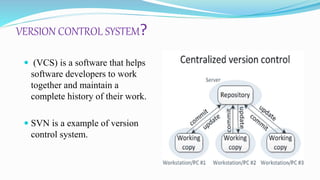
VERSION CONTROL SYSTEM?
 (VCS) is a software that helps
software developers to work
together and maintain a
complete history of their work.
 SVN is a example of version
control system.
FEATURES
 Retain full revision history.
 Merge tracking – Merges between branches will be tracked.
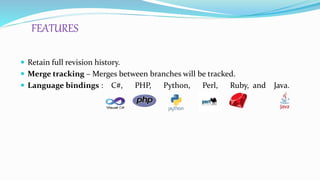
 Language bindings : C#, PHP, Python, Perl, Ruby, and Java.
HW / SW REQUIREMENTS
HARDWARE REQUIREMENT:
 512MB RAM.
 128 GB HDD.
SOFTWARE REQUIREMENT :
 All modern flavors of Unix, Window, BeOS, OS/2, MacOS X.
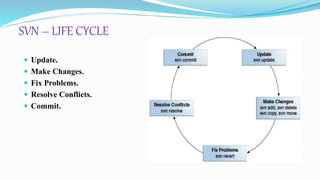
SVN – LIFE CYCLE
 Update.
 Make Changes.
 Fix Problems.
 Resolve Conflicts.
 Commit.
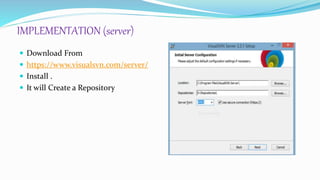
IMPLEMENTATION (server)
 Download From
 https://www.visualsvn.com/server/
 Install .
 It will Create a Repository
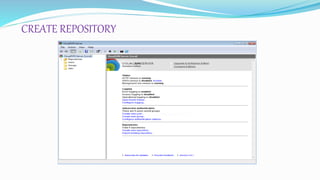
CREATE REPOSITORY
Implementation(Client)
 Open source application – download it
http://tortoisesvn.net/downloads
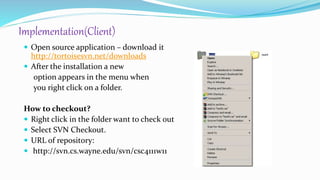
 After the installation a new
option appears in the menu when
you right click on a folder.
How to checkout?
 Right click in the folder want to check out
 Select SVN Checkout.
 URL of repository:
 http://svn.cs.wayne.edu/svn/csc4111w11
UPDATE
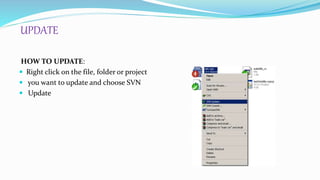
HOW TO UPDATE:
 Right click on the file, folder or project
 you want to update and choose SVN
 Update
COMMIT
HOW TO COMMIT:
 Once you have added, deleted, or
changed
 Files or directories, you can then commit
those
 Changes to the repository.
 Right click on the file, folder or project
you
 Want to update and choose SVN
Commit…
CONFLICTS
 File conflicts: A file conflict
occurs if two (or more)
developers have changed the
same few lines of a file.
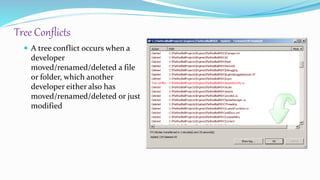
Tree Conflicts
 A tree conflict occurs when a
developer
moved/renamed/deleted a file
or folder, which another
developer either also has
moved/renamed/deleted or just
modified
Rules oN using SVN
 Carefully test your code before committing
 Always commit only the individual files you modified, not the entire directory
 When adding new files to the existing source code, always perform SVN Add and
then SVN Commit
LIMITAtions of svn
 Locking: Subversion currently has no support for file locking, to prevent more
than one person from working on single file.
 Subversion does not store the modification times of files.
 Subversion stores additional copies of data on the local machine, which can
become an issue with very large projects or files,
SVN Tutorial

SVN Tutorial

  • 2.
    INTRODUCTION  Apache Subversionwhich is often abbreviated as SVN, is a software versioning and Version control system.  Open source.  Subversion operates across networks, which allows it to be used by people on different computers.
  • 3.
    VERSION CONTROL SYSTEM? (VCS) is a software that helps software developers to work together and maintain a complete history of their work.  SVN is a example of version control system.
  • 4.
    FEATURES  Retain fullrevision history.  Merge tracking – Merges between branches will be tracked.  Language bindings : C#, PHP, Python, Perl, Ruby, and Java.
  • 5.
    HW / SWREQUIREMENTS HARDWARE REQUIREMENT:  512MB RAM.  128 GB HDD. SOFTWARE REQUIREMENT :  All modern flavors of Unix, Window, BeOS, OS/2, MacOS X.
  • 6.
    SVN – LIFECYCLE  Update.  Make Changes.  Fix Problems.  Resolve Conflicts.  Commit.
  • 7.
    IMPLEMENTATION (server)  DownloadFrom  https://www.visualsvn.com/server/  Install .  It will Create a Repository
  • 8.
  • 9.
    Implementation(Client)  Open sourceapplication – download it http://tortoisesvn.net/downloads  After the installation a new option appears in the menu when you right click on a folder. How to checkout?  Right click in the folder want to check out  Select SVN Checkout.  URL of repository:  http://svn.cs.wayne.edu/svn/csc4111w11
  • 10.
    UPDATE HOW TO UPDATE: Right click on the file, folder or project  you want to update and choose SVN  Update
  • 11.
    COMMIT HOW TO COMMIT: Once you have added, deleted, or changed  Files or directories, you can then commit those  Changes to the repository.  Right click on the file, folder or project you  Want to update and choose SVN Commit…
  • 12.
    CONFLICTS  File conflicts:A file conflict occurs if two (or more) developers have changed the same few lines of a file.
  • 13.
    Tree Conflicts  Atree conflict occurs when a developer moved/renamed/deleted a file or folder, which another developer either also has moved/renamed/deleted or just modified
  • 14.
    Rules oN usingSVN  Carefully test your code before committing  Always commit only the individual files you modified, not the entire directory  When adding new files to the existing source code, always perform SVN Add and then SVN Commit
  • 15.
    LIMITAtions of svn Locking: Subversion currently has no support for file locking, to prevent more than one person from working on single file.  Subversion does not store the modification times of files.  Subversion stores additional copies of data on the local machine, which can become an issue with very large projects or files,