Organizing & Simplifying
  your CSS [with Sass]
    Matt Puchlerz   Refresh Chicago
    @mattpuchlerz   May 26, 2010
Organizing & Simplifying
  your CSS [with Sass]
    Matt Puchlerz   Refresh Chicago
    @mattpuchlerz   May 26, 2010
Organizing & Simplifying
  your CSS [with Sass]
    Matt Puchlerz   Refresh Chicago
    @mattpuchlerz   May 26, 2010
Organizing & Simplifying
  your CSS [with Sass]
    Matt Puchlerz   Refresh Chicago
    @mattpuchlerz
                    GeekFest
                    MayJun 15 12:28:43 -0500
                        26, 2010
                    Tue                        2010
Gross
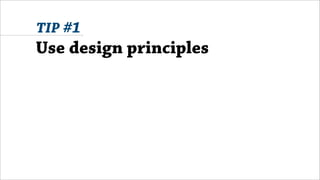
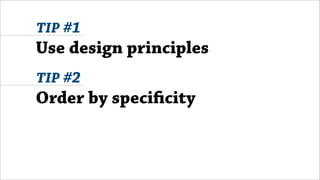
TIP #1


Use design
principles
1   11
                                 2   12
Balance                          3   .carousel {
                                 4     width:80%;height:50px}
                                 5
                                 6   blockquote
                                 7   {
                                 8      position: relative;
                                 9      padding: 0px;
                                1      color: #555;
Images © Digital Web Magazine   0    }
1   11
                                 2   12
Balance                          3   .carousel {
                                 4     width: 80%;
                                 5     height: 50px;
                                 6   }
                                 7
                                 8   blockquote {
                                 9    position: relative;
                                1     padding: 0;
Images © Digital Web Magazine   0     color: #555;
1 11
                                 2 12
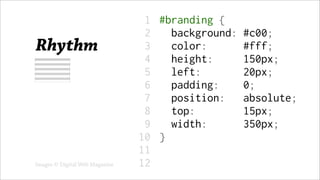
Rhythm                           3 #branding {
                                 4 width:     350px;
                                 5 height:    150px;
                                 6 padding: 0px;
                                 7 position: absolute;
                                 8 top:      15px;
                                 9 left:    20px;
                                1   background: #c00;
Images © Digital Web Magazine   0   color:   #fff;
1 11
                                 2 12
Rhythm                           3 #branding {
                                 4 background: #c00;
                                 5 color:    #fff;
                                 6 height:    150px;
                                 7 left:    20px;
                                 8 padding: 0;
                                 9 position: absolute;
                                1   top:     15px;
Images © Digital Web Magazine   0   width:    350px;
1   11
                                 2   12
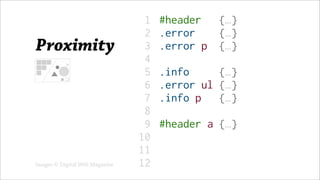
Proximity                        3   #header {…}
                                 4   .error {…}
                                 5   .error p {…}
                                 6
                                 7   .info   {…}
                                 8   .error ul {…}
                                 9   .info p {…}
                                1
Images © Digital Web Magazine   0    #header a {…}
1   11
                                 2   12
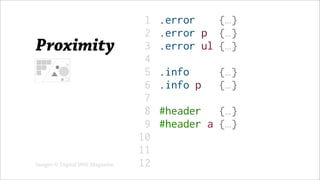
Proximity                        3   .error {…}
                                 4   .error p {…}
                                 5   .error ul {…}
                                 6
                                 7   .info   {…}
                                 8   .info p {…}
                                 9
                                1    #header {…}
Images © Digital Web Magazine   0    #header a {…}
TIP #2


Order by
Speci city
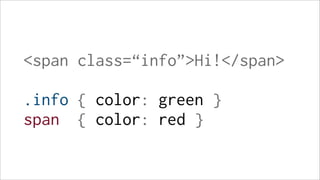
<span class=“info”>Hi!</

.info { color: green }
span { color: red }
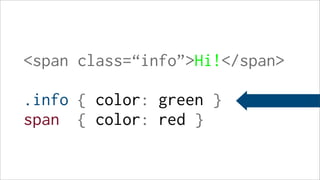
<span class=“info”>Hi!</

.info { color: green }
span { color: red }
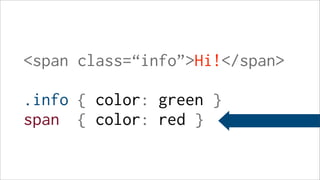
<span class=“info”>Hi!</

.info { color: green }
span { color: red }
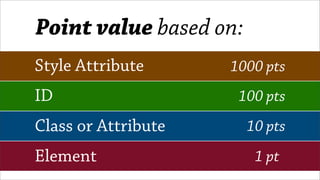
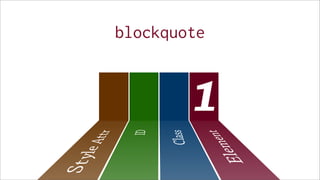
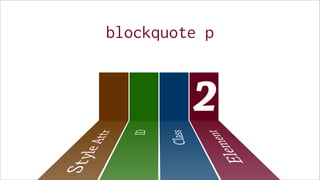
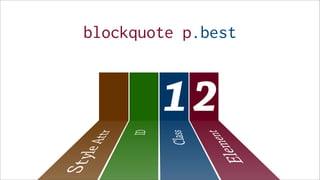
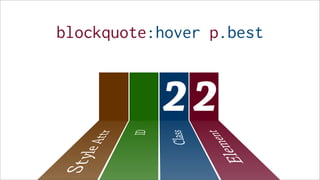
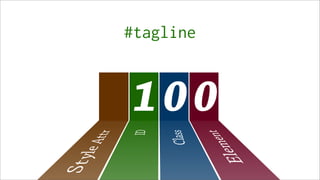
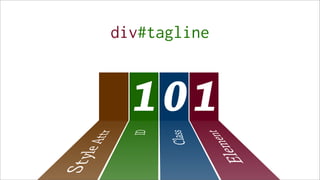
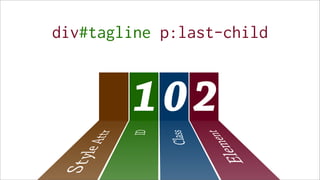
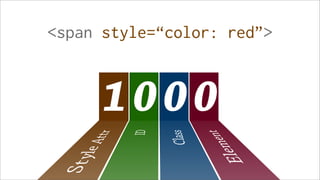
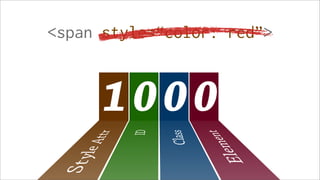
Point value based on:
Style Attribute      1000 pts
ID                    100 pts
Class or Attribute      10 pts
Element                  1 pt
blockquote


        1
blockquote p


         2
blockquote p.best


        12
blockquote:hover p.best


           22
#tagline


100
div#tagline


  101
div#tagline p:last-child


        102
<span style=“color: red”>


      1000
<span style=“color: red”>


      1000
1   11
 2   12
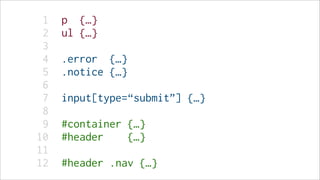
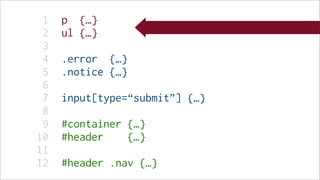
 3   p {…}
 4   ul {…}
 5
 6   .error {…}
 7   .notice {…}
 8
 9   input[type=“submit”] {…}
1
0    #container {…}
1   11
 2   12
 3   p {…}
 4   ul {…}
 5
 6   .error {…}
 7   .notice {…}
 8
 9   input[type=“submit”] {…}
1
0    #container {…}
1   11
 2   12
 3   p {…}
 4   ul {…}
 5
 6   .error {…}
 7   .notice {…}
 8
 9   input[type=“submit”] {…}
1
0    #container {…}
1   11
 2   12
 3   p {…}
 4   ul {…}
 5
 6   .error {…}
 7   .notice {…}
 8
 9   input[type=“submit”] {…}
1
0    #container {…}
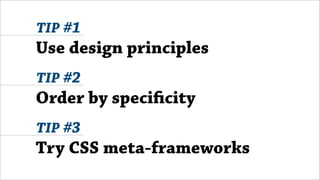
TIP #3


Try CSS meta-
frameworks
version 3.0
1 11
           2 12
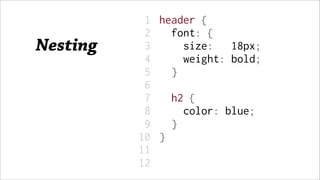
Nesting    3 header {
           4 font: {
           5    size: 18px;
           6    weight: bold;
           7 }
           8
           9 h2 {
          1     color: blue;
          0   }
1   11
             2   12
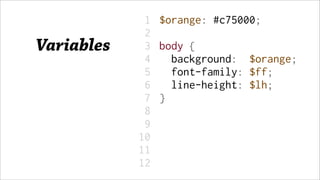
Variables    3   $orange: #c75000;
             4
             5   body {
             6     background: $orange;
             7     font-family: $ff;
             8     line-height: $lh;
             9   }
            1
            0
1   11
        2   12
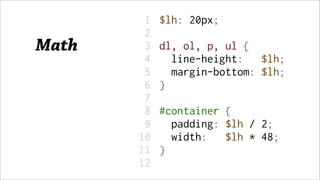
Math    3   $lh: 20px;
        4
        5   dl, ol, p, ul {
        6     line-height: $lh;
        7     margin-bottom: $lh;
        8   }
        9
       1    #container {
       0     padding: $lh / 2;
1   11
             2   12
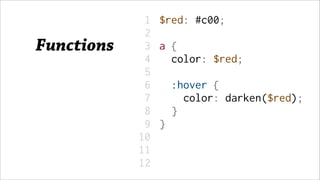
Functions    3   $red: #c00;
             4
             5   a{
             6    color: $red;
             7
             8       :hover {
             9         color: darken($red);
            1        }
            0    }
1   11
          2   12
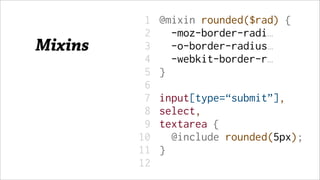
Mixins    3   @mixin rounded($rad) {
          4     -moz-border-radi…
          5     -o-border-radius…
          6     -webkit-border-r…
          7   }
          8
          9   input[type=“submit”],
         1    select,
         0    textarea {
1   11
           2   12
“SCSS”     3   $lh: 18px;
 Syntax    4
           5   #feature {
           6    padding: $lh;
           7    width: $lh * 10;
           8
           9    &:hover {
          1      @include rounded;
          0      padding: $lh * 2;
1   11
           2   12
“SASS”     3   $lh: 18px
 Syntax    4
           5   #feature
           6    padding: $lh
           7    width: $lh * 10
           8
           9    &:hover
          1      @include rounded
          0      padding: $lh * 2
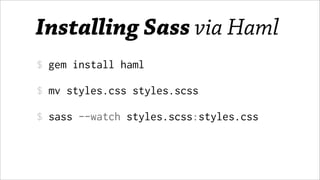
Installing Sass via Haml
$ gem install haml

$ mv styles.css styles.scss

$ sass --watch styles.scss:styles.css
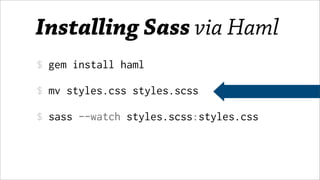
Installing Sass via Haml
$ gem install haml

$ mv styles.css styles.scss

$ sass --watch styles.scss:styles.css
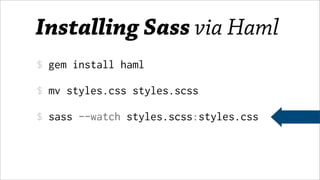
Installing Sass via Haml
$ gem install haml

$ mv styles.css styles.scss

$ sass --watch styles.scss:styles.css
Installing Sass via Haml
$ gem install haml

$ mv styles.css styles.scss

$ sass --watch styles.scss:styles.css
TIP #1
Use design principles
TIP #1
Use design principles
TIP #2
Order by speci city
TIP #1
Use design principles
TIP #2
Order by speci city
TIP #3
Try CSS meta-frameworks
anks!
Any questions?
 Matt Puchlerz   Refresh Chicago
 @mattpuchlerz
                 GeekFest
                 MayJun 15 12:48:09 -0500
                     26, 2010
                 Tue                        2010

Organizing & Simplifying CSS [with Sass]

  • 1.
    Organizing & Simplifying your CSS [with Sass] Matt Puchlerz Refresh Chicago @mattpuchlerz May 26, 2010
  • 2.
    Organizing & Simplifying your CSS [with Sass] Matt Puchlerz Refresh Chicago @mattpuchlerz May 26, 2010
  • 3.
    Organizing & Simplifying your CSS [with Sass] Matt Puchlerz Refresh Chicago @mattpuchlerz May 26, 2010
  • 4.
    Organizing & Simplifying your CSS [with Sass] Matt Puchlerz Refresh Chicago @mattpuchlerz GeekFest MayJun 15 12:28:43 -0500 26, 2010 Tue 2010
  • 6.
  • 7.
  • 8.
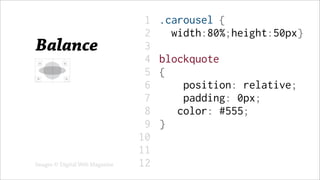
    1 11 2 12 Balance 3 .carousel { 4 width:80%;height:50px} 5 6 blockquote 7 { 8 position: relative; 9 padding: 0px; 1 color: #555; Images © Digital Web Magazine 0 }
  • 9.
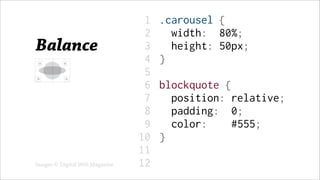
    1 11 2 12 Balance 3 .carousel { 4 width: 80%; 5 height: 50px; 6 } 7 8 blockquote { 9 position: relative; 1 padding: 0; Images © Digital Web Magazine 0 color: #555;
  • 10.
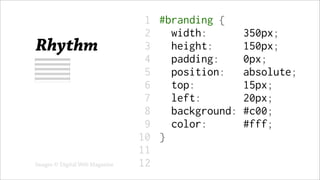
    1 11 2 12 Rhythm 3 #branding { 4 width: 350px; 5 height: 150px; 6 padding: 0px; 7 position: absolute; 8 top: 15px; 9 left: 20px; 1 background: #c00; Images © Digital Web Magazine 0 color: #fff;
  • 11.
    1 11 2 12 Rhythm 3 #branding { 4 background: #c00; 5 color: #fff; 6 height: 150px; 7 left: 20px; 8 padding: 0; 9 position: absolute; 1 top: 15px; Images © Digital Web Magazine 0 width: 350px;
  • 12.
    1 11 2 12 Proximity 3 #header {…} 4 .error {…} 5 .error p {…} 6 7 .info {…} 8 .error ul {…} 9 .info p {…} 1 Images © Digital Web Magazine 0 #header a {…}
  • 13.
    1 11 2 12 Proximity 3 .error {…} 4 .error p {…} 5 .error ul {…} 6 7 .info {…} 8 .info p {…} 9 1 #header {…} Images © Digital Web Magazine 0 #header a {…}
  • 14.
  • 15.
    <span class=“info”>Hi!</ .info {color: green } span { color: red }
  • 16.
    <span class=“info”>Hi!</ .info {color: green } span { color: red }
  • 17.
    <span class=“info”>Hi!</ .info {color: green } span { color: red }
  • 18.
    Point value basedon: Style Attribute 1000 pts ID 100 pts Class or Attribute 10 pts Element 1 pt
  • 19.
  • 20.
  • 21.
  • 22.
  • 23.
  • 24.
  • 25.
  • 26.
  • 27.
  • 28.
    1 11 2 12 3 p {…} 4 ul {…} 5 6 .error {…} 7 .notice {…} 8 9 input[type=“submit”] {…} 1 0 #container {…}
  • 29.
    1 11 2 12 3 p {…} 4 ul {…} 5 6 .error {…} 7 .notice {…} 8 9 input[type=“submit”] {…} 1 0 #container {…}
  • 30.
    1 11 2 12 3 p {…} 4 ul {…} 5 6 .error {…} 7 .notice {…} 8 9 input[type=“submit”] {…} 1 0 #container {…}
  • 31.
    1 11 2 12 3 p {…} 4 ul {…} 5 6 .error {…} 7 .notice {…} 8 9 input[type=“submit”] {…} 1 0 #container {…}
  • 32.
    TIP #3 Try CSSmeta- frameworks
  • 34.
  • 35.
    1 11 2 12 Nesting 3 header { 4 font: { 5 size: 18px; 6 weight: bold; 7 } 8 9 h2 { 1 color: blue; 0 }
  • 36.
    1 11 2 12 Variables 3 $orange: #c75000; 4 5 body { 6 background: $orange; 7 font-family: $ff; 8 line-height: $lh; 9 } 1 0
  • 37.
    1 11 2 12 Math 3 $lh: 20px; 4 5 dl, ol, p, ul { 6 line-height: $lh; 7 margin-bottom: $lh; 8 } 9 1 #container { 0 padding: $lh / 2;
  • 38.
    1 11 2 12 Functions 3 $red: #c00; 4 5 a{ 6 color: $red; 7 8 :hover { 9 color: darken($red); 1 } 0 }
  • 39.
    1 11 2 12 Mixins 3 @mixin rounded($rad) { 4 -moz-border-radi… 5 -o-border-radius… 6 -webkit-border-r… 7 } 8 9 input[type=“submit”], 1 select, 0 textarea {
  • 40.
    1 11 2 12 “SCSS” 3 $lh: 18px; Syntax 4 5 #feature { 6 padding: $lh; 7 width: $lh * 10; 8 9 &:hover { 1 @include rounded; 0 padding: $lh * 2;
  • 41.
    1 11 2 12 “SASS” 3 $lh: 18px Syntax 4 5 #feature 6 padding: $lh 7 width: $lh * 10 8 9 &:hover 1 @include rounded 0 padding: $lh * 2
  • 46.
    Installing Sass viaHaml $ gem install haml $ mv styles.css styles.scss $ sass --watch styles.scss:styles.css
  • 47.
    Installing Sass viaHaml $ gem install haml $ mv styles.css styles.scss $ sass --watch styles.scss:styles.css
  • 48.
    Installing Sass viaHaml $ gem install haml $ mv styles.css styles.scss $ sass --watch styles.scss:styles.css
  • 49.
    Installing Sass viaHaml $ gem install haml $ mv styles.css styles.scss $ sass --watch styles.scss:styles.css
  • 50.
  • 51.
    TIP #1 Use designprinciples TIP #2 Order by speci city
  • 52.
    TIP #1 Use designprinciples TIP #2 Order by speci city TIP #3 Try CSS meta-frameworks
  • 53.
    anks! Any questions? MattPuchlerz Refresh Chicago @mattpuchlerz GeekFest MayJun 15 12:48:09 -0500 26, 2010 Tue 2010

Editor's Notes

  • #2  Web craftsman One of many software craftspeople at Obtiva
  • #3  Web craftsman One of many software craftspeople at Obtiva
  • #4  Web craftsman One of many software craftspeople at Obtiva
  • #5  Web craftsman One of many software craftspeople at Obtiva
  • #6  Web craftsman One of many software craftspeople at Obtiva
  • #7  Show of hands Gross! Point out nauseating parts; offer tips
  • #8  Show of hands Gross! Point out nauseating parts; offer tips
  • #9  Steve Smith (Ordered List) gave a talk on &amp;#x201C;Designing Code&amp;#x201D; Don&amp;#x2019;t just write CSS, sculpt it.
  • #10  Uneven brackets, indentation, spacing No alignment
  • #12  Could be whitespace between rules Within properties is &amp;#x201C;progressive rhythm&amp;#x201D;&amp;#x2026; How to improve?
  • #13  Alphabetize!
  • #14  Items in close proximity to, or aligned with one another, ought to be grouped by similarity. .error class in several spots #header in several spots
  • #15  Now that we are grouping well, be mindful of order
  • #16  CSS properties are applied based on the specificity of their selector and their order.
  • #38  Popular &amp;#x201C;frameworks&amp;#x201D; like Blueprint and 960.gs just give us defaults &amp;#x201C;Metaframeworks&amp;#x201D; alter the way we write CSS
  • #42  Nesting selectors and properties