If you manage big CSS, probably you
will know hundreds of frameworks to
     help developing new projects...
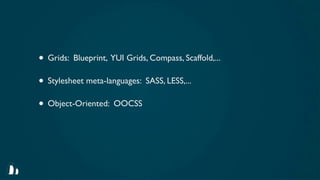
• Grids: Blueprint, YUI Grids, Compass, Scaffold,...
• Stylesheet meta-languages: SASS, LESS,...
• Object-Oriented: OOCSS
But...
Is anybody worried about
    the order of CSS?
         At least i do...
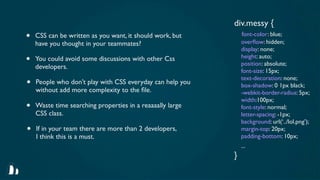
div.messy {
•   CSS can be written as you want, it should work, but        font-color: blue;
                                                               overflow: hidden;
    have you thought in your teammates?
                                                               display: none;
•   You could avoid some discussions with other Css            height: auto;
                                                               position: absolute;
    developers.
                                                               font-size: 15px;
                                                               text-decoration: none;
•   People who don’t play with CSS everyday can help you       box-shadow: 0 1px black;
    without add more complexity to the file.                    -webkit-border-radius: 5px;
                                                               width:100px;
•   Waste time searching properties in a reaaaally large       font-style: normal;
    CSS class.                                                 letter-spacing: -1px;
                                                               background: url(‘../lol.png’);
•   If in your team there are more than 2 developers,          margin-top: 20px;
    I think this is a must.                                    padding-bottom: 10px;
                                                               ...
                                                           }
So, this is my proposal...
      It likely shouldn’t fit for you
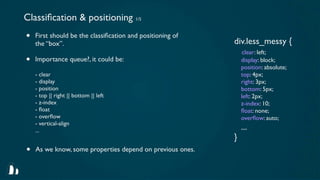
Classification & positioning 1/5
•   First should be the classification and positioning of
                                                           div.less_messy {
    the “box”.
                                                               clear: left;
•   Importance queue?, it could be:                            display: block;
                                                               position: absolute;
    - clear                                                    top: 4px;
    - display                                                  right: 3px;
    - position                                                 bottom: 5px;
    - top || right || bottom || left                           left: 2px;
    - z-index                                                  z-index: 10;
    - float                                                     float: none;
    - overflow                                                  overflow: auto;
    - vertical-align
    ...                                                        ...
                                                           }
•   As we know, some properties depend on previous ones.
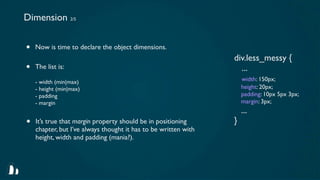
Dimension 2/5


•   Now is time to declare the object dimensions.
                                                                 div.less_messy {
•   The list is:                                                   ...
    - width (min|max)                                                width: 150px;
    - height (min|max)                                               height: 20px;
    - padding                                                        padding: 10px 5px 3px;
    - margin                                                         margin: 3px;
                                                                     ...
•   It’s true that margin property should be in positioning      }
    chapter, but I’ve always thought it has to be written with
    height, width and padding (mania?).
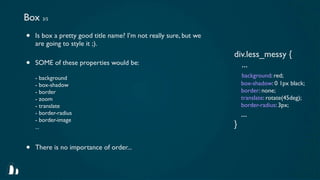
Box 3/5
•   Is box a pretty good title name? I’m not really sure, but we
    are going to style it ;).
                                                                   div.less_messy {
•   SOME of these properties would be:                               ...
    - background                                                       background: red;
    - box-shadow                                                       box-shadow: 0 1px black;
    - border                                                           border: none;
    - zoom                                                             translate: rotate(45deg);
    - translate                                                        border-radius: 3px;
    - border-radius                                                    ...
    - border-image
    ...                                                            }

•   There is no importance of order...
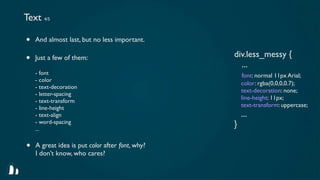
Text 4/5

•   And almost last, but no less important.

                                                 div.less_messy {
•   Just a few of them:
                                                   ...
    - font                                           font: normal 11px Arial;
    - color
                                                     color: rgba(0,0,0,0.7);
    - text-decoration
                                                     text-decoration: none;
    - letter-spacing
                                                     line-height: 11px;
    - text-transform
    - line-height                                    text-transform: uppercase;
    - text-align                                     ...
    - word-spacing
    ...
                                                 }

•   A great idea is put color after font, why?
    I don’t know, who cares?
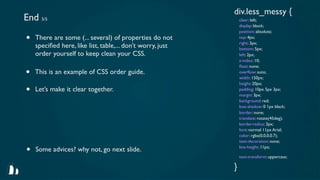
div.less_messy {
End 5/5                                                         clear: left;
                                                                display: block;
                                                                position: absolute;
•   There are some (... several) of properties do not           top: 4px;
                                                                right: 3px;
    specified here, like list, table,... don’t worry, just       bottom: 5px;
    order yourself to keep clean your CSS.                      left: 2px;
                                                                z-index: 10;
                                                                float: none;
•   This is an example of CSS order guide.                      overflow: auto;
                                                                width: 150px;
                                                                height: 20px;
•   Let’s make it clear together.                               padding: 10px 5px 3px;
                                                                margin: 3px;
                                                                background: red;
                                                                box-shadow: 0 1px black;
                                                                border: none;
                                                                translate: rotate(45deg);
                                                                border-radius: 3px;
                                                                font: normal 11px Arial;
                                                                color: rgba(0,0,0,0.7);
                                                                text-decoration: none;

•   Some advices? why not, go next slide.                       line-height: 11px;

                                                                text-transform: uppercase;

                                                            }
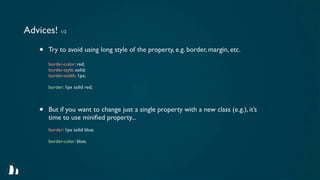
Advices! 1/2

    •   Try to avoid using long style of the property, e.g. border, margin, etc.

        border-color: red;
        border-style: solid;
        border-width: 1px;

        border: 1px solid red;


    •   But if you want to change just a single property with a new class (e.g.), it’s
        time to use minified property...
        border: 1px solid blue;

        border-color: blue;
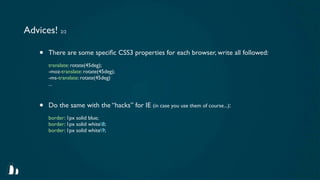
Advices! 2/2

    •   There are some specific CSS3 properties for each browser, write all followed:
        translate: rotate(45deg);
        -moz-translate: rotate(45deg);
        -ms-translate: rotate(45deg)
        ...


    •   Do the same with the “hacks” for IE (in case you use them of course...):
        border: 1px solid blue;
        border: 1px solid white8;
        border: 1px solid white9;
Remember once more!

This is not a guide to improve the world, use just
            in case you find it useful...
Thanks! :-)
  xavijam.github.com

Messy css

  • 1.
    If you managebig CSS, probably you will know hundreds of frameworks to help developing new projects...
  • 2.
    • Grids: Blueprint,YUI Grids, Compass, Scaffold,... • Stylesheet meta-languages: SASS, LESS,... • Object-Oriented: OOCSS
  • 3.
  • 4.
    Is anybody worriedabout the order of CSS? At least i do...
  • 5.
    div.messy { • CSS can be written as you want, it should work, but font-color: blue; overflow: hidden; have you thought in your teammates? display: none; • You could avoid some discussions with other Css height: auto; position: absolute; developers. font-size: 15px; text-decoration: none; • People who don’t play with CSS everyday can help you box-shadow: 0 1px black; without add more complexity to the file. -webkit-border-radius: 5px; width:100px; • Waste time searching properties in a reaaaally large font-style: normal; CSS class. letter-spacing: -1px; background: url(‘../lol.png’); • If in your team there are more than 2 developers, margin-top: 20px; I think this is a must. padding-bottom: 10px; ... }
  • 6.
    So, this ismy proposal... It likely shouldn’t fit for you
  • 7.
    Classification & positioning1/5 • First should be the classification and positioning of div.less_messy { the “box”. clear: left; • Importance queue?, it could be: display: block; position: absolute; - clear top: 4px; - display right: 3px; - position bottom: 5px; - top || right || bottom || left left: 2px; - z-index z-index: 10; - float float: none; - overflow overflow: auto; - vertical-align ... ... } • As we know, some properties depend on previous ones.
  • 8.
    Dimension 2/5 • Now is time to declare the object dimensions. div.less_messy { • The list is: ... - width (min|max) width: 150px; - height (min|max) height: 20px; - padding padding: 10px 5px 3px; - margin margin: 3px; ... • It’s true that margin property should be in positioning } chapter, but I’ve always thought it has to be written with height, width and padding (mania?).
  • 9.
    Box 3/5 • Is box a pretty good title name? I’m not really sure, but we are going to style it ;). div.less_messy { • SOME of these properties would be: ... - background background: red; - box-shadow box-shadow: 0 1px black; - border border: none; - zoom translate: rotate(45deg); - translate border-radius: 3px; - border-radius ... - border-image ... } • There is no importance of order...
  • 10.
    Text 4/5 • And almost last, but no less important. div.less_messy { • Just a few of them: ... - font font: normal 11px Arial; - color color: rgba(0,0,0,0.7); - text-decoration text-decoration: none; - letter-spacing line-height: 11px; - text-transform - line-height text-transform: uppercase; - text-align ... - word-spacing ... } • A great idea is put color after font, why? I don’t know, who cares?
  • 11.
    div.less_messy { End 5/5 clear: left; display: block; position: absolute; • There are some (... several) of properties do not top: 4px; right: 3px; specified here, like list, table,... don’t worry, just bottom: 5px; order yourself to keep clean your CSS. left: 2px; z-index: 10; float: none; • This is an example of CSS order guide. overflow: auto; width: 150px; height: 20px; • Let’s make it clear together. padding: 10px 5px 3px; margin: 3px; background: red; box-shadow: 0 1px black; border: none; translate: rotate(45deg); border-radius: 3px; font: normal 11px Arial; color: rgba(0,0,0,0.7); text-decoration: none; • Some advices? why not, go next slide. line-height: 11px; text-transform: uppercase; }
  • 12.
    Advices! 1/2 • Try to avoid using long style of the property, e.g. border, margin, etc. border-color: red; border-style: solid; border-width: 1px; border: 1px solid red; • But if you want to change just a single property with a new class (e.g.), it’s time to use minified property... border: 1px solid blue; border-color: blue;
  • 13.
    Advices! 2/2 • There are some specific CSS3 properties for each browser, write all followed: translate: rotate(45deg); -moz-translate: rotate(45deg); -ms-translate: rotate(45deg) ... • Do the same with the “hacks” for IE (in case you use them of course...): border: 1px solid blue; border: 1px solid white8; border: 1px solid white9;
  • 14.
    Remember once more! Thisis not a guide to improve the world, use just in case you find it useful...
  • 15.
    Thanks! :-) xavijam.github.com