MOBILE CAMP - NAPOLI
Develop a Windows 10 app
Deploy it on PC, Phone and
Raspberry Pi
Clemente Giorio
Hi! I’m Clemente
Overview on Universal Windows Platform
How to Develop a simple UWP app
Deploy on PC
Agenda
Deploy on Phone
Deploy on Raspberry Pi 2
XboxIoT
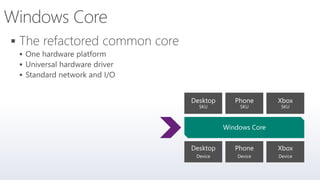
One Hardware platform
Universal hardware driver
Standard network and I/O
One App Mode
One Windows Kernel




Phone
Device
Xbox
Device
Desktop
Device
Windows Core
Desktop
SKU
Phone
SKU
Xbox
SKU
One Windows
Desktop
SKU
PC
2 in 1
Mobile
SKU
Tablet
Phablet
Phone
Xbox
SKU
Xbox
IoT
SKU
Band
IoT headless
SKU
Raspberry Pi
Home
Automation
Surface Hub
SKU
Surface Hub
Holographic
SKU
HoloLens
Each family adds features
to the one it inherits
Easy for users to
get & stay current
Unified core
and app platform
Windows 10
Converged
OS kernel
Converged
app model
Phone Small Tablet
2-in-1s
(Tablet or Laptop)
Desktops
& All-in-OnesPhablet Large Tablet
Classic
Laptop
Xbox IoTSurface Hub Holographic
Windows 10
One Store +
One Dev Center
Reuse
Existing
CodeOne SDK +
Tooling
Adaptive
User Interface
Natural
User Inputs
One Universal Windows Platform



Phone
Device
Xbox
Device
Desktop
Device
Windows Core
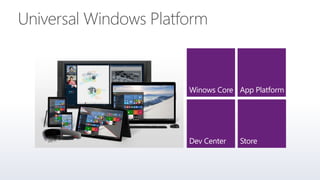
Universal Windows Platform
One Windows
Desktop
SKU
PC
2 in 1
Mobile
SKU
Tablet
Phablet
Phone
Xbox
SKU
Xbox
IoT
SKU
Band
IoT headless
SKU
Raspberry Pi
Home
Automation
Surface Hub
SKU
Surface Hub
Holographic
SKU
HoloLens
Apps don't target Operating System,
Apps target the platform
Universal Windows 8.1 app
#if WINDOWS_APP
ResourceLoader loader = new ResourceLoader();
string about = loader.GetString("SettingsLabel/Text");
string privacy = loader.GetString("PrivacySettings/Text");
string options = loader.GetString("Settings/Text");
ISettingsService settings =
container.RegisterSettingsService();
settings.RegisterFlyoutCommand<AboutViewModel>(about);
settings.RegisterFlyoutCommand<PrivacyPolicyViewModel>(privacy);
settings.RegisterFlyoutCommand<SettingsViewModel>(options);
#endif
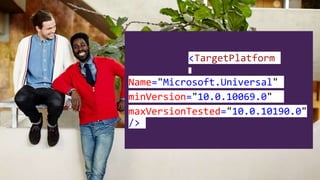
<TargetPlatform
Name="Microsoft.Universal"
minVersion="10.0.10069.0"
maxVersionTested="10.0.10190.0"
/>
The Universal Windows Platform can
update at its own cadence




Phone
Device
Xbox
Device
Desktop
Device
Windows Core
Universal Windows Platform
Windows App




Phone
Device
Xbox
Device
Desktop
Device
Windows Core
Universal Windows Platform
Windows App
Phone
extension
Xbox
extension
Desktop
extension
Extensions don't invalidate
binaries on other devices
Universal Windows Platform
Traditional Microsoft technologies are not
the only way to create Windows apps
Windows 10
operating system
Bridging technologies
Win32
desktop
Web
hosted
Java
Android
Obj.C
iOS
Universal Windows Platform
WWAC++
& CX
.Net
languages
HTML
DirectX
XAML
C++
.Net
languages
MFCWFWPF
.Net
runtime








Bridges bring more apps
to the Windows platform









Users love apps that
work great on all their devices

var api = "Windows.Phone.UI.Input.HardwareButtons";
if (Windows.Foundation.Metadata.ApiInformation.IsTypePresent(api))
{
Windows.Phone.UI.Input.HardwareButtons.CameraPressed
+= CameraButtonPressed;
}
IsApiContractPresent
IsEnumNamedValuePresent
IsEventPresent
IsMethodPresent
IsPropertyPresent
IsReadOnlyPropertyPresent
IsTypePresent
IsWriteablePropertyPresent
Windows.Foundation.Metadata.ApiInformation
UAP
Windows Core Windows Core Windows Core Windows Core
UAP UAP UAP
Desktop Mobile Xbox More…
The device families you choose
determines which APIs
you can call freely
One simple, unified, integrated
development environment













http://insider.windows.com
http://www.visualstudio.com








The code
Deploy on PC
Deploy on Phone Emulator
Deploy on Raspberry Pi 2
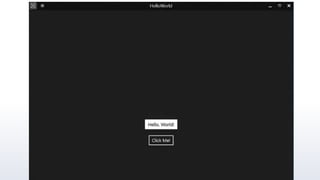
DEMO:
“Hello World”
Windows Embedded Pre-Release Programs
Setup Raspberry Pi 2
Boot Windows 10 IoT Core Insider Preview
DEMO:
“LED”
DEMO:
“Two LEDs”
Clemente.Giorio@live.com
http://it.linkedin.com/pub/clem
ente-giorio/11/618/3a
Let’s Connect

Develop a Windows 10 App. Deploy it on PC, Phone and Raspberry Pi.

Editor's Notes

  • #10  Platform convergence has been a journey which ends today with Windows 10 We started by using the same Internet Explorer code + engine on Windows Phone 7.5 and Xbox 360; and we started implementing the Microsoft modern design language. With the release of Windows 8, we converged the Windows kernel (which aligns, among other things, the HAL and driver models). Windows Phone 8 took advantage of new lighter-weight kernel to enable multiple CPUs and other improvements, and the Xbox One was built on top of Windows 8. Xbox also introduced xJS, Xbox’s version of WinJS so developers could write apps in HTML/WinJS the same framework as available on Windows 8. With the release of Windows Phone 8.1 the runtimes from Windows 8.1 and phone came together as well – continuing up the Windows stack and building upon the kernel convergence that happened in 8.0 – aligning the app models and API set, bringing 90%+ API convergence and unification/convergence of things like Windows Notification Services, back-stack behavior, sharing contracts, live tiles, etc. With Windows 10, we bring complete the unification of Windows families, and now provide a Windows core that can be used on embedded and IoT devices. Background data: 9/15/11 Windows Phone 7.5 10/26/12 Windows 8 10/29/12 Windows Phone 8 10/18/13 Windows 8.1 11/22/13 Xbox One 4/8/14 Windows 8.1 Update 3/26/14 Windows Phone 8.1
  • #12 To bring the family together, Windows 10 is built upon a unified core (the Windows core) and a unified app platform (Universal Windows platform), meaning that all of our device families run Windows at their core. This provides the consistency that users need and the tailored experiences desire. Gone are the days of Microsoft maintaining a number of code-bases that works to build bridges across silos; Windows has evolved to do that itself. And gone are the days of ISVs doing this as well – targeting Windows provides a single roadmap to the billion+ Windows screens. Enabling this consistent, yet tailored, Windows experience are a number of services: Adaptive UX: User interface design that adapts and reacts to the device family it’s running on Natural user inputs: Speech, natural ink, gesture and facial recognition Cloud-based intelligent services: Cortana AI, personal hubs, OneDrive, Office 365, Windows notification services, credential locker Windows Store: Universally available apps and games, digital media For the app builder, this also means that you can build one Windows solution that runs across all of the Windows device families, and use these Windows services to tailor your experience at runtime.
  • #41 Add a reference to the Windows IoT extension SDK namespaces like Windows.Devices.Gpio Windows Universal->Extensions->Windows IoT Extension SDK
  • #45 Set HelloWorld as the Startup App You can also set this HelloWorld app to be the ‘Startup App’ for your Windows IoT Core device, so that when the device reboot, it will start HelloWorld automatically. To do so, you’ll need to run a command line utility called iotstartup on the Windows IoT Core device. We will do this using PowerShell. Start a PowerShell (PS) session with your Windows IoT Core device as described here. From the PS session, type: [192.168.0.243]: PS C:\> iotstartup list HelloWorld and you should see the full name of our HelloWorld UWP application, i.e. something like: Headed : HelloWorld_n2pe7ts0w7wey!App the utility is confirming that HelloWorld is an ‘headed’ application, and is installed correctly. Now, it’s easy to set this app as the ‘Startup App’. Just type the command: [192.168.0.243]: PS C:\> iotstartup add headed HelloWorld The utility will confirm that the new Startup headed app is now HelloWorld: AppId changed to HelloWorld_n2pe7ts0w7wey!App Go ahead and restart your Windows IoT Core device. From the PS session, you can issue the shutdown command: [192.168.0.243]: PS C:\> shutdown /r /t 0 Once the device has restarted, you’ll see HelloWorld start automatically. At this point, you can revert back to using the DefaultApp as your ‘Startup App’. Just type the command: [192.168.0.243]: PS C:\> iotstartup add headed DefaultApp The utility will confirm that the new Startup headed app is now DefaultApp: AppId changed to DefaultApp_cw5n1h2txyewy!App
  • #46 Windows Embedded Pre-Release Programs: https://connect.microsoft.com/windowsembeddedIoT/Downloads/DownloadDetails.aspx?DownloadID=57782 Set your Device http://ms-iot.github.io/content/en-US/win10/SetupRPI.htm dism.exe /Apply-Image /ImageFile:flash.ffu /ApplyDrive:\\.\PhysicalDriveN /SkipPlatformCheck Using PowerShell to connect and configure a device running Windows IoT Core http://ms-iot.github.io/content/en-US/win10/samples/PowerShell.htm
  • #50 Windows 10 IoT Core Command Line Utils http://ms-iot.github.io/content/en-US/win10/tools/CommandLineUtils.htm
  • #55 Hardware interfaces for the Raspberry Pi 2 are exposed through the 40-pin header J8 on the board. Functionality includes: 13x - GPIO pins 2x - SPI buses 1x - I2C bus 2x - 5V power pins 2x - 3.3V power pins 8x - Ground pins