www.cigniti.com | Distribution is Restricted. Copyright © 2017 - 18, Cigniti Technologies 1
Mobile Automation and Best Practices
- Siva Sundararaman, Senior Director - Enterprise Solutions Group
Why Mobile?
www.cigniti.com | Distribution is Restricted. Copyright © 2017 - 18, Cigniti Technologies 3
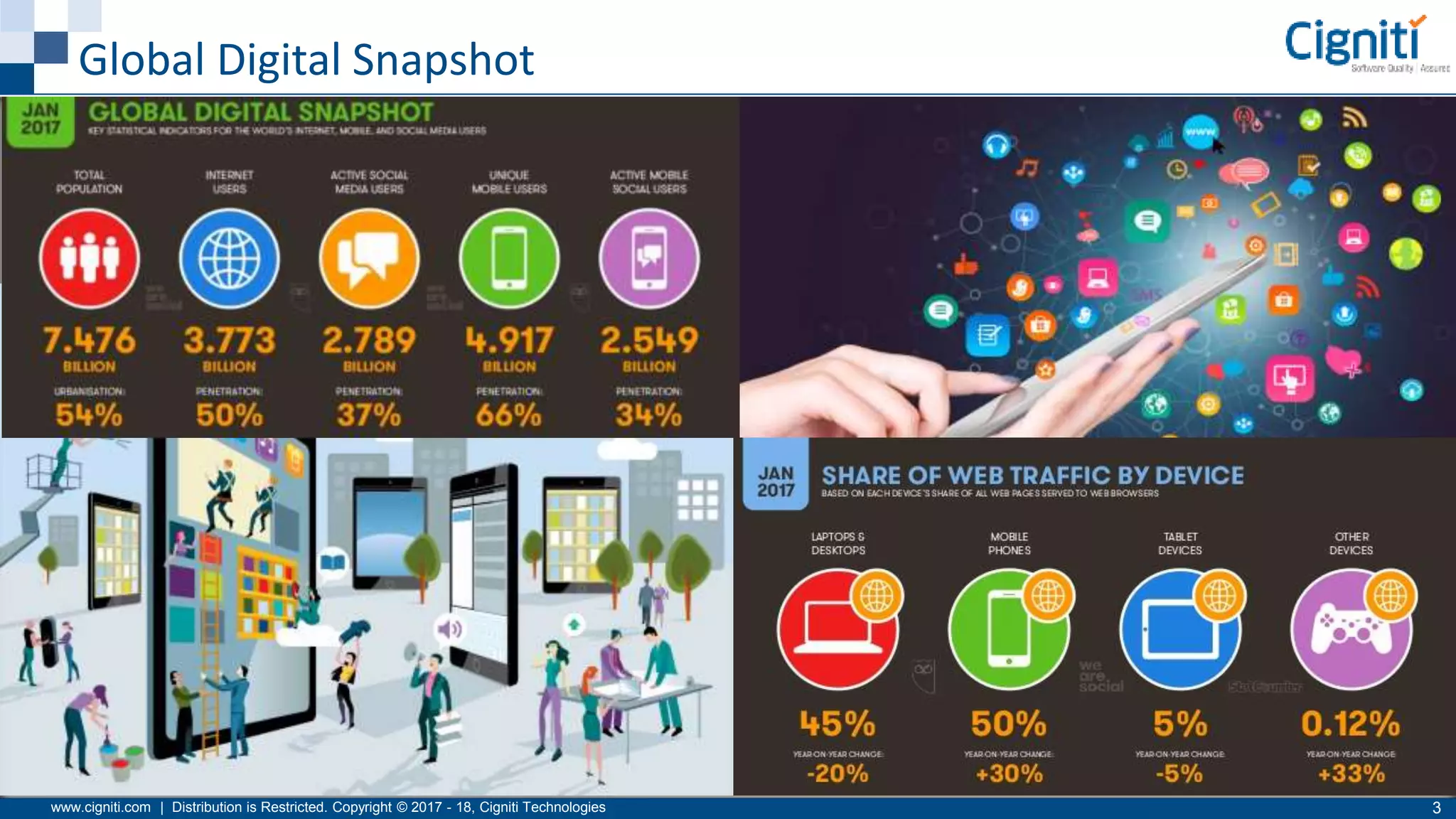
Global Digital Snapshot
www.cigniti.com | Distribution is Restricted. Copyright © 2017 - 18, Cigniti Technologies 4
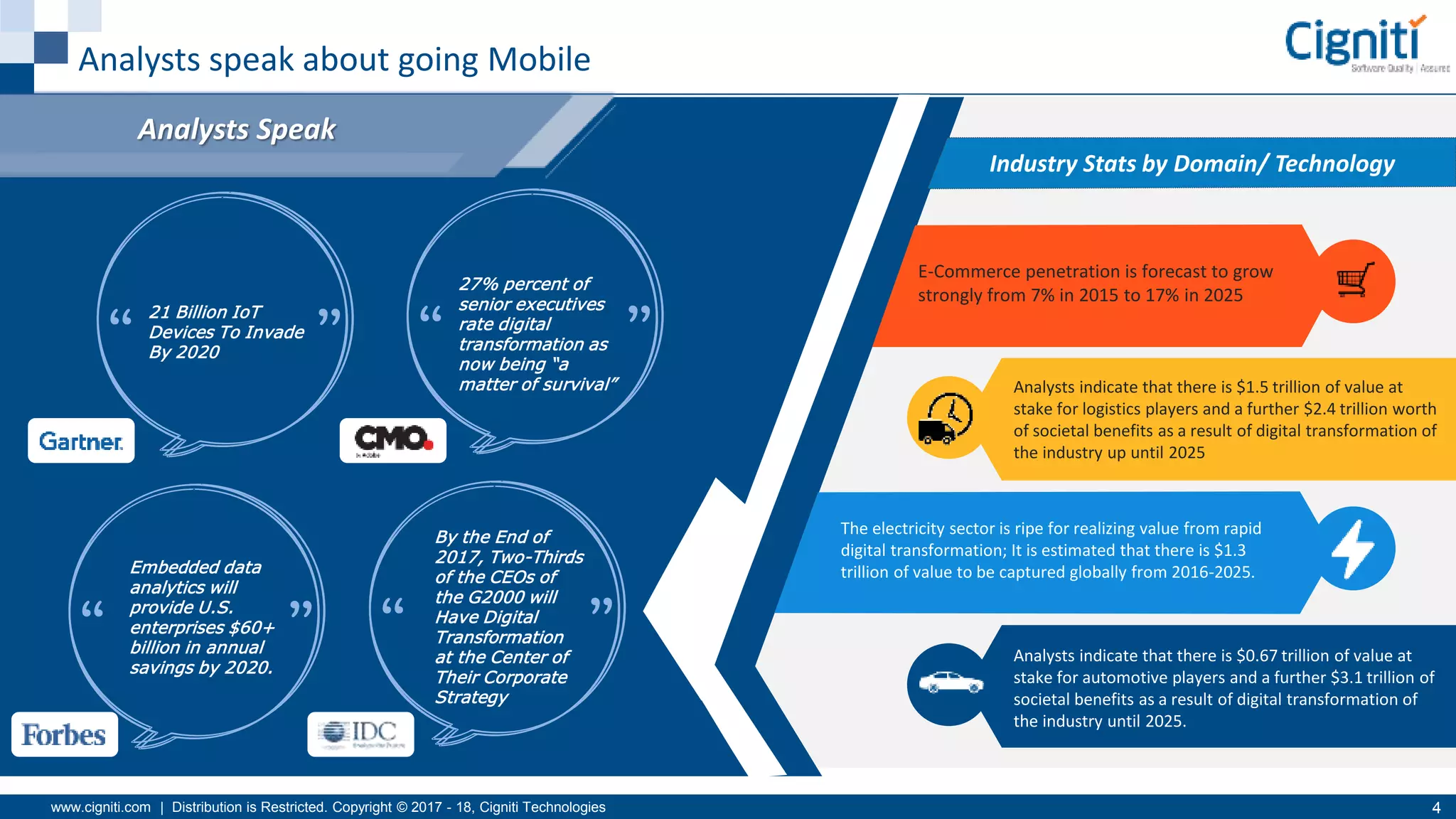
Analysts speak about going Mobile
Industry Stats by Domain/ Technology
Analysts Speak
Analysts indicate that there is $1.5 trillion of value at
stake for logistics players and a further $2.4 trillion worth
of societal benefits as a result of digital transformation of
the industry up until 2025
The electricity sector is ripe for realizing value from rapid
digital transformation; It is estimated that there is $1.3
trillion of value to be captured globally from 2016-2025.
Analysts indicate that there is $0.67 trillion of value at
stake for automotive players and a further $3.1 trillion of
societal benefits as a result of digital transformation of
the industry until 2025.
E-Commerce penetration is forecast to grow
strongly from 7% in 2015 to 17% in 2025
21 Billion IoT
Devices To Invade
By 2020
27% percent of
senior executives
rate digital
transformation as
now being “a
matter of survival”
Embedded data
analytics will
provide U.S.
enterprises $60+
billion in annual
savings by 2020.
By the End of
2017, Two-Thirds
of the CEOs of
the G2000 will
Have Digital
Transformation
at the Center of
Their Corporate
Strategy
www.cigniti.com | Distribution is Restricted. Copyright © 2017 - 18, Cigniti Technologies 5
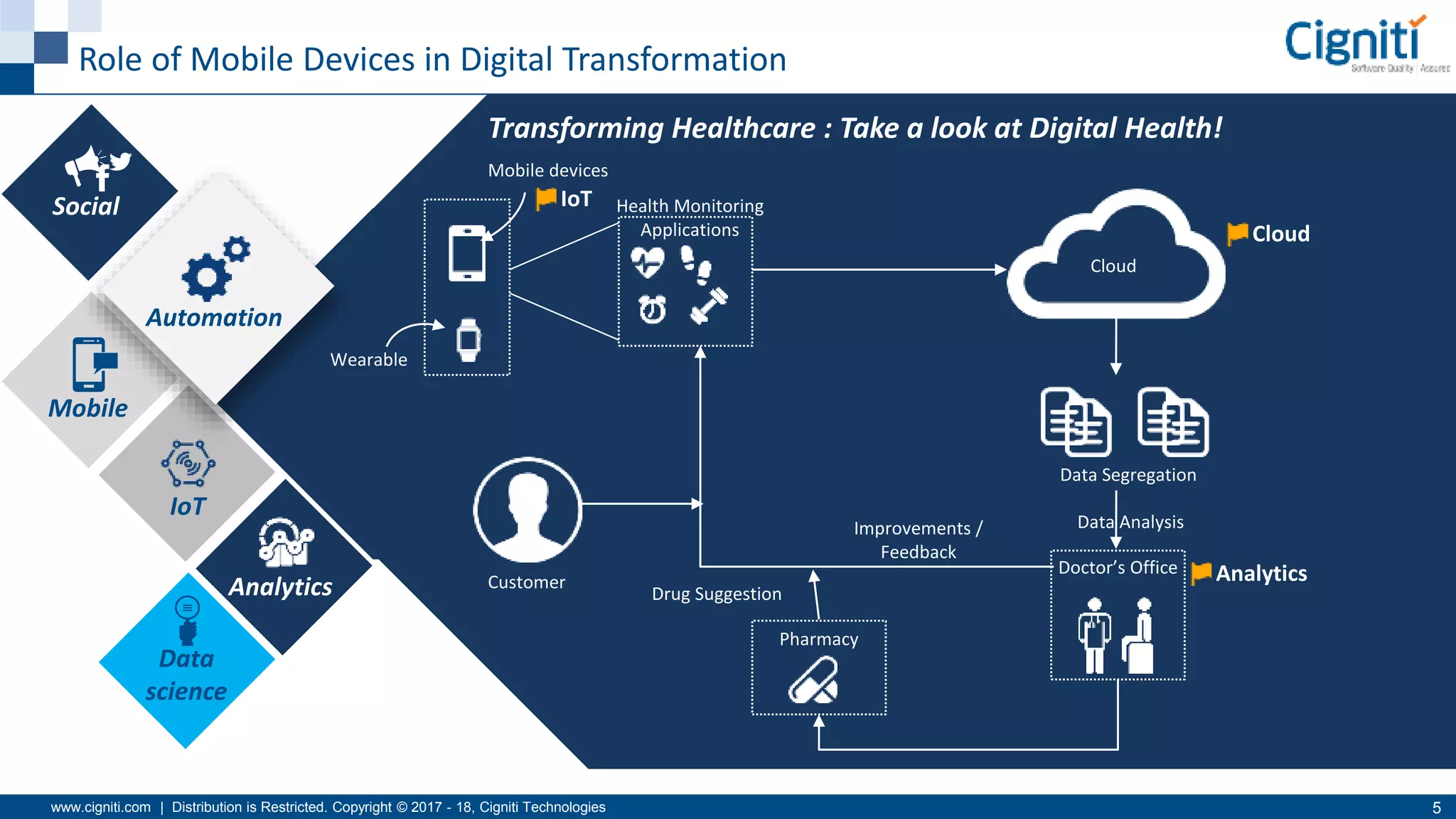
Role of Mobile Devices in Digital Transformation
Social
Mobile
IoT
Analytics
Data
science
Automation
Transforming Healthcare : Take a look at Digital Health!
Mobile devices
Wearable
Customer
Health Monitoring
Applications
Cloud
Data Segregation
Doctor’s Office
Pharmacy
Drug Suggestion
Improvements /
Feedback
IoT
Cloud
Analytics
Data Analysis
www.cigniti.com | Distribution is Restricted. Copyright © 2017 - 18, Cigniti Technologies 6
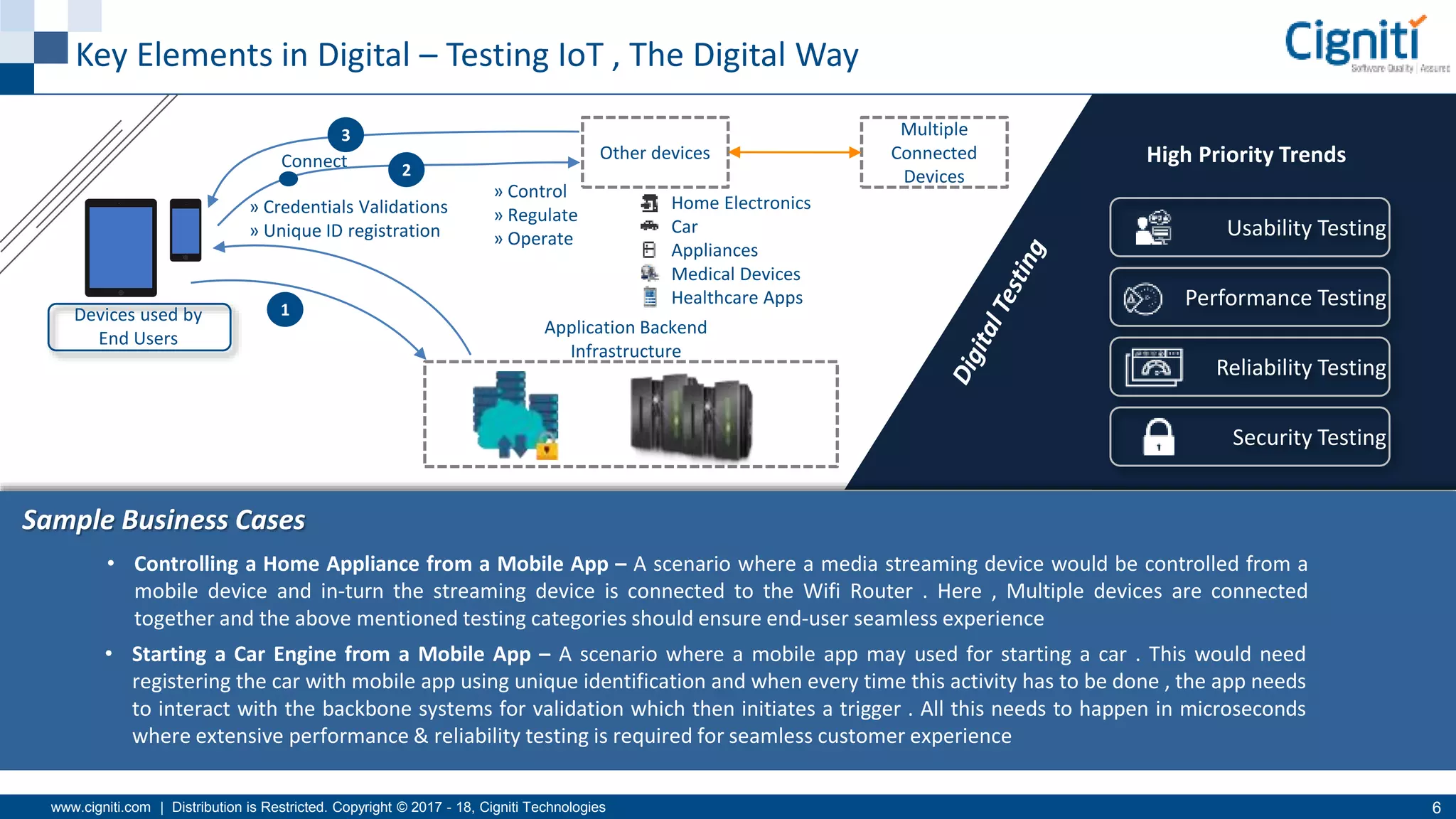
Key Elements in Digital – Testing IoT , The Digital Way
Connect
Devices used by
End Users
Application Backend
Infrastructure
Sample Business Cases
Other devices
Multiple
Connected
Devices
1
2
3
» Control
» Regulate
» Operate
» Credentials Validations
» Unique ID registration
Home Electronics
Car
Appliances
Medical Devices
Healthcare Apps
Usability Testing
Performance Testing
Reliability Testing
Security Testing
• Controlling a Home Appliance from a Mobile App – A scenario where a media streaming device would be controlled from a
mobile device and in-turn the streaming device is connected to the Wifi Router . Here , Multiple devices are connected
together and the above mentioned testing categories should ensure end-user seamless experience
• Starting a Car Engine from a Mobile App – A scenario where a mobile app may used for starting a car . This would need
registering the car with mobile app using unique identification and when every time this activity has to be done , the app needs
to interact with the backbone systems for validation which then initiates a trigger . All this needs to happen in microseconds
where extensive performance & reliability testing is required for seamless customer experience
High Priority Trends
www.cigniti.com | Distribution is Restricted. Copyright © 2017 - 18, Cigniti Technologies 7
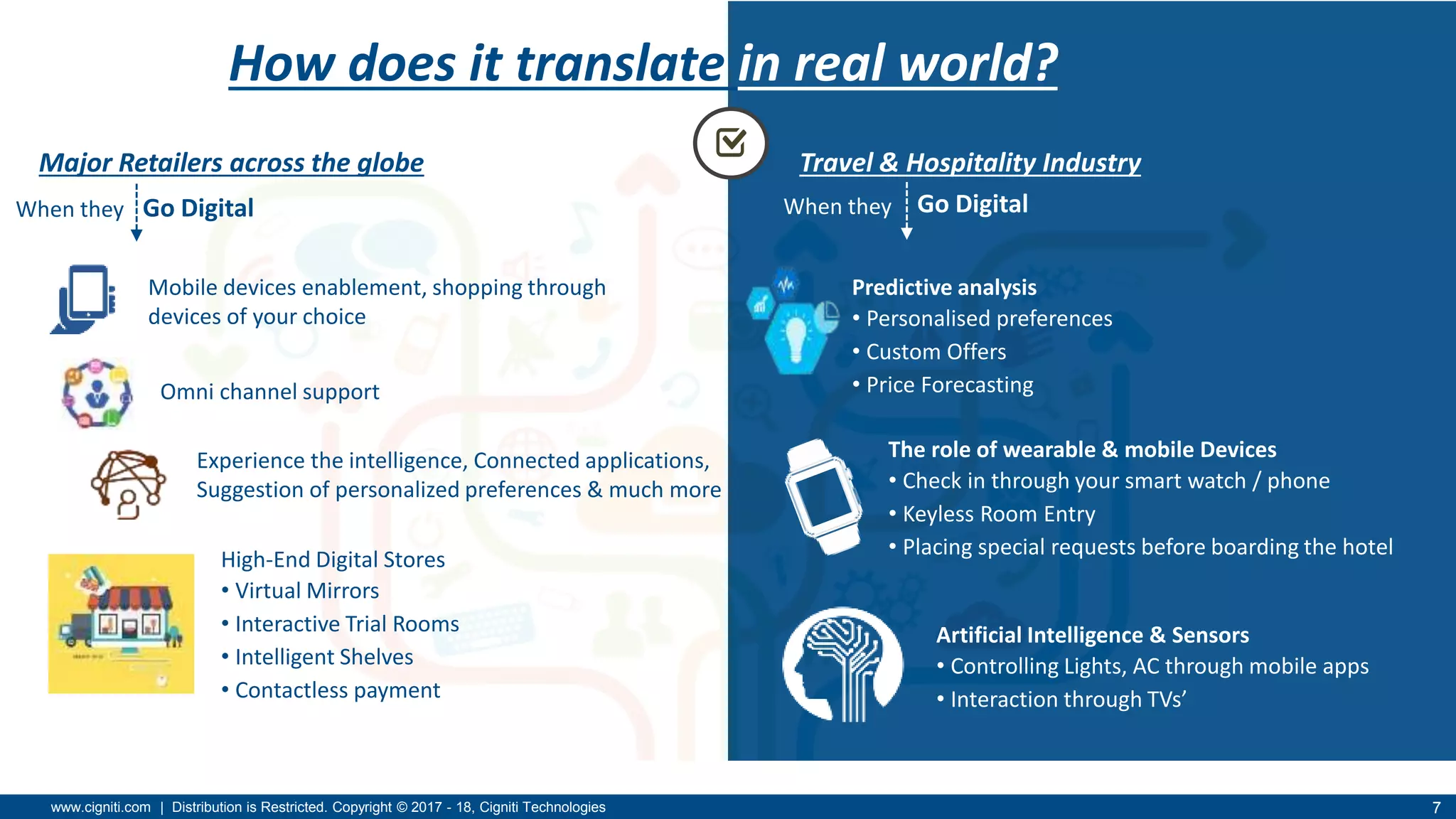
Travel & Hospitality Industry
Predictive analysis
• Personalised preferences
• Custom Offers
• Price Forecasting
The role of wearable & mobile Devices
• Check in through your smart watch / phone
• Keyless Room Entry
• Placing special requests before boarding the hotel
Artificial Intelligence & Sensors
• Controlling Lights, AC through mobile apps
• Interaction through TVs’
How does it translate in real world?
Major Retailers across the globe
Go Digital
Omni channel support
Experience the intelligence, Connected applications,
Suggestion of personalized preferences & much more
High-End Digital Stores
• Virtual Mirrors
• Interactive Trial Rooms
• Intelligent Shelves
• Contactless payment
Mobile devices enablement, shopping through
devices of your choice
When they Go DigitalWhen they
www.cigniti.com | Distribution is Restricted. Copyright © 2017 - 18, Cigniti Technologies 8
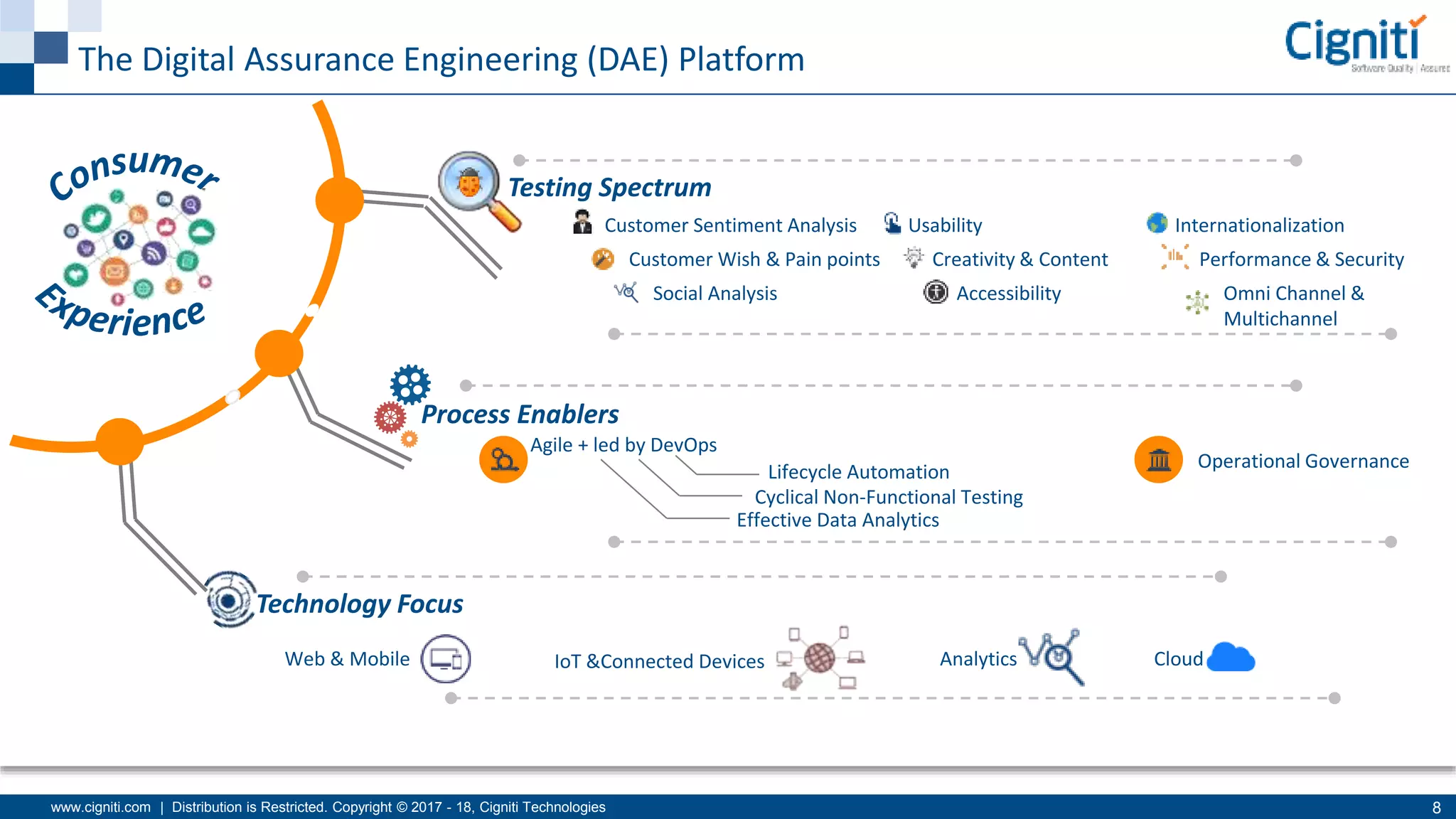
The Digital Assurance Engineering (DAE) Platform
Testing Spectrum
Process Enablers
Customer Sentiment Analysis
Customer Wish & Pain points
Social Analysis
Usability
Creativity & Content
Accessibility
Internationalization
Performance & Security
Omni Channel &
Multichannel
Agile + led by DevOps
Lifecycle Automation
Cyclical Non-Functional Testing
Effective Data Analytics
Operational Governance
Technology Focus
Web & Mobile IoT &Connected Devices Analytics Cloud
Why do Mobile Apps Fail?
www.cigniti.com | Distribution is Restricted. Copyright © 2017 - 18, Cigniti Technologies 10
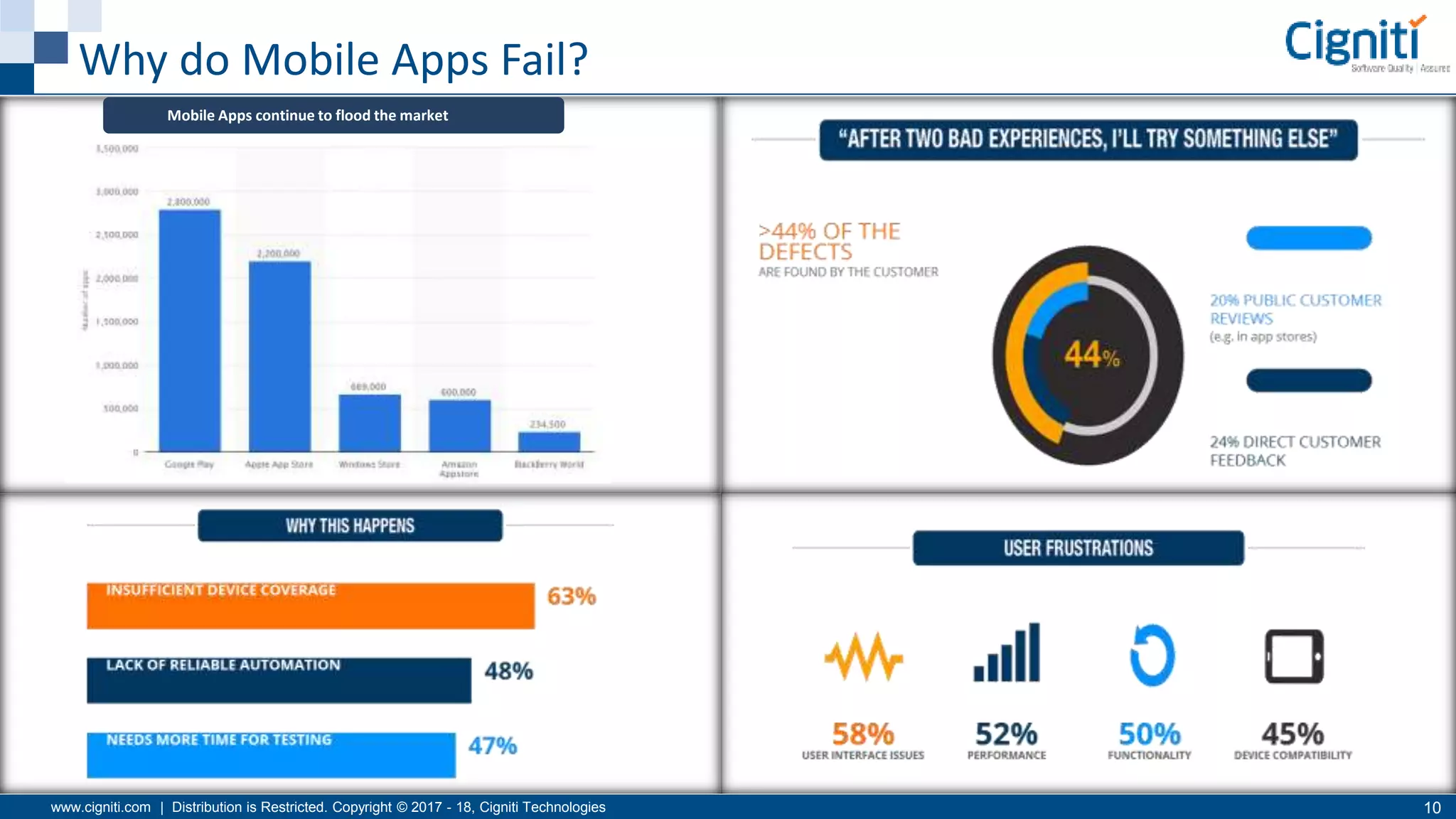
Why do Mobile Apps Fail?
Mobile Apps continue to flood the market
Why Mobile Test
Automation?
www.cigniti.com | Distribution is Restricted. Copyright © 2017 - 18, Cigniti Technologies 12
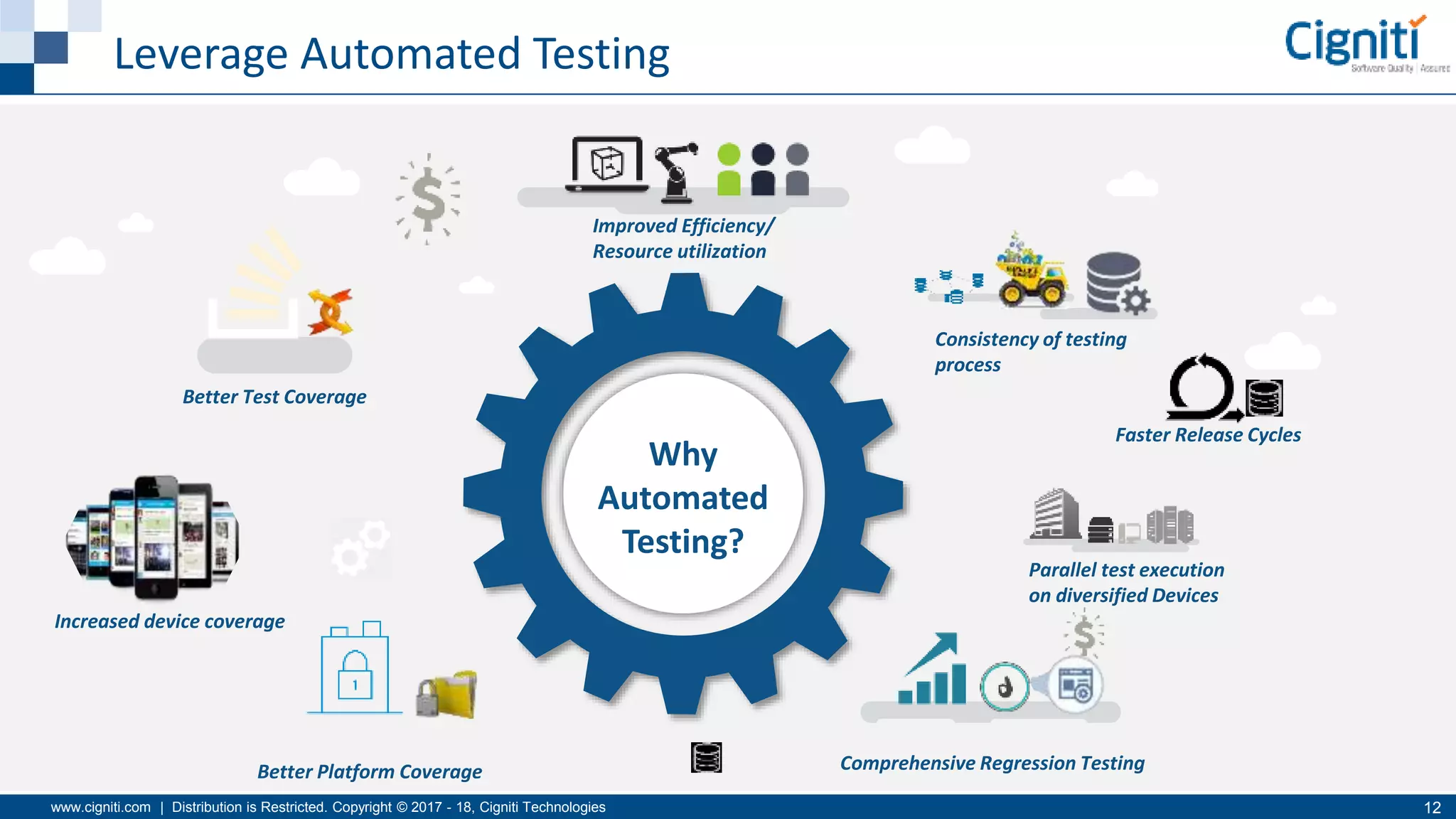
Leverage Automated Testing
Parallel test execution
on diversified Devices
Better Platform Coverage
Improved Efficiency/
Resource utilization
Increased device coverage
Consistency of testing
process
Faster Release Cycles
Why
Automated
Testing?
Comprehensive Regression Testing
Better Test Coverage
www.cigniti.com | Distribution is Restricted. Copyright © 2017 - 18, Cigniti Technologies 13
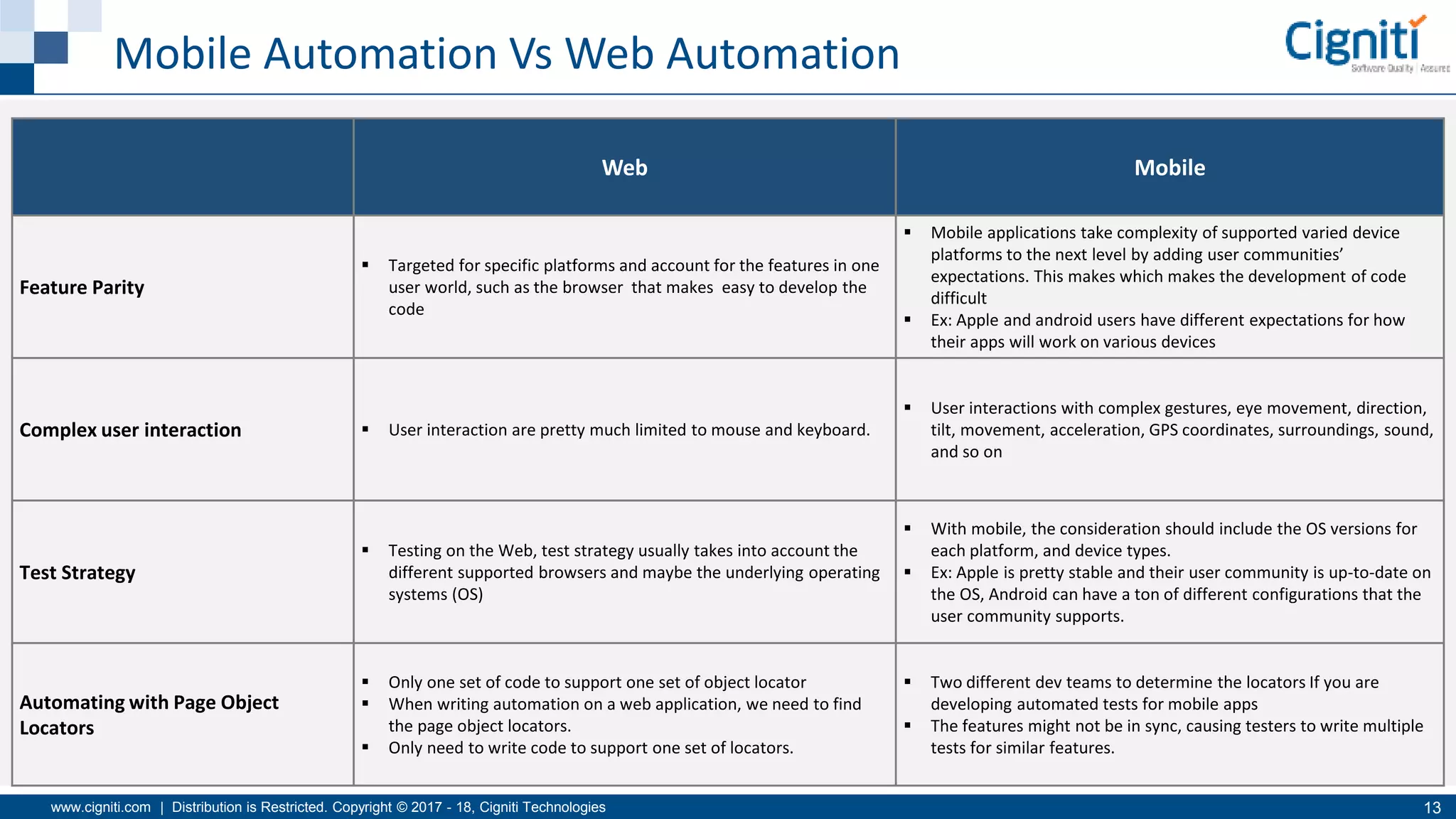
Mobile Automation Vs Web Automation
Web Mobile
Feature Parity
 Targeted for specific platforms and account for the features in one
user world, such as the browser that makes easy to develop the
code
 Mobile applications take complexity of supported varied device
platforms to the next level by adding user communities’
expectations. This makes which makes the development of code
difficult
 Ex: Apple and android users have different expectations for how
their apps will work on various devices
Complex user interaction  User interaction are pretty much limited to mouse and keyboard.
 User interactions with complex gestures, eye movement, direction,
tilt, movement, acceleration, GPS coordinates, surroundings, sound,
and so on
Test Strategy
 Testing on the Web, test strategy usually takes into account the
different supported browsers and maybe the underlying operating
systems (OS)
 With mobile, the consideration should include the OS versions for
each platform, and device types.
 Ex: Apple is pretty stable and their user community is up-to-date on
the OS, Android can have a ton of different configurations that the
user community supports.
Automating with Page Object
Locators
 Only one set of code to support one set of object locator
 When writing automation on a web application, we need to find
the page object locators.
 Only need to write code to support one set of locators.
 Two different dev teams to determine the locators If you are
developing automated tests for mobile apps
 The features might not be in sync, causing testers to write multiple
tests for similar features.
www.cigniti.com | Distribution is Restricted. Copyright © 2017 - 18, Cigniti Technologies 14
Top 10 Challenges of Mobile Testing
,
Automated Reporting Challenges
App Performance
Localization challenges Location-based Testing
Security is the Key
Platform and Device Fragmentation
User Experience and
Usability of Applications
Device Interrupt Simulation
Connected Device Testing
System Integration Complexities
Top Challenges in
Implementing Mobile Test
Automation & How To
address them
www.cigniti.com | Distribution is Restricted. Copyright © 2017 - 18, Cigniti Technologies 16
1. Platform and Device Coverage
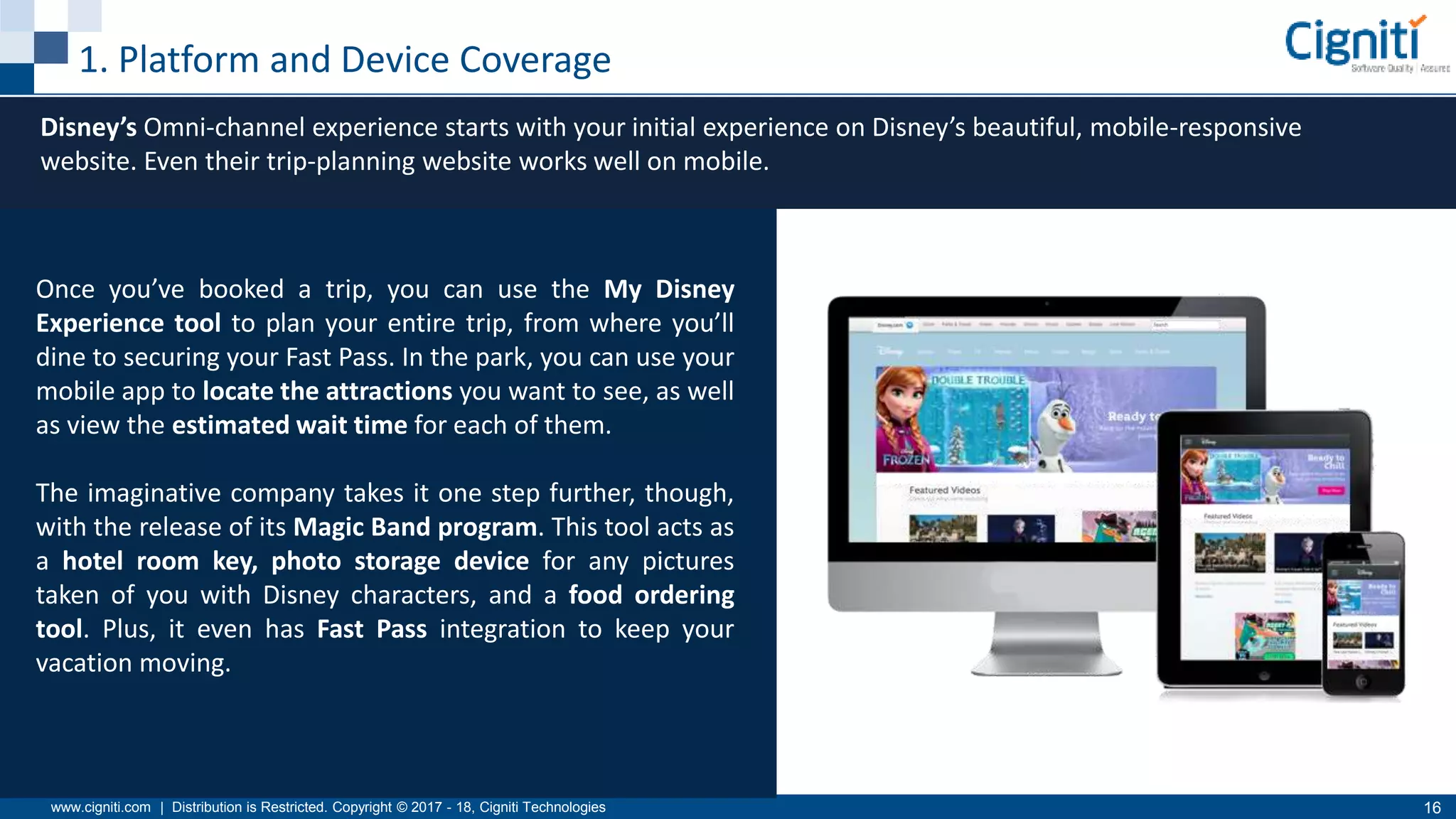
Disney’s Omni-channel experience starts with your initial experience on Disney’s beautiful, mobile-responsive
website. Even their trip-planning website works well on mobile.
Once you’ve booked a trip, you can use the My Disney
Experience tool to plan your entire trip, from where you’ll
dine to securing your Fast Pass. In the park, you can use your
mobile app to locate the attractions you want to see, as well
as view the estimated wait time for each of them.
The imaginative company takes it one step further, though,
with the release of its Magic Band program. This tool acts as
a hotel room key, photo storage device for any pictures
taken of you with Disney characters, and a food ordering
tool. Plus, it even has Fast Pass integration to keep your
vacation moving.
www.cigniti.com | Distribution is Restricted. Copyright © 2017 - 18, Cigniti Technologies 17
How Automated Testing helps in Platform/Device Coverage
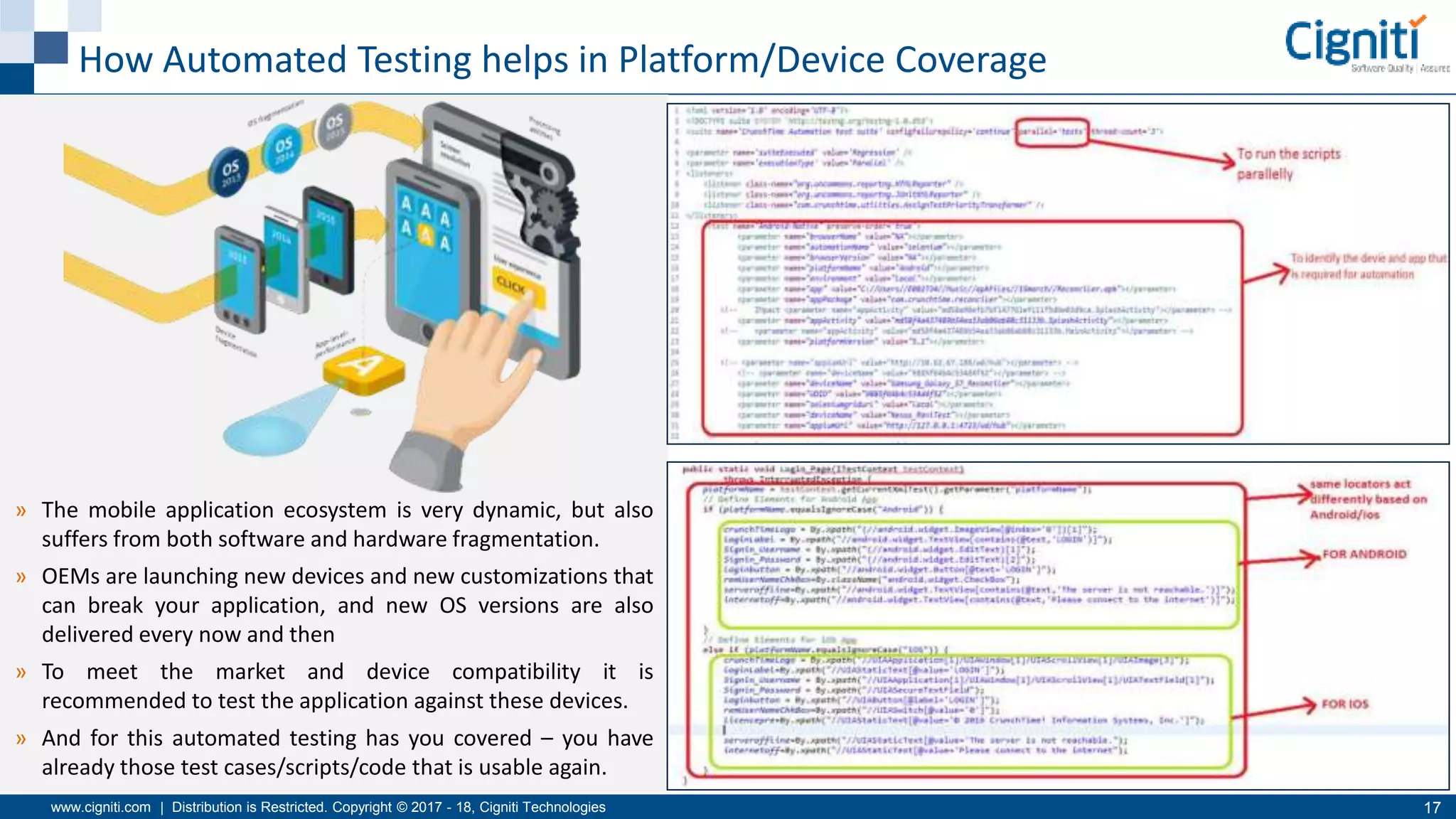
» The mobile application ecosystem is very dynamic, but also
suffers from both software and hardware fragmentation.
» OEMs are launching new devices and new customizations that
can break your application, and new OS versions are also
delivered every now and then
» To meet the market and device compatibility it is
recommended to test the application against these devices.
» And for this automated testing has you covered – you have
already those test cases/scripts/code that is usable again.
www.cigniti.com | Distribution is Restricted. Copyright © 2017 - 18, Cigniti Technologies 18
2. User Experience
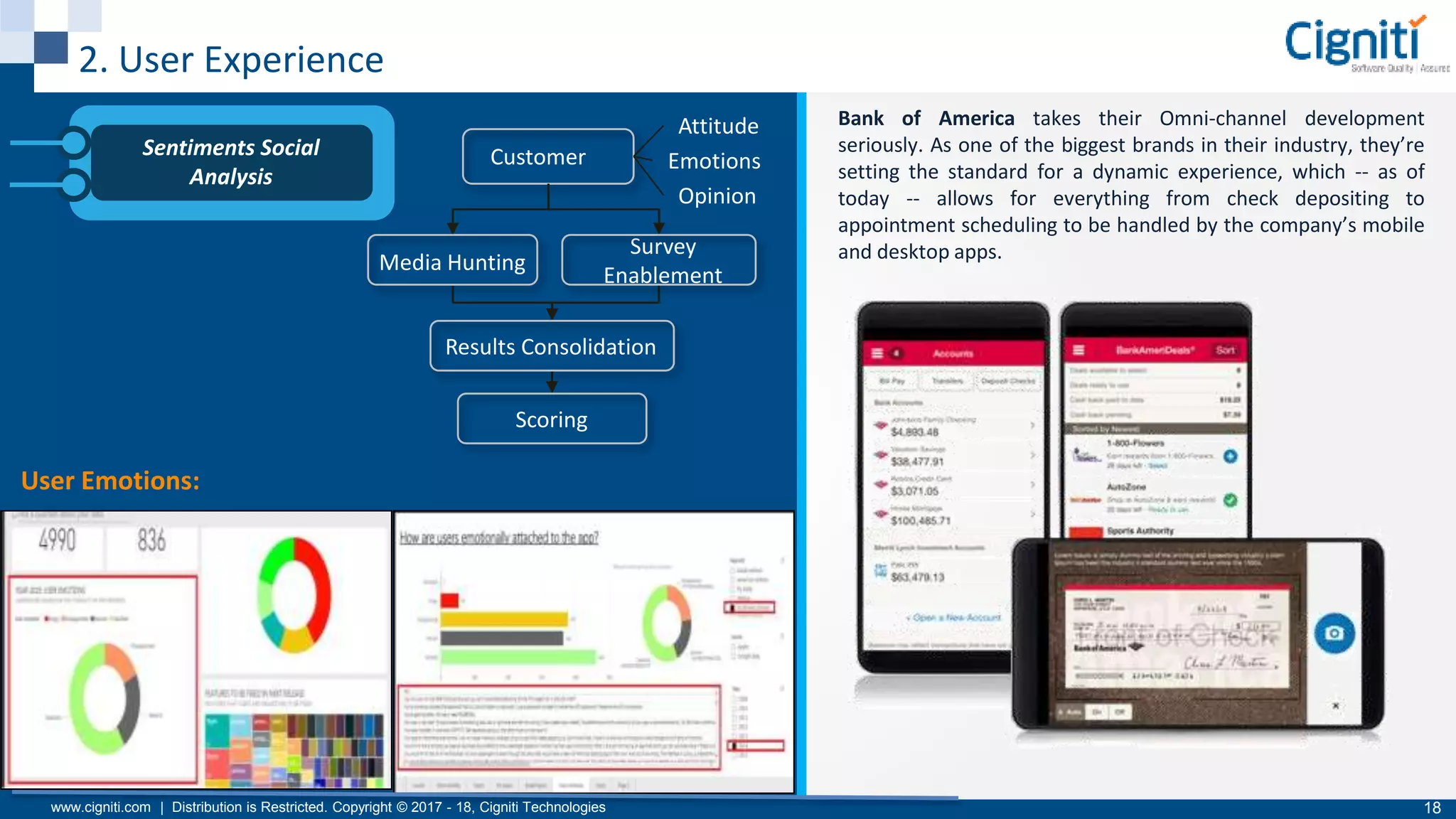
Bank of America takes their Omni-channel development
seriously. As one of the biggest brands in their industry, they’re
setting the standard for a dynamic experience, which -- as of
today -- allows for everything from check depositing to
appointment scheduling to be handled by the company’s mobile
and desktop apps.
Sentiments Social
Analysis
Customer
Attitude
Emotions
Opinion
Media Hunting
Survey
Enablement
Results Consolidation
Scoring
User Emotions:
www.cigniti.com | Distribution is Restricted. Copyright © 2017 - 18, Cigniti Technologies 19
User Experience & Usability Testing
Usability Analysis /
Testing
Product Exploration
Prioritization of Key Scenarios
Creation of workflows
Execution
Scoring
Remediation
Content
Accuracy
Visual
Attraction
Ease of UseSimplicity
Comparative
Analysis
Multiple
Versions
A/B Testing
Accessibility
Portrait/Landscape Mode:
www.cigniti.com | Distribution is Restricted. Copyright © 2017 - 18, Cigniti Technologies 20
3. Device Interrupt Simulation
A phone call/Facetime that you attend while you are
reading a digital book on iBooks (or similar application).
When the user answers a phone, iBooks waits until it is
done and then resumes when the call ends.
Automated test tools can provide a great deal of help in simulating interruptions.
 MAutomate is a record and playback tool for mobile application testing. Testers are able to record a clean
functional test, without the interrupts, to be executed on target devices. Then, using the tool's wizard, the
tester can insert interrupts at any stage in the test script without writing a single line of code. The tool is able
to simulate the specified various interrupts on the device under test and then send the screenshot results back
to the tool's Web interface.
 UI AutoMonkey (for iOS) and The Monkey (for Android) perform "Monkey testing" to conduct testing in a
random fashion, or generating random keystrokes or events to see how the system under test reacts. Using
The Monkey mobile test tool, the tester is able to send a pseudo-random stream of user events to an
emulator or device and then validate for appropriate behavior or report on errors or unhandled exceptions.
www.cigniti.com | Distribution is Restricted. Copyright © 2017 - 18, Cigniti Technologies 21
4. End-to-End System Testing
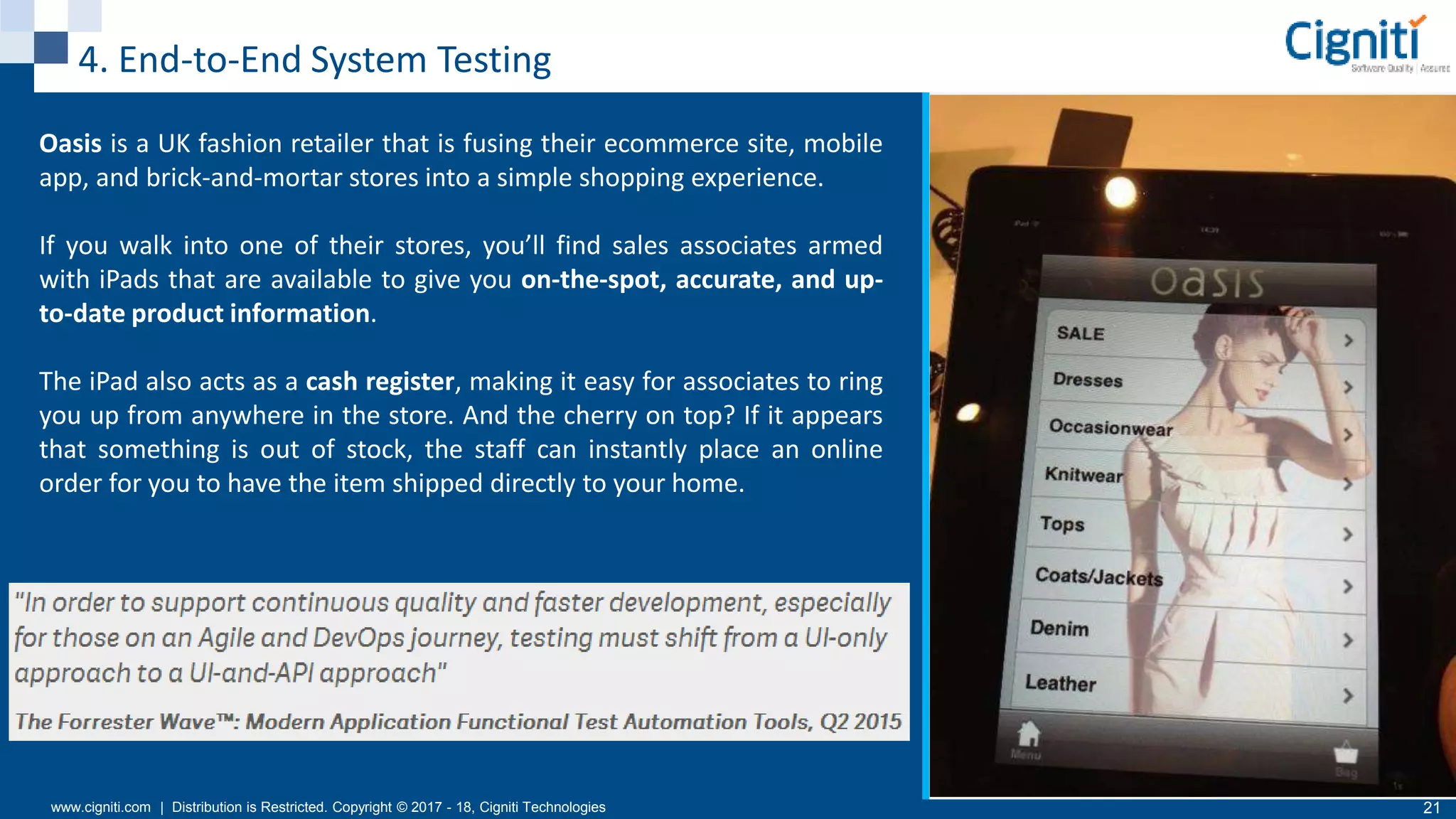
Oasis is a UK fashion retailer that is fusing their ecommerce site, mobile
app, and brick-and-mortar stores into a simple shopping experience.
If you walk into one of their stores, you’ll find sales associates armed
with iPads that are available to give you on-the-spot, accurate, and up-
to-date product information.
The iPad also acts as a cash register, making it easy for associates to ring
you up from anywhere in the store. And the cherry on top? If it appears
that something is out of stock, the staff can instantly place an online
order for you to have the item shipped directly to your home.
www.cigniti.com | Distribution is Restricted. Copyright © 2017 - 18, Cigniti Technologies 22
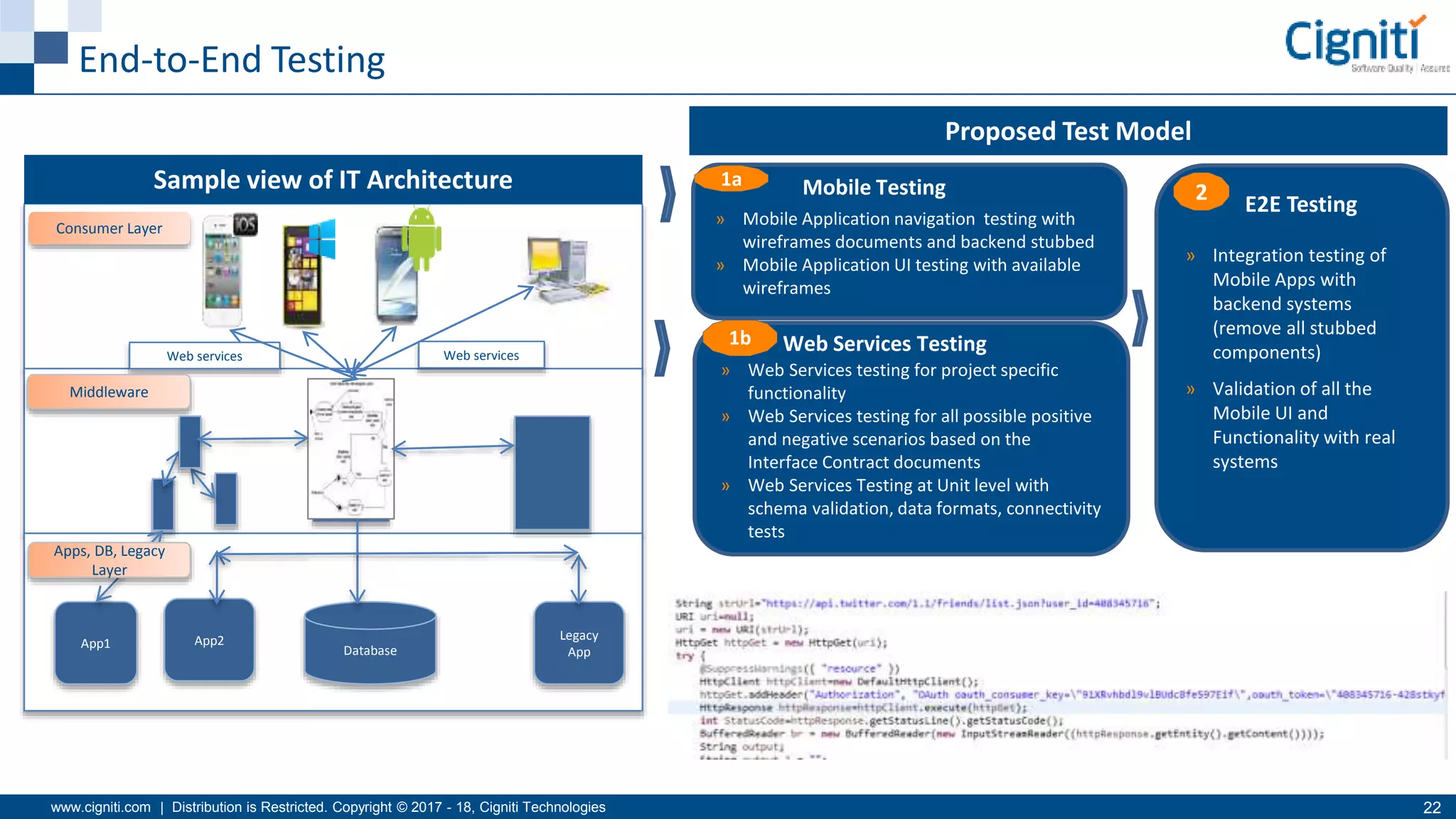
App2
Database
Legacy
App
Consumer Layer
Web services Web services
Middleware
App1
Apps, DB, Legacy
Layer
» Integration testing of
Mobile Apps with
backend systems
(remove all stubbed
components)
» Validation of all the
Mobile UI and
Functionality with real
systems
2 E2E Testing
» Web Services testing for project specific
functionality
» Web Services testing for all possible positive
and negative scenarios based on the
Interface Contract documents
» Web Services Testing at Unit level with
schema validation, data formats, connectivity
tests
1b Web Services Testing
» Mobile Application navigation testing with
wireframes documents and backend stubbed
» Mobile Application UI testing with available
wireframes
1a Mobile TestingSample view of IT Architecture
Proposed Test Model
End-to-End Testing
www.cigniti.com | Distribution is Restricted. Copyright © 2017 - 18, Cigniti Technologies 23
5. Location Based Testing
Parkway Parade is a shopping mall which partnered
with Sprooki to encourage retailers and shoppers
alike to pre-purchase using smartphones.
Customers receive proximity-based alerts of the
shopping mall then as well as receiving alerts and
browsing products and offers, customers can
purchase the products and services on the spot,
through their phone and redeem immediately at
participating stores.
Use location faking tools to test your app in a location where your intended user
base would be using the app. Fake GPS Location and Lockito are some location
faking apps for Android.
www.cigniti.com | Distribution is Restricted. Copyright © 2017 - 18, Cigniti Technologies 24
6. Localization Testing
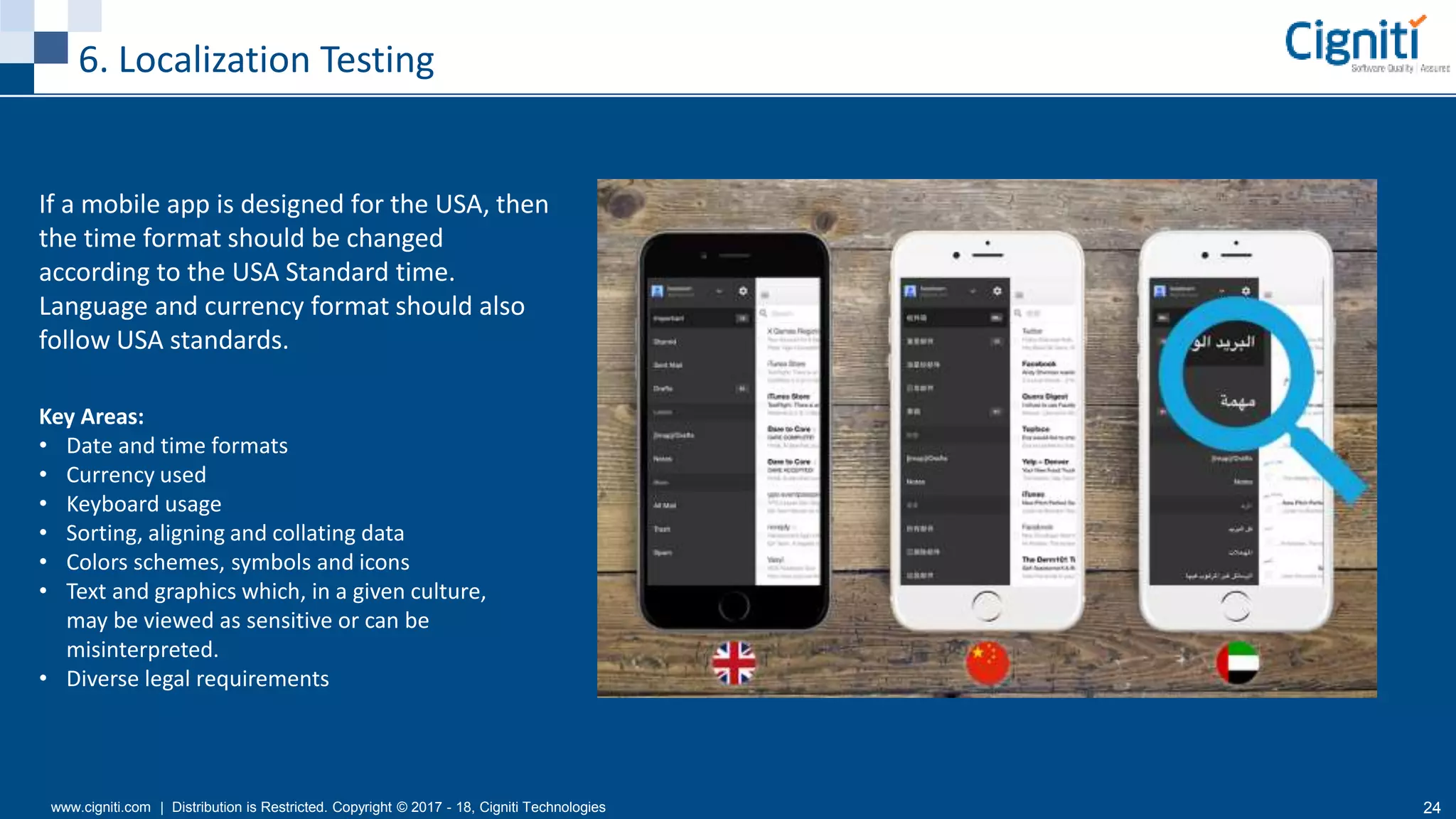
If a mobile app is designed for the USA, then
the time format should be changed
according to the USA Standard time.
Language and currency format should also
follow USA standards.
Key Areas:
• Date and time formats
• Currency used
• Keyboard usage
• Sorting, aligning and collating data
• Colors schemes, symbols and icons
• Text and graphics which, in a given culture,
may be viewed as sensitive or can be
misinterpreted.
• Diverse legal requirements
www.cigniti.com | Distribution is Restricted. Copyright © 2017 - 18, Cigniti Technologies 25
Localization Testing Approach
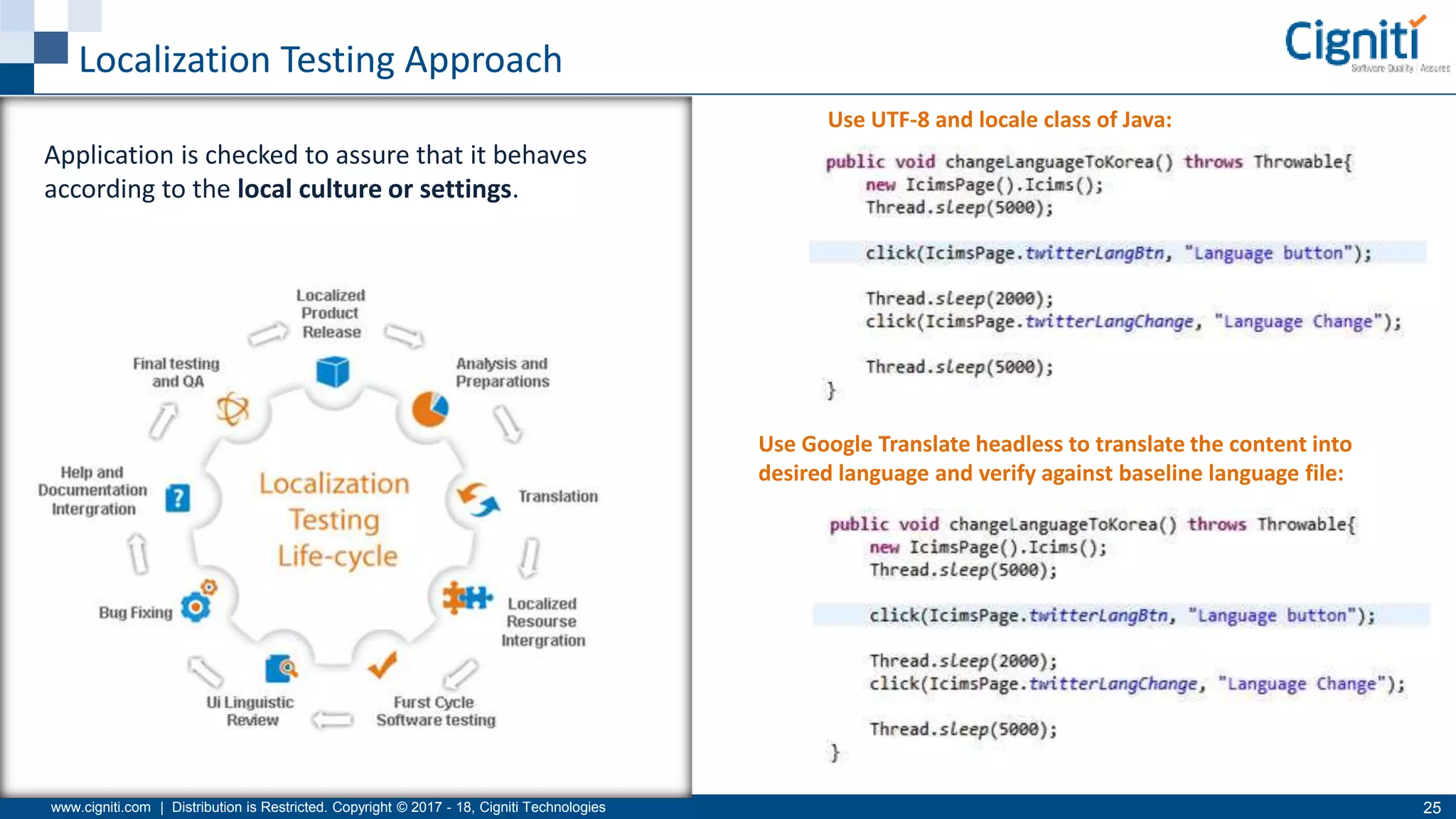
Use UTF-8 and locale class of Java:
Use Google Translate headless to translate the content into
desired language and verify against baseline language file:
Application is checked to assure that it behaves
according to the local culture or settings.
www.cigniti.com | Distribution is Restricted. Copyright © 2017 - 18, Cigniti Technologies 26
7. App Performance
App performance can impact users’ devices and experiences.
Mobile application performance testing allows you to:
• Measure effects on device CPU, memory, battery, location, and
network bytes sent/received
• Compare baseline performance to the current build to catch
memory leaks, a slow loading image, or new functionality that
requires too many network calls
• View trends over time to identify bugs and mobile performance
deltas from build to build
To keep up with testing cycles and identify inconsistencies, you can
automate mobile testing and integrate it into your continuous
integration testing process.
By building a core set of tests quickly, you can focus on analyzing
the results to identify root causes of errors.
www.cigniti.com | Distribution is Restricted. Copyright © 2017 - 18, Cigniti Technologies 27
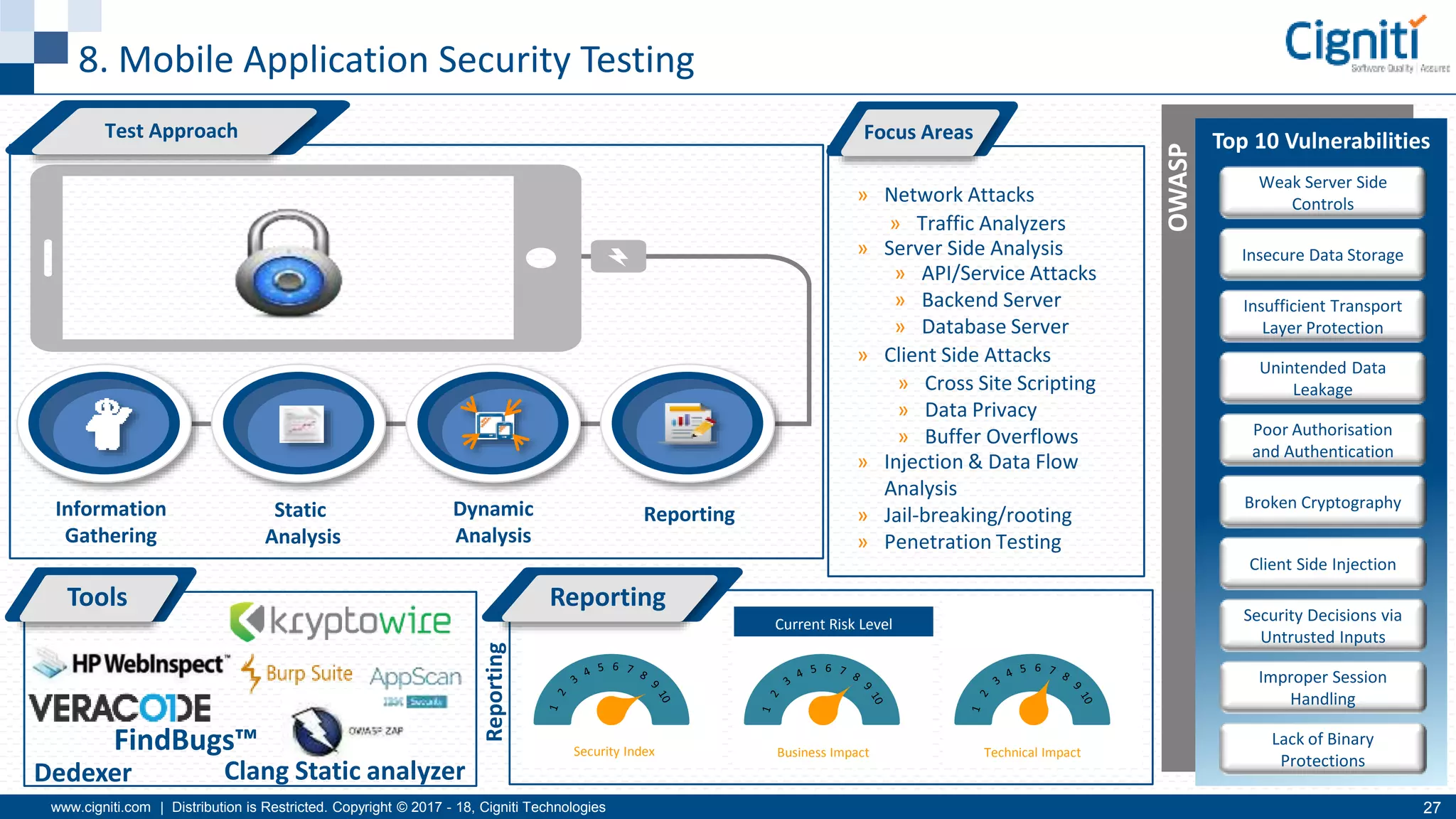
8. Mobile Application Security Testing
Security Index Business Impact Technical Impact
Current Risk Level
Reporting
Top 10 Vulnerabilities
Weak Server Side
Controls
Insecure Data Storage
Insufficient Transport
Layer Protection
Unintended Data
Leakage
Poor Authorisation
and Authentication
Broken Cryptography
Client Side Injection
Security Decisions via
Untrusted Inputs
Improper Session
Handling
Lack of Binary
Protections
Tools
OWASP
ReportingInformation
Gathering
Dynamic
Analysis
Static
Analysis
Focus Areas
» Network Attacks
» Server Side Analysis
» Client Side Attacks
» Injection & Data Flow
Analysis
» Jail-breaking/rooting
» Penetration Testing
» Traffic Analyzers
» API/Service Attacks
» Backend Server
» Database Server
» Cross Site Scripting
» Data Privacy
» Buffer Overflows
Test Approach
Reporting
Dedexer Clang Static analyzer
FindBugs™
www.cigniti.com | Distribution is Restricted. Copyright © 2017 - 18, Cigniti Technologies 28
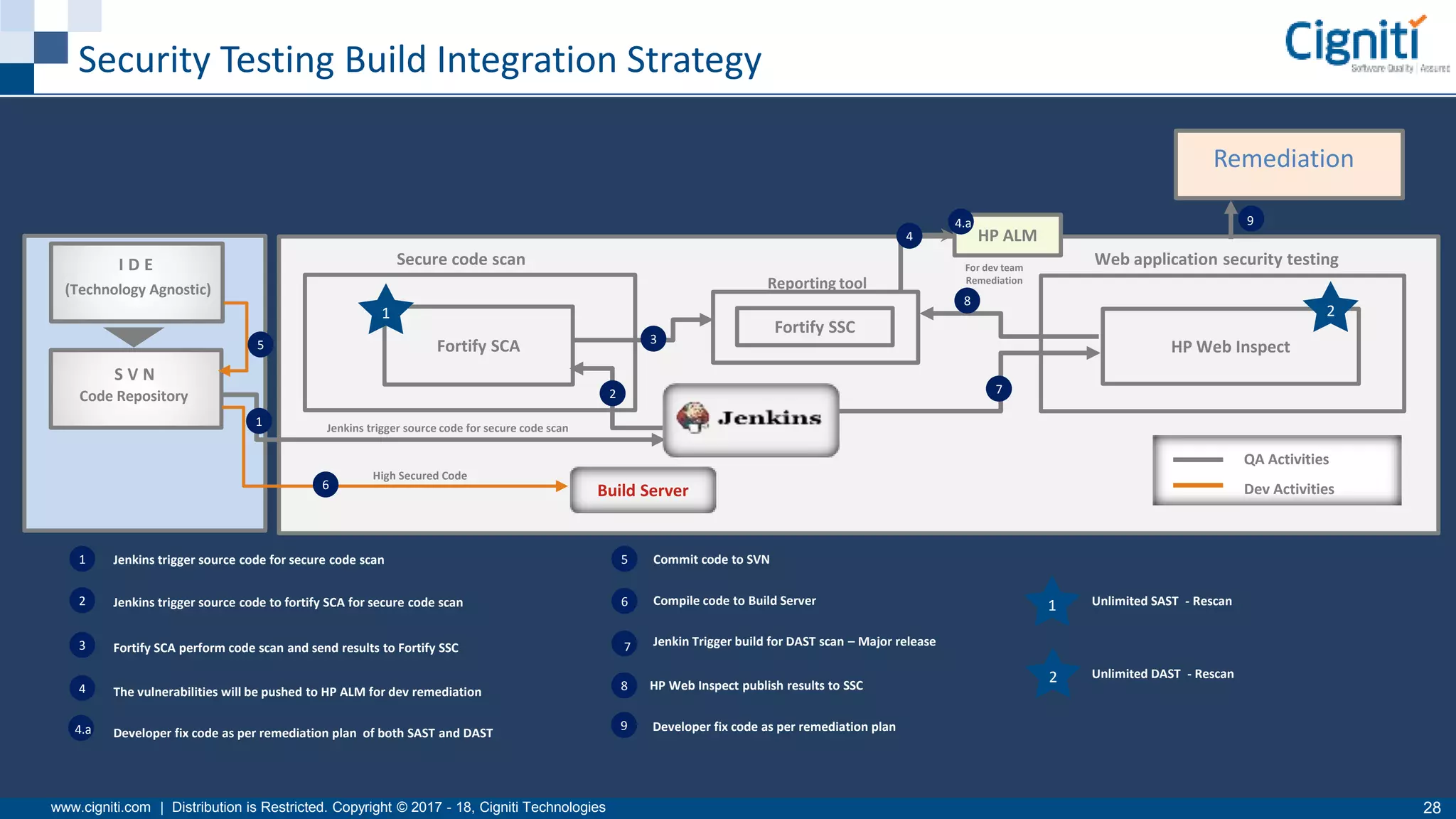
Security Testing Build Integration Strategy
I D E
(Technology Agnostic)
S V N
Code Repository
Secure code scan Web application security testing
Fortify SCA
Jenkins trigger source code for secure code scan
Fortify SSC
Reporting tool
Build Server
High Secured Code
HP Web Inspect
HP ALM
1
QA Activities
Dev Activities
2
3
4
5
6
7
8
94.a
For dev team
Remediation
1 2
1
2
3
4
4.a
5
6
7
8
9
Jenkins trigger source code for secure code scan
Jenkins trigger source code to fortify SCA for secure code scan
Fortify SCA perform code scan and send results to Fortify SSC
The vulnerabilities will be pushed to HP ALM for dev remediation
Developer fix code as per remediation plan of both SAST and DAST
Commit code to SVN
Compile code to Build Server
Jenkin Trigger build for DAST scan – Major release
1
2HP Web Inspect publish results to SSC
Developer fix code as per remediation plan
Unlimited SAST - Rescan
Unlimited DAST - Rescan
Remediation
www.cigniti.com | Distribution is Restricted. Copyright © 2017 - 18, Cigniti Technologies 29
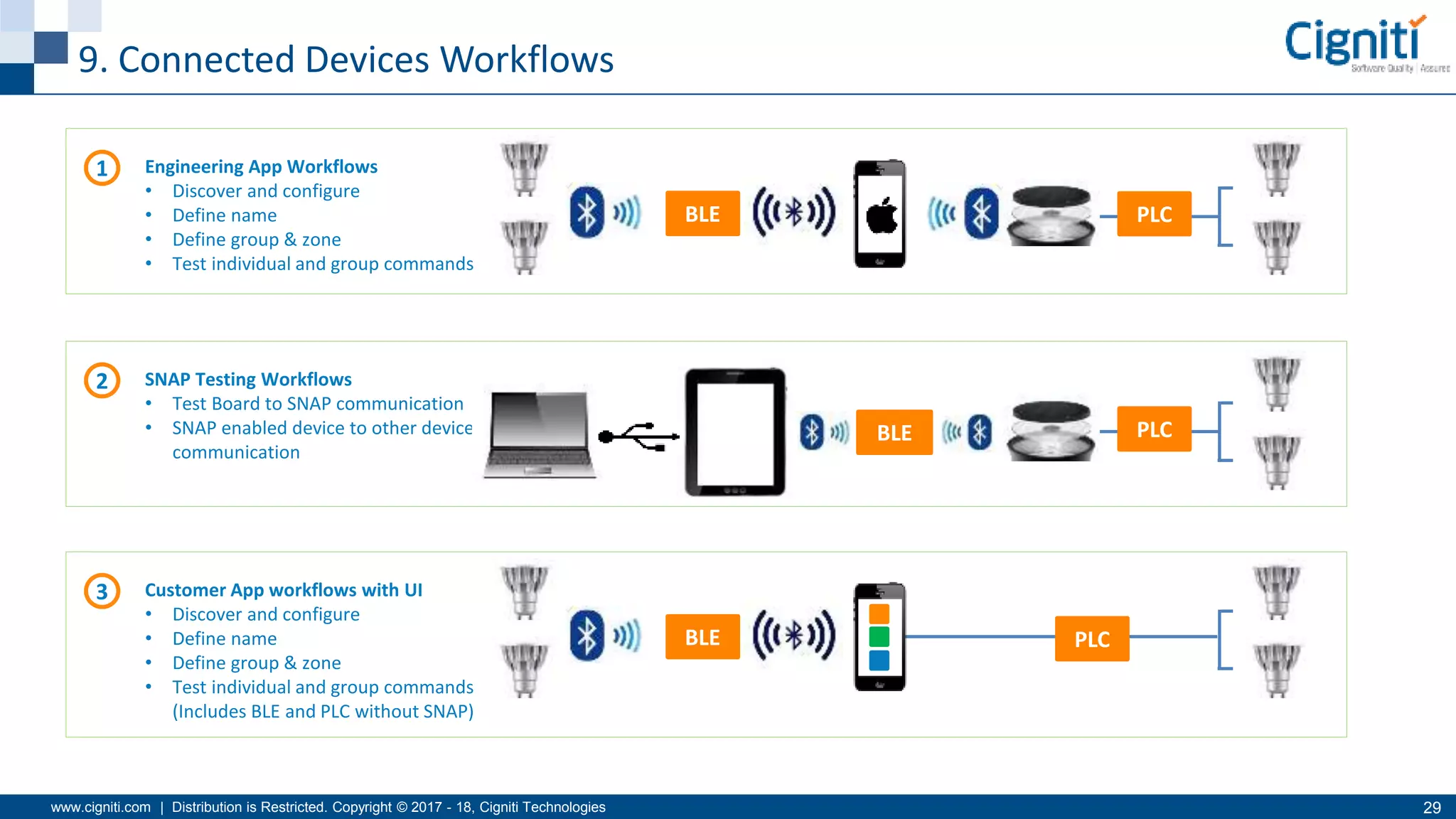
9. Connected Devices Workflows
BLE PLC
1 Engineering App Workflows
• Discover and configure
• Define name
• Define group & zone
• Test individual and group commands
2 SNAP Testing Workflows
• Test Board to SNAP communication
• SNAP enabled device to other device
communication
BLE PLC
3 Customer App workflows with UI
• Discover and configure
• Define name
• Define group & zone
• Test individual and group commands
(Includes BLE and PLC without SNAP)
PLCBLE
www.cigniti.com | Distribution is Restricted. Copyright © 2017 - 18, Cigniti Technologies 30
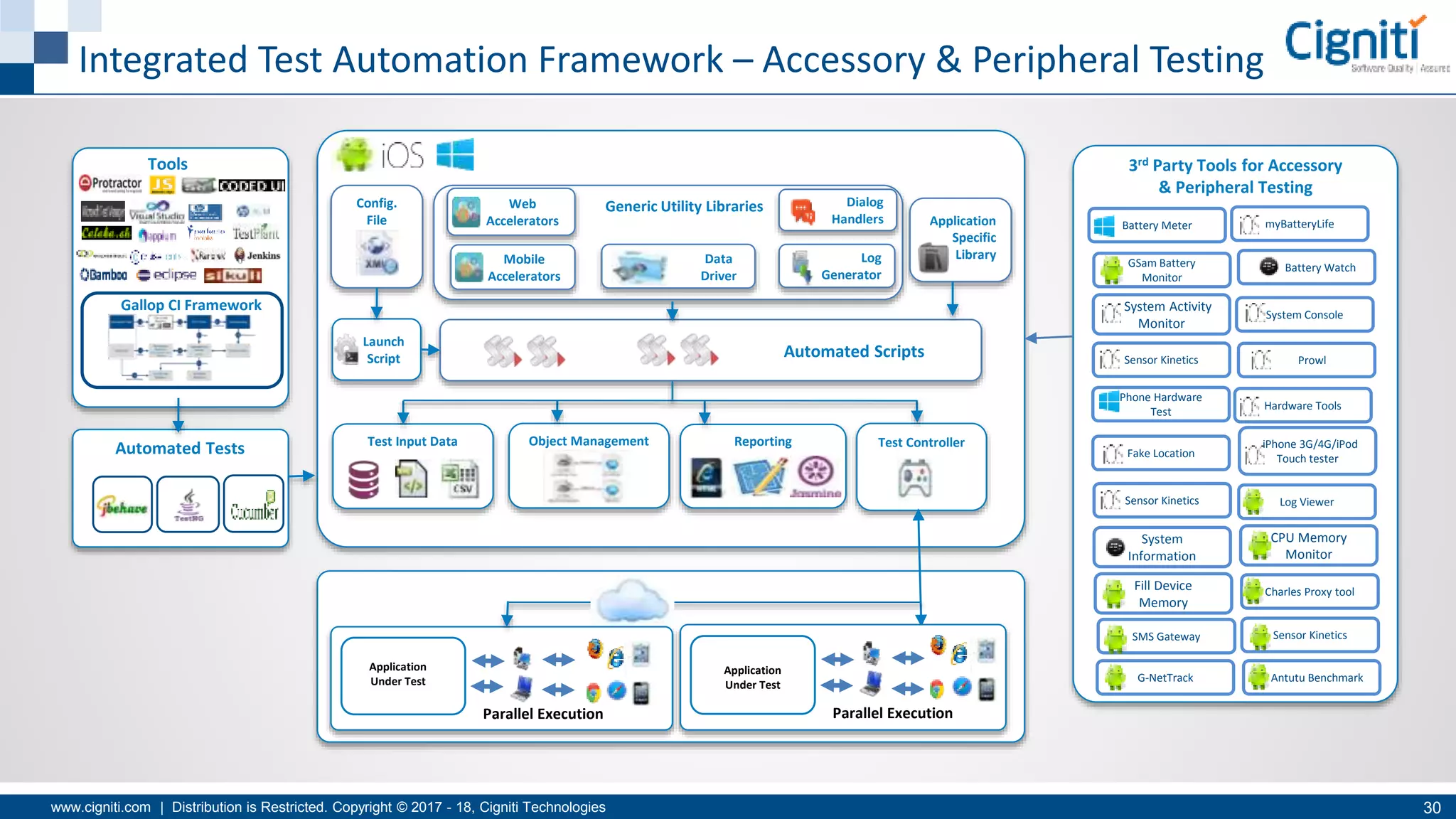
Integrated Test Automation Framework – Accessory & Peripheral Testing
Tools
Automated Tests Test Input Data
Launch
Script
Reporting
Config.
File
Object Management
Generic Utility Libraries
Log
Generator
Dialog
Handlers Application
Specific
Library
Test Controller
Web
Accelerators
Automated Scripts
Gallop CI Framework
Application
Under Test
Parallel Execution
Application
Under Test
Parallel Execution
Mobile
Accelerators
Data
Driver
3rd Party Tools for Accessory
& Peripheral Testing
myBatteryLifeBattery Meter
GSam Battery
Monitor
Battery Watch
System Activity
Monitor
System Console
Sensor Kinetics Prowl
Phone Hardware
Test
Hardware Tools
iPhone 3G/4G/iPod
Touch testerFake Location
Sensor Kinetics
Fill Device
Memory
CPU Memory
Monitor
System
Information
SMS Gateway
Antutu BenchmarkG-NetTrack
Sensor Kinetics
Charles Proxy tool
Log Viewer
www.cigniti.com | Distribution is Restricted. Copyright © 2017 - 18, Cigniti Technologies 31
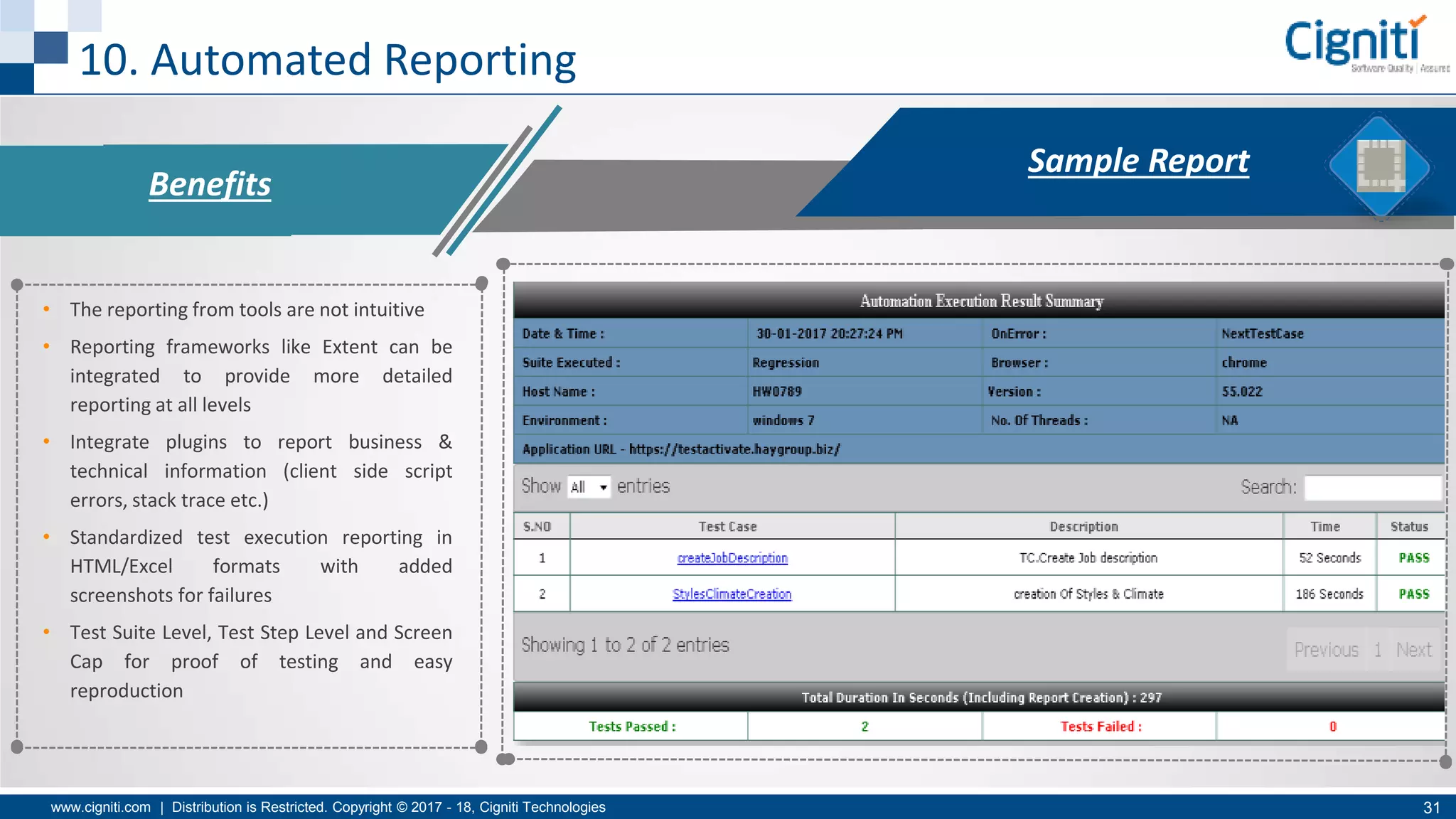
10. Automated Reporting
Benefits
• The reporting from tools are not intuitive
• Reporting frameworks like Extent can be
integrated to provide more detailed
reporting at all levels
• Integrate plugins to report business &
technical information (client side script
errors, stack trace etc.)
• Standardized test execution reporting in
HTML/Excel formats with added
screenshots for failures
• Test Suite Level, Test Step Level and Screen
Cap for proof of testing and easy
reproduction
Sample Report
www.cigniti.com | Distribution is Restricted. Copyright © 2017 - 18, Cigniti Technologies 32
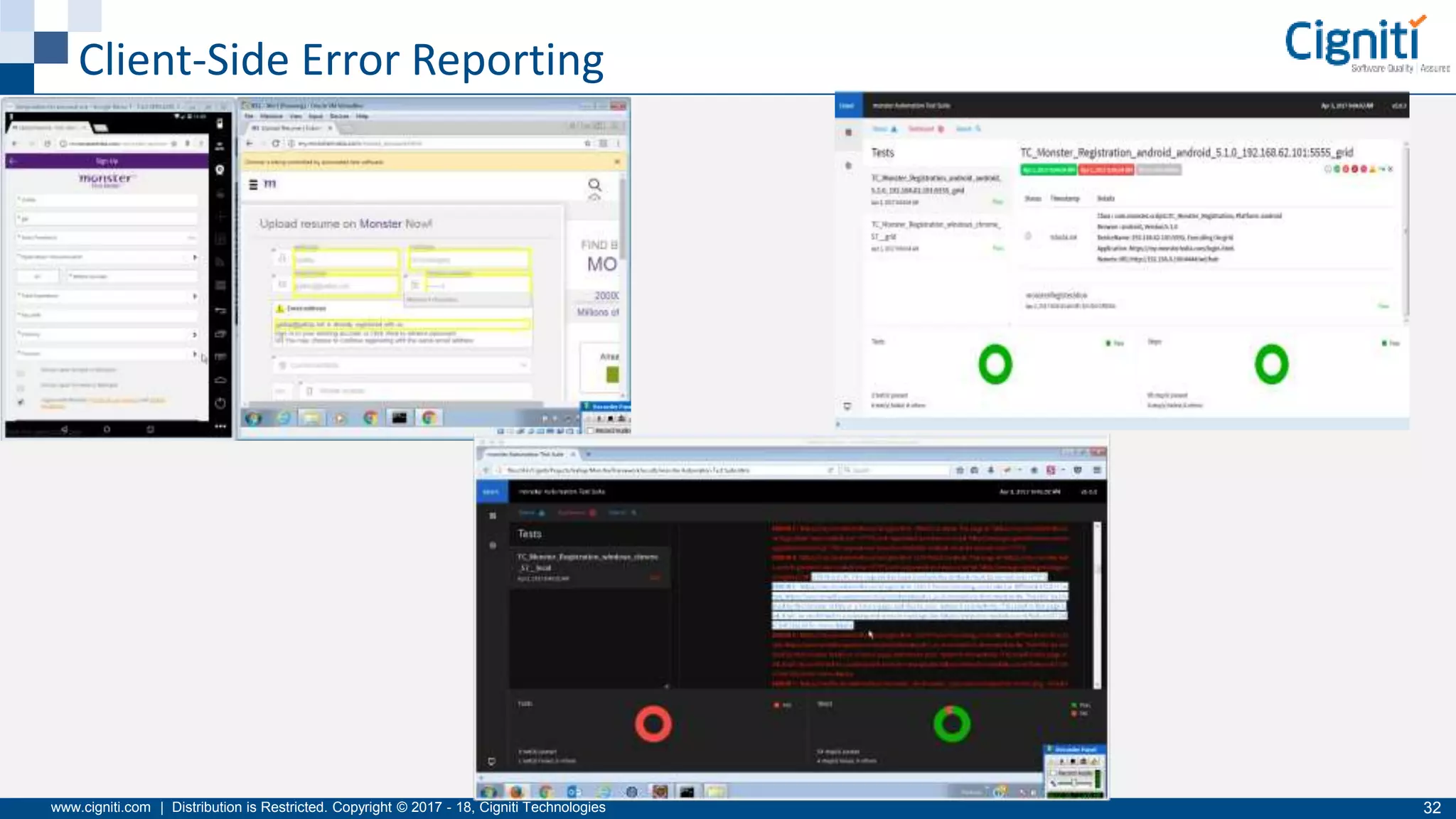
Client-Side Error Reporting
Q&A
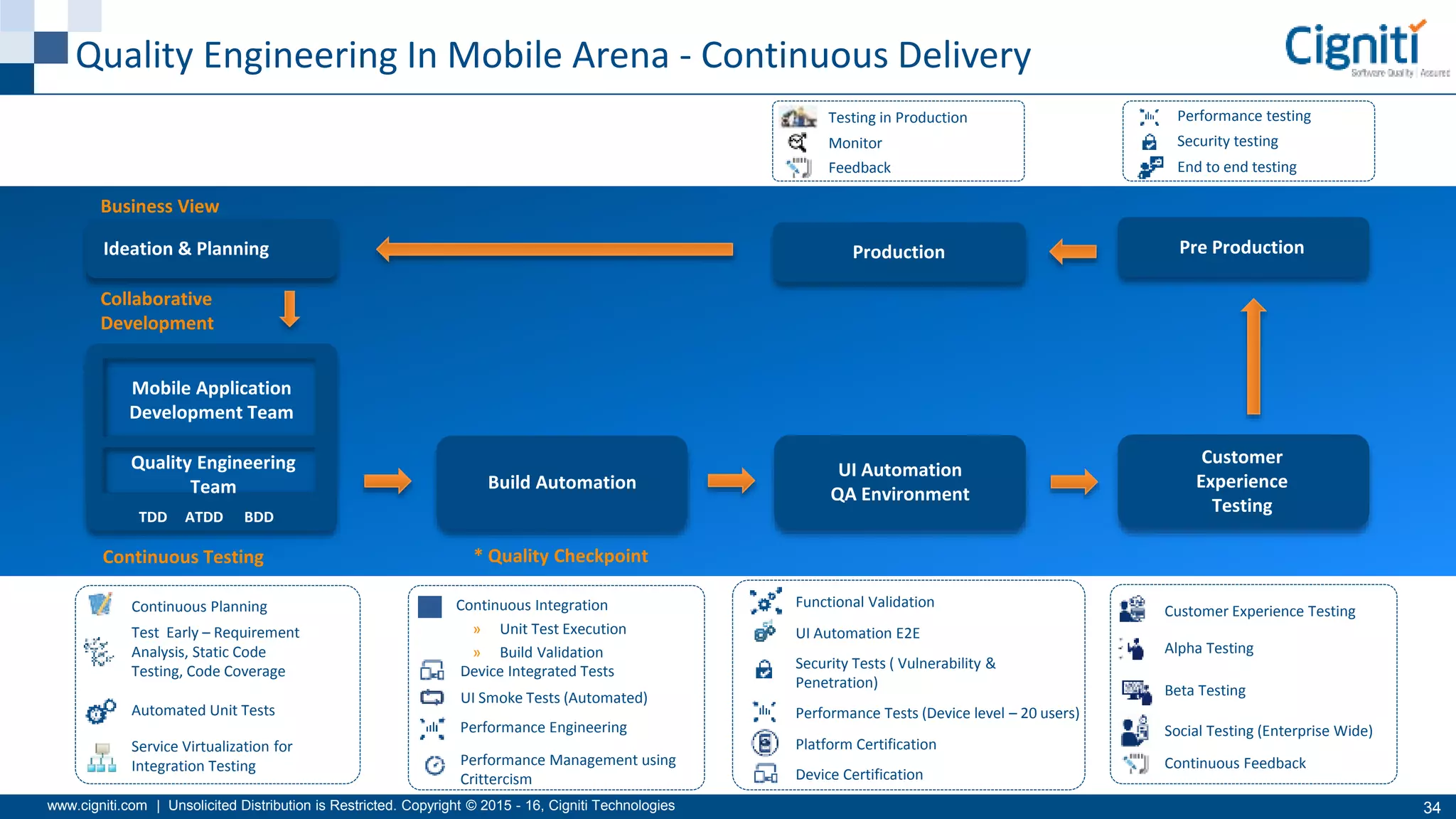
www.cigniti.com | Unsolicited Distribution is Restricted. Copyright © 2015 - 16, Cigniti Technologies 34
Continuous Testing * Quality Checkpoint
Business View
Collaborative
Development
Ideation & Planning
Mobile Application
Development Team
Quality Engineering
Team
TDD ATDD BDD
Build Automation
UI Automation
QA Environment
Customer
Experience
Testing
Pre ProductionProduction
Quality Engineering In Mobile Arena - Continuous Delivery
Continuous Integration
» Unit Test Execution
» Build Validation
Device Integrated Tests
UI Smoke Tests (Automated)
Performance Engineering
Performance Management using
Crittercism
Functional Validation
UI Automation E2E
Security Tests ( Vulnerability &
Penetration)
Performance Tests (Device level – 20 users)
Platform Certification
Device Certification
Customer Experience Testing
Alpha Testing
Beta Testing
Social Testing (Enterprise Wide)
Continuous Feedback
Continuous Planning
Test Early – Requirement
Analysis, Static Code
Testing, Code Coverage
Automated Unit Tests
Service Virtualization for
Integration Testing
Testing in Production
Monitor
Feedback
Performance testing
Security testing
End to end testing

Mobile Automation and Best Practices - Siva Sundararaman

  • 1.
    www.cigniti.com | Distributionis Restricted. Copyright © 2017 - 18, Cigniti Technologies 1 Mobile Automation and Best Practices - Siva Sundararaman, Senior Director - Enterprise Solutions Group
  • 2.
  • 3.
    www.cigniti.com | Distributionis Restricted. Copyright © 2017 - 18, Cigniti Technologies 3 Global Digital Snapshot
  • 4.
    www.cigniti.com | Distributionis Restricted. Copyright © 2017 - 18, Cigniti Technologies 4 Analysts speak about going Mobile Industry Stats by Domain/ Technology Analysts Speak Analysts indicate that there is $1.5 trillion of value at stake for logistics players and a further $2.4 trillion worth of societal benefits as a result of digital transformation of the industry up until 2025 The electricity sector is ripe for realizing value from rapid digital transformation; It is estimated that there is $1.3 trillion of value to be captured globally from 2016-2025. Analysts indicate that there is $0.67 trillion of value at stake for automotive players and a further $3.1 trillion of societal benefits as a result of digital transformation of the industry until 2025. E-Commerce penetration is forecast to grow strongly from 7% in 2015 to 17% in 2025 21 Billion IoT Devices To Invade By 2020 27% percent of senior executives rate digital transformation as now being “a matter of survival” Embedded data analytics will provide U.S. enterprises $60+ billion in annual savings by 2020. By the End of 2017, Two-Thirds of the CEOs of the G2000 will Have Digital Transformation at the Center of Their Corporate Strategy
  • 5.
    www.cigniti.com | Distributionis Restricted. Copyright © 2017 - 18, Cigniti Technologies 5 Role of Mobile Devices in Digital Transformation Social Mobile IoT Analytics Data science Automation Transforming Healthcare : Take a look at Digital Health! Mobile devices Wearable Customer Health Monitoring Applications Cloud Data Segregation Doctor’s Office Pharmacy Drug Suggestion Improvements / Feedback IoT Cloud Analytics Data Analysis
  • 6.
    www.cigniti.com | Distributionis Restricted. Copyright © 2017 - 18, Cigniti Technologies 6 Key Elements in Digital – Testing IoT , The Digital Way Connect Devices used by End Users Application Backend Infrastructure Sample Business Cases Other devices Multiple Connected Devices 1 2 3 » Control » Regulate » Operate » Credentials Validations » Unique ID registration Home Electronics Car Appliances Medical Devices Healthcare Apps Usability Testing Performance Testing Reliability Testing Security Testing • Controlling a Home Appliance from a Mobile App – A scenario where a media streaming device would be controlled from a mobile device and in-turn the streaming device is connected to the Wifi Router . Here , Multiple devices are connected together and the above mentioned testing categories should ensure end-user seamless experience • Starting a Car Engine from a Mobile App – A scenario where a mobile app may used for starting a car . This would need registering the car with mobile app using unique identification and when every time this activity has to be done , the app needs to interact with the backbone systems for validation which then initiates a trigger . All this needs to happen in microseconds where extensive performance & reliability testing is required for seamless customer experience High Priority Trends
  • 7.
    www.cigniti.com | Distributionis Restricted. Copyright © 2017 - 18, Cigniti Technologies 7 Travel & Hospitality Industry Predictive analysis • Personalised preferences • Custom Offers • Price Forecasting The role of wearable & mobile Devices • Check in through your smart watch / phone • Keyless Room Entry • Placing special requests before boarding the hotel Artificial Intelligence & Sensors • Controlling Lights, AC through mobile apps • Interaction through TVs’ How does it translate in real world? Major Retailers across the globe Go Digital Omni channel support Experience the intelligence, Connected applications, Suggestion of personalized preferences & much more High-End Digital Stores • Virtual Mirrors • Interactive Trial Rooms • Intelligent Shelves • Contactless payment Mobile devices enablement, shopping through devices of your choice When they Go DigitalWhen they
  • 8.
    www.cigniti.com | Distributionis Restricted. Copyright © 2017 - 18, Cigniti Technologies 8 The Digital Assurance Engineering (DAE) Platform Testing Spectrum Process Enablers Customer Sentiment Analysis Customer Wish & Pain points Social Analysis Usability Creativity & Content Accessibility Internationalization Performance & Security Omni Channel & Multichannel Agile + led by DevOps Lifecycle Automation Cyclical Non-Functional Testing Effective Data Analytics Operational Governance Technology Focus Web & Mobile IoT &Connected Devices Analytics Cloud
  • 9.
    Why do MobileApps Fail?
  • 10.
    www.cigniti.com | Distributionis Restricted. Copyright © 2017 - 18, Cigniti Technologies 10 Why do Mobile Apps Fail? Mobile Apps continue to flood the market
  • 11.
  • 12.
    www.cigniti.com | Distributionis Restricted. Copyright © 2017 - 18, Cigniti Technologies 12 Leverage Automated Testing Parallel test execution on diversified Devices Better Platform Coverage Improved Efficiency/ Resource utilization Increased device coverage Consistency of testing process Faster Release Cycles Why Automated Testing? Comprehensive Regression Testing Better Test Coverage
  • 13.
    www.cigniti.com | Distributionis Restricted. Copyright © 2017 - 18, Cigniti Technologies 13 Mobile Automation Vs Web Automation Web Mobile Feature Parity  Targeted for specific platforms and account for the features in one user world, such as the browser that makes easy to develop the code  Mobile applications take complexity of supported varied device platforms to the next level by adding user communities’ expectations. This makes which makes the development of code difficult  Ex: Apple and android users have different expectations for how their apps will work on various devices Complex user interaction  User interaction are pretty much limited to mouse and keyboard.  User interactions with complex gestures, eye movement, direction, tilt, movement, acceleration, GPS coordinates, surroundings, sound, and so on Test Strategy  Testing on the Web, test strategy usually takes into account the different supported browsers and maybe the underlying operating systems (OS)  With mobile, the consideration should include the OS versions for each platform, and device types.  Ex: Apple is pretty stable and their user community is up-to-date on the OS, Android can have a ton of different configurations that the user community supports. Automating with Page Object Locators  Only one set of code to support one set of object locator  When writing automation on a web application, we need to find the page object locators.  Only need to write code to support one set of locators.  Two different dev teams to determine the locators If you are developing automated tests for mobile apps  The features might not be in sync, causing testers to write multiple tests for similar features.
  • 14.
    www.cigniti.com | Distributionis Restricted. Copyright © 2017 - 18, Cigniti Technologies 14 Top 10 Challenges of Mobile Testing , Automated Reporting Challenges App Performance Localization challenges Location-based Testing Security is the Key Platform and Device Fragmentation User Experience and Usability of Applications Device Interrupt Simulation Connected Device Testing System Integration Complexities
  • 15.
    Top Challenges in ImplementingMobile Test Automation & How To address them
  • 16.
    www.cigniti.com | Distributionis Restricted. Copyright © 2017 - 18, Cigniti Technologies 16 1. Platform and Device Coverage Disney’s Omni-channel experience starts with your initial experience on Disney’s beautiful, mobile-responsive website. Even their trip-planning website works well on mobile. Once you’ve booked a trip, you can use the My Disney Experience tool to plan your entire trip, from where you’ll dine to securing your Fast Pass. In the park, you can use your mobile app to locate the attractions you want to see, as well as view the estimated wait time for each of them. The imaginative company takes it one step further, though, with the release of its Magic Band program. This tool acts as a hotel room key, photo storage device for any pictures taken of you with Disney characters, and a food ordering tool. Plus, it even has Fast Pass integration to keep your vacation moving.
  • 17.
    www.cigniti.com | Distributionis Restricted. Copyright © 2017 - 18, Cigniti Technologies 17 How Automated Testing helps in Platform/Device Coverage » The mobile application ecosystem is very dynamic, but also suffers from both software and hardware fragmentation. » OEMs are launching new devices and new customizations that can break your application, and new OS versions are also delivered every now and then » To meet the market and device compatibility it is recommended to test the application against these devices. » And for this automated testing has you covered – you have already those test cases/scripts/code that is usable again.
  • 18.
    www.cigniti.com | Distributionis Restricted. Copyright © 2017 - 18, Cigniti Technologies 18 2. User Experience Bank of America takes their Omni-channel development seriously. As one of the biggest brands in their industry, they’re setting the standard for a dynamic experience, which -- as of today -- allows for everything from check depositing to appointment scheduling to be handled by the company’s mobile and desktop apps. Sentiments Social Analysis Customer Attitude Emotions Opinion Media Hunting Survey Enablement Results Consolidation Scoring User Emotions:
  • 19.
    www.cigniti.com | Distributionis Restricted. Copyright © 2017 - 18, Cigniti Technologies 19 User Experience & Usability Testing Usability Analysis / Testing Product Exploration Prioritization of Key Scenarios Creation of workflows Execution Scoring Remediation Content Accuracy Visual Attraction Ease of UseSimplicity Comparative Analysis Multiple Versions A/B Testing Accessibility Portrait/Landscape Mode:
  • 20.
    www.cigniti.com | Distributionis Restricted. Copyright © 2017 - 18, Cigniti Technologies 20 3. Device Interrupt Simulation A phone call/Facetime that you attend while you are reading a digital book on iBooks (or similar application). When the user answers a phone, iBooks waits until it is done and then resumes when the call ends. Automated test tools can provide a great deal of help in simulating interruptions.  MAutomate is a record and playback tool for mobile application testing. Testers are able to record a clean functional test, without the interrupts, to be executed on target devices. Then, using the tool's wizard, the tester can insert interrupts at any stage in the test script without writing a single line of code. The tool is able to simulate the specified various interrupts on the device under test and then send the screenshot results back to the tool's Web interface.  UI AutoMonkey (for iOS) and The Monkey (for Android) perform "Monkey testing" to conduct testing in a random fashion, or generating random keystrokes or events to see how the system under test reacts. Using The Monkey mobile test tool, the tester is able to send a pseudo-random stream of user events to an emulator or device and then validate for appropriate behavior or report on errors or unhandled exceptions.
  • 21.
    www.cigniti.com | Distributionis Restricted. Copyright © 2017 - 18, Cigniti Technologies 21 4. End-to-End System Testing Oasis is a UK fashion retailer that is fusing their ecommerce site, mobile app, and brick-and-mortar stores into a simple shopping experience. If you walk into one of their stores, you’ll find sales associates armed with iPads that are available to give you on-the-spot, accurate, and up- to-date product information. The iPad also acts as a cash register, making it easy for associates to ring you up from anywhere in the store. And the cherry on top? If it appears that something is out of stock, the staff can instantly place an online order for you to have the item shipped directly to your home.
  • 22.
    www.cigniti.com | Distributionis Restricted. Copyright © 2017 - 18, Cigniti Technologies 22 App2 Database Legacy App Consumer Layer Web services Web services Middleware App1 Apps, DB, Legacy Layer » Integration testing of Mobile Apps with backend systems (remove all stubbed components) » Validation of all the Mobile UI and Functionality with real systems 2 E2E Testing » Web Services testing for project specific functionality » Web Services testing for all possible positive and negative scenarios based on the Interface Contract documents » Web Services Testing at Unit level with schema validation, data formats, connectivity tests 1b Web Services Testing » Mobile Application navigation testing with wireframes documents and backend stubbed » Mobile Application UI testing with available wireframes 1a Mobile TestingSample view of IT Architecture Proposed Test Model End-to-End Testing
  • 23.
    www.cigniti.com | Distributionis Restricted. Copyright © 2017 - 18, Cigniti Technologies 23 5. Location Based Testing Parkway Parade is a shopping mall which partnered with Sprooki to encourage retailers and shoppers alike to pre-purchase using smartphones. Customers receive proximity-based alerts of the shopping mall then as well as receiving alerts and browsing products and offers, customers can purchase the products and services on the spot, through their phone and redeem immediately at participating stores. Use location faking tools to test your app in a location where your intended user base would be using the app. Fake GPS Location and Lockito are some location faking apps for Android.
  • 24.
    www.cigniti.com | Distributionis Restricted. Copyright © 2017 - 18, Cigniti Technologies 24 6. Localization Testing If a mobile app is designed for the USA, then the time format should be changed according to the USA Standard time. Language and currency format should also follow USA standards. Key Areas: • Date and time formats • Currency used • Keyboard usage • Sorting, aligning and collating data • Colors schemes, symbols and icons • Text and graphics which, in a given culture, may be viewed as sensitive or can be misinterpreted. • Diverse legal requirements
  • 25.
    www.cigniti.com | Distributionis Restricted. Copyright © 2017 - 18, Cigniti Technologies 25 Localization Testing Approach Use UTF-8 and locale class of Java: Use Google Translate headless to translate the content into desired language and verify against baseline language file: Application is checked to assure that it behaves according to the local culture or settings.
  • 26.
    www.cigniti.com | Distributionis Restricted. Copyright © 2017 - 18, Cigniti Technologies 26 7. App Performance App performance can impact users’ devices and experiences. Mobile application performance testing allows you to: • Measure effects on device CPU, memory, battery, location, and network bytes sent/received • Compare baseline performance to the current build to catch memory leaks, a slow loading image, or new functionality that requires too many network calls • View trends over time to identify bugs and mobile performance deltas from build to build To keep up with testing cycles and identify inconsistencies, you can automate mobile testing and integrate it into your continuous integration testing process. By building a core set of tests quickly, you can focus on analyzing the results to identify root causes of errors.
  • 27.
    www.cigniti.com | Distributionis Restricted. Copyright © 2017 - 18, Cigniti Technologies 27 8. Mobile Application Security Testing Security Index Business Impact Technical Impact Current Risk Level Reporting Top 10 Vulnerabilities Weak Server Side Controls Insecure Data Storage Insufficient Transport Layer Protection Unintended Data Leakage Poor Authorisation and Authentication Broken Cryptography Client Side Injection Security Decisions via Untrusted Inputs Improper Session Handling Lack of Binary Protections Tools OWASP ReportingInformation Gathering Dynamic Analysis Static Analysis Focus Areas » Network Attacks » Server Side Analysis » Client Side Attacks » Injection & Data Flow Analysis » Jail-breaking/rooting » Penetration Testing » Traffic Analyzers » API/Service Attacks » Backend Server » Database Server » Cross Site Scripting » Data Privacy » Buffer Overflows Test Approach Reporting Dedexer Clang Static analyzer FindBugs™
  • 28.
    www.cigniti.com | Distributionis Restricted. Copyright © 2017 - 18, Cigniti Technologies 28 Security Testing Build Integration Strategy I D E (Technology Agnostic) S V N Code Repository Secure code scan Web application security testing Fortify SCA Jenkins trigger source code for secure code scan Fortify SSC Reporting tool Build Server High Secured Code HP Web Inspect HP ALM 1 QA Activities Dev Activities 2 3 4 5 6 7 8 94.a For dev team Remediation 1 2 1 2 3 4 4.a 5 6 7 8 9 Jenkins trigger source code for secure code scan Jenkins trigger source code to fortify SCA for secure code scan Fortify SCA perform code scan and send results to Fortify SSC The vulnerabilities will be pushed to HP ALM for dev remediation Developer fix code as per remediation plan of both SAST and DAST Commit code to SVN Compile code to Build Server Jenkin Trigger build for DAST scan – Major release 1 2HP Web Inspect publish results to SSC Developer fix code as per remediation plan Unlimited SAST - Rescan Unlimited DAST - Rescan Remediation
  • 29.
    www.cigniti.com | Distributionis Restricted. Copyright © 2017 - 18, Cigniti Technologies 29 9. Connected Devices Workflows BLE PLC 1 Engineering App Workflows • Discover and configure • Define name • Define group & zone • Test individual and group commands 2 SNAP Testing Workflows • Test Board to SNAP communication • SNAP enabled device to other device communication BLE PLC 3 Customer App workflows with UI • Discover and configure • Define name • Define group & zone • Test individual and group commands (Includes BLE and PLC without SNAP) PLCBLE
  • 30.
    www.cigniti.com | Distributionis Restricted. Copyright © 2017 - 18, Cigniti Technologies 30 Integrated Test Automation Framework – Accessory & Peripheral Testing Tools Automated Tests Test Input Data Launch Script Reporting Config. File Object Management Generic Utility Libraries Log Generator Dialog Handlers Application Specific Library Test Controller Web Accelerators Automated Scripts Gallop CI Framework Application Under Test Parallel Execution Application Under Test Parallel Execution Mobile Accelerators Data Driver 3rd Party Tools for Accessory & Peripheral Testing myBatteryLifeBattery Meter GSam Battery Monitor Battery Watch System Activity Monitor System Console Sensor Kinetics Prowl Phone Hardware Test Hardware Tools iPhone 3G/4G/iPod Touch testerFake Location Sensor Kinetics Fill Device Memory CPU Memory Monitor System Information SMS Gateway Antutu BenchmarkG-NetTrack Sensor Kinetics Charles Proxy tool Log Viewer
  • 31.
    www.cigniti.com | Distributionis Restricted. Copyright © 2017 - 18, Cigniti Technologies 31 10. Automated Reporting Benefits • The reporting from tools are not intuitive • Reporting frameworks like Extent can be integrated to provide more detailed reporting at all levels • Integrate plugins to report business & technical information (client side script errors, stack trace etc.) • Standardized test execution reporting in HTML/Excel formats with added screenshots for failures • Test Suite Level, Test Step Level and Screen Cap for proof of testing and easy reproduction Sample Report
  • 32.
    www.cigniti.com | Distributionis Restricted. Copyright © 2017 - 18, Cigniti Technologies 32 Client-Side Error Reporting
  • 33.
  • 34.
    www.cigniti.com | UnsolicitedDistribution is Restricted. Copyright © 2015 - 16, Cigniti Technologies 34 Continuous Testing * Quality Checkpoint Business View Collaborative Development Ideation & Planning Mobile Application Development Team Quality Engineering Team TDD ATDD BDD Build Automation UI Automation QA Environment Customer Experience Testing Pre ProductionProduction Quality Engineering In Mobile Arena - Continuous Delivery Continuous Integration » Unit Test Execution » Build Validation Device Integrated Tests UI Smoke Tests (Automated) Performance Engineering Performance Management using Crittercism Functional Validation UI Automation E2E Security Tests ( Vulnerability & Penetration) Performance Tests (Device level – 20 users) Platform Certification Device Certification Customer Experience Testing Alpha Testing Beta Testing Social Testing (Enterprise Wide) Continuous Feedback Continuous Planning Test Early – Requirement Analysis, Static Code Testing, Code Coverage Automated Unit Tests Service Virtualization for Integration Testing Testing in Production Monitor Feedback Performance testing Security testing End to end testing

Editor's Notes

  • #4 http://www.gartner.com/newsroom/id/3076817 http://www.gartner.com/newsroom/id/2654115
  • #20 Add ADA / Section 501 testing.
  • #23 Facebook Example
  • #26 Digital vandalism is becoming a real threat and with Internet of Things connecting the devices everywhere, every device on digital platform is going to get vulnerable to attack. Security testing is going to be of strategic importance in the age of IoT as organizations look to curb the digital attacks.