➜ https://tinyurl.com/madunit1
1
Mobile
Application
development
Unit 2
4
1. SDK provides a selection of tools required to build Android app
2. Android SDK contains several components like Platform Tools, Build Tools, SDK Tools,
Android Debug Bridge, and Android Emulator,
Android SDK
5
1. Android Studio
Android Development Tools
6
1. Eclipse
Android Development Tools
7
1. ADB
Android Development Tools
8
1. Fabric
Android Development Tools
9
1. Gamemaker
Android Development Tools
10
1. Genymotion
Android Development Tools
11
1. Gradle
Android Development Tools
12
1. IntelliJ IDEA
Android Development Tools
13
1. Instabug
Android Development Tools
14
1. Nimble Droid
Android Development Tools
15
1. Stetho
Android Development Tools
16
1. Hardware Profile
2. System Image
3. Storage Area
4. Skin
5. Other Properties
Android Virtual Device
17
1. A tool which lets you test the application without need to purchase a real device
2. To emulate different configurations by creating Android Virtual Devices
3. All the capabilities of a real device like incoming call, location, network speed, rotation,
google play store
4. Faster testing
5. Test on variety of variety of configurations
6. Each AVD is a independent device
Emulator
18
1. Stored image of an AVD, that preserves the state of the device
2. Waiting time for operating system and applications to restart is reduced
3. Same as SLEEP
4. Quick Boot Snapshot
5. Cold Boot
6. Separate for each AVD
Snapshots
19
1. It is an Android Virtual Machine optimized for Android Devices
2. Memory, Battery Life and Performance
3. Makes use of Memory Memory management and Multi Threading
4. Individual Process with its own instance of DVM
Dalvik Virtual Machine
20
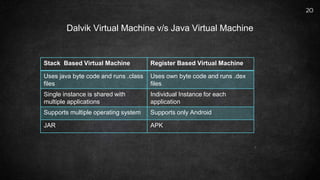
Dalvik Virtual Machine v/s Java Virtual Machine
Stack Based Virtual Machine Register Based Virtual Machine
Uses java byte code and runs .class
files
Uses own byte code and runs .dex
files
Single instance is shared with
multiple applications
Individual Instance for each
application
Supports multiple operating system Supports only Android
JAR APK
21
Official IDE for Android App Development
Flexible Gradle Based System
Fast and Rich Emulator
Unified Environment where you can develop for all Android Devices
Apply changes to push code and recourse changes to you running app without restarting you
app
Android Studio
22
Code templates and GitHub integration helps you build common app features and import
sample code
Extensive testing tools and frameworks
Link tools to catch performance, usability , version compatibility
Built in support for Google Cloud Platform , Google Cloud Messaging and App Engine
Android Studio
23
Download Android Studio
Run Set up
Configure SDK
Configure AVD
Steps to install

Mobile Applicaiton Development Unit 2.pptx