Welcome to Vibrant
Technologies and Computers
---------
Hibernate Training course
1
2
Contents
3
 What’s Android
 Android architecture
 Android software development
 ‘Hello World’ on Android
 More…
Contact Us On : vibranttechnologies.co.in
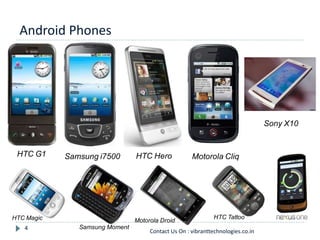
Android Phones
4
Motorola CliqHTC G1 HTC HeroSamsung i7500
Samsung Moment
Motorola DroidHTC Magic HTC Tattoo
Sony X10
Contact Us On : vibranttechnologies.co.in
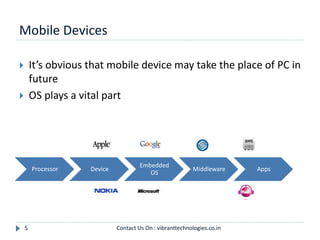
Mobile Devices
5
 It’s obvious that mobile device may take the place of PC in
future
 OS plays a vital part
Processor Device
Embedded
OS
Middleware Apps
Contact Us On : vibranttechnologies.co.in
6
OHA and Android
7
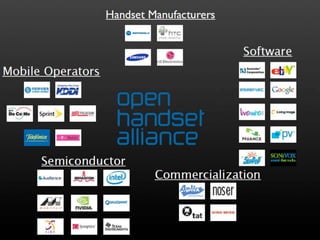
 OHA(Open Handset Alliance) is a group of 71 technology
and mobile companies, including Google, Intel, Dell, HTC
and China Mobile…
 OHA’s aim:
 accelerate innovation in mobile phones
 offer consumers a richer, less expensive, and better mobile
experience
 OHA developed Android™, the first complete, open, and
free mobile platform
 OHA was initially called up by Google, and Google is the
‘captain’
Contact Us On : vibranttechnologies.co.in
What’s Android
8
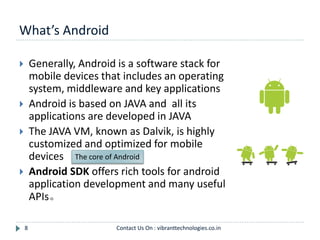
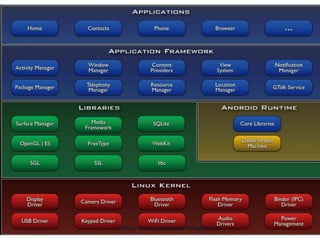
 Generally, Android is a software stack for
mobile devices that includes an operating
system, middleware and key applications
 Android is based on JAVA and all its
applications are developed in JAVA
 The JAVA VM, known as Dalvik, is highly
customized and optimized for mobile
devices
 Android SDK offers rich tools for android
application development and many useful
APIs。
The core of Android
Contact Us On : vibranttechnologies.co.in
Android Features #1
9
 Application framework enabling reuse and replacement
of components
 Optimized Java virtual machine: Dalvik
 Optimized Graphics Processing, supporting 2D and 3D
graphics(OpenGL ES 1.0 )
 Integrated open source web browser: WebKit
 SQLite for structured data storage
Contact Us On : vibranttechnologies.co.in
Android Features #2
10
 Multimedia capability, supporting varieties of audio,
video and still image formats
 GSM Telephony
 Bluetooth, EDGE, 3G and Wi-Fi support
 Camera, GPS, compass, accelerometer
and other sensors support
 Rich development environment, including an
emulator, debugging tools, memory probe tools, log
tools and powerful eclipse plugins
Hardware
dependent
Contact Us On : vibranttechnologies.co.in
11 Contact Us On : vibranttechnologies.co.in
Linux Kernel
12
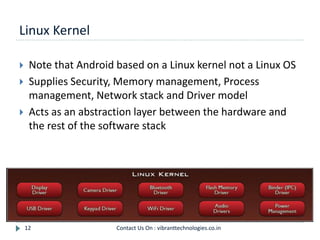
 Note that Android based on a Linux kernel not a Linux OS
 Supplies Security, Memory management, Process
management, Network stack and Driver model
 Acts as an abstraction layer between the hardware and
the rest of the software stack
Contact Us On : vibranttechnologies.co.in
Libraries
13
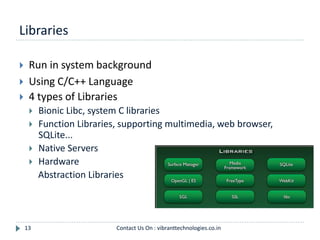
 Run in system background
 Using C/C++ Language
 4 types of Libraries
 Bionic Libc, system C libraries
 Function Libraries, supporting multimedia, web browser,
SQLite...
 Native Servers
 Hardware
Abstraction Libraries
Contact Us On : vibranttechnologies.co.in
Core Libraries
14
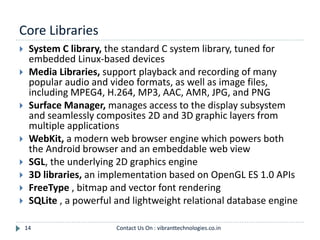
 System C library, the standard C system library, tuned for
embedded Linux-based devices
 Media Libraries, support playback and recording of many
popular audio and video formats, as well as image files,
including MPEG4, H.264, MP3, AAC, AMR, JPG, and PNG
 Surface Manager, manages access to the display subsystem
and seamlessly composites 2D and 3D graphic layers from
multiple applications
 WebKit, a modern web browser engine which powers both
the Android browser and an embeddable web view
 SGL, the underlying 2D graphics engine
 3D libraries, an implementation based on OpenGL ES 1.0 APIs
 FreeType , bitmap and vector font rendering
 SQLite , a powerful and lightweight relational database engine
Contact Us On : vibranttechnologies.co.in
Andoid Runtime
15
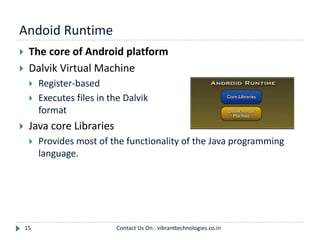
 The core of Android platform
 Dalvik Virtual Machine
 Register-based
 Executes files in the Dalvik Executable (.dex)
format
 Java core Libraries
 Provides most of the functionality of the Java programming
language.
Contact Us On : vibranttechnologies.co.in
Android Runtime (cont.)
16
 The functions of Java core libraries rely on the Dalvik VM
and the underlying Linux kernel
 Multiple Dalvik VMs may run at the same time
 Every Android application runs in its own process, with its
own instance of the Dalvik virtual machine
 The "dx" tool in Android SDK can transform compiled JAVA
class into the .dex format
Contact Us On : vibranttechnologies.co.in
Dalvik Virtual Machine
17
 Android custom implementation virtual machine
 Provides application portability and runtime consistency
 Runs optimized file format (.dex) and Dalvik bytecode
 Java .class / .jar files converted to .dex at build time
 Designed for embedded environment
 Supports multiple virtual machine processes per device
 Highly CPU-optimized bytecode interpreter
 Efficiently Using runtime memory
 Core Libraries
 Core APIs for Java language provide a powerful, yet simple and
familiar development platform
Contact Us On : vibranttechnologies.co.in
DVM vs. JVM
18
 DVM
 Google
 Dalvik executable
 Only supports a subset of standard Java Library
 JVM
 Sun
 Java bytecode
 Some worries that Java world may be divided into
different communities, each has its own Java standard
Contact Us On : vibranttechnologies.co.in
Application Framework
19
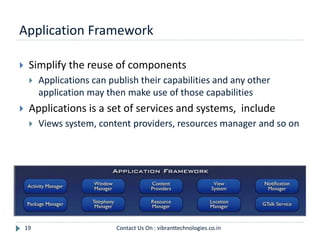
 Simplify the reuse of components
 Applications can publish their capabilities and any other
application may then make use of those capabilities
 Applications is a set of services and systems, include
 Views system, content providers, resources manager and so on
Contact Us On : vibranttechnologies.co.in
Application Framework (cont.)
20
 Activity Manager, manages the lifecycle of applications
and provides a common navigation backstack
 Notification Manager, enables all applications to display
custom alerts in the status bar
 Resource Manager, providing access to non-code
resources such as localized strings, graphics, and layout
files
 Content Providers, access data from other applications
(such as Contacts), or to share their own data
 Views, used to build an application, including lists, grids,
text boxes, buttons, and even an embeddable web
browser
Contact Us On : vibranttechnologies.co.in
Applications
21
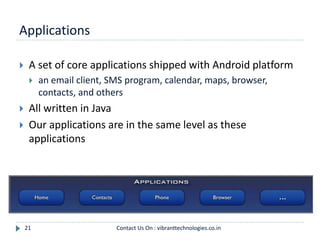
 A set of core applications shipped with Android platform
 an email client, SMS program, calendar, maps, browser,
contacts, and others
 All written in Java
 Our applications are in the same level as these
applications
Contact Us On : vibranttechnologies.co.in
Development Environment
 IDE – Eclipse
 Eclipse plug-in - ADT
 Software Development Kit (SDK)
 Android Emulator
 Debugger
Contact Us On : vibranttechnologies.co.in22
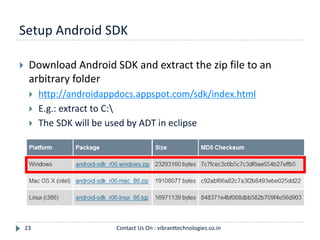
Setup Android SDK
23
 Download Android SDK and extract the zip file to an
arbitrary folder
 http://androidappdocs.appspot.com/sdk/index.html
 E.g.: extract to C:
 The SDK will be used by ADT in eclipse
Contact Us On : vibranttechnologies.co.in
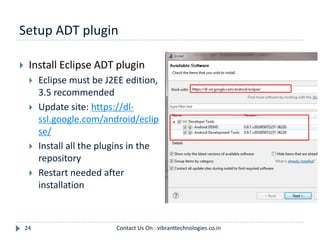
Setup ADT plugin
24
 Install Eclipse ADT plugin
 Eclipse must be J2EE edition,
3.5 recommended
 Update site: https://dl-
ssl.google.com/android/eclip
se/
 Install all the plugins in the
repository
 Restart needed after
installation
Contact Us On : vibranttechnologies.co.in
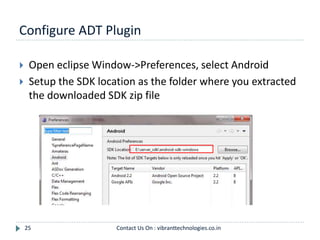
Configure ADT Plugin
25
 Open eclipse Window->Preferences, select Android
 Setup the SDK location as the folder where you extracted
the downloaded SDK zip file
Contact Us On : vibranttechnologies.co.in
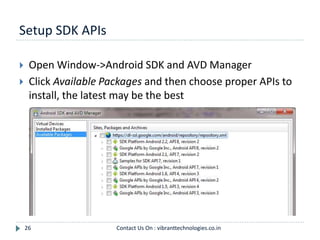
Setup SDK APIs
26
 Open Window->Android SDK and AVD Manager
 Click Available Packages and then choose proper APIs to
install, the latest may be the best
Contact Us On : vibranttechnologies.co.in
Setup Emulators
27
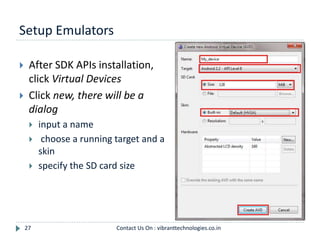
 After SDK APIs installation,
click Virtual Devices
 Click new, there will be a
dialog
 input a name
 choose a running target and a
skin
 specify the SD card size
Contact Us On : vibranttechnologies.co.in
Ready…
28
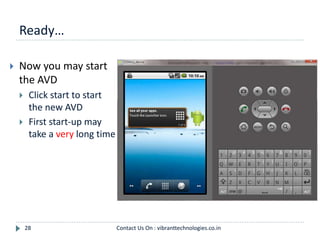
 Now you may start
the AVD
 Click start to start
the new AVD
 First start-up may
take a very long time
Contact Us On : vibranttechnologies.co.in
Create a new Android Project
29
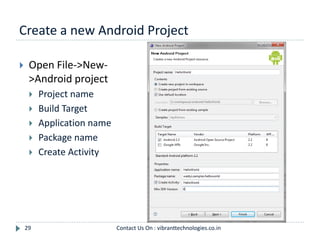
 Open File->New-
>Android project
 Project name
 Build Target
 Application name
 Package name
 Create Activity
Contact Us On : vibranttechnologies.co.in
Hello World Project
30
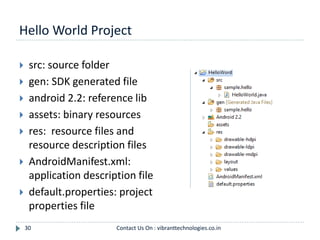
 src: source folder
 gen: SDK generated file
 android 2.2: reference lib
 assets: binary resources
 res: resource files and
resource description files
 AndroidManifest.xml:
application description file
 default.properties: project
properties file
Contact Us On : vibranttechnologies.co.in
Say Hello World
31
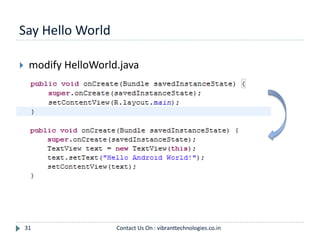
 modify HelloWorld.java
Contact Us On : vibranttechnologies.co.in
Run Hello World
32
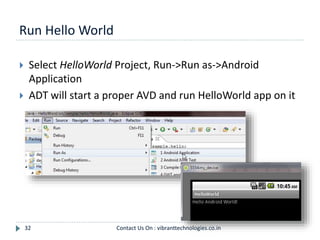
 Select HelloWorld Project, Run->Run as->Android
Application
 ADT will start a proper AVD and run HelloWorld app on it
Contact Us On : vibranttechnologies.co.in
Behind HelloWorld #1
33
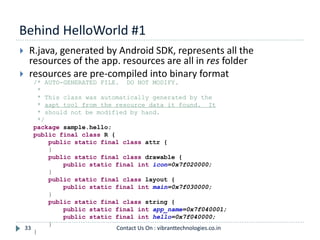
 R.java, generated by Android SDK, represents all the
resources of the app. resources are all in res folder
 resources are pre-compiled into binary format
/* AUTO-GENERATED FILE. DO NOT MODIFY.
*
* This class was automatically generated by the
* aapt tool from the resource data it found. It
* should not be modified by hand.
*/
package sample.hello;
public final class R {
public static final class attr {
}
public static final class drawable {
public static final int icon=0x7f020000;
}
public static final class layout {
public static final int main=0x7f030000;
}
public static final class string {
public static final int app_name=0x7f040001;
public static final int hello=0x7f040000;
}
}
Contact Us On : vibranttechnologies.co.in
Linear Layout
Behind HelloWorld #2
34
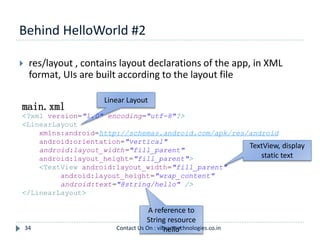
 res/layout , contains layout declarations of the app, in XML
format, UIs are built according to the layout file
main.xml
<?xml version="1.0" encoding="utf-8"?>
<LinearLayout
xmlns:android=http://schemas.android.com/apk/res/android
android:orientation="vertical"
android:layout_width="fill_parent"
android:layout_height="fill_parent">
<TextView android:layout_width="fill_parent"
android:layout_height="wrap_content"
android:text="@string/hello" />
</LinearLayout>
TextView, display
static text
A reference to
String resource
‘hello’Contact Us On : vibranttechnologies.co.in
referenced in
res/layout/mai
n.xml
Behind HelloWorld #3
35
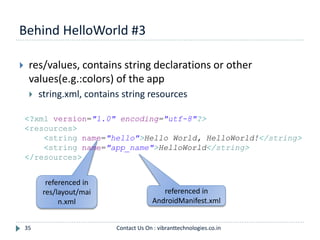
 res/values, contains string declarations or other
values(e.g.:colors) of the app
 string.xml, contains string resources
<?xml version="1.0" encoding="utf-8"?>
<resources>
<string name="hello">Hello World, HelloWorld!</string>
<string name="app_name">HelloWorld</string>
</resources>
referenced in
AndroidManifest.xml
Contact Us On : vibranttechnologies.co.in
Behind HelloWorld #4
36
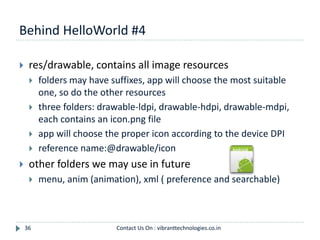
 res/drawable, contains all image resources
 folders may have suffixes, app will choose the most suitable
one, so do the other resources
 three folders: drawable-ldpi, drawable-hdpi, drawable-mdpi,
each contains an icon.png file
 app will choose the proper icon according to the device DPI
 reference name:@drawable/icon
 other folders we may use in future
 menu, anim (animation), xml ( preference and searchable)
Contact Us On : vibranttechnologies.co.in
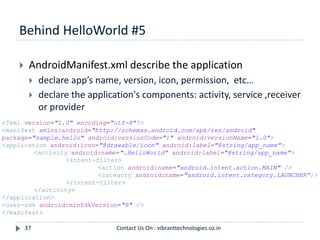
Behind HelloWorld #5
37
 AndroidManifest.xml describe the application
 declare app’s name, version, icon, permission, etc…
 declare the application's components: activity, service ,receiver
or provider
<?xml version="1.0" encoding="utf-8"?>
<manifest xmlns:android="http://schemas.android.com/apk/res/android"
package="sample.hello" android:versionCode="1" android:versionName="1.0">
<application android:icon="@drawable/icon" android:label="@string/app_name">
<activity android:name=".HelloWorld" android:label="@string/app_name">
<intent-filter>
<action android:name="android.intent.action.MAIN" />
<category android:name="android.intent.category.LAUNCHER”/>
</intent-filter>
</activity>
</application>
<uses-sdk android:minSdkVersion="8" />
</manifest>
Contact Us On : vibranttechnologies.co.in
Core Components-Activity #1
38
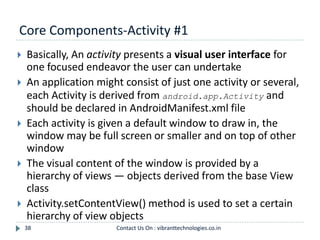
 Basically, An activity presents a visual user interface for
one focused endeavor the user can undertake
 An application might consist of just one activity or several,
each Activity is derived from android.app.Activity and
should be declared in AndroidManifest.xml file
 Each activity is given a default window to draw in, the
window may be full screen or smaller and on top of other
window
 The visual content of the window is provided by a
hierarchy of views — objects derived from the base View
class
 Activity.setContentView() method is used to set a certain
hierarchy of view objects
Contact Us On : vibranttechnologies.co.in
Core Components-Activity #2
39
 Activities are activated by asynchronous messages called
intents
 An intent is an Intent object that holds the content of the message
 The action being requested or the URI of the data to act on
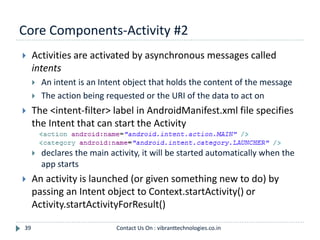
 The <intent-filter> label in AndroidManifest.xml file specifies
the Intent that can start the Activity
 declares the main activity, it will be started automatically when the
app starts
 An activity is launched (or given something new to do) by
passing an Intent object to Context.startActivity() or
Activity.startActivityForResult()
Contact Us On : vibranttechnologies.co.in
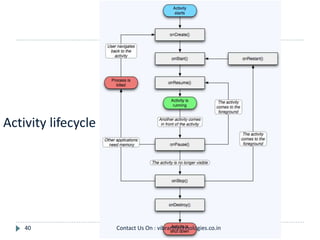
Activity lifecycle
40 Contact Us On : vibranttechnologies.co.in
Other Core Components
41
 Service
 A service doesn't have a visual user interface, runs in the
background for a period of time
 Broadcast receivers
 a component that does nothing but receive and react to
broadcast announcements
 Content providers
 A content provider makes a specific set of the application's
data available to other applications.
 The data can be stored in the file system, in an SQLite database,
or in any other manner that makes sense
Contact Us On : vibranttechnologies.co.in
Beyond HelloWorld #1
42
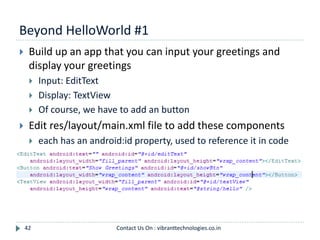
 Build up an app that you can input your greetings and
display your greetings
 Input: EditText
 Display: TextView
 Of course, we have to add an button
 Edit res/layout/main.xml file to add these components
 each has an android:id property, used to reference it in code
Contact Us On : vibranttechnologies.co.in
Beyond HelloWorld #2
43
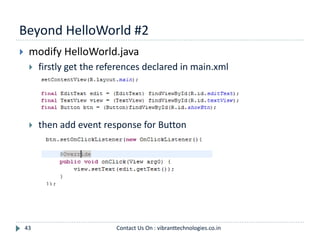
 modify HelloWorld.java
 firstly get the references declared in main.xml
 then add event response for Button
Contact Us On : vibranttechnologies.co.in
Beyond HelloWorld #3
44
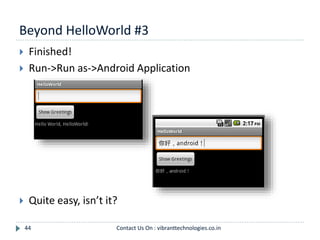
 Finished!
 Run->Run as->Android Application
 Quite easy, isn’t it?
Contact Us On : vibranttechnologies.co.in
Thank You
45 Contact Us On : vibranttechnologies.co.in

Android development tutorial

  • 1.
    Welcome to Vibrant Technologiesand Computers --------- Hibernate Training course 1
  • 2.
  • 3.
    Contents 3  What’s Android Android architecture  Android software development  ‘Hello World’ on Android  More… Contact Us On : vibranttechnologies.co.in
  • 4.
    Android Phones 4 Motorola CliqHTCG1 HTC HeroSamsung i7500 Samsung Moment Motorola DroidHTC Magic HTC Tattoo Sony X10 Contact Us On : vibranttechnologies.co.in
  • 5.
    Mobile Devices 5  It’sobvious that mobile device may take the place of PC in future  OS plays a vital part Processor Device Embedded OS Middleware Apps Contact Us On : vibranttechnologies.co.in
  • 6.
  • 7.
    OHA and Android 7 OHA(Open Handset Alliance) is a group of 71 technology and mobile companies, including Google, Intel, Dell, HTC and China Mobile…  OHA’s aim:  accelerate innovation in mobile phones  offer consumers a richer, less expensive, and better mobile experience  OHA developed Android™, the first complete, open, and free mobile platform  OHA was initially called up by Google, and Google is the ‘captain’ Contact Us On : vibranttechnologies.co.in
  • 8.
    What’s Android 8  Generally,Android is a software stack for mobile devices that includes an operating system, middleware and key applications  Android is based on JAVA and all its applications are developed in JAVA  The JAVA VM, known as Dalvik, is highly customized and optimized for mobile devices  Android SDK offers rich tools for android application development and many useful APIs。 The core of Android Contact Us On : vibranttechnologies.co.in
  • 9.
    Android Features #1 9 Application framework enabling reuse and replacement of components  Optimized Java virtual machine: Dalvik  Optimized Graphics Processing, supporting 2D and 3D graphics(OpenGL ES 1.0 )  Integrated open source web browser: WebKit  SQLite for structured data storage Contact Us On : vibranttechnologies.co.in
  • 10.
    Android Features #2 10 Multimedia capability, supporting varieties of audio, video and still image formats  GSM Telephony  Bluetooth, EDGE, 3G and Wi-Fi support  Camera, GPS, compass, accelerometer and other sensors support  Rich development environment, including an emulator, debugging tools, memory probe tools, log tools and powerful eclipse plugins Hardware dependent Contact Us On : vibranttechnologies.co.in
  • 11.
    11 Contact UsOn : vibranttechnologies.co.in
  • 12.
    Linux Kernel 12  Notethat Android based on a Linux kernel not a Linux OS  Supplies Security, Memory management, Process management, Network stack and Driver model  Acts as an abstraction layer between the hardware and the rest of the software stack Contact Us On : vibranttechnologies.co.in
  • 13.
    Libraries 13  Run insystem background  Using C/C++ Language  4 types of Libraries  Bionic Libc, system C libraries  Function Libraries, supporting multimedia, web browser, SQLite...  Native Servers  Hardware Abstraction Libraries Contact Us On : vibranttechnologies.co.in
  • 14.
    Core Libraries 14  SystemC library, the standard C system library, tuned for embedded Linux-based devices  Media Libraries, support playback and recording of many popular audio and video formats, as well as image files, including MPEG4, H.264, MP3, AAC, AMR, JPG, and PNG  Surface Manager, manages access to the display subsystem and seamlessly composites 2D and 3D graphic layers from multiple applications  WebKit, a modern web browser engine which powers both the Android browser and an embeddable web view  SGL, the underlying 2D graphics engine  3D libraries, an implementation based on OpenGL ES 1.0 APIs  FreeType , bitmap and vector font rendering  SQLite , a powerful and lightweight relational database engine Contact Us On : vibranttechnologies.co.in
  • 15.
    Andoid Runtime 15  Thecore of Android platform  Dalvik Virtual Machine  Register-based  Executes files in the Dalvik Executable (.dex) format  Java core Libraries  Provides most of the functionality of the Java programming language. Contact Us On : vibranttechnologies.co.in
  • 16.
    Android Runtime (cont.) 16 The functions of Java core libraries rely on the Dalvik VM and the underlying Linux kernel  Multiple Dalvik VMs may run at the same time  Every Android application runs in its own process, with its own instance of the Dalvik virtual machine  The "dx" tool in Android SDK can transform compiled JAVA class into the .dex format Contact Us On : vibranttechnologies.co.in
  • 17.
    Dalvik Virtual Machine 17 Android custom implementation virtual machine  Provides application portability and runtime consistency  Runs optimized file format (.dex) and Dalvik bytecode  Java .class / .jar files converted to .dex at build time  Designed for embedded environment  Supports multiple virtual machine processes per device  Highly CPU-optimized bytecode interpreter  Efficiently Using runtime memory  Core Libraries  Core APIs for Java language provide a powerful, yet simple and familiar development platform Contact Us On : vibranttechnologies.co.in
  • 18.
    DVM vs. JVM 18 DVM  Google  Dalvik executable  Only supports a subset of standard Java Library  JVM  Sun  Java bytecode  Some worries that Java world may be divided into different communities, each has its own Java standard Contact Us On : vibranttechnologies.co.in
  • 19.
    Application Framework 19  Simplifythe reuse of components  Applications can publish their capabilities and any other application may then make use of those capabilities  Applications is a set of services and systems, include  Views system, content providers, resources manager and so on Contact Us On : vibranttechnologies.co.in
  • 20.
    Application Framework (cont.) 20 Activity Manager, manages the lifecycle of applications and provides a common navigation backstack  Notification Manager, enables all applications to display custom alerts in the status bar  Resource Manager, providing access to non-code resources such as localized strings, graphics, and layout files  Content Providers, access data from other applications (such as Contacts), or to share their own data  Views, used to build an application, including lists, grids, text boxes, buttons, and even an embeddable web browser Contact Us On : vibranttechnologies.co.in
  • 21.
    Applications 21  A setof core applications shipped with Android platform  an email client, SMS program, calendar, maps, browser, contacts, and others  All written in Java  Our applications are in the same level as these applications Contact Us On : vibranttechnologies.co.in
  • 22.
    Development Environment  IDE– Eclipse  Eclipse plug-in - ADT  Software Development Kit (SDK)  Android Emulator  Debugger Contact Us On : vibranttechnologies.co.in22
  • 23.
    Setup Android SDK 23 Download Android SDK and extract the zip file to an arbitrary folder  http://androidappdocs.appspot.com/sdk/index.html  E.g.: extract to C:  The SDK will be used by ADT in eclipse Contact Us On : vibranttechnologies.co.in
  • 24.
    Setup ADT plugin 24 Install Eclipse ADT plugin  Eclipse must be J2EE edition, 3.5 recommended  Update site: https://dl- ssl.google.com/android/eclip se/  Install all the plugins in the repository  Restart needed after installation Contact Us On : vibranttechnologies.co.in
  • 25.
    Configure ADT Plugin 25 Open eclipse Window->Preferences, select Android  Setup the SDK location as the folder where you extracted the downloaded SDK zip file Contact Us On : vibranttechnologies.co.in
  • 26.
    Setup SDK APIs 26 Open Window->Android SDK and AVD Manager  Click Available Packages and then choose proper APIs to install, the latest may be the best Contact Us On : vibranttechnologies.co.in
  • 27.
    Setup Emulators 27  AfterSDK APIs installation, click Virtual Devices  Click new, there will be a dialog  input a name  choose a running target and a skin  specify the SD card size Contact Us On : vibranttechnologies.co.in
  • 28.
    Ready… 28  Now youmay start the AVD  Click start to start the new AVD  First start-up may take a very long time Contact Us On : vibranttechnologies.co.in
  • 29.
    Create a newAndroid Project 29  Open File->New- >Android project  Project name  Build Target  Application name  Package name  Create Activity Contact Us On : vibranttechnologies.co.in
  • 30.
    Hello World Project 30 src: source folder  gen: SDK generated file  android 2.2: reference lib  assets: binary resources  res: resource files and resource description files  AndroidManifest.xml: application description file  default.properties: project properties file Contact Us On : vibranttechnologies.co.in
  • 31.
    Say Hello World 31 modify HelloWorld.java Contact Us On : vibranttechnologies.co.in
  • 32.
    Run Hello World 32 Select HelloWorld Project, Run->Run as->Android Application  ADT will start a proper AVD and run HelloWorld app on it Contact Us On : vibranttechnologies.co.in
  • 33.
    Behind HelloWorld #1 33 R.java, generated by Android SDK, represents all the resources of the app. resources are all in res folder  resources are pre-compiled into binary format /* AUTO-GENERATED FILE. DO NOT MODIFY. * * This class was automatically generated by the * aapt tool from the resource data it found. It * should not be modified by hand. */ package sample.hello; public final class R { public static final class attr { } public static final class drawable { public static final int icon=0x7f020000; } public static final class layout { public static final int main=0x7f030000; } public static final class string { public static final int app_name=0x7f040001; public static final int hello=0x7f040000; } } Contact Us On : vibranttechnologies.co.in
  • 34.
    Linear Layout Behind HelloWorld#2 34  res/layout , contains layout declarations of the app, in XML format, UIs are built according to the layout file main.xml <?xml version="1.0" encoding="utf-8"?> <LinearLayout xmlns:android=http://schemas.android.com/apk/res/android android:orientation="vertical" android:layout_width="fill_parent" android:layout_height="fill_parent"> <TextView android:layout_width="fill_parent" android:layout_height="wrap_content" android:text="@string/hello" /> </LinearLayout> TextView, display static text A reference to String resource ‘hello’Contact Us On : vibranttechnologies.co.in
  • 35.
    referenced in res/layout/mai n.xml Behind HelloWorld#3 35  res/values, contains string declarations or other values(e.g.:colors) of the app  string.xml, contains string resources <?xml version="1.0" encoding="utf-8"?> <resources> <string name="hello">Hello World, HelloWorld!</string> <string name="app_name">HelloWorld</string> </resources> referenced in AndroidManifest.xml Contact Us On : vibranttechnologies.co.in
  • 36.
    Behind HelloWorld #4 36 res/drawable, contains all image resources  folders may have suffixes, app will choose the most suitable one, so do the other resources  three folders: drawable-ldpi, drawable-hdpi, drawable-mdpi, each contains an icon.png file  app will choose the proper icon according to the device DPI  reference name:@drawable/icon  other folders we may use in future  menu, anim (animation), xml ( preference and searchable) Contact Us On : vibranttechnologies.co.in
  • 37.
    Behind HelloWorld #5 37 AndroidManifest.xml describe the application  declare app’s name, version, icon, permission, etc…  declare the application's components: activity, service ,receiver or provider <?xml version="1.0" encoding="utf-8"?> <manifest xmlns:android="http://schemas.android.com/apk/res/android" package="sample.hello" android:versionCode="1" android:versionName="1.0"> <application android:icon="@drawable/icon" android:label="@string/app_name"> <activity android:name=".HelloWorld" android:label="@string/app_name"> <intent-filter> <action android:name="android.intent.action.MAIN" /> <category android:name="android.intent.category.LAUNCHER”/> </intent-filter> </activity> </application> <uses-sdk android:minSdkVersion="8" /> </manifest> Contact Us On : vibranttechnologies.co.in
  • 38.
    Core Components-Activity #1 38 Basically, An activity presents a visual user interface for one focused endeavor the user can undertake  An application might consist of just one activity or several, each Activity is derived from android.app.Activity and should be declared in AndroidManifest.xml file  Each activity is given a default window to draw in, the window may be full screen or smaller and on top of other window  The visual content of the window is provided by a hierarchy of views — objects derived from the base View class  Activity.setContentView() method is used to set a certain hierarchy of view objects Contact Us On : vibranttechnologies.co.in
  • 39.
    Core Components-Activity #2 39 Activities are activated by asynchronous messages called intents  An intent is an Intent object that holds the content of the message  The action being requested or the URI of the data to act on  The <intent-filter> label in AndroidManifest.xml file specifies the Intent that can start the Activity  declares the main activity, it will be started automatically when the app starts  An activity is launched (or given something new to do) by passing an Intent object to Context.startActivity() or Activity.startActivityForResult() Contact Us On : vibranttechnologies.co.in
  • 40.
    Activity lifecycle 40 ContactUs On : vibranttechnologies.co.in
  • 41.
    Other Core Components 41 Service  A service doesn't have a visual user interface, runs in the background for a period of time  Broadcast receivers  a component that does nothing but receive and react to broadcast announcements  Content providers  A content provider makes a specific set of the application's data available to other applications.  The data can be stored in the file system, in an SQLite database, or in any other manner that makes sense Contact Us On : vibranttechnologies.co.in
  • 42.
    Beyond HelloWorld #1 42 Build up an app that you can input your greetings and display your greetings  Input: EditText  Display: TextView  Of course, we have to add an button  Edit res/layout/main.xml file to add these components  each has an android:id property, used to reference it in code Contact Us On : vibranttechnologies.co.in
  • 43.
    Beyond HelloWorld #2 43 modify HelloWorld.java  firstly get the references declared in main.xml  then add event response for Button Contact Us On : vibranttechnologies.co.in
  • 44.
    Beyond HelloWorld #3 44 Finished!  Run->Run as->Android Application  Quite easy, isn’t it? Contact Us On : vibranttechnologies.co.in
  • 45.
    Thank You 45 ContactUs On : vibranttechnologies.co.in