Chapter 6
                     Point-of-Sale Technology

                                Managing Technology in the Hospitality Industry
                                                Fifth Edition
                                            (468TXT or 468CIN)


© 2011, Educational Institute
Competencies for
                         Point-of-Sale Technology
      1. Describe the features and functions of keyboards
         and monitors typically used by point-of-sale
         systems.
      2. Distinguish touchscreen point-of-sale terminals
         from wireless terminals.
      3. Describe the features and functions of various
         types of point-of-sale printers.

© 2011, Educational Institute     (continued)               1
Competencies for
                         Point-of-Sale Technology
                                  (continued)

  4. Describe the features and functions of point-of-sale
     account settlement devices such as magnetic strip
     and RFID readers, power platforms, smart
     cards, debit cards, cashless payment, and
     contactless payment.
  5. Discuss data typically found on payment cards and
     within POS systems, and identify PCI DSS
     objectives and requirements.

                                  (continued)
© 2011, Educational Institute                               2
Competencies for
                         Point-of-Sale Technology
                                  (continued)


  6. Identify the major files typically maintained by
     point-of-sale software, describe how managers can
     use the various reports commonly generated by
     point-of-sale software, and discuss frequent diner
     applications and gift cards.
  7. Describe the features and functions of an automated
     beverage control system.


© 2011, Educational Institute                              3
Point-of-Sale
          • The location where a transaction occurs in
            exchange for goods or services.
          • The point of sale often refers to the physical
            electronic cash register or dedicated POS
            hardware (or "terminal") used for checkout.
          • The POS is simply the location where the
            sale is conducted, money changes hands and
            a receipt is given.
© 2011, Educational Institute                                4
Point-of-Sale Entry Units
          • Cashier Terminal: POS device that is
            connected to a cash drawer
          • Pre-Check Terminal: POS device not
            connected to a cash drawer. Used to entry
            orders only and not for settling accounts.
          • POS Devices can normally support both
            pre-checking and cashiering functions.

© 2011, Educational Institute                            5
Point-of-Sale Entry Units
          • POS order entry units may be
            touchscreen or composed of Keyboards
            and Monitors.


© 2011, Educational Institute                          6
Point-of-Sale Entry Units
          • Entry units can be touchscreen or composed
            of keyboards and monitors.
          • Keyboards can be Micro-motion or Reed
            Style.
          • Hard Keys and Soft Keys


© 2011, Educational Institute                            7
© 2011, Educational Institute   8
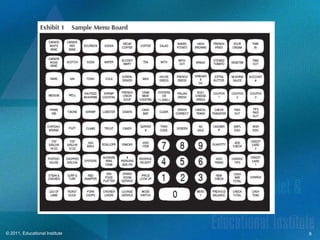
POS Terminal Keys
                                • Preset Keys
                                • Price Look-Up (PLU) keys
                                • Function Keys
                                • Settlement Keys
                                • Modifier Keys
                                • Numeric Keypad
© 2011, Educational Institute                                9
Monitors
          • An operator monitor typically contained in
            either a reed or micro-motion style system.
          • Monitors can include a standard system that
            allows an operator to view and edit entries.
          • Also includes customer display units; these
            usually rest atop, inside or alongside the
            POS Device.

© 2011, Educational Institute                              10
Touch Screen Terminals
          • Commonly used POS hardware
          • A unique adaptation of a screen and a
            special micro processor to control it. The
            self contained microprocessor displays data
            on areas of the screen and are sensitive to
            touch.


© 2011, Educational Institute                             11
Self-Service Order Entry
          • Countertop recessed or lobby stand-up
            touchscreen terminals that enable customers
            to place their orders without interacting
            with staff members.
          • Intended to reduce labor costs and provide
            more efficient customer services.


© 2011, Educational Institute                             12
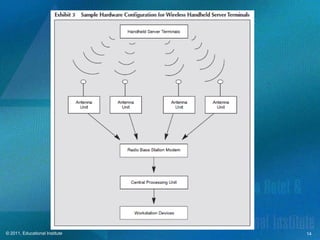
Handheld Terminals
          • Wireless order entry terminals.
          • HHT’s are able to perform most of the
            functions of a pre-check POS terminal.
          • Order entry rely on either sequential screen
            progression or written character recognition.


© 2011, Educational Institute                               13
© 2011, Educational Institute   14
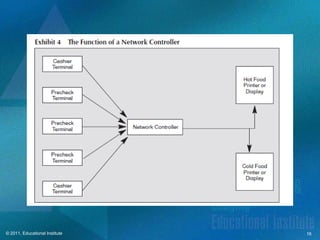
POS Printers
    • Either on-board or remote printing devices.
    • On-board printing devices normally located within six feet
      of the terminal they serve.
    • Network controller- aka. Printer controller; coordinates
      communications between cashier or pre check terminals and
      work station printers or remote monitors.
       – Network controllers process data from one of the
         terminals immediately and temporarily stores other
         communications until the remote device is available.


© 2011, Educational Institute                                      15
© 2011, Educational Institute   16
POS Printers
          • Guest Check Printers
                   – Immediate Check Printing
                   – Delayed Check Printing
                   – Retained Check Printing


© 2011, Educational Institute                   17
POS Printers
                            Guest check printers
                                • Hard/soft checks
                                • Automatic form number reader
                                • Automatic slip feed
                            Receipt printers
                            Workstation printers
                            Journal printers
© 2011, Educational Institute                                    18
Magnetic Stripe Readers, RFID
           Readers, and Power Platforms
                        Magnetic strip reader
                                • Rapid data entry
                                • Efficient settlement processing
                                • Credit card and house account
                                  transactions within POS system
                        RFID readers
                                • Contactless transaction processing
© 2011, Educational Institute               (continued)                19
Magnetic Stripe Readers/
                           Power Platforms
                                 (continued)

      Power platform
              • Simplified credit card transactions
              • Connects POS terminals to a single processor
              • Quick data retrieval
              • Reduces time, cost, and risk of credit card
                transactions
© 2011, Educational Institute                                 20
Smart Cards, Debit
                     Cards, Cashless Payments,
                     and Contactless Payments
                                Smart Cards
                                 • Embedded microchips
                                 • Size of credit card
                                 • Stores information in several
                                   files for different functions
                                 • PIN necessary for access
© 2011, Educational Institute                 (continued)          21
Smart Cards, Debit
                     Cards, Cashless Payments,
                     and Contactless Payments
                                     (continued)
                Debit Cards
                     • Account must contain funds
                     • Transactions as fast as with credit cards
                Cashless Payments
                     • Open system
                     • Closed system
© 2011, Educational Institute                                      22
Smart Cards, Debit
                     Cards, Cashless Payments,
                     and Contactless Payments
                                     (continued)


                    Contactless Payments
                         • RFID technology
                         • NFC technology


© 2011, Educational Institute                      23
PCI DSS Objectives
    • Build and maintain a secure network
    • Protect cardholder data
    • Maintain a vulnerability management program
    • Implement strong access control measures
    • Regularly monitor and test networks
    • Maintain an information security policy

© 2011, Educational Institute                        24
Open Check File
    • Terminal number where guest check was opened
    • Guest check serial number
    • Server identification
    • Time of day guest check created
    • Menu items ordered
    • Selling prices of items ordered
    • Applicable tax
    • Total amount due
© 2011, Educational Institute                     25
Menu Item File
                   • Identification number
                   • Descriptor
                   • Selling price
                   • Taxable item identifier
                   • Applicable modifier keys
                   • Amount totals for inventory reporting
                   • Remote device routing code
© 2011, Educational Institute                                26
Labor Master File
  • Employee name                         • Tips (or tip credits)
  • Employee number                       • Credits for
                                            employee meals
  • Social security number
                                          • Number of guests
  • Authorized job codes                    served (if
  • Hourly wage rates                       appropriate)
  • Hours worked                          • Gross sales
                                            generated (if
  • Gross hourly wages                      appropriate)
  • Declared Wages
© 2011, Educational Institute                                   27
POS Consolidated Reports
                       • Activity reports
                       • Sales and payment summary report
                       • Sales by time of day report
                       • Sales analysis reports
                       • Daily transactions report
                       • Productivity reports
© 2011, Educational Institute                               28

MIS Chapter 6

  • 1.
    Chapter 6 Point-of-Sale Technology Managing Technology in the Hospitality Industry Fifth Edition (468TXT or 468CIN) © 2011, Educational Institute
  • 2.
    Competencies for Point-of-Sale Technology 1. Describe the features and functions of keyboards and monitors typically used by point-of-sale systems. 2. Distinguish touchscreen point-of-sale terminals from wireless terminals. 3. Describe the features and functions of various types of point-of-sale printers. © 2011, Educational Institute (continued) 1
  • 3.
    Competencies for Point-of-Sale Technology (continued) 4. Describe the features and functions of point-of-sale account settlement devices such as magnetic strip and RFID readers, power platforms, smart cards, debit cards, cashless payment, and contactless payment. 5. Discuss data typically found on payment cards and within POS systems, and identify PCI DSS objectives and requirements. (continued) © 2011, Educational Institute 2
  • 4.
    Competencies for Point-of-Sale Technology (continued) 6. Identify the major files typically maintained by point-of-sale software, describe how managers can use the various reports commonly generated by point-of-sale software, and discuss frequent diner applications and gift cards. 7. Describe the features and functions of an automated beverage control system. © 2011, Educational Institute 3
  • 5.
    Point-of-Sale • The location where a transaction occurs in exchange for goods or services. • The point of sale often refers to the physical electronic cash register or dedicated POS hardware (or "terminal") used for checkout. • The POS is simply the location where the sale is conducted, money changes hands and a receipt is given. © 2011, Educational Institute 4
  • 6.
    Point-of-Sale Entry Units • Cashier Terminal: POS device that is connected to a cash drawer • Pre-Check Terminal: POS device not connected to a cash drawer. Used to entry orders only and not for settling accounts. • POS Devices can normally support both pre-checking and cashiering functions. © 2011, Educational Institute 5
  • 7.
    Point-of-Sale Entry Units • POS order entry units may be touchscreen or composed of Keyboards and Monitors. © 2011, Educational Institute 6
  • 8.
    Point-of-Sale Entry Units • Entry units can be touchscreen or composed of keyboards and monitors. • Keyboards can be Micro-motion or Reed Style. • Hard Keys and Soft Keys © 2011, Educational Institute 7
  • 9.
  • 10.
    POS Terminal Keys • Preset Keys • Price Look-Up (PLU) keys • Function Keys • Settlement Keys • Modifier Keys • Numeric Keypad © 2011, Educational Institute 9
  • 11.
    Monitors • An operator monitor typically contained in either a reed or micro-motion style system. • Monitors can include a standard system that allows an operator to view and edit entries. • Also includes customer display units; these usually rest atop, inside or alongside the POS Device. © 2011, Educational Institute 10
  • 12.
    Touch Screen Terminals • Commonly used POS hardware • A unique adaptation of a screen and a special micro processor to control it. The self contained microprocessor displays data on areas of the screen and are sensitive to touch. © 2011, Educational Institute 11
  • 13.
    Self-Service Order Entry • Countertop recessed or lobby stand-up touchscreen terminals that enable customers to place their orders without interacting with staff members. • Intended to reduce labor costs and provide more efficient customer services. © 2011, Educational Institute 12
  • 14.
    Handheld Terminals • Wireless order entry terminals. • HHT’s are able to perform most of the functions of a pre-check POS terminal. • Order entry rely on either sequential screen progression or written character recognition. © 2011, Educational Institute 13
  • 15.
  • 16.
    POS Printers • Either on-board or remote printing devices. • On-board printing devices normally located within six feet of the terminal they serve. • Network controller- aka. Printer controller; coordinates communications between cashier or pre check terminals and work station printers or remote monitors. – Network controllers process data from one of the terminals immediately and temporarily stores other communications until the remote device is available. © 2011, Educational Institute 15
  • 17.
  • 18.
    POS Printers • Guest Check Printers – Immediate Check Printing – Delayed Check Printing – Retained Check Printing © 2011, Educational Institute 17
  • 19.
    POS Printers Guest check printers • Hard/soft checks • Automatic form number reader • Automatic slip feed Receipt printers Workstation printers Journal printers © 2011, Educational Institute 18
  • 20.
    Magnetic Stripe Readers,RFID Readers, and Power Platforms Magnetic strip reader • Rapid data entry • Efficient settlement processing • Credit card and house account transactions within POS system RFID readers • Contactless transaction processing © 2011, Educational Institute (continued) 19
  • 21.
    Magnetic Stripe Readers/ Power Platforms (continued) Power platform • Simplified credit card transactions • Connects POS terminals to a single processor • Quick data retrieval • Reduces time, cost, and risk of credit card transactions © 2011, Educational Institute 20
  • 22.
    Smart Cards, Debit Cards, Cashless Payments, and Contactless Payments Smart Cards • Embedded microchips • Size of credit card • Stores information in several files for different functions • PIN necessary for access © 2011, Educational Institute (continued) 21
  • 23.
    Smart Cards, Debit Cards, Cashless Payments, and Contactless Payments (continued) Debit Cards • Account must contain funds • Transactions as fast as with credit cards Cashless Payments • Open system • Closed system © 2011, Educational Institute 22
  • 24.
    Smart Cards, Debit Cards, Cashless Payments, and Contactless Payments (continued) Contactless Payments • RFID technology • NFC technology © 2011, Educational Institute 23
  • 25.
    PCI DSS Objectives • Build and maintain a secure network • Protect cardholder data • Maintain a vulnerability management program • Implement strong access control measures • Regularly monitor and test networks • Maintain an information security policy © 2011, Educational Institute 24
  • 26.
    Open Check File • Terminal number where guest check was opened • Guest check serial number • Server identification • Time of day guest check created • Menu items ordered • Selling prices of items ordered • Applicable tax • Total amount due © 2011, Educational Institute 25
  • 27.
    Menu Item File • Identification number • Descriptor • Selling price • Taxable item identifier • Applicable modifier keys • Amount totals for inventory reporting • Remote device routing code © 2011, Educational Institute 26
  • 28.
    Labor Master File • Employee name • Tips (or tip credits) • Employee number • Credits for employee meals • Social security number • Number of guests • Authorized job codes served (if • Hourly wage rates appropriate) • Hours worked • Gross sales generated (if • Gross hourly wages appropriate) • Declared Wages © 2011, Educational Institute 27
  • 29.
    POS Consolidated Reports • Activity reports • Sales and payment summary report • Sales by time of day report • Sales analysis reports • Daily transactions report • Productivity reports © 2011, Educational Institute 28