Chapter 2
                          Hospitality Technology
                              Components
                                Managing Technology in the Hospitality Industry
                                                Sixth Edition
                                            (468TXT or 468CIN)


© 2011, Educational Institute
Competencies for
   Hospitality Technology Components
  1. Identify and describe system input components.
  2. Identify and describe system output components.
  3. Explain the function of a system’s central processing
     unit and distinguish read-only memory from random
     access memory.
  4. Identify and describe common external storage
     devices.
  5. Explain how the processing capability and speed of a
     system are measured.
© 2011, Educational Institute
                                (continued)
                                                        2
Competencies for
   Hospitality Technology Components
                                (continued)

        6. Identify and describe components or devices
            commonly added on to a system.
        7. Explain computer hardware configurations and
            interface connections.
        8. Define two broad categories of software and
            explain the function of an operating system.
        9. Discuss types of computer networks.
        10. Identify and describe components fundamental
            to Internet operations.0
© 2011, Educational Institute                              3
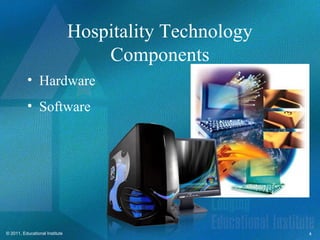
Hospitality Technology
                                    Components
          • Hardware
          • Software


© 2011, Educational Institute                            4
Hardware
         • They are visible, moveable
           and easy to identify.
         • Has three (3) components:
                 – Input/Output (I/O)
                 – Central Processing Unit
                   (CPU) and;
                 – External Storage Device


© 2011, Educational Institute                5
Input Components
  Keyboards
  • Function keys
  • Alphabet keys
  • Cursor control keys
  • Numeric keys


© 2011, Educational Institute                      6
Touch screen Terminals
          • Can employ a grid of tiny beams of light
            over a display screen.
          • Effective as devices for food service, self-
            check in kiosks and navigational screens.


© 2011, Educational Institute                              7
Other Input Components
            • Computer Mouse
                    – Small pointing device that’s designed to fit
                      comfortable under a users hand.
                    – Conntected to the processor by a serial cable or
                      a wireless infrared sensor.


© 2011, Educational Institute                                            8
Other Input Components
          • Scanners
                   – Capable of translating a page of text or graphic
                     image into a machine readable format.
                   – Digitizes information to be recognized by the
                     computer
                   – Flatbed scanners, hand held scanners are
                     examples of this.


© 2011, Educational Institute                                           9
Other Input Components
          • Voice Recognition
                   – Instructions spoken using a human voice.
                   – Also known as Automated Speech Recognition
                     (ASR)
                   – Converts spoken data into electronic form.


© 2011, Educational Institute                                     10
Other Input Components
          • Handheld devices (mobile phone, palmtop
            PC, personal digital assistant (PDA))


© 2011, Educational Institute                         11
Monitors
                                • Color graphics adapter
                                  (CGA)
                                  – Low-end display RGB

                                • Enhanced graphics
                                  adapter (EGA)
                                  – Uses Digital signals.
                                  – Clearer and has better
                                    quality of resolution
                                    compared to CGA
© 2011, Educational Institute                                12
Monitors
          • Video graphics array (VGA)
                  – Best for desktop publishing. Uses Analog
                    Signals
          • Super video graphics array (SVGA)
                  – Uses both digital and analog signals (VGA and
                    DVI)


© 2011, Educational Institute                                       13
Monitors
      • Liquid crystal display (LCD)
             – Blue or Black letters on a grayish white
               background (found on handheld units)
      • Gas Plasma (GP)
             – Orange letters on a black screen


© 2011, Educational Institute                             14
Printers
  • Impact printers
         – Movement of a print
           head or paper feeding
           mechanism to place
           data on the page.
  • Dot matrix printers
         – Form characters by
           firing a vertical line of
           pins through an inked
           ribbon onto the paper.
© 2011, Educational Institute              15
Printers
        • Non Impact Printers
                – Print positioning is
                  achieved using electrical
                  signals.
                – Techniques to print the
                  image on paper include:
                  Laser techniques, Inkjet
                  sprays Xerographic
                  processes Electrostatic
                  methods and
                  Electrothermal methods
© 2011, Educational Institute                 16
Printers
   • Thermal printers
           – Also known as electro-thermal printers.
           – Works by burning a protective layer off
             specially treated paper to reveal ink
           – Restricted to point-of-sale Printer applications


© 2011, Educational Institute                                   17
Printers
          • Ink jet printers
                  – Sprays a minute and finely controlled jet of ink
                    onto a paper.


© 2011, Educational Institute                                          18
Printers
          • Laser printers
                  – Quiet, highly efficient and more expensive
                    than ink jet printers.
                  – Uses laser technology to print documents.
                  – Electronically controlled laser beam traces out
                    the desired character to be printed.


© 2011, Educational Institute                                         19
I/O Components in the Hotel
                         Industry
          • Most have adopted touch screen and hand-
            held units.
          • CRT units.
          • Common equipment include: POS, Kitchen
            Monitors and Specialty handheld devices.
          • They also produce soft copies and hard
            copies of output.
© 2011, Educational Institute                          20
The Central Processing Unit
          • The most important hardware
            component found within an
            automated system.
          • Also called the brain of the
            system. Responsible for
            controlling most other system
            components.

© 2011, Educational Institute                  21
The Central Processing Unit
          • Arithmetic and Logical Unit
                   – Responsible for all mathematical, sorting, ranking
                     and processing functions of the CPU
          • Control Unit
                   – Determines which peripheral device in the system
                     can be accessed by the CPU.
                   – Determines what unit is capable of interacting
                     directly with the CPU.
                   – Online and Offline status of peripherals
© 2011, Educational Institute                                             22
The Central Processing Unit
          • Operating System
                   – Orchestrates the hardware and the software within
                     the system.
                   – Establishes the systems priorities and directs its
                     resources to accomplish desired tasks.
          • Internal (Primary) Memory


© 2011, Educational Institute                                             23
The Central Processing Unit


© 2011, Educational Institute                  24
ROM/RAM
             Read-only memory (ROM)
             • “Reads” but cannot “write”
             • Nonvolatile memory
             • Does not require a constant power supply
             Random access memory (RAM)
             • Read/write memory
             • Volatile memory
             • Contents lost if power supply interrupted or
               turned off
© 2011, Educational Institute                                 25
External Storage Devices
                                Magnetic tapes
                                • Sequential access medium
                                Magnetic disks
                                • Formatting
                                • Random access medium
                                • Diskette/floppy disks
                                • Zip disks
                                Hard disks
© 2011, Educational Institute
                                          (continued)
                                                             26
External Storage Devices
                                  (continued)

              USB drives
              • High-speed, high-capacity
              • Hot-swapping, hot-plugging
              Optical disks
              • Compact disc—read only (CD-R)
              • Compact disc—read and write (CD-RW)
              • DVD—optical storage device
© 2011, Educational Institute                         27
Measuring System Processing
                  Capability and Speed
          Microprocessor
                  – The Central Processing Unit

          CPU Speed—“Clock Rate” or “Clock
            Speed”
          • Megahertz (one million cycles per second)
          • Gigahertz (one billion cycles per second)
          • Dual-core processing
                            (continued)
© 2011, Educational Institute                           28
Measuring System Processing
                  Capability and Speed
                                (continued)

Bus Input/Output System
       – BIOS
       – The electronic circuitry over which power, data,
         address and other signals travel.
       – This is how signals get from one location to another
       – Data bus: transports data
       – Address bus: directs operations
       – Control bus: transports instructions


© 2011, Educational Institute                                   29
Measuring System Processing
                  Capability and Speed
                                (continued)

System Architecture
• Industry Standard Architecture (ISA)
• Extended Industry Standard Architecture (EISA)
• Micro Channel Architecture (MCA)


© 2011, Educational Institute                      30
Computer Add-Ons
          • Components or devices that are added to a
            system to increase its storage capacity,
            modify its architecture or upgrade its
            performance.
          • May require the insertion of a special circuit
            board or through an external access point.


© 2011, Educational Institute                                31
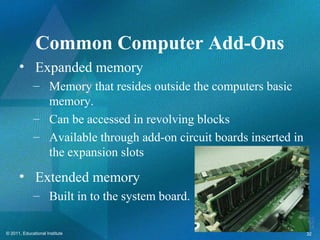
Common Computer Add-Ons
      • Expanded memory
             – Memory that resides outside the computers basic
               memory.
             – Can be accessed in revolving blocks
             – Available through add-on circuit boards inserted in
               the expansion slots
      • Extended memory
             – Built in to the system board.

© 2011, Educational Institute                                        32
Common Computer Add-Ons
   • Modem devices
           – Telecommunications device that
             is used to transmit digital data
             over telephone lines
   • Fax boards
           – Facsimile. Allows a computer to
             send or receive images of
             documents


© 2011, Educational Institute                   33
Common Computer Add-Ons
     • Interface Boards
             – Composed of a series of
               microchips on a circuit
               board containing an I/O
               port.
             – Connects to the CPU and
               allows communications
               between the CPU and a
               remote device
© 2011, Educational Institute            34
Common Computer Add-Ons
   • Network Interface Cards
            – Also called the Network Adapter
              Card (LAN)
            – Enables a computer to
              communicate on a network.
            – It can send and receive data


© 2011, Educational Institute                   35
Hardware Configurations
          • Client-Server model
                   – Uses a powerful file server PC to hold software
                     application and all relevant data, communicates
                     with the individuals PC workstations over the
                     LAN.


© 2011, Educational Institute                                          36
Hardware Configurations
          • Client-Server model
                   – In hotels, 2 servers usually run:
                           • Hotel specific applications
                           • General Purpose Software


© 2011, Educational Institute                              37
Hardware Configurations
          • Remote-Server Model
                   – Application Software is physically located
                     somewhere other than the actual property.
                   – Workstations are connected to the server using
                     a Wide Area Network.
                   – Cloud Computing is a new configuration using
                     this model.


© 2011, Educational Institute                                         38
Hardware Configurations
      • Cloud Computing
              – The emergence of the internet (cloud) as a way to
                implement a distant configuration over virtual
                private network.


© 2011, Educational Institute                                       39
© 2011, Educational Institute   40
Hardware Configurations
   • Cloud Computing
            – The server (cloud) is the internet
              with application software located
              at different websites.
            – Allows users to access data and
              programs anywhere as long as
              there is an internet connection


© 2011, Educational Institute                      41
Software
   • The set of instructions
     followed by the Hardware.
   • This commands the
     automated system to
     perform useful tasks.
   • These can direct data
     processing procedures
     through operations.
© 2011, Educational Institute              42
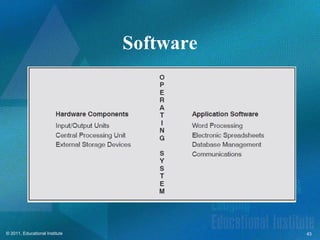
Software


© 2011, Educational Institute              43
Software
          • Has two broad categories:
                   – System Software
                           • Responsible for diagnostics and Maintenance of
                             hardware components.
                           • Managed by System Suppliers
                   – Applications Software
                           • Under the users control can be generic or industry
                             specific.


© 2011, Educational Institute                                                     44
Operating System
         • Controls interactions between
           hardware components of an
           automated system and
           application software
           programs.
         • Needed to carry out
           instructions generated by
           application software
           programs
© 2011, Educational Institute                      45
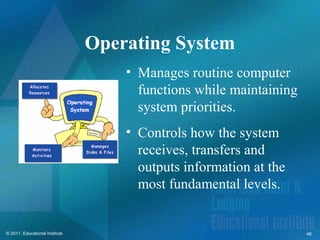
Operating System
                                    • Manages routine computer
                                      functions while maintaining
                                      system priorities.
                                    • Controls how the system
                                      receives, transfers and
                                      outputs information at the
                                      most fundamental levels.


© 2011, Educational Institute                                       46
Operating System
      • Programs that control the
        execution of programs.
      • Relies on GUI for operation
      • Has multi-tasking capabilities
      • Designed to provide effective
        data processing, sharing
        storage and facilities.

© 2011, Educational Institute                      47
The Internet
  • A collection of diverse networks.
  • It is a network of networks that
    consists of millions of private,
    public, academic, business, and
    government networks, of local to
    global scope, that are linked by a
    broad array of electronic, wireless
    and optical networking
    technologies.
© 2011, Educational Institute                  48
Internet Components
   • Bridge
           – Connects 2 or more
             networks that use the
             same data
   • Gateway
           – Means for two
             incompatible
             networks to
             communicate
© 2011, Educational Institute                         49
Internet Components
   • Routers
   • Intranet
           – Internet Technology
             Applied within a
             company and these
             pages are restricted
             to its employees.
           – Normally password
             protected networks
             that utilizes
             firewalls.
© 2011, Educational Institute                         50
Next Lecture can be seen at:
          • http://prezi.com/vdtadasz8ter/reservation-
            systems/


© 2011, Educational Institute                            51

IT 118: AHLAEI Chapter 2

  • 1.
    Chapter 2 Hospitality Technology Components Managing Technology in the Hospitality Industry Sixth Edition (468TXT or 468CIN) © 2011, Educational Institute
  • 2.
    Competencies for Hospitality Technology Components 1. Identify and describe system input components. 2. Identify and describe system output components. 3. Explain the function of a system’s central processing unit and distinguish read-only memory from random access memory. 4. Identify and describe common external storage devices. 5. Explain how the processing capability and speed of a system are measured. © 2011, Educational Institute (continued) 2
  • 3.
    Competencies for Hospitality Technology Components (continued) 6. Identify and describe components or devices commonly added on to a system. 7. Explain computer hardware configurations and interface connections. 8. Define two broad categories of software and explain the function of an operating system. 9. Discuss types of computer networks. 10. Identify and describe components fundamental to Internet operations.0 © 2011, Educational Institute 3
  • 4.
    Hospitality Technology Components • Hardware • Software © 2011, Educational Institute 4
  • 5.
    Hardware • They are visible, moveable and easy to identify. • Has three (3) components: – Input/Output (I/O) – Central Processing Unit (CPU) and; – External Storage Device © 2011, Educational Institute 5
  • 6.
    Input Components Keyboards • Function keys • Alphabet keys • Cursor control keys • Numeric keys © 2011, Educational Institute 6
  • 7.
    Touch screen Terminals • Can employ a grid of tiny beams of light over a display screen. • Effective as devices for food service, self- check in kiosks and navigational screens. © 2011, Educational Institute 7
  • 8.
    Other Input Components • Computer Mouse – Small pointing device that’s designed to fit comfortable under a users hand. – Conntected to the processor by a serial cable or a wireless infrared sensor. © 2011, Educational Institute 8
  • 9.
    Other Input Components • Scanners – Capable of translating a page of text or graphic image into a machine readable format. – Digitizes information to be recognized by the computer – Flatbed scanners, hand held scanners are examples of this. © 2011, Educational Institute 9
  • 10.
    Other Input Components • Voice Recognition – Instructions spoken using a human voice. – Also known as Automated Speech Recognition (ASR) – Converts spoken data into electronic form. © 2011, Educational Institute 10
  • 11.
    Other Input Components • Handheld devices (mobile phone, palmtop PC, personal digital assistant (PDA)) © 2011, Educational Institute 11
  • 12.
    Monitors • Color graphics adapter (CGA) – Low-end display RGB • Enhanced graphics adapter (EGA) – Uses Digital signals. – Clearer and has better quality of resolution compared to CGA © 2011, Educational Institute 12
  • 13.
    Monitors • Video graphics array (VGA) – Best for desktop publishing. Uses Analog Signals • Super video graphics array (SVGA) – Uses both digital and analog signals (VGA and DVI) © 2011, Educational Institute 13
  • 14.
    Monitors • Liquid crystal display (LCD) – Blue or Black letters on a grayish white background (found on handheld units) • Gas Plasma (GP) – Orange letters on a black screen © 2011, Educational Institute 14
  • 15.
    Printers •Impact printers – Movement of a print head or paper feeding mechanism to place data on the page. • Dot matrix printers – Form characters by firing a vertical line of pins through an inked ribbon onto the paper. © 2011, Educational Institute 15
  • 16.
    Printers • Non Impact Printers – Print positioning is achieved using electrical signals. – Techniques to print the image on paper include: Laser techniques, Inkjet sprays Xerographic processes Electrostatic methods and Electrothermal methods © 2011, Educational Institute 16
  • 17.
    Printers • Thermal printers – Also known as electro-thermal printers. – Works by burning a protective layer off specially treated paper to reveal ink – Restricted to point-of-sale Printer applications © 2011, Educational Institute 17
  • 18.
    Printers • Ink jet printers – Sprays a minute and finely controlled jet of ink onto a paper. © 2011, Educational Institute 18
  • 19.
    Printers • Laser printers – Quiet, highly efficient and more expensive than ink jet printers. – Uses laser technology to print documents. – Electronically controlled laser beam traces out the desired character to be printed. © 2011, Educational Institute 19
  • 20.
    I/O Components inthe Hotel Industry • Most have adopted touch screen and hand- held units. • CRT units. • Common equipment include: POS, Kitchen Monitors and Specialty handheld devices. • They also produce soft copies and hard copies of output. © 2011, Educational Institute 20
  • 21.
    The Central ProcessingUnit • The most important hardware component found within an automated system. • Also called the brain of the system. Responsible for controlling most other system components. © 2011, Educational Institute 21
  • 22.
    The Central ProcessingUnit • Arithmetic and Logical Unit – Responsible for all mathematical, sorting, ranking and processing functions of the CPU • Control Unit – Determines which peripheral device in the system can be accessed by the CPU. – Determines what unit is capable of interacting directly with the CPU. – Online and Offline status of peripherals © 2011, Educational Institute 22
  • 23.
    The Central ProcessingUnit • Operating System – Orchestrates the hardware and the software within the system. – Establishes the systems priorities and directs its resources to accomplish desired tasks. • Internal (Primary) Memory © 2011, Educational Institute 23
  • 24.
    The Central ProcessingUnit © 2011, Educational Institute 24
  • 25.
    ROM/RAM Read-only memory (ROM) • “Reads” but cannot “write” • Nonvolatile memory • Does not require a constant power supply Random access memory (RAM) • Read/write memory • Volatile memory • Contents lost if power supply interrupted or turned off © 2011, Educational Institute 25
  • 26.
    External Storage Devices Magnetic tapes • Sequential access medium Magnetic disks • Formatting • Random access medium • Diskette/floppy disks • Zip disks Hard disks © 2011, Educational Institute (continued) 26
  • 27.
    External Storage Devices (continued) USB drives • High-speed, high-capacity • Hot-swapping, hot-plugging Optical disks • Compact disc—read only (CD-R) • Compact disc—read and write (CD-RW) • DVD—optical storage device © 2011, Educational Institute 27
  • 28.
    Measuring System Processing Capability and Speed Microprocessor – The Central Processing Unit CPU Speed—“Clock Rate” or “Clock Speed” • Megahertz (one million cycles per second) • Gigahertz (one billion cycles per second) • Dual-core processing (continued) © 2011, Educational Institute 28
  • 29.
    Measuring System Processing Capability and Speed (continued) Bus Input/Output System – BIOS – The electronic circuitry over which power, data, address and other signals travel. – This is how signals get from one location to another – Data bus: transports data – Address bus: directs operations – Control bus: transports instructions © 2011, Educational Institute 29
  • 30.
    Measuring System Processing Capability and Speed (continued) System Architecture • Industry Standard Architecture (ISA) • Extended Industry Standard Architecture (EISA) • Micro Channel Architecture (MCA) © 2011, Educational Institute 30
  • 31.
    Computer Add-Ons • Components or devices that are added to a system to increase its storage capacity, modify its architecture or upgrade its performance. • May require the insertion of a special circuit board or through an external access point. © 2011, Educational Institute 31
  • 32.
    Common Computer Add-Ons • Expanded memory – Memory that resides outside the computers basic memory. – Can be accessed in revolving blocks – Available through add-on circuit boards inserted in the expansion slots • Extended memory – Built in to the system board. © 2011, Educational Institute 32
  • 33.
    Common Computer Add-Ons • Modem devices – Telecommunications device that is used to transmit digital data over telephone lines • Fax boards – Facsimile. Allows a computer to send or receive images of documents © 2011, Educational Institute 33
  • 34.
    Common Computer Add-Ons • Interface Boards – Composed of a series of microchips on a circuit board containing an I/O port. – Connects to the CPU and allows communications between the CPU and a remote device © 2011, Educational Institute 34
  • 35.
    Common Computer Add-Ons • Network Interface Cards – Also called the Network Adapter Card (LAN) – Enables a computer to communicate on a network. – It can send and receive data © 2011, Educational Institute 35
  • 36.
    Hardware Configurations • Client-Server model – Uses a powerful file server PC to hold software application and all relevant data, communicates with the individuals PC workstations over the LAN. © 2011, Educational Institute 36
  • 37.
    Hardware Configurations • Client-Server model – In hotels, 2 servers usually run: • Hotel specific applications • General Purpose Software © 2011, Educational Institute 37
  • 38.
    Hardware Configurations • Remote-Server Model – Application Software is physically located somewhere other than the actual property. – Workstations are connected to the server using a Wide Area Network. – Cloud Computing is a new configuration using this model. © 2011, Educational Institute 38
  • 39.
    Hardware Configurations • Cloud Computing – The emergence of the internet (cloud) as a way to implement a distant configuration over virtual private network. © 2011, Educational Institute 39
  • 40.
  • 41.
    Hardware Configurations • Cloud Computing – The server (cloud) is the internet with application software located at different websites. – Allows users to access data and programs anywhere as long as there is an internet connection © 2011, Educational Institute 41
  • 42.
    Software • The set of instructions followed by the Hardware. • This commands the automated system to perform useful tasks. • These can direct data processing procedures through operations. © 2011, Educational Institute 42
  • 43.
  • 44.
    Software • Has two broad categories: – System Software • Responsible for diagnostics and Maintenance of hardware components. • Managed by System Suppliers – Applications Software • Under the users control can be generic or industry specific. © 2011, Educational Institute 44
  • 45.
    Operating System • Controls interactions between hardware components of an automated system and application software programs. • Needed to carry out instructions generated by application software programs © 2011, Educational Institute 45
  • 46.
    Operating System • Manages routine computer functions while maintaining system priorities. • Controls how the system receives, transfers and outputs information at the most fundamental levels. © 2011, Educational Institute 46
  • 47.
    Operating System • Programs that control the execution of programs. • Relies on GUI for operation • Has multi-tasking capabilities • Designed to provide effective data processing, sharing storage and facilities. © 2011, Educational Institute 47
  • 48.
    The Internet • A collection of diverse networks. • It is a network of networks that consists of millions of private, public, academic, business, and government networks, of local to global scope, that are linked by a broad array of electronic, wireless and optical networking technologies. © 2011, Educational Institute 48
  • 49.
    Internet Components • Bridge – Connects 2 or more networks that use the same data • Gateway – Means for two incompatible networks to communicate © 2011, Educational Institute 49
  • 50.
    Internet Components • Routers • Intranet – Internet Technology Applied within a company and these pages are restricted to its employees. – Normally password protected networks that utilizes firewalls. © 2011, Educational Institute 50
  • 51.
    Next Lecture canbe seen at: • http://prezi.com/vdtadasz8ter/reservation- systems/ © 2011, Educational Institute 51