Mining the Geo Needles in
   the Social Haystack
       (Where 2.0, 2011)

Matthew A. Russell
http://linkedin.com/in/ptwobrussell
@ptwobrussell
About Me

• VP of Engineering @ Digital Reasoning Systems
• Principal @ Zaffra
• Author of Mining the Social Web et al.
• Triathlete-in-training

                                                  @SocialWebMining
                                    2
Objectives

• Orientation to geo data in the social web space
• Hands-on exercises for analyzing/visualizing geo data
• Whet your appetite and send you away motivated and with useful
 tools/insight


                                    3
Approximate Schedule


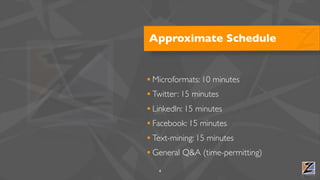
• Microformats: 10 minutes
• Twitter: 15 minutes
• LinkedIn: 15 minutes
• Facebook: 15 minutes
• Text-mining: 15 minutes
• General Q&A (time-permitting)
   4
Development

• Your local machine
• Python version 2.{6,7}
  • Recommend Windows users try ActivePython
• We'll handle the rest along the way


   5
Microformats


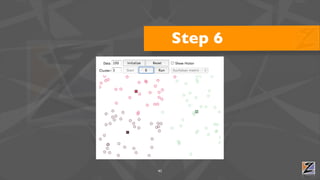
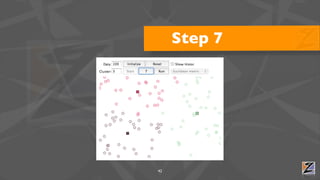
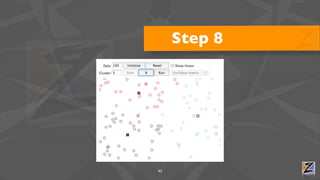
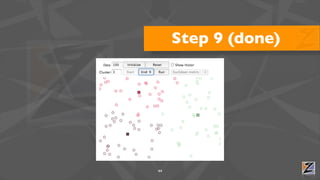
               Agile Data Solutions
Microformats

• My definition: "conventions for unambiguously including structured
 data into web pages in an entirely value-added way" (MTSW, p19)
• Bookmark and browse: http://microformats.org
• Examples:
  • geo, hCard, hEvent, hResume, XFN

                                     7
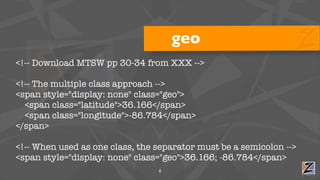
geo
<!-- Download MTSW pp 30-34 from XXX -->

<!-- The multiple class approach -->
<span style="display: none" class="geo">
  <span class="latitude">36.166</span>
  <span class="longitude">-86.784</span>
</span>

<!-- When used as one class, the separator must be a semicolon -->
<span style="display: none" class="geo">36.166; -86.784</span>
                                 8
Exercise!

• View source @ http://en.wikipedia.org/wiki/List_of_U.S._national_parks
• Use http://microform.at to extract the geo data as KML
  • http://microform.at/?type=geo&url=http%3A%2F%2Fen.wikipedia.org
   %2Fwiki%2FList_of_U.S._national_parks
  • Try pasting this URL into Google Maps and see what happens

                                     9
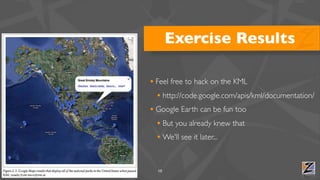
Exercise Results

• Feel free to hack on the KML
  • http://code.google.com/apis/kml/documentation/
• Google Earth can be fun too
  • But you already knew that
  • We'll see it later...


  10
Twitter


          Agile Data Solutions
Twitter Data

• There's geo data in the user profile
• And in tweets...
  • ...if the user enabled it in their prefs
• And even in the 140 chars of the tweet itself


      12
A Tweet as JSON
{
    "user" : {
        "name" : "Matthew Russell",
        "description" : "Author of Mining the Social Web; International Sex Symbol",
        "location" : "Franklin, TN",
        "screen_name" : "ptwobrussell",
        ...
    },
    "geo" : { "type" : "Point", "coordinates" : [36.166, 86.784]},
    "text" : "Franklin, TN is the best small town in the whole wide world #WIN",
    ...
}


                                                    13
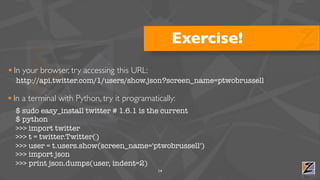
Exercise!
• In your browser, try accessing this URL:
  http://api.twitter.com/1/users/show.json?screen_name=ptwobrussell

• In a terminal with Python, try it programatically:
  $ sudo easy_install twitter # 1.6.1 is the current
  $ python
  >>> import twitter
  >>> t = twitter.Twitter()
  >>> user = t.users.show(screen_name='ptwobrussell')
  >>> import json
  >>> print json.dumps(user, indent=2)
                                              14
Recipe #21


• Geocode locations in profiles:
  • https://github.com/ptwobrussell/Recipes-for-Mining-Twitter/blob/
   master/recipe__geocode_profile_locations.py
  • Recipe #21 from 21 Recipes for Mining Twitter

                                      15
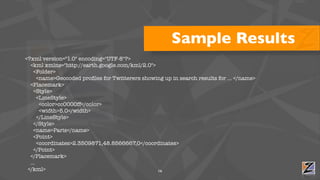
Sample Results
<?xml version="1.0" encoding="UTF-8"?>
  <kml xmlns="http://earth.google.com/kml/2.0">
    <Folder>
      <name>Geocoded profiles for Twitterers showing up in search results for ... </name>
  <Placemark>
    <Style>
      <LineStyle>
       <color>cc0000ff</color>
       <width>5.0</width>
      </LineStyle>
    </Style>
    <name>Paris</name>
    <Point>
      <coordinates>2.3509871,48.8566667,0</coordinates>
    </Point>
  </Placemark>
  ...
 </kml>                                          16
Recipe #20


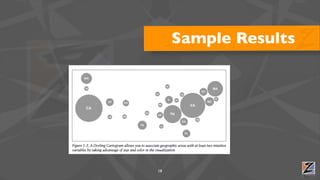
• Visualizing results with a Dorling Cartogram:
  • https://github.com/ptwobrussell/Recipes-for-Mining-Twitter/blob/
   master/recipe__dorling_cartogram.py
  • Recipe #20 from 21 Recipes for Mining Twitter

                                      17
Sample Results


18
Recipe #22 (?!?)

• Extracting "geo" fields from a batch of search results
  • https://github.com/ptwobrussell/Recipes-for-Mining-Twitter/blob/
   master/recipe__geocode_tweets.py
  • Not in current edition of 21 Recipes for Mining Twitter
    • Just checked in especially for you

                                       19
Sample Results
• Unfortunately (???), "geo" data for
                                             [None, None, None, None, None, None, None, None, None, None,
 tweets seems really scarce                  None, None, None, None, None, None, None, None, None, None,
                                             None, None, None, None, None, None, None, None, None, None,
                                             None, None, None, None, None, None, None, None, None, None,
                                             None, None, None, None, None, None, None, None, None, None,
                                             None, None, None, None, None, None, None, None, None, None,
                                             None, None, None, None, None, None, None, None, None, None,

• Varies according to a particular           None, None, {u'type': u'Point', u'coordinates':
                                             [32.802900000000001, -96.828100000000006]}, {u'type':
                                             u'Point', u'coordinates': [33.793300000000002, -117.852]},
                                             None, None, None, None, None, None, None, None, None, None,
 user's privacy mindset?                     None, None, None, None, None, None, None, None, None, None,
                                             None, None, None, None, None, None, None, None, None, None,
                                             None, None, None, None, None, None, None, None, None, None,
                                             None, None, None, None, None, None, None, None, None, None,
                                             None, None, {u'type': u'Point', u'coordinates':
                                             [35.512099999999997, -97.631299999999996]}, None, None,
• Examining only Twitter users who           None, None, None, None, None, None, None, None, None, None,
                                             None, None, None, None, None, None, None, None, None, None,
                                             None, None, None, None, None, None, None, None, None, None,
 enable "geo" would be interesting           None, None, None, None, None, None, None, None, None, None,
                                             None, None, None, None, None, None, None, None, None, None,
                                             None, None, None, None, None, None, None, None, None, None,
                                             None, None, None, None, None, None, None, None, None, None,
 in and of itself                       20
                                             None]
Mining the 140 Characters


• Not a trivial exercise
• Mining natural language data is hard
  • Mining bastardized natural language data is even harder
• We'll look at mining natural language data later


                                      21
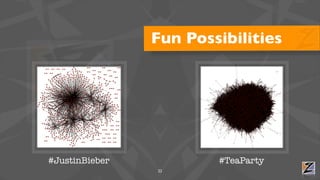
Fun Possibilities


#JustinBieber           #TeaParty
                22
Oh, and by the way...


          23
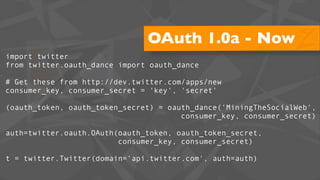
OAuth 1.0a - Now
import twitter
from twitter.oauth_dance import oauth_dance

# Get these from http://dev.twitter.com/apps/new
consumer_key, consumer_secret = 'key', 'secret'

(oauth_token, oauth_token_secret) = oauth_dance('MiningTheSocialWeb',
                                       consumer_key, consumer_secret)

auth=twitter.oauth.OAuth(oauth_token, oauth_token_secret,
                         consumer_key, consumer_secret)

t = twitter.Twitter(domain='api.twitter.com', auth=auth)
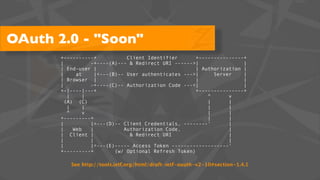
OAuth 2.0 - "Soon"
       +----------+            Client Identifier       +---------------+
       |          -+----(A)--- & Redirect URI ------>|                 |
       | End-user |                                    | Authorization |
       |     at     |<---(B)-- User authenticates --->|      Server    |
       | Browser |                                     |               |
       |          -+----(C)-- Authorization Code ---<|                 |
       +-|----|---+                                    +---------------+
          |     |                                          ^      v
         (A) (C)                                           |      |
          |     |                                          |      |
          ^     v                                          |      |
       +---------+                                         |      |
       |          |>---(D)-- Client Credentials, --------'        |
       |    Web   |           Authorization Code,                 |
       | Client |               & Redirect URI                    |
       |          |                                               |
       |          |<---(E)----- Access Token -------------------'
       +---------+         (w/ Optional Refresh Token)

          See http://tools.ietf.org/html/draft-ietf-oauth-v2-10#section-1.4.1
LinkedIn


           Agile Data Solutions
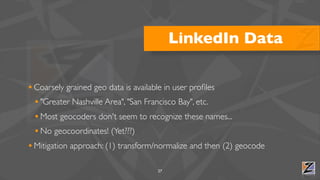
LinkedIn Data

• Coarsely grained geo data is available in user profiles
  • "Greater Nashville Area", "San Francisco Bay", etc.
  • Most geocoders don't seem to recognize these names...
  • No geocoordinates! (Yet???)
• Mitigation approach: (1) transform/normalize and then (2) geocode

                                    27
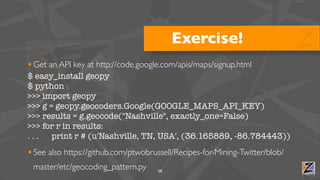
Exercise!
• Get an API key at http://code.google.com/apis/maps/signup.html
$ easy_install geopy
$ python
>>> import geopy
>>> g = geopy.geocoders.Google(GOOGLE_MAPS_API_KEY)
>>> results = g.geocode("Nashville", exactly_one=False)
>>> for r in results:
...    print r # (u'Nashville, TN, USA', (36.165889, -86.784443))
• See also https://github.com/ptwobrussell/Recipes-for-Mining-Twitter/blob/
 master/etc/geocoding_pattern.py      28
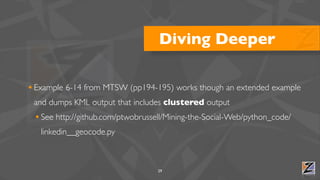
Diving Deeper

• Example 6-14 from MTSW (pp194-195) works though an extended example
 and dumps KML output that includes clustered output
 • See http://github.com/ptwobrussell/Mining-the-Social-Web/python_code/
   linkedin__geocode.py


                                   29
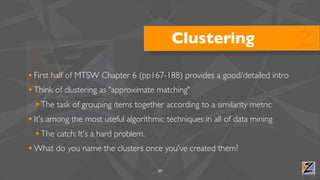
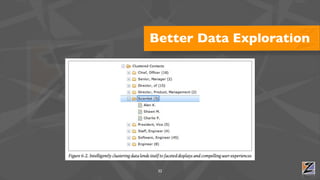
Clustering

• First half of MTSW Chapter 6 (pp167-188) provides a good/detailed intro
• Think of clustering as "approximate matching"
  • The task of grouping items together according to a similarity metric
• It's among the most useful algorithmic techniques in all of data mining
  • The catch: It's a hard problem.
• What do you name the clusters once you've created them?
                                    30
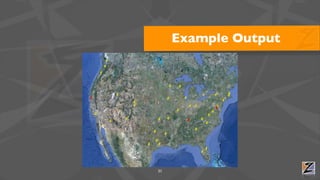
Example Output


31
Better Data Exploration


 32
Clustering Approaches


• Agglomerative (hierarchical)
• Greedy
• Approximate
  • k-means


      33
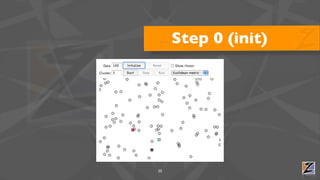
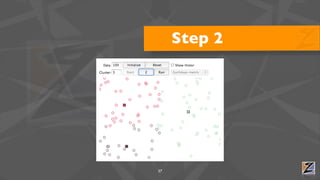
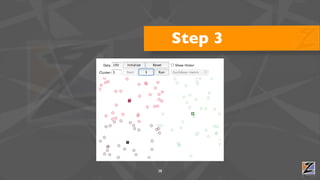
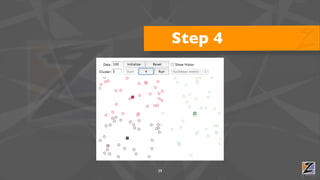
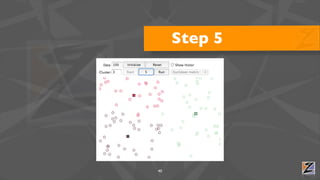
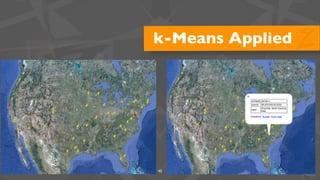
k-Means Algorithm
1. Randomly pick k points in the data space as initial values that will be used to compute the
   k clusters: K1, K2, ..., Kk.

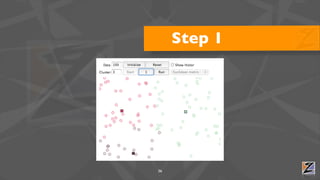
2. Assign each of the n points to a cluster by finding the nearest Kn—effectively creating
   k clusters and requiring k*n comparisons.

3. For each of the k clusters, calculate the centroid (the mean of the cluster) and reassign
   its Ki value to be that value. (Hence, you’re computing “k-means” during each iteration of the
   algorithm.)

4. Repeat steps 2–3 until the members of the clusters do not change between iterations.
   Generally speaking, relatively few iterations are required for convergence.

Let's try it: http://home.dei.polimi.it/matteucc/Clustering/tutorial_html/AppletKM.html
                                                     34
Step 0 (init)


35
Step 1


36
Step 2


37
Step 3


38
Step 4


39
Step 5


40
Step 6


41
Step 7


42
Step 8


43
Step 9 (done)


44
k-Means Applied


45
Facebook


           Agile Data Solutions
Facebook Data

• Ridiculous amounts of data (all kinds) is available via the FB Platform
• Current location, hometown, "checkins"
• Access to the FB platform data is relatively painless:
  • Social Graph: http://developers.facebook.com/docs/reference/api/
  • FQL: http://developers.facebook.com/docs/reference/fql/

                                       47
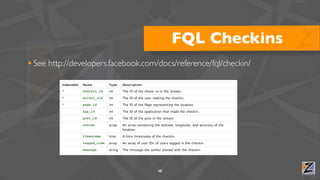
FQL Checkins
• See http://developers.facebook.com/docs/reference/fql/checkin/


                                     48
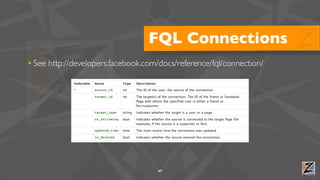
FQL Connections
• See http://developers.facebook.com/docs/reference/fql/connection/


                                     49
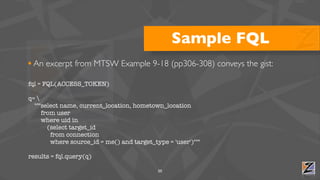
Sample FQL
• An excerpt from MTSW Example 9-18 (pp306-308) conveys the gist:
fql = FQL(ACCESS_TOKEN)

q= 
  """select name, current_location, hometown_location
     from user
     where uid in
       (select target_id
        from connection
        where source_id = me() and target_type = 'user')"""

results = fql.query(q)

                                            50
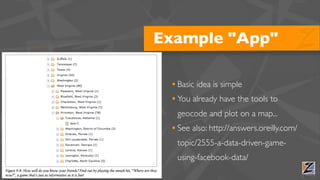
Example "App"

     • Basic idea is simple
     • You already have the tools to
      geocode and plot on a map...
     • See also: http://answers.oreilly.com/
      topic/2555-a-data-driven-game-
      using-facebook-data/
51
FB Platform Demo

• Mininal sample app at http://miningthesocialweb.appspot.com
• Source is at http://github.com/ptwobrussell/Mining-the-Social-Web/
 web_code/facebook_gae_demo_app


                                    52
Text Mining


              Agile Data Solutions
References


• MTSW Chapter 7 (Google Buzz: TF-IDF, Cosine Similarity, and Collocations)
• MTSW Chapter 8 (Blogs et al.: Natural Language Processing and Beyond)


                                    54
"Legacy" NLP

• "Legacy" => Classic Information Retrieval (IR) techniques
  • Often (but not always) uses a "bag of words" model
  • tf-idf metric is usually the root of the core strategy
  • Variations on cosine similarity are often the fruition
  • Additional higher order analytics are possible, but inevitably
   cannot be optimal for deep semantic analysis
• Virtually every A-list search engine has started here
                                       55
A Vector Space


56
How might you discover locations from text
       using "legacy" techniques?


                     57
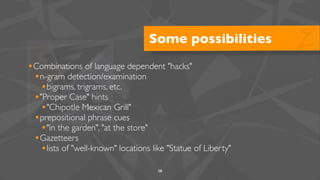
Some possibilities
•Combinations of language dependent "hacks"
 •n-gram detection/examination
  •bigrams, trigrams, etc.
 •"Proper Case" hints
  •"Chipotle Mexican Grill"
 •prepositional phrase cues
  •"in the garden", "at the store"
 •Gazetteers
  •lists of "well-known" locations like "Statue of Liberty"
                                     58
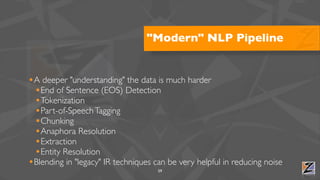
"Modern" NLP Pipeline


•A deeper "understanding" the data is much harder
 •End of Sentence (EOS) Detection
 •Tokenization
 •Part-of-Speech Tagging
 •Chunking
 •Anaphora Resolution
 •Extraction
 •Entity Resolution
•Blending in "legacy" IR techniques can be very helpful in reducing noise
                                     59
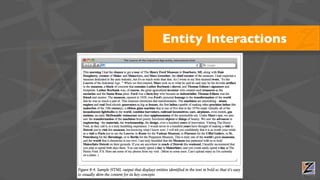
Entity Interactions


60
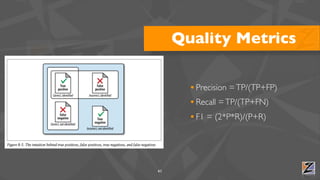
Quality Metrics

       • Precision = TP/(TP+FP)
       • Recall = TP/(TP+FN)
       • F1 = (2*P*R)/(P+R)


61
Exercise!
• Get a webpage:
  • curl http://example.com/foo.html
• Extract the text:
  • curl -d @foo.html "http://www.datasciencetoolkit.org/html2story" > foo.json
• Extract the locations:
  • curl -d @foo.json "http://www.datasciencetoolkit.org/text2places"
• NOTE: Windows users can work directly at http://www.datasciencetoolkit.org
                                     62
Tools to Investigate


• NLTK - http://nltk.org
• Data Science Toolkit - http://www.datasciencetoolkit.org
• WordNet - http://wordnet.princeton.edu/


                          63
Q&A


      Agile Data Solutions
The End


          Agile Data Solutions

Mining the Geo Needles in the Social Haystack

  • 1.
    Mining the GeoNeedles in the Social Haystack (Where 2.0, 2011) Matthew A. Russell http://linkedin.com/in/ptwobrussell @ptwobrussell
  • 2.
    About Me • VPof Engineering @ Digital Reasoning Systems • Principal @ Zaffra • Author of Mining the Social Web et al. • Triathlete-in-training @SocialWebMining 2
  • 3.
    Objectives • Orientation togeo data in the social web space • Hands-on exercises for analyzing/visualizing geo data • Whet your appetite and send you away motivated and with useful tools/insight 3
  • 4.
    Approximate Schedule • Microformats:10 minutes • Twitter: 15 minutes • LinkedIn: 15 minutes • Facebook: 15 minutes • Text-mining: 15 minutes • General Q&A (time-permitting) 4
  • 5.
    Development • Your localmachine • Python version 2.{6,7} • Recommend Windows users try ActivePython • We'll handle the rest along the way 5
  • 6.
    Microformats Agile Data Solutions
  • 7.
    Microformats • My definition:"conventions for unambiguously including structured data into web pages in an entirely value-added way" (MTSW, p19) • Bookmark and browse: http://microformats.org • Examples: • geo, hCard, hEvent, hResume, XFN 7
  • 8.
    geo <!-- Download MTSWpp 30-34 from XXX --> <!-- The multiple class approach --> <span style="display: none" class="geo"> <span class="latitude">36.166</span> <span class="longitude">-86.784</span> </span> <!-- When used as one class, the separator must be a semicolon --> <span style="display: none" class="geo">36.166; -86.784</span> 8
  • 9.
    Exercise! • View source@ http://en.wikipedia.org/wiki/List_of_U.S._national_parks • Use http://microform.at to extract the geo data as KML • http://microform.at/?type=geo&url=http%3A%2F%2Fen.wikipedia.org %2Fwiki%2FList_of_U.S._national_parks • Try pasting this URL into Google Maps and see what happens 9
  • 10.
    Exercise Results • Feelfree to hack on the KML • http://code.google.com/apis/kml/documentation/ • Google Earth can be fun too • But you already knew that • We'll see it later... 10
  • 11.
    Twitter Agile Data Solutions
  • 12.
    Twitter Data • There'sgeo data in the user profile • And in tweets... • ...if the user enabled it in their prefs • And even in the 140 chars of the tweet itself 12
  • 13.
    A Tweet asJSON { "user" : { "name" : "Matthew Russell", "description" : "Author of Mining the Social Web; International Sex Symbol", "location" : "Franklin, TN", "screen_name" : "ptwobrussell", ... }, "geo" : { "type" : "Point", "coordinates" : [36.166, 86.784]}, "text" : "Franklin, TN is the best small town in the whole wide world #WIN", ... } 13
  • 14.
    Exercise! • In yourbrowser, try accessing this URL: http://api.twitter.com/1/users/show.json?screen_name=ptwobrussell • In a terminal with Python, try it programatically: $ sudo easy_install twitter # 1.6.1 is the current $ python >>> import twitter >>> t = twitter.Twitter() >>> user = t.users.show(screen_name='ptwobrussell') >>> import json >>> print json.dumps(user, indent=2) 14
  • 15.
    Recipe #21 • Geocodelocations in profiles: • https://github.com/ptwobrussell/Recipes-for-Mining-Twitter/blob/ master/recipe__geocode_profile_locations.py • Recipe #21 from 21 Recipes for Mining Twitter 15
  • 16.
    Sample Results <?xml version="1.0"encoding="UTF-8"?> <kml xmlns="http://earth.google.com/kml/2.0"> <Folder> <name>Geocoded profiles for Twitterers showing up in search results for ... </name> <Placemark> <Style> <LineStyle> <color>cc0000ff</color> <width>5.0</width> </LineStyle> </Style> <name>Paris</name> <Point> <coordinates>2.3509871,48.8566667,0</coordinates> </Point> </Placemark> ... </kml> 16
  • 17.
    Recipe #20 • Visualizingresults with a Dorling Cartogram: • https://github.com/ptwobrussell/Recipes-for-Mining-Twitter/blob/ master/recipe__dorling_cartogram.py • Recipe #20 from 21 Recipes for Mining Twitter 17
  • 18.
  • 19.
    Recipe #22 (?!?) •Extracting "geo" fields from a batch of search results • https://github.com/ptwobrussell/Recipes-for-Mining-Twitter/blob/ master/recipe__geocode_tweets.py • Not in current edition of 21 Recipes for Mining Twitter • Just checked in especially for you 19
  • 20.
    Sample Results • Unfortunately(???), "geo" data for [None, None, None, None, None, None, None, None, None, None, tweets seems really scarce None, None, None, None, None, None, None, None, None, None, None, None, None, None, None, None, None, None, None, None, None, None, None, None, None, None, None, None, None, None, None, None, None, None, None, None, None, None, None, None, None, None, None, None, None, None, None, None, None, None, None, None, None, None, None, None, None, None, None, None, • Varies according to a particular None, None, {u'type': u'Point', u'coordinates': [32.802900000000001, -96.828100000000006]}, {u'type': u'Point', u'coordinates': [33.793300000000002, -117.852]}, None, None, None, None, None, None, None, None, None, None, user's privacy mindset? None, None, None, None, None, None, None, None, None, None, None, None, None, None, None, None, None, None, None, None, None, None, None, None, None, None, None, None, None, None, None, None, None, None, None, None, None, None, None, None, None, None, {u'type': u'Point', u'coordinates': [35.512099999999997, -97.631299999999996]}, None, None, • Examining only Twitter users who None, None, None, None, None, None, None, None, None, None, None, None, None, None, None, None, None, None, None, None, None, None, None, None, None, None, None, None, None, None, enable "geo" would be interesting None, None, None, None, None, None, None, None, None, None, None, None, None, None, None, None, None, None, None, None, None, None, None, None, None, None, None, None, None, None, None, None, None, None, None, None, None, None, None, None, in and of itself 20 None]
  • 21.
    Mining the 140Characters • Not a trivial exercise • Mining natural language data is hard • Mining bastardized natural language data is even harder • We'll look at mining natural language data later 21
  • 22.
  • 23.
    Oh, and bythe way... 23
  • 24.
    OAuth 1.0a -Now import twitter from twitter.oauth_dance import oauth_dance # Get these from http://dev.twitter.com/apps/new consumer_key, consumer_secret = 'key', 'secret' (oauth_token, oauth_token_secret) = oauth_dance('MiningTheSocialWeb', consumer_key, consumer_secret) auth=twitter.oauth.OAuth(oauth_token, oauth_token_secret, consumer_key, consumer_secret) t = twitter.Twitter(domain='api.twitter.com', auth=auth)
  • 25.
    OAuth 2.0 -"Soon" +----------+ Client Identifier +---------------+ | -+----(A)--- & Redirect URI ------>| | | End-user | | Authorization | | at |<---(B)-- User authenticates --->| Server | | Browser | | | | -+----(C)-- Authorization Code ---<| | +-|----|---+ +---------------+ | | ^ v (A) (C) | | | | | | ^ v | | +---------+ | | | |>---(D)-- Client Credentials, --------' | | Web | Authorization Code, | | Client | & Redirect URI | | | | | |<---(E)----- Access Token -------------------' +---------+ (w/ Optional Refresh Token) See http://tools.ietf.org/html/draft-ietf-oauth-v2-10#section-1.4.1
  • 26.
    LinkedIn Agile Data Solutions
  • 27.
    LinkedIn Data • Coarselygrained geo data is available in user profiles • "Greater Nashville Area", "San Francisco Bay", etc. • Most geocoders don't seem to recognize these names... • No geocoordinates! (Yet???) • Mitigation approach: (1) transform/normalize and then (2) geocode 27
  • 28.
    Exercise! • Get anAPI key at http://code.google.com/apis/maps/signup.html $ easy_install geopy $ python >>> import geopy >>> g = geopy.geocoders.Google(GOOGLE_MAPS_API_KEY) >>> results = g.geocode("Nashville", exactly_one=False) >>> for r in results: ... print r # (u'Nashville, TN, USA', (36.165889, -86.784443)) • See also https://github.com/ptwobrussell/Recipes-for-Mining-Twitter/blob/ master/etc/geocoding_pattern.py 28
  • 29.
    Diving Deeper • Example6-14 from MTSW (pp194-195) works though an extended example and dumps KML output that includes clustered output • See http://github.com/ptwobrussell/Mining-the-Social-Web/python_code/ linkedin__geocode.py 29
  • 30.
    Clustering • First halfof MTSW Chapter 6 (pp167-188) provides a good/detailed intro • Think of clustering as "approximate matching" • The task of grouping items together according to a similarity metric • It's among the most useful algorithmic techniques in all of data mining • The catch: It's a hard problem. • What do you name the clusters once you've created them? 30
  • 31.
  • 32.
  • 33.
    Clustering Approaches • Agglomerative(hierarchical) • Greedy • Approximate • k-means 33
  • 34.
    k-Means Algorithm 1. Randomlypick k points in the data space as initial values that will be used to compute the k clusters: K1, K2, ..., Kk. 2. Assign each of the n points to a cluster by finding the nearest Kn—effectively creating k clusters and requiring k*n comparisons. 3. For each of the k clusters, calculate the centroid (the mean of the cluster) and reassign its Ki value to be that value. (Hence, you’re computing “k-means” during each iteration of the algorithm.) 4. Repeat steps 2–3 until the members of the clusters do not change between iterations. Generally speaking, relatively few iterations are required for convergence. Let's try it: http://home.dei.polimi.it/matteucc/Clustering/tutorial_html/AppletKM.html 34
  • 35.
  • 36.
  • 37.
  • 38.
  • 39.
  • 40.
  • 41.
  • 42.
  • 43.
  • 44.
  • 45.
  • 46.
    Facebook Agile Data Solutions
  • 47.
    Facebook Data • Ridiculousamounts of data (all kinds) is available via the FB Platform • Current location, hometown, "checkins" • Access to the FB platform data is relatively painless: • Social Graph: http://developers.facebook.com/docs/reference/api/ • FQL: http://developers.facebook.com/docs/reference/fql/ 47
  • 48.
    FQL Checkins • Seehttp://developers.facebook.com/docs/reference/fql/checkin/ 48
  • 49.
    FQL Connections • Seehttp://developers.facebook.com/docs/reference/fql/connection/ 49
  • 50.
    Sample FQL • Anexcerpt from MTSW Example 9-18 (pp306-308) conveys the gist: fql = FQL(ACCESS_TOKEN) q= """select name, current_location, hometown_location from user where uid in (select target_id from connection where source_id = me() and target_type = 'user')""" results = fql.query(q) 50
  • 51.
    Example "App" • Basic idea is simple • You already have the tools to geocode and plot on a map... • See also: http://answers.oreilly.com/ topic/2555-a-data-driven-game- using-facebook-data/ 51
  • 52.
    FB Platform Demo •Mininal sample app at http://miningthesocialweb.appspot.com • Source is at http://github.com/ptwobrussell/Mining-the-Social-Web/ web_code/facebook_gae_demo_app 52
  • 53.
    Text Mining Agile Data Solutions
  • 54.
    References • MTSW Chapter7 (Google Buzz: TF-IDF, Cosine Similarity, and Collocations) • MTSW Chapter 8 (Blogs et al.: Natural Language Processing and Beyond) 54
  • 55.
    "Legacy" NLP • "Legacy"=> Classic Information Retrieval (IR) techniques • Often (but not always) uses a "bag of words" model • tf-idf metric is usually the root of the core strategy • Variations on cosine similarity are often the fruition • Additional higher order analytics are possible, but inevitably cannot be optimal for deep semantic analysis • Virtually every A-list search engine has started here 55
  • 56.
  • 57.
    How might youdiscover locations from text using "legacy" techniques? 57
  • 58.
    Some possibilities •Combinations oflanguage dependent "hacks" •n-gram detection/examination •bigrams, trigrams, etc. •"Proper Case" hints •"Chipotle Mexican Grill" •prepositional phrase cues •"in the garden", "at the store" •Gazetteers •lists of "well-known" locations like "Statue of Liberty" 58
  • 59.
    "Modern" NLP Pipeline •Adeeper "understanding" the data is much harder •End of Sentence (EOS) Detection •Tokenization •Part-of-Speech Tagging •Chunking •Anaphora Resolution •Extraction •Entity Resolution •Blending in "legacy" IR techniques can be very helpful in reducing noise 59
  • 60.
  • 61.
    Quality Metrics • Precision = TP/(TP+FP) • Recall = TP/(TP+FN) • F1 = (2*P*R)/(P+R) 61
  • 62.
    Exercise! • Get awebpage: • curl http://example.com/foo.html • Extract the text: • curl -d @foo.html "http://www.datasciencetoolkit.org/html2story" > foo.json • Extract the locations: • curl -d @foo.json "http://www.datasciencetoolkit.org/text2places" • NOTE: Windows users can work directly at http://www.datasciencetoolkit.org 62
  • 63.
    Tools to Investigate •NLTK - http://nltk.org • Data Science Toolkit - http://www.datasciencetoolkit.org • WordNet - http://wordnet.princeton.edu/ 63
  • 64.
    Q&A Agile Data Solutions
  • 65.
    The End Agile Data Solutions