Bruno Gonçalves
www.bgoncalves.com
Mining Georeferenced Data: 

Location-based Services and the Sharing Economy
https://github.com/bmtgoncalves/Mining-Georeferenced-Data
www.bgoncalves.com@bgoncalves
Contents
• Introduction to Twitter
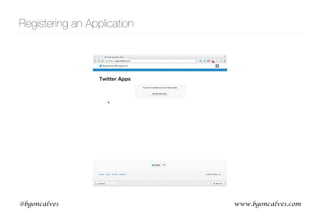
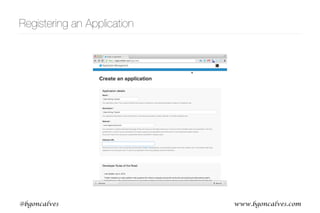
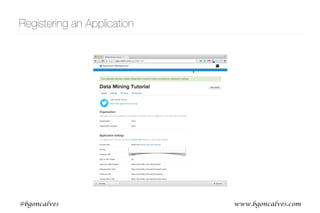
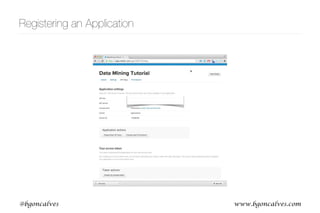
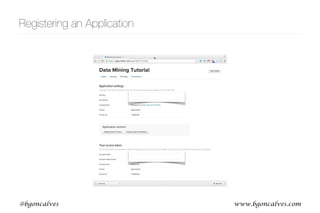
• Registering a Twitter Application
• API Basics
• Streaming Geolocated Tweets (twitter)
• Filter Based on an arbitrary Polygon (shapely, shapefile)
• Parse URLs (urlparse)
• Register a Foursquare Application
• Query Checkin Information (foursquare)
• Parse webpages (requests, BeautifulSoup) and extract Checkin Information
https://github.com/bmtgoncalves/Mining-Georeferenced-Data
www.bgoncalves.com@bgoncalves
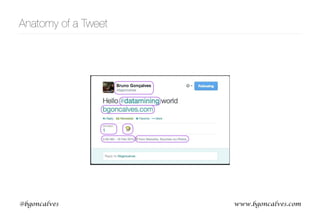
Anatomy of a Tweet
www.bgoncalves.com@bgoncalves
Anatomy of a Tweet
[u'contributors',
u'truncated',
u'text',
u'in_reply_to_status_id',
u'id',
u'favorite_count',
u'source',
u'retweeted',
u'coordinates',
u'entities',
u'in_reply_to_screen_name',
u'in_reply_to_user_id',
u'retweet_count',
u'id_str',
u'favorited',
u'user',
u'geo',
u'in_reply_to_user_id_str',
u'possibly_sensitive',
u'lang',
u'created_at',
u'in_reply_to_status_id_str',
u'place',
u'metadata']
www.bgoncalves.com@bgoncalves
Anatomy of a Tweet
[u'contributors',
u'truncated',
u'text',
u'in_reply_to_status_id',
u'id',
u'favorite_count',
u'source',
u'retweeted',
u'coordinates',
u'entities',
u'in_reply_to_screen_name',
u'in_reply_to_user_id',
u'retweet_count',
u'id_str',
u'favorited',
u'user',
u'geo',
u'in_reply_to_user_id_str',
u'possibly_sensitive',
u'lang',
u'created_at',
u'in_reply_to_status_id_str',
u'place',
u'metadata']
[u'follow_request_sent',
u'profile_use_background_image',
u'default_profile_image',
u'id',
u'profile_background_image_url_https',
u'verified',
u'profile_text_color',
u'profile_image_url_https',
u'profile_sidebar_fill_color',
u'entities',
u'followers_count',
u'profile_sidebar_border_color',
u'id_str',
u'profile_background_color',
u'listed_count',
u'is_translation_enabled',
u'utc_offset',
u'statuses_count',
u'description',
u'friends_count',
u'location',
u'profile_link_color',
u'profile_image_url',
u'following',
u'geo_enabled',
u'profile_banner_url',
u'profile_background_image_url',
u'screen_name',
u'lang',
u'profile_background_tile',
u'favourites_count',
u'name',
u'notifications',
u'url',
u'created_at',
u'contributors_enabled',
u'time_zone',
u'protected',
u'default_profile',
u'is_translator']
www.bgoncalves.com@bgoncalves
Anatomy of a Tweet
[u'contributors',
u'truncated',
u'text',
u'in_reply_to_status_id',
u'id',
u'favorite_count',
u'source',
u'retweeted',
u'coordinates',
u'entities',
u'in_reply_to_screen_name',
u'in_reply_to_user_id',
u'retweet_count',
u'id_str',
u'favorited',
u'user',
u'geo',
u'in_reply_to_user_id_str',
u'possibly_sensitive',
u'lang',
u'created_at',
u'in_reply_to_status_id_str',
u'place',
u'metadata']
[u'type',
u'coordinates']
[u'symbols',
u'user_mentions',
u'hashtags',
u'urls']
u'<a href="http://foursquare.com" rel=“nofollow">
foursquare</a>'
u"I'm at Terminal Rodovixe1rio de Feira de Santana
(Feira de Santana, BA) http://t.co/WirvdHwYMq"
www.bgoncalves.com@bgoncalves
Anatomy of a Tweet
[u'contributors',
u'truncated',
u'text',
u'in_reply_to_status_id',
u'id',
u'favorite_count',
u'source',
u'retweeted',
u'coordinates',
u'entities',
u'in_reply_to_screen_name',
u'in_reply_to_user_id',
u'retweet_count',
u'id_str',
u'favorited',
u'user',
u'geo',
u'in_reply_to_user_id_str',
u'possibly_sensitive',
u'lang',
u'created_at',
u'in_reply_to_status_id_str',
u'place',
u'metadata']
[u'type',
u'coordinates']
[u'symbols',
u'user_mentions',
u'hashtags',
u'urls']
u'<a href="http://foursquare.com" rel=“nofollow">
foursquare</a>'
u"I'm at Terminal Rodovixe1rio de Feira de Santana
(Feira de Santana, BA) http://t.co/WirvdHwYMq"
{u'display_url': u'4sq.com/1k5MeYF',
u'expanded_url': u'http://4sq.com/1k5MeYF',
u'indices': [70, 92],
u'url': u'http://t.co/WirvdHwYMq'}
www.bgoncalves.com@bgoncalves
Registering an Application
www.bgoncalves.com@bgoncalves
Registering an Application
www.bgoncalves.com@bgoncalves
Registering an Application
www.bgoncalves.com@bgoncalves
Registering an Application
www.bgoncalves.com@bgoncalves
Registering an Application
www.bgoncalves.com@bgoncalves
API Basics https://dev.twitter.com/docs
• The twitter module provides the oauth interface. We just need to provide the right credentials.
• Best to keep the credentials in a dict and parametrize our calls with the dict key. This way we can
switch between different accounts easily.
• .Twitter(auth) takes an OAuth instance as argument and returns a Twitter object that we can
use to interact with the API
• Twitter methods mimic API structure
• 4 basic types of objects:
• Tweets
• Users
• Entities
www.bgoncalves.com@bgoncalves
Authenticating with the API
import twitter
accounts = {
"social" : { 'api_key' : 'API_KEY',
'api_secret' : 'API_SECRET',
'token' : 'TOKEN',
'token_secret' : 'TOKEN_SECRET'
},
}
app = accounts["social"]
auth = twitter.oauth.OAuth(app["token"],
app["token_secret"],
app["api_key"],
app["api_secret"])
twitter_api = twitter.Twitter(auth=auth)
• In the remainder of this lecture, the accounts dict will live inside the twitter_accounts.py file
authentication_twitter.py
www.bgoncalves.com@bgoncalves
Searching for Tweets
• .search.tweets(query, count)
• query is the content to search for
• count is the maximum number of results to return
• returns dict with a list of “statuses” and “search_metadata”
• search_results[“search_metadata”][“next_results”] can be used to get the next page of results
https://dev.twitter.com/docs/api/1.1/get/search/tweets
{u'completed_in': 0.027,
u'count': 15,
u'max_id': 438088492577345536,
u'max_id_str': u'438088492577345536',
u'next_results': u'?max_id=438088485145034752&q=soccer&include_entities=1',
u'query': u'soccer',
u'refresh_url': u'?since_id=438088492577345536&q=soccer&include_entities=1',
u'since_id': 0,
u'since_id_str': u'0'}
www.bgoncalves.com@bgoncalves
Searching for Tweets https://dev.twitter.com/docs/api/1.1/get/search/tweets
import twitter
from twitter_accounts import accounts
import urllib2
app = accounts["social"]
auth = twitter.oauth.OAuth(app["token"],
app["token_secret"],
app["api_key"],
app["api_secret"])
twitter_api = twitter.Twitter(auth=auth)
query = "foursquare"
count = 200
search_results = twitter_api.search.tweets(q = query, count = count)
statuses = search_results["statuses"]
while True:
try:
next_results = search_results["search_metadata"]["next_results"]
args = urllib2.urlparse.parse_qs(next_results[1:])
search_results = twitter_api.search.tweets(**args)
statuses += search_results["statuses"]
except:
break
search_twitter.py
www.bgoncalves.com@bgoncalves
Streaming data
• The Streaming api provides realtime data, subject to filters
• Use TwitterStream instead of Twitter object (.TwitterStream(auth=twitter_api.auth))
• .status.filter(track=q) will return tweets that match the query q in real time
• Returns generator that you can iterate over
https://dev.twitter.com/docs/api/1.1/post/statuses/filter
www.bgoncalves.com@bgoncalves
Streaming data https://dev.twitter.com/docs/api/1.1/post/statuses/filter
import twitter
from twitter_accounts import accounts
app = accounts["social"]
auth = twitter.oauth.OAuth(app["token"],
app["token_secret"],
app["api_key"],
app["api_secret"])
stream_api = twitter.TwitterStream(auth=auth)
query = "bieber"
stream_results = stream_api.statuses.filter(track=query)
for tweet in stream_results:
print tweet["text"]
stream_twitter.py
www.bgoncalves.com@bgoncalves
• .users.lookup() returns user profile information for a list of user_ids or screen_names
• list should be comma separated and provided as a string
User profiles https://dev.twitter.com/docs/api/1.1/get/users/lookup
import twitter
from twitter_accounts import accounts
app = accounts["social"]
auth = twitter.oauth.OAuth(app["token"],
app["token_secret"],
app["api_key"],
app["api_secret"])
twitter_api = twitter.Twitter(auth=auth)
screen_names = ",".join(["bgoncalves", "tnoulas"])
search_results = twitter_api.users.lookup(screen_name=screen_names)
for user in search_results:
print user["screen_name"], "has", user["followers_count"], "followers"
www.bgoncalves.com@bgoncalves
Social Connections
• .friends.ids() and .followers.ids() returns a list of up to 5000 of a users friends or followers for a
given screen_name or user_id
• result is a dict containing multiple fields:
• ids are contained in results[“ids”].
• results[“next_cursor”] allows us to obtain the next page of results.
• .friends.ids(screen_name=screen_name, cursor=results[“next_cursor”]) will return the next
page of results
• cursor=0 means no more results
https://dev.twitter.com/docs/api/1.1/get/friends/ids

https://dev.twitter.com/docs/api/1.1/get/followers/ids
[u'next_cursor_str',
u'previous_cursor',
u'ids',
u'next_cursor',
u'previous_cursor_str']
www.bgoncalves.com@bgoncalves
Social Connections https://dev.twitter.com/docs/api/1.1/get/friends/ids

https://dev.twitter.com/docs/api/1.1/get/followers/ids
import twitter
from twitter_accounts import accounts
app = accounts["social"]
auth = twitter.oauth.OAuth(app["token"],
app["token_secret"],
app["api_key"],
app["api_secret"])
twitter_api = twitter.Twitter(auth=auth)
screen_name = "stephen_wolfram"
cursor = -1
followers = []
while cursor != 0:
result = twitter_api.followers.ids(screen_name=screen_name, cursor=cursor)
followers += result["ids"]
cursor = result["next_cursor"]
print "Found", len(followers), "Followers"
www.bgoncalves.com@bgoncalves
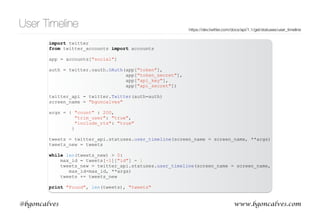
User Timeline
• .statuses.user_timeline() returns a set of tweets posted by a single user
• Important options:
• include_rts=‘true’ to Include retweets by this user
• count=200 number of tweets to return in each call
• trim_user=‘true’ to not include the user information (save bandwidth and processing time)
• max_id=1234 to include only tweets with an id lower than 1234
• Returns at most 200 tweets in each call. Can get all of a users tweets (up to 3200) with multiple
calls using max_id
https://dev.twitter.com/docs/api/1.1/get/statuses/user_timeline
www.bgoncalves.com@bgoncalves
User Timeline https://dev.twitter.com/docs/api/1.1/get/statuses/user_timeline
import twitter
from twitter_accounts import accounts
app = accounts["social"]
auth = twitter.oauth.OAuth(app["token"],
app["token_secret"],
app["api_key"],
app["api_secret"])
twitter_api = twitter.Twitter(auth=auth)
screen_name = "bgoncalves"
args = { "count" : 200,
"trim_user": "true",
"include_rts": "true"
}
tweets = twitter_api.statuses.user_timeline(screen_name = screen_name, **args)
tweets_new = tweets
while len(tweets_new) > 0:
max_id = tweets[-1]["id"] - 1
tweets_new = twitter_api.statuses.user_timeline(screen_name = screen_name,
max_id=max_id, **args)
tweets += tweets_new
print "Found", len(tweets), "tweets"
www.bgoncalves.com@bgoncalves
Social Interactions
import twitter
from twitter_accounts import accounts
app = accounts["social"]
auth = twitter.oauth.OAuth(app[“token"], app["token_secret"], app[“api_key"],
app["api_secret"])
twitter_api = twitter.Twitter(auth=auth)
screen_name = "bgoncalves"
args = { "count" : 200,
"trim_user": "true",
"include_rts": "true"}
tweets = twitter_api.statuses.user_timeline(screen_name = screen_name, **args)
tweets_new = tweets
while len(tweets_new) > 0:
max_id = tweets[-1]["id"] - 1
tweets_new = twitter_api.statuses.user_timeline(screen_name = screen_name,
max_id=max_id, **args)
tweets += tweets_new
user = tweets[0]["user"]["id"]
for tweet in tweets:
if "retweeted_status" in tweet:
print user, "->", tweet["retweeted_status"]["user"]["id"]
elif tweet["in_reply_to_user_id"]:
print tweet["in_reply_to_user_id"], "->", user
www.bgoncalves.com@bgoncalves
Streaming Geocoded data
• The Streaming api provides realtime data, subject to filters
• Use TwitterStream instead of Twitter object (.TwitterStream(auth=twitter_api.auth))
• .status.filter(track=q) will return tweets that match the query q in real time
• Returns generator that you can iterate over
• .status.filter(locations=bb) will return tweets that occur within the bounding box bb in real time
• bb is a comma separated pair of lat/lon coordinates.
• -180,-90,180,90 - World
• -74,40,-73,41 - NYC
https://dev.twitter.com/streaming/overview/request-parameters#locations
www.bgoncalves.com@bgoncalves
Streaming Geocoded data https://dev.twitter.com/streaming/overview/request-parameters#locations
import twitter
from twitter_accounts import accounts
import gzip
app = accounts["social"]
auth = twitter.oauth.OAuth(app["token"],
app["token_secret"],
app["api_key"],
app["api_secret"])
stream_api = twitter.TwitterStream(auth=auth)
query = "-74,40,-73,41" # NYC
stream_results = stream_api.statuses.filter(locations = query)
tweet_count = 0
fp = gzip.open("NYC.json.gz", "a")
for tweet in stream_results:
try:
tweet_count += 1
print tweet_count, tweet[“id”]
print >> fp, tweet
except:
pass
if tweet_count % 1000 == 0:
print >> sys.stderr, tweet_count
location_twitter.py
www.bgoncalves.com@bgoncalves
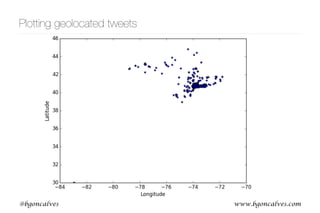
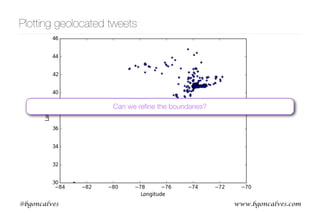
Plotting geolocated tweets
import sys
import gzip
import matplotlib.pyplot as plt
x = []
y = []
line_count = 0
try:
for line in gzip.open(sys.argv[1]):
try:
tweet = eval(line.strip())
line_count += 1
if "coordinates" in tweet and tweet["coordinates"] is not None:
x.append(tweet["coordinates"]["coordinates"][0])
y.append(tweet["coordinates"]["coordinates"][1])
except:
pass
except:
pass
print >> sys.stderr, "Read", line_count, "and found", len(x), "geolocated tweets"
plt.plot(x, y, '*')
plt.xlabel('Longitude')
plt.ylabel('Latitude')
plt.savefig(sys.argv[1] + '.png')
plt.close()
plot_tweets.py
www.bgoncalves.com@bgoncalves
Plotting geolocated tweets
www.bgoncalves.com@bgoncalves
Plotting geolocated tweets
Can we refine the boundaries?
www.bgoncalves.com@bgoncalves
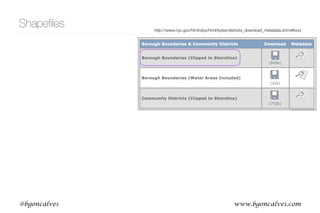
Shapefiles http://www.nyc.gov/html/dcp/html/bytes/districts_download_metadata.shtml#bcd
www.bgoncalves.com@bgoncalves
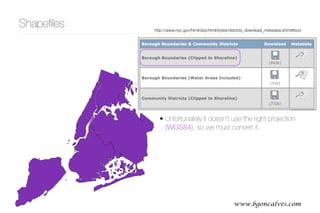
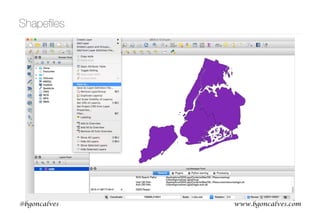
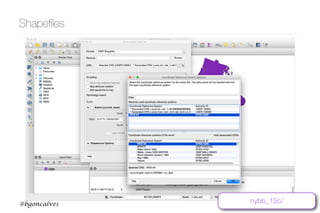
• Unfortunately it doesn’t use the right projection
(WGS84), so we must convert it.
Shapefiles http://www.nyc.gov/html/dcp/html/bytes/districts_download_metadata.shtml#bcd
www.bgoncalves.com@bgoncalves
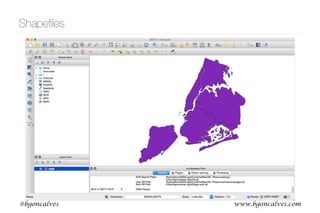
Shapefiles
www.bgoncalves.com@bgoncalves
Shapefiles
www.bgoncalves.com@bgoncalves
Shapefiles
nybb_15c/
www.bgoncalves.com@bgoncalves
pyshp
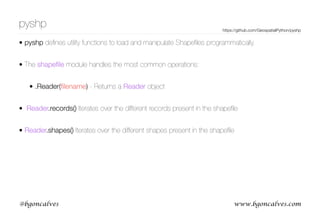
• pyshp defines utility functions to load and manipulate Shapefiles programmatically.
• The shapefile module handles the most common operations:
• .Reader(filename) - Returns a Reader object
• Reader.records() Iterates over the different records present in the shapefile
• Reader.shapes() Iterates over the different shapes present in the shapefile
https://github.com/GeospatialPython/pyshp
www.bgoncalves.com@bgoncalves
shapely
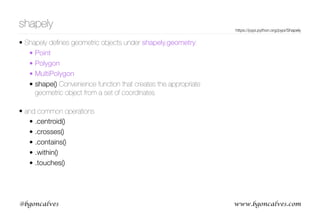
• Shapely defines geometric objects under shapely.geometry:
• Point
• Polygon
• MultiPolygon
• shape() Convenience function that creates the appropriate
geometric object from a set of coordinates

• and common operations
• .centroid()
• .crosses()
• .contains()
• .within()
• .touches()
https://pypi.python.org/pypi/Shapely
www.bgoncalves.com@bgoncalves
Loading a Shapefile
import sys
import shapefile
from shapely.geometry import shape
shp = shapefile.Reader(sys.argv[1])
print "Found", shp.numRecords, "records:"
pos = None
count = 0
for record in shp.records():
print " ", record[1]
if record[1] == sys.argv[2]:
pos = count
count += 1
if pos is None:
print >> sys.stderr, sys.argv[2], "not found in shapefile"
sys.exit()
print >> sys.stderr, "Using", sys.argv[2], "..."
manhattan = shape(shp.shapes()[pos])
print manhattan.contains(manhattan.centroid)
load_shapefile.py
www.bgoncalves.com@bgoncalves
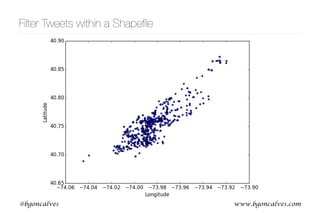
Filter Tweets within a Shapefile
import sys
import shapefile
from shapely.geometry import shape, Point
import gzip
shp = shapefile.Reader("nybb_15c/nybb_wgs84.shp")
print "Found", shp.numRecords, "records:"
pos = 2 # Manhattan
count = 0
for record in shp.records():
print count, " ", record[1]
count += 1
print >> sys.stderr, "Using", shp.records()[pos][1],"..."
manhattan = shape(shp.shapes()[pos])
fp = gzip.open("Manhattan.json.gz", "w")
for line in gzip.open("NYC.json.gz"):
try:
tweet = eval(line.strip())
if "coordinates" in tweet and tweet["coordinates"] is not None:
point = Point(tweet["coordinates"]["coordinates"])
if manhattan.contains(point):
print >> fp, line.strip()
except:
pass
filter_shapefile.py
www.bgoncalves.com@bgoncalves
Filter Tweets within a Shapefile
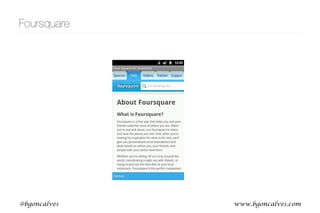
Foursquare
www.bgoncalves.com@bgoncalves
Foursquare
www.bgoncalves.com@bgoncalves
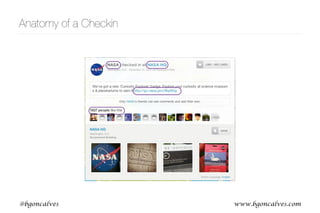
Anatomy of a Checkin
www.bgoncalves.com@bgoncalves
Anatomy of a Checkin
[u’venue’,
u'like',
u'photos',
u'source',
u'visibility',
u'entities',
u'shout',
u'timeZoneOffset',
u'type',
u'id',
u'createdAt',
u'likes']
www.bgoncalves.com@bgoncalves
Anatomy of a Checkin
[u’venue’,
u'like',
u'photos',
u'source',
u'visibility',
u'entities',
u'shout',
u'timeZoneOffset',
u'type',
u'id',
u'createdAt',
u'likes']
u"We've got a new 'Curiosity Explorer' badge.
Explore your curiosity at science museums &
planetariums to earn it http://go.nasa.gov/9kpN5g"
[u'verified',
u'name',
u'url',
u'like',
u'contact',
u'location',
u'stats',
u'id',
u'categories',
u'likes']
{u'count': 1837,
u'groups': [{u'count': 1837, u'items': [], u'type': u'others'}],
u'summary': u'1837 likes'}
[{u'indices': [112, 137],
u'object': {u'url': u'http://go.nasa.gov/9kpN5g'},
u'type': u'url'}]
www.bgoncalves.com@bgoncalves
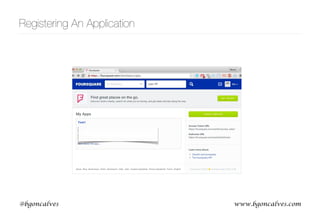
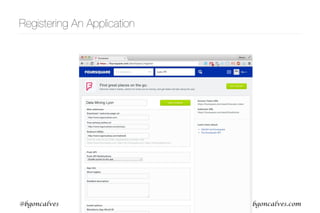
Registering An Application
www.bgoncalves.com@bgoncalves
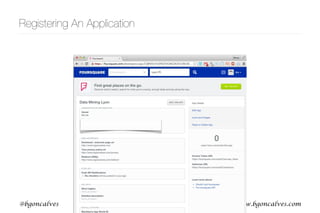
Registering An Application
www.bgoncalves.com@bgoncalves
Registering An Application
www.bgoncalves.com@bgoncalves
Registering An Application
import foursquare
accounts = { "tutorial": {"client_id": “CLIENT_ID",
"client_secret": “CLIENT_SECRET",
"access_token": ""
}
}
app = accounts["tutorial"]
client = foursquare.Foursquare(client_id = app["client_id"],
client_secret = app["client_secret"],
redirect_uri='http://www.bgoncalves.com/redirect')
auth_uri = client.oauth.auth_url()
print auth_uri
• We now have our client_id and client_secret that we can use to request
an access token.
• First we request an auth_url, a URL where the “user” will be asked to login
to foursquare and authorize our app
auth_uri_foursquare.py
• In the remainder of this lecture, the accounts dict will live inside the foursquare_accounts.py file
www.bgoncalves.com@bgoncalves
Registering An Application
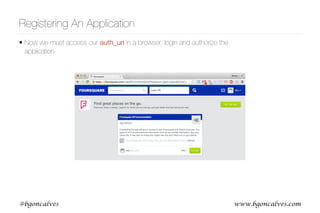
• Now we must access our auth_uri in a browser, login and authorize the
application
www.bgoncalves.com@bgoncalves
Registering An Application
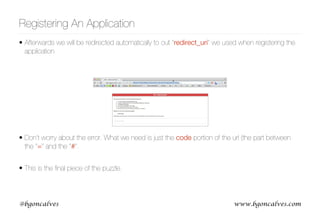
• Afterwards we will be redirected automatically to out “redirect_uri” we used when registering the
application
• Don’t worry about the error. What we need is just the code portion of the url (the part between
the “=“ and the “#”.
• This is the final piece of the puzzle.
www.bgoncalves.com@bgoncalves
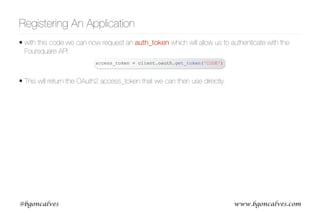
• with this code we can now request an auth_token which will allow us to authenticate with the
Foursquare API
• This will return the OAuth2 access_token that we can then use directly.
Registering An Application
access_token = client.oauth.get_token('CODE')
www.bgoncalves.com@bgoncalves
Authenticating with the API
import foursquare
from foursquare_accounts import accounts
app = accounts["tutorial"]
client = foursquare.Foursquare(client_id = app["client_id"],
client_secret = app["client_secret"])
client.set_access_token(app["access_token"])
user_id = 3751987
friends = client.users.friends(user_id)
• Much simpler and intuitive
• Less prone to mistakes
• Automatically takes care of all the dirty details
auth_foursquare.py
www.bgoncalves.com@bgoncalves
Objects
• Two main types of objects:
• Users
• Venues
• Multiple possible actions (by Users on Venues)
• Checkin
• Like
• Tip
www.bgoncalves.com@bgoncalves
API Limitations
• Users have privacy concerns with respect to publicly sharing their location.
• “Stalker apps”
• “Please Rob Me”
• Privacy is a big concern for Foursquare
• API structure reflects this
• “Easy” to get information on users and on venues. Connecting users to
venues much harder to obtain.
www.bgoncalves.com@bgoncalves
[u'rating',
u'reasons',
u'likes',
u'mayor',
u'createdAt',
u'verified',
u'id',
u'shortUrl',
u'pageUpdates',
u'location',
u'tips',
u'listed',
u'canonicalUrl',
u'tags',
u'photos',
u'attributes',
u'stats',
u'dislike',
u'hereNow',
u'categories',
u'name',
u'like',
u'phrases',
u'specials',
u'contact',
u'popular',
u'timeZone']
Venues
• Venues correspond to physical locations
• Are perhaps the most important object in the Foursquare universe
• API is particularly generous, allowing for 5000 requests per hour.
• .venues(venue_id) 

Returns a venue object
• .venues.similar(venue_id) 

Returns a list of similar venues (abbreviated)
• .venues.search({“query”:query, “near”:location})

Searches for places matching the query 

(“pizza”, “Eiffel Tower”, etc) near location (“Paris”, etc).
[u'city',
u'cc',
u'country',
u'state',
u'address',
u'lat',
u'lng']
[u'count',
u'groups',
u'summary']
www.bgoncalves.com@bgoncalves
Similar Venues https://developer.foursquare.com/overview/venues.html
import foursquare
from foursquare_accounts import accounts
app = accounts["tutorial"]
client = foursquare.Foursquare(client_id = app["client_id"],
client_secret = app["client_secret"])
client.set_access_token(app["access_token"])
venue_id = "43695300f964a5208c291fe3"
venue = client.venues(venue_id)
similar = client.venues.similar(venue_id)
print "Similar venues to", venue["venue"]["name"],"(",venue["venue"]["hereNow"]["summary"],")"
print
for venue in similar["similarVenues"]["items"]:
print venue["name"]
venues_foursquare.py
www.bgoncalves.com@bgoncalves
Tips
• Users can leave tips in venues at any time (without checking in)
• (Reduced) Tips for a venue can be accessed using .venues.tips(venue_id)
• Limited to a maximum of 500 per call, defined with the “count” parameter. Get further tips with
“offset” parameter (same as for friends).
• Full Tip objets can be obtained with .tips(tip_id)
• Contain (Reduced) User object and are public, providing an easy way to connect users with
venues.
https://developer.foursquare.com/docs/venues/tips
www.bgoncalves.com@bgoncalves
Tips
import foursquare
from foursquare_accounts import accounts
app = accounts["tutorial"]
client = foursquare.Foursquare(client_id = app["client_id"],
client_secret = app["client_secret"])
client.set_access_token(app["access_token"])
venue_id = "43695300f964a5208c291fe3"
tips = client.venues.tips(venue_id)
tips_list = tips["tips"]["items"]
tip_count = tips["tips"]["count"]
while len(tips_list) < tip_count:
tips = client.venues.tips(venue_id, {"offset": len(tips_list)})
tips_list += tips["tips"]["items"]
print len(tips_list), tip_count
for tip in tips_list:
print tip[“user”]["id"], tip["text"]
tips_foursquare.py
www.bgoncalves.com@bgoncalves
Checkins
• Checkins are the Raison d'être of Foursquare.
• They connect Users with Venues providing valuable temporal and demographic information.
• .checkins(checkin_id) Returns the Checkin object
• .users.checkins(user_id) Returns the list of Public checkins for User user_id or all checkins if
user_id is friends of the user using the application.
https://developer.foursquare.com/docs/checkins/checkins.html
import foursquare
from foursquare_accounts import accounts
app = accounts["tutorial"]
client = foursquare.Foursquare(client_id = app["client_id"],
client_secret = app["client_secret"])
client.set_access_token(app["access_token"])
checkin_id = "5089b44319a9974111a6c882"
checkin = client.checkins(checkin_id)
user_name = checkin["checkin"]["user"]["firstName"]
print checkin_id, "was made by", user_name
checkins_foursquare.py
www.bgoncalves.com@bgoncalves
Checkins https://developer.foursquare.com/docs/checkins/checkins.html
• Users have the option of sharing their checkins through Twitter and Facebook, making them
publicly accessible
• The status text is shared along with the URL of the web version of the checkin.
• To allow Twitter and Facebook friends to access the checkin, a special “access_token”, called a
signature, is added to the checkin URL.
• Each signature is valid for just a single checkin and it allows anyone to access the respective
checkin
www.bgoncalves.com@bgoncalves
Checkins
• Signed checkin urls are of the form:
https://foursquare.com/<user>/checkin/<checkin_id>?s=<signature>&ref=tw
• For example:
https://foursquare.com/tyayayayaa/checkin/5304b652498e734439d8711f?
s=ScMqmpSLg1buhGXQicDJS4A_FVY&ref=tw
• corresponds to user tyayayayaa performing checkin 5304b652498e734439d8711f and has
signature ScMqmpSLg1buhGXQicDJS4A_FVY
• .checkins(checkin_id, {“signature”: signature}) can be used to query the API using the
signature key to access a private checkin
https://developer.foursquare.com/docs/checkins/checkins.html
Obtain signatures from Twitter!!!!
www.bgoncalves.com@bgoncalves
URL parsing
import urllib2
import posixpath
import foursquare
from foursquare_accounts import accounts
app = accounts["tutorial"]
client = foursquare.Foursquare(client_id = app["client_id"],
client_secret = app["client_secret"])
client.set_access_token(app["access_token"])
url = "https://foursquare.com/tyayayayaa/checkin/
5304b652498e734439d8711f?s=ScMqmpSLg1buhGXQicDJS4A_FVY&ref=tw"
parsed_url = urllib2.urlparse.urlparse(url)
checkin_id = posixpath.basename(parsed_url.path)
query = urllib2.urlparse.parse_qs(parsed_url.query)
screen_name = parsed_url.path.split('/')[1]
signature = query["s"][0]
source = query["ref"]
checkin = client.checkins(checkin_id, {"signature": signature})
url_parse.py
www.bgoncalves.com@bgoncalves
requests
• .get(url) open the given url for reading (like .urlopen()) and returns a Response
• .get(url, auth=(“user”, “pass”)) open the given url and authenticate with username=“user” and
password=“pass” (Basic Authentication)
• Response.status_code is a field that contains the calls status code
• Response.headers is a dict containing all the returned headers
• Response.text is a field that contains the content of the returned page
• Response.url contains the final url after all redirections
• Response.json() parses a JSON response (throws a JSONDecodeError exception if
response is not valid JSON). Check “content-type” header field.
http://requests.readthedocs.org/en/latest/
www.bgoncalves.com@bgoncalves
requests http://requests.readthedocs.org/en/latest/
import requests
import sys
url = "http://httpbin.org/basic-auth/user/passwd"
request = requests.get(url, auth=("user", "passwd"))
if request.status_code != 200:
print >> sys.stderr, "Error found", request.get_code()
content_type = request.headers[“content-type"]
response = request.json()
if response["authenticated"]:
print "Authentication Successful"
• .get(url, headers=headers) open the url for reading but pass “headers” contents to server when
establishing a connection
• Useful to override default values of headers or add custom values to help server decide how
to handle our request
• Most commonly used to spoof the user-agent
basic_auth.py
www.bgoncalves.com@bgoncalves
requests http://requests.readthedocs.org/en/latest/
import requests
from BeautifulSoup import BeautifulSoup
url = "http://whatsmyuseragent.com/"
headers = {"User-agent" : "Mozilla/5.0 (Windows NT 6.1; Win64; x64; rv:25.0) Gecko/20100101 Firefox/25.0"}
request_default = requests.get(url)
request_spoofed = requests.get(url, headers=headers)
soup_default = BeautifulSoup(request_default.text)
soup_spoofed = BeautifulSoup(request_spoofed.text)
print "Default:", soup_default.h2.text
print "Spoofed:", soup_spoofed.h2.text
• Some servers use the User-agent string to decide how to format the output
• Correctly handle specific versions of web browsers
• Provide lighter/simplified versions to users on their mobiles
• Refusing access to automated tools, etc
spoof.py
www.bgoncalves.com@bgoncalves
Venue HTML Parsing http://www.crummy.com/software/BeautifulSoup/
from BeautifulSoup import BeautifulSoup
import urllib2
import requests
import posixpath
url = "http://4sq.com/18aGENW"
headers = {"User-agent": "Mozilla/5.0 (Windows NT 6.1; Win64; x64; rv:25.0) Gecko/20100101 Firefox/
25.0"}
request = requests.get(url, headers=headers)
final_url = request.url
parsed = urllib2.urlparse.urlparse(final_url)
query = parsed.query
signature = urllib2.urlparse.parse_qs(query)["s"][0]
checkin_id = posixpath.basename(parsed.path)
user = posixpath.dirname(parsed.path).split('/')[1]
soup = BeautifulSoup(request.text)
venue_push = soup.div(attrs={"class": "venue push"})[0]
screen_name = venue_push.h1.strong.text
venue = venue_push.a["href"]
print "Checkin %s is for User "%s" with Name "%s" checking in at %s"
% (checkin_id, user, screen_name, posixpath.basename(venue))
beautiful.py

Mining Georeferenced Data

  • 1.
    Bruno Gonçalves www.bgoncalves.com Mining GeoreferencedData: 
 Location-based Services and the Sharing Economy https://github.com/bmtgoncalves/Mining-Georeferenced-Data
  • 2.
    www.bgoncalves.com@bgoncalves Contents • Introduction toTwitter • Registering a Twitter Application • API Basics • Streaming Geolocated Tweets (twitter) • Filter Based on an arbitrary Polygon (shapely, shapefile) • Parse URLs (urlparse) • Register a Foursquare Application • Query Checkin Information (foursquare) • Parse webpages (requests, BeautifulSoup) and extract Checkin Information https://github.com/bmtgoncalves/Mining-Georeferenced-Data
  • 3.
  • 4.
    www.bgoncalves.com@bgoncalves Anatomy of aTweet [u'contributors', u'truncated', u'text', u'in_reply_to_status_id', u'id', u'favorite_count', u'source', u'retweeted', u'coordinates', u'entities', u'in_reply_to_screen_name', u'in_reply_to_user_id', u'retweet_count', u'id_str', u'favorited', u'user', u'geo', u'in_reply_to_user_id_str', u'possibly_sensitive', u'lang', u'created_at', u'in_reply_to_status_id_str', u'place', u'metadata']
  • 5.
    www.bgoncalves.com@bgoncalves Anatomy of aTweet [u'contributors', u'truncated', u'text', u'in_reply_to_status_id', u'id', u'favorite_count', u'source', u'retweeted', u'coordinates', u'entities', u'in_reply_to_screen_name', u'in_reply_to_user_id', u'retweet_count', u'id_str', u'favorited', u'user', u'geo', u'in_reply_to_user_id_str', u'possibly_sensitive', u'lang', u'created_at', u'in_reply_to_status_id_str', u'place', u'metadata'] [u'follow_request_sent', u'profile_use_background_image', u'default_profile_image', u'id', u'profile_background_image_url_https', u'verified', u'profile_text_color', u'profile_image_url_https', u'profile_sidebar_fill_color', u'entities', u'followers_count', u'profile_sidebar_border_color', u'id_str', u'profile_background_color', u'listed_count', u'is_translation_enabled', u'utc_offset', u'statuses_count', u'description', u'friends_count', u'location', u'profile_link_color', u'profile_image_url', u'following', u'geo_enabled', u'profile_banner_url', u'profile_background_image_url', u'screen_name', u'lang', u'profile_background_tile', u'favourites_count', u'name', u'notifications', u'url', u'created_at', u'contributors_enabled', u'time_zone', u'protected', u'default_profile', u'is_translator']
  • 6.
    www.bgoncalves.com@bgoncalves Anatomy of aTweet [u'contributors', u'truncated', u'text', u'in_reply_to_status_id', u'id', u'favorite_count', u'source', u'retweeted', u'coordinates', u'entities', u'in_reply_to_screen_name', u'in_reply_to_user_id', u'retweet_count', u'id_str', u'favorited', u'user', u'geo', u'in_reply_to_user_id_str', u'possibly_sensitive', u'lang', u'created_at', u'in_reply_to_status_id_str', u'place', u'metadata'] [u'type', u'coordinates'] [u'symbols', u'user_mentions', u'hashtags', u'urls'] u'<a href="http://foursquare.com" rel=“nofollow"> foursquare</a>' u"I'm at Terminal Rodovixe1rio de Feira de Santana (Feira de Santana, BA) http://t.co/WirvdHwYMq"
  • 7.
    www.bgoncalves.com@bgoncalves Anatomy of aTweet [u'contributors', u'truncated', u'text', u'in_reply_to_status_id', u'id', u'favorite_count', u'source', u'retweeted', u'coordinates', u'entities', u'in_reply_to_screen_name', u'in_reply_to_user_id', u'retweet_count', u'id_str', u'favorited', u'user', u'geo', u'in_reply_to_user_id_str', u'possibly_sensitive', u'lang', u'created_at', u'in_reply_to_status_id_str', u'place', u'metadata'] [u'type', u'coordinates'] [u'symbols', u'user_mentions', u'hashtags', u'urls'] u'<a href="http://foursquare.com" rel=“nofollow"> foursquare</a>' u"I'm at Terminal Rodovixe1rio de Feira de Santana (Feira de Santana, BA) http://t.co/WirvdHwYMq" {u'display_url': u'4sq.com/1k5MeYF', u'expanded_url': u'http://4sq.com/1k5MeYF', u'indices': [70, 92], u'url': u'http://t.co/WirvdHwYMq'}
  • 8.
  • 9.
  • 10.
  • 11.
  • 12.
  • 13.
    www.bgoncalves.com@bgoncalves API Basics https://dev.twitter.com/docs •The twitter module provides the oauth interface. We just need to provide the right credentials. • Best to keep the credentials in a dict and parametrize our calls with the dict key. This way we can switch between different accounts easily. • .Twitter(auth) takes an OAuth instance as argument and returns a Twitter object that we can use to interact with the API • Twitter methods mimic API structure • 4 basic types of objects: • Tweets • Users • Entities
  • 14.
    www.bgoncalves.com@bgoncalves Authenticating with theAPI import twitter accounts = { "social" : { 'api_key' : 'API_KEY', 'api_secret' : 'API_SECRET', 'token' : 'TOKEN', 'token_secret' : 'TOKEN_SECRET' }, } app = accounts["social"] auth = twitter.oauth.OAuth(app["token"], app["token_secret"], app["api_key"], app["api_secret"]) twitter_api = twitter.Twitter(auth=auth) • In the remainder of this lecture, the accounts dict will live inside the twitter_accounts.py file authentication_twitter.py
  • 15.
    www.bgoncalves.com@bgoncalves Searching for Tweets •.search.tweets(query, count) • query is the content to search for • count is the maximum number of results to return • returns dict with a list of “statuses” and “search_metadata” • search_results[“search_metadata”][“next_results”] can be used to get the next page of results https://dev.twitter.com/docs/api/1.1/get/search/tweets {u'completed_in': 0.027, u'count': 15, u'max_id': 438088492577345536, u'max_id_str': u'438088492577345536', u'next_results': u'?max_id=438088485145034752&q=soccer&include_entities=1', u'query': u'soccer', u'refresh_url': u'?since_id=438088492577345536&q=soccer&include_entities=1', u'since_id': 0, u'since_id_str': u'0'}
  • 16.
    www.bgoncalves.com@bgoncalves Searching for Tweetshttps://dev.twitter.com/docs/api/1.1/get/search/tweets import twitter from twitter_accounts import accounts import urllib2 app = accounts["social"] auth = twitter.oauth.OAuth(app["token"], app["token_secret"], app["api_key"], app["api_secret"]) twitter_api = twitter.Twitter(auth=auth) query = "foursquare" count = 200 search_results = twitter_api.search.tweets(q = query, count = count) statuses = search_results["statuses"] while True: try: next_results = search_results["search_metadata"]["next_results"] args = urllib2.urlparse.parse_qs(next_results[1:]) search_results = twitter_api.search.tweets(**args) statuses += search_results["statuses"] except: break search_twitter.py
  • 17.
    www.bgoncalves.com@bgoncalves Streaming data • TheStreaming api provides realtime data, subject to filters • Use TwitterStream instead of Twitter object (.TwitterStream(auth=twitter_api.auth)) • .status.filter(track=q) will return tweets that match the query q in real time • Returns generator that you can iterate over https://dev.twitter.com/docs/api/1.1/post/statuses/filter
  • 18.
    www.bgoncalves.com@bgoncalves Streaming data https://dev.twitter.com/docs/api/1.1/post/statuses/filter importtwitter from twitter_accounts import accounts app = accounts["social"] auth = twitter.oauth.OAuth(app["token"], app["token_secret"], app["api_key"], app["api_secret"]) stream_api = twitter.TwitterStream(auth=auth) query = "bieber" stream_results = stream_api.statuses.filter(track=query) for tweet in stream_results: print tweet["text"] stream_twitter.py
  • 19.
    www.bgoncalves.com@bgoncalves • .users.lookup() returnsuser profile information for a list of user_ids or screen_names • list should be comma separated and provided as a string User profiles https://dev.twitter.com/docs/api/1.1/get/users/lookup import twitter from twitter_accounts import accounts app = accounts["social"] auth = twitter.oauth.OAuth(app["token"], app["token_secret"], app["api_key"], app["api_secret"]) twitter_api = twitter.Twitter(auth=auth) screen_names = ",".join(["bgoncalves", "tnoulas"]) search_results = twitter_api.users.lookup(screen_name=screen_names) for user in search_results: print user["screen_name"], "has", user["followers_count"], "followers"
  • 20.
    www.bgoncalves.com@bgoncalves Social Connections • .friends.ids()and .followers.ids() returns a list of up to 5000 of a users friends or followers for a given screen_name or user_id • result is a dict containing multiple fields: • ids are contained in results[“ids”]. • results[“next_cursor”] allows us to obtain the next page of results. • .friends.ids(screen_name=screen_name, cursor=results[“next_cursor”]) will return the next page of results • cursor=0 means no more results https://dev.twitter.com/docs/api/1.1/get/friends/ids
 https://dev.twitter.com/docs/api/1.1/get/followers/ids [u'next_cursor_str', u'previous_cursor', u'ids', u'next_cursor', u'previous_cursor_str']
  • 21.
    www.bgoncalves.com@bgoncalves Social Connections https://dev.twitter.com/docs/api/1.1/get/friends/ids
 https://dev.twitter.com/docs/api/1.1/get/followers/ids importtwitter from twitter_accounts import accounts app = accounts["social"] auth = twitter.oauth.OAuth(app["token"], app["token_secret"], app["api_key"], app["api_secret"]) twitter_api = twitter.Twitter(auth=auth) screen_name = "stephen_wolfram" cursor = -1 followers = [] while cursor != 0: result = twitter_api.followers.ids(screen_name=screen_name, cursor=cursor) followers += result["ids"] cursor = result["next_cursor"] print "Found", len(followers), "Followers"
  • 22.
    www.bgoncalves.com@bgoncalves User Timeline • .statuses.user_timeline()returns a set of tweets posted by a single user • Important options: • include_rts=‘true’ to Include retweets by this user • count=200 number of tweets to return in each call • trim_user=‘true’ to not include the user information (save bandwidth and processing time) • max_id=1234 to include only tweets with an id lower than 1234 • Returns at most 200 tweets in each call. Can get all of a users tweets (up to 3200) with multiple calls using max_id https://dev.twitter.com/docs/api/1.1/get/statuses/user_timeline
  • 23.
    www.bgoncalves.com@bgoncalves User Timeline https://dev.twitter.com/docs/api/1.1/get/statuses/user_timeline importtwitter from twitter_accounts import accounts app = accounts["social"] auth = twitter.oauth.OAuth(app["token"], app["token_secret"], app["api_key"], app["api_secret"]) twitter_api = twitter.Twitter(auth=auth) screen_name = "bgoncalves" args = { "count" : 200, "trim_user": "true", "include_rts": "true" } tweets = twitter_api.statuses.user_timeline(screen_name = screen_name, **args) tweets_new = tweets while len(tweets_new) > 0: max_id = tweets[-1]["id"] - 1 tweets_new = twitter_api.statuses.user_timeline(screen_name = screen_name, max_id=max_id, **args) tweets += tweets_new print "Found", len(tweets), "tweets"
  • 24.
    www.bgoncalves.com@bgoncalves Social Interactions import twitter fromtwitter_accounts import accounts app = accounts["social"] auth = twitter.oauth.OAuth(app[“token"], app["token_secret"], app[“api_key"], app["api_secret"]) twitter_api = twitter.Twitter(auth=auth) screen_name = "bgoncalves" args = { "count" : 200, "trim_user": "true", "include_rts": "true"} tweets = twitter_api.statuses.user_timeline(screen_name = screen_name, **args) tweets_new = tweets while len(tweets_new) > 0: max_id = tweets[-1]["id"] - 1 tweets_new = twitter_api.statuses.user_timeline(screen_name = screen_name, max_id=max_id, **args) tweets += tweets_new user = tweets[0]["user"]["id"] for tweet in tweets: if "retweeted_status" in tweet: print user, "->", tweet["retweeted_status"]["user"]["id"] elif tweet["in_reply_to_user_id"]: print tweet["in_reply_to_user_id"], "->", user
  • 25.
    www.bgoncalves.com@bgoncalves Streaming Geocoded data •The Streaming api provides realtime data, subject to filters • Use TwitterStream instead of Twitter object (.TwitterStream(auth=twitter_api.auth)) • .status.filter(track=q) will return tweets that match the query q in real time • Returns generator that you can iterate over • .status.filter(locations=bb) will return tweets that occur within the bounding box bb in real time • bb is a comma separated pair of lat/lon coordinates. • -180,-90,180,90 - World • -74,40,-73,41 - NYC https://dev.twitter.com/streaming/overview/request-parameters#locations
  • 26.
    www.bgoncalves.com@bgoncalves Streaming Geocoded datahttps://dev.twitter.com/streaming/overview/request-parameters#locations import twitter from twitter_accounts import accounts import gzip app = accounts["social"] auth = twitter.oauth.OAuth(app["token"], app["token_secret"], app["api_key"], app["api_secret"]) stream_api = twitter.TwitterStream(auth=auth) query = "-74,40,-73,41" # NYC stream_results = stream_api.statuses.filter(locations = query) tweet_count = 0 fp = gzip.open("NYC.json.gz", "a") for tweet in stream_results: try: tweet_count += 1 print tweet_count, tweet[“id”] print >> fp, tweet except: pass if tweet_count % 1000 == 0: print >> sys.stderr, tweet_count location_twitter.py
  • 27.
    www.bgoncalves.com@bgoncalves Plotting geolocated tweets importsys import gzip import matplotlib.pyplot as plt x = [] y = [] line_count = 0 try: for line in gzip.open(sys.argv[1]): try: tweet = eval(line.strip()) line_count += 1 if "coordinates" in tweet and tweet["coordinates"] is not None: x.append(tweet["coordinates"]["coordinates"][0]) y.append(tweet["coordinates"]["coordinates"][1]) except: pass except: pass print >> sys.stderr, "Read", line_count, "and found", len(x), "geolocated tweets" plt.plot(x, y, '*') plt.xlabel('Longitude') plt.ylabel('Latitude') plt.savefig(sys.argv[1] + '.png') plt.close() plot_tweets.py
  • 28.
  • 29.
  • 30.
  • 31.
    www.bgoncalves.com@bgoncalves • Unfortunately itdoesn’t use the right projection (WGS84), so we must convert it. Shapefiles http://www.nyc.gov/html/dcp/html/bytes/districts_download_metadata.shtml#bcd
  • 32.
  • 33.
  • 34.
  • 35.
    www.bgoncalves.com@bgoncalves pyshp • pyshp definesutility functions to load and manipulate Shapefiles programmatically. • The shapefile module handles the most common operations: • .Reader(filename) - Returns a Reader object • Reader.records() Iterates over the different records present in the shapefile • Reader.shapes() Iterates over the different shapes present in the shapefile https://github.com/GeospatialPython/pyshp
  • 36.
    www.bgoncalves.com@bgoncalves shapely • Shapely definesgeometric objects under shapely.geometry: • Point • Polygon • MultiPolygon • shape() Convenience function that creates the appropriate geometric object from a set of coordinates
 • and common operations • .centroid() • .crosses() • .contains() • .within() • .touches() https://pypi.python.org/pypi/Shapely
  • 37.
    www.bgoncalves.com@bgoncalves Loading a Shapefile importsys import shapefile from shapely.geometry import shape shp = shapefile.Reader(sys.argv[1]) print "Found", shp.numRecords, "records:" pos = None count = 0 for record in shp.records(): print " ", record[1] if record[1] == sys.argv[2]: pos = count count += 1 if pos is None: print >> sys.stderr, sys.argv[2], "not found in shapefile" sys.exit() print >> sys.stderr, "Using", sys.argv[2], "..." manhattan = shape(shp.shapes()[pos]) print manhattan.contains(manhattan.centroid) load_shapefile.py
  • 38.
    www.bgoncalves.com@bgoncalves Filter Tweets withina Shapefile import sys import shapefile from shapely.geometry import shape, Point import gzip shp = shapefile.Reader("nybb_15c/nybb_wgs84.shp") print "Found", shp.numRecords, "records:" pos = 2 # Manhattan count = 0 for record in shp.records(): print count, " ", record[1] count += 1 print >> sys.stderr, "Using", shp.records()[pos][1],"..." manhattan = shape(shp.shapes()[pos]) fp = gzip.open("Manhattan.json.gz", "w") for line in gzip.open("NYC.json.gz"): try: tweet = eval(line.strip()) if "coordinates" in tweet and tweet["coordinates"] is not None: point = Point(tweet["coordinates"]["coordinates"]) if manhattan.contains(point): print >> fp, line.strip() except: pass filter_shapefile.py
  • 39.
  • 40.
  • 41.
  • 42.
  • 43.
    www.bgoncalves.com@bgoncalves Anatomy of aCheckin [u’venue’, u'like', u'photos', u'source', u'visibility', u'entities', u'shout', u'timeZoneOffset', u'type', u'id', u'createdAt', u'likes']
  • 44.
    www.bgoncalves.com@bgoncalves Anatomy of aCheckin [u’venue’, u'like', u'photos', u'source', u'visibility', u'entities', u'shout', u'timeZoneOffset', u'type', u'id', u'createdAt', u'likes'] u"We've got a new 'Curiosity Explorer' badge. Explore your curiosity at science museums & planetariums to earn it http://go.nasa.gov/9kpN5g" [u'verified', u'name', u'url', u'like', u'contact', u'location', u'stats', u'id', u'categories', u'likes'] {u'count': 1837, u'groups': [{u'count': 1837, u'items': [], u'type': u'others'}], u'summary': u'1837 likes'} [{u'indices': [112, 137], u'object': {u'url': u'http://go.nasa.gov/9kpN5g'}, u'type': u'url'}]
  • 45.
  • 46.
  • 47.
  • 48.
    www.bgoncalves.com@bgoncalves Registering An Application importfoursquare accounts = { "tutorial": {"client_id": “CLIENT_ID", "client_secret": “CLIENT_SECRET", "access_token": "" } } app = accounts["tutorial"] client = foursquare.Foursquare(client_id = app["client_id"], client_secret = app["client_secret"], redirect_uri='http://www.bgoncalves.com/redirect') auth_uri = client.oauth.auth_url() print auth_uri • We now have our client_id and client_secret that we can use to request an access token. • First we request an auth_url, a URL where the “user” will be asked to login to foursquare and authorize our app auth_uri_foursquare.py • In the remainder of this lecture, the accounts dict will live inside the foursquare_accounts.py file
  • 49.
    www.bgoncalves.com@bgoncalves Registering An Application •Now we must access our auth_uri in a browser, login and authorize the application
  • 50.
    www.bgoncalves.com@bgoncalves Registering An Application •Afterwards we will be redirected automatically to out “redirect_uri” we used when registering the application • Don’t worry about the error. What we need is just the code portion of the url (the part between the “=“ and the “#”. • This is the final piece of the puzzle.
  • 51.
    www.bgoncalves.com@bgoncalves • with thiscode we can now request an auth_token which will allow us to authenticate with the Foursquare API • This will return the OAuth2 access_token that we can then use directly. Registering An Application access_token = client.oauth.get_token('CODE')
  • 52.
    www.bgoncalves.com@bgoncalves Authenticating with theAPI import foursquare from foursquare_accounts import accounts app = accounts["tutorial"] client = foursquare.Foursquare(client_id = app["client_id"], client_secret = app["client_secret"]) client.set_access_token(app["access_token"]) user_id = 3751987 friends = client.users.friends(user_id) • Much simpler and intuitive • Less prone to mistakes • Automatically takes care of all the dirty details auth_foursquare.py
  • 53.
    www.bgoncalves.com@bgoncalves Objects • Two maintypes of objects: • Users • Venues • Multiple possible actions (by Users on Venues) • Checkin • Like • Tip
  • 54.
    www.bgoncalves.com@bgoncalves API Limitations • Usershave privacy concerns with respect to publicly sharing their location. • “Stalker apps” • “Please Rob Me” • Privacy is a big concern for Foursquare • API structure reflects this • “Easy” to get information on users and on venues. Connecting users to venues much harder to obtain.
  • 55.
    www.bgoncalves.com@bgoncalves [u'rating', u'reasons', u'likes', u'mayor', u'createdAt', u'verified', u'id', u'shortUrl', u'pageUpdates', u'location', u'tips', u'listed', u'canonicalUrl', u'tags', u'photos', u'attributes', u'stats', u'dislike', u'hereNow', u'categories', u'name', u'like', u'phrases', u'specials', u'contact', u'popular', u'timeZone'] Venues • Venues correspondto physical locations • Are perhaps the most important object in the Foursquare universe • API is particularly generous, allowing for 5000 requests per hour. • .venues(venue_id) 
 Returns a venue object • .venues.similar(venue_id) 
 Returns a list of similar venues (abbreviated) • .venues.search({“query”:query, “near”:location})
 Searches for places matching the query 
 (“pizza”, “Eiffel Tower”, etc) near location (“Paris”, etc). [u'city', u'cc', u'country', u'state', u'address', u'lat', u'lng'] [u'count', u'groups', u'summary']
  • 56.
    www.bgoncalves.com@bgoncalves Similar Venues https://developer.foursquare.com/overview/venues.html importfoursquare from foursquare_accounts import accounts app = accounts["tutorial"] client = foursquare.Foursquare(client_id = app["client_id"], client_secret = app["client_secret"]) client.set_access_token(app["access_token"]) venue_id = "43695300f964a5208c291fe3" venue = client.venues(venue_id) similar = client.venues.similar(venue_id) print "Similar venues to", venue["venue"]["name"],"(",venue["venue"]["hereNow"]["summary"],")" print for venue in similar["similarVenues"]["items"]: print venue["name"] venues_foursquare.py
  • 57.
    www.bgoncalves.com@bgoncalves Tips • Users canleave tips in venues at any time (without checking in) • (Reduced) Tips for a venue can be accessed using .venues.tips(venue_id) • Limited to a maximum of 500 per call, defined with the “count” parameter. Get further tips with “offset” parameter (same as for friends). • Full Tip objets can be obtained with .tips(tip_id) • Contain (Reduced) User object and are public, providing an easy way to connect users with venues. https://developer.foursquare.com/docs/venues/tips
  • 58.
    www.bgoncalves.com@bgoncalves Tips import foursquare from foursquare_accountsimport accounts app = accounts["tutorial"] client = foursquare.Foursquare(client_id = app["client_id"], client_secret = app["client_secret"]) client.set_access_token(app["access_token"]) venue_id = "43695300f964a5208c291fe3" tips = client.venues.tips(venue_id) tips_list = tips["tips"]["items"] tip_count = tips["tips"]["count"] while len(tips_list) < tip_count: tips = client.venues.tips(venue_id, {"offset": len(tips_list)}) tips_list += tips["tips"]["items"] print len(tips_list), tip_count for tip in tips_list: print tip[“user”]["id"], tip["text"] tips_foursquare.py
  • 59.
    www.bgoncalves.com@bgoncalves Checkins • Checkins arethe Raison d'être of Foursquare. • They connect Users with Venues providing valuable temporal and demographic information. • .checkins(checkin_id) Returns the Checkin object • .users.checkins(user_id) Returns the list of Public checkins for User user_id or all checkins if user_id is friends of the user using the application. https://developer.foursquare.com/docs/checkins/checkins.html import foursquare from foursquare_accounts import accounts app = accounts["tutorial"] client = foursquare.Foursquare(client_id = app["client_id"], client_secret = app["client_secret"]) client.set_access_token(app["access_token"]) checkin_id = "5089b44319a9974111a6c882" checkin = client.checkins(checkin_id) user_name = checkin["checkin"]["user"]["firstName"] print checkin_id, "was made by", user_name checkins_foursquare.py
  • 60.
    www.bgoncalves.com@bgoncalves Checkins https://developer.foursquare.com/docs/checkins/checkins.html • Usershave the option of sharing their checkins through Twitter and Facebook, making them publicly accessible • The status text is shared along with the URL of the web version of the checkin. • To allow Twitter and Facebook friends to access the checkin, a special “access_token”, called a signature, is added to the checkin URL. • Each signature is valid for just a single checkin and it allows anyone to access the respective checkin
  • 61.
    www.bgoncalves.com@bgoncalves Checkins • Signed checkinurls are of the form: https://foursquare.com/<user>/checkin/<checkin_id>?s=<signature>&ref=tw • For example: https://foursquare.com/tyayayayaa/checkin/5304b652498e734439d8711f? s=ScMqmpSLg1buhGXQicDJS4A_FVY&ref=tw • corresponds to user tyayayayaa performing checkin 5304b652498e734439d8711f and has signature ScMqmpSLg1buhGXQicDJS4A_FVY • .checkins(checkin_id, {“signature”: signature}) can be used to query the API using the signature key to access a private checkin https://developer.foursquare.com/docs/checkins/checkins.html Obtain signatures from Twitter!!!!
  • 62.
    www.bgoncalves.com@bgoncalves URL parsing import urllib2 importposixpath import foursquare from foursquare_accounts import accounts app = accounts["tutorial"] client = foursquare.Foursquare(client_id = app["client_id"], client_secret = app["client_secret"]) client.set_access_token(app["access_token"]) url = "https://foursquare.com/tyayayayaa/checkin/ 5304b652498e734439d8711f?s=ScMqmpSLg1buhGXQicDJS4A_FVY&ref=tw" parsed_url = urllib2.urlparse.urlparse(url) checkin_id = posixpath.basename(parsed_url.path) query = urllib2.urlparse.parse_qs(parsed_url.query) screen_name = parsed_url.path.split('/')[1] signature = query["s"][0] source = query["ref"] checkin = client.checkins(checkin_id, {"signature": signature}) url_parse.py
  • 63.
    www.bgoncalves.com@bgoncalves requests • .get(url) openthe given url for reading (like .urlopen()) and returns a Response • .get(url, auth=(“user”, “pass”)) open the given url and authenticate with username=“user” and password=“pass” (Basic Authentication) • Response.status_code is a field that contains the calls status code • Response.headers is a dict containing all the returned headers • Response.text is a field that contains the content of the returned page • Response.url contains the final url after all redirections • Response.json() parses a JSON response (throws a JSONDecodeError exception if response is not valid JSON). Check “content-type” header field. http://requests.readthedocs.org/en/latest/
  • 64.
    www.bgoncalves.com@bgoncalves requests http://requests.readthedocs.org/en/latest/ import requests importsys url = "http://httpbin.org/basic-auth/user/passwd" request = requests.get(url, auth=("user", "passwd")) if request.status_code != 200: print >> sys.stderr, "Error found", request.get_code() content_type = request.headers[“content-type"] response = request.json() if response["authenticated"]: print "Authentication Successful" • .get(url, headers=headers) open the url for reading but pass “headers” contents to server when establishing a connection • Useful to override default values of headers or add custom values to help server decide how to handle our request • Most commonly used to spoof the user-agent basic_auth.py
  • 65.
    www.bgoncalves.com@bgoncalves requests http://requests.readthedocs.org/en/latest/ import requests fromBeautifulSoup import BeautifulSoup url = "http://whatsmyuseragent.com/" headers = {"User-agent" : "Mozilla/5.0 (Windows NT 6.1; Win64; x64; rv:25.0) Gecko/20100101 Firefox/25.0"} request_default = requests.get(url) request_spoofed = requests.get(url, headers=headers) soup_default = BeautifulSoup(request_default.text) soup_spoofed = BeautifulSoup(request_spoofed.text) print "Default:", soup_default.h2.text print "Spoofed:", soup_spoofed.h2.text • Some servers use the User-agent string to decide how to format the output • Correctly handle specific versions of web browsers • Provide lighter/simplified versions to users on their mobiles • Refusing access to automated tools, etc spoof.py
  • 66.
    www.bgoncalves.com@bgoncalves Venue HTML Parsinghttp://www.crummy.com/software/BeautifulSoup/ from BeautifulSoup import BeautifulSoup import urllib2 import requests import posixpath url = "http://4sq.com/18aGENW" headers = {"User-agent": "Mozilla/5.0 (Windows NT 6.1; Win64; x64; rv:25.0) Gecko/20100101 Firefox/ 25.0"} request = requests.get(url, headers=headers) final_url = request.url parsed = urllib2.urlparse.urlparse(final_url) query = parsed.query signature = urllib2.urlparse.parse_qs(query)["s"][0] checkin_id = posixpath.basename(parsed.path) user = posixpath.dirname(parsed.path).split('/')[1] soup = BeautifulSoup(request.text) venue_push = soup.div(attrs={"class": "venue push"})[0] screen_name = venue_push.h1.strong.text venue = venue_push.a["href"] print "Checkin %s is for User "%s" with Name "%s" checking in at %s" % (checkin_id, user, screen_name, posixpath.basename(venue)) beautiful.py