Download to read offline
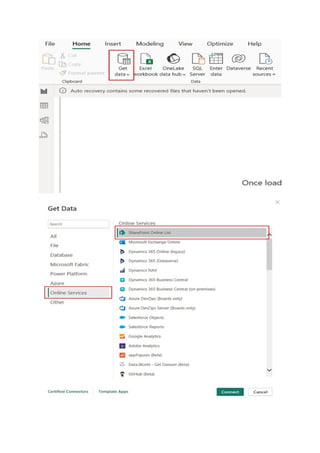
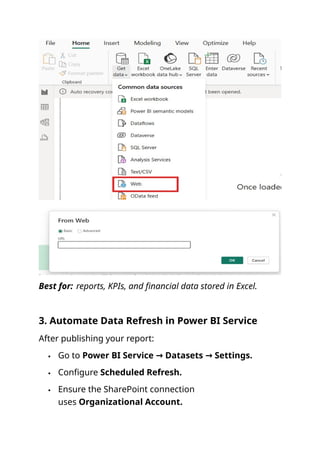
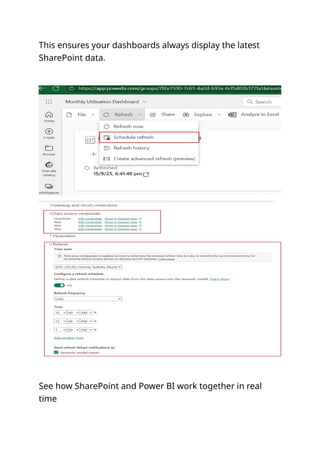

Unlock the full potential of your SharePoint data by connecting it with Power BI to create powerful, interactive dashboards that drive smarter business decisions. This guide walks you through how to seamlessly integrate SharePoint and Power BI—transforming static lists, libraries, and files into dynamic visual insights. Whether you manage projects, track performance metrics, or handle large datasets within your organization, combining these two Microsoft 365 tools can completely change the way you view and analyze your data. With this connection, you can easily import your SharePoint lists into Power BI and turn them into real-time charts, graphs, and key performance indicators (KPIs). Instead of manually updating reports or juggling spreadsheets, you can automate everything—ensuring your visuals stay up to date whenever data in SharePoint changes. Power BI allows you to design customized dashboards that fit your organization’s needs, offering deep visibility into trends, bottlenecks, and opportunities across teams and departments. In this pin, you’ll see how simple it is to build a live dashboard powered by SharePoint data. You’ll learn: How to connect SharePoint Online lists directly to Power BI. How to create stunning data visualizations such as pie charts, bar graphs, and line trends. How to set up automatic data refresh schedules for real-time updates. How to share your Power BI dashboards with colleagues securely through Microsoft Teams or SharePoint pages. How to use filters and slicers for interactive exploration of your data. Imagine tracking employee performance, project milestones, or document status—all in one visually engaging dashboard. You can display metrics such as task progress, approval rates, or departmental workloads in a format that’s easy to understand at a glance. Power BI’s flexibility allows you to pull in data not only from SharePoint but also from Excel, Dataverse, and other systems, giving you a unified view of your business performance. Whether you’re an IT professional, a project manager, or a business analyst, this Power BI–SharePoint integration will help you build a data culture in your organization. No coding expertise is required—just your existing Microsoft 365 environment and a little creativity. Once your dashboard is set up, you can embed it right inside a SharePoint site or SharePoint web part, making insights instantly available to your team. This is more than just a reporting solution—it’s a way to empower collaboration, transparency, and informed decision-making. Explore this pin to see how you can transform your SharePoint data into actionable analytics and start building dashboards that tell your business story visually and effectively.


