Mind Mapping tools move on in 2010Abi James, iansystWith the help of E.A. Draffan, University of Southampton
Over 20 mind mapping tools for windows… how do we focus in on what suits our students?
Recent developments…Inspiration v9 out Feb 10Mind Genius v3 out Oct 09,v3.5 adding Gantt views out March 10Mind Manager for Mac 8 out March 10MindView 3 for Education available in the DSA Nov 09
Everything is new … so is it time to think outside the box?
What do students really need to get out of their mind mapping tools?How do they want to use it?
Some comments from students…Should allow me to tag nodes…I want to tag some branches with a light bulb icon if they are ideas. I should then be able to search for all ideasKeyboard navigation & control for fast navigation & manipulation using only the keyboard (so it can be used in lectures or when information is being provided at a speed)Ability to focus on particular parts of a very large mind map (showing only things below that level, not above) = mapping program should not get in the way of the thought process
Assistive Technology solutions must...Lessen difficulties & provide equal accessEnhance learning‘a mismatch can hamper the students ability to use coping strategies to manage their dyslexia’ Stacy (1998)
What tasks can be supported by using mind mapping tools?
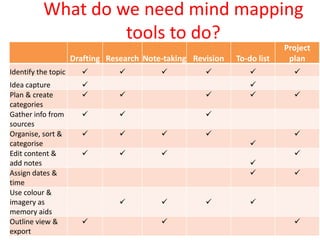
What do we need mind mapping tools to do?
Inspiration 9
MindGenius v 3.5
MindView
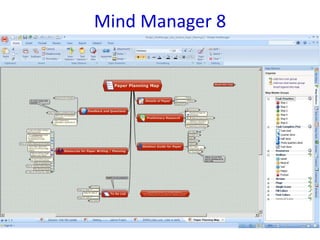
Mind Manager 8
Contact details:Abi Jamesiansyst LtdFen HouseFen RoadCambridgeCB4 1UNEmail: abi@iansyst.co.ukTel: 	01223 420101Web: 	www.dyslexic.comwww.iansyst.co.ukwww.itspc.co.uk

Mind Mapping Moves On In 2010

  • 1.
    Mind Mapping toolsmove on in 2010Abi James, iansystWith the help of E.A. Draffan, University of Southampton
  • 2.
    Over 20 mindmapping tools for windows… how do we focus in on what suits our students?
  • 4.
    Recent developments…Inspiration v9out Feb 10Mind Genius v3 out Oct 09,v3.5 adding Gantt views out March 10Mind Manager for Mac 8 out March 10MindView 3 for Education available in the DSA Nov 09
  • 5.
    Everything is new… so is it time to think outside the box?
  • 6.
    What do studentsreally need to get out of their mind mapping tools?How do they want to use it?
  • 7.
    Some comments fromstudents…Should allow me to tag nodes…I want to tag some branches with a light bulb icon if they are ideas. I should then be able to search for all ideasKeyboard navigation & control for fast navigation & manipulation using only the keyboard (so it can be used in lectures or when information is being provided at a speed)Ability to focus on particular parts of a very large mind map (showing only things below that level, not above) = mapping program should not get in the way of the thought process
  • 8.
    Assistive Technology solutionsmust...Lessen difficulties & provide equal accessEnhance learning‘a mismatch can hamper the students ability to use coping strategies to manage their dyslexia’ Stacy (1998)
  • 9.
    What tasks canbe supported by using mind mapping tools?
  • 11.
    What do weneed mind mapping tools to do?
  • 13.
  • 14.
  • 15.
  • 16.
  • 17.
    Contact details:Abi JamesiansystLtdFen HouseFen RoadCambridgeCB4 1UNEmail: abi@iansyst.co.ukTel: 01223 420101Web: www.dyslexic.comwww.iansyst.co.ukwww.itspc.co.uk

Editor's Notes

  • #5 There are over 20 mind mapping tools for windows… how do we focus in on what suits our students?
  • #8 Seems to be lots of concerns about how mind maps print out