Using Tool Maps
1
Using Tool Maps: A New Feature of Mind Mapping Software
Start
I would like to present a new feature of mind mapping software.
This feature provides help right in the mind map you are working with. You can take single items or entire
templates from help and use them in your map.
These help items come from a second background mind map called tool map.
This new feature does not yet exist, and I want to point out its many applications and advantages.
For shorter reference, let’s call this yet nonexistent software MiHX, the Mi standing for Mind Mapping Software
and the HX suggesting ‘heuristic expansion‘.
And now:
Imagine
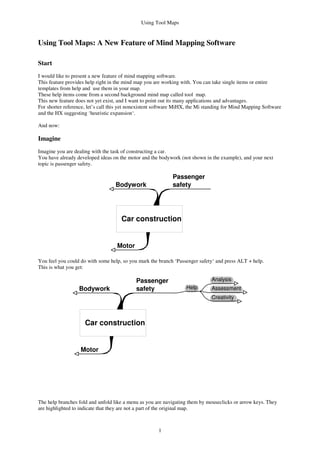
Imagine you are dealing with the task of constructing a car.
You have already developed ideas on the motor and the bodywork (not shown in the example), and your next
topic is passenger safety.
Motor
Passenger
safetyBodywork
Car construction
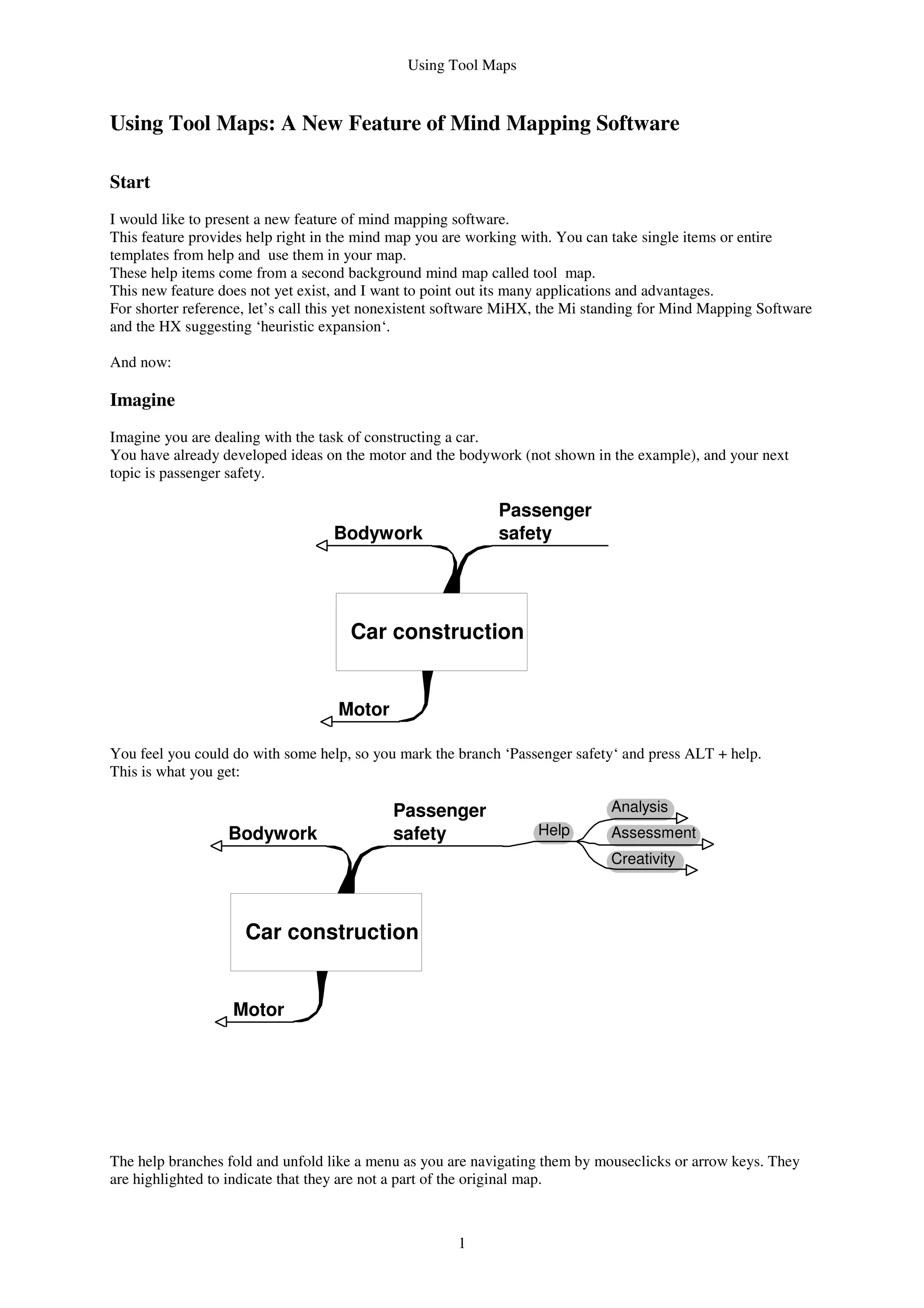
You feel you could do with some help, so you mark the branch ‘Passenger safety‘ and press ALT + help.
This is what you get:
Motor
Passenger
safetyBodywork
Car construction
Help
Analysis
Assessment
Creativity
The help branches fold and unfold like a menu as you are navigating them by mouseclicks or arrow keys. They
are highlighted to indicate that they are not a part of the original map.
Using Tool Maps
2
Motor
Passenger
safetyBodywork
Car construction
Help
Analysis
Assessment
Creativity
Brainstorming
Osborn's checklist
Look for
analogies
Analogies
from nature
Analogies
from art
Analogies from
technology
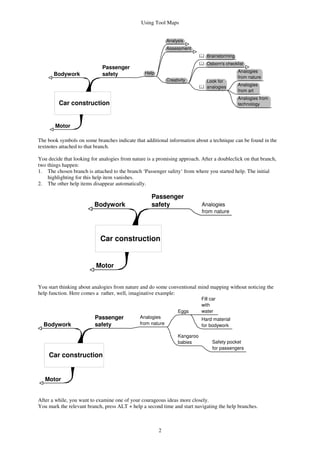
The book symbols on some branches indicate that additional information about a technique can be found in the
textnotes attached to that branch.
You decide that looking for analogies from nature is a promising approach. After a doubleclick on that branch,
two things happen:
1. The chosen branch is attached to the branch ‘Passenger safety‘ from where you started help. The initial
highlighting for this help item vanishes.
2. The other help items disappear automatically.
Motor
Passenger
safetyBodywork
Car construction
Analogies
from nature
You start thinking about analogies from nature and do some conventional mind mapping without noticing the
help function. Here comes a rather, well, imaginative example:
Motor
Passenger
safetyBodywork
Car construction
Analogies
from nature
Eggs
Fill car
with
water
Hard material
for bodywork
Kangaroo
babies Safety pocket
for passengers
After a while, you want to examine one of your courageous ideas more closely.
You mark the relevant branch, press ALT + help a second time and start navigating the help branches.
Using Tool Maps
3
Motor
Passenger
safetyBodywork
Car construction
Analogies
from nature
Eggs
Fill car
with
water Help
Analysis
Assessment
SWOT
Strength
Weakness
Opportunity
Threat
Pros & Cons
Creativity
Hard material
for bodywork
Kangaroo
babies Safety pocket
for passengers
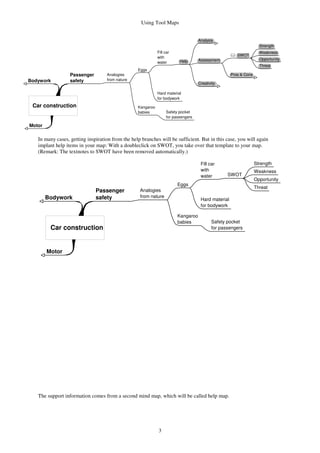
In many cases, getting inspiration from the help branches will be sufficient. But in this case, you will again
implant help items in your map: With a doubleclick on SWOT, you take over that template to your map.
(Remark: The textnotes to SWOT have been removed automatically.)
Motor
Passenger
safetyBodywork
Car construction
Analogies
from nature
Eggs
Fill car
with
water SWOT
Strength
Weakness
Opportunity
Threat
Hard material
for bodywork
Kangaroo
babies Safety pocket
for passengers
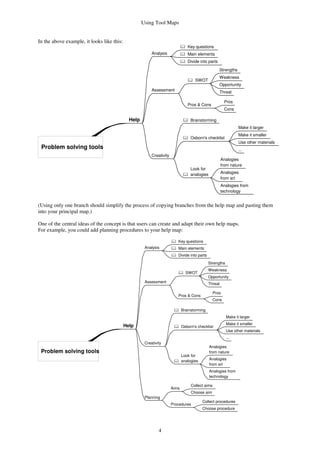
The support information comes from a second mind map, which will be called help map.
Using Tool Maps
4
In the above example, it looks like this:
Help
Problem solving tools
Analysis
Key questions
Main elements
Divide into parts
Assessment
SWOT
Strengths
Weakness
Opportunity
Threat
Pros & Cons
Pros
Cons
Creativity
Brainstorming
Osborn's checklist
Make it larger
Make it smaller
Use other materials
...
Look for
analogies
Analogies
from nature
Analogies
from art
Analogies from
technology
(Using only one branch should simplify the process of copying branches from the help map and pasting them
into your principal map.)
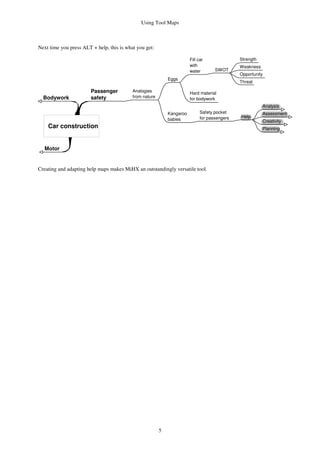
One of the central ideas of the concept is that users can create and adapt their own help maps.
For example, you could add planning procedures to your help map:
Help
Problem solving tools
Analysis
Key questions
Main elements
Divide into parts
Assessment
SWOT
Strengths
Weakness
Opportunity
Threat
Pros & Cons
Pros
Cons
Creativity
Brainstorming
Osborn's checklist
Make it larger
Make it smaller
Use other materials
...
Look for
analogies
Analogies
from nature
Analogies
from art
Analogies from
technology
Planning
Aims
Collect aims
Choose aim
Procedures
Collect procedures
Choose procedure
Using Tool Maps
5
Next time you press ALT + help, this is what you get:
Motor
Passenger
safetyBodywork
Car construction
Analogies
from nature
Eggs
Fill car
with
water SWOT
Strength
Weakness
Opportunity
Threat
Hard material
for bodywork
Kangaroo
babies
Safety pocket
for passengers Help
Analysis
Assessment
Creativity
Planning
Creating and adapting help maps makes MiHX an outstandingly versatile tool.
Using Tool Maps
6
Applications
Imagine tool maps about the following topics:
• Project planning tools
• Consulting, with tools for analyzing business situations
• Analyzing marketing strategies, with questions about market situation, competitor analysis and tools for
improving own marketing success
• Examining lawsuits
• Studying, with questions supporting critical thinking
• Scientific work, with advice on information retrieval, argumentation and methodology
• Specialized creativity tools supporting advertising agencies
• Developing computer programs, with style guides or information on syntax
• Information for job beginners to support rapid learning on the new job
• Information from seminars that should be directly accessible
• Solving math problems, with heuristic strategies, questions, useful mathematical principles and tools for
dealing with mathematical objects (a pet subject of mine)
• Creative writing
• Self-help, with suggestions for analyzing and overcoming personal problems
• Personal growth, with questions about your aims and suggestions for change in your life
On most of these topics there are numerous excellent books. Condensing information from these books into tool
maps is simple.
Tool maps allow you to transform dormant information from books into working knowledge.
Advantages
• User-friendly tutoring:
Tool maps provide large amounts of support information at a keystroke. You do not have to use another
program or another file.
Help is simply there where you need it.
• Reminder function:
Tool maps remind you of tools you might otherwise have overlooked.
• Flexibility:
You can adapt the tool maps to any kind of problem and any kind of expertise.
• Working knowledge:
With tool maps, information from books, seminars or talks with your collegues quickly becomes part of
your working knowledge: First, you do some active work on that information by integrating it into a tool
map. After that, you can access this information most easily.
It is quite easy to extract the essential information from a book. In contrast to merely reading a book, its
content can become part of your work by using help maps.
• Knowledge management:
By sharing tool maps, information and working knowledge can be circulated quickly. This is of prime
importance for companies, schools and universities.
• Self-improving:
The tool map concept encourages you to improve your ‘toolbox‘ for mental work.
This improves not only your set of tool maps, but at the same time your working habits.
Miscellaneous ideas
• Tool maps should be searchable from the principal map. Otherwise it might be difficult to find relevant
information in large tool maps.
• It might be useful to edit the tool map directly in your principal map.
• The help branches could be adapted to the principal map (with regard to size, font etc.).
• If the tool map is large, the distance between the branch from which you started help and the help branch
you have chosen by doubleclicking may be considerable. Animations could help avoid confusion.
Using Tool Maps
7
Literature
I have used ideas from the following books.
De Bono, Edward: de Bonos neue Denkschule. Mvg Verlag, Landsberg 2002
Buzan, Tony: The Mind Map Book. BBC Books, London 1995
Buzan, Tony: Business Mind Mapping. Ueberreuter, Frankfurt 1999
Dörner, Dietrich: Problemlösen als Informationsverarbeitung. Kohlhammer, Stuttgart 1987
Dörner, Dietrich: Die Logik des Misslingens. Rowohlt, Reinbek 1989
Dörner, Dietrich: Bauplan für eine Seele. Rowohlt, Reinbek 1998
Engel, Arthur: Problem-Solving Strategies. Springer, New York 1998
Funke, Joachim: Problemlösendes Denken. Kohlhammer, Stuttgart 2003
Higgins, James M.: 101 Creative Problem Solving Techniques. The New Management Publish Company,
Winter Park 1994
Hoenig, Christopher: The Problem Solving Journey. Perseus Publishing 2000
Jones, Morgan D.: 14 Powerful Techniques for Problem Solving. Three Rivers Press, New York 1998
Mason, John: Hexeneinmaleins. Oldenbourg, München 1985
Michalko, Michael: Cracking Creativity. Ten Speed Press, Berkeley 2001
Nelson-Jones, Richard: Using Your Mind. Cassell, London 1997
North, Klaus: Wissensorientierte Unternehmensführung. Gabler, Wiesbaden 2002
Von der Oelsnitz, Dietrich; Hahmann, Martin: Wissensmanagement. Kohlhammer, Stuttgart 2003
Polya, George: How to Solve it. Princeton 1957
Pricken, Mario: Kribbeln im Kopf. Schmidt, Mainz 2001
Robertson, S. Ian: Problem Solving. Psychology Press 2001
Sell, Robert; Schimweg, Ralf: Probleme lösen. Springer, Berlin 2002
Zeitz: The Art and Craft of Problem Solving. Wiley, New York 1999
5. December 2003, slightly revised 13. November 2008
© Dr. Thomas Teepe
Alosenweg 37
70329 Stuttgart
Germany
E-mail: thomasteepe@web.de

A New Feature For Mind Mapping Software

  • 1.
    Using Tool Maps 1 UsingTool Maps: A New Feature of Mind Mapping Software Start I would like to present a new feature of mind mapping software. This feature provides help right in the mind map you are working with. You can take single items or entire templates from help and use them in your map. These help items come from a second background mind map called tool map. This new feature does not yet exist, and I want to point out its many applications and advantages. For shorter reference, let’s call this yet nonexistent software MiHX, the Mi standing for Mind Mapping Software and the HX suggesting ‘heuristic expansion‘. And now: Imagine Imagine you are dealing with the task of constructing a car. You have already developed ideas on the motor and the bodywork (not shown in the example), and your next topic is passenger safety. Motor Passenger safetyBodywork Car construction You feel you could do with some help, so you mark the branch ‘Passenger safety‘ and press ALT + help. This is what you get: Motor Passenger safetyBodywork Car construction Help Analysis Assessment Creativity The help branches fold and unfold like a menu as you are navigating them by mouseclicks or arrow keys. They are highlighted to indicate that they are not a part of the original map.
  • 2.
    Using Tool Maps 2 Motor Passenger safetyBodywork Carconstruction Help Analysis Assessment Creativity Brainstorming Osborn's checklist Look for analogies Analogies from nature Analogies from art Analogies from technology The book symbols on some branches indicate that additional information about a technique can be found in the textnotes attached to that branch. You decide that looking for analogies from nature is a promising approach. After a doubleclick on that branch, two things happen: 1. The chosen branch is attached to the branch ‘Passenger safety‘ from where you started help. The initial highlighting for this help item vanishes. 2. The other help items disappear automatically. Motor Passenger safetyBodywork Car construction Analogies from nature You start thinking about analogies from nature and do some conventional mind mapping without noticing the help function. Here comes a rather, well, imaginative example: Motor Passenger safetyBodywork Car construction Analogies from nature Eggs Fill car with water Hard material for bodywork Kangaroo babies Safety pocket for passengers After a while, you want to examine one of your courageous ideas more closely. You mark the relevant branch, press ALT + help a second time and start navigating the help branches.
  • 3.
    Using Tool Maps 3 Motor Passenger safetyBodywork Carconstruction Analogies from nature Eggs Fill car with water Help Analysis Assessment SWOT Strength Weakness Opportunity Threat Pros & Cons Creativity Hard material for bodywork Kangaroo babies Safety pocket for passengers In many cases, getting inspiration from the help branches will be sufficient. But in this case, you will again implant help items in your map: With a doubleclick on SWOT, you take over that template to your map. (Remark: The textnotes to SWOT have been removed automatically.) Motor Passenger safetyBodywork Car construction Analogies from nature Eggs Fill car with water SWOT Strength Weakness Opportunity Threat Hard material for bodywork Kangaroo babies Safety pocket for passengers The support information comes from a second mind map, which will be called help map.
  • 4.
    Using Tool Maps 4 Inthe above example, it looks like this: Help Problem solving tools Analysis Key questions Main elements Divide into parts Assessment SWOT Strengths Weakness Opportunity Threat Pros & Cons Pros Cons Creativity Brainstorming Osborn's checklist Make it larger Make it smaller Use other materials ... Look for analogies Analogies from nature Analogies from art Analogies from technology (Using only one branch should simplify the process of copying branches from the help map and pasting them into your principal map.) One of the central ideas of the concept is that users can create and adapt their own help maps. For example, you could add planning procedures to your help map: Help Problem solving tools Analysis Key questions Main elements Divide into parts Assessment SWOT Strengths Weakness Opportunity Threat Pros & Cons Pros Cons Creativity Brainstorming Osborn's checklist Make it larger Make it smaller Use other materials ... Look for analogies Analogies from nature Analogies from art Analogies from technology Planning Aims Collect aims Choose aim Procedures Collect procedures Choose procedure
  • 5.
    Using Tool Maps 5 Nexttime you press ALT + help, this is what you get: Motor Passenger safetyBodywork Car construction Analogies from nature Eggs Fill car with water SWOT Strength Weakness Opportunity Threat Hard material for bodywork Kangaroo babies Safety pocket for passengers Help Analysis Assessment Creativity Planning Creating and adapting help maps makes MiHX an outstandingly versatile tool.
  • 6.
    Using Tool Maps 6 Applications Imaginetool maps about the following topics: • Project planning tools • Consulting, with tools for analyzing business situations • Analyzing marketing strategies, with questions about market situation, competitor analysis and tools for improving own marketing success • Examining lawsuits • Studying, with questions supporting critical thinking • Scientific work, with advice on information retrieval, argumentation and methodology • Specialized creativity tools supporting advertising agencies • Developing computer programs, with style guides or information on syntax • Information for job beginners to support rapid learning on the new job • Information from seminars that should be directly accessible • Solving math problems, with heuristic strategies, questions, useful mathematical principles and tools for dealing with mathematical objects (a pet subject of mine) • Creative writing • Self-help, with suggestions for analyzing and overcoming personal problems • Personal growth, with questions about your aims and suggestions for change in your life On most of these topics there are numerous excellent books. Condensing information from these books into tool maps is simple. Tool maps allow you to transform dormant information from books into working knowledge. Advantages • User-friendly tutoring: Tool maps provide large amounts of support information at a keystroke. You do not have to use another program or another file. Help is simply there where you need it. • Reminder function: Tool maps remind you of tools you might otherwise have overlooked. • Flexibility: You can adapt the tool maps to any kind of problem and any kind of expertise. • Working knowledge: With tool maps, information from books, seminars or talks with your collegues quickly becomes part of your working knowledge: First, you do some active work on that information by integrating it into a tool map. After that, you can access this information most easily. It is quite easy to extract the essential information from a book. In contrast to merely reading a book, its content can become part of your work by using help maps. • Knowledge management: By sharing tool maps, information and working knowledge can be circulated quickly. This is of prime importance for companies, schools and universities. • Self-improving: The tool map concept encourages you to improve your ‘toolbox‘ for mental work. This improves not only your set of tool maps, but at the same time your working habits. Miscellaneous ideas • Tool maps should be searchable from the principal map. Otherwise it might be difficult to find relevant information in large tool maps. • It might be useful to edit the tool map directly in your principal map. • The help branches could be adapted to the principal map (with regard to size, font etc.). • If the tool map is large, the distance between the branch from which you started help and the help branch you have chosen by doubleclicking may be considerable. Animations could help avoid confusion.
  • 7.
    Using Tool Maps 7 Literature Ihave used ideas from the following books. De Bono, Edward: de Bonos neue Denkschule. Mvg Verlag, Landsberg 2002 Buzan, Tony: The Mind Map Book. BBC Books, London 1995 Buzan, Tony: Business Mind Mapping. Ueberreuter, Frankfurt 1999 Dörner, Dietrich: Problemlösen als Informationsverarbeitung. Kohlhammer, Stuttgart 1987 Dörner, Dietrich: Die Logik des Misslingens. Rowohlt, Reinbek 1989 Dörner, Dietrich: Bauplan für eine Seele. Rowohlt, Reinbek 1998 Engel, Arthur: Problem-Solving Strategies. Springer, New York 1998 Funke, Joachim: Problemlösendes Denken. Kohlhammer, Stuttgart 2003 Higgins, James M.: 101 Creative Problem Solving Techniques. The New Management Publish Company, Winter Park 1994 Hoenig, Christopher: The Problem Solving Journey. Perseus Publishing 2000 Jones, Morgan D.: 14 Powerful Techniques for Problem Solving. Three Rivers Press, New York 1998 Mason, John: Hexeneinmaleins. Oldenbourg, München 1985 Michalko, Michael: Cracking Creativity. Ten Speed Press, Berkeley 2001 Nelson-Jones, Richard: Using Your Mind. Cassell, London 1997 North, Klaus: Wissensorientierte Unternehmensführung. Gabler, Wiesbaden 2002 Von der Oelsnitz, Dietrich; Hahmann, Martin: Wissensmanagement. Kohlhammer, Stuttgart 2003 Polya, George: How to Solve it. Princeton 1957 Pricken, Mario: Kribbeln im Kopf. Schmidt, Mainz 2001 Robertson, S. Ian: Problem Solving. Psychology Press 2001 Sell, Robert; Schimweg, Ralf: Probleme lösen. Springer, Berlin 2002 Zeitz: The Art and Craft of Problem Solving. Wiley, New York 1999 5. December 2003, slightly revised 13. November 2008 © Dr. Thomas Teepe Alosenweg 37 70329 Stuttgart Germany E-mail: thomasteepe@web.de