Mindmeister
Kim Wilson
Lori Sand
Christine Young
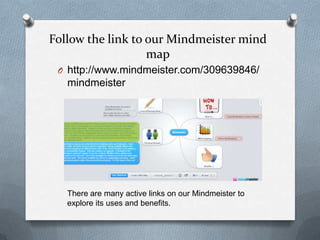
Follow the link to our Mindmeister mind
map
O http://www.mindmeister.com/309639846/
mindmeister
There are many active links on our Mindmeister to
explore its uses and benefits.
Mindmeister is a mind or
concept mapping tool
O The difference between it and other tools
is that you can add links, videos, images
and files.
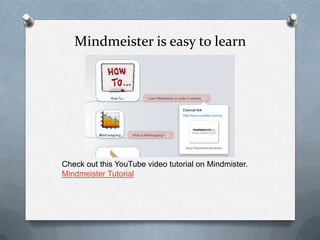
Mindmeister is easy to learn
Check out this YouTube video tutorial on Mindmister.
Mindmeister Tutorial
Benefits of Mindmeister
O This is a Mindmeister mind map outlining
the Benefits of Mindmeister. You can find
this mind map linked in our Mindmeister.
Or use this link Benefits of Mindmeister
Mindmeister can be used to plan
your lessons.
Or as a tool to enhance your
lesson. Click here to view a
sample lesson. Lesson Plan
Personal Reviews
While we found many benefits to using Mindmeister, there were
some problems as well. Please read our reviews below, they can
also be found on our Mindmeister.
Kim Wilson- I believe that Mindmeister has some true benefits in
the classroom. It can be used as a resource for teachers for
lesson planning and visual aides used in lessons. A teacher could
use the program as a resource for students on any topic. The
students could then navigate through the map independently to
obtain information. Teacher's can also use it as a visual way to
organize lessons or days. However, there are many drawbacks to
the program. Many of the features that would be important in a
lesson are only available if you purchase a subscription. I also had
a lot of trouble navigating the site on several occasions, some of
the features were down and then worked when I logged back in.
We tried to use the program as a group for the presentation and
we had to purchase a subscription to add additional users to our
Mindmeister. I would say that the program has some neat
features, but the cost of the subscription is not worth the use a
teacher would get out of it. Con’t
Lori Sand - Mindmeister is a Web 2.0 concept mapping
tool that is easy to use at the first level of adding topics
and subtopics. Once additional features are desired
such as attaching images or files, the basic account
must be upgraded. Having multiple editors also
required an account upgrade. The features that make
this mind mapping tool different than some of the other
freeware is the ability to upload files, links, videos and
images. The tool also has a presentation feature. This
also requires an upgrade. A downfall of the
presentation mode is that it is only supported by some
browsers, Internet Explorer is not one of them! Mozilla
Firefox added some hyperlinks to our presentation to
unrelated material that could not be removed. One of
the strengths for student use is that the mind maps save
automatically as the are being created. This prevents
lost work. The tool is available for school or
organization purchase. I think this tool functions better
as an organizational tool for planning purposes rather
than presentation purposes. For this aspect, there are
other free tools that do not require upgrades.
Con’t
Christine Young- Mindmeister has pros and cons in the teaching world.
In terms of pros, educators can use the mapping tool to organize
lessons/units, share ideas with department members and other
coworkers, as well as run meetings and student activities. Although at
first site, Mindmeiser appears to be confusing to do since it lacks a
traditional beginning and end that is utilized in other presentations, it
has it benefits in keeping students and other users on their toes. For
the classroom, students would have to "search" more for the answers
and read all the information presented instead of waiting for the
teacher to go to the next slide or skim the title of each slide only. This
type of presentation would work well for a flipped classroom
presentation of material. It would test students' abilities to seek out
information and also allow the teacher to see if all areas were truly
read by each student. However, there are also cons to Mindmeister. I
believe that this type of presentation would be very difficult for some
special education students (and very traditional students) to grow
accustom to and be able to follow. I currently work with direct
instruction students who are only in the general education classroom
for my class, Social Studies. Many have a difficult time with tranditional
presentation and often cannot keep up to speed with the class even
when given teacher copy of notes. Since Mindmeister does not have a
clear beginning and end, I foresee some of my special education
students who need lots of structure getting confused, frustrated, and
lost. While it be a unique way to present information, the transition for
any educator would have to be slow and with lots of practice. Another
con is that many of the templates offered are for businesses, not
educators. This may discourage some educators.

Mindmeister Group Project

  • 1.
  • 2.
    Follow the linkto our Mindmeister mind map O http://www.mindmeister.com/309639846/ mindmeister There are many active links on our Mindmeister to explore its uses and benefits.
  • 3.
    Mindmeister is amind or concept mapping tool O The difference between it and other tools is that you can add links, videos, images and files.
  • 4.
    Mindmeister is easyto learn Check out this YouTube video tutorial on Mindmister. Mindmeister Tutorial
  • 5.
    Benefits of Mindmeister OThis is a Mindmeister mind map outlining the Benefits of Mindmeister. You can find this mind map linked in our Mindmeister. Or use this link Benefits of Mindmeister
  • 6.
    Mindmeister can beused to plan your lessons. Or as a tool to enhance your lesson. Click here to view a sample lesson. Lesson Plan
  • 7.
    Personal Reviews While wefound many benefits to using Mindmeister, there were some problems as well. Please read our reviews below, they can also be found on our Mindmeister. Kim Wilson- I believe that Mindmeister has some true benefits in the classroom. It can be used as a resource for teachers for lesson planning and visual aides used in lessons. A teacher could use the program as a resource for students on any topic. The students could then navigate through the map independently to obtain information. Teacher's can also use it as a visual way to organize lessons or days. However, there are many drawbacks to the program. Many of the features that would be important in a lesson are only available if you purchase a subscription. I also had a lot of trouble navigating the site on several occasions, some of the features were down and then worked when I logged back in. We tried to use the program as a group for the presentation and we had to purchase a subscription to add additional users to our Mindmeister. I would say that the program has some neat features, but the cost of the subscription is not worth the use a teacher would get out of it. Con’t
  • 8.
    Lori Sand -Mindmeister is a Web 2.0 concept mapping tool that is easy to use at the first level of adding topics and subtopics. Once additional features are desired such as attaching images or files, the basic account must be upgraded. Having multiple editors also required an account upgrade. The features that make this mind mapping tool different than some of the other freeware is the ability to upload files, links, videos and images. The tool also has a presentation feature. This also requires an upgrade. A downfall of the presentation mode is that it is only supported by some browsers, Internet Explorer is not one of them! Mozilla Firefox added some hyperlinks to our presentation to unrelated material that could not be removed. One of the strengths for student use is that the mind maps save automatically as the are being created. This prevents lost work. The tool is available for school or organization purchase. I think this tool functions better as an organizational tool for planning purposes rather than presentation purposes. For this aspect, there are other free tools that do not require upgrades. Con’t
  • 9.
    Christine Young- Mindmeisterhas pros and cons in the teaching world. In terms of pros, educators can use the mapping tool to organize lessons/units, share ideas with department members and other coworkers, as well as run meetings and student activities. Although at first site, Mindmeiser appears to be confusing to do since it lacks a traditional beginning and end that is utilized in other presentations, it has it benefits in keeping students and other users on their toes. For the classroom, students would have to "search" more for the answers and read all the information presented instead of waiting for the teacher to go to the next slide or skim the title of each slide only. This type of presentation would work well for a flipped classroom presentation of material. It would test students' abilities to seek out information and also allow the teacher to see if all areas were truly read by each student. However, there are also cons to Mindmeister. I believe that this type of presentation would be very difficult for some special education students (and very traditional students) to grow accustom to and be able to follow. I currently work with direct instruction students who are only in the general education classroom for my class, Social Studies. Many have a difficult time with tranditional presentation and often cannot keep up to speed with the class even when given teacher copy of notes. Since Mindmeister does not have a clear beginning and end, I foresee some of my special education students who need lots of structure getting confused, frustrated, and lost. While it be a unique way to present information, the transition for any educator would have to be slow and with lots of practice. Another con is that many of the templates offered are for businesses, not educators. This may discourage some educators.