

Microsoft Visio is Registered Trade of Microsoft Corporation
This presentation is Copyright of QBI Institute. This presentation is part of
course material for QBI Institute Software Business Analyst Certification
Program
About the Speaker
Importance of MS VISIO
What can VISIO Do for You
Is Learning Visio Compulsory ?
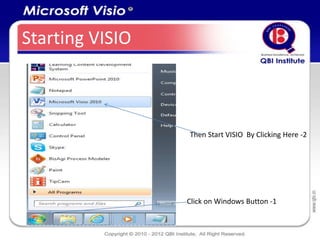
Starting VISIO


                 Then Start VISIO By Clicking Here -2


                 Click on Windows Button -1
Starting VISIO


                                              Template
                  Template Area: Recently
Navigation Area                               Preview Area
                  Used, Template Categories
Ribbon Bar


                                         Groups on Ribbon
                 Quick Access Tool Bar


File Menu                                    Visio Drawing


       Visio Stencil
                                             Zoom Control


                       Page Control
Top Right / Bottom Left Options

     To Minimize the Visio
     File
     To Restore Down
      To Close the file
      To Minimize the Ribbon
      To Open Visio Help
      To Minimize Window
      To Restore Window

      To Close Window

         Page No of Open Visio Drawing
           Unit being used US or Metric

         Macro Recording Option
File Menu


   File is the only drop down menu available it
   provides options for Save/Save
   as, Open, Close, Info, Recent, New etc.
Home Tab /Ribbon


Home Tab or Ribbon has provision for common actions like alignment, font
size, formatting, Copy, Paste etc. Home Ribbon has groups like Clip
Board, Font, Paragraph, Tools, Shape, Arrange and Editing
Insert Ribbon


Insert Tab or Ribbon has provision to Insert Blank Page, Picture, Clip Art, Chart, CAD
Drawing, Container, Call Out, Hyperlink, Screen Tip, Object, Field and symbol. It has Ribbon
Groups named Pages, Illustrations, Diagram Parts, Links and Text
Design Ribbon


Page Orientation, Page Themes, Backgrounds etc. are set in the Design Tab or Design Ribbon.
Design Ribbon has the following Groups : Page Setup, Themes, Backgrounds and Layout
Data Ribbon


We can link external data sources and data graphics through Data Ribbon. Data Ribbon has
three Groups : External Data, Display Data, Show/Hide
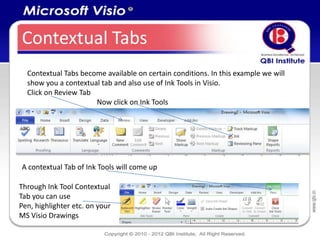
Contextual Tabs
  Contextual Tabs become available on certain conditions. In this example we will
  show you a contextual tab and also use of Ink Tools in Visio.
  Click on Review Tab
                      Now click on Ink Tools


A contextual Tab of Ink Tools will come up

Through Ink Tool Contextual
Tab you can use
Pen, highlighter etc. on your
MS Visio Drawings
Review Ribbon


Functionalities provided in this Ribbon help us to Review our Visio Files or Diagrams .
Review Ribbon has following Groups : Proofing, Language, Comments, Markup and Reports
View Ribbon


Functionalities provided in this View Ribbon help us to View better our Visio Files or Diagrams .
View Ribbon has following Groups : Views, Show, Zoom, Visual Aids, Window and Macros
Developer Ribbon


Developer Ribbon has Groups like Code, Add-Ins, Controls, Shape Design, Stencil, Show/Hide.
Here you can record new Macros, Prepare new stencils etc
Add-Ins Ribbon


Add-Inns Ribbon shows Add-Ins to your Visio Program.
A Visio Add-In is a Program which extends the capability of VISIO
There are several third party Add-Ins available for Microsoft Visio
More about Tabs
Shapes

Visio Shapes and connectors make up the Visio Diagram
Visio Shapes are readymade images with which you can make your diagram

Visio Shape can be simple as a line or complex as a Calendar
Shapes can be 1-D (behaves like a line ) or 2-D (behaves like a rectangle)
Relevant Visio Shapes can be utilized from the Stencil, by dragging and dropping
instance (which you drop on diagram) of master shape (which remains on the
stencil)
Shapes can hold important information and data
You can make your own shapes

Common Shape Actions
Rotate a Shape
Resize
Flip Horizontally and Vertically
Format
Managing Viewing Shape Data
View Shape Data , Size and Positopn

To check data associated with a
Shape, Select the Shape View Ribbon
Task Panes Shape Data
(Only 2D shapes have shape
data, connectors do not have shape data)

To check positioning of a Shape on the
Diagram, Select the Shape, Go to View
Ribbon Task Panes Size and Position

After you activate these options whatever
Shape you will select their Data, Size and
Position will be displayed
Shape Connection Points

A connection point is a special point on some
shapes that you can “glue” connectors and other
shapes to. It looks like a blue x ( ). When you glue
a connector to a connection point on a
shape, they stay connected, even if the shape is
moved. Use connection points when you want
connectors or shapes to stay connected to specific
points on a shape.

In Microsoft Visio 2010, connection points fade in
and become visible when you are attempting to
connect a shape to another. You see a shape’s
connection points when you hover near the shape
with the Connector Tool or drag the endpoint of
any connector or line near a shape that has
connection points.
Prevent or Protect Shapes
To prevent or protect shapes go to
File  Options  Advanced General
Select Run in developer mode
Now Select a Shape you wish to protect
Now on Developer Tab Shape Design Group Click Protect. Protect the properties you
wish to protect
Static Connection

Static Connections or Point Connections. When the Shapes are Connected the
Connection end points turn red. If we move the shape the connector remains glued to
the end point
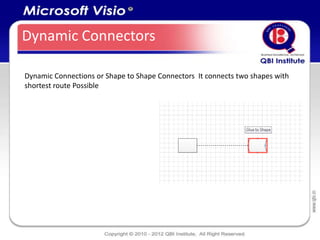
Dynamic Connectors

Dynamic Connections or Shape to Shape Connectors It connects two shapes with
shortest route Possible
Adding Text to Connector

Double Click on the Connector and Add Text
MS Visio File Types

 .vsd is Visio Drawing File
 Vss is Visio Stencil File
 .vst is Visio Template File
 .vsx is Visio XML file
Visio File Types
       .vsd : The vsd file extension is associated with Microsoft Visio binary file format and
       used for its flowcharts and diagram document files

       .vss: The vss file extension is associated with Microsoft Visio. File contains smartshapes
       (stencils).File is in binary Visio document format


       .vst: The vst file extension is associated with Microsoft Visio templates


       .vdw: The vsw file suffix is associated with Microsoft Office Visio. File contains web
       drawing, that is created in Microsoft Office Visio.


        .vdx: Visio drawing XML file - a drawing or chart created with Microsoft Visio, a
        program for creating business diagrams and flowcharts. It is similar to a standard
        .vsd file, but saved in an XML format.
Creating a New Stencil


  Developer Ribbon  New Stencil

  Save with .vss extension

  Utilize with Visio Drawing Files
Applying a Theme
Selection Handle


Rotation Handle
Drop and Connect Indicator
Working With Shapes
Flipping and Rotating Shapes
Rotate Shape 90 degree to the left (counter-clock wise) Ctrl +L
Rotate Shape 90 degree to the right (clockwise) Ctrl +R
Flip Shape Vertically Ctrl +J
Flip Shape Horizontally Ctrl + H
Flip a line Shape to reverse its ends – Choose Shape Operations Reverse ends

Grouping and Ungrouping Shapes
Grouping Shapes Shift + Ctrl + G
Ungrouping Shapes Shift + Ctrl +U

Nudging a Shape
Nudging a Shape : Select the Shape and Press Up, Down, Left, Right and Arrow Keys
Nudging means shifting a Shape with a very small degree
Working With Shapes
Zooming
Hold Down Shift+Ctrl and Click left mouse button – Zooms in
Hold Down Shift+Ctrl and Click right mouse button – Zooms Out
Formatting Shapes
  Select the Shape  Right
  Click with mouse
  Select Fill / Line/Text
Working with Visio Pages

                           Inserting a New Page


                           Accessing Page Setup
                           Insert
                           Delete
                           Rename
                           Re-order
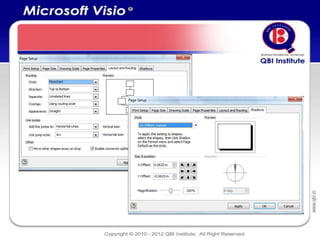
                           Page Setup Options
Visio Page Setup Options
Background Page
Using Visio Artifacts in Requirement
Documents


• Paste Picture
• Link Visio Drawing in your
  Requirements Document
• Display as Icon
Copy and Paste Picture
• This option is equivalent to Copying and Pasting the Visio Snapshot in your
  Requirements Document
• Embedded Picture Can Not Be Edited as a Visio Drawing
• Embedded Picture is not Linked with the Original Visio Drawing. Any Subsequent
  change in Original Visio Drawing will not be reflected here
Link Visio Object in your
     Requirement Document


•   Open Your Requirements Document. On Insert Ribbon click on Insert Object.
•   Select Create from File if Drawing is already available
•   Select the drawing you wish to link
•   To keep the link active do not rename the file or change folders
Protect Your Drawing
Developer Tab
Click On Document Explorer
Right Click Document you wish to protect
Click on Protect Document
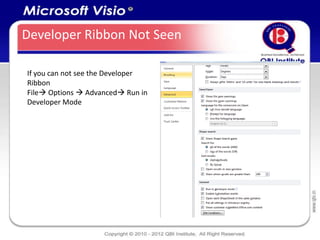
Developer Ribbon Not Seen

If you can not see the Developer
Ribbon
File Options  Advanced Run in
Developer Mode
Preparing UML Diagrams through
           MS VISIO
Preparing UML Diagrams
Metric and US Units
• Metric and US units are used to scale
  diagrams in drawing page
• Metric units example : Meter, MM etc.
• US units example : Miles etc.
Wireframes Through Visio
Portal / Application / Service Wireframing
Using MS Visio


• Wire-framing is making a visual of a website /web service / application to be
  developed
• It is an Elicitation / Validation Technique
• You can seek client approvals through Wireframes
• Through the wireframes you communicate client requirements to development
  team
• MS Visio is a good application to prepare Wireframes. It is weak in preparing
  Prototypes which have larger interactivity
Wire Framing - Case Study
Your client is a World leader in Insurance Software Products. Your company who is the
vendor has been engaged to develop an interactive company portal for them. As a
business analyst you have been in discussion about the client requirements

As per the discussion the following has emerged
• The client wishes to prominently display its logo on every page of the web site
• In addition to home page there will be top level links for Products, Services,
   Components Media, Contact Us
• In addition the client prominently wishes to highlight about its Alliance Partners,
   Clients, Career Opportunities, Blogs and Sitemap
• They want to portray a modern image through the website

Prepare a Wireframe Website to be approved by your client before you share these
ideas with your design and development team
References
References
Visio 2010 Key Board Shortcuts
http://office.microsoft.com/en-us/visio-help/visio-2010-keyboard-shortcuts-
RZ102810189.aspx?section=1
BPMN Diagrams Using MS Visio
http://office.microsoft.com/en-us/visio-help/bpmn-diagramming-basics-
RZ102712773.aspx?CTT=1
Business Template Overview
http://office.microsoft.com/en-us/visio-help/video-business-template-overview-
VA101848201.aspx?CTT=4&origin=EC001023145
Thank - You
Hold Down Shift + Ctrl and drag with the left
mouse button – Zooms in on the selected area
Hold Down Shift + Ctrl and drag with the right
mouse button – Zooms in on the selected area
Microsoft Visio Detailed Presentation

Microsoft Visio Detailed Presentation

  • 1.
    Microsoft Visio isRegistered Trade of Microsoft Corporation This presentation is Copyright of QBI Institute. This presentation is part of course material for QBI Institute Software Business Analyst Certification Program
  • 2.
  • 3.
  • 4.
    What can VISIODo for You
  • 5.
    Is Learning VisioCompulsory ?
  • 6.
    Starting VISIO Then Start VISIO By Clicking Here -2 Click on Windows Button -1
  • 7.
    Starting VISIO Template Template Area: Recently Navigation Area Preview Area Used, Template Categories
  • 8.
    Ribbon Bar Groups on Ribbon Quick Access Tool Bar File Menu Visio Drawing Visio Stencil Zoom Control Page Control
  • 9.
    Top Right /Bottom Left Options To Minimize the Visio File To Restore Down To Close the file To Minimize the Ribbon To Open Visio Help To Minimize Window To Restore Window To Close Window Page No of Open Visio Drawing Unit being used US or Metric Macro Recording Option
  • 10.
    File Menu File is the only drop down menu available it provides options for Save/Save as, Open, Close, Info, Recent, New etc.
  • 11.
    Home Tab /Ribbon HomeTab or Ribbon has provision for common actions like alignment, font size, formatting, Copy, Paste etc. Home Ribbon has groups like Clip Board, Font, Paragraph, Tools, Shape, Arrange and Editing
  • 12.
    Insert Ribbon Insert Tabor Ribbon has provision to Insert Blank Page, Picture, Clip Art, Chart, CAD Drawing, Container, Call Out, Hyperlink, Screen Tip, Object, Field and symbol. It has Ribbon Groups named Pages, Illustrations, Diagram Parts, Links and Text
  • 13.
    Design Ribbon Page Orientation,Page Themes, Backgrounds etc. are set in the Design Tab or Design Ribbon. Design Ribbon has the following Groups : Page Setup, Themes, Backgrounds and Layout
  • 14.
    Data Ribbon We canlink external data sources and data graphics through Data Ribbon. Data Ribbon has three Groups : External Data, Display Data, Show/Hide
  • 15.
    Contextual Tabs Contextual Tabs become available on certain conditions. In this example we will show you a contextual tab and also use of Ink Tools in Visio. Click on Review Tab Now click on Ink Tools A contextual Tab of Ink Tools will come up Through Ink Tool Contextual Tab you can use Pen, highlighter etc. on your MS Visio Drawings
  • 16.
    Review Ribbon Functionalities providedin this Ribbon help us to Review our Visio Files or Diagrams . Review Ribbon has following Groups : Proofing, Language, Comments, Markup and Reports
  • 17.
    View Ribbon Functionalities providedin this View Ribbon help us to View better our Visio Files or Diagrams . View Ribbon has following Groups : Views, Show, Zoom, Visual Aids, Window and Macros
  • 18.
    Developer Ribbon Developer Ribbonhas Groups like Code, Add-Ins, Controls, Shape Design, Stencil, Show/Hide. Here you can record new Macros, Prepare new stencils etc
  • 19.
    Add-Ins Ribbon Add-Inns Ribbonshows Add-Ins to your Visio Program. A Visio Add-In is a Program which extends the capability of VISIO There are several third party Add-Ins available for Microsoft Visio
  • 20.
  • 21.
    Shapes Visio Shapes andconnectors make up the Visio Diagram Visio Shapes are readymade images with which you can make your diagram Visio Shape can be simple as a line or complex as a Calendar Shapes can be 1-D (behaves like a line ) or 2-D (behaves like a rectangle) Relevant Visio Shapes can be utilized from the Stencil, by dragging and dropping instance (which you drop on diagram) of master shape (which remains on the stencil) Shapes can hold important information and data You can make your own shapes Common Shape Actions Rotate a Shape Resize Flip Horizontally and Vertically Format Managing Viewing Shape Data
  • 22.
    View Shape Data, Size and Positopn To check data associated with a Shape, Select the Shape View Ribbon Task Panes Shape Data (Only 2D shapes have shape data, connectors do not have shape data) To check positioning of a Shape on the Diagram, Select the Shape, Go to View Ribbon Task Panes Size and Position After you activate these options whatever Shape you will select their Data, Size and Position will be displayed
  • 23.
    Shape Connection Points Aconnection point is a special point on some shapes that you can “glue” connectors and other shapes to. It looks like a blue x ( ). When you glue a connector to a connection point on a shape, they stay connected, even if the shape is moved. Use connection points when you want connectors or shapes to stay connected to specific points on a shape. In Microsoft Visio 2010, connection points fade in and become visible when you are attempting to connect a shape to another. You see a shape’s connection points when you hover near the shape with the Connector Tool or drag the endpoint of any connector or line near a shape that has connection points.
  • 24.
    Prevent or ProtectShapes To prevent or protect shapes go to File  Options  Advanced General Select Run in developer mode Now Select a Shape you wish to protect Now on Developer Tab Shape Design Group Click Protect. Protect the properties you wish to protect
  • 25.
    Static Connection Static Connectionsor Point Connections. When the Shapes are Connected the Connection end points turn red. If we move the shape the connector remains glued to the end point
  • 26.
    Dynamic Connectors Dynamic Connectionsor Shape to Shape Connectors It connects two shapes with shortest route Possible
  • 27.
    Adding Text toConnector Double Click on the Connector and Add Text
  • 28.
    MS Visio FileTypes .vsd is Visio Drawing File Vss is Visio Stencil File .vst is Visio Template File .vsx is Visio XML file
  • 29.
    Visio File Types .vsd : The vsd file extension is associated with Microsoft Visio binary file format and used for its flowcharts and diagram document files .vss: The vss file extension is associated with Microsoft Visio. File contains smartshapes (stencils).File is in binary Visio document format .vst: The vst file extension is associated with Microsoft Visio templates .vdw: The vsw file suffix is associated with Microsoft Office Visio. File contains web drawing, that is created in Microsoft Office Visio. .vdx: Visio drawing XML file - a drawing or chart created with Microsoft Visio, a program for creating business diagrams and flowcharts. It is similar to a standard .vsd file, but saved in an XML format.
  • 30.
    Creating a NewStencil Developer Ribbon  New Stencil Save with .vss extension Utilize with Visio Drawing Files
  • 31.
  • 32.
  • 33.
  • 34.
    Working With Shapes Flippingand Rotating Shapes Rotate Shape 90 degree to the left (counter-clock wise) Ctrl +L Rotate Shape 90 degree to the right (clockwise) Ctrl +R Flip Shape Vertically Ctrl +J Flip Shape Horizontally Ctrl + H Flip a line Shape to reverse its ends – Choose Shape Operations Reverse ends Grouping and Ungrouping Shapes Grouping Shapes Shift + Ctrl + G Ungrouping Shapes Shift + Ctrl +U Nudging a Shape Nudging a Shape : Select the Shape and Press Up, Down, Left, Right and Arrow Keys Nudging means shifting a Shape with a very small degree
  • 35.
    Working With Shapes Zooming HoldDown Shift+Ctrl and Click left mouse button – Zooms in Hold Down Shift+Ctrl and Click right mouse button – Zooms Out
  • 36.
    Formatting Shapes Select the Shape  Right Click with mouse Select Fill / Line/Text
  • 37.
    Working with VisioPages Inserting a New Page Accessing Page Setup Insert Delete Rename Re-order Page Setup Options
  • 38.
  • 39.
  • 41.
  • 42.
    Using Visio Artifactsin Requirement Documents • Paste Picture • Link Visio Drawing in your Requirements Document • Display as Icon
  • 43.
    Copy and PastePicture • This option is equivalent to Copying and Pasting the Visio Snapshot in your Requirements Document • Embedded Picture Can Not Be Edited as a Visio Drawing • Embedded Picture is not Linked with the Original Visio Drawing. Any Subsequent change in Original Visio Drawing will not be reflected here
  • 44.
    Link Visio Objectin your Requirement Document • Open Your Requirements Document. On Insert Ribbon click on Insert Object. • Select Create from File if Drawing is already available • Select the drawing you wish to link • To keep the link active do not rename the file or change folders
  • 45.
    Protect Your Drawing DeveloperTab Click On Document Explorer Right Click Document you wish to protect Click on Protect Document
  • 46.
    Developer Ribbon NotSeen If you can not see the Developer Ribbon File Options  Advanced Run in Developer Mode
  • 47.
    Preparing UML Diagramsthrough MS VISIO
  • 49.
  • 50.
    Metric and USUnits • Metric and US units are used to scale diagrams in drawing page • Metric units example : Meter, MM etc. • US units example : Miles etc.
  • 53.
  • 54.
    Portal / Application/ Service Wireframing Using MS Visio • Wire-framing is making a visual of a website /web service / application to be developed • It is an Elicitation / Validation Technique • You can seek client approvals through Wireframes • Through the wireframes you communicate client requirements to development team • MS Visio is a good application to prepare Wireframes. It is weak in preparing Prototypes which have larger interactivity
  • 55.
    Wire Framing -Case Study Your client is a World leader in Insurance Software Products. Your company who is the vendor has been engaged to develop an interactive company portal for them. As a business analyst you have been in discussion about the client requirements As per the discussion the following has emerged • The client wishes to prominently display its logo on every page of the web site • In addition to home page there will be top level links for Products, Services, Components Media, Contact Us • In addition the client prominently wishes to highlight about its Alliance Partners, Clients, Career Opportunities, Blogs and Sitemap • They want to portray a modern image through the website Prepare a Wireframe Website to be approved by your client before you share these ideas with your design and development team
  • 59.
    References References Visio 2010 KeyBoard Shortcuts http://office.microsoft.com/en-us/visio-help/visio-2010-keyboard-shortcuts- RZ102810189.aspx?section=1 BPMN Diagrams Using MS Visio http://office.microsoft.com/en-us/visio-help/bpmn-diagramming-basics- RZ102712773.aspx?CTT=1 Business Template Overview http://office.microsoft.com/en-us/visio-help/video-business-template-overview- VA101848201.aspx?CTT=4&origin=EC001023145
  • 60.
  • 61.
    Hold Down Shift+ Ctrl and drag with the left mouse button – Zooms in on the selected area Hold Down Shift + Ctrl and drag with the right mouse button – Zooms in on the selected area