Project Learning Microsoft Project ®  Usage Survey Results May 2010
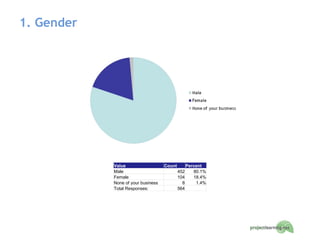
1. Gender Value Count Percent Male 452 80.1% Female 104 18.4% None of your business 8 1.4% Total Responses: 564  
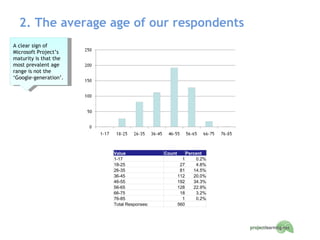
2. The average age of our respondents A clear sign of Microsoft Project’s maturity is that the most prevalent age range is not the ‘Google-generation’. Value Count Percent 1-17 1 0.2% 18-25 27 4.8% 26-35 81 14.5% 36-45 112 20.0% 46-55 192 34.3% 56-65 128 22.9% 66-75 18 3.2% 76-85 1 0.2% Total Responses: 560  
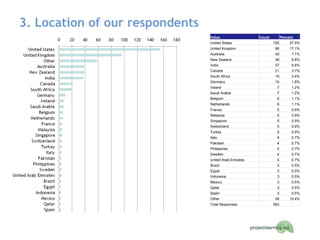
3. Location of our respondents Value Count Percent United States 155 27.5% United Kingdom 96 17.1% Australia 40 7.1% New Zealand 38 6.8% India 37 6.6% Canada 21 3.7% South Africa 19 3.4% Germany 10 1.8% Ireland 7 1.2% Saudi Arabia 7 1.2% Belgium 6 1.1% Netherlands 6 1.1% France 5 0.9% Malaysia 5 0.9% Singapore 5 0.9% Switzerland 5 0.9% Turkey 5 0.9% Italy 4 0.7% Pakistan 4 0.7% Philippines 4 0.7% Sweden 4 0.7% United Arab Emirates 4 0.7% Brazil 3 0.5% Egypt 3 0.5% Indonesia 3 0.5% Mexico 3 0.5% Qatar 3 0.5% Spain 3 0.5% Other 58 10.4% Total Responses: 563  
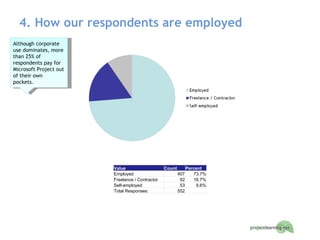
4. How our respondents are employed Although corporate use dominates, more than 25% of respondents pay for Microsoft Project out of their own pockets. Value Count Percent Employed 407 73.7% Freelance / Contractor 92 16.7% Self-employed 53 9.6% Total Responses: 552  
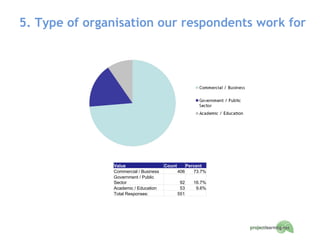
5. Type of organisation our respondents work for Value Count Percent Commercial / Business 406 73.7% Government / Public Sector 92 16.7% Academic / Education 53 9.6% Total Responses: 551  
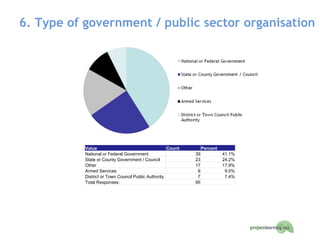
6. Type of government / public sector organisation Value Count Percent National or Federal Government 39 41.1% State or County Government / Council 23 24.2% Other 17 17.9% Armed Services 9 9.5% District or Town Council Public Authority 7 7.4% Total Responses: 95  
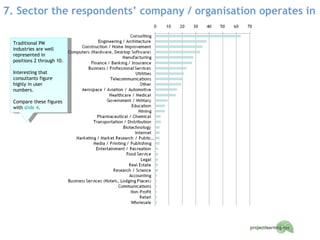
7. Sector the respondents’ company / organisation operates in Traditional PM industries are well represented in positions 2 through 10. Interesting that consultants figure highly in user numbers.  Compare these figures with  slide 4 .
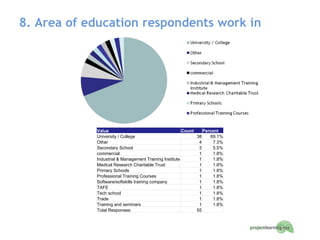
8. Area of education respondents work in Value Count Percent University / College 38 69.1% Other 4 7.3% Secondary School 3 5.5% commercial 1 1.8% Industrial & Management Training Institute 1 1.8% Medical Research Charitable Trust 1 1.8% Primary Schools 1 1.8% Professional Training Courses 1 1.8% Software/softskills training company 1 1.8% TAFE 1 1.8% Tech school 1 1.8% Trade 1 1.8% Training and seminars 1 1.8% Total Responses: 55  
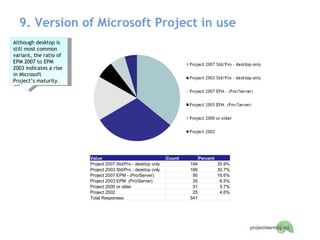
9. Version of Microsoft Project in use Although desktop is still most common variant, the ratio of EPM 2007 to EPM 2003 indicates a rise in Microsoft Project’s maturity. Value Count Percent Project 2007 Std/Pro - desktop only 194 35.9% Project 2003 Std/Pro - desktop only 166 30.7% Project 2007 EPM - (Pro/Server) 90 16.6% Project 2003 EPM  (Pro/Server) 35 6.5% Project 2000 or older 31 5.7% Project 2002 25 4.6% Total Responses: 541  
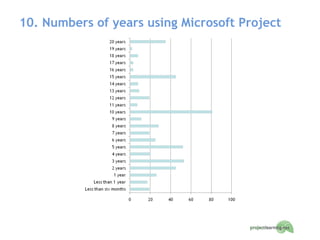
10. Numbers of years using Microsoft Project
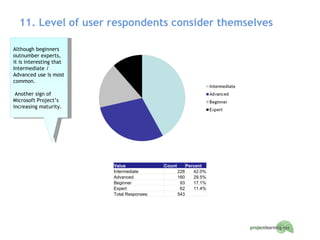
11. Level of user respondents consider themselves Although beginners outnumber experts, it is interesting that Intermediate / Advanced use is most common.  Another sign of Microsoft Project’s increasing maturity.  Value Count Percent Intermediate 228 42.0% Advanced 160 29.5% Beginner 93 17.1% Expert 62 11.4% Total Responses: 543  
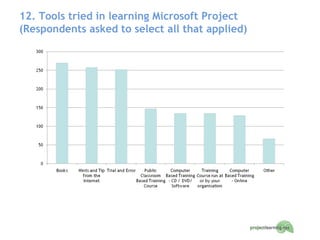
12. Tools tried in learning Microsoft Project  (Respondents asked to select all that applied)
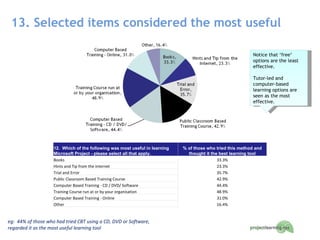
13. Selected items considered the most useful Notice that ‘free’ options are the least effective.  Tutor-led and computer-based learning options are seen as the most effective. 12.  Which of the following was most useful in learning Microsoft Project - please select all that apply. % of those who tried this method and thought it the best learning tool Books 33.3% Hints and Tip from the Internet 23.3% Trial and Error 35.7% Public Classroom Based Training Course 42.9% Computer Based Training - CD / DVD/ Software 44.4% Training Course run at or by your organisation 48.9% Computer Based Training - Online 31.0% Other 16.4% eg:  44% of those who had tried CBT using a CD, DVD or Software, regarded it as the most useful learning tool
Some comments on why some thought CBT with a CD/DVD / Software was most useful I can study at my own pace and repeat lessons. Combination of text supported by video and practical exercises works really well for me I was able to go over the information until I completely grasped the concepts. Structured, on-demand, in depth content (more than could be handled in a classroom session of limited time) I could learn on my own schedule and investigate those areas that were pertinent to my issues. I could train at my own speed and pace. I could also complete parts, pause and re-join, work on Sat and Sun.~ In Chicago...anything that can load on a hard drive for training works well.  Commute is 10 hours a week.  One or two lessons a day works well.  Then print out the lessons learn to remember. It took a long time for me to decide to purchase Project Mentor. My only regret is that I didn't purchase this product earlier. It enabled me to fully appreciate just how good Microsoft Project is! Because from Help option we could learn if we face any difficulty. If internet connection is slow then t is not possible if we require the solution instantly. Because it gives micro level knowledge
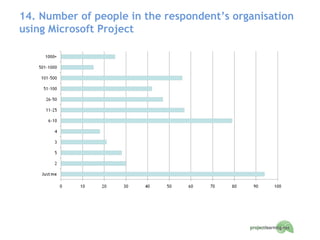
14. Number of people in the respondent’s organisation using Microsoft Project
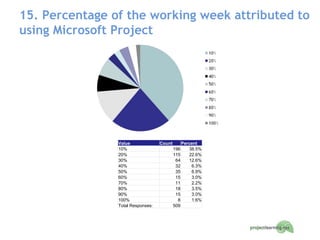
15. Percentage of the working week attributed to using Microsoft Project  Value Count Percent 10% 196 38.5% 20% 115 22.6% 30% 64 12.6% 40% 32 6.3% 50% 35 6.9% 60% 15 3.0% 70% 11 2.2% 80% 18 3.5% 90% 15 3.0% 100% 8 1.6% Total Responses: 509  
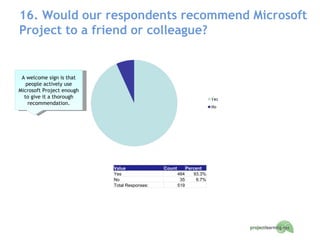
16. Would our respondents recommend Microsoft Project to a friend or colleague? A welcome sign is that people actively use Microsoft Project enough to give it a thorough recommendation. Value Count Percent Yes 484 93.3% No 35 6.7% Total Responses: 519  
About Project Learning Since 1994 Project Learning has provided informed, objective and impartial advice to help people manage their projects better.  Stakeholders, managers and knowledge workers in project-oriented environments benefit from the real world examples and focus provided by our experience and expertise. As specialists in Project Management, Microsoft ®  Project and Microsoft Enterprise Project Management, we have products and services that have a positive impact on people, processes and ultimately business success. Our  Project Mentor  computer based training system is  smart way to learn Microsoft Project.  Developed by Project Managers for Project Managers , just  learn, test and refer  to plan and manage your projects better. Learn : Let more than eighty in-depth movies teach you what to do, then follow step-by-step instructions to learn as you experience. Test : Test your skills and knowledge using challenging practical exercises and thought-provoking quizzes.  Refer : Have authoritative references readily to hand to answer all your Microsoft Project questions. Download an  evaluation kit today  or alternatively find out how  cost effective Project Mentor is compared to classroom training

Microsoft Project Usage Survey

  • 1.
    Project Learning MicrosoftProject ® Usage Survey Results May 2010
  • 2.
    1. Gender ValueCount Percent Male 452 80.1% Female 104 18.4% None of your business 8 1.4% Total Responses: 564  
  • 3.
    2. The averageage of our respondents A clear sign of Microsoft Project’s maturity is that the most prevalent age range is not the ‘Google-generation’. Value Count Percent 1-17 1 0.2% 18-25 27 4.8% 26-35 81 14.5% 36-45 112 20.0% 46-55 192 34.3% 56-65 128 22.9% 66-75 18 3.2% 76-85 1 0.2% Total Responses: 560  
  • 4.
    3. Location ofour respondents Value Count Percent United States 155 27.5% United Kingdom 96 17.1% Australia 40 7.1% New Zealand 38 6.8% India 37 6.6% Canada 21 3.7% South Africa 19 3.4% Germany 10 1.8% Ireland 7 1.2% Saudi Arabia 7 1.2% Belgium 6 1.1% Netherlands 6 1.1% France 5 0.9% Malaysia 5 0.9% Singapore 5 0.9% Switzerland 5 0.9% Turkey 5 0.9% Italy 4 0.7% Pakistan 4 0.7% Philippines 4 0.7% Sweden 4 0.7% United Arab Emirates 4 0.7% Brazil 3 0.5% Egypt 3 0.5% Indonesia 3 0.5% Mexico 3 0.5% Qatar 3 0.5% Spain 3 0.5% Other 58 10.4% Total Responses: 563  
  • 5.
    4. How ourrespondents are employed Although corporate use dominates, more than 25% of respondents pay for Microsoft Project out of their own pockets. Value Count Percent Employed 407 73.7% Freelance / Contractor 92 16.7% Self-employed 53 9.6% Total Responses: 552  
  • 6.
    5. Type oforganisation our respondents work for Value Count Percent Commercial / Business 406 73.7% Government / Public Sector 92 16.7% Academic / Education 53 9.6% Total Responses: 551  
  • 7.
    6. Type ofgovernment / public sector organisation Value Count Percent National or Federal Government 39 41.1% State or County Government / Council 23 24.2% Other 17 17.9% Armed Services 9 9.5% District or Town Council Public Authority 7 7.4% Total Responses: 95  
  • 8.
    7. Sector therespondents’ company / organisation operates in Traditional PM industries are well represented in positions 2 through 10. Interesting that consultants figure highly in user numbers. Compare these figures with slide 4 .
  • 9.
    8. Area ofeducation respondents work in Value Count Percent University / College 38 69.1% Other 4 7.3% Secondary School 3 5.5% commercial 1 1.8% Industrial & Management Training Institute 1 1.8% Medical Research Charitable Trust 1 1.8% Primary Schools 1 1.8% Professional Training Courses 1 1.8% Software/softskills training company 1 1.8% TAFE 1 1.8% Tech school 1 1.8% Trade 1 1.8% Training and seminars 1 1.8% Total Responses: 55  
  • 10.
    9. Version ofMicrosoft Project in use Although desktop is still most common variant, the ratio of EPM 2007 to EPM 2003 indicates a rise in Microsoft Project’s maturity. Value Count Percent Project 2007 Std/Pro - desktop only 194 35.9% Project 2003 Std/Pro - desktop only 166 30.7% Project 2007 EPM - (Pro/Server) 90 16.6% Project 2003 EPM (Pro/Server) 35 6.5% Project 2000 or older 31 5.7% Project 2002 25 4.6% Total Responses: 541  
  • 11.
    10. Numbers ofyears using Microsoft Project
  • 12.
    11. Level ofuser respondents consider themselves Although beginners outnumber experts, it is interesting that Intermediate / Advanced use is most common. Another sign of Microsoft Project’s increasing maturity. Value Count Percent Intermediate 228 42.0% Advanced 160 29.5% Beginner 93 17.1% Expert 62 11.4% Total Responses: 543  
  • 13.
    12. Tools triedin learning Microsoft Project (Respondents asked to select all that applied)
  • 14.
    13. Selected itemsconsidered the most useful Notice that ‘free’ options are the least effective. Tutor-led and computer-based learning options are seen as the most effective. 12. Which of the following was most useful in learning Microsoft Project - please select all that apply. % of those who tried this method and thought it the best learning tool Books 33.3% Hints and Tip from the Internet 23.3% Trial and Error 35.7% Public Classroom Based Training Course 42.9% Computer Based Training - CD / DVD/ Software 44.4% Training Course run at or by your organisation 48.9% Computer Based Training - Online 31.0% Other 16.4% eg: 44% of those who had tried CBT using a CD, DVD or Software, regarded it as the most useful learning tool
  • 15.
    Some comments onwhy some thought CBT with a CD/DVD / Software was most useful I can study at my own pace and repeat lessons. Combination of text supported by video and practical exercises works really well for me I was able to go over the information until I completely grasped the concepts. Structured, on-demand, in depth content (more than could be handled in a classroom session of limited time) I could learn on my own schedule and investigate those areas that were pertinent to my issues. I could train at my own speed and pace. I could also complete parts, pause and re-join, work on Sat and Sun.~ In Chicago...anything that can load on a hard drive for training works well. Commute is 10 hours a week. One or two lessons a day works well. Then print out the lessons learn to remember. It took a long time for me to decide to purchase Project Mentor. My only regret is that I didn't purchase this product earlier. It enabled me to fully appreciate just how good Microsoft Project is! Because from Help option we could learn if we face any difficulty. If internet connection is slow then t is not possible if we require the solution instantly. Because it gives micro level knowledge
  • 16.
    14. Number ofpeople in the respondent’s organisation using Microsoft Project
  • 17.
    15. Percentage ofthe working week attributed to using Microsoft Project Value Count Percent 10% 196 38.5% 20% 115 22.6% 30% 64 12.6% 40% 32 6.3% 50% 35 6.9% 60% 15 3.0% 70% 11 2.2% 80% 18 3.5% 90% 15 3.0% 100% 8 1.6% Total Responses: 509  
  • 18.
    16. Would ourrespondents recommend Microsoft Project to a friend or colleague? A welcome sign is that people actively use Microsoft Project enough to give it a thorough recommendation. Value Count Percent Yes 484 93.3% No 35 6.7% Total Responses: 519  
  • 19.
    About Project LearningSince 1994 Project Learning has provided informed, objective and impartial advice to help people manage their projects better.  Stakeholders, managers and knowledge workers in project-oriented environments benefit from the real world examples and focus provided by our experience and expertise. As specialists in Project Management, Microsoft ® Project and Microsoft Enterprise Project Management, we have products and services that have a positive impact on people, processes and ultimately business success. Our Project Mentor computer based training system is smart way to learn Microsoft Project. Developed by Project Managers for Project Managers , just learn, test and refer to plan and manage your projects better. Learn : Let more than eighty in-depth movies teach you what to do, then follow step-by-step instructions to learn as you experience. Test : Test your skills and knowledge using challenging practical exercises and thought-provoking quizzes. Refer : Have authoritative references readily to hand to answer all your Microsoft Project questions. Download an evaluation kit today or alternatively find out how cost effective Project Mentor is compared to classroom training