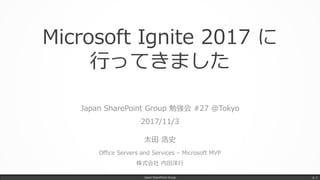
Microsoft Ignite 2017 に
行ってきました
Japan SharePoint Group 勉強会 #27 @Tokyo
2017/11/3
太田 浩史
Office Servers and Services – Microsoft MVP
株式会社 内田洋行
Japan SharePoint Group p. 1
自己紹介
太田 浩史 (おおた ひろふみ)
• 2008 年ごろから、SharePoint を中心に活動しています。
• 自社やお客様の Office 365 活用のご支援もしています。
• ちょっとした工夫や役立ちそうな小ネタが好きです。
Japan SharePoint Group p. 2
Microsoft MVP
2013,2014 SharePoint Server
2015,2016 Office Servers and Services
www.slideshare.net/hirofumi_ota
idea.tostring.jp
ブログとか資料とかソーシャルとか
twitter.com/hrfmjp
www.facebook.com/idea.tostring.jp
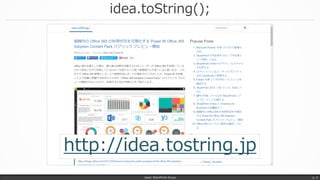
idea.toString();
Japan SharePoint Group p. 3
http://idea.tostring.jp
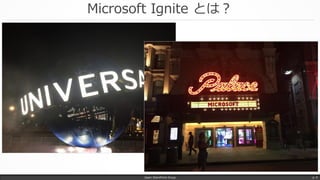
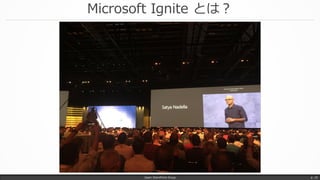
Microsoft Ignite とは?
• Microsoft 主催のめっちゃ大きなイベント
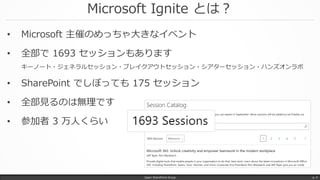
• 全部で 1693 セッションもあります
キーノート・ジェネラルセッション・ブレイクアウトセッション・シアターセッション・ハンズオンラボ
• SharePoint でしぼっても 175 セッション
• 全部見るのは無理です
• 参加者 3 万人くらい
Japan SharePoint Group p. 4
Microsoft Ignite とは?
Japan SharePoint Group p. 5
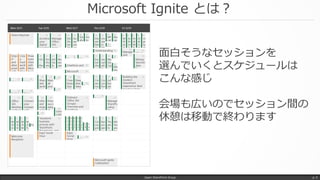
面白そうなセッションを
選んでいくとスケジュールは
こんな感じ
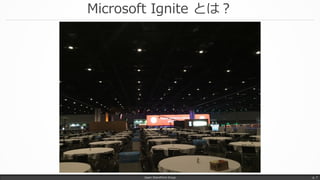
会場も広いのでセッション間の
休憩は移動で終わります
Microsoft Ignite とは?
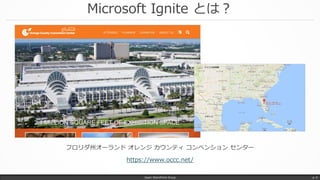
フロリダ州オーランド オレンジ カウンティ コンベンション センター
https://www.occc.net/
Japan SharePoint Group p. 6
Microsoft Ignite とは?
Japan SharePoint Group p. 7
Microsoft Ignite とは?
Japan SharePoint Group p. 8
Microsoft Ignite とは?
Japan SharePoint Group p. 9
Microsoft Ignite とは?
Japan SharePoint Group p. 10
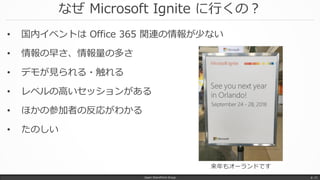
なぜ Microsoft Ignite に行くの?
• 国内イベントは Office 365 関連の情報が少ない
• 情報の早さ、情報量の多さ
• デモが見られる・触れる
• レベルの高いセッションがある
• ほかの参加者の反応がわかる
• たのしい
Japan SharePoint Group p. 11
来年もオーランドです
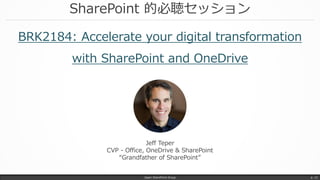
SharePoint 的必聴セッション
BRK2184: Accelerate your digital transformation
with SharePoint and OneDrive
Japan SharePoint Group p. 12
Jeff Teper
CVP - Office, OneDrive & SharePoint
“Grandfather of SharePoint”
ホントはもっといっぱいあります
Japan SharePoint Group p. 13
厳選!!
SharePoint や OneDrive の
21
アップデート
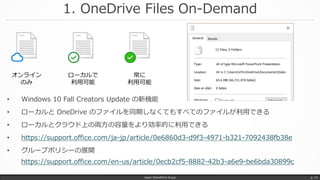
1. OneDrive Files On-Demand
Japan SharePoint Group p. 14
• Windows 10 Fall Creators Update の新機能
• ローカルと OneDrive のファイルを同期しなくてもすべてのファイルが利用できる
• ローカルとクラウド上の両方の容量をより効率的に利用できる
• https://support.office.com/ja-jp/article/0e6860d3-d9f3-4971-b321-7092438fb38e
• グループポリシーの展開
https://support.office.com/en-us/article/0ecb2cf5-8882-42b3-a6e9-be6bda30899c
オンライン
のみ
ローカルで
利用可能
常に
利用可能
2. OneDrive IRM ライブラリ対応
Japan SharePoint Group p. 15
• 現在はプレビューリリース
• 17.3.6944.0627 よりも新しい同期クライアントでプレビューが可能
• プレビュー版では、Files On-Demand の無効化が必要(同時利用不可)
• その他、いろいろな制限事項あり
• https://support.office.com/ja-jp/article/6778d4de-b5f8-423c-af43-
a1b2449e9b99
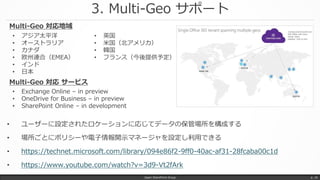
3. Multi-Geo サポート
Japan SharePoint Group p. 16
• ユーザーに設定されたロケーションに応じてデータの保管場所を構成する
• 場所ごとにポリシーや電子情報開示マネージャを設定し利用できる
• https://technet.microsoft.com/library/094e86f2-9ff0-40ac-af31-28fcaba00c1d
• https://www.youtube.com/watch?v=3d9-Vt2fArk
• アジア太平洋
• オーストラリア
• カナダ
• 欧州連合(EMEA)
• インド
• 日本
• 英国
• 米国(北アメリカ)
• 韓国
• フランス(今後提供予定)
Multi-Geo 対応地域
• Exchange Online – in preview
• OneDrive for Business – in preview
• SharePoint Online – in development
Multi-Geo 対応 サービス
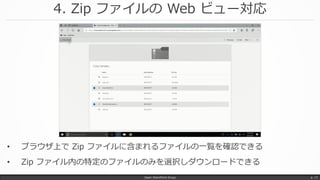
4. Zip ファイルの Web ビュー対応
Japan SharePoint Group p. 17
• ブラウザ上で Zip ファイルに含まれるファイルの一覧を確認できる
• Zip ファイル内の特定のファイルのみを選択しダウンロードできる
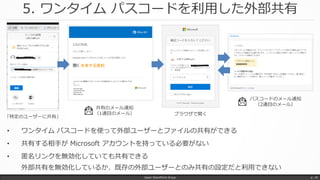
5. ワンタイム パスコードを利用した外部共有
• ワンタイム パスコードを使って外部ユーザーとファイルの共有ができる
• 共有する相手が Microsoft アカウントを持っている必要がない
• 匿名リンクを無効化していても共有できる
外部共有を無効化しているか、既存の外部ユーザーとのみ共有の設定だと利用できない
Japan SharePoint Group p. 18
「特定のユーザーに共有」
共有のメール通知
(1通目のメール)
パスコードのメール通知
(2通目のメール)
ブラウザで開く
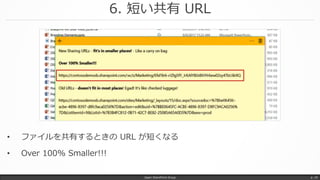
6. 短い共有 URL
Japan SharePoint Group p. 19
• ファイルを共有するときの URL が短くなる
• Over 100% Smaller!!!
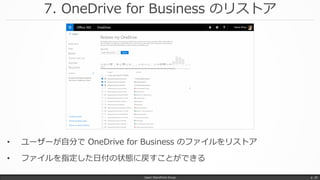
7. OneDrive for Business のリストア
Japan SharePoint Group p. 20
• ユーザーが自分で OneDrive for Business のファイルをリストア
• ファイルを指定した日付の状態に戻すことができる
8. PowerApps によるカスタムフォーム
Japan SharePoint Group p. 21
• PowerApps を利用してリストのフォームをカスタマイズ可能になる
• カスケードの選択肢入力や入力規則
• 他サービスとのデータ連携
[リストの設定] - [全般設定; フォームの設定] から有効化
フォームのカスタマイズについて
• PowerApps
• InfoPath
のいずれかから選択可能になる(はず)
9. Flow Launch Panel
Japan SharePoint Group p. 22
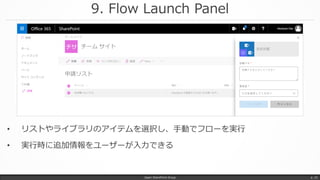
• リストやライブラリのアイテムを選択し、手動でフローを実行
• 実行時に追加情報をユーザーが入力できる
PowerApps & Flow
Japan SharePoint Group p. 23
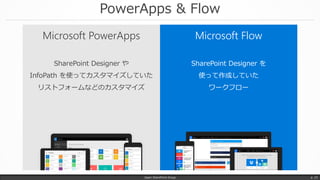
Microsoft FlowMicrosoft PowerApps
SharePoint Designer や
InfoPath を使ってカスタマイズしていた
リストフォームなどのカスタマイズ
SharePoint Designer を
使って作成していた
ワークフロー
10. Column formatting(Column Formatter)
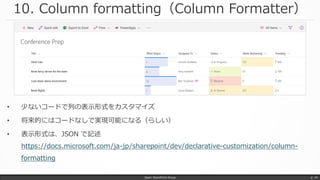
• 少ないコードで列の表示形式をカスタマイズ
• 将来的にはコードなしで実現可能になる(らしい)
• 表示形式は、JSON で記述
https://docs.microsoft.com/ja-jp/sharepoint/dev/declarative-customization/column-
formatting
Japan SharePoint Group p. 24
11. Attention View
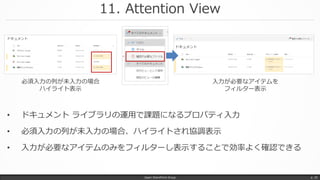
• ドキュメント ライブラリの運用で課題になるプロパティ入力
• 必須入力の列が未入力の場合、ハイライトされ協調表示
• 入力が必要なアイテムのみをフィルターし表示することで効率よく確認できる
Japan SharePoint Group p. 25
必須入力の列が未入力の場合
ハイライト表示
入力が必要なアイテムを
フィルター表示
12. フィルターパネルのピン止め
• フィルターパネルをユーザーが簡単にカスタマイズ
• シンプルな操作でよりドキュメントを探しやすくできる
Japan SharePoint Group p. 26
[列の設定] –
[フィルターウインドウに固定]
フィルターパネルに
選択した列のフィルターを追加
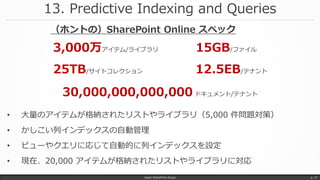
13. Predictive Indexing and Queries
Japan SharePoint Group p. 27
• 大量のアイテムが格納されたリストやライブラリ(5,000 件問題対策)
• かしこい列インデックスの自動管理
• ビューやクエリに応じて自動的に列インデックスを設定
• 現在、20,000 アイテムが格納されたリストやライブラリに対応
3,000万アイテム/ライブラリ
25TB/サイトコレクション
15GB/ファイル
12.5EB/テナント
30,000,000,000,000 ドキュメント/テナント
(ホントの)SharePoint Online スペック
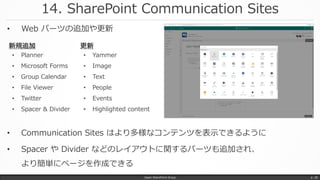
14. SharePoint Communication Sites
Japan SharePoint Group p. 28
• Communication Sites はより多様なコンテンツを表示できるように
• Spacer や Divider などのレイアウトに関するパーツも追加され、
より簡単にページを作成できる
• Planner
• Microsoft Forms
• Group Calendar
• File Viewer
• Twitter
• Spacer & Divider
新規追加
• Yammer
• Image
• Text
• People
• Events
• Highlighted content
更新
• Web パーツの追加や更新
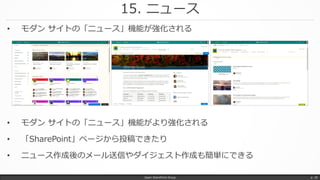
15. ニュース
Japan SharePoint Group p. 29
• モダン サイトの「ニュース」機能がより強化される
• 「SharePoint」ページから投稿できたり
• ニュース作成後のメール送信やダイジェスト作成も簡単にできる
• モダン サイトの「ニュース」機能が強化される
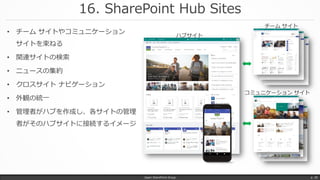
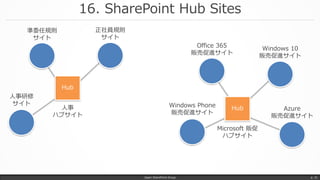
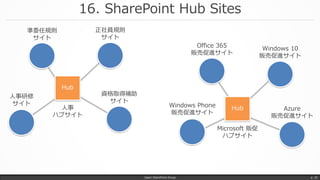
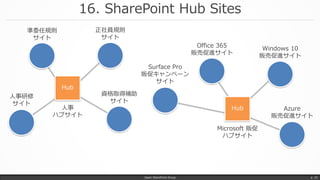
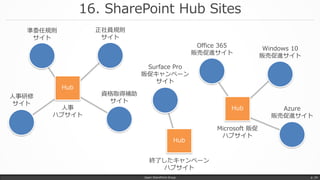
16. SharePoint Hub Sites
Japan SharePoint Group p. 30
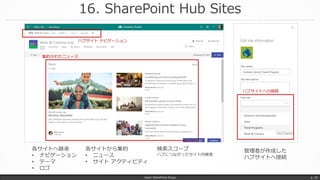
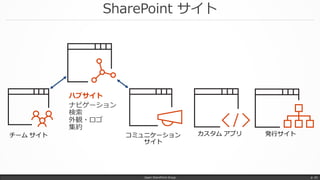
• チーム サイトやコミュニケーション
サイトを束ねる
• 関連サイトの検索
• ニュースの集約
• クロスサイト ナビゲーション
• 外観の統一
• 管理者がハブを作成し、各サイトの管理
者がそのハブサイトに接続するイメージ
16. SharePoint Hub Sites
Japan SharePoint Group p. 31
Hub
Hub
準委任規則
サイト
人事
ハブサイト
正社員規則
サイト
人事研修
サイト
Office 365
販売促進サイト
Windows 10
販売促進サイト
Azure
販売促進サイト
Windows Phone
販売促進サイト
Microsoft 販促
ハブサイト
資格取得補助
サイト
16. SharePoint Hub Sites
Japan SharePoint Group p. 32
Hub
Hub
準委任規則
サイト
人事
ハブサイト
正社員規則
サイト
人事研修
サイト
Office 365
販売促進サイト
Windows 10
販売促進サイト
Azure
販売促進サイト
Windows Phone
販売促進サイト
Microsoft 販促
ハブサイト
Surface Pro
販促キャンペーン
サイト
資格取得補助
サイト
16. SharePoint Hub Sites
Japan SharePoint Group p. 33
Hub
Hub
準委任規則
サイト
人事
ハブサイト
正社員規則
サイト
人事研修
サイト
Office 365
販売促進サイト
Windows 10
販売促進サイト
Azure
販売促進サイト
Microsoft 販促
ハブサイト
Surface Pro
販促キャンペーン
サイト
資格取得補助
サイト
16. SharePoint Hub Sites
Japan SharePoint Group p. 34
Hub
Hub
準委任規則
サイト
人事
ハブサイト
正社員規則
サイト
人事研修
サイト
Office 365
販売促進サイト
Windows 10
販売促進サイト
Azure
販売促進サイト
Microsoft 販促
ハブサイト
Hub
終了したキャンペーン
ハブサイト
16. SharePoint Hub Sites
Japan SharePoint Group p. 35
ハブサイト ナビゲーション
集約されたニュース
ハブサイトへの接続
各サイトへ継承
• ナビゲーション
• テーマ
• ロゴ
各サイトから集約
• ニュース
• サイト アクティビティ
管理者が作成した
ハブサイトへ接続
検索スコープ
ハブにつながったサイト内検索
17. New SharePoint Admin Center
Japan SharePoint Group p. 36
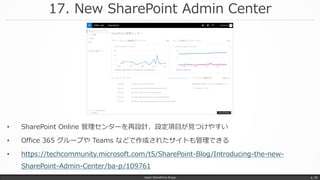
• SharePoint Online 管理センターを再設計、設定項目が見つけやすい
• Office 365 グループや Teams などで作成されたサイトも管理できる
• https://techcommunity.microsoft.com/t5/SharePoint-Blog/Introducing-the-new-
SharePoint-Admin-Center/ba-p/109761
18. パーソナライズ検索
Japan SharePoint Group p. 37
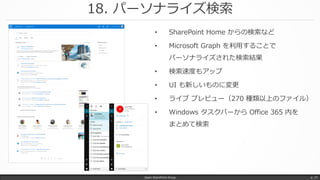
• SharePoint Home からの検索など
• Microsoft Graph を利用することで
パーソナライズされた検索結果
• 検索速度もアップ
• UI も新しいものに変更
• ライブ プレビュー(270 種類以上のファイル)
• Windows タスクバーから Office 365 内を
まとめて検索
19. 画像内検索
Japan SharePoint Group p. 38
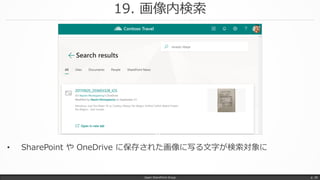
• SharePoint や OneDrive に保存された画像に写る文字が検索対象に
20. Bing for Business
Japan SharePoint Group p. 39
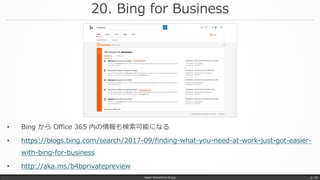
• Bing から Office 365 内の情報も検索可能になる
• https://blogs.bing.com/search/2017-09/finding-what-you-need-at-work-just-got-easier-
with-bing-for-business
• http://aka.ms/b4bprivatepreview
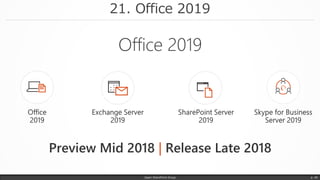
21. Office 2019
Japan SharePoint Group p. 40
|
SharePoint Server 2019
Japan SharePoint Group p. 41
• OneDrive 同期クライアント(OneDrive.exe)サポート
• モダン UX
• Microsoft Flow / PowerApps 統合
• その他の SharePoint Online Innovation!!
• InfoPath サポート(というウワサ)
• TAP (Private beta) Nomination (Code: SPT232)
http://aka.ms/sptap
• https://blogs.msdn.microsoft.com/ronalg/2017/10/03/long-live-
sharepoint-server-sp2019-tap/
SharePoint サイト
Japan SharePoint Group p. 42
ハブサイト
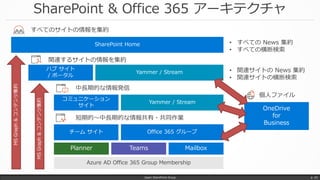
SharePoint & Office 365 アーキテクチャ
Japan SharePoint Group p. 43
SharePoint Home
ハブ サイト
/ ポータル
コミュニケーション
サイト
チーム サイト
Yammer / Stream
Office 365 グループ
Yammer / Stream
Planner Teams Mailbox
MSGraph&コンテンツ集約
MSGraph&コンテンツ集約
• すべての News 集約
• すべての横断検索
すべてのサイトの情報を集約
関連するサイトの情報を集約
中長期的な情報発信
短期的~中長期的な情報共有・共同作業
OneDrive
for
Business
個人ファイル
• 関連サイトの News 集約
• 関連サイトの横断検索
Azure AD Office 365 Group Membership
まとめ
Japan SharePoint Group p. 44
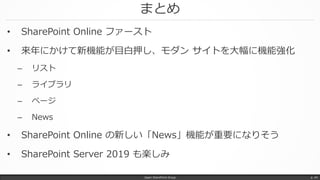
• SharePoint Online ファースト
• 来年にかけて新機能が目白押し、モダン サイトを大幅に機能強化
– リスト
– ライブラリ
– ページ
– News
• SharePoint Online の新しい「News」機能が重要になりそう
• SharePoint Server 2019 も楽しみ
Japan SharePoint Group
終製作・著作
@hrfmjp
idea.tostring.jp
Fin.
Japan SharePoint Group p. 46
Appendix
References
Japan SharePoint Group p. 47
Accelerate your digital transformation with SharePoint and OneDrive
https://techcommunity.microsoft.com/t5/Microsoft-Ignite-Content-2017/Accelerate-your-digital-transformation-with-
SharePoint-and/td-p/98891
Accelerate productivity with search and discovery in SharePoint and Office365
https://techcommunity.microsoft.com/t5/Microsoft-Ignite-Content-2017/Accelerate-productivity-with-search-and-
discovery-in-SharePoint/m-p/98582
OneDrive—Past, Present, and Future
https://techcommunity.microsoft.com/t5/Microsoft-Ignite-Content-2017/OneDrive-Past-Present-and-Future/td-
p/98880
Share and work together on the intranet with SharePoint Team Sites
https://techcommunity.microsoft.com/t5/Microsoft-Ignite-Content-2017/Share-and-work-together-on-the-intranet-
with-SharePoint-Team/td-p/98881
Inform and engage employees with SharePoint communications sites and news
https://techcommunity.microsoft.com/t5/Microsoft-Ignite-Content-2017/Inform-and-engage-employees-with-
SharePoint-communications-sites/td-p/98887
Microsoft Ignite 2017 Sessions
References
Japan SharePoint Group p. 48
Transform business process with SharePoint, PowerApps, and Flow for biz apps, forms, and automation
https://techcommunity.microsoft.com/t5/Microsoft-Ignite-Content-2017/Transform-business-process-with-SharePoint-
PowerApps-and-Flow/td-p/98882
SharePoint Development in the Enterprise (What's New, What's Coming)
https://techcommunity.microsoft.com/t5/Microsoft-Ignite-Content-2017/SharePoint-Development-in-the-Enterprise-
What-s-New-What-s/td-p/99124
Harness collective knowledge with SharePoint content services (ECM)
https://techcommunity.microsoft.com/t5/Microsoft-Ignite-Content-2017/Harness-collective-knowledge-with-
SharePoint-and-OneDrive/td-p/98892
Microsoft Ignite 2017 Sessions
References
Japan SharePoint Group p. 49
Connecting the modern workplace with SharePoint and OneDrive: Announcements at Ignite 2017
https://techcommunity.microsoft.com/t5/SharePoint-Blog/Connecting-the-modern-workplace-with-SharePoint-and-
OneDrive/ba-p/110399
Refine your message and increase your reach with SharePoint communication sites
https://techcommunity.microsoft.com/t5/SharePoint-Blog/Refine-your-message-and-increase-your-reach-with-
SharePoint/ba-p/109553
Work better together with SharePoint team sites Office 365 app integrations
https://techcommunity.microsoft.com/t5/SharePoint-Blog/Work-better-together-with-SharePoint-team-sites-Office-
365-app/ba-p/109550
SharePoint hub sites new in Office 365
https://techcommunity.microsoft.com/t5/SharePoint-Blog/SharePoint-hub-sites-new-in-Office-365/ba-p/109547
Reinvent business process in SharePoint and OneDrive
https://techcommunity.microsoft.com/t5/SharePoint-Blog/Reinvent-business-process-in-SharePoint-and-OneDrive/ba-
p/109490
Tech Community Blog
References
Japan SharePoint Group p. 50
Updating content management for the cloud
https://techcommunity.microsoft.com/t5/SharePoint-Blog/Updating-content-management-for-the-cloud/ba-p/106615
Engage employees in your intelligent social intranet with Yammer and SharePoint
https://techcommunity.microsoft.com/t5/SharePoint-Blog/Engage-employees-in-your-intelligent-social-intranet-with-
Yammer/ba-p/110005
Introducing the new SharePoint Admin Center
https://techcommunity.microsoft.com/t5/SharePoint-Blog/Introducing-the-new-SharePoint-Admin-Center/ba-p/109761
Introducing the SharePoint Migration Tool from Microsoft
https://techcommunity.microsoft.com/t5/SharePoint-Blog/Introducing-the-SharePoint-Migration-Tool-from-
Microsoft/ba-p/109767
Security you can trust, control you can count on with SharePoint and OneDrive (Ignite News)
https://techcommunity.microsoft.com/t5/SharePoint-Blog/Security-you-can-trust-control-you-can-count-on-with-
SharePoint/ba-p/109771
OneDrive Announcements at Ignite 2017
https://techcommunity.microsoft.com/t5/OneDrive-Blog/OneDrive-Announcements-at-Ignite-2017/ba-p/108533
Tech Community Blog
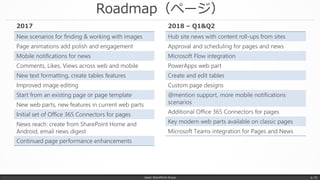
Roadmap(ページ)
Japan SharePoint Group p. 51
New scenarios for finding & working with images
Page animations add polish and engagement
Mobile notifications for news
Comments, Likes, Views across web and mobile
New text formatting, create tables features
Improved image editing
Start from an existing page or page template
New web parts, new features in current web parts
Initial set of Office 365 Connectors for pages
News reach: create from SharePoint Home and
Android, email news digest
Continued page performance enhancements
2017
Hub site news with content roll-ups from sites
Approval and scheduling for pages and news
Microsoft Flow integration
PowerApps web part
Create and edit tables
Custom page designs
@mention support, more mobile notifications
scenarios
Additional Office 365 Connectors for pages
Key modern web parts available on classic pages
Microsoft Teams integration for Pages and News
2018 – Q1&Q2
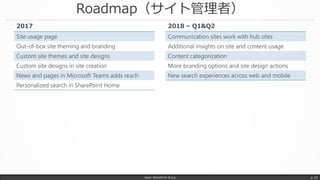
Roadmap(サイト管理者)
Japan SharePoint Group p. 52
Site usage page
Out-of-box site theming and branding
Custom site themes and site designs
Custom site designs in site creation
News and pages in Microsoft Teams adds reach
Personalized search in SharePoint Home
2017
Communication sites work with hub sites
Additional insights on site and content usage
Content categorization
More branding options and site design actions
New search experiences across web and mobile
2018 – Q1&Q2
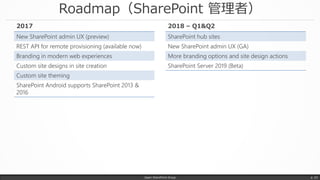
Roadmap(SharePoint 管理者)
Japan SharePoint Group p. 53
New SharePoint admin UX (preview)
REST API for remote provisioning (available now)
Branding in modern web experiences
Custom site designs in site creation
Custom site theming
SharePoint Android supports SharePoint 2013 &
2016
2017
SharePoint hub sites
New SharePoint admin UX (GA)
More branding options and site design actions
SharePoint Server 2019 (Beta)
2018 – Q1&Q2
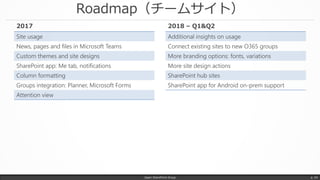
Roadmap(チームサイト)
Japan SharePoint Group p. 54
Site usage
News, pages and files in Microsoft Teams
Custom themes and site designs
SharePoint app: Me tab, notifications
Column formatting
Groups integration: Planner, Microsoft Forms
Attention view
2017
Additional insights on usage
Connect existing sites to new O365 groups
More branding options: fonts, variations
More site design actions
SharePoint hub sites
SharePoint app for Android on-prem support
2018 – Q1&Q2
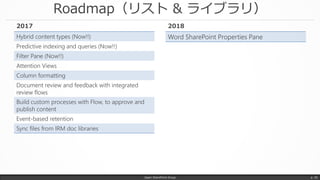
Roadmap(リスト & ライブラリ)
Japan SharePoint Group p. 55
Hybrid content types (Now!!)
Predictive indexing and queries (Now!!)
Filter Pane (Now!!)
Attention Views
Column formatting
Document review and feedback with integrated
review flows
Build custom processes with Flow, to approve and
publish content
Event-based retention
Sync files from IRM doc libraries
2017
Word SharePoint Properties Pane
2018
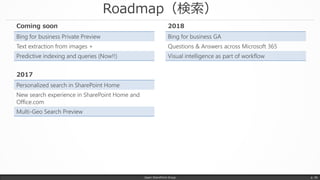
Roadmap(検索)
Japan SharePoint Group p. 56
Personalized search in SharePoint Home
New search experience in SharePoint Home and
Office.com
Multi-Geo Search Preview
2017
Bing for business GA
Questions & Answers across Microsoft 365
Visual intelligence as part of workflow
2018
Bing for business Private Preview
Text extraction from images +
Predictive indexing and queries (Now!!)
Coming soon

Microsoft Ignite 2017 に行ってきました

  • 1.
    Microsoft Ignite 2017に 行ってきました Japan SharePoint Group 勉強会 #27 @Tokyo 2017/11/3 太田 浩史 Office Servers and Services – Microsoft MVP 株式会社 内田洋行 Japan SharePoint Group p. 1
  • 2.
    自己紹介 太田 浩史 (おおたひろふみ) • 2008 年ごろから、SharePoint を中心に活動しています。 • 自社やお客様の Office 365 活用のご支援もしています。 • ちょっとした工夫や役立ちそうな小ネタが好きです。 Japan SharePoint Group p. 2 Microsoft MVP 2013,2014 SharePoint Server 2015,2016 Office Servers and Services www.slideshare.net/hirofumi_ota idea.tostring.jp ブログとか資料とかソーシャルとか twitter.com/hrfmjp www.facebook.com/idea.tostring.jp
  • 3.
    idea.toString(); Japan SharePoint Groupp. 3 http://idea.tostring.jp
  • 4.
    Microsoft Ignite とは? •Microsoft 主催のめっちゃ大きなイベント • 全部で 1693 セッションもあります キーノート・ジェネラルセッション・ブレイクアウトセッション・シアターセッション・ハンズオンラボ • SharePoint でしぼっても 175 セッション • 全部見るのは無理です • 参加者 3 万人くらい Japan SharePoint Group p. 4
  • 5.
    Microsoft Ignite とは? JapanSharePoint Group p. 5 面白そうなセッションを 選んでいくとスケジュールは こんな感じ 会場も広いのでセッション間の 休憩は移動で終わります
  • 6.
    Microsoft Ignite とは? フロリダ州オーランドオレンジ カウンティ コンベンション センター https://www.occc.net/ Japan SharePoint Group p. 6
  • 7.
    Microsoft Ignite とは? JapanSharePoint Group p. 7
  • 8.
    Microsoft Ignite とは? JapanSharePoint Group p. 8
  • 9.
    Microsoft Ignite とは? JapanSharePoint Group p. 9
  • 10.
    Microsoft Ignite とは? JapanSharePoint Group p. 10
  • 11.
    なぜ Microsoft Igniteに行くの? • 国内イベントは Office 365 関連の情報が少ない • 情報の早さ、情報量の多さ • デモが見られる・触れる • レベルの高いセッションがある • ほかの参加者の反応がわかる • たのしい Japan SharePoint Group p. 11 来年もオーランドです
  • 12.
    SharePoint 的必聴セッション BRK2184: Accelerateyour digital transformation with SharePoint and OneDrive Japan SharePoint Group p. 12 Jeff Teper CVP - Office, OneDrive & SharePoint “Grandfather of SharePoint”
  • 13.
    ホントはもっといっぱいあります Japan SharePoint Groupp. 13 厳選!! SharePoint や OneDrive の 21 アップデート
  • 14.
    1. OneDrive FilesOn-Demand Japan SharePoint Group p. 14 • Windows 10 Fall Creators Update の新機能 • ローカルと OneDrive のファイルを同期しなくてもすべてのファイルが利用できる • ローカルとクラウド上の両方の容量をより効率的に利用できる • https://support.office.com/ja-jp/article/0e6860d3-d9f3-4971-b321-7092438fb38e • グループポリシーの展開 https://support.office.com/en-us/article/0ecb2cf5-8882-42b3-a6e9-be6bda30899c オンライン のみ ローカルで 利用可能 常に 利用可能
  • 15.
    2. OneDrive IRMライブラリ対応 Japan SharePoint Group p. 15 • 現在はプレビューリリース • 17.3.6944.0627 よりも新しい同期クライアントでプレビューが可能 • プレビュー版では、Files On-Demand の無効化が必要(同時利用不可) • その他、いろいろな制限事項あり • https://support.office.com/ja-jp/article/6778d4de-b5f8-423c-af43- a1b2449e9b99
  • 16.
    3. Multi-Geo サポート JapanSharePoint Group p. 16 • ユーザーに設定されたロケーションに応じてデータの保管場所を構成する • 場所ごとにポリシーや電子情報開示マネージャを設定し利用できる • https://technet.microsoft.com/library/094e86f2-9ff0-40ac-af31-28fcaba00c1d • https://www.youtube.com/watch?v=3d9-Vt2fArk • アジア太平洋 • オーストラリア • カナダ • 欧州連合(EMEA) • インド • 日本 • 英国 • 米国(北アメリカ) • 韓国 • フランス(今後提供予定) Multi-Geo 対応地域 • Exchange Online – in preview • OneDrive for Business – in preview • SharePoint Online – in development Multi-Geo 対応 サービス
  • 17.
    4. Zip ファイルのWeb ビュー対応 Japan SharePoint Group p. 17 • ブラウザ上で Zip ファイルに含まれるファイルの一覧を確認できる • Zip ファイル内の特定のファイルのみを選択しダウンロードできる
  • 18.
    5. ワンタイム パスコードを利用した外部共有 •ワンタイム パスコードを使って外部ユーザーとファイルの共有ができる • 共有する相手が Microsoft アカウントを持っている必要がない • 匿名リンクを無効化していても共有できる 外部共有を無効化しているか、既存の外部ユーザーとのみ共有の設定だと利用できない Japan SharePoint Group p. 18 「特定のユーザーに共有」 共有のメール通知 (1通目のメール) パスコードのメール通知 (2通目のメール) ブラウザで開く
  • 19.
    6. 短い共有 URL JapanSharePoint Group p. 19 • ファイルを共有するときの URL が短くなる • Over 100% Smaller!!!
  • 20.
    7. OneDrive forBusiness のリストア Japan SharePoint Group p. 20 • ユーザーが自分で OneDrive for Business のファイルをリストア • ファイルを指定した日付の状態に戻すことができる
  • 21.
    8. PowerApps によるカスタムフォーム JapanSharePoint Group p. 21 • PowerApps を利用してリストのフォームをカスタマイズ可能になる • カスケードの選択肢入力や入力規則 • 他サービスとのデータ連携 [リストの設定] - [全般設定; フォームの設定] から有効化 フォームのカスタマイズについて • PowerApps • InfoPath のいずれかから選択可能になる(はず)
  • 22.
    9. Flow LaunchPanel Japan SharePoint Group p. 22 • リストやライブラリのアイテムを選択し、手動でフローを実行 • 実行時に追加情報をユーザーが入力できる
  • 23.
    PowerApps & Flow JapanSharePoint Group p. 23 Microsoft FlowMicrosoft PowerApps SharePoint Designer や InfoPath を使ってカスタマイズしていた リストフォームなどのカスタマイズ SharePoint Designer を 使って作成していた ワークフロー
  • 24.
    10. Column formatting(ColumnFormatter) • 少ないコードで列の表示形式をカスタマイズ • 将来的にはコードなしで実現可能になる(らしい) • 表示形式は、JSON で記述 https://docs.microsoft.com/ja-jp/sharepoint/dev/declarative-customization/column- formatting Japan SharePoint Group p. 24
  • 25.
    11. Attention View •ドキュメント ライブラリの運用で課題になるプロパティ入力 • 必須入力の列が未入力の場合、ハイライトされ協調表示 • 入力が必要なアイテムのみをフィルターし表示することで効率よく確認できる Japan SharePoint Group p. 25 必須入力の列が未入力の場合 ハイライト表示 入力が必要なアイテムを フィルター表示
  • 26.
    12. フィルターパネルのピン止め • フィルターパネルをユーザーが簡単にカスタマイズ •シンプルな操作でよりドキュメントを探しやすくできる Japan SharePoint Group p. 26 [列の設定] – [フィルターウインドウに固定] フィルターパネルに 選択した列のフィルターを追加
  • 27.
    13. Predictive Indexingand Queries Japan SharePoint Group p. 27 • 大量のアイテムが格納されたリストやライブラリ(5,000 件問題対策) • かしこい列インデックスの自動管理 • ビューやクエリに応じて自動的に列インデックスを設定 • 現在、20,000 アイテムが格納されたリストやライブラリに対応 3,000万アイテム/ライブラリ 25TB/サイトコレクション 15GB/ファイル 12.5EB/テナント 30,000,000,000,000 ドキュメント/テナント (ホントの)SharePoint Online スペック
  • 28.
    14. SharePoint CommunicationSites Japan SharePoint Group p. 28 • Communication Sites はより多様なコンテンツを表示できるように • Spacer や Divider などのレイアウトに関するパーツも追加され、 より簡単にページを作成できる • Planner • Microsoft Forms • Group Calendar • File Viewer • Twitter • Spacer & Divider 新規追加 • Yammer • Image • Text • People • Events • Highlighted content 更新 • Web パーツの追加や更新
  • 29.
    15. ニュース Japan SharePointGroup p. 29 • モダン サイトの「ニュース」機能がより強化される • 「SharePoint」ページから投稿できたり • ニュース作成後のメール送信やダイジェスト作成も簡単にできる • モダン サイトの「ニュース」機能が強化される
  • 30.
    16. SharePoint HubSites Japan SharePoint Group p. 30 • チーム サイトやコミュニケーション サイトを束ねる • 関連サイトの検索 • ニュースの集約 • クロスサイト ナビゲーション • 外観の統一 • 管理者がハブを作成し、各サイトの管理 者がそのハブサイトに接続するイメージ
  • 31.
    16. SharePoint HubSites Japan SharePoint Group p. 31 Hub Hub 準委任規則 サイト 人事 ハブサイト 正社員規則 サイト 人事研修 サイト Office 365 販売促進サイト Windows 10 販売促進サイト Azure 販売促進サイト Windows Phone 販売促進サイト Microsoft 販促 ハブサイト
  • 32.
    資格取得補助 サイト 16. SharePoint HubSites Japan SharePoint Group p. 32 Hub Hub 準委任規則 サイト 人事 ハブサイト 正社員規則 サイト 人事研修 サイト Office 365 販売促進サイト Windows 10 販売促進サイト Azure 販売促進サイト Windows Phone 販売促進サイト Microsoft 販促 ハブサイト
  • 33.
    Surface Pro 販促キャンペーン サイト 資格取得補助 サイト 16. SharePointHub Sites Japan SharePoint Group p. 33 Hub Hub 準委任規則 サイト 人事 ハブサイト 正社員規則 サイト 人事研修 サイト Office 365 販売促進サイト Windows 10 販売促進サイト Azure 販売促進サイト Microsoft 販促 ハブサイト
  • 34.
    Surface Pro 販促キャンペーン サイト 資格取得補助 サイト 16. SharePointHub Sites Japan SharePoint Group p. 34 Hub Hub 準委任規則 サイト 人事 ハブサイト 正社員規則 サイト 人事研修 サイト Office 365 販売促進サイト Windows 10 販売促進サイト Azure 販売促進サイト Microsoft 販促 ハブサイト Hub 終了したキャンペーン ハブサイト
  • 35.
    16. SharePoint HubSites Japan SharePoint Group p. 35 ハブサイト ナビゲーション 集約されたニュース ハブサイトへの接続 各サイトへ継承 • ナビゲーション • テーマ • ロゴ 各サイトから集約 • ニュース • サイト アクティビティ 管理者が作成した ハブサイトへ接続 検索スコープ ハブにつながったサイト内検索
  • 36.
    17. New SharePointAdmin Center Japan SharePoint Group p. 36 • SharePoint Online 管理センターを再設計、設定項目が見つけやすい • Office 365 グループや Teams などで作成されたサイトも管理できる • https://techcommunity.microsoft.com/t5/SharePoint-Blog/Introducing-the-new- SharePoint-Admin-Center/ba-p/109761
  • 37.
    18. パーソナライズ検索 Japan SharePointGroup p. 37 • SharePoint Home からの検索など • Microsoft Graph を利用することで パーソナライズされた検索結果 • 検索速度もアップ • UI も新しいものに変更 • ライブ プレビュー(270 種類以上のファイル) • Windows タスクバーから Office 365 内を まとめて検索
  • 38.
    19. 画像内検索 Japan SharePointGroup p. 38 • SharePoint や OneDrive に保存された画像に写る文字が検索対象に
  • 39.
    20. Bing forBusiness Japan SharePoint Group p. 39 • Bing から Office 365 内の情報も検索可能になる • https://blogs.bing.com/search/2017-09/finding-what-you-need-at-work-just-got-easier- with-bing-for-business • http://aka.ms/b4bprivatepreview
  • 40.
    21. Office 2019 JapanSharePoint Group p. 40 |
  • 41.
    SharePoint Server 2019 JapanSharePoint Group p. 41 • OneDrive 同期クライアント(OneDrive.exe)サポート • モダン UX • Microsoft Flow / PowerApps 統合 • その他の SharePoint Online Innovation!! • InfoPath サポート(というウワサ) • TAP (Private beta) Nomination (Code: SPT232) http://aka.ms/sptap • https://blogs.msdn.microsoft.com/ronalg/2017/10/03/long-live- sharepoint-server-sp2019-tap/
  • 42.
    SharePoint サイト Japan SharePointGroup p. 42 ハブサイト
  • 43.
    SharePoint & Office365 アーキテクチャ Japan SharePoint Group p. 43 SharePoint Home ハブ サイト / ポータル コミュニケーション サイト チーム サイト Yammer / Stream Office 365 グループ Yammer / Stream Planner Teams Mailbox MSGraph&コンテンツ集約 MSGraph&コンテンツ集約 • すべての News 集約 • すべての横断検索 すべてのサイトの情報を集約 関連するサイトの情報を集約 中長期的な情報発信 短期的~中長期的な情報共有・共同作業 OneDrive for Business 個人ファイル • 関連サイトの News 集約 • 関連サイトの横断検索 Azure AD Office 365 Group Membership
  • 44.
    まとめ Japan SharePoint Groupp. 44 • SharePoint Online ファースト • 来年にかけて新機能が目白押し、モダン サイトを大幅に機能強化 – リスト – ライブラリ – ページ – News • SharePoint Online の新しい「News」機能が重要になりそう • SharePoint Server 2019 も楽しみ
  • 45.
  • 46.
    Japan SharePoint Groupp. 46 Appendix
  • 47.
    References Japan SharePoint Groupp. 47 Accelerate your digital transformation with SharePoint and OneDrive https://techcommunity.microsoft.com/t5/Microsoft-Ignite-Content-2017/Accelerate-your-digital-transformation-with- SharePoint-and/td-p/98891 Accelerate productivity with search and discovery in SharePoint and Office365 https://techcommunity.microsoft.com/t5/Microsoft-Ignite-Content-2017/Accelerate-productivity-with-search-and- discovery-in-SharePoint/m-p/98582 OneDrive—Past, Present, and Future https://techcommunity.microsoft.com/t5/Microsoft-Ignite-Content-2017/OneDrive-Past-Present-and-Future/td- p/98880 Share and work together on the intranet with SharePoint Team Sites https://techcommunity.microsoft.com/t5/Microsoft-Ignite-Content-2017/Share-and-work-together-on-the-intranet- with-SharePoint-Team/td-p/98881 Inform and engage employees with SharePoint communications sites and news https://techcommunity.microsoft.com/t5/Microsoft-Ignite-Content-2017/Inform-and-engage-employees-with- SharePoint-communications-sites/td-p/98887 Microsoft Ignite 2017 Sessions
  • 48.
    References Japan SharePoint Groupp. 48 Transform business process with SharePoint, PowerApps, and Flow for biz apps, forms, and automation https://techcommunity.microsoft.com/t5/Microsoft-Ignite-Content-2017/Transform-business-process-with-SharePoint- PowerApps-and-Flow/td-p/98882 SharePoint Development in the Enterprise (What's New, What's Coming) https://techcommunity.microsoft.com/t5/Microsoft-Ignite-Content-2017/SharePoint-Development-in-the-Enterprise- What-s-New-What-s/td-p/99124 Harness collective knowledge with SharePoint content services (ECM) https://techcommunity.microsoft.com/t5/Microsoft-Ignite-Content-2017/Harness-collective-knowledge-with- SharePoint-and-OneDrive/td-p/98892 Microsoft Ignite 2017 Sessions
  • 49.
    References Japan SharePoint Groupp. 49 Connecting the modern workplace with SharePoint and OneDrive: Announcements at Ignite 2017 https://techcommunity.microsoft.com/t5/SharePoint-Blog/Connecting-the-modern-workplace-with-SharePoint-and- OneDrive/ba-p/110399 Refine your message and increase your reach with SharePoint communication sites https://techcommunity.microsoft.com/t5/SharePoint-Blog/Refine-your-message-and-increase-your-reach-with- SharePoint/ba-p/109553 Work better together with SharePoint team sites Office 365 app integrations https://techcommunity.microsoft.com/t5/SharePoint-Blog/Work-better-together-with-SharePoint-team-sites-Office- 365-app/ba-p/109550 SharePoint hub sites new in Office 365 https://techcommunity.microsoft.com/t5/SharePoint-Blog/SharePoint-hub-sites-new-in-Office-365/ba-p/109547 Reinvent business process in SharePoint and OneDrive https://techcommunity.microsoft.com/t5/SharePoint-Blog/Reinvent-business-process-in-SharePoint-and-OneDrive/ba- p/109490 Tech Community Blog
  • 50.
    References Japan SharePoint Groupp. 50 Updating content management for the cloud https://techcommunity.microsoft.com/t5/SharePoint-Blog/Updating-content-management-for-the-cloud/ba-p/106615 Engage employees in your intelligent social intranet with Yammer and SharePoint https://techcommunity.microsoft.com/t5/SharePoint-Blog/Engage-employees-in-your-intelligent-social-intranet-with- Yammer/ba-p/110005 Introducing the new SharePoint Admin Center https://techcommunity.microsoft.com/t5/SharePoint-Blog/Introducing-the-new-SharePoint-Admin-Center/ba-p/109761 Introducing the SharePoint Migration Tool from Microsoft https://techcommunity.microsoft.com/t5/SharePoint-Blog/Introducing-the-SharePoint-Migration-Tool-from- Microsoft/ba-p/109767 Security you can trust, control you can count on with SharePoint and OneDrive (Ignite News) https://techcommunity.microsoft.com/t5/SharePoint-Blog/Security-you-can-trust-control-you-can-count-on-with- SharePoint/ba-p/109771 OneDrive Announcements at Ignite 2017 https://techcommunity.microsoft.com/t5/OneDrive-Blog/OneDrive-Announcements-at-Ignite-2017/ba-p/108533 Tech Community Blog
  • 51.
    Roadmap(ページ) Japan SharePoint Groupp. 51 New scenarios for finding & working with images Page animations add polish and engagement Mobile notifications for news Comments, Likes, Views across web and mobile New text formatting, create tables features Improved image editing Start from an existing page or page template New web parts, new features in current web parts Initial set of Office 365 Connectors for pages News reach: create from SharePoint Home and Android, email news digest Continued page performance enhancements 2017 Hub site news with content roll-ups from sites Approval and scheduling for pages and news Microsoft Flow integration PowerApps web part Create and edit tables Custom page designs @mention support, more mobile notifications scenarios Additional Office 365 Connectors for pages Key modern web parts available on classic pages Microsoft Teams integration for Pages and News 2018 – Q1&Q2
  • 52.
    Roadmap(サイト管理者) Japan SharePoint Groupp. 52 Site usage page Out-of-box site theming and branding Custom site themes and site designs Custom site designs in site creation News and pages in Microsoft Teams adds reach Personalized search in SharePoint Home 2017 Communication sites work with hub sites Additional insights on site and content usage Content categorization More branding options and site design actions New search experiences across web and mobile 2018 – Q1&Q2
  • 53.
    Roadmap(SharePoint 管理者) Japan SharePointGroup p. 53 New SharePoint admin UX (preview) REST API for remote provisioning (available now) Branding in modern web experiences Custom site designs in site creation Custom site theming SharePoint Android supports SharePoint 2013 & 2016 2017 SharePoint hub sites New SharePoint admin UX (GA) More branding options and site design actions SharePoint Server 2019 (Beta) 2018 – Q1&Q2
  • 54.
    Roadmap(チームサイト) Japan SharePoint Groupp. 54 Site usage News, pages and files in Microsoft Teams Custom themes and site designs SharePoint app: Me tab, notifications Column formatting Groups integration: Planner, Microsoft Forms Attention view 2017 Additional insights on usage Connect existing sites to new O365 groups More branding options: fonts, variations More site design actions SharePoint hub sites SharePoint app for Android on-prem support 2018 – Q1&Q2
  • 55.
    Roadmap(リスト & ライブラリ) JapanSharePoint Group p. 55 Hybrid content types (Now!!) Predictive indexing and queries (Now!!) Filter Pane (Now!!) Attention Views Column formatting Document review and feedback with integrated review flows Build custom processes with Flow, to approve and publish content Event-based retention Sync files from IRM doc libraries 2017 Word SharePoint Properties Pane 2018
  • 56.
    Roadmap(検索) Japan SharePoint Groupp. 56 Personalized search in SharePoint Home New search experience in SharePoint Home and Office.com Multi-Geo Search Preview 2017 Bing for business GA Questions & Answers across Microsoft 365 Visual intelligence as part of workflow 2018 Bing for business Private Preview Text extraction from images + Predictive indexing and queries (Now!!) Coming soon