WithumSmith+Brown, PC | BE IN A POSITION OF STRENGTH
1
SM
@melihubb @pgbhoyar #SharePointFestDCMelissa Hubbard, MVP and Prashant G Bhoyar MVP
SharePoint Fest DC 2019, Washington, DC, USA
29 April 2019
WRK106 - Microsoft Flow for
SharePoint Designer Workflow Professionals
WithumSmith+Brown, PC | BE IN A POSITION OF STRENGTH
2
SM
@melihubb @pgbhoyar #SharePointFestDC
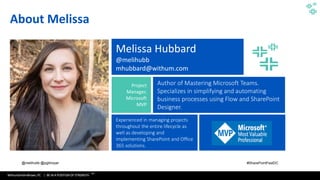
About Melissa
Melissa Hubbard
@melihubb
mhubbard@withum.com
Project
Manager,
Microsoft
MVP
Author of Mastering Microsoft Teams.
Specializes in simplifying and automating
business processes using Flow and SharePoint
Designer.
Experienced in managing projects
throughout the entire lifecycle as
well as developing and
implementing SharePoint and Office
365 solutions.
WithumSmith+Brown, PC | BE IN A POSITION OF STRENGTH
3
SM
@melihubb @pgbhoyar #SharePointFestDC
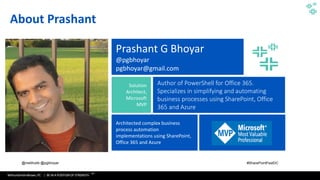
About Prashant
Prashant G Bhoyar
@pgbhoyar
pgbhoyar@gmail.com
Solution
Architect,
Microsoft
MVP
Author of PowerShell for Office 365.
Specializes in simplifying and automating
business processes using SharePoint, Office
365 and Azure
Architected complex business
process automation
implementations using SharePoint,
Office 365 and Azure
WithumSmith+Brown, PC | BE IN A POSITION OF STRENGTH
4
SM
@melihubb @pgbhoyar #SharePointFestDC
Join Us At DC Flow User Group!
WithumSmith+Brown, PC | BE IN A POSITION OF STRENGTH
5
SM
@melihubb @pgbhoyar #SharePointFestDC
01010101010101010101010101010010101010101010101010110011110101011000111110000000000000000000000
000000001111101101101101010101010101010101010101010010101010101010101010110011110101011000111110
00000000000000000000000000000111110110110111010101010101010101010101010010101010101010101010110
011110101011000111110000000000000000000000000000001111101101101101010101010101010101010101010010
101010101010101010110011110101011000111110000000000000000000000000000001111101101101101010101010
10101010101010101001010101010101010101011001111010101100011111000000000000000000000000000000111
110110110110101010101010101010101010101001010101010101010101011001111010101100011111000000000000
00000000000000000011111011011011
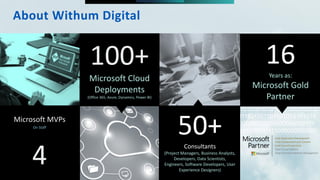
Microsoft MVPs
On Staff
4
100+
Microsoft Cloud
Deployments
(Office 365, Azure, Dynamics, Power BI)
50+Consultants
(Project Managers, Business Analysts,
Developers, Data Scientists,
Engineers, Software Developers, User
Experience Designers)
16Years as:
Microsoft Gold
Partner
About Withum Digital
WithumSmith+Brown, PC | BE IN A POSITION OF STRENGTH
6
SM
@melihubb @pgbhoyar #SharePointFestDC
• What Microsoft Flow Is
• Components of a Flow
• Templates
• Modern SharePoint Built in Flows
• Comparison of Flow and SharePoint Designer Workflows
• Approval Process Flows
• Expressions
• How to call SharePoint REST APIs Using Microsoft Flow
• How to call Web Services Using Microsoft Flow
• Microsoft Flow and Microsoft Graph APIs
• Microsoft Flow and Azure Functions
• How to trigger Microsoft Flow from a web service
• Microsoft Flow Vs Logic Apps
• Microsoft Flow Administration
• Microsoft Flow Best Practices
Agenda
WithumSmith+Brown, PC | BE IN A POSITION OF STRENGTH
7
SM
@melihubb @pgbhoyar #SharePointFestDC
WithumSmith+Brown, PC | BE IN A POSITION OF STRENGTH
8
SM
@melihubb @pgbhoyar #SharePointFestDC
Audience Poll
▪ How many of you are IT pros?
▪ How many of you are business users?
▪ How many of you are Power Users?
▪ How many of you are Developers?
▪ How many of you are using Microsoft Flow?
8
WithumSmith+Brown, PC | BE IN A POSITION OF STRENGTH
9
SM
@melihubb @pgbhoyar #SharePointFestDC
Housekeeping
▪ A lot of Giveaway :
▪ Mastering Microsoft Teams ( 2
Copies )
▪ PowerShell for Office 365 ( 2
Copies )
▪ Drop your business card
▪ Will select the lucky winner at
the end of the each break ☺
WithumSmith+Brown, PC | BE IN A POSITION OF STRENGTH
10
SM
@melihubb @pgbhoyar #SharePointFestDC
01010101010101010101010101010010101010101010101010110011110101011000111110000000000000000000000
000000001111101101101101010101010101010101010101010010101010101010101010110011110101011000111110
00000000000000000000000000000111110110110111010101010101010101010101010010101010101010101010110
011110101011000111110000000000000000000000000000001111101101101101010101010101010101010101010010
101010101010101010110011110101011000111110000000000000000000000000000001111101101101101010101010
10101010101010101001010101010101010101011001111010101100011111000000000000000000000000000000111
110110110110101010101010101010101010101001010101010101010101011001111010101100011111000000000000
00000000000000000011111011011011
What Microsoft Flow Is
WithumSmith+Brown, PC | BE IN A POSITION OF STRENGTH
11
SM
@melihubb @pgbhoyar #SharePointFestDC
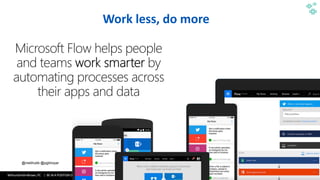
Work less, do more
WithumSmith+Brown, PC | BE IN A POSITION OF STRENGTH
12
SM
@melihubb @pgbhoyar #SharePointFestDC
What Flow Is
• Cloud based business process automation service, eventually replacing
SharePoint Designer workflows!
• Provides user friendly solutions to automate your personal AND
organizational business processes and move content across services.
• Use content from other platforms to build workflows.
• A streamlined version of the Azure LogicApps meant for the everyday
business user "Citizen Integrator".
• Use Flow templates or start from scratch.
• Mobile app that allows for users to track, manage, and create Flows.
• BUTTONS!
WithumSmith+Brown, PC | BE IN A POSITION OF STRENGTH
13
SM
@melihubb @pgbhoyar #SharePointFestDC
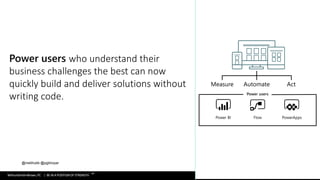
Power users who understand their
business challenges the best can now
quickly build and deliver solutions without
writing code.
WithumSmith+Brown, PC | BE IN A POSITION OF STRENGTH
14
SM
@melihubb @pgbhoyar #SharePointFestDC
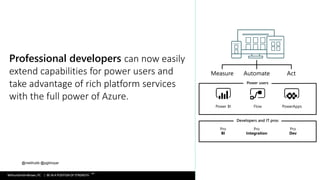
Professional developers can now easily
extend capabilities for power users and
take advantage of rich platform services
with the full power of Azure.
WithumSmith+Brown, PC | BE IN A POSITION OF STRENGTH
15
SM
@melihubb @pgbhoyar #SharePointFestDC
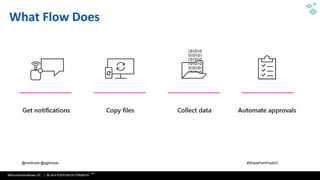
What Flow Does
WithumSmith+Brown, PC | BE IN A POSITION OF STRENGTH
16
SM
@melihubb @pgbhoyar #SharePointFestDC
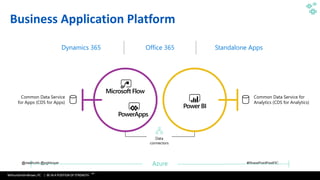
PowerApps
Power BI
Common Data Service for
Analytics (CDS for Analytics)
Common Data Service
for Apps (CDS for Apps)
Dynamics 365 Office 365 Standalone Apps
Microsoft Flow
Business Application Platform
Data
connectors
WithumSmith+Brown, PC | BE IN A POSITION OF STRENGTH
17
SM
@melihubb @pgbhoyar #SharePointFestDC
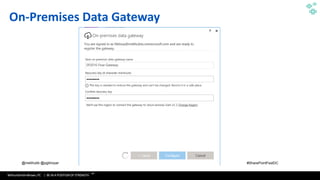
On-Premises Data Gateway
WithumSmith+Brown, PC | BE IN A POSITION OF STRENGTH
18
SM
@melihubb @pgbhoyar #SharePointFestDC
Benefits
▪ Save time and effort through automation
▪ Accelerate Requests, Content, and Document Review and Approval
▪ Automate processes that tend to interrupt your daily workflow
▪ Citizen Development
▪ Personal Productivity
▪ Integrates with the Microsoft Common Data Model enterprises improving
efficiencies with a unified view of business data
▪ Connects with SharePoint on premises allowing you to easily move data out
of SharePoint and between site collections
▪ Go mobile! Create and monitor flows from your mobile device
WithumSmith+Brown, PC | BE IN A POSITION OF STRENGTH
19
SM
@melihubb @pgbhoyar #SharePointFestDC
Limitations
▪ Save time and effort on manual processes through automation
▪ No state machines
▪ 250 actions per flow
▪ Max of 5,000 iterations in Do until and For each actions(100,000 with plan
1)
▪ Cannot change SharePoint item security OOTB
▪ Flow duration is 30 days (can impact lengthy approval processes)
▪ No way to see all flows associated with a SharePoint list or library
▪ No way to see all approval history for a flow
WithumSmith+Brown, PC | BE IN A POSITION OF STRENGTH
20
SM
@melihubb @pgbhoyar #SharePointFestDC
01010101010101010101010101010010101010101010101010110011110101011000111110000000000000000000000
000000001111101101101101010101010101010101010101010010101010101010101010110011110101011000111110
00000000000000000000000000000111110110110111010101010101010101010101010010101010101010101010110
011110101011000111110000000000000000000000000000001111101101101101010101010101010101010101010010
101010101010101010110011110101011000111110000000000000000000000000000001111101101101101010101010
10101010101010101001010101010101010101011001111010101100011111000000000000000000000000000000111
110110110110101010101010101010101010101001010101010101010101011001111010101100011111000000000000
00000000000000000011111011011011
Components of a Flow
WithumSmith+Brown, PC | BE IN A POSITION OF STRENGTH
21
SM
@melihubb @pgbhoyar #SharePointFestDC
Components of a Flow
▪ Connectors
▪ Triggers
▪ Conditions
▪ Actions
WithumSmith+Brown, PC | BE IN A POSITION OF STRENGTH
22
SM
@melihubb @pgbhoyar #SharePointFestDC
How to access Flow
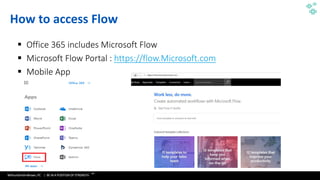
▪ Office 365 includes Microsoft Flow
▪ Microsoft Flow Portal : https://flow.Microsoft.com
▪ Mobile App
WithumSmith+Brown, PC | BE IN A POSITION OF STRENGTH
23
SM
@melihubb @pgbhoyar #SharePointFestDC
Connectors
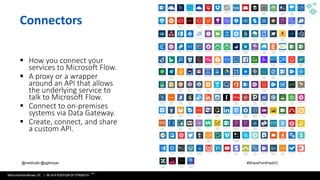
▪ How you connect your
services to Microsoft Flow.
▪ A proxy or a wrapper
around an API that allows
the underlying service to
talk to Microsoft Flow.
▪ Connect to on-premises
systems via Data Gateway.
▪ Create, connect, and share
a custom API.
WithumSmith+Brown, PC | BE IN A POSITION OF STRENGTH
24
SM
@melihubb @pgbhoyar #SharePointFestDC
Flow Triggers
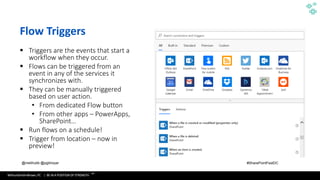
▪ Triggers are the events that start a
workflow when they occur.
▪ Flows can be triggered from an
event in any of the services it
synchronizes with.
▪ They can be manually triggered
based on user action.
• From dedicated Flow button
• From other apps – PowerApps,
SharePoint…
▪ Run flows on a schedule!
▪ Trigger from location – now in
preview!
WithumSmith+Brown, PC | BE IN A POSITION OF STRENGTH
25
SM
@melihubb @pgbhoyar #SharePointFestDC
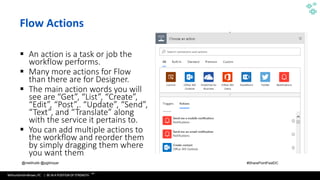
Flow Actions
▪ An action is a task or job the
workflow performs.
▪ Many more actions for Flow
than there are for Designer.
▪ The main action words you will
see are “Get”, “List”, “Create”,
“Edit”, “Post”,. “Update”, “Send”,
“Text”, and “Translate” along
with the service it pertains to.
▪ You can add multiple actions to
the workflow and reorder them
by simply dragging them where
you want them.
WithumSmith+Brown, PC | BE IN A POSITION OF STRENGTH
26
SM
@melihubb @pgbhoyar #SharePointFestDC
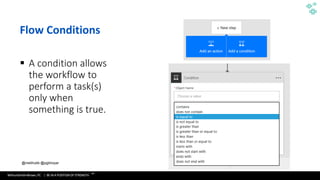
Flow Conditions
▪ A condition allows
the workflow to
perform a task(s)
only when
something is true.
WithumSmith+Brown, PC | BE IN A POSITION OF STRENGTH
27
SM
@melihubb @pgbhoyar #SharePointFestDC
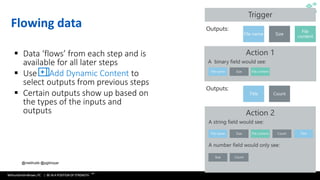
Flowing data
▪ Data ‘flows’ from each step and is
available for all later steps
▪ Use Add Dynamic Content to
select outputs from previous steps
▪ Certain outputs show up based on
the types of the inputs and
outputs
Outputs:
Outputs:
WithumSmith+Brown, PC | BE IN A POSITION OF STRENGTH
28
SM
@melihubb @pgbhoyar #SharePointFestDC
More Features
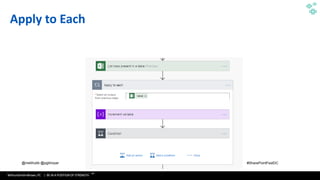
▪ Apply to Each
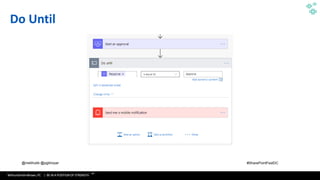
▪ Do-Until
▪ Expressions
▪ Variables
▪ Nested workflows
WithumSmith+Brown, PC | BE IN A POSITION OF STRENGTH
29
SM
@melihubb @pgbhoyar #SharePointFestDC
Apply to Each
WithumSmith+Brown, PC | BE IN A POSITION OF STRENGTH
30
SM
@melihubb @pgbhoyar #SharePointFestDC
Do Until
WithumSmith+Brown, PC | BE IN A POSITION OF STRENGTH
31
SM
@melihubb @pgbhoyar #SharePointFestDC
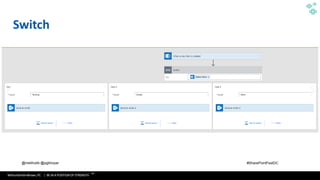
Switch
WithumSmith+Brown, PC | BE IN A POSITION OF STRENGTH
32
SM
@melihubb @pgbhoyar #SharePointFestDC
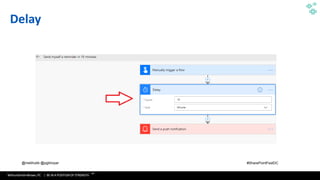
Delay
WithumSmith+Brown, PC | BE IN A POSITION OF STRENGTH
33
SM
@melihubb @pgbhoyar #SharePointFestDC
01010101010101010101010101010010101010101010101010110011110101011000111110000000000000000000000
000000001111101101101101010101010101010101010101010010101010101010101010110011110101011000111110
00000000000000000000000000000111110110110111010101010101010101010101010010101010101010101010110
011110101011000111110000000000000000000000000000001111101101101101010101010101010101010101010010
101010101010101010110011110101011000111110000000000000000000000000000001111101101101101010101010
10101010101010101001010101010101010101011001111010101100011111000000000000000000000000000000111
110110110110101010101010101010101010101001010101010101010101011001111010101100011111000000000000
00000000000000000011111011011011
Templates
WithumSmith+Brown, PC | BE IN A POSITION OF STRENGTH
34
SM
@melihubb @pgbhoyar #SharePointFestDC
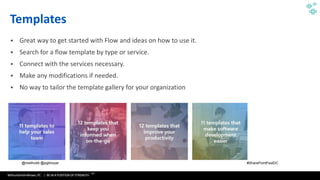
Templates
▪ Great way to get started with Flow and ideas on how to use it.
▪ Search for a flow template by type or service.
▪ Connect with the services necessary.
▪ Make any modifications if needed.
▪ No way to tailor the template gallery for your organization
WithumSmith+Brown, PC | BE IN A POSITION OF STRENGTH
35
SM
@melihubb @pgbhoyar #SharePointFestDC
Demo
Build a Flow From a Template
WithumSmith+Brown, PC | BE IN A POSITION OF STRENGTH
36
SM
@melihubb @pgbhoyar #SharePointFestDC
Demo
Build a Flow Button
WithumSmith+Brown, PC | BE IN A POSITION OF STRENGTH
37
SM
@melihubb @pgbhoyar #SharePointFestDC
Demo
Move a File to Another Library with Flow
WithumSmith+Brown, PC | BE IN A POSITION OF STRENGTH
38
SM
@melihubb @pgbhoyar #SharePointFestDC
01010101010101010101010101010010101010101010101010110011110101011000111110000000000000000000000
000000001111101101101101010101010101010101010101010010101010101010101010110011110101011000111110
00000000000000000000000000000111110110110111010101010101010101010101010010101010101010101010110
011110101011000111110000000000000000000000000000001111101101101101010101010101010101010101010010
101010101010101010110011110101011000111110000000000000000000000000000001111101101101101010101010
10101010101010101001010101010101010101011001111010101100011111000000000000000000000000000000111
110110110110101010101010101010101010101001010101010101010101011001111010101100011111000000000000
00000000000000000011111011011011
Built-In SharePoint Flows
WithumSmith+Brown, PC | BE IN A POSITION OF STRENGTH
39
SM
@melihubb @pgbhoyar #SharePointFestDC
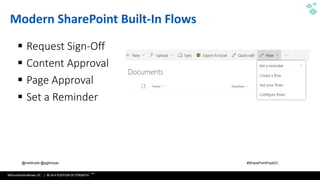
Modern SharePoint Built-In Flows
▪ Request Sign-Off
▪ Content Approval
▪ Page Approval
▪ Set a Reminder
WithumSmith+Brown, PC | BE IN A POSITION OF STRENGTH
40
SM
@melihubb @pgbhoyar #SharePointFestDC
Demo
Configure Built-In SharePoint Flows
WithumSmith+Brown, PC | BE IN A POSITION OF STRENGTH
41
SM
@melihubb @pgbhoyar #SharePointFestDC
01010101010101010101010101010010101010101010101010110011110101011000111110000000000000000000000
000000001111101101101101010101010101010101010101010010101010101010101010110011110101011000111110
00000000000000000000000000000111110110110111010101010101010101010101010010101010101010101010110
011110101011000111110000000000000000000000000000001111101101101101010101010101010101010101010010
101010101010101010110011110101011000111110000000000000000000000000000001111101101101101010101010
10101010101010101001010101010101010101011001111010101100011111000000000000000000000000000000111
110110110110101010101010101010101010101001010101010101010101011001111010101100011111000000000000
00000000000000000011111011011011
Microsoft Flow Vs SharePoint
Designer 2013 Workflows
WithumSmith+Brown, PC | BE IN A POSITION OF STRENGTH
42
SM
@melihubb @pgbhoyar #SharePointFestDC
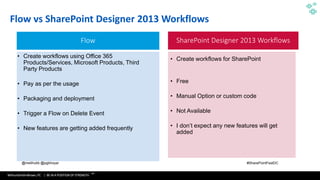
Flow vs SharePoint Designer 2013 Workflows
Flow SharePoint Designer 2013 Workflows
• Create workflows using Office 365
Products/Services, Microsoft Products, Third
Party Products
• Pay as per the usage
• Packaging and deployment
• Trigger a Flow on Delete Event
• New features are getting added frequently
• Create workflows for SharePoint
• Free
• Manual Option or custom code
• Not Available
• I don’t expect any new features will get
added
WithumSmith+Brown, PC | BE IN A POSITION OF STRENGTH
43
SM
@melihubb @pgbhoyar #SharePointFestDC
Flow vs SharePoint Designer 2013 Workflows
Flow SharePoint Designer 2013 Workflows
• Part of Business Apps Group ( Dynamics Group) • Part of Office 365 Group
WithumSmith+Brown, PC | BE IN A POSITION OF STRENGTH
44
SM
@melihubb @pgbhoyar #SharePointFestDC
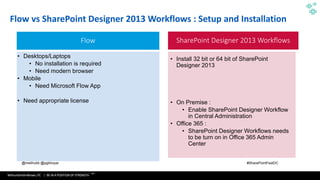
Flow vs SharePoint Designer 2013 Workflows : Setup and Installation
Flow SharePoint Designer 2013 Workflows
• Desktops/Laptops
• No installation is required
• Need modern browser
• Mobile
• Need Microsoft Flow App
• Need appropriate license
• Install 32 bit or 64 bit of SharePoint
Designer 2013
• On Premise :
• Enable SharePoint Designer Workflow
in Central Administration
• Office 365 :
• SharePoint Designer Workflows needs
to be turn on in Office 365 Admin
Center
WithumSmith+Brown, PC | BE IN A POSITION OF STRENGTH
45
SM
@melihubb @pgbhoyar #SharePointFestDC
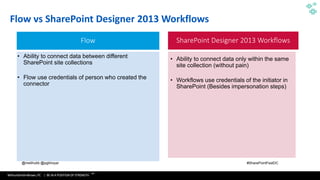
Flow vs SharePoint Designer 2013 Workflows
Flow SharePoint Designer 2013 Workflows
• Ability to connect data between different
SharePoint site collections
• Flow use credentials of person who created the
connector
• Ability to connect data only within the same
site collection (without pain)
• Workflows use credentials of the initiator in
SharePoint (Besides impersonation steps)
WithumSmith+Brown, PC | BE IN A POSITION OF STRENGTH
46
SM
@melihubb @pgbhoyar #SharePointFestDC
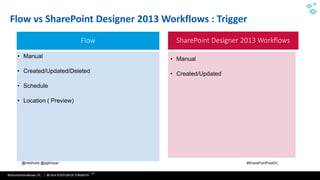
Flow vs SharePoint Designer 2013 Workflows : Trigger
Flow SharePoint Designer 2013 Workflows
• Manual
• Created/Updated/Deleted
• Schedule
• Location ( Preview)
• Manual
• Created/Updated
WithumSmith+Brown, PC | BE IN A POSITION OF STRENGTH
47
SM
@melihubb @pgbhoyar #SharePointFestDC
Flow vs SharePoint Designer 2013 Workflows : Duration
Flow SharePoint Designer 2013 Workflows
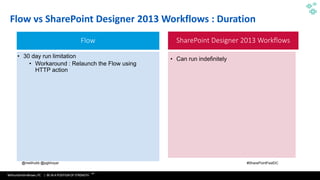
• 30 day run limitation
• Workaround : Relaunch the Flow using
HTTP action
• Can run indefinitely
WithumSmith+Brown, PC | BE IN A POSITION OF STRENGTH
48
SM
@melihubb @pgbhoyar #SharePointFestDC
Flow vs SharePoint Designer 2013 Workflows : New/Update Item
Flow SharePoint Designer 2013 Workflows
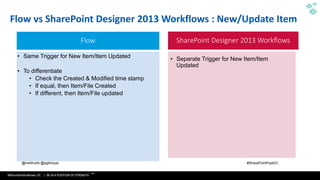
• Same Trigger for New Item/Item Updated
• To differentiate
• Check the Created & Modified time stamp
• If equal, then Item/File Created
• If different, then Item/File updated
• Separate Trigger for New Item/Item
Updated
WithumSmith+Brown, PC | BE IN A POSITION OF STRENGTH
49
SM
@melihubb @pgbhoyar #SharePointFestDC
Flow vs SharePoint Designer 2013 Workflows : Emails
Flow SharePoint Designer 2013 Workflows
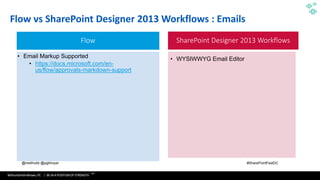
• Email Markup Supported
• https://docs.microsoft.com/en-
us/flow/approvals-markdown-support
• WYSIWWYG Email Editor
WithumSmith+Brown, PC | BE IN A POSITION OF STRENGTH
50
SM
@melihubb @pgbhoyar #SharePointFestDC
Flow vs SharePoint Designer 2013 Workflows : State Machine
Flow SharePoint Designer 2013 Workflows
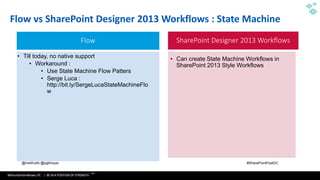
• Till today, no native support
• Workaround :
• Use State Machine Flow Patters
• Serge Luca :
http://bit.ly/SergeLucaStateMachineFlo
w
• Can create State Machine Workflows in
SharePoint 2013 Style Workflows
WithumSmith+Brown, PC | BE IN A POSITION OF STRENGTH
51
SM
@melihubb @pgbhoyar #SharePointFestDC
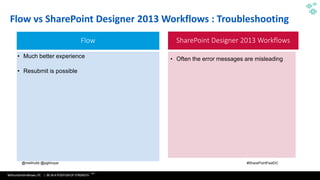
Flow vs SharePoint Designer 2013 Workflows : Troubleshooting
Flow SharePoint Designer 2013 Workflows
• Much better experience
• Resubmit is possible
• Often the error messages are misleading
WithumSmith+Brown, PC | BE IN A POSITION OF STRENGTH
52
SM
@melihubb @pgbhoyar #SharePointFestDC
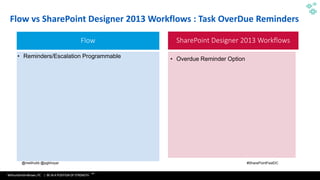
Flow vs SharePoint Designer 2013 Workflows : Task OverDue Reminders
Flow SharePoint Designer 2013 Workflows
• Reminders/Escalation Programmable • Overdue Reminder Option
WithumSmith+Brown, PC | BE IN A POSITION OF STRENGTH
53
SM
@melihubb @pgbhoyar #SharePointFestDC
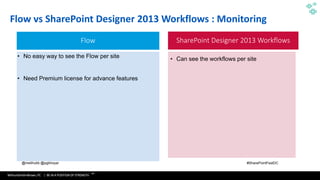
Flow vs SharePoint Designer 2013 Workflows : Monitoring
Flow SharePoint Designer 2013 Workflows
• No easy way to see the Flow per site
• Need Premium license for advance features
• Can see the workflows per site
WithumSmith+Brown, PC | BE IN A POSITION OF STRENGTH
54
SM
@melihubb @pgbhoyar #SharePointFestDC
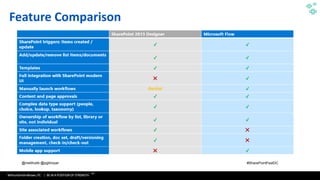
Feature Comparison
WithumSmith+Brown, PC | BE IN A POSITION OF STRENGTH
55
SM
@melihubb @pgbhoyar #SharePointFestDC
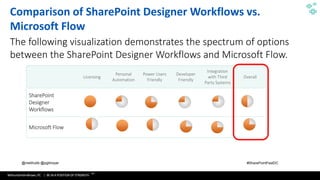
Licensing
Personal
Automation
Power Users
Friendly
Developer
Friendly
Integration
with Third
Party Systems
Overall
SharePoint
Designer
Workflows
Microsoft Flow
Comparison of SharePoint Designer Workflows vs.
Microsoft Flow
The following visualization demonstrates the spectrum of options
between the SharePoint Designer Workflows and Microsoft Flow.
WithumSmith+Brown, PC | BE IN A POSITION OF STRENGTH
56
SM
@melihubb @pgbhoyar #SharePointFestDC
01010101010101010101010101010010101010101010101010110011110101011000111110000000000000000000000
000000001111101101101101010101010101010101010101010010101010101010101010110011110101011000111110
00000000000000000000000000000111110110110111010101010101010101010101010010101010101010101010110
011110101011000111110000000000000000000000000000001111101101101101010101010101010101010101010010
101010101010101010110011110101011000111110000000000000000000000000000001111101101101101010101010
10101010101010101001010101010101010101011001111010101100011111000000000000000000000000000000111
110110110110101010101010101010101010101001010101010101010101011001111010101100011111000000000000
00000000000000000011111011011011
Approvals
WithumSmith+Brown, PC | BE IN A POSITION OF STRENGTH
57
SM
@melihubb @pgbhoyar #SharePointFestDC
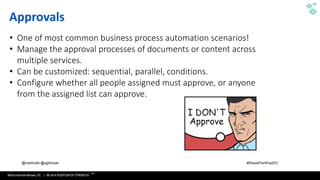
Approvals
• One of most common business process automation scenarios!
• Manage the approval processes of documents or content across
multiple services.
• Can be customized: sequential, parallel, conditions.
• Configure whether all people assigned must approve, or anyone
from the assigned list can approve.
WithumSmith+Brown, PC | BE IN A POSITION OF STRENGTH
58
SM
@melihubb @pgbhoyar #SharePointFestDC
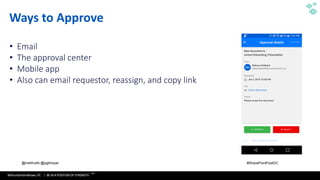
Ways to Approve
• Email
• The approval center
• Mobile app
• Also can email requestor, reassign, and copy link
WithumSmith+Brown, PC | BE IN A POSITION OF STRENGTH
59
SM
@melihubb @pgbhoyar #SharePointFestDC
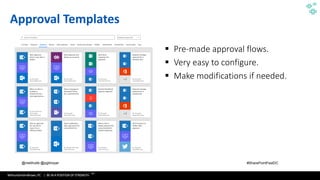
Approval Templates
▪ Pre-made approval flows.
▪ Very easy to configure.
▪ Make modifications if needed.
WithumSmith+Brown, PC | BE IN A POSITION OF STRENGTH
60
SM
@melihubb @pgbhoyar #SharePointFestDC
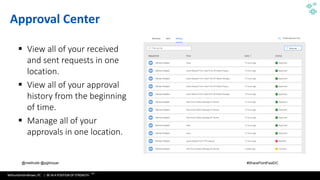
Approval Center
▪ View all of your received
and sent requests in one
location.
▪ View all of your approval
history from the beginning
of time.
▪ Manage all of your
approvals in one location.
WithumSmith+Brown, PC | BE IN A POSITION OF STRENGTH
61
SM
@melihubb @pgbhoyar #SharePointFestDC
Demo
Build a Parallel Approval Flow
WithumSmith+Brown, PC | BE IN A POSITION OF STRENGTH
62
SM
@melihubb @pgbhoyar #SharePointFestDC
Demo
Build a Consecutive Approval Flow
WithumSmith+Brown, PC | BE IN A POSITION OF STRENGTH
63
SM
@melihubb @pgbhoyar #SharePointFestDC
Demo
Build an Approval Flow with a Reminder
WithumSmith+Brown, PC | BE IN A POSITION OF STRENGTH
64
SM
@melihubb @pgbhoyar #SharePointFestDC
Demo
Build an Approval Flow with an
Escalation
WithumSmith+Brown, PC | BE IN A POSITION OF STRENGTH
65
SM
@melihubb @pgbhoyar #SharePointFestDC
01010101010101010101010101010010101010101010101010110011110101011000111110000000000000000000000
000000001111101101101101010101010101010101010101010010101010101010101010110011110101011000111110
00000000000000000000000000000111110110110111010101010101010101010101010010101010101010101010110
011110101011000111110000000000000000000000000000001111101101101101010101010101010101010101010010
101010101010101010110011110101011000111110000000000000000000000000000001111101101101101010101010
10101010101010101001010101010101010101011001111010101100011111000000000000000000000000000000111
110110110110101010101010101010101010101001010101010101010101011001111010101100011111000000000000
00000000000000000011111011011011
Sharing Flows
WithumSmith+Brown, PC | BE IN A POSITION OF STRENGTH
66
SM
@melihubb @pgbhoyar #SharePointFestDC
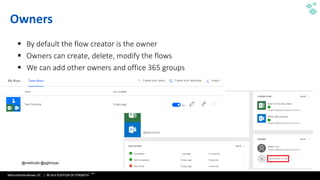
Owners
▪ By default the flow creator is the owner
▪ Owners can create, delete, modify the flows
▪ We can add other owners and office 365 groups
WithumSmith+Brown, PC | BE IN A POSITION OF STRENGTH
67
SM
@melihubb @pgbhoyar #SharePointFestDC
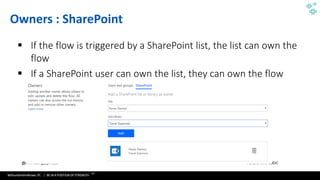
Owners : SharePoint
▪ If the flow is triggered by a SharePoint list, the list can own the
flow
▪ If a SharePoint user can own the list, they can own the flow
WithumSmith+Brown, PC | BE IN A POSITION OF STRENGTH
68
SM
@melihubb @pgbhoyar #SharePointFestDC
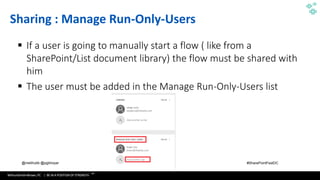
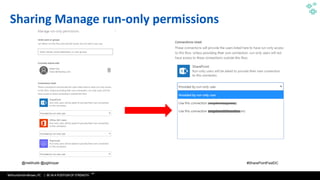
Sharing : Manage Run-Only-Users
▪ If a user is going to manually start a flow ( like from a
SharePoint/List document library) the flow must be shared with
him
▪ The user must be added in the Manage Run-Only-Users list
WithumSmith+Brown, PC | BE IN A POSITION OF STRENGTH
69
SM
@melihubb @pgbhoyar #SharePointFestDC
Sharing Manage run-only permissions
WithumSmith+Brown, PC | BE IN A POSITION OF STRENGTH
70
SM
@melihubb @pgbhoyar #SharePointFestDC
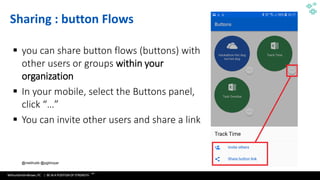
Sharing : button Flows
▪ you can share button flows (buttons) with
other users or groups within your
organization
▪ In your mobile, select the Buttons panel,
click “…”
▪ You can invite other users and share a link
WithumSmith+Brown, PC | BE IN A POSITION OF STRENGTH
71
SM
@melihubb @pgbhoyar #SharePointFestDC
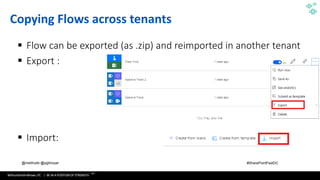
Copying Flows across tenants
▪ Flow can be exported (as .zip) and reimported in another tenant
▪ Export :
▪ Import:
WithumSmith+Brown, PC | BE IN A POSITION OF STRENGTH
72
SM
@melihubb @pgbhoyar #SharePointFestDC
Demo
Exporting and Importing a Flow
WithumSmith+Brown, PC | BE IN A POSITION OF STRENGTH
73
SM
@melihubb @pgbhoyar #SharePointFestDC
01010101010101010101010101010010101010101010101010110011110101011000111110000000000000000000000
000000001111101101101101010101010101010101010101010010101010101010101010110011110101011000111110
00000000000000000000000000000111110110110111010101010101010101010101010010101010101010101010110
011110101011000111110000000000000000000000000000001111101101101101010101010101010101010101010010
101010101010101010110011110101011000111110000000000000000000000000000001111101101101101010101010
10101010101010101001010101010101010101011001111010101100011111000000000000000000000000000000111
110110110110101010101010101010101010101001010101010101010101011001111010101100011111000000000000
00000000000000000011111011011011
Microsoft Flow Advanced Topics
WithumSmith+Brown, PC | BE IN A POSITION OF STRENGTH
74
SM
@melihubb @pgbhoyar #SharePointFestDC
Microsoft Flow for Developers
▪ Build Custom Connectors
• Develop custom connectors to connect to your organization's data and web
services through Microsoft Flow
▪ Build Azure Functions
• Craft Azure Functions to extend apps with custom server-side logic
▪ Embed Microsoft Flow
• Embed Microsoft Flow directly into your website experiences to create integrated
solutions, surfacing workflows or processes where people in your organization
already do their work
74
Source :https://docs.microsoft.com/en-us/flow/dev-enterprise-intro
WithumSmith+Brown, PC | BE IN A POSITION OF STRENGTH
75
SM
@melihubb @pgbhoyar #SharePointFestDC
01010101010101010101010101010010101010101010101010110011110101011000111110000000000000000000000
000000001111101101101101010101010101010101010101010010101010101010101010110011110101011000111110
00000000000000000000000000000111110110110111010101010101010101010101010010101010101010101010110
011110101011000111110000000000000000000000000000001111101101101101010101010101010101010101010010
101010101010101010110011110101011000111110000000000000000000000000000001111101101101101010101010
10101010101010101001010101010101010101011001111010101100011111000000000000000000000000000000111
110110110110101010101010101010101010101001010101010101010101011001111010101100011111000000000000
00000000000000000011111011011011
Expressions
WithumSmith+Brown, PC | BE IN A POSITION OF STRENGTH
76
SM
@melihubb @pgbhoyar #SharePointFestDC
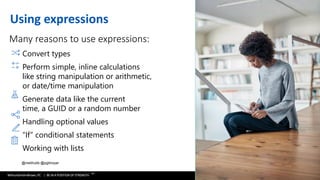
Using expressions
Many reasons to use expressions:
Convert types
Perform simple, inline calculations
like string manipulation or arithmetic,
or date/time manipulation
Generate data like the current
time, a GUID or a random number
Handling optional values
“If” conditional statements
Working with lists
WithumSmith+Brown, PC | BE IN A POSITION OF STRENGTH
77
SM
@melihubb @pgbhoyar #SharePointFestDC
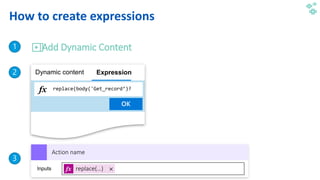
How to create expressions
Add Dynamic Content
Action name
replace(…)
WithumSmith+Brown, PC | BE IN A POSITION OF STRENGTH
78
SM
@melihubb @pgbhoyar #SharePointFestDC
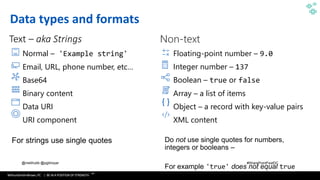
Data types and formats
Text – aka Strings
Normal – 'Example string'
Email, URL, phone number, etc…
Base64
Binary content
Data URI
URI component
Floating-point number – 9.0
Integer number – 137
Boolean – true or false
Array – a list of items
Object – a record with key-value pairs
XML content
WithumSmith+Brown, PC | BE IN A POSITION OF STRENGTH
79
SM
@melihubb @pgbhoyar #SharePointFestDC
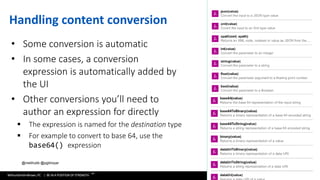
Handling content conversion
• Some conversion is automatic
• In some cases, a conversion
expression is automatically added by
the UI
• Other conversions you’ll need to
author an expression for directly
▪ The expression is named for the destination type
▪ For example to convert to base 64, use the
base64() expression
WithumSmith+Brown, PC | BE IN A POSITION OF STRENGTH
80
SM
@melihubb @pgbhoyar #SharePointFestDC
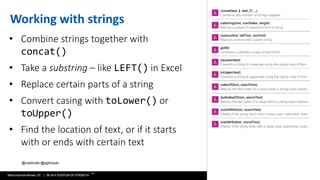
Working with strings
• Combine strings together with
concat()
• Take a substring – like LEFT() in Excel
• Replace certain parts of a string
• Convert casing with toLower() or
toUpper()
• Find the location of text, or if it starts
with or ends with certain text
WithumSmith+Brown, PC | BE IN A POSITION OF STRENGTH
81
SM
@melihubb @pgbhoyar #SharePointFestDC
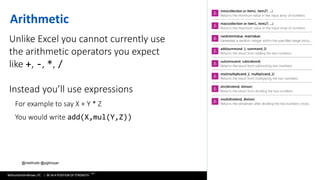
Arithmetic
Unlike Excel you cannot currently use
the arithmetic operators you expect
like +, -, *, /
Instead you’ll use expressions
For example to say X + Y * Z

You would write add(X,mul(Y,Z))
WithumSmith+Brown, PC | BE IN A POSITION OF STRENGTH
82
SM
@melihubb @pgbhoyar #SharePointFestDC
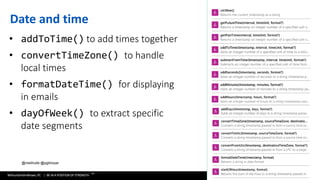
Date and time
• addToTime() to add times together
• convertTimeZone() to handle
local times
• formatDateTime() for displaying
in emails
• dayOfWeek() to extract specific
date segments
WithumSmith+Brown, PC | BE IN A POSITION OF STRENGTH
83
SM
@melihubb @pgbhoyar #SharePointFestDC
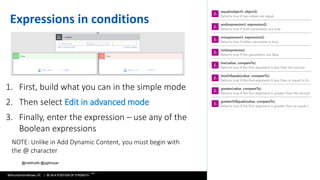
Expressions in conditions
1. First, build what you can in the simple mode
2. Then select Edit in advanced mode
3. Finally, enter the expression – use any of the
Boolean expressions
NOTE: Unlike in Add Dynamic Content, you must begin with
the @ character
WithumSmith+Brown, PC | BE IN A POSITION OF STRENGTH
84
SM
@melihubb @pgbhoyar #SharePointFestDC
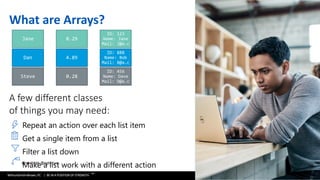
What are Arrays?
A few different classes
of things you may need:
Repeat an action over each list item
Get a single item from a list
Filter a list down
Make a list work with a different action
WithumSmith+Brown, PC | BE IN A POSITION OF STRENGTH
85
SM
@melihubb @pgbhoyar #SharePointFestDC
01010101010101010101010101010010101010101010101010110011110101011000111110000000000000000000000
000000001111101101101101010101010101010101010101010010101010101010101010110011110101011000111110
00000000000000000000000000000111110110110111010101010101010101010101010010101010101010101010110
011110101011000111110000000000000000000000000000001111101101101101010101010101010101010101010010
101010101010101010110011110101011000111110000000000000000000000000000001111101101101101010101010
10101010101010101001010101010101010101011001111010101100011111000000000000000000000000000000111
110110110110101010101010101010101010101001010101010101010101011001111010101100011111000000000000
00000000000000000011111011011011
HTTP Connector
WithumSmith+Brown, PC | BE IN A POSITION OF STRENGTH
86
SM
@melihubb @pgbhoyar #SharePointFestDC
Demo
Microsoft Flow & SharePoint REST APIs
WithumSmith+Brown, PC | BE IN A POSITION OF STRENGTH
87
SM
@melihubb @pgbhoyar #SharePointFestDC
Demo
Trigger Microsoft Flow From REST API
CALL
WithumSmith+Brown, PC | BE IN A POSITION OF STRENGTH
88
SM
@melihubb @pgbhoyar #SharePointFestDC
Demo
Microsoft Flow and Azure Functions
WithumSmith+Brown, PC | BE IN A POSITION OF STRENGTH
89
SM
@melihubb @pgbhoyar #SharePointFestDC
Demo
Microsoft Flow and Microsoft Graph
WithumSmith+Brown, PC | BE IN A POSITION OF STRENGTH
90
SM
@melihubb @pgbhoyar #SharePointFestDC
01010101010101010101010101010010101010101010101010110011110101011000111110000000000000000000000
000000001111101101101101010101010101010101010101010010101010101010101010110011110101011000111110
00000000000000000000000000000111110110110111010101010101010101010101010010101010101010101010110
011110101011000111110000000000000000000000000000001111101101101101010101010101010101010101010010
101010101010101010110011110101011000111110000000000000000000000000000001111101101101101010101010
10101010101010101001010101010101010101011001111010101100011111000000000000000000000000000000111
110110110110101010101010101010101010101001010101010101010101011001111010101100011111000000000000
00000000000000000011111011011011
Flow Pricing
WithumSmith+Brown, PC | BE IN A POSITION OF STRENGTH
91
SM
@melihubb @pgbhoyar #SharePointFestDC
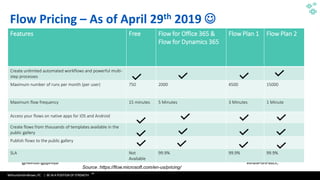
Flow Pricing – As of April 29th 2019 ☺
Features Free Flow for Office 365 &
Flow for Dynamics 365
Flow Plan 1 Flow Plan 2
Create unlimited automated workflows and powerful multi-
step processes
Maximum number of runs per month (per user) 750 2000 4500 15000
Maximum flow frequency 15 minutes 5 Minutes 3 Minutes 1 Minute
Access your flows on native apps for iOS and Android
Create flows from thousands of templates available in the
public gallery
Publish flows to the public gallery
SLA Not
Available
99.9% 99.9% 99.9%
Source :https://flow.microsoft.com/en-us/pricing/
WithumSmith+Brown, PC | BE IN A POSITION OF STRENGTH
92
SM
@melihubb @pgbhoyar #SharePointFestDC
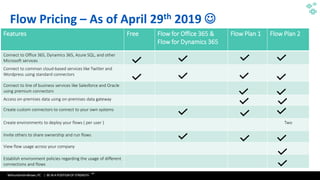
Flow Pricing – As of April 29th 2019 ☺
Features Free Flow for Office 365 &
Flow for Dynamics 365
Flow Plan 1 Flow Plan 2
Connect to Office 365, Dynamics 365, Azure SQL, and other
Microsoft services
Connect to common cloud-based services like Twitter and
Wordpress using standard connectors
Connect to line of business services like Salesforce and Oracle
using premium connectors
Access on-premises data using on-premises data gateway
Create custom connectors to connect to your own systems
Create environments to deploy your flows ( per user ) Two
Invite others to share ownership and run flows
View flow usage across your company
Establish environment policies regarding the usage of different
connections and flows
WithumSmith+Brown, PC | BE IN A POSITION OF STRENGTH
93
SM
@melihubb @pgbhoyar #SharePointFestDC
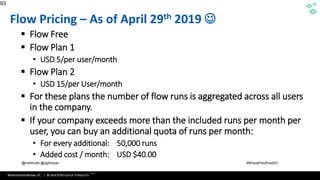
Flow Pricing – As of April 29th 2019 ☺
▪ Flow Free
▪ Flow Plan 1
• USD 5/per user/month
▪ Flow Plan 2
• USD 15/per User/month
▪ For these plans the number of flow runs is aggregated across all users
in the company.
▪ If your company exceeds more than the included runs per month per
user, you can buy an additional quota of runs per month:
• For every additional: 50,000 runs
• Added cost / month: USD $40.00
93
Source :https://azure.microsoft.com/en-us/documentation/articles/app-service-logic-what-are-logic-
apps/
WithumSmith+Brown, PC | BE IN A POSITION OF STRENGTH
94
SM
@melihubb @pgbhoyar #SharePointFestDC
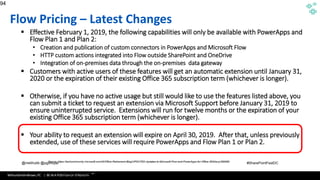
Flow Pricing – Latest Changes
▪ Effective February 1, 2019, the following capabilities will only be available with PowerApps and
Flow Plan 1 and Plan 2:
• Creation and publication of custom connectors in PowerApps and Microsoft Flow
• HTTP custom actions integrated into Flow outside SharePoint and OneDrive
• Integration of on-premises data through the on-premises data gateway
▪ Customers with active users of these features will get an automatic extension until January 31,
2020 or the expiration of their existing Office 365 subscription term (whichever is longer).
▪ Otherwise, if you have no active usage but still would like to use the features listed above, you
can submit a ticket to request an extension via Microsoft Support before January 31, 2019 to
ensure uninterrupted service. Extensions will run for twelve months or the expiration of your
existing Office 365 subscription term (whichever is longer).
▪ Your ability to request an extension will expire on April 30, 2019. After that, unless previously
extended, use of these services will require PowerApps and Flow Plan 1 or Plan 2.
94
Source :https://azure.microsoft.com/en-us/documentation/articles/app-service-logic-what-are-logic-
apps/
Source :https://techcommunity.microsoft.com/t5/Office-Retirement-Blog/UPDATED-Updates-to-Microsoft-Flow-and-PowerApps-for-Office-365/ba-p/289589
WithumSmith+Brown, PC | BE IN A POSITION OF STRENGTH
95
SM
@melihubb @pgbhoyar #SharePointFestDC
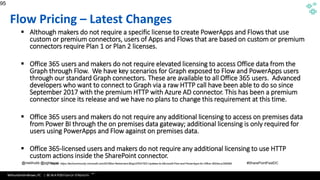
Flow Pricing – Latest Changes
▪ Although makers do not require a specific license to create PowerApps and Flows that use
custom or premium connectors, users of Apps and Flows that are based on custom or premium
connectors require Plan 1 or Plan 2 licenses.
▪ Office 365 users and makers do not require elevated licensing to access Office data from the
Graph through Flow. We have key scenarios for Graph exposed to Flow and PowerApps users
through our standard Graph connectors. These are available to all Office 365 users. Advanced
developers who want to connect to Graph via a raw HTTP call have been able to do so since
September 2017 with the premium HTTP with Azure AD connector. This has been a premium
connector since its release and we have no plans to change this requirement at this time.
▪ Office 365 users and makers do not require any additional licensing to access on premises data
from Power BI through the on premises data gateway; additional licensing is only required for
users using PowerApps and Flow against on premises data.
▪ Office 365-licensed users and makers do not require any additional licensing to use HTTP
custom actions inside the SharePoint connector.
95
Source :https://azure.microsoft.com/en-us/documentation/articles/app-service-logic-what-are-logic-
apps/
Source :https://techcommunity.microsoft.com/t5/Office-Retirement-Blog/UPDATED-Updates-to-Microsoft-Flow-and-PowerApps-for-Office-365/ba-p/289589
WithumSmith+Brown, PC | BE IN A POSITION OF STRENGTH
96
SM
@melihubb @pgbhoyar #SharePointFestDC
01010101010101010101010101010010101010101010101010110011110101011000111110000000000000000000000
000000001111101101101101010101010101010101010101010010101010101010101010110011110101011000111110
00000000000000000000000000000111110110110111010101010101010101010101010010101010101010101010110
011110101011000111110000000000000000000000000000001111101101101101010101010101010101010101010010
101010101010101010110011110101011000111110000000000000000000000000000001111101101101101010101010
10101010101010101001010101010101010101011001111010101100011111000000000000000000000000000000111
110110110110101010101010101010101010101001010101010101010101011001111010101100011111000000000000
00000000000000000011111011011011
Microsoft Flow Admin Center
WithumSmith+Brown, PC | BE IN A POSITION OF STRENGTH
97
SM
@melihubb @pgbhoyar #SharePointFestDC
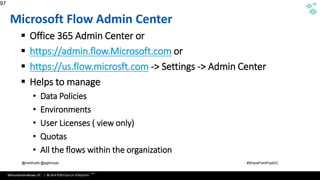
Microsoft Flow Admin Center
▪ Office 365 Admin Center or
▪ https://admin.flow.Microsoft.com or
▪ https://us.flow.microsft.com -> Settings -> Admin Center
▪ Helps to manage
• Data Policies
• Environments
• User Licenses ( view only)
• Quotas
• All the flows within the organization
97
Source :https://azure.microsoft.com/en-us/documentation/articles/app-service-logic-what-are-logic-
apps/
WithumSmith+Brown, PC | BE IN A POSITION OF STRENGTH
98
SM
@melihubb @pgbhoyar #SharePointFestDC
01010101010101010101010101010010101010101010101010110011110101011000111110000000000000000000000
000000001111101101101101010101010101010101010101010010101010101010101010110011110101011000111110
00000000000000000000000000000111110110110111010101010101010101010101010010101010101010101010110
011110101011000111110000000000000000000000000000001111101101101101010101010101010101010101010010
101010101010101010110011110101011000111110000000000000000000000000000001111101101101101010101010
10101010101010101001010101010101010101011001111010101100011111000000000000000000000000000000111
110110110110101010101010101010101010101001010101010101010101011001111010101100011111000000000000
00000000000000000011111011011011
Microsoft Flow and Logic Apps
WithumSmith+Brown, PC | BE IN A POSITION OF STRENGTH
99
SM
@melihubb @pgbhoyar #SharePointFestDC
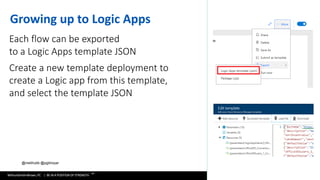
Growing up to Logic Apps
Each flow can be exported
to a Logic Apps template JSON
Create a new template deployment to
create a Logic app from this template,
and select the template JSON
WithumSmith+Brown, PC | BE IN A POSITION OF STRENGTH
100
SM
@melihubb @pgbhoyar #SharePointFestDC
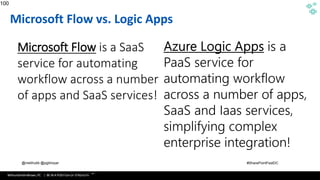
Microsoft Flow vs. Logic Apps
100
Source :https://azure.microsoft.com/en-us/documentation/articles/app-service-logic-what-are-logic-
apps/
Microsoft Flow is a SaaS
service for automating
workflow across a number
of apps and SaaS services!
WithumSmith+Brown, PC | BE IN A POSITION OF STRENGTH
101
SM
@melihubb @pgbhoyar #SharePointFestDC
01010101010101010101010101010010101010101010101010110011110101011000111110000000000000000000000
000000001111101101101101010101010101010101010101010010101010101010101010110011110101011000111110
00000000000000000000000000000111110110110111010101010101010101010101010010101010101010101010110
011110101011000111110000000000000000000000000000001111101101101101010101010101010101010101010010
101010101010101010110011110101011000111110000000000000000000000000000001111101101101101010101010
10101010101010101001010101010101010101011001111010101100011111000000000000000000000000000000111
110110110110101010101010101010101010101001010101010101010101011001111010101100011111000000000000
00000000000000000011111011011011
SharePoint Designer Workflow
Migration
WithumSmith+Brown, PC | BE IN A POSITION OF STRENGTH
102
SM
@melihubb @pgbhoyar #SharePointFestDC
01010101010101010101010101010010101010101010101010110011110101011000111110000000000000000000000
000000001111101101101101010101010101010101010101010010101010101010101010110011110101011000111110
00000000000000000000000000000111110110110111010101010101010101010101010010101010101010101010110
011110101011000111110000000000000000000000000000001111101101101101010101010101010101010101010010
101010101010101010110011110101011000111110000000000000000000000000000001111101101101101010101010
10101010101010101001010101010101010101011001111010101100011111000000000000000000000000000000111
110110110110101010101010101010101010101001010101010101010101011001111010101100011111000000000000
00000000000000000011111011011011
SharePoint Designer 2013 Vs
Microsoft Flow
Vs
Nintex
WithumSmith+Brown, PC | BE IN A POSITION OF STRENGTH
103
SM
@melihubb @pgbhoyar #SharePointFestDC
01010101010101010101010101010010101010101010101010110011110101011000111110000000000000000000000
000000001111101101101101010101010101010101010101010010101010101010101010110011110101011000111110
00000000000000000000000000000111110110110111010101010101010101010101010010101010101010101010110
011110101011000111110000000000000000000000000000001111101101101101010101010101010101010101010010
101010101010101010110011110101011000111110000000000000000000000000000001111101101101101010101010
10101010101010101001010101010101010101011001111010101100011111000000000000000000000000000000111
110110110110101010101010101010101010101001010101010101010101011001111010101100011111000000000000
00000000000000000011111011011011
Microsoft Flow PowerShell
CmdLets
WithumSmith+Brown, PC | BE IN A POSITION OF STRENGTH
104
SM
@melihubb @pgbhoyar #SharePointFestDC
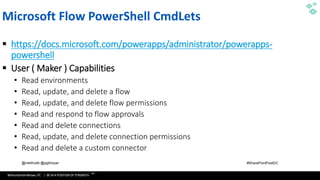
Microsoft Flow PowerShell CmdLets
▪ https://docs.microsoft.com/powerapps/administrator/powerapps-
powershell
▪ User ( Maker ) Capabilities
• Read environments
• Read, update, and delete a flow
• Read, update, and delete flow permissions
• Read and respond to flow approvals
• Read and delete connections
• Read, update, and delete connection permissions
• Read and delete a custom connector
WithumSmith+Brown, PC | BE IN A POSITION OF STRENGTH
105
SM
@melihubb @pgbhoyar #SharePointFestDC
Microsoft Flow PowerShell CmdLets
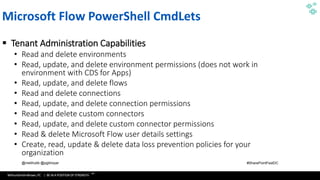
▪ Tenant Administration Capabilities
• Read and delete environments
• Read, update, and delete environment permissions (does not work in
environment with CDS for Apps)
• Read, update, and delete flows
• Read and delete connections
• Read, update, and delete connection permissions
• Read and delete custom connectors
• Read, update, and delete custom connector permissions
• Read & delete Microsoft Flow user details settings
• Create, read, update & delete data loss prevention policies for your
organization
WithumSmith+Brown, PC | BE IN A POSITION OF STRENGTH
106
SM
@melihubb @pgbhoyar #SharePointFestDC
01010101010101010101010101010010101010101010101010110011110101011000111110000000000000000000000
000000001111101101101101010101010101010101010101010010101010101010101010110011110101011000111110
00000000000000000000000000000111110110110111010101010101010101010101010010101010101010101010110
011110101011000111110000000000000000000000000000001111101101101101010101010101010101010101010010
101010101010101010110011110101011000111110000000000000000000000000000001111101101101101010101010
10101010101010101001010101010101010101011001111010101100011111000000000000000000000000000000111
110110110110101010101010101010101010101001010101010101010101011001111010101100011111000000000000
00000000000000000011111011011011
Microsoft Flow Best Practices
WithumSmith+Brown, PC | BE IN A POSITION OF STRENGTH
107
SM
@melihubb @pgbhoyar #SharePointFestDC
Microsoft Flow Best Practices
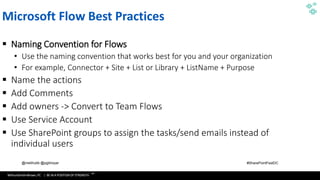
▪ Naming Convention for Flows
• Use the naming convention that works best for you and your organization
• For example, Connector + Site + List or Library + ListName + Purpose
▪ Name the actions
▪ Add Comments
▪ Add owners -> Convert to Team Flows
▪ Use Service Account
▪ Use SharePoint groups to assign the tasks/send emails instead of
individual users
WithumSmith+Brown, PC | BE IN A POSITION OF STRENGTH
108
SM
@melihubb @pgbhoyar #SharePointFestDC
Microsoft Flow Best Practices
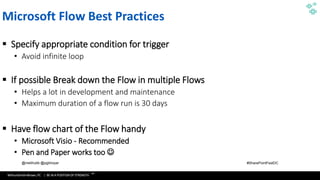
▪ Specify appropriate condition for trigger
• Avoid infinite loop
▪ If possible Break down the Flow in multiple Flows
• Helps a lot in development and maintenance
• Maximum duration of a flow run is 30 days
▪ Have flow chart of the Flow handy
• Microsoft Visio - Recommended
• Pen and Paper works too ☺
WithumSmith+Brown, PC | BE IN A POSITION OF STRENGTH
109
SM
@melihubb @pgbhoyar #SharePointFestDC
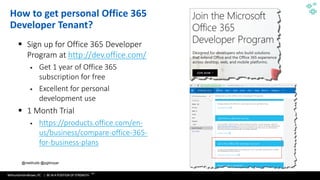
▪ Sign up for Office 365 Developer
Program at http://dev.office.com/
▪ Get 1 year of Office 365
subscription for free
▪ Excellent for personal
development use
▪ 1 Month Trial
▪ https://products.office.com/en-
us/business/compare-office-365-
for-business-plans
109
How to get personal Office 365
Developer Tenant?
WithumSmith+Brown, PC | BE IN A POSITION OF STRENGTH
110
SM
@melihubb @pgbhoyar #SharePointFestDC
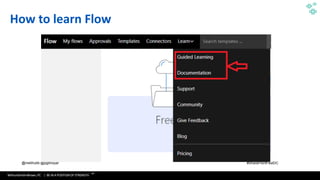
How to learn Flow
WithumSmith+Brown, PC | BE IN A POSITION OF STRENGTH
111
SM
@melihubb @pgbhoyar #SharePointFestDC
How to learn Flow
https://flow.microsoft.com/en-us/blog/microsoft-flow-learning-resources-materials/
WithumSmith+Brown, PC | BE IN A POSITION OF STRENGTH
112
SM
@melihubb @pgbhoyar #SharePointFestDC
Key Takeaways
▪ Hopefully the contents we covered today made you to explore
Microsoft Flow and you will go home and play with it ☺
▪ Sign up for Developer Program using https://dev.office.com/
WithumSmith+Brown, PC | BE IN A POSITION OF STRENGTH
113
SM
@melihubb @pgbhoyar #SharePointFestDC
Recap
▪ What Microsoft Flow Is
▪ Components of a Flow
▪ Templates
▪ Modern SharePoint Built in Flows
▪ Comparison of Flow and SharePoint Designer Workflows
▪ Approval Process Flows
▪ Expressions
▪ How to call SharePoint REST APIs Using Microsoft Flow
▪ How to call Web Services Using Microsoft Flow
▪ Microsoft Flow and Microsoft Graph APIs
▪ Microsoft Flow and Azure Functions
▪ How to trigger Microsoft Flow from a web service
▪ Microsoft Flow Vs Logic Apps
▪ Microsoft Flow Administration
▪ Microsoft Flow Best Practices
113
WithumSmith+Brown, PC | BE IN A POSITION OF STRENGTH
114
SM
@melihubb @pgbhoyar #SharePointFestDC
References
▪ https://docs.microsoft.com/en-us/flow/
▪ https://flow.microsoft.com/en-us/pricing/
▪ https://docs.microsoft.com/en-us/azure/azure-functions/functions-
compare-logic-apps-ms-flow-webjobs
▪ https://docs.microsoft.com/en-us/flow/approvals-markdown-support
▪ https://www.youtube.com/channel/UClBCcDTylJUzvP8sycg6pEA
▪ https://www.youtube.com/channel/UCG98S4lL7nwlN8dxSF322bA
WithumSmith+Brown, PC | BE IN A POSITION OF STRENGTH
115
SM
@melihubb @pgbhoyar #SharePointFestDC
Q&A
WithumSmith+Brown, PC | BE IN A POSITION OF STRENGTH
116
SM
@melihubb @pgbhoyar #SharePointFestDC
Questions? Feedback? Contact US:
▪ Email:
▪ mhubbard@withum.com
▪ pgbhoyar@gmail.com
▪ Feedback : Please provide feedback
▪ Event App
▪ Email
Thank You
Organizers, Sponsors and You for Making this Possible.

Microsoft Flow for SharePoint Designer Workflow Professionals-SPFestDC2019

  • 1.
    WithumSmith+Brown, PC |BE IN A POSITION OF STRENGTH 1 SM @melihubb @pgbhoyar #SharePointFestDCMelissa Hubbard, MVP and Prashant G Bhoyar MVP SharePoint Fest DC 2019, Washington, DC, USA 29 April 2019 WRK106 - Microsoft Flow for SharePoint Designer Workflow Professionals
  • 2.
    WithumSmith+Brown, PC |BE IN A POSITION OF STRENGTH 2 SM @melihubb @pgbhoyar #SharePointFestDC About Melissa Melissa Hubbard @melihubb mhubbard@withum.com Project Manager, Microsoft MVP Author of Mastering Microsoft Teams. Specializes in simplifying and automating business processes using Flow and SharePoint Designer. Experienced in managing projects throughout the entire lifecycle as well as developing and implementing SharePoint and Office 365 solutions.
  • 3.
    WithumSmith+Brown, PC |BE IN A POSITION OF STRENGTH 3 SM @melihubb @pgbhoyar #SharePointFestDC About Prashant Prashant G Bhoyar @pgbhoyar pgbhoyar@gmail.com Solution Architect, Microsoft MVP Author of PowerShell for Office 365. Specializes in simplifying and automating business processes using SharePoint, Office 365 and Azure Architected complex business process automation implementations using SharePoint, Office 365 and Azure
  • 4.
    WithumSmith+Brown, PC |BE IN A POSITION OF STRENGTH 4 SM @melihubb @pgbhoyar #SharePointFestDC Join Us At DC Flow User Group!
  • 5.
    WithumSmith+Brown, PC |BE IN A POSITION OF STRENGTH 5 SM @melihubb @pgbhoyar #SharePointFestDC 01010101010101010101010101010010101010101010101010110011110101011000111110000000000000000000000 000000001111101101101101010101010101010101010101010010101010101010101010110011110101011000111110 00000000000000000000000000000111110110110111010101010101010101010101010010101010101010101010110 011110101011000111110000000000000000000000000000001111101101101101010101010101010101010101010010 101010101010101010110011110101011000111110000000000000000000000000000001111101101101101010101010 10101010101010101001010101010101010101011001111010101100011111000000000000000000000000000000111 110110110110101010101010101010101010101001010101010101010101011001111010101100011111000000000000 00000000000000000011111011011011 Microsoft MVPs On Staff 4 100+ Microsoft Cloud Deployments (Office 365, Azure, Dynamics, Power BI) 50+Consultants (Project Managers, Business Analysts, Developers, Data Scientists, Engineers, Software Developers, User Experience Designers) 16Years as: Microsoft Gold Partner About Withum Digital
  • 6.
    WithumSmith+Brown, PC |BE IN A POSITION OF STRENGTH 6 SM @melihubb @pgbhoyar #SharePointFestDC • What Microsoft Flow Is • Components of a Flow • Templates • Modern SharePoint Built in Flows • Comparison of Flow and SharePoint Designer Workflows • Approval Process Flows • Expressions • How to call SharePoint REST APIs Using Microsoft Flow • How to call Web Services Using Microsoft Flow • Microsoft Flow and Microsoft Graph APIs • Microsoft Flow and Azure Functions • How to trigger Microsoft Flow from a web service • Microsoft Flow Vs Logic Apps • Microsoft Flow Administration • Microsoft Flow Best Practices Agenda
  • 7.
    WithumSmith+Brown, PC |BE IN A POSITION OF STRENGTH 7 SM @melihubb @pgbhoyar #SharePointFestDC
  • 8.
    WithumSmith+Brown, PC |BE IN A POSITION OF STRENGTH 8 SM @melihubb @pgbhoyar #SharePointFestDC Audience Poll ▪ How many of you are IT pros? ▪ How many of you are business users? ▪ How many of you are Power Users? ▪ How many of you are Developers? ▪ How many of you are using Microsoft Flow? 8
  • 9.
    WithumSmith+Brown, PC |BE IN A POSITION OF STRENGTH 9 SM @melihubb @pgbhoyar #SharePointFestDC Housekeeping ▪ A lot of Giveaway : ▪ Mastering Microsoft Teams ( 2 Copies ) ▪ PowerShell for Office 365 ( 2 Copies ) ▪ Drop your business card ▪ Will select the lucky winner at the end of the each break ☺
  • 10.
    WithumSmith+Brown, PC |BE IN A POSITION OF STRENGTH 10 SM @melihubb @pgbhoyar #SharePointFestDC 01010101010101010101010101010010101010101010101010110011110101011000111110000000000000000000000 000000001111101101101101010101010101010101010101010010101010101010101010110011110101011000111110 00000000000000000000000000000111110110110111010101010101010101010101010010101010101010101010110 011110101011000111110000000000000000000000000000001111101101101101010101010101010101010101010010 101010101010101010110011110101011000111110000000000000000000000000000001111101101101101010101010 10101010101010101001010101010101010101011001111010101100011111000000000000000000000000000000111 110110110110101010101010101010101010101001010101010101010101011001111010101100011111000000000000 00000000000000000011111011011011 What Microsoft Flow Is
  • 11.
    WithumSmith+Brown, PC |BE IN A POSITION OF STRENGTH 11 SM @melihubb @pgbhoyar #SharePointFestDC Work less, do more
  • 12.
    WithumSmith+Brown, PC |BE IN A POSITION OF STRENGTH 12 SM @melihubb @pgbhoyar #SharePointFestDC What Flow Is • Cloud based business process automation service, eventually replacing SharePoint Designer workflows! • Provides user friendly solutions to automate your personal AND organizational business processes and move content across services. • Use content from other platforms to build workflows. • A streamlined version of the Azure LogicApps meant for the everyday business user "Citizen Integrator". • Use Flow templates or start from scratch. • Mobile app that allows for users to track, manage, and create Flows. • BUTTONS!
  • 13.
    WithumSmith+Brown, PC |BE IN A POSITION OF STRENGTH 13 SM @melihubb @pgbhoyar #SharePointFestDC Power users who understand their business challenges the best can now quickly build and deliver solutions without writing code.
  • 14.
    WithumSmith+Brown, PC |BE IN A POSITION OF STRENGTH 14 SM @melihubb @pgbhoyar #SharePointFestDC Professional developers can now easily extend capabilities for power users and take advantage of rich platform services with the full power of Azure.
  • 15.
    WithumSmith+Brown, PC |BE IN A POSITION OF STRENGTH 15 SM @melihubb @pgbhoyar #SharePointFestDC What Flow Does
  • 16.
    WithumSmith+Brown, PC |BE IN A POSITION OF STRENGTH 16 SM @melihubb @pgbhoyar #SharePointFestDC PowerApps Power BI Common Data Service for Analytics (CDS for Analytics) Common Data Service for Apps (CDS for Apps) Dynamics 365 Office 365 Standalone Apps Microsoft Flow Business Application Platform Data connectors
  • 17.
    WithumSmith+Brown, PC |BE IN A POSITION OF STRENGTH 17 SM @melihubb @pgbhoyar #SharePointFestDC On-Premises Data Gateway
  • 18.
    WithumSmith+Brown, PC |BE IN A POSITION OF STRENGTH 18 SM @melihubb @pgbhoyar #SharePointFestDC Benefits ▪ Save time and effort through automation ▪ Accelerate Requests, Content, and Document Review and Approval ▪ Automate processes that tend to interrupt your daily workflow ▪ Citizen Development ▪ Personal Productivity ▪ Integrates with the Microsoft Common Data Model enterprises improving efficiencies with a unified view of business data ▪ Connects with SharePoint on premises allowing you to easily move data out of SharePoint and between site collections ▪ Go mobile! Create and monitor flows from your mobile device
  • 19.
    WithumSmith+Brown, PC |BE IN A POSITION OF STRENGTH 19 SM @melihubb @pgbhoyar #SharePointFestDC Limitations ▪ Save time and effort on manual processes through automation ▪ No state machines ▪ 250 actions per flow ▪ Max of 5,000 iterations in Do until and For each actions(100,000 with plan 1) ▪ Cannot change SharePoint item security OOTB ▪ Flow duration is 30 days (can impact lengthy approval processes) ▪ No way to see all flows associated with a SharePoint list or library ▪ No way to see all approval history for a flow
  • 20.
    WithumSmith+Brown, PC |BE IN A POSITION OF STRENGTH 20 SM @melihubb @pgbhoyar #SharePointFestDC 01010101010101010101010101010010101010101010101010110011110101011000111110000000000000000000000 000000001111101101101101010101010101010101010101010010101010101010101010110011110101011000111110 00000000000000000000000000000111110110110111010101010101010101010101010010101010101010101010110 011110101011000111110000000000000000000000000000001111101101101101010101010101010101010101010010 101010101010101010110011110101011000111110000000000000000000000000000001111101101101101010101010 10101010101010101001010101010101010101011001111010101100011111000000000000000000000000000000111 110110110110101010101010101010101010101001010101010101010101011001111010101100011111000000000000 00000000000000000011111011011011 Components of a Flow
  • 21.
    WithumSmith+Brown, PC |BE IN A POSITION OF STRENGTH 21 SM @melihubb @pgbhoyar #SharePointFestDC Components of a Flow ▪ Connectors ▪ Triggers ▪ Conditions ▪ Actions
  • 22.
    WithumSmith+Brown, PC |BE IN A POSITION OF STRENGTH 22 SM @melihubb @pgbhoyar #SharePointFestDC How to access Flow ▪ Office 365 includes Microsoft Flow ▪ Microsoft Flow Portal : https://flow.Microsoft.com ▪ Mobile App
  • 23.
    WithumSmith+Brown, PC |BE IN A POSITION OF STRENGTH 23 SM @melihubb @pgbhoyar #SharePointFestDC Connectors ▪ How you connect your services to Microsoft Flow. ▪ A proxy or a wrapper around an API that allows the underlying service to talk to Microsoft Flow. ▪ Connect to on-premises systems via Data Gateway. ▪ Create, connect, and share a custom API.
  • 24.
    WithumSmith+Brown, PC |BE IN A POSITION OF STRENGTH 24 SM @melihubb @pgbhoyar #SharePointFestDC Flow Triggers ▪ Triggers are the events that start a workflow when they occur. ▪ Flows can be triggered from an event in any of the services it synchronizes with. ▪ They can be manually triggered based on user action. • From dedicated Flow button • From other apps – PowerApps, SharePoint… ▪ Run flows on a schedule! ▪ Trigger from location – now in preview!
  • 25.
    WithumSmith+Brown, PC |BE IN A POSITION OF STRENGTH 25 SM @melihubb @pgbhoyar #SharePointFestDC Flow Actions ▪ An action is a task or job the workflow performs. ▪ Many more actions for Flow than there are for Designer. ▪ The main action words you will see are “Get”, “List”, “Create”, “Edit”, “Post”,. “Update”, “Send”, “Text”, and “Translate” along with the service it pertains to. ▪ You can add multiple actions to the workflow and reorder them by simply dragging them where you want them.
  • 26.
    WithumSmith+Brown, PC |BE IN A POSITION OF STRENGTH 26 SM @melihubb @pgbhoyar #SharePointFestDC Flow Conditions ▪ A condition allows the workflow to perform a task(s) only when something is true.
  • 27.
    WithumSmith+Brown, PC |BE IN A POSITION OF STRENGTH 27 SM @melihubb @pgbhoyar #SharePointFestDC Flowing data ▪ Data ‘flows’ from each step and is available for all later steps ▪ Use Add Dynamic Content to select outputs from previous steps ▪ Certain outputs show up based on the types of the inputs and outputs Outputs: Outputs:
  • 28.
    WithumSmith+Brown, PC |BE IN A POSITION OF STRENGTH 28 SM @melihubb @pgbhoyar #SharePointFestDC More Features ▪ Apply to Each ▪ Do-Until ▪ Expressions ▪ Variables ▪ Nested workflows
  • 29.
    WithumSmith+Brown, PC |BE IN A POSITION OF STRENGTH 29 SM @melihubb @pgbhoyar #SharePointFestDC Apply to Each
  • 30.
    WithumSmith+Brown, PC |BE IN A POSITION OF STRENGTH 30 SM @melihubb @pgbhoyar #SharePointFestDC Do Until
  • 31.
    WithumSmith+Brown, PC |BE IN A POSITION OF STRENGTH 31 SM @melihubb @pgbhoyar #SharePointFestDC Switch
  • 32.
    WithumSmith+Brown, PC |BE IN A POSITION OF STRENGTH 32 SM @melihubb @pgbhoyar #SharePointFestDC Delay
  • 33.
    WithumSmith+Brown, PC |BE IN A POSITION OF STRENGTH 33 SM @melihubb @pgbhoyar #SharePointFestDC 01010101010101010101010101010010101010101010101010110011110101011000111110000000000000000000000 000000001111101101101101010101010101010101010101010010101010101010101010110011110101011000111110 00000000000000000000000000000111110110110111010101010101010101010101010010101010101010101010110 011110101011000111110000000000000000000000000000001111101101101101010101010101010101010101010010 101010101010101010110011110101011000111110000000000000000000000000000001111101101101101010101010 10101010101010101001010101010101010101011001111010101100011111000000000000000000000000000000111 110110110110101010101010101010101010101001010101010101010101011001111010101100011111000000000000 00000000000000000011111011011011 Templates
  • 34.
    WithumSmith+Brown, PC |BE IN A POSITION OF STRENGTH 34 SM @melihubb @pgbhoyar #SharePointFestDC Templates ▪ Great way to get started with Flow and ideas on how to use it. ▪ Search for a flow template by type or service. ▪ Connect with the services necessary. ▪ Make any modifications if needed. ▪ No way to tailor the template gallery for your organization
  • 35.
    WithumSmith+Brown, PC |BE IN A POSITION OF STRENGTH 35 SM @melihubb @pgbhoyar #SharePointFestDC Demo Build a Flow From a Template
  • 36.
    WithumSmith+Brown, PC |BE IN A POSITION OF STRENGTH 36 SM @melihubb @pgbhoyar #SharePointFestDC Demo Build a Flow Button
  • 37.
    WithumSmith+Brown, PC |BE IN A POSITION OF STRENGTH 37 SM @melihubb @pgbhoyar #SharePointFestDC Demo Move a File to Another Library with Flow
  • 38.
    WithumSmith+Brown, PC |BE IN A POSITION OF STRENGTH 38 SM @melihubb @pgbhoyar #SharePointFestDC 01010101010101010101010101010010101010101010101010110011110101011000111110000000000000000000000 000000001111101101101101010101010101010101010101010010101010101010101010110011110101011000111110 00000000000000000000000000000111110110110111010101010101010101010101010010101010101010101010110 011110101011000111110000000000000000000000000000001111101101101101010101010101010101010101010010 101010101010101010110011110101011000111110000000000000000000000000000001111101101101101010101010 10101010101010101001010101010101010101011001111010101100011111000000000000000000000000000000111 110110110110101010101010101010101010101001010101010101010101011001111010101100011111000000000000 00000000000000000011111011011011 Built-In SharePoint Flows
  • 39.
    WithumSmith+Brown, PC |BE IN A POSITION OF STRENGTH 39 SM @melihubb @pgbhoyar #SharePointFestDC Modern SharePoint Built-In Flows ▪ Request Sign-Off ▪ Content Approval ▪ Page Approval ▪ Set a Reminder
  • 40.
    WithumSmith+Brown, PC |BE IN A POSITION OF STRENGTH 40 SM @melihubb @pgbhoyar #SharePointFestDC Demo Configure Built-In SharePoint Flows
  • 41.
    WithumSmith+Brown, PC |BE IN A POSITION OF STRENGTH 41 SM @melihubb @pgbhoyar #SharePointFestDC 01010101010101010101010101010010101010101010101010110011110101011000111110000000000000000000000 000000001111101101101101010101010101010101010101010010101010101010101010110011110101011000111110 00000000000000000000000000000111110110110111010101010101010101010101010010101010101010101010110 011110101011000111110000000000000000000000000000001111101101101101010101010101010101010101010010 101010101010101010110011110101011000111110000000000000000000000000000001111101101101101010101010 10101010101010101001010101010101010101011001111010101100011111000000000000000000000000000000111 110110110110101010101010101010101010101001010101010101010101011001111010101100011111000000000000 00000000000000000011111011011011 Microsoft Flow Vs SharePoint Designer 2013 Workflows
  • 42.
    WithumSmith+Brown, PC |BE IN A POSITION OF STRENGTH 42 SM @melihubb @pgbhoyar #SharePointFestDC Flow vs SharePoint Designer 2013 Workflows Flow SharePoint Designer 2013 Workflows • Create workflows using Office 365 Products/Services, Microsoft Products, Third Party Products • Pay as per the usage • Packaging and deployment • Trigger a Flow on Delete Event • New features are getting added frequently • Create workflows for SharePoint • Free • Manual Option or custom code • Not Available • I don’t expect any new features will get added
  • 43.
    WithumSmith+Brown, PC |BE IN A POSITION OF STRENGTH 43 SM @melihubb @pgbhoyar #SharePointFestDC Flow vs SharePoint Designer 2013 Workflows Flow SharePoint Designer 2013 Workflows • Part of Business Apps Group ( Dynamics Group) • Part of Office 365 Group
  • 44.
    WithumSmith+Brown, PC |BE IN A POSITION OF STRENGTH 44 SM @melihubb @pgbhoyar #SharePointFestDC Flow vs SharePoint Designer 2013 Workflows : Setup and Installation Flow SharePoint Designer 2013 Workflows • Desktops/Laptops • No installation is required • Need modern browser • Mobile • Need Microsoft Flow App • Need appropriate license • Install 32 bit or 64 bit of SharePoint Designer 2013 • On Premise : • Enable SharePoint Designer Workflow in Central Administration • Office 365 : • SharePoint Designer Workflows needs to be turn on in Office 365 Admin Center
  • 45.
    WithumSmith+Brown, PC |BE IN A POSITION OF STRENGTH 45 SM @melihubb @pgbhoyar #SharePointFestDC Flow vs SharePoint Designer 2013 Workflows Flow SharePoint Designer 2013 Workflows • Ability to connect data between different SharePoint site collections • Flow use credentials of person who created the connector • Ability to connect data only within the same site collection (without pain) • Workflows use credentials of the initiator in SharePoint (Besides impersonation steps)
  • 46.
    WithumSmith+Brown, PC |BE IN A POSITION OF STRENGTH 46 SM @melihubb @pgbhoyar #SharePointFestDC Flow vs SharePoint Designer 2013 Workflows : Trigger Flow SharePoint Designer 2013 Workflows • Manual • Created/Updated/Deleted • Schedule • Location ( Preview) • Manual • Created/Updated
  • 47.
    WithumSmith+Brown, PC |BE IN A POSITION OF STRENGTH 47 SM @melihubb @pgbhoyar #SharePointFestDC Flow vs SharePoint Designer 2013 Workflows : Duration Flow SharePoint Designer 2013 Workflows • 30 day run limitation • Workaround : Relaunch the Flow using HTTP action • Can run indefinitely
  • 48.
    WithumSmith+Brown, PC |BE IN A POSITION OF STRENGTH 48 SM @melihubb @pgbhoyar #SharePointFestDC Flow vs SharePoint Designer 2013 Workflows : New/Update Item Flow SharePoint Designer 2013 Workflows • Same Trigger for New Item/Item Updated • To differentiate • Check the Created & Modified time stamp • If equal, then Item/File Created • If different, then Item/File updated • Separate Trigger for New Item/Item Updated
  • 49.
    WithumSmith+Brown, PC |BE IN A POSITION OF STRENGTH 49 SM @melihubb @pgbhoyar #SharePointFestDC Flow vs SharePoint Designer 2013 Workflows : Emails Flow SharePoint Designer 2013 Workflows • Email Markup Supported • https://docs.microsoft.com/en- us/flow/approvals-markdown-support • WYSIWWYG Email Editor
  • 50.
    WithumSmith+Brown, PC |BE IN A POSITION OF STRENGTH 50 SM @melihubb @pgbhoyar #SharePointFestDC Flow vs SharePoint Designer 2013 Workflows : State Machine Flow SharePoint Designer 2013 Workflows • Till today, no native support • Workaround : • Use State Machine Flow Patters • Serge Luca : http://bit.ly/SergeLucaStateMachineFlo w • Can create State Machine Workflows in SharePoint 2013 Style Workflows
  • 51.
    WithumSmith+Brown, PC |BE IN A POSITION OF STRENGTH 51 SM @melihubb @pgbhoyar #SharePointFestDC Flow vs SharePoint Designer 2013 Workflows : Troubleshooting Flow SharePoint Designer 2013 Workflows • Much better experience • Resubmit is possible • Often the error messages are misleading
  • 52.
    WithumSmith+Brown, PC |BE IN A POSITION OF STRENGTH 52 SM @melihubb @pgbhoyar #SharePointFestDC Flow vs SharePoint Designer 2013 Workflows : Task OverDue Reminders Flow SharePoint Designer 2013 Workflows • Reminders/Escalation Programmable • Overdue Reminder Option
  • 53.
    WithumSmith+Brown, PC |BE IN A POSITION OF STRENGTH 53 SM @melihubb @pgbhoyar #SharePointFestDC Flow vs SharePoint Designer 2013 Workflows : Monitoring Flow SharePoint Designer 2013 Workflows • No easy way to see the Flow per site • Need Premium license for advance features • Can see the workflows per site
  • 54.
    WithumSmith+Brown, PC |BE IN A POSITION OF STRENGTH 54 SM @melihubb @pgbhoyar #SharePointFestDC Feature Comparison
  • 55.
    WithumSmith+Brown, PC |BE IN A POSITION OF STRENGTH 55 SM @melihubb @pgbhoyar #SharePointFestDC Licensing Personal Automation Power Users Friendly Developer Friendly Integration with Third Party Systems Overall SharePoint Designer Workflows Microsoft Flow Comparison of SharePoint Designer Workflows vs. Microsoft Flow The following visualization demonstrates the spectrum of options between the SharePoint Designer Workflows and Microsoft Flow.
  • 56.
    WithumSmith+Brown, PC |BE IN A POSITION OF STRENGTH 56 SM @melihubb @pgbhoyar #SharePointFestDC 01010101010101010101010101010010101010101010101010110011110101011000111110000000000000000000000 000000001111101101101101010101010101010101010101010010101010101010101010110011110101011000111110 00000000000000000000000000000111110110110111010101010101010101010101010010101010101010101010110 011110101011000111110000000000000000000000000000001111101101101101010101010101010101010101010010 101010101010101010110011110101011000111110000000000000000000000000000001111101101101101010101010 10101010101010101001010101010101010101011001111010101100011111000000000000000000000000000000111 110110110110101010101010101010101010101001010101010101010101011001111010101100011111000000000000 00000000000000000011111011011011 Approvals
  • 57.
    WithumSmith+Brown, PC |BE IN A POSITION OF STRENGTH 57 SM @melihubb @pgbhoyar #SharePointFestDC Approvals • One of most common business process automation scenarios! • Manage the approval processes of documents or content across multiple services. • Can be customized: sequential, parallel, conditions. • Configure whether all people assigned must approve, or anyone from the assigned list can approve.
  • 58.
    WithumSmith+Brown, PC |BE IN A POSITION OF STRENGTH 58 SM @melihubb @pgbhoyar #SharePointFestDC Ways to Approve • Email • The approval center • Mobile app • Also can email requestor, reassign, and copy link
  • 59.
    WithumSmith+Brown, PC |BE IN A POSITION OF STRENGTH 59 SM @melihubb @pgbhoyar #SharePointFestDC Approval Templates ▪ Pre-made approval flows. ▪ Very easy to configure. ▪ Make modifications if needed.
  • 60.
    WithumSmith+Brown, PC |BE IN A POSITION OF STRENGTH 60 SM @melihubb @pgbhoyar #SharePointFestDC Approval Center ▪ View all of your received and sent requests in one location. ▪ View all of your approval history from the beginning of time. ▪ Manage all of your approvals in one location.
  • 61.
    WithumSmith+Brown, PC |BE IN A POSITION OF STRENGTH 61 SM @melihubb @pgbhoyar #SharePointFestDC Demo Build a Parallel Approval Flow
  • 62.
    WithumSmith+Brown, PC |BE IN A POSITION OF STRENGTH 62 SM @melihubb @pgbhoyar #SharePointFestDC Demo Build a Consecutive Approval Flow
  • 63.
    WithumSmith+Brown, PC |BE IN A POSITION OF STRENGTH 63 SM @melihubb @pgbhoyar #SharePointFestDC Demo Build an Approval Flow with a Reminder
  • 64.
    WithumSmith+Brown, PC |BE IN A POSITION OF STRENGTH 64 SM @melihubb @pgbhoyar #SharePointFestDC Demo Build an Approval Flow with an Escalation
  • 65.
    WithumSmith+Brown, PC |BE IN A POSITION OF STRENGTH 65 SM @melihubb @pgbhoyar #SharePointFestDC 01010101010101010101010101010010101010101010101010110011110101011000111110000000000000000000000 000000001111101101101101010101010101010101010101010010101010101010101010110011110101011000111110 00000000000000000000000000000111110110110111010101010101010101010101010010101010101010101010110 011110101011000111110000000000000000000000000000001111101101101101010101010101010101010101010010 101010101010101010110011110101011000111110000000000000000000000000000001111101101101101010101010 10101010101010101001010101010101010101011001111010101100011111000000000000000000000000000000111 110110110110101010101010101010101010101001010101010101010101011001111010101100011111000000000000 00000000000000000011111011011011 Sharing Flows
  • 66.
    WithumSmith+Brown, PC |BE IN A POSITION OF STRENGTH 66 SM @melihubb @pgbhoyar #SharePointFestDC Owners ▪ By default the flow creator is the owner ▪ Owners can create, delete, modify the flows ▪ We can add other owners and office 365 groups
  • 67.
    WithumSmith+Brown, PC |BE IN A POSITION OF STRENGTH 67 SM @melihubb @pgbhoyar #SharePointFestDC Owners : SharePoint ▪ If the flow is triggered by a SharePoint list, the list can own the flow ▪ If a SharePoint user can own the list, they can own the flow
  • 68.
    WithumSmith+Brown, PC |BE IN A POSITION OF STRENGTH 68 SM @melihubb @pgbhoyar #SharePointFestDC Sharing : Manage Run-Only-Users ▪ If a user is going to manually start a flow ( like from a SharePoint/List document library) the flow must be shared with him ▪ The user must be added in the Manage Run-Only-Users list
  • 69.
    WithumSmith+Brown, PC |BE IN A POSITION OF STRENGTH 69 SM @melihubb @pgbhoyar #SharePointFestDC Sharing Manage run-only permissions
  • 70.
    WithumSmith+Brown, PC |BE IN A POSITION OF STRENGTH 70 SM @melihubb @pgbhoyar #SharePointFestDC Sharing : button Flows ▪ you can share button flows (buttons) with other users or groups within your organization ▪ In your mobile, select the Buttons panel, click “…” ▪ You can invite other users and share a link
  • 71.
    WithumSmith+Brown, PC |BE IN A POSITION OF STRENGTH 71 SM @melihubb @pgbhoyar #SharePointFestDC Copying Flows across tenants ▪ Flow can be exported (as .zip) and reimported in another tenant ▪ Export : ▪ Import:
  • 72.
    WithumSmith+Brown, PC |BE IN A POSITION OF STRENGTH 72 SM @melihubb @pgbhoyar #SharePointFestDC Demo Exporting and Importing a Flow
  • 73.
    WithumSmith+Brown, PC |BE IN A POSITION OF STRENGTH 73 SM @melihubb @pgbhoyar #SharePointFestDC 01010101010101010101010101010010101010101010101010110011110101011000111110000000000000000000000 000000001111101101101101010101010101010101010101010010101010101010101010110011110101011000111110 00000000000000000000000000000111110110110111010101010101010101010101010010101010101010101010110 011110101011000111110000000000000000000000000000001111101101101101010101010101010101010101010010 101010101010101010110011110101011000111110000000000000000000000000000001111101101101101010101010 10101010101010101001010101010101010101011001111010101100011111000000000000000000000000000000111 110110110110101010101010101010101010101001010101010101010101011001111010101100011111000000000000 00000000000000000011111011011011 Microsoft Flow Advanced Topics
  • 74.
    WithumSmith+Brown, PC |BE IN A POSITION OF STRENGTH 74 SM @melihubb @pgbhoyar #SharePointFestDC Microsoft Flow for Developers ▪ Build Custom Connectors • Develop custom connectors to connect to your organization's data and web services through Microsoft Flow ▪ Build Azure Functions • Craft Azure Functions to extend apps with custom server-side logic ▪ Embed Microsoft Flow • Embed Microsoft Flow directly into your website experiences to create integrated solutions, surfacing workflows or processes where people in your organization already do their work 74 Source :https://docs.microsoft.com/en-us/flow/dev-enterprise-intro
  • 75.
    WithumSmith+Brown, PC |BE IN A POSITION OF STRENGTH 75 SM @melihubb @pgbhoyar #SharePointFestDC 01010101010101010101010101010010101010101010101010110011110101011000111110000000000000000000000 000000001111101101101101010101010101010101010101010010101010101010101010110011110101011000111110 00000000000000000000000000000111110110110111010101010101010101010101010010101010101010101010110 011110101011000111110000000000000000000000000000001111101101101101010101010101010101010101010010 101010101010101010110011110101011000111110000000000000000000000000000001111101101101101010101010 10101010101010101001010101010101010101011001111010101100011111000000000000000000000000000000111 110110110110101010101010101010101010101001010101010101010101011001111010101100011111000000000000 00000000000000000011111011011011 Expressions
  • 76.
    WithumSmith+Brown, PC |BE IN A POSITION OF STRENGTH 76 SM @melihubb @pgbhoyar #SharePointFestDC Using expressions Many reasons to use expressions: Convert types Perform simple, inline calculations like string manipulation or arithmetic, or date/time manipulation Generate data like the current time, a GUID or a random number Handling optional values “If” conditional statements Working with lists
  • 77.
    WithumSmith+Brown, PC |BE IN A POSITION OF STRENGTH 77 SM @melihubb @pgbhoyar #SharePointFestDC How to create expressions Add Dynamic Content Action name replace(…)
  • 78.
    WithumSmith+Brown, PC |BE IN A POSITION OF STRENGTH 78 SM @melihubb @pgbhoyar #SharePointFestDC Data types and formats Text – aka Strings Normal – 'Example string' Email, URL, phone number, etc… Base64 Binary content Data URI URI component Floating-point number – 9.0 Integer number – 137 Boolean – true or false Array – a list of items Object – a record with key-value pairs XML content
  • 79.
    WithumSmith+Brown, PC |BE IN A POSITION OF STRENGTH 79 SM @melihubb @pgbhoyar #SharePointFestDC Handling content conversion • Some conversion is automatic • In some cases, a conversion expression is automatically added by the UI • Other conversions you’ll need to author an expression for directly ▪ The expression is named for the destination type ▪ For example to convert to base 64, use the base64() expression
  • 80.
    WithumSmith+Brown, PC |BE IN A POSITION OF STRENGTH 80 SM @melihubb @pgbhoyar #SharePointFestDC Working with strings • Combine strings together with concat() • Take a substring – like LEFT() in Excel • Replace certain parts of a string • Convert casing with toLower() or toUpper() • Find the location of text, or if it starts with or ends with certain text
  • 81.
    WithumSmith+Brown, PC |BE IN A POSITION OF STRENGTH 81 SM @melihubb @pgbhoyar #SharePointFestDC Arithmetic Unlike Excel you cannot currently use the arithmetic operators you expect like +, -, *, / Instead you’ll use expressions For example to say X + Y * Z You would write add(X,mul(Y,Z))

  • 82.
    WithumSmith+Brown, PC |BE IN A POSITION OF STRENGTH 82 SM @melihubb @pgbhoyar #SharePointFestDC Date and time • addToTime() to add times together • convertTimeZone() to handle local times • formatDateTime() for displaying in emails • dayOfWeek() to extract specific date segments
  • 83.
    WithumSmith+Brown, PC |BE IN A POSITION OF STRENGTH 83 SM @melihubb @pgbhoyar #SharePointFestDC Expressions in conditions 1. First, build what you can in the simple mode 2. Then select Edit in advanced mode 3. Finally, enter the expression – use any of the Boolean expressions NOTE: Unlike in Add Dynamic Content, you must begin with the @ character
  • 84.
    WithumSmith+Brown, PC |BE IN A POSITION OF STRENGTH 84 SM @melihubb @pgbhoyar #SharePointFestDC What are Arrays? A few different classes of things you may need: Repeat an action over each list item Get a single item from a list Filter a list down Make a list work with a different action
  • 85.
    WithumSmith+Brown, PC |BE IN A POSITION OF STRENGTH 85 SM @melihubb @pgbhoyar #SharePointFestDC 01010101010101010101010101010010101010101010101010110011110101011000111110000000000000000000000 000000001111101101101101010101010101010101010101010010101010101010101010110011110101011000111110 00000000000000000000000000000111110110110111010101010101010101010101010010101010101010101010110 011110101011000111110000000000000000000000000000001111101101101101010101010101010101010101010010 101010101010101010110011110101011000111110000000000000000000000000000001111101101101101010101010 10101010101010101001010101010101010101011001111010101100011111000000000000000000000000000000111 110110110110101010101010101010101010101001010101010101010101011001111010101100011111000000000000 00000000000000000011111011011011 HTTP Connector
  • 86.
    WithumSmith+Brown, PC |BE IN A POSITION OF STRENGTH 86 SM @melihubb @pgbhoyar #SharePointFestDC Demo Microsoft Flow & SharePoint REST APIs
  • 87.
    WithumSmith+Brown, PC |BE IN A POSITION OF STRENGTH 87 SM @melihubb @pgbhoyar #SharePointFestDC Demo Trigger Microsoft Flow From REST API CALL
  • 88.
    WithumSmith+Brown, PC |BE IN A POSITION OF STRENGTH 88 SM @melihubb @pgbhoyar #SharePointFestDC Demo Microsoft Flow and Azure Functions
  • 89.
    WithumSmith+Brown, PC |BE IN A POSITION OF STRENGTH 89 SM @melihubb @pgbhoyar #SharePointFestDC Demo Microsoft Flow and Microsoft Graph
  • 90.
    WithumSmith+Brown, PC |BE IN A POSITION OF STRENGTH 90 SM @melihubb @pgbhoyar #SharePointFestDC 01010101010101010101010101010010101010101010101010110011110101011000111110000000000000000000000 000000001111101101101101010101010101010101010101010010101010101010101010110011110101011000111110 00000000000000000000000000000111110110110111010101010101010101010101010010101010101010101010110 011110101011000111110000000000000000000000000000001111101101101101010101010101010101010101010010 101010101010101010110011110101011000111110000000000000000000000000000001111101101101101010101010 10101010101010101001010101010101010101011001111010101100011111000000000000000000000000000000111 110110110110101010101010101010101010101001010101010101010101011001111010101100011111000000000000 00000000000000000011111011011011 Flow Pricing
  • 91.
    WithumSmith+Brown, PC |BE IN A POSITION OF STRENGTH 91 SM @melihubb @pgbhoyar #SharePointFestDC Flow Pricing – As of April 29th 2019 ☺ Features Free Flow for Office 365 & Flow for Dynamics 365 Flow Plan 1 Flow Plan 2 Create unlimited automated workflows and powerful multi- step processes Maximum number of runs per month (per user) 750 2000 4500 15000 Maximum flow frequency 15 minutes 5 Minutes 3 Minutes 1 Minute Access your flows on native apps for iOS and Android Create flows from thousands of templates available in the public gallery Publish flows to the public gallery SLA Not Available 99.9% 99.9% 99.9% Source :https://flow.microsoft.com/en-us/pricing/
  • 92.
    WithumSmith+Brown, PC |BE IN A POSITION OF STRENGTH 92 SM @melihubb @pgbhoyar #SharePointFestDC Flow Pricing – As of April 29th 2019 ☺ Features Free Flow for Office 365 & Flow for Dynamics 365 Flow Plan 1 Flow Plan 2 Connect to Office 365, Dynamics 365, Azure SQL, and other Microsoft services Connect to common cloud-based services like Twitter and Wordpress using standard connectors Connect to line of business services like Salesforce and Oracle using premium connectors Access on-premises data using on-premises data gateway Create custom connectors to connect to your own systems Create environments to deploy your flows ( per user ) Two Invite others to share ownership and run flows View flow usage across your company Establish environment policies regarding the usage of different connections and flows
  • 93.
    WithumSmith+Brown, PC |BE IN A POSITION OF STRENGTH 93 SM @melihubb @pgbhoyar #SharePointFestDC Flow Pricing – As of April 29th 2019 ☺ ▪ Flow Free ▪ Flow Plan 1 • USD 5/per user/month ▪ Flow Plan 2 • USD 15/per User/month ▪ For these plans the number of flow runs is aggregated across all users in the company. ▪ If your company exceeds more than the included runs per month per user, you can buy an additional quota of runs per month: • For every additional: 50,000 runs • Added cost / month: USD $40.00 93 Source :https://azure.microsoft.com/en-us/documentation/articles/app-service-logic-what-are-logic- apps/
  • 94.
    WithumSmith+Brown, PC |BE IN A POSITION OF STRENGTH 94 SM @melihubb @pgbhoyar #SharePointFestDC Flow Pricing – Latest Changes ▪ Effective February 1, 2019, the following capabilities will only be available with PowerApps and Flow Plan 1 and Plan 2: • Creation and publication of custom connectors in PowerApps and Microsoft Flow • HTTP custom actions integrated into Flow outside SharePoint and OneDrive • Integration of on-premises data through the on-premises data gateway ▪ Customers with active users of these features will get an automatic extension until January 31, 2020 or the expiration of their existing Office 365 subscription term (whichever is longer). ▪ Otherwise, if you have no active usage but still would like to use the features listed above, you can submit a ticket to request an extension via Microsoft Support before January 31, 2019 to ensure uninterrupted service. Extensions will run for twelve months or the expiration of your existing Office 365 subscription term (whichever is longer). ▪ Your ability to request an extension will expire on April 30, 2019. After that, unless previously extended, use of these services will require PowerApps and Flow Plan 1 or Plan 2. 94 Source :https://azure.microsoft.com/en-us/documentation/articles/app-service-logic-what-are-logic- apps/ Source :https://techcommunity.microsoft.com/t5/Office-Retirement-Blog/UPDATED-Updates-to-Microsoft-Flow-and-PowerApps-for-Office-365/ba-p/289589
  • 95.
    WithumSmith+Brown, PC |BE IN A POSITION OF STRENGTH 95 SM @melihubb @pgbhoyar #SharePointFestDC Flow Pricing – Latest Changes ▪ Although makers do not require a specific license to create PowerApps and Flows that use custom or premium connectors, users of Apps and Flows that are based on custom or premium connectors require Plan 1 or Plan 2 licenses. ▪ Office 365 users and makers do not require elevated licensing to access Office data from the Graph through Flow. We have key scenarios for Graph exposed to Flow and PowerApps users through our standard Graph connectors. These are available to all Office 365 users. Advanced developers who want to connect to Graph via a raw HTTP call have been able to do so since September 2017 with the premium HTTP with Azure AD connector. This has been a premium connector since its release and we have no plans to change this requirement at this time. ▪ Office 365 users and makers do not require any additional licensing to access on premises data from Power BI through the on premises data gateway; additional licensing is only required for users using PowerApps and Flow against on premises data. ▪ Office 365-licensed users and makers do not require any additional licensing to use HTTP custom actions inside the SharePoint connector. 95 Source :https://azure.microsoft.com/en-us/documentation/articles/app-service-logic-what-are-logic- apps/ Source :https://techcommunity.microsoft.com/t5/Office-Retirement-Blog/UPDATED-Updates-to-Microsoft-Flow-and-PowerApps-for-Office-365/ba-p/289589
  • 96.
    WithumSmith+Brown, PC |BE IN A POSITION OF STRENGTH 96 SM @melihubb @pgbhoyar #SharePointFestDC 01010101010101010101010101010010101010101010101010110011110101011000111110000000000000000000000 000000001111101101101101010101010101010101010101010010101010101010101010110011110101011000111110 00000000000000000000000000000111110110110111010101010101010101010101010010101010101010101010110 011110101011000111110000000000000000000000000000001111101101101101010101010101010101010101010010 101010101010101010110011110101011000111110000000000000000000000000000001111101101101101010101010 10101010101010101001010101010101010101011001111010101100011111000000000000000000000000000000111 110110110110101010101010101010101010101001010101010101010101011001111010101100011111000000000000 00000000000000000011111011011011 Microsoft Flow Admin Center
  • 97.
    WithumSmith+Brown, PC |BE IN A POSITION OF STRENGTH 97 SM @melihubb @pgbhoyar #SharePointFestDC Microsoft Flow Admin Center ▪ Office 365 Admin Center or ▪ https://admin.flow.Microsoft.com or ▪ https://us.flow.microsft.com -> Settings -> Admin Center ▪ Helps to manage • Data Policies • Environments • User Licenses ( view only) • Quotas • All the flows within the organization 97 Source :https://azure.microsoft.com/en-us/documentation/articles/app-service-logic-what-are-logic- apps/
  • 98.
    WithumSmith+Brown, PC |BE IN A POSITION OF STRENGTH 98 SM @melihubb @pgbhoyar #SharePointFestDC 01010101010101010101010101010010101010101010101010110011110101011000111110000000000000000000000 000000001111101101101101010101010101010101010101010010101010101010101010110011110101011000111110 00000000000000000000000000000111110110110111010101010101010101010101010010101010101010101010110 011110101011000111110000000000000000000000000000001111101101101101010101010101010101010101010010 101010101010101010110011110101011000111110000000000000000000000000000001111101101101101010101010 10101010101010101001010101010101010101011001111010101100011111000000000000000000000000000000111 110110110110101010101010101010101010101001010101010101010101011001111010101100011111000000000000 00000000000000000011111011011011 Microsoft Flow and Logic Apps
  • 99.
    WithumSmith+Brown, PC |BE IN A POSITION OF STRENGTH 99 SM @melihubb @pgbhoyar #SharePointFestDC Growing up to Logic Apps Each flow can be exported to a Logic Apps template JSON Create a new template deployment to create a Logic app from this template, and select the template JSON
  • 100.
    WithumSmith+Brown, PC |BE IN A POSITION OF STRENGTH 100 SM @melihubb @pgbhoyar #SharePointFestDC Microsoft Flow vs. Logic Apps 100 Source :https://azure.microsoft.com/en-us/documentation/articles/app-service-logic-what-are-logic- apps/ Microsoft Flow is a SaaS service for automating workflow across a number of apps and SaaS services!
  • 101.
    WithumSmith+Brown, PC |BE IN A POSITION OF STRENGTH 101 SM @melihubb @pgbhoyar #SharePointFestDC 01010101010101010101010101010010101010101010101010110011110101011000111110000000000000000000000 000000001111101101101101010101010101010101010101010010101010101010101010110011110101011000111110 00000000000000000000000000000111110110110111010101010101010101010101010010101010101010101010110 011110101011000111110000000000000000000000000000001111101101101101010101010101010101010101010010 101010101010101010110011110101011000111110000000000000000000000000000001111101101101101010101010 10101010101010101001010101010101010101011001111010101100011111000000000000000000000000000000111 110110110110101010101010101010101010101001010101010101010101011001111010101100011111000000000000 00000000000000000011111011011011 SharePoint Designer Workflow Migration
  • 102.
    WithumSmith+Brown, PC |BE IN A POSITION OF STRENGTH 102 SM @melihubb @pgbhoyar #SharePointFestDC 01010101010101010101010101010010101010101010101010110011110101011000111110000000000000000000000 000000001111101101101101010101010101010101010101010010101010101010101010110011110101011000111110 00000000000000000000000000000111110110110111010101010101010101010101010010101010101010101010110 011110101011000111110000000000000000000000000000001111101101101101010101010101010101010101010010 101010101010101010110011110101011000111110000000000000000000000000000001111101101101101010101010 10101010101010101001010101010101010101011001111010101100011111000000000000000000000000000000111 110110110110101010101010101010101010101001010101010101010101011001111010101100011111000000000000 00000000000000000011111011011011 SharePoint Designer 2013 Vs Microsoft Flow Vs Nintex
  • 103.
    WithumSmith+Brown, PC |BE IN A POSITION OF STRENGTH 103 SM @melihubb @pgbhoyar #SharePointFestDC 01010101010101010101010101010010101010101010101010110011110101011000111110000000000000000000000 000000001111101101101101010101010101010101010101010010101010101010101010110011110101011000111110 00000000000000000000000000000111110110110111010101010101010101010101010010101010101010101010110 011110101011000111110000000000000000000000000000001111101101101101010101010101010101010101010010 101010101010101010110011110101011000111110000000000000000000000000000001111101101101101010101010 10101010101010101001010101010101010101011001111010101100011111000000000000000000000000000000111 110110110110101010101010101010101010101001010101010101010101011001111010101100011111000000000000 00000000000000000011111011011011 Microsoft Flow PowerShell CmdLets
  • 104.
    WithumSmith+Brown, PC |BE IN A POSITION OF STRENGTH 104 SM @melihubb @pgbhoyar #SharePointFestDC Microsoft Flow PowerShell CmdLets ▪ https://docs.microsoft.com/powerapps/administrator/powerapps- powershell ▪ User ( Maker ) Capabilities • Read environments • Read, update, and delete a flow • Read, update, and delete flow permissions • Read and respond to flow approvals • Read and delete connections • Read, update, and delete connection permissions • Read and delete a custom connector
  • 105.
    WithumSmith+Brown, PC |BE IN A POSITION OF STRENGTH 105 SM @melihubb @pgbhoyar #SharePointFestDC Microsoft Flow PowerShell CmdLets ▪ Tenant Administration Capabilities • Read and delete environments • Read, update, and delete environment permissions (does not work in environment with CDS for Apps) • Read, update, and delete flows • Read and delete connections • Read, update, and delete connection permissions • Read and delete custom connectors • Read, update, and delete custom connector permissions • Read & delete Microsoft Flow user details settings • Create, read, update & delete data loss prevention policies for your organization
  • 106.
    WithumSmith+Brown, PC |BE IN A POSITION OF STRENGTH 106 SM @melihubb @pgbhoyar #SharePointFestDC 01010101010101010101010101010010101010101010101010110011110101011000111110000000000000000000000 000000001111101101101101010101010101010101010101010010101010101010101010110011110101011000111110 00000000000000000000000000000111110110110111010101010101010101010101010010101010101010101010110 011110101011000111110000000000000000000000000000001111101101101101010101010101010101010101010010 101010101010101010110011110101011000111110000000000000000000000000000001111101101101101010101010 10101010101010101001010101010101010101011001111010101100011111000000000000000000000000000000111 110110110110101010101010101010101010101001010101010101010101011001111010101100011111000000000000 00000000000000000011111011011011 Microsoft Flow Best Practices
  • 107.
    WithumSmith+Brown, PC |BE IN A POSITION OF STRENGTH 107 SM @melihubb @pgbhoyar #SharePointFestDC Microsoft Flow Best Practices ▪ Naming Convention for Flows • Use the naming convention that works best for you and your organization • For example, Connector + Site + List or Library + ListName + Purpose ▪ Name the actions ▪ Add Comments ▪ Add owners -> Convert to Team Flows ▪ Use Service Account ▪ Use SharePoint groups to assign the tasks/send emails instead of individual users
  • 108.
    WithumSmith+Brown, PC |BE IN A POSITION OF STRENGTH 108 SM @melihubb @pgbhoyar #SharePointFestDC Microsoft Flow Best Practices ▪ Specify appropriate condition for trigger • Avoid infinite loop ▪ If possible Break down the Flow in multiple Flows • Helps a lot in development and maintenance • Maximum duration of a flow run is 30 days ▪ Have flow chart of the Flow handy • Microsoft Visio - Recommended • Pen and Paper works too ☺
  • 109.
    WithumSmith+Brown, PC |BE IN A POSITION OF STRENGTH 109 SM @melihubb @pgbhoyar #SharePointFestDC ▪ Sign up for Office 365 Developer Program at http://dev.office.com/ ▪ Get 1 year of Office 365 subscription for free ▪ Excellent for personal development use ▪ 1 Month Trial ▪ https://products.office.com/en- us/business/compare-office-365- for-business-plans 109 How to get personal Office 365 Developer Tenant?
  • 110.
    WithumSmith+Brown, PC |BE IN A POSITION OF STRENGTH 110 SM @melihubb @pgbhoyar #SharePointFestDC How to learn Flow
  • 111.
    WithumSmith+Brown, PC |BE IN A POSITION OF STRENGTH 111 SM @melihubb @pgbhoyar #SharePointFestDC How to learn Flow https://flow.microsoft.com/en-us/blog/microsoft-flow-learning-resources-materials/
  • 112.
    WithumSmith+Brown, PC |BE IN A POSITION OF STRENGTH 112 SM @melihubb @pgbhoyar #SharePointFestDC Key Takeaways ▪ Hopefully the contents we covered today made you to explore Microsoft Flow and you will go home and play with it ☺ ▪ Sign up for Developer Program using https://dev.office.com/
  • 113.
    WithumSmith+Brown, PC |BE IN A POSITION OF STRENGTH 113 SM @melihubb @pgbhoyar #SharePointFestDC Recap ▪ What Microsoft Flow Is ▪ Components of a Flow ▪ Templates ▪ Modern SharePoint Built in Flows ▪ Comparison of Flow and SharePoint Designer Workflows ▪ Approval Process Flows ▪ Expressions ▪ How to call SharePoint REST APIs Using Microsoft Flow ▪ How to call Web Services Using Microsoft Flow ▪ Microsoft Flow and Microsoft Graph APIs ▪ Microsoft Flow and Azure Functions ▪ How to trigger Microsoft Flow from a web service ▪ Microsoft Flow Vs Logic Apps ▪ Microsoft Flow Administration ▪ Microsoft Flow Best Practices 113
  • 114.
    WithumSmith+Brown, PC |BE IN A POSITION OF STRENGTH 114 SM @melihubb @pgbhoyar #SharePointFestDC References ▪ https://docs.microsoft.com/en-us/flow/ ▪ https://flow.microsoft.com/en-us/pricing/ ▪ https://docs.microsoft.com/en-us/azure/azure-functions/functions- compare-logic-apps-ms-flow-webjobs ▪ https://docs.microsoft.com/en-us/flow/approvals-markdown-support ▪ https://www.youtube.com/channel/UClBCcDTylJUzvP8sycg6pEA ▪ https://www.youtube.com/channel/UCG98S4lL7nwlN8dxSF322bA
  • 115.
    WithumSmith+Brown, PC |BE IN A POSITION OF STRENGTH 115 SM @melihubb @pgbhoyar #SharePointFestDC Q&A
  • 116.
    WithumSmith+Brown, PC |BE IN A POSITION OF STRENGTH 116 SM @melihubb @pgbhoyar #SharePointFestDC Questions? Feedback? Contact US: ▪ Email: ▪ mhubbard@withum.com ▪ pgbhoyar@gmail.com ▪ Feedback : Please provide feedback ▪ Event App ▪ Email Thank You Organizers, Sponsors and You for Making this Possible.