WithumSmith+Brown, PC | BE IN A POSITION OF STRENGTH
1
SM
November 13, 2019
Webinar:
Key Takeaways from
Microsoft Ignite 2019
WithumSmith+Brown, PC | BE IN A POSITION OF STRENGTH
2
SM
Housekeeping
• Webinar is being recorded
• 45 minute session
• 15 minute Q&A session at the end
• Send in your questions!
• Type your questions in the Questions
Pane of the GotoWebinar Panel
• Slides and recording will be emailed
after the webinar
WithumSmith+Brown, PC | BE IN A POSITION OF STRENGTH
3
SM
About Melissa
Melissa Hubbard
@melihubb
mhubbard@withum.com
Project
Manager
Digital workplace expert who specializes in
team collaboration as well as simplifying and
automating business processes. Author of
Mastering Microsoft Teams.
Fun Fact:
Melissa is a toddler and cat mom.
In her spare time she enjoys
training in Muay Thai, running,
and gardening.
WithumSmith+Brown, PC | BE IN A POSITION OF STRENGTH
4
SM
About Adam
Adam Levithan
@collabadam
alevithan@withum.com
Principal,
Product
Manager
Building Intranets & Project Collaboration for
over 12+ years. Adam specializes in Digital
Workplace strategy and balancing technology
with every day working in mind.
Fun Fact:
Adam is an avid cyclist and rides
over 1000 miles each year to raise
money for different charities.
WithumSmith+Brown, PC | BE IN A POSITION OF STRENGTH
5
SM
What to Expect From Today’s Webinar
•Recap Ignite announcements that
have the Withum team excited!
•Answer questions
Objectives
WithumSmith+Brown, PC | BE IN A POSITION OF STRENGTH
6
SM
POLL
WithumSmith+Brown, PC | BE IN A POSITION OF STRENGTH
7
SM
Impressions
• The keynote was…
• Tech Intensity
• Diversity & Inclusion
• Overall Microsoft Ignite was….
• Power Platform
• Azure leaps
• Kept promises
• Devices
• #YearofYammer
WithumSmith+Brown, PC | BE IN A POSITION OF STRENGTH
8
SM
010101010101010101010101010100101010101010101010101100111101010110001111100000000000000000000000
000000011111011011011010101010101010101010101010100101010101010101010101100111101010110001111100
000000000000000000000000000011111011011011101010101010101010101010101001010101010101010101011001
111010101100011111000000000000000000000000000000111110110110110101010101010101010101010101001010
101010101010101011001111010101100011111000000000000000000000000000000111110110110110101010101010
101010101010101001010101010101010101011001111010101100011111000000000000000000000000000000111110
110110110101010101010101010101010101001010101010101010101011001111010101100011111000000000000000
00000000000000011111011011011
Azure Arc
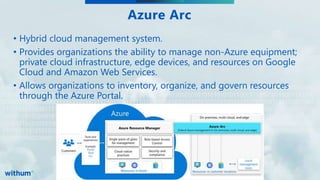
• Hybrid cloud management system.
• Provides organizations the ability to manage non-Azure equipment;
private cloud infrastructure, edge devices, and resources on Google
Cloud and Amazon Web Services.
• Allows organizations to inventory, organize, and govern resources
through the Azure Portal.
WithumSmith+Brown, PC | BE IN A POSITION OF STRENGTH
9
SM
Project Cortex
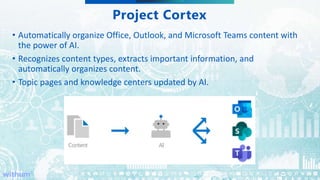
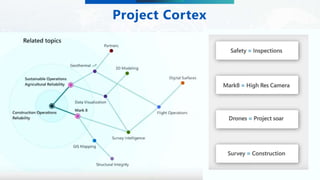
• Automatically organize Office, Outlook, and Microsoft Teams content with
the power of AI.
• Recognizes content types, extracts important information, and
automatically organizes content.
• Topic pages and knowledge centers updated by AI.
WithumSmith+Brown, PC | BE IN A POSITION OF STRENGTH
10
SM
Project Cortex
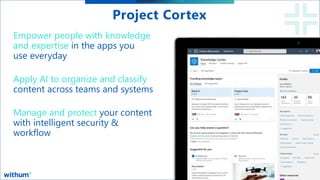
Empower people with knowledge
and expertise in the apps you
use everyday
Apply AI to organize and classify
content across teams and systems
Manage and protect your content
with intelligent security &
workflow
WithumSmith+Brown, PC | BE IN A POSITION OF STRENGTH
11
SM
Project Cortex
WithumSmith+Brown, PC | BE IN A POSITION OF STRENGTH
12
SM
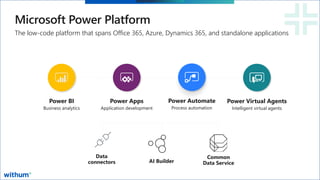
Microsoft Power Platform
Power BI
Business analytics
Power Apps
Application development
Power Automate
Process automation
Power Virtual Agents
Intelligent virtual agents
The low-code platform that spans Office 365, Azure, Dynamics 365, and standalone applications
Common
Data Service
Data
connectors AI Builder
WithumSmith+Brown, PC | BE IN A POSITION OF STRENGTH
13
SM
010101010101010101010101010100101010101010101010101100111101010110001111100000000000000000000000
000000011111011011011010101010101010101010101010100101010101010101010101100111101010110001111100
000000000000000000000000000011111011011011101010101010101010101010101001010101010101010101011001
111010101100011111000000000000000000000000000000111110110110110101010101010101010101010101001010
101010101010101011001111010101100011111000000000000000000000000000000111110110110110101010101010
101010101010101001010101010101010101011001111010101100011111000000000000000000000000000000111110
110110110101010101010101010101010101001010101010101010101011001111010101100011111000000000000000
00000000000000011111011011011
Power Platform
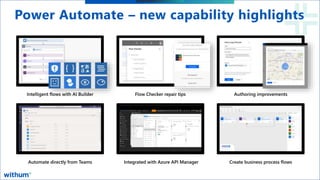
• Microsoft Flow was rebranded to be called Power Automate.
• A new Robotic Process Automation feature was added to the Power
Platform stack.
• New Power Virtual Agent to provide a no code approach to creating
and deploying intelligent, AI-powered bots was announced.
• Ability for Power Apps creators to publish their apps directly to their
company’s app library in Teams
WithumSmith+Brown, PC | BE IN A POSITION OF STRENGTH
14
SM
Power Automate – new capability highlights
WithumSmith+Brown, PC | BE IN A POSITION OF STRENGTH
15
SM
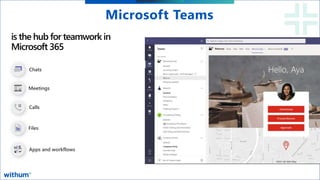
is the hub for teamwork in
Microsoft 365
Chats
Meetings
Calls
Files
Apps and workflows
Microsoft Teams
WithumSmith+Brown, PC | BE IN A POSITION OF STRENGTH
16
SM
010101010101010101010101010100101010101010101010101100111101010110001111100000000000000000000000
000000011111011011011010101010101010101010101010100101010101010101010101100111101010110001111100
000000000000000000000000000011111011011011101010101010101010101010101001010101010101010101011001
111010101100011111000000000000000000000000000000111110110110110101010101010101010101010101001010
101010101010101011001111010101100011111000000000000000000000000000000111110110110110101010101010
101010101010101001010101010101010101011001111010101100011111000000000000000000000000000000111110
110110110101010101010101010101010101001010101010101010101011001111010101100011111000000000000000
00000000000000011111011011011
Microsoft Teams
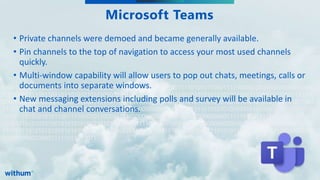
• Private channels were demoed and became generally available.
• Pin channels to the top of navigation to access your most used channels
quickly.
• Multi-window capability will allow users to pop out chats, meetings, calls or
documents into separate windows.
• New messaging extensions including polls and survey will be available in
chat and channel conversations.
WithumSmith+Brown, PC | BE IN A POSITION OF STRENGTH
17
SM
010101010101010101010101010100101010101010101010101100111101010110001111100000000000000000000000
000000011111011011011010101010101010101010101010100101010101010101010101100111101010110001111100
000000000000000000000000000011111011011011101010101010101010101010101001010101010101010101011001
111010101100011111000000000000000000000000000000111110110110110101010101010101010101010101001010
101010101010101011001111010101100011111000000000000000000000000000000111110110110110101010101010
101010101010101001010101010101010101011001111010101100011111000000000000000000000000000000111110
110110110101010101010101010101010101001010101010101010101011001111010101100011111000000000000000
00000000000000011111011011011
Microsoft Teams - Integrations
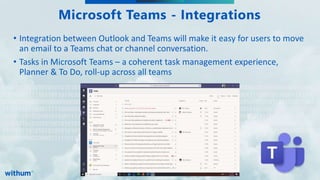
• Integration between Outlook and Teams will make it easy for users to move
an email to a Teams chat or channel conversation.
• Tasks in Microsoft Teams – a coherent task management experience,
Planner & To Do, roll-up across all teams
WithumSmith+Brown, PC | BE IN A POSITION OF STRENGTH
18
SM
010101010101010101010101010100101010101010101010101100111101010110001111100000000000000000000000
000000011111011011011010101010101010101010101010100101010101010101010101100111101010110001111100
000000000000000000000000000011111011011011101010101010101010101010101001010101010101010101011001
111010101100011111000000000000000000000000000000111110110110110101010101010101010101010101001010
101010101010101011001111010101100011111000000000000000000000000000000111110110110110101010101010
101010101010101001010101010101010101011001111010101100011111000000000000000000000000000000111110
110110110101010101010101010101010101001010101010101010101011001111010101100011111000000000000000
00000000000000011111011011011
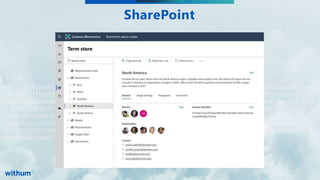
SharePoint
WithumSmith+Brown, PC | BE IN A POSITION OF STRENGTH
19
SM
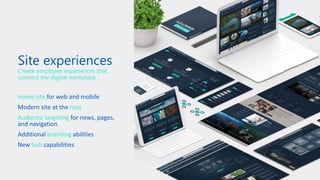
Create employee experiences that
connect the digital workplace
Home site
root
Audience targeting
branding
hub
WithumSmith+Brown, PC | BE IN A POSITION OF STRENGTH
20
SM
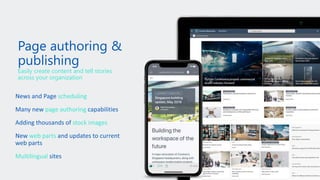
Easily create content and tell stories
across your organization
scheduling
page authoring
stock images
web parts
Multilingual
WithumSmith+Brown, PC | BE IN A POSITION OF STRENGTH
21
SM
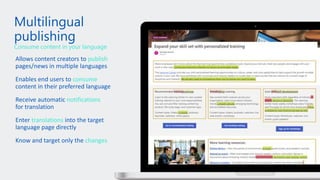
publish
consume
notifications
translations
changes
Consume content in your language
WithumSmith+Brown, PC | BE IN A POSITION OF STRENGTH
22
SM
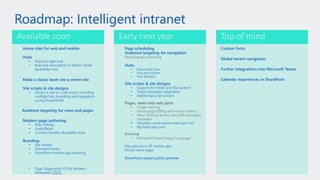
Roadmap: Intelligent intranet
Home sites for web and mobile
Hubs
• Hub join approval
• Bulk hub association in admin center
(available now)
Make a classic team site a comm site
Site scripts & site designs
• Extract a site to a site script, including
multiple lists, branding and navigation
(using PowerShell)
Audience targeting for news and pages
Modern page authoring
• Wiki Linking
• Undo/Redo
• Content handler (Available now)
Branding
• Shy header
• Extended footer
• SharePoint mobile app branding
• Page Diagnostics V2 for Modern
(Released) 57075
Page scheduling
Audience targeting for navigation
Hubs
• Associated hubs
• Hub permissions
• Hub analytics
Site scripts & site designs
• Support for folder and file content
• Teams template integration
• Additional script actions
• Yammer conversations web part (v2)
• My Feed web part
File uploads in SP mobile app
Portal owner page
SharePoint spaces public preview
Available soon Early next year
Custom fonts
Global tenant navigation
Further integrations into Microsoft Teams
Calendar experiences in SharePoint
Top of mind
WithumSmith+Brown, PC | BE IN A POSITION OF STRENGTH
23
SM
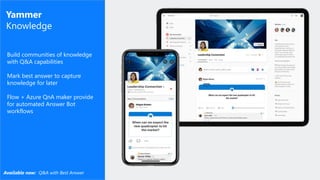
Yammer
Knowledge
Build communities of knowledge
with Q&A capabilities
Mark best answer to capture
knowledge for later
Flow + Azure QnA maker provide
for automated Answer Bot
workflows
Available now: Q&A with Best Answer
WithumSmith+Brown, PC | BE IN A POSITION OF STRENGTH
24
SM
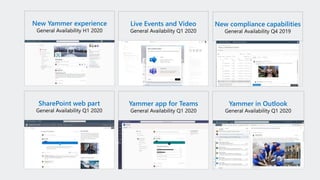
New Yammer experience
SharePoint web part Yammer app for Teams Yammer in Outlook
Live Events and Video New compliance capabilities
WithumSmith+Brown, PC | BE IN A POSITION OF STRENGTH
25
SM
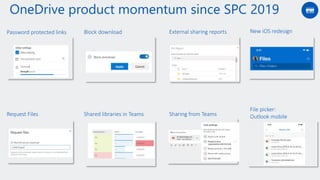
Password protected links Block download External sharing reports
Shared libraries in TeamsRequest Files Sharing from Teams
OneDrive product momentum since SPC 2019
New iOS redesign
File picker:
Outlook mobile
WithumSmith+Brown, PC | BE IN A POSITION OF STRENGTH
26
SM
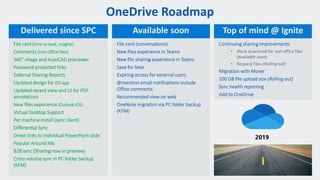
OneDrive Roadmap
File card (time to read, insights)
Comments (non-Office files)
360° image and AutoCAD previewer
Password-protected links
External Sharing Reports
Updated design for iOS app
Updated recent view and UI for PDF
annotations
New files experience (Outlook iOS)
Virtual Desktop Support
Per machine install (sync client)
Differential Sync
Direct links to individual PowerPoint slide
Popular Around Me
B2B sync (Sharing now in preview)
Cross volume sync in PC folder backup
(KFM)
Delivered since SPC Available soon Top of mind @ Ignite
WithumSmith+Brown, PC | BE IN A POSITION OF STRENGTH
27
SM
QUESTIONS
WithumSmith+Brown, PC | BE IN A POSITION OF STRENGTH
28
SM
Subscribe to Us!
Get a weekly dose of the latest digital transformation
trends and insights delivered to your inbox.
No Junk - Just What Matters Most to You
Subscribe Here

Webinar: Key Takeaways from Microsoft Ignite 2019

  • 1.
    WithumSmith+Brown, PC |BE IN A POSITION OF STRENGTH 1 SM November 13, 2019 Webinar: Key Takeaways from Microsoft Ignite 2019
  • 2.
    WithumSmith+Brown, PC |BE IN A POSITION OF STRENGTH 2 SM Housekeeping • Webinar is being recorded • 45 minute session • 15 minute Q&A session at the end • Send in your questions! • Type your questions in the Questions Pane of the GotoWebinar Panel • Slides and recording will be emailed after the webinar
  • 3.
    WithumSmith+Brown, PC |BE IN A POSITION OF STRENGTH 3 SM About Melissa Melissa Hubbard @melihubb mhubbard@withum.com Project Manager Digital workplace expert who specializes in team collaboration as well as simplifying and automating business processes. Author of Mastering Microsoft Teams. Fun Fact: Melissa is a toddler and cat mom. In her spare time she enjoys training in Muay Thai, running, and gardening.
  • 4.
    WithumSmith+Brown, PC |BE IN A POSITION OF STRENGTH 4 SM About Adam Adam Levithan @collabadam alevithan@withum.com Principal, Product Manager Building Intranets & Project Collaboration for over 12+ years. Adam specializes in Digital Workplace strategy and balancing technology with every day working in mind. Fun Fact: Adam is an avid cyclist and rides over 1000 miles each year to raise money for different charities.
  • 5.
    WithumSmith+Brown, PC |BE IN A POSITION OF STRENGTH 5 SM What to Expect From Today’s Webinar •Recap Ignite announcements that have the Withum team excited! •Answer questions Objectives
  • 6.
    WithumSmith+Brown, PC |BE IN A POSITION OF STRENGTH 6 SM POLL
  • 7.
    WithumSmith+Brown, PC |BE IN A POSITION OF STRENGTH 7 SM Impressions • The keynote was… • Tech Intensity • Diversity & Inclusion • Overall Microsoft Ignite was…. • Power Platform • Azure leaps • Kept promises • Devices • #YearofYammer
  • 8.
    WithumSmith+Brown, PC |BE IN A POSITION OF STRENGTH 8 SM 010101010101010101010101010100101010101010101010101100111101010110001111100000000000000000000000 000000011111011011011010101010101010101010101010100101010101010101010101100111101010110001111100 000000000000000000000000000011111011011011101010101010101010101010101001010101010101010101011001 111010101100011111000000000000000000000000000000111110110110110101010101010101010101010101001010 101010101010101011001111010101100011111000000000000000000000000000000111110110110110101010101010 101010101010101001010101010101010101011001111010101100011111000000000000000000000000000000111110 110110110101010101010101010101010101001010101010101010101011001111010101100011111000000000000000 00000000000000011111011011011 Azure Arc • Hybrid cloud management system. • Provides organizations the ability to manage non-Azure equipment; private cloud infrastructure, edge devices, and resources on Google Cloud and Amazon Web Services. • Allows organizations to inventory, organize, and govern resources through the Azure Portal.
  • 9.
    WithumSmith+Brown, PC |BE IN A POSITION OF STRENGTH 9 SM Project Cortex • Automatically organize Office, Outlook, and Microsoft Teams content with the power of AI. • Recognizes content types, extracts important information, and automatically organizes content. • Topic pages and knowledge centers updated by AI.
  • 10.
    WithumSmith+Brown, PC |BE IN A POSITION OF STRENGTH 10 SM Project Cortex Empower people with knowledge and expertise in the apps you use everyday Apply AI to organize and classify content across teams and systems Manage and protect your content with intelligent security & workflow
  • 11.
    WithumSmith+Brown, PC |BE IN A POSITION OF STRENGTH 11 SM Project Cortex
  • 12.
    WithumSmith+Brown, PC |BE IN A POSITION OF STRENGTH 12 SM Microsoft Power Platform Power BI Business analytics Power Apps Application development Power Automate Process automation Power Virtual Agents Intelligent virtual agents The low-code platform that spans Office 365, Azure, Dynamics 365, and standalone applications Common Data Service Data connectors AI Builder
  • 13.
    WithumSmith+Brown, PC |BE IN A POSITION OF STRENGTH 13 SM 010101010101010101010101010100101010101010101010101100111101010110001111100000000000000000000000 000000011111011011011010101010101010101010101010100101010101010101010101100111101010110001111100 000000000000000000000000000011111011011011101010101010101010101010101001010101010101010101011001 111010101100011111000000000000000000000000000000111110110110110101010101010101010101010101001010 101010101010101011001111010101100011111000000000000000000000000000000111110110110110101010101010 101010101010101001010101010101010101011001111010101100011111000000000000000000000000000000111110 110110110101010101010101010101010101001010101010101010101011001111010101100011111000000000000000 00000000000000011111011011011 Power Platform • Microsoft Flow was rebranded to be called Power Automate. • A new Robotic Process Automation feature was added to the Power Platform stack. • New Power Virtual Agent to provide a no code approach to creating and deploying intelligent, AI-powered bots was announced. • Ability for Power Apps creators to publish their apps directly to their company’s app library in Teams
  • 14.
    WithumSmith+Brown, PC |BE IN A POSITION OF STRENGTH 14 SM Power Automate – new capability highlights
  • 15.
    WithumSmith+Brown, PC |BE IN A POSITION OF STRENGTH 15 SM is the hub for teamwork in Microsoft 365 Chats Meetings Calls Files Apps and workflows Microsoft Teams
  • 16.
    WithumSmith+Brown, PC |BE IN A POSITION OF STRENGTH 16 SM 010101010101010101010101010100101010101010101010101100111101010110001111100000000000000000000000 000000011111011011011010101010101010101010101010100101010101010101010101100111101010110001111100 000000000000000000000000000011111011011011101010101010101010101010101001010101010101010101011001 111010101100011111000000000000000000000000000000111110110110110101010101010101010101010101001010 101010101010101011001111010101100011111000000000000000000000000000000111110110110110101010101010 101010101010101001010101010101010101011001111010101100011111000000000000000000000000000000111110 110110110101010101010101010101010101001010101010101010101011001111010101100011111000000000000000 00000000000000011111011011011 Microsoft Teams • Private channels were demoed and became generally available. • Pin channels to the top of navigation to access your most used channels quickly. • Multi-window capability will allow users to pop out chats, meetings, calls or documents into separate windows. • New messaging extensions including polls and survey will be available in chat and channel conversations.
  • 17.
    WithumSmith+Brown, PC |BE IN A POSITION OF STRENGTH 17 SM 010101010101010101010101010100101010101010101010101100111101010110001111100000000000000000000000 000000011111011011011010101010101010101010101010100101010101010101010101100111101010110001111100 000000000000000000000000000011111011011011101010101010101010101010101001010101010101010101011001 111010101100011111000000000000000000000000000000111110110110110101010101010101010101010101001010 101010101010101011001111010101100011111000000000000000000000000000000111110110110110101010101010 101010101010101001010101010101010101011001111010101100011111000000000000000000000000000000111110 110110110101010101010101010101010101001010101010101010101011001111010101100011111000000000000000 00000000000000011111011011011 Microsoft Teams - Integrations • Integration between Outlook and Teams will make it easy for users to move an email to a Teams chat or channel conversation. • Tasks in Microsoft Teams – a coherent task management experience, Planner & To Do, roll-up across all teams
  • 18.
    WithumSmith+Brown, PC |BE IN A POSITION OF STRENGTH 18 SM 010101010101010101010101010100101010101010101010101100111101010110001111100000000000000000000000 000000011111011011011010101010101010101010101010100101010101010101010101100111101010110001111100 000000000000000000000000000011111011011011101010101010101010101010101001010101010101010101011001 111010101100011111000000000000000000000000000000111110110110110101010101010101010101010101001010 101010101010101011001111010101100011111000000000000000000000000000000111110110110110101010101010 101010101010101001010101010101010101011001111010101100011111000000000000000000000000000000111110 110110110101010101010101010101010101001010101010101010101011001111010101100011111000000000000000 00000000000000011111011011011 SharePoint
  • 19.
    WithumSmith+Brown, PC |BE IN A POSITION OF STRENGTH 19 SM Create employee experiences that connect the digital workplace Home site root Audience targeting branding hub
  • 20.
    WithumSmith+Brown, PC |BE IN A POSITION OF STRENGTH 20 SM Easily create content and tell stories across your organization scheduling page authoring stock images web parts Multilingual
  • 21.
    WithumSmith+Brown, PC |BE IN A POSITION OF STRENGTH 21 SM publish consume notifications translations changes Consume content in your language
  • 22.
    WithumSmith+Brown, PC |BE IN A POSITION OF STRENGTH 22 SM Roadmap: Intelligent intranet Home sites for web and mobile Hubs • Hub join approval • Bulk hub association in admin center (available now) Make a classic team site a comm site Site scripts & site designs • Extract a site to a site script, including multiple lists, branding and navigation (using PowerShell) Audience targeting for news and pages Modern page authoring • Wiki Linking • Undo/Redo • Content handler (Available now) Branding • Shy header • Extended footer • SharePoint mobile app branding • Page Diagnostics V2 for Modern (Released) 57075 Page scheduling Audience targeting for navigation Hubs • Associated hubs • Hub permissions • Hub analytics Site scripts & site designs • Support for folder and file content • Teams template integration • Additional script actions • Yammer conversations web part (v2) • My Feed web part File uploads in SP mobile app Portal owner page SharePoint spaces public preview Available soon Early next year Custom fonts Global tenant navigation Further integrations into Microsoft Teams Calendar experiences in SharePoint Top of mind
  • 23.
    WithumSmith+Brown, PC |BE IN A POSITION OF STRENGTH 23 SM Yammer Knowledge Build communities of knowledge with Q&A capabilities Mark best answer to capture knowledge for later Flow + Azure QnA maker provide for automated Answer Bot workflows Available now: Q&A with Best Answer
  • 24.
    WithumSmith+Brown, PC |BE IN A POSITION OF STRENGTH 24 SM New Yammer experience SharePoint web part Yammer app for Teams Yammer in Outlook Live Events and Video New compliance capabilities
  • 25.
    WithumSmith+Brown, PC |BE IN A POSITION OF STRENGTH 25 SM Password protected links Block download External sharing reports Shared libraries in TeamsRequest Files Sharing from Teams OneDrive product momentum since SPC 2019 New iOS redesign File picker: Outlook mobile
  • 26.
    WithumSmith+Brown, PC |BE IN A POSITION OF STRENGTH 26 SM OneDrive Roadmap File card (time to read, insights) Comments (non-Office files) 360° image and AutoCAD previewer Password-protected links External Sharing Reports Updated design for iOS app Updated recent view and UI for PDF annotations New files experience (Outlook iOS) Virtual Desktop Support Per machine install (sync client) Differential Sync Direct links to individual PowerPoint slide Popular Around Me B2B sync (Sharing now in preview) Cross volume sync in PC folder backup (KFM) Delivered since SPC Available soon Top of mind @ Ignite
  • 27.
    WithumSmith+Brown, PC |BE IN A POSITION OF STRENGTH 27 SM QUESTIONS
  • 28.
    WithumSmith+Brown, PC |BE IN A POSITION OF STRENGTH 28 SM Subscribe to Us! Get a weekly dose of the latest digital transformation trends and insights delivered to your inbox. No Junk - Just What Matters Most to You Subscribe Here

Editor's Notes

  • #6  THIS IS OUR NEW ABSTRACT FOR THIS WEBINAR: Join us for an informative webinar, hosted by GrowFL, as we discuss the necessary steps to protecting your business in the event of a natural disaster like a hurricane. We will provide tips for creating a business continuity plan and touch on how cloud systems such as Microsoft 365, cloud ERP systems and other cloud technologies help secure and prepare your business. During this session you will learn tips on how to make sure you are able to: Stay in touch with your employees: Most organizations are so reliant on email that if your mail server goes down, it disrupts your business and hurts productivity. Respond to customer demands: Your customers have come to expect 24/7 responsiveness, even during an emergency. Maintain basic services: such as paying your bills, paying employees and generating revenues, all of which have dramatic implications. Protect crucial documents in the aftermath of a crisis. Maintain operational continuity.
  • #11 10
  • #13 The Microsoft Power Platform – Empowering millions of people to achieve more Our vision for the Power Platform started from the recognition that data is increasingly flowing from everything, and a belief that organizations that harness their data – to gain insights then used to drive intelligent business processes – will outperform those that don’t. We also recognize there aren’t enough programmers, data scientists and tech professionals to go around. So our goal was to build a platform targeting these technology experts and the millions of other frontline workers who see opportunities every day to create something better than the status quo, but who’ve never been empowered to do anything about it. Our guiding vision was a framework we called the “Triple-A Loop” – a closed-loop system allowing users to gain insights from data (Analyze) used to drive intelligent business processes via apps they build (Act) and processes they automate (Automate). The Microsoft Power Platform implements this vision via three cloud-based services: Power BI, PowerApps and Flow. PowerApps is our low code application development platform – allowing anyone to build web and mobile applications without writing code. The natural connection between Power BI and PowerApps makes it effortless to put insights in the hands of maintenance workers, teachers, miners and others on the frontline, in tailored and often task-specific applications that supercharge their productivity and make their work perhaps a little less tedious. Like Power BI, PowerApps connects to hundreds of business systems and databases, making it easy to connect workers with the existing processes and data that makes the business tick. And all the data captured in PowerApps can make its way right back to those very systems for further analysis in Power BI creating a closed-loop process for continuous improvement. Additionally, PowerApps comes with a built-in, fully-managed, enterprise-grade datastore called the Common Data Service (CDS) for those applications that generate data not destined for a legacy system – and Power BI and Flow have deep connections to CDS making it that much easier to get even more value from data stored there. Extending the Power Platform via connectors to other Microsoft offerings allow our clients to leverage those investments and create productivity faster. With Office 365, we offer a complete intelligent solution that empowers your employees to creative, collaborate and work together with Office 365, Skype, Teams With Dynamics 365, our intelligent business applications, we offer a complete set of solutions across Marketing, Sales, Commerce, Service, Finance, Operations and Talent. With Microsoft Azure we are delivering the most productive, hybrid, intelligent, and trusted cloud to run your business. Azure is offered in 54 regions, more than any cloud provider; Offers 70+ compliance industries, the largest portfolio in the industry; 95% of Fortune 500 companies run on Azure
  • #18 https://techcommunity.microsoft.com/t5/Planner-Blog/Announcing-Tasks-in-Teams-a-coherent-task-management-experience/ba-p/969386
  • #26 https://techcommunity.microsoft.com/t5/Microsoft-SharePoint-Blog/Ignite-2019-guide-to-SharePoint-OneDrive-Yammer-Stream-and/ba-p/930289
  • #28 Advanced in computer processing, growth in data, new ways to leverage and process intelligence. ALGORYTHM