Are you there Page Experience?
It’s me, Dev Tools.
Jamie Indigo, Senior Technical SEO
Rachel Anderson, Senior Technical SEO
@rachelleighrva @jammer_volts
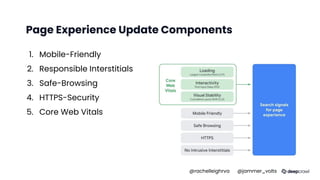
Page Experience Update Components
1. Mobile-Friendly
2. Responsible Interstitials
3. Safe-Browsing
4. HTTPS-Security
5. Core Web Vitals
@rachelleighrva @jammer_volts
Meet Cute
DevTools
@rachelleighrva @jammer_volts
What are DevTools?
“Chrome DevTools is a set of web developer
tools built directly into the Google Chrome
browser.”
AKA: Your way to prep for the update without all
those darn extensions
@rachelleighrva @jammer_volts
5
Use an incognito
window or dedicated
chrome profile for
accurate
performance results
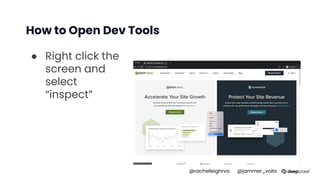
How to Open Dev Tools
● Right click the
screen and
select
“inspect”
@rachelleighrva @jammer_volts
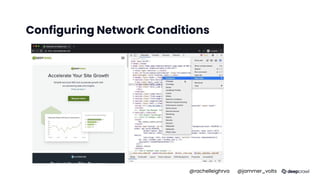
Configuring Network Conditions
@rachelleighrva @jammer_volts
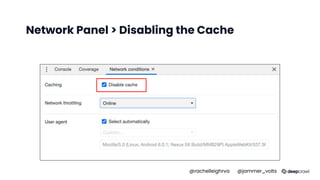
Network Panel > Disabling the Cache
@rachelleighrva @jammer_volts
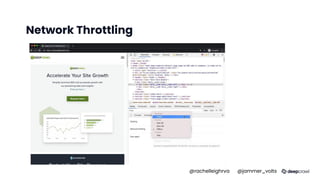
Network Throttling
@rachelleighrva @jammer_volts
Hands on Test
and Measure
@rachelleighrva @jammer_volts
Mobile Friendly
SEO friend since 2016
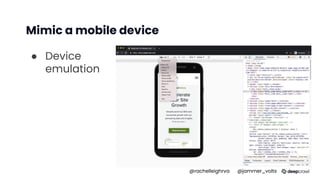
Mimic a mobile device
● Device
emulation
@rachelleighrva @jammer_volts
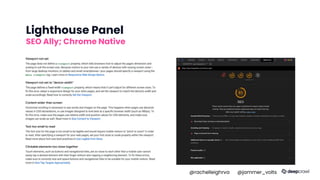
Lighthouse Panel
SEO Ally; Chrome Native
@rachelleighrva @jammer_volts
Intrusive Interstitials
Penalizing the annoying
since January 2017
@rachelleighrva @jammer_volts
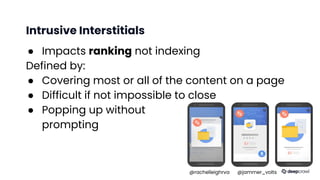
Intrusive Interstitials
● Impacts ranking not indexing
Defined by:
● Covering most or all of the content on a page
● Difficult if not impossible to close
● Popping up without
prompting
@rachelleighrva @jammer_volts
Use inspect to ensure crawlability
● Elements panel
● Biggest risk: content isn't available until the
interstitial is dismissed.
● Overlays are fine as long as the content is
available without dismissing or agreeing (or any
interaction)
@rachelleighrva @jammer_volts
Elements Panel
@rachelleighrva @jammer_volts
Safe Browsing &
HTTPS-Security
The fact we went without
this until 2016 is terrifying
@rachelleighrva @jammer_volts
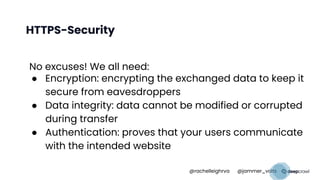
HTTPS-Security
No excuses! We all need:
● Encryption: encrypting the exchanged data to keep it
secure from eavesdroppers
● Data integrity: data cannot be modified or corrupted
during transfer
● Authentication: proves that your users communicate
with the intended website
@rachelleighrva @jammer_volts
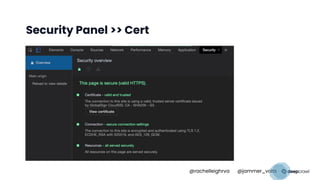
Security Panel >> Cert
@rachelleighrva @jammer_volts
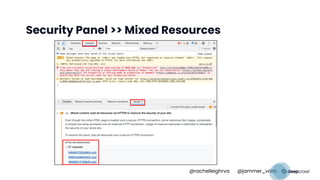
Security Panel >> Mixed Resources
@rachelleighrva @jammer_volts
How to Improve
CWV with
DevTools
@rachelleighrva @jammer_volts
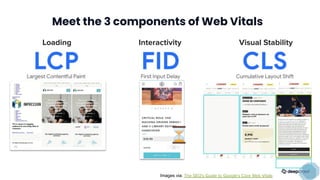
Meet the 3 components of Web Vitals
Loading Interactivity Visual Stability
�
�
⏳
Images via: The SEO's Guide to Google's Core Web Vitals
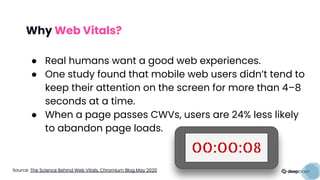
Why Web Vitals?
● Real humans want a good web experiences.
● One study found that mobile web users didn’t tend to
keep their attention on the screen for more than 4–8
seconds at a time.
● When a page passes CWVs, users are 24% less likely
to abandon page loads.
OO:OO:O8
Source: The Science Behind Web Vitals, Chromium Blog May 2020
Lab vs Field Data
An Important Caveat
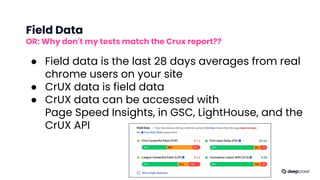
Field Data
OR: Why don't my tests match the Crux report??
● Field data is the last 28 days averages from real
chrome users on your site
● CrUX data is field data
● CrUX data can be accessed with
Page Speed Insights, in GSC, LightHouse, and the
CrUX API
Source: The Science Behind Web Vitals, Chromium Blog May 2020
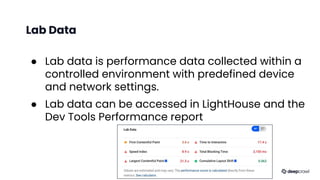
Lab Data
● Lab data is performance data collected within a
controlled environment with predefined device
and network settings.
● Lab data can be accessed in LightHouse and the
Dev Tools Performance report
Source: The Science Behind Web Vitals, Chromium Blog May 2020
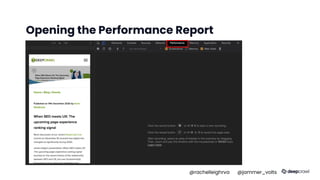
Opening the Performance Report
@rachelleighrva @jammer_volts
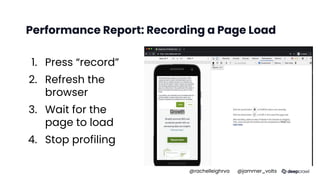
Performance Report: Recording a Page Load
1. Press “record”
2. Refresh the
browser
3. Wait for the
page to load
4. Stop profiling
@rachelleighrva @jammer_volts
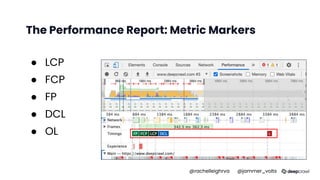
The Performance Report: Metric Markers
● LCP
● FCP
● FP
● DCL
● OL
@rachelleighrva @jammer_volts
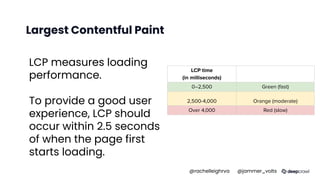
Largest Contentful Paint
LCP measures loading
performance.
To provide a good user
experience, LCP should
occur within 2.5 seconds
of when the page first
starts loading.
LCP time
(in milliseconds) Color-coding
0–2,500 Green (fast)
2,500-4,000 Orange (moderate)
Over 4,000 Red (slow)
@rachelleighrva @jammer_volts
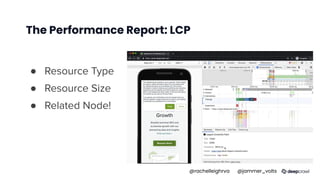
The Performance Report: LCP
● Resource Type
● Resource Size
● Related Node!
@rachelleighrva @jammer_volts
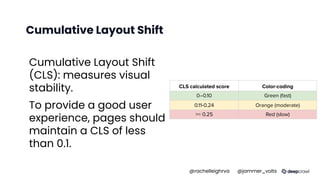
Cumulative Layout Shift
(CLS): measures visual
stability.
To provide a good user
experience, pages should
maintain a CLS of less
than 0.1.
CLS calculated score Color-coding
0–0.10 Green (fast)
0.11-0.24 Orange (moderate)
>= 0.25 Red (slow)
@rachelleighrva @jammer_volts
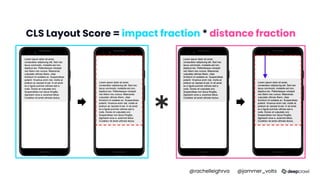
CLS Layout Score = impact fraction * distance fraction
*
@rachelleighrva @jammer_volts
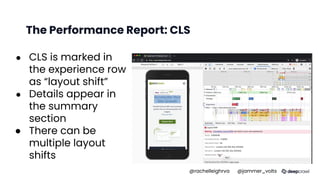
The Performance Report: CLS
● CLS is marked in
the experience row
as “layout shift”
● Details appear in
the summary
section
● There can be
multiple layout
shifts
@rachelleighrva @jammer_volts
First Input Delay
(FID) measures interactivity.
To provide a good user experience, pages should
have a FID of less than 100 milliseconds.
@rachelleighrva @jammer_volts
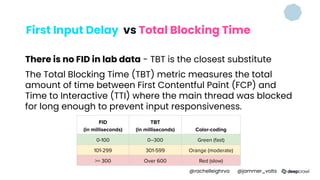
First Input Delay vs Total Blocking Time
There is no FID in lab data - TBT is the closest substitute
The Total Blocking Time (TBT) metric measures the total
amount of time between First Contentful Paint (FCP) and
Time to Interactive (TTI) where the main thread was blocked
for long enough to prevent input responsiveness.
FID
(in milliseconds)
TBT
(in milliseconds) Color-coding
0-100 0–300 Green (fast)
101-299 301-599 Orange (moderate)
>= 300 Over 600 Red (slow)
@rachelleighrva @jammer_volts
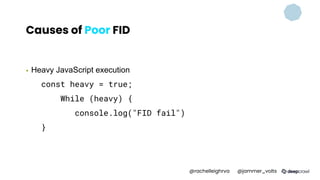
Causes of Poor FID
▪ Heavy JavaScript execution
const heavy = true;
While (heavy) {
console.log("FID fail")
}
@rachelleighrva @jammer_volts
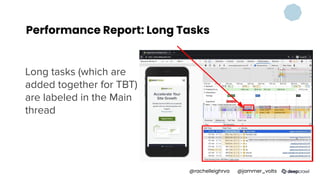
Performance Report: Long Tasks
Long tasks (which are
added together for TBT)
are labeled in the Main
thread
@rachelleighrva @jammer_volts
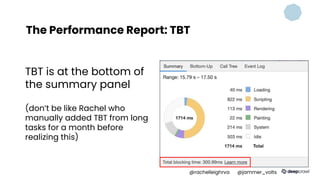
The Performance Report: TBT
TBT is at the bottom of
the summary panel
(don’t be like Rachel who
manually added TBT from long
tasks for a month before
realizing this)
@rachelleighrva @jammer_volts
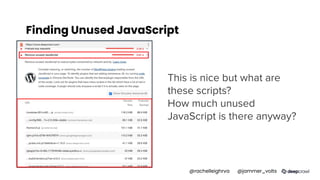
Finding Unused JavaScript
This is nice but what are
these scripts?
How much unused
JavaScript is there anyway?
@rachelleighrva @jammer_volts
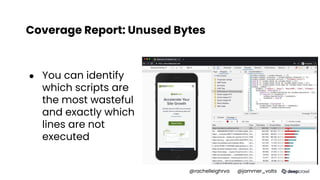
Coverage Report: Unused Bytes
● You can identify
which scripts are
the most wasteful
and exactly which
lines are not
executed
@rachelleighrva @jammer_volts
What we know
ranking signal
mechanics
@rachelleighrva @jammer_volts
Launching May 2021
● Page-level factor
● Score may be a mix of origin summary and
page specific
● The signal will use mobile CWV data
● AMP pages are included in the signal
● Noindexed pages are included in the
signal
@rachelleighrva @jammer_volts
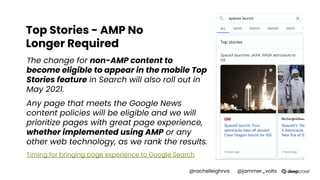
Top Stories - AMP No
Longer Required
The change for non-AMP content to
become eligible to appear in the mobile Top
Stories feature in Search will also roll out in
May 2021.
Any page that meets the Google News
content policies will be eligible and we will
prioritize pages with great page experience,
whether implemented using AMP or any
other web technology, as we rank the results.
Timing for bringing page experience to Google Search
@rachelleighrva @jammer_volts
Expect Core Web Vitals to evolve
● Google intends to update the page
experience signals on an annual basis
● Future CWV metrics will be documented
similarly to the initial signal rollout.
@rachelleighrva @jammer_volts
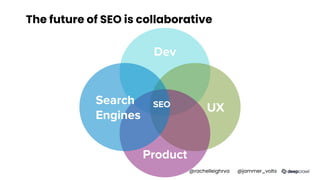
The future of SEO is collaborative
Dev
UX
Product
Search
Engines
SEO
@rachelleighrva @jammer_volts
There’s SO Much More
● Need more DevTools
in your life?
Watch Chris Johnson’s
talk!
@rachelleighrva @jammer_volts
| ̄ ̄ ̄ ̄ ̄ ̄ ̄ ̄ ̄ ̄ ̄|
DON'T BE AFRAID
TO LEARN IN PUBLIC
|___________|
(__/) ||
(•ㅅ•) ||
/   づ
Resources
▪ Performance panel updates, Google
Developers
▪ A Technical SEO Guide to Lighthouse
Performance Metrics
@rachelleighrva @jammer_volts
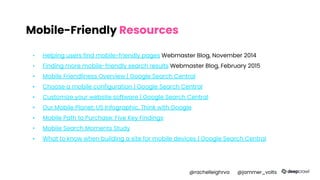
Mobile-Friendly Resources
▪ Helping users find mobile-friendly pages Webmaster Blog, November 2014
▪ Finding more mobile-friendly search results Webmaster Blog, February 2015
▪ Mobile Friendliness Overview | Google Search Central
▪ Choose a mobile configuration | Google Search Central
▪ Customize your website software | Google Search Central
▪ Our Mobile Planet: US Infographic, Think with Google
▪ Mobile Path to Purchase: Five Key Findings
▪ Mobile Search Moments Study
▪ What to know when building a site for mobile devices | Google Search Central
@rachelleighrva @jammer_volts
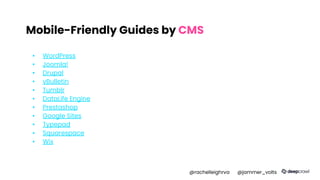
Mobile-Friendly Guides by CMS
▪ WordPress
▪ Joomla!
▪ Drupal
▪ vBulletin
▪ Tumblr
▪ DataLife Engine
▪ Prestashop
▪ Google Sites
▪ Typepad
▪ Squarespace
▪ Wix
@rachelleighrva @jammer_volts
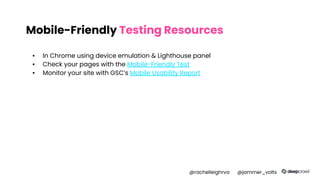
Mobile-Friendly Testing Resources
▪ In Chrome using device emulation & Lighthouse panel
▪ Check your pages with the Mobile-Friendly Test
▪ Monitor your site with GSC’s Mobile Usability Report
@rachelleighrva @jammer_volts
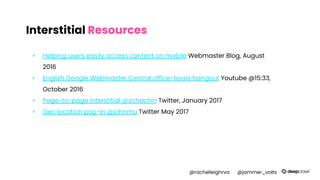
Interstitial Resources
▪ Helping users easily access content on mobile Webmaster Blog, August
2016
▪ English Google Webmaster Central office-hours hangout Youtube @15:33,
October 2016
▪ Page-to-page interstitial @schachin Twitter, January 2017
▪ Geo location pop-in @johnmu Twitter May 2017
@rachelleighrva @jammer_volts
Safe Browsing Resources
▪ More Safe Browsing Help for Webmasters Webmaster Blog, August 2016
▪ Safe Browsing protection from even more deceptive attacks Webmaster Blog, November
2015
▪ Google Online Security Blog: More Protection from Unwanted Software Security Blog, February
2015
▪ Google Safe Browsing
▪ Security tips | Google Safety Center
▪ Help, I think I've been hacked! | Web Fundamentals
▪ Social Engineering (Phishing and Deceptive Sites)
▪ Malware and unwanted software | Google Search Central
▪ https://support.google.com/webmasters/answer/3258249#if_uncommon
▪ Malware and unwanted software | Google Search Central
@rachelleighrva @jammer_volts
HTTPS Resources
▪ Secure your site with HTTPS | Google Search Central
▪ HTTPS as a ranking signal Webmaster Blog, August 2014
▪ Here's to more HTTPS on the web! Webmaster Blog, November 2016
▪ Why HTTPS matters web.dev, April 2020
@rachelleighrva @jammer_volts
Page Experience Ranking Signal Resources
▪ Evaluating page experience for a better web Google Search Central
▪ Understanding page experience in Google Search results Google Search
Central
▪ Timing for bringing page experience to Google Search Google Search
Central
@rachelleighrva @jammer_volts
Core Web Vitals Resources
▪ The SEO's Guide to Google's Core Web Vitals DeepCrawl
▪ Core Web Vitals report Search Console Help
▪ Lighthouse Largest Contentful Paint web.dev
@rachelleighrva @jammer_volts
Core Web Vitals Testing Tools
▪ GoogleChrome/lighthouse, Github
▪ Google PageSpeed Insights page
▪ Chrome DevTools
▪ Google Search Console
▪ Measure
▪ Web Vitals - Chrome Web Store
▪ Chrome User Experience Report | Chrome UX Report
@rachelleighrva @jammer_volts
LCP Resources
▪ Largest Contentful Paint (LCP) web.dev
▪ Optimize Largest Contentful Paint web.dev
▪ Lighthouse Largest Contentful Paint web.dev
@rachelleighrva @jammer_volts
FID/TBT Resources
▪ First Input Delay (FID) web.dev
▪ Total Blocking Time (TBT) web.dev
▪ Optimize First Input Delay web.dev
▪ Lighthouse: Total Blocking Time web.dev
@rachelleighrva @jammer_volts
CLS Resources
▪ Optimize Cumulative Layout Shift web.dev
▪ Cumulative Layout Shift (CLS) web.dev
▪ Cumulative Layout Shift (CLS) in AMP – The AMP Blog AMP blog, April 2020
▪ Cumulative Layout Shift (CLS) Calculator
@rachelleighrva @jammer_volts
63
Thanks for Watching!

Are you there Page Experience? It's Me, DevTools.

  • 1.
    Are you therePage Experience? It’s me, Dev Tools. Jamie Indigo, Senior Technical SEO Rachel Anderson, Senior Technical SEO @rachelleighrva @jammer_volts
  • 2.
    Page Experience UpdateComponents 1. Mobile-Friendly 2. Responsible Interstitials 3. Safe-Browsing 4. HTTPS-Security 5. Core Web Vitals @rachelleighrva @jammer_volts
  • 3.
  • 4.
    What are DevTools? “ChromeDevTools is a set of web developer tools built directly into the Google Chrome browser.” AKA: Your way to prep for the update without all those darn extensions @rachelleighrva @jammer_volts
  • 5.
    5 Use an incognito windowor dedicated chrome profile for accurate performance results
  • 6.
    How to OpenDev Tools ● Right click the screen and select “inspect” @rachelleighrva @jammer_volts
  • 7.
  • 8.
    Network Panel >Disabling the Cache @rachelleighrva @jammer_volts
  • 9.
  • 10.
    Hands on Test andMeasure @rachelleighrva @jammer_volts
  • 11.
  • 12.
    Mimic a mobiledevice ● Device emulation @rachelleighrva @jammer_volts
  • 13.
    Lighthouse Panel SEO Ally;Chrome Native @rachelleighrva @jammer_volts
  • 14.
    Intrusive Interstitials Penalizing theannoying since January 2017 @rachelleighrva @jammer_volts
  • 15.
    Intrusive Interstitials ● Impactsranking not indexing Defined by: ● Covering most or all of the content on a page ● Difficult if not impossible to close ● Popping up without prompting @rachelleighrva @jammer_volts
  • 16.
    Use inspect toensure crawlability ● Elements panel ● Biggest risk: content isn't available until the interstitial is dismissed. ● Overlays are fine as long as the content is available without dismissing or agreeing (or any interaction) @rachelleighrva @jammer_volts
  • 17.
  • 18.
    Safe Browsing & HTTPS-Security Thefact we went without this until 2016 is terrifying @rachelleighrva @jammer_volts
  • 19.
    HTTPS-Security No excuses! Weall need: ● Encryption: encrypting the exchanged data to keep it secure from eavesdroppers ● Data integrity: data cannot be modified or corrupted during transfer ● Authentication: proves that your users communicate with the intended website @rachelleighrva @jammer_volts
  • 20.
    Security Panel >>Cert @rachelleighrva @jammer_volts
  • 21.
    Security Panel >>Mixed Resources @rachelleighrva @jammer_volts
  • 22.
    How to Improve CWVwith DevTools @rachelleighrva @jammer_volts
  • 23.
    Meet the 3components of Web Vitals Loading Interactivity Visual Stability � � ⏳ Images via: The SEO's Guide to Google's Core Web Vitals
  • 24.
    Why Web Vitals? ●Real humans want a good web experiences. ● One study found that mobile web users didn’t tend to keep their attention on the screen for more than 4–8 seconds at a time. ● When a page passes CWVs, users are 24% less likely to abandon page loads. OO:OO:O8 Source: The Science Behind Web Vitals, Chromium Blog May 2020
  • 25.
    Lab vs FieldData An Important Caveat
  • 26.
    Field Data OR: Whydon't my tests match the Crux report?? ● Field data is the last 28 days averages from real chrome users on your site ● CrUX data is field data ● CrUX data can be accessed with Page Speed Insights, in GSC, LightHouse, and the CrUX API Source: The Science Behind Web Vitals, Chromium Blog May 2020
  • 27.
    Lab Data ● Labdata is performance data collected within a controlled environment with predefined device and network settings. ● Lab data can be accessed in LightHouse and the Dev Tools Performance report Source: The Science Behind Web Vitals, Chromium Blog May 2020
  • 28.
    Opening the PerformanceReport @rachelleighrva @jammer_volts
  • 29.
    Performance Report: Recordinga Page Load 1. Press “record” 2. Refresh the browser 3. Wait for the page to load 4. Stop profiling @rachelleighrva @jammer_volts
  • 30.
    The Performance Report:Metric Markers ● LCP ● FCP ● FP ● DCL ● OL @rachelleighrva @jammer_volts
  • 31.
    Largest Contentful Paint LCPmeasures loading performance. To provide a good user experience, LCP should occur within 2.5 seconds of when the page first starts loading. LCP time (in milliseconds) Color-coding 0–2,500 Green (fast) 2,500-4,000 Orange (moderate) Over 4,000 Red (slow) @rachelleighrva @jammer_volts
  • 32.
    The Performance Report:LCP ● Resource Type ● Resource Size ● Related Node! @rachelleighrva @jammer_volts
  • 33.
    Cumulative Layout Shift CumulativeLayout Shift (CLS): measures visual stability. To provide a good user experience, pages should maintain a CLS of less than 0.1. CLS calculated score Color-coding 0–0.10 Green (fast) 0.11-0.24 Orange (moderate) >= 0.25 Red (slow) @rachelleighrva @jammer_volts
  • 34.
    CLS Layout Score= impact fraction * distance fraction * @rachelleighrva @jammer_volts
  • 35.
    The Performance Report:CLS ● CLS is marked in the experience row as “layout shift” ● Details appear in the summary section ● There can be multiple layout shifts @rachelleighrva @jammer_volts
  • 36.
    First Input Delay (FID)measures interactivity. To provide a good user experience, pages should have a FID of less than 100 milliseconds. @rachelleighrva @jammer_volts
  • 37.
    First Input Delayvs Total Blocking Time There is no FID in lab data - TBT is the closest substitute The Total Blocking Time (TBT) metric measures the total amount of time between First Contentful Paint (FCP) and Time to Interactive (TTI) where the main thread was blocked for long enough to prevent input responsiveness. FID (in milliseconds) TBT (in milliseconds) Color-coding 0-100 0–300 Green (fast) 101-299 301-599 Orange (moderate) >= 300 Over 600 Red (slow) @rachelleighrva @jammer_volts
  • 38.
    Causes of PoorFID ▪ Heavy JavaScript execution const heavy = true; While (heavy) { console.log("FID fail") } @rachelleighrva @jammer_volts
  • 39.
    Performance Report: LongTasks Long tasks (which are added together for TBT) are labeled in the Main thread @rachelleighrva @jammer_volts
  • 40.
    The Performance Report:TBT TBT is at the bottom of the summary panel (don’t be like Rachel who manually added TBT from long tasks for a month before realizing this) @rachelleighrva @jammer_volts
  • 41.
    Finding Unused JavaScript Thisis nice but what are these scripts? How much unused JavaScript is there anyway? @rachelleighrva @jammer_volts
  • 42.
    Coverage Report: UnusedBytes ● You can identify which scripts are the most wasteful and exactly which lines are not executed @rachelleighrva @jammer_volts
  • 43.
    What we know rankingsignal mechanics @rachelleighrva @jammer_volts
  • 44.
    Launching May 2021 ●Page-level factor ● Score may be a mix of origin summary and page specific ● The signal will use mobile CWV data ● AMP pages are included in the signal ● Noindexed pages are included in the signal @rachelleighrva @jammer_volts
  • 45.
    Top Stories -AMP No Longer Required The change for non-AMP content to become eligible to appear in the mobile Top Stories feature in Search will also roll out in May 2021. Any page that meets the Google News content policies will be eligible and we will prioritize pages with great page experience, whether implemented using AMP or any other web technology, as we rank the results. Timing for bringing page experience to Google Search @rachelleighrva @jammer_volts
  • 46.
    Expect Core WebVitals to evolve ● Google intends to update the page experience signals on an annual basis ● Future CWV metrics will be documented similarly to the initial signal rollout. @rachelleighrva @jammer_volts
  • 47.
    The future ofSEO is collaborative Dev UX Product Search Engines SEO @rachelleighrva @jammer_volts
  • 48.
    There’s SO MuchMore ● Need more DevTools in your life? Watch Chris Johnson’s talk! @rachelleighrva @jammer_volts
  • 49.
    @rachelleighrva @jammer_volts | ̄ ̄ ̄ ̄ ̄ ̄ ̄ ̄ ̄ ̄ ̄| DON'T BEAFRAID TO LEARN IN PUBLIC |___________| (__/) || (•ㅅ•) || /   づ
  • 50.
    Resources ▪ Performance panelupdates, Google Developers ▪ A Technical SEO Guide to Lighthouse Performance Metrics @rachelleighrva @jammer_volts
  • 51.
    Mobile-Friendly Resources ▪ Helpingusers find mobile-friendly pages Webmaster Blog, November 2014 ▪ Finding more mobile-friendly search results Webmaster Blog, February 2015 ▪ Mobile Friendliness Overview | Google Search Central ▪ Choose a mobile configuration | Google Search Central ▪ Customize your website software | Google Search Central ▪ Our Mobile Planet: US Infographic, Think with Google ▪ Mobile Path to Purchase: Five Key Findings ▪ Mobile Search Moments Study ▪ What to know when building a site for mobile devices | Google Search Central @rachelleighrva @jammer_volts
  • 52.
    Mobile-Friendly Guides byCMS ▪ WordPress ▪ Joomla! ▪ Drupal ▪ vBulletin ▪ Tumblr ▪ DataLife Engine ▪ Prestashop ▪ Google Sites ▪ Typepad ▪ Squarespace ▪ Wix @rachelleighrva @jammer_volts
  • 53.
    Mobile-Friendly Testing Resources ▪In Chrome using device emulation & Lighthouse panel ▪ Check your pages with the Mobile-Friendly Test ▪ Monitor your site with GSC’s Mobile Usability Report @rachelleighrva @jammer_volts
  • 54.
    Interstitial Resources ▪ Helpingusers easily access content on mobile Webmaster Blog, August 2016 ▪ English Google Webmaster Central office-hours hangout Youtube @15:33, October 2016 ▪ Page-to-page interstitial @schachin Twitter, January 2017 ▪ Geo location pop-in @johnmu Twitter May 2017 @rachelleighrva @jammer_volts
  • 55.
    Safe Browsing Resources ▪More Safe Browsing Help for Webmasters Webmaster Blog, August 2016 ▪ Safe Browsing protection from even more deceptive attacks Webmaster Blog, November 2015 ▪ Google Online Security Blog: More Protection from Unwanted Software Security Blog, February 2015 ▪ Google Safe Browsing ▪ Security tips | Google Safety Center ▪ Help, I think I've been hacked! | Web Fundamentals ▪ Social Engineering (Phishing and Deceptive Sites) ▪ Malware and unwanted software | Google Search Central ▪ https://support.google.com/webmasters/answer/3258249#if_uncommon ▪ Malware and unwanted software | Google Search Central @rachelleighrva @jammer_volts
  • 56.
    HTTPS Resources ▪ Secureyour site with HTTPS | Google Search Central ▪ HTTPS as a ranking signal Webmaster Blog, August 2014 ▪ Here's to more HTTPS on the web! Webmaster Blog, November 2016 ▪ Why HTTPS matters web.dev, April 2020 @rachelleighrva @jammer_volts
  • 57.
    Page Experience RankingSignal Resources ▪ Evaluating page experience for a better web Google Search Central ▪ Understanding page experience in Google Search results Google Search Central ▪ Timing for bringing page experience to Google Search Google Search Central @rachelleighrva @jammer_volts
  • 58.
    Core Web VitalsResources ▪ The SEO's Guide to Google's Core Web Vitals DeepCrawl ▪ Core Web Vitals report Search Console Help ▪ Lighthouse Largest Contentful Paint web.dev @rachelleighrva @jammer_volts
  • 59.
    Core Web VitalsTesting Tools ▪ GoogleChrome/lighthouse, Github ▪ Google PageSpeed Insights page ▪ Chrome DevTools ▪ Google Search Console ▪ Measure ▪ Web Vitals - Chrome Web Store ▪ Chrome User Experience Report | Chrome UX Report @rachelleighrva @jammer_volts
  • 60.
    LCP Resources ▪ LargestContentful Paint (LCP) web.dev ▪ Optimize Largest Contentful Paint web.dev ▪ Lighthouse Largest Contentful Paint web.dev @rachelleighrva @jammer_volts
  • 61.
    FID/TBT Resources ▪ FirstInput Delay (FID) web.dev ▪ Total Blocking Time (TBT) web.dev ▪ Optimize First Input Delay web.dev ▪ Lighthouse: Total Blocking Time web.dev @rachelleighrva @jammer_volts
  • 62.
    CLS Resources ▪ OptimizeCumulative Layout Shift web.dev ▪ Cumulative Layout Shift (CLS) web.dev ▪ Cumulative Layout Shift (CLS) in AMP – The AMP Blog AMP blog, April 2020 ▪ Cumulative Layout Shift (CLS) Calculator @rachelleighrva @jammer_volts
  • 63.