
MICROSOFT AZURE
CREATED BY : SOUMYA DE @PMP CERTIFIED
DESIGNATION : SAP TECH LEAD
3
Microsoft Azure is a cloud computing service created by
Microsoft for building, testing, deploying, and managing
applications and services through a global network of
Microsoft-managed data centers. Microsoft Azure supports
many different programming languages, tools and
frameworks, including both Microsoft-specific and third-party
software and systems.
What is Azure?
4
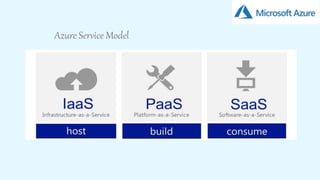
Azure Service Model
5
Infrastructure as a service(IaaS)
With the IaaS model, you can outsource the elements of infrastructure
like Virtualization, Storage, Networking, Load Balancers and so on, to
Microsoft
To deploy your applications to the Cloud, you have to install OS images
and related application software on the cloud infrastructure. In this
model, it's your responsibility to patch/update/maintain the OS and any
application software you install. Microsoft will typically bill you on
computing power by the hour and the amount of resources allocated and
consumed.
One of the biggest benefits of IaaS is that it provides granular control,
where you can choose the core components for your infrastructure. By
pooling your computing and storage resources you can scale with ease
and speed to meet the infrastructure needs of your entire organization or
individual departments, globally or locally.
6
Platform as a Service (PaaS)
With the PaaS model, you get a core hosting operating system and optional
building block services that allow you to run your own applications or third-
party applications. You need not be concerned about lower level elements of
Infrastructure, Network Topology, Security and Load Balancers, all this is
done for you by Microsoft. Microsoft provide a fully functional OS with major
platform software.
Microsoft Windows Azure as PaaS can be used as a development, service
hosting and service management environment. SQL Azure can provide data
services, including a relational database, reporting and data
synchronization. Both Windows Azure and SQL Azure are the key
components of the Azure Cloud Platform.
One of the key benefits of PaaS is that you need not be concerned about
the running OS or updates (service packs) and hardware upgrades. The
Provider regularly patches your OS, updates platform features (such as the
core .NET platform or SQL database engine) and updates hardware on
demand to meet your demand.
7
Software as a Service (SaaS)
With the SaaS model, you consume as a service only the Applications that
you need for your business. These applications run on the provider’s cloud
infrastructure, making them accessible from various devices like browser or
mobile.
The SaaS provider manages everything -- that includes Infrastructure, Load
balancers and firewalls, Operating Systems and runtime environments like
.NET and Java, the line of business applications and services such as email
or a CRM.
The key benefit of SaaS is that it requires no upfront investment in servers
or software licensing. For the application developer, there is only one
application to maintain for multiple clients.
Microsoft Office 365 is a SaaS that provides these types of services, which
include SharePoint Online, Exchange Online, Lync Online and Office
Professional Plus.
8
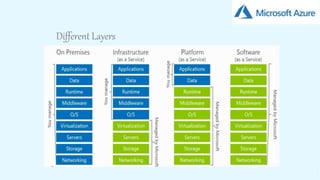
Different Layers
9
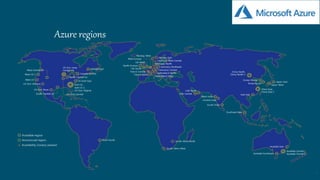
Azure regions
10
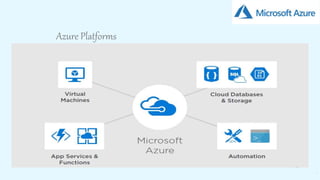
Azure Platforms
11
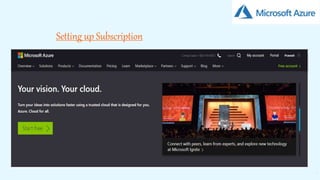
Setting up Subscription
12
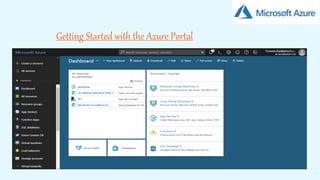
Getting Started with the Azure Portal
13
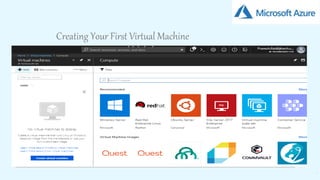
Creating Your First Virtual Machine
14
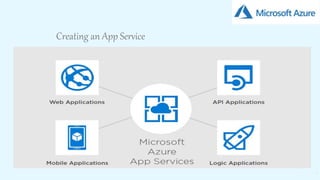
Creating an App Service
15
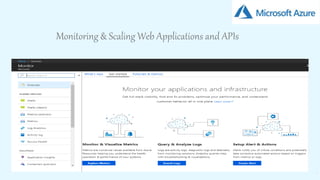
Monitoring & Scaling Web Applications and APIs
16
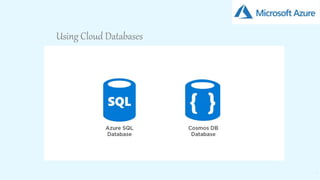
Using Cloud Databases
17
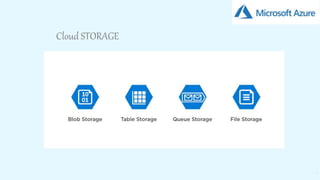
Cloud STORAGE
18
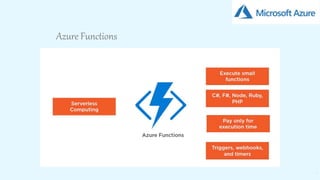
Azure Functions
19
Cost Management
Discount
Get an EA Agreement for maximum Azure discounts.
EA agreements require selecting an annual monetary commitment and
that locks in a discount rate. You are then billed quarterly for any
overages beyond your annual commit.
Switch Azure regions for better azure pricing
Azure pricing varies from one region to another, even in the US. Double
check the pricing in various regions to see if you can save a little.
Review pricing and identify equivalents
Azure’s services change rapidly and so does its pricing. What is
interesting is that in a bid to push customers to newer types of
infrastructure (and off older types), Azure will often charge less for the
newer and better variants of their services.
20
Cost Management
Management of resources
Delete what you don’t use
Since it is rather easy to set up services and resources you easily end up with
many of them while not deleting what you are not using anymore.
Deallocate when not in use
Simply turning of a VM isn’t enough if cost saving is what you are going for. Turn
of what doesn’t need to be on. Make sure you deallocate, not just stop from the
VM. This can also be scheduled if you know your usage pattern.
Pick the right type and size of Virtual Machines.
If you are using Azure for hosting Virtual Machines, make sure you pick the
correct type of instance. There are literally dozens of different types and sizes.
Make sure you select the right type based on if you need more memory, CPU,
faster disk, etc.
Use Azure DevTest Labs
Azure DevTest Labs is awesome for creating servers that you need occasionally
or just certain hours of the day. DevTest Labs can automatically turn them on and
shut them down on a schedule. This helps a lot with solving the issue of your QA
team forgetting to shut down servers before they leave for the day or weekend.
21
Cost Management
Reporting and Monitoring
Use subscriptions to define cost areas
For example, one for Dev, QA, Prod etc. Azure gives a lot of details in terms of
cost which gives in turn gives you a lot of control. This also helps with setting
prices for customers, and you could define price tracks this way.
Monitor costs with a dashboard
The dashboards on Azure are very handy and a clever way to use them is to
create a cost dashboard where you can pin information about your spending. If
you have divided the resources by subscriptions that define cost areas then you
can also easily compare and detect deviations by a quick glance.
Set up billing alerts
Set up billing alerts to get emails when your usage costs exceed an amount that
you specify. If you have monthly credits, set up alerts for when you use up a
specified amount.
Add tags to your resources to group your billing data
You can use tags to group billing data for supported services. For example, if you
run several VMs for different teams, then you can use tags to categorize costs by
cost center (HR, marketing, finance) or environment (production, pre-production,
test).
THANK YOU

Microsoft Azure

  • 1.
  • 2.
    CREATED BY :SOUMYA DE @PMP CERTIFIED DESIGNATION : SAP TECH LEAD
  • 3.
    3 Microsoft Azure isa cloud computing service created by Microsoft for building, testing, deploying, and managing applications and services through a global network of Microsoft-managed data centers. Microsoft Azure supports many different programming languages, tools and frameworks, including both Microsoft-specific and third-party software and systems. What is Azure?
  • 4.
  • 5.
    5 Infrastructure as aservice(IaaS) With the IaaS model, you can outsource the elements of infrastructure like Virtualization, Storage, Networking, Load Balancers and so on, to Microsoft To deploy your applications to the Cloud, you have to install OS images and related application software on the cloud infrastructure. In this model, it's your responsibility to patch/update/maintain the OS and any application software you install. Microsoft will typically bill you on computing power by the hour and the amount of resources allocated and consumed. One of the biggest benefits of IaaS is that it provides granular control, where you can choose the core components for your infrastructure. By pooling your computing and storage resources you can scale with ease and speed to meet the infrastructure needs of your entire organization or individual departments, globally or locally.
  • 6.
    6 Platform as aService (PaaS) With the PaaS model, you get a core hosting operating system and optional building block services that allow you to run your own applications or third- party applications. You need not be concerned about lower level elements of Infrastructure, Network Topology, Security and Load Balancers, all this is done for you by Microsoft. Microsoft provide a fully functional OS with major platform software. Microsoft Windows Azure as PaaS can be used as a development, service hosting and service management environment. SQL Azure can provide data services, including a relational database, reporting and data synchronization. Both Windows Azure and SQL Azure are the key components of the Azure Cloud Platform. One of the key benefits of PaaS is that you need not be concerned about the running OS or updates (service packs) and hardware upgrades. The Provider regularly patches your OS, updates platform features (such as the core .NET platform or SQL database engine) and updates hardware on demand to meet your demand.
  • 7.
    7 Software as aService (SaaS) With the SaaS model, you consume as a service only the Applications that you need for your business. These applications run on the provider’s cloud infrastructure, making them accessible from various devices like browser or mobile. The SaaS provider manages everything -- that includes Infrastructure, Load balancers and firewalls, Operating Systems and runtime environments like .NET and Java, the line of business applications and services such as email or a CRM. The key benefit of SaaS is that it requires no upfront investment in servers or software licensing. For the application developer, there is only one application to maintain for multiple clients. Microsoft Office 365 is a SaaS that provides these types of services, which include SharePoint Online, Exchange Online, Lync Online and Office Professional Plus.
  • 8.
  • 9.
  • 10.
  • 11.
  • 12.
    12 Getting Started withthe Azure Portal
  • 13.
    13 Creating Your FirstVirtual Machine
  • 14.
  • 15.
    15 Monitoring & ScalingWeb Applications and APIs
  • 16.
  • 17.
  • 18.
  • 19.
    19 Cost Management Discount Get anEA Agreement for maximum Azure discounts. EA agreements require selecting an annual monetary commitment and that locks in a discount rate. You are then billed quarterly for any overages beyond your annual commit. Switch Azure regions for better azure pricing Azure pricing varies from one region to another, even in the US. Double check the pricing in various regions to see if you can save a little. Review pricing and identify equivalents Azure’s services change rapidly and so does its pricing. What is interesting is that in a bid to push customers to newer types of infrastructure (and off older types), Azure will often charge less for the newer and better variants of their services.
  • 20.
    20 Cost Management Management ofresources Delete what you don’t use Since it is rather easy to set up services and resources you easily end up with many of them while not deleting what you are not using anymore. Deallocate when not in use Simply turning of a VM isn’t enough if cost saving is what you are going for. Turn of what doesn’t need to be on. Make sure you deallocate, not just stop from the VM. This can also be scheduled if you know your usage pattern. Pick the right type and size of Virtual Machines. If you are using Azure for hosting Virtual Machines, make sure you pick the correct type of instance. There are literally dozens of different types and sizes. Make sure you select the right type based on if you need more memory, CPU, faster disk, etc. Use Azure DevTest Labs Azure DevTest Labs is awesome for creating servers that you need occasionally or just certain hours of the day. DevTest Labs can automatically turn them on and shut them down on a schedule. This helps a lot with solving the issue of your QA team forgetting to shut down servers before they leave for the day or weekend.
  • 21.
    21 Cost Management Reporting andMonitoring Use subscriptions to define cost areas For example, one for Dev, QA, Prod etc. Azure gives a lot of details in terms of cost which gives in turn gives you a lot of control. This also helps with setting prices for customers, and you could define price tracks this way. Monitor costs with a dashboard The dashboards on Azure are very handy and a clever way to use them is to create a cost dashboard where you can pin information about your spending. If you have divided the resources by subscriptions that define cost areas then you can also easily compare and detect deviations by a quick glance. Set up billing alerts Set up billing alerts to get emails when your usage costs exceed an amount that you specify. If you have monthly credits, set up alerts for when you use up a specified amount. Add tags to your resources to group your billing data You can use tags to group billing data for supported services. For example, if you run several VMs for different teams, then you can use tags to categorize costs by cost center (HR, marketing, finance) or environment (production, pre-production, test).
  • 22.