API
www.cloudanalogy.com
Ajay Dubedi
Salesforce Expert
www.cloudanalogy.com
First you need to understand data. What is data in context with Salesforce.
Data is anything which is stored in a database like records related to Contacts,
Accounts, Leads Opportunity etc.
Metadata:
Metadata can be defined as the set of data about another data. i.e.,
Configuration/Code/Logic of the underlying structure which is used to store the
data (Records).
Another definition is you can say the database structure in which you will be
saving the data.
MetaData API
Metadata Api for Salesforce can do several things
programmatically.You can read, create, update, delete
following components in a Salesforce organization.
1. Custom Objects/Fields.
2. Visualforce pages.
3. Page Layouts.
4. Validation rules.
5. Apex.
6. Workflows.
7. Approval processes.
8. Profiles.
9. Reports etc.
10. Security.
www.cloudanalogy.com
MetaData API
You can configure a Salesforce organization just by running a piece of code. In contrast
to this I meant to say that you can create Objects,Fields,Validation,Workflows, Profiles,
Reports for a particular client organization just by running the piece of code so that you
need not do all the customisation settings manually which will consume time if you have
to do that several times for different clients for the same configuration settings.
You can also take the backup of your organization customisation settings just by
fetching the metadata WSDL from your Salesforce org.
For this You need to click setup>type API-Click on API >Click Generate metadata WSDL
and download the xml file.
www.cloudanalogy.com
MetaData API
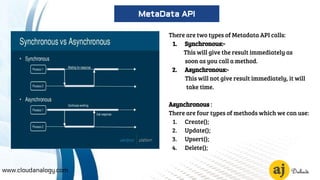
There are two types of Metadata API calls:
1. Synchronous:-
This will give the result immediately as
soon as you call a method.
2. Asynchronous:-
This will not give result immediately, it will
take time.
Asynchronous :
There are four types of methods which we can use:
1. Create();
2. Update();
3. Upsert();
4. Delete();
www.cloudanalogy.com
MetaData API
Synchronous :
There are four types of methods which we can use:
createMetadata(); saveResult[] = metadataConnection.createMetadata(Metadata[] metadata);
readMetadata();readResult=metadataConnection.readMetadata(stringmetadataType,string[]
fullNames);
updateMetadata(); saveResult[] = metadataConnection.updateMetadata(Metadata[] metadata);
upsertMetadata(); upsertResult[] = metadataConnection.upsertMetadata(Metadata[] metadata);
deleteMetadata(); seleteResult[] = metadataConnection.delete(string metadataType, string[] fullNames);
All these classes saveResult,readResult, upsertResult,deleteResult comes from a main class that is
MetadataService.cls in which all the relevant methods are present to function Read, Create, Update,
Upsert or Delete properly.
www.cloudanalogy.com
MetaData API
MetadataService is a class which have several methods and used in these methods.
So now if you want to create the object then you just have to call this method like this:
YourClassName.createObject();
Firstly you have to deploy these classes in your org. check this link for all the classes in
metadata sample and add them to your org
If you face some problem like : Remote site settings error. Then just create a remote site
setting in your org by typing remote site settings in setup and in Remote site URL paste
the link and click save.
As you call this method like for example in the Execute Anonymous section then it will
create an object named as Test.
www.cloudanalogy.com
MetaData API
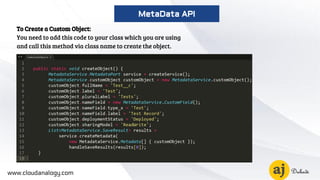
To Create a Custom Object:
You need to add this code to your class which you are using
and call this method via class name to create the object.
www.cloudanalogy.com
MetaData API
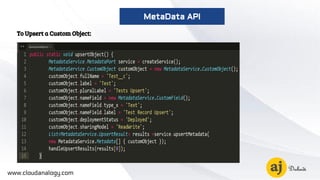
To Upsert a Custom Object:
www.cloudanalogy.com
MetaData API
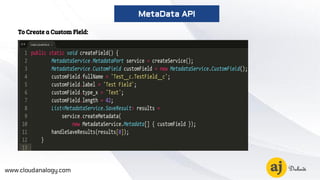
To Create a Custom Field:
www.cloudanalogy.com
MetaData API
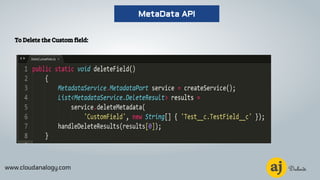
To Delete the Custom field:
www.cloudanalogy.com
MetaData API
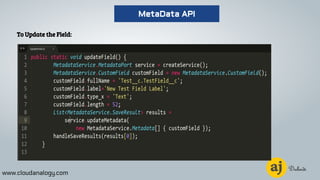
To Update the Field:
www.cloudanalogy.com
MetaData API
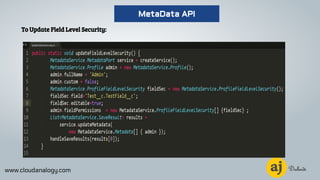
To Update Field Level Security:
www.cloudanalogy.com
MetaData API
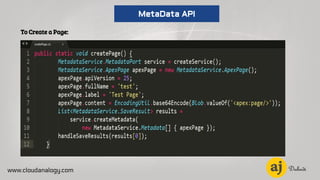
To Create a Page:
www.cloudanalogy.com
MetaData API
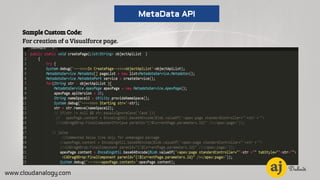
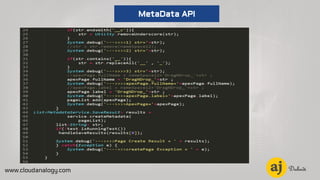
Sample Custom Code:
For creation of a Visualforce page.
www.cloudanalogy.com
MetaData API
www.cloudanalogy.com
MetaData API
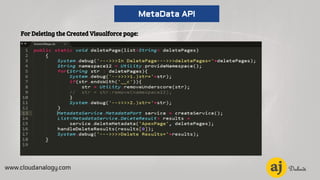
For Deleting the Created Visualforce page:
www.cloudanalogy.com
MetaData API
Ajay Dubedi
Salesforce Expert
www.cloudanalogy.com
+1 (415) 830-3899
hello@cloudanalogy.com ajay.dubedi

Metadata API

  • 1.
  • 2.
    www.cloudanalogy.com First you needto understand data. What is data in context with Salesforce. Data is anything which is stored in a database like records related to Contacts, Accounts, Leads Opportunity etc. Metadata: Metadata can be defined as the set of data about another data. i.e., Configuration/Code/Logic of the underlying structure which is used to store the data (Records). Another definition is you can say the database structure in which you will be saving the data. MetaData API
  • 3.
    Metadata Api forSalesforce can do several things programmatically.You can read, create, update, delete following components in a Salesforce organization. 1. Custom Objects/Fields. 2. Visualforce pages. 3. Page Layouts. 4. Validation rules. 5. Apex. 6. Workflows. 7. Approval processes. 8. Profiles. 9. Reports etc. 10. Security. www.cloudanalogy.com MetaData API
  • 4.
    You can configurea Salesforce organization just by running a piece of code. In contrast to this I meant to say that you can create Objects,Fields,Validation,Workflows, Profiles, Reports for a particular client organization just by running the piece of code so that you need not do all the customisation settings manually which will consume time if you have to do that several times for different clients for the same configuration settings. You can also take the backup of your organization customisation settings just by fetching the metadata WSDL from your Salesforce org. For this You need to click setup>type API-Click on API >Click Generate metadata WSDL and download the xml file. www.cloudanalogy.com MetaData API
  • 5.
    There are twotypes of Metadata API calls: 1. Synchronous:- This will give the result immediately as soon as you call a method. 2. Asynchronous:- This will not give result immediately, it will take time. Asynchronous : There are four types of methods which we can use: 1. Create(); 2. Update(); 3. Upsert(); 4. Delete(); www.cloudanalogy.com MetaData API
  • 6.
    Synchronous : There arefour types of methods which we can use: createMetadata(); saveResult[] = metadataConnection.createMetadata(Metadata[] metadata); readMetadata();readResult=metadataConnection.readMetadata(stringmetadataType,string[] fullNames); updateMetadata(); saveResult[] = metadataConnection.updateMetadata(Metadata[] metadata); upsertMetadata(); upsertResult[] = metadataConnection.upsertMetadata(Metadata[] metadata); deleteMetadata(); seleteResult[] = metadataConnection.delete(string metadataType, string[] fullNames); All these classes saveResult,readResult, upsertResult,deleteResult comes from a main class that is MetadataService.cls in which all the relevant methods are present to function Read, Create, Update, Upsert or Delete properly. www.cloudanalogy.com MetaData API
  • 7.
    MetadataService is aclass which have several methods and used in these methods. So now if you want to create the object then you just have to call this method like this: YourClassName.createObject(); Firstly you have to deploy these classes in your org. check this link for all the classes in metadata sample and add them to your org If you face some problem like : Remote site settings error. Then just create a remote site setting in your org by typing remote site settings in setup and in Remote site URL paste the link and click save. As you call this method like for example in the Execute Anonymous section then it will create an object named as Test. www.cloudanalogy.com MetaData API
  • 8.
    To Create aCustom Object: You need to add this code to your class which you are using and call this method via class name to create the object. www.cloudanalogy.com MetaData API
  • 9.
    To Upsert aCustom Object: www.cloudanalogy.com MetaData API
  • 10.
    To Create aCustom Field: www.cloudanalogy.com MetaData API
  • 11.
    To Delete theCustom field: www.cloudanalogy.com MetaData API
  • 12.
    To Update theField: www.cloudanalogy.com MetaData API
  • 13.
    To Update FieldLevel Security: www.cloudanalogy.com MetaData API
  • 14.
    To Create aPage: www.cloudanalogy.com MetaData API
  • 15.
    Sample Custom Code: Forcreation of a Visualforce page. www.cloudanalogy.com MetaData API
  • 16.
  • 17.
    For Deleting theCreated Visualforce page: www.cloudanalogy.com MetaData API
  • 18.
    Ajay Dubedi Salesforce Expert www.cloudanalogy.com +1(415) 830-3899 hello@cloudanalogy.com ajay.dubedi