Mulesoft Salesforce Connector
using Data Sense , Message
Enricher
Updating a salesforce object
Use Case- Accept json in HTTP end point and
update corresponding salesforce object.
What we will learn:-
1):- Using HTTP connector and adding
metadata.
2):- Converting JSON to a format which
salesforce can accept.
3):- Message Enricher and using Data Sense.
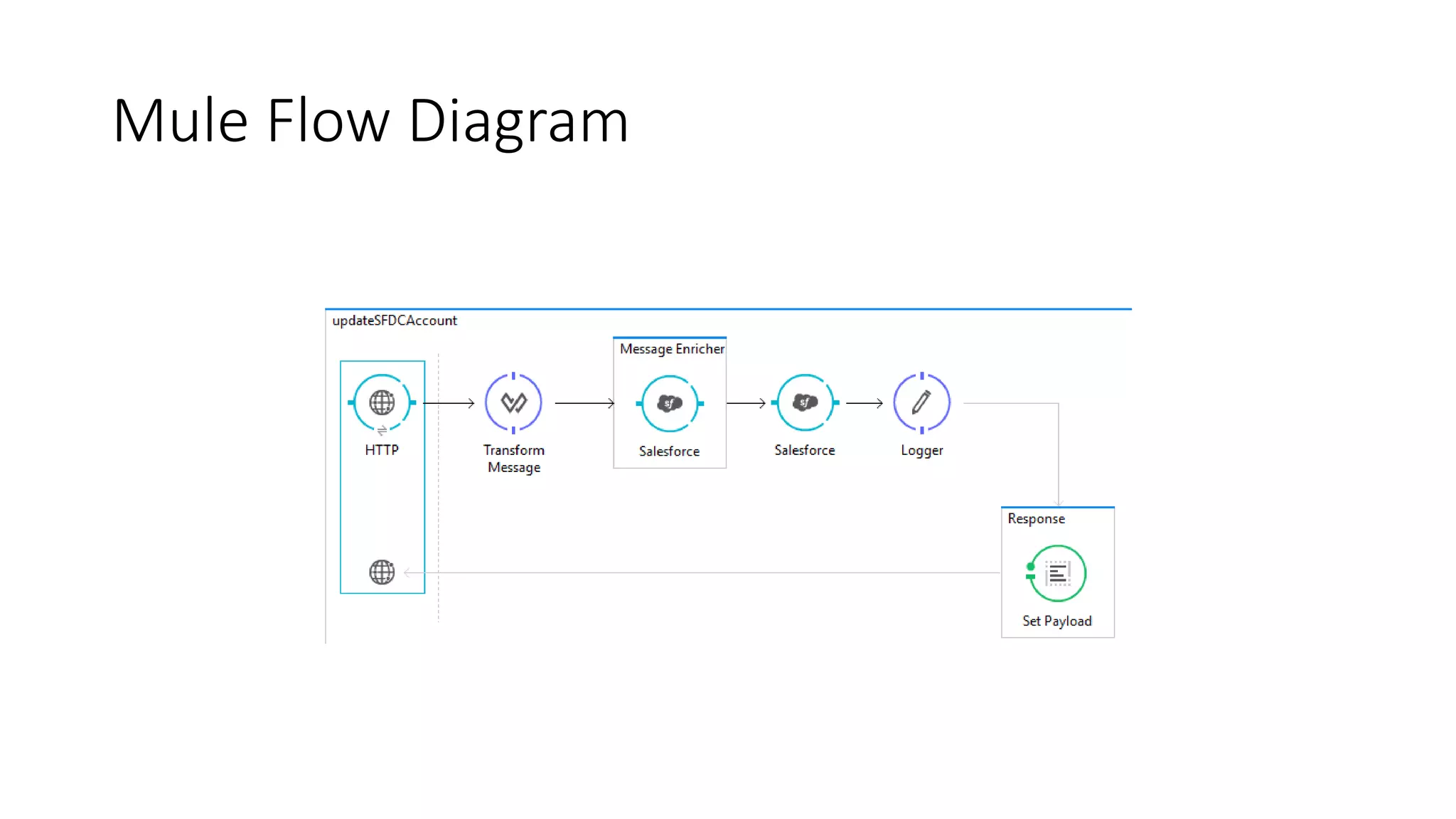
Mule Flow Diagram
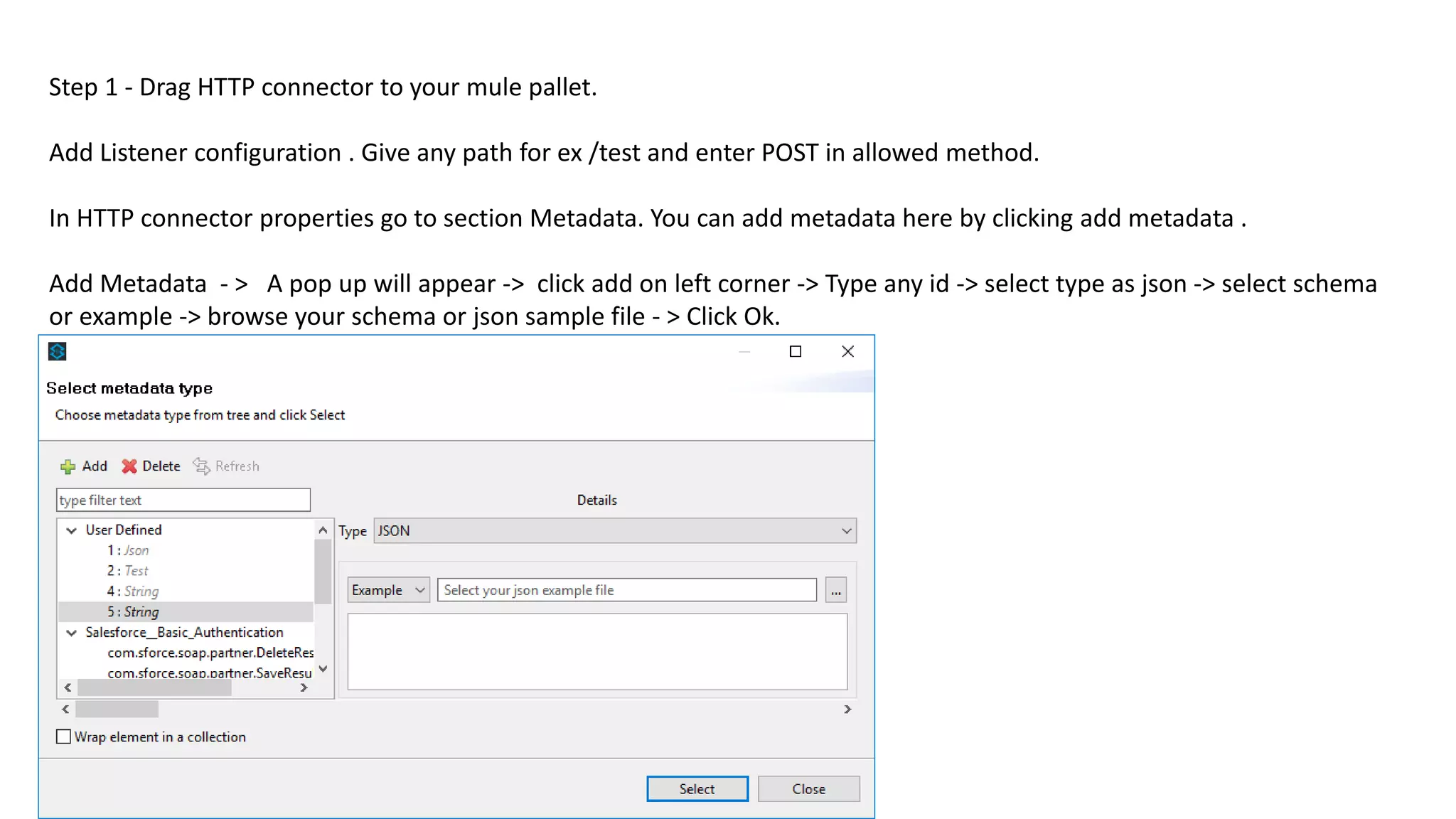
Step 1 - Drag HTTP connector to your mule pallet.
Add Listener configuration . Give any path for ex /test and enter POST in allowed method.
In HTTP connector properties go to section Metadata. You can add metadata here by clicking add metadata .
Add Metadata - > A pop up will appear -> click add on left corner -> Type any id -> select type as json -> select schema
or example -> browse your schema or json sample file - > Click Ok.
Following is example JSON which we have to send for update an existing contact record
having last name “Pandey” in salesforce and we have to update department from IT to
training.
{
"id": "",
"name": “Pandey",
"department":“training"
}
Step 2-To update a salesforce object we need id of that object. We can update only if we
have id with us. So before updating we need Id of contact object . Now drag salesforce
connector to pallet and add connector configuration detail with basic authentication.
Select Operation as Update and sObject Type is contact.
As you select object as Contact Data Sense get all metadata for Contact object of salesforce
for you and this will help to transform your JSON to a format which salesforce can accept.
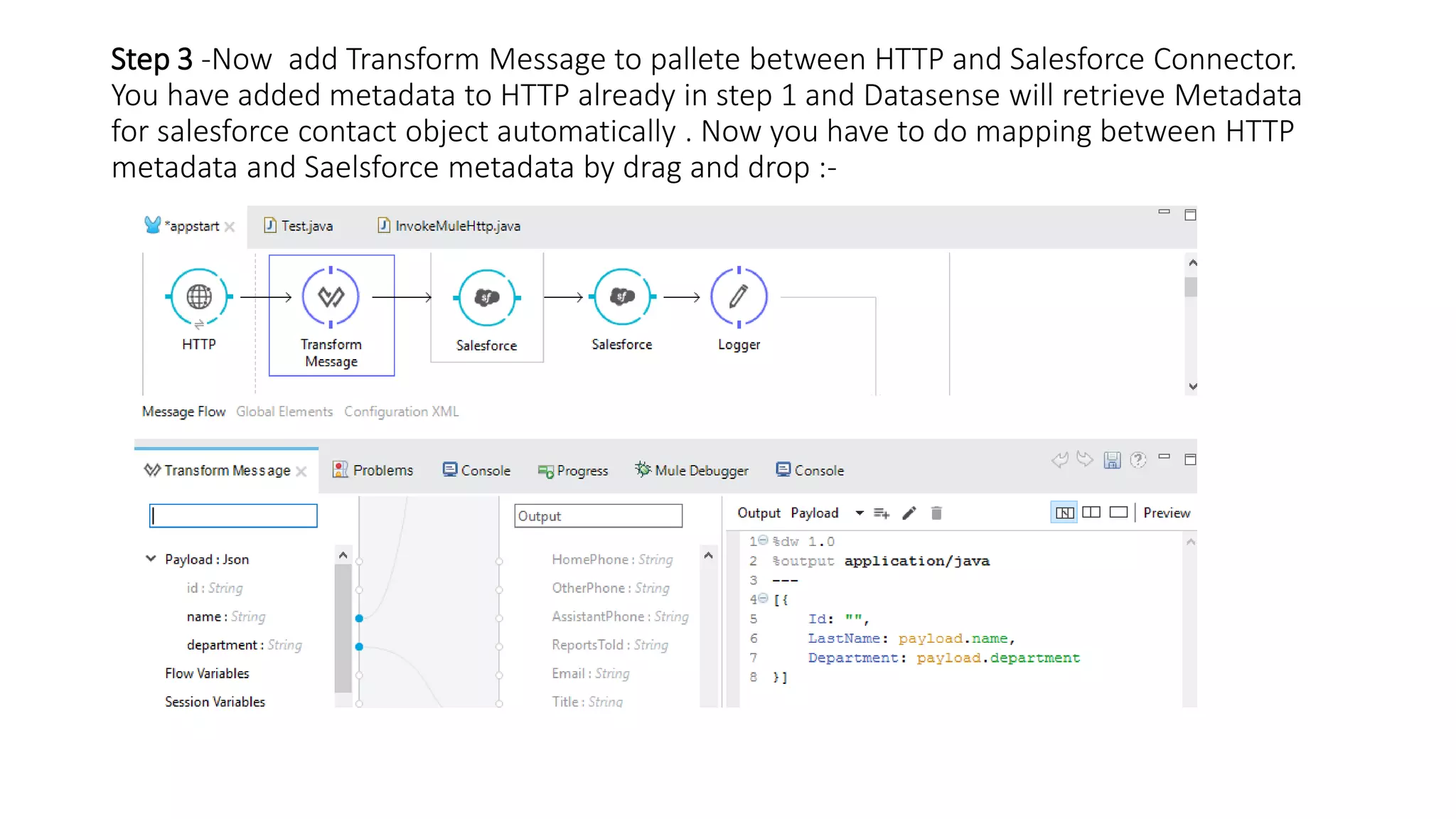
Step 3 -Now add Transform Message to pallete between HTTP and Salesforce Connector.
You have added metadata to HTTP already in step 1 and Datasense will retrieve Metadata
for salesforce contact object automatically . Now you have to do mapping between HTTP
metadata and Saelsforce metadata by drag and drop :-
• Step 4- Now add a Message Enricher to your pallet and drag salesforce connector inside
Message Enricher. We need Id of contact.Select salesforce connector and change operation to
query and language Data Sense query language and write following query :-
SELECT Id FROM Contact WHERE LastName = '#[payload.get(0).get("LastName")]'
Initially when we used salesforce connector we used operation as update and selected sObjectType
as Contact. We did that to get metadata for contact object so that transform message can be used
graphically to do transformation .
We have to use Message Enricher because we do not want to change payload which we
transformed using Transform Message but we want Id of contact to update Contact object.
In Message enricher we can add source and target . Source is from where data will be retrieved and
target is where this data will be set. We can add multiple source and target as well
Message Enricher limitation is that it can not enrich payload .
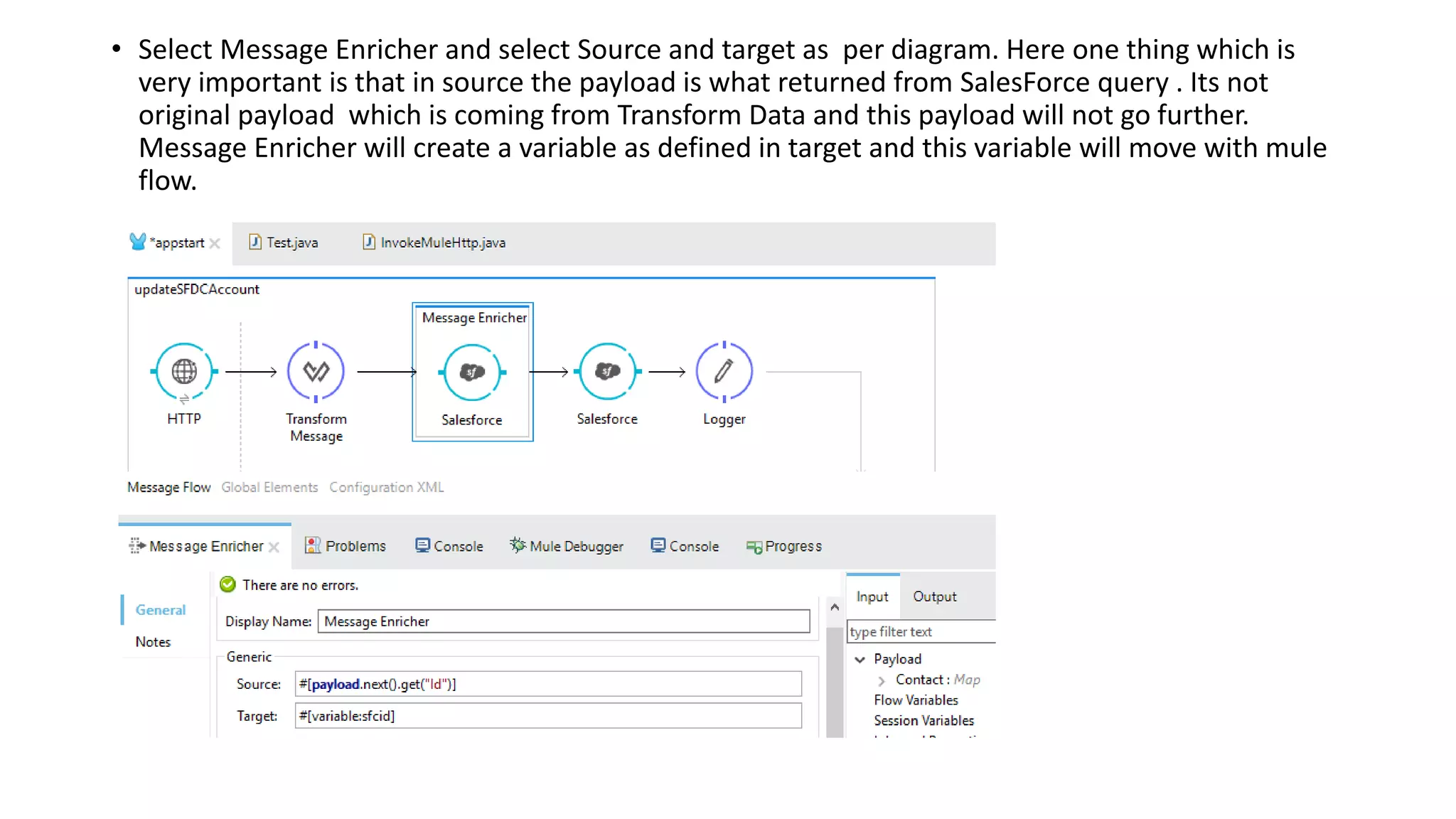
• Select Message Enricher and select Source and target as per diagram. Here one thing which is
very important is that in source the payload is what returned from SalesForce query . Its not
original payload which is coming from Transform Data and this payload will not go further.
Message Enricher will create a variable as defined in target and this variable will move with mule
flow.
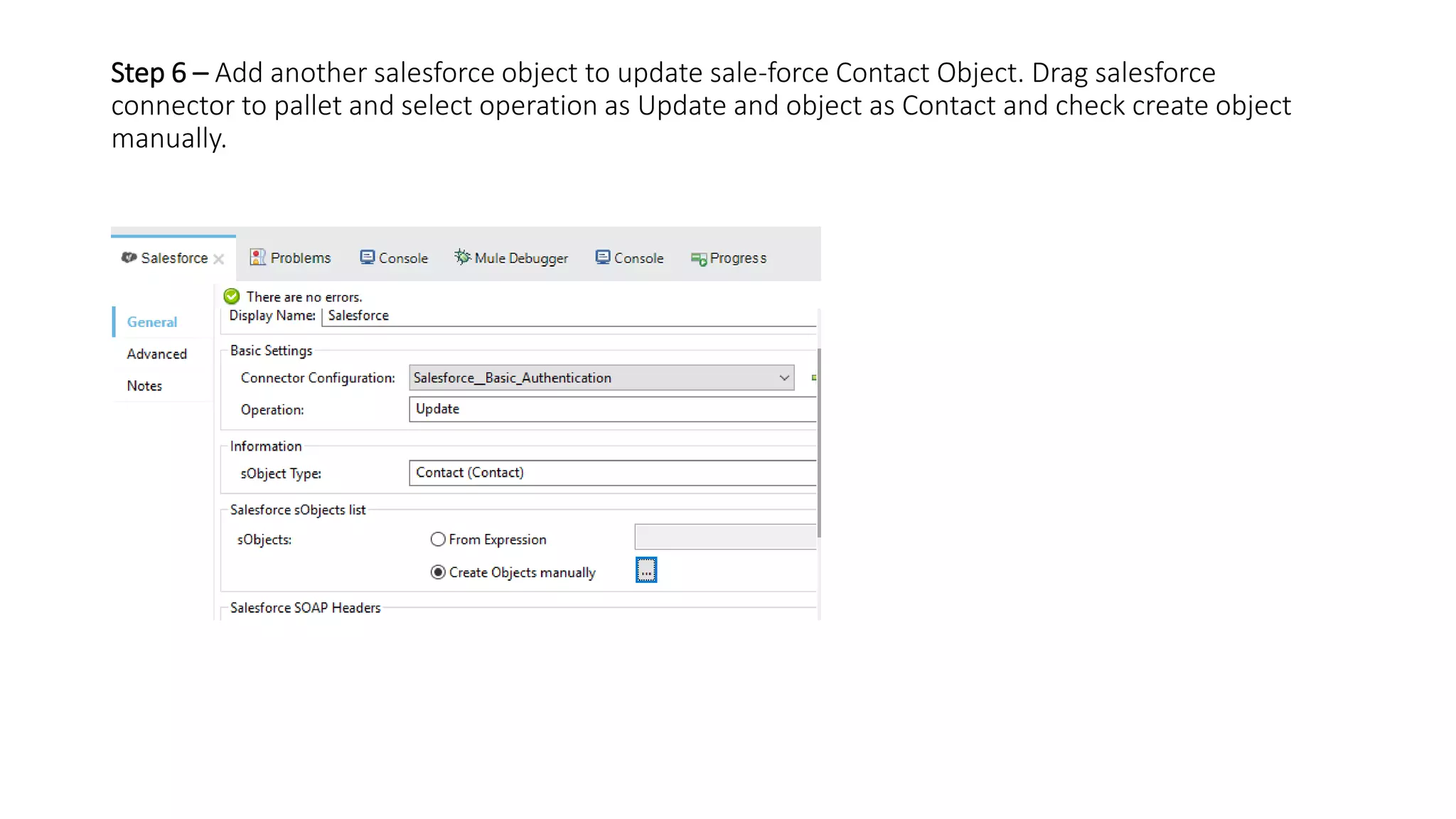
Step 6 – Add another salesforce object to update sale-force Contact Object. Drag salesforce
connector to pallet and select operation as Update and object as Contact and check create object
manually.
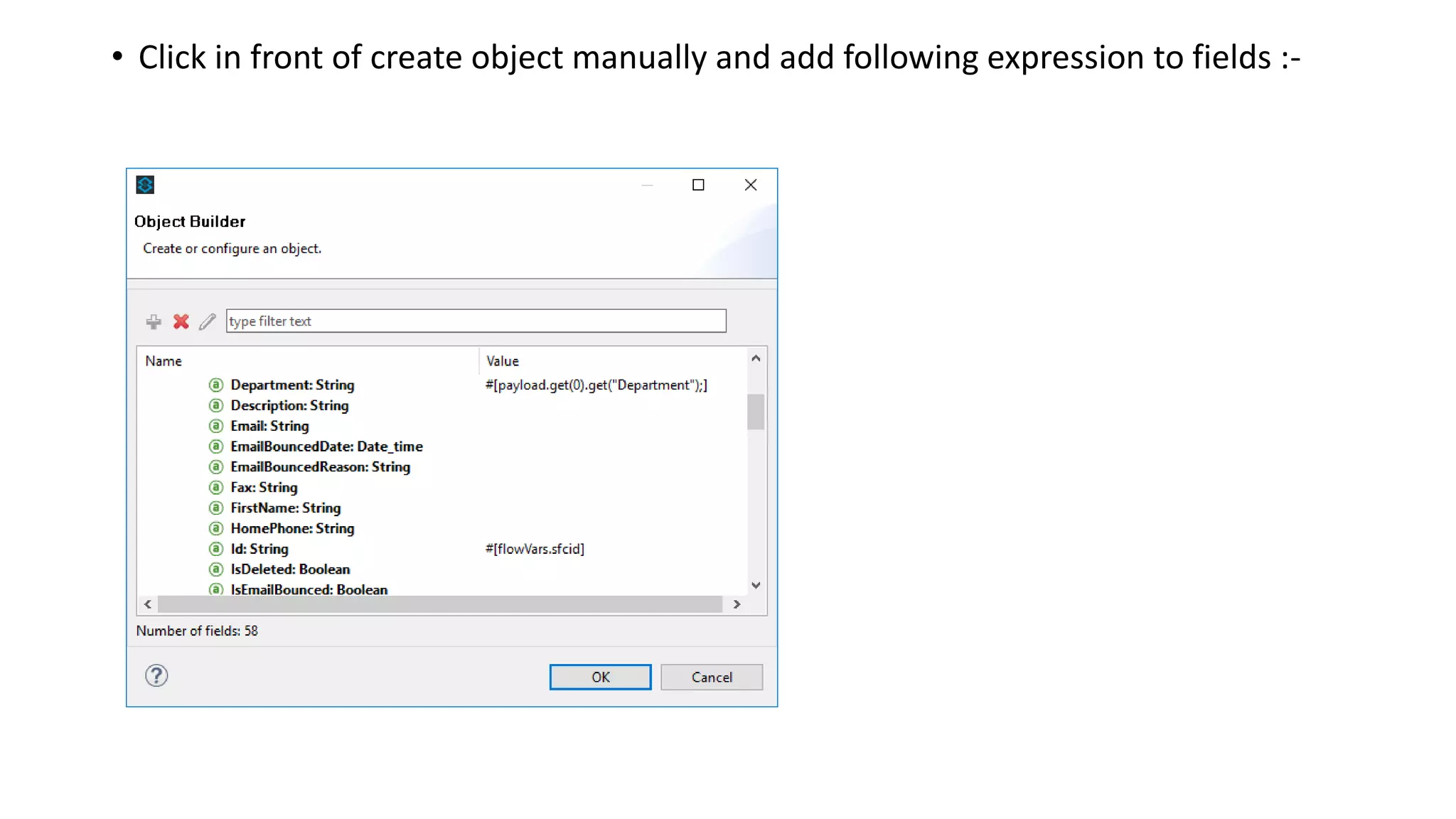
• Click in front of create object manually and add following expression to fields :-
• At end of flow add set Payload and set Payload to ‘success’. Before making call to flow make sure
you have record with Last Name which you are going to send in body of POST request. Now use
any tool like postman.
http://localhost:8081/json
And data for POST request is :-
{
"id": "1",
"name": "Pandey",
"department": "training"
}
Press Send and if everything works fine , check your salesforce object.
Thanks
Yogesh Chandr
Question? -> Email - reachtoyogesh@gmail.com

Mulesoft salesforce connector to update Object.

  • 1.
    Mulesoft Salesforce Connector usingData Sense , Message Enricher Updating a salesforce object
  • 2.
    Use Case- Acceptjson in HTTP end point and update corresponding salesforce object. What we will learn:- 1):- Using HTTP connector and adding metadata. 2):- Converting JSON to a format which salesforce can accept. 3):- Message Enricher and using Data Sense.
  • 3.
  • 4.
    Step 1 -Drag HTTP connector to your mule pallet. Add Listener configuration . Give any path for ex /test and enter POST in allowed method. In HTTP connector properties go to section Metadata. You can add metadata here by clicking add metadata . Add Metadata - > A pop up will appear -> click add on left corner -> Type any id -> select type as json -> select schema or example -> browse your schema or json sample file - > Click Ok.
  • 5.
    Following is exampleJSON which we have to send for update an existing contact record having last name “Pandey” in salesforce and we have to update department from IT to training. { "id": "", "name": “Pandey", "department":“training" } Step 2-To update a salesforce object we need id of that object. We can update only if we have id with us. So before updating we need Id of contact object . Now drag salesforce connector to pallet and add connector configuration detail with basic authentication. Select Operation as Update and sObject Type is contact. As you select object as Contact Data Sense get all metadata for Contact object of salesforce for you and this will help to transform your JSON to a format which salesforce can accept.
  • 6.
    Step 3 -Nowadd Transform Message to pallete between HTTP and Salesforce Connector. You have added metadata to HTTP already in step 1 and Datasense will retrieve Metadata for salesforce contact object automatically . Now you have to do mapping between HTTP metadata and Saelsforce metadata by drag and drop :-
  • 7.
    • Step 4-Now add a Message Enricher to your pallet and drag salesforce connector inside Message Enricher. We need Id of contact.Select salesforce connector and change operation to query and language Data Sense query language and write following query :- SELECT Id FROM Contact WHERE LastName = '#[payload.get(0).get("LastName")]' Initially when we used salesforce connector we used operation as update and selected sObjectType as Contact. We did that to get metadata for contact object so that transform message can be used graphically to do transformation . We have to use Message Enricher because we do not want to change payload which we transformed using Transform Message but we want Id of contact to update Contact object. In Message enricher we can add source and target . Source is from where data will be retrieved and target is where this data will be set. We can add multiple source and target as well Message Enricher limitation is that it can not enrich payload .
  • 8.
    • Select MessageEnricher and select Source and target as per diagram. Here one thing which is very important is that in source the payload is what returned from SalesForce query . Its not original payload which is coming from Transform Data and this payload will not go further. Message Enricher will create a variable as defined in target and this variable will move with mule flow.
  • 9.
    Step 6 –Add another salesforce object to update sale-force Contact Object. Drag salesforce connector to pallet and select operation as Update and object as Contact and check create object manually.
  • 10.
    • Click infront of create object manually and add following expression to fields :-
  • 11.
    • At endof flow add set Payload and set Payload to ‘success’. Before making call to flow make sure you have record with Last Name which you are going to send in body of POST request. Now use any tool like postman. http://localhost:8081/json And data for POST request is :- { "id": "1", "name": "Pandey", "department": "training" } Press Send and if everything works fine , check your salesforce object. Thanks Yogesh Chandr Question? -> Email - reachtoyogesh@gmail.com