PLAY WITH FORCE.COM
METADATA
How to use Force.com Metadata Soap API as a Rest Call in Apex
Presentation by :
Rakesh Kumar Kedia
(Sr. Developer/Consultant at SimplionTechnologies)
WHY AM I HERE ?
 Do not want to download and consume soap based metadata apiWSDL in your
development org.
 Re-consuming process is tough onWSDL version upgrade’s by force.com
 I want metadata CRUD-Based development in managed package but do not want
to include these WSDL classes in my package.
 Less efforts to changing the version of metadataAPI’s in Rest Based Callout.
 Just create a soap envelop to perform CRUD–Operation like creating a custom
object with custom field and make a rest callout.
AGENDA
 What is Force.com Metadata
 What is Force.com Metadata API
 What is Soap vs Rest based service
 Accessing metadata through Metadata API
 Create Custom Object Example
 Demo
WHAT IS FORCE.COM METADATA
 Metadata is the heart of the Force.com platform.
 The Force.com IDE, Force.com MigrationTool and the browser-based user
interface that we use to add records in our Force.com applications are all powered
by metadata.
 Metadata Configuration describes the complete application design and Shapes the
functionality of your specific applications
 Metadata controls the logic and presentation of your applications.
WHAT IS FORCE.COM METADATA API
 Programmable interface to access Salesforce Metadata
 Allows you to create/update Metadata components
 Supported from all modern languages like .Net, Java, PHP
 Allows you to get/update XML version of an Org
 SOAP based API
 Supports both Synchronous and Asynchronous invocation
WHAT IS SOAPVS REST BASED SERVICE
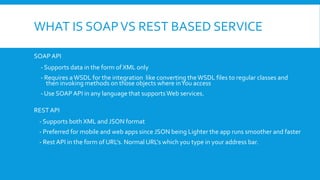
SOAP API
- Supports data in the form of XML only
- Requires aWSDL for the integration like converting theWSDL files to regular classes and
then invoking methods on those objects where inYou access
- Use SOAP API in any language that supportsWeb services.
REST API
- Supports both XML and JSON format
- Preferred for mobile and web apps since JSON being Lighter the app runs smoother and faster
- Rest API in the form of URL's. Normal URL's which you type in your address bar.
ACCESSING METADATATHROUGH
METADATA API
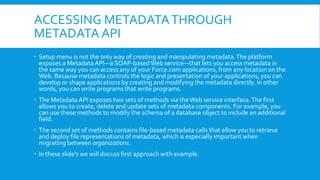
 Setup menu is not the only way of creating and manipulating metadata.The platform
exposes a Metadata API—a SOAP-basedWeb service—that lets you access metadata in
the same way you can access any of your Force.com applications, from any location on the
Web. Because metadata controls the logic and presentation of your applications, you can
develop or shape applications by creating and modifying the metadata directly. In other
words, you can write programs that write programs.
 The Metadata API exposes two sets of methods via theWeb service interface.The first
allows you to create, delete and update sets of metadata components. For example, you
can use these methods to modify the schema of a database object to include an additional
field.
 The second set of methods contains file-based metadata calls that allow you to retrieve
and deploy file representations of metadata, which is especially important when
migrating between organizations.
 In these slide’s we will discuss first approach with example.
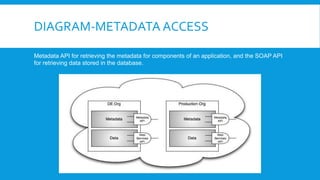
DIAGRAM-METADATA ACCESS
Metadata API for retrieving the metadata for components of an application, and the SOAP API
for retrieving data stored in the database.
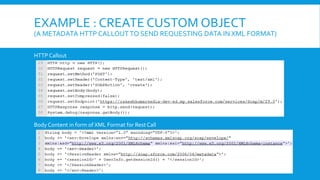
EXAMPLE : CREATE CUSTOM OBJECT
(A METADATA HTTP CALLOUTTO SEND REQUESTING DATA IN XML FORMAT)
HTTP Callout
Body Content in form of XML Format for Rest Call
EXAMPLE : CREATE CUSTOM OBJECT
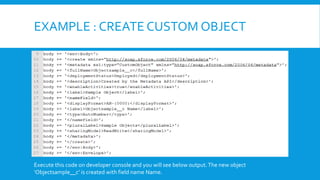
Execute this code on developer console and you will see below output.The new object
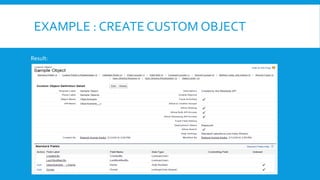
‘Objectsample__c’ is created with field name Name.
EXAMPLE : CREATE CUSTOM OBJECT
Result:
DEMO
 Create and Update ‘remote site settings’ dynamically using MetadataAPI Soap
Based Rest Callout
 Create and Update ‘custom object’ dynamically using Metadata API Soap Based
Rest Callout.
 Create and Update ‘custom fields’ dynamically using MetadataAPI Soap Based
Rest Callout
 *Note - In API version 30.0 and later, when deploying a new custom field, the field
editable/readable visibility is set false by default.To set it true you will need to
make a callout to set profile based field access permission on create ‘Custom
Fields’ .
THANKYOU !!
:Contact:
Rakesh Kumar Kedia
(rakeshkedia1983@gmail.com)

Play with force.com metadata

  • 1.
    PLAY WITH FORCE.COM METADATA Howto use Force.com Metadata Soap API as a Rest Call in Apex Presentation by : Rakesh Kumar Kedia (Sr. Developer/Consultant at SimplionTechnologies)
  • 2.
    WHY AM IHERE ?  Do not want to download and consume soap based metadata apiWSDL in your development org.  Re-consuming process is tough onWSDL version upgrade’s by force.com  I want metadata CRUD-Based development in managed package but do not want to include these WSDL classes in my package.  Less efforts to changing the version of metadataAPI’s in Rest Based Callout.  Just create a soap envelop to perform CRUD–Operation like creating a custom object with custom field and make a rest callout.
  • 3.
    AGENDA  What isForce.com Metadata  What is Force.com Metadata API  What is Soap vs Rest based service  Accessing metadata through Metadata API  Create Custom Object Example  Demo
  • 4.
    WHAT IS FORCE.COMMETADATA  Metadata is the heart of the Force.com platform.  The Force.com IDE, Force.com MigrationTool and the browser-based user interface that we use to add records in our Force.com applications are all powered by metadata.  Metadata Configuration describes the complete application design and Shapes the functionality of your specific applications  Metadata controls the logic and presentation of your applications.
  • 5.
    WHAT IS FORCE.COMMETADATA API  Programmable interface to access Salesforce Metadata  Allows you to create/update Metadata components  Supported from all modern languages like .Net, Java, PHP  Allows you to get/update XML version of an Org  SOAP based API  Supports both Synchronous and Asynchronous invocation
  • 6.
    WHAT IS SOAPVSREST BASED SERVICE SOAP API - Supports data in the form of XML only - Requires aWSDL for the integration like converting theWSDL files to regular classes and then invoking methods on those objects where inYou access - Use SOAP API in any language that supportsWeb services. REST API - Supports both XML and JSON format - Preferred for mobile and web apps since JSON being Lighter the app runs smoother and faster - Rest API in the form of URL's. Normal URL's which you type in your address bar.
  • 7.
    ACCESSING METADATATHROUGH METADATA API Setup menu is not the only way of creating and manipulating metadata.The platform exposes a Metadata API—a SOAP-basedWeb service—that lets you access metadata in the same way you can access any of your Force.com applications, from any location on the Web. Because metadata controls the logic and presentation of your applications, you can develop or shape applications by creating and modifying the metadata directly. In other words, you can write programs that write programs.  The Metadata API exposes two sets of methods via theWeb service interface.The first allows you to create, delete and update sets of metadata components. For example, you can use these methods to modify the schema of a database object to include an additional field.  The second set of methods contains file-based metadata calls that allow you to retrieve and deploy file representations of metadata, which is especially important when migrating between organizations.  In these slide’s we will discuss first approach with example.
  • 8.
    DIAGRAM-METADATA ACCESS Metadata APIfor retrieving the metadata for components of an application, and the SOAP API for retrieving data stored in the database.
  • 9.
    EXAMPLE : CREATECUSTOM OBJECT (A METADATA HTTP CALLOUTTO SEND REQUESTING DATA IN XML FORMAT) HTTP Callout Body Content in form of XML Format for Rest Call
  • 10.
    EXAMPLE : CREATECUSTOM OBJECT Execute this code on developer console and you will see below output.The new object ‘Objectsample__c’ is created with field name Name.
  • 11.
    EXAMPLE : CREATECUSTOM OBJECT Result:
  • 12.
    DEMO  Create andUpdate ‘remote site settings’ dynamically using MetadataAPI Soap Based Rest Callout  Create and Update ‘custom object’ dynamically using Metadata API Soap Based Rest Callout.  Create and Update ‘custom fields’ dynamically using MetadataAPI Soap Based Rest Callout  *Note - In API version 30.0 and later, when deploying a new custom field, the field editable/readable visibility is set false by default.To set it true you will need to make a callout to set profile based field access permission on create ‘Custom Fields’ .
  • 13.
    THANKYOU !! :Contact: Rakesh KumarKedia (rakeshkedia1983@gmail.com)