Nashville Salesforce Developer
User Group
February 27, 2020
Tour of Salesforce APIs
lydon.bergin@cgi.com
@lydonbergin
Lydon Bergin
Director Consulting Expert
This presentation may contain forward-looking statements that involve risks, uncertainties, and assumptions. If any such uncertainties materialize or if any of the
assumptions proves incorrect, the results of salesforce.com, inc. could differ materially from the results expressed or implied by the forward-looking statements we
make. All statements other than statements of historical fact could be deemed forward-looking, including any projections of product or service availability, subscriber
growth, earnings, revenues, or other financial items and any statements regarding strategies or plans of management for future operations, statements of belief, any
statements concerning new, planned, or upgraded services or technology developments and customer contracts or use of our services.
The risks and uncertainties referred to above include – but are not limited to – risks associated with developing and delivering new functionality for our service, new
products and services, our new business model, our past operating losses, possible fluctuations in our operating results and rate of growth, interruptions or delays in
our Web hosting, breach of our security measures, the outcome of any litigation, risks associated with completed and any possible mergers and acquisitions, the
immature market in which we operate, our relatively limited operating history, our ability to expand, retain, and motivate our employees and manage our growth, new
releases of our service and successful customer deployment, our limited history reselling non-salesforce.com products, and utilization and selling to larger enterprise
customers. Further information on potential factors that could affect the financial results of salesforce.com, inc. is included in our annual report on Form 10-K for the
most recent fiscal year and in our quarterly report on Form 10-Q for the most recent fiscal quarter. These documents and others containing important disclosures
are available on the SEC Filings section of the Investor Information section of our Web site.
Any unreleased services or features referenced in this or other presentations, press releases or public statements are not currently available and may not be
delivered on time or at all. Customers who purchase our services should make the purchase decisions based upon features that are currently available.
Salesforce.com, inc. assumes no obligation and does not intend to update these forward-looking statements.
Forward-Looking Statement
Statement under the Private Securities Litigation Reform Act of 1995
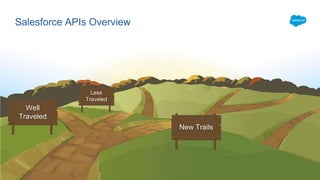
Salesforce APIs Overview
Well
Traveled
Less
Traveled
New Trails
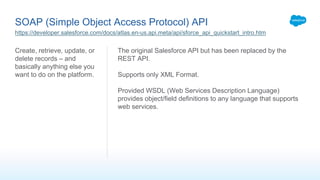
SOAP (Simple Object Access Protocol) API
Create, retrieve, update, or
delete records – and
basically anything else you
want to do on the platform.
The original Salesforce API but has been replaced by the
REST API.
Supports only XML Format.
Provided WSDL (Web Services Description Language)
provides object/field definitions to any language that supports
web services.
https://developer.salesforce.com/docs/atlas.en-us.api.meta/api/sforce_api_quickstart_intro.htm
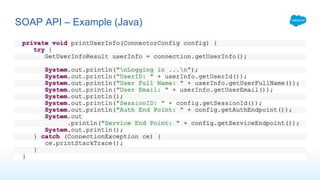
SOAP API – Example (Java)
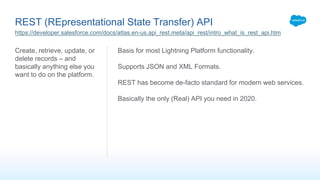
REST (REpresentational State Transfer) API
Create, retrieve, update, or
delete records – and
basically anything else you
want to do on the platform.
Basis for most Lightning Platform functionality.
Supports JSON and XML Formats.
REST has become de-facto standard for modern web services.
Basically the only (Real) API you need in 2020.
https://developer.salesforce.com/docs/atlas.en-us.api_rest.meta/api_rest/intro_what_is_rest_api.htm
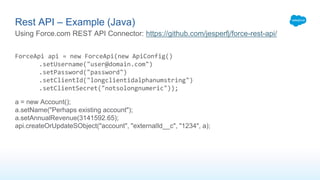
ForceApi api = new ForceApi(new ApiConfig()
.setUsername("user@domain.com")
.setPassword("password")
.setClientId("longclientidalphanumstring")
.setClientSecret("notsolongnumeric"));
a = new Account();
a.setName("Perhaps existing account");
a.setAnnualRevenue(3141592.65);
api.createOrUpdateSObject("account", "externalId__c", "1234", a);
Rest API – Example (Java)
Using Force.com REST API Connector: https://github.com/jesperfj/force-rest-api/
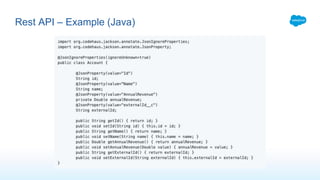
Rest API – Example (Java)
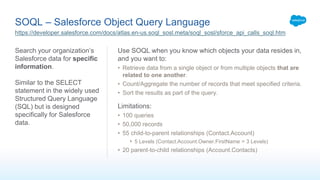
SOQL – Salesforce Object Query Language
Search your organization’s
Salesforce data for specific
information.
Similar to the SELECT
statement in the widely used
Structured Query Language
(SQL) but is designed
specifically for Salesforce
data.
Use SOQL when you know which objects your data resides in,
and you want to:
• Retrieve data from a single object or from multiple objects that are
related to one another.
• Count/Aggregate the number of records that meet specified criteria.
• Sort the results as part of the query.
Limitations:
• 100 queries
• 50,000 records
• 55 child-to-parent relationships (Contact.Account)
• 5 Levels (Contact.Account.Owner.FirstName = 3 Levels)
• 20 parent-to-child relationships (Account.Contacts)
https://developer.salesforce.com/docs/atlas.en-us.soql_sosl.meta/soql_sosl/sforce_api_calls_soql.htm
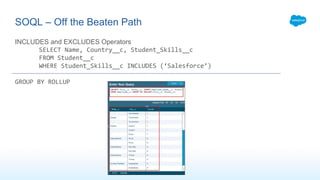
INCLUDES and EXCLUDES Operators
SELECT Name, Country__c, Student_Skills__c
FROM Student__c
WHERE Student_Skills__c INCLUDES (‘Salesforce’)
GROUP BY ROLLUP
SOQL – Off the Beaten Path
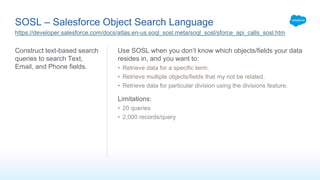
SOSL – Salesforce Object Search Language
Construct text-based search
queries to search Text,
Email, and Phone fields.
Use SOSL when you don’t know which objects/fields your data
resides in, and you want to:
• Retrieve data for a specific term.
• Retrieve multiple objects/fields that my not be related.
• Retrieve data for particular division using the divisions feature.
Limitations:
• 20 queries
• 2,000 records/query
https://developer.salesforce.com/docs/atlas.en-us.soql_sosl.meta/soql_sosl/sforce_api_calls_sosl.htm
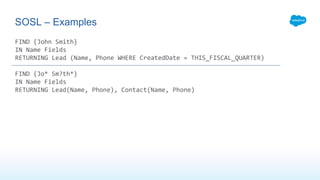
FIND {John Smith}
IN Name Fields
RETURNING Lead (Name, Phone WHERE CreatedDate = THIS_FISCAL_QUARTER)
FIND {Jo* Sm?th*}
IN Name Fields
RETURNING Lead(Name, Phone), Contact(Name, Phone)
SOSL – Examples
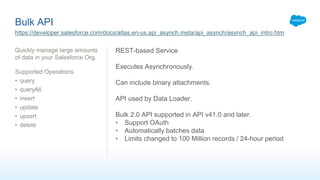
Bulk API
Quickly manage large amounts
of data in your Salesforce Org.
Supported Operations
• query
• queryAll
• insert
• update
• upsert
• delete
https://developer.salesforce.com/docs/atlas.en-us.api_asynch.meta/api_asynch/asynch_api_intro.htm
REST-based Service
Executes Asynchronously.
Can include binary attachments.
API used by Data Loader.
Bulk 2.0 API supported in API v41.0 and later.
• Support OAuth
• Automatically batches data
• Limits changed to 100 Million records / 24-hour period
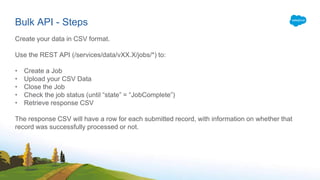
Bulk API - Steps
Create your data in CSV format.
Use the REST API (/services/data/vXX.X/jobs/*) to:
• Create a Job
• Upload your CSV Data
• Close the Job
• Check the job status (until “state” = “JobComplete”)
• Retrieve response CSV
The response CSV will have a row for each submitted record, with information on whether that
record was successfully processed or not.
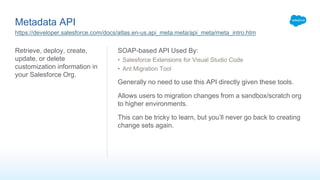
Metadata API
Retrieve, deploy, create,
update, or delete
customization information in
your Salesforce Org.
SOAP-based API Used By:
• Salesforce Extensions for Visual Studio Code
• Ant Migration Tool
Generally no need to use this API directly given these tools.
Allows users to migration changes from a sandbox/scratch org
to higher environments.
This can be tricky to learn, but you’ll never go back to creating
change sets again.
https://developer.salesforce.com/docs/atlas.en-us.api_meta.meta/api_meta/meta_intro.htm
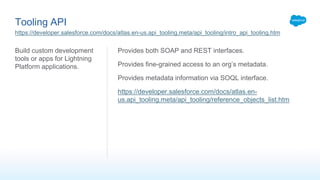
Tooling API
Build custom development
tools or apps for Lightning
Platform applications.
Provides both SOAP and REST interfaces.
Provides fine-grained access to an org’s metadata.
Provides metadata information via SOQL interface.
https://developer.salesforce.com/docs/atlas.en-
us.api_tooling.meta/api_tooling/reference_objects_list.htm
https://developer.salesforce.com/docs/atlas.en-us.api_tooling.meta/api_tooling/intro_api_tooling.htm
Streaming API
Enables streaming of events
using push technology and
provides a subscription
mechanism for receiving
events in near real time.
Subscribers can receive notifications using CometD, some
types of events support Apex triggers, Process Builder, and
Flow Builder.
Supported Events:
• PushTopic Event – Changes to records based on user-defined
SOQL Query
• Change Data Capture Event – Changes to records, event includes
all changed fields.
• Supports more standard objects than PushTopic and provides more
features
• Platform Events – Custom payloads with pre-defined schema
• Generic Events – Arbitrary payloads without defined schema
https://developer.salesforce.com/docs/atlas.en-us.api_streaming.meta/api_streaming/intro_stream.htm
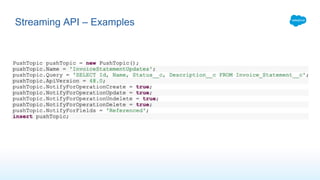
Streaming API – Examples
User Interface API
Build Salesforce UI for native
mobile apps and custom web
apps using the same API
that Salesforce uses to build
Lightning Experience and
Salesforce for Android, iOS,
and mobile web.
Allows developers to leverage the Salesforce platform for
external applications.
Calls to UI API automatically:
• Check FLS, Sharing Settings, Permissions
• Makes SOQL queries to get record data
• Gets object metadata and theme information
• Gets layout information
These calls return an easy-to-consume JSON response with all
metadata necessary to display the record.
Also supports Actions, Favorites, and List Views!
https://developer.salesforce.com/docs/atlas.en-us.uiapi.meta/uiapi/ui_api_get_started.htm
https://nashsfuiapi.herokuapp.com/
MetadataComponentDependency (Part of Tooling API)
Represents dependency
relationships between the
metadata components in
your org.
Available in API version 43.0
and later.
Currently in Beta.
Allows developers back-end access to the “Where is this
used?” feature.
Use SOQL to query for dependencies between basically any
components, i.e.:
• Apex Classes
• Page Layouts
• Objects
• Fields
• Reports
• Everything else
https://developer.salesforce.com/docs/atlas.en-us.api_tooling.meta/api_tooling/tooling_api_objects_metadatacomponentdependency.htm
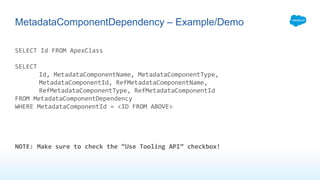
SELECT Id FROM ApexClass
SELECT
Id, MetadataComponentName, MetadataComponentType,
MetadataComponentId, RefMetadataComponentName,
RefMetadataComponentType, RefMetadataComponentId
FROM MetadataComponentDependency
WHERE MetadataComponentId = <ID FROM ABOVE>
NOTE: Make sure to check the “Use Tooling API” checkbox!
MetadataComponentDependency – Example/Demo
What we didn’t cover…
Yes, there’s more (and more)
• External Objects
• Canvas
• Data.com API
• Federated Search API
• Industries API
• IoT REST API
• Reports & Dashboards REST API
• Push Notification API
• Social Studio API
Salesforce APIs Overview
Questions?
Follow-
Ups?
Experiences?
February 2020 Salesforce API Review

February 2020 Salesforce API Review

  • 1.
    Nashville Salesforce Developer UserGroup February 27, 2020
  • 2.
    Tour of SalesforceAPIs lydon.bergin@cgi.com @lydonbergin Lydon Bergin Director Consulting Expert
  • 3.
    This presentation maycontain forward-looking statements that involve risks, uncertainties, and assumptions. If any such uncertainties materialize or if any of the assumptions proves incorrect, the results of salesforce.com, inc. could differ materially from the results expressed or implied by the forward-looking statements we make. All statements other than statements of historical fact could be deemed forward-looking, including any projections of product or service availability, subscriber growth, earnings, revenues, or other financial items and any statements regarding strategies or plans of management for future operations, statements of belief, any statements concerning new, planned, or upgraded services or technology developments and customer contracts or use of our services. The risks and uncertainties referred to above include – but are not limited to – risks associated with developing and delivering new functionality for our service, new products and services, our new business model, our past operating losses, possible fluctuations in our operating results and rate of growth, interruptions or delays in our Web hosting, breach of our security measures, the outcome of any litigation, risks associated with completed and any possible mergers and acquisitions, the immature market in which we operate, our relatively limited operating history, our ability to expand, retain, and motivate our employees and manage our growth, new releases of our service and successful customer deployment, our limited history reselling non-salesforce.com products, and utilization and selling to larger enterprise customers. Further information on potential factors that could affect the financial results of salesforce.com, inc. is included in our annual report on Form 10-K for the most recent fiscal year and in our quarterly report on Form 10-Q for the most recent fiscal quarter. These documents and others containing important disclosures are available on the SEC Filings section of the Investor Information section of our Web site. Any unreleased services or features referenced in this or other presentations, press releases or public statements are not currently available and may not be delivered on time or at all. Customers who purchase our services should make the purchase decisions based upon features that are currently available. Salesforce.com, inc. assumes no obligation and does not intend to update these forward-looking statements. Forward-Looking Statement Statement under the Private Securities Litigation Reform Act of 1995
  • 4.
  • 6.
    SOAP (Simple ObjectAccess Protocol) API Create, retrieve, update, or delete records – and basically anything else you want to do on the platform. The original Salesforce API but has been replaced by the REST API. Supports only XML Format. Provided WSDL (Web Services Description Language) provides object/field definitions to any language that supports web services. https://developer.salesforce.com/docs/atlas.en-us.api.meta/api/sforce_api_quickstart_intro.htm
  • 7.
    SOAP API –Example (Java)
  • 8.
    REST (REpresentational StateTransfer) API Create, retrieve, update, or delete records – and basically anything else you want to do on the platform. Basis for most Lightning Platform functionality. Supports JSON and XML Formats. REST has become de-facto standard for modern web services. Basically the only (Real) API you need in 2020. https://developer.salesforce.com/docs/atlas.en-us.api_rest.meta/api_rest/intro_what_is_rest_api.htm
  • 9.
    ForceApi api =new ForceApi(new ApiConfig() .setUsername("user@domain.com") .setPassword("password") .setClientId("longclientidalphanumstring") .setClientSecret("notsolongnumeric")); a = new Account(); a.setName("Perhaps existing account"); a.setAnnualRevenue(3141592.65); api.createOrUpdateSObject("account", "externalId__c", "1234", a); Rest API – Example (Java) Using Force.com REST API Connector: https://github.com/jesperfj/force-rest-api/
  • 10.
    Rest API –Example (Java)
  • 11.
    SOQL – SalesforceObject Query Language Search your organization’s Salesforce data for specific information. Similar to the SELECT statement in the widely used Structured Query Language (SQL) but is designed specifically for Salesforce data. Use SOQL when you know which objects your data resides in, and you want to: • Retrieve data from a single object or from multiple objects that are related to one another. • Count/Aggregate the number of records that meet specified criteria. • Sort the results as part of the query. Limitations: • 100 queries • 50,000 records • 55 child-to-parent relationships (Contact.Account) • 5 Levels (Contact.Account.Owner.FirstName = 3 Levels) • 20 parent-to-child relationships (Account.Contacts) https://developer.salesforce.com/docs/atlas.en-us.soql_sosl.meta/soql_sosl/sforce_api_calls_soql.htm
  • 12.
    INCLUDES and EXCLUDESOperators SELECT Name, Country__c, Student_Skills__c FROM Student__c WHERE Student_Skills__c INCLUDES (‘Salesforce’) GROUP BY ROLLUP SOQL – Off the Beaten Path
  • 13.
    SOSL – SalesforceObject Search Language Construct text-based search queries to search Text, Email, and Phone fields. Use SOSL when you don’t know which objects/fields your data resides in, and you want to: • Retrieve data for a specific term. • Retrieve multiple objects/fields that my not be related. • Retrieve data for particular division using the divisions feature. Limitations: • 20 queries • 2,000 records/query https://developer.salesforce.com/docs/atlas.en-us.soql_sosl.meta/soql_sosl/sforce_api_calls_sosl.htm
  • 14.
    FIND {John Smith} INName Fields RETURNING Lead (Name, Phone WHERE CreatedDate = THIS_FISCAL_QUARTER) FIND {Jo* Sm?th*} IN Name Fields RETURNING Lead(Name, Phone), Contact(Name, Phone) SOSL – Examples
  • 15.
    Bulk API Quickly managelarge amounts of data in your Salesforce Org. Supported Operations • query • queryAll • insert • update • upsert • delete https://developer.salesforce.com/docs/atlas.en-us.api_asynch.meta/api_asynch/asynch_api_intro.htm REST-based Service Executes Asynchronously. Can include binary attachments. API used by Data Loader. Bulk 2.0 API supported in API v41.0 and later. • Support OAuth • Automatically batches data • Limits changed to 100 Million records / 24-hour period
  • 16.
    Bulk API -Steps Create your data in CSV format. Use the REST API (/services/data/vXX.X/jobs/*) to: • Create a Job • Upload your CSV Data • Close the Job • Check the job status (until “state” = “JobComplete”) • Retrieve response CSV The response CSV will have a row for each submitted record, with information on whether that record was successfully processed or not.
  • 18.
    Metadata API Retrieve, deploy,create, update, or delete customization information in your Salesforce Org. SOAP-based API Used By: • Salesforce Extensions for Visual Studio Code • Ant Migration Tool Generally no need to use this API directly given these tools. Allows users to migration changes from a sandbox/scratch org to higher environments. This can be tricky to learn, but you’ll never go back to creating change sets again. https://developer.salesforce.com/docs/atlas.en-us.api_meta.meta/api_meta/meta_intro.htm
  • 19.
    Tooling API Build customdevelopment tools or apps for Lightning Platform applications. Provides both SOAP and REST interfaces. Provides fine-grained access to an org’s metadata. Provides metadata information via SOQL interface. https://developer.salesforce.com/docs/atlas.en- us.api_tooling.meta/api_tooling/reference_objects_list.htm https://developer.salesforce.com/docs/atlas.en-us.api_tooling.meta/api_tooling/intro_api_tooling.htm
  • 20.
    Streaming API Enables streamingof events using push technology and provides a subscription mechanism for receiving events in near real time. Subscribers can receive notifications using CometD, some types of events support Apex triggers, Process Builder, and Flow Builder. Supported Events: • PushTopic Event – Changes to records based on user-defined SOQL Query • Change Data Capture Event – Changes to records, event includes all changed fields. • Supports more standard objects than PushTopic and provides more features • Platform Events – Custom payloads with pre-defined schema • Generic Events – Arbitrary payloads without defined schema https://developer.salesforce.com/docs/atlas.en-us.api_streaming.meta/api_streaming/intro_stream.htm
  • 21.
  • 23.
    User Interface API BuildSalesforce UI for native mobile apps and custom web apps using the same API that Salesforce uses to build Lightning Experience and Salesforce for Android, iOS, and mobile web. Allows developers to leverage the Salesforce platform for external applications. Calls to UI API automatically: • Check FLS, Sharing Settings, Permissions • Makes SOQL queries to get record data • Gets object metadata and theme information • Gets layout information These calls return an easy-to-consume JSON response with all metadata necessary to display the record. Also supports Actions, Favorites, and List Views! https://developer.salesforce.com/docs/atlas.en-us.uiapi.meta/uiapi/ui_api_get_started.htm https://nashsfuiapi.herokuapp.com/
  • 24.
    MetadataComponentDependency (Part ofTooling API) Represents dependency relationships between the metadata components in your org. Available in API version 43.0 and later. Currently in Beta. Allows developers back-end access to the “Where is this used?” feature. Use SOQL to query for dependencies between basically any components, i.e.: • Apex Classes • Page Layouts • Objects • Fields • Reports • Everything else https://developer.salesforce.com/docs/atlas.en-us.api_tooling.meta/api_tooling/tooling_api_objects_metadatacomponentdependency.htm
  • 25.
    SELECT Id FROMApexClass SELECT Id, MetadataComponentName, MetadataComponentType, MetadataComponentId, RefMetadataComponentName, RefMetadataComponentType, RefMetadataComponentId FROM MetadataComponentDependency WHERE MetadataComponentId = <ID FROM ABOVE> NOTE: Make sure to check the “Use Tooling API” checkbox! MetadataComponentDependency – Example/Demo
  • 26.
    What we didn’tcover… Yes, there’s more (and more) • External Objects • Canvas • Data.com API • Federated Search API • Industries API • IoT REST API • Reports & Dashboards REST API • Push Notification API • Social Studio API
  • 27.