



Analytics for Business
Goals
Agenda
 Why analytics skills are essential for marketing
  and technical professionals
 Types of data
 Define and Measure – Goals & Funnels
 Key Metrics to Measure
 The three most important questions
 How to Embarrass Your Boss (and Implement
  Analytics in Your Company)
Why Analytics Matters
 Measure whether the business
  goals were achieved
 Agile: Test, Sprint, Adjust
 Digital marketing make us
  more accountable and
  measurable
 Can’t throw money on
  campaigns that don’t drive
  revenue or ROI
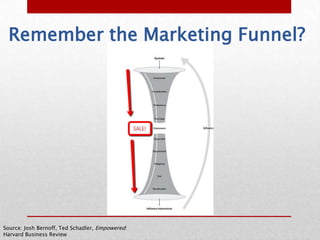
Remember the Marketing Funnel?


Source: Josh Bernoff, Ted Schadler, Empowered:
Harvard Business Review
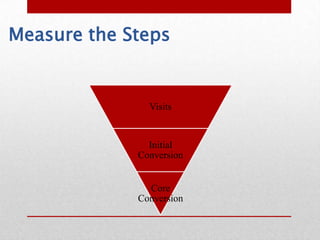
Measure the Steps


               Visits


               Initial
             Conversion


               Core
             Conversion
Take a Holistic Approach
Web Analytics 2.0 is:
    the analysis of qualitative and quantitative
data from your website & the competition
    to drive a continual improvement of the
online experience that your customers, and
potential customers have,
    which translates into your desired
outcomes (online and offline)

- Avinash Kaushik, Web Analytics 2.0: The Art of Online Accountability and Science of
Customer Centricity
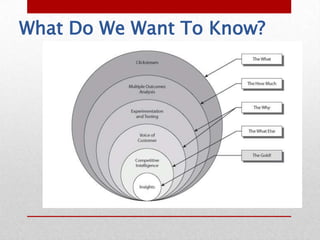
What Do We Want To Know?
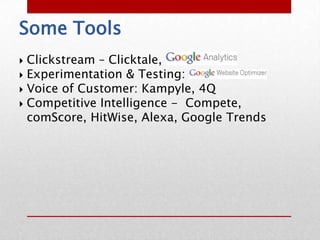
Some Tools
 Clickstream – Clicktale,
 Experimentation & Testing:
 Voice of Customer: Kampyle, 4Q
 Competitive Intelligence - Compete,
  comScore, HitWise, Alexa, Google Trends
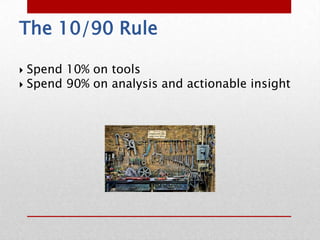
The 10/90 Rule

 Spend 10% on tools
 Spend 90% on analysis and actionable insight
What’s Your Goal?
A website exists to serve three types of
outcomes:
 1.Increase revenue
 2.Reduce cost
 3.Improve customer loyalty/satisfaction

          Measure Against These Outcomes
STOP MEASURING
TRAFFIC AND VISITORS
What NOT to measure
 Pageviews
 Visits
 Traffic Sources
 Likes
 Fans
 Followers
 +1s (sorry Google!)
What TO Measure
 Sales
 Downloads
    ◦ White Papers
    ◦ Software
    ◦ User Guides (yes, even PDFs)
 Registrations
 Leads


Business Goals & the Steps to Achieve them
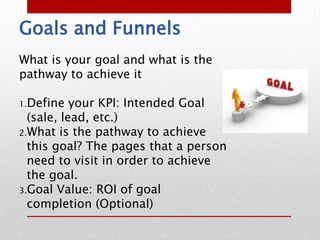
Goals and Funnels
What is your goal and what is the
pathway to achieve it

1.Define   your KPI: Intended Goal
  (sale, lead, etc.)
2.What is the pathway to achieve
  this goal? The pages that a person
  need to visit in order to achieve
  the goal.
3.Goal Value: ROI of goal
  completion (Optional)
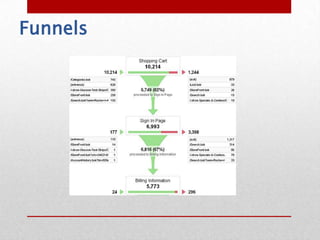
Funnels
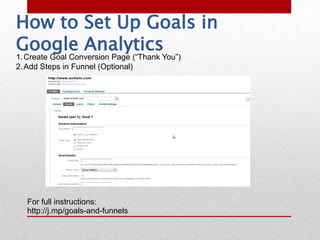
How to Set Up Goals in
Google Analytics
1. Create Goal Conversion Page (“Thank You”)
2. Add Steps in Funnel (Optional)


  For full instructions:
  http://j.mp/goals-and-funnels
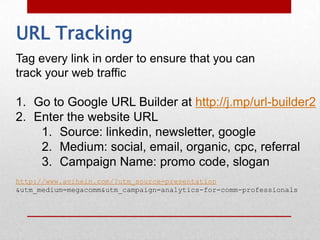
URL Tracking
Tag every link in order to ensure that you can
track your web traffic

1. Go to Google URL Builder at http://j.mp/url-builder2
2. Enter the website URL
    1. Source: linkedin, newsletter, google
    2. Medium: social, email, organic, cpc, referral
    3. Campaign Name: promo code, slogan
http://www.avihein.com/?utm_source=presentation
&utm_medium=megacomm&utm_campaign=analytics-for-comm-professionals
Case Study: Webinar
Goal: 300 Registrations for Webinar
Tactic: Identify which channels lead to more
registrations
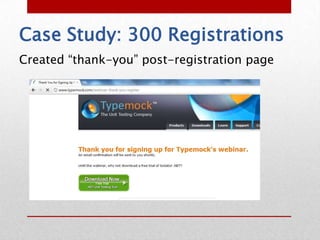
Case Study: 300 Registrations
Created “thank-you” post-registration page
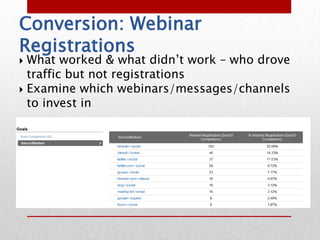
Conversion: Webinar
Registrations
 What worked & what didn’t work – who drove
  traffic but not registrations
 Examine which webinars/messages/channels
  to invest in
WHY?
   Why did 500 people come to my page but only
    5 download my white paper?
Qualitative
•   Many ways to answer “Why?”

•   Usability Studies: See how users complete
    a task
    • Test concepts
    • Verify comprehension

•   Surveys – Listen to the customers and
    generate immediate feedback
The 3 Most Important
Questions to Ask
   What is the purpose of your visit to our
    website?
    • They might not be there for the reason that you
      think.
   Were you able to complete the task?
    • Your opinion is irrelevant. So is your bosses. The
      only opinion that matters is your customer.
   If you were not able to complete the task, why
    not?
    • What can you change to raise your conversions?
How to Embarrass Your Boss
   Experiment and Test – Test two variations of a page
    and see which converts more
   Ask “Why?” - Capture Voice of Consumer on
    Underperforming Page
   Benchmark
   Competitive Analysis – Show How Much Better Your
    Competitor is Doing
   Run a Small Experiment with a Friendly Sub-site
   Hire a Consultant
Resources
• Avinash Kaushik, Web
  Analytics 2.0
  • Occam’s Razor,
    http://www.kaushik.net
• Daniel Weisberg
  • http://online-behavior.com/
  • http://conversionjourney.co
    m/
• Avi Hein
    • http://www.avihein.com
    • http://www.theclinegroup.com
About Avi
 Advisory Board, The Cline Group
 Global Marketing Manager, Typemock


 www.avihein.com
 avihein@gmail.com
Thank You!
www.avihein.com

Megacomm - Data Analytics for Business Results

  • 1.
  • 2.
    Agenda  Why analyticsskills are essential for marketing and technical professionals  Types of data  Define and Measure – Goals & Funnels  Key Metrics to Measure  The three most important questions  How to Embarrass Your Boss (and Implement Analytics in Your Company)
  • 3.
    Why Analytics Matters Measure whether the business goals were achieved  Agile: Test, Sprint, Adjust  Digital marketing make us more accountable and measurable  Can’t throw money on campaigns that don’t drive revenue or ROI
  • 4.
    Remember the MarketingFunnel? Source: Josh Bernoff, Ted Schadler, Empowered: Harvard Business Review
  • 5.
    Measure the Steps Visits Initial Conversion Core Conversion
  • 6.
    Take a HolisticApproach Web Analytics 2.0 is: the analysis of qualitative and quantitative data from your website & the competition to drive a continual improvement of the online experience that your customers, and potential customers have, which translates into your desired outcomes (online and offline) - Avinash Kaushik, Web Analytics 2.0: The Art of Online Accountability and Science of Customer Centricity
  • 7.
    What Do WeWant To Know?
  • 8.
    Some Tools  Clickstream– Clicktale,  Experimentation & Testing:  Voice of Customer: Kampyle, 4Q  Competitive Intelligence - Compete, comScore, HitWise, Alexa, Google Trends
  • 9.
    The 10/90 Rule Spend 10% on tools  Spend 90% on analysis and actionable insight
  • 10.
    What’s Your Goal? Awebsite exists to serve three types of outcomes: 1.Increase revenue 2.Reduce cost 3.Improve customer loyalty/satisfaction Measure Against These Outcomes
  • 11.
  • 12.
    What NOT tomeasure  Pageviews  Visits  Traffic Sources  Likes  Fans  Followers  +1s (sorry Google!)
  • 13.
    What TO Measure Sales  Downloads ◦ White Papers ◦ Software ◦ User Guides (yes, even PDFs)  Registrations  Leads Business Goals & the Steps to Achieve them
  • 14.
    Goals and Funnels Whatis your goal and what is the pathway to achieve it 1.Define your KPI: Intended Goal (sale, lead, etc.) 2.What is the pathway to achieve this goal? The pages that a person need to visit in order to achieve the goal. 3.Goal Value: ROI of goal completion (Optional)
  • 15.
  • 16.
    How to SetUp Goals in Google Analytics 1. Create Goal Conversion Page (“Thank You”) 2. Add Steps in Funnel (Optional) For full instructions: http://j.mp/goals-and-funnels
  • 17.
    URL Tracking Tag everylink in order to ensure that you can track your web traffic 1. Go to Google URL Builder at http://j.mp/url-builder2 2. Enter the website URL 1. Source: linkedin, newsletter, google 2. Medium: social, email, organic, cpc, referral 3. Campaign Name: promo code, slogan http://www.avihein.com/?utm_source=presentation &utm_medium=megacomm&utm_campaign=analytics-for-comm-professionals
  • 18.
    Case Study: Webinar Goal:300 Registrations for Webinar Tactic: Identify which channels lead to more registrations
  • 19.
    Case Study: 300Registrations Created “thank-you” post-registration page
  • 20.
    Conversion: Webinar Registrations  Whatworked & what didn’t work – who drove traffic but not registrations  Examine which webinars/messages/channels to invest in
  • 21.
    WHY?  Why did 500 people come to my page but only 5 download my white paper?
  • 22.
    Qualitative • Many ways to answer “Why?” • Usability Studies: See how users complete a task • Test concepts • Verify comprehension • Surveys – Listen to the customers and generate immediate feedback
  • 23.
    The 3 MostImportant Questions to Ask  What is the purpose of your visit to our website? • They might not be there for the reason that you think.  Were you able to complete the task? • Your opinion is irrelevant. So is your bosses. The only opinion that matters is your customer.  If you were not able to complete the task, why not? • What can you change to raise your conversions?
  • 24.
    How to EmbarrassYour Boss  Experiment and Test – Test two variations of a page and see which converts more  Ask “Why?” - Capture Voice of Consumer on Underperforming Page  Benchmark  Competitive Analysis – Show How Much Better Your Competitor is Doing  Run a Small Experiment with a Friendly Sub-site  Hire a Consultant
  • 25.
    Resources • Avinash Kaushik,Web Analytics 2.0 • Occam’s Razor, http://www.kaushik.net • Daniel Weisberg • http://online-behavior.com/ • http://conversionjourney.co m/ • Avi Hein • http://www.avihein.com • http://www.theclinegroup.com
  • 26.
    About Avi  AdvisoryBoard, The Cline Group  Global Marketing Manager, Typemock  www.avihein.com  avihein@gmail.com
  • 27.

Editor's Notes

  • #18 You need to tag your links to see where the traffic comes from.This is especially important with any shortened link or shared link, as links from sources like Twitter and shortened URL services like bit.ly are otherwise counted as “direct / none” providing no insight as to the source of the traffic if it is not tagged.
  • #20 We created a thank you post-registration page because what matters is how many people signed up after the webinar – not how many people came to the webinar page in the first place. That can also be measured but how many people who come to your page are actually registering. We’ve had 10% of total traffic finally signing up, so that 90% doesn’t matter in terms of the ultimate goal of registrants.