Social Media
                                           Strategy:

                                                 Produced by Tony
                                                   Roberts for EADI
                                                   based on original presentation
                                            Created by Vanessa and Colin Rhinesmith
                                                      and shared on Slideshare


                    This presentation is licensed by Tony Roberts
under a Creative Commons Noncommercial Attribution Share Alike 3.0 Unported license.
Table of Contents:

ď‚§ Review & Expectations
 inc. yesterday's questions

ď‚§ Social Media Work-flow

ď‚§ Metrics for Measurement

ď‚§ Definitions & Tools

ď‚§ Aligning metrics to strategy

ď‚§ Resources
Answers:
Qu.1. Why does Google analytics report
different stats than my web server stats
or other analytics tools?
Ans.1.
http://support.google.com/googleanalytics/bin/an
Ans.1. Compare apples with apples i.e.
stick with Google Analytics and compare
week on week and month on month

Qu.2. Survey Monkey & other provide
'best practice' examples of questions -
both quantitative & qualitative. See
http://www.questionpro.com/a/showSurveyLibrary

http://de.surveymonkey.com/

Qu.3. Alumni & Corporate brainstorm
Social Media
 Work Flow
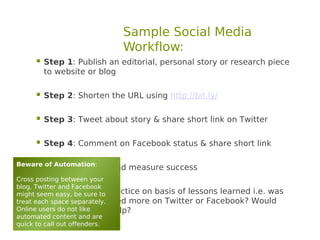
Sample Social Media
                              Workflow:
     ď‚§ Step 1: Publish an editorial, personal story or research piece
         to website or blog

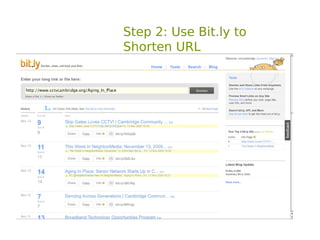
     ď‚§ Step 2: Shorten the URL using http://bit.ly/

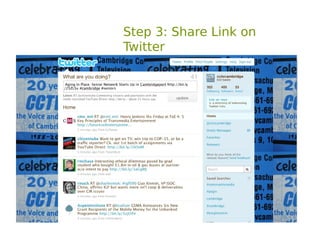
     ď‚§ Step 3: Tweet about story & share short link on Twitter

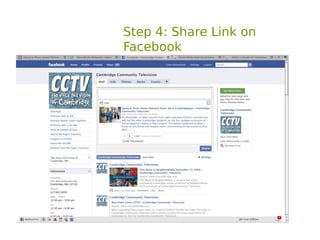
     ď‚§ Step 4: Comment on Facebook status & share short link
Beware of Automation:
     ď‚§ Step 5: Monitor and measure success
Cross posting between your
blog, Twitter and Facebook
     ď‚§
might seem easy, be sure to practice on basis of lessons learned i.e. was
         Step 6: Modify
         it viewed / re-posted more on Twitter or Facebook? Would
treat each space separately.
Online users do not like
         picture or video help?
automated content and are
quick to call out offenders.
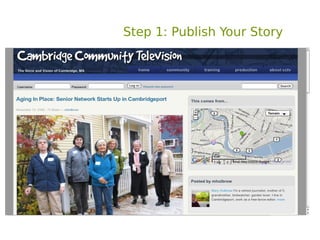
Step 1: Publish Your Story
    l
Step 2: Use Bit.ly to
Shorten URL
Step 3: Share Link on
Twitter
Enable Sharing


Top Tips to get amplified (shared, retweeted, re-posted)


Add Value


Be Sensational!


Use photos, infographics, video


Add This: social media buttons
https://www.addthis.com/get/sharing#.T_NgmUilgUQ
Step 4: Share Link on
Facebook
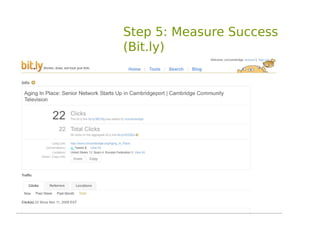
Step 5: Measure Success
(Bit.ly)
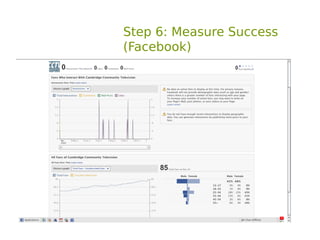
Step 6: Measure Success
(Facebook)
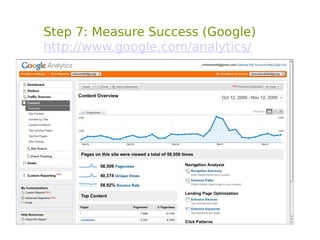
Step 7: Measure Success (Google)
http://www.google.com/analytics/
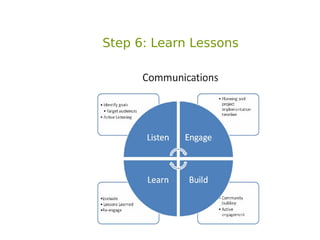
Step 6: Learn Lessons
Metrics
    for
Measurement
Definitions
  exercise
        Hits
    Pageviews
  Unique Visits
  Bounce Rate
  Visibility Time
       Other
Tools
      exercise


(Press Clipping Service)
     [Google Alerts]
    Google Analytics
   Facebook Insights
  Linked-In Analytics
          Bit.ly
          Klout
      SocialMention
       TweetReach
          Other
Aligning Metrics
 with Strategy
Strategy Management

ď‚§ Gain internal consensus around strategy

ď‚§ Secure resources to implement
  (Adwords – intern – extra hours)

ď‚§ Assign staff responsibilities

ď‚§ Establish internal use policies and user
  guidelines of what you deem appropriate as well
  as inappropriate

ď‚§ Quarterly review against agreed indicators
Measure Success


ď‚§ Set Up analytics tools to measure progress against your
 social media strategy

ď‚§ Create management sub-set of indicators to report back
 to boss / team / Board

ď‚§ Quarterly review against agreed indicators
Buy Success


Google Ads
http://bit.ly/BuySuccessOnGoogle

Linked-In Ads
http://www.linkedin.com/advertising

Facebook Ads
http://www.facebook.com/advertising/?pages
What Are Your Next Steps?


ď‚§ Please take 30 minutes to review your draft strategy,
 success indicators, tools & tactics and think about
 3 solid next steps that you will take this month.

ď‚§ Discuss your next steps with your partner and be
 prepared to share them with the group.
Conclusion:

Websites, blogs, social networks are just tools – garbage in –
garbage out.
Analytics tools are not analysts – the data that they produce
requires intelligent interpretation by humans.

  ď‚§ Take your time learning how to use the tools effectively
  ď‚§ Identify the tools best for your organisation / strategy
  ď‚§ Respect your capacity and the resource/time capacity
    of your organisation

  ď‚§ Be flexible and dynamic: your operating environment
    and your target users are.
Resources
Resources:

The Social Media Guru
http://www.youtube.com/watch?v=ZKCdexz5RQ8


Web Analytics
http://en.wikipedia.org/wiki/Web_analytics


Google Analytics
http://www.google.com/analytics/


Facebook Insights
http://mashable.com/2010/09/03/facebook-insights-guide/


Bit.ly
http://techpresident.com/blog-entry/measuring-social-media-impact-bitly-vs-google-analyt


What your Klout Score Really Means
http://www.wired.com/business/2012/04/ff_klout/
Resources:
Return On Investment Calculator for Social
Networking
http://www.frogloop.com/social-network-calculator


The ROI of Social Media
http://nten.org/blog/2008/01/11/the-roi-of-social-media


5 Ways to Measure your Social Media
http://www.fuzzone.com/blog/919/social-media-marketi


What Does a Social Media Strategy looks like?
http://blog.coherentia.com/index.php/2010/07/what-doe


Add This: social media buttons
https://www.addthis.com/get/sharing#.T_NgmUilgUQ
Tony Roberts, ICT4D Centre
Royal Holloway, University of London

Contacts:
                                             Thank you!
tonyroberts@hotmail.com

Twitter https://twitter.com/phat_controller
Facebook http://www.facebook.com/phat.controller
Wordpress http://laptopburns.wordpress.com/
Linked-In http://www.linkedin.com/pub/tony-roberts/1/514/98b
Flickr http://www.flickr.com/photos/tonyroberts/
Delicious http://www.delicious.com/stacks/phat_controller
YouTube http://www.youtube.com/roberts56tony
Slideshare http://www.slideshare.net/tonyroberts


Based on an original presentation given by Colin Rhinesmith

License = creative commons share alike 3.0

Measuringsocialmediaimpact ead iworkshopjun2012

  • 1.
    Social Media Strategy: Produced by Tony Roberts for EADI based on original presentation Created by Vanessa and Colin Rhinesmith and shared on Slideshare This presentation is licensed by Tony Roberts under a Creative Commons Noncommercial Attribution Share Alike 3.0 Unported license.
  • 2.
    Table of Contents: ď‚§Review & Expectations inc. yesterday's questions ď‚§ Social Media Work-flow ď‚§ Metrics for Measurement ď‚§ Definitions & Tools ď‚§ Aligning metrics to strategy ď‚§ Resources
  • 3.
    Answers: Qu.1. Why doesGoogle analytics report different stats than my web server stats or other analytics tools? Ans.1. http://support.google.com/googleanalytics/bin/an Ans.1. Compare apples with apples i.e. stick with Google Analytics and compare week on week and month on month Qu.2. Survey Monkey & other provide 'best practice' examples of questions - both quantitative & qualitative. See http://www.questionpro.com/a/showSurveyLibrary http://de.surveymonkey.com/ Qu.3. Alumni & Corporate brainstorm
  • 4.
  • 5.
    Sample Social Media Workflow: ď‚§ Step 1: Publish an editorial, personal story or research piece to website or blog ď‚§ Step 2: Shorten the URL using http://bit.ly/ ď‚§ Step 3: Tweet about story & share short link on Twitter ď‚§ Step 4: Comment on Facebook status & share short link Beware of Automation: ď‚§ Step 5: Monitor and measure success Cross posting between your blog, Twitter and Facebook ď‚§ might seem easy, be sure to practice on basis of lessons learned i.e. was Step 6: Modify it viewed / re-posted more on Twitter or Facebook? Would treat each space separately. Online users do not like picture or video help? automated content and are quick to call out offenders.
  • 6.
    Step 1: PublishYour Story l
  • 7.
    Step 2: UseBit.ly to Shorten URL
  • 8.
    Step 3: ShareLink on Twitter
  • 9.
    Enable Sharing Top Tipsto get amplified (shared, retweeted, re-posted) Add Value Be Sensational! Use photos, infographics, video Add This: social media buttons https://www.addthis.com/get/sharing#.T_NgmUilgUQ
  • 10.
    Step 4: ShareLink on Facebook
  • 11.
    Step 5: MeasureSuccess (Bit.ly)
  • 12.
    Step 6: MeasureSuccess (Facebook)
  • 13.
    Step 7: MeasureSuccess (Google) http://www.google.com/analytics/
  • 14.
  • 15.
    Metrics for Measurement
  • 16.
    Definitions exercise Hits Pageviews Unique Visits Bounce Rate Visibility Time Other
  • 17.
    Tools exercise (Press Clipping Service) [Google Alerts] Google Analytics Facebook Insights Linked-In Analytics Bit.ly Klout SocialMention TweetReach Other
  • 18.
  • 19.
    Strategy Management  Gaininternal consensus around strategy  Secure resources to implement (Adwords – intern – extra hours)  Assign staff responsibilities  Establish internal use policies and user guidelines of what you deem appropriate as well as inappropriate  Quarterly review against agreed indicators
  • 20.
    Measure Success ď‚§ SetUp analytics tools to measure progress against your social media strategy ď‚§ Create management sub-set of indicators to report back to boss / team / Board ď‚§ Quarterly review against agreed indicators
  • 21.
    Buy Success Google Ads http://bit.ly/BuySuccessOnGoogle Linked-InAds http://www.linkedin.com/advertising Facebook Ads http://www.facebook.com/advertising/?pages
  • 22.
    What Are YourNext Steps? ď‚§ Please take 30 minutes to review your draft strategy, success indicators, tools & tactics and think about 3 solid next steps that you will take this month. ď‚§ Discuss your next steps with your partner and be prepared to share them with the group.
  • 23.
    Conclusion: Websites, blogs, socialnetworks are just tools – garbage in – garbage out. Analytics tools are not analysts – the data that they produce requires intelligent interpretation by humans.  Take your time learning how to use the tools effectively  Identify the tools best for your organisation / strategy  Respect your capacity and the resource/time capacity of your organisation  Be flexible and dynamic: your operating environment and your target users are.
  • 24.
  • 25.
    Resources: The Social MediaGuru http://www.youtube.com/watch?v=ZKCdexz5RQ8 Web Analytics http://en.wikipedia.org/wiki/Web_analytics Google Analytics http://www.google.com/analytics/ Facebook Insights http://mashable.com/2010/09/03/facebook-insights-guide/ Bit.ly http://techpresident.com/blog-entry/measuring-social-media-impact-bitly-vs-google-analyt What your Klout Score Really Means http://www.wired.com/business/2012/04/ff_klout/
  • 26.
    Resources: Return On InvestmentCalculator for Social Networking http://www.frogloop.com/social-network-calculator The ROI of Social Media http://nten.org/blog/2008/01/11/the-roi-of-social-media 5 Ways to Measure your Social Media http://www.fuzzone.com/blog/919/social-media-marketi What Does a Social Media Strategy looks like? http://blog.coherentia.com/index.php/2010/07/what-doe Add This: social media buttons https://www.addthis.com/get/sharing#.T_NgmUilgUQ
  • 27.
    Tony Roberts, ICT4DCentre Royal Holloway, University of London Contacts: Thank you! tonyroberts@hotmail.com Twitter https://twitter.com/phat_controller Facebook http://www.facebook.com/phat.controller Wordpress http://laptopburns.wordpress.com/ Linked-In http://www.linkedin.com/pub/tony-roberts/1/514/98b Flickr http://www.flickr.com/photos/tonyroberts/ Delicious http://www.delicious.com/stacks/phat_controller YouTube http://www.youtube.com/roberts56tony Slideshare http://www.slideshare.net/tonyroberts Based on an original presentation given by Colin Rhinesmith License = creative commons share alike 3.0