Medical Communication Systems, Inc.
          www.medcomsys.com


   EHR Implementation
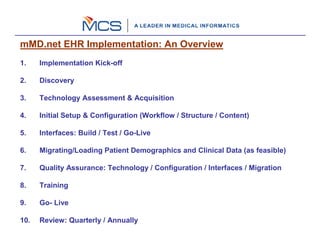
mMD.net EHR Implementation: An Overview
1.    Implementation Kick-off

2.    Discovery

3.    Technology Assessment & Acquisition

4.    Initial Setup & Configuration (Workflow / Structure / Content)

5.    Interfaces: Build / Test / Go-Live

6.    Migrating/Loading Patient Demographics and Clinical Data (as feasible)

7.    Quality Assurance: Technology / Configuration / Interfaces / Migration

8.    Training

9.    Go- Live

10.   Review: Quarterly / Annually
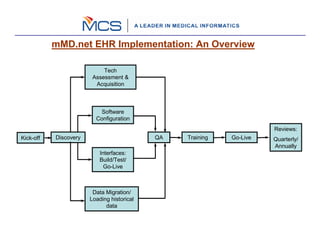
mMD.net EHR Implementation: An Overview

                            Tech
                        Assessment &
                         Acquisition


                          Software
                         Configuration
                                                                      Reviews:
Kick-off   Discovery                        QA   Training   Go-Live   Quarterly/
                                                                      Annually
                           Interfaces:
                           Build/Test/
                             Go-Live


                        Data Migration/
                       Loading historical
                             data
Step # 1: Implementation Kick-off
    Formation of the Steering Committee for efficient and effective management
    of the Project

    Designating Single Point Contacts on both sides and documenting their
    responsibilities

    Establishing communication protocols, project tracking and review
    frequencies, and knowledge transfer methods to MCS

    Agreeing on the documentation of the knowledge to be transferred by the
    physician’s office to MCS and vice versa

    Agreeing on deliverables and establishing acceptance criteria of agreed upon
    deliverables; and project schedule

    Identifying Key Performance Indicators and their measurement

    Formalizing terms and conditions for managing Software Enhancement
    Requests
Step # 2: Discovery
    Practice/Organization details

    Details for all users and groups who will be using EHR including Front Desk,
    PA, Nurse, MA, Physicians or any ancillary staff

    Details for all Servers, Desktop, Tablet/Laptop, Printer, Scanner at the practice

    All networking and remote connection details for the server and other
    computers.

    Most commonly used Medications, Diagnosis, Handouts, CPT’s, Labs, etc

    Any reports or correspondence that needs to be generated using EHR.

    Details for clinical complaints, Review of Systems, Physical Examination, etc

    Any templates that the practice would like to incorporate

    Any other clinical or non-clinical documentation that needs to be addressed
    by the EHR
Step # 3: Technology Assessment & Acquisition
   Reasonable approach: utilize existing investment

   Reasonable approach: optimize overall throughput and performance

   Overall throughput depends on appropriate selection of technology

   Due consideration to innovations, stability of platforms, scalability,
   robustness, and comparing TCO while selecting appropriate technology

   mMD.net EHR Server is designed for Microsoft Windows Server OS 2008 /
   Microsoft .net Framework 3.5 / Microsoft SQL Server 2008

   Utilizing touch screen based tablets maximize the ease of use and superior
   design of mMD.net EHR

   Working with existing IT vendors is encouraged yet helping find other
   alternatives is also recommended

   Ensuring deliveries to satisfy the project plan
Step # 4: Software Configuration
    Reasonable approach: Start with specialty specific defaults

    Reasonable approach: Incorporate “improvisations” over defaults

    Clinical Templates and Order Sets form crux of the “Clinical Best Practices”

    Clinical Alerts and Disease Management

    Due consideration to the Health Information Exchange

    Preferences for managing workflow: the real tool for enhancing efficiencies

    Frequent interaction with coordinators / physicians / clinicians
Step # 5: Interfaces (Build/Test-Go-Live)
    Setting up mMD.net Interoperability Adapters for integrating:
          Patient Demographics
          Scheduling
          Billing
          Reference/Hospital Labs & Tests
          SureScripts/RxHUB
          Medical Equipments, such as, Vitals, Spirometry, Holter, EKG etc.

    Coordinate with third-party vendors and practice for testing each interface

    Upon completion of testing, take interfaces “Live”
Step # 6: Migrating/Loading Demographics and Clinical Data
   Identification of all external system data stores that are required to support
   the deployment of mMD.net database (e.g. patient demographics)

   Conversion of data from the existing databases to the mMD.net database,
   involving further steps such as:

       identifying existing databases and segments of databases that will be moved to
       tables in the mMD.net database

       designing procedures for converting the data identified from the existing databases
       to the mMD.net database

       developing software for accomplishing each conversion

       testing the conversion using test data

       testing the conversion using live data

       verifying the conversion results

   Getting old records in EHR: Scanning / Populating Clinical Lists

   Deployment of mMD.net database with data migrated from legacy systems, old
   records, and definition of Masters
Step # 7: QA: Technology/Configuration/Interfaces/Migration
    Certifying that technology acquisition and deployment is as planned and
    expected for mMD.net implementation requirements

    Ensuring that the information provided by the physician’s office is configured
    accurately and as expected

    Process check demands approval from the physician’s office that the
    configuration has been done to their satisfaction

    Taking a “dry run” of the complete application is not unusual as part of the
    QA process which also verifies and validates data migration

    A Post Configuration Report (PCR) is filled-in that includes details of the
    complete technology deployment, software configuration – default plus
    customizations/personalization, and accuracy and validity of data – migrated
    and Masters.

    PCR is eventually handed over to the Tech Support Team
Step # 8: Training
    Focus on training physicians office as a group as well as individuals

    Structured training program to maximize class room (presentation) based
    training and hands-on training

    Approx. 20 hours of online training per FTE provider before scheduling onsite
    training

    Training schedule is published in advance to ensure that the physicians office
    can make appropriate resources available

    All application modules are covered, including the Administrative module

    Partners shadow-over to learn from the training programs conducted by MCS
    in addition to structured train-the-trainer manuals and Certification Program
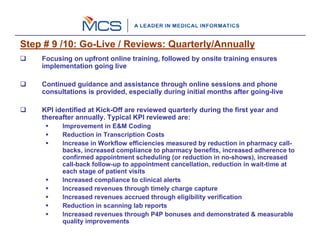
Step # 9 /10: Go-Live / Reviews: Quarterly/Annually
    Focusing on upfront online training, followed by onsite training ensures
    implementation going live

    Continued guidance and assistance through online sessions and phone
    consultations is provided, especially during initial months after going-live

    KPI identified at Kick-Off are reviewed quarterly during the first year and
    thereafter annually. Typical KPI reviewed are:
          Improvement in E&M Coding
          Reduction in Transcription Costs
          Increase in Workflow efficiencies measured by reduction in pharmacy call-
          backs, increased compliance to pharmacy benefits, increased adherence to
          confirmed appointment scheduling (or reduction in no-shows), increased
          call-back follow-up to appointment cancellation, reduction in wait-time at
          each stage of patient visits
          Increased compliance to clinical alerts
          Increased revenues through timely charge capture
          Increased revenues accrued through eligibility verification
          Reduction in scanning lab reports
          Increased revenues through P4P bonuses and demonstrated & measurable
          quality improvements
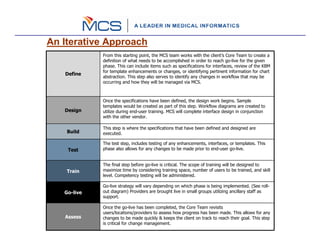
An Iterative Approach
             From this starting point, the MCS team works with the client’s Core Team to create a
             definition of what needs to be accomplished in order to reach go-live for the given
             phase. This can include items such as specifications for interfaces, review of the KBM
             for template enhancements or changes, or identifying pertinent information for chart
   Define
             abstraction. This step also serves to identify any changes in workflow that may be
             occurring and how they will be managed via MCS.


             Once the specifications have been defined, the design work begins. Sample
             templates would be created as part of this step. Workflow diagrams are created to
   Design    utilize during end-user training. MCS will complete interface design in conjunction
             with the other vendor.

             This step is where the specifications that have been defined and designed are
    Build    executed.

             The test step, includes testing of any enhancements, interfaces, or templates. This
    Test     phase also allows for any changes to be made prior to end-user go-live.


             The final step before go-live is critical. The scope of training will be designed to
    Train    maximize time by considering training space, number of users to be trained, and skill
             level. Competency testing will be administered.

             Go-live strategy will vary depending on which phase is being implemented. (See roll-
   Go-live   out diagram) Providers are brought live in small groups utilizing ancillary staff as
             support.

             Once the go-live has been completed, the Core Team revisits
             users/locations/providers to assess how progress has been made. This allows for any
   Assess    changes to be made quickly & keeps the client on track to reach their goal. This step
             is critical for change management.
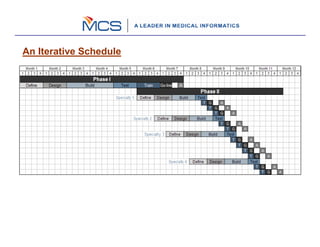
An Iterative Schedule
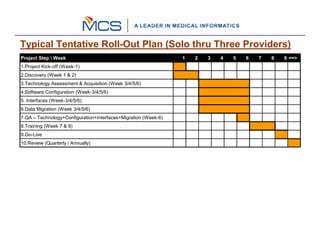
Typical Tentative Roll-Out Plan (Solo thru Three Providers)
Project Step  Week                                             1   2   3   4   5   6   7   8   9 ==>
1.Project Kick-off (Week-1)
2.Discovery (Week 1 & 2)
3.Technology Assessment & Acquisition (Week 3/4/5/6)
4.Software Configuration (Week-3/4/5/6)
5. Interfaces (Week-3/4/5/6)
6.Data Migration (Week 3/4/5/6)
7.QA – Technology+Configuration+Interfaces+Migration (Week-6)
8.Training (Week 7 & 8)
9.Go-Live
10.Review (Quarterly / Annually)

Mcs Implementation Process 1

  • 1.
    Medical Communication Systems,Inc. www.medcomsys.com EHR Implementation
  • 2.
    mMD.net EHR Implementation:An Overview 1. Implementation Kick-off 2. Discovery 3. Technology Assessment & Acquisition 4. Initial Setup & Configuration (Workflow / Structure / Content) 5. Interfaces: Build / Test / Go-Live 6. Migrating/Loading Patient Demographics and Clinical Data (as feasible) 7. Quality Assurance: Technology / Configuration / Interfaces / Migration 8. Training 9. Go- Live 10. Review: Quarterly / Annually
  • 3.
    mMD.net EHR Implementation:An Overview Tech Assessment & Acquisition Software Configuration Reviews: Kick-off Discovery QA Training Go-Live Quarterly/ Annually Interfaces: Build/Test/ Go-Live Data Migration/ Loading historical data
  • 4.
    Step # 1:Implementation Kick-off Formation of the Steering Committee for efficient and effective management of the Project Designating Single Point Contacts on both sides and documenting their responsibilities Establishing communication protocols, project tracking and review frequencies, and knowledge transfer methods to MCS Agreeing on the documentation of the knowledge to be transferred by the physician’s office to MCS and vice versa Agreeing on deliverables and establishing acceptance criteria of agreed upon deliverables; and project schedule Identifying Key Performance Indicators and their measurement Formalizing terms and conditions for managing Software Enhancement Requests
  • 5.
    Step # 2:Discovery Practice/Organization details Details for all users and groups who will be using EHR including Front Desk, PA, Nurse, MA, Physicians or any ancillary staff Details for all Servers, Desktop, Tablet/Laptop, Printer, Scanner at the practice All networking and remote connection details for the server and other computers. Most commonly used Medications, Diagnosis, Handouts, CPT’s, Labs, etc Any reports or correspondence that needs to be generated using EHR. Details for clinical complaints, Review of Systems, Physical Examination, etc Any templates that the practice would like to incorporate Any other clinical or non-clinical documentation that needs to be addressed by the EHR
  • 6.
    Step # 3:Technology Assessment & Acquisition Reasonable approach: utilize existing investment Reasonable approach: optimize overall throughput and performance Overall throughput depends on appropriate selection of technology Due consideration to innovations, stability of platforms, scalability, robustness, and comparing TCO while selecting appropriate technology mMD.net EHR Server is designed for Microsoft Windows Server OS 2008 / Microsoft .net Framework 3.5 / Microsoft SQL Server 2008 Utilizing touch screen based tablets maximize the ease of use and superior design of mMD.net EHR Working with existing IT vendors is encouraged yet helping find other alternatives is also recommended Ensuring deliveries to satisfy the project plan
  • 7.
    Step # 4:Software Configuration Reasonable approach: Start with specialty specific defaults Reasonable approach: Incorporate “improvisations” over defaults Clinical Templates and Order Sets form crux of the “Clinical Best Practices” Clinical Alerts and Disease Management Due consideration to the Health Information Exchange Preferences for managing workflow: the real tool for enhancing efficiencies Frequent interaction with coordinators / physicians / clinicians
  • 8.
    Step # 5:Interfaces (Build/Test-Go-Live) Setting up mMD.net Interoperability Adapters for integrating: Patient Demographics Scheduling Billing Reference/Hospital Labs & Tests SureScripts/RxHUB Medical Equipments, such as, Vitals, Spirometry, Holter, EKG etc. Coordinate with third-party vendors and practice for testing each interface Upon completion of testing, take interfaces “Live”
  • 9.
    Step # 6:Migrating/Loading Demographics and Clinical Data Identification of all external system data stores that are required to support the deployment of mMD.net database (e.g. patient demographics) Conversion of data from the existing databases to the mMD.net database, involving further steps such as: identifying existing databases and segments of databases that will be moved to tables in the mMD.net database designing procedures for converting the data identified from the existing databases to the mMD.net database developing software for accomplishing each conversion testing the conversion using test data testing the conversion using live data verifying the conversion results Getting old records in EHR: Scanning / Populating Clinical Lists Deployment of mMD.net database with data migrated from legacy systems, old records, and definition of Masters
  • 10.
    Step # 7:QA: Technology/Configuration/Interfaces/Migration Certifying that technology acquisition and deployment is as planned and expected for mMD.net implementation requirements Ensuring that the information provided by the physician’s office is configured accurately and as expected Process check demands approval from the physician’s office that the configuration has been done to their satisfaction Taking a “dry run” of the complete application is not unusual as part of the QA process which also verifies and validates data migration A Post Configuration Report (PCR) is filled-in that includes details of the complete technology deployment, software configuration – default plus customizations/personalization, and accuracy and validity of data – migrated and Masters. PCR is eventually handed over to the Tech Support Team
  • 11.
    Step # 8:Training Focus on training physicians office as a group as well as individuals Structured training program to maximize class room (presentation) based training and hands-on training Approx. 20 hours of online training per FTE provider before scheduling onsite training Training schedule is published in advance to ensure that the physicians office can make appropriate resources available All application modules are covered, including the Administrative module Partners shadow-over to learn from the training programs conducted by MCS in addition to structured train-the-trainer manuals and Certification Program
  • 12.
    Step # 9/10: Go-Live / Reviews: Quarterly/Annually Focusing on upfront online training, followed by onsite training ensures implementation going live Continued guidance and assistance through online sessions and phone consultations is provided, especially during initial months after going-live KPI identified at Kick-Off are reviewed quarterly during the first year and thereafter annually. Typical KPI reviewed are: Improvement in E&M Coding Reduction in Transcription Costs Increase in Workflow efficiencies measured by reduction in pharmacy call- backs, increased compliance to pharmacy benefits, increased adherence to confirmed appointment scheduling (or reduction in no-shows), increased call-back follow-up to appointment cancellation, reduction in wait-time at each stage of patient visits Increased compliance to clinical alerts Increased revenues through timely charge capture Increased revenues accrued through eligibility verification Reduction in scanning lab reports Increased revenues through P4P bonuses and demonstrated & measurable quality improvements
  • 13.
    An Iterative Approach From this starting point, the MCS team works with the client’s Core Team to create a definition of what needs to be accomplished in order to reach go-live for the given phase. This can include items such as specifications for interfaces, review of the KBM for template enhancements or changes, or identifying pertinent information for chart Define abstraction. This step also serves to identify any changes in workflow that may be occurring and how they will be managed via MCS. Once the specifications have been defined, the design work begins. Sample templates would be created as part of this step. Workflow diagrams are created to Design utilize during end-user training. MCS will complete interface design in conjunction with the other vendor. This step is where the specifications that have been defined and designed are Build executed. The test step, includes testing of any enhancements, interfaces, or templates. This Test phase also allows for any changes to be made prior to end-user go-live. The final step before go-live is critical. The scope of training will be designed to Train maximize time by considering training space, number of users to be trained, and skill level. Competency testing will be administered. Go-live strategy will vary depending on which phase is being implemented. (See roll- Go-live out diagram) Providers are brought live in small groups utilizing ancillary staff as support. Once the go-live has been completed, the Core Team revisits users/locations/providers to assess how progress has been made. This allows for any Assess changes to be made quickly & keeps the client on track to reach their goal. This step is critical for change management.
  • 14.
  • 15.
    Typical Tentative Roll-OutPlan (Solo thru Three Providers) Project Step Week 1 2 3 4 5 6 7 8 9 ==> 1.Project Kick-off (Week-1) 2.Discovery (Week 1 & 2) 3.Technology Assessment & Acquisition (Week 3/4/5/6) 4.Software Configuration (Week-3/4/5/6) 5. Interfaces (Week-3/4/5/6) 6.Data Migration (Week 3/4/5/6) 7.QA – Technology+Configuration+Interfaces+Migration (Week-6) 8.Training (Week 7 & 8) 9.Go-Live 10.Review (Quarterly / Annually)