Howard Hays, MD, MSPH David Taylor MHS, RPh, PA-C, RN, CDE, NCPS RPMS EHR Where Are We Now? IHS Combined Councils February 26, 2007
Objectives Current deployment status of EHR Reported impact on practice & care EHR preparation and lessons learned EHR & GPRA documentation Area role in RPMS and EHR Discussion
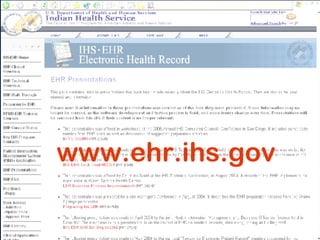
EHR Presentations Page www.ehr.ihs.gov
The National EHR Initiative Institute of Medicine (IOM) reports 1991: “An Essential Technology for Health Care” 2000: “To Err is Human” Bush Administration EMR for most Americans in 10 years Interoperable records, shared data RPMS – elements of an EHR for 20+ years EHR GUI project began in 2002
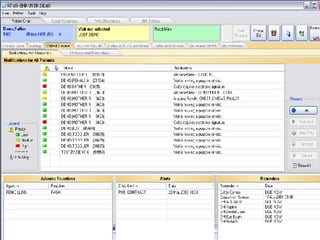
What is RPMS EHR? Integrated RPMS database Applications adapted from VHA or developed by IHS Graphical User Interface User-friendly and intuitive access to RPMS database for clinicians and other staff Components derived from VHA (CPRS) or developed internally for I/T/U needs Proprietary “framework” for presentation of various GUI components Licensed from Clinical Informatics Associates (now Medsphere)
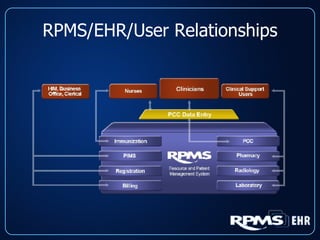
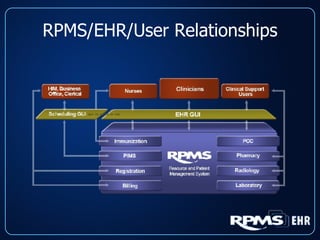
RPMS/EHR/User Relationships
 
EHR Milestones and Status RPMS EHR was certified January 2005 7 test sites participated in 2004 Presently  78  facilities use EHR Goal for all Federal sites to be using EHR by end of 2008 Tribal sites encouraged to use EHR as well
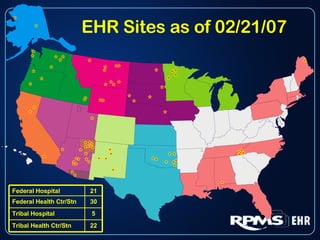
EHR Sites as of 02/21/07 22 Tribal Health Ctr/Stn 5 Tribal Hospital 30 Federal Health Ctr/Stn 21 Federal Hospital
Advantages of RPMS EHR Retains existing RPMS database Users have access to all prior RPMS data Same data from EHR and non-EHR sites No interfacing or reformatting of data for national exports Extensive customizability at local level Full integration of RPMS applications Very low cost compared to commercial Future growth/development Ongoing partnership with VHA, other developers
How Can EHR Improve Care? Access to Information Immediately available, no data entry delay Service Unit wide, even satellite clinics Legible Computerized Order Entry Much  less chance for error Order checks for allergies and interactions Complete, up to date medication lists Reminders, Notifications, and Alerts Abnormal lab results Screening and interventions that are due
Provider Productivity All sites see a transient decrease in provider productivity (pts/day) at first Typically takes 1-3 months to recover to pre-EHR levels Mitigate by staggering implementation, either by provider or by function, or both Efficiencies in other areas (phone calls, chart reviews) can improve productivity
EHR Creates the Potential to Improve Collections: More complete documentation with templates Provider notifications for forgotten POVs or codes Superbills, ICD/CPT Pick Lists – easier to find correct codes Coding Tools and Training with EHR
Patient Care Metrics Principal reason for EHR – improve patient care How do we know we have done that? Sites should be identifying important metrics and tracking them Ready-made patient care metrics: CRS EHR can provide the tools for quality improvement but an active QI program is a must
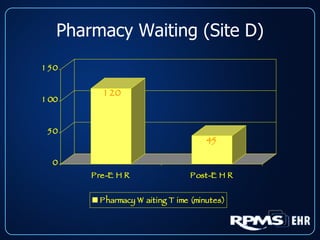
Pharmacy Waiting (Site D)
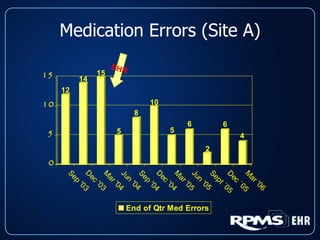
Medication Errors (Site A) EHR
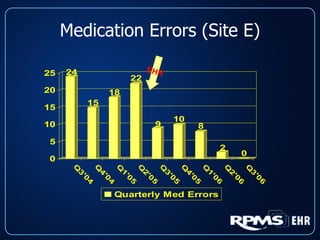
Medication Errors (Site E) EHR
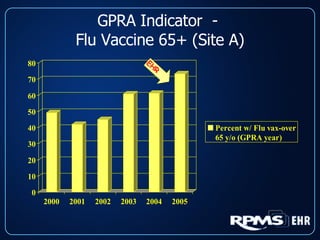
GPRA Indicator  -  Flu Vaccine 65+ (Site A) EHR
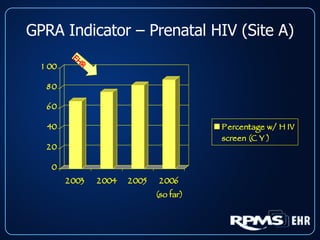
GPRA Indicator – Prenatal HIV (Site A) EHR
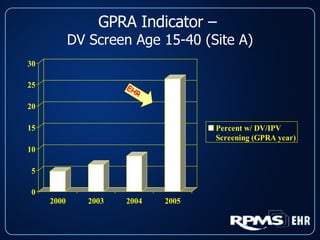
GPRA Indicator –  DV Screen Age 15-40 (Site A) EHR
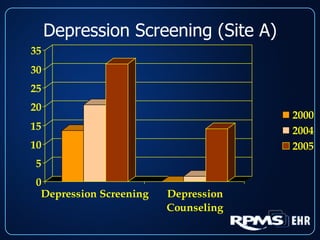
Depression Screening (Site A)
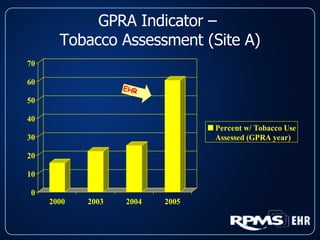
GPRA Indicator –  Tobacco Assessment (Site A) EHR
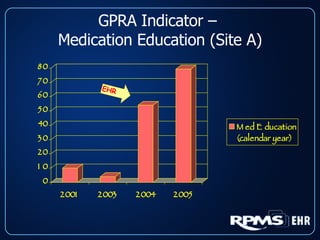
GPRA Indicator –  Medication Education (Site A) EHR
EHR Preparation and  Lessons Learned
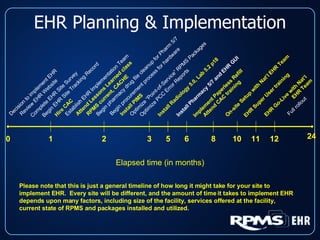
EHR Planning & Implementation Elapsed time (in months) Please note that this is just a general timeline of how long it might take for your site to implement EHR.  Every site will be different, and the amount of time it takes to implement EHR depends upon many factors, including size of the facility, services offered at the facility, current state of RPMS and packages installed and utilized. Decision to implement EHR Review EHR Website 0 Complete EHR Site Survey Begin EHR Site Tracking Record Hire CAC Establish EHR Implementation Team Attend Lessons Learned class RPMS current, CACHE Begin pharmacy drug file cleanup for Pharm 5/7 Begin procurement process for hardware Install PIMS Optimize “Point-of-Service” RPMS Packages  Optimize PCC Error Reports Install Radiology 5.0, Lab 5.2 p18  Install Pharmacy 5/7 and EHR GUI Implement Paperless Refill Attend CAC training On-site Setup with Nat’l EHR Team EHR Super User training EHR Go-Live with Nat’l  EHR Team Full rollout 1 2 3 5 8 10 6 11 12 24
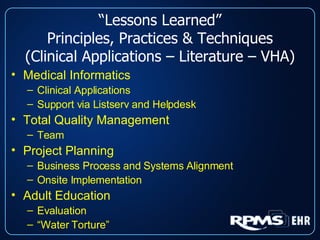
“ Lessons Learned” Principles, Practices & Techniques (Clinical Applications – Literature – VHA) Medical Informatics Clinical Applications Support via Listserv and Helpdesk Total Quality Management Team Project Planning Business Process and Systems Alignment Onsite Implementation Adult Education Evaluation “ Water Torture”
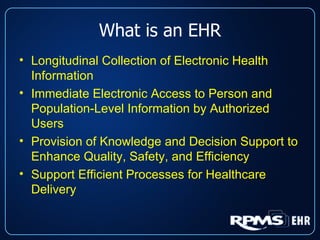
What is an EHR Longitudinal Collection of Electronic Health Information Immediate Electronic Access to Person and Population-Level Information by Authorized Users Provision of Knowledge and Decision Support to Enhance Quality, Safety, and Efficiency Support Efficient Processes for Healthcare Delivery
What is an EHR? EHR is  NOT  Necessarily One Single System  BUT  a Broad Set of Functionalities that may be Provided by One or Many Systems by One or Many Providers
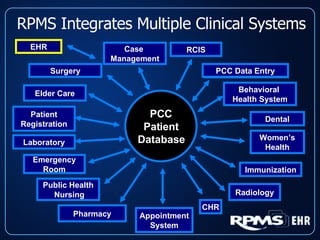
RPMS Integrates Multiple Clinical Systems Laboratory Appointment System Patient Registration Dental Emergency Room PCC Patient Database Elder Care Public Health  Nursing Pharmacy Behavioral  Health System Women’s Health RCIS Immunization Radiology Case  Management CHR Surgery EHR PCC Data Entry
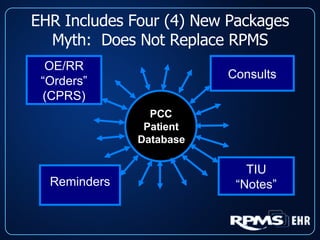
EHR Includes Four (4) New Packages Myth:  Does Not Replace RPMS TIU “ Notes” OE/RR “ Orders” (CPRS) Reminders Consults PCC Patient Database
Medical Informatics RPMS “inputs” and “outputs” PCC Documentation Principles Management of Information Computer-Based Patient Record Systems “ Optimize” RPMS Packages HIMSS  JCAHO and AAAHC Delineate Document and Source of Legal Medical Record (LMR)
Journey Not a Destination (Optimize RPMS Packages) Before RPMS EHR Point of Care (POC) Lab Point of Service Documentation of Immunizations Community Health Representatives (CHR) Package Optimization Behavioral Health GUI Referred Care Information System (RCIS)
“ Journey not a Destination” (It’s Never Over!!!) Radiology Reports in Radiology Package Adverse Tracking Package “ Paperless Refill” & “Coding Queue” IHS Patient Chart (RCIS and BH GUI) Diabetes Management System Women’s Health Scheduling (PIMS) Interfaces (POC Lab, Omnicell® , Pyxis® )
“ Journey not a Destination” (It’s Never Over!!!) RPMS EHR Reminders Vista Imaging Pharmacy Signature Capture IM Consent Reference Lab Interface GUI Scheduling Package E-MAR (Inpatient) BCMA (Inpatient) … and Don’t Forget all the Patches and Package Updates

EhrPresentation

  • 1.
    Howard Hays, MD,MSPH David Taylor MHS, RPh, PA-C, RN, CDE, NCPS RPMS EHR Where Are We Now? IHS Combined Councils February 26, 2007
  • 2.
    Objectives Current deploymentstatus of EHR Reported impact on practice & care EHR preparation and lessons learned EHR & GPRA documentation Area role in RPMS and EHR Discussion
  • 3.
    EHR Presentations Pagewww.ehr.ihs.gov
  • 4.
    The National EHRInitiative Institute of Medicine (IOM) reports 1991: “An Essential Technology for Health Care” 2000: “To Err is Human” Bush Administration EMR for most Americans in 10 years Interoperable records, shared data RPMS – elements of an EHR for 20+ years EHR GUI project began in 2002
  • 5.
    What is RPMSEHR? Integrated RPMS database Applications adapted from VHA or developed by IHS Graphical User Interface User-friendly and intuitive access to RPMS database for clinicians and other staff Components derived from VHA (CPRS) or developed internally for I/T/U needs Proprietary “framework” for presentation of various GUI components Licensed from Clinical Informatics Associates (now Medsphere)
  • 6.
  • 7.
  • 8.
  • 9.
    EHR Milestones andStatus RPMS EHR was certified January 2005 7 test sites participated in 2004 Presently 78 facilities use EHR Goal for all Federal sites to be using EHR by end of 2008 Tribal sites encouraged to use EHR as well
  • 10.
    EHR Sites asof 02/21/07 22 Tribal Health Ctr/Stn 5 Tribal Hospital 30 Federal Health Ctr/Stn 21 Federal Hospital
  • 11.
    Advantages of RPMSEHR Retains existing RPMS database Users have access to all prior RPMS data Same data from EHR and non-EHR sites No interfacing or reformatting of data for national exports Extensive customizability at local level Full integration of RPMS applications Very low cost compared to commercial Future growth/development Ongoing partnership with VHA, other developers
  • 12.
    How Can EHRImprove Care? Access to Information Immediately available, no data entry delay Service Unit wide, even satellite clinics Legible Computerized Order Entry Much less chance for error Order checks for allergies and interactions Complete, up to date medication lists Reminders, Notifications, and Alerts Abnormal lab results Screening and interventions that are due
  • 13.
    Provider Productivity Allsites see a transient decrease in provider productivity (pts/day) at first Typically takes 1-3 months to recover to pre-EHR levels Mitigate by staggering implementation, either by provider or by function, or both Efficiencies in other areas (phone calls, chart reviews) can improve productivity
  • 14.
    EHR Creates thePotential to Improve Collections: More complete documentation with templates Provider notifications for forgotten POVs or codes Superbills, ICD/CPT Pick Lists – easier to find correct codes Coding Tools and Training with EHR
  • 15.
    Patient Care MetricsPrincipal reason for EHR – improve patient care How do we know we have done that? Sites should be identifying important metrics and tracking them Ready-made patient care metrics: CRS EHR can provide the tools for quality improvement but an active QI program is a must
  • 16.
  • 17.
  • 18.
  • 19.
    GPRA Indicator - Flu Vaccine 65+ (Site A) EHR
  • 20.
    GPRA Indicator –Prenatal HIV (Site A) EHR
  • 21.
    GPRA Indicator – DV Screen Age 15-40 (Site A) EHR
  • 22.
  • 23.
    GPRA Indicator – Tobacco Assessment (Site A) EHR
  • 24.
    GPRA Indicator – Medication Education (Site A) EHR
  • 25.
    EHR Preparation and Lessons Learned
  • 26.
    EHR Planning &Implementation Elapsed time (in months) Please note that this is just a general timeline of how long it might take for your site to implement EHR. Every site will be different, and the amount of time it takes to implement EHR depends upon many factors, including size of the facility, services offered at the facility, current state of RPMS and packages installed and utilized. Decision to implement EHR Review EHR Website 0 Complete EHR Site Survey Begin EHR Site Tracking Record Hire CAC Establish EHR Implementation Team Attend Lessons Learned class RPMS current, CACHE Begin pharmacy drug file cleanup for Pharm 5/7 Begin procurement process for hardware Install PIMS Optimize “Point-of-Service” RPMS Packages Optimize PCC Error Reports Install Radiology 5.0, Lab 5.2 p18 Install Pharmacy 5/7 and EHR GUI Implement Paperless Refill Attend CAC training On-site Setup with Nat’l EHR Team EHR Super User training EHR Go-Live with Nat’l EHR Team Full rollout 1 2 3 5 8 10 6 11 12 24
  • 27.
    “ Lessons Learned”Principles, Practices & Techniques (Clinical Applications – Literature – VHA) Medical Informatics Clinical Applications Support via Listserv and Helpdesk Total Quality Management Team Project Planning Business Process and Systems Alignment Onsite Implementation Adult Education Evaluation “ Water Torture”
  • 28.
    What is anEHR Longitudinal Collection of Electronic Health Information Immediate Electronic Access to Person and Population-Level Information by Authorized Users Provision of Knowledge and Decision Support to Enhance Quality, Safety, and Efficiency Support Efficient Processes for Healthcare Delivery
  • 29.
    What is anEHR? EHR is NOT Necessarily One Single System BUT a Broad Set of Functionalities that may be Provided by One or Many Systems by One or Many Providers
  • 30.
    RPMS Integrates MultipleClinical Systems Laboratory Appointment System Patient Registration Dental Emergency Room PCC Patient Database Elder Care Public Health Nursing Pharmacy Behavioral Health System Women’s Health RCIS Immunization Radiology Case Management CHR Surgery EHR PCC Data Entry
  • 31.
    EHR Includes Four(4) New Packages Myth: Does Not Replace RPMS TIU “ Notes” OE/RR “ Orders” (CPRS) Reminders Consults PCC Patient Database
  • 32.
    Medical Informatics RPMS“inputs” and “outputs” PCC Documentation Principles Management of Information Computer-Based Patient Record Systems “ Optimize” RPMS Packages HIMSS JCAHO and AAAHC Delineate Document and Source of Legal Medical Record (LMR)
  • 33.
    Journey Not aDestination (Optimize RPMS Packages) Before RPMS EHR Point of Care (POC) Lab Point of Service Documentation of Immunizations Community Health Representatives (CHR) Package Optimization Behavioral Health GUI Referred Care Information System (RCIS)
  • 34.
    “ Journey nota Destination” (It’s Never Over!!!) Radiology Reports in Radiology Package Adverse Tracking Package “ Paperless Refill” & “Coding Queue” IHS Patient Chart (RCIS and BH GUI) Diabetes Management System Women’s Health Scheduling (PIMS) Interfaces (POC Lab, Omnicell® , Pyxis® )
  • 35.
    “ Journey nota Destination” (It’s Never Over!!!) RPMS EHR Reminders Vista Imaging Pharmacy Signature Capture IM Consent Reference Lab Interface GUI Scheduling Package E-MAR (Inpatient) BCMA (Inpatient) … and Don’t Forget all the Patches and Package Updates