Hearty Welcome
Presentation Agenda

 COSEC Time Attendance
 Applications
 COSEC Solution
   Software Solution
   Hardware Solution
 Key Features
   Time-Attendance
   Leave Management
   System Features
 Reports and Charts
COSEC Time Attendance
What is Time-Attendance System?

 It is a Automatic Attendance Marking System
 Combination of Hardware and Software
 Hardware is Used to Record Time of an User from a Credential
 Software is Used to Process the Time According to Attendance Policy
 System Generates Attendance Reports or Send Attendance Data to
 Payroll Software for Further Action
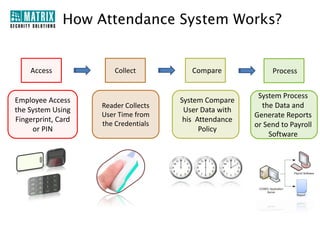
How Attendance System Works?


    Access              Collect          Compare             Process


                                                         System Process
Employee Access                       System Compare
                    Reader Collects                       the Data and
the System Using                       User Data with
                    User Time from                      Generate Reports
Fingerprint, Card                      his Attendance
                    the Credentials                     or Send to Payroll
     or PIN                                 Policy
                                                            Software
What is COSEC Time-Attendance?

 Comprehensive Solution for SOHO, SMB, SME and Enterprises
 Time-Attendance and Leave Management
 Fingerprint and Card based Attendance Marking
 Various Attendance Policies Creation
 Manual Entry and Correction of Attendance Data
 Integration with Existing Payroll Software
 Attendance and Leave Reports and Charts
Benefits of Time-Attendance

 Eliminate Human Error in Employee Time Records
 Prevent Buddy Punching and Fraudulent Time Keeping Records
 Significantly Increase Employee and Manager Satisfaction
 Cut Down on Administrative Time and Cost
 Monitor and Analyze Absence to Reduce Impact on Productivity
 Graphical Representation of Attendance for Easy and Fast Interpretation
 Significantly Cut Down on Payroll Processing Time
 Adapt to Existing HR Policies
 Eliminate Payments for Unapproved or Fraudulent Overtime
 Give Employees Self-service Access
Why COSEC Time-Attendance?

   Comprehensive Time-Attendance Solution
   Accurate Time Record
   Leave Management
   Configurable Attendance Parameters
   Integration with Payroll and HRM
   Proactive SMS and Email Alerts
   Completely Scalable, Flexible and Modular
   On Demand Report Generation
Target Customers…


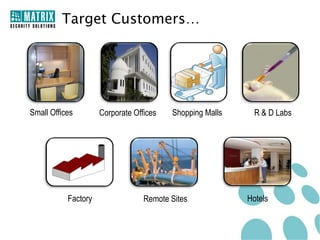
Small Offices        Corporate Offices   Shopping Malls     R & D Labs


           Factory                Remote Sites            Hotels
Target Customers…


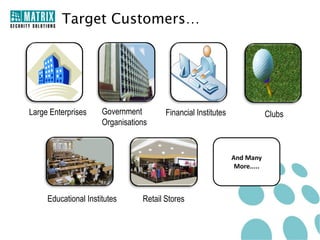
Large Enterprises     Government        Financial Institutes                Clubs
                      Organisations


                                                               And Many
                                                                More.....


     Educational Institutes      Retail Stores
Applications
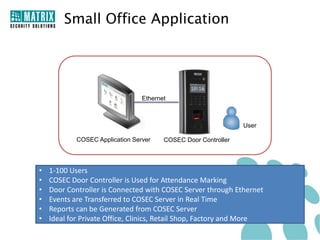
Small Office Application


                                 Ethernet


                                                                User

            COSEC Application Server    COSEC Door Controller


•   1-100 Users
•   COSEC Door Controller is Used for Attendance Marking
•   Door Controller is Connected with COSEC Server through Ethernet
•   Events are Transferred to COSEC Server in Real Time
•   Reports can be Generated from COSEC Server
•   Ideal for Private Office, Clinics, Retail Shop, Factory and More
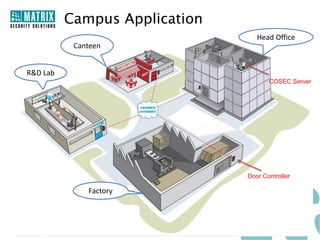
Campus Application
                                  Head Office
           Canteen


R&D Lab
                                      COSEC Server


                               Door Controller

              Factory
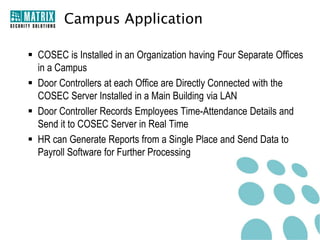
Campus Application

 COSEC is Installed in an Organization having Four Separate Offices
  in a Campus
 Door Controllers at each Office are Directly Connected with the
  COSEC Server Installed in a Main Building via LAN
 Door Controller Records Employees Time-Attendance Details and
  Send it to COSEC Server in Real Time
 HR can Generate Reports from a Single Place and Send Data to
  Payroll Software for Further Processing
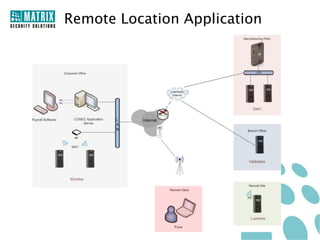
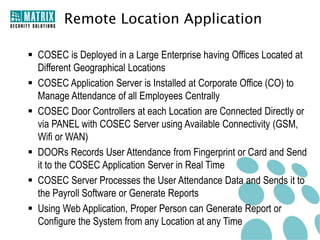
Remote Location Application

 COSEC is Deployed in a Large Enterprise having Offices Located at
  Different Geographical Locations
 COSEC Application Server is Installed at Corporate Office (CO) to
  Manage Attendance of all Employees Centrally
 COSEC Door Controllers at each Location are Connected Directly or
  via PANEL with COSEC Server using Available Connectivity (GSM,
  Wifi or WAN)
 DOORs Records User Attendance from Fingerprint or Card and Send
  it to the COSEC Application Server in Real Time
 COSEC Server Processes the User Attendance Data and Sends it to
  the Payroll Software or Generate Reports
 Using Web Application, Proper Person can Generate Report or
  Configure the System from any Location at any Time
COSEC Solution
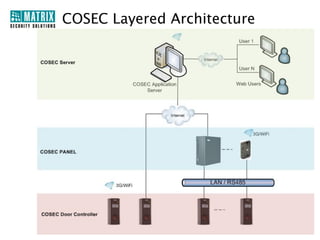
COSEC Layered Architecture
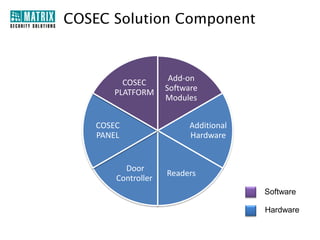
COSEC Solution Component


         COSEC        Add-on
       PLATFORM      Software
                     Modules


    COSEC                  Additional
    PANEL                  Hardware


          Door
                     Readers
        Controller
                                        Software

                                        Hardware
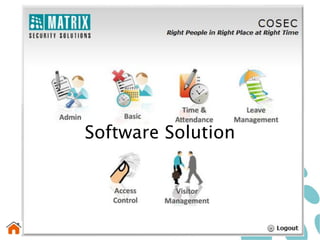
Software Solution
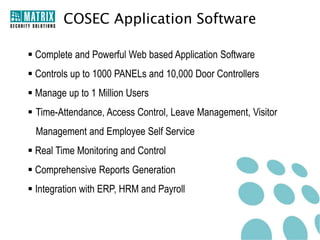
COSEC Application Software

 Complete and Powerful Web based Application Software
 Controls up to 1000 PANELs and 10,000 Door Controllers
 Manage up to 1 Million Users
 Time-Attendance, Access Control, Leave Management, Visitor
 Management and Employee Self Service
 Real Time Monitoring and Control
 Comprehensive Reports Generation
 Integration with ERP, HRM and Payroll
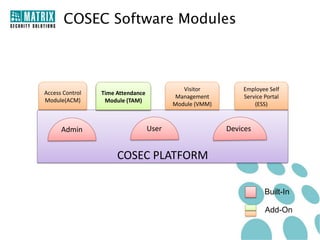
COSEC Software Modules


                                             Visitor         Employee Self
Access Control   Time Attendance
                                          Management         Service Portal
Module(ACM)       Module (TAM)
                                          Module (VMM)           (ESS)


      Admin                        User                  Devices


                      COSEC PLATFORM

                                                                     Built-In

                                                                     Add-On
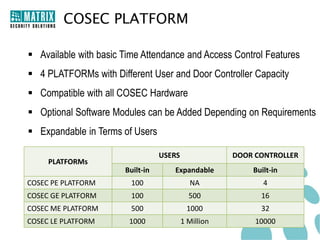
COSEC PLATFORM

 Available with basic Time Attendance and Access Control Features
 4 PLATFORMs with Different User and Door Controller Capacity
 Compatible with all COSEC Hardware
 Optional Software Modules can be Added Depending on Requirements
 Expandable in Terms of Users

                                  USERS               DOOR CONTROLLER
     PLATFORMs
                       Built-in      Expandable           Built-in
COSEC PE PLATFORM        100                NA               4
COSEC GE PLATFORM        100                500             16
COSEC ME PLATFORM        500               1000             32
COSEC LE PLATFORM       1000              1 Million        10000
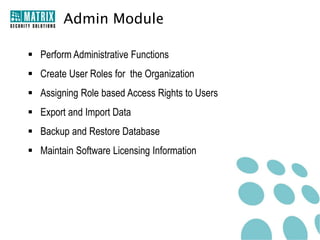
Admin Module

 Perform Administrative Functions
 Create User Roles for the Organization
 Assigning Role based Access Rights to Users
 Export and Import Data
 Backup and Restore Database
 Maintain Software Licensing Information
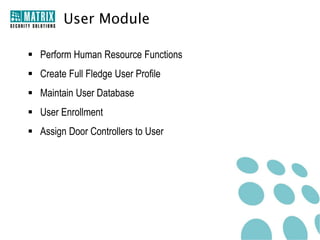
User Module

 Perform Human Resource Functions
 Create Full Fledge User Profile
 Maintain User Database
 User Enrollment
 Assign Door Controllers to User
Device Module

 Add New COSEC Hardware and Configure Various Parameters
   COSEC PANEL
   COSEC DOOR CONTROLLER
 Define Features and Functions
Enrollment Management

 Desktop based Application Software
 Fingerprint and Card Enrollment
 USB based Enrollment Station
 Show Image of Finger Print while Enrolling a User
 Show Finger Print and Card Details
 Fingerprint Verification
 User Photo Browse, Upload and Capture Facility
 User Photo Adjustment
 Built-in Module with COSEC PLATFORM
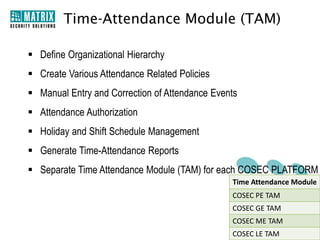
Time-Attendance Module (TAM)

 Define Organizational Hierarchy
 Create Various Attendance Related Policies
 Manual Entry and Correction of Attendance Events
 Attendance Authorization
 Holiday and Shift Schedule Management
 Generate Time-Attendance Reports
 Separate Time Attendance Module (TAM) for each COSEC PLATFORM
                                                Time Attendance Module
                                                COSEC PE TAM
                                                COSEC GE TAM
                                                COSEC ME TAM
                                                COSEC LE TAM
Leave Management Module

 New Leave Creation
 Accurate Leave Balance Management
 Leave Carry Forward and Encash
 Leave Request and Approval
 Automatic Leave Report Generation
 Comes Along with COSEC Time Attendance Module (TAM)
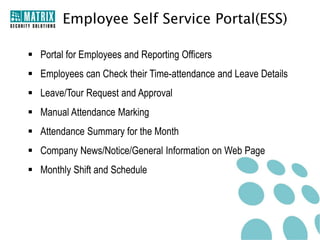
Employee Self Service Portal(ESS)

 Portal for Employees and Reporting Officers
 Employees can Check their Time-attendance and Leave Details
 Leave/Tour Request and Approval
 Manual Attendance Marking
 Attendance Summary for the Month
 Company News/Notice/General Information on Web Page
 Monthly Shift and Schedule
COSEC Hardware Solution
COSEC PANEL

 Controls up to 75 Door Controllers
     Maximum 75 Door Controllers on Ethernet
     Maximum 32 Door Controllers on RS485

 Ethernet, RS485, WiFi and 3G Interface
 10,000 Users Capacity
 Store 1,00,000 Events in Log
 Built-in Battery Backup Provision
 Supervised Alarm Input Port and Auxiliary Output Relay Contact
 Built-in USB Port
 Audio Visual Indication in terms of LEDs and Buzzer
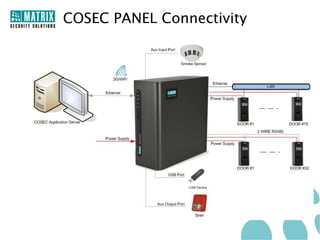
COSEC PANEL Connectivity
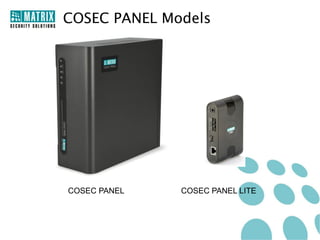
COSEC PANEL Models


COSEC PANEL   COSEC PANEL LITE
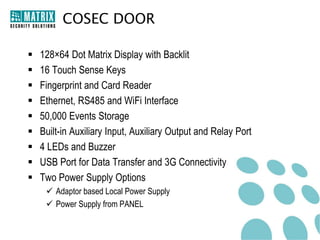
COSEC DOOR

   128×64 Dot Matrix Display with Backlit
   16 Touch Sense Keys
   Fingerprint and Card Reader
   Ethernet, RS485 and WiFi Interface
   50,000 Events Storage
   Built-in Auxiliary Input, Auxiliary Output and Relay Port
   4 LEDs and Buzzer
   USB Port for Data Transfer and 3G Connectivity
   Two Power Supply Options
      Adaptor based Local Power Supply
      Power Supply from PANEL
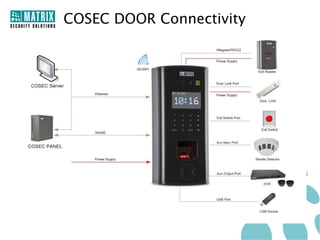
COSEC DOOR Connectivity
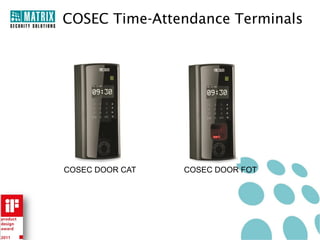
COSEC Time-Attendance Terminals


COSEC DOOR CAT   COSEC DOOR FOT
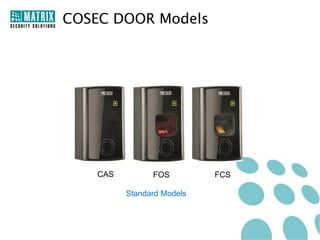
COSEC DOOR Models


    CAS         FOS         FCS

          Standard Models
COSEC DOOR Models


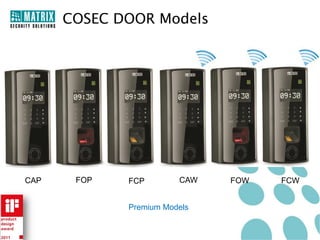
CAP    FOP   FCP        CAW   FOW   FCW


             Premium Models
COSEC Reader
Exit Reader
 Fingerprint or Contactless Card Reader
 Wiegand and RS232 Interface
 Allowed, Denied, Status and Alarm LEDs
 Built-in Buzzer
 Power Supply from COSEC DOOR
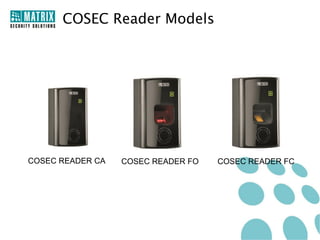
COSEC Reader Models


COSEC READER CA   COSEC READER FO   COSEC READER FC
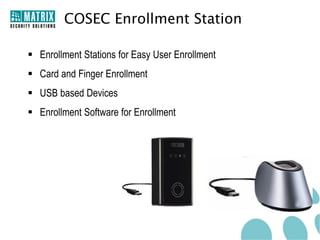
COSEC Enrollment Station

 Enrollment Stations for Easy User Enrollment
 Card and Finger Enrollment
 USB based Devices
 Enrollment Software for Enrollment
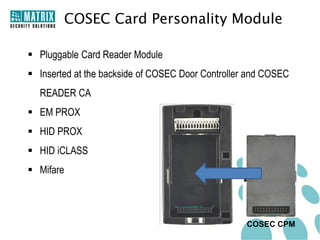
COSEC Card Personality Module

 Pluggable Card Reader Module
 Inserted at the backside of COSEC Door Controller and COSEC
  READER CA
 EM PROX
 HID PROX
 HID iCLASS
 Mifare


                                                   COSEC CPM
Key Features
Time Attendance
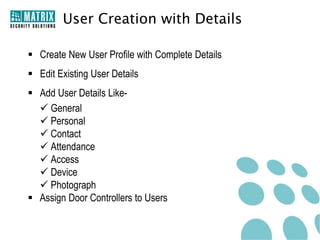
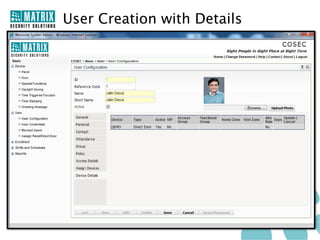
User Creation with Details

 Create New User Profile with Complete Details
 Edit Existing User Details
 Add User Details Like-
   General
   Personal
   Contact
   Attendance
   Access
   Device
   Photograph
 Assign Door Controllers to Users
User Creation with Details
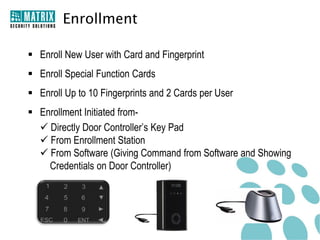
Enrollment

 Enroll New User with Card and Fingerprint
 Enroll Special Function Cards
 Enroll Up to 10 Fingerprints and 2 Cards per User
 Enrollment Initiated from-
   Directly Door Controller’s Key Pad
   From Enrollment Station
   From Software (Giving Command from Software and Showing
    Credentials on Door Controller)
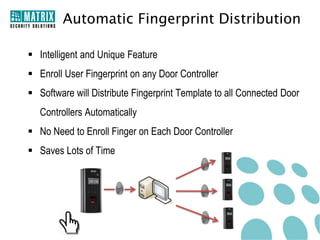
Automatic Fingerprint Distribution

 Intelligent and Unique Feature
 Enroll User Fingerprint on any Door Controller
 Software will Distribute Fingerprint Template to all Connected Door
   Controllers Automatically
 No Need to Enroll Finger on Each Door Controller
 Saves Lots of Time
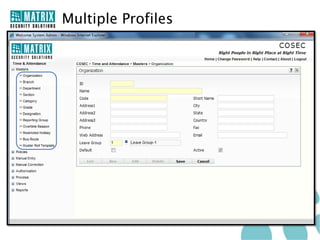
Multiple Profiles Creation

 Flexibility to Create Multiple Profiles Under One Company
 Create Multiple Profiles Like:
    Organizations
    Branches
    Sections
    Departments
    Categories
    Designations
    Grades
 Assign a Profile Against Each User
 Software Access to only Particular Profile Only
Multiple Profiles
Holiday Schedule

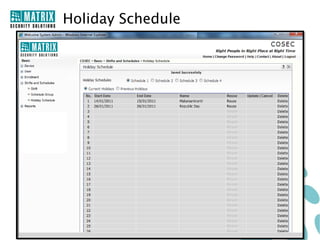
 4 Holiday Schedules
 32 Holidays in each Schedule
 Assign any Schedule to a User Group
 Define Continuous Holidays Using Only one Holiday (Important for
   School Vacation)
 Restricted Holiday List
Holiday Schedule
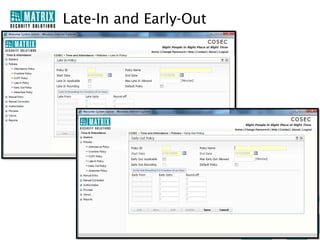
Late-In and Early-Out Policy

 99 Late-In and Early-Out Policies Creation
 Assign Policy to Each User Depending Upon Work Profile
 Flexible Programming to Meet Diverse Attendance Requirements
 Rounding-off Option
Late-In and Early-Out
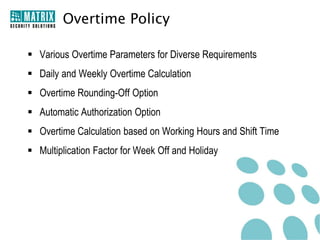
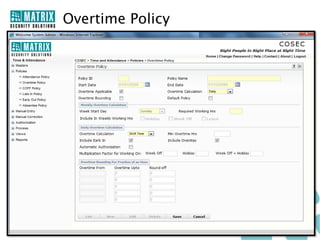
Overtime Policy

 Various Overtime Parameters for Diverse Requirements
 Daily and Weekly Overtime Calculation
 Overtime Rounding-Off Option
 Automatic Authorization Option
 Overtime Calculation based on Working Hours and Shift Time
 Multiplication Factor for Week Off and Holiday
Overtime Policy
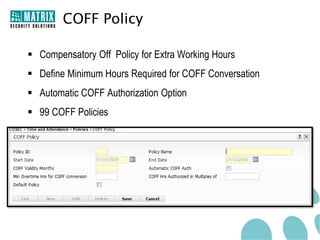
COFF Policy

 Compensatory Off Policy for Extra Working Hours
 Define Minimum Hours Required for COFF Conversation
 Automatic COFF Authorization Option
 99 COFF Policies
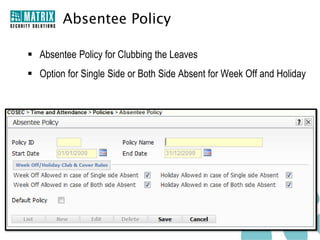
Absentee Policy

 Absentee Policy for Clubbing the Leaves
 Option for Single Side or Both Side Absent for Week Off and Holiday
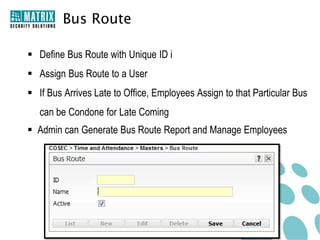
Bus Route

 Define Bus Route with Unique ID i
 Assign Bus Route to a User
 If Bus Arrives Late to Office, Employees Assign to that Particular Bus
   can be Condone for Late Coming
 Admin can Generate Bus Route Report and Manage Employees
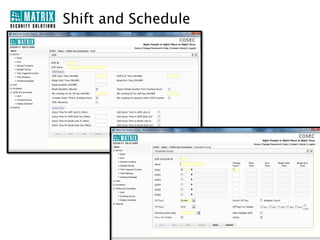
Shift and Schedule

 Shifts Creation with Numerous Optional Parameters to Tackle
   Complexity of Organization's Shifts
 99 Schedules
 6 Shifts per Schedule
 Auto Shifts Correction Option if Employee Comes in Other Shift instead
   of Regular Shift
 Define Rotation and Week off for the Schedule
 Define Start Time, End Time, Break Time, Late-In, Early-Out and
   Other Options in Every Shift
Shift and Schedule
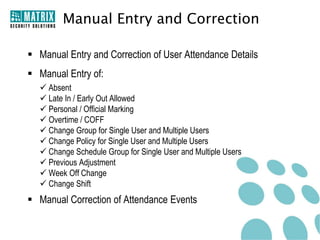
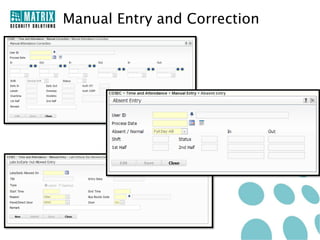
Manual Entry and Correction

 Manual Entry and Correction of User Attendance Details
 Manual Entry of:
   Absent
   Late In / Early Out Allowed
   Personal / Official Marking
   Overtime / COFF
   Change Group for Single User and Multiple Users
   Change Policy for Single User and Multiple Users
   Change Schedule Group for Single User and Multiple Users
   Previous Adjustment
   Week Off Change
   Change Shift
 Manual Correction of Attendance Events
Manual Entry and Correction
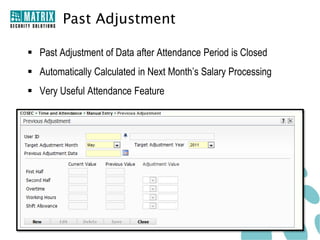
Past Adjustment

 Past Adjustment of Data after Attendance Period is Closed
 Automatically Calculated in Next Month’s Salary Processing
 Very Useful Attendance Feature
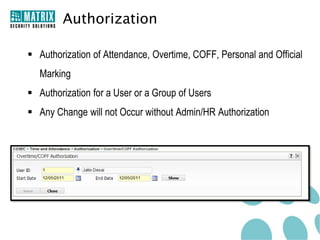
Authorization

 Authorization of Attendance, Overtime, COFF, Personal and Official
   Marking
 Authorization for a User or a Group of Users
 Any Change will not Occur without Admin/HR Authorization
Attendance with Fingerprint Only

 Useful Feature where both Card and Fingerprint are Used
 System will Mark Attendance only with Fingerprint
 Card is Used for Access Control Only
 Reduce Proxy Punching
Integration with Payroll

 COSEC can be Integrated with HRM, ERP, Tally and Payroll
 System will Send Attendance and Leave Data to Payroll Software
 Define Required Fields for the Payroll
 API for Automatic Payroll Integration
 Generates Salary at the End of every Month/Week
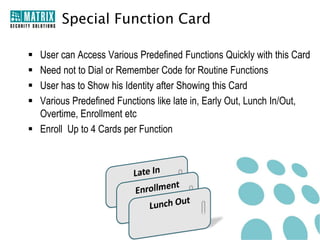
Special Function Card

 User can Access Various Predefined Functions Quickly with this Card
 Need not to Dial or Remember Code for Routine Functions
 User has to Show his Identity after Showing this Card
 Various Predefined Functions like late in, Early Out, Lunch In/Out,
  Overtime, Enrollment etc
 Enroll Up to 4 Cards per Function
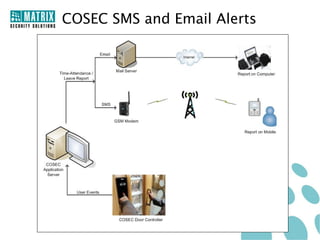
COSEC SMS and Email Alerts

 SMS and Email Notification for the Attendance and Leave Status
 Alerts for the:
       Punch Time
       Forget to Punch
       Leave Rejection
       Leave Approval
       Monthly Attendance
 Customized Message for Special Announcement
 Automatic and Instant Notification to Multiple Users
 Important Feature for School, Colleges, Offices and more
COSEC SMS and Email Alerts
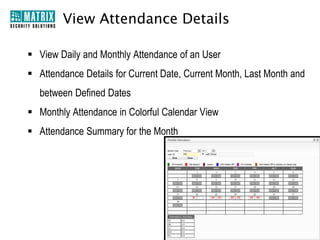
View Attendance Details

 View Daily and Monthly Attendance of an User
 Attendance Details for Current Date, Current Month, Last Month and
  between Defined Dates
 Monthly Attendance in Colorful Calendar View
 Attendance Summary for the Month
Leave Management
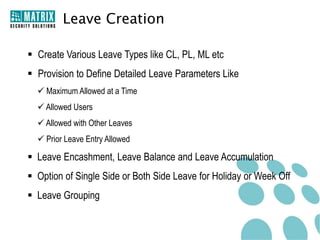
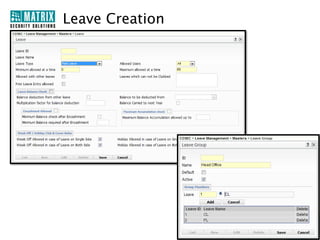
Leave Creation

 Create Various Leave Types like CL, PL, ML etc
 Provision to Define Detailed Leave Parameters Like
   Maximum Allowed at a Time
   Allowed Users
   Allowed with Other Leaves
   Prior Leave Entry Allowed

 Leave Encashment, Leave Balance and Leave Accumulation
 Option of Single Side or Both Side Leave for Holiday or Week Off
 Leave Grouping
Leave Creation
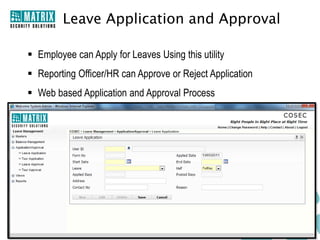
Leave Application and Approval

 Employee can Apply for Leaves Using this utility
 Reporting Officer/HR can Approve or Reject Application
 Web based Application and Approval Process
 Reduce Time and Increase Transparency
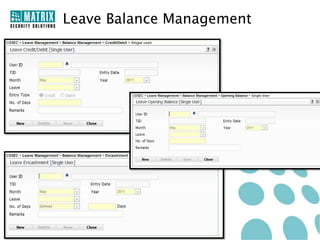
Leave Balance Management

 Automatically Leave Credit in User Account in Every Month
 Leave Encashment or Lapse Option at the End of Year
 Automatically Update Balance Upon Employee Timing and Leave
  Approval
Leave Balance Management
System Features
Unique Hardware Design

 Attractive Vertical Look
 Built-in Controller and Reader
 Touch Sense Key Pad and LCD Display
 Screw Less Push Type Connector for Easy Wire Insert
 Pluggable Card Reader Module
 Easy Wall Mounting with Back Plate
 Built-In Tamper Detection
Operations from Door Controller

 Easy Operation from Door Controller with Touch Sense Keypad and
  Dot-Matrix Display
 16 Touch Sense Numeric and Function Keys
 Functions from Door Controller
   Admin          Attendance
   Enroll         Regular
   User Profile   Break
   Late In        Overtime
   Early Out      Official
                  Short Leave
USB Connectivity

 USB Port for Various Applications
 Connect Memory Stick, Internet Dongle or WiFi Dongle
 Easy Data Transfer from Controller/Panel to Server
 Easy Firmware Upgrade of Door Controller and Panel
 Connect Remote Sites with 3G/2G USB Internet Dongle
 No any Physical Connectivity is Required between Door Controller
  and Server
 Ideal for Remote Applications
WiFi Connectivity

 Simple Connectivity between Controller and Server
 No Wiring is Required
 Real Time Events and Report Generation
 Ideal for Applications where Ethernet is not Possible because of
   Aesthetic Purpose or any Architectural Limitations
Easy Backup and Data Restore

 One Click Backup of System Database
 Helpful in Case of System Crash
 Restore Database Easily from File
Import and Export Data

 Import Data from File and Restore in COSEC Software
 Export Data in ERP, Payroll and HRM
 Export in Various File Formats
   Excel
   Text
   CSV
   XML
Message Board

 Virtual Notice Board for All Users
 Three Separate Messages: Notice, News and General
 Advanced Editing Options
 Reduce Possibility to Miss any Important Communication
COSEC Live Monitoring Window

 Real Time Events Monitoring and Control
 Live Status of Door Controllers and Panels
 Alarm Monitoring and Control
 Firmware Up Gradation
 Temporary Deactivate Function/Features
 Automatic Events Download
Web Based Application

 Built-In Web based Application Software
 Program the System and Generate Reports from any Location
 View Attendance and Access Detail of Users Remotely
 Apply for Leave/Tour and Check Attendance
Password Protection

 Separate Password for all Login User
 Password Change Option
 Expire Old Password after Predefined Days and ask for New Password
 Option for Account Blocked when it is Unused for Predefined Days
Software Access to User

 Web based Application Software
 User can Access COSEC from Anywhere with his Login ID and
  Password
 Generate Reports, Change System Parameters and View
  Attendance Details
 User can Access only those Details in which he has Access Rights
COSEC Integration
Web Application Program Interface

 Ideal Tool for Payroll/HR Software integration
 Each Event can be transferred
 Useful tool for SAP Integration
 Backward integration support for User Creation
 Different API possible like:
Add or Delete Device , Assign or Revoke Device
Add User, Daily Attendance, Monthly Attendance, Daily T&A Events
MS SQL Integration

 Useful Integration Tool for Payroll having SQL database
 Each Event can be transferred
 Transferring with Field Mapping Facility
 Daily Attendance, Attendance Events, Monthly Attendance Possible
Active Directory Integration

 Active Directory is an useful Microsoft Windows Server Operating
   System
 Active Directory is a Database that keeps track of all the User
   Accounts and Passwords in an organization and from which we can
   Import user data in Cosec database
PostGre SQL Integration

 PostGre SQL is a Proprietary SQL for Government usage purpose
 PostGre SQL must have predefined tables like devices and device logs
 Device table hold the basic data like device ID,MAC & IP. This table
   holds information on last Ping Time and last Log Download
 Event logs for a particular device can also be obtained in device logs
   table
Tally Integration

 Tally is one of the powerful Accounting and Inventory Software
 Importing attendance data from COSEC Server into Tally would
   allow user to directly generate attendance vouchers
 Vouchers can be used to maintain Employee accounts.
 Integration through Export tool with required file format by Tally
Reports and Charts
COSEC Reports and Charts

 Wide Range of Reports and Charts for Divers Needs of the
   Organizations
 100+ Reports and Colorful Charts
 Reports with Month, Day and between Defined Dates
 Print Report
 Reports of Time-Attendance, Access Control, Leave, Visitor, User
   etc.
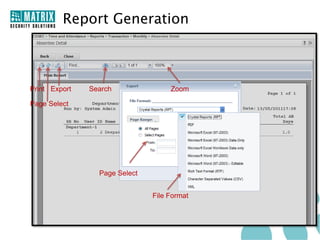
Report Generation


Print Export   Search               Zoom

Page Select


                 Page Select


                               File Format
Reports in File Format

 Export Report in Various File Formats
   PDF
   XML
   Rich Text Format
   MS Excel
   MS Excel (Data Only)
   Crystal Report (RPT)
   MS-Word
   MS-Word Editable
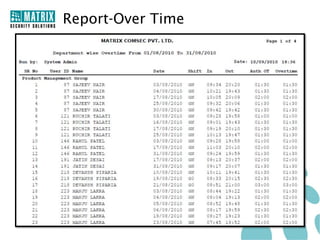
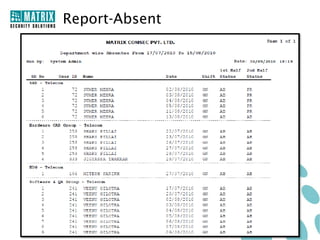
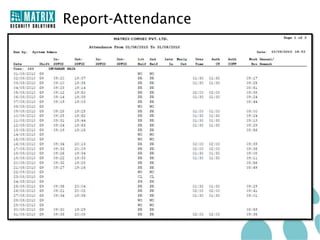
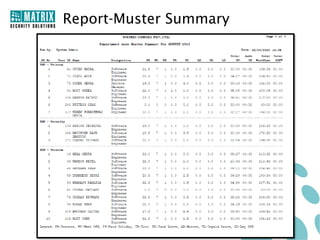
COSEC Reports
    Time-Attendance
   Late In                 Weekly Work and OT
   Early in                Continuous Absenteeism
   Overtime                Special Function Punch
   Absent                  Department wise Absent
   Exception               Shift Schedule
   Attendance              Muster Summary
   Attendance Summary      Salary Data
   Shift Change            Attendance Register
   Late Arrival Memo       Overtime Register
   Absent Memo             Yearly Performance
                            Schedule Group Report
COSEC Reports
View                            Leave
   User Personal Information    Leave Application
   Activity Log Viewer          Leave Register
   Event                        Leave Balance
   Monthly Shift Schedule
   Daily Attendance
   Monthly Attendance
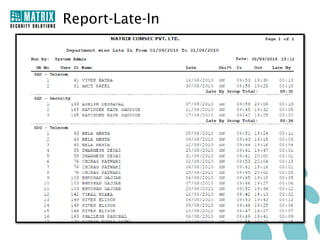
Report-Late-In
Report-Over Time
Report-Absent
Report-Attendance
Report-Muster Summary
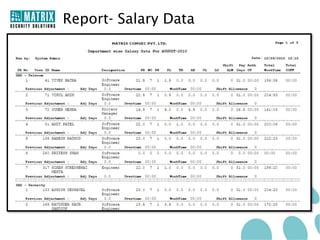
Report- Salary Data
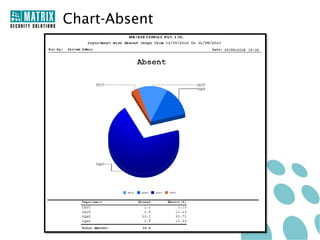
COSEC Charts

   Time Loss
   Overtime
   Absent
   Late In
   Irregularity
   Month wise Overtime
   Attendance Summary
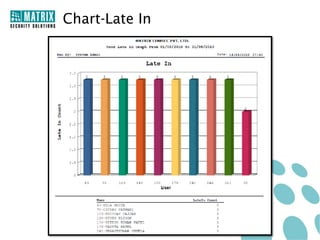
Chart-Late In
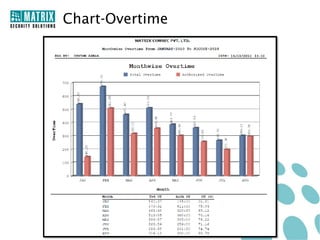
Chart-Overtime
Chart-Absent
Thank You


            Copyright © Matrix Comsec 2009-2010
For Further Information Please Contact:
Email ID: Security@MatrixComSec.com
Tel: +91 265 2630555
Visit us at www.MatrixComSec.com
Version: V1R1

Matrix Cosec Tam Presentation V1 R1

  • 1.
  • 2.
    Presentation Agenda  COSECTime Attendance  Applications  COSEC Solution  Software Solution  Hardware Solution  Key Features  Time-Attendance  Leave Management  System Features  Reports and Charts
  • 3.
  • 4.
    What is Time-AttendanceSystem?  It is a Automatic Attendance Marking System  Combination of Hardware and Software  Hardware is Used to Record Time of an User from a Credential  Software is Used to Process the Time According to Attendance Policy  System Generates Attendance Reports or Send Attendance Data to Payroll Software for Further Action
  • 5.
    How Attendance SystemWorks? Access Collect Compare Process System Process Employee Access System Compare Reader Collects the Data and the System Using User Data with User Time from Generate Reports Fingerprint, Card his Attendance the Credentials or Send to Payroll or PIN Policy Software
  • 6.
    What is COSECTime-Attendance?  Comprehensive Solution for SOHO, SMB, SME and Enterprises  Time-Attendance and Leave Management  Fingerprint and Card based Attendance Marking  Various Attendance Policies Creation  Manual Entry and Correction of Attendance Data  Integration with Existing Payroll Software  Attendance and Leave Reports and Charts
  • 7.
    Benefits of Time-Attendance Eliminate Human Error in Employee Time Records  Prevent Buddy Punching and Fraudulent Time Keeping Records  Significantly Increase Employee and Manager Satisfaction  Cut Down on Administrative Time and Cost  Monitor and Analyze Absence to Reduce Impact on Productivity  Graphical Representation of Attendance for Easy and Fast Interpretation  Significantly Cut Down on Payroll Processing Time  Adapt to Existing HR Policies  Eliminate Payments for Unapproved or Fraudulent Overtime  Give Employees Self-service Access
  • 8.
    Why COSEC Time-Attendance?  Comprehensive Time-Attendance Solution  Accurate Time Record  Leave Management  Configurable Attendance Parameters  Integration with Payroll and HRM  Proactive SMS and Email Alerts  Completely Scalable, Flexible and Modular  On Demand Report Generation
  • 9.
    Target Customers… Small Offices Corporate Offices Shopping Malls R & D Labs Factory Remote Sites Hotels
  • 10.
    Target Customers… Large Enterprises Government Financial Institutes Clubs Organisations And Many More..... Educational Institutes Retail Stores
  • 11.
  • 12.
    Small Office Application Ethernet User COSEC Application Server COSEC Door Controller • 1-100 Users • COSEC Door Controller is Used for Attendance Marking • Door Controller is Connected with COSEC Server through Ethernet • Events are Transferred to COSEC Server in Real Time • Reports can be Generated from COSEC Server • Ideal for Private Office, Clinics, Retail Shop, Factory and More
  • 13.
    Campus Application Head Office Canteen R&D Lab COSEC Server Door Controller Factory
  • 14.
    Campus Application  COSECis Installed in an Organization having Four Separate Offices in a Campus  Door Controllers at each Office are Directly Connected with the COSEC Server Installed in a Main Building via LAN  Door Controller Records Employees Time-Attendance Details and Send it to COSEC Server in Real Time  HR can Generate Reports from a Single Place and Send Data to Payroll Software for Further Processing
  • 15.
  • 16.
    Remote Location Application COSEC is Deployed in a Large Enterprise having Offices Located at Different Geographical Locations  COSEC Application Server is Installed at Corporate Office (CO) to Manage Attendance of all Employees Centrally  COSEC Door Controllers at each Location are Connected Directly or via PANEL with COSEC Server using Available Connectivity (GSM, Wifi or WAN)  DOORs Records User Attendance from Fingerprint or Card and Send it to the COSEC Application Server in Real Time  COSEC Server Processes the User Attendance Data and Sends it to the Payroll Software or Generate Reports  Using Web Application, Proper Person can Generate Report or Configure the System from any Location at any Time
  • 17.
  • 18.
  • 19.
    COSEC Solution Component COSEC Add-on PLATFORM Software Modules COSEC Additional PANEL Hardware Door Readers Controller Software Hardware
  • 20.
  • 21.
    COSEC Application Software Complete and Powerful Web based Application Software  Controls up to 1000 PANELs and 10,000 Door Controllers  Manage up to 1 Million Users  Time-Attendance, Access Control, Leave Management, Visitor Management and Employee Self Service  Real Time Monitoring and Control  Comprehensive Reports Generation  Integration with ERP, HRM and Payroll
  • 22.
    COSEC Software Modules Visitor Employee Self Access Control Time Attendance Management Service Portal Module(ACM) Module (TAM) Module (VMM) (ESS) Admin User Devices COSEC PLATFORM Built-In Add-On
  • 23.
    COSEC PLATFORM  Availablewith basic Time Attendance and Access Control Features  4 PLATFORMs with Different User and Door Controller Capacity  Compatible with all COSEC Hardware  Optional Software Modules can be Added Depending on Requirements  Expandable in Terms of Users USERS DOOR CONTROLLER PLATFORMs Built-in Expandable Built-in COSEC PE PLATFORM 100 NA 4 COSEC GE PLATFORM 100 500 16 COSEC ME PLATFORM 500 1000 32 COSEC LE PLATFORM 1000 1 Million 10000
  • 24.
    Admin Module  PerformAdministrative Functions  Create User Roles for the Organization  Assigning Role based Access Rights to Users  Export and Import Data  Backup and Restore Database  Maintain Software Licensing Information
  • 25.
    User Module  PerformHuman Resource Functions  Create Full Fledge User Profile  Maintain User Database  User Enrollment  Assign Door Controllers to User
  • 26.
    Device Module  AddNew COSEC Hardware and Configure Various Parameters  COSEC PANEL  COSEC DOOR CONTROLLER  Define Features and Functions
  • 27.
    Enrollment Management  Desktopbased Application Software  Fingerprint and Card Enrollment  USB based Enrollment Station  Show Image of Finger Print while Enrolling a User  Show Finger Print and Card Details  Fingerprint Verification  User Photo Browse, Upload and Capture Facility  User Photo Adjustment  Built-in Module with COSEC PLATFORM
  • 28.
    Time-Attendance Module (TAM) Define Organizational Hierarchy  Create Various Attendance Related Policies  Manual Entry and Correction of Attendance Events  Attendance Authorization  Holiday and Shift Schedule Management  Generate Time-Attendance Reports  Separate Time Attendance Module (TAM) for each COSEC PLATFORM Time Attendance Module COSEC PE TAM COSEC GE TAM COSEC ME TAM COSEC LE TAM
  • 29.
    Leave Management Module New Leave Creation  Accurate Leave Balance Management  Leave Carry Forward and Encash  Leave Request and Approval  Automatic Leave Report Generation  Comes Along with COSEC Time Attendance Module (TAM)
  • 30.
    Employee Self ServicePortal(ESS)  Portal for Employees and Reporting Officers  Employees can Check their Time-attendance and Leave Details  Leave/Tour Request and Approval  Manual Attendance Marking  Attendance Summary for the Month  Company News/Notice/General Information on Web Page  Monthly Shift and Schedule
  • 31.
  • 32.
    COSEC PANEL  Controlsup to 75 Door Controllers  Maximum 75 Door Controllers on Ethernet  Maximum 32 Door Controllers on RS485  Ethernet, RS485, WiFi and 3G Interface  10,000 Users Capacity  Store 1,00,000 Events in Log  Built-in Battery Backup Provision  Supervised Alarm Input Port and Auxiliary Output Relay Contact  Built-in USB Port  Audio Visual Indication in terms of LEDs and Buzzer
  • 33.
  • 34.
    COSEC PANEL Models COSECPANEL COSEC PANEL LITE
  • 35.
    COSEC DOOR  128×64 Dot Matrix Display with Backlit  16 Touch Sense Keys  Fingerprint and Card Reader  Ethernet, RS485 and WiFi Interface  50,000 Events Storage  Built-in Auxiliary Input, Auxiliary Output and Relay Port  4 LEDs and Buzzer  USB Port for Data Transfer and 3G Connectivity  Two Power Supply Options  Adaptor based Local Power Supply  Power Supply from PANEL
  • 36.
  • 37.
  • 38.
    COSEC DOOR Models CAS FOS FCS Standard Models
  • 39.
    COSEC DOOR Models CAP FOP FCP CAW FOW FCW Premium Models
  • 40.
    COSEC Reader Exit Reader Fingerprint or Contactless Card Reader  Wiegand and RS232 Interface  Allowed, Denied, Status and Alarm LEDs  Built-in Buzzer  Power Supply from COSEC DOOR
  • 41.
    COSEC Reader Models COSECREADER CA COSEC READER FO COSEC READER FC
  • 42.
    COSEC Enrollment Station Enrollment Stations for Easy User Enrollment  Card and Finger Enrollment  USB based Devices  Enrollment Software for Enrollment
  • 43.
    COSEC Card PersonalityModule  Pluggable Card Reader Module  Inserted at the backside of COSEC Door Controller and COSEC READER CA  EM PROX  HID PROX  HID iCLASS  Mifare COSEC CPM
  • 44.
  • 45.
  • 46.
    User Creation withDetails  Create New User Profile with Complete Details  Edit Existing User Details  Add User Details Like-  General  Personal  Contact  Attendance  Access  Device  Photograph  Assign Door Controllers to Users
  • 47.
  • 48.
    Enrollment  Enroll NewUser with Card and Fingerprint  Enroll Special Function Cards  Enroll Up to 10 Fingerprints and 2 Cards per User  Enrollment Initiated from-  Directly Door Controller’s Key Pad  From Enrollment Station  From Software (Giving Command from Software and Showing Credentials on Door Controller)
  • 49.
    Automatic Fingerprint Distribution Intelligent and Unique Feature  Enroll User Fingerprint on any Door Controller  Software will Distribute Fingerprint Template to all Connected Door Controllers Automatically  No Need to Enroll Finger on Each Door Controller  Saves Lots of Time
  • 50.
    Multiple Profiles Creation Flexibility to Create Multiple Profiles Under One Company  Create Multiple Profiles Like:  Organizations  Branches  Sections  Departments  Categories  Designations  Grades  Assign a Profile Against Each User  Software Access to only Particular Profile Only
  • 51.
  • 52.
    Holiday Schedule  4Holiday Schedules  32 Holidays in each Schedule  Assign any Schedule to a User Group  Define Continuous Holidays Using Only one Holiday (Important for School Vacation)  Restricted Holiday List
  • 53.
  • 54.
    Late-In and Early-OutPolicy  99 Late-In and Early-Out Policies Creation  Assign Policy to Each User Depending Upon Work Profile  Flexible Programming to Meet Diverse Attendance Requirements  Rounding-off Option
  • 55.
  • 56.
    Overtime Policy  VariousOvertime Parameters for Diverse Requirements  Daily and Weekly Overtime Calculation  Overtime Rounding-Off Option  Automatic Authorization Option  Overtime Calculation based on Working Hours and Shift Time  Multiplication Factor for Week Off and Holiday
  • 57.
  • 58.
    COFF Policy  CompensatoryOff Policy for Extra Working Hours  Define Minimum Hours Required for COFF Conversation  Automatic COFF Authorization Option  99 COFF Policies
  • 59.
    Absentee Policy  AbsenteePolicy for Clubbing the Leaves  Option for Single Side or Both Side Absent for Week Off and Holiday
  • 60.
    Bus Route  DefineBus Route with Unique ID i  Assign Bus Route to a User  If Bus Arrives Late to Office, Employees Assign to that Particular Bus can be Condone for Late Coming  Admin can Generate Bus Route Report and Manage Employees
  • 61.
    Shift and Schedule Shifts Creation with Numerous Optional Parameters to Tackle Complexity of Organization's Shifts  99 Schedules  6 Shifts per Schedule  Auto Shifts Correction Option if Employee Comes in Other Shift instead of Regular Shift  Define Rotation and Week off for the Schedule  Define Start Time, End Time, Break Time, Late-In, Early-Out and Other Options in Every Shift
  • 62.
  • 63.
    Manual Entry andCorrection  Manual Entry and Correction of User Attendance Details  Manual Entry of:  Absent  Late In / Early Out Allowed  Personal / Official Marking  Overtime / COFF  Change Group for Single User and Multiple Users  Change Policy for Single User and Multiple Users  Change Schedule Group for Single User and Multiple Users  Previous Adjustment  Week Off Change  Change Shift  Manual Correction of Attendance Events
  • 64.
    Manual Entry andCorrection
  • 65.
    Past Adjustment  PastAdjustment of Data after Attendance Period is Closed  Automatically Calculated in Next Month’s Salary Processing  Very Useful Attendance Feature
  • 66.
    Authorization  Authorization ofAttendance, Overtime, COFF, Personal and Official Marking  Authorization for a User or a Group of Users  Any Change will not Occur without Admin/HR Authorization
  • 67.
    Attendance with FingerprintOnly  Useful Feature where both Card and Fingerprint are Used  System will Mark Attendance only with Fingerprint  Card is Used for Access Control Only  Reduce Proxy Punching
  • 68.
    Integration with Payroll COSEC can be Integrated with HRM, ERP, Tally and Payroll  System will Send Attendance and Leave Data to Payroll Software  Define Required Fields for the Payroll  API for Automatic Payroll Integration  Generates Salary at the End of every Month/Week
  • 69.
    Special Function Card User can Access Various Predefined Functions Quickly with this Card  Need not to Dial or Remember Code for Routine Functions  User has to Show his Identity after Showing this Card  Various Predefined Functions like late in, Early Out, Lunch In/Out, Overtime, Enrollment etc  Enroll Up to 4 Cards per Function
  • 70.
    COSEC SMS andEmail Alerts  SMS and Email Notification for the Attendance and Leave Status  Alerts for the:  Punch Time  Forget to Punch  Leave Rejection  Leave Approval  Monthly Attendance  Customized Message for Special Announcement  Automatic and Instant Notification to Multiple Users  Important Feature for School, Colleges, Offices and more
  • 71.
    COSEC SMS andEmail Alerts
  • 72.
    View Attendance Details View Daily and Monthly Attendance of an User  Attendance Details for Current Date, Current Month, Last Month and between Defined Dates  Monthly Attendance in Colorful Calendar View  Attendance Summary for the Month
  • 73.
  • 74.
    Leave Creation  CreateVarious Leave Types like CL, PL, ML etc  Provision to Define Detailed Leave Parameters Like  Maximum Allowed at a Time  Allowed Users  Allowed with Other Leaves  Prior Leave Entry Allowed  Leave Encashment, Leave Balance and Leave Accumulation  Option of Single Side or Both Side Leave for Holiday or Week Off  Leave Grouping
  • 75.
  • 76.
    Leave Application andApproval  Employee can Apply for Leaves Using this utility  Reporting Officer/HR can Approve or Reject Application  Web based Application and Approval Process  Reduce Time and Increase Transparency
  • 77.
    Leave Balance Management Automatically Leave Credit in User Account in Every Month  Leave Encashment or Lapse Option at the End of Year  Automatically Update Balance Upon Employee Timing and Leave Approval
  • 78.
  • 79.
  • 80.
    Unique Hardware Design Attractive Vertical Look  Built-in Controller and Reader  Touch Sense Key Pad and LCD Display  Screw Less Push Type Connector for Easy Wire Insert  Pluggable Card Reader Module  Easy Wall Mounting with Back Plate  Built-In Tamper Detection
  • 81.
    Operations from DoorController  Easy Operation from Door Controller with Touch Sense Keypad and Dot-Matrix Display  16 Touch Sense Numeric and Function Keys  Functions from Door Controller Admin Attendance Enroll Regular User Profile Break Late In Overtime Early Out Official Short Leave
  • 82.
    USB Connectivity  USBPort for Various Applications  Connect Memory Stick, Internet Dongle or WiFi Dongle  Easy Data Transfer from Controller/Panel to Server  Easy Firmware Upgrade of Door Controller and Panel  Connect Remote Sites with 3G/2G USB Internet Dongle  No any Physical Connectivity is Required between Door Controller and Server  Ideal for Remote Applications
  • 83.
    WiFi Connectivity  SimpleConnectivity between Controller and Server  No Wiring is Required  Real Time Events and Report Generation  Ideal for Applications where Ethernet is not Possible because of Aesthetic Purpose or any Architectural Limitations
  • 84.
    Easy Backup andData Restore  One Click Backup of System Database  Helpful in Case of System Crash  Restore Database Easily from File
  • 85.
    Import and ExportData  Import Data from File and Restore in COSEC Software  Export Data in ERP, Payroll and HRM  Export in Various File Formats  Excel  Text  CSV  XML
  • 86.
    Message Board  VirtualNotice Board for All Users  Three Separate Messages: Notice, News and General  Advanced Editing Options  Reduce Possibility to Miss any Important Communication
  • 87.
    COSEC Live MonitoringWindow  Real Time Events Monitoring and Control  Live Status of Door Controllers and Panels  Alarm Monitoring and Control  Firmware Up Gradation  Temporary Deactivate Function/Features  Automatic Events Download
  • 88.
    Web Based Application Built-In Web based Application Software  Program the System and Generate Reports from any Location  View Attendance and Access Detail of Users Remotely  Apply for Leave/Tour and Check Attendance
  • 89.
    Password Protection  SeparatePassword for all Login User  Password Change Option  Expire Old Password after Predefined Days and ask for New Password  Option for Account Blocked when it is Unused for Predefined Days
  • 90.
    Software Access toUser  Web based Application Software  User can Access COSEC from Anywhere with his Login ID and Password  Generate Reports, Change System Parameters and View Attendance Details  User can Access only those Details in which he has Access Rights
  • 91.
  • 92.
    Web Application ProgramInterface  Ideal Tool for Payroll/HR Software integration  Each Event can be transferred  Useful tool for SAP Integration  Backward integration support for User Creation  Different API possible like: Add or Delete Device , Assign or Revoke Device Add User, Daily Attendance, Monthly Attendance, Daily T&A Events
  • 93.
    MS SQL Integration Useful Integration Tool for Payroll having SQL database  Each Event can be transferred  Transferring with Field Mapping Facility  Daily Attendance, Attendance Events, Monthly Attendance Possible
  • 94.
    Active Directory Integration Active Directory is an useful Microsoft Windows Server Operating System  Active Directory is a Database that keeps track of all the User Accounts and Passwords in an organization and from which we can Import user data in Cosec database
  • 95.
    PostGre SQL Integration PostGre SQL is a Proprietary SQL for Government usage purpose  PostGre SQL must have predefined tables like devices and device logs  Device table hold the basic data like device ID,MAC & IP. This table holds information on last Ping Time and last Log Download  Event logs for a particular device can also be obtained in device logs table
  • 96.
    Tally Integration  Tallyis one of the powerful Accounting and Inventory Software  Importing attendance data from COSEC Server into Tally would allow user to directly generate attendance vouchers  Vouchers can be used to maintain Employee accounts.  Integration through Export tool with required file format by Tally
  • 97.
  • 98.
    COSEC Reports andCharts  Wide Range of Reports and Charts for Divers Needs of the Organizations  100+ Reports and Colorful Charts  Reports with Month, Day and between Defined Dates  Print Report  Reports of Time-Attendance, Access Control, Leave, Visitor, User etc.
  • 99.
    Report Generation Print Export Search Zoom Page Select Page Select File Format
  • 100.
    Reports in FileFormat  Export Report in Various File Formats  PDF  XML  Rich Text Format  MS Excel  MS Excel (Data Only)  Crystal Report (RPT)  MS-Word  MS-Word Editable
  • 101.
    COSEC Reports Time-Attendance  Late In  Weekly Work and OT  Early in  Continuous Absenteeism  Overtime  Special Function Punch  Absent  Department wise Absent  Exception  Shift Schedule  Attendance  Muster Summary  Attendance Summary  Salary Data  Shift Change  Attendance Register  Late Arrival Memo  Overtime Register  Absent Memo  Yearly Performance  Schedule Group Report
  • 102.
    COSEC Reports View Leave  User Personal Information  Leave Application  Activity Log Viewer  Leave Register  Event  Leave Balance  Monthly Shift Schedule  Daily Attendance  Monthly Attendance
  • 103.
  • 104.
  • 105.
  • 106.
  • 107.
  • 108.
  • 109.
    COSEC Charts  Time Loss  Overtime  Absent  Late In  Irregularity  Month wise Overtime  Attendance Summary
  • 110.
  • 111.
  • 112.
  • 113.
    Thank You Copyright © Matrix Comsec 2009-2010
  • 114.
    For Further InformationPlease Contact: Email ID: Security@MatrixComSec.com Tel: +91 265 2630555 Visit us at www.MatrixComSec.com Version: V1R1