Introduction to MATLAB
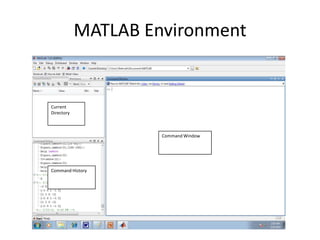
MATLAB Environment

Current
Directory

Command Window

Command History
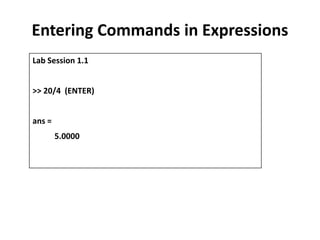
Entering Commands in Expressions
Lab Session 1.1
>> 20/4 (ENTER)
ans =

5.0000
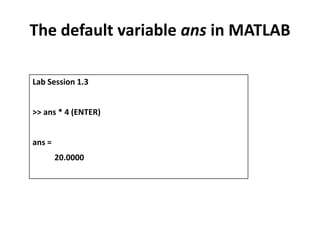
The default variable ans in MATLAB
Lab Session 1.3
>> ans * 4 (ENTER)
ans =
20.0000
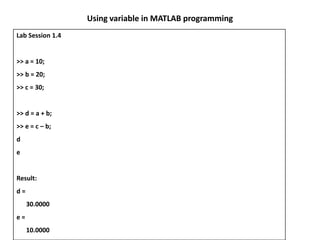
Using variable in MATLAB programming
Lab Session 1.4

>> a = 10;
>> b = 20;
>> c = 30;

>> d = a + b;
>> e = c – b;
d
e

Result:

d=
30.0000
e=
10.0000
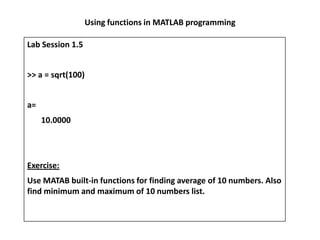
Using functions in MATLAB programming
Lab Session 1.5
>> a = sqrt(100)
a=
10.0000

Exercise:
Use MATAB built-in functions for finding average of 10 numbers. Also
find minimum and maximum of 10 numbers list.
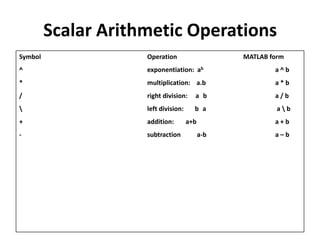
Scalar Arithmetic Operations
Symbol

Operation

MATLAB form

^

exponentiation: ab

a^b

*

multiplication: a.b

a*b

/

right division:

a b

a/b


left division:

b a

ab

+

addition:

-

subtraction

a+b

a+b

a-b

a–b
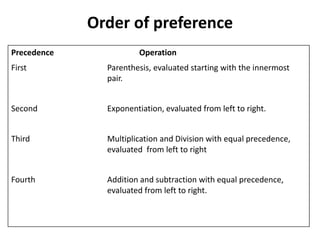
Order of preference
Precedence

Operation

First

Parenthesis, evaluated starting with the innermost
pair.

Second

Exponentiation, evaluated from left to right.

Third

Multiplication and Division with equal precedence,
evaluated from left to right

Fourth

Addition and subtraction with equal precedence,
evaluated from left to right.
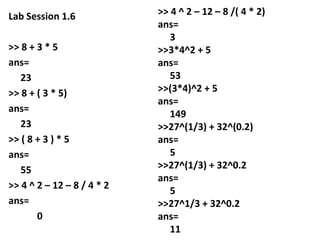
Lab Session 1.6
>> 8 + 3 * 5
ans=
23
>> 8 + ( 3 * 5)
ans=
23
>> ( 8 + 3 ) * 5
ans=
55
>> 4 ^ 2 – 12 – 8 / 4 * 2
ans=
0

>> 4 ^ 2 – 12 – 8 /( 4 * 2)
ans=
3
>>3*4^2 + 5
ans=
53
>>(3*4)^2 + 5
ans=
149
>>27^(1/3) + 32^(0.2)
ans=
5
>>27^(1/3) + 32^0.2
ans=
5
>>27^1/3 + 32^0.2
ans=
11
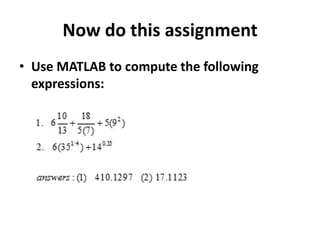
Now do this assignment
• Use MATLAB to compute the following
expressions:

Introduction to matlab

  • 1.
  • 2.
  • 3.
    Entering Commands inExpressions Lab Session 1.1 >> 20/4 (ENTER) ans = 5.0000
  • 4.
    The default variableans in MATLAB Lab Session 1.3 >> ans * 4 (ENTER) ans = 20.0000
  • 5.
    Using variable inMATLAB programming Lab Session 1.4 >> a = 10; >> b = 20; >> c = 30; >> d = a + b; >> e = c – b; d e Result: d= 30.0000 e= 10.0000
  • 6.
    Using functions inMATLAB programming Lab Session 1.5 >> a = sqrt(100) a= 10.0000 Exercise: Use MATAB built-in functions for finding average of 10 numbers. Also find minimum and maximum of 10 numbers list.
  • 7.
    Scalar Arithmetic Operations Symbol Operation MATLABform ^ exponentiation: ab a^b * multiplication: a.b a*b / right division: a b a/b left division: b a ab + addition: - subtraction a+b a+b a-b a–b
  • 8.
    Order of preference Precedence Operation First Parenthesis,evaluated starting with the innermost pair. Second Exponentiation, evaluated from left to right. Third Multiplication and Division with equal precedence, evaluated from left to right Fourth Addition and subtraction with equal precedence, evaluated from left to right.
  • 9.
    Lab Session 1.6 >>8 + 3 * 5 ans= 23 >> 8 + ( 3 * 5) ans= 23 >> ( 8 + 3 ) * 5 ans= 55 >> 4 ^ 2 – 12 – 8 / 4 * 2 ans= 0 >> 4 ^ 2 – 12 – 8 /( 4 * 2) ans= 3 >>3*4^2 + 5 ans= 53 >>(3*4)^2 + 5 ans= 149 >>27^(1/3) + 32^(0.2) ans= 5 >>27^(1/3) + 32^0.2 ans= 5 >>27^1/3 + 32^0.2 ans= 11
  • 10.
    Now do thisassignment • Use MATLAB to compute the following expressions: