Presented by: Object 9
Mastering LinkedIn
Steffan Pedersen
Social Media Lead, Object 9
June | 2016
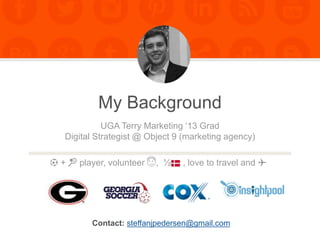
My Background
Contact: steffanjpedersen@gmail.com
UGA Terry Marketing ‘13 Grad
Digital Strategist @ Object 9 (marketing agency)
⚽️ + 🎾 player, volunteer 😇, ½ , love to travel and ✈️
3OBJECT 9 SOCIAL MEDIA PRESENTATION
TODAY.
Leveraging your digital presence, content creation, and
professionalism to support the job searching efforts.
Networking, marketing yourself, organizations, and tips on tools
and etiquette.
4OBJECT 9 SOCIAL MEDIA PRESENTATION
General tips to get set-up.
Vanity URLs, credible profiles, thought leadership
5OBJECT 9 SOCIAL MEDIA PRESENTATION
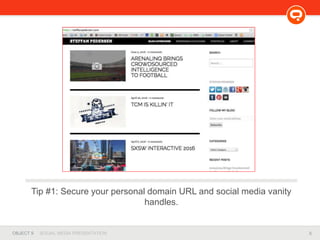
Tip #1: Secure your personal domain URL and social media vanity
handles.
6OBJECT 9 SOCIAL MEDIA PRESENTATION
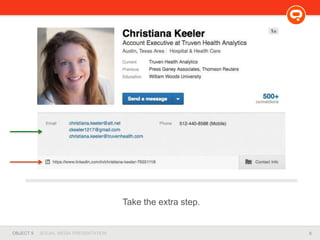
Take the extra step.
7OBJECT 9 SOCIAL MEDIA PRESENTATION
8OBJECT 9 SOCIAL MEDIA PRESENTATION
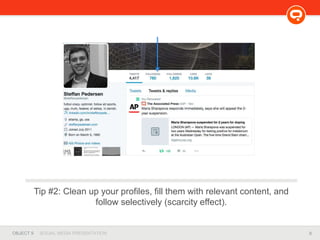
Tip #2: Clean up your profiles, fill them with relevant content, and
follow selectively (scarcity effect).
9OBJECT 9 SOCIAL MEDIA PRESENTATION
Tip #3: Start creating content. Repurpose, repurpose, repurpose.
10OBJECT 9 SOCIAL MEDIA PRESENTATION
Tip #4: Start attending events and industry-specific networking
functions.
11OBJECT 9 SOCIAL MEDIA PRESENTATION
Physical Networking: Events &
Organizations
• Be personable. Get outside your comfort zone!
• Build real, lasting relationships.
• Realize it’s uncomfortable, talk about:
– The event, venue, other people you’ve met,
– their role at the company, your counterparts at their
company, future of their company, their culture,
– even what college they attended, restaurants you’ve been to
recently, movie, where they live in town, etc. etc.
12OBJECT 9 SOCIAL MEDIA PRESENTATION
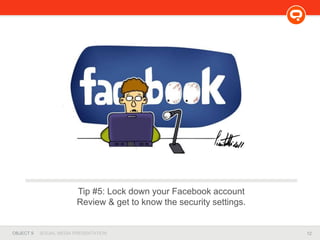
Tip #5: Lock down your Facebook account
Review & get to know the security settings.
13OBJECT 9 SOCIAL MEDIA PRESENTATION
LinkedIn: My Strategy
14OBJECT 9 SOCIAL MEDIA PRESENTATION
• DO:
– Snag your vanity URL
– Fill out your profile completely
– Ask for introductions between close,
mutual friends
– Send proper introduction emails /
InMail
– Join Groups & Follow Companies
– Utilize Publisher
– Set up Job Alerts
– Give recommendations and
endorsements (then ask!)
– Link to projects and work
LinkedIn: Do’s and Don’ts
• DON’T:
– Treat LinkedIn like your
resume
– Send a connection request
without meeting in-person
– Assume that a connection
wants to help you out
– Share unprofessional
news or updates
– Spam groups for your
personal gain
– Stalk people too much
15OBJECT 9 SOCIAL MEDIA PRESENTATION
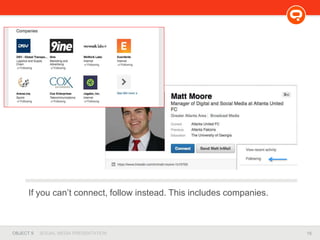
If you can’t connect, follow instead. This includes companies.
16OBJECT 9 SOCIAL MEDIA PRESENTATION
LinkedIn Publisher: Case Study
• Before writing (and publishing), think about:
– Purpose.
– Audience.
– Attainable Outcomes.
• Tips for writing
– Consumable and digestible. What would you read?
– “I don’t want to see words.”
– Lists work well. “Listicles”
• Multimedia
– Include videos, pictures, charts, tweets, etc.
17OBJECT 9 SOCIAL MEDIA PRESENTATION
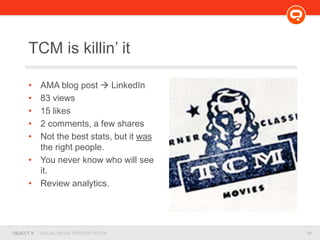
• AMA blog post  LinkedIn
• 83 views
• 15 likes
• 2 comments, a few shares
• Not the best stats, but it was
the right people.
• You never know who will see
it.
• Review analytics.
TCM is killin’ it
18OBJECT 9 SOCIAL MEDIA PRESENTATION
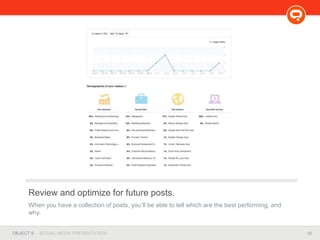
Review and optimize for future posts.
When you have a collection of posts, you’ll be able to tell which are the best performing, and
why.
19OBJECT 9 SOCIAL MEDIA PRESENTATION
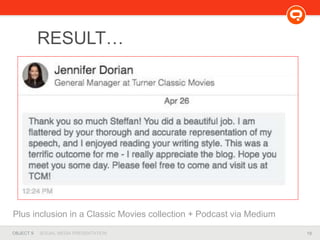
RESULT…
Plus inclusion in a Classic Movies collection + Podcast via Medium
20OBJECT 9 SOCIAL MEDIA PRESENTATION
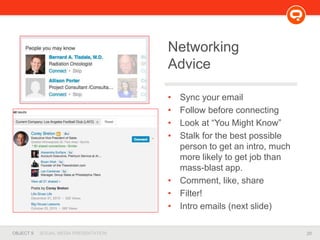
• Sync your email
• Follow before connecting
• Look at “You Might Know”
• Stalk for the best possible
person to get an intro, much
more likely to get job than
mass-blast app.
• Comment, like, share
• Filter!
• Intro emails (next slide)
Networking
Advice
21OBJECT 9 SOCIAL MEDIA PRESENTATION
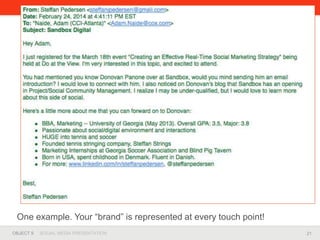
One example. Your “brand” is represented at every touch point!
22OBJECT 9 SOCIAL MEDIA PRESENTATION
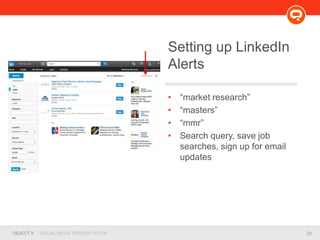
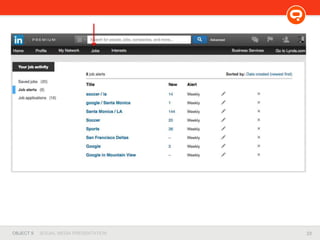
• “market research”
• “masters”
• “mmr”
• Search query, save job
searches, sign up for email
updates
Setting up LinkedIn
Alerts
23OBJECT 9 SOCIAL MEDIA PRESENTATION
24OBJECT 9 SOCIAL MEDIA PRESENTATION
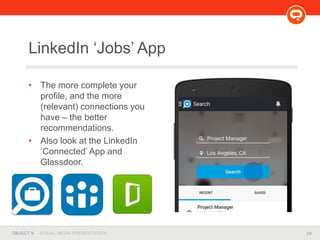
• The more complete your
profile, and the more
(relevant) connections you
have – the better
recommendations.
• Also look at the LinkedIn
‘Connected’ App and
Glassdoor.
LinkedIn ‘Jobs’ App
25OBJECT 9 SOCIAL MEDIA PRESENTATION
• DO:
– Fill out your bio with interests,
passions, employer, relevant links
– Follow aspirational and interesting
people/influencers, and brands
– Share successes of others
– Interject in conversation (nicely)
– Humble brag
– Use the search query
– Again, use a consistent handle
across profiles
Twitter: Do’s and Don’ts
• DON’T:
– Tweet >10X / day
– Use auto DM’s
– Assume you’re the expert:
the Twittersphere will hunt
you down.
26OBJECT 9 SOCIAL MEDIA PRESENTATION
Interviewing
• Evaluate & track accomplishments on a regular basis =
much easier to remember / recite.
• Research (interviewer) and bring questions.
• Ask about the culture.
• Body language and eye contact.
• Handwritten follow-up + social media pokes.
• Realize it’s a two way conversation.
• You’re feeling them out as much as they are you.
• Choose carefully: traditional or creative resume?
27OBJECT 9 SOCIAL MEDIA PRESENTATION
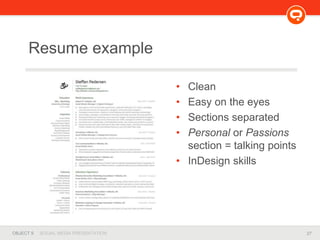
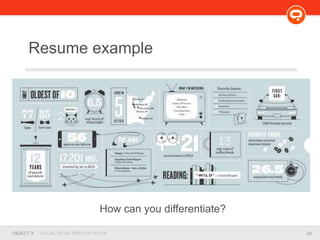
Resume example
• Clean
• Easy on the eyes
• Sections separated
• Personal or Passions
section = talking points
• InDesign skills
28OBJECT 9 SOCIAL MEDIA PRESENTATION
Resume example
How can you differentiate?
29OBJECT 9 SOCIAL MEDIA PRESENTATION
Tools
• Wix, Squarespace, Wordpress
• Slideshare
• Buffer App
• Google Analytics, AdWords, and Alerts
• Industry-specific newsletters
• Familiarize yourself with industry tools and programs,
i.e. Basecamp, Adobe Suite, Windows/Mac-specifics,
Cision, etc.
30OBJECT 9 SOCIAL MEDIA PRESENTATION
Your homework.
• LinkedIn Publisher post via Dr. Hollenbeck
31OBJECT 9 SOCIAL MEDIA PRESENTATION
Questions, Comments, or
Connecting?
http://linkedin.com/in/steffanpedersen
32OBJECT 9 SOCIAL MEDIA PRESENTATION
Some Resources
• SteffanPedersen.com
• StrengthsFinder 2.0 Book
• Definitive Book of Body Language
• SlideShare
• Tools: Infogr.am, SquareSpace ,Wix, About Me, Talkwalker,
Bit.ly, Pixabay, Canva, Buffer, ProductHunt, IFTTT
• Jobs: Reddit Jobs, Agency Sparks Jobs, Hypepotamus Board
• Presentations: Social 101 Presentation, Facebook Tips,
LinkedIn Tips

Mastering LinkedIn

  • 1.
    Presented by: Object9 Mastering LinkedIn Steffan Pedersen Social Media Lead, Object 9 June | 2016
  • 2.
    My Background Contact: steffanjpedersen@gmail.com UGATerry Marketing ‘13 Grad Digital Strategist @ Object 9 (marketing agency) ⚽️ + 🎾 player, volunteer 😇, ½ , love to travel and ✈️
  • 3.
    3OBJECT 9 SOCIALMEDIA PRESENTATION TODAY. Leveraging your digital presence, content creation, and professionalism to support the job searching efforts. Networking, marketing yourself, organizations, and tips on tools and etiquette.
  • 4.
    4OBJECT 9 SOCIALMEDIA PRESENTATION General tips to get set-up. Vanity URLs, credible profiles, thought leadership
  • 5.
    5OBJECT 9 SOCIALMEDIA PRESENTATION Tip #1: Secure your personal domain URL and social media vanity handles.
  • 6.
    6OBJECT 9 SOCIALMEDIA PRESENTATION Take the extra step.
  • 7.
    7OBJECT 9 SOCIALMEDIA PRESENTATION
  • 8.
    8OBJECT 9 SOCIALMEDIA PRESENTATION Tip #2: Clean up your profiles, fill them with relevant content, and follow selectively (scarcity effect).
  • 9.
    9OBJECT 9 SOCIALMEDIA PRESENTATION Tip #3: Start creating content. Repurpose, repurpose, repurpose.
  • 10.
    10OBJECT 9 SOCIALMEDIA PRESENTATION Tip #4: Start attending events and industry-specific networking functions.
  • 11.
    11OBJECT 9 SOCIALMEDIA PRESENTATION Physical Networking: Events & Organizations • Be personable. Get outside your comfort zone! • Build real, lasting relationships. • Realize it’s uncomfortable, talk about: – The event, venue, other people you’ve met, – their role at the company, your counterparts at their company, future of their company, their culture, – even what college they attended, restaurants you’ve been to recently, movie, where they live in town, etc. etc.
  • 12.
    12OBJECT 9 SOCIALMEDIA PRESENTATION Tip #5: Lock down your Facebook account Review & get to know the security settings.
  • 13.
    13OBJECT 9 SOCIALMEDIA PRESENTATION LinkedIn: My Strategy
  • 14.
    14OBJECT 9 SOCIALMEDIA PRESENTATION • DO: – Snag your vanity URL – Fill out your profile completely – Ask for introductions between close, mutual friends – Send proper introduction emails / InMail – Join Groups & Follow Companies – Utilize Publisher – Set up Job Alerts – Give recommendations and endorsements (then ask!) – Link to projects and work LinkedIn: Do’s and Don’ts • DON’T: – Treat LinkedIn like your resume – Send a connection request without meeting in-person – Assume that a connection wants to help you out – Share unprofessional news or updates – Spam groups for your personal gain – Stalk people too much
  • 15.
    15OBJECT 9 SOCIALMEDIA PRESENTATION If you can’t connect, follow instead. This includes companies.
  • 16.
    16OBJECT 9 SOCIALMEDIA PRESENTATION LinkedIn Publisher: Case Study • Before writing (and publishing), think about: – Purpose. – Audience. – Attainable Outcomes. • Tips for writing – Consumable and digestible. What would you read? – “I don’t want to see words.” – Lists work well. “Listicles” • Multimedia – Include videos, pictures, charts, tweets, etc.
  • 17.
    17OBJECT 9 SOCIALMEDIA PRESENTATION • AMA blog post  LinkedIn • 83 views • 15 likes • 2 comments, a few shares • Not the best stats, but it was the right people. • You never know who will see it. • Review analytics. TCM is killin’ it
  • 18.
    18OBJECT 9 SOCIALMEDIA PRESENTATION Review and optimize for future posts. When you have a collection of posts, you’ll be able to tell which are the best performing, and why.
  • 19.
    19OBJECT 9 SOCIALMEDIA PRESENTATION RESULT… Plus inclusion in a Classic Movies collection + Podcast via Medium
  • 20.
    20OBJECT 9 SOCIALMEDIA PRESENTATION • Sync your email • Follow before connecting • Look at “You Might Know” • Stalk for the best possible person to get an intro, much more likely to get job than mass-blast app. • Comment, like, share • Filter! • Intro emails (next slide) Networking Advice
  • 21.
    21OBJECT 9 SOCIALMEDIA PRESENTATION One example. Your “brand” is represented at every touch point!
  • 22.
    22OBJECT 9 SOCIALMEDIA PRESENTATION • “market research” • “masters” • “mmr” • Search query, save job searches, sign up for email updates Setting up LinkedIn Alerts
  • 23.
    23OBJECT 9 SOCIALMEDIA PRESENTATION
  • 24.
    24OBJECT 9 SOCIALMEDIA PRESENTATION • The more complete your profile, and the more (relevant) connections you have – the better recommendations. • Also look at the LinkedIn ‘Connected’ App and Glassdoor. LinkedIn ‘Jobs’ App
  • 25.
    25OBJECT 9 SOCIALMEDIA PRESENTATION • DO: – Fill out your bio with interests, passions, employer, relevant links – Follow aspirational and interesting people/influencers, and brands – Share successes of others – Interject in conversation (nicely) – Humble brag – Use the search query – Again, use a consistent handle across profiles Twitter: Do’s and Don’ts • DON’T: – Tweet >10X / day – Use auto DM’s – Assume you’re the expert: the Twittersphere will hunt you down.
  • 26.
    26OBJECT 9 SOCIALMEDIA PRESENTATION Interviewing • Evaluate & track accomplishments on a regular basis = much easier to remember / recite. • Research (interviewer) and bring questions. • Ask about the culture. • Body language and eye contact. • Handwritten follow-up + social media pokes. • Realize it’s a two way conversation. • You’re feeling them out as much as they are you. • Choose carefully: traditional or creative resume?
  • 27.
    27OBJECT 9 SOCIALMEDIA PRESENTATION Resume example • Clean • Easy on the eyes • Sections separated • Personal or Passions section = talking points • InDesign skills
  • 28.
    28OBJECT 9 SOCIALMEDIA PRESENTATION Resume example How can you differentiate?
  • 29.
    29OBJECT 9 SOCIALMEDIA PRESENTATION Tools • Wix, Squarespace, Wordpress • Slideshare • Buffer App • Google Analytics, AdWords, and Alerts • Industry-specific newsletters • Familiarize yourself with industry tools and programs, i.e. Basecamp, Adobe Suite, Windows/Mac-specifics, Cision, etc.
  • 30.
    30OBJECT 9 SOCIALMEDIA PRESENTATION Your homework. • LinkedIn Publisher post via Dr. Hollenbeck
  • 31.
    31OBJECT 9 SOCIALMEDIA PRESENTATION Questions, Comments, or Connecting? http://linkedin.com/in/steffanpedersen
  • 32.
    32OBJECT 9 SOCIALMEDIA PRESENTATION Some Resources • SteffanPedersen.com • StrengthsFinder 2.0 Book • Definitive Book of Body Language • SlideShare • Tools: Infogr.am, SquareSpace ,Wix, About Me, Talkwalker, Bit.ly, Pixabay, Canva, Buffer, ProductHunt, IFTTT • Jobs: Reddit Jobs, Agency Sparks Jobs, Hypepotamus Board • Presentations: Social 101 Presentation, Facebook Tips, LinkedIn Tips

Editor's Notes

  • #4 From the get-go, think about how you can leverage this for your own industry (mine being marketing/advertising, yours research)
  • #7 Share contact information in “about me / linkedin bio” (if you want to be reached!)
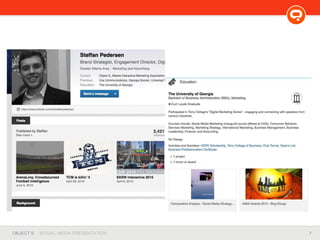
  • #8 Share your portfolio, if you’re ready. Image with link / projects. Not just blank url. Catches eye.
  • #9 I deleted a lot of tweets, unfollowed a lot of people/accounts.
  • #10 Trickles down from website / blog  portfolio  other sites.
  • #11 At least familiarize yourself with the players.
  • #12 Real relationships, and trust, are the only things that will get you somewhere.
  • #14 Share projects you’ve done at high level – don’t have to do graphs etc. One sentence insight. Let people know you have valuable insights before ever talking. Thought leadership / methodology.
  • #17 Cater content around specific industry/job/company? For you all, might be much more quantitative and around your research methodology.
  • #22 Long-winded example. Shorter the better. 7 second attention span / gold fish 7 touch points to make a sale in biz dev