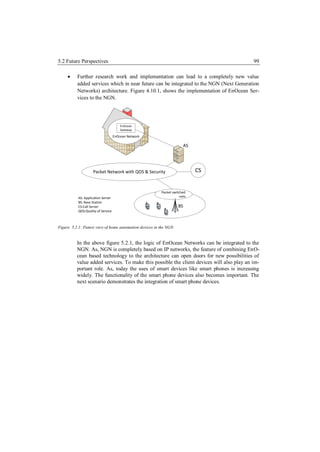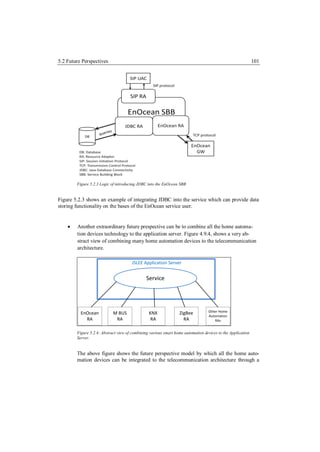


Master Thesis
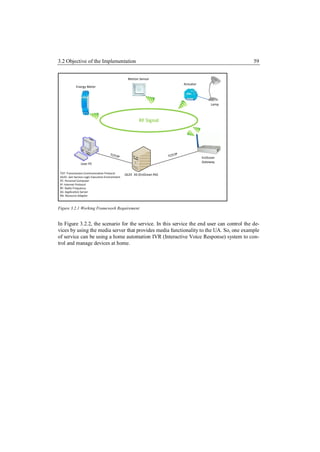
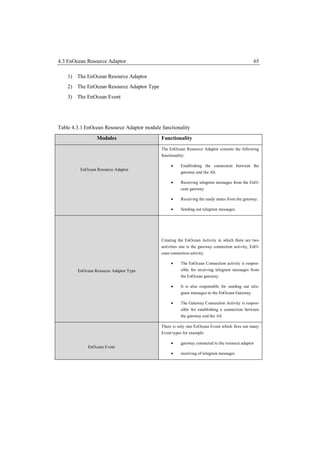
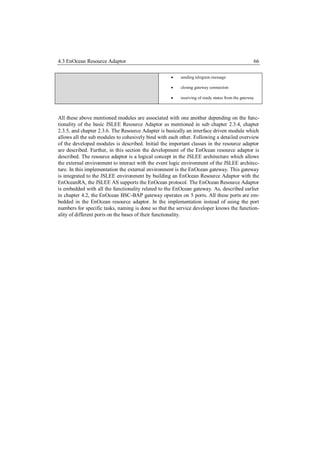
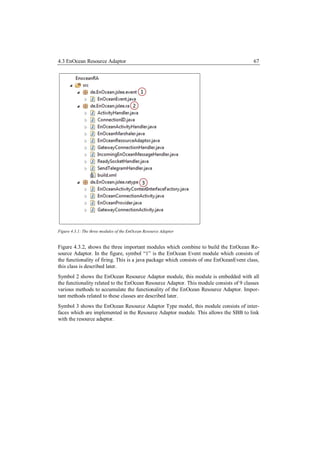
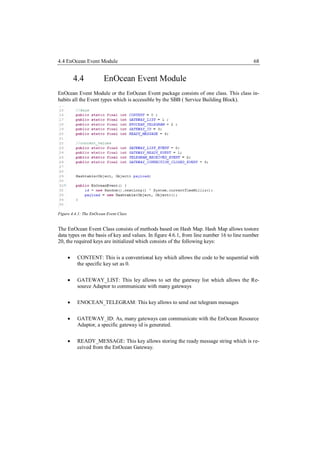
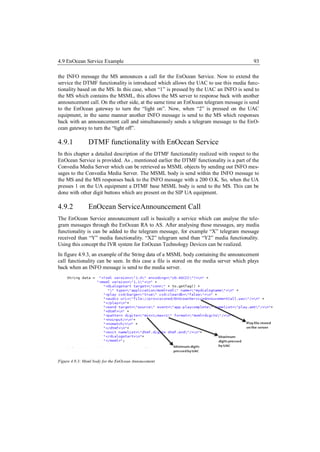
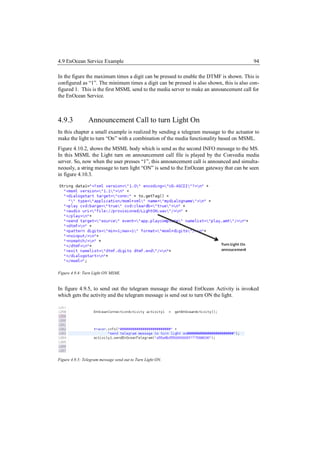
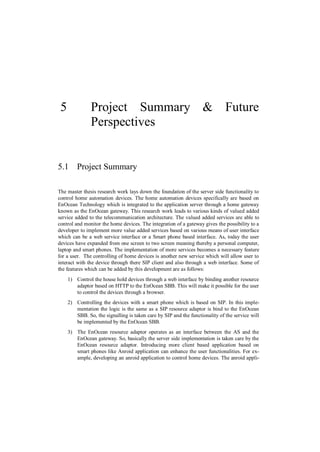
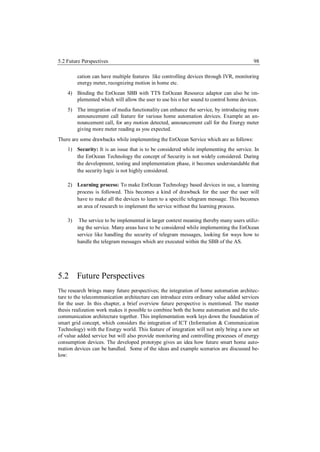
Management & Control of Home Automation
Devices based on EnOcean Technology with
                  JSLEE

                 Submitted by: Piyush Chand
    Submitted to: Prof. Dr. Ulrich Trick & Dr. Andreas Pech


            Date of Submission: 14th October 2011
Statement
I confirm that the master thesis is written by me without any assistant. No other sources were
used except those referenced.


Frankfurt, 14.10.2011


_____________________
Piyush Chand
Acknowledgement
        It gives me immense pleasure to thank all, who made this thesis to be accomplished.
Firstly, I would like to acknowledge Professor Dr.-Ing.Ulrich Trick for giving me an oppor-
tunity to work and write my thesis at the Research Group of Telecommunications, Frankfurt
am Main. The experience has been highly acknowledging and pleasuring.
       I would also like to express my gratitude towards my supervisors, especially to Tho-
mas Eichelmann for his skilful guidance, motivation and support during the progress of the
thesis work.
        I am also thankful to Armin Lehmann, Patrick Wacht and Patrick Ruhrig for their
skilful guidance, in depth discussions, moral support and maintaining a pleasant environment
during the progress of the thesis work,
     On a personal note, I would like to thank my parents and my uncle for their moral
support and encouragement.
      In the end, I would like to offer my regards to everyone who supported me during the
completion of the thesis work.
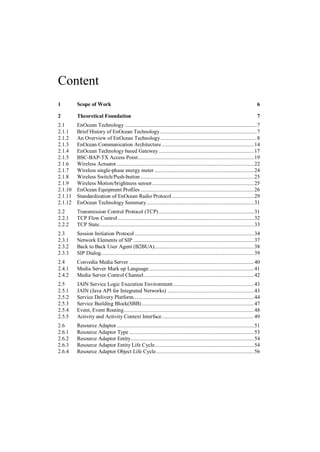
Content
1        Scope of Work                                                                                                           6

2        Theoretical Foundation                                                                                                  7
2.1      EnOcean Technology ............................................................................................. 7
2.1.1    Brief History of EnOcean Technology .................................................................... 7
2.1.2    An Overview of EnOcean Technology .................................................................... 8
2.1.3    EnOcean Communication Architecture ................................................................. 14
2.1.4    EnOcean Technology based Gateway ................................................................... 17
2.1.5    BSC-BAP-TX Access Point.................................................................................. 19
2.1.6    Wireless Actuator ................................................................................................. 22
2.1.7    Wireless single-phase energy meter ...................................................................... 24
2.1.8    Wireless Switch/Push-button ................................................................................ 25
2.1.9    Wireless Motion/brightness sensor ........................................................................ 25
2.1.10   EnOcean Equipment Profiles ................................................................................ 26
2.1.11   Standardization of EnOcean Radio Protocol .......................................................... 29
2.1.12   EnOcean Technology Summary............................................................................ 31
2.2      Transmission Control Protocol (TCP) ................................................................... 31
2.2.1    TCP Flow Control ................................................................................................ 32
2.2.2    TCP State ............................................................................................................. 33
2.3      Session Initiation Protocol .................................................................................... 34
2.3.1    Network Elements of SIP ..................................................................................... 37
2.3.2    Back to Back User Agent (B2BUA) ...................................................................... 38
2.3.3    SIP Dialog............................................................................................................ 39
2.4      Convedia Media Server ........................................................................................ 40
2.4.1    Media Server Mark up Language .......................................................................... 41
2.4.2    Media Server Control Channel.............................................................................. 42
2.5      JAIN Service Logic Execution Environment ......................................................... 43
2.5.1    JAIN (Java API for Integrated Networks) ............................................................. 43
2.5.2    Service Delivery Platform..................................................................................... 44
2.5.3    Service Building Block(SBB) ............................................................................... 47
2.5.4    Event, Event Routing............................................................................................ 48
2.5.5    Activity and Activity Context Interface ................................................................. 49
2.6      Resource Adaptor ................................................................................................. 51
2.6.1    Resource Adaptor Type ........................................................................................ 53
2.6.2    Resource Adaptor Entity....................................................................................... 54
2.6.3    Resource Adaptor Entity Life Cycle...................................................................... 54
2.6.4    Resource Adaptor Object Life Cycle ..................................................................... 56
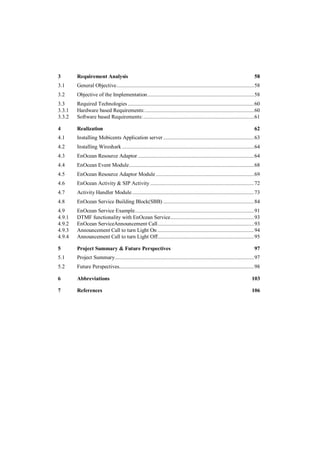
3       Requirement Analysis                                                                                              58
3.1     General Objective ................................................................................................. 58
3.2     Objective of the Implementation ........................................................................... 58
3.3     Required Technologies ......................................................................................... 60
3.3.1   Hardware based Requirements: ............................................................................. 60
3.3.2   Software based Requirements: .............................................................................. 61

4       Realization                                                                                                       62
4.1     Installing Mobicents Application server ................................................................ 63
4.2     Installing Wireshark ............................................................................................. 64
4.3     EnOcean Resource Adaptor .................................................................................. 64
4.4     EnOcean Event Module ........................................................................................ 68
4.5     EnOcean Resource Adaptor Module ..................................................................... 69
4.6     EnOcean Activity & SIP Activity ......................................................................... 72
4.7     Activity Handler Module ...................................................................................... 73
4.8     EnOcean Service Building Block(SBB) ................................................................ 84
4.9     EnOcean Service Example.................................................................................... 91
4.9.1   DTMF functionality with EnOcean Service........................................................... 93
4.9.2   EnOcean ServiceAnnouncement Call .................................................................... 93
4.9.3   Announcement Call to turn Light On .................................................................... 94
4.9.4   Announcement Call to turn Light Off.................................................................... 95

5       Project Summary & Future Perspectives                                                                             97
5.1     Project Summary .................................................................................................. 97
5.2     Future Perspectives............................................................................................... 98

6       Abbreviations                                                                                                   103

7       References                                                                                                      106
1             Scope of Work
The scope of the Master Thesis research work is to integrate the home automation communi-
cating architecture to the telecommunication architecture. The research provides the founda-
tion of developing value added services for controlling and monitoring home automation
devices by a SIP (Session Initiation Protocol) [3261] UA (User Agent). The work demon-
strates a service by which a user can control and manage the home automation devices based
on EnOcean Technology by a SIP UA. The home automation devices are based on actuators
and sensors. The initial part of the thesis work is to develop an EnOcean Resource Adaptor
on the bases of JAIN SLEE (Java API for Integrated Networks Service Logic Execution
Environment) [Jain], this allows the Application Server to communicate with the EnOcean
Gateway. To evaluate the integration, a service based on the specification of [Jain] is devel-
oped. The service is developed to control the home devices like lamp, motion sensor and
energy meter with add on media functionality like an IVR (Interactive Voice Response)
system to control the house hold devices. This scenario of implementation provides a possi-
bility of integrating the smart home devices to the telecommunication architecture. A further
extension of this research work can be to set up a completely new set of value added services
through which a user can demonstrate services like controlling their house hold devices
which include light, motion sensors, energy meter by mobile devices.
The control of these devices is introduced as a service for the SIP UA. The research work
provides the possibility of more services for the user like IVR system for controlling house
hold devices, announcement calls for motion detection, announcement calls for various sen-
sors in the home etc. The complete functionality of integrating the home automation devices
to the telecommunication architecture depends upon the EnOcean Gateway which is an Ac-
cess point and industrial name is BSC-BAP-TX (Wireless Bolt Access Point) [Bscb]. The
gateway provision provides a possibility of an application server to be integrated to the EnO-
cean gateway on the bases of TCP/IP [1180], the handling of the TCP/IP is done by the
EnOcean Resource Adaptor. The gateway can communicate with home automation devices
over RF (Radio Frequency). As, the communication is established between the application
server, services can be developed by which management, monitoring, controlling can be
done by SIP UA or a Web user based on HTTP (Hyper Text Transfer Protocol) [2616].
2            Theoretical Foundation


2.1          EnOcean Technology
In this section of the thesis, a detailed description of the EnOcean[Enoc1] Technology is
provided. This section gives all the important and necessary information which includes
technical behaviour, working principle, EnOcean Technology supporting devices, advan-
tages, special features of EnOcean Technology. To provide home automation environment to
the user various technologies are in use one of the popular technology is the EnOcean Tech-
nology, this technology allows user to completely automate their home devices based on
sensors and actuators. The main innovation behind this technology is to harvest the energy
from the environment and then utilize that energy to create some activity like controlling
devices in the home that are controlled by actuators and sensors.


2.1.1        Brief History of EnOcean Technology


EnOcean is gradually becoming popular in developing automation devices for homes and
official buildings. As mentioned in [Enoc1] the EnOcean Alliance Group was founded by
Management & Siemens Technology Acceorometer. The EnOcean GmbH is a venture-
funded spin-off company of Siemens AG founded in 2001. It is a technology supplier of self-
powered modules like transmitters, receivers, transceivers, energy converter to companies
like Siemens, Distech Controls, Seamless Sensing which develop and manufacture products
used in building home automation devices for example light, shading, HVAC(Heat Ventila-
tion and Air Conditioner) and also industrial based automation like replacement of the con-
ventional battery in tyre pressure sensors. As mentioned in [Enoc1] the company has won
awards for its performance and technology including the Bavarian Innovation Prize 2002 for
its globally unique technology.
2.1 EnOcean Technology                                                                        8


2.1.2         An Overview of EnOcean Technology

The EnOcean Technology is based on providing Energy Harvesting wireless technology. As
mentioned in [Enoc2] the EnOcean Technology can broadly be divided to three major advan-
tageous divisions:
        Interoperable wireless standard: Monitoring and lighting control systems are readily
         available and wide-ranging product portfolio exists, based on an interoperable stan-
         dard technology together with interfaces to established automation solutions such as
         EIB (European Instalation Bus) that is a standard for home automation devices in
         europe and TCP /IP (Transmission Control Protocol /Internet protocol) [1180].
        Self-powered: The EnOcean devices are based on Energy Harvesting which makes
         the use of energy created from slight changes in motion, pressure, light, temperature
         or vibration. The self-powered wireless sensors help make buildings smarter, safer,
         more comfortable and more energy-efficient.
        Technology for sustainable buildings: EnOcean enabled wireless networks making
         it the most pervasive and field-tested wireless building automation standard.
As described in [Enoc1], EnOcean Technology is based on the energetically efficient exploi-
tation of applied slight mechanical excitation and other potentials from the environment
using the principles of energy harvesting. In order to transform such energy fluctuations into
usable electrical energy based on some electrical principles like Electromagnetic which is a
physical field produced by electrically charged objects. Piezogenerator: It is the charge
which accumulates in certain solid materials like notably crystals, certain ceramics. Solar cell
also known as photovoltaic cell or photoelectric cell is a solid state electrical device that
converts the energy of light directly into electricity by the photovoltaic effect Thermocouple,
It is a device consisting of two different conductors (usually metal alloys) that produce a
voltage proportional to a temperature difference between either ends of the pair of conduc-
tors. The EnOcean products are engineered to operate maintenance-free.
The transmission frequency used for the devices is 868.3 MHz which is a standard for home
automation devices. The EnOcean RF modules based on energy harvesting modules are
fundamentally based on consuming very low power electronics and reliable wireless trans-
mission. A small example scenario demonstrating the EnOcean Technology is shown in
figure 2.1.1.
2.1 EnOcean Technology                                                                                        9


2.1.1 Figure showing a complete optimizing heating and cooling solution based on EnOcean Technology [Enoc3]


Figure 2.1.1, shows a complete EnOcean based heating and cooling solution. The figure
consists of a Energy control which communicates with all the devices like Room temperature
sensor, humidity sensor, CO2 sensor, Contact temperature sensor for both air conditioner and
the heater, Window contact and Window handle sensor for ventilation. This is consider as an
example home automation scenario for heating, ventilation, air-conditioning.


The Concept of EnOcean Technology is mentioned in [ENOC3] states that Energy harvest-
ing wireless switches and sensors for Green-Smart-Wireless. The idea that led to this innova-
tive technology is based on a very simple observation: where sensors capture measured val-
ues, the energy state constantly changes. When a switch is pressed, the temperature alters or
the luminance level varies. All these operations generate enough energy to transmit wireless
signals. [Enoc3]
2.1 EnOcean Technology                                                                      10


Figure 2.1.2: Energy Harvesting Wireless Sensor Solution from EnOcean Technology. [Enoc3]


The basic principle of working of a sensor wireless module is shown in figure 2.1.2. This
framework is divided into two specific modules, the Wireless Sensor Module and the Wire-
less System Module which together combine to build up the Energy harvesting Wireless
Sensor Solution defined by EnOcean Technology.


         Wireless Sensor Module :
This module consists of five basic technical building blocks which are described as follows:
          1) Energy Convertor /Energy Harvesting Devices: This is the process by which
             energy is derived from external sources (e.g., solar power, thermal energy,
             wind energy, salinity gradients, and kinetic energy), captured, and stored for
             small, wireless autonomous devices.
          2) Microcontroller: This is used to utilize the embedded functionality behaviour of
             the wireless sensor module. This includes the processing and controlling of the
             devices depending upon the information received and also transmitted from the
             module.
          3) Energy Management: This sub-module adds up to the functionality of the wire-
             less sensor module, it can be used to manage other sensor based devices and
             Energy Converter/ Energy Harvesting Devices.
          4) Sensor: This sensor is a device that will measure a physical quantity and con-
             vert it into a signal which can be read by the microcontroller for processing and
             controlling.
          5) RF Transceiver: This sub module provides the functionality to send and receive
             RF (Radio Frequency) Signals.
2.1 EnOcean Technology                                                                         11


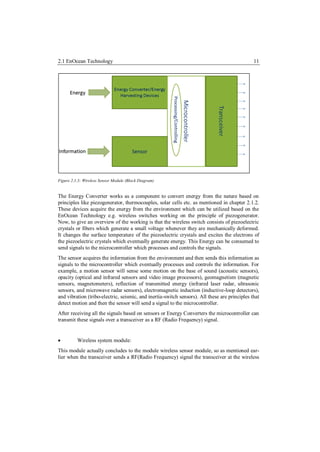
Figure 2.1.3: Wireless Sensor Module (Block Diagram)


The Energy Converter works as a component to convert energy from the nature based on
principles like piezogenerator, thermocouples, solar cells etc. as mentioned in chapter 2.1.2.
These devices acquire the energy from the environment which can be utilized based on the
EnOcean Technology e.g. wireless switches working on the principle of piezogenerator.
Now, to give an overview of the working is that the wireless switch consists of piezoelectric
crystals or fibers which generate a small voltage whenever they are mechanically deformed.
It changes the surface temperature of the piezoelectric crystals and excites the electrons of
the piezoelectric crystals which eventually generate energy. This Energy can be consumed to
send signals to the microcontroller which processes and controls the signals.
The sensor acquires the information from the environment and then sends this information as
signals to the microcontroller which eventually processes and controls the information. For
example, a motion sensor will sense some motion on the base of sound (acoustic sensors),
opacity (optical and infrared sensors and video image processors), geomagnetism (magnetic
sensors, magnetometers), reflection of transmitted energy (infrared laser radar, ultrasonic
sensors, and microwave radar sensors), electromagnetic induction (inductive-loop detectors),
and vibration (tribo-electric, seismic, and inertia-switch sensors). All these are principles that
detect motion and then the sensor will send a signal to the microcontroller.
After receiving all the signals based on sensors or Energy Converters the microcontroller can
transmit these signals over a transceiver as a RF (Radio Frequency) signal.


         Wireless system module:
This module actually concludes to the module wireless sensor module, so as mentioned ear-
lier when the transceiver sends a RF(Radio Frequency) signal the transceiver at the wireless
2.1 EnOcean Technology                                                                      12

system end receives this signal and then operates the actuators depending upon the type of
message received.


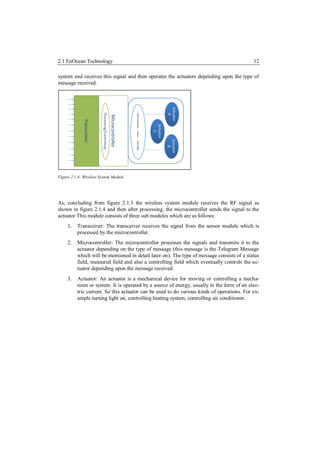
Figure 2.1.4: Wireless System Module


As, concluding from figure 2.1.3 the wireless system module receives the RF signal as
shown in figure 2.1.4 and then after processing, the microcontroller sends the signal to the
actuator This module consists of three sub modules which are as follows:
     1.   Transceiver: The transceiver receives the signal from the sensor module which is
          processed by the microcontroller.
     2.   Microcontroller: The microcontroller processes the signals and transmits it to the
          actuator depending on the type of message (this message is the Telegram Message
          which will be mentioned in detail later on). The type of message consists of a status
          field, measured field and also a controlling field which eventually controls the ac-
          tuator depending upon the message received.
     3.   Actuator: An actuator is a mechanical device for moving or controlling a mecha-
          nism or system. It is operated by a source of energy, usually in the form of an elec-
          tric current. So this actuator can be used to do various kinds of operations. For ex-
          ample turning light on, controlling heating system, controlling air conditioner.
2.1 EnOcean Technology                                                                                     13


Figure 2.1.4: The complete abstract-level overview of the wireless Energy Harvesting EnOcean Technology.


The complete abstract view after combining the wireless sensor module and the wireless
system module can be seen in figure 2.1.4 which shows how Energy converters and Sensors
can be utilized to create an action on the actuator. So concluding with the same idealistic
approach some examples can be viewed. For example any motion sensor can produce an
action on the actuator to make some event like controlling the heating system.
Some of the important features of the EnOcean Technology as mentioned in [Enoc3] are as
follows:
     A highly optimized automation and controlling solution.
     Easy to integrate components, for example Energy converters, energy management &
      radio modules, system & communication software.
     Radio modules without batteries: The required operating energy is typ. 50 μWs per
      radio telegram only.
     Operating energy is generated by pressure, movements, light, temperature, vibration,
      rotation, etc.
     High transmission range: Up to 300 m outdoor up to 30 m indoor.
     Minimal emission energy: Less than the spark radiation of a conventional light
      switch, one million times less a mobile phone.
     Reliable signal transmission, suited for systems with hundreds of sensors (since signal
      transmission time is a thousand of a second only)
     Reliable against external disturbances: Repeated radio signal transmission delayed at
      random, using of regulated frequency ranges approved for pulsed signals only
     Prearranged transmitter to receiver assignment: Four billion code numbers are fixed,
      easy learning procedure (push receiver learn button and activate transmitters)
Considering all the aspects of the EnOcean Technology, the most specific feature is the En-
ergy Harvesting Concept to control home automation devices.
2.1 EnOcean Technology                                                                            14

EnOcean Technology Technical Characteristics as mentioned in [Enoc3] are shown in figure
2.1.1, which is as follows:
Table 2.1.1: Characteristics of the EnOcean Technology modules.

Frequency                          868.3 MHz or 315 MHz (depending upon on the location)

Transmission power:                6 dBm (antenna input)

Receiver sensitivity:              -97 dB

Modulation type:                   ASK

Data rate                          125 kHz

Channel bandwidth                  280 kHz

Radio telegram                     1 ms, variable telegram length (e.g. 53-130 bit incl. 32 Bit
                                   sensor ID, 1-4 byte sensor data, checksum)

Transmission time                  40 ms for three identical radio telegrams, delayed at
                                   random


2.1.3              EnOcean Communication Architecture
The EnOcean Technology builds up its own communication architecture based upon actua-
tors. Based on [Enoc4] EnOcean is a patented energy harvesting wireless sensor solution
which enables to generate a signal of range from an extremely small amount of energy. From
just 50 μWs a standard EnOcean energy harvesting wireless module can easily transmit a
signal 300 meters. The secret lies in the signal duration which means that the entire process
is started, executed and completed in no more than a thousandth of a second.
Figure 2.1.5, shows the network architecture of EnOcean Technology, the bidirectional com-
ponents are gateways which communicate over TCP/IP, EIB, KNX, Modbus, these are the
standards for communication in home automation devices. The receivers are actuators which
basically communicate over RF. The battery less switches are transmitters which also com-
municate over RF. A common message protocol is followed which is known as telegram
message which allows to create any kind of activity on the actuators and sensors.
2.1 EnOcean Technology                                                                 15


Figure 2.1.5: EnOcean Wireless Networking System with battery-less nodes. [ENOC4]


The EnOcean Technology based network communication architecture is basically divided
into two areas which are as follows:
         Radio Frequency (Access Network)
         TCP/IP (Transmission Control Protocol/Internet Protocol), EIB(European Installa-
          tion Bus), KNX, Modbus(Wired Backbone).


The communication architecture of EnOcean Technology can be divided into two areas
which are as follows:
     1) Radio Frequency based wireless communication which can be correlated to the ac-
        cess network in regard to the conventional network architecture.
     2) TCP/IP or any other specific backbone related protocol (e.g. LON, EIB/KNX,
        Mobus) can be used to build the backbone architecture for the communication.
2.1 EnOcean Technology                                                                  16


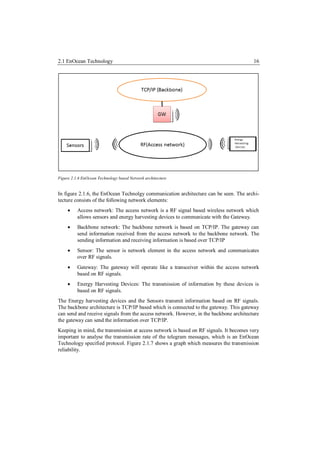
Figure 2.1.6 EnOcean Technology based Network architecture


In figure 2.1.6, the EnOcean Technolgy communication architecture can be seen. The archi-
tecture consists of the following network elements:
         Access network: The access network is a RF signal based wireless network which
          allows sensors and energy harvesting devices to communicate with the Gateway.
         Backbone network: The backbone network is based on TCP/IP. The gateway can
          send information received from the access network to the backbone network. The
          sending information and receiving information is based over TCP/IP
         Sensor: The sensor is network element in the access network and communicates
          over RF signals.
         Gateway: The gateway will operate like a transceiver within the access network
          based on RF signals.
         Energy Harvesting Devices: The transmission of information by these devices is
          based on RF signals.
The Energy harvesting devices and the Sensors transmit information based on RF signals.
The backbone architecture is TCP/IP based which is connected to the gateway. This gateway
can send and receive signals from the access network. However, in the backbone architecture
the gateway can send the information over TCP/IP.
Keeping in mind, the transmission at access network is based on RF signals. It becomes very
important to analyse the transmission rate of the telegram messages, which is an EnOcean
Technology specified protocol. Figure 2.1.7 shows a graph which measures the transmission
reliability.
2.1 EnOcean Technology                                                                    17


Figure 2.1.7: Transmission reliability Graph [Enoc4].


In this graph, a comparison of typical radio sensor transmission and the EnOcean technology
based transmission is compared. The number of sender transmitting data increases gradually
making. Closely analysing the graph, it can be depicted that as the number of senders in-
creases, the transmission of typical radio sensor decreases. In the same graph scale, the
transmission of EnOcean technology based sensors is much higher; this makes the possibility
of telegram collision rate to decrease. As mentioned in [Enoc4] transmission reliability is
still better than 99.99% for 100 wireless sensors each transmitting their data once a minute.
Considering this information to be accurate, it gives a possibility that a large number EnO-
cean wireless sensors and modules can be used in the same building which will transmit
reliable telegram messages.


2.1.4            EnOcean Technology based Gateway

The EnOcean Technolgy based gateway is one of the important elements in the communica-
tion architecture of EnOcean Technology. This allows to interact with the access based net-
work devices and to send the information over TCP/IP. In simple words it is a gateway
which has the capability to send and receive information over TCP/IP and also operates as a
transceiver for the energy harvesting devices and sensors, as mentioned in chapter 2.1.3.

Figure 2.1.8 shows the picture of the used BSC-BAP-TX wireless access gateway. This
gateway consists of a TCM (Transceivers Module) 120 modules, this module consists of the
functionality of a wireless sensor module and a wireless system module as mentioned in
chapter 2.1.2. The TCM-120[Tcmu] module serves the 868 MHz air interface protocol of
2.1 EnOcean Technology                                                                     18

EnOcean. It receives all signals of the EnOcean radio transmitters e.g. modules PTM (Push-
button Transceiver Module)-100 and makes them available at the serial port. The PTM is a
wireless push button controller which is a wireless switch and is mentioned in detail in chap-
ter 2.1.8.


Figure 2.1.8: A picture of the BSC-BAP-TX Gateway.[Bscb]


The gateway operates on an embedded module TCM-120. The transceiver module TCM 120
of EnOcean enables the implementation of bi-directional RF applications based on the inno-
vative EnOcean radio technology. Typical applications are bi-directional EnOcean compati-
ble radio interfaces, e.g. to existing system solutions or bus systems. The TCM 120 trans-
ceiver module serves the 868 MHz air interface protocol of EnOcean radio technology.
[Tcm1]


Important features of the BSC-BAP Access Point based on TCM 120 transceiver which are
mention in [Bscb] are as follows:

        128 actuators and an optional number of transmitters that is compatible with EnO-
         cean wireless technology per BAP.
      It can be integrated in an existing network infrastructure.
      PoE(Power over Ethernet) can be used for connection
      BSC - BAP uses up to 0.5 Watts of power which makes it a very low power con-
         sumption device.
      EnOcean technology based devices can be integrated to the BSC-BAP. For exam-
         ple, PTM-200 or PTM-100, Wireless Actuators, Wireless sensors based on EnO-
         cean Technology.
There are some limitations of the gateway which are mentioned in [Bscb] and are ellabo-
rateed as follows:

     1) The electrical field strength and the magnetic field strength are inversely propor-
        tional to the square of the distance between the sender and the receiver. This has an
        affect while transmitting RF signals.
     2) Interfaces by materials like metallized foils of thermal insulator, metallized heat-
        absorbing glass. These materials can reflect electromagnetic waves. A so-called ra-
2.1 EnOcean Technology                                                                       19

         dio shadow is built up behind these parts. Some figures related to the amount of
         penetration of radio signals which can be created are as follows:
         Table 2.1.3 EnCana RF penetration level in percentage.[Bscb]
                      Material                  Percentage of Penetration
          Wood, gypsum, glass uncoated                90 to100%
           Brick, pressboard                          65 to 95%
          Reinforced concrete                         10 to 90%
          Metal, aluminium pasting                     0 to10%

        Figure 2.1.10, shows a picture of range and penetration being decremented when an
        iron acts as an obstacle between the transmissions.


        2.1.9 Radio path range/-penetration, Reference:


        As, it is shown on the left side of the figure 2.1.9, that the iron casts a radio shadow
        between the receiver and the sensor. This is a drawback while implementing the
        sensor and actuator based home automation environment. On the right side of the
        figure 2.1.9, the effective range of radio frequency between two receivers. As one is
        receiving a very good range of radio frequency and the other one is receiving it at a
        slightly lower level.


2.1.5         BSC-BAP-TX Access Point
The industrial name provided to the EnOcean Gateway is BSC-BAP-TX Access Point
[Bscb].This gateway operates on 5 ports; all these 5 ports define a specific functionality
depending upon the different types of functions which can be used. In this section, a detail
overview about the EnOcean Gateway Ports is described. The 5 ports can be utilized on the
bases of network programming, specifically client server programming. To mention in detail
among the 5 ports, 2 ports work as a client socket where the remaining 3 work as a server
socket. Following is a list of Ports which is utilized to use the functionality of the EnOcean
Gateway:
    1) 2010: This port is used to configure the IP address of the EnOcean Gateway
2.1 EnOcean Technology                                                                         20

    2) 2001: This port is utilized to establish a connection between the Gateway and the
         Server.
    3) 2100: This port is utilized to handle the connection between the gateway and the
         Server. However, this port can be changed which allows more gateways to connect
         to the server.
    4) 2003: This port is utilized to make sure that the Gateway is ready.
    5) 2005: This port is utilized to send a specific message to the gateway.
    6) 2002: This port is utilized to close the connection between the gateway and the
         server.
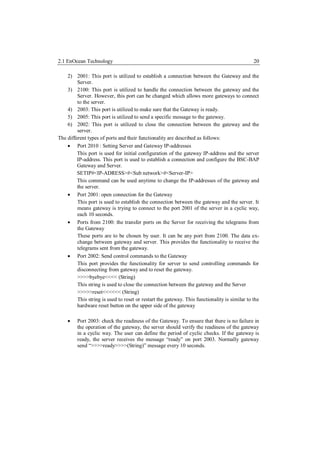
The different types of ports and their functionality are described as follows:
     Port 2010 : Setting Server and Gateway IP-addresses
         This port is used for initial configuration of the gateway IP-address and the server
         IP-address. This port is used to establish a connection and configure the BSC-BAP
         Gateway and Server.
         SETIP#<IP-ADRESS>#<Sub network>#<Server-IP>
         This command can be used anytime to change the IP-addresses of the gateway and
         the server.
     Port 2001: open connection for the Gateway
         This port is used to establish the connection between the gateway and the server. It
         means gateway is trying to connect to the port 2001 of the server in a cyclic way,
         each 10 seconds.
     Ports from 2100: the transfer ports on the Server for receiving the telegrams from
         the Gateway
         These ports are to be chosen by user. It can be any port from 2100. The data ex-
         change between gateway and server. This provides the functionality to receive the
         telegrams sent from the gateway.
     Port 2002: Send control commands to the Gateway
         This port provides the functionality for server to send controlling commands for
         disconnecting from gateway and to reset the gateway.
         >>>>byebye<<<< (String)
         This string is used to close the connection between the gateway and the Server
         >>>>>reset<<<<<< (String)
         This string is used to reset or restart the gateway. This functionality is similar to the
         hardware reset button on the upper side of the gateway

        Port 2003: check the readiness of the Gateway. To ensure that there is no failure in
         the operation of the gateway, the server should verify the readiness of the gateway
         in a cyclic way. The user can define the period of cyclic checks. If the gateway is
         ready, the server receives the message “ready” on port 2003. Normally gateway
         send “>>>>ready>>>>(String)” message every 10 seconds.
2.1 EnOcean Technology                                                                            21

Considering the functionalities of the port, the complete procedure of utilizing the ports is
explained as follows:
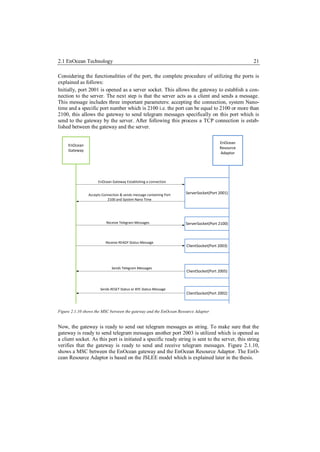
Initially, port 2001 is opened as a server socket. This allows the gateway to establish a con-
nection to the server. The next step is that the server acts as a client and sends a message.
This message includes three important parameters: accepting the connection, system Nano-
time and a specific port number which is 2100 i.e. the port can be equal to 2100 or more than
2100, this allows the gateway to send telegram messages specifically on this port which is
send to the gateway by the server. After following this process a TCP connection is estab-
lished between the gateway and the server.

                                                                                       EnOcean
     EnOcean
                                                                                       Resource
     Gateway
                                                                                       Adaptor


                     EnOcean Gateway Establishing a connection


                Accepts Connection & sends message containing Port   ServerSocket(Port 2001)
                           2100 and System Nano Time


                          Receive Telegram Messages                  ServerSocket(Port 2100)


                          Receive READY Status Message
                                                                     ClientSocket(Port 2003)


                              Sends Telegram Messages
                                                                     ClientSocket(Port 2005)


                       Sends RESET Status or BYE Status Message
                                                                     ClientSocket(Port 2002)


Figure 2.1.10 shows the MSC between the gateway and the EnOcean Resource Adaptor


Now, the gateway is ready to send out telegram messages as string. To make sure that the
gateway is ready to send telegram messages another port 2003 is utilized which is opened as
a client socket. As this port is initiated a specific ready string is sent to the server, this string
verifies that the gateway is ready to send and receive telegram messages. Figure 2.1.10,
shows a MSC between the EnOcean gateway and the EnOcean Resource Adaptor. The EnO-
cean Resource Adaptor is based on the JSLEE model which is explained later in the thesis.
2.1 EnOcean Technology                                                                    22

After, completing the connection and the ready state, the gateway is ready to receive tele-
gram messages from the server. To send a telegram message to the gateway a specific port
2005 is used, which is opened as a client. On this port telegram messages are sent which
allow any kind of activity on the EnOcean device depending upon type of telegram message.
For closing the connection between the gateway and the server, another port 2002 is used.
On this port a specific string >>>>byebye<<<< is sent which closes the connection between
the gateway and the server.
Table 2.1.2 List of the EnOcean gateway ports and their functionality
            Port                           Functionality               Type of Socket
            2001                 Establish Connection, gateway          Server Socket
                                 can receive a special message.
            2100                 Special port to receive messages       Server Socket
                                 from the gateway.
            2003                 To make sure gateway is ready          Client Socket
            2005                 To send telegram messages              Client Socket
            2002                 To send message for closing            Client Socket
                                 connection or resetting connec-
                                 tion.


2.1.6         Wireless Actuator
The wireless actuator [Elta1] is an impulse switch with integrated functionality to the EnO-
cean communication architecture. Some of the important features as mentioned in related to
the devices are mentioned below:

       The universal impulse switching relay can be controlled by a conventional 230 V
        AC control switch.
       35 wireless pushbuttons can be assigned to the wireless actuator. The wireless
        pushbuttons are configured by using the learning functionality of the wireless actua-
        tor.
       Wireless window/door contacts can also be configured to the wireless actuator. In
        this scenario there can be two possibilities: firstly the window/door is opened this
        can be facilitated to the wireless actuator by using the normally open (N/O) contact
        functionality; secondly window/door is closed by using normally closed (N/C) con-
        tact while the window is closed.

       The wireless actuator consists of functionalities which can be configured depending
        upon the requirements. Following is a table which shows some configuring features
        of the wireless actuator:
2.1 EnOcean Technology                                                                                       23


          Table 2.1.3 Configuration mode of the wireless actuator
           Configuring modes Configuring functionality
            ER                            Switching relay
            ESV                           Impulse switch. Possibly with off delay
                                          + = ESV with push-button permanent light
                                          + = ESV with switch-off early warning
                                          + = ESV with push-button permanent light and switch-off early warning.


            LRN                           Using this configuration field a push button can be made to learn with
                                          the wireless actuator.
            CLR                           This configuration filed is used to clear old set configuration mode.


The following figure 2.1.11 shows the place on the wireless actuator where the configuration
related to the above mentioned functionalities can be done.


Figure 2.1.11: Wireless Actuator[Elta1]


The wireless actuator consists of two configuration section:
One is to configure the functionality of the wireless actuator depending upon the require-
ments as mentioned in table 2.1.3; this section can be seen as the configuring mode place on
the wireless actuator. The other section is the time relay configuration section which allows
the wireless actuator to modify the time relay of the receiving signals, this makes it possible
to expand the communication architecture if many actuators are located in a home or build-
ing.
2.1 EnOcean Technology                                                                   24


2.1.7            Wireless single-phase energy meter
The wireless single-phase [Elta2] energy meter measures active energy by means of the cur-
rent between input and output and transmits the consumption and meter reading over the RF
signal.


Figure 2.1.12: Wireless Single Phase Energy Meter [Elta2]


Some of the important features of the Wireless Single phase Energy Meter [Elta2] are as
follows:
      The wireless energy meter gives a reading only when the power consumption is
         more than 0.3 watt active power.
      Only a one phase conductor with a maximum current up to 16A (Amperes) can be
         connected.
      The rush in current is 20mA.
      The reading of the energy consumed is saved to a non-volatile memory and is im-
         mediately available again after a power failure.
      The change in power status by 10 % enables the wireless energy meter to send a
         telegram message within 20 seconds.
      A full telegram comprising meter reading and power status is transmitted after
         every 10 minutes.
      When the power supply is switched on, a teach-in telegram is sent to teach in the as-
         sociated energy consumption indicator.
2.1 EnOcean Technology                                                                     25


2.1.8            Wireless Switch/Push-button
The wireless switch/push-button as mentioned in [Elta3], operates with in the access net-
work. RF signals are used for the transmission of telegram messages. Figure 2.1.13 shows an
example of a single rocker switch which can be used to send telegram messages within the
RF signal. The wireless switch is based on the PTM -100. As, mentioned in [Ptms], this
module is based on the principle of electro-dynamic energy transducer, which sends out RF
signals when the button is pressed and released.


Figure 2.1.13: Wireless Switch/Push Button [Elta1]


Important features of the wireless push button [Elta3] are as follows:
         The Wireless push-buttons with one rocker, one rocker push button means that only
          one button can be used to evaluate the functionality of transmitting telegram mes-
          sages over RF signals. It transmits two evaluable signals: press rocker up and press
          rocker down.
         Wireless push-buttons with double rocker can transmit four evaluable signals: press
          two rockers up or down.


2.1.9            Wireless Motion/brightness sensor

The wireless motion sensor [Elta4] operates within the access network of the EnOcean com-
munication architecture, this enables the device to send telegram messages over RF signals
to the EnOcean gateway. Figure 2.1.14 shows a figure of the wireless motion sensor.
2.1 EnOcean Technology                                                                      26


Figure 2.1.14: Wireless Brightness/ Motion Sensor


Important features of the wireless motion sensor [Elta4] are as follows:
         The wireless motion sensor transmits telegram messages to the EnOcean wireless
          access network after every 100 seconds.
         The wireless motion sensor transmits two signals instantaneously after detecting
          motion.
         The switch-off signal is sent after the off delay which has a fixed setting of 1 min-
          ute.
         The motion sensor transmits signals with the information of the status every 20
          minutes.


2.1.10           EnOcean Equipment Profiles
In this chapter, information with respect the EnOcean Equipments Profiles and the telegram
messages will be provided. The EnOcean Equipment profile is a specification on which tele-
gram messages can be created. The telegram message is message stack which is transmitted
on RF signals. The EnOcean Equipment Profile provides the information of the telegram
stack which is described in this chapter. Based on [Eepv1], the telegram message stack can
be created which can provide functionalities like turning light ON and turning light OFF.

Definition: The EnOcean Equipment Profile (EEP) is a unique identifier that describes the
functionality of an EnOcean device irrespective of its vendor. [Eepv1]

During the time of development a new EnOcean Equipment Profile is being released, this
profile introduces some more functionality like Smart Ack, Remote management (RPC),
MSC telegram, Bi-directional profiles (4 BS).

New Definition: The ERP specification defines the structure of the entire radio telegram.
The user data embedded in this structure is defined by the EEP. [Eepv2]
2.1 EnOcean Technology                                                                     27

However, in this chapter the old specification [Eepv1] is being explained as during the reali-
zation phase, the old specification [Eepv1] is being used. In chapter 2.1.11, a small descrip-
tion about the new functionality and a new radio protocol stack is mentioned.

The EEP (EnOcean Equipment Profile) is defined on the bases of EnOcean technology de-
fined fields:
     ORG: Identifies the EnOcean Messages which allows the communication of the
          EnOcean devices.
     FUNC: This field represents the basic functionality of the data content in the tele-
          gram message.
     TYPE: This field represents type of device in its individual characteristics.

In figure 2.1.15, the telegram stack is presented, in this figure it can be seen how the tele-
gram stack is organized and which fields are useful for developing an EnOcean message.


Figure 2.1.15: Telegram Stack [Tcmu]


The Data_Byte field represents the FUNC field of the telegram message that provides the
functionality of the telegram message. The FUNC field describes the type of activity to be
created. So the functionality to make a light to turn on or off is handled by this field. The
ID_BYTE field represents the TYPE field of the telegram message. Figure 2.1.15 elaborates
the functionality of the telegram stack in detail. The main functionality of the telegram mes-
sage stack can be understood by the figure 2.1.16. In this figure basically the complete stack
is explained.
2.1 EnOcean Technology                                                                     28


Figure 2.1.16: Detail Description of the EnOcean Telegram [Tcmu]


Following a detailed description of the Telegram message is provided:
     1.   SYNC_BYTE: This field of the stack is used for synchronization of received bytes
          and sent bytes. It consists of two sync bytes which are 8 bits each. [Tcmu]
     2.   H_SEQ: This field of the stack is the Header Sequence; this field identifies which
          type of function the telegram message will implement. The length of this field is of
          3 bits. [Tcmu]
Types of telegram functions:
     3.   RRT (Received Radio telegram): the function to receive radio data telegram on the
          BSC-BAP-TX [Bscb] gateway.
     4.   TRT (Transmit Radio Telegram): This function of the telegram message provides
          the function to transmit radio data telegram to the BSC-BAP-TX [Bscb] gateway.
     5.   RMT (Receive Message telegram): This function of the telegram message provides
          the function to receive telegram messages from the energy harvesting devices.
     6.   TCT (Transmit Command Telegram): This function of the telegram message pro-
          vides the function to send command telegram messages which means, the energy
          devices can be controlled by using this telegram message.
     7.    LENGTH: This field of the stack provides the information about the number octets
          following the header octet. This field length is of 5 bits and combines with H_SEQ
          field to complete 1 Byte of the telegram stack.
     8.   ORG: This field defines which type of telegram is used within the telegram stack.
          For TCM-120 module there are 6 types of telegram messages, which are shown in
2.1 EnOcean Technology                                                                       29

          figure 2.1.16, in this figure the ORG can be distinguished on the bases of the type of
          functionality. [Tcmu]


Figure 2.1.17: Detail Description of the ORG Field[Tcmu]


A new version of the EnOcean Equipement profile is also available, in this specification new
functionalities have been added to make it KNX association standard. The new specification
mentioned on [eepv2] has the following changes which are as follows:
         New 4 BS telegrams
         Smart Ack [Enoc6 ]
         Remote management (RPC) [Enoc7]
         MSC telegram [Eppv2]
         Bi-directional profiles (4 BS) [Eppv2]
         Introduction of Encryption in the presentation layer[ Enoc8]


2.1.11          Standardization of EnOcean Radio Protocol

In this sub chapter a detail description about the standardization of the EnOcean Radio Pro-
tocal is provided. In this chapter the new standard as mentioned in [Enoc8] is explained. As
mentioned in chapter 2.1.10, a new specification is released. The new specification follows
this standard.
A standardized set of radio protocol is utilized by the EnOcean technology based devices.
This determines the transmission layer of the EnOcean technology based devices. Figure
2.1 EnOcean Technology                                                                    30

2.1.18, shows a table of the standardized EnOcean Radio Protocol. The transmission layer is
divided into 7 layers which are as follows:
     1) Application Layer: At this layer of the EnOcean Standard the Data interpretation
        with respect to the EnOcean Equipment Profile is utilized.
     2) Presentation Layer: This layer of the EnOcean Standard, introduces to some basic
        functionalities like data encryption, data decryption, encapsulating and decapsulat-
        ing the retrieve and transmitted data.
     3) Session Layer: No functionality of creating a session is utilized in the EnOcean Ra-
        dio Protocol till yet maybe it can be enhanced for future.


Figure 2.1.18 Standardization of EnOcean Radio Protocol [Enoc8]


     4) Physical Layer: the Physical layer operates at the RF Signal level which considers
        functionalities related to bit sampling, carrier frequency, modulation, data rate, Tx
        power, Rx sensitivity
     5) Transport Layer: This layer provides the functionality of remote management,
        Smart Ack. Smart Ack enables bidirectional communication. The communication
        is managed by a Controller that responds to the devices telegrams with acknowl-
        edges, for more information please refer to document. [Enoc8], [Enoc6]
2.2 Transmission Control Protocol (TCP)                                                   31

    6) Network Layer: This layer provides functionality of addressing, networking, rout-
       ing, switching, and repeating. The routing and repeating of the telegram messages is
       operated on the bases of the decoded telegram messages. Important decoded tele-
       gram message fields at the bytes level are utilized.
    7) Data Link Layer: This layer provides functionality of decoding and encoding the
       telegram messages like synchronization of bits, checksum of bits, CRC (cyclic re-
       dundancy check) for error detection and LBT (Listen Before Back). LBT is a tech-
       nique used in wireless communications whereby a wireless transmitter or repeater
       first senses its wireless environment before starting a transmission. The aim is to
       avoid collisions with other senders. It is an optional feature of the transmitting de-
       vice. [Enoc8]


2.1.12        EnOcean Technology Summary
The EnOcean Technology is known as a standard for home automation devices which makes
it possible for various kinds of actuators and sensors located in the home to communicate
with each other. The main advantage is that the transmitting devices which are based on
energy harvesting technique that means these devices acquire the energy from the environ-
ment based on simple concepts of electrical and mechanical engineering. The provision of
the gateway makes it possible to extend the EnOcean Technology based communication
architecture. The above mentioned devices are the important elements of EnOcean Teach-
nology. There are many other kinds of home devices performing heating and cooling tech-
niques based on sensors and actuators on the same principle.


2.2 Transmission Control Protocol (TCP)
The TCP [793] is one of the core protocols of the Internet Protocol Suite. This protocol is
specified in RFC -793, which provides all the information about TCP. The concept was first
mentioned by Cerf and Kahn. This protocol came to existence from September 1981 and
was developed by IETF (Internet Engineering Task Force).As, mentioned in [793] TCP is a
connection-oriented, end-to-end reliable protocol designed to fit into a layered hierarchy of
protocols which support multi-network applications. The TCP provides reliable inter-process
communication between pairs of processes in host computers attached to distinct but inter-
connected computer communication networks. It is intended to provide a reliable process-
to-process communication service in a multi network environment. The main functionality is
connection establishment based on three way handshake concept, sequencing number, flow
control, after timeouts repetition of a TCP message by transmitter, multiplexing of TCP
connection by ports and sockets, checksum with header and data.
2.2 Transmission Control Protocol (TCP)                                                     32


2.2.1         TCP Flow Control
TCP is based on the logical concept of flow control; the flow control is basically based on
the different types of control flags which provide the information of the three way hand
shake between a server and a client.
As, mentioned in [793], TCP provides a means for the receiver to govern the amount of data
sent by the sender. This is achieved by returning a "window" with every ACK indicating a
range of acceptable sequence numbers beyond the last segment successfully received. The
window indicates an allowed number of octets that the sender may transmit before receiving
further permission.
The connection is initiated by a client and then the server sends back an acknowledgement to
the user to establish a connection. After the connection that client sends the datagram packets
to the server. This operation is flowed back and forth between the client user and the server,
until the required data is transmitted. In the end to release the TCP connection another pa-
rameter is set. There is defined TCP terminology based on the functionality of TCP which is
known as control flags. The communication in TCP is based on control flags which are as
follows:

    1.   SYN = 1: This value provides the information that the TCP-connection establish-
         ment is initiated.
    2.   ACK = 1: This value provides the information of the Acknowledgement of a re-
         ceived TCP-packet.
    3.   FIN = 1: This value provides the information that a TCP-connection is release.

The above mentioned control flags are the basic principle of communication in TCP, Figure
2.2.1 shows an example of the control flags between a client and a server.
2.2 Transmission Control Protocol (TCP)                                                                     33


                                                                  1.    The client sends a SYN packet
                                                                        to establish a connection.
                                                                  2.    The server sends an ACK
                                                                        packet to acknowledge the
                                                                        SYN packet.
                                                                  3.    The client completes the three-
                                                                        way handshake.
                                                                  4.    The client sends the actual re-
                                                                        quest.
                                                                  5.    The client sends a FIN packet
                                                                        to indicate that it is done send-
                                                                        ing.
                                                                  6.    The server acknowledges the
                                                                        request and the FIN.
                                                                  7.    The server sends the reply
                                                                        back to the client.
                                                                  8.    The server sends a FIN packet
                                                                        to indicate that it is also done.
                                                                  9.    The client acknowledges the
                                                                        server's FIN.
Figure 2.2.1 Example of TCP Control Flow[Tsac ]


2.2.2           TCP State
Based on the logic of the flow control in the TCP, complete state can be seen in table 2.2.1.
The handling of the gateway and the application server is based on TCP. The connection is
established on a specific port and other functionalities are handled on various other ports
which are described in chapter 2.2.1, while developing the network interface between the
application server and the EnOcean gateway based on [Jain], it becomes essential to analyse
the TCP connection between the EnOcean gateway and the Application Server. Based on
[793] Following is a list of state:

  Table 2.2.1 TCP state table
      State                                                 Functionality
       LISTEN             Represents waiting for a connection request from any remote TCP and port.

                          Represents waiting for a matching connection request after having sent a connection
     SYN-SENT             request.

                          Represents waiting for a matching connection request
   SYN-RECEIVED
                          Represents an open connection, data received can be delivered to the user. The normal
   ESTABLISHED            state for the data transfer phase of the connection.
2.3 Session Initiation Protocol                                                                         34

                       Represents waiting for a connection termination request from the remote TCP, or an
                       acknowledgment of the connection termination request previously sent.
    FIN-WAIT-1
                       Represents waiting for a connection termination request from the remote TCP.
    FIN-WAIT-2
                       Represents waiting for a connection termination request from the local user.
   CLOSE-WAIT
                       Represents waiting for a connection termination request acknowledgment from the
      CLOSING          remote TCP.

                       Represents waiting for an acknowledgment of the connection termination request previ-
                       ously sent to the remote TCP (which includes an acknowledgment of its connection
     LAST-ACK          termination request).


The above table gives the information of all the possible states, while the TCP communica-
tion is established between a client and a server. During the implementation the TCP com-
munication is one of the important protocols to analyse as the EnOcean gateway communica-
tion with the Application Server is based on TCP/IP.


2.3           Session Initiation Protocol

The Session Initiation Protocol (SIP) is a signalling protocol used for establishing sessions in
an IP network. The first RFC of SIP was 2543 which was published in 1992. After that many
RFC have been created. The most recent RFC is 3261. To design a simpler and more modu-
lar way to do voice over IP, SIP was standardized in 1999 by the Internet Engineering Task
Force (IETF). SIP makes it possible to use it for signalling between two user agents. Based
on SIP, two-party sessions that are ordinary telephone calls, multiparty sessions that allow
everyone to hear and speak, and multicast sessions which means one sender, many receivers
can be realized. The session may contain audio, video, or data, the latter being useful for
multiplayer real-time games. SIP just handles setup, management, and termination of ses-
sions. Other protocols, such as RTP (Real Time Protocol) and RTCP (Real Time Communi-
cation Protocol), are used for data transport. SIP is an application-layer protocol and can run
over UDP [768] or TCP. SIP is a request-response protocol that closely resembles two other
Internet protocols, Hyper Text Transfer Protocol (HTTP) and Simple Mail Transfer Protocol
(SMTP). SIP is compatible with Internet applications.
According to RFC 3261, SIP is an application-layer control protocol that can establish, mod-
ify, and terminate multimedia sessions (conferences) such as Internet telephony calls. SIP
can also invite participants to already existing sessions, such as multicast conferences. Me-
dia can be added to (and removed from) an existing session. SIP transparently supports
name mapping and redirection services, which supports personal mobility.
2.3 Session Initiation Protocol                                                                             35

The logic of SIP resides upon the SIP messages which are based on request and response
which is basically like HTTP. In the following description of SIP, the types of messages and
there operation are described.


SIP Request:
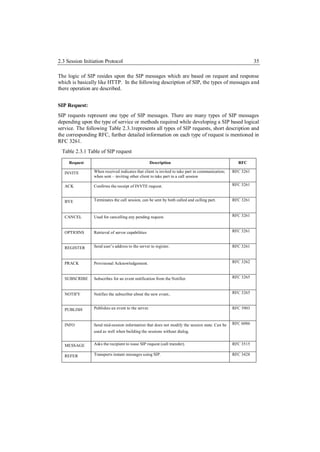
SIP requests represent one type of SIP messages. There are many types of SIP messages
depending upon the type of service or methods required while developing a SIP based logical
service. The following Table 2.3.1represents all types of SIP requests, short description and
the corresponding RFC, further detailed information on each type of request is mentioned in
RFC 3261.
 Table 2.3.1 Table of SIP request

     Request                                         Description                                   RFC

   INVITE        When received indicates that client is invited to take part in communication;   RFC 3261
                 when sent – inviting other client to take part in a call session

   ACK           Confirms the receipt of INVTE request.                                          RFC 3261


   BYE           Terminates the call session, can be sent by both called and calling part.       RFC 3261


   CANCEL        Used for cancelling any pending request.                                        RFC 3261


   OPTIOINS      Retrieval of server capabilities                                                RFC 3261


   REGISTER      Send user’s address to the server to register.                                  RFC 3261


   PRACK         Provisional Acknowledgement.                                                    RFC 3262


   SUBSCRIBE     Subscribes for an event notification from the Notifier.                         RFC 3265


   NOTIFY        Notifies the subscriber about the new event..                                   RFC 3265


   PUBLISH       Publishes an event to the server.                                               RFC 3903


   INFO          Send mid-session information that does not modify the session state. Can be     RFC 6086
                 used as well when building the sessions without dialog.


   MESSAGE       Asks the recipient to issue SIP request (call transfer).                        RFC 3515

   REFER         Transports instant messages using SIP.                                          RFC 3428
2.3 Session Initiation Protocol                                                                              36

   UPDATE             Modifies the state of the session without changing the dialog.              RFC 3311


In the above table mostly the first five requests INVITE, ACK, BYE, CANCEL, OPTIONS,
REGISTER based on [3261] are used between a UAC and a UAS. The INFO message pro-
vides add on functionality for the UAC, while communicating with the AS.


SIP response:
SIP responses are the second type of SIP messages, they complement the SIP requests. The
first line in a SIP response is called “status line” or “status code”. The responses are divided
according to the type of the status code as follows:

          Informational
          Success
          Redirection
          Request failure
          Server-error
          Global failure

Table 2.3.2 Table of SIP Response
Response Type                     Functionality                                                     RFC
1xx: Provisional             request received, continuing to process the request;                 RFC 3261

2xx: Success                 action was successfully received, understood, and accepted;          RFC 3261
3xx: Redirection             further action needs to be taken in order to complete the request;   RFC 3261

4xx: Client Error            request contains bad syntax or cannot be fulfilled at this server;   RFC 3261

5xx: Server Error            server failed to fulfill an apparently valid request;                RFC 3261

6xx: Global Failure          Request cannot be fulfilled at any server.                           RFC 3261


Table 2.3.2, shows all the necessary response messages which are handled by a proxy server,
application server or a media server. The response can further be extended, depending upon
their properties. The “1xx”, only shows the series of provisional response type messages
send out. However, there is a list of messages in the same series which can be referred from
the specific RFC.
2.3 Session Initiation Protocol                                                               37


2.3.1         Network Elements of SIP
There are many network elements based on SIP but they can broadly be divided into SIP user
agent and the SIP server. The user agent can be of two types: SIP user agent client (UAC)
and the SIP user agent server (UAS).
SIP User Agent client: This element initiates request to start a session between the user
agent and the application server.
SIP User Agent server: This element generates responses to the request made by the UAC.
There are several network elements defined in the RFC 3261. Some of the important network
elements are as follows:
    1.   A proxy server, as mentioned in [3261] "is an intermediary entity that acts as both a
         server and a client for the purpose of making requests on behalf of other clients. A
         proxy server primarily plays the role of routing, which means its job is to ensure
         that a request is sent to another entity "closer" to the targeted user. Proxies are also
         useful for enforcing policy (for example, making sure a user is allowed to make a
         call). A proxy interprets, and, if necessary, rewrites specific parts of a request mes-
         sage before forwarding it." The proxy server is responsible for routing and sending
         out the request to the specific UAC.
    2.   A registrar, as mentioned in [3261], “is a server that accepts REGISTER requests
         and places the information it receives in those requests into the location service for
         the domain it handles." The UAC can register to this server which identifies the
         user’s location.
    3.   A redirect server, as mentioned in [3261] “is a user agent server that generates 3xx
         responses to re-quests it receives, directing the client to contact an alternate set of
         URIs. The redirect server allows SIP Proxy Servers to direct SIP session invitations
         to external domains.” The redirect server is responsible for redirecting any SIP re-
         quests. The redirection of the request depends upon the “to” header field.
2.3 Session Initiation Protocol                                                            38


Figure 2.3.1 A simple peer to peer SIP call between two UAC [Tsac]


There can be many scenarios to explain the concept of a SIP call, in figure 2.3.1 a simple SIP
call is shown in which there are four SIP based network elements, the caller, the callee, the
Proxy server, and the Location server. Considering that the caller and the callee are regis-
tered to a register server. The procedure of the call can be seen by the sequences of the
number indicated in the figure 2.3.1. So basically, the caller makes a call sends an INVITE to
the Proxy server, the Proxy server looks up in the Location server and checks if the called
SIP URI is located on the server meaning there by the mapping between the permanent SIP
URI and the temporary URI is created on the basis on the register server which by the way is
not mentioned in figure 2.3.1. After looking up the SIP URI, the location server sends a reply
to the proxy server. The proxy server sends an INVITE to the callee, assuming that the callee
accepts the call; an OK is send to the Proxy Server. The proxy server sends an OK to the
caller; the caller receives the OK and sends an ACK to the Proxy server. To start the session
between the caller and the callee, the proxy server sends the final ACK. In the end a peer to
peer connection is established between the caller and the callee for a SIP based call. The
server functionality can reside on a single machine which can handle all the back end service
including location, redirection, registration and also proxy server functionality.

2.3.2           Back to Back User Agent (B2BUA)

A B2BUA is a SIP logic that receives a SIP request, reformulates it, and then sends it out as
a new request. Responses to the new request are also reformulated and send back out in the
opposite direction. In the realized service example, the application server acts as a back to
2.3 Session Initiation Protocol                                                            39

back user agent which means the application sends out responses and also requests depend-
ing upon the behaviour of the service. In the scenario the application server controls the SIP
messages between the user agent and the media server, this behaviour of the application
server is like a back to back user agent. Figure 2.3.2 shows a B2BUA, which theoretically
demonstrates the logic.


Figure 2.3.2 Example of a Back to Back User Agent [Sipc]


In this example service for both the user agents 1 and 2, the SIP server operates as a B2BUA,
which shows that it contains the functionality of UAC and the UAS. When a request is re-
ceived by the B2BUA, the B2BUA reformulates the header bodies and then forwards the
request to the other user agent. Similarly, when response is received by the B2BUA, the
server can reformulate the header fields and send it to the necessary UAC.
According to RFC-3261, a back-to-back user agent (B2BUA) is a logical entity that receives
a request and processes it as a user agent server (UAS). In order to determine how the re-
quest should be answered, it acts as a user agent client (UAC) and generates requests.
Unlike a proxy server, it maintains dialog state and must participate in all requests sent on
the dialogs it has established. Since it is a concatenation of a UAC and UAS, no explicit
definitions are needed for its behaviour.


2.3.3           SIP Dialog
The SIP dialog is an important concept while implementing the service as mentioned in
chapter 4. The dialog is basically between two user agents, or between two servers or be-
tween user agent and server.
2.4 Convedia Media Server                                                                    40

As mentioned in [3261], a “Dialog is a peer-to-peer relationship between two user agents. It
represents a context that facilitates the sequencing of messages between the user agents and
proper routing of requests between them. The dialog represents a context in which to inter-
pret SIP messages.”
In context of SIP, a dialog is created between two user agents. After establishing a session, a
dialog becomes an important concept in SIP which allows the possibility of interpreting
various SIP messages during the dialog. Each dialog is identified at each UA by three pa-
rameters: Call-ID value, a local tag and a remote tag, bringing all these tags together a dialog
ID is created which is responsible to identify a specific dialog between two user agents. Dur-
ing the realization of the service the following dialogs are created between the following
elements:
        UAC (User Agent Client) and AS (Application Server).
        AS and MS (Media Server).
        UAC and MS.


2.4 Convedia Media Server
The RadiSys Convedia CMS-3000 media server delivers carrier-class media processing
capabilities for enterprise IP telecommunication services. Increased processing power, in-
cluding I/O throughput upgrades, delivers significant performance improvement for Voice
XML (Extensible Markup Language) based on IVR and messaging applications, while deliv-
ering multi-service versatility for numerous applications including IP PBX, instant video
conferencing, IP contact centres, and unified communication solutions. [Conv]
The Convedia media server is a hardware based server which provides variety of media re-
lated services like call conferencing, announcement calls etc. It is valuable server for IP
based telecommunication infrastructure which supports in providing media based value
added services. The main functionality of the media server lies with the MSML (Media
server mark up language) [5707], more information about the MSML is mentioned in chapter
2.4.1. Basically MSML is a type of XML which supports media functionalities. The func-
tionality of the media server can be utilized by using the MSML which stores the required
data types as XML, which eventually can be accumulated for various kinds of media based
services. The media server supports many media functionalities which include DTMF( Dual
Tone Multi-Frequency), recording and playback, stream connection which provides intercep-
tion support for video and audio, video announcements, IVVR(Interactive Voice and Video
Response). In the implementation of the EnOcean service DTMF functionality is used which
actually demonstrates the behaviour in respect to the controlling of EnOcean devices.
2.4 Convedia Media Server                                                                   41


2.4.1         Media Server Mark up Language

Based on the RFC 5707, The Media Sessions Mark-up Language (MSML) is an XML (Ex-
tension Mark-up Language) language used to specify and change the flow of media streams
within a media server. MSML is designed for manipulating media services offered by the
media server to established media sessions based on SIP [3665]. As mentioned in [5707],
MSML specifies how media sessions on the media server interact, and controls and invokes
media services on the media server. For example, MSML can be used to create conferences
and join sessions into conferences. The MSML is handled by SIP which operates as a signal-
ing protocol and creates a session between the media server and a controlling agent. The
session acts as a control channel which is described in sub-chapter 2.4.1. During this session,
the user agent can utilize the functionality of the media server which are mentioned in chap-
ter 2.4.

MSML can also be used with MOML (Media Objects Markup Language) to interact with
individual users or with groups of conference participants, for example applying IVR opera-
tions, called “dialogs,” to sessions or conferences. Using MSML, it is also possible to control
advanced conferencing features on a media server, to modify media while a session is in
progress, and to perform advanced session manipulation such as personalized mixing.
MSML transactions are originated by application domain events. These events can be inde-
pendent of any media or user interaction. For example, an application may play an an-
nouncement to a conference warning that its scheduled completion time is approaching.
MSML is designed to be used with other languages. For example, MSML does not set up or
teardown sessions. Instead, MSML uses a transport protocol such as SIP for that purpose.
[5707].

The Media Objects Mark up Language based on [5707] generates a media object which is an
endpoint of one or more media streams. It may be a connection that terminates RTP sessions
from the network or a resource that transforms or manipulates media. MSML defines four
classes of media objects. Each class defines the basic properties of how object instances are
used within a media server. However, most classes require that the function of specific in-
stances be defined by the client, using MSML or other languages such as VoiceXML.
2.4 Convedia Media Server                                                                    42


Figure 2.4.1 Example of a MSML


Figure 2.4.1, shows an example of a MSML which is used to utilize the functionalities based
on the Convedia Media Server. The MSML is created on the basis of [Msml]. In this exam-
ple the dialogstart target, play id, send target, record destination, send target are the parent
elements which consists of substitute child elements to enable the service media functionali-
ty.

MSML does not directly constrain the media processing language. However, the current
implementation of MSML on the Convedia Media Server supports only MOML as a media
processing language. While MSML addresses the relationships of media streams (in, for
example, simple and advanced conferencing), MOML is an XML language that addresses
the control and manipulations of media processing operations, such as announcement, IVR,
play and record, AST/TTS, fax, and video. Together, MSML and MOML form general-
purpose media server control protocol architecture.


2.4.2          Media Server Control Channel
The media server control channel creates a session between the application server and the
Convedia Media Server. To access the functionality located on the media server based on
MSML, a control channel is to be established which allows the user agent to establish a con-
2.5 JAIN Service Logic Execution Environment                                               43

nection through the application server. Figure 2.4.2, shows an example of a control channel.
The control agent can be an application server, which utilizes the functionality of the Media
Server.


2.4.2 Convedia Media Server Control Channel [Msml].


The Control channel is a SIP based three way hand shake which creates the session between
the control agent and the Media Server. When the control channel is created, SIP based IN-
FO messages can be send to the media server which provides the UA to use media functio-
nality presiding on the media server. Creating the control channel is a fundamental logic to
utilize the functionality of the Convedia Media server. This logic is used during the realiza-
tion of the EnOcean Service.


2.5             JAIN Service Logic Execution Environment
In this chapter the Java API for Integrating Networks Service Logic Execution Environment
is described. Basically, JSLEE is a fundamental architecture for a service delivery platform
which has an extremely deep conceptual model. In this chapter the important concepts and
logics with respect to JSLEE is discussed.

2.5.1           JAIN (Java API for Integrated Networks)
JAIN stands for Java API for Integrated Networks. Based on [Jain3] it is an initiative, and
represents the community extension to of SJN (Sun Java Networks). It is a JAVA API for
providing next generation telecommunication services. The Development proceeds under the
terms of Sun's Java Specification Participation Agreement (JSPA). It is endorse as Sun de-
veloper Network with an initiative to unify complex wire line, wireless and IP communica-
tions interfaces into a set of industry defined Java standards. [Jain2]
2.5 JAIN Service Logic Execution Environment                                                44

JAIN is supposed to integrate all existing types of networks, like IP networks, cellular, wire-
less and PSTN networks. This should be done by means of creating industry standards for
execution environments and interfaces for creating intelligent network services and applica-
tions. JAIN has a component-based architecture, which it has inherited from Java Beans
technology, meaning a robust and flexible environment with module architecture. [Jain2]

Java APIs for Integrated Networks (JAIN) is a collection of APIs that are based on Java
technology and provide access to telephone and data networks. The company Sun Microsys-
tems has introduced this extension of the Java platform in 1998 to develop network services
faster and easier. [Jain3]


2.5.2         Service Delivery Platform
JSLEE (Jain Service Logic Execution Environment), where Jain stands for Java API for
Integrated Network. As mentioned in [Sunj] JSLEE is a component model like EJB, Servlet
or JSP, and is most similar to EJB. The concept is J2EE technologies but is a specialized
component model for event driven applications. The SLEE can be implemented independent
of J2EE and used stand-alone without requiring a J2EE. The component model is designed
and developed to provide telecommunication service developers to develop much more ro-
bust.

It is a service delivery platform which provides telecommunication application service de-
velopers to implement the service in an event oriented way. The complete architecture de-
fines a component model for structuring the application logic of communications applica-
tions as a collection of reusable object-oriented components, and for composing these com-
ponents into more sophisticated services. Based on [Jain], the SLEE architecture also defines
the contract between these components and the container that will host these components at
runtime. The SLEE specification supports the development of highly available and scalable
distributed SLEE specification compliant application servers, but does not mandate any par-
ticular implementation strategy.

One of the most attractive features of the JSLEE architecture is that the applications may be
written once, and then deployed on any application server that complies with the SLEE
specification. In addition to the application component model, the SLEE specification also
defines the management interfaces used to administer the application server and the applica-
tion components executing within the application server. The JSLEE architecture provides a
highly adaptive and objects oriented based platform which makes it possible for developers
to implement service just like any other server based application but keeping in mind the
telecommunication requirements.
2.5 JAIN Service Logic Execution Environment                                                45


Figure 2.5.1: JSLEE Architecture [Mmjt]


SLEE is a container developed for asynchronous event driven applications. In Figure 2.5.1
the basic architecture of the JSLEE architecture can be seen which shows how exactly the
architecture is embedded. Based on [Mmjt] JSLEE can be divided into three parts which are
mentioned below:

Management: This specific component of the JSLEE architecture provides the developer to
use various management entities which includes JMX (Java Management Extension), it is a
management entity that runs in a Java Virtual Machine (JVM) and acts as the liaison between
the MBeans and the management application.

Framework: The Framework component consists of the major functionality related to event
routing, profile specification, alarming facilities and the trace. These functionalities are
JSLEE specific.

Component Model: This component consists the main building block like the SBB (Service
Building Block), the events are fired by the resource adaptor which are accumulated by the
SBB. The lifecycle of the SBB is also a part of this model. So, whenever an event based
object is generated it follows the lifecycle of the SBB. The formulation of the deployment
units are also done in this component model. The deployment is done on the bases of a spe-
cific format which the JSLEE component model can understand. The Look up for any spe-
cific facilities is also carried out in the component model. Figure 2.3.1, shows the component
model, at step 1, the RA stack consists the communicating protocol which enables the JSLE
to communicate with the external environment. At step 2, the mapping of java objects is
done on the basis of [Jain]. At step 3 the event routing is done which utilizes the developed
java objects. At step 3, the Event router routes out the required events to the tended SBB . At
2.5 JAIN Service Logic Execution Environment                                              46

step 4, more child SBBs can be integrated to the main SBB. At step 5, the SBB can commu-
nicate with RA (Resource Adaptor) Stack and at step 6, the RA Stack sends out an action to
the external environment.


Figure 2.5.1: Component model of JSLEE[Mmjt]


Resource Adaptor & Resource API: This section of the JSLEE architecture allows the
JSLEE to communicate with the external environment. The example of utilizing the resource
adaptor can be seen in figure 2.3.1, where the resource adaptor, RA stack consists of a spe-
cific protocol stack to communicate to the external environment. The resource adaptor has
the property to accumulate all the functionality related to a specific communicating protocol
which allows the JSLEE to communicate with the external environment, a detail description
about the basic conventional resource adaptor is described in chapter 2.6.1.

As mention in [Jain], JSLEE is a platform containing multiple containers developed for
building applications for centric networks. SLEE is standardized to meet the needs of devel-
opers that build real-time event processing applications.
2.5 JAIN Service Logic Execution Environment                                               47


2.5.3           Service Building Block(SBB)
An SBB is a software component that sends and receives events, and implements the execu-
tion logic of the system. Figure 2.5.2 shows the example of a SBB operation. There is a root
SBB which basically looks up for events fired by the resource adaptor, the root SBB can fire
more events to the child SBB depending upon the service logic. So, SLEE contains service
“A”, service “B”, service “C”, the handling of the events is done by specific SBB. To verify
the event and the right SBB on which the event is fired a XML format is used. This format
configures the property of the SBB and waits for certain events which are fired by the re-
source. The handling of the events can further be done depending if a child SBB is required
for the service. Events are used to represent important events that can occur at any time. The
SBB follows a specific configuration which provides the information of the vendor, name
and version. This configuration is followed through the implementation.


Figure 2.5.2 Example of SBB(Service Building Block)


This description is done in the descriptor files which generate a specific SBB id, this id is
used as service identity while implementing the service logic. So, every SBB is bounded to
an id which is depended to other child SBBs if events are to be fired to the child SBB. The
configuration property provides the binding of the events which are to be routed by the event
router, while the service is implemented. The concept of event routing is explained in the
next chapter.
2.5 JAIN Service Logic Execution Environment                                               48


2.5.4            Event, Event Routing

Events fired by the resource adaptor and the handling of the fired events are logical funda-
mental concept in the JLSEE architecture. The handling of the fired event is done by the
concept of event routing. Event can be a kind of logic behavior fired by the resource adaptor
depending upon the external resource which is based on a communication protocol. The
Event router actually routes the event to the SBB which is subscribed to the specific event.
As mention in [Uocl], an event represents an event which triggers a process, or may be part
of a process. Also includes event information describing the event, such as the source of the
event. In addition, an event can be generated from various sources, such as external resources
that are tied to the resource adapter using JSLEE, JSLEE by itself or by the application com-
ponents within the JSLEE.


Figure 2.5.3: The concept of event and event routing [Mobi3].


In figure 2.5.3, the Resource Adaptor fires an event which is handled by the event router.
The event router forwards the event to the required SBB. The Events are represented within a
JSLEE through event objects that are used to distribute information to the resource adapter or
SBBs to exchange information among root SBBs and child SBBs. The transfer of an event
takes place on an Activity Context. Each event object corresponds to a defined event type.
The event router ensures that the events of a given type are forwarded to the SBBs who are
interested in receiving events of such type.
The event routing between resources and the JSLEE components and the routing of events
between components, is one of the basic functions of JSLEE. In the JSLEE the event model
is based on publish-subscribe model. Based on [Jain] this model decouples the component
2.5 JAIN Service Logic Execution Environment                                                 49

that generated the event of the consumers of that event by the event-routing mechanism, the
distribution of events, from event to event producer-consumer, takes over. So, basically, the
resource adaptor works as a publisher which publishes out events and the event router sub-
scribes to the published event.


2.5.5            Activity and Activity Context Interface
The activity and the activity context interface is an important concept in the JSLEE architec-
ture. This makes it possible for the SBB to interact with different kinds activities which are
formulated in the JSLEE. As mentioned in [Jain], “An Activity represents a related stream of
events. These events represent occurrences of significance that have occurred on the entity
represented by the Activity. From a resource’s perspective, an Activity represents an entity
within the resource that emits events on state changes within the entity or resource.”
The activity is entitled to events which fires out events in the JSLEE and the SBB entity can
capture those events and use that event for the Service Logic. Figure 2.5.5, shows an exam-
ple of the activity which fires out events to the SBB entity which can then utilize the activity
in the service building logic. The activity is handled by a resource that can be a resource
adaptor which formulates the concept behind the activity depending upon the resource adap-
tors functionality.


Figure 2.5.4: Example for the Activity in JSLEE [Sunj]


The activity context interface is another important concept in the JSLEE architecture. It is an
interface between the SBB entity and the Activity which is handled by the resource domain.
Basically the Activity fires out events to the SLEE Domain which can be handled by the
SBB over the activity context interface.
2.5 JAIN Service Logic Execution Environment                                               50


Figure 2.5.5: Example of the Activity Context Interface and the Activity [Sunj]


The Activity Context interface can be utilized by many SBBs, various useful objects can be
stored in the Activity Context interface to maintain a persistence service. Even, the Activity
can be stored in the Activity Context Interface which allows the SBB to utilize the stored
activity in the activity context interface and then use the activity in the service logic.
The activity is a resource oriented logic which is implemented in a resource adaptor and the
resource adaptor fires outs event on an activity. On the other hand the SBB can accumulate
the event which is fired by the resource adaptor over the activity context interface. The con-
ceptual logic of the Activity and the Activity Context interface allows binding the SBB to a
resource adaptor.
2.6 Resource Adaptor                                                                          51


2.6             Resource Adaptor
The Resource Adaptor is basically an element presented in the JSLEE architecture, which
provides the functionality to the JSLEE architecture to communicate with the external envi-
ronment. The resource adaptor is general a communication protocol driven logic which pro-
vides the functionality to the SBB (Service Building Block) to communicate on a specific
protocol. So, for example if a Service is based on the SIP protocol, a SIP resource adaptor is
used which provides the SBB to communicate to the external environment utilizing the SIP
protocol which is embedded in the resource adaptor.
In the implementation the EnOcean Resource Adaptor which is explained in chapter no. 4.3
is basically based on the TCP which allows the JSLEE based application server to communi-
cate with the EnOcean gateway. As described in [Jain], a Resource Adaptor is an implemen-
tation of one or more resource adaptor types. There may be multiple Resource Adaptors
available for a particular resource adaptor type, each providing the same contract to SBB
developers.


Figure 2.6.1 An Example of a service building block where a SBB uses many resource adaptors


Typically, a Resource Adaptor is provided either by a resource vendor or a SLEE vendor to
adapt a particular resource implementation to a SLEE. So this makes it possible for many
resource adaptors to communicate on various protocols like, SIP, TCP, and HTTP etc. The
concept and logic of the communication protocol is developed in the resource adaptor which
is accessible by the SBB.
To expand the service implementation, one SBB can be bind with many resources adaptors.
So if one service i.e. a SBB would like to use many protocols to implement the service that is
possible. A simple block diagram shown in figure no. 2.6.1 represents the conceptual logic of
using one SBB with many resource adaptors. The green oval shaped body represents the
Service building block and the blue coloured box represents the resource adaptors. This func-
2.6 Resource Adaptor                                                                                     52

tionality provides the SBB to communicate over multiple protocols and enhance more ser-
vices.
As mentioned in [Jain], a vendor may provide a Resource Adapter that adapts the SIP stack
to the SLEE. An Administrator installs Resource Adapters in the SLEE which allows an SBB
(Service Building Block) to use the functionality of the resource adaptor. Another example is
a HTTP client resource adapter, which consists of all the functionality related to a Hyper-
Text-Transfer Protocol which is based on the request and response methods. These methods
are than added to the HTTP client resource adapter which can be utilized by a SBB (Service
Building Block). The resource adaptor logically has another component as the resource
adaptor type which is explained in chapter no. 4.3.
Logically the resource adaptor accumulates the functionality of the communication protocol
as described earlier and then fires out events to the JSLEE component. On the other hand the
SBB utilities these events to develop the service logic based on the functionality of the com-
municating protocol. In figure no. 2.6.2, the basic logic of utilization of the resource adaptor
and the service building block can be seen. In this figure a resource adaptor fires out an event
to the JSLEE component model which is then accumulated by the SBB over the JSLEE
component model.


Figure 2.6.2: The logical implementation between the resource adaptors and the Service Building Block.


In figure 2.6.2, the green colour box represent the resource adaptor which fires out an event
to the JSLEE Component model as an object which can be seen in the blue oval colour
shape. The event object is than utilized by the SBB (Service Building Block), which provides
the SBB to develop the service logic on the bases of the resource adaptor.
2.6 Resource Adaptor                                                                        53


2.6.1           Resource Adaptor Type
A resource adaptor type provides the functionality to the resource adaptor to interact with the
SBB (Service Building Block). The resource adaptor type defines an API and a behavioural
contract that SBBs use to interact with a Resource. The resource adaptor type is basically a
bunch of interface classes which are implemented in the resource adaptor.


Figure 2.6.3: Block diagram showing the interface behaviour


Figure 2.6.3, shows a simple block diagram showing the working of the resource adaptor
type. The resource adaptor type is a set of interfaces which interact with the resource adaptor
and the SBB (Service Building Block). The activity interfaces is basically describing a type
of activity which is created by the resource adaptor and is handled by the resource adaptor
type as an interface. The activity is a logical concept in the JSLEE architecture to define any
kind of activity which might be created in respect to the implementation of the service. For
example, if a user makes a call to the application server, than that will be consider as an
activity and when the user disconnects the call that will again be consider as an activity. On
the same activity many events can be fired by the resource adaptor. The type of activities is
actually defined by the resource developer. In figure 2.6.3, the SBB interface and the activ-
ity context interface allows the SBB to interact with the resource adaptor through the re-
source adaptor type.
As mentioned in [Jain], the Resource adaptor types are independent of a particular Resource
Adaptor implementation, allowing development of SBBs that can use multiple different
implementations of the same resource adaptor type. Typically, a resource adaptor type is
defined by an organization of collaborating SLEE or resource vendors, such as the SLEE
expert group. An Administrator installs resource adaptor types in the SLEE.
So, the resource adaptor type basically provides a binding with the SBB (Service Building
Block). In the complete Resource Adaptor Architecture, the resource adaptor consists of
various activities and interfaces which are implemented in the Resource Adaptor.
2.6 Resource Adaptor                                                                          54


2.6.2            Resource Adaptor Entity
A resource adaptor entity is the mapping, within the SLEE, of a particular resource as
adapted by a Resource Adaptor. As mentioned in [Jain], multiple resource adaptor entities
are created from a single Resource Adaptor. For example a SIP Resource Adaptor may have
multiple resource adaptor entities each responsible for a different instantiation of a SIP stack.
Typically, an Administrator creates a resource adaptor entity from a Resource Adaptor in-
stalled in the SLEE and provides the appropriate configuration parameters. Configuration
parameters enable a resource adaptor entity to “bind” to a particular resource. The resource
adaptor entity enables a developer to create multiple entities based on multiple resource
adaptors. So, if multiple resource adaptors are to be used by a SBB, an entity is created for
multiple resource adaptors.


Figure 2.6.1:Multiple RA utilized by a single SBB.


Figure 2.6.1, shows an abstract view of the utilizing multiple Resource adaptor by a single
SBB based on this concept, each RA will produce its own entity which can be used by a
single SBB. The SBB will utilize the entity created RA depending upon the service logic.
Each RA Entity follows a life cycle which is explained in chapter 2.6.3.

2.6.3            Resource Adaptor Entity Life Cycle
The life cycle of the resource adaptor entity is an important feature for the resource adaptor.
As mentioned in [Jain], the resource adaptor entity state machine is modelled similarly to the
state machine for a Service. The resource adaptor entity state machine and SLEE state ma-
chine together drive the resource adaptor object state transitions. For example if a set of
management operations are performed on a resource adaptor entity via the Resource Man-
agement MBean there may be sequences of lifecycle operations invoked on the resource
2.6 Resource Adaptor                                                                                            55

adaptor objects instantiated by the SLEE for that resource adaptor entity. A resource adaptor
entity can be in logic sate. Following table describes the functionality of the states:
Table 2.6.1

        Entity State                                          Functionality of the State

          Inactive               A resource adaptor entity enters the Inactive state when it has been successfully
                                 created in the SLEE.


          Active                 The resource adaptor entity has been activated. If the SLEE is in the Running
                                 state, resource adaptor objects associated with the resource adaptor entity can
                                 create new activities like submit events on activities, and end activities.

         Stopping                The resource adaptor entity is being deactivated. However, some activities created
                                 by the resource adaptor objects associated with the resource adaptor entity may
                                 still exist in the SLEE and have not completed their processing. The SLEE is
                                 waiting for these activities to end.


Depending upon the state of the entity a flow diagram is mentioned in [Jain]. This can be
seen in figure 2.5.1. In this figure, an entity is created as a createResourceAdaptorEntity
which is in the inactive state, if the entity is required to be handled, it moves to the active
state as an activateResourceAdaptorentity. If the Entity is to be stopped it moves to the stop-
ping state and than in the end it moves to the Inactive state as a removeResourceAdaptorEn-
tity.


Figure 2.6.2 The Entity Life Cycle of the Resource Adapter [Jain]
2.6 Resource Adaptor                                                                                     56

As mentioned in [Jain], the operational state of resource adaptor entities is persistent, i.e. the
SLEE [Jain] stores the state of the resource adaptor entities. If the SLEE is shut down and
then restarted, the SLEE will restore the resource adaptor entities to their previous opera-
tional state.


2.6.4         Resource Adaptor Object Life Cycle

Every entity creates an object which also goes through a life cycle. The life cycle is defined
in four states. So every time when a resource adaptor is deployed, the objects created go
through set of states. The four important states which are part of the life cycle are defined in
detail. A resource adaptor object can be in one of the following four operational states.


                        State                                         Functionality
                                                  The resource adaptor object has been created and pro-
                  Unconfigured state.             vided with a ResourceAdaptorContext( which is created
                                                  in the resource adapter during the time of implementa-
                                                  tion) object, but has no configuration information for the
                                                  resource adaptor entity that it was created for.

                                                  The resource adaptor object has been configured for the
                   Inactive state.                resource adaptor entity. It is ready to work on behalf of
                                                  the resource adaptor entity but is not yet creating Activi-
                                                  ties or firing Events.

                                                  The resource adaptor object has been activated, i.e. it is
                  Active state.                   running. The resource adaptor object can create new
                                                  Activities, submit Events on Activities, and end Activi-
                                                  ties on behalf of the resource adaptor entity.

                                                  The resource adaptor object is being deactivated. The
                Stopping state.                   resource adaptor object continues to manage any re-
                                                  maining Activities that are owned by the resource
                                                  adaptor object. It can submit Events on Activities and
                                                  end Activities, but cannot start new Activities.


The four states mentioned above can more precisely be understood by figure 2.6.3. In this
figure initially the ResourceAdaptorContext are set, which basically allows all the necessary
JSLEE specified conventional activities and facilities to be configured and initialized. The
state invoked is basically the unconfigured state which defines initial and useful parameters
for the resource adaptor. Eventully, when the resource adaptor is undeployed the unconfig-
ured state is invoked which basically releases all the parameters which are described in the
2.6 Resource Adaptor                                                                          57

unconfigured state. The inactive state is basically a analogy to the active state, so all the
functionality which are activated in the active are removed in the inactive state and than
handed over to the unconfigured state in the end.

The next state is the active state. This state actually initializes the resoucre adaptor at type
when the resource adaptor is deployed. So for example for opening a thread immediately
after deploying, this can be handled in this state which will allow the resource adaptor to start
the thread immediately in the active state. The stopping state is a state when all the function-
ality is stop from any activity. For example closing of a thread can be handled in the stop
state, which than goes to the inactive state and then to the unconfigured state. Eventually in
the end the resource adaptor context is unset.


Figure 2.6.3: Life-cycle of the resource adaptor Object [Jain]
3             Requirement Analysis
3.1 General Objective
As the world gets more and more technologically advanced, we find new technology being
used more and more in our personal lives from homes to our mobile devices. Home automa-
tion is becoming more and more popular around the world and is becoming a common prac-
tice. There are various kinds of technologies which are introducing home automation tech-
nology. However, the objective in this respect will be to develop an environment for the SIP
UA to control home devices which is based on a service delivery platform known as JSLEE.
Introducing voice services to control home devices will also be an objective to increase and
provide more value added services to the SIP UA. The idea is to implement a service which
enables controlling of home devices with media functionalities.


3.2 Objective of the Implementation

The objective of the master thesis is to control and manage home automation devices that are
based on EnOcean Technology. The basic idea is to provide this functionality on the applica-
tion server i.e. Mobicents JSLEE. To realize this implementation a resource adapter is devel-
oped that will allow the SBB (Service Building Block) to control the EnOcean Technology
based devices. The resource adapter named as EnOcean RA will be deployed on the JSLEE
application server which allows the SIP user to control EnOcean Technology based devices.
In Figure 3.2.1, the required home automation devices are located which includes the motion
sensor, energy meter, actuator and the EnOcean Gateway. However, the main functionality
of control and service will be deployed on the application server, depending upon the func-
tionality and behaviour of the home automation device the end user would be able to control
the home automation devices, it can also be seen that the home automation devices are com-
municating on the bases of RF signals which provides them the ability to communicate with
EnOcean gateway.
3.2 Objective of the Implementation                                                                       59


                                                     Motion Sensor
                                                                                    Actuator
             Energy Meter


                                                                                                   Lamp


                                                           RF Signal


                                        TCP/IP                             TCP/IP              EnOcean
                                                                                               Gateway
                 User PC

 TCP: Transmission Communication Protocol          JSLEE AS (EnOcean RA)
 JSLEE: Jain Service Logic Execution Environment
 PC: Personal Computer
 IP: Internet Protocol
 RF: Radio Frequency
 AS: Application Server
 RA: Resource Adapter


Figure 3.2.1 Working Framework Requirement


In Figure 3.2.2, the scenario for the service. In this service the end user can control the de-
vices by using the media server that provides media functionality to the UA. So, one example
of service can be using a home automation IVR (Interactive Voice Response) system to con-
trol and manage devices at home.
3.3 Required Technologies                                                                                        60


                                                    Motion Sensor
                                                                                          Actuator
                Energy Meter


                                                                                                          Lamp


                                                        RF Signal


                                                                                 TCP/IP
                                             SIP

                         User PC                                           SIP
                                                   JSLEE AS (EnOcean RA)
 TCP: Transmission Communication Protocol
 JSLEE: Jain Service Logic Execution Environment
 PC: Personal Computer                                                                     Media Server
 IP: Internet Protocol
 RF: Radio Frequency
 AS: Application Server
 RA: Resource Adapter
 SIP: Session Initiation Protocol


Figure 3.2.2: Working Framework for the SIP user to control home automation devices


3.3 Required Technologies
For the development and implementation of the defined objective for the master thesis fol-
lowing are the requirement that is used:

3.3.1               Hardware based Requirements:
Following are the list of hardware devices used:
1.     BSC-BAP-TX Wireless Access point for EnOcean Technology.
2.     Wireless Actuator.
3.     Wireless single-phase energy meter.
4.     Wireless Switch/Push-button.
5.     Wireless Motion/Bright Sensor.
3.3 Required Technologies                                                                 61


3.3.2        Software based Requirements:
       Eclipse Helios which has a JSLEE development plugin
        An IDE (Integrated Development Environment) is a software application that pro-
        vides comprehensive facilities to computer programmers for software development.
        Eclipse Helios is a version of eclipse which released in 2010. For development on
        JSLEE Architecture, a JSLEE plugin is required.
       Mobicents JSLEE platform
        Mobicents enables the composition of Service Building Blocks (SBB) such as call
        control, billing, user provisioning, administration, and presence sensitive features.
        In an easy way with EclipSLEE, a graphical Service Creation Environment for rapid
        development of value added JAIN SLEE services. It is a developing platform which
        allows developers to understand the logical concepts of the back-end functionality
        presiding for in the telecommunication domain.
       Phonerlite
        PhonerLite is an application for Windows which enables a PC to use it for internet
        telephony, VOIP (Voice over IP). Phonerlite supports the SIP protocol which can be
        configured depending upon the need. It can handle registration of a SIP UA to a
        register server for a specific domain. The Phonerlite is one of the popular software
        tools for testing SIP call flow.
       Wireshark
        Wireshark is a cross-platform software which is used to trace networks. It is a fine
        tool to understand any network behaviour. The tool provides detailed information of
        all the layers in the OSI model. The tool is predominantly used as a sniffer of the
        network. It can be used basically on all the OS platforms.
       Network Supporting Environment Virtual Private Network (VPN)
        A virtual private network (VPN) is a secure way of connecting to a private Local
        Area Network at a remote location, using the Internet or any unsecure public net-
        work to transport the network data packets privately, using encryption.


3.4 Schedule of the Master Thesis
The schedule date of the master thesis, starts from 15th may 2011 to 14th October 2011. Dur-
ing this period the development and implementation of the mentioned objectives will be
achieved.
4                Realization
The concept behind the realization of the master thesis work is to combine the home automa-
tion based network architecture to the telecommunication architecture. The implementation
of the home automation network architecture is governed by the EnOcean Technology and
the telecommunication architecture is handled by the JSLEE based Application server. By
this realization both these two communication architecture can be combined with the support
of an EnOcean RA. The EnOcean RA is embedded with the functionality of a communica-
tion protocol based on TCP which allows communicating with EnOcean gateway. On the
bases of JSLEE, the EnOcean RA fires out events and these events are handled by the EnO-
cean SBB by method calls. The implementation provides an overview of the combination
between home automation communication architecture and the telecommunication architec-
ture, figure 3.3.1 shows the implementation scenario for the realization. To provide media
functionality to the service a media server is introduced which allows the SIP user to use
media functionality.

                               Application Server
                                                  Method Calls
                                                                    EnOcean SBB
                                 EnOcean Events


                     EnOcean                         EnOcean
                                                                   Method


                                                    Events fired
                                                                    Calls


                       RA                                                          SIP Events fired

                                                                     SIP Events
                                                                            SIP                          SIP(Request)
                                                                            RA

                                                                                                         SIP(Response)
                                                                                                         MSML Control Channel
                                                                                         SIP


                                TCP                                                                      DTMF MSML
                                                                                             (Re
                                                                                  SIP


                                                                                                sp o
                                                                                     (Re


                                                                                                                      P
                                                                                                                   RT
                                                                                                 n se
                                                                                        qu


                                                                                                     )
                                                                                       est
                                                                                          )


   Actuator
                     EnOcean Gateway
                  RF Signals                                                                      SIP UA


Figure 3.3.1 The complete realization of the EnOcean Service


In this section of the master thesis the complete realization of an EnOcean Service is also
done. This service utilizes the developed EnOcean RA (Resource Adaptor). Figure 3.3.1,
shows the overview of the complete example service which includes all the required ele-
4.1 Installing Mobicents Application server                                                  63

ments. After deploying the EnOcean RA, the SIP RA and the EnOcean SBB, the connection
between the EnOcean gateway and the AS is established. The control channel between the
AS and the MS is also created during the time of deployment.
Now, the SIP UA, makes a SIP call to the AS. The handling of control channel and the SIP
call flow is done by the SIP RA. The SIP RA fires events to the EnOcean SBB; the EnOcean
SBB calls back a method to utilize the event. A RTP flows between the UA and the MS
which makes it possible to play a file uploaded on the MS. This file is an announcement call.
The UA presses “1” on his or her SIP based equipment and another announcement call is
heard and simultaneously a telegram message is sent. The EnOcean RA fires an event to the
EnOcean SBB which utilizes this event on a method and sends a telegram message to the
EnOcean gateway. On the bases of [Eepv2], the EnOcean gateway reads this telegram mes-
sage. The telegram message is send to the actuator to turn the light “on”; this is send over the
RF signal.


4.1           Installing Mobicents Application server
Mobicents is an open source VoIP (voice over Internet Protocol) platform which indulges in
bringing several kinds sub-projects to integrate with each other. Overtime the Mobicents
developing community has expanded which makes it possible for developers and researcher
enhance their skills. The Mobicents Application Server is basically developed over the
JBOSS architecture. In other sense it is a JBOSS server which is enhanced with the function-
alities related to the JSLEE architecture.
To install the Mobicents Application following are the initial requirements:
    1) JDK (Java Development Kit) version 5 or even higher.
    2) Eclipse IDE which also consists of an EclipSLEE plug-in, the EclipSLEE plugin
       enables the developer to develop JSLEE projects much more conveniently. It is an
       IDE specifically for the JSLEE developers for more information see [Mobi1].
    3) An Eclipse plug-in for ANT is also required which enables the developer to package
       and then also to deploy the deployment unit as described in [Jain].
    4) After this installation, the mobicents can be downloaded from the mobicents web-
       site [Mobi]. The downloaded folder consists of various service examples and re-
       source adaptor examples based on various service logics and communication proto-
       cols respectively.
    5) The step is to set up the path variable specifically JBOSS_HOME to the path of the
       JBOSS bin folder and also the path variable of the JAVA_HOME to the path of the
       Java bin folder. However in the newer version Mobicents 2.4.1 this is not required.
    6) Install SVN (Subversion) as a software tool as a plug-in on eclipse, this will allow
       the developer to access the open source mobicents based services and resource
       adaptors. For more information about SVN see [Subv].
4.2 Installing Wireshark                                                                     64

After, the above mentioned steps, the developer can use eclipse IDE to develop JSLEE based
services and resource adaptors.


        4.2          Installing Wireshark
Wireshark is a very useful tool to computer networks in both wired environment and wireless
environment. It is an open source specifically developed for computer networks specialist
and developers to understand the behaviour of the network based on the traces of the net-
work. It gives the user in-depth information of the network layer at all the seven layers from
the physical layer to the application layer. It is very useful tool for network troubleshooting,
analysis, software and communications protocol development. There are numerous tutorials
on the website which provides information about the using of wireshark effectively. For
more information about wireshark see [Wire].
        Wireshark can be downloaded from [http://www.wireshark.org/download.html].
        For windows an executable file as a windows installer can be downloaded, the in-
         staller can be both 32 bits and 64 bits.
        For linux it can be installed by command line using apt-get install wireshark


In Java Programming language, thread is a sequential path of code execution within a pro-
gram. Each thread has its own local variables, program counter and lifetime. In single
threaded runtime environment, operations are executes sequentially i.e. next operation can
execute only when the previous one is complete. It exists in a common memory space and
can share both data and code of a program. For more information about threading, please
refer to [Multi].


        4.3           EnOcean Resource Adaptor
In this section of the implementation and realization a detailed view of the EnOcean Re-
source Adaptor is provided. This is the major part of the research work. As, described earlier
a resource adaptor defines an API and a behavioural contract that SBBs use to interact with a
Resource. Resource adaptor types are independent of a particular Resource Adaptor imple-
mentation, allowing development of SBBs that can use multiple different implementations of
the same resource adaptor type.
The EnOcean Resource Adaptor is the logical concept which makes it possible to integrate
the EnOcean gateway to the AS (Application Server). Broadly the EnOcean resource adaptor
can be divided into three modules:
4.3 EnOcean Resource Adaptor                                                                    65

    1) The EnOcean Resource Adaptor
    2) The EnOcean Resource Adaptor Type
    3) The EnOcean Event


Table 4.3.1 EnOcean Resource Adaptor module functionality
                 Modules                    Functionality
                                            The EnOcean Resource Adaptor consists the following
                                            functionality:

                                                      Establishing the connection between the
         EnOcean Resource Adaptor
                                                       gateway and the AS.

                                                      Receiving telegram messages from the EnO-
                                                       cean gateway

                                                      Receiving the ready status from the gateway.

                                                      Sending out telegram messages.


                                            Creating the EnOcean Activity in which there are two
                                            activities one is the gateway connection activity, EnO-
                                            cean connection activity.

                                                      The EnOcean Connection activity is respon-
        EnOcean Resource Adaptor Type                  sible for receiving telegram messages from
                                                       the EnOcean gateway.

                                                      It is also responsible for sending out tele-
                                                       gram messages to the EnOcean Gateway.

                                                      The Gateway Connection Activity is respon-
                                                       sible for establishing a connection between
                                                       the gateway and the AS

                                            There is only one EnOcean Event which fires out many
                                            Event types for example:

                                                      gateway connected to the resource adaptor
             EnOcean Event
                                                      receiving of telegram messages
4.3 EnOcean Resource Adaptor                                                                     66

                                                       sending telegram message

                                                       closing gateway connection

                                                       receiving of ready status from the gateway


All these above mentioned modules are associated with one another depending on the func-
tionality of the basic JSLEE Resource Adaptor as mentioned in sub chapter 2.3.4, chapter
2.3.5, and chapter 2.3.6. The Resource Adapter is basically an interface driven module which
allows all the sub modules to cohesively bind with each other. Following a detailed overview
of the developed modules is described. Initial the important classes in the resource adaptor
are described. Further, in this section the development of the EnOcean resource adaptor is
described. The resource adaptor is a logical concept in the JSLEE architecture which allows
the external environment to interact with the event logic environment of the JSLEE architec-
ture. In this implementation the external environment is the EnOcean gateway. This gateway
is integrated to the JSLEE environment by building an EnOcean Resource Adaptor with the
EnOceanRA, the JSLEE AS supports the EnOcean protocol. The EnOcean Resource Adaptor
is embedded with all the functionality related to the EnOcean gateway. As, described earlier
in chapter 4.2, the EnOcean BSC-BAP gateway operates on 5 ports. All these ports are em-
bedded in the EnOcean resource adaptor. In the implementation instead of using the port
numbers for specific tasks, naming is done so that the service developer knows the function-
ality of different ports on the bases of their functionality.
4.3 EnOcean Resource Adaptor                                                              67


Figure 4.3.1: The three modules of the EnOcean Resource Adaptor


Figure 4.3.2, shows the three important modules which combine to build the EnOcean Re-
source Adaptor. In the figure, symbol “1” is the EnOcean Event module which consists of
the functionality of firing. This is a java package which consists of one EnOceanEvent class,
this class is described later.
Symbol 2 shows the EnOcean Resource Adaptor module, this module is embedded with all
the functionality related to the EnOcean Resource Adaptor. This module consists of 9 classes
various methods to accumulate the functionality of the EnOcean Resource Adaptor. Impor-
tant methods related to these classes are described later.
Symbol 3 shows the EnOcean Resource Adaptor Type model, this module consists of inter-
faces which are implemented in the Resource Adaptor module. This allows the SBB to link
with the resource adaptor.
4.4 EnOcean Event Module                                                                   68


         4.4            EnOcean Event Module
EnOcean Event Module or the EnOcean Event package consists of one class. This class in-
habits all the Event types which is accessible by the SBB ( Service Building Block).


Figure 4.4.1: The EnOcean Event Class


The EnOcean Event Class consists of methods based on Hash Map. Hash Map allows tostore
data types on the basis of key and values. In figure 4.6.1, from line number 16 to line number
20, the required keys are initialized which consists of the following keys:

         CONTENT: This is a conventional key which allows the code to be sequential with
          the specific key set as 0.


         GATEWAY_LIST: This ley allows to set the gateway list which allows the Re-
          source Adaptor to communicate with many gateways

         ENOCEAN_TELEGRAM: This key allows to send out telegram messages


         GATEWAY_ID: As, many gateways can communicate with the EnOcean Resource
          Adaptor, a specific gateway id is generated.


         READY_MESSAGE: This key allows storing the ready message string which is re-
          ceived from the EnOcean Gateway.
4.5 EnOcean Resource Adaptor Module                                                                    69

From line number 23 to 26, the specific values which are as follows:
         GATEWAY_LIST_EVENT,
         GATEWAY_READY_EVENT,
         TELEGRAM_RECEIVED_EVENT,
         GATEWAY_CLOSE_EVENT
All the above mentioned values are set which can be stored as a hash map at line number 29
which allows the keys and values to be stored as a payload.


         4.5            EnOcean Resource Adaptor Module
This module consists of all the functionality of the resource adaptor. The module consists of
9 main classes which allow the Resource adaptor to communicate with the EnOcean Gate-
way as per the specification of the ports mentioned in chapter number 2.1.5. The EnOcean
Resource is further modulated to basically three levels which are the following:
    1) The EnOcean Resource Adaptor, this sub module contains all the functionality of a
       conventional resource adaptor which follows the life cycle. Chapter 2.3.5 describes
       the main functionality of a conventional resource adaptor.
    2) The Activity handler, which allows the EnOcean Resource Adaptor to utilize the
       methods and the objects generated from the activity handler. In the EnOcean Re-
       source, there are basically two levels of activity handlers. One is the Gateway Con-
       nection handler and the other one is the EnOcean Activity Handler. Both of these
       handlers are programmed in a way to handle the threads as these threads are used to
       handle connections to the gateway on specific ports which is mentioned in chapter
       2.1.5.
    3) The third sub-module is the thread classes, these classes are simple threads which
       start at specific events. For example, sending telegram message or wiating for in-
       coming telegram messages.


Table 4.5.1 The EnOcean Resource Adaptor Module and functionality
         Class names and important methods                            Functionality

EnOcean Resource Adaptor Class
                                                 This class is based on the Specification [Jain], it
    1.    setResourceAdaptorContext( )           follows the mandatory model defined by [Jain].

                                                 The mandatory methods defined by [Jain] are 1-13,
    2.    unsetResourceAdaptorContext( )
                                                 which basically follow to life-cycle models; one is the
4.5 EnOcean Resource Adaptor Module                                                                  70

     3.   raUnconfigure( )                      resource adaptor entity life cycle model as described
                                                in chapter 2.5.7. The other one is the resource adaptor
     4.   raConfigure( )                        object life cycle model as mentioned in chapter 2.5.8

     5.   raConfigurationUpdate( )                        At (14) an event is fired out which con-
                                                           tains the list of gateway establishing a
                                                           connection to the resource adaptor.
     6.   raActive( )
                                                           For receiving telegram messages an event
     7.   raStopping( )
                                                           is fired out at (15) as an EnOcean event
                                                           (3).
     8.   raInactive( )
                                                          For sending out telegram message another
     9.   activityEnded( )
                                                           EnOceanEvent is created at (16).
     10. queryLivenes( )
                                                          For receiving the ready status of the gate-
                                                           way an event is fired out at (17).
     11. Activity( )

     12. getActivityHandle( )

     13. Activity created( )                              There are various other methods which
                                                           demonstrate the functionality of removing
     14. fireGateway_LIST_EVENT( )                         free port and adding a free port which is
                                                           invoked while establishing a connection to
                                                           the resource adaptor(18), (19).
     15. fireTELEGRAM_RECEIVED_EVENT( )
                                                          To initialize the ports with in the EnOcean
     16. fireEnOceanEvent( )
                                                           resource adaptor a method is invoked at
                                                           (20).
     17. fireGATEWAY_READY_EVENT( )

     18. getandRemoveFreePort( )

     19. addFreePort( )                                   For handling the activity based on the
                                                           EnOcean gateway a method is invoked at
     20. initEnOceanPortMap()                              (21).

     21. EnOceanConnectionActivity( )

GatewayConnectionHandler extends Thread Class
                                                This thread class handles the gateway connection,
     1.   run ( )                               initially the run method is invoked which allows the
                                                gateway to be connected on port 2001(1).
     2.   handleConnection( )
                                                          The handling of the connection is done
                                                           which creates a list of gateways which can
     3.   closeSockets()
                                                           establish a connection to the resource
                                                           adaptor at (2).
     4.   fireEvent()
                                                          The socket with port 2001 is closed at (3).
                                                          Immediately after closing the socket an
     5.   EnOceanConnectionActivity( )
                                                           event is fired out to the resource adaptor
                                                           which consists of the list of gateways. The
     6.   getGatewayActivity( )
                                                           handling of the connection is done by the
                                                           EnOceanConnectionActivity( ) at (5).
     7.   Close( )
                                                          To get the activity of the gateway a
                                                           method is created which is later used by
                                                           the SBB(Service Building Block) at (6).
                                                          In the end the close method closes all the
4.5 EnOcean Resource Adaptor Module                                                                         71

                                                                   sockets at (7).


IncomingEnOceanMessageHandler        extends   Thread   This thread class provides the functionality to the
                                                        server to receive incoming telegram messages from
Class                                                   the EnOcean gateway.

        1.   run( )                                               This class handles the functionality of in-
                                                                   coming EnOcean Telegram messages from
        2.   readIncomingEnOceanMessage()                          the EnOcean gateway to the EnOcean Re-
                                                                   source Adaptor. This class opens a port for
        3.   FireEnOceanEvent( )                                   the telegram messages to be received in the
                                                                   run method(1).
        4.   close( )
                                                                  To allow the resource adaptor to receive
                                                                   incoming EnOcean Message the method is
                                                                   invoked at (2).

                                                                  At (3) an event is EnOceanEvent is fired
                                                                   which is handled by the resource adaptor
                                                                   class.

                                                                  In the end the thread is closed (4)
ReadySocketHandler extends Thread Class                 This class initiates the ready status of the EnOcean
                                                        gateway.
        1.   run( )
                                                                  Initially the thread starts which opens port
        2.   close( )                                              2003 for the receiving the ready status
                                                                   string from the EnOcean gateway at (1).
        3.   readIncomingReadyMessage()
                                                                  A close method is invoked if the socket is
                                                                   to be closed (2).

                                                                   For receiving the ready status string the
                                                                    readyIncomingReadyMessage method is
                                                                    invoke which allows application server to
                                                                    receive the ready string from the gateway
                                                                    (3).
SendTelegramHandler extends Thread Class                This class starts a thread which consists of the func-
                                                        tionality to send out telegram messages to the gate-
        1.   setEnOceanTelegram( )                      way.
                                                                   Initially to send out telegram messages the
        2.   run( )                                                 EnOceanTelegram is set which consists
                                                                    the telegram at (1).
        3.   close()
                                                                  Initially the run method is invoked which
                                                                   opens port 2005 to send out telegram mes-
                                                                   sages to the gateway at (2).

                                                                 In the end the socket is closed at (3).
EnOceanActivityHandler extends Thread Class             This class is a handler thread which handles the
                                                        EnOcean activity as mentioned in [Jain].
        1.   run ( )
                                                                  Initially the run method is invoked to start
        2.   getActivityID( )                                      the thread, this method starts the incomin-
                                                                   gEnOceanMessage thread as mentioned
4.6 EnOcean Activity & SIP Activity                                                              72

    3.    getEnOceanActivity( )                         above in this table and also the sendTele-
                                                        gramHandler thread is instantiated, the
    4.    closeSockets( )                               message containing a specific port no. is
                                                        sent on which the telegram messages are
                                                        received(1).
    5.    close( )
                                                       As per the specification of [Jain], an Ac-
    6.    checkReadyStatus( )
                                                        tivity with an ID is get at (2).
    7.    sendEnOceanTelegram( )
                                                       To get the activity a method is created at
                                                        (3), this allows resource adaptor to get the
                                                        EnOcean Activity which handling the
                                                        functionality.

                                                       A close method is created which allows
                                                        the resource adaptor to close the socket(4).

                                                       To check the ready status of the gateway a
                                                        method as checkReadyStatus is created
                                                        which is invoked whenever the status of
                                                        ready is to initialised at (6).

                                                       In the end the sendEnOceanTelegram
                                                        method is invoked which allows the EnO-
                                                        cean resource adaptor to send out telegram
                                                        messages to the gateway(7).


         4.6                EnOcean Activity & SIP Activity
The EnOcean Activity and the SIP Activity are important logic for handling the SIP resource
adaptor and the EnOcean resource adaptor with the EnOcean SBB. Figure 4.6.1 shows the
implementation of the SIP RA and the EnOcean RA. The EnOcean SBB utilizes the EnO-
cean Activity and the SIP activity over the Activity Context Interface.
4.7 Activity Handler Module                                                                  73


Figure 4.6.1 Handling of the EnOcean Activity and the SIP activity


The Service logic makes it possible to utilize the SIP activity and the EnOcean activity de-
pending upon the service logic. For example, if the service logic provides the functionality to
send out a telegram message to the EnOcean gateway, than the EnOcean activity is invoked.
If the service logic provides the functionality for a SIP message to be send than the SIP activ-
ity is utilized by the SBB.


        4.7               Activity Handler Module
The EnOcean Activity Handler Module basically consists of two handlers which are:
     1) Gateway Connection Handler.
     2) EnOcean Activity Handler
In figure 4.7.1, the gateway connection handler allows to open a server socket at port named
as connection port. This connection port (line number 31) is basically port number “2001”;
this is a conventional port number as described in chapter 2.1.5.
4.7 Activity Handler Module                                                             74


Figure 4.7.1: Gateway Connnection handler class


In this class a server socket is opened on a connection Port. This connection port is 2001
which allows the gateway to establish a connection to the Server. The developed class is
based on the BSC-BAP Gateway API, which is mentioned in chapter 2.1.5. In the figure
4.7.1, at line number 43 a while loop is implemented which makes it possible for the server
to wait for other gateways to establish a connection. At line number 50, the connection is
accepted which makes it possible for the gateway to establish a TCP [793] connection to the
EnOcean Resource Adaptor. Line number 57 to 61, describes the mentioned IP address on
which the connection is established.
The EnOcean Activity Handler is shown in figure 4.7.2 in this class rest of the important
ports of the Gateway are utilized. This allows the resource adaptor to communicate with
gateway. In this class three threads are started, the first one is the incomingEnOceanMes-
4.7 Activity Handler Module                                                             75

sageHandler. In figure 4.7.2 on line number 56 the thread starts which allows the EnOcean
gateway to send out telegram messages.


Figure 4.7.2 EnOceanActivityHandler Class showing the handling of threads


Specifically in figure 4.7.2 the incoming EnOcean Message Handler Thread starts at line
number 56 which is a thread is described in Table 4.5.1, this thread enables the gateway to
receive message on the messageReceivePort which is specified at line number 53. The mes-
sageReceievdPort can be any port which is send out to the EnOcean Gateway.
In the same EnOcean Activity class the second thread is the ReadySocketHandler which is
programmed at line number 59 in figure 4.7.3. This thread waits for the EnOcean Gateway to
be ready by sending out a ready string.
4.7 Activity Handler Module                                                            76


Figure 4.7.3: EnOceanActivityHandler Class showing the handling of the threads.


As soon as the EnOcean Resource Adaptor establishes a connection on port 2001 which is
explained by figure 4.7.1, a message is sent out by the EnOcean Resource Adaptor. This
message is seen in figure 4.7.4; line number 90, which actually shows the accepted connec-
tion, the system time clock of the server and the messageReceievePort this port number
(≥2100). This scenario actually allows the EnOcean gateway to know on which port to send
out telegram messages which is the messageReceivePort. The sending of the message can be
seen in figure 4.7.4 on line number 90. In the same figure, the required method to get the
EnOcean Connection Activity is invoked on line number 118.
4.7 Activity Handler Module                                                               77


Figure 4.7.4 EnOcean Activity class


The EnOcean gateway sends out a ready string status to inform the server that the gateway is
ready to send out telegram messages. To implement this principle of the EnOcean Gateway a
thread class developed which opens port 2003. This port actually allows receiving a ready
string from the EnOcean gateway. The concept is also explained in chapter 2.1.5. In figure
4.7.5, the developed class can be seen. In this figure on line number 35 the client socket is
opened. The client socket opened with an IP address and a port number 2003. The port 2003
is named as ready port. On line number 45 and 46, the class receives the “ready” string from
4.7 Activity Handler Module                                                                 78

the EnOcean gateway. On line number 47, the fire-GATEWAY_READY_EVENT is in-
voked and is implemented in the EnOcean Resource adaptor.


Figure 4.7.5: The ready handler class which opens port 2003.


In figure 4.7.6, shows the incoming EnOcean telegram message class. This class is again a
thread class which waits for incoming telegram message from the enocean gateway. This
class opens a message receive port, this port is actually the port number sent to the EnOcean
gateway to receive telegram messages specifically on this port. As, an initial port value it is
set as 2100. The socket is a server socket which is opened on line number 35. On line num-
ber 50, the thread waits for EnOcean telegram messages from the EnOcean gateway.
4.7 Activity Handler Module                                                                             79


Figure 4.7.6: The class which implements the incoming class which waits for incoming telegram message


As, it can be seen in figure 4.7.6, on line number 47 the server waits for the incoming tele-
gram messages. Both the classes specifically the Ready Handler class and the Incoming
Telegram message class shown in figure 4.7.5 and figure 4.7.6 respectively, are instantiated
in the EnOcean connection Activity, some on the important methods and the methods can be
seen in figure 4.7.7. In this figure, at line number 70 the ready socket closes which is opened
in the ready handler method shown in figure 4.7.5. The next method in the same figure 4.7.7
named as readIncomingReadyMessage. In this method on line number 80 the incoming mes-
sage is read out this is a string which describes the telegram message as mentioned in chapter
2.1.10.
4.7 Activity Handler Module                                                          80


Figure 4.7.7 specific methods implemented in the EnOceanConnnectionhandler class.


In figure 4.7.7, readyIncomingreadyMessage method gives a return type at line number 92.
This method is responsible for receiving incoming telegram messages from the EnOcean
gateway. This method actually reads out the messages which are spread around by the EnO-
cean gateway.
4.7 Activity Handler Module                                                                      81


Figure 4.7.8 The SendTelegramHandler class which is a thread for sending out telegram messages


The class which work as a thread and3.3.2 implements the functionality to send out telegram
messages to the EnOcean gateway. Basically this class opens a client socket on the gateway
IP address and the send telegram port which can be seen on line number 42. On line number
52, 53, 54 the telegram message is sent out to the EnOcean gateway. This telegram message
is also a string type which is recognized by the EnOcean gateway as an EnOcean Telegram
message as explained in chapter 2.1.10.
Some of the important methods which are developed in the gateway Connection handler can
be seen in figure 4.7.9. In this figure basically the gateway connection activity is imple-
mented which has an interface in the resource adapter type package or the resource adaptor
type module. This activity can be used by the getActivity method which is invoked on line
number 119. To allow more gateways to connect to the server a list is created which can be
4.7 Activity Handler Module                                                               82


Figure 4.7.9 Message sent out by the server after opening port 2001


seen on line number 114, figure 4.7.9. The close method is invoked on line number 124 to
close the gateway connection handler thread.


EnOcean Resource Adaptor descriptors:
To make sure the JSLEE architecture can realize the important activities and activity context
interface, some convention are followed which are described in [Jain], in much detailed. The
descriptor logic in JSLEE makes it possible for the JSLEE to know how to use the specific
class in the context of the service. Figure 4.7.10, actually shows the jar xml which depicts
the descriptor of the EnOcean resource adaptor.
4.7 Activity Handler Module                                                              83


4.7.10 Important interfaces configured in the resource adaptor jar xml.


The above figure shows the example of the resource adaptor jar xml. At “1”, the EnOcean
Activity Context Interface is configured. At “2”, the gateway connection activity is config-
ured. At “3”, the EnOcean connection activity is configured and in the end at “3”, the SBB
interface mentioned as the EnOceanProvider is configured. Basically the implementation
consists of two activities as shown in the above figure. This jar xml configuration makes it
possible for JSLEE to realize which activity is to be used while the implementation of the
EnOcean SBB. This configuration makes it sure that the events are to be fired over these
activities.
4.8 EnOcean Service Building Block(SBB)                                                               84


        4.8                EnOcean Service Building Block(SBB)
The EnOcean SBB provides the functionality of the EnOcean Service logic which is basi-
cally using two resource adaptors one is the SIP resource adaptor and the other one is the
EnOcean resource adaptor. Figure 4.8.1 shows the EnOcean Service Module


Figure 4.8.1: EnOcean SBB Module


To provide a much detailed view of the functionality within the classes, the table 4.8.1 shows
a list of methods and there functionality in respect to the methods mentioned in the module.
The explanation of the modules is sequentially order with respect to the functionality sequen-
tial number
Table 4.8.1 EnOcean Service module and functionality
                 Module                                        Functionality
EnOcean Service class                       1.   Initially in the SBB context all the event lookups are
                                                 initialzed which includes the service activity factory as
1.      setSbbContext()
                                                 mentioned in [Jain], the naming facility as mentioned in
2.      unsetSbbContext()                        [Jain] is initialized, the SBB interfaces for both EnO-
                                                 cean Resource Adaptor and the SIP Resource Adaptor
3.      sbbActivate()                            is also initialized as an event lookup.

4.      sbbCreate()                         2.   The service activity factory and the naming facility are
                                                 set to null basically again initialize due to the JSLEE
5.      sbbLoad()
                                                 convention.
6.      sbbPassivate()
                                            3-8. The conventional SBB life cycle methods are followed
7.      sbbPostCreate()                          which handles the SBB objects.

8.      sbbRemove()                         9.   On this method the service is started which basically
                                                 utilizes two activities; one is the SIP resource adaptor
9.      onStartService()
                                                 activity to establish the control channel between the
10.     onSuccess()                              application server and Media server. The other activity
                                                 is to establish the connection between the gateway and
11.     onInvite( )
                                                 the AS. A SIP INVITE is created which is send out to
                                                 the MS, the MS sends an ACK back to the AS which is
                                                 received on onSuccess.
4.8 EnOcean Service Building Block(SBB)                                                                          85

12.        onAck( )                               10.          This method receives the ACK for an INVITE and
                                                               also an ACK for a BYE from the MS.

                                                  11.          In this method the SBB receives an INVITE from the
13.        onEnOceanEvent( )
                                                               UAC and then another INVITE is created which is
                                                               send to the MS.

14.        analyseTelegramm( )                    12.          In this method an ACK is received from the media
                                                               server and     than an INFO containing the MSML is
                                                               send to the MS. The MS sends an ACK in response
15.        turnLightOn( )                                      to the INFO.

                                                  13.          This method is invoked when an EnOcean Event is
                                                               fired by the EnOcean Resource Adaptor and then the
                                                               SBB calls a method to do some activity, e.g. to send
                                                               a telegram message etc. The activity related to the
16.        turnLightOff( )
                                                               EnOcean Resource adaptor is set in this method.

                                                  14.          This method makes it possible to analyse which kind
                                                               of telegram messages are received from the EnOcean
                                                               gateway.
17.        sendEnOceanTelegram( )
                                                  15.          This method is invoked when a telegram message is
                                                               send to the EnOcean gateway; this contains the tele-
                                                               gram message string.

18.        initialiseReadyChecking( )             16.          This method is invoked when a telegram message is
                                                               send to the EnOcean gateway to turn off the light;
                                                               this contains the telegram message string.

                                                  17.          This method is invoked when a telegram message is
                                                               send to the EnOcean gateway.
19.        onInfo()
                                                  18.          To receive the ready status from the EnOcean gate-
                                                               way, this method is invoked.

                                                  19.          To send out the SIP INFO message to the MS, this
20.        onBye( )                                            method is invoked.

                                                  20.          To receive the SIP BYE message from the UAC or
                                                               the MS this method is invoked.


ServiceACIActivityContextInterface class   This class basically stores the dialogs, the dialog parameters and
                                           the EnOcean Activity in hash maps, which are invoked in the
                                           EnOcean SBB class.
      1.     setControlChannelDialog( )
                                           1-2.         These methods store the control channel dialog between
      2.     getControlChannelDialog( )                 the AS and the MS as a combination of set and get meth-
                                                        ods.
4.8 EnOcean Service Building Block(SBB)                                                                         86

     3.    setEnOceanActivity( )              3-4.    These methods store the EnOcean Activity in a hash map
                                                      which can be set within the SBB and also get within the
     4.    getEnOceanActivity( )
                                                      SBB on some Event.
     5.    setSubscriberDialog( )
                                              5-6.    Both of these methods store the subscriber dialog between
     6.    getSubscriberDialog( )                     the UAC and the AS.

     7.    setDialogCseq( )                   7-8.    To store the dialog, every generated Cseq has to be stored
                                                      which is stored as a hash map between the UAC and the
     8.    getDialogCseq( )                           AS.
     9.    setDialogServerTransaction( )      9-10.   The server transaction dialogs is also stored as a hash

     10. getDialogServerTransaction( )                map, again in a set method and get method which are in-
                                                      voked in the SBB on an event.


Figure 4.8.2 Initialization done in the SBB


Some of the important methods which provide the EnOcean SSB to provide the required
service are described in more detail. In figure 4.8.2, the important interfaces as mentioned in
[Jain] are initialized. This includes the SIP RA and the EnOcean RA, from line number 179
4.8 EnOcean Service Building Block(SBB)                                                    87

to 193. This initialization provides the functionality to the SBB to look up for events which
are generated by both of these resource adaptors. To provide the service, the service activity
context interface is initialized; the service activity context interface is basically a JSLEE
model convention which allows the SBB for look for activities being handled by the service
activity context interface. Line number 166 to 172 shows the initialization of the service
activity context interface. The naming facility is also initialized which is basically a JSLEE
conventional model specification to allow the SBB to ensure the right naming functionalities
are used while the SBB is deployed or initiated. This is initialized from line number 174 to
176, in the same figure 4.8.2.


Figure 4.8.3 On start service method to establish the connection with the gateway.


Figure 4.8.3 shows the start service method which establishes a connection between the
gateway and the JSLEE AS which is done over the EnOcean resource adaptor. In the figure
on line number 328, the connection to the gateway is created which is basically handled over
the SBB interface known as the enOceanProvider, this functionality is implemented in the
EnOcean resource adaptor. This connection is established by the gateway connection activity
which is implemented at line number 324. After establishing the connection between the
gateway and the AS, the handling of the connection is done by the EnOcean Connection
Activity. This activity is invoked on line number 333.This is implemented in the resource
adaptor which allows the handling of the EnOcean connection on a specific port.
4.8 EnOcean Service Building Block(SBB)                                                     88


Figure 4.8.4 Analysing the received telegram messages from the EnOcean Gateway.


Figure 4.8.4, shows the method which analysis the EnOcean Event, based on this method the
EnOcean SBB can read out EnOcean messages generated from the EnOcean gateway. In this
figure at 944, the event to get the EnOcean Event is invoked which eventually receives a
string telegram message from the EnOcean gateway. At line number 951, the stored EnO-
cean Activity is set, which actually initiates the stored activity as a hash map and can be get
while sending out a telegram messages to the EnOcean gateway.
4.8 EnOcean Service Building Block(SBB)                                                    89


Figure 4.8.5 The EnOcean Event method


Figure 4.8.5, show the EnOcean Event method, in this method various event types are in-
voked like gateway list event type, telegram received event type, gateway ready event type.
All these event types are implemented in the resource as shown in table 4.7.1. the event types
supports the functionality of the EnOcean resource adaptor. The EnOcean SBB can utilize
this functionality over the activity context interface.
4.8 EnOcean Service Building Block(SBB)                                                      90


Figure 4.8.6 SBB jar xml syntax for the EnOcean Event.


Figure 4.8.6, shows the EnOceanSbb jar xml, which actually shows the configuration of the
EnOcean event descriptor, this is a defined convention mention in [Jain], by which the EnO-
cean SBB knows which type of Event is to be utilized from JSLEE while developing the
service logic.


Figure 4.8.7 SBB jar xml showing the binding of the Enocean RA


Figure 4.8.7; show the jar xml which binds the EnOcean Resource adaptor over the Activity
context interface to the SBB. This is again a convention followed in [Jain], which gives pro-
cides the necessary parameters to define the SBB jar xml. This configuration provides the
information to JSLEE that this is the specific EnOcean Resource Adaptor which is to be
utilized by the EnOcean SBB. So, when the service is deployed the SBB subscribes for an
event that is fired on a RA activity to this resource adaptor for receiving events which is then
used in the service logic.
4.9 EnOcean Service Example                                                                       91


4.9 EnOcean Service Example
The EnOcean Service example specifies, the complete scenario implementation shows the
combining of the home automation communication architecture to the telecommunication
architecture that consists of five network elements which include the Application Server
(AS), EnOcean Gateway (EG), Convedia Media Server (MS), the User Agent (UA) and
actuator. Figure 4.6.10 shows the example service scenario.


                         Actuator                                                 Actuator


                                                        EnOcean
                                                        Gateway
                                                         TCP


                                                                                 SIP
                                      SIP                   AS
                                            ( EnOcean RA, SIP RA, EnOcean SBB)

                                                                                             MS
               SIP User


 SIP: Session Initiation Protocol
 AS:Application Server
 MS:Media Server
 TCP: Transmission Control Protocol


Figure 4.9.1: EnOcean Service Example


Based on figure 4.9.1, a connection is established between the EnOcean gateway and the
application server, this functionality is handled by the Enocean RA. Simultaneously, a con-
trol channel is built between the AS and the MS, which is described in chapter 2.4.2. The
UAC can send out a SIP message containing the INVITE as mentioned in chapter 2.3, the
AS creates a dialog as mentioned in chapter 2.3.3, by creating a dialog the UAC can access
the functionality on the MS. The UAC on INFO messages can send out a telegram message
4.9 EnOcean Service Example                                                                     92

to the EnOcean gateway which will send it to the actuator to do some activity like “Light on”
or “Light off”.
To explain the service in detail figure 4.9.2 shows the MSC diagram between the UAC, AS,
EnOcean gateway and MS. After deploying the EnOcean RA and the EnOcean SBB, a con-
nection is established between the EG and the AS. Simultaneously, a control channel is cre-
ated between the MS and the AS.

                                       Application                                    EnOcean
          User Agent                                             Media Server         Gateway
                                         Server

                                                     INVITE
                                                     200 O.K.
                                                      ACK
                                                                                TCP
                         INVITE
                                                      INVITE

                                                     200 O.K.
                        200 O.K.

                         ACK
                                                      ACK

                                   SESSION
                                             INFO(MSML +MOML)
                                                      200 O.K.

                                     RTP

                                             INFO(MSML +MOML)

                                                     200 O.K.

                                     RTP
                                                                                TCP

                                              INFO(MSML +MOML)
                                                     200 O.K.

                                     RTP
                                                                                TCP
                           BYE
                                                       BYE

                         200 O.K.                    200 O.K.


              TCP: Transmission Control Protocol
              RTP: Real Time Protocol
              SIP: Session Initiation Protocol Messages
              MSML: Media Server Markup Language
              MOML: Media Objects Markup Language
              Control Channel


                  Figure 4.9.2: Message Sequence Chart of the EnOcean Service Example.


To create a session, the UA sends an INVITE to the AS that is forwarded to the MS, the MS
responses back with a 200 O.K., the AS forwards the 200 O.K. to the UA. In response to the
200 O.K. an ACK is sent to the AS and the AS forwards the ACK to the MS. This basically
creates a B2BUA scenario. For the UA to utilize of the DTMF functionality is based on the
fact that the AS sends out INFO messages containing the MSML to the MS. In response to
4.9 EnOcean Service Example                                                               93

the INFO message the MS announces a call for the EnOcean Service. Now to extend the
service the DTMF functionality is introduced which allows the UAC to use this media func-
tionality based on the MS. In this case, when “1” is pressed by the UAC an INFO is send to
the MS which contains the MSML, this allows the MS server to response back with another
announcement call. On the other side, at the same time an EnOcean telegram message is send
to the EnOcean gateway to turn the “light on”. Now, when “2” is pressed on the UAC
equipment, in the same manner another INFO message is send to the MS which responses
back with an announcement call and simultaneously sends a telegram message to the EnO-
cean gateway to turn the “light off”.

4.9.1           DTMF functionality with EnOcean Service
In this chapter a detailed description of the DTMF functionality realized with respect to the
EnOcean Service is provided. As , mentioned earlier the DTMF functionality is a part of the
Convedia Media Server which can be retrieved as MSML objects by sending out INFO mes-
sages to the Convedia Media Server. The MSML body is send within the INFO message to
the MS and the MS responses back to the INFO message with a 200 O.K. So, when the UA
presses 1 on the UA equipment a DTMF base MSML body is send to the MS. This can be
done with other digit buttons which are present on the SIP UA equipment.

4.9.2           EnOcean ServiceAnnouncement Call
The EnOcean Service announcement call is basically a service which can analyse the tele-
gram messages through the EnOcean RA to AS. After analysing these messages, any media
functionality is can be added to the telegram message, for example “X” telegram message
received than “Y” media functionality. “X2” telegram send than “Y2” media functionality.
Using this concept the IVR system for EnOcean Technology Devices can be realized.
In figure 4.9.3, an example of the String data of a MSML body containing the announcement
call functionality can be seen. In this case a file is stored on the media server which plays
back when an INFO message is send to the media server.


Figure 4.9.3: Msml body for the EnOcean Annoucement
4.9 EnOcean Service Example                                                              94

In the figure the maximum times a digit can be pressed to enable the DTMF is shown. This is
configured as “1”. The minimum times a digit can be pressed is also shown, this is also con-
figured 1. This is the first MSML send to the media server to make an announcement call for
the EnOcean Service.


4.9.3           Announcement Call to turn Light On
In this chapter a small example is realized by sending a telegram message to the actuator to
make the light to turn “On” with a combination of the media functionality based on MSML.
Figure 4.10.2, shows the MSML body which is send as the second INFO message to the MS.
In this MSML the Light turn on announcement call file is played by the Convedia media
server. So, now when the user presses “1”, this announcement call is announced and simulta-
neously, a string message to turn light “ON” is send to the EnOcean gateway that can be seen
in figure 4.10.3.


Figure 4.9.4: Turn Light ON MSML


In figure 4.9.5, to send out the telegram message the stored EnOcean Activity is invoked
which gets the activity and the telegram message is send out to turn ON the light.


Figure 4.9.5: Telegram message send out to Turn Light ON.
4.9 EnOcean Service Example                                                                    95


4.9.4            Announcement Call to turn Light Off
In this chapter, a small example is realized, for turning off the light with a backend function-
ality of the media server. The handling is nearly the same as to turn the light on but the tele-
gram messages changes based on the information in [Eepv1]. Similarly as mentioned in
chapter 4.9.2, the MSML based announcement to turn the light OFF is shown in figure 4.9.6.
In this figure the MSML body consists the turn light off announcement call file. This file is
played back to the UA, when and INFO message is send to the MS. The INFO message body
contains the MSML body which can be seen in figure 4.9.6.


Figure 4.9.6 MSML body to turn light off


Similarly, to send out the EnOcean telegram message to turn light OFF can be seen in figure
4.10.5. In this figure the EnOcean Activity is initially invoked that is stored in the service
activity context interface. After getting the activity, the telegram message to turn the light off
is send the EnOcean gateway which eventually makes the light “OFF”. The telegram mes-
sage is basically created from the specification mentioned in [Eepv1].


Figure 4.9.7 Telegram message send to turn light off.
4.9 EnOcean Service Example                                                       96

Both the above shown examples in chapter 4.10.2 and chapter 4.10.3, builds up an IVR
system for controlling home automation devices based on EnOcean Technology. The back-
end functionality is completely handled by the Application server.
5             Project Summary & Future
               Perspectives


5.1 Project Summary

The master thesis research work lays down the foundation of the server side functionality to
control home automation devices. The home automation devices specifically are based on
EnOcean Technology which is integrated to the application server through a home gateway
known as the EnOcean gateway. This research work leads to various kinds of valued added
service added to the telecommunication architecture. The valued added services are able to
control and monitor the home devices. The integration of a gateway gives the possibility to a
developer to implement more value added services based on various means of user interface
which can be a web service interface or a Smart phone based interface. As, today the user
devices have expanded from one screen to two screen meaning thereby a personal computer,
laptop and smart phones. The implementation of more services becomes a necessary feature
for a user. The controlling of home devices is another new service which will allow user to
interact with the device through there SIP client and also through a web interface. Some of
the features which can be added by this development are as follows:
     1) Control the house hold devices through a web interface by binding another resource
        adaptor based on HTTP to the EnOcean SBB. This will make it possible for the user
        to control the devices through a browser.
     2) Controlling the devices with a smart phone which is based on SIP. In this imple-
        mentation the logic is the same as a SIP resource adaptor is bind to the EnOcean
        SBB. So, the signalling is taken care by SIP and the functionality of the service will
        be implemented by the EnOcean SBB.
     3) The EnOcean resource adaptor operates as an interface between the AS and the
        EnOcean gateway. So, basically the server side implementation is taken care by the
        EnOcean resource adaptor. Introducing more client based application based on
        smart phones like Anroid application can enhance the user functionalities. For ex-
        ample, developing an anroid application to control home devices. The anroid appli-
5.2 Future Perspectives                                                                  98

         cation can have multiple features like controlling devices through IVR, monitoring
         energy meter, recognizing motion in home etc.
    4) Binding the EnOcean SBB with TTS EnOcean Resource adaptor can also be im-
       plemented which will allow the user to use his o her sound to control home devices.
    5) The integration of media functionality can enhance the service, by introducing more
       announcement call feature for various home automation devices. Example an an-
       nouncement call, for any motion detected, announcement call for the Energy meter
       giving more meter reading as you expected.
There are some drawbacks while implementing the EnOcean Service which are as follows:
    1) Security: It is an issue that is to be considered while implementing the service. In
       the EnOcean Technology the concept of Security is not widely considered. During
       the development, testing and implementation phase, it becomes understandable that
       the security logic is not highly considered.

    2) Learning process: To make EnOcean Technology based devices in use, a learning
       process is followed. This becomes a kind of drawback for the user the user will
       have to make all the devices to learn to a specific telegram message. This becomes
       an area of research to implement the service without the learning process.

    3)    The service to be implemented in larger context meaning thereby many users utiliz-
         ing the service. Many areas have to be considered while implementing the EnOcean
         service like handling the security of telegram messages, looking for ways how to
         handle the telegram messages which are executed within the SBB of the AS.


5.2 Future Perspectives
The research brings many future perspectives; the integration of home automation architec-
ture to the telecommunication architecture can introduce extra ordinary value added services
for the user. In this chapter, a brief overview future perspective is mentioned. The master
thesis realization work makes it possible to combine both the home automation and the tele-
communication architecture together. This implementation work lays down the foundation of
smart grid concept, which considers the integration of ICT (Information & Communication
Technology) with the Energy world. This feature of integration will not only bring a new set
of value added service but will also provide monitoring and controlling processes of energy
consumption devices. The developed prototype gives an idea how future smart home auto-
mation devices can be handled. Some of the ideas and example scenarios are discussed be-
low:
5.2 Future Perspectives                                                                    99

         Further research work and implementation can lead to a completely new value
          added services which in near future can be integrated to the NGN (Next Generation
          Networks) architecture. Figure 4.10.1, shows the implementation of EnOcean Ser-
          vices to the NGN.


                                        EnOcean
                                        Gateway

                                    EnOcean Network

                                                                     AS


                    Packet Network with QOS & Security                    CS


                                                        Packet switched
                                                                  radio
           AS: Application Server
           BS: Base Station
           CS:Call Server                                         BS
           QOS:Quality of Service


Figure 5.2.1: Future view of home automation devices in the NGN


          In the above figure 5.2.1, the logic of EnOcean Networks can be integrated to the
          NGN. As, NGN is completely based on IP networks, the feature of combining EnO-
          cean based technology to the architecture can open doors for new possibilities of
          value added services. To make this possible the client devices will also play an im-
          portant role. As, today the uses of smart devices like smart phones is increasing
          widely. The functionality of the smart phone devices also becomes important. The
          next scenario demonstrates the integration of smart phone devices.
5.2 Future Perspectives                                                                   100


        Figure 5.2.2: Abstract view of various client handling home automation gateway.


       The figure 5.2.2 provides an abstract view of anroid client, I-phone client with a
        smart phone interface and the laptop/PC client with a web browser interface. All
        these devices can be brought together to control EnOcean devices. So, the UA will
        be a based on an anroid client or any other smart phone and will utilize the func-
        tionality of the AS. As, currently the back end functionality is taken care by the AS,
        developing various application on the client side that will be the front end can mo-
        tive the value added service scenario for the EnOcean Service.


       The implementation of the master thesis work provides various aspects of imple-
        menting this service in the customer oriented manner. This makes the handling of
        the SBB quite significant. As, the Enocean resource provides the functionality to es-
        tablish and handle connection with many gateways. The functionality of sending
        and receiving telegram message becomes a concern. This can be handled by intro-
        ducing the concept of a database. In JSLEE there is a resource adaptor named JDBC
        (Java Database Connectivity), JDBC is a database interface for java platforms. The
        JDBC RA can provide an interface to a database and the handling of the queries as
        mentioned in [Jdbr] can be done by the JDBC RA. The queries are based on SQL,
        so any SQL based database can be integrated. This follows to enhance the service
        by storing the user specific information and then retrieving the required information
        when necessary. In respect to EnOcean Service, some functionality can be stored,
        for example a list of EnOcean telegram messages used by a specific user or a spe-
        cific EnOcean gateway ID which will initiate the specific telegram messages.
5.2 Future Perspectives                                                                                     101


        Figure 5.2.3 Logic of introducing JDBC into the EnOcean SBB


Figure 5.2.3 shows an example of integrating JDBC into the service which can provide data
storing functionality on the bases of the EnOcean service user.


       Another extraordinary future prespective can be to combine all the home automa-
        tion devices technology to the application server. Figure 4.9.4, shows a very ab-
        stract view of combining many home automation devices to the telecommunication
        architecture.

                                      JSLEE Application Server


                                              Service


                                                                                 Other Home
          EnOcean           M BUS               KNX              ZigBee
                                                                                 Automation
            RA               RA                  RA                RA               RAs


        Figure 5.2.4: Abstract view of combining various smart home automation devices to the Application
        Server.


        The above figure shows the future perspective model by which all the home auto-
        mation devices can be integrated to the telecommunication architecture through a
5.2 Future Perspectives                                                                102

        Resource Adaptor. The RA will have the ability to communicate through standard-
        ized smart home automation communicating protocols.
After working on the master thesis research project, mentioning about the importance of the
research project as a whole becomes very important. The EnOcean technology is being
adopted quite significantly throughout the world. The technical aspects of the EnOcean
Technology are standardized for home automation. Plenty of research work is being done to
make the EnOcean Technology devices much more intuitive to the home automation world.
The introduction of new Standard based on [Eepv2], provides more added feature to the
EnOcean telegram message that shows the existence of importance in this home automation
sector. For making a complete controlling and monitoring platform ICT will play a major
part. This master thesis work gives a foundation to combine both the telecommunication
architecture and the home automation architecture. As, mentioned the importance of home
automation devices in this paragraph, I believe that more research work should be followed
to combine ICT and the Energy world together for a complete smart grid and ubiquitous
experience.
6        Abbreviations
A
AS            Application Server
API           Application Programming for Interface


B
BSC-BAP-TX    Bolt Access Point Transceiver
B2BUA         Back to Back User Agent


D
DTMF          Dual Tone Multi-Frequency


E
EIB           European Instalation Bus
EEP           EnOcean Equipment Profile


H
HTTP          Hyper Text Transfer Protocol
HVAC          Heating, Ventilation, Air Conditioning


I
IVR           Interactive Voice Recognition
IETF          Internet Engineering Task Force
IVVR          Interactive Voice and Video Response
IP            Internet Protocol
J
JAIN    Java API for Integrated Networks
JSLEE   Jain Service Logic Execution Environment
JVM     Java Virtual Machine
JSPA    Java Specification Participation Agreement
JMX     Java Management Extensions
JDBC    Java Database Connectivity


L
LBT      Listen Before Back


M
MSC     Message Sequence Chart
MOML    Media Objects Markup Language
MS      Media Server


N
NGN     Next Generation Networks


O
OSI     Open Systems Interconnection Model


P
PBX     Private Branch Exchange


R
RRT     Received Radio telegram
RMT     Receive Message Telegram
RFC     Request for Comments
RTP     Real Time Protocol
RA               Resource Adaptor
RTPC            RTP Control Protocol
RF              Radio Frequency
RPC             Remote Procedure Call


S
SIP           Session Initiation Protocol
SQL           Structure Query Language


T
TCT           Transmit Command Telegram
TRT           Transmit Radio Telegram
TCP          Transmission Control Protocol
TTS          Text-to-Speech


U
UAC          User Agent Client
UAS          User Agent Server
UDP


V
VPN         Virtual private network


X
XML    Extensible Mark up Language
7       References

[3261]     Rosenberg, J.;Schulzrinne ,H.;Camarillo, G.;Johnston, A.;Peterson,
           J.;Sparks, R.;Handley, M.;Schooler, E.;“SIP: Session Initiation Proto-
           col”, RFC 3261, IETF, June 2002.


[3665]      Johnston, A.; Donovan, S.; Sparks, R.; Cunningham, C.; Summers, K.:
           “Session Initiation Protocol (SIP) Basic Call Flow Examples”, RFC
           3665, IETF, December 2003.


[793]      Robert E. Kahn.; Vinton G. Cerf.; “Darpa Internet Program Protocol
           Specification”, RFC 793, IETF, September 1981.


[1180]     Socolofsky T.; Kale C.; “A TCP/IP Tutorial”, RFC 1180, IETF, Janu-
           ary 1991.


[2616]     Fielding, R. ; Irvine, UC; Gettys J.; Mogul J.; Frystyk H.; Masinter
           L.; Leach P.; Berners-Lee T.; “Hypertext Transfer Protocol --
           HTTP/1.1”, RFC 2616, IETF, June 1999.


[5707]     Saleem A.; Xin Y.;Sharrat G.; “Media Server Markup Lan
           guage(MSML)”, RFC 5707 February 2010.


[Bscb]     BSC-BAP-TX Wireless Access point: BSC-BAP Datasheet, issue date
           21.08.07, available at
           http://www.enoceanalliance.org/uploads/tx_f03enocean/bsc_Produktdat
           enblatt-BAP.pdf


[Bapi]     BSC-BAP-TX API Manual by BSC Computer Gmbh.


[Conv]     Convedia Media Server: MSML 1.1 Interface Refernce issued date
           December 2009.
[Enoc1]   EnOcean- the originator of patented energy harvesting wireless tech-
          nology, available at http://www.enocean.com/en/company-profile/


[Enoc2]   ENOCEAN DOLPHIN - The platform for Energy Harvesting wireless
          sensor technology, available at
          http://www.enocean.com/fileadmin/redaktion/pdf/press/enocean_dolphi
          n_EN.pdf


[Enoc3]   Energy Efficiency and flexibility enabled by EnOcean, available at
          http://www.enocean.com/fileadmin/redaktion/pdf/press/enocean_hvac_
          en.pdf


[Enoc4]   EnOcean Technology- Energy Harvesting Wireless, Issued on July
          2011, available at
          http://www.enocean.com/fileadmin/redaktion/pdf/white_paper/WP_En
          Ocean_Technology_en_Jul11.pdf


[Enoc5]   Wireless Sensor Solutions for Home & Building Automation, issued on
          August 10, 2007, available at
          http://www.enocean.com/fileadmin/redaktion/pdf/white_paper/wp_sens
          ors_for_automation.pdf


[Enoc6]   EnOcean: Smart Ack Bi-directional Thermostat with display, issue date
          july 2011, available at
          http://www.enocean.com/fileadmin/redaktion/pdf/app_notes/AN501_S
          MART_ACK.pdf.


[Enoc7]   EnOcean: Remote Management 1.7, issued date December 2010, avail-
          able at
          http://www.enocean.com/fileadmin/redaktion/pdf/tec_docs/RemoteMan
          agement.pdf.


[Enoc8]   EnOcean Radio Protocol, issued date February 8, 2011, available at
          http://www.enocean.com/fileadmin/redaktion/pdf/tec_docs/EnOceanRa
          dioProtocol.pdf
[Elta1]   Wireless Actuator (FSR61NP): The Eltako Wireless System, 2011,
          available at
          http://www.eltako.com/fileadmin/downloads/en/_catalogue/wireless_sy
          stem_high_res.pdf


[Elta2]    Wireless single-phase energy Meter (FWZ12-16A): The Eltako Wire-
          less System, 2011, available at
          http://www.eltako.com/fileadmin/downloads/en/_catalogue/wireless_sy
          stem_high_res.pdf


[Elta3]   Wireless switch/ Push-button (FT4F): The Eltako Wireless System,
          2011, available at
          http://www.eltako.com/fileadmin/downloads/en/_catalogue/wireless_sy
          stem_high_res.pdf .


[Elta4]   Motion/Brightness sensor (FBH55): The Eltako Wireless System, 2011,
          available                                                         at
          http://www.eltako.com/fileadmin/downloads/en/_catalogue/wireless_sy
          stem_high_res.pdf


[Eepv1]   EnOcean Equipment Profiles (EEP) V2.0, July 2009, available at
          http://www.enoceanalliance.org/fileadmin/redaktion/enocean_alliance/
          pdf/EnOcean_Equipment_Profiles_2.0.pdf

[Ecli]    Eclipse Development Platform, Available for download at:
          http://eclipse.org/ [Accessed 24 June 2011].
[Jain]    Ferry D.: “JAIN SLEE (JSLEE) Specification 1.1, Final release”, JSR
          240, Sun Microsystems Inc., 2008.


[Jain3]   Jain an Java in Communication, issued in march 2004, available at
          http://java.sun.com/products/jain/reference/docs/Jain_and_Java_in_Co
          mmunications-1_0.pdf


[Jain4]   JSLEE and the JAIN initiative, available at
          http://java.sun.com/products/jain/.
[Jdbr]    Mobicents Jain Slee JDBC Resource Adaptor User Guide , by Eduardo
          Martin, dated 2010, available at http://docs.jboss.org/mobicents/jain-
          slee/2.4.1.FINAL/resources/jdbc/user-guide/en-US/html/.


[Mobi1]   Installing Mobicents JSLEE, available at
          http://docs.jboss.org/mobicents/jainslee/2.4.1.FINAL/tools/eclipslee/use
          r-guide/en-US/html/install.html


[Mobi2]   Mobicents Application server, available at
          http://sourceforge.net/projects/mobicents/files/Mobicents%20JAIN%20
          SLEE%20Server/


[Mobi3]   Ivanov Ivelin, Mobicents JSLEE: for the people, by the people, issued
          on 14th march 2006 available at
          http://today.java.net/pub/a/today/2006/03/09/mobicents-jslee.html


[Mmjt]     Michael Maretzke, Java Telecommunication Application Server Tech-
          nology Comparison, published on 29th july 2008, available at
          http://www.maretzke.de/pub/whitepapers/telcoappserver_2008/Position
          ing_TelcoApplicationServer_Technologies_MiMa_v1.0_20080729.pdf


[Multi]   MultiThreading, available at
          http://www.tutorialspoint.com/java/java_multithreading.htm


[Sunj]     JSLEE tutorial Serving the developer community, Open Cloud, 2003,
          available at http://java.sun.com/products/jain/JAIN-SLEE-Tutorial.pdf
[Subv]     Open source software engineering tool subversion, available at
           http://subversion.tigris.org/.


[Sipc]     Bringing Telephony Features into SIP Networks with Back To Back
           User Agent, available at
           http://www.sipcenter.com/sip.nsf/html/Bringing+Telephony+Features+i
           nto+SIP+Networks+with+Back+To+Back+User+Agent.


[Tcmu1]    TCM 120 Transceiver Module User Manual V1.53, August 2008, at
           http://www.enocean.com/en/enocean_modules/TCM_120_User_Manua
           l_V1.53_02.pdf


[ Tsac ]   Tanenbaum S. A.; Computer Networks, fourth edition, ISBN: 0-13-
           066102-3, published on March 17, 2003.


[Uocl]     University of Otaga, Open Cloud Limited: JAIN SLEE Fundamentals.
           http://www.jainslee.org/slee/fundamentals.html,


[Wire]     Wireshark website, available at
           http://www.wireshark.org/download.html. (accessed september)
Master Arbeit_Chand _Piyush

Master Arbeit_Chand _Piyush

  • 1.
    Master Thesis Management &Control of Home Automation Devices based on EnOcean Technology with JSLEE Submitted by: Piyush Chand Submitted to: Prof. Dr. Ulrich Trick & Dr. Andreas Pech Date of Submission: 14th October 2011
  • 2.
    Statement I confirm thatthe master thesis is written by me without any assistant. No other sources were used except those referenced. Frankfurt, 14.10.2011 _____________________ Piyush Chand
  • 3.
    Acknowledgement It gives me immense pleasure to thank all, who made this thesis to be accomplished. Firstly, I would like to acknowledge Professor Dr.-Ing.Ulrich Trick for giving me an oppor- tunity to work and write my thesis at the Research Group of Telecommunications, Frankfurt am Main. The experience has been highly acknowledging and pleasuring. I would also like to express my gratitude towards my supervisors, especially to Tho- mas Eichelmann for his skilful guidance, motivation and support during the progress of the thesis work. I am also thankful to Armin Lehmann, Patrick Wacht and Patrick Ruhrig for their skilful guidance, in depth discussions, moral support and maintaining a pleasant environment during the progress of the thesis work, On a personal note, I would like to thank my parents and my uncle for their moral support and encouragement. In the end, I would like to offer my regards to everyone who supported me during the completion of the thesis work.
  • 4.
    Content 1 Scope of Work 6 2 Theoretical Foundation 7 2.1 EnOcean Technology ............................................................................................. 7 2.1.1 Brief History of EnOcean Technology .................................................................... 7 2.1.2 An Overview of EnOcean Technology .................................................................... 8 2.1.3 EnOcean Communication Architecture ................................................................. 14 2.1.4 EnOcean Technology based Gateway ................................................................... 17 2.1.5 BSC-BAP-TX Access Point.................................................................................. 19 2.1.6 Wireless Actuator ................................................................................................. 22 2.1.7 Wireless single-phase energy meter ...................................................................... 24 2.1.8 Wireless Switch/Push-button ................................................................................ 25 2.1.9 Wireless Motion/brightness sensor ........................................................................ 25 2.1.10 EnOcean Equipment Profiles ................................................................................ 26 2.1.11 Standardization of EnOcean Radio Protocol .......................................................... 29 2.1.12 EnOcean Technology Summary............................................................................ 31 2.2 Transmission Control Protocol (TCP) ................................................................... 31 2.2.1 TCP Flow Control ................................................................................................ 32 2.2.2 TCP State ............................................................................................................. 33 2.3 Session Initiation Protocol .................................................................................... 34 2.3.1 Network Elements of SIP ..................................................................................... 37 2.3.2 Back to Back User Agent (B2BUA) ...................................................................... 38 2.3.3 SIP Dialog............................................................................................................ 39 2.4 Convedia Media Server ........................................................................................ 40 2.4.1 Media Server Mark up Language .......................................................................... 41 2.4.2 Media Server Control Channel.............................................................................. 42 2.5 JAIN Service Logic Execution Environment ......................................................... 43 2.5.1 JAIN (Java API for Integrated Networks) ............................................................. 43 2.5.2 Service Delivery Platform..................................................................................... 44 2.5.3 Service Building Block(SBB) ............................................................................... 47 2.5.4 Event, Event Routing............................................................................................ 48 2.5.5 Activity and Activity Context Interface ................................................................. 49 2.6 Resource Adaptor ................................................................................................. 51 2.6.1 Resource Adaptor Type ........................................................................................ 53 2.6.2 Resource Adaptor Entity....................................................................................... 54 2.6.3 Resource Adaptor Entity Life Cycle...................................................................... 54 2.6.4 Resource Adaptor Object Life Cycle ..................................................................... 56
  • 5.
    3 Requirement Analysis 58 3.1 General Objective ................................................................................................. 58 3.2 Objective of the Implementation ........................................................................... 58 3.3 Required Technologies ......................................................................................... 60 3.3.1 Hardware based Requirements: ............................................................................. 60 3.3.2 Software based Requirements: .............................................................................. 61 4 Realization 62 4.1 Installing Mobicents Application server ................................................................ 63 4.2 Installing Wireshark ............................................................................................. 64 4.3 EnOcean Resource Adaptor .................................................................................. 64 4.4 EnOcean Event Module ........................................................................................ 68 4.5 EnOcean Resource Adaptor Module ..................................................................... 69 4.6 EnOcean Activity & SIP Activity ......................................................................... 72 4.7 Activity Handler Module ...................................................................................... 73 4.8 EnOcean Service Building Block(SBB) ................................................................ 84 4.9 EnOcean Service Example.................................................................................... 91 4.9.1 DTMF functionality with EnOcean Service........................................................... 93 4.9.2 EnOcean ServiceAnnouncement Call .................................................................... 93 4.9.3 Announcement Call to turn Light On .................................................................... 94 4.9.4 Announcement Call to turn Light Off.................................................................... 95 5 Project Summary & Future Perspectives 97 5.1 Project Summary .................................................................................................. 97 5.2 Future Perspectives............................................................................................... 98 6 Abbreviations 103 7 References 106
  • 6.
    1 Scope of Work The scope of the Master Thesis research work is to integrate the home automation communi- cating architecture to the telecommunication architecture. The research provides the founda- tion of developing value added services for controlling and monitoring home automation devices by a SIP (Session Initiation Protocol) [3261] UA (User Agent). The work demon- strates a service by which a user can control and manage the home automation devices based on EnOcean Technology by a SIP UA. The home automation devices are based on actuators and sensors. The initial part of the thesis work is to develop an EnOcean Resource Adaptor on the bases of JAIN SLEE (Java API for Integrated Networks Service Logic Execution Environment) [Jain], this allows the Application Server to communicate with the EnOcean Gateway. To evaluate the integration, a service based on the specification of [Jain] is devel- oped. The service is developed to control the home devices like lamp, motion sensor and energy meter with add on media functionality like an IVR (Interactive Voice Response) system to control the house hold devices. This scenario of implementation provides a possi- bility of integrating the smart home devices to the telecommunication architecture. A further extension of this research work can be to set up a completely new set of value added services through which a user can demonstrate services like controlling their house hold devices which include light, motion sensors, energy meter by mobile devices. The control of these devices is introduced as a service for the SIP UA. The research work provides the possibility of more services for the user like IVR system for controlling house hold devices, announcement calls for motion detection, announcement calls for various sen- sors in the home etc. The complete functionality of integrating the home automation devices to the telecommunication architecture depends upon the EnOcean Gateway which is an Ac- cess point and industrial name is BSC-BAP-TX (Wireless Bolt Access Point) [Bscb]. The gateway provision provides a possibility of an application server to be integrated to the EnO- cean gateway on the bases of TCP/IP [1180], the handling of the TCP/IP is done by the EnOcean Resource Adaptor. The gateway can communicate with home automation devices over RF (Radio Frequency). As, the communication is established between the application server, services can be developed by which management, monitoring, controlling can be done by SIP UA or a Web user based on HTTP (Hyper Text Transfer Protocol) [2616].
  • 7.
    2 Theoretical Foundation 2.1 EnOcean Technology In this section of the thesis, a detailed description of the EnOcean[Enoc1] Technology is provided. This section gives all the important and necessary information which includes technical behaviour, working principle, EnOcean Technology supporting devices, advan- tages, special features of EnOcean Technology. To provide home automation environment to the user various technologies are in use one of the popular technology is the EnOcean Tech- nology, this technology allows user to completely automate their home devices based on sensors and actuators. The main innovation behind this technology is to harvest the energy from the environment and then utilize that energy to create some activity like controlling devices in the home that are controlled by actuators and sensors. 2.1.1 Brief History of EnOcean Technology EnOcean is gradually becoming popular in developing automation devices for homes and official buildings. As mentioned in [Enoc1] the EnOcean Alliance Group was founded by Management & Siemens Technology Acceorometer. The EnOcean GmbH is a venture- funded spin-off company of Siemens AG founded in 2001. It is a technology supplier of self- powered modules like transmitters, receivers, transceivers, energy converter to companies like Siemens, Distech Controls, Seamless Sensing which develop and manufacture products used in building home automation devices for example light, shading, HVAC(Heat Ventila- tion and Air Conditioner) and also industrial based automation like replacement of the con- ventional battery in tyre pressure sensors. As mentioned in [Enoc1] the company has won awards for its performance and technology including the Bavarian Innovation Prize 2002 for its globally unique technology.
  • 8.
    2.1 EnOcean Technology 8 2.1.2 An Overview of EnOcean Technology The EnOcean Technology is based on providing Energy Harvesting wireless technology. As mentioned in [Enoc2] the EnOcean Technology can broadly be divided to three major advan- tageous divisions:  Interoperable wireless standard: Monitoring and lighting control systems are readily available and wide-ranging product portfolio exists, based on an interoperable stan- dard technology together with interfaces to established automation solutions such as EIB (European Instalation Bus) that is a standard for home automation devices in europe and TCP /IP (Transmission Control Protocol /Internet protocol) [1180].  Self-powered: The EnOcean devices are based on Energy Harvesting which makes the use of energy created from slight changes in motion, pressure, light, temperature or vibration. The self-powered wireless sensors help make buildings smarter, safer, more comfortable and more energy-efficient.  Technology for sustainable buildings: EnOcean enabled wireless networks making it the most pervasive and field-tested wireless building automation standard. As described in [Enoc1], EnOcean Technology is based on the energetically efficient exploi- tation of applied slight mechanical excitation and other potentials from the environment using the principles of energy harvesting. In order to transform such energy fluctuations into usable electrical energy based on some electrical principles like Electromagnetic which is a physical field produced by electrically charged objects. Piezogenerator: It is the charge which accumulates in certain solid materials like notably crystals, certain ceramics. Solar cell also known as photovoltaic cell or photoelectric cell is a solid state electrical device that converts the energy of light directly into electricity by the photovoltaic effect Thermocouple, It is a device consisting of two different conductors (usually metal alloys) that produce a voltage proportional to a temperature difference between either ends of the pair of conduc- tors. The EnOcean products are engineered to operate maintenance-free. The transmission frequency used for the devices is 868.3 MHz which is a standard for home automation devices. The EnOcean RF modules based on energy harvesting modules are fundamentally based on consuming very low power electronics and reliable wireless trans- mission. A small example scenario demonstrating the EnOcean Technology is shown in figure 2.1.1.
  • 9.
    2.1 EnOcean Technology 9 2.1.1 Figure showing a complete optimizing heating and cooling solution based on EnOcean Technology [Enoc3] Figure 2.1.1, shows a complete EnOcean based heating and cooling solution. The figure consists of a Energy control which communicates with all the devices like Room temperature sensor, humidity sensor, CO2 sensor, Contact temperature sensor for both air conditioner and the heater, Window contact and Window handle sensor for ventilation. This is consider as an example home automation scenario for heating, ventilation, air-conditioning. The Concept of EnOcean Technology is mentioned in [ENOC3] states that Energy harvest- ing wireless switches and sensors for Green-Smart-Wireless. The idea that led to this innova- tive technology is based on a very simple observation: where sensors capture measured val- ues, the energy state constantly changes. When a switch is pressed, the temperature alters or the luminance level varies. All these operations generate enough energy to transmit wireless signals. [Enoc3]
  • 10.
    2.1 EnOcean Technology 10 Figure 2.1.2: Energy Harvesting Wireless Sensor Solution from EnOcean Technology. [Enoc3] The basic principle of working of a sensor wireless module is shown in figure 2.1.2. This framework is divided into two specific modules, the Wireless Sensor Module and the Wire- less System Module which together combine to build up the Energy harvesting Wireless Sensor Solution defined by EnOcean Technology.  Wireless Sensor Module : This module consists of five basic technical building blocks which are described as follows: 1) Energy Convertor /Energy Harvesting Devices: This is the process by which energy is derived from external sources (e.g., solar power, thermal energy, wind energy, salinity gradients, and kinetic energy), captured, and stored for small, wireless autonomous devices. 2) Microcontroller: This is used to utilize the embedded functionality behaviour of the wireless sensor module. This includes the processing and controlling of the devices depending upon the information received and also transmitted from the module. 3) Energy Management: This sub-module adds up to the functionality of the wire- less sensor module, it can be used to manage other sensor based devices and Energy Converter/ Energy Harvesting Devices. 4) Sensor: This sensor is a device that will measure a physical quantity and con- vert it into a signal which can be read by the microcontroller for processing and controlling. 5) RF Transceiver: This sub module provides the functionality to send and receive RF (Radio Frequency) Signals.
  • 11.
    2.1 EnOcean Technology 11 Figure 2.1.3: Wireless Sensor Module (Block Diagram) The Energy Converter works as a component to convert energy from the nature based on principles like piezogenerator, thermocouples, solar cells etc. as mentioned in chapter 2.1.2. These devices acquire the energy from the environment which can be utilized based on the EnOcean Technology e.g. wireless switches working on the principle of piezogenerator. Now, to give an overview of the working is that the wireless switch consists of piezoelectric crystals or fibers which generate a small voltage whenever they are mechanically deformed. It changes the surface temperature of the piezoelectric crystals and excites the electrons of the piezoelectric crystals which eventually generate energy. This Energy can be consumed to send signals to the microcontroller which processes and controls the signals. The sensor acquires the information from the environment and then sends this information as signals to the microcontroller which eventually processes and controls the information. For example, a motion sensor will sense some motion on the base of sound (acoustic sensors), opacity (optical and infrared sensors and video image processors), geomagnetism (magnetic sensors, magnetometers), reflection of transmitted energy (infrared laser radar, ultrasonic sensors, and microwave radar sensors), electromagnetic induction (inductive-loop detectors), and vibration (tribo-electric, seismic, and inertia-switch sensors). All these are principles that detect motion and then the sensor will send a signal to the microcontroller. After receiving all the signals based on sensors or Energy Converters the microcontroller can transmit these signals over a transceiver as a RF (Radio Frequency) signal.  Wireless system module: This module actually concludes to the module wireless sensor module, so as mentioned ear- lier when the transceiver sends a RF(Radio Frequency) signal the transceiver at the wireless
  • 12.
    2.1 EnOcean Technology 12 system end receives this signal and then operates the actuators depending upon the type of message received. Figure 2.1.4: Wireless System Module As, concluding from figure 2.1.3 the wireless system module receives the RF signal as shown in figure 2.1.4 and then after processing, the microcontroller sends the signal to the actuator This module consists of three sub modules which are as follows: 1. Transceiver: The transceiver receives the signal from the sensor module which is processed by the microcontroller. 2. Microcontroller: The microcontroller processes the signals and transmits it to the actuator depending on the type of message (this message is the Telegram Message which will be mentioned in detail later on). The type of message consists of a status field, measured field and also a controlling field which eventually controls the ac- tuator depending upon the message received. 3. Actuator: An actuator is a mechanical device for moving or controlling a mecha- nism or system. It is operated by a source of energy, usually in the form of an elec- tric current. So this actuator can be used to do various kinds of operations. For ex- ample turning light on, controlling heating system, controlling air conditioner.
  • 13.
    2.1 EnOcean Technology 13 Figure 2.1.4: The complete abstract-level overview of the wireless Energy Harvesting EnOcean Technology. The complete abstract view after combining the wireless sensor module and the wireless system module can be seen in figure 2.1.4 which shows how Energy converters and Sensors can be utilized to create an action on the actuator. So concluding with the same idealistic approach some examples can be viewed. For example any motion sensor can produce an action on the actuator to make some event like controlling the heating system. Some of the important features of the EnOcean Technology as mentioned in [Enoc3] are as follows:  A highly optimized automation and controlling solution.  Easy to integrate components, for example Energy converters, energy management & radio modules, system & communication software.  Radio modules without batteries: The required operating energy is typ. 50 μWs per radio telegram only.  Operating energy is generated by pressure, movements, light, temperature, vibration, rotation, etc.  High transmission range: Up to 300 m outdoor up to 30 m indoor.  Minimal emission energy: Less than the spark radiation of a conventional light switch, one million times less a mobile phone.  Reliable signal transmission, suited for systems with hundreds of sensors (since signal transmission time is a thousand of a second only)  Reliable against external disturbances: Repeated radio signal transmission delayed at random, using of regulated frequency ranges approved for pulsed signals only  Prearranged transmitter to receiver assignment: Four billion code numbers are fixed, easy learning procedure (push receiver learn button and activate transmitters) Considering all the aspects of the EnOcean Technology, the most specific feature is the En- ergy Harvesting Concept to control home automation devices.
  • 14.
    2.1 EnOcean Technology 14 EnOcean Technology Technical Characteristics as mentioned in [Enoc3] are shown in figure 2.1.1, which is as follows: Table 2.1.1: Characteristics of the EnOcean Technology modules. Frequency 868.3 MHz or 315 MHz (depending upon on the location) Transmission power: 6 dBm (antenna input) Receiver sensitivity: -97 dB Modulation type: ASK Data rate 125 kHz Channel bandwidth 280 kHz Radio telegram 1 ms, variable telegram length (e.g. 53-130 bit incl. 32 Bit sensor ID, 1-4 byte sensor data, checksum) Transmission time 40 ms for three identical radio telegrams, delayed at random 2.1.3 EnOcean Communication Architecture The EnOcean Technology builds up its own communication architecture based upon actua- tors. Based on [Enoc4] EnOcean is a patented energy harvesting wireless sensor solution which enables to generate a signal of range from an extremely small amount of energy. From just 50 μWs a standard EnOcean energy harvesting wireless module can easily transmit a signal 300 meters. The secret lies in the signal duration which means that the entire process is started, executed and completed in no more than a thousandth of a second. Figure 2.1.5, shows the network architecture of EnOcean Technology, the bidirectional com- ponents are gateways which communicate over TCP/IP, EIB, KNX, Modbus, these are the standards for communication in home automation devices. The receivers are actuators which basically communicate over RF. The battery less switches are transmitters which also com- municate over RF. A common message protocol is followed which is known as telegram message which allows to create any kind of activity on the actuators and sensors.
  • 15.
    2.1 EnOcean Technology 15 Figure 2.1.5: EnOcean Wireless Networking System with battery-less nodes. [ENOC4] The EnOcean Technology based network communication architecture is basically divided into two areas which are as follows:  Radio Frequency (Access Network)  TCP/IP (Transmission Control Protocol/Internet Protocol), EIB(European Installa- tion Bus), KNX, Modbus(Wired Backbone). The communication architecture of EnOcean Technology can be divided into two areas which are as follows: 1) Radio Frequency based wireless communication which can be correlated to the ac- cess network in regard to the conventional network architecture. 2) TCP/IP or any other specific backbone related protocol (e.g. LON, EIB/KNX, Mobus) can be used to build the backbone architecture for the communication.
  • 16.
    2.1 EnOcean Technology 16 Figure 2.1.6 EnOcean Technology based Network architecture In figure 2.1.6, the EnOcean Technolgy communication architecture can be seen. The archi- tecture consists of the following network elements:  Access network: The access network is a RF signal based wireless network which allows sensors and energy harvesting devices to communicate with the Gateway.  Backbone network: The backbone network is based on TCP/IP. The gateway can send information received from the access network to the backbone network. The sending information and receiving information is based over TCP/IP  Sensor: The sensor is network element in the access network and communicates over RF signals.  Gateway: The gateway will operate like a transceiver within the access network based on RF signals.  Energy Harvesting Devices: The transmission of information by these devices is based on RF signals. The Energy harvesting devices and the Sensors transmit information based on RF signals. The backbone architecture is TCP/IP based which is connected to the gateway. This gateway can send and receive signals from the access network. However, in the backbone architecture the gateway can send the information over TCP/IP. Keeping in mind, the transmission at access network is based on RF signals. It becomes very important to analyse the transmission rate of the telegram messages, which is an EnOcean Technology specified protocol. Figure 2.1.7 shows a graph which measures the transmission reliability.
  • 17.
    2.1 EnOcean Technology 17 Figure 2.1.7: Transmission reliability Graph [Enoc4]. In this graph, a comparison of typical radio sensor transmission and the EnOcean technology based transmission is compared. The number of sender transmitting data increases gradually making. Closely analysing the graph, it can be depicted that as the number of senders in- creases, the transmission of typical radio sensor decreases. In the same graph scale, the transmission of EnOcean technology based sensors is much higher; this makes the possibility of telegram collision rate to decrease. As mentioned in [Enoc4] transmission reliability is still better than 99.99% for 100 wireless sensors each transmitting their data once a minute. Considering this information to be accurate, it gives a possibility that a large number EnO- cean wireless sensors and modules can be used in the same building which will transmit reliable telegram messages. 2.1.4 EnOcean Technology based Gateway The EnOcean Technolgy based gateway is one of the important elements in the communica- tion architecture of EnOcean Technology. This allows to interact with the access based net- work devices and to send the information over TCP/IP. In simple words it is a gateway which has the capability to send and receive information over TCP/IP and also operates as a transceiver for the energy harvesting devices and sensors, as mentioned in chapter 2.1.3. Figure 2.1.8 shows the picture of the used BSC-BAP-TX wireless access gateway. This gateway consists of a TCM (Transceivers Module) 120 modules, this module consists of the functionality of a wireless sensor module and a wireless system module as mentioned in chapter 2.1.2. The TCM-120[Tcmu] module serves the 868 MHz air interface protocol of
  • 18.
    2.1 EnOcean Technology 18 EnOcean. It receives all signals of the EnOcean radio transmitters e.g. modules PTM (Push- button Transceiver Module)-100 and makes them available at the serial port. The PTM is a wireless push button controller which is a wireless switch and is mentioned in detail in chap- ter 2.1.8. Figure 2.1.8: A picture of the BSC-BAP-TX Gateway.[Bscb] The gateway operates on an embedded module TCM-120. The transceiver module TCM 120 of EnOcean enables the implementation of bi-directional RF applications based on the inno- vative EnOcean radio technology. Typical applications are bi-directional EnOcean compati- ble radio interfaces, e.g. to existing system solutions or bus systems. The TCM 120 trans- ceiver module serves the 868 MHz air interface protocol of EnOcean radio technology. [Tcm1] Important features of the BSC-BAP Access Point based on TCM 120 transceiver which are mention in [Bscb] are as follows:  128 actuators and an optional number of transmitters that is compatible with EnO- cean wireless technology per BAP.  It can be integrated in an existing network infrastructure.  PoE(Power over Ethernet) can be used for connection  BSC - BAP uses up to 0.5 Watts of power which makes it a very low power con- sumption device.  EnOcean technology based devices can be integrated to the BSC-BAP. For exam- ple, PTM-200 or PTM-100, Wireless Actuators, Wireless sensors based on EnO- cean Technology. There are some limitations of the gateway which are mentioned in [Bscb] and are ellabo- rateed as follows: 1) The electrical field strength and the magnetic field strength are inversely propor- tional to the square of the distance between the sender and the receiver. This has an affect while transmitting RF signals. 2) Interfaces by materials like metallized foils of thermal insulator, metallized heat- absorbing glass. These materials can reflect electromagnetic waves. A so-called ra-
  • 19.
    2.1 EnOcean Technology 19 dio shadow is built up behind these parts. Some figures related to the amount of penetration of radio signals which can be created are as follows: Table 2.1.3 EnCana RF penetration level in percentage.[Bscb] Material Percentage of Penetration Wood, gypsum, glass uncoated 90 to100% Brick, pressboard 65 to 95% Reinforced concrete 10 to 90% Metal, aluminium pasting 0 to10% Figure 2.1.10, shows a picture of range and penetration being decremented when an iron acts as an obstacle between the transmissions. 2.1.9 Radio path range/-penetration, Reference: As, it is shown on the left side of the figure 2.1.9, that the iron casts a radio shadow between the receiver and the sensor. This is a drawback while implementing the sensor and actuator based home automation environment. On the right side of the figure 2.1.9, the effective range of radio frequency between two receivers. As one is receiving a very good range of radio frequency and the other one is receiving it at a slightly lower level. 2.1.5 BSC-BAP-TX Access Point The industrial name provided to the EnOcean Gateway is BSC-BAP-TX Access Point [Bscb].This gateway operates on 5 ports; all these 5 ports define a specific functionality depending upon the different types of functions which can be used. In this section, a detail overview about the EnOcean Gateway Ports is described. The 5 ports can be utilized on the bases of network programming, specifically client server programming. To mention in detail among the 5 ports, 2 ports work as a client socket where the remaining 3 work as a server socket. Following is a list of Ports which is utilized to use the functionality of the EnOcean Gateway: 1) 2010: This port is used to configure the IP address of the EnOcean Gateway
  • 20.
    2.1 EnOcean Technology 20 2) 2001: This port is utilized to establish a connection between the Gateway and the Server. 3) 2100: This port is utilized to handle the connection between the gateway and the Server. However, this port can be changed which allows more gateways to connect to the server. 4) 2003: This port is utilized to make sure that the Gateway is ready. 5) 2005: This port is utilized to send a specific message to the gateway. 6) 2002: This port is utilized to close the connection between the gateway and the server. The different types of ports and their functionality are described as follows:  Port 2010 : Setting Server and Gateway IP-addresses This port is used for initial configuration of the gateway IP-address and the server IP-address. This port is used to establish a connection and configure the BSC-BAP Gateway and Server. SETIP#<IP-ADRESS>#<Sub network>#<Server-IP> This command can be used anytime to change the IP-addresses of the gateway and the server.  Port 2001: open connection for the Gateway This port is used to establish the connection between the gateway and the server. It means gateway is trying to connect to the port 2001 of the server in a cyclic way, each 10 seconds.  Ports from 2100: the transfer ports on the Server for receiving the telegrams from the Gateway These ports are to be chosen by user. It can be any port from 2100. The data ex- change between gateway and server. This provides the functionality to receive the telegrams sent from the gateway.  Port 2002: Send control commands to the Gateway This port provides the functionality for server to send controlling commands for disconnecting from gateway and to reset the gateway. >>>>byebye<<<< (String) This string is used to close the connection between the gateway and the Server >>>>>reset<<<<<< (String) This string is used to reset or restart the gateway. This functionality is similar to the hardware reset button on the upper side of the gateway  Port 2003: check the readiness of the Gateway. To ensure that there is no failure in the operation of the gateway, the server should verify the readiness of the gateway in a cyclic way. The user can define the period of cyclic checks. If the gateway is ready, the server receives the message “ready” on port 2003. Normally gateway send “>>>>ready>>>>(String)” message every 10 seconds.
  • 21.
    2.1 EnOcean Technology 21 Considering the functionalities of the port, the complete procedure of utilizing the ports is explained as follows: Initially, port 2001 is opened as a server socket. This allows the gateway to establish a con- nection to the server. The next step is that the server acts as a client and sends a message. This message includes three important parameters: accepting the connection, system Nano- time and a specific port number which is 2100 i.e. the port can be equal to 2100 or more than 2100, this allows the gateway to send telegram messages specifically on this port which is send to the gateway by the server. After following this process a TCP connection is estab- lished between the gateway and the server. EnOcean EnOcean Resource Gateway Adaptor EnOcean Gateway Establishing a connection Accepts Connection & sends message containing Port ServerSocket(Port 2001) 2100 and System Nano Time Receive Telegram Messages ServerSocket(Port 2100) Receive READY Status Message ClientSocket(Port 2003) Sends Telegram Messages ClientSocket(Port 2005) Sends RESET Status or BYE Status Message ClientSocket(Port 2002) Figure 2.1.10 shows the MSC between the gateway and the EnOcean Resource Adaptor Now, the gateway is ready to send out telegram messages as string. To make sure that the gateway is ready to send telegram messages another port 2003 is utilized which is opened as a client socket. As this port is initiated a specific ready string is sent to the server, this string verifies that the gateway is ready to send and receive telegram messages. Figure 2.1.10, shows a MSC between the EnOcean gateway and the EnOcean Resource Adaptor. The EnO- cean Resource Adaptor is based on the JSLEE model which is explained later in the thesis.
  • 22.
    2.1 EnOcean Technology 22 After, completing the connection and the ready state, the gateway is ready to receive tele- gram messages from the server. To send a telegram message to the gateway a specific port 2005 is used, which is opened as a client. On this port telegram messages are sent which allow any kind of activity on the EnOcean device depending upon type of telegram message. For closing the connection between the gateway and the server, another port 2002 is used. On this port a specific string >>>>byebye<<<< is sent which closes the connection between the gateway and the server. Table 2.1.2 List of the EnOcean gateway ports and their functionality Port Functionality Type of Socket 2001 Establish Connection, gateway Server Socket can receive a special message. 2100 Special port to receive messages Server Socket from the gateway. 2003 To make sure gateway is ready Client Socket 2005 To send telegram messages Client Socket 2002 To send message for closing Client Socket connection or resetting connec- tion. 2.1.6 Wireless Actuator The wireless actuator [Elta1] is an impulse switch with integrated functionality to the EnO- cean communication architecture. Some of the important features as mentioned in related to the devices are mentioned below:  The universal impulse switching relay can be controlled by a conventional 230 V AC control switch.  35 wireless pushbuttons can be assigned to the wireless actuator. The wireless pushbuttons are configured by using the learning functionality of the wireless actua- tor.  Wireless window/door contacts can also be configured to the wireless actuator. In this scenario there can be two possibilities: firstly the window/door is opened this can be facilitated to the wireless actuator by using the normally open (N/O) contact functionality; secondly window/door is closed by using normally closed (N/C) con- tact while the window is closed.  The wireless actuator consists of functionalities which can be configured depending upon the requirements. Following is a table which shows some configuring features of the wireless actuator:
  • 23.
    2.1 EnOcean Technology 23 Table 2.1.3 Configuration mode of the wireless actuator Configuring modes Configuring functionality ER Switching relay ESV Impulse switch. Possibly with off delay + = ESV with push-button permanent light + = ESV with switch-off early warning + = ESV with push-button permanent light and switch-off early warning. LRN Using this configuration field a push button can be made to learn with the wireless actuator. CLR This configuration filed is used to clear old set configuration mode. The following figure 2.1.11 shows the place on the wireless actuator where the configuration related to the above mentioned functionalities can be done. Figure 2.1.11: Wireless Actuator[Elta1] The wireless actuator consists of two configuration section: One is to configure the functionality of the wireless actuator depending upon the require- ments as mentioned in table 2.1.3; this section can be seen as the configuring mode place on the wireless actuator. The other section is the time relay configuration section which allows the wireless actuator to modify the time relay of the receiving signals, this makes it possible to expand the communication architecture if many actuators are located in a home or build- ing.
  • 24.
    2.1 EnOcean Technology 24 2.1.7 Wireless single-phase energy meter The wireless single-phase [Elta2] energy meter measures active energy by means of the cur- rent between input and output and transmits the consumption and meter reading over the RF signal. Figure 2.1.12: Wireless Single Phase Energy Meter [Elta2] Some of the important features of the Wireless Single phase Energy Meter [Elta2] are as follows:  The wireless energy meter gives a reading only when the power consumption is more than 0.3 watt active power.  Only a one phase conductor with a maximum current up to 16A (Amperes) can be connected.  The rush in current is 20mA.  The reading of the energy consumed is saved to a non-volatile memory and is im- mediately available again after a power failure.  The change in power status by 10 % enables the wireless energy meter to send a telegram message within 20 seconds.  A full telegram comprising meter reading and power status is transmitted after every 10 minutes.  When the power supply is switched on, a teach-in telegram is sent to teach in the as- sociated energy consumption indicator.
  • 25.
    2.1 EnOcean Technology 25 2.1.8 Wireless Switch/Push-button The wireless switch/push-button as mentioned in [Elta3], operates with in the access net- work. RF signals are used for the transmission of telegram messages. Figure 2.1.13 shows an example of a single rocker switch which can be used to send telegram messages within the RF signal. The wireless switch is based on the PTM -100. As, mentioned in [Ptms], this module is based on the principle of electro-dynamic energy transducer, which sends out RF signals when the button is pressed and released. Figure 2.1.13: Wireless Switch/Push Button [Elta1] Important features of the wireless push button [Elta3] are as follows:  The Wireless push-buttons with one rocker, one rocker push button means that only one button can be used to evaluate the functionality of transmitting telegram mes- sages over RF signals. It transmits two evaluable signals: press rocker up and press rocker down.  Wireless push-buttons with double rocker can transmit four evaluable signals: press two rockers up or down. 2.1.9 Wireless Motion/brightness sensor The wireless motion sensor [Elta4] operates within the access network of the EnOcean com- munication architecture, this enables the device to send telegram messages over RF signals to the EnOcean gateway. Figure 2.1.14 shows a figure of the wireless motion sensor.
  • 26.
    2.1 EnOcean Technology 26 Figure 2.1.14: Wireless Brightness/ Motion Sensor Important features of the wireless motion sensor [Elta4] are as follows:  The wireless motion sensor transmits telegram messages to the EnOcean wireless access network after every 100 seconds.  The wireless motion sensor transmits two signals instantaneously after detecting motion.  The switch-off signal is sent after the off delay which has a fixed setting of 1 min- ute.  The motion sensor transmits signals with the information of the status every 20 minutes. 2.1.10 EnOcean Equipment Profiles In this chapter, information with respect the EnOcean Equipments Profiles and the telegram messages will be provided. The EnOcean Equipment profile is a specification on which tele- gram messages can be created. The telegram message is message stack which is transmitted on RF signals. The EnOcean Equipment Profile provides the information of the telegram stack which is described in this chapter. Based on [Eepv1], the telegram message stack can be created which can provide functionalities like turning light ON and turning light OFF. Definition: The EnOcean Equipment Profile (EEP) is a unique identifier that describes the functionality of an EnOcean device irrespective of its vendor. [Eepv1] During the time of development a new EnOcean Equipment Profile is being released, this profile introduces some more functionality like Smart Ack, Remote management (RPC), MSC telegram, Bi-directional profiles (4 BS). New Definition: The ERP specification defines the structure of the entire radio telegram. The user data embedded in this structure is defined by the EEP. [Eepv2]
  • 27.
    2.1 EnOcean Technology 27 However, in this chapter the old specification [Eepv1] is being explained as during the reali- zation phase, the old specification [Eepv1] is being used. In chapter 2.1.11, a small descrip- tion about the new functionality and a new radio protocol stack is mentioned. The EEP (EnOcean Equipment Profile) is defined on the bases of EnOcean technology de- fined fields:  ORG: Identifies the EnOcean Messages which allows the communication of the EnOcean devices.  FUNC: This field represents the basic functionality of the data content in the tele- gram message.  TYPE: This field represents type of device in its individual characteristics. In figure 2.1.15, the telegram stack is presented, in this figure it can be seen how the tele- gram stack is organized and which fields are useful for developing an EnOcean message. Figure 2.1.15: Telegram Stack [Tcmu] The Data_Byte field represents the FUNC field of the telegram message that provides the functionality of the telegram message. The FUNC field describes the type of activity to be created. So the functionality to make a light to turn on or off is handled by this field. The ID_BYTE field represents the TYPE field of the telegram message. Figure 2.1.15 elaborates the functionality of the telegram stack in detail. The main functionality of the telegram mes- sage stack can be understood by the figure 2.1.16. In this figure basically the complete stack is explained.
  • 28.
    2.1 EnOcean Technology 28 Figure 2.1.16: Detail Description of the EnOcean Telegram [Tcmu] Following a detailed description of the Telegram message is provided: 1. SYNC_BYTE: This field of the stack is used for synchronization of received bytes and sent bytes. It consists of two sync bytes which are 8 bits each. [Tcmu] 2. H_SEQ: This field of the stack is the Header Sequence; this field identifies which type of function the telegram message will implement. The length of this field is of 3 bits. [Tcmu] Types of telegram functions: 3. RRT (Received Radio telegram): the function to receive radio data telegram on the BSC-BAP-TX [Bscb] gateway. 4. TRT (Transmit Radio Telegram): This function of the telegram message provides the function to transmit radio data telegram to the BSC-BAP-TX [Bscb] gateway. 5. RMT (Receive Message telegram): This function of the telegram message provides the function to receive telegram messages from the energy harvesting devices. 6. TCT (Transmit Command Telegram): This function of the telegram message pro- vides the function to send command telegram messages which means, the energy devices can be controlled by using this telegram message. 7. LENGTH: This field of the stack provides the information about the number octets following the header octet. This field length is of 5 bits and combines with H_SEQ field to complete 1 Byte of the telegram stack. 8. ORG: This field defines which type of telegram is used within the telegram stack. For TCM-120 module there are 6 types of telegram messages, which are shown in
  • 29.
    2.1 EnOcean Technology 29 figure 2.1.16, in this figure the ORG can be distinguished on the bases of the type of functionality. [Tcmu] Figure 2.1.17: Detail Description of the ORG Field[Tcmu] A new version of the EnOcean Equipement profile is also available, in this specification new functionalities have been added to make it KNX association standard. The new specification mentioned on [eepv2] has the following changes which are as follows:  New 4 BS telegrams  Smart Ack [Enoc6 ]  Remote management (RPC) [Enoc7]  MSC telegram [Eppv2]  Bi-directional profiles (4 BS) [Eppv2]  Introduction of Encryption in the presentation layer[ Enoc8] 2.1.11 Standardization of EnOcean Radio Protocol In this sub chapter a detail description about the standardization of the EnOcean Radio Pro- tocal is provided. In this chapter the new standard as mentioned in [Enoc8] is explained. As mentioned in chapter 2.1.10, a new specification is released. The new specification follows this standard. A standardized set of radio protocol is utilized by the EnOcean technology based devices. This determines the transmission layer of the EnOcean technology based devices. Figure
  • 30.
    2.1 EnOcean Technology 30 2.1.18, shows a table of the standardized EnOcean Radio Protocol. The transmission layer is divided into 7 layers which are as follows: 1) Application Layer: At this layer of the EnOcean Standard the Data interpretation with respect to the EnOcean Equipment Profile is utilized. 2) Presentation Layer: This layer of the EnOcean Standard, introduces to some basic functionalities like data encryption, data decryption, encapsulating and decapsulat- ing the retrieve and transmitted data. 3) Session Layer: No functionality of creating a session is utilized in the EnOcean Ra- dio Protocol till yet maybe it can be enhanced for future. Figure 2.1.18 Standardization of EnOcean Radio Protocol [Enoc8] 4) Physical Layer: the Physical layer operates at the RF Signal level which considers functionalities related to bit sampling, carrier frequency, modulation, data rate, Tx power, Rx sensitivity 5) Transport Layer: This layer provides the functionality of remote management, Smart Ack. Smart Ack enables bidirectional communication. The communication is managed by a Controller that responds to the devices telegrams with acknowl- edges, for more information please refer to document. [Enoc8], [Enoc6]
  • 31.
    2.2 Transmission ControlProtocol (TCP) 31 6) Network Layer: This layer provides functionality of addressing, networking, rout- ing, switching, and repeating. The routing and repeating of the telegram messages is operated on the bases of the decoded telegram messages. Important decoded tele- gram message fields at the bytes level are utilized. 7) Data Link Layer: This layer provides functionality of decoding and encoding the telegram messages like synchronization of bits, checksum of bits, CRC (cyclic re- dundancy check) for error detection and LBT (Listen Before Back). LBT is a tech- nique used in wireless communications whereby a wireless transmitter or repeater first senses its wireless environment before starting a transmission. The aim is to avoid collisions with other senders. It is an optional feature of the transmitting de- vice. [Enoc8] 2.1.12 EnOcean Technology Summary The EnOcean Technology is known as a standard for home automation devices which makes it possible for various kinds of actuators and sensors located in the home to communicate with each other. The main advantage is that the transmitting devices which are based on energy harvesting technique that means these devices acquire the energy from the environ- ment based on simple concepts of electrical and mechanical engineering. The provision of the gateway makes it possible to extend the EnOcean Technology based communication architecture. The above mentioned devices are the important elements of EnOcean Teach- nology. There are many other kinds of home devices performing heating and cooling tech- niques based on sensors and actuators on the same principle. 2.2 Transmission Control Protocol (TCP) The TCP [793] is one of the core protocols of the Internet Protocol Suite. This protocol is specified in RFC -793, which provides all the information about TCP. The concept was first mentioned by Cerf and Kahn. This protocol came to existence from September 1981 and was developed by IETF (Internet Engineering Task Force).As, mentioned in [793] TCP is a connection-oriented, end-to-end reliable protocol designed to fit into a layered hierarchy of protocols which support multi-network applications. The TCP provides reliable inter-process communication between pairs of processes in host computers attached to distinct but inter- connected computer communication networks. It is intended to provide a reliable process- to-process communication service in a multi network environment. The main functionality is connection establishment based on three way handshake concept, sequencing number, flow control, after timeouts repetition of a TCP message by transmitter, multiplexing of TCP connection by ports and sockets, checksum with header and data.
  • 32.
    2.2 Transmission ControlProtocol (TCP) 32 2.2.1 TCP Flow Control TCP is based on the logical concept of flow control; the flow control is basically based on the different types of control flags which provide the information of the three way hand shake between a server and a client. As, mentioned in [793], TCP provides a means for the receiver to govern the amount of data sent by the sender. This is achieved by returning a "window" with every ACK indicating a range of acceptable sequence numbers beyond the last segment successfully received. The window indicates an allowed number of octets that the sender may transmit before receiving further permission. The connection is initiated by a client and then the server sends back an acknowledgement to the user to establish a connection. After the connection that client sends the datagram packets to the server. This operation is flowed back and forth between the client user and the server, until the required data is transmitted. In the end to release the TCP connection another pa- rameter is set. There is defined TCP terminology based on the functionality of TCP which is known as control flags. The communication in TCP is based on control flags which are as follows: 1. SYN = 1: This value provides the information that the TCP-connection establish- ment is initiated. 2. ACK = 1: This value provides the information of the Acknowledgement of a re- ceived TCP-packet. 3. FIN = 1: This value provides the information that a TCP-connection is release. The above mentioned control flags are the basic principle of communication in TCP, Figure 2.2.1 shows an example of the control flags between a client and a server.
  • 33.
    2.2 Transmission ControlProtocol (TCP) 33 1. The client sends a SYN packet to establish a connection. 2. The server sends an ACK packet to acknowledge the SYN packet. 3. The client completes the three- way handshake. 4. The client sends the actual re- quest. 5. The client sends a FIN packet to indicate that it is done send- ing. 6. The server acknowledges the request and the FIN. 7. The server sends the reply back to the client. 8. The server sends a FIN packet to indicate that it is also done. 9. The client acknowledges the server's FIN. Figure 2.2.1 Example of TCP Control Flow[Tsac ] 2.2.2 TCP State Based on the logic of the flow control in the TCP, complete state can be seen in table 2.2.1. The handling of the gateway and the application server is based on TCP. The connection is established on a specific port and other functionalities are handled on various other ports which are described in chapter 2.2.1, while developing the network interface between the application server and the EnOcean gateway based on [Jain], it becomes essential to analyse the TCP connection between the EnOcean gateway and the Application Server. Based on [793] Following is a list of state: Table 2.2.1 TCP state table State Functionality LISTEN Represents waiting for a connection request from any remote TCP and port. Represents waiting for a matching connection request after having sent a connection SYN-SENT request. Represents waiting for a matching connection request SYN-RECEIVED Represents an open connection, data received can be delivered to the user. The normal ESTABLISHED state for the data transfer phase of the connection.
  • 34.
    2.3 Session InitiationProtocol 34 Represents waiting for a connection termination request from the remote TCP, or an acknowledgment of the connection termination request previously sent. FIN-WAIT-1 Represents waiting for a connection termination request from the remote TCP. FIN-WAIT-2 Represents waiting for a connection termination request from the local user. CLOSE-WAIT Represents waiting for a connection termination request acknowledgment from the CLOSING remote TCP. Represents waiting for an acknowledgment of the connection termination request previ- ously sent to the remote TCP (which includes an acknowledgment of its connection LAST-ACK termination request). The above table gives the information of all the possible states, while the TCP communica- tion is established between a client and a server. During the implementation the TCP com- munication is one of the important protocols to analyse as the EnOcean gateway communica- tion with the Application Server is based on TCP/IP. 2.3 Session Initiation Protocol The Session Initiation Protocol (SIP) is a signalling protocol used for establishing sessions in an IP network. The first RFC of SIP was 2543 which was published in 1992. After that many RFC have been created. The most recent RFC is 3261. To design a simpler and more modu- lar way to do voice over IP, SIP was standardized in 1999 by the Internet Engineering Task Force (IETF). SIP makes it possible to use it for signalling between two user agents. Based on SIP, two-party sessions that are ordinary telephone calls, multiparty sessions that allow everyone to hear and speak, and multicast sessions which means one sender, many receivers can be realized. The session may contain audio, video, or data, the latter being useful for multiplayer real-time games. SIP just handles setup, management, and termination of ses- sions. Other protocols, such as RTP (Real Time Protocol) and RTCP (Real Time Communi- cation Protocol), are used for data transport. SIP is an application-layer protocol and can run over UDP [768] or TCP. SIP is a request-response protocol that closely resembles two other Internet protocols, Hyper Text Transfer Protocol (HTTP) and Simple Mail Transfer Protocol (SMTP). SIP is compatible with Internet applications. According to RFC 3261, SIP is an application-layer control protocol that can establish, mod- ify, and terminate multimedia sessions (conferences) such as Internet telephony calls. SIP can also invite participants to already existing sessions, such as multicast conferences. Me- dia can be added to (and removed from) an existing session. SIP transparently supports name mapping and redirection services, which supports personal mobility.
  • 35.
    2.3 Session InitiationProtocol 35 The logic of SIP resides upon the SIP messages which are based on request and response which is basically like HTTP. In the following description of SIP, the types of messages and there operation are described. SIP Request: SIP requests represent one type of SIP messages. There are many types of SIP messages depending upon the type of service or methods required while developing a SIP based logical service. The following Table 2.3.1represents all types of SIP requests, short description and the corresponding RFC, further detailed information on each type of request is mentioned in RFC 3261. Table 2.3.1 Table of SIP request Request Description RFC INVITE When received indicates that client is invited to take part in communication; RFC 3261 when sent – inviting other client to take part in a call session ACK Confirms the receipt of INVTE request. RFC 3261 BYE Terminates the call session, can be sent by both called and calling part. RFC 3261 CANCEL Used for cancelling any pending request. RFC 3261 OPTIOINS Retrieval of server capabilities RFC 3261 REGISTER Send user’s address to the server to register. RFC 3261 PRACK Provisional Acknowledgement. RFC 3262 SUBSCRIBE Subscribes for an event notification from the Notifier. RFC 3265 NOTIFY Notifies the subscriber about the new event.. RFC 3265 PUBLISH Publishes an event to the server. RFC 3903 INFO Send mid-session information that does not modify the session state. Can be RFC 6086 used as well when building the sessions without dialog. MESSAGE Asks the recipient to issue SIP request (call transfer). RFC 3515 REFER Transports instant messages using SIP. RFC 3428
  • 36.
    2.3 Session InitiationProtocol 36 UPDATE Modifies the state of the session without changing the dialog. RFC 3311 In the above table mostly the first five requests INVITE, ACK, BYE, CANCEL, OPTIONS, REGISTER based on [3261] are used between a UAC and a UAS. The INFO message pro- vides add on functionality for the UAC, while communicating with the AS. SIP response: SIP responses are the second type of SIP messages, they complement the SIP requests. The first line in a SIP response is called “status line” or “status code”. The responses are divided according to the type of the status code as follows:  Informational  Success  Redirection  Request failure  Server-error  Global failure Table 2.3.2 Table of SIP Response Response Type Functionality RFC 1xx: Provisional request received, continuing to process the request; RFC 3261 2xx: Success action was successfully received, understood, and accepted; RFC 3261 3xx: Redirection further action needs to be taken in order to complete the request; RFC 3261 4xx: Client Error request contains bad syntax or cannot be fulfilled at this server; RFC 3261 5xx: Server Error server failed to fulfill an apparently valid request; RFC 3261 6xx: Global Failure Request cannot be fulfilled at any server. RFC 3261 Table 2.3.2, shows all the necessary response messages which are handled by a proxy server, application server or a media server. The response can further be extended, depending upon their properties. The “1xx”, only shows the series of provisional response type messages send out. However, there is a list of messages in the same series which can be referred from the specific RFC.
  • 37.
    2.3 Session InitiationProtocol 37 2.3.1 Network Elements of SIP There are many network elements based on SIP but they can broadly be divided into SIP user agent and the SIP server. The user agent can be of two types: SIP user agent client (UAC) and the SIP user agent server (UAS). SIP User Agent client: This element initiates request to start a session between the user agent and the application server. SIP User Agent server: This element generates responses to the request made by the UAC. There are several network elements defined in the RFC 3261. Some of the important network elements are as follows: 1. A proxy server, as mentioned in [3261] "is an intermediary entity that acts as both a server and a client for the purpose of making requests on behalf of other clients. A proxy server primarily plays the role of routing, which means its job is to ensure that a request is sent to another entity "closer" to the targeted user. Proxies are also useful for enforcing policy (for example, making sure a user is allowed to make a call). A proxy interprets, and, if necessary, rewrites specific parts of a request mes- sage before forwarding it." The proxy server is responsible for routing and sending out the request to the specific UAC. 2. A registrar, as mentioned in [3261], “is a server that accepts REGISTER requests and places the information it receives in those requests into the location service for the domain it handles." The UAC can register to this server which identifies the user’s location. 3. A redirect server, as mentioned in [3261] “is a user agent server that generates 3xx responses to re-quests it receives, directing the client to contact an alternate set of URIs. The redirect server allows SIP Proxy Servers to direct SIP session invitations to external domains.” The redirect server is responsible for redirecting any SIP re- quests. The redirection of the request depends upon the “to” header field.
  • 38.
    2.3 Session InitiationProtocol 38 Figure 2.3.1 A simple peer to peer SIP call between two UAC [Tsac] There can be many scenarios to explain the concept of a SIP call, in figure 2.3.1 a simple SIP call is shown in which there are four SIP based network elements, the caller, the callee, the Proxy server, and the Location server. Considering that the caller and the callee are regis- tered to a register server. The procedure of the call can be seen by the sequences of the number indicated in the figure 2.3.1. So basically, the caller makes a call sends an INVITE to the Proxy server, the Proxy server looks up in the Location server and checks if the called SIP URI is located on the server meaning there by the mapping between the permanent SIP URI and the temporary URI is created on the basis on the register server which by the way is not mentioned in figure 2.3.1. After looking up the SIP URI, the location server sends a reply to the proxy server. The proxy server sends an INVITE to the callee, assuming that the callee accepts the call; an OK is send to the Proxy Server. The proxy server sends an OK to the caller; the caller receives the OK and sends an ACK to the Proxy server. To start the session between the caller and the callee, the proxy server sends the final ACK. In the end a peer to peer connection is established between the caller and the callee for a SIP based call. The server functionality can reside on a single machine which can handle all the back end service including location, redirection, registration and also proxy server functionality. 2.3.2 Back to Back User Agent (B2BUA) A B2BUA is a SIP logic that receives a SIP request, reformulates it, and then sends it out as a new request. Responses to the new request are also reformulated and send back out in the opposite direction. In the realized service example, the application server acts as a back to
  • 39.
    2.3 Session InitiationProtocol 39 back user agent which means the application sends out responses and also requests depend- ing upon the behaviour of the service. In the scenario the application server controls the SIP messages between the user agent and the media server, this behaviour of the application server is like a back to back user agent. Figure 2.3.2 shows a B2BUA, which theoretically demonstrates the logic. Figure 2.3.2 Example of a Back to Back User Agent [Sipc] In this example service for both the user agents 1 and 2, the SIP server operates as a B2BUA, which shows that it contains the functionality of UAC and the UAS. When a request is re- ceived by the B2BUA, the B2BUA reformulates the header bodies and then forwards the request to the other user agent. Similarly, when response is received by the B2BUA, the server can reformulate the header fields and send it to the necessary UAC. According to RFC-3261, a back-to-back user agent (B2BUA) is a logical entity that receives a request and processes it as a user agent server (UAS). In order to determine how the re- quest should be answered, it acts as a user agent client (UAC) and generates requests. Unlike a proxy server, it maintains dialog state and must participate in all requests sent on the dialogs it has established. Since it is a concatenation of a UAC and UAS, no explicit definitions are needed for its behaviour. 2.3.3 SIP Dialog The SIP dialog is an important concept while implementing the service as mentioned in chapter 4. The dialog is basically between two user agents, or between two servers or be- tween user agent and server.
  • 40.
    2.4 Convedia MediaServer 40 As mentioned in [3261], a “Dialog is a peer-to-peer relationship between two user agents. It represents a context that facilitates the sequencing of messages between the user agents and proper routing of requests between them. The dialog represents a context in which to inter- pret SIP messages.” In context of SIP, a dialog is created between two user agents. After establishing a session, a dialog becomes an important concept in SIP which allows the possibility of interpreting various SIP messages during the dialog. Each dialog is identified at each UA by three pa- rameters: Call-ID value, a local tag and a remote tag, bringing all these tags together a dialog ID is created which is responsible to identify a specific dialog between two user agents. Dur- ing the realization of the service the following dialogs are created between the following elements:  UAC (User Agent Client) and AS (Application Server).  AS and MS (Media Server).  UAC and MS. 2.4 Convedia Media Server The RadiSys Convedia CMS-3000 media server delivers carrier-class media processing capabilities for enterprise IP telecommunication services. Increased processing power, in- cluding I/O throughput upgrades, delivers significant performance improvement for Voice XML (Extensible Markup Language) based on IVR and messaging applications, while deliv- ering multi-service versatility for numerous applications including IP PBX, instant video conferencing, IP contact centres, and unified communication solutions. [Conv] The Convedia media server is a hardware based server which provides variety of media re- lated services like call conferencing, announcement calls etc. It is valuable server for IP based telecommunication infrastructure which supports in providing media based value added services. The main functionality of the media server lies with the MSML (Media server mark up language) [5707], more information about the MSML is mentioned in chapter 2.4.1. Basically MSML is a type of XML which supports media functionalities. The func- tionality of the media server can be utilized by using the MSML which stores the required data types as XML, which eventually can be accumulated for various kinds of media based services. The media server supports many media functionalities which include DTMF( Dual Tone Multi-Frequency), recording and playback, stream connection which provides intercep- tion support for video and audio, video announcements, IVVR(Interactive Voice and Video Response). In the implementation of the EnOcean service DTMF functionality is used which actually demonstrates the behaviour in respect to the controlling of EnOcean devices.
  • 41.
    2.4 Convedia MediaServer 41 2.4.1 Media Server Mark up Language Based on the RFC 5707, The Media Sessions Mark-up Language (MSML) is an XML (Ex- tension Mark-up Language) language used to specify and change the flow of media streams within a media server. MSML is designed for manipulating media services offered by the media server to established media sessions based on SIP [3665]. As mentioned in [5707], MSML specifies how media sessions on the media server interact, and controls and invokes media services on the media server. For example, MSML can be used to create conferences and join sessions into conferences. The MSML is handled by SIP which operates as a signal- ing protocol and creates a session between the media server and a controlling agent. The session acts as a control channel which is described in sub-chapter 2.4.1. During this session, the user agent can utilize the functionality of the media server which are mentioned in chap- ter 2.4. MSML can also be used with MOML (Media Objects Markup Language) to interact with individual users or with groups of conference participants, for example applying IVR opera- tions, called “dialogs,” to sessions or conferences. Using MSML, it is also possible to control advanced conferencing features on a media server, to modify media while a session is in progress, and to perform advanced session manipulation such as personalized mixing. MSML transactions are originated by application domain events. These events can be inde- pendent of any media or user interaction. For example, an application may play an an- nouncement to a conference warning that its scheduled completion time is approaching. MSML is designed to be used with other languages. For example, MSML does not set up or teardown sessions. Instead, MSML uses a transport protocol such as SIP for that purpose. [5707]. The Media Objects Mark up Language based on [5707] generates a media object which is an endpoint of one or more media streams. It may be a connection that terminates RTP sessions from the network or a resource that transforms or manipulates media. MSML defines four classes of media objects. Each class defines the basic properties of how object instances are used within a media server. However, most classes require that the function of specific in- stances be defined by the client, using MSML or other languages such as VoiceXML.
  • 42.
    2.4 Convedia MediaServer 42 Figure 2.4.1 Example of a MSML Figure 2.4.1, shows an example of a MSML which is used to utilize the functionalities based on the Convedia Media Server. The MSML is created on the basis of [Msml]. In this exam- ple the dialogstart target, play id, send target, record destination, send target are the parent elements which consists of substitute child elements to enable the service media functionali- ty. MSML does not directly constrain the media processing language. However, the current implementation of MSML on the Convedia Media Server supports only MOML as a media processing language. While MSML addresses the relationships of media streams (in, for example, simple and advanced conferencing), MOML is an XML language that addresses the control and manipulations of media processing operations, such as announcement, IVR, play and record, AST/TTS, fax, and video. Together, MSML and MOML form general- purpose media server control protocol architecture. 2.4.2 Media Server Control Channel The media server control channel creates a session between the application server and the Convedia Media Server. To access the functionality located on the media server based on MSML, a control channel is to be established which allows the user agent to establish a con-
  • 43.
    2.5 JAIN ServiceLogic Execution Environment 43 nection through the application server. Figure 2.4.2, shows an example of a control channel. The control agent can be an application server, which utilizes the functionality of the Media Server. 2.4.2 Convedia Media Server Control Channel [Msml]. The Control channel is a SIP based three way hand shake which creates the session between the control agent and the Media Server. When the control channel is created, SIP based IN- FO messages can be send to the media server which provides the UA to use media functio- nality presiding on the media server. Creating the control channel is a fundamental logic to utilize the functionality of the Convedia Media server. This logic is used during the realiza- tion of the EnOcean Service. 2.5 JAIN Service Logic Execution Environment In this chapter the Java API for Integrating Networks Service Logic Execution Environment is described. Basically, JSLEE is a fundamental architecture for a service delivery platform which has an extremely deep conceptual model. In this chapter the important concepts and logics with respect to JSLEE is discussed. 2.5.1 JAIN (Java API for Integrated Networks) JAIN stands for Java API for Integrated Networks. Based on [Jain3] it is an initiative, and represents the community extension to of SJN (Sun Java Networks). It is a JAVA API for providing next generation telecommunication services. The Development proceeds under the terms of Sun's Java Specification Participation Agreement (JSPA). It is endorse as Sun de- veloper Network with an initiative to unify complex wire line, wireless and IP communica- tions interfaces into a set of industry defined Java standards. [Jain2]
  • 44.
    2.5 JAIN ServiceLogic Execution Environment 44 JAIN is supposed to integrate all existing types of networks, like IP networks, cellular, wire- less and PSTN networks. This should be done by means of creating industry standards for execution environments and interfaces for creating intelligent network services and applica- tions. JAIN has a component-based architecture, which it has inherited from Java Beans technology, meaning a robust and flexible environment with module architecture. [Jain2] Java APIs for Integrated Networks (JAIN) is a collection of APIs that are based on Java technology and provide access to telephone and data networks. The company Sun Microsys- tems has introduced this extension of the Java platform in 1998 to develop network services faster and easier. [Jain3] 2.5.2 Service Delivery Platform JSLEE (Jain Service Logic Execution Environment), where Jain stands for Java API for Integrated Network. As mentioned in [Sunj] JSLEE is a component model like EJB, Servlet or JSP, and is most similar to EJB. The concept is J2EE technologies but is a specialized component model for event driven applications. The SLEE can be implemented independent of J2EE and used stand-alone without requiring a J2EE. The component model is designed and developed to provide telecommunication service developers to develop much more ro- bust. It is a service delivery platform which provides telecommunication application service de- velopers to implement the service in an event oriented way. The complete architecture de- fines a component model for structuring the application logic of communications applica- tions as a collection of reusable object-oriented components, and for composing these com- ponents into more sophisticated services. Based on [Jain], the SLEE architecture also defines the contract between these components and the container that will host these components at runtime. The SLEE specification supports the development of highly available and scalable distributed SLEE specification compliant application servers, but does not mandate any par- ticular implementation strategy. One of the most attractive features of the JSLEE architecture is that the applications may be written once, and then deployed on any application server that complies with the SLEE specification. In addition to the application component model, the SLEE specification also defines the management interfaces used to administer the application server and the applica- tion components executing within the application server. The JSLEE architecture provides a highly adaptive and objects oriented based platform which makes it possible for developers to implement service just like any other server based application but keeping in mind the telecommunication requirements.
  • 45.
    2.5 JAIN ServiceLogic Execution Environment 45 Figure 2.5.1: JSLEE Architecture [Mmjt] SLEE is a container developed for asynchronous event driven applications. In Figure 2.5.1 the basic architecture of the JSLEE architecture can be seen which shows how exactly the architecture is embedded. Based on [Mmjt] JSLEE can be divided into three parts which are mentioned below: Management: This specific component of the JSLEE architecture provides the developer to use various management entities which includes JMX (Java Management Extension), it is a management entity that runs in a Java Virtual Machine (JVM) and acts as the liaison between the MBeans and the management application. Framework: The Framework component consists of the major functionality related to event routing, profile specification, alarming facilities and the trace. These functionalities are JSLEE specific. Component Model: This component consists the main building block like the SBB (Service Building Block), the events are fired by the resource adaptor which are accumulated by the SBB. The lifecycle of the SBB is also a part of this model. So, whenever an event based object is generated it follows the lifecycle of the SBB. The formulation of the deployment units are also done in this component model. The deployment is done on the bases of a spe- cific format which the JSLEE component model can understand. The Look up for any spe- cific facilities is also carried out in the component model. Figure 2.3.1, shows the component model, at step 1, the RA stack consists the communicating protocol which enables the JSLE to communicate with the external environment. At step 2, the mapping of java objects is done on the basis of [Jain]. At step 3 the event routing is done which utilizes the developed java objects. At step 3, the Event router routes out the required events to the tended SBB . At
  • 46.
    2.5 JAIN ServiceLogic Execution Environment 46 step 4, more child SBBs can be integrated to the main SBB. At step 5, the SBB can commu- nicate with RA (Resource Adaptor) Stack and at step 6, the RA Stack sends out an action to the external environment. Figure 2.5.1: Component model of JSLEE[Mmjt] Resource Adaptor & Resource API: This section of the JSLEE architecture allows the JSLEE to communicate with the external environment. The example of utilizing the resource adaptor can be seen in figure 2.3.1, where the resource adaptor, RA stack consists of a spe- cific protocol stack to communicate to the external environment. The resource adaptor has the property to accumulate all the functionality related to a specific communicating protocol which allows the JSLEE to communicate with the external environment, a detail description about the basic conventional resource adaptor is described in chapter 2.6.1. As mention in [Jain], JSLEE is a platform containing multiple containers developed for building applications for centric networks. SLEE is standardized to meet the needs of devel- opers that build real-time event processing applications.
  • 47.
    2.5 JAIN ServiceLogic Execution Environment 47 2.5.3 Service Building Block(SBB) An SBB is a software component that sends and receives events, and implements the execu- tion logic of the system. Figure 2.5.2 shows the example of a SBB operation. There is a root SBB which basically looks up for events fired by the resource adaptor, the root SBB can fire more events to the child SBB depending upon the service logic. So, SLEE contains service “A”, service “B”, service “C”, the handling of the events is done by specific SBB. To verify the event and the right SBB on which the event is fired a XML format is used. This format configures the property of the SBB and waits for certain events which are fired by the re- source. The handling of the events can further be done depending if a child SBB is required for the service. Events are used to represent important events that can occur at any time. The SBB follows a specific configuration which provides the information of the vendor, name and version. This configuration is followed through the implementation. Figure 2.5.2 Example of SBB(Service Building Block) This description is done in the descriptor files which generate a specific SBB id, this id is used as service identity while implementing the service logic. So, every SBB is bounded to an id which is depended to other child SBBs if events are to be fired to the child SBB. The configuration property provides the binding of the events which are to be routed by the event router, while the service is implemented. The concept of event routing is explained in the next chapter.
  • 48.
    2.5 JAIN ServiceLogic Execution Environment 48 2.5.4 Event, Event Routing Events fired by the resource adaptor and the handling of the fired events are logical funda- mental concept in the JLSEE architecture. The handling of the fired event is done by the concept of event routing. Event can be a kind of logic behavior fired by the resource adaptor depending upon the external resource which is based on a communication protocol. The Event router actually routes the event to the SBB which is subscribed to the specific event. As mention in [Uocl], an event represents an event which triggers a process, or may be part of a process. Also includes event information describing the event, such as the source of the event. In addition, an event can be generated from various sources, such as external resources that are tied to the resource adapter using JSLEE, JSLEE by itself or by the application com- ponents within the JSLEE. Figure 2.5.3: The concept of event and event routing [Mobi3]. In figure 2.5.3, the Resource Adaptor fires an event which is handled by the event router. The event router forwards the event to the required SBB. The Events are represented within a JSLEE through event objects that are used to distribute information to the resource adapter or SBBs to exchange information among root SBBs and child SBBs. The transfer of an event takes place on an Activity Context. Each event object corresponds to a defined event type. The event router ensures that the events of a given type are forwarded to the SBBs who are interested in receiving events of such type. The event routing between resources and the JSLEE components and the routing of events between components, is one of the basic functions of JSLEE. In the JSLEE the event model is based on publish-subscribe model. Based on [Jain] this model decouples the component
  • 49.
    2.5 JAIN ServiceLogic Execution Environment 49 that generated the event of the consumers of that event by the event-routing mechanism, the distribution of events, from event to event producer-consumer, takes over. So, basically, the resource adaptor works as a publisher which publishes out events and the event router sub- scribes to the published event. 2.5.5 Activity and Activity Context Interface The activity and the activity context interface is an important concept in the JSLEE architec- ture. This makes it possible for the SBB to interact with different kinds activities which are formulated in the JSLEE. As mentioned in [Jain], “An Activity represents a related stream of events. These events represent occurrences of significance that have occurred on the entity represented by the Activity. From a resource’s perspective, an Activity represents an entity within the resource that emits events on state changes within the entity or resource.” The activity is entitled to events which fires out events in the JSLEE and the SBB entity can capture those events and use that event for the Service Logic. Figure 2.5.5, shows an exam- ple of the activity which fires out events to the SBB entity which can then utilize the activity in the service building logic. The activity is handled by a resource that can be a resource adaptor which formulates the concept behind the activity depending upon the resource adap- tors functionality. Figure 2.5.4: Example for the Activity in JSLEE [Sunj] The activity context interface is another important concept in the JSLEE architecture. It is an interface between the SBB entity and the Activity which is handled by the resource domain. Basically the Activity fires out events to the SLEE Domain which can be handled by the SBB over the activity context interface.
  • 50.
    2.5 JAIN ServiceLogic Execution Environment 50 Figure 2.5.5: Example of the Activity Context Interface and the Activity [Sunj] The Activity Context interface can be utilized by many SBBs, various useful objects can be stored in the Activity Context interface to maintain a persistence service. Even, the Activity can be stored in the Activity Context Interface which allows the SBB to utilize the stored activity in the activity context interface and then use the activity in the service logic. The activity is a resource oriented logic which is implemented in a resource adaptor and the resource adaptor fires outs event on an activity. On the other hand the SBB can accumulate the event which is fired by the resource adaptor over the activity context interface. The con- ceptual logic of the Activity and the Activity Context interface allows binding the SBB to a resource adaptor.
  • 51.
    2.6 Resource Adaptor 51 2.6 Resource Adaptor The Resource Adaptor is basically an element presented in the JSLEE architecture, which provides the functionality to the JSLEE architecture to communicate with the external envi- ronment. The resource adaptor is general a communication protocol driven logic which pro- vides the functionality to the SBB (Service Building Block) to communicate on a specific protocol. So, for example if a Service is based on the SIP protocol, a SIP resource adaptor is used which provides the SBB to communicate to the external environment utilizing the SIP protocol which is embedded in the resource adaptor. In the implementation the EnOcean Resource Adaptor which is explained in chapter no. 4.3 is basically based on the TCP which allows the JSLEE based application server to communi- cate with the EnOcean gateway. As described in [Jain], a Resource Adaptor is an implemen- tation of one or more resource adaptor types. There may be multiple Resource Adaptors available for a particular resource adaptor type, each providing the same contract to SBB developers. Figure 2.6.1 An Example of a service building block where a SBB uses many resource adaptors Typically, a Resource Adaptor is provided either by a resource vendor or a SLEE vendor to adapt a particular resource implementation to a SLEE. So this makes it possible for many resource adaptors to communicate on various protocols like, SIP, TCP, and HTTP etc. The concept and logic of the communication protocol is developed in the resource adaptor which is accessible by the SBB. To expand the service implementation, one SBB can be bind with many resources adaptors. So if one service i.e. a SBB would like to use many protocols to implement the service that is possible. A simple block diagram shown in figure no. 2.6.1 represents the conceptual logic of using one SBB with many resource adaptors. The green oval shaped body represents the Service building block and the blue coloured box represents the resource adaptors. This func-
  • 52.
    2.6 Resource Adaptor 52 tionality provides the SBB to communicate over multiple protocols and enhance more ser- vices. As mentioned in [Jain], a vendor may provide a Resource Adapter that adapts the SIP stack to the SLEE. An Administrator installs Resource Adapters in the SLEE which allows an SBB (Service Building Block) to use the functionality of the resource adaptor. Another example is a HTTP client resource adapter, which consists of all the functionality related to a Hyper- Text-Transfer Protocol which is based on the request and response methods. These methods are than added to the HTTP client resource adapter which can be utilized by a SBB (Service Building Block). The resource adaptor logically has another component as the resource adaptor type which is explained in chapter no. 4.3. Logically the resource adaptor accumulates the functionality of the communication protocol as described earlier and then fires out events to the JSLEE component. On the other hand the SBB utilities these events to develop the service logic based on the functionality of the com- municating protocol. In figure no. 2.6.2, the basic logic of utilization of the resource adaptor and the service building block can be seen. In this figure a resource adaptor fires out an event to the JSLEE component model which is then accumulated by the SBB over the JSLEE component model. Figure 2.6.2: The logical implementation between the resource adaptors and the Service Building Block. In figure 2.6.2, the green colour box represent the resource adaptor which fires out an event to the JSLEE Component model as an object which can be seen in the blue oval colour shape. The event object is than utilized by the SBB (Service Building Block), which provides the SBB to develop the service logic on the bases of the resource adaptor.
  • 53.
    2.6 Resource Adaptor 53 2.6.1 Resource Adaptor Type A resource adaptor type provides the functionality to the resource adaptor to interact with the SBB (Service Building Block). The resource adaptor type defines an API and a behavioural contract that SBBs use to interact with a Resource. The resource adaptor type is basically a bunch of interface classes which are implemented in the resource adaptor. Figure 2.6.3: Block diagram showing the interface behaviour Figure 2.6.3, shows a simple block diagram showing the working of the resource adaptor type. The resource adaptor type is a set of interfaces which interact with the resource adaptor and the SBB (Service Building Block). The activity interfaces is basically describing a type of activity which is created by the resource adaptor and is handled by the resource adaptor type as an interface. The activity is a logical concept in the JSLEE architecture to define any kind of activity which might be created in respect to the implementation of the service. For example, if a user makes a call to the application server, than that will be consider as an activity and when the user disconnects the call that will again be consider as an activity. On the same activity many events can be fired by the resource adaptor. The type of activities is actually defined by the resource developer. In figure 2.6.3, the SBB interface and the activ- ity context interface allows the SBB to interact with the resource adaptor through the re- source adaptor type. As mentioned in [Jain], the Resource adaptor types are independent of a particular Resource Adaptor implementation, allowing development of SBBs that can use multiple different implementations of the same resource adaptor type. Typically, a resource adaptor type is defined by an organization of collaborating SLEE or resource vendors, such as the SLEE expert group. An Administrator installs resource adaptor types in the SLEE. So, the resource adaptor type basically provides a binding with the SBB (Service Building Block). In the complete Resource Adaptor Architecture, the resource adaptor consists of various activities and interfaces which are implemented in the Resource Adaptor.
  • 54.
    2.6 Resource Adaptor 54 2.6.2 Resource Adaptor Entity A resource adaptor entity is the mapping, within the SLEE, of a particular resource as adapted by a Resource Adaptor. As mentioned in [Jain], multiple resource adaptor entities are created from a single Resource Adaptor. For example a SIP Resource Adaptor may have multiple resource adaptor entities each responsible for a different instantiation of a SIP stack. Typically, an Administrator creates a resource adaptor entity from a Resource Adaptor in- stalled in the SLEE and provides the appropriate configuration parameters. Configuration parameters enable a resource adaptor entity to “bind” to a particular resource. The resource adaptor entity enables a developer to create multiple entities based on multiple resource adaptors. So, if multiple resource adaptors are to be used by a SBB, an entity is created for multiple resource adaptors. Figure 2.6.1:Multiple RA utilized by a single SBB. Figure 2.6.1, shows an abstract view of the utilizing multiple Resource adaptor by a single SBB based on this concept, each RA will produce its own entity which can be used by a single SBB. The SBB will utilize the entity created RA depending upon the service logic. Each RA Entity follows a life cycle which is explained in chapter 2.6.3. 2.6.3 Resource Adaptor Entity Life Cycle The life cycle of the resource adaptor entity is an important feature for the resource adaptor. As mentioned in [Jain], the resource adaptor entity state machine is modelled similarly to the state machine for a Service. The resource adaptor entity state machine and SLEE state ma- chine together drive the resource adaptor object state transitions. For example if a set of management operations are performed on a resource adaptor entity via the Resource Man- agement MBean there may be sequences of lifecycle operations invoked on the resource
  • 55.
    2.6 Resource Adaptor 55 adaptor objects instantiated by the SLEE for that resource adaptor entity. A resource adaptor entity can be in logic sate. Following table describes the functionality of the states: Table 2.6.1 Entity State Functionality of the State Inactive A resource adaptor entity enters the Inactive state when it has been successfully created in the SLEE. Active The resource adaptor entity has been activated. If the SLEE is in the Running state, resource adaptor objects associated with the resource adaptor entity can create new activities like submit events on activities, and end activities. Stopping The resource adaptor entity is being deactivated. However, some activities created by the resource adaptor objects associated with the resource adaptor entity may still exist in the SLEE and have not completed their processing. The SLEE is waiting for these activities to end. Depending upon the state of the entity a flow diagram is mentioned in [Jain]. This can be seen in figure 2.5.1. In this figure, an entity is created as a createResourceAdaptorEntity which is in the inactive state, if the entity is required to be handled, it moves to the active state as an activateResourceAdaptorentity. If the Entity is to be stopped it moves to the stop- ping state and than in the end it moves to the Inactive state as a removeResourceAdaptorEn- tity. Figure 2.6.2 The Entity Life Cycle of the Resource Adapter [Jain]
  • 56.
    2.6 Resource Adaptor 56 As mentioned in [Jain], the operational state of resource adaptor entities is persistent, i.e. the SLEE [Jain] stores the state of the resource adaptor entities. If the SLEE is shut down and then restarted, the SLEE will restore the resource adaptor entities to their previous opera- tional state. 2.6.4 Resource Adaptor Object Life Cycle Every entity creates an object which also goes through a life cycle. The life cycle is defined in four states. So every time when a resource adaptor is deployed, the objects created go through set of states. The four important states which are part of the life cycle are defined in detail. A resource adaptor object can be in one of the following four operational states. State Functionality The resource adaptor object has been created and pro- Unconfigured state. vided with a ResourceAdaptorContext( which is created in the resource adapter during the time of implementa- tion) object, but has no configuration information for the resource adaptor entity that it was created for. The resource adaptor object has been configured for the Inactive state. resource adaptor entity. It is ready to work on behalf of the resource adaptor entity but is not yet creating Activi- ties or firing Events. The resource adaptor object has been activated, i.e. it is Active state. running. The resource adaptor object can create new Activities, submit Events on Activities, and end Activi- ties on behalf of the resource adaptor entity. The resource adaptor object is being deactivated. The Stopping state. resource adaptor object continues to manage any re- maining Activities that are owned by the resource adaptor object. It can submit Events on Activities and end Activities, but cannot start new Activities. The four states mentioned above can more precisely be understood by figure 2.6.3. In this figure initially the ResourceAdaptorContext are set, which basically allows all the necessary JSLEE specified conventional activities and facilities to be configured and initialized. The state invoked is basically the unconfigured state which defines initial and useful parameters for the resource adaptor. Eventully, when the resource adaptor is undeployed the unconfig- ured state is invoked which basically releases all the parameters which are described in the
  • 57.
    2.6 Resource Adaptor 57 unconfigured state. The inactive state is basically a analogy to the active state, so all the functionality which are activated in the active are removed in the inactive state and than handed over to the unconfigured state in the end. The next state is the active state. This state actually initializes the resoucre adaptor at type when the resource adaptor is deployed. So for example for opening a thread immediately after deploying, this can be handled in this state which will allow the resource adaptor to start the thread immediately in the active state. The stopping state is a state when all the function- ality is stop from any activity. For example closing of a thread can be handled in the stop state, which than goes to the inactive state and then to the unconfigured state. Eventually in the end the resource adaptor context is unset. Figure 2.6.3: Life-cycle of the resource adaptor Object [Jain]
  • 58.
    3 Requirement Analysis 3.1 General Objective As the world gets more and more technologically advanced, we find new technology being used more and more in our personal lives from homes to our mobile devices. Home automa- tion is becoming more and more popular around the world and is becoming a common prac- tice. There are various kinds of technologies which are introducing home automation tech- nology. However, the objective in this respect will be to develop an environment for the SIP UA to control home devices which is based on a service delivery platform known as JSLEE. Introducing voice services to control home devices will also be an objective to increase and provide more value added services to the SIP UA. The idea is to implement a service which enables controlling of home devices with media functionalities. 3.2 Objective of the Implementation The objective of the master thesis is to control and manage home automation devices that are based on EnOcean Technology. The basic idea is to provide this functionality on the applica- tion server i.e. Mobicents JSLEE. To realize this implementation a resource adapter is devel- oped that will allow the SBB (Service Building Block) to control the EnOcean Technology based devices. The resource adapter named as EnOcean RA will be deployed on the JSLEE application server which allows the SIP user to control EnOcean Technology based devices. In Figure 3.2.1, the required home automation devices are located which includes the motion sensor, energy meter, actuator and the EnOcean Gateway. However, the main functionality of control and service will be deployed on the application server, depending upon the func- tionality and behaviour of the home automation device the end user would be able to control the home automation devices, it can also be seen that the home automation devices are com- municating on the bases of RF signals which provides them the ability to communicate with EnOcean gateway.
  • 59.
    3.2 Objective ofthe Implementation 59 Motion Sensor Actuator Energy Meter Lamp RF Signal TCP/IP TCP/IP EnOcean Gateway User PC TCP: Transmission Communication Protocol JSLEE AS (EnOcean RA) JSLEE: Jain Service Logic Execution Environment PC: Personal Computer IP: Internet Protocol RF: Radio Frequency AS: Application Server RA: Resource Adapter Figure 3.2.1 Working Framework Requirement In Figure 3.2.2, the scenario for the service. In this service the end user can control the de- vices by using the media server that provides media functionality to the UA. So, one example of service can be using a home automation IVR (Interactive Voice Response) system to con- trol and manage devices at home.
  • 60.
    3.3 Required Technologies 60 Motion Sensor Actuator Energy Meter Lamp RF Signal TCP/IP SIP User PC SIP JSLEE AS (EnOcean RA) TCP: Transmission Communication Protocol JSLEE: Jain Service Logic Execution Environment PC: Personal Computer Media Server IP: Internet Protocol RF: Radio Frequency AS: Application Server RA: Resource Adapter SIP: Session Initiation Protocol Figure 3.2.2: Working Framework for the SIP user to control home automation devices 3.3 Required Technologies For the development and implementation of the defined objective for the master thesis fol- lowing are the requirement that is used: 3.3.1 Hardware based Requirements: Following are the list of hardware devices used: 1. BSC-BAP-TX Wireless Access point for EnOcean Technology. 2. Wireless Actuator. 3. Wireless single-phase energy meter. 4. Wireless Switch/Push-button. 5. Wireless Motion/Bright Sensor.
  • 61.
    3.3 Required Technologies 61 3.3.2 Software based Requirements:  Eclipse Helios which has a JSLEE development plugin An IDE (Integrated Development Environment) is a software application that pro- vides comprehensive facilities to computer programmers for software development. Eclipse Helios is a version of eclipse which released in 2010. For development on JSLEE Architecture, a JSLEE plugin is required.  Mobicents JSLEE platform Mobicents enables the composition of Service Building Blocks (SBB) such as call control, billing, user provisioning, administration, and presence sensitive features. In an easy way with EclipSLEE, a graphical Service Creation Environment for rapid development of value added JAIN SLEE services. It is a developing platform which allows developers to understand the logical concepts of the back-end functionality presiding for in the telecommunication domain.  Phonerlite PhonerLite is an application for Windows which enables a PC to use it for internet telephony, VOIP (Voice over IP). Phonerlite supports the SIP protocol which can be configured depending upon the need. It can handle registration of a SIP UA to a register server for a specific domain. The Phonerlite is one of the popular software tools for testing SIP call flow.  Wireshark Wireshark is a cross-platform software which is used to trace networks. It is a fine tool to understand any network behaviour. The tool provides detailed information of all the layers in the OSI model. The tool is predominantly used as a sniffer of the network. It can be used basically on all the OS platforms.  Network Supporting Environment Virtual Private Network (VPN) A virtual private network (VPN) is a secure way of connecting to a private Local Area Network at a remote location, using the Internet or any unsecure public net- work to transport the network data packets privately, using encryption. 3.4 Schedule of the Master Thesis The schedule date of the master thesis, starts from 15th may 2011 to 14th October 2011. Dur- ing this period the development and implementation of the mentioned objectives will be achieved.
  • 62.
    4 Realization The concept behind the realization of the master thesis work is to combine the home automa- tion based network architecture to the telecommunication architecture. The implementation of the home automation network architecture is governed by the EnOcean Technology and the telecommunication architecture is handled by the JSLEE based Application server. By this realization both these two communication architecture can be combined with the support of an EnOcean RA. The EnOcean RA is embedded with the functionality of a communica- tion protocol based on TCP which allows communicating with EnOcean gateway. On the bases of JSLEE, the EnOcean RA fires out events and these events are handled by the EnO- cean SBB by method calls. The implementation provides an overview of the combination between home automation communication architecture and the telecommunication architec- ture, figure 3.3.1 shows the implementation scenario for the realization. To provide media functionality to the service a media server is introduced which allows the SIP user to use media functionality. Application Server Method Calls EnOcean SBB EnOcean Events EnOcean EnOcean Method Events fired Calls RA SIP Events fired SIP Events SIP SIP(Request) RA SIP(Response) MSML Control Channel SIP TCP DTMF MSML (Re SIP sp o (Re P RT n se qu ) est ) Actuator EnOcean Gateway RF Signals SIP UA Figure 3.3.1 The complete realization of the EnOcean Service In this section of the master thesis the complete realization of an EnOcean Service is also done. This service utilizes the developed EnOcean RA (Resource Adaptor). Figure 3.3.1, shows the overview of the complete example service which includes all the required ele-
  • 63.
    4.1 Installing MobicentsApplication server 63 ments. After deploying the EnOcean RA, the SIP RA and the EnOcean SBB, the connection between the EnOcean gateway and the AS is established. The control channel between the AS and the MS is also created during the time of deployment. Now, the SIP UA, makes a SIP call to the AS. The handling of control channel and the SIP call flow is done by the SIP RA. The SIP RA fires events to the EnOcean SBB; the EnOcean SBB calls back a method to utilize the event. A RTP flows between the UA and the MS which makes it possible to play a file uploaded on the MS. This file is an announcement call. The UA presses “1” on his or her SIP based equipment and another announcement call is heard and simultaneously a telegram message is sent. The EnOcean RA fires an event to the EnOcean SBB which utilizes this event on a method and sends a telegram message to the EnOcean gateway. On the bases of [Eepv2], the EnOcean gateway reads this telegram mes- sage. The telegram message is send to the actuator to turn the light “on”; this is send over the RF signal. 4.1 Installing Mobicents Application server Mobicents is an open source VoIP (voice over Internet Protocol) platform which indulges in bringing several kinds sub-projects to integrate with each other. Overtime the Mobicents developing community has expanded which makes it possible for developers and researcher enhance their skills. The Mobicents Application Server is basically developed over the JBOSS architecture. In other sense it is a JBOSS server which is enhanced with the function- alities related to the JSLEE architecture. To install the Mobicents Application following are the initial requirements: 1) JDK (Java Development Kit) version 5 or even higher. 2) Eclipse IDE which also consists of an EclipSLEE plug-in, the EclipSLEE plugin enables the developer to develop JSLEE projects much more conveniently. It is an IDE specifically for the JSLEE developers for more information see [Mobi1]. 3) An Eclipse plug-in for ANT is also required which enables the developer to package and then also to deploy the deployment unit as described in [Jain]. 4) After this installation, the mobicents can be downloaded from the mobicents web- site [Mobi]. The downloaded folder consists of various service examples and re- source adaptor examples based on various service logics and communication proto- cols respectively. 5) The step is to set up the path variable specifically JBOSS_HOME to the path of the JBOSS bin folder and also the path variable of the JAVA_HOME to the path of the Java bin folder. However in the newer version Mobicents 2.4.1 this is not required. 6) Install SVN (Subversion) as a software tool as a plug-in on eclipse, this will allow the developer to access the open source mobicents based services and resource adaptors. For more information about SVN see [Subv].
  • 64.
    4.2 Installing Wireshark 64 After, the above mentioned steps, the developer can use eclipse IDE to develop JSLEE based services and resource adaptors. 4.2 Installing Wireshark Wireshark is a very useful tool to computer networks in both wired environment and wireless environment. It is an open source specifically developed for computer networks specialist and developers to understand the behaviour of the network based on the traces of the net- work. It gives the user in-depth information of the network layer at all the seven layers from the physical layer to the application layer. It is very useful tool for network troubleshooting, analysis, software and communications protocol development. There are numerous tutorials on the website which provides information about the using of wireshark effectively. For more information about wireshark see [Wire].  Wireshark can be downloaded from [http://www.wireshark.org/download.html].  For windows an executable file as a windows installer can be downloaded, the in- staller can be both 32 bits and 64 bits.  For linux it can be installed by command line using apt-get install wireshark In Java Programming language, thread is a sequential path of code execution within a pro- gram. Each thread has its own local variables, program counter and lifetime. In single threaded runtime environment, operations are executes sequentially i.e. next operation can execute only when the previous one is complete. It exists in a common memory space and can share both data and code of a program. For more information about threading, please refer to [Multi]. 4.3 EnOcean Resource Adaptor In this section of the implementation and realization a detailed view of the EnOcean Re- source Adaptor is provided. This is the major part of the research work. As, described earlier a resource adaptor defines an API and a behavioural contract that SBBs use to interact with a Resource. Resource adaptor types are independent of a particular Resource Adaptor imple- mentation, allowing development of SBBs that can use multiple different implementations of the same resource adaptor type. The EnOcean Resource Adaptor is the logical concept which makes it possible to integrate the EnOcean gateway to the AS (Application Server). Broadly the EnOcean resource adaptor can be divided into three modules:
  • 65.
    4.3 EnOcean ResourceAdaptor 65 1) The EnOcean Resource Adaptor 2) The EnOcean Resource Adaptor Type 3) The EnOcean Event Table 4.3.1 EnOcean Resource Adaptor module functionality Modules Functionality The EnOcean Resource Adaptor consists the following functionality:  Establishing the connection between the EnOcean Resource Adaptor gateway and the AS.  Receiving telegram messages from the EnO- cean gateway  Receiving the ready status from the gateway.  Sending out telegram messages. Creating the EnOcean Activity in which there are two activities one is the gateway connection activity, EnO- cean connection activity.  The EnOcean Connection activity is respon- EnOcean Resource Adaptor Type sible for receiving telegram messages from the EnOcean gateway.  It is also responsible for sending out tele- gram messages to the EnOcean Gateway.  The Gateway Connection Activity is respon- sible for establishing a connection between the gateway and the AS There is only one EnOcean Event which fires out many Event types for example:  gateway connected to the resource adaptor EnOcean Event  receiving of telegram messages
  • 66.
    4.3 EnOcean ResourceAdaptor 66  sending telegram message  closing gateway connection  receiving of ready status from the gateway All these above mentioned modules are associated with one another depending on the func- tionality of the basic JSLEE Resource Adaptor as mentioned in sub chapter 2.3.4, chapter 2.3.5, and chapter 2.3.6. The Resource Adapter is basically an interface driven module which allows all the sub modules to cohesively bind with each other. Following a detailed overview of the developed modules is described. Initial the important classes in the resource adaptor are described. Further, in this section the development of the EnOcean resource adaptor is described. The resource adaptor is a logical concept in the JSLEE architecture which allows the external environment to interact with the event logic environment of the JSLEE architec- ture. In this implementation the external environment is the EnOcean gateway. This gateway is integrated to the JSLEE environment by building an EnOcean Resource Adaptor with the EnOceanRA, the JSLEE AS supports the EnOcean protocol. The EnOcean Resource Adaptor is embedded with all the functionality related to the EnOcean gateway. As, described earlier in chapter 4.2, the EnOcean BSC-BAP gateway operates on 5 ports. All these ports are em- bedded in the EnOcean resource adaptor. In the implementation instead of using the port numbers for specific tasks, naming is done so that the service developer knows the function- ality of different ports on the bases of their functionality.
  • 67.
    4.3 EnOcean ResourceAdaptor 67 Figure 4.3.1: The three modules of the EnOcean Resource Adaptor Figure 4.3.2, shows the three important modules which combine to build the EnOcean Re- source Adaptor. In the figure, symbol “1” is the EnOcean Event module which consists of the functionality of firing. This is a java package which consists of one EnOceanEvent class, this class is described later. Symbol 2 shows the EnOcean Resource Adaptor module, this module is embedded with all the functionality related to the EnOcean Resource Adaptor. This module consists of 9 classes various methods to accumulate the functionality of the EnOcean Resource Adaptor. Impor- tant methods related to these classes are described later. Symbol 3 shows the EnOcean Resource Adaptor Type model, this module consists of inter- faces which are implemented in the Resource Adaptor module. This allows the SBB to link with the resource adaptor.
  • 68.
    4.4 EnOcean EventModule 68 4.4 EnOcean Event Module EnOcean Event Module or the EnOcean Event package consists of one class. This class in- habits all the Event types which is accessible by the SBB ( Service Building Block). Figure 4.4.1: The EnOcean Event Class The EnOcean Event Class consists of methods based on Hash Map. Hash Map allows tostore data types on the basis of key and values. In figure 4.6.1, from line number 16 to line number 20, the required keys are initialized which consists of the following keys:  CONTENT: This is a conventional key which allows the code to be sequential with the specific key set as 0.  GATEWAY_LIST: This ley allows to set the gateway list which allows the Re- source Adaptor to communicate with many gateways  ENOCEAN_TELEGRAM: This key allows to send out telegram messages  GATEWAY_ID: As, many gateways can communicate with the EnOcean Resource Adaptor, a specific gateway id is generated.  READY_MESSAGE: This key allows storing the ready message string which is re- ceived from the EnOcean Gateway.
  • 69.
    4.5 EnOcean ResourceAdaptor Module 69 From line number 23 to 26, the specific values which are as follows:  GATEWAY_LIST_EVENT,  GATEWAY_READY_EVENT,  TELEGRAM_RECEIVED_EVENT,  GATEWAY_CLOSE_EVENT All the above mentioned values are set which can be stored as a hash map at line number 29 which allows the keys and values to be stored as a payload. 4.5 EnOcean Resource Adaptor Module This module consists of all the functionality of the resource adaptor. The module consists of 9 main classes which allow the Resource adaptor to communicate with the EnOcean Gate- way as per the specification of the ports mentioned in chapter number 2.1.5. The EnOcean Resource is further modulated to basically three levels which are the following: 1) The EnOcean Resource Adaptor, this sub module contains all the functionality of a conventional resource adaptor which follows the life cycle. Chapter 2.3.5 describes the main functionality of a conventional resource adaptor. 2) The Activity handler, which allows the EnOcean Resource Adaptor to utilize the methods and the objects generated from the activity handler. In the EnOcean Re- source, there are basically two levels of activity handlers. One is the Gateway Con- nection handler and the other one is the EnOcean Activity Handler. Both of these handlers are programmed in a way to handle the threads as these threads are used to handle connections to the gateway on specific ports which is mentioned in chapter 2.1.5. 3) The third sub-module is the thread classes, these classes are simple threads which start at specific events. For example, sending telegram message or wiating for in- coming telegram messages. Table 4.5.1 The EnOcean Resource Adaptor Module and functionality Class names and important methods Functionality EnOcean Resource Adaptor Class This class is based on the Specification [Jain], it 1. setResourceAdaptorContext( ) follows the mandatory model defined by [Jain]. The mandatory methods defined by [Jain] are 1-13, 2. unsetResourceAdaptorContext( ) which basically follow to life-cycle models; one is the
  • 70.
    4.5 EnOcean ResourceAdaptor Module 70 3. raUnconfigure( ) resource adaptor entity life cycle model as described in chapter 2.5.7. The other one is the resource adaptor 4. raConfigure( ) object life cycle model as mentioned in chapter 2.5.8 5. raConfigurationUpdate( )  At (14) an event is fired out which con- tains the list of gateway establishing a connection to the resource adaptor. 6. raActive( )  For receiving telegram messages an event 7. raStopping( ) is fired out at (15) as an EnOcean event (3). 8. raInactive( )  For sending out telegram message another 9. activityEnded( ) EnOceanEvent is created at (16). 10. queryLivenes( )  For receiving the ready status of the gate- way an event is fired out at (17). 11. Activity( ) 12. getActivityHandle( ) 13. Activity created( )  There are various other methods which demonstrate the functionality of removing 14. fireGateway_LIST_EVENT( ) free port and adding a free port which is invoked while establishing a connection to the resource adaptor(18), (19). 15. fireTELEGRAM_RECEIVED_EVENT( )  To initialize the ports with in the EnOcean 16. fireEnOceanEvent( ) resource adaptor a method is invoked at (20). 17. fireGATEWAY_READY_EVENT( ) 18. getandRemoveFreePort( ) 19. addFreePort( )  For handling the activity based on the EnOcean gateway a method is invoked at 20. initEnOceanPortMap() (21). 21. EnOceanConnectionActivity( ) GatewayConnectionHandler extends Thread Class This thread class handles the gateway connection, 1. run ( ) initially the run method is invoked which allows the gateway to be connected on port 2001(1). 2. handleConnection( )  The handling of the connection is done which creates a list of gateways which can 3. closeSockets() establish a connection to the resource adaptor at (2). 4. fireEvent()  The socket with port 2001 is closed at (3).  Immediately after closing the socket an 5. EnOceanConnectionActivity( ) event is fired out to the resource adaptor which consists of the list of gateways. The 6. getGatewayActivity( ) handling of the connection is done by the EnOceanConnectionActivity( ) at (5). 7. Close( )  To get the activity of the gateway a method is created which is later used by the SBB(Service Building Block) at (6).  In the end the close method closes all the
  • 71.
    4.5 EnOcean ResourceAdaptor Module 71 sockets at (7). IncomingEnOceanMessageHandler extends Thread This thread class provides the functionality to the server to receive incoming telegram messages from Class the EnOcean gateway. 1. run( )  This class handles the functionality of in- coming EnOcean Telegram messages from 2. readIncomingEnOceanMessage() the EnOcean gateway to the EnOcean Re- source Adaptor. This class opens a port for 3. FireEnOceanEvent( ) the telegram messages to be received in the run method(1). 4. close( )  To allow the resource adaptor to receive incoming EnOcean Message the method is invoked at (2).  At (3) an event is EnOceanEvent is fired which is handled by the resource adaptor class.  In the end the thread is closed (4) ReadySocketHandler extends Thread Class This class initiates the ready status of the EnOcean gateway. 1. run( )  Initially the thread starts which opens port 2. close( ) 2003 for the receiving the ready status string from the EnOcean gateway at (1). 3. readIncomingReadyMessage()  A close method is invoked if the socket is to be closed (2).  For receiving the ready status string the readyIncomingReadyMessage method is invoke which allows application server to receive the ready string from the gateway (3). SendTelegramHandler extends Thread Class This class starts a thread which consists of the func- tionality to send out telegram messages to the gate- 1. setEnOceanTelegram( ) way.  Initially to send out telegram messages the 2. run( ) EnOceanTelegram is set which consists the telegram at (1). 3. close()  Initially the run method is invoked which opens port 2005 to send out telegram mes- sages to the gateway at (2).  In the end the socket is closed at (3). EnOceanActivityHandler extends Thread Class This class is a handler thread which handles the EnOcean activity as mentioned in [Jain]. 1. run ( )  Initially the run method is invoked to start 2. getActivityID( ) the thread, this method starts the incomin- gEnOceanMessage thread as mentioned
  • 72.
    4.6 EnOcean Activity& SIP Activity 72 3. getEnOceanActivity( ) above in this table and also the sendTele- gramHandler thread is instantiated, the 4. closeSockets( ) message containing a specific port no. is sent on which the telegram messages are received(1). 5. close( )  As per the specification of [Jain], an Ac- 6. checkReadyStatus( ) tivity with an ID is get at (2). 7. sendEnOceanTelegram( )  To get the activity a method is created at (3), this allows resource adaptor to get the EnOcean Activity which handling the functionality.  A close method is created which allows the resource adaptor to close the socket(4).  To check the ready status of the gateway a method as checkReadyStatus is created which is invoked whenever the status of ready is to initialised at (6).  In the end the sendEnOceanTelegram method is invoked which allows the EnO- cean resource adaptor to send out telegram messages to the gateway(7). 4.6 EnOcean Activity & SIP Activity The EnOcean Activity and the SIP Activity are important logic for handling the SIP resource adaptor and the EnOcean resource adaptor with the EnOcean SBB. Figure 4.6.1 shows the implementation of the SIP RA and the EnOcean RA. The EnOcean SBB utilizes the EnO- cean Activity and the SIP activity over the Activity Context Interface.
  • 73.
    4.7 Activity HandlerModule 73 Figure 4.6.1 Handling of the EnOcean Activity and the SIP activity The Service logic makes it possible to utilize the SIP activity and the EnOcean activity de- pending upon the service logic. For example, if the service logic provides the functionality to send out a telegram message to the EnOcean gateway, than the EnOcean activity is invoked. If the service logic provides the functionality for a SIP message to be send than the SIP activ- ity is utilized by the SBB. 4.7 Activity Handler Module The EnOcean Activity Handler Module basically consists of two handlers which are: 1) Gateway Connection Handler. 2) EnOcean Activity Handler In figure 4.7.1, the gateway connection handler allows to open a server socket at port named as connection port. This connection port (line number 31) is basically port number “2001”; this is a conventional port number as described in chapter 2.1.5.
  • 74.
    4.7 Activity HandlerModule 74 Figure 4.7.1: Gateway Connnection handler class In this class a server socket is opened on a connection Port. This connection port is 2001 which allows the gateway to establish a connection to the Server. The developed class is based on the BSC-BAP Gateway API, which is mentioned in chapter 2.1.5. In the figure 4.7.1, at line number 43 a while loop is implemented which makes it possible for the server to wait for other gateways to establish a connection. At line number 50, the connection is accepted which makes it possible for the gateway to establish a TCP [793] connection to the EnOcean Resource Adaptor. Line number 57 to 61, describes the mentioned IP address on which the connection is established. The EnOcean Activity Handler is shown in figure 4.7.2 in this class rest of the important ports of the Gateway are utilized. This allows the resource adaptor to communicate with gateway. In this class three threads are started, the first one is the incomingEnOceanMes-
  • 75.
    4.7 Activity HandlerModule 75 sageHandler. In figure 4.7.2 on line number 56 the thread starts which allows the EnOcean gateway to send out telegram messages. Figure 4.7.2 EnOceanActivityHandler Class showing the handling of threads Specifically in figure 4.7.2 the incoming EnOcean Message Handler Thread starts at line number 56 which is a thread is described in Table 4.5.1, this thread enables the gateway to receive message on the messageReceivePort which is specified at line number 53. The mes- sageReceievdPort can be any port which is send out to the EnOcean Gateway. In the same EnOcean Activity class the second thread is the ReadySocketHandler which is programmed at line number 59 in figure 4.7.3. This thread waits for the EnOcean Gateway to be ready by sending out a ready string.
  • 76.
    4.7 Activity HandlerModule 76 Figure 4.7.3: EnOceanActivityHandler Class showing the handling of the threads. As soon as the EnOcean Resource Adaptor establishes a connection on port 2001 which is explained by figure 4.7.1, a message is sent out by the EnOcean Resource Adaptor. This message is seen in figure 4.7.4; line number 90, which actually shows the accepted connec- tion, the system time clock of the server and the messageReceievePort this port number (≥2100). This scenario actually allows the EnOcean gateway to know on which port to send out telegram messages which is the messageReceivePort. The sending of the message can be seen in figure 4.7.4 on line number 90. In the same figure, the required method to get the EnOcean Connection Activity is invoked on line number 118.
  • 77.
    4.7 Activity HandlerModule 77 Figure 4.7.4 EnOcean Activity class The EnOcean gateway sends out a ready string status to inform the server that the gateway is ready to send out telegram messages. To implement this principle of the EnOcean Gateway a thread class developed which opens port 2003. This port actually allows receiving a ready string from the EnOcean gateway. The concept is also explained in chapter 2.1.5. In figure 4.7.5, the developed class can be seen. In this figure on line number 35 the client socket is opened. The client socket opened with an IP address and a port number 2003. The port 2003 is named as ready port. On line number 45 and 46, the class receives the “ready” string from
  • 78.
    4.7 Activity HandlerModule 78 the EnOcean gateway. On line number 47, the fire-GATEWAY_READY_EVENT is in- voked and is implemented in the EnOcean Resource adaptor. Figure 4.7.5: The ready handler class which opens port 2003. In figure 4.7.6, shows the incoming EnOcean telegram message class. This class is again a thread class which waits for incoming telegram message from the enocean gateway. This class opens a message receive port, this port is actually the port number sent to the EnOcean gateway to receive telegram messages specifically on this port. As, an initial port value it is set as 2100. The socket is a server socket which is opened on line number 35. On line num- ber 50, the thread waits for EnOcean telegram messages from the EnOcean gateway.
  • 79.
    4.7 Activity HandlerModule 79 Figure 4.7.6: The class which implements the incoming class which waits for incoming telegram message As, it can be seen in figure 4.7.6, on line number 47 the server waits for the incoming tele- gram messages. Both the classes specifically the Ready Handler class and the Incoming Telegram message class shown in figure 4.7.5 and figure 4.7.6 respectively, are instantiated in the EnOcean connection Activity, some on the important methods and the methods can be seen in figure 4.7.7. In this figure, at line number 70 the ready socket closes which is opened in the ready handler method shown in figure 4.7.5. The next method in the same figure 4.7.7 named as readIncomingReadyMessage. In this method on line number 80 the incoming mes- sage is read out this is a string which describes the telegram message as mentioned in chapter 2.1.10.
  • 80.
    4.7 Activity HandlerModule 80 Figure 4.7.7 specific methods implemented in the EnOceanConnnectionhandler class. In figure 4.7.7, readyIncomingreadyMessage method gives a return type at line number 92. This method is responsible for receiving incoming telegram messages from the EnOcean gateway. This method actually reads out the messages which are spread around by the EnO- cean gateway.
  • 81.
    4.7 Activity HandlerModule 81 Figure 4.7.8 The SendTelegramHandler class which is a thread for sending out telegram messages The class which work as a thread and3.3.2 implements the functionality to send out telegram messages to the EnOcean gateway. Basically this class opens a client socket on the gateway IP address and the send telegram port which can be seen on line number 42. On line number 52, 53, 54 the telegram message is sent out to the EnOcean gateway. This telegram message is also a string type which is recognized by the EnOcean gateway as an EnOcean Telegram message as explained in chapter 2.1.10. Some of the important methods which are developed in the gateway Connection handler can be seen in figure 4.7.9. In this figure basically the gateway connection activity is imple- mented which has an interface in the resource adapter type package or the resource adaptor type module. This activity can be used by the getActivity method which is invoked on line number 119. To allow more gateways to connect to the server a list is created which can be
  • 82.
    4.7 Activity HandlerModule 82 Figure 4.7.9 Message sent out by the server after opening port 2001 seen on line number 114, figure 4.7.9. The close method is invoked on line number 124 to close the gateway connection handler thread. EnOcean Resource Adaptor descriptors: To make sure the JSLEE architecture can realize the important activities and activity context interface, some convention are followed which are described in [Jain], in much detailed. The descriptor logic in JSLEE makes it possible for the JSLEE to know how to use the specific class in the context of the service. Figure 4.7.10, actually shows the jar xml which depicts the descriptor of the EnOcean resource adaptor.
  • 83.
    4.7 Activity HandlerModule 83 4.7.10 Important interfaces configured in the resource adaptor jar xml. The above figure shows the example of the resource adaptor jar xml. At “1”, the EnOcean Activity Context Interface is configured. At “2”, the gateway connection activity is config- ured. At “3”, the EnOcean connection activity is configured and in the end at “3”, the SBB interface mentioned as the EnOceanProvider is configured. Basically the implementation consists of two activities as shown in the above figure. This jar xml configuration makes it possible for JSLEE to realize which activity is to be used while the implementation of the EnOcean SBB. This configuration makes it sure that the events are to be fired over these activities.
  • 84.
    4.8 EnOcean ServiceBuilding Block(SBB) 84 4.8 EnOcean Service Building Block(SBB) The EnOcean SBB provides the functionality of the EnOcean Service logic which is basi- cally using two resource adaptors one is the SIP resource adaptor and the other one is the EnOcean resource adaptor. Figure 4.8.1 shows the EnOcean Service Module Figure 4.8.1: EnOcean SBB Module To provide a much detailed view of the functionality within the classes, the table 4.8.1 shows a list of methods and there functionality in respect to the methods mentioned in the module. The explanation of the modules is sequentially order with respect to the functionality sequen- tial number Table 4.8.1 EnOcean Service module and functionality Module Functionality EnOcean Service class 1. Initially in the SBB context all the event lookups are initialzed which includes the service activity factory as 1. setSbbContext() mentioned in [Jain], the naming facility as mentioned in 2. unsetSbbContext() [Jain] is initialized, the SBB interfaces for both EnO- cean Resource Adaptor and the SIP Resource Adaptor 3. sbbActivate() is also initialized as an event lookup. 4. sbbCreate() 2. The service activity factory and the naming facility are set to null basically again initialize due to the JSLEE 5. sbbLoad() convention. 6. sbbPassivate() 3-8. The conventional SBB life cycle methods are followed 7. sbbPostCreate() which handles the SBB objects. 8. sbbRemove() 9. On this method the service is started which basically utilizes two activities; one is the SIP resource adaptor 9. onStartService() activity to establish the control channel between the 10. onSuccess() application server and Media server. The other activity is to establish the connection between the gateway and 11. onInvite( ) the AS. A SIP INVITE is created which is send out to the MS, the MS sends an ACK back to the AS which is received on onSuccess.
  • 85.
    4.8 EnOcean ServiceBuilding Block(SBB) 85 12. onAck( ) 10. This method receives the ACK for an INVITE and also an ACK for a BYE from the MS. 11. In this method the SBB receives an INVITE from the 13. onEnOceanEvent( ) UAC and then another INVITE is created which is send to the MS. 14. analyseTelegramm( ) 12. In this method an ACK is received from the media server and than an INFO containing the MSML is send to the MS. The MS sends an ACK in response 15. turnLightOn( ) to the INFO. 13. This method is invoked when an EnOcean Event is fired by the EnOcean Resource Adaptor and then the SBB calls a method to do some activity, e.g. to send a telegram message etc. The activity related to the 16. turnLightOff( ) EnOcean Resource adaptor is set in this method. 14. This method makes it possible to analyse which kind of telegram messages are received from the EnOcean gateway. 17. sendEnOceanTelegram( ) 15. This method is invoked when a telegram message is send to the EnOcean gateway; this contains the tele- gram message string. 18. initialiseReadyChecking( ) 16. This method is invoked when a telegram message is send to the EnOcean gateway to turn off the light; this contains the telegram message string. 17. This method is invoked when a telegram message is send to the EnOcean gateway. 19. onInfo() 18. To receive the ready status from the EnOcean gate- way, this method is invoked. 19. To send out the SIP INFO message to the MS, this 20. onBye( ) method is invoked. 20. To receive the SIP BYE message from the UAC or the MS this method is invoked. ServiceACIActivityContextInterface class This class basically stores the dialogs, the dialog parameters and the EnOcean Activity in hash maps, which are invoked in the EnOcean SBB class. 1. setControlChannelDialog( ) 1-2. These methods store the control channel dialog between 2. getControlChannelDialog( ) the AS and the MS as a combination of set and get meth- ods.
  • 86.
    4.8 EnOcean ServiceBuilding Block(SBB) 86 3. setEnOceanActivity( ) 3-4. These methods store the EnOcean Activity in a hash map which can be set within the SBB and also get within the 4. getEnOceanActivity( ) SBB on some Event. 5. setSubscriberDialog( ) 5-6. Both of these methods store the subscriber dialog between 6. getSubscriberDialog( ) the UAC and the AS. 7. setDialogCseq( ) 7-8. To store the dialog, every generated Cseq has to be stored which is stored as a hash map between the UAC and the 8. getDialogCseq( ) AS. 9. setDialogServerTransaction( ) 9-10. The server transaction dialogs is also stored as a hash 10. getDialogServerTransaction( ) map, again in a set method and get method which are in- voked in the SBB on an event. Figure 4.8.2 Initialization done in the SBB Some of the important methods which provide the EnOcean SSB to provide the required service are described in more detail. In figure 4.8.2, the important interfaces as mentioned in [Jain] are initialized. This includes the SIP RA and the EnOcean RA, from line number 179
  • 87.
    4.8 EnOcean ServiceBuilding Block(SBB) 87 to 193. This initialization provides the functionality to the SBB to look up for events which are generated by both of these resource adaptors. To provide the service, the service activity context interface is initialized; the service activity context interface is basically a JSLEE model convention which allows the SBB for look for activities being handled by the service activity context interface. Line number 166 to 172 shows the initialization of the service activity context interface. The naming facility is also initialized which is basically a JSLEE conventional model specification to allow the SBB to ensure the right naming functionalities are used while the SBB is deployed or initiated. This is initialized from line number 174 to 176, in the same figure 4.8.2. Figure 4.8.3 On start service method to establish the connection with the gateway. Figure 4.8.3 shows the start service method which establishes a connection between the gateway and the JSLEE AS which is done over the EnOcean resource adaptor. In the figure on line number 328, the connection to the gateway is created which is basically handled over the SBB interface known as the enOceanProvider, this functionality is implemented in the EnOcean resource adaptor. This connection is established by the gateway connection activity which is implemented at line number 324. After establishing the connection between the gateway and the AS, the handling of the connection is done by the EnOcean Connection Activity. This activity is invoked on line number 333.This is implemented in the resource adaptor which allows the handling of the EnOcean connection on a specific port.
  • 88.
    4.8 EnOcean ServiceBuilding Block(SBB) 88 Figure 4.8.4 Analysing the received telegram messages from the EnOcean Gateway. Figure 4.8.4, shows the method which analysis the EnOcean Event, based on this method the EnOcean SBB can read out EnOcean messages generated from the EnOcean gateway. In this figure at 944, the event to get the EnOcean Event is invoked which eventually receives a string telegram message from the EnOcean gateway. At line number 951, the stored EnO- cean Activity is set, which actually initiates the stored activity as a hash map and can be get while sending out a telegram messages to the EnOcean gateway.
  • 89.
    4.8 EnOcean ServiceBuilding Block(SBB) 89 Figure 4.8.5 The EnOcean Event method Figure 4.8.5, show the EnOcean Event method, in this method various event types are in- voked like gateway list event type, telegram received event type, gateway ready event type. All these event types are implemented in the resource as shown in table 4.7.1. the event types supports the functionality of the EnOcean resource adaptor. The EnOcean SBB can utilize this functionality over the activity context interface.
  • 90.
    4.8 EnOcean ServiceBuilding Block(SBB) 90 Figure 4.8.6 SBB jar xml syntax for the EnOcean Event. Figure 4.8.6, shows the EnOceanSbb jar xml, which actually shows the configuration of the EnOcean event descriptor, this is a defined convention mention in [Jain], by which the EnO- cean SBB knows which type of Event is to be utilized from JSLEE while developing the service logic. Figure 4.8.7 SBB jar xml showing the binding of the Enocean RA Figure 4.8.7; show the jar xml which binds the EnOcean Resource adaptor over the Activity context interface to the SBB. This is again a convention followed in [Jain], which gives pro- cides the necessary parameters to define the SBB jar xml. This configuration provides the information to JSLEE that this is the specific EnOcean Resource Adaptor which is to be utilized by the EnOcean SBB. So, when the service is deployed the SBB subscribes for an event that is fired on a RA activity to this resource adaptor for receiving events which is then used in the service logic.
  • 91.
    4.9 EnOcean ServiceExample 91 4.9 EnOcean Service Example The EnOcean Service example specifies, the complete scenario implementation shows the combining of the home automation communication architecture to the telecommunication architecture that consists of five network elements which include the Application Server (AS), EnOcean Gateway (EG), Convedia Media Server (MS), the User Agent (UA) and actuator. Figure 4.6.10 shows the example service scenario. Actuator Actuator EnOcean Gateway TCP SIP SIP AS ( EnOcean RA, SIP RA, EnOcean SBB) MS SIP User SIP: Session Initiation Protocol AS:Application Server MS:Media Server TCP: Transmission Control Protocol Figure 4.9.1: EnOcean Service Example Based on figure 4.9.1, a connection is established between the EnOcean gateway and the application server, this functionality is handled by the Enocean RA. Simultaneously, a con- trol channel is built between the AS and the MS, which is described in chapter 2.4.2. The UAC can send out a SIP message containing the INVITE as mentioned in chapter 2.3, the AS creates a dialog as mentioned in chapter 2.3.3, by creating a dialog the UAC can access the functionality on the MS. The UAC on INFO messages can send out a telegram message
  • 92.
    4.9 EnOcean ServiceExample 92 to the EnOcean gateway which will send it to the actuator to do some activity like “Light on” or “Light off”. To explain the service in detail figure 4.9.2 shows the MSC diagram between the UAC, AS, EnOcean gateway and MS. After deploying the EnOcean RA and the EnOcean SBB, a con- nection is established between the EG and the AS. Simultaneously, a control channel is cre- ated between the MS and the AS. Application EnOcean User Agent Media Server Gateway Server INVITE 200 O.K. ACK TCP INVITE INVITE 200 O.K. 200 O.K. ACK ACK SESSION INFO(MSML +MOML) 200 O.K. RTP INFO(MSML +MOML) 200 O.K. RTP TCP INFO(MSML +MOML) 200 O.K. RTP TCP BYE BYE 200 O.K. 200 O.K. TCP: Transmission Control Protocol RTP: Real Time Protocol SIP: Session Initiation Protocol Messages MSML: Media Server Markup Language MOML: Media Objects Markup Language Control Channel Figure 4.9.2: Message Sequence Chart of the EnOcean Service Example. To create a session, the UA sends an INVITE to the AS that is forwarded to the MS, the MS responses back with a 200 O.K., the AS forwards the 200 O.K. to the UA. In response to the 200 O.K. an ACK is sent to the AS and the AS forwards the ACK to the MS. This basically creates a B2BUA scenario. For the UA to utilize of the DTMF functionality is based on the fact that the AS sends out INFO messages containing the MSML to the MS. In response to
  • 93.
    4.9 EnOcean ServiceExample 93 the INFO message the MS announces a call for the EnOcean Service. Now to extend the service the DTMF functionality is introduced which allows the UAC to use this media func- tionality based on the MS. In this case, when “1” is pressed by the UAC an INFO is send to the MS which contains the MSML, this allows the MS server to response back with another announcement call. On the other side, at the same time an EnOcean telegram message is send to the EnOcean gateway to turn the “light on”. Now, when “2” is pressed on the UAC equipment, in the same manner another INFO message is send to the MS which responses back with an announcement call and simultaneously sends a telegram message to the EnO- cean gateway to turn the “light off”. 4.9.1 DTMF functionality with EnOcean Service In this chapter a detailed description of the DTMF functionality realized with respect to the EnOcean Service is provided. As , mentioned earlier the DTMF functionality is a part of the Convedia Media Server which can be retrieved as MSML objects by sending out INFO mes- sages to the Convedia Media Server. The MSML body is send within the INFO message to the MS and the MS responses back to the INFO message with a 200 O.K. So, when the UA presses 1 on the UA equipment a DTMF base MSML body is send to the MS. This can be done with other digit buttons which are present on the SIP UA equipment. 4.9.2 EnOcean ServiceAnnouncement Call The EnOcean Service announcement call is basically a service which can analyse the tele- gram messages through the EnOcean RA to AS. After analysing these messages, any media functionality is can be added to the telegram message, for example “X” telegram message received than “Y” media functionality. “X2” telegram send than “Y2” media functionality. Using this concept the IVR system for EnOcean Technology Devices can be realized. In figure 4.9.3, an example of the String data of a MSML body containing the announcement call functionality can be seen. In this case a file is stored on the media server which plays back when an INFO message is send to the media server. Figure 4.9.3: Msml body for the EnOcean Annoucement
  • 94.
    4.9 EnOcean ServiceExample 94 In the figure the maximum times a digit can be pressed to enable the DTMF is shown. This is configured as “1”. The minimum times a digit can be pressed is also shown, this is also con- figured 1. This is the first MSML send to the media server to make an announcement call for the EnOcean Service. 4.9.3 Announcement Call to turn Light On In this chapter a small example is realized by sending a telegram message to the actuator to make the light to turn “On” with a combination of the media functionality based on MSML. Figure 4.10.2, shows the MSML body which is send as the second INFO message to the MS. In this MSML the Light turn on announcement call file is played by the Convedia media server. So, now when the user presses “1”, this announcement call is announced and simulta- neously, a string message to turn light “ON” is send to the EnOcean gateway that can be seen in figure 4.10.3. Figure 4.9.4: Turn Light ON MSML In figure 4.9.5, to send out the telegram message the stored EnOcean Activity is invoked which gets the activity and the telegram message is send out to turn ON the light. Figure 4.9.5: Telegram message send out to Turn Light ON.
  • 95.
    4.9 EnOcean ServiceExample 95 4.9.4 Announcement Call to turn Light Off In this chapter, a small example is realized, for turning off the light with a backend function- ality of the media server. The handling is nearly the same as to turn the light on but the tele- gram messages changes based on the information in [Eepv1]. Similarly as mentioned in chapter 4.9.2, the MSML based announcement to turn the light OFF is shown in figure 4.9.6. In this figure the MSML body consists the turn light off announcement call file. This file is played back to the UA, when and INFO message is send to the MS. The INFO message body contains the MSML body which can be seen in figure 4.9.6. Figure 4.9.6 MSML body to turn light off Similarly, to send out the EnOcean telegram message to turn light OFF can be seen in figure 4.10.5. In this figure the EnOcean Activity is initially invoked that is stored in the service activity context interface. After getting the activity, the telegram message to turn the light off is send the EnOcean gateway which eventually makes the light “OFF”. The telegram mes- sage is basically created from the specification mentioned in [Eepv1]. Figure 4.9.7 Telegram message send to turn light off.
  • 96.
    4.9 EnOcean ServiceExample 96 Both the above shown examples in chapter 4.10.2 and chapter 4.10.3, builds up an IVR system for controlling home automation devices based on EnOcean Technology. The back- end functionality is completely handled by the Application server.
  • 97.
    5 Project Summary & Future Perspectives 5.1 Project Summary The master thesis research work lays down the foundation of the server side functionality to control home automation devices. The home automation devices specifically are based on EnOcean Technology which is integrated to the application server through a home gateway known as the EnOcean gateway. This research work leads to various kinds of valued added service added to the telecommunication architecture. The valued added services are able to control and monitor the home devices. The integration of a gateway gives the possibility to a developer to implement more value added services based on various means of user interface which can be a web service interface or a Smart phone based interface. As, today the user devices have expanded from one screen to two screen meaning thereby a personal computer, laptop and smart phones. The implementation of more services becomes a necessary feature for a user. The controlling of home devices is another new service which will allow user to interact with the device through there SIP client and also through a web interface. Some of the features which can be added by this development are as follows: 1) Control the house hold devices through a web interface by binding another resource adaptor based on HTTP to the EnOcean SBB. This will make it possible for the user to control the devices through a browser. 2) Controlling the devices with a smart phone which is based on SIP. In this imple- mentation the logic is the same as a SIP resource adaptor is bind to the EnOcean SBB. So, the signalling is taken care by SIP and the functionality of the service will be implemented by the EnOcean SBB. 3) The EnOcean resource adaptor operates as an interface between the AS and the EnOcean gateway. So, basically the server side implementation is taken care by the EnOcean resource adaptor. Introducing more client based application based on smart phones like Anroid application can enhance the user functionalities. For ex- ample, developing an anroid application to control home devices. The anroid appli-
  • 98.
    5.2 Future Perspectives 98 cation can have multiple features like controlling devices through IVR, monitoring energy meter, recognizing motion in home etc. 4) Binding the EnOcean SBB with TTS EnOcean Resource adaptor can also be im- plemented which will allow the user to use his o her sound to control home devices. 5) The integration of media functionality can enhance the service, by introducing more announcement call feature for various home automation devices. Example an an- nouncement call, for any motion detected, announcement call for the Energy meter giving more meter reading as you expected. There are some drawbacks while implementing the EnOcean Service which are as follows: 1) Security: It is an issue that is to be considered while implementing the service. In the EnOcean Technology the concept of Security is not widely considered. During the development, testing and implementation phase, it becomes understandable that the security logic is not highly considered. 2) Learning process: To make EnOcean Technology based devices in use, a learning process is followed. This becomes a kind of drawback for the user the user will have to make all the devices to learn to a specific telegram message. This becomes an area of research to implement the service without the learning process. 3) The service to be implemented in larger context meaning thereby many users utiliz- ing the service. Many areas have to be considered while implementing the EnOcean service like handling the security of telegram messages, looking for ways how to handle the telegram messages which are executed within the SBB of the AS. 5.2 Future Perspectives The research brings many future perspectives; the integration of home automation architec- ture to the telecommunication architecture can introduce extra ordinary value added services for the user. In this chapter, a brief overview future perspective is mentioned. The master thesis realization work makes it possible to combine both the home automation and the tele- communication architecture together. This implementation work lays down the foundation of smart grid concept, which considers the integration of ICT (Information & Communication Technology) with the Energy world. This feature of integration will not only bring a new set of value added service but will also provide monitoring and controlling processes of energy consumption devices. The developed prototype gives an idea how future smart home auto- mation devices can be handled. Some of the ideas and example scenarios are discussed be- low:
  • 99.
    5.2 Future Perspectives 99  Further research work and implementation can lead to a completely new value added services which in near future can be integrated to the NGN (Next Generation Networks) architecture. Figure 4.10.1, shows the implementation of EnOcean Ser- vices to the NGN. EnOcean Gateway EnOcean Network AS Packet Network with QOS & Security CS Packet switched radio AS: Application Server BS: Base Station CS:Call Server BS QOS:Quality of Service Figure 5.2.1: Future view of home automation devices in the NGN In the above figure 5.2.1, the logic of EnOcean Networks can be integrated to the NGN. As, NGN is completely based on IP networks, the feature of combining EnO- cean based technology to the architecture can open doors for new possibilities of value added services. To make this possible the client devices will also play an im- portant role. As, today the uses of smart devices like smart phones is increasing widely. The functionality of the smart phone devices also becomes important. The next scenario demonstrates the integration of smart phone devices.
  • 100.
    5.2 Future Perspectives 100 Figure 5.2.2: Abstract view of various client handling home automation gateway.  The figure 5.2.2 provides an abstract view of anroid client, I-phone client with a smart phone interface and the laptop/PC client with a web browser interface. All these devices can be brought together to control EnOcean devices. So, the UA will be a based on an anroid client or any other smart phone and will utilize the func- tionality of the AS. As, currently the back end functionality is taken care by the AS, developing various application on the client side that will be the front end can mo- tive the value added service scenario for the EnOcean Service.  The implementation of the master thesis work provides various aspects of imple- menting this service in the customer oriented manner. This makes the handling of the SBB quite significant. As, the Enocean resource provides the functionality to es- tablish and handle connection with many gateways. The functionality of sending and receiving telegram message becomes a concern. This can be handled by intro- ducing the concept of a database. In JSLEE there is a resource adaptor named JDBC (Java Database Connectivity), JDBC is a database interface for java platforms. The JDBC RA can provide an interface to a database and the handling of the queries as mentioned in [Jdbr] can be done by the JDBC RA. The queries are based on SQL, so any SQL based database can be integrated. This follows to enhance the service by storing the user specific information and then retrieving the required information when necessary. In respect to EnOcean Service, some functionality can be stored, for example a list of EnOcean telegram messages used by a specific user or a spe- cific EnOcean gateway ID which will initiate the specific telegram messages.
  • 101.
    5.2 Future Perspectives 101 Figure 5.2.3 Logic of introducing JDBC into the EnOcean SBB Figure 5.2.3 shows an example of integrating JDBC into the service which can provide data storing functionality on the bases of the EnOcean service user.  Another extraordinary future prespective can be to combine all the home automa- tion devices technology to the application server. Figure 4.9.4, shows a very ab- stract view of combining many home automation devices to the telecommunication architecture. JSLEE Application Server Service Other Home EnOcean M BUS KNX ZigBee Automation RA RA RA RA RAs Figure 5.2.4: Abstract view of combining various smart home automation devices to the Application Server. The above figure shows the future perspective model by which all the home auto- mation devices can be integrated to the telecommunication architecture through a
  • 102.
    5.2 Future Perspectives 102 Resource Adaptor. The RA will have the ability to communicate through standard- ized smart home automation communicating protocols. After working on the master thesis research project, mentioning about the importance of the research project as a whole becomes very important. The EnOcean technology is being adopted quite significantly throughout the world. The technical aspects of the EnOcean Technology are standardized for home automation. Plenty of research work is being done to make the EnOcean Technology devices much more intuitive to the home automation world. The introduction of new Standard based on [Eepv2], provides more added feature to the EnOcean telegram message that shows the existence of importance in this home automation sector. For making a complete controlling and monitoring platform ICT will play a major part. This master thesis work gives a foundation to combine both the telecommunication architecture and the home automation architecture. As, mentioned the importance of home automation devices in this paragraph, I believe that more research work should be followed to combine ICT and the Energy world together for a complete smart grid and ubiquitous experience.
  • 103.
    6 Abbreviations A AS Application Server API Application Programming for Interface B BSC-BAP-TX Bolt Access Point Transceiver B2BUA Back to Back User Agent D DTMF Dual Tone Multi-Frequency E EIB European Instalation Bus EEP EnOcean Equipment Profile H HTTP Hyper Text Transfer Protocol HVAC Heating, Ventilation, Air Conditioning I IVR Interactive Voice Recognition IETF Internet Engineering Task Force IVVR Interactive Voice and Video Response IP Internet Protocol
  • 104.
    J JAIN Java API for Integrated Networks JSLEE Jain Service Logic Execution Environment JVM Java Virtual Machine JSPA Java Specification Participation Agreement JMX Java Management Extensions JDBC Java Database Connectivity L LBT Listen Before Back M MSC Message Sequence Chart MOML Media Objects Markup Language MS Media Server N NGN Next Generation Networks O OSI Open Systems Interconnection Model P PBX Private Branch Exchange R RRT Received Radio telegram RMT Receive Message Telegram RFC Request for Comments RTP Real Time Protocol
  • 105.
    RA Resource Adaptor RTPC RTP Control Protocol RF Radio Frequency RPC Remote Procedure Call S SIP Session Initiation Protocol SQL Structure Query Language T TCT Transmit Command Telegram TRT Transmit Radio Telegram TCP Transmission Control Protocol TTS Text-to-Speech U UAC User Agent Client UAS User Agent Server UDP V VPN Virtual private network X XML Extensible Mark up Language
  • 106.
    7 References [3261] Rosenberg, J.;Schulzrinne ,H.;Camarillo, G.;Johnston, A.;Peterson, J.;Sparks, R.;Handley, M.;Schooler, E.;“SIP: Session Initiation Proto- col”, RFC 3261, IETF, June 2002. [3665] Johnston, A.; Donovan, S.; Sparks, R.; Cunningham, C.; Summers, K.: “Session Initiation Protocol (SIP) Basic Call Flow Examples”, RFC 3665, IETF, December 2003. [793] Robert E. Kahn.; Vinton G. Cerf.; “Darpa Internet Program Protocol Specification”, RFC 793, IETF, September 1981. [1180] Socolofsky T.; Kale C.; “A TCP/IP Tutorial”, RFC 1180, IETF, Janu- ary 1991. [2616] Fielding, R. ; Irvine, UC; Gettys J.; Mogul J.; Frystyk H.; Masinter L.; Leach P.; Berners-Lee T.; “Hypertext Transfer Protocol -- HTTP/1.1”, RFC 2616, IETF, June 1999. [5707] Saleem A.; Xin Y.;Sharrat G.; “Media Server Markup Lan guage(MSML)”, RFC 5707 February 2010. [Bscb] BSC-BAP-TX Wireless Access point: BSC-BAP Datasheet, issue date 21.08.07, available at http://www.enoceanalliance.org/uploads/tx_f03enocean/bsc_Produktdat enblatt-BAP.pdf [Bapi] BSC-BAP-TX API Manual by BSC Computer Gmbh. [Conv] Convedia Media Server: MSML 1.1 Interface Refernce issued date December 2009.
  • 107.
    [Enoc1] EnOcean- the originator of patented energy harvesting wireless tech- nology, available at http://www.enocean.com/en/company-profile/ [Enoc2] ENOCEAN DOLPHIN - The platform for Energy Harvesting wireless sensor technology, available at http://www.enocean.com/fileadmin/redaktion/pdf/press/enocean_dolphi n_EN.pdf [Enoc3] Energy Efficiency and flexibility enabled by EnOcean, available at http://www.enocean.com/fileadmin/redaktion/pdf/press/enocean_hvac_ en.pdf [Enoc4] EnOcean Technology- Energy Harvesting Wireless, Issued on July 2011, available at http://www.enocean.com/fileadmin/redaktion/pdf/white_paper/WP_En Ocean_Technology_en_Jul11.pdf [Enoc5] Wireless Sensor Solutions for Home & Building Automation, issued on August 10, 2007, available at http://www.enocean.com/fileadmin/redaktion/pdf/white_paper/wp_sens ors_for_automation.pdf [Enoc6] EnOcean: Smart Ack Bi-directional Thermostat with display, issue date july 2011, available at http://www.enocean.com/fileadmin/redaktion/pdf/app_notes/AN501_S MART_ACK.pdf. [Enoc7] EnOcean: Remote Management 1.7, issued date December 2010, avail- able at http://www.enocean.com/fileadmin/redaktion/pdf/tec_docs/RemoteMan agement.pdf. [Enoc8] EnOcean Radio Protocol, issued date February 8, 2011, available at http://www.enocean.com/fileadmin/redaktion/pdf/tec_docs/EnOceanRa dioProtocol.pdf
  • 108.
    [Elta1] Wireless Actuator (FSR61NP): The Eltako Wireless System, 2011, available at http://www.eltako.com/fileadmin/downloads/en/_catalogue/wireless_sy stem_high_res.pdf [Elta2] Wireless single-phase energy Meter (FWZ12-16A): The Eltako Wire- less System, 2011, available at http://www.eltako.com/fileadmin/downloads/en/_catalogue/wireless_sy stem_high_res.pdf [Elta3] Wireless switch/ Push-button (FT4F): The Eltako Wireless System, 2011, available at http://www.eltako.com/fileadmin/downloads/en/_catalogue/wireless_sy stem_high_res.pdf . [Elta4] Motion/Brightness sensor (FBH55): The Eltako Wireless System, 2011, available at http://www.eltako.com/fileadmin/downloads/en/_catalogue/wireless_sy stem_high_res.pdf [Eepv1] EnOcean Equipment Profiles (EEP) V2.0, July 2009, available at http://www.enoceanalliance.org/fileadmin/redaktion/enocean_alliance/ pdf/EnOcean_Equipment_Profiles_2.0.pdf [Ecli] Eclipse Development Platform, Available for download at: http://eclipse.org/ [Accessed 24 June 2011]. [Jain] Ferry D.: “JAIN SLEE (JSLEE) Specification 1.1, Final release”, JSR 240, Sun Microsystems Inc., 2008. [Jain3] Jain an Java in Communication, issued in march 2004, available at http://java.sun.com/products/jain/reference/docs/Jain_and_Java_in_Co mmunications-1_0.pdf [Jain4] JSLEE and the JAIN initiative, available at http://java.sun.com/products/jain/.
  • 109.
    [Jdbr] Mobicents Jain Slee JDBC Resource Adaptor User Guide , by Eduardo Martin, dated 2010, available at http://docs.jboss.org/mobicents/jain- slee/2.4.1.FINAL/resources/jdbc/user-guide/en-US/html/. [Mobi1] Installing Mobicents JSLEE, available at http://docs.jboss.org/mobicents/jainslee/2.4.1.FINAL/tools/eclipslee/use r-guide/en-US/html/install.html [Mobi2] Mobicents Application server, available at http://sourceforge.net/projects/mobicents/files/Mobicents%20JAIN%20 SLEE%20Server/ [Mobi3] Ivanov Ivelin, Mobicents JSLEE: for the people, by the people, issued on 14th march 2006 available at http://today.java.net/pub/a/today/2006/03/09/mobicents-jslee.html [Mmjt] Michael Maretzke, Java Telecommunication Application Server Tech- nology Comparison, published on 29th july 2008, available at http://www.maretzke.de/pub/whitepapers/telcoappserver_2008/Position ing_TelcoApplicationServer_Technologies_MiMa_v1.0_20080729.pdf [Multi] MultiThreading, available at http://www.tutorialspoint.com/java/java_multithreading.htm [Sunj] JSLEE tutorial Serving the developer community, Open Cloud, 2003, available at http://java.sun.com/products/jain/JAIN-SLEE-Tutorial.pdf
  • 110.
    [Subv] Open source software engineering tool subversion, available at http://subversion.tigris.org/. [Sipc] Bringing Telephony Features into SIP Networks with Back To Back User Agent, available at http://www.sipcenter.com/sip.nsf/html/Bringing+Telephony+Features+i nto+SIP+Networks+with+Back+To+Back+User+Agent. [Tcmu1] TCM 120 Transceiver Module User Manual V1.53, August 2008, at http://www.enocean.com/en/enocean_modules/TCM_120_User_Manua l_V1.53_02.pdf [ Tsac ] Tanenbaum S. A.; Computer Networks, fourth edition, ISBN: 0-13- 066102-3, published on March 17, 2003. [Uocl] University of Otaga, Open Cloud Limited: JAIN SLEE Fundamentals. http://www.jainslee.org/slee/fundamentals.html, [Wire] Wireshark website, available at http://www.wireshark.org/download.html. (accessed september)