Automatic Installation and Configuration
for Large Scale Farms
author:
Novák Judit
computer scientist
supervisors:
Germán Cancio Meliá, CERN
Dr. Nyékyné Gaizler Judit, ELTE
ELTE Faculty of Informatics
2005. Budapest
CERN-THESIS-2005-029
12/06/2005
2
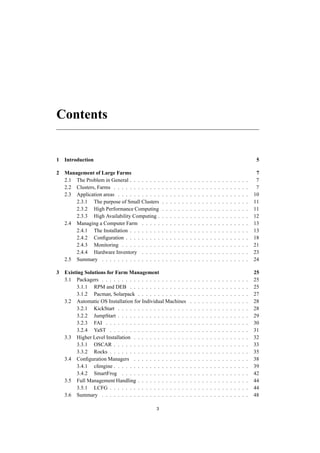
Contents
1 Introduction 5
2 Management of Large Farms 7
2.1 The Problem in General . . . . . . . . . . . . . . . . . . . . . . . . . . . . . . 7
2.2 Clusters, Farms . . . . . . . . . . . . . . . . . . . . . . . . . . . . . . . . . . 7
2.3 Application areas . . . . . . . . . . . . . . . . . . . . . . . . . . . . . . . . . 10
2.3.1 The purpose of Small Clusters . . . . . . . . . . . . . . . . . . . . . . 11
2.3.2 High Performance Computing . . . . . . . . . . . . . . . . . . . . . . 11
2.3.3 High Availability Computing . . . . . . . . . . . . . . . . . . . . . . . 12
2.4 Managing a Computer Farm . . . . . . . . . . . . . . . . . . . . . . . . . . . 13
2.4.1 The Installation . . . . . . . . . . . . . . . . . . . . . . . . . . . . . . 13
2.4.2 Configuration . . . . . . . . . . . . . . . . . . . . . . . . . . . . . . . 18
2.4.3 Monitoring . . . . . . . . . . . . . . . . . . . . . . . . . . . . . . . . 21
2.4.4 Hardware Inventory . . . . . . . . . . . . . . . . . . . . . . . . . . . 23
2.5 Summary . . . . . . . . . . . . . . . . . . . . . . . . . . . . . . . . . . . . . 24
3 Existing Solutions for Farm Management 25
3.1 Packagers . . . . . . . . . . . . . . . . . . . . . . . . . . . . . . . . . . . . . 25
3.1.1 RPM and DEB . . . . . . . . . . . . . . . . . . . . . . . . . . . . . . 25
3.1.2 Pacman, Solarpack . . . . . . . . . . . . . . . . . . . . . . . . . . . . 27
3.2 Automatic OS Installation for Individual Machines . . . . . . . . . . . . . . . 28
3.2.1 KickStart . . . . . . . . . . . . . . . . . . . . . . . . . . . . . . . . . 28
3.2.2 JumpStart . . . . . . . . . . . . . . . . . . . . . . . . . . . . . . . . . 29
3.2.3 FAI . . . . . . . . . . . . . . . . . . . . . . . . . . . . . . . . . . . . 30
3.2.4 YaST . . . . . . . . . . . . . . . . . . . . . . . . . . . . . . . . . . . 31
3.3 Higher Level Installation . . . . . . . . . . . . . . . . . . . . . . . . . . . . . 32
3.3.1 OSCAR . . . . . . . . . . . . . . . . . . . . . . . . . . . . . . . . . . 33
3.3.2 Rocks . . . . . . . . . . . . . . . . . . . . . . . . . . . . . . . . . . . 35
3.4 Configuration Managers . . . . . . . . . . . . . . . . . . . . . . . . . . . . . 38
3.4.1 cfengine . . . . . . . . . . . . . . . . . . . . . . . . . . . . . . . . . . 39
3.4.2 SmartFrog . . . . . . . . . . . . . . . . . . . . . . . . . . . . . . . . 42
3.5 Full Management Handling . . . . . . . . . . . . . . . . . . . . . . . . . . . . 44
3.5.1 LCFG . . . . . . . . . . . . . . . . . . . . . . . . . . . . . . . . . . . 44
3.6 Summary . . . . . . . . . . . . . . . . . . . . . . . . . . . . . . . . . . . . . 48
3
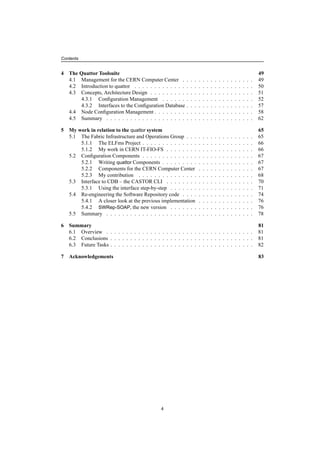
Contents
4 The Quattor Toolsuite 49
4.1 Management for the CERN Computer Center . . . . . . . . . . . . . . . . . . 49
4.2 Introduction to quattor . . . . . . . . . . . . . . . . . . . . . . . . . . . . . . 50
4.3 Concepts, Architecture Design . . . . . . . . . . . . . . . . . . . . . . . . . . 51
4.3.1 Configuration Management . . . . . . . . . . . . . . . . . . . . . . . 52
4.3.2 Interfaces to the Configuration Database . . . . . . . . . . . . . . . . . 57
4.4 Node Configuration Management . . . . . . . . . . . . . . . . . . . . . . . . . 58
4.5 Summary . . . . . . . . . . . . . . . . . . . . . . . . . . . . . . . . . . . . . 62
5 My work in relation to the quattor system 65
5.1 The Fabric Infrastructure and Operations Group . . . . . . . . . . . . . . . . . 65
5.1.1 The ELFms Project . . . . . . . . . . . . . . . . . . . . . . . . . . . . 66
5.1.2 My work in CERN IT-FIO-FS . . . . . . . . . . . . . . . . . . . . . . 66
5.2 Configuration Components . . . . . . . . . . . . . . . . . . . . . . . . . . . . 67
5.2.1 Writing quattor Components . . . . . . . . . . . . . . . . . . . . . . . 67
5.2.2 Components for the CERN Computer Center . . . . . . . . . . . . . . 67
5.2.3 My contribution . . . . . . . . . . . . . . . . . . . . . . . . . . . . . 68
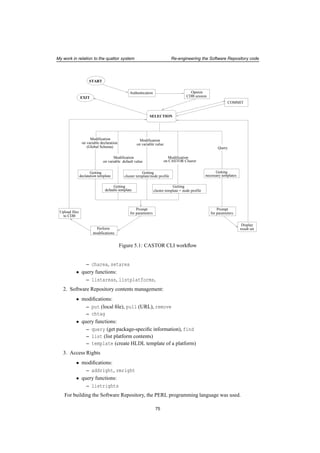
5.3 Interface to CDB – the CASTOR CLI . . . . . . . . . . . . . . . . . . . . . . 70
5.3.1 Using the interface step-by-step . . . . . . . . . . . . . . . . . . . . . 71
5.4 Re-engineering the Software Repository code . . . . . . . . . . . . . . . . . . 74
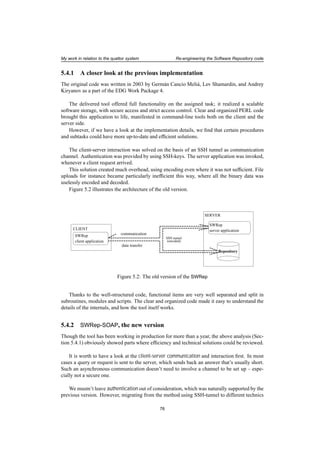
5.4.1 A closer look at the previous implementation . . . . . . . . . . . . . . 76
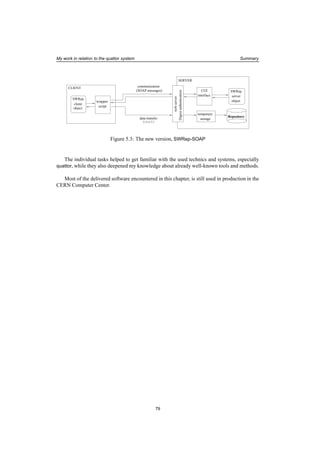
5.4.2 SWRep-SOAP, the new version . . . . . . . . . . . . . . . . . . . . . 76
5.5 Summary . . . . . . . . . . . . . . . . . . . . . . . . . . . . . . . . . . . . . 78
6 Summary 81
6.1 Overview . . . . . . . . . . . . . . . . . . . . . . . . . . . . . . . . . . . . . 81
6.2 Conclusions . . . . . . . . . . . . . . . . . . . . . . . . . . . . . . . . . . . . 81
6.3 Future Tasks . . . . . . . . . . . . . . . . . . . . . . . . . . . . . . . . . . . . 82
7 Acknowledgements 83
4
chapter 1
Introduction
Since the early appearance of commodity hardware, the utilization of computers rose rapidly,
and they became essential in all areas of life. Soon it was realized that nodes are able to work
cooperatively, in order to solve new, more complex tasks. This conception got materialized in
coherent aggregations of computers called farms and clusters.
Collective application of nodes, being efficient and economical, was adopted in education,
research and industry before long. But maintainance, especially in large scale, appeared as a
problem to be resolved. New challenges needed new methods and tools. Development work
has been started to build farm management applications and frameworks.
In the first part of the thesis, these systems are introduced. After a general description of
the matter (Chapter 2), a comparative analysis of different approaches and tools illustrates the
practical aspects of the theoretical discussion (Chapter 3).
CERN, the European Organization of Nuclear Research is the largest Particle Physics
laboratory in the world. High Energy Physics calculations performed here involves an enor-
mous computing capacity, which is achieved by large commodity-hardware clusters. For an
automatic installation and configuration at the CERN Computer Center, the quattor system ad-
ministration toolsuite is used.
This framework gets a stronger emphasis in the thesis, by having a more detailed architec-
tural overview (Chapter 4).
Being a technical student at the CERN Information Technology department, in the Fabric
Infrastructure and Operations group between 2003.02.14 and 2004.03.31, I had the oppor-
tunity to get involved in operations for large scale productions farms managed by quattor. Here
I gained experience with using the framework, which got deepened by related software devel-
opment.
My tasks included both building plug-in modules, and re-engineering system internals. The
results of my work are explained in the last part of the thesis (Chapter 5).
5
Introduction
6
chapter 2
Management of Large Farms
2.1 The Problem in General
At the beginning, we would like to deal with computer farm management from a more general
view, starting form the very basics of the matter.
What does the name ’computer farm’ stand for? Where, how, and what is it used for? What
are the main use cases to take advantage of such collection of boxes? What scale they might
cover? Do they have an internal structure, or are they unorganized aggregations?
A more precise description follows in the next sections, but as a first approach, a farm means
a group of computers physically located quite close to each other, connected over the network.
Just like a real farm has huge variety of inhabitants, the members can be from different types of
nodes, but a more generic common property (functionality, software, etc.) makes the aggrega-
tion a logical unit.
Nowadays we couldn’t live without them: farms appear in research institutes, universities,
companies. They are used for rendering movies, calculating scientific challenges, process satel-
lite pictures, etc. They have all kind of sizes from tiny to huge, with different composition in
terms of the member types. A broad range of functionalities are supplied in many areas of
business and scientific life, as well as education and other fields.
The common problem, that this thesis is focusing on, raises in all cases: the most efficient
way to deal with the farm has to be discovered, that suits the properties and the raised demands.
2.2 Clusters, Farms
Before focusing on the problem itself, it worths to have a closer look at these collections of
computer boxes themselves, with respect to layout and functionality, hardware and software
properties.
Computer farm we call a loosely coupled, usually homogeneous set of network connected
computers, that belong together from a higher level view. Normally there’s not much physical
distance between the members: in fact in most cases they are all located in same computer room
or lab. Member nodes belong to the same subnet, and they share a common property (hardware
type, Operating System, etc.). A farm is a wider set, a more general unit, where members can
be further organized in subgroups.
7
Management of Large Farms Clusters, Farms
These subgroups are called clusters. These logical units often have the same hardware
running the same operating system and software, and they likely are connected on the same
network. They have a dedicated task that needs common effort and couldn’t be solved by just
one member. They often take the task that only a supercomputer could supply in the past. The
reason for that is the cost efficiency of a PC cluster against the price and more expensive man-
agement of such hardware with specific Operating System and software applications.
As an illustration, a few examples will follow. Putting some of the below discussed clusters
together (interactive, batch, GRID), in one computer room could form a serious computer farm.
These are important parts of computer centers for instance at CERN, DESY or other research
institutes.
University lab (farm)
Starting from a smaller scale heading towards a large, the first one is taken from the Informatics
Department in an university.
As the effort is made that students would collect a wide knowledge on the field of comput-
ing, a brief orientation on different hardware and software distributions that appear in business
and scientific world are usually part of the studies. For this purpose, suppose that the department
doesn’t only have small, specific labs, but one bigger computer room as well. Here, though the
majority is still formed by normal Intel PCs, a few Solaris boxes, DEC Alpha-s, and even a few
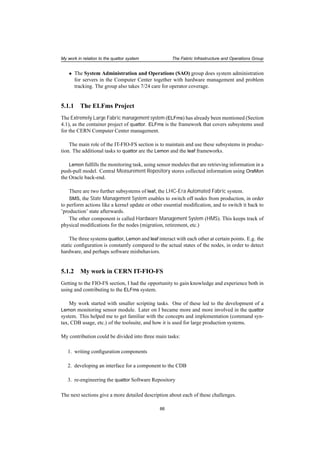
machines of well-known but more specific systems (old Silicon machines, etc.) could be placed.
This already introduces a colorful set, let alone the installed software on PC-s. This must
provide facilities for development and presentation of students’ individual and team projects,
therefore probably they have the biggest interest. Even though many homeworks would be
written on the attendees’ private computers, there can be special software applications which
are only available on these nodes.
A panoramic view about informatics requires knowledge about different kinds of Operating
Systems and applications (Microsoft products, UNIX-based utilities, etc.). The PC-s should
show these at least, perhaps together with other often-used systems (like BSD).
If the various machines of the lab can be treated the same in terms of administration (instal-
lation and management procedures, network), it can be labelled as a computer farm.
University lab (cluster)
Using the same example, the next to show is the role and purpose of clusters.
On a higher level academic qualification, distributed programming is part of the education.
Students have to write applications demonstrating real parallelism i.e. software threads are
running on many processors at the same time, interacting with each other, producing results
collectively. This needs a special soft- and hardware configuration. Member nodes (mostly
PCs) don’t have more than two CPUs, therefore they need to be organized in a virtual super-
computer, where they have a special communication level with each other.
The set of boxes used for this purpose will need to have certain software (PVM [PVM],
MPI [MPI]) to be installed. This enables a parent task, started on an arbitrary member, will
be able to send child processes to run on other member nodes. Processes can communicate
8
Management of Large Farms Clusters, Farms
via messages they send to each other. Programmer students can develop parallel code on this
system, written without the exact knowledge of which nodes the threads will be executed.
This special connection indicated by the parallel software, which might include only (a part
of) the PCs in the lab, forms this group to be a cluster.
An Interactive Login Cluster
There are other occurrences of farms and clusters in other fields of life. The next example could
come both from scientific and business life as well as from an educational institute.
Research centers and business companies often have a central login server accessible for
the users (scientists, employees, students, lecturers and tutors, etc.). On this they can read their
e-mails, run applications, and store limited amount of data in their home directories. Usually
web accessibility is also offered, so they could set up their own web pages. Since the server
provides a work environment, it’s important that these software applications are installed and
configured properly. They don’t include all software specific to their work, but more general
ones. To this category belong for instance documentation-related applications, compilers and
other development tools. On the other hand some of the special libraries, applications, particu-
larly those used by a local community (department, experiment, work group) are important to
be available.
Above a certain number of users, a supercomputer or a computer cluster has to take this
role , since a single node is not powerful enough to serve more than a very limited number of
requests. Taking the second case, we would have a group of computers, acting as if they were
all together one machine. Seemingly, the user connects to one host, where behind the name,
such a cluster resides.
To help this illusion, users’ private data (home directories) are usually stored on a differ-
ent group of nodes that have huge storage capacity. As these are visible from all nodes of the
cluster, users can access their home directories from an arbitrary member they are logged on.
After a successful authentication to the interactive logging service cluster, the user always gets
his/her home directory. 1
Using a load balancing mechanism this solution results in an optimal number of users on
each of these nodes. Resources (CPU, memory) are used locally, which distributes the load of
the system between the individual members.
The system also scales: if the amount of users radically increases, it can be extended with
more PCs.
This is a case, where a more expensive server that could have provided the same capacity is
substituted with cheap commodity hardware.
Batch Cluster
Another cluster instance are the so called batch clusters.
In scientific life, there are often computing-intensive tasks, which operate on the input for a
long time. In biomedical experiments or space research, scientists often process pictures. Their
1Mechanism used for this is nowadays mostly AFS ([AFS]) sometimes NFS ([NFS]). In fact, these disk servers
also represent a cluster, with special role "home servers".
9
Management of Large Farms Clusters, Farms
aim can be, for instance to remove "noise", so relevant information would be better recogniz-
able. Depending on the complexity of the applied algorithm, size and resolution of the photo,
etc. this can take a long time, serious CPU capacity and possibly disk space as well.
It wouldn’t make sense to overload a login server (cluster) with such jobs. What’s more, it
would be disturbing for other users, who get slow responses because of these background jobs.
It’s better to have a separate group of nodes assigned for these processes. Usually these clusters
have many members in the research centers.
There are various implementations for batch systems available both in the software market
and freely downloadable. The purpose of these is to help to organize and perform the procedure
between receiving the job for batch cluster, and the actual execution of the process on a chosen
member node. This type of management software has to make the decision about where the job
should be finally run, choosing the less occupied member node which fulfills all requirement
on resources (CPU, memory, disk, installed software).
The batch system deals with the so called queues, which handle different sets of jobs. Cate-
gorization is often based on the estimated time of execution, to separate jobs that take long time
(hours, days, weeks) from those that are finished in a few seconds or minutes. The system must
keep track about the actual load on the members, which of them are momentarily down, etc..
Development and Testing Cluster
Another example is a small "copy" of the production system, available for software develop-
ment and testing, before new applications would go into production.
GRID Cluster
Highly complicated, nowadays very popular occurrences are clusters that are members of a
GRID system ([GRID]). The aim of the GRID infrastructure is to have a world-wide network
connecting computers in order to unite computing capacity, providing storage as well as related
services.
Since important calculations are performed on the system on possibly confidential data,
and also because of restricted access to common resources, a serious security infrastructure is
involved. There’s also a strong emphasis on monitoring. Complex structure of applications and
services installed on several nodes are needed to connect a site to the GRID system.
Local configuration (like firewall settings), resources and software (mass storage systems,
batch systems, ...) have to be integrated within the GRID software. The difficulty level of
these installations are far above normal cluster setups.
2.3 Application areas
To be able to understand the purpose of the main stream in automatic management tool develop-
ment, we first need to investigate more the aim of the various adaptations of clusters and farms.
In Section 2.2 we have already seen a few examples of the actual usage in the most important
application fields. The following enumeration emphasizes on the main aspects of cluster and
farm management by highlighting several distinct requirements raised on the already mentioned
areas.
10
Management of Large Farms Application areas
2.3.1 The purpose of Small Clusters
A lot of small clusters can be found in education. They might appear for primary and secondary
schools, but more serious is the number we see in universities and high schools. In general, de-
pending on the purpose, they can be separated in two categories: generic and specific purpose
computer labs.
The former one is essential for all of these institutes, since many of them have electronic
administration procedures (subscription for classes, exams, etc.).
It’s also important to ensure several computer and network-related possibilities for the stu-
dents. Documenting tools must be available for their essays, papers. They must be able to send
and receive e-mails, as part of the communication with their teachers and each other might be
electrical. They need to be able to browse the web, which –as an enormous information base–
plays a very important role in research. They probably need to download files from the network,
if tools for homeworks, or notes for the studies are available there. File upload could be also
necessary to submit their work. Some of these tasks (e-mailing, for example) usually happen
on a central login server, to which they must be able to log on.
Machines of such a lab could be individual nodes connected over the network. Depending
on the demands raised by studies and users (students), one or two Operating Systems should
be available with a basic set of applications needed on desktop workstations. This way, the
students would have a possibility to work in a suitable environment both for them and their
work.
The latter is more typical for schools and universities focusing on computing-related disci-
plines: either directly involved in informatics, or using software resources (for instance specific
applications) as part of the studies.
For the specific purpose labs, characteristics can refer to hardware parameters, architecture,
but can also relate to software. It could be a "VMS lab" with DEC machines or a "graphics lab"
with licensed graphics applications. In a Building and Architecture Department, there could be
a separate lab where engineering designer software is available.
Applications, that form the lab to become a cluster (like distributed programming environ-
ments), are more usual for programming-related studies.
2.3.2 High Performance Computing
Strongly diverse is what we find in scientific life. While in education the expectation about the
individual nodes were mostly to be desktops machines, research applications make use of them
often in a way that they all together would substitute a remote supercomputer.
At the beginning of the nineties research started on clusters built on commodity-hardware,
that could take the duty of supercomputers implementing real parallelism both in terms of CPU
and memory. Among the advantages appear low cost (cheap, off-the-shelf components) and
scalability (simplicity of adding/removing a node). As a first main representative, the Beowulf
Project ([BEOWF]) came to existence, grown from the NASA Earth and Space Sciences (ESS)
project.
The idea was to build one virtual computer of connected PC boxes particularly for dis-
tributed computing, using available CPUs as if they were all in one parallel machine. Since
computing efficiency could considerably cope with those, the new configuration spread quickly,
raising a community of users and software developers, to work on improving both necessary
11
Management of Large Farms Application areas
and suitable tools. The new structure also introduced new theoretical (algorithms) and practical
(management, software, etc.) issues and problems investigated by computing scientist.
Beowulf clusters typically run Open Source software (originally Linux and GNU).
This forms one of the bases of today’s High Performance Computing ([HPC]). The phrase
itself describes computational solutions, that significantly exceed the capabilities of desktop
PCs. This implies two branches: parallel computers with special architecture (vector and SMP
2), and Beowulf-like clusters. The latter one means a high number of PCs forming a cluster
dedicated to run CPU intensive user jobs, or need parallel execution environment. These are
often batch systems, so non-interactive jobs can be submitted to the cluster as one unit, and the
scheduler software will take care of actual execution, taking in account the current load of the
nodes, together with other related parameters.
Most of the research centers run these commodity-hardwareclusters with different purposes
(interactive login services, batch systems, etc.).
2.3.3 High Availability Computing
Another approach we can often see in business life is the High Availability Computing ([HAC]).
These are also called uninterruptible services: up and running 24 hours 7 days of the week.
Many of these systems are constantly under heavy usage. Companies, banks and suppliers
are running this kind of clusters, to provide services for Internet, e-banking, Online Shopping
Centers, etc.. Important to see that there’s one thing in common: the shortest downtime loses
the confidence of the users or customers about service reliability. Furthermore this also results
in a serious financial damage, that often can be measured in thousand to million dollars per
minute.
This problem created a similar section to the previously described HPC. Within High Avail-
ability Computing there are also two main directions. The first is based on special hardware
implementations while the second is based on clusters. The situation is similar to what was seen
for HPC: though the former is more stable, solutions based on cheap commodity-hardware are
getting more and more popular. While hardware solutions focus on strong, fail safe physical
components, clusters use sophisticated software algorithms to ensure a constantly running of a
service.
Two subsets in HAC could be denominated based on functionality:
• Continuous Availability which includes non-stop services, where basically no downtime
is allowed (like e-banking services).
• Fault Tolerant systems are capable of henceforward offering the service, even if parts of
it were affected by failures. This is achieved by using uninterruptible power supplies,
redundancies in hardware and software, etc.
There area a few aspects to be considered when planning High Availability clusters.
What must be avoided is to have so called single points of failure. This means any part of
the chain which pulls the whole service down in case it fails. This could be soft- or hardware,
2see Reference [HPCintro]
12
Management of Large Farms Managing a Computer Farm
anything from the network cable to a disk in a disk server.
Certainly on different components different prevention can be applied.
Instead of one accesspoint alternative ones must exist, probably using a loadbalancing
mechanism for incoming requests. If one of them crashes it should not disable the rest of
the system, but the other front-end nodes have to keep on serving requests.
Services must be installed also on nodes that don’t actually run them, but are ready to start
them anytime. These nodes should take over the service if the current servers have problems.
Software vendors provide applications, usually for a specific Operating System, that realize
failover mechanisms within or among clusters. These immediately assign the task to another
(group of) nodes, that are capable of carrying on, when one of the services fail.
2.4 Managing a Computer Farm
There are a few important issues that generally have to be considered, independently from the
special purposes and properties of the site. These could be summarized in the following points:
• Installation
1. Initial system installation
2. Additional software installation, updates
• Configuration
Settings for services, installed software, etc.
• Monitoring
Knowledge about the actual state of the members
• Inventory
Storage for cluster information
In the following sections, these issues will be encountered one by one, highlighting the
fundamental questions.
2.4.1 The Installation
For small clusters, computer labs, where the size is about 25 member nodes, the Operating
System installation is still possible manually, though it needs significant time and manpower.
More problematic is the maintainance after the system is set up: constant updates and ad-
ditional installations can’t be avoided. Even the easy ones are rather elaborate to perform on
all these nodes by hand. Therefore system administrators find out solutions, "tricks", to speed
up the procedure: usage of ssh keys to avoid typing passwords each time, scripts for repetitive
commands, loops that iterate over the cluster, etc. But even with these "shortcuts", a lot of work
remains, where direct interference is needed: setup dialogs, node-specific software settings, etc.
By enlarging the farm the complexity increases. It’s getting impossible for a local system
administrator to handle. When the size of the computer center is hundreds of machines, the
time factor raises rapidly together with the manpower involved.
13
Management of Large Farms Managing a Computer Farm
Most of the steps that need to be performed are simple and straightforward. This raises
the need of a specific tool or framework, that is able to perform these almost identical steps
many times. It also has to take care of settings determined by the actual node’s attributes in an
intelligent way.
According to the wide range of use cases where computer farms are involved, existing
solutions strongly differ. One that offers advantages on a certain configuration can have disad-
vantages on the other.
Within the confines of the installation task, we have to encounter two areas. One of them
is the initial Operating System setup, the other is the later deployment of additional packages,
together with the update of the existing ones.
Operating System installation is an important operation for all farms. In many of them re-
installation is frequently applied on member nodes. Reasons for that could be that a new task
is assigned to the node, or to perform a system upgrade this way. Also, when a farm is up and
running, it might be extended with new nodes, or actual members need to be substituted due to
hardware failures.
Software installations follow the installation of the Operating System, since normally more
than the base system is needed. Applications and other additional software have to be delivered
on the nodes. Important to mention are security updates, which must be applied immediately
after they appear in order to keep the system safe. In fact this is more like a continuous process,
in contrast to the previous one, which was necessary to be applied only once in the life-cycle
of a system. Software contents of the nodes have to be constantly manipulated as long as the
system works.
Both subtasks are introduced from two aspects: applied mechanisms together with practical
solutions, and later (Chapter 3) a broad view on implemented tools.
Mechanism for basic installation
As we have seen, groups of computers have different purposes and tasks. This also effects the
way how they are administered.
The aim is to (re)create groups of nodes, that have customized contents, while many of them
are practically identical. Though this could be achieved manually, when the number of nodes is
not high (less than 30), it’s neither an efficient nor a scalable solution. As the number of nodes
increases, manual operations get more elaborate and expensive.
The task has to be automated.
On the first type of clusters, typical in education, installation is not only necessary when
building up the system. This was particularly true for operating systems used in the past, which
didn’t restrict system data and configuration access. Users could not only produce temporary
garbage in the user-space, but easily bring the whole system in a misconfigured state by chang-
ing files fundamental to its function. Cleanup in such a state is almost impossible. The only
way to safely restore the Operating System is to install everything from scratch. No user data is
kept on these machines, except temporary files left there after their work, and similarly installed
applications. None of these are to be kept on these workstations.
These nodes contain usually more than just the plain Operating System. All the time re-
quests arise for specific applications, mostly as educational subject materials.
14
Management of Large Farms Managing a Computer Farm
In large farms admins also have to face the problem of installations, even if most of these
being dedicated to HPC or HAC purposes, need to reinstall members less often. User-space is
well separated from the system area; it’s often supplied by different servers. Though this still
can not completely stop system corruption, it at least significantly reduces the amount of it, as
users can’t easily harm the Operating System.
A common case on these farms is that new nodes join the already existing group. These
have to be supplied with the same system configuration, perhaps on slightly different hardware.
There’s also a serious amount of additional software installations and updates; security up-
dates in particular.
The first attempt on this matter takes the following idea: since these nodes are essentially
copies of each other, it’s enough to perform the setup once, and then deliver the contents of the
"golden node’s" hard disk to the rest of the farm. This procedure is called cloning. Though it’s
a method easy to carry out, the problem is that it fulfills rather restricted requirements. Cloning
doesn’t easily follow software changes and updates, doesn’t deal with configuration issues. It
doesn’t allow variants of the same setup that have small differences: each of these implies a
new disk image.
Therefore plain cloning is not used further than setting up small labs. Other solutions had
to be investigated in order to make Beowulf-like clusters really efficient. Some are based on
cloning, while others took a different direction emphasizing more on remotely configurable
dynamical actions.
Recently the latter approach is used more often. Regarding the installation task, these are
the most important aspects to be considered:
• hardware information must be available, since the OS installer tools need this knowledge.
• configuration information for an initial setup must be available
(installation procedure must be non-interactive)
• additional software has to be set up following the base system
Each of these raise further questions. How, and in what format information should be
stored? What mechanism to use to distribute software to the nodes? Where and how to store
software?
These and similar questions will be discussed in the following sections.
Tools for Operating System installation
There are vendor-provided tools addressing a part of the task, namely the Operating System
setup. These can be taken as a base for higher-level tools.
Being a critical problem, software developers already devoted attention on automatized in-
stallation. Nowadays most of the Operating Systems come with applications which achieve
that only with minimal or no human intervention. Most of the hardware parameters can be de-
tected automatically, but selections between parameters that customize system characteristics
(like language or keyboard settings) can’t be determined but have to be directly stated. Using
pre-defined values from the appropriate configuration files, the interactive install-time decisions
are taken off-line, enabling the procedure to be fully automatized.
15
Management of Large Farms Managing a Computer Farm
The install process is specific to each Operating System. That’s why it is the same about
the OS installation tools. Additionally, each of them implement a slightly different approach to
solve the problem.
Obviously this possibility is an important aid when designing tools for automatic farm man-
agement. But there is still a missing point from the very beginning of the process: optimal
solutions don’t require a manual startup.
Network boot mechanisms (PXE, Etherboot) removed the previously unavoidable boot CD
or floppy usage. These facilities allow the managers to perform a complete node setup without
them physically contacting the node.
If the boot image can be transmitted on the network, and the OS installer takes over after
the startup, it means that an important part of the task is basically solved.
Methods for software installation and updates
Together with the Operating System, additional software setups and updates have to be taken
into account.
Even if what’s typically needed by the actual user community is installed on the nodes, new
requirements constantly arise. This is a reason for later installations.
Among updates, the most important of all are the security updates. Both in the system and
in applications it is discovered that tricky commands and use cases can open admin access to
the machine. Fixes should arrive immediately whenever such a bug is found. These have to be
applied with no delay.
Also software patches and bugfixes are released together with new versions, which then
require an update operation.
Cloning offers two ways how these could be done. First is to create a new disk image that
has the changes applied and to deploy it on the farm. The second is to perform the operation
manually on each node. The latter doesn’t necessarily mean to physically go to each member
node: they can be reached over the network. Still, configuration might need node-specific
adjustment, or in the case of an interactive setup, again the admin has to deal with each of them
one by one ...
Another problem is the speed, since the whole image (few GBs) stresses the network for
each client.
This shows that plain cloning could be only suitable for setups that rarely change, or any-
way perform re-installations often (on a weekly basis).
On the contrary, an implementation of the update can be a re-installation, in the case when
the procedure is fairly fast (about 10 minutes).
A smart fix on cloning enables the mechanism also to be used in big farms. The way how
it works (see Section 3.3.1) is to synchronize only the changes between the "golden node" and
the client.
Configuration-driven installs usually add the new software (versions) to the list the node’s
software contents and corresponding services on server and client side will take care of the
actual operation.
16
Management of Large Farms Managing a Computer Farm
Tools and solutions used in software distribution
Further to the OS installation there is additional software to be set up on the nodes. There are
several ways to do that, and a few issues that might be considered at this point.
For instance, one hat to download a compressed file, which contains the source code of the
application. The next to do is to follow steps described by the included instructions, which
usually tell about environment variables that the compilation needs, commands that have to be
run, etc. Though this results in a setup completely suitable for the actual system, it can’t be
automatized in this form, as the steps instead of being uniform are changing for each package.
Interactive setups allow the user to change default values of parameters or define essential
ones before the new application becomes a part of the system. Though this is a helpful facility,
it can’t be utilized, in an automatized way.
Self-extracting and -installing packages can also lead to a problem, as they usually initialize
an interactive setup.
Since it would be almost impossible to prepare tools that would be ready to apply the right
procedure for the actually used mechanism, the software that has to get to the nodes must follow
general conventions in terms of the setup procedure.
A simple way could be to have compressed source packages, which all install using uniform
steps (like ./configure; make; make install; ). Unpacking with a pre-defined decom-
presser, and issuing a one-line command would be all that has to be done, for which even a
short script could act as a setup tool.
But there are two problems with this procedure:
One is that it is hard to follow up compilation failures.
The other is that we have taken into account only locally developed software. It is easy to
force a common way in a workgroup, department, institute, but most of the applications and li-
braries come from external sources, that follow other procedures, and require different building
tools. It would mean a significant amount of manpower to change all these setups to the local
standard.
Operating Systems usually provide a common way to distribute software. This often in-
volves packager applications, which, as the name suggests, deal with software packages. For
the more widespread mechanisms packages are usually available as software downloads both
supplied by OS vendor repositories and by standalone resources. The software deployment
mechanism should definitely be taken in account, when choosing the Operating System for a
cluster.
For those that didn’t support any of these the software maintainance would be problematic.
As for such cloning is more than suitable, as this way manual installations have to be applied
only once.
Packaging mechanisms create a common interface to encapsulate sources or binaries, and
are in fact perfect for automatized setups. One of their main strength is that, together with
the code, functional (setup instructions, dependency attributes, etc.) and administrative data
(author, version, description, etc.) are attached.
The other strong point about packaging is the local registry, built on the client side. This
keeps track of software information: what is currently installed, removed, updated, what ver-
sion of a package is actually there ...
To fulfill the specifications, management software for package generation, management
17
Management of Large Farms Managing a Computer Farm
and query is always provided for packager mechanisms. The application to handle and build
packages is often the same. When a package should be installed, the client application reads the
package information, makes sure that dependencies are met, no version conflicts occur and takes
care of the registry after modifications. Builder tools, as an input for package generation, often
can use both the (compressed) sources and compiled executables, together with –optional or
required– additional information. Queries on the actually installed packages are also possible,
using the local cache. More complex actions, like upgrade of all packages in the system might
be also possible.
Software Repository
Also an important issue is, how the software should be stored. The best way is to keep pack-
ages centrally, in a well-structured, organized way, implicitly separating software for different
hardware architectures, Operating System version, etc.
The representation of the central repository have several variations. Two examples of them
are described below.
In a smaller scale farm, where members of the sysadmin workgroup all have access to the
install server nodes, the repository could be a directory on one of these nodes, which could be
e.g. NFS-mounted by all clients. This way they could all perform modifications on the contents.
This solution provides software only for the local nodes.
There is a different implementation, that reaches out from the scale of a local site, per-
fectly suitable for local installations as well. HTTP and FTP accessible repositories can provide
software to a wider community. If needed, access restrictions and user authentication can be
applied, so packages would not be available, but for those who are authorized .
Browsing these directories users can map contents of the tree themselves. The advantage
of a pre-defined structure could be that client-side applications can be prepared to expected
paths. This way, with a minimal configuration (pointer to the server), they could to download
requested software without having the exact location of the package specified by the user.
Uploads and modification of the storage contents can be done only by the group of entitled
managers. This could also happen in a community, where software releases are well-controlled,
that the maintainer first has to submit the package to a committee, which, after a verification
process adds it or not to the repository.
Web repositories implement a very efficient solution for software distribution, however it
can happen that more scalability is needed in user access either for modification or for down-
loads. Perhaps there are users, who should be able to write one part of the repository, but not
the other. This requires more than individual user access: access control is necessary over the
different package sets.
Development of special software is necessary in order to meet these requirements.
2.4.2 Configuration
Various configuration information is necessary from the beginning of the installation to the dif-
ferent stages of the further system management.
Due to the large number of identical installations, many parameters are almost or completely
the same for subgroups of the farm. This means that, information can also be grouped and
organized in a sensible structure, following the cluster topology.
Since these parameters include essential information (like the layout of hard disk partitions),
it is useful, that data is available after the install for further usage. This could be particularly
18
Management of Large Farms Managing a Computer Farm
helpful to compare the actual node status with the desired state.
There are certain cases, in which configuration information is needed:
• Configuration values first are required by Operating System installers (see Section 2.4.1).
Many of the hardware parameters can be dynamically detected, therefore don’t need to
be described directly, but there is still a number of decisions which can’t be determined.
These are are normally taken interactively during the install process (default character
set, timezone, etc.). Since the goal is to have no human interaction involved, all of these
parameters have to be specified.
• Following the setup procedure of the base Operating System, the next step is to set up the
user applications, which are usually delivered as software packages. Since the proposed
contents of the nodes depend on the actual function and demands, this also has to be
defined specific to the node or node set. For each different setup, the admin has to create
the list of packages that should be installed.
This list enables strict control over node contents, of which systems emphasizing node
state management 3 especially profit. If any difference from the list is detected, an update
on the node contents should be performed to adjust them to the specification. This is
true both when unwanted packages appear, and when required ones are missing. The
installation of new packages could happen as an (automatic) consequence, following
modifications on the list.
• Applications delivered this way usually need further adjustment. Similar to the setup
parameters they often require configuration options to be defined, in order to point to the
specialities of their actual environment. This is normally a static description brought into
effect by helper applications.
The configuration task also has to cover the problem of several additional steps. In most
cases, after applying modifications on attributes, services have to be restarted, configuration
scripts have to be (re-)run, etc. A Configuration Management framework has to consider the
delivery of information, and make sure that it will take effect as soon as possible.
Configuration changes have to be applied automatically, and as transparent, as the actual
task permits. This means deployment without rebooting nodes, or interrupting tasks they’re
doing at the moment of the change, even if modifications take effect immediately. This is not
always possible. Certain modifications, for instance those that determine boot-time decisions,
require an Operating System restart. These changes must be previously announced by the
operators.
Central Database
The way how configuration information is stored is a fundamental question for automatic farm
management systems.
The most popular solution is to store configuration parameters centrally. Information has
to be accessible by the nodes, so they would be able to get the corresponding settings. This can
be needed for initial installation; later, when applications are installed and in all cases, when
static data is required in order to configure user software as well as services running on the node.
3Examples: LCFGng (Section 3.5.1), quattor (Chapter 4), etc.
19
Management of Large Farms Managing a Computer Farm
As the simplest solution, configuration files could be kept in a directory accessible by all
clients, from where the files could be copied to the proper location. However, since many
configuration files contain node-specific information (IP address, MAC address, etc.), they have
to be created for each node, or they have to be locally configured after being copied over.
The former is not a flexible solution, as one parameter change requires a modification in the
corresponding configuration file(s) each time. With the latter method, node-specific parameters
still have to be added to these files on behalf of each node.
More suitable, especially for bigger farms is a more sophisticated solution. Since in the final
config files have different formats, the description syntax could be standardized in a way that
it is able to store the full information about the parameters. Variables and their values should
be kept in a unified format in the repository, organized following certain aspects (functionality,
cluster topology, etc.). This often leads to key-value pairs, where keys are the configuration
variables, and values are their actual values. Based on these pairs, there might be further,
complex structures.
In many cases classic SQL-based databases are involved, in others special repositories are
designed for this particular purpose.
Using helper applications it will be easy to determine settings for a given node. Such an
information base can hold attributes for both applications and services running there.
Certainly this precious information must be safe. It must be backed up regularly, and also
replicated or kept on redundant disks.
Security also has to be taken in account. There should be an access control set up for
the database and the different sets of data. This problem is largely solved, when a relational
database is used, where this type of access is naturally supported.
Configuration parameters, together with the list of installed software packages give a full
description of the node, which makes it easily reproducible. This is important, for instance,
when setting up new worker nodes, that have to be identical to the rest of the farm.
Publishing Data
Each tool has its own way for sharing information. In this section, the most popular ones are
emphasized.
In many cases remote, NFS-mounted server-side directories are used, where files contain-
ing necessary data are available. According to the configuration settings on the server, this
filesystem is directly available for clients, perhaps for read-only access.
This solution is simple and easy to set up, but it has several restrictions: sensitivity on net-
work errors, lack of scalability on large number of clients, etc.
An observation is the XML’s popularity in this field. Most of the automated systems use
this format to exchange configuration items. The reason is the powerful encapsulation of in-
formation, which at the same time gives a general interface to pass data to various formats.
Thanks to many already existing parser applications, developers of farm management software
don’t have to write code for data retrieving application; they can concentrate on consuming and
transforming it to the required config files.
On the server side, information that forms the base of the XML files can be represented in
very different ways (databases, special files, etc.). XML data received on the client side will be
transformed and split in several config files.
20
Management of Large Farms Managing a Computer Farm
Another strong advantage of XML is the easy and flexible way of publishing data, as for
sharing XML files the HTTP protocol is very much suitable. Web access is easy to realize; it
requires no more than a properly configured web server. Using HTTP, no specific tools have to
be developed. There’s no restriction on the publishing server’s location on the network either.
If there is a need for protecting data, secure HTTP (HTTPS) could be used.
Cluster Topology
Over the individual setup, there’s a higher level, which is important to be considered from the
configuration point of view.
Sets of nodes can be grouped by certain functionalities they come up with together . It is
worth to have a look, especially at the roles that members do play inside such a set, and how
this effects their configuration properties.
Clusters don’t just often require special software, but information about their structure as
well. What are the members, what servers they should contact with different types of services,
are there any nodes with special roles, and if yes, which ...Any of these can be necessary pa-
rameters. Often the characterizing software normally has parameters too, which are related to
structural issues.
The layout of these clusters is not complicated in most cases. There are one or more so
called head nodes, that have a "leader position"-like role over regular members. This could be
a monitoring task for instance, observing events on the cluster. Alternatively, the head node
could also be a broker, assigning resources in its competence to the requesting applications.
There are clusters with flat structure, too.
A batch system, where incoming jobs are scheduled for execution on the momentarily most
appropriate member, always have a head node, where information is constantly gathered, and
decision is taken. On the other hand, members of a PVM cluster 4 need no more than the in-
stalled software and a proper configuration to be able to receive jobs and messages from each
other.
A GRID cluster has several services running on special nodes. There are many configuration
parameters even on the simplest worker node. Partially for applications and special sets of
commands that are introduced, but many just describe relations to other nodes. Further to the
local cluster, higher level services must be identified, therefore pointers have to be set up to the
appropriate servers with details (protocols, ports) on how to access those.
2.4.3 Monitoring
Feedback on the actual state of a farm is crucial. Regarding the complexity of the task, deeper
discussion on the matter belong into this thesis. What can be found in here is only a short
introduction.
There are two main reasons, why the actual status of the system should be monitored. First
is to detect malfunctions that occur. The second is to have the possibility to evaluate system
parameters, attributes of services that are running there, etc. during certain time periods. In
other words, to build statistical data.
4Parallel Virtual Machine, see [PVM]
21
Management of Large Farms Managing a Computer Farm
For an admin it’s essential to know, what actual state actually the system is in. How heavily
it is loaded, how often provided services are accessed, if node contents, configuration and
running applications fit the requirements, etc. When irregular behavior is detected, warning or
alert should be generated, so it would draw the attention to the problematic node.
It’s important to archive this on-line generated data, especially measurement values, and
provide a possibility to check details and averages on a certain time periods. This gives a
higher view of the corresponding parameter, service, its usage and behavior in certain terms of
time.
Statistical information is particularly important for various stress tests like Data Challenges.
It could reflect both strong points and weaknesses of used components, system behavior as an
answer for the test, etc.
It’s also useful to see how resources are shared between different user communities during
weeks’, months’ or years’ term. This helps to make a decision on how to assign them to the
communities.
In a university interactive services, that provide a desktop environment for the students,
these are expected to be heavily used, as the semester gets closer to the end, while an Internet
shopping center should presume the highest load before Christmas. Admins can get prepared
for periods when services mush be strongly attended, 24/7 availability might be needed, and
also when there’s free capacity, so additional tasks can be scheduled. Special tasks might
require monitoring on specific related attributes.
Understanding load ranges can also give a hint on the directions of investment on cluster
extensions.
The way of how to display monitoring information, can vary among several possible ways,
depending on the actual purpose. To show an actual state, the corresponding measurement val-
ues are reasonable. To visualize historical information about the run of a persistent service or
a constantly observed system, attribute graphs are much more verbose and perspicuous. When
mostly irregular behavior is to be detected, a less detailed summary of properties is eligible,
emphasizing on failures and differences from the desired state. In such systems, critical errors
should immediately generate alerts, so they could be followed up as soon as possible.
Since it’s practically impossible to perform even the basic tests on a system with 20 or more
members. Cluster-administration systems and tools (see in Section 3) provide tools which col-
lect information about a cluster.
Further to resources (CPU load, disk capacity), the more attributes about the system load
(number of users, processes) and running services (number of requests, queries) are kept insight,
is the better. To keep track of installed software could detect if suspicious applications appear
on the node. Also it could remind of old software versions, with possible security holes, that
have to be updated right away.
Monitoring Use Cases
In simple case, like a university lab, admins probably don’t have to worry about monitoring.
These machines are used directly by users who are physically present in the lab, therefore they
will report any irregular behavior of the nodes. Re-installation happens relatively often (once a
week or a month) for these PCs, which dissolves configuration errors, and gives the possibility
to detect hardware problems. Here the problems are usually not critical, since the functions
of the nodes can be easily substituted both at the moment of usage (by choosing another one
22
Management of Large Farms Managing a Computer Farm
from the lab), in terms of software (reinstall) and hardware (these are usually less expensive PC
boxes).
It’s already different even for a few member size interactive login cluster used for remote
connections. Here admins can rely much less on the user feedback, though it’s still an impor-
tant source. On this level, monitoring applications already do appear, however, as long as the
number of members is relatively low, operators and admins often run some commands manu-
ally to orientate themselves about certain issues. Depending on the scale and function, system
administrators might even know people behind login names, so the situation can be virtually
similar to the lab where they knew who entered.
Attacks happen from time to time: running illegal software under harmless aliases, attack-
ing other machines, trying to access forbidden data, etc. Some of these could effect other
members of the cluster, than just the one where it has happened. Since often important central
services (mail, news, web) are running on these clusters, neither actions hurting the cluster’s
computing policy, nor attacks can be tolerated. Therefore, beyond security protection (firewall,
etc.) a constant watch on ports, services, running applications must be applied.
The main perspectives are the same, but demands are much more strict on production sys-
tems, where precious calculations are executed on precious, perhaps confidential data. No
member of such farm must get corrupted. If it happens, it must be detected and corrected
immediately.
2.4.4 Hardware Inventory
It’s not only the configuration information, that has to be maintained for a farm: the physical
properties of the machines also have to be registered. This suggests the setup of a Hardware
Repository.
There are a few reasons, for which the existence of this information base is necessary.
• From the administrative point of view: each node must have the hardware attributes
recorded in a registry. For several considerations (unified format, efficient search, etc.),
it is useful to have it in an electric form.
• Parts of this data are needed for configuration. For example, hardware attributes are very
important at installation time. Though automatic installers can detect many of these,
often there are some that must be specified directly.
• The actual hardware state of the nodes should be constantly compared to the static spec-
ification. This could be done as part of monitoring, aiming to detect hardware failures.
Small set of machines often have the same hardware configuration, and are upgraded col-
lectively. Depending on the installation method, it could occur that individual hardware infor-
mation is not necessary for the management of the nodes. In these cases a hardware inventory
might not be essential.
For thousands of machines, the situation is different. Since there is always a mixture of
hardware, Hardware Repository becomes especially important for large scale systems, where
from slight to very essential differences can be encountered among the members.
A possible representation suitable for the task can be a relational database. Both direct
queries could be addressed, and interfaces or applications that implement specific tasks can be
23
Management of Large Farms Managing a Computer Farm
built on the top of it. For example, it’s easy to develop tools to search for nodes with given
parameters.
Configuration and hardware information are not distant from each other, in fact there’s a lot
of overlapping between them. This is the reason, why many times they are kept together, if the
repository is able to hold them both.
In order to keep information organized and consistent, the two types of data should be kept
separate within the database.
The structure and the schema used in these data stores should be a matter of discussion
at the time of planning the farm. There should be a well-defined list of properties, covering
details, that are either essential (CPU type, hard disks, etc), or expected to be needed later by
applications. Such a registry entry has to exist for all members of the computer center.
Registration entries shouldn’t be too detailed, to avoid an over-elaborate registration proce-
dure. On the other hand, they have to include all necessary fields, since it might be very hard to
add new parameters for all existing entries later.
Depending on the size and complexity of the database the network layout information could
also be included. However, in case it has to go deep into details (physical links, routing infor-
mation, etc.), it might be better to be kept separate from hardware data.
2.5 Summary
PC farms cover a wide scale of computer aggregations. These can be very different depending
on actual functionality and the requirements raised by that.
Variances involve farm size, structure, composition of hardware and installed software. De-
pending on these, certain categories can be distinguished, which contain further subtypes.
There are a few important organizational and functional issues, which must be taken in ac-
count, when speaking about installation and management for these farms.
Considering actual needs administrators have a wide selection from which they can choose
the system that implements the most suitable approach to for that particular use case.
24
chapter 3
Existing Solutions for Farm Manage-
ment
In the past few years computer clusters and farms have become more and more popular both in
the industrial and in the scientific world. With the spread of HPC clusters, many system man-
agers had to face the problems described in the previous chapter. Therefore, several solutions
came to existence that deal with these issues. Some of them don’t offer a full implementation
, but addresses a subset of the problems. This section gives an overview by briefly introducing
the most popular ones trying to emphasize on the main characteristics, that makes them diverse.
3.1 Packagers
Before turning to these complex systems that are objects of our interest, it’s important to learn
about what the most of them are based on.
On this level there are applications from various types, that approach aspects which need
to be considered for farm management frameworks. One of the most interesting and important
issues is packaging, together with the package manager applications.
These tools provide a uniform interface for the software to be deployed, while at the same
time they also implement a possibility to add extra information, to the packed data.
A large variety of solutions exist in this area. Some of them are designed and developed
to be more independent from the Operating System that is used, while some are bound to a
particular one. Others can be used in different environments. A part of them follows the idea
of keeping packages simple, while others prefer to have a complex specification both in terms
of the structure and contents of a package.
Sophisticated software is built (possibly as an Operating System utility) not only to perform
package operations, but also to handle information about them.
They have already been mentioned shortly in the previous section. Below a little more
detailed introduction to a few of them can be found.
3.1.1 RPM and DEB
Starting with the most popular ones from the Linux world, the two that must be mentioned are
the RPM Package Manager, rpm ([RPM]) and deb ([DEB]). The first one belongs to the Red-
Hat Linux distribution, the second to Debian. These two are based on a similar concept, both
25
Existing Solutions for Farm Management Packagers
very powerful with complex specification.
rpm and deb have the notion of two packages categories: source and binary. The first one
contains the source code of the actual software, while the latter provides the binaries (executa-
bles, libraries). Though on the Operating System distribution, installation of binary packages
should be enough, source packages also must exist in the most cases. Sources are important for
those, who would like to contribute development work. Another purpose is that software often
has to be built on the actual system, because compiled binaries don’t always suit the system
hardware or other parameters.
For both of these tools package creation needs additional information with the software to
be contained. A certain amount of new files have to be attached to the sources or binaries, which
include various kinds of documentation, installation scripts, compilation instructions, package
information, etc..
Probably the most important one among the additional files is the control- (deb) or
specfile (rpm), which has several obligatory fields that the creator has to fill in. Here be-
longs the package name, version, author and packager, a short description of the contents and
a list of required packages, that should be installed previously on the node, just to mention
the more important ones. Since the package structure is different for the two mechanisms, the
control- and the specfile also differ. For instance, while the first one includes strictly just
package information, the latter defines the list of packaged files also.
For source packages both procedures require a Makefile-like file that is responsible for the
compilation.
Documentation should include a description similar to manpages, together with changelogs
and installation notes.
The concept and the tools for package deployment are very well designed. An evidence for
this is the fact, that recently the tools are being ported to other Linux distributions, and similar
software repositories are being created for them.
Mirrors all around the world store the software in a well-defined directory structure, that has
branches for different versions, all holding packages organized in a pre-defined set of categories.
A set of higher-level commands (all their names start with prefix apt-) come with the basic
Debian Linux Operating System. These can retrieve requested packages together with their
dependencies from the specified mirrors, unpack contents, and perform their installation. apt
commands maintain a local database (for RedHat a similar thing is done by rpm), holding
information about what is, what is not, and even about what was installed. This makes software
removal also easily possible. Furthermore, caching package information enables addressing
different kinds of queries even from nodes that are offline. Query commands are available for
all users, root access is only required for modification commands.
rpm packages don’t have such a practical availability, though rpmfind ([RPM1]) certainly
helps a lot. For these, local repositories exist, instead of one that is mirrored all around the
world.
The concept of these tools is to claim strict rules. As a return for complexity on the level
of building packages they are extremely powerful and efficient. Unfortunately both are specific
to the Operating System. This is especially true for deb; rpm is being used also on other Linux
distributions (SuSE), or at least it is available (Solaris).
26
Existing Solutions for Farm Management Packagers
3.1.2 Pacman, Solarpack
Applications independent from the Operating System also do exist; a widely-used representa-
tive is pacman.
The basic idea is similar, but here, instead of the special format, simple tar and gzip
compressed (.tar.gz) files are used. A build script (called PKGBUILD) must be provided, which
is used for the same purpose as the previously mentioned specifications. Having operational
contents together with data, this one is more similar to the rpm specfile. The command set
pacman is based on still restricts the tool to UNIX and related systems, but this is already a
much wider scale than a specific distribution.
The price for simplicity is less control over the structure of the package contents. Other
properties are very similar to the previously discussed packager applications. A local database
for pacman is also built, which enables querying package information. Dependencies are pos-
sible to define too, which are taken into account during installation. Synchronization (upgrade)
with an FTP repository is possible. pacman doesn’t have unified mirrors, but individual repos-
itories instead.
This can be a useful tool for instance, for software distributions within an institute.
The idea is similar to what is implemented in the NetBSD system. A built-in package
manager does basically the same as pacman, using also tar-gzipped files. The Solaris package
manager Solarpack is based on the NetBSD solution.
Not all Operating Systems follow a structured way for handling packages.
Previous windows versions, for instance, didn’t have such a built-in mechanism, which
made it hard to keep track of the installed software. Not knowing what files a new package
have brought to the box, software removal was often not an easy task.
In order to fix this problem solutions are developed, but they use a completely different
approach than the mentioned tools. Instead of a local database, information is added to the
package. The same is true for package manipulation: uninstall will be handled by facilities that
came with the software.
Packagers aren’t only useful for managing individual installations. Their functionalities
should also be considered, when planning large scale, package based installations, which should
definitely profit of them.
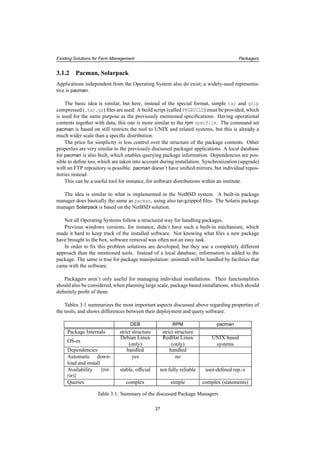
Tables 3.1 summarizes the most important aspects discussed above regarding properties of
the tools, and shows differences between their deployment and query software.
DEB RPM pacman
Package Internals strict structure strict structure
OS-es
Debian Linux
(only)
RedHat Linux
(only)
UNIX based
systems
Dependencies handled handled
Automatic down-
load and install
yes no
Availability (mir-
rors)
stable, official not fully reliable user-defined rep.-s
Queries complex simple complex (statements)
Table 3.1: Summary of the discussed Package Managers
27
Existing Solutions for Farm Management Packagers
3.2 Automatic OS Installation for Individual Machines
Below another set of useful tools, that farm maintainance benefits from are encountered.
Unlike packagers, where overlapping is possible between OS-es, the basic installation –
and this way the tool that performs the process – is 100% specific to them. In a heterogeneous
environment probably many installers have to be used, as there are different systems.
3.2.1 KickStart
Starting with Linux systems, definitely one of the most popular installers is KickStart the one
implemented for RedHat Linux.
The three bases of KickStart installation are: a (small) boot image, a configuration file, and
the repository that stores packages. Thanks to remote startups, the image doesn’t necessarily
have to be delivered physically to the nodes; having a proper Boot Server set up, they can be
started up using the network, this way avoiding human assistance to be involved.
KickStart offers a variety of options for admins to customize the installations according to
their needs. Unarguably nice and handy is the simple way how this all is possible using one
plain text file (ks.cfg).
The file contains a part with commands referring to the install steps, and takes basically the
same parameters, like what can be specified interactively. In this section of parameters belongs
the selection of keyboard and language, authentication method as well as disk partitioning or
what boot loader to use.
Next after enumerating these actions, is the list of packages that will go on the node.
The last parts of the file are to describe pre- and post-install instructions, where shell com-
mands can be specified, that will be executed before and after installation process.
Also nice and helpful is the feature, that ks.cfg can be used for partially-interactive installs
and upgrades. The software prompts for parameters that aren’t given in the file, though they are
obligatory. This way KickStart can be used to speed up manual installs by pre-configuring them.
On the other hand, modifications on an installed system with KickStart are possible only
in a limited way. Package upgrades aren’t supported, but other parameters of a node can be
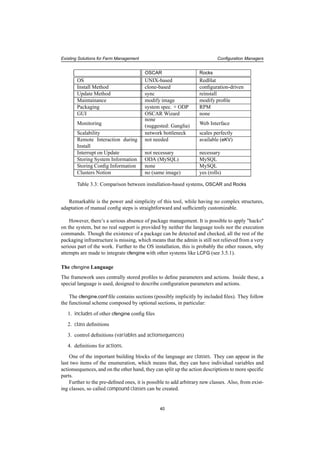
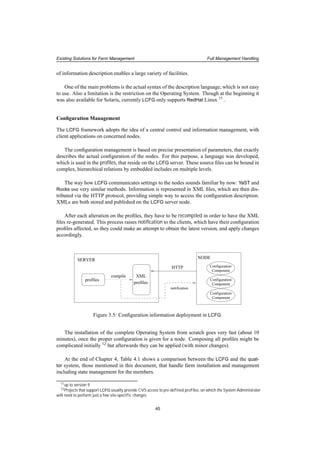
changed without setting up the whole from scratch.
Obviously the main use case for automated installations is the one that doesn’t require the
slightest manual intervention. Remote installs, initiated on the network from boot are also
available with no further requirements than having a DHCP/BOOTP server, that –further than
IP address– provides clients with the location of the KickStart file to use, which the nodes copy
over. DHCP and BOOTP services can reside both on the KickStart server, or on a different one.
Although the syntax of the configuration file is simple and easy to understand, a graphical
tool is provided as well, to visualize the choices between options, that will form the contents of
the ks.cfg.
Handling RedHat(-based) installations efficiently, KickStart is widely used in these clusters’
world, while also ground for higher level tools (quattor, WareWulf, SmartFrog).
28
Existing Solutions for Farm Management Automatic OS Installation for Individual Machines
NODE
Install options file
Install Directory
SERVER
pull
mount, HTTP, FTP
Figure 3.1: Install Method used by KickStart, JumpStart, YaST
3.2.2 JumpStart
A short allusion to Solaris’ JumpStart ([JS]) can be found here. The concepts followed by Kick-
Start are very similar to what this tool uses.
There are two stages in a JumpStart setup.
In the first one an application called Sysidtool takes control. This registers information (time
zone, system locale, nameserver, etc.) which can be entered interactively, or can come from a
config file (sysidcfg).
The second stage is the system configuration (disk partitioning, parameter definitions, pack-
ages). The information needed here are in files called profiles.
Though these files have a different syntax from the one for ks.cfg, just as command names
are different for JumpStart form KickStart, in principal the main characteristics of the two tools
are the same. A shared directory is available on the network, from where configuration profiles
can be derived, together with additional data necessary for the process.
Incomplete JumpStart specification also results in interactive requests for parameters. This
means that partially pre-configured interactive installations are possible.
A variance to KickStart is that the JumpStart server needs the exact specification of the
clients in /etc/hosts and /etc/ethers, which means that it needs to know certain parame-
ters in advance, while with KickStart clients were arbitrary and hidden (apart from specification
in NFS allow-list).
Furthermore, there are two additional differences, that are worth mentioning.
A main, so called rules file is located on the JumpStart server, which expresses correspon-
dence between clients and profiles that drive their install. This is determined for sets of nodes
grouped by common properties (architecture for instance). The same rules file can be utilized
along the whole cluster, and it will help to assign the right profiles to each of these groups.
These files introduce a higher level organization unit in the farm configuration than individ-
ual boxes. Assigning appropriate setups for distinct groups and clusters is possible, supporting
suitable configuration according to a farm’s internal structure.
Another interesting feature is the script, that needs to be run after each modification on the
profiles, in order to validate their syntax.
29
Existing Solutions for Farm Management Automatic OS Installation for Individual Machines
3.2.3 FAI
The next tool to focus on is closely related to the previous ones. The name is FAI ([FAI]), which
stands for Fully Automatic Installation. FAI is specific to the Debian Linux operating system.
Despite very similar functionality, the concepts differ from the previously discussed RedHat
solution. After the (network or floppy) boot, a remote filesystem, residing on the install server
for this purpose is mounted on the nodes as the root file system via NFS [NFS] services. After-
wards, the installation script starts execution, getting options from a special directory structure
accessible also by the NFS-mount, or from a CVS ([CVS]) repository, that could be local or
remote.
To be able to handle different configurations, FAI introduced the concept of classes, attached
to each other by an inheritance-like relation. Nodes belong at least to one of these, by having a
list of containing classes in an increasing priority, in order to address the problem of overriding
declarations, when there are multiple anchors. Knowing their class identity , nodes will be able
to retrieve all corresponding scripts and packages from the strictly structured remote directory
they have mounted.
Having a brief look at the contents of this directory gives us a hint about how the system
works.
- The class directory holds scripts, that define environment variables needed later by
the configuration actions (invoked by executables from the scripts directory discussed
soon), and modules to be loaded for a class. Declarations can be performed both directly
and indirectly, where the latter means to include already existing class definitions.
- disk_config and package_config directories hold partition information and package
lists.
- Interesting is the idea introduced by directory scripts. Here instructions files for various
command interpreters (perl, bash, even cfengine 1) can be found, organized in directories
referring to the class they are created for. These are executed after all packages are
installed.
- Another smart solution, represented by the hook directory, gives the possibility to execute
scripts as an "intermission" between certain steps of installation. The install procedure
continues where it was interrupted after the script execution is finished. This can be useful
for instance to detect hardware parameters, and dynamically generate values needed by
future steps.
- Last in the enumeration is the files directory. Here mostly configuration files are col-
lected for the classes, which have to be deployed on the members. Files are stored in a
directory structure that refers to their future location, while their name is specific to their
class.
Compared to KickStart, we see a new concept here. Instead of delivering one file and then
continue working mostly locally on the node, in FAI, contact with the installation server is
necessary all the time. Therefore, this is more sensitive on server failures and network errors,
though these are rare on local networks, where installs are usually performed
However these issues have to be considered when using FAI.
1cfengine will be discussed later
30
Existing Solutions for Farm Management Automatic OS Installation for Individual Machines
Though we are looking for a fully automated solution, it should be mentioned that there’s
no correspondence for KickStart’s semi-automatic procedure within FAI.
Configuration information in the FAI directory structure is much more complicated, spread
in many files. For the sysadmin, a higher level of understanding is required, than it was for the
single one ks.cfg file. But this is not a disadvantage of the design of the FAI system.
These two tools are addressing different areas of problems. While KickStart focuses more
on the individual install action, using the structure of classes in FAI takes into account higher-
level cluster management-problems. It places information in a well-structured order, enabling
multiple different cluster installations easily.
FAI is powerful, flexible and introduces new features to the ones we have already seen. Due
to the complex structure, the usage is more difficult, as many instructions have to be written in
scripts, that are already available as KickStart built-in commands and options. Using a minimal
set of KickStart commands might be more handy for less experienced admins, while the large
variety of options enable to perform specific, customized KickStart setups, as well.
On the other hand the way how FAI is designed, it doesn’t depend on which options are
implemented and which are not: ’hooks’ can implement any actions, that could be done man-
ually between main install steps, ’scripts’ can do anything after installation, and it all can be
completed by arbitrary ’files’, that can be delivered and modified locally by the other facilities.
With FAI also various special steps can be defined, in case of less usual local parameters,
though this needs experience and knowledge about the system.
Install Directory NODE
SERVER
mount
Figure 3.2: Sketch of the Installation Method used by FAI
3.2.4 YaST
More similar to RedHat KickStart is the method used by SuSE Linux. Based on the operating
system configuration tool YaST2 (Yet another System Tool 2. [YAST]), an installer called Au-
toYaST is used to organize the automatic installation method.
AutoYaST also has a main control file driving the procedure. This is in fact, is so similar
to the ks.cfg, that it’s even possible to generate it from this KickStart configuration file. Within
the YAsT2 control file XML ([XML]) is used for description. This doesn’t only give a general
interface to the different kinds of commands and parameters. XML is suitable for passing in-
formation stored in (configuration) variables (Section 2.4.2), and has a huge amount of parser
tools already available. This eases the work of the developers, who can simply use one of these.
The XML files will be transformed to YaST2 profiles after being delivered to the clients.
Since AutoYaST has a Graphical User Interface, the admin doesn’t need to edit the control
file manually; a full configuration can be put together by clicking on the right options.
31
Existing Solutions for Farm Management Automatic OS Installation for Individual Machines
On the other hand, just as FAI, AutoYaST is also using the notation of classes. With the
so called rules file, knowing certain parameters of a node (memory size, disk size, etc.), it’s
possible to determine the class(es) it belongs to. Since this happens in real-time during the
installation process, it prevents the admins of categorizing the nodes manually. When a box is
a member of more than one classes, properties are taken in a well-defined order, similar to FAI.
This is the way to interpret multiple definitions on variables, that occur in different classes.
Different from FAI, is the actual distribution of class information, which can happen also
via HTTP, and not necessarily by mounting a remote filesystem. However, data needed for the
installation has to come from an NFS directory in the case of a network install.
Summarizing the enumeration of often-used install tools, the table below compares them
encountering a few fundamental and interesting parameters.
KickStart JumpStart FAI YaST
Operating System RedHat
Linux
Solaris Debian
Linux
SuSE Linux
Addressed Level
of the Problem
individual
nodes
individual
nodes
clusters clusters
Information Orga-
nization
all in one file all in one file Directory
Structure
one (two)
file(s)
Description format text text text XML
Description Com-
plexity
simple simple complicated simple
Network Installa-
tion
supported supported supported supported
Interactive Setup
with Defaults
supported supported not sup-
ported
supported
Publishing Config
Information
NFS, HTTP,
floppy,
cdrom, hard
disk
NFS NFS HTTP, NFS,
TFTP, floppy,
cdrom, hard
disk
Distributing Soft-
ware
NFS, HTTP,
FTP
NFS NFS NFS
Table 3.2: Encountered OS-related Automated Install Applications
3.3 Higher Level Installation
After learning about applications for individual system installs, as a next step we will turn to
those that handle setups on a higher organization level.
A few of the previously discussed group of installers (FAI, AutoYaST) integrated the OS
installer tool with the cluster or farm installer. On the contrary, the following solutions are not
suitable for single setups; their targets are sets of computers.
The market for these frameworks –both commercial and free– is quite wide, however solu-
tions usually meet slightly different requirements. The main characteristics of a few of these
systems will be introduced below.
32
Existing Solutions for Farm Management Higher Level Installation
3.3.1 OSCAR
The first to be discussed is OSCAR, the Open Source Cluster Application Resources toolkit
([OSC]).
The reason for starting with this one is the way how the system is put together by applica-
tions that solve separate subtasks of the remote farm installation. This layout of components
shows the different functional parts of the system very well.
OSCAR is the first development project supported by informal society Open Cluster Group
(OCG, [OCG]). Unfortunately it supports only RedHat and Mandrake Linux, but Debian also
appears on some of these components’ future plans.
Building bricks of this framework are the System Installation Suite (SIS, [SIS]), the Clus-
ter Command and Control (C3) and the OSCAR Password Installer and User Management
(OPIUM). Furthermore the OSCAR Database (ODA) and the OSCAR Package Downloader
(OPD) play an important role in package management.
These all together form a nice solution for a clone-based installation. 2
The opportunity of maintaining the running system definitely lifts OSCAR over plain cloning
software. Packages can be installed on actually working nodes easy and fast. During this action,
the saved "golden image" is treated the same way as the real nodes are, in the sense that update
is applied on the image as well. This means that neither redistribution of the modified image is
necessary, nor software installation on the members nodes one by one. Thanks to the OSCAR
Database that maintains the package information, the update of more differently-shaped images
can be also handled.
To provide easier usage, OSCAR adds a Graphical User Interface hiding lower-level appli-
cations, command-line tools. The GUI covers all actions that these tools enable; this makes
cluster management easy and fast.
System Installation Suite (SIS)
SIS itself is an individual project developed by contributors from various institutes 3. It’s de-
signed to be an tool, that works on various Linux distributions. Having the tasks split up, the
three main areas could be handled by different groups of developers.
Sub-projects that came to existence this way are:
1. SystemImager ([SI1])
2. System Installer ([SI2])
3. System Configurator ([SI3])
Figure 3.3 is a diagram on how these three subsystems interact.
SystemImager captures a hard disk image of an existing machine. This is typically a "golden
client" representing the ideal setup of all nodes, which has to be deployed on all of them. Sys-
temImager has a command for updating an already installed image on the client in a way that
2There are many other cloning applications, which are not discussed here in more detail. A few examples: Patagonia
CloneSys [CLS], Dolly [DOL] (developed for fast switched networks), Norton Ghost from Symantec, ImageCast from
Innovative Software Ltd., DriveImagePro form PowerQuest, etc.
3IBM Linux Technology Center, Hewlett Packard
33
Existing Solutions for Farm Management Higher Level Installation
image
system desciption
"golden client"
System Imager
System Installer
System Imager
System Configurator
SERVER
NODE
create
create
configure
update
Figure 3.3: Sketch of SiS Installation used in OSCAR
the whole image doesn’t have to be pushed through the network again: it’s only the modified
parts that the node contents are synchronized with.
System Installer realizes another possibility for image creation. Given a file describing par-
titions and an RPM list, the tool builds the image on the installation server. This can be very
handy when cloning multiple images, which doesn’t have to be manually installed on different
"golden client" nodes.
System Configurator performs a few essential node-specific steps following the installation
(network setup, etc.) New systems can immediately get the necessary parameters over the static
image copied on the hard disk.
These facilities offer two solutions for the image maintainance. The first is performed
directly on the "golden client". This can be favorable when changes have to be investigated,
they should be tested before deployed, so whenever the admin needs to see how a system is
running with the new settings, software, etc. When there’s no doubt about the success of the
operations, the already-existing image can be used as a live filesystem on which the new settings
can be applied directly and the resulted image can be deployed onto the clients.
Cluster Command and Control toolsuite (C3)
Having the image prepared, the next step is to use the Cluster Command and Control toolsuite
([C3]). C3 is developed at Oak Ridge National Laboratory as a separate project.
This tool is a set of commands, that operate on the whole cluster or a part of it. It has several
commands with various functions. Just a part of them are mentioned here.
There is one (cexec), that implements parallel command execution over the cluster mem-
bers. Another one (cpush) realizes data distribution (directories, files) to each node. Using
the synchronization mechanism, data transfer can be restricted to what is really necessary; un-
changed parts of the filesystem don’t have to be transmitted through the network. This is a
serious gain, e.g. when 40 GB disk images need to be only partially updated on several mem-
ber nodes. For disk image distribution a separate command (cpushimage) exists in C3. Other
34
Existing Solutions for Farm Management Higher Level Installation
instructions (cget, crm) are getting and removing specified files.
C3 doesn’t only have an important role in the installation and update, but provides com-
mands that form the base for OPIUM, the OSCAR accounting management also.
Cluster administration, package management
There are two other components, which finally, fully belong to the OSCAR toolsuite. In fact,
they extend the OSCAR functionality more to the direction of cluster management, than cloning
tools.
OSCAR uses a packaging mechanism, with packages similar to RPMs. The OSCAR Database
(ODA), rooted in MySQL, is the component that keeps track of node software contents. It has
administrative functionality in terms of cluster information as well.
A command-line interface hides the physical database, providing an easy way to access
information and to execute package operations. The OSCAR Package Downloader (OPD) is
the application that obtains the packages.
3.3.2 Rocks
One of the most widespread systems is definitely NPACI Rocks ([RCK]). This toolsuite is espe-
cially popular in the United States, but from the approximately 280 Rocks clusters 4 many are
from other parts of the world.
Rocks is based on RedHat Linux, but it has its own distribution of the Operating System in-
cluded. This contains the base system, RedHat updates, NPACI packages, and other additional
packages. Unfortunately the fact that there’s no support for other Operating Systems is a strong
limitation of the otherwise rather efficient system.
The major concept of this freely downloadable framework is to make the farm setup and
maintainance as easy as possible.
Main characteristics
Within system procedures, the strongest emphasis is on the node installation. Setup from
scratch is not more than a simple command, and it takes about 10 minutes to be finished.
The process is driven by configuration data in contrast to the previously mentioned disk-
image-delivering mechanisms. Necessary information is ordered in uniform directories, that
represent higher-level abstraction on the relationships between the elements.
The setup procedure is elaborated in detail. Even a remote interaction is possible with the
client during the install, using application eKV, designed for this purpose.
The description-driven approach together with the list of packages enables configuration
changes and software updates to be deployed by the framework. However, the update proce-
dure instead of changing anything on the already working node simply reinstalls it with the new
parameters, as if it was a brand-new setup.
4The list can be found at http://www.rocksclusters.org/rocks-register
35
Existing Solutions for Farm Management Higher Level Installation
Settings of a node are not traced further after the initial steps are done, administrators have
no knowledge about the actual state of the farm members. Alerts are triggered by the monitoring
system (Ganglia, [GL]) when failures occur. Rocks doesn’t have a configuration information
management system; differences from original parameters are not followed up at all.
The install procedure is reliable and fast. This explains why the system doesn’t emphasize
on following the configuration state of the nodes. A safe way to clean up any misconfiguration
that occurred is to set it up from scratch.
The same approach is reflected on the way how configuration and software updates are im-
plemented.
Though having an update procedure labels the framework to be a configuration tool as well,
the strong emphasis on the installation procedure keeps Rocks more an installation framework.
What Rocks is suitable for
There’s a strong relation between a farm’s structure and functions, and the applied management
tools. Admins have to consider several parameters, main characteristics and requirements in
order to be able to make the right decision about what to be used.
Rocks is a delicate solution in particular for huge, basically homogeneous, perhaps com-
mercial purpose clusters, where changing old to brand-new both in terms of soft- and hardware
is rather preferred, than spending time on with following up and fixing problems.
In these cases neither the physical box itself, nor the contained software are precious. These
nodes normally don’t hold user data. Home directories – if there are any – are stored on network
filesystems (like AFS) instead, on stable and reliable nodes, that are not meant to be often
manipulated.
These, perhaps High Availability Clusters have such importance, that minutes of downtime
can be charged in serious financial damage. No time to lose: substitution for a corrupted node
must be back and running the soonest possible, or being completely replaced otherwise. It
isn’t worth to investigate on details of failures. Member nodes here are usually much the same,
mostly cheap commodity hardware.
With such conditions, there’s no point to pay more attention on the running system’s cur-
rent state of configuration either. It’s irrelevant as long as nodes don’t fail and they provide
demanded functionality. If something goes wrong, the monitoring system detects it soon, and
notification will be generated.
With a slightly different motivation, similar things can be said about utilizations in educa-
tional institutes. Interactive student labs need frequent complete reinstalls, and no configuration
management. For this kind of maintainance, Rocks is a rather suitable solution. Probably that’s
why, the base of the Rocks-community are universities.
On the other hand, lack of information and control over running system’s parameters is not
acceptable on certain other cluster types.
As an example we should consider the case, when applying an urgent security patch on a
huge, strongly loaded batch system, which is constantly executing short and long running jobs.
Such action requires a scheduled downtime after draining the queues, or detecting one by one,
when a node is "empty", and then perform the update (reinstall) on it, which is hard to carry out.
(Probably the most convenient solution might be a way between the two: perform the procedure
on subsets of the cluster.)
36
Existing Solutions for Farm Management Higher Level Installation
Obviously, there are certain kinds of software updates that require an interrupt and restart,
however non-interruptible services need the most that can be done on-line, without affecting
running processes, that are not concerned. This is impossible, when an OS reinstall stands for
each software update.
For such purpose, more desirable is a system strongly based on detailed config description,
and run-time intervention to perform modifications, updates.
Organization of Information
Since Rocks is designed to be able to easily hold large scale installations, the internal layout is
rather complex. Scalability was also a requirement: growing number of clients mustn’t signifi-
cantly increase work on the administrator’s side.
To implement such structure, Rocks introduced an extension of KickStart, which is based
on data encapsulated in XML files. The reason for choosing XML was the aim to ease gen-
erating and publishing information in a unified way. To be able to go through the described
KickStart actions after being transmitted on the nodes, the XML profiles are transformed to
normal ks.cfg files so it could be used for the setup.
This approach sounds familiar from studying AutoYaST. In fact there are even more paral-
lels to be drawn between the two tools.
In general, we have to note that an object-oriented model is a very good approach to deal
with high-level configuration description.
Setups for nodes from various functional categories (interactive, batch, etc.) usually do
have common parts, that form the core of several different configurations. The number of these
fundamental descriptions is quite small compared to the amount of members of the farm. On
the top of the core definitions, depending on the function of the future system, diverse groups
of applications, libraries, etc. will be added: some of them will characterize larger number of
nodes, which then still can be divided to smaller groups by others parameters.
In order to define these relationships between appliances, graphs are introduced. Each
node5
of the graph corresponds to a KickStart file. End points represent full configuration
descriptions for computers, so called types. Following paths from starting points to an end
point, taking profiles of all occurring graph nodes, by the end the complete ks.cfg is generated
for that certain type.
This graph is a special way to implement the often-used concept of inheritance. Realization
of the graphs is another application of XML within the system.
Furthermore, graph representation can be used not only for software, but other relations.
There are services, that can be grouped on cluster bases, where each node’s own install profile
will be a "descendant" of the cluster’s one, adding only a few host-specific settings. (This way,
the actual structure of a cluster might also be reflected by the graph.)
A similar approach often appears in large-scale installation systems, the only differences
are implementation and representation, which also strongly depend on specific tools that are
internally used by the systems themselves. For the Java-based SmartFrog framework (Section
3.4.2), the most obvious way is to use the language-given object and class relationships, as
it just perfectly suits these purposes too. Again, others having more relation with C or C++
programming languages, prefer to use something like include files.
5in mathematical meaning of the word
37
Existing Solutions for Farm Management Higher Level Installation
Each of these methods and related tools have their special features. When Rocks’ XML-
graphs are traversed, a real-time detection of parameters is enabled, which will then help to
choose between certain ancestors. This very useful property was also implemented in AutoY-
aST. This could be useful for example in the case of a few possible hardware architectures, to
be able to allocate the appropriate group of packages.
Items in a Rocks graph are separate, in a sense that they don’t have information about
each other; essentially they’re only used to supply a corresponding part of the KickStart file.
In contrast, Java methods in the lively, strongly distributed, hierarchical SmartFrog system,
constantly give access to a parent component’s attributes and methods. This enables passing
inheritance information.
Setups for Clusters
There is a higher-level organization unit used within Rocks, which is called roll. These are de-
fined for the different types of clusters, which can mean both software and hardware distinction.
Provided by the system besides the base roll, Condor, Sun GRID Engine, Intel and a few others
are available. One can develop arbitrary new rolls as well. The commands for roll creation and
manipulation are delivered among the Rocks executables.
Rolls are realized as directories with a special structure and contents. This is where pack-
ages for that group are collected (both source and binary) together with uncompiled sources of
applications and libraries, that have to be built on the nodes, just as graph description and graph
node-representation XML-s.
Storing Information
Supplying this data structure, configuration information comes from a central database on the
front-end node.
One of the previously mentioned types must be specified where the new node will belong.
Afterwards, when the node’s XML KickStart file is requested, the corresponding part of the
graph is traversed. XML profiles are represented by each entered graph node 6 which are added
together by an application walking through the connecting edges. These profile parts will sum
up in the concerned type’s XML profile. Handled by Rocks XML-KickStart this file will control
the setup procedure.
There is also an SQL Database 7 where important properties (MAC and IP addresses, loca-
tion, etc.) and several config parameters are stored. This helps the KickStart-file customization.
Table 3.3 summarizes similarities and differences between the two installation management
systems, OSCAR and Rocks.
3.4 Configuration Managers
After systems, that address the matter of installation, tools that deal with farm configuration
will be discussed now.
6Word node is a bit confusing here. Mathematical meaning, it refers to the junctions on the graph.
7precisely: MySQL
38
Existing Solutions for Farm Management Configuration Managers
profiles
XMLMySQL
profiles
node
specific
info
KickStart
config
file
NODE
Kickstart
SERVER
graph
Figure 3.4: Rocks installation structure
3.4.1 cfengine
The name ([CFE]) comes from A Configuration Engine which perfectly describes the tool’s
functionality. cfengine doesn’t do OS installation, but operates on an already working system.
cfengine is developed for UNIX-based systems, (though, invoked from special environment
it can be available for others as well) 8
. The idea is to take over the duty of a UNIX system
administrator. When customizing software, adjusting system, service, application parameters
several tasks occur from time to time: file manipulation (edit, copy, etc.) , creating directories,
changing filesystem access permissions, executing (self-written) scripts, etc.
That’s exactly what cfengine is designed for: taking over these tasks, performing them in a
structured way, without restricting the freedom the admin had when doing the work manually.
At the same time, it gives the possibility to have a higher-level view of the farm, much easier
to see through, plan with, change fundamentally or modify slightly, as it was true for the nodes
one by one.
To describe information the introduced syntax is clear and easy to follow. Most keywords
are coming from the UNIX-world, which makes it easy to learn and understand for one, who
has at least a little experience with such.
Opposite to the model of component hierarchy and relations seen recently, this one comes
up with another way of thinking. A different schema with different grouping and execution
path concepts appears here. If the previous systems could correspond to object-oriented pro-
gramming, this one would be again a representative of procedural languages.
The sequential concept is a bit similar to what was found for the KickStart installer, but
while there each group need their own control files, here one file can hold all variants, thanks to
the richness of the language. Of course, having one enormous config file is not what an admin
wants for a large farm: such a configuration should be split up to logical units, that will build
up config structure by being included.
8On a Windows using cygwin application, that enables a Unix-like environment
39
Existing Solutions for Farm Management Configuration Managers
OSCAR Rocks
OS UNIX-based RedHat
Install Method clone-based configuration-driven
Update Method sync reinstall
Maintainance modify image modify profile
Packaging system spec. + ODP RPM
GUI OSCAR Wizard none
Monitoring
none
(suggested: Ganglia) Web Interface
Scalability network bottleneck scales perfectly
Remote Interaction during
Install
not needed available (eKV)
Interrupt on Update not necessary necessary
Storing System Information ODA (MySQL) MySQL
Storing Config Information none MySQL
Clusters Notion no (same image) yes (rolls)
Table 3.3: Comparison between installation-based systems, OSCAR and Rocks
Remarkable is the power and simplicity of this tool, while having no complex structures,
adaptation of manual config steps is straightforward and sufficiently customizable.
However, there’s a serious absence of package management. It is possible to apply "hacks"
on the system, but no real support is provided by neither the language tools nor the execution
commands. Though the existence of a package can be detected and checked, all the rest of the
packaging infrastructure is missing, which means that the admin is still not relieved from a very
serious part of the work. Further to the OS installation, this is probably the other reason, why
attempts are made to integrate cfengine with other systems like LCFG (see 3.5.1).
The cfengine Language
The framework uses centrally stored profiles to define parameters and actions. Inside these, a
special language is used, designed to describe configuration parameters and actions.
The cfengine.conf file contains sections (possibly implicitly by included files). They follow
the functional scheme composed by optional sections, in particular:
1. includes of other cfengine config files
2. class definitions
3. control definitions (variables and actionsequences)
4. definitions for actions.
One of the important building blocks of the language are classes. They can appear in the
last two items of the enumeration, which means that, they can have individual variables and
actionsequences, and on the other hand, they can split up the action descriptions to more specific
parts.
Further to the pre-defined ones, it is possible to add arbitrary new classes. Also, from exist-
ing classes, so called compound classes can be created.
40
Existing Solutions for Farm Management Configuration Managers
Classes can be set up for various purposes. Built-in ones belong to three main categories:
• time
(year, month, day of month and week, hour, minute, time intervals, quart hours, etc.)
• node
(OS type, IP class, hostname and domain)
• user-defined
Later on, classes can be referred to in entries describing individual actions, in order to im-
plement the way, how the action should be carried out for that particular class. So classes
realize a static arrangement, to be used by the entries describing functionality. They are useful
to define actions to be carried out in certain moments or time periods, to be applied on certain
machines, etc.
Compound classes are intersections or unions of other classes. The easiest is to demonstrate
them with examples:
• Monday.Hr00.Min00
This one appoints to time class ’Monday 00:00’. With this, for instance, a list of actions
could be defined only for midnight execution.
• solaris|irix
This notation refers to machines that run Solaris or the Irix Operating Systems. This
should label actions, that are to be performed specially on these machines. Any of these
two could be used within the other one’s definition (as long as it’s not redundant).
Note that node classes (groups) really indicate machine sets but no more. There’s no men-
tion about cluster structure: this description doesn’t show hierarchy, or any other relation among
the members.
Lots of facilities do reside in this class concept. Smart tricks are available, especially with
the possibility of defining new ones. One example could be to divide an execution entry into
parts by user-defined classes. This way these could be invoked one after the other, with the
possibility of performing other actions in-between the blocks.
The actionsequence is the list of built-in action category names, that will be executed se-
quentially in the given order. The actual implementation of each of the categories will be
specified later in the file.
The language has a set of keywords for actions in the actionsequence definition. They come
from the most often-used UNIX commands, that appear as configurations steps (copy, link or
directory creation, editing files, etc.). Keywords are just bricks to build from, in a pre-defined,
very flexible schema. To mention a few of these words, there’s mountinfo, checktimezone,
netconfig, resolve, unmount, shellcommands, addmounts, and many others. They all have
their own syntax, according to their role, that has to be used when their meaning is stated. IP
address is expected in resolve, while in the links section, it is paths. It is important to em-
phasize shellcommands, which gives a possibility to invoke scripts and external applications.
Though the set of keywords can’t be extended, shellcommands in some sense substitutes this
absence.
These descriptions are further structured by classes (groups 9 ), or can be defined directly.
9Keyword group in fact is an alias for class.
41
Existing Solutions for Farm Management Configuration Managers
Different action entries require different syntax elements, that can describe the actual task.
These follow the UNIX commands that carry out the same function. Also, the language has
built-in functions to make the utilizations of often-used operations easier, and it also has several
ways to issue commands directly to the shell.
All these facilities make it possible to realize any setup layout and perform checks, without
a restriction on the order or type of the steps.
The Setup and Commands
There are a few commands that realize cfengine actions on the client and the sever side.
In order to install the actual configuration settings, the command cfengine has to run on
the client with the appropriate cfengine.conf file. It also could be invoked periodically by a
cron job.
The update command doesn’t need root access, therefore a user without admin rights can
run it to fix configuration errors.
On the server file permissions, directories have to be adjusted on the basis of hosts and
domains. The command cfrun can notify clients to rerun the cfengine command, for which
depending on the configuration they might want to download the newest config file version.
The server doesn’t publish (push) the file, it can be only downloaded (pull) by the clients.
The original setup uses a NFS-mounted directory which holds the cfagent.conf and its
included files (if any), together with those config files, that need to be copied to the nodes (pos-
sibly to be modified afterwards). This is not a large amount of data, therefore it could be copied
over the network to the boxes, without involving data accessed on NFS.
Only cfagent.conf is needed for the config process. All kind of operations (further down-
loads etc.) can be achieved using this one.
Security
A security infrastructure, using public-private key pairs is integrated, so the nodes authenticate
themselves to the server, and also the other way around.
There are two reasons to emphasize about security is the cfengine framework. On one hand,
to prevent a non-authorized node to access the configuration information. On the other hand, a
faked server shouldn’t be able to offer the cfagent.conf file to the clients.
3.4.2 SmartFrog
To show a very different approach to the configuration task, we continue with SmartFrog, the
Smart Framework for Distributed Groups ([SF]). The tool comes from UK, Bristol, from the
HP labs exactly.
The framework is more than a configuration tool: basically it creates an environment for
distributed programming. As for such, Java ([JAVA]) is used, which is also strongly present in
the language, developed for SmartFrog component description. This relation also manifests in
the inheritance-based approach.
42
Existing Solutions for Farm Management Configuration Managers
SmartFrog is a powerful tool to solve large scale configuration and monitoring issues, ser-
vice management, etc. This schema, a parallel environment with alive components can be much
more suitable for certain tasks, than the sequential-execution based ones seen before.
This structure, enables developing network monitoring system modelled by communicat-
ing components on physically different locations. Another use case is an arbitrary service, that
must be running constantly. If a failure occurs that must be noticed and appropriate nodes have
to take over the role of the original ones to keep the service running.
On the other hand, since it emphasizes on the live system, information is "stored" in running
components; there’s no strong notation neither on how to organize configuration data, nor about
software repository. SmartFrog doesn’t issue installation problems, therefore an efficient way
of usage is to couple it with a tool, that successfully targets the setup procedure itself (like
LCFG, Section 3.5.1).
Components
SmartFrog components are processes that are running simultaneously. Practically they are Java
objects, realizing inheritance relations.
The components have a life-cycle. They go through states like initiated, initialized, running,
terminated. Each components must implement the methods that bring forth the state transition.
In case of an error, they can get to the failed state.
SmartFrog component processes can interact with each other, and they can start other com-
ponent processes in a parent-child relation. Further to that, there are other groupings between
components, too, and it’s possible to set up timing in the execution of the coherent components.
Components can locate each other using Java naming mechanisms and communicate via
messages.
Language
A language was developed for component description. It can be recognized both in the syntax
and in the object-oriented approach that it is based on the Java programming language.
The language contains regular elements of programming languages: declarations (vari-
ables, functions, types), execution patterns (only if-then-else, no support for loops), etc.
It’s possible to refer to runtime evaluated values, and also to attributes of other processes, by
using pointers in the code.
The life-cycles of components are driven by their methods. There are a few essential pre-
defined ones, and there is the possibility for the user to create additional ones. The life-cycle of
parent processes is affected by their children’s. They can be arranged in a higher-level group-
ings like collection and workflow.
Regarding object- class relations the language provides the necessary keywords to imple-
ment inheritance and attributes for the related references.
Naming, and placing a component on a chosen node that is part of the system is also avail-
able. Services don’t have to be restarted when setting up a new component: SmartFrog daemons
43
Existing Solutions for Farm Management Configuration Managers
take care of created and terminated instances, while the registry still remains up-to-date.
External commands like scripts can also be invoked from the component code.
Security
Practically it is easy to join the system, therefore security issues need to be considered. The
framework’s security model uses so called trusted groups, where members have the right to
distribute SmartFrog resources.
cfengine SmartFrog
OS UNIX-based
(in principal)
RedHat
Windows
Architecture central control
sequential execution
distributed system
parallel execution
System Characteris-
tics
system config suite with
automatized sysadmin tasks
distributed programming
environment
Info Location central arbitrary
Update Process one command component life-cycle
Language based on UNIX commands based on Java
Component Rela-
tions
none as in Object-Oriented Lan-
guages
Monitoring for "neighbor" nodes built-in component monitor-
ing
GUI none avail. in plug-in
(SmartFrog Eclipse)
Table 3.4: Comparison of the Configuration Systems cfengine and SmartFrog
Above Table 3.4 shows a summary of the properties of the discussed configuration manage-
ment systems.
3.5 Full Management Handling
In the encountered evolution of farm management tools, the last one are the systems, that deal
both with installation, and the management of software on the nodes.
3.5.1 LCFG
The first representative, LCFG 10 ([LCFG]) was developed by the Computer Science Depart-
ment of Edinburgh University. It was used by the European Data GRID project ([EDG]), as the
officially supported solution for the complete, automatized installation of service and worker
nodes on the local fabric.
LCFG realizes a full solution for node installation and management for RedHat Linux sys-
tems. The architecture is well-designed, consists of subcomponents that realize different func-
tionalities. Deployment of information and package management are practical. The basic idea
10We mostly refer to version LCFGng
44
Existing Solutions for Farm Management Full Management Handling
of information description enables a large variety of facilities.
One of the main problems is the actual syntax of the description language, which is not easy
to use. Also a limitation is the restriction on the Operating System. Though at the beginning it
was also available for Solaris, currently LCFG only supports RedHat Linux 11 .
Configuration Management
The LCFG framework adopts the idea of a central control and information management, with
client applications on concerned nodes.
The configuration management is based on precise presentation of parameters, that exactly
describes the actual configuration of the nodes. For this purpose, a language was developed,
which is used in the profiles, that reside on the LCFG server. These source files can be bound in
complex, hierarchical relations by embedded includes on multiple levels.
The way how LCFG communicates settings to the nodes sounds familiar by now: YaST and
Rocks use very similar methods. Information is represented in XML files, which are then dis-
tributed via the HTTP protocol, providing simple way to access the configuration description.
XMLs are both stored and published on the LCFG server node.
After each alteration on the profiles, they have to be recompiled in order to have the XML
files re-generated. This process raises notification to the clients, which have their configuration
profiles affected, so they could make an attempt to obtain the latest version, and apply changes
accordingly.
profiles
profiles
XML
Configuration
Component
Configuration
Component
Configuration
Component
SERVER NODE
notification
compile
HTTP
Figure 3.5: Configuration information deployment in LCFG
The installation of the complete Operating System from scratch goes very fast (about 10
minutes), once the proper configuration is given for a node. Composing all profiles might be
complicated initially 12 but afterwards they can be applied (with minor changes).
At the end of Chapter 4, Table 4.1 shows a comparison between the LCFG and the quat-
tor system, those mentioned in this document, that handle farm installation and management
including state management for the members.
11up to version 9
12Projects that support LCFG usually provide CVS access to pre-defined profiles, on which the System Administrator
will need to perform just a few site-specific changes.
45
Existing Solutions for Farm Management Full Management Handling
Software Repository
The concept of software maintainance in LCFG follows a similar approach.
There is a central Software Repository, on the LCFG server by default, but there’s no re-
striction on this within the system. There might be separate disk servers, which can hold large
amounts of data that store software packages.
Each node has a list of RPM packages, that determines the software to be set up on the
node. This applies both for the initial installation, and later on, when the system is running.
Therefore the RPM list has to be modified in order to set up new or update the already installed
software.
The list is exclusive: no additional packages are supported except if the LCFG configuration
indicates. The package manager is run on the clients at boot time, and can be executed at any
time by the admin.
The Client Side
A notification is sent to the client, each time its profile was modified.
On the clients are components installed for each of the services, applications, etc. that the
client is running. Components are responsible for configuration settings for that particular piece
of software using information from the node’s XML profile. After applying the configuration
changes, they often have to restart services, too.
Components have a similar life-cycle like SmartFrog components. In practice they are shell
or PERL scripts, that implement the standard methods (configure,, start, stop, etc.), which
realize transitions between life states.
There are several library functions added in order to support component development. This
way configuration variables are easily referred to inside from a component.
The subroutine, that performs updates will be invoked automatically, when changes on the
server side are noticed. It’s also possible to run the update manually 13.
Each component is packed in an RPM package that is stored in the Software Repository.
The LCFG language
To describe the information, a macro language was developed that is used in the LCFG source
files.
A regular LCFG profile consists of key-value pairs, where keys are the names of the vari-
ables. These can be both "internal" (LCFG) and "external" (system environment) variables used
on the client-side.
Complex data structures can be realized using this simple method, however this is both an
advantage and a disadvantage of the system. In practice it’s hard to follow diversified branches
of definitions in the profiles sources.
Another syntax problem is that all variables are internal to the declaring component. No
reference can be made inside from a component’s code to another one’s variables. The fact that
13only with root permissions
46
Existing Solutions for Farm Management Full Management Handling
variables can’t be shared is a possible source of duplication and inconsistency inside the system.
Source files can be included in each other. This increases complexity, but also defines a cer-
tain hierarchy among the sources, and enables to split variable definitions in a sensible structure.
A very interesting and useful feature introduced by one of the accessory libraries is the
template substitution. It is useful when generating configuration files with a complex structure.
Defining templates, it’s possible to modify only the relevant parts of the file, and the rest is
retrieved from the template. Inside the components library functions are used, to drive the
completion of the template file.
Templates belong to the same RPM package as the component that uses them.
Performance
The system is very efficient especially when used for large farms. Increasing the number of
nodes does not effect the time needed for the LCFG installation . Approximately 10 minutes
are necessary to set up a node from scratch.
However, scalability issues might raise in the profile compilation, as fundamental changes
are performed that affect many of the nodes.
Also, network access to the Software Repository might be a bottleneck, as all clients initiate
file transfers to download RPMs specified on their RPM lists.
Interesting measurement results about scalability tests on LCFG-based installations can be
found in [LCFGperf].
Integration with other tools
There are investigations on how to obtain more powerful management tools, by creating hybrid
systems as combinations of the existing ones, in order to unite their advantages.
The latter two, SmartFrog and LCFG were integrated successfully ([SFLCFG]) together re-
sulting in a more efficient system, as they are individually. This way a fully automatized farm
management framework can be presented, where dynamic decisions can be taken.
Since SmartFrog doesn’t solve the problem of installation, LCFG can be used for the au-
tomatic setup procedure, including the setup of the SmartFrog software itself. Afterwards,
SmartFrog components can take control over LCFG components following policy rules defined
on the LCFG server, considering run-time parameters.
A use case for such setup could be a cluster, where a crashed server has to be replaced with
the most appropriate member of a well-defined set, taking into account their actual state (current
load, etc.). SmartFrog components are perfect for the task of choosing the best candidate. They
can also invoke the relevant LCFG component, that will call methods like starting the crashed
machine’s services or registration with the new server.
47
Existing Solutions for Farm Management Summary
3.6 Summary
The encountered tools and systems were a small but representative fraction of what is available
for UNIX-based Operating Systems. Many interesting solutions didn’t fit within the scale of
this document.
The individual descriptions show very well the slight differences, that can be observed
among these tools and frameworks.
We can see a variety of miscellaneous methods and implementations as they approach the
problem in different ways. On the other hand, there are subtasks, that are similarly realized in
many of them.
Different properties can be very useful in one, while they can be a disadvantage in another
case. The characteristics of the actual farm determines which system is the best choice.
48
chapter 4
The Quattor Toolsuite
We have already discussed and compared several of the currently existing solutions for automa-
tized farm management. In this chapter the focus is on one particular implementation, spending
more time on a deeper analysis.
The name of this tool is quattor, which stands for Quattor is an Administration Toolkit
for Optimizing Resources. In principal, it was developed at CERN, as a part of the European
DataGrid project ([EDG]), aiming to fulfill the Configuration Management and Installation
Management and Maintainance requirements, in the scope of EDG Work Package 4 ([WP4]) –
the Fabric Management Work Package within the DataGRID project.
4.1 Management for the CERN Computer Center
For the CERN Computer Center, administration is organized by ELFms the Extremely Large
Fabric management system ([ELFms]) .
ELFms has to realize a high-level, production quality system, scalable in number of nodes,
that’s expected to raise as the Computer Center gets extended in the preparation for the opening
of the Large Hadron Collider ([LHC]). One of the main design objectives is to adopt heteroge-
neous hardware as well as homogeneous, and to be able to deal with nodes that have different
functionalities (disk servers, batch/interactive nodes, etc.).
This is achieved by the interopability of three subsystems within the ELFms project: Lemon,
the LHC EDG Monitoring ([LEM]) LEAF, the LHC-Era Automated Fabric toolset and the quat-
tor toolsuite. (See also Section 5.1.1)
The structure of the ELFms system is shown on Figure 4.1
The quattor framework brought a radical change in the CERN Computer Center manage-
ment. After the successful test runs, it rapidly took over the task of installation, and the role
of SUE 1 , the previously used configuration tool. Actions that took hours or days, now can be
brought to effect in a few minutes without having services stopped, etc.
More and more nodes got installed and configured by quattor. Currently the 95% of all
Linux nodes in the CERN Computer Center are installed and managed by this framework,
while an increasing number of tape servers are also getting migrated to use it.
1(Standard UNIX Environment [SUE])
49
The Quattor Toolsuite Management for the CERN Computer Center
Management
Node
Management
Configuration
LEAF
LeMon
quattor
node
Figure 4.1: ELFms system structure
After the system has been proven to be robust and efficient at CERN other, managers of
computer centers all around the world decide to use quattor one after the other . Currently the
development and maintainance is coordinated by CERN, but the project has many contributors
in other countries (UAM Madrid, NIKHEF in Holland, IN2P3 in France, INFN in Italy, etc.).
4.2 Introduction to quattor
The quattor toolsuite is designed handle full maintainance for computer farms: installation,
configuration and software management.
Among farm administration systems, quattor could be called as "heavy-weight". Due to the
detailed and precise design, with the aligned work of well-configured components it is able to
handle thousands of machines: it’s very much suitable for middle to large size computer cen-
ters. On the other hand it might not be practical to create the complex configuration description
structure, for smaller (less then 50 nodes) clusters.
The architecture scheme is strongly related to the structure of LCFG, which supplies many
ideas to the design of the system, while it aims to overcome the weaknesses experienced there.
Influence can be recognized in both the overall structure and components, together with the
workflow.
The way how configuration data is represented, gives a lot of freedom to the system admin-
istrators; basically an arbitrary configuration can be set up easily. The hierarchical structure of
configuration templates enables inheritance-like relations and also grouping of common prop-
erties.
The language syntax is much more appropriate to the task, and easier to follow, than it was
the case for LCFGng, though creating node profiles from scratch is still elaborate. quattor’s con-
figuration description language, Pan uses a clear and comprehensible schema for definitions.
Opposite to LCFGng’s macro language, it belongs to the family of higher-level sequential lan-
guages.
50
The Quattor Toolsuite Concepts, Architecture Design
Both a graphical (PanGUIn) and a command line user interfaces (cdbop) is available to in-
teract with the Configuration Database.
Configuration information, collected from different sources is now organized in the Con-
figuration Database, and it is published in the node profiles that have the full list of parameters
for the node. Client-side agents ensure that the node configuration is up-to-date. Monitoring
facilities detect irregular behaviors, and can create alarms to notify responsibles.
4.3 Concepts, Architecture Design
The quattor system is built up on several components, dividing up the task in separate functional
units.
Main objectives
Key concepts, taken into account when the system was designed, are the following:
• A central database is the only source for all configuration information.
The final representation of the configuration data, the form that nodes will download,
should be generated from the information defined there. This helps to avoid multiple
diverse definitions of parameters, and prevents information to be spread in different loca-
tions.
• Operations must be atomic, in order to avoid inconsistent state due to execution failures.
If executed more than once with the same parameters, these commands mustn’t give
different result, but have to be idempotent.
• Independence from remote file systems (AFS, NFS), since these always hide the danger of
failures of non-atomic operations. When network errors are encountered while the client
is using the remote filesystem, the entire procedure will fail. Network accesses must be
reduced to a minimal amount.
• As much as possible, actions should be performed locally on the nodes, instead of re-
motely controlled. Reasons for that are to avoid both network-originated and server-side
scalability problems. There’s no need for the server to initiate operations on clients;
especially since the result is also hard to follow up.
• Usage of standard protocols, formats and tools (HTTP, XML, SOAP, RPM); re-implementing
of what is presently available already should be avoided, existing tools should be utilized.
This way –with reasonable prerequisites– quattor software will easily fit in a generally
used computing environments, and less work is necessary on the system integration (mak-
ing use of already existing packages, etc.).
• Load balancing, redundant (mirrored) data sources are important in order to avoid scal-
ability problems and single points of failure. The used protocols also aim to produce the
lowest load possible.
Task partition
The quattor toolsuite focuses on two main roles, and is divided accordingly to the tasks Config-
uration Management and Node and Cluster Management.
51
The Quattor Toolsuite Concepts, Architecture Design
The first includes access, management and interactions with the Configuration Database
(CDB) and templates that are stored there. These source files are written in the Pan config-
uration language. Configuration Management also covers the mechanism to cache relevant
configuration on the clients. Similarly the API and the User Interfaces: PanGUIn (graphical)
and cdbop (command-line).
The node and Cluster Management includes methods how the information is transmitted
and deployed on the nodes. The other issue that belongs here is the software management.
On the client-side, configuration components make sure that the appropriate settings will be
applied right after each modification. Software that deal with getting and applying configuration
are grouped in the Node Configuration Management (NCM) subsystem, and mostly consists of
the environment for the configuration components.
Operations related to software installations interact with the Software Repository. The Soft-
ware Package Management Agent (SPMA) is responsible to adjust the setup status of packages
on a particular node to the specified list of packages.
The next section will discuss these parts of the framework a little more in-depth.
4.3.1 Configuration Management
After a short introduction of the functionalities, an investigation follows on the individual parts
that realize the solutions for the subtasks that belong to the Configuration Management.
The subsystem mostly focuses on the definition, storage and distribution of configuration
templates and profiles, that describe the configuration attributes. quattor adopts the concept of
one central source of information. The data is kept in the Configuration Database (CDB), from
where it has to be delivered to the nodes.
Templates are written in Pan, the language developed for quattor, in order to provide a suit-
able environment for parameter description. Pan source files are compiled into XML profiles.
The nodes will be notified to download the new configuration profile, which will be processed
locally. The profiles are periodically downloaded, in case a notification would have been missed
due to a failure (network, etc.).
Standard protocols, as HTTP and SOAP are used for exchanging information. The first one
is to publish node profiles, the second is for CDB access.
A similar approach was already used in previously discussed systems (Rocks,FAI, LCFGng
...). The information in these systems was also stored in plain text files with a special syntax
suitable for the task. As the representation of parameters was strongly detailed and powerful,
the complexity increased, and a programming-language-like environment came to existence,
(LCFGng language, ...).
Server side notifications are sent to concerned clients about configuration modifications,
were also encountered when analyzing LCFGng. quattor adopted the sketch of this solution as
this realizes load share between the server and the clients.
The quattor configuration management structure is visualized on Figure 4.3.1
52
The Quattor Toolsuite Concepts, Architecture Design
Component
Component
Component
CDB Pan
compile
XML
profiles
GUI
CLI
NODE
SERVER−side
HTTP
SOAP
CCM
Figure 4.2: quattor Configuration Management Structure
The Pan language
The first to be discussed is the base of configuration data description: the language itself. One
of the main strengths of quattor is the powerful, but yet clear and easily comprehensible Pan
language.
Pan is a High Level Definition Language (HLDL). It covers the declaration of configura-
tion templates, profiles and variables, while it also includes a Data Manipulation Language,
that allows modifications on stored information. This way Pan enables not only the usage of
various data structures, but gives the possibility to create functions, use flows of control, etc.
Definitions in Pan source templates will be compiled with the provided compiler utility into
XML profiles.
Characteristics mainly comes from syntactical representation of the configuration variables,
which mostly reminds us to directory paths, ensuring a strict, yet extensible built-in structure.
Another level of organization is found on the templates and profiles. The latter realizes
configuration for a certain resource, building from definitions described in the former one.
Templates and profiles enable both code reuse and grouping of information. These aspects are
rather important, since they implement a native support for ordered planning about available
resources. The result is a rich, standalone language, that has all possibilities a task of this kind
might need, while at the same time it remains simple and easy to use.
There are four types of templates: declaration, structure, object and ordinary. No restric-
tions apply on ordinary templates, these can include arbitrary commands on variables in the
global namespace. Declaration templates contain definitions that modify the configuration tree.
They often involve type declarations standalone or together with new paths. Structure templates
operate on data structures, that can be later instantiated (essentially cloned). Object templates
are the ones that describe the properties of a resource (mostly nodes), so they are the ones that
are the base of XML profiles.
Though the language doesn’t declare it as a special type, it is worth to mention the templates
that declare configuration components. They are ordinary declaration templates with the com-
ponent’s variables and types, which can be used in cluster templates and node profiles to define
exact values. This way the component can complete its configuration for the related application
or service on the node or cluster.
53
The Quattor Toolsuite Concepts, Architecture Design
Configuration variables are defined as a path in the configuration tree, in a form like:
"/hardware/devices/eth0/address" = "44:52:04:43:a4:b2"
As it’s true for paths in a filesystem, this representation also categorizes information in sep-
arate groups following a hierarchical arrangement. Using built-in structures together with the
user-defined types, a coherent store for data can be built.
Branches located right on the root of the tree are already defined, and normally no modifi-
cations effect this level. Here we find:
/system
/software
/hardware
These also have a few necessary subtrees, which are also constant. These are for instance:
/hardware/harddisks
/system/filesystems
/system/mounts
/system/partitions
/software/packages
/software/repositories
The Pan language has built-in basic types, as boolean, long, string, etc . each supplied with
operators and test functions. Data types are strictly checked, illegal assignments and similar
errors are detected at compilation time. This is how the Configuration Database is protected
against inaccurate templates.
The language allows the usage of well-known data types like records, arrays and lists. Fur-
thermore, there are task-specific, functional types available as well. One of them, is the fetch
type, which gets the contents of the URL given as a value.
These all are building bricks for the complex user-defined types, declared for specific pur-
poses: a record for network interface or disk partition description. E.g. a CPU record type is
defined as follows:
define type cpu_type = {
"vendor": string
"model": string
"speed": udouble
}
Arrays are often used in order to create lists of similar resources (CPUs, network interfaces,
disks, etc.).
structure template cpu_intel_p3_800;
"vendor" = "Intel";
"model" = "Pentium III (Coppermine)";
"speed" = 796.551;
structure template pc_elonex_850_256;
54
The Quattor Toolsuite Concepts, Architecture Design
[...]
"/hardware/cpus" = list( create( cpu_intel_p3_800 ),
create( cpu_intel_p3_800 ) );
Which will result in path
"/hardware/cpus/0/vendor" = "Intel"
"/hardware/cpus/0/model" = "Pentium III (Coppermine)";
"/hardware/cpus/0/speed" = 796.550;
"/hardware/cpus/1/vendor" = "Intel"
"/hardware/cpus/1/model" = "Pentium III (Coppermine)";
"/hardware/cpus/1/speed" = 796.550;
The language has several built-in functions, and it also enables the definition of others, that
can similarly perform dynamical actions both on the configuration tree, and on the right-hand
side of variable assignments.
Pre-defined functions implement various categories of actions. There are functions to ma-
nipulate data and the configuration tree schema, as create, delete, clone. Tests operations
are available both for general queries (like exists, is_defined), and specific to types, data
structures (is_boolean, is_list, is_array, etc.). Furthermore, supported data structures are
supplied with discovery and modification procedures and operators.
This current set is already enough for regular setups, however special, sophisticated user-
defined functions can be created for individual cases. Functions can dynamically detect actual
configuration parameters, and perform actions accordingly. They can not only access the con-
figuration tree, but define their own local variables. Pan supports the three basic flows of
control: command sequences, if-then-else structures and loops. These can be used within the
functions, and this can realize from simple to rather complicated tasks.
More information about Pan can be found in the Pan Language Specification ([PAN]).
The Configuration Database
CDB is the location of Pan source templates and profiles. In contrast to the name, this storage
is not a database in the regular sense: similar to CVS ([CVS]) it’s designed to hold plain text
files written in Pan, the configuration language for quattor.
CDB has to store all data necessary from the bases of the Operating System install leading
through the fully functional configuration to the periodic updates of the running box. Therefore
CDB information is complex and heterogeneous, describing various groups of parameters.
Hardware parameters (CPU, memory, cards, etc.) is collected here, in order to provide
what’s necessary for the automatic installer (KickStart). 2 Also later on, there can be special
applications that need to know hardware attributes. In fact, for the OS installation additional
definitions are also needed: partition table, network, language, time settings, etc. These reside
in the database as well. One other important field that has to be covered in the CDB templates
is software contents of the nodes: package lists, that enumerate what has to be installed on the
machine, with parameters that are needed and will be applied by the configuration components.
From a higher-level point of view, it’s also important to record cluster topology, and roles
of members in the database, too.
2The concept of CDB is to store configuration information, therefore only the part of hardware information should
be kept there, that is needed for this purpose.
55
The Quattor Toolsuite Concepts, Architecture Design
By containing all configuration data, CDB stores a desired state of the machines both in
terms of software and hardware. This can be used by monitoring facilities to detect if the nodes
got in an irregular state.
CDB provides a common interface for accessing the data. It realizes a virtual data store,
where actions are implemented on transactions bases handled within the scope of user sessions.
3 System managers, who will need to edit templates and profiles, must have an account and
password set up, to be able to interact with the database. Access is provided via the SOAP
([SOAP]) protocol.
In the CDB, the authentic source of configuration data, incorrect information can not be
present, therefore syntax and semantics check must be run against new or modified Pan tem-
plates and profiles, before they could enter the system.
The syntax is verified, when the file is uploaded to the CDB, but at this point the file contents
are not a part of the stored information yet. Validation happens when a finalizing commit
command is sent from the user. Exactly as it happened in LCFG, profiles have to be recompiled
each time, when there was a modification.
A node’s XML profile comes to existence compiling the corresponding object template and
all its included files. All concerned templates and profiles are revised to detect possible incon-
sistency, and after the semantical check new XML profiles will be generated, which contain the
latest modifications.
The resulting profile is transformed to XML and published on the web, while an UDP noti-
fication is sent to the client to notify about the change.
The underlying CVS system ensures versioning and backups for each verified state of the
Pan sources. This also enables a possibility to return to previous versions.
CDB and Pan together are excellent to represent and store configuration data. The only
drawback is a problem with the scalability: the more templates are there the longer the compi-
lation takes for fundamental changes, that effect many profiles.
The Configuration Cache Manager
The Configuration Cache Manager (CCM) has the task of storing locally on the machines the
latest version of the corresponding XML profile.
CCM is particularly important, since it reduces the network dependency, as it turns all
profile-related operations to local actions. Whenever a configuration component is invoked, it
only has to access a file on the local filesystem, instead of contacting a remote server. Therefore
off-line operations can be supported, and also configuration operations will have a significantly
shorter execution time. This method also takes load off the server.
When a new XML profile is created for a node, it gets a notification, which signals the CCM
to get the new file. Also, in order to keep consistency between data on the server and the clients,
the CCM periodically checks, if the stored profile is up-to-date, and downloads the latest one,
if it outdated.
This operation can be enforced manually as well by the system administrator.
3A clear correspondence is can be discovered with CVS, the back-end system in CDB.
56
The Quattor Toolsuite Concepts, Architecture Design
4.3.2 Interfaces to the Configuration Database
Interactions with the CDB are not performed directly, but via interfaces, that hide lower-level
functions and apply checks on transferred data, whenever it’s necessary.
cdbop, the Command Line Interface
A command-line tool called cdbop provides access to the CDB. The tool implements an admin
shell, and uses low-level functions to communicate with the database.
cdbop work is based on user sessions, which start with an authentication to the CDB server.
It’s possible to initiate file transfers for a particular or a set of templates in both directions.
The commit command has to be used after each operation, that should have a persistent result.
Commands for queries are also implemented.
There are several features, that makes the tool similar to a real system shell. In regard to the
large number of profiles, it’s very useful to have tab completition on CDB source file names,
and also metacharacters enabled both for query and transfer commands.
Also helpful and user-friendly is the way how cdbop recognizes shortenings of commands,
this way preventing the user from typing longer form of commands each time.
Issuing help, it’s possible to get a list of available commands, with a short description about
their function.
cdbop is deployed on the lxplus interactive login cluster at CERN.
PanGUIn, the Graphical User Interface
Also, a graphical tool written in Java was developed to access the CDB.
PanGUIn sessions have to start with user authentication. This interface also implements file
transfer commands. There’s no need for queries, as they are substituted by graphical visualiza-
tion and mouse clicks on directories and files.
The directory tree is displayed in the upper left browser window, where templates and pro-
files are organized in certain categories (declaration templates, components, system-related,
software contents, node profiles, etc.). Source files are downloaded whenever they are opened
by clicking on the chosen element. Difference from the command-line interface is the possibil-
ity of immediately editing the displayed Pan sources in the upper right window.
Changing a file is not enough; a commit has to follow all actions, in order to have a remain-
ing result.
PanGUIn is particularly useful, as it visualizes the possibly complex directory tree. Rapid
access to the files eases modification and orientation functions. For instance, the often-occurring
problem of finding the location of a variable or data structure definition is far much easier with
the possibility of viewing any Pan sources easy and fast.
The GUI is available on the web as a Java applet.
57
The Quattor Toolsuite Node Configuration Management
download
profile
XML
profiles
SWRep
packages
SOFTWARE SERVER
Vendor
System
Installer
Install
Manager
CCM
HTTP
NFS
DHCP
PXE
INSTALL SERVER
AII
Base OS
SPMA
Software Installation/Update
SPMA.cfg
CCM NCD Component
Component
Component
SPM
Configuration
cdispd
NODE
NCM
download
RPM, PKG
Server−side Client−side
CONFIGURATION SERVER
HTTP
CDB
Figure 4.3: quattor Node Configuration Management
4.4 Node Configuration Management
This section briefly shows how quattor deals with configuration changes and software installa-
tions on local systems, together with software updates.
First follows a description of the workflow itself, introducing both server- and client-side.
Afterwards those individual parts are encountered, which have not been discussed yet.
The diagram above (Figure 4.4) visualizes the procedure, which will be described now.
Local configuration management on each node is executed by local services (daemons,
agents, etc.) and configuration components. The Configuration Cache Manager (CCM) stores
a copy of the latest version of the node’s XML profile. The cdispd daemon periodically issues
queries, and invokes the corresponding component execution via the Node Configuration De-
ployer (NCD), whenever it detects changes.
58
The Quattor Toolsuite Node Configuration Management
A special component, the Software Package Manager (SPM), provides information for the
Software Package Manager Agent (SPMA), which keeps the node’s software contents up-to-
date according to its software package list.
The SPMA contacts the Software Repository, a structured store for software packages, when
there’s a need for an installation or upgrade. The SWRep server application performs authenti-
cation, and serves the request, if conditions were eligible, so SPMA can download and deploy
the required packages.
The Automated Installation Infrastructure (AII) is run on the Installation Server machine,
and it’s responsible for the installation of the Operating System. For this task, automatic in-
staller applications are used, provided by software vendors 4 . For these tools the necessary
configuration files are generated by the Install Manager using parameters defined in the CDB
for each node. This way they are supplied with individually suitable installation files. Network
boot options and DHCP settings are also defined in the templates and profiles. Similarly to the
clients, again the CCM is used to access the CDB.
The system we get this way is rather stable and reliable. Constant notifications and checks
ensure that no modifications are "lost", but they would be all delivered to the corresponding
nodes. An advantage of the used mechanism is that changes take effect as soon as possible,
which means essentially immediate updates in the most cases 5 .
Thanks to the caching mechanisms, the presented architecture is not really sensitive to net-
work errors.
An effort is made to use standard protocols, formats and tools (HTTP, XML, etc.). Most
of the applications were also designed to be portable; many of them are developed using the
platform-independent PERL language.
The Installation Manager
From the quattor point of view, the most interesting part of the Automatic Installation Infras-
tructure (AII) subsystem is definitely the Installation Manager.
There are several installation-related tasks, that have to be dealt with within AII.
At the beginning, the Install Manager gets the information for remote boot services (TFTP/PXE),
and for DHCP. It also has to take care of making initial settings available for the system-specific
installer applications. This involves fundamental data, like disk partitions and network infor-
mation. The list of software packages to be installed, is also an essential information for these
vendor tools.
From the CDB information a configuration file is generated, that’s expected by the actual
automatic install tool so it can perform the installation procedure. Even some features of the
installers are made available in the Pan templates. For example it’s possible to specify post-
installation commands in the CDB, that should be carried out by the installation tool.
While the daemon obtains all what’s necessary to complete the OS setup, and transforms
information to a format that’s expected by the actual tools, it also prepares the registration en-
tries that are required for new member nodes. Note that no further information source is needed
4For the currently supported RedHat and Solaris systems, these are KickStart or JumpStart installers.
5Not for those changes that need a reboot.
59
The Quattor Toolsuite Node Configuration Management
for this operation than what is in the CDB, which means that the central database achieved its
goal.
Currently the Install Manager for RedHat-based systems is the Anaconda Installer ([ANAC]),
which allows plug-ins for Solaris and other Linux distributions (SuSE, Debian) as well.
cdispd and the Node Configuration Deployer
When a node gets a new profile, it has to adjust its current configuration settings according to
the new attributes. This is done in several steps, where the cdispd service and the Node Con-
figuration Deployer (NCD) have the key role.
cdispd continually queries the Configuration Cache Manager CCM, if a new profile should
be downloaded. When a modifications is noticed, it determines which components are con-
cerned by the changed variables. 6
When the affected components are known, the NCD has to be invoked, taking as a parameter
this list of components. NCD is realized as a command-line application (ncm-ncd) and it acts a
front-end to execute the components. As such, it can be invoked both manually (by the admins)
and non-interactively (via cron or cdispd).
Configuration Components
Configuration Components are the plug-in modules of the framework, that perform actions on
client-side.
The concept of components was already introduced in SUE 7, the configuration system used
at CERN before quattor. This provided a general format and interface to each individual item
that takes care of an application’s or service’s parameters, options. No load is generated on the
server, as all actions can be performed locally after the node’s profile is there.
In the Pan configuration tree, there’s a branch labelled "/software/components". This
subtree is further structured by component names. Under these paths, each component has its
specific variables, which can be arranged in complex structures.
Bringing new namespace in the tree, all components must have a declaration template in
the CDB, which includes (inherits from) type "component_type". This ensures that each com-
ponent will have a boolean variable indicating if the component is active in an actual context.
This must be set true for the nodes, where the component should be available for execution. 8
In the component’s declaration template, arbitrary new types can be defined, that might be
used to declare variables, subtrees, and other declaration templates can be included here as well.
All the component’s variables e.g. those that have the form
"/software/components/<component_name>/<variable_name>"
must be declared in the component’s Pan template.
6There is a clear correspondence between variables and container configuration components, since a variable’s name
(the "full path"), includes the component’s name after the leading "/software/components/" prefix.
7Unix Workstation Support ([SUE])
8The fact that the component is installed on a node doesn’t imply that it can be invoked: it can’t be executed only if
the node’s profile doesn’t mark it being active.
60
The Quattor Toolsuite Node Configuration Management
Components themselves are essentially PERL modules, with a few obligatory include li-
braries and classes to inherit from. They must have at least one main function (called Configure),
that describes the configuration actions. This is the subroutine that will be executed by the NCD.
Additional functions are provided in the Node View Access (NVA) API library 9 , that gives
access to the configuration tree. Using function calls, queries can be issued to the CCM about
configuration variables of the node. It is possible to get the values of the variables and to tra-
verse the data structures.
The rest of the component source is regular PERL code. Facilities enabled by PERL can be
utilized: services can be restarted, whenever config changes require that, environment variables
can be accessed, files can be modified, etc. Though there are no restrictions, a few guidelines
exist that should be kept in mind when developing quattor components. More information can
be found in Section 5.2.1 and the NCM component writer’s guidelines ([CGL])
Components are deployed as packages, just as other software, and they are stored in the
Software Repository. However, there are certain regulations about what must be in a com-
ponent’s package in addition to the information that is required by the packaging mechanism
specification. For example in an RPM package, further to the obligatory, customized specfile,
there must be also a README file, a PERL documentation file (.pod) and the Pan templates that
declare the component in the CDB Global Schema.
A tool for component creation exists already, which eases the developer’s task by creating
initial samples for the obligatory files. These contain specific options that need to be changed
by the developer.
Having all these facilities, components are easy to create and deploy. As a starting point,
one component called testcomponent exists, as a working example.
More information about components can be found in Section 5.2.
Additional libraries: the NVA API
The native access to configuration variables is one of the main achievements obtained by the
quattor system. Both the structure and the values defined in CDB are available within the con-
figuration component code by using the Node View Access (NVA) API.
The root of this PERL library is EDG::WP4::CCM. There are several modules that belong to
this namespace. They implement the necessary classes.
The most important is the CacheManager class, which provides access to the locally cached
part of the configuration tree: variables that apply to the actual machine.
The tree itself is realized in the class Configuration. An object instantiated from here is
available for each CacheManager instance 10. The pointer is initially at the root of the tree,
which can be traversed by the object methods.
The NVA API has notations used for discovering this graph, which are manifested in PERL
classes, accordingly named as Element, Resource, and Property.
9See corresponding subsection of the chapter
10In component code, the actual Configuration object is automatically passed to the Configure subroutine, when
the component is invoked by the NCD.
61
The Quattor Toolsuite Node Configuration Management
Properties are the leaves of the tree: variables that have exact values. Internal nodes in the
configuration tree are the resources. Element is a more general group, where these two belong
to.
Parts of the tree can be queried by specifying the path in question. Traversing an unknown
(sub)tree is also possible by "stepping" from one element (resource) to another.
Elements can be queried about their name, path and type. The type of a resource is the type
of the data structure associated to it (TABLE, LIST, etc.), while properties have built-in basic
types (BOOLEAN, STRING, LINK, etc.). It’s also possible to query if an element (path) exists, if
an element is a resource or a property, etc.
Resources provide methods to get associated values in the appropriate data structure. The
orientation of property class methods is to get the actual value, knowing the type it belongs to.
Following a short code example can be found, about how to obtain values from the config-
uration tree:
if ($config->elementExists("/software/components/<comp_name>")) {
my $node = $config->getElement("/software/components/<comp_name>");
while ( $node->hasNextElement() ) {
my $element = $node->getNextElement();
if ( $element->isProperty() ) {
my $name = $element->getName();
my $value = $element->getValue();
$env{$name} = $value;
}
}
}
For more information about the NVA API, see [NVA], and the pod documentation for the
mentioned PERL classes.
LCFG and quattor
Table 4.1 summarizes the differences between the two discussed systems that achieve full man-
agement of farms.
4.5 Summary
During the last two years, quattor proved to be a reliable system in the CERN Computer Center
management.
The system is characterized by precisely designed and carefully implemented architecture,
and it is very efficient on large production systems. Strict rules, well-defined structures, inter-
faces, methods realize an organized, nicely handleable, scalable system.
Being very suitable for High Performance Clusters, the interest about quattor is raising
among scientific institutes.
62
The Quattor Toolsuite Summary
LCFG quattor
OS RedHat
RedHat
Solaris
Language Structure based on key-value
definitions
truly hierarchical
Language Characteris-
tics
macro-language
high-level configura-
tion language
Language Functionality data definition
data definition and manipu-
lation, extendible
Accessing Config Values via env. variables native support (NVA API)
Components Sharing
Information
difficult built-in
Component
Functionality
configuration + system
functionalities
(start/stop services,...)
getting and deploying con-
figuration
Modularity functionality not split up
individual subcomponents
well-defined communica-
tion protocols
Software Repository NFS directory service,
access via interfaces
Software Availability no restrictions access control list
Table 4.1: Comparison of farm Management Systems LCFG and quattor
63
The Quattor Toolsuite Summary
64
chapter 5
My work in relation to the quattor
system
CERN, one of the core developer centers of the quattor toolsuite offers a possibility for stu-
dents from member countries to join the institute for roughly a year, in order to get a technical
training related to their studies. I had the privilege to get such a position within the CERN
Information Technologies department, Fabric Infrastructure and Operations (FIO) group,
where the quattor toolsuite was developed, and it’s heavily used in production since 2003.
5.1 The Fabric Infrastructure and Operations Group
Main activities and structure
The CERN IT-FIO group has several duties to cover in the management of the local fabric and
related areas, as it is stated in the FIO mandate ([FIOMAND]):
- Operation of Linux-based services in the CERN Computer Center, in particular running
the CERN Public Interactive Service (lxplus) and the CERN Batch Services (lxbatch)
clusters.
- Integrate and maintain these services to become a part of the LHC CERN Grid (LCG,
[LCG]) environment
- development of a computer center revision system
- management of computer center services
- supervision for currently performing CERN Computer Center upgrade
In order to meet these demands, the approximately 50 members of the group are split into
three sections, each taking the referring part of the encountered tasks.
• The Data Services (DS) section deals with tape servers and robots, together with the
CERN Advanced STORage Manager (CASTOR, [CASTOR]) service and several disk
servers as well.
• The Fabric Services (FS) section has to manage the interactive and batch services (lxplus
and lxbatch), including the management of the LSF 1 batch system.
1Name stands for Load Sharing Facility
65
My work in relation to the quattor system The Fabric Infrastructure and Operations Group
• The System Administration and Operations (SAO) group does system administration
for servers in the Computer Center together with hardware management and problem
tracking. The group also takes 7/24 care for operator coverage.
5.1.1 The ELFms Project
The Extremely Large Fabric management system (ELFms) has already been mentioned (Section
4.1), as the container project of quattor. ELFms is the framework that covers subsystems used
for the CERN Computer Center management.
The main role of the IT-FIO-FS section is to maintain and use these subsystems in produc-
tion. The additional tasks to quattor are the Lemon and the leaf frameworks.
Lemon fulfills the monitoring task, using sensor modules that are retrieving information in a
push-pull model. Central Measurement Repository stores collected information using OraMon
the Oracle back-end.
There are two further subsystems of leaf, the LHC-Era Automated Fabric system.
SMS, the State Management System enables to switch off nodes from production, in order
to perform actions like a kernel update or other essential modification, and to switch it back to
’production’ state afterwards.
The other component is called Hardware Management System (HMS). This keeps track of
physical modifications for the nodes (migration, retirement, etc.)
The three systems quattor, Lemon and leaf interact with each other at certain points. E.g. the
static configuration is constantly compared to the actual states of the nodes, in order to detect
hardware, and perhaps software misbehaviors.
5.1.2 My work in CERN IT-FIO-FS
Getting to the FIO-FS section, I had the opportunity to gain knowledge and experience both in
using and contributing to the ELFms system.
My work started with smaller scripting tasks. One of these led to the development of a
Lemon monitoring sensor module. Later on I became more and more involved in the quattor
system. This helped me to get familiar with the concepts and implementation (command syn-
tax, CDB usage, etc.) of the toolsuite, and how it is used for large production systems.
My contribution could be divided into three main tasks:
1. writing configuration components
2. developing an interface for a component to the CDB
3. re-engineering the quattor Software Repository
The next sections give a more detailed description about each of these challenges.
66
My work in relation to the quattor system Configuration Components
5.2 Configuration Components
First I had to learn about the system. A very good approach how one should get involved,
is to start writing configuration components. This was my first exercise, and it helped me to
understand a lot about quattor and the logic behind it.
5.2.1 Writing quattor Components
Before turning to the exact task itself, a short introduction to component code development is
necessary.
Components are purely PERL modules, that inherit from the NCM::Component class, and
implement a main Configure subroutine. In order to understand their function, it’s important
to see what and what are not the aims of these pieces of software.
In general there are no restrictions on the semantics of a component code, but there are
suggestions on how to build the modules in order to preserve system integrity and portability.
Precise description on this matter can be found in the NCM Component Writer’s Guidelines
([CGL]). Here we just briefly want to show the main objectives mentioned there.
In principal, components should keep contact with CDB on behalf of the service, applica-
tion, etc. they represent, in a sense to read corresponding variables from the local copy of the
node’s XML profile, and perform related actions, whenever it’s necessary. To enable access
to the encapsulated CDB information, the NVA API (See Section 4.4) can be used within the
component code.
In fact that’s all they should do, and no more. They are not supposed to start or stop ser-
vices, only restart them if a config change makes it necessary, they shouldn’t perform pre- or
post-installation functions for software packages, neither substitute cron jobs. They shouldn’t
modify environment variables, since it would be out of control if components override each
other’s changes. It’s no problem to change specific parts of system configuration files with API
calls designed for this purpose, but one component shouldn’t re-generate profiles that might be
modified also by others.
Many components operate on one specific configuration file, not touched by any others.
Generating one like this is accepted, even supported with a template library, in order to avoid
uselessly hard-coding a complex syntax in the component sources.
There are suggestions on naming as well, to reflect functionality, related application, etc.
Components should not contain hard-coded site-specific information, but they must remain
portable between different computing environments and supported Operating Systems.
5.2.2 Components for the CERN Computer Center
Currently used components came to existence from two sources. Many of them are the "quattor
implementations" of modules from other systems, while other components fulfill newly raised
demands.
Migrating from the previously used SUE configuration system at CERN, quattor compo-
nents had to be created one by one, that would take over the role each of the old SUE ’features’.
Also, the LCG software installation and configuration performed with LCFG had to be in-
tegrated with the tools used in the CERN Computer Center, therefore LCFG components had to
67
My work in relation to the quattor system Configuration Components
be transformed into a strongly different environment.
The two approaches, though being similar, needed different solutions in actual implemen-
tation.
5.2.3 My contribution
The time I joined the group was exactly the period, when they were in the migration process
from the previous tools to quattor. There was a serious need for configuration components to
be written, which came from previous tools, GRID integration, or newly raised demands.
My work included components from all these areas.
LCG components
Being system administrator for an LCG testbed, there were components coming from LCFG,
that I had to migrate to the quattor environment.
LCG components I had to deal with, were:
• ncm-globuscfg
A component to create the rather complex configuration file for the Globus Toolkit, an
essential part for the LCG software.
• ncm-rm
A component to maintain the Replica Manager service configuration file.
• ncm-edglcg
A component that creates overall EDG and LCG configuration files.
All three components are rather complex, with many variables and difficult structures.
First, a big challenge was to resolve the chains of LCFG definitions, in order to evaluate the
variables that were used. Reconstructing data from the macro language source files required
certain effort.
Understanding the structures they were organized in, together with their functionalities,
helped to form the Pan data structures and variables, that describe the same data in the CDB.
The ncm-globuscfg component should be emphasized here, which introduced variables in a
multiple level hierarchical structure, involving many new type definitions. Retrieving such in-
formation from LCFG sources, was not a trivial task.
There was another reason, why these components were difficult to implement.
LCFG has a strong support on template-based configuration file generation, which is a very
efficient way to create files with a complex syntax, which only have to be changed at well-
defined parts. Unfortunately quattor by that time missed such library functions 2
, therefore all
contents of the files had to be generated within the components.
This, together with browsing the configuration tree, made component code more complex.
These components are still used (with smaller modifications for the CERN LCG cluster).
2Since, template libraries are already available for quattor.
68
My work in relation to the quattor system Configuration Components
The castor component
The most interesting configuration component-related task I had, was the migration of the
shift SUE feature to the new environment. This one had the task of creating important con-
figuration files for CASTOR-related software.
There was a reason why quattor configuration for this service, together with the related
component had to be created as soon as possible. The two files which supplied information,
did reside on the CERN AFS filesystem, which meant serious sensibility on network-related
failures. The SUE feature was parsing these remote files, and was transforming the data to the
syntax expected to be in the local shift.conf and shift.localhosts configuration files.
The two AFS files were called shift.env and shift.master.
shift.env had a simple syntax, and it described CASTOR clusters. Contents of the file
were lists of node names after the name of the cluster. This logical grouping for CASTOR is
particularly important.
Significantly more complex was the shift.master file. This one assigned configuration
variables to the clusters and nodes. However, the variables followed an embedded hierarchical
structure, as each of them belonged to a variable group. Every group could have a default value,
overridden by individual definitions.
All this information had to be moved to the CDB. An appropriate structure, that can describe
the same information had to be invented, which was a more complicated task, since the original
files followed a very different description design from the Pan syntax, and also because they
didn’t use typing, but definite values.
An embedded structure was finally resolved by creating new types, that included vari-
ables declarations for one subgroup. Types were determined from the exact values used in
the shift.master file. Since the file integrated variable definitions and their assignment to
clusters, information had to be split into separate units to suit the CDB logic.
PERL scripts helped to parse the more than 1500 lines of data.
Variable declarations had to be extracted, that would form the base of the declaration tem-
plate (pro_declaration_component_castor.tpl) for the corresponding quattor component
called castor. At the same time another template, pro_component_castor_defaults.tpl
had to be created, to store the default values. Cluster information (i.e. defined variables with
actual values) had to be described in new templates, that were created for each CASTOR clus-
ter. Definitions for those variables, that were defined for individual nodes, had to be added to
the actual node’s profile.
On the other hand, shift.env also had to be taken to account. The logic this one followed
was different compared to the CDB. This file contained definitions of clusters by listing their
members. In CDB there’s no central file to describe cluster membership, but this information
has to be added to each nodes profile one by one.
A configuration component (ncm-castor) was created that could deal with this rather com-
plex organization of variables. RPM package of the component can be found in the CERN
Software Repository.
Due to the old age and rare cleanup of the original files, shift.env contained about 30 clus-
ters and more than 500 machines, that were not used anymore. This affected shift.master
too, as it contained parameter definitions for these as well.
69
My work in relation to the quattor system Configuration Components
Since the new setup is far much more complicated to maintain than the two AFS-files were,
a command-line tool was designed to be an easy-to-use interface to the CDB definitions. This
development was assigned to me. Detailed description of the software produced can be found
in Section 5.3.
5.3 Interface to CDB – the CASTOR CLI
CASTOR variables and cluster definitions from two AFS files had to be migrated to the CDB
(Section 5.2.3). As data was split and added to the corresponding Pan source templates, the new
layout became harder to deal with, than editing the original files. This is a problem especially
for those, who are not used to the CDB concepts.
Therefore an effort was made to make these changes as simple, as possible, and an interface
was created to interact with CDB, hiding the Pan implementation details from the user. A
command-line application called castor-cli was developed, that would provide an interface
to these internals.
For the implementation of this tool the PERL programming language was used.
The interface had to provide all functionalities, that simulate possible modifications on the
original shift.env and shift.master files. The first one corresponds to changes in the CAS-
TOR cluster structure, while the second means a change on configuration parameters.
Modifying the shift.env file realizes a modification on CASTOR clusters. Possible changes
are:
• creating a cluster
• deleting a cluster
• adding member nodes
• deleting member nodes
Luckily, modifications on the strict structure of the shift.master file only affect well-
separated areas, which are the following:
• variable groups
• default values
• variable values
– for clusters
– for individual nodes
Possible actions for each of these could be classified into three categories: add, delete and
change.
The interface had to enable all these facilities in a text-based environment. The most conve-
nient solution was to use menus, where choices can be made by invoking the ordinal number of
the desired menu entry. Each time a decision was taken, depending on what it was, subsequent
choices appear on a next menu, or a prompt for input.
70
My work in relation to the quattor system Interface to CDB – the CASTOR CLI
At the same time in the background, the the castor-cli has to interact with the CDB.
This happens completely hidden, users of the interface do neither need to edit profiles, nor
to up- or download them. The tool opens and closes CDB sessions on behalf of the user, and
enables a possibility to make changes permanent (commit), or to undo modifications (rollback).
To ease the navigation in the complex variable definitions, whenever there’s a prompt ask-
ing for a variable or variable group name, a facility is added that lists all declared instances of
that level. This feature is very useful, due to the large number of variables, organized in several
subgroups, which are impossible to be kept in mind.
When the value of a variable is questioned, definitions made on any levels are displayed.
This is particularly important not only for perspicuity, but to understand the level where a cer-
tain change has to be applied (default values are overridden by cluster-level definitions, which
are overridden by node-level ones).
Listing facilities are also added explicitly both for configuration variables and CASTOR
clusters. They are available within the related group of operations.
All modifications on Pan source files are done automatically with using PERL pattern
matching and file parsing methods. The strictly formatted CDB templates have to be treated
very carefully: the slightest irregularity can ruin the Pan syntax correctness. Modifications
have to be intelligent, especially in the case of the files which are edited manually too, not only
via software applications. It took a large effort to build code to recognize and modify certain
parts of a template file, as both adding new and deleting unwanted data had to keep file contents
syntactically correct.
5.3.1 Using the interface step-by-step
After a successful SOAP-based authentication, which is necessary for the CDB, the first menu
screen appears.
Choices in the main menu refer to the two areas of modifications:
1. CASTOR variables
2. CASTOR clusters
| 3. Commit | 4. Rollback | 5. Quit |
Your choice?:
All menus offer the possibility to quit the program, sub-menus also to return to one level
higher. Almost all menus have a ’Commit’ and a Rollback entry, too. Hitting enter is the same
as ’Back’.
Typing ’1’ at the prompt, the user gets a list of available actions on the CASTOR variables.
This practically is equivalent to the shift.master file’s changes.
1. General modifications
2. Modification on default values
3. Cluster-specific modifications
4. Node-specific modifications
5. List of defined variables
| 6. Commit | 7. Rollback | 8. Back | 9. Quit |
71
My work in relation to the quattor system Interface to CDB – the CASTOR CLI
Your choice?:
Each entry from 1 to 5 refers to complex chains of actions in the background.
’General modifications’ means a change in the CDB Global Schema, which means
something that affects variable declarations. Choosing any of these entries, the user is prompted
to specify necessary details. These are practically changes in the declaration template 3 .
1. Declaring new variable
2. Modifying variable declaration
3. Deleting variable declaration
| 4. Commit | 5. Rollback | 6. Back | 7. Quit |
Your choice?:
A very helpful feature is the built-in listing functionality: typing the ’?’ character when a
variable group name or a variable has to be entered gives a list of possibilities. In the first case a
list of existing variable groups is printed. In the second case all defined variables for the actual
group are displayed from which the user has to choose.
Verification checks are done at each step (variable to be declared doesn’t exist yet, variable
to be deleted does exist, etc.), even trying to reduce case-sensitivity problems.
In the most cases 4 , if an empty line or character ’q’ (quit) is entered instead of a string, the
control returns to the menu one level higher.
’Modification on default values’, the second entry of the previous menu has a slightly
different sub-menu:
1. Giving default value to a variable
2. Modifying the default value of a variable
3. Deleting the default value of a variable
| 4. Commit | 5. Rollback | 6. Back | 7. Quit |
Your choice?:
Since variables don’t necessarily have a default value, it’s possible to add or delete these. All
actions are transformed to modifications on the "defaults" CDB template 5.
’Cluster-specific modifications’ and ’Node-specific modifications’ are in fact
very similar, the only difference is just the level of modifications. ’Cluster-level’ means that all
members of the chosen CASTOR cluster will be affected by the change. ’Node-level’ refers to
only one particular node.
Choosing the second one, the first information the tool is prompting for, is the name of the
cluster or node, which must exist (possess a template/profile).
Their menus for these two categories are very similar too, therefore here we only show one
of them.
1. Adding variable to node’s profile
2. Modifying variable in node’s profile
3pro_declaration_component_castor
4Listing functions display full list these times.
5pro_component_castor_defaults
72
My work in relation to the quattor system Interface to CDB – the CASTOR CLI
3. Deleting variable from node’s profile
| 4. Commit | 5. Rollback | 6. Back | 7. Quit |
Your choice?:
Choosing the last menu entry, the ’List of defined variables’ shows the actual status
of variable declarations and values to the users. This is very important, since users neither
interact directly with the CDB, nor modify manually any of the source files. Information has to
be grouped and formatted to be clear and understandable. Therefore the following categories
were set up in this section:
1. Declared variables
2. Default values
3. Cluster’s variables
4. Node’s variables
| 5. Back | 6. Quit |
Your choice?:
It’s possible to get a list of all existing CASTOR variables, or just a required subset of them,
and to get definitions of their values on all three levels: default, cluster and node. Values are
displayed for all levels when asking about a certain one.
Finishing the first group of operations, the next is the second entry of the main menu,
which is the ’CASTOR clusters’ item. Actions implemented here simulate modifications on
the shift.env file, where the CASTOR cluster layout was defined.
The menu printed after this selection has entries for the two types of operations: query and
change.
1. Information about clusters
2. Modification on a cluster’s data
| 3. Commit | 4. Rollback | 5. Back | 6. Quit |
Your choice?:
The listing facility, ’Information about clusters’ includes the possible types of queries
about the node groups.
1. List of existing clusters
2. List of a cluster’s member nodes
3. Get the name of the cluster, where the node belongs
| 4. Back | 5. Quit |
Your choice?:
’Modification on a cluster’s data’ has many subentries, as there are several param-
eters of a cluster that can be set. Cluster templates 6 and node profiles 7 are concerned by these
operations.
6pro_system_castor_<clustername>.tpl
7profile_<nodename>
73
My work in relation to the quattor system Interface to CDB – the CASTOR CLI
1. Create new cluster
2. Delete cluster
3. Modify stager name
4. Modify stager alias name
5. Add nodes to the cluster
6. Remove nodes from the cluster
| 7. Commit | 8. Rollback | 9. Back | 10. Quit |
Your choice?:
Further to cluster name, members, etc., there’s an additional, CASTOR-specific attribute,
which is the stager machine. This one has a sort of leading position within the group. This
attribute also can be modified.
Cluster creation and deletion involves the creation and removal of CBD templates.
Verification on entered data is done automatically (existing cluster can not be added, a mem-
ber can be defined for a cluster only once, etc.)
The interface realizes all what could be done on the original remote config files. The easy
way of making a decision (typing a single number) can be shortly acquired, which ensures a fast
and confident way of usage. This way, migrating configuration for the shift-files to CDB is
acceptable for those, who are not as comfortable with CDB usage, as they were with the direct
modifications.
Figure 5.1 presents the described usage.
5.4 Re-engineering the Software Repository code
Apparently, one of the most essential parts of the framework is the storage for software. The
Software Repository management tool, SWRep is responsible to maintain this ordered collec-
tion of packages.
Contents of the storage are organized into platform groups, which are further divided to
software areas. This is realized in a directory tree with the same structure (see the quattor-
ELFms Software Repository [QSW]). User access to these is based on Access Control Lists. In
order to provide a secure service, RSA authentication is used with public-private key pairs.
The tool consists of two parts: a server- and a client-side command-line application. User
commands are sent to the server, where corresponding ones are invoked and executed. There-
fore the client and the server applications are basically sharing a very similar command set.
However the server application is never used interactively, but always implicitly by the client-
side tool.
Querying and listing functions are available for the repository and other facilities for soft-
ware and user management, too. A brief list of mostly self-explaining commands shows the
main functionalities:
1. Software Repository structure maintainance:
• modifications:
– addplatform, rmplatform, addarea, rmarea,
74
My work in relation to the quattor system Re-engineering the Software Repository code
Modification
on CASTOR Clusrer
Modification
on variable value
Modification
on variable default value
Modification
on variable declaration
(Global Schema)
declatation template
Getting
Getting
cluster template + node profiledefaults template
Getting
Prompt
for parameters
Prompt
for parameters
necessary templates
Getting
Perform
modifications
EXIT
START
Openin
CDB session
Display
result set
Upload files
to CDB
Getting
cluster template/node profile
SELECTION
Query
COMMIT
Authentication
Figure 5.1: CASTOR CLI workflow
– charea, setarea
• query functions:
– listareas, listplatforms,
2. Software Repository contents management:
• modifications:
– put (local file), pull (URL), remove
– chtag
• query functions:
– query (get package-specific information), find
– list (list platform contents)
– template (create HLDL template of a platform)
3. Access Rights
• modifications:
– addright, rmright
• query functions:
– listrights
For building the Software Repository, the PERL programming language was used.
75
My work in relation to the quattor system Re-engineering the Software Repository code
5.4.1 A closer look at the previous implementation
The original code was written in 2003 by Germán Cancio Meliá, Lev Shamardin, and Andrey
Kiryanov as a part of the EDG Work Package 4.
The delivered tool offered full functionality on the assigned task; it realized a scalable
software storage, with secure access and strict access control. Clear and organized PERL code
brought this application to life, manifested in command-line tools both on the client and the
server side.
However, if we have a look at the implementation details, we find that certain procedures
and subtasks could have more up-to-date and efficient solutions.
The client-server interaction was solved on the basis of an SSH tunnel as communication
channel. Authentication was provided by using SSH-keys. The server application was invoked,
whenever a client request arrived.
This solution created much overhead, using encoding even where it was not sufficient. File
uploads for instance became particularly inefficient this way, where all the binary data was
uselessly encoded and decoded.
Figure 5.2 illustrates the architecture of the old version.
SWRep
client application
SERVER
SWRep
server application
Repository
(encoded)
SSH tunnel
CLIENT
communication
data transfer
Figure 5.2: The old version of the SWRep
Thanks to the well-structured code, functional items are very well separated and split in
subroutines, modules and scripts. The clear and organized code made it easy to understand the
details of the internals, and how the tool itself works.
5.4.2 SWRep-SOAP, the new version
Though the tool has been working in production for more than a year, the above analysis (Sec-
tion 5.4.1) obviously showed parts where efficiency and technical solutions could be reviewed.
It is worth to have a look at the client-server communication and interaction first. In most
cases a query or request is sent to the server, which sends back an answer that’s usually short.
Such an asynchronous communication doesn’t need to involve a channel to be set up – espe-
cially not a secure one.
We mustn’t leave authentication out of consideration, which was naturally supported by the
previous version. However, migrating from the method using SSH-tunnel to different technics
76
My work in relation to the quattor system Re-engineering the Software Repository code
this issue will also raise. A secure method is necessary, which authenticates users at the begin-
ning of the session.
The case, when serious amount of data has to be transferred from client-side, must be
taken in account as well. Regarding functionality this issue belongs to a different category than
client-server communication, therefore it has to be dealt with separately.
Web Services
Searching a suitable method for message passing between the client and the server applications,
draw web services into our attention.
Most of the actions initiated by the client send a request to the server, which essentially de-
scribes the action and passes the actual parameters. The server executes associated function(s),
and returns the (mostly short) result.
This kind of communication is practically message passing, which doesn’t need a channel
to be set up as continuous data flows do. Short, encapsulated messages are a much more suit-
able method to use in this case.
SOAP, the Simple Object Access Protocol, offers a lightweight solution for sending mes-
sages over HTTP. Even complex data structures can be delivered between the parties, described
in XML language. PERL functions to handle SOAP messages are available in the correspond-
ing library.
The idea is to implement the SWRep server as a service accessible through the web for
clients to communicate with. Implementation for this is a remote CGI script, which is essen-
tially a proxy to the server object.
The original code had to be modified accordingly. A separate PERL module was created,
that realizes the server object this proxy can attach to.
The client code also had to be changed, to send requests in SOAP messages and to expect
responses the same way.
In order to keep communications safe, HTTPS is used instead of plain HTTP.
Authentication
Instead of the SSH-based authentication, another solution was introduced, which is more suit-
able for the newly used protocols and tools.
The only requirement is a high security level. There’s no need to encode the full commu-
nication, it’s enough to protect user passwords. The rest of the transported information will be
sent over the HTTPS protocol, therefore encrypted by SSL.
Since the SWRep server object will be accessible by HTTP, it was sensible to first search
among the methods that would be naturally supported.
The HTTP Basic authentication uses the simple, easily decodeable base64 mechanism. This
is not eligible for the repository access.
HTTP Digest authentication on the other hand is a method, that doesn’t send the password
itself over the network, but using MD5 algorithm. It creates a hash that will be delivered to the
server in order to verify validity.
77
My work in relation to the quattor system Re-engineering the Software Repository code
In order to set up the Digest authentication for the SWRep server service, the web server
configuration has to be changed. After restarting the web server, users can be added by using
the related utilities. A detailed description of the matter can be found in the installation instruc-
tions enclosed in the SWRep Server software.
Another authentication method available only for CERN users is also supported. This is
to use CERN NICE ([NICE]) usernames and passwords: the same as for the CERN Computer
Center’s CDB. To achieve this, the same libraries are used as in the CDB access tool (cdbop)
code.
Local file upload
The put function of the SWRep tool enables local file upload. This is a very useful facility,
therefore it must be included in the new code.
There’s a large number of file transfer tools and several different transfer methods. Which
one would be the most sufficient for the task, had to be investigated.
SOAP messages can include binary data as an ’attachment’. But this is only suitable for
small files, typically for pictures or documents. It’s definitely not the right approach for large
software packages.
File uploads are supported actions within CGI forms, but for the SWRep server tool this
feature can not be used. The problem is that the SWRep CGI interface is not a form, but a
proxy script.
What finally was found is a command-line application named curl. This implements data
transfer, both up- and downloads for Linux and several UNIX-based systems. curl works over
many protocols, including HTTP and HTTPS, which makes it perfectly suitable for the SWRep.
Therefore this became the chosen tool. Uploads are initiated from the client-side. The des-
tination file is created in the server-side directory that’s given in the client configuration 8 . In
order to avoid data corruption, the uploads first create a temporary file, which will become part
of the repository only in the case of a successful transfer. This also prevents failures caused by
parallel uploads for the same package.
Adopting curl made its installation a necessary prerequisite for the SWRep client applica-
tion.
The architecture of the new SWRep version is shown on Figure 5.3.
5.5 Summary
The year I spent as a member of the IT-FIO group developed my technical skills, as it gave an
opportunity to apply in practice what I’ve learned during my university studies. Being a part
of a team with experienced software developers and farm managers got me acquainted with
practical aspects of operational issues.
8It must be published by the managers of the repository, which is the area on the remote file system available for
uploads.
78
My work in relation to the quattor system Summary
SERVER
SWRep
client
object
wrapper
script
data transfer
(curl)
communication
(SOAP messages) SWRep
server
object
temporary
storage
CGI
interface
CLIENT
webserver
Digestauthentication
Repository
Figure 5.3: The new version, SWRep-SOAP
The individual tasks helped to get familiar with the used technics and systems, especially
quattor, while they also deepened my knowledge about already well-known tools and methods.
Most of the delivered software encountered in this chapter, is still used in production in the
CERN Computer Center.
79
My work in relation to the quattor system Summary
80
chapter 6
Summary
The subject of computer farm administration together with the tools developed for this purpose
cover a very large field. This thesis aimed to give a brief overview on both the theoretical and
the practical aspects of these systems, also helping to understand the reason behind the big va-
riety of approaches.
First we had to become familiar with real-life applications of computer farms and the meth-
ods and solutions used for their maintainance. After the general discussions, a practical descrip-
tion followed together with a comparison of a few representative tools and systems. quattor, the
toolsuite chosen by CERN got a higher emphasis by a deeper introduction on its architecture.
My own contribution to the quattor framework gave an insight to farm management-related
development tasks.
6.1 Overview
A main objective of the thesis was to reflect on the fundamental differences between the ar-
chitecture, the design concepts and the nature of management systems illustrated by several
examples. This covered both a review of the properties in general and specialities of the indi-
vidual systems. Having the main cluster types introduced, it was important to show the most
convenient use cases for the various kinds of systems.
Together with the theoretical discussions, an insight was also provided about practical as-
pects of farm maintainance. The introductions to the frameworks helped to get more familiar
with their operations as well. We also got a closer view on a few types of development tasks
(add-on applications, plug-in modules, modifications on internals) related to a complex tool-
suite.
6.2 Conclusions
The observations of our investigations could be summarized in the following points:
• Utilization of computer farms showed a high variety. According to their different func-
tionalities, a variance could be recognized both in their attributes and their infrastructure.
Clearly, no single management application could be designed to be suitable for all these
types. A reason for their large number is originated from the diversity of the farms.
81
Summary Conclusions
• The importance of a well-designed architecture, which can vary between simple to highly
complex, according to the targeted farm or cluster type was shown. The discussions
pointed out the fundamental issues that are common and which had only slight variances
in actual implementations.
– Central services for software distribution and configuration information appear in
most of the large scale systems.
– The frameworks usually made an effort to use standard tools and protocols both for
internal communications between functional units and for external access. 1
• Certain limitations had to be taken in account in the most cases (Operating System, scala-
bility, etc.). Even when an approach would perfectly apply for an actual cluster instance,
possibly it can’t be used because of practical difficulties.
6.3 Future Tasks
For the current needs available administration systems and tools cover all the different areas
of farm and cluster utilization. However, there are constant soft- and hardware developments,
together with new tasks and demands rising constantly, which are based on or affect computer
aggregations.
As a result, so far unknown new cluster and farm compositions may arise in the future,
which will require further developments on the existing, and the creation of new management
systems.
1The importance and weight of this issue was illustrated a practical example in Section 5.4.
82
chapter 7
Acknowledgements
I’m thankful to my professor, Dr. Nyekyné Gaizler Judit for supervising this thesis, and for
all her help, encouragement, honest caring and understanding during the years of my studies.
Great thanks to Germán Cancio Meliá, for being my work supervisor for my work spent
at CERN IT-FIO group, for his patience and support, and his effort to help me to learn how to
organize myself.
Acknowledgements to Dr. Thorsten Kleinwort, my work supervisor for all his patience,
kind volunteering help, and especially for helping me how to express my thoughts more "English-
like".
I’m grateful to Dr. Tim Smith, who was my section leader and officemate during my tech-
nical studentship, for all his devoted support and careful attention though being overscheduled
and extremely busy most of the time.
I’m wholeheartedly thankful to each of you for being not just my supervisors but my true
friends as well.
I want express my acknowledgement CERN Information Technology Department Fab-
ric Infrastructure and Operations Group for the opportunity to gain knowledge and technical
experience for my thesis. It was a great adventure to participate in the work performed here,
and I very much enjoyed to be a member of the group.
I’d like to say thanks to Mum, Dad, my brothers Dávid and Áron and my sister Laura, for
their encouragement and all their payers sent for me. Special thanks for Mum’s solidarity, and
for Little Brother’s long, cheering e-mails!
Thanks to Daddy for the appreciative words: his assistance to the thesis.
I respect my friends, who were behind me, and didn’t get tired of me cancelling gatherings
and activities for the benefit of my thesis.
I’m extremely thankful for the hours of entertainment and break which I so needed, spent
on the back of my horse, Galopin.
And over all, I’d like to say the greatest thanks and praise to God, who was my strongest
help and support being there all the time helping to carry on.
83
Acknowledgements
84
Bibliography
[BEOWF] http://www.beowulf.org
[HPC] http://www.linuxhpc.org
[HPCintro] http://www.ac3.edu.au/hpc-intro/hpc-intro.html
[HAC] http://www.ieeetfcc.org/high-availability.html
[AFS] http://www.openafs.org
[PVM] http://www.csm.ornl.gov/pvm/pvm_home.html
[MPI] http://www-unix.mcs.anl.gov/mpi
[RPM] http://www.rpm.org
[DEB] http://www.debian.org/doc/FAQ/ch-pkg_basics.en.html
[GRID] http://www.gridcomputing.com
[Eb] http://etherboot.sourceforge.net
[FAI] http://etherboot.sourceforge.net
[ANAC] http://rhlinux.redhat.com/anaconda
[NFS] http://www.faqs.org/rfcs/rfc1094.html
[CVS] https://www.cvshome.org
[YAST] has to be searched, it’s not obvious
[JS] http://www.amorin.org/professional/jumpstart.php
[OSC] http://oscar.openclustergroup.org
[OCG] http://www.openclustergroup.org
[SIS] http://sisuite.org
[SI1] http://www.systemimager.org
[SI2] http://systeminstaller.sourceforge.net
[SI3] http://sisuite.org/systemconfig
[CLS] http://www.cs.inf.ethz.ch/CoPs/patagonia/clonesys/clonesys.html
85
Bibliography
[DOL] http://www.cs.inf.ethz.ch/CoPs/patagonia/dolly/dolly.0.57/dolly.html
[C3] http://www.csm.ornl.gov/torc/C3
[RPM1] http://rpmfind.net
[RCK] http://www.rocksclusters.org
[RL] http://www.rocksclusters.org/rocks-register
[GL] http://ganglia.sourceforge.net
[XML] http://www.xml.com
[CFE] http://www.cfengine.org/
[CYW] http://sources.redhat.com/cygwin/
[JAVA] http://java.sun.com
[SF] http://www.hpl.hp.com/research/smartfrog
[LCFG] http://www.lcfg.org
[LCFGperf] https://edms.cern.ch/file/384844/1/lcfg-scalab-test.pdf
[EDG] http://eu-datagrid.web.cern.ch/eu-datagrid
[SFLCFG] http://www.lcfg.org/doc/lisa03.pdf
[EDG] http://eu-datagrid.web.cern.ch/eu-datagrid
[WP4] http://cern.ch/hep-proj-grid-fabric
[LHC] http://lhc-new-homepage.web.cern.ch/lhc-new-homepage
[SUE] http://proj-sue.web.cern.ch/proj-sue
[ELFms] http://cern.ch/elfms
[LEM] http://cern.ch/lemon
[LF] http://cern.ch/leaf
[NVA] https://edms.cern.ch/document/440280
[SOAP] http://www.w3.org/TR/soap
[PAN] http://hep-proj-grid-fabric-config.web.cern.ch/hep-proj-grid-fabric-
config/documents/pan-spec.pdf
[CASTOR] http://castor.web.cern.ch/castor
[FIOMAND] http://it-div-fio.web.cern.ch/it-div-fio/mandate.html
[LCG] http://lcg.web.cern.ch/LCG
[CGL] https://edms.cern.ch/document/409650
[QSW] http://quattorsw.web.cern.ch/quattorsw
[NICE] http://winservices.web.cern.ch/Winservices
86
List of Tables
3.1 Summary of the discussed Package Managers . . . . . . . . . . . . . . . . . . 27
3.2 Encountered OS-related Automated Install Applications . . . . . . . . . . . . . 32
3.3 Comparison between installation-based systems, OSCAR and Rocks . . . . . . 40
3.4 Comparison of the Configuration Systems cfengine and SmartFrog . . . . . . . 44
4.1 Comparison of farm Management Systems LCFG and quattor . . . . . . . . . 63
87
List of Tables
88
List of Figures
3.1 Install Method used by KickStart, JumpStart, YaST . . . . . . . . . . . . . . . 29
3.2 Sketch of the Installation Method used by FAI . . . . . . . . . . . . . . . . . . 31
3.3 Sketch of SiS Installation used in OSCAR . . . . . . . . . . . . . . . . . . . . 34
3.4 Rocks installation structure . . . . . . . . . . . . . . . . . . . . . . . . . . . . 39
3.5 Configuration information deployment in LCFG . . . . . . . . . . . . . . . . . 45
4.1 ELFms system structure . . . . . . . . . . . . . . . . . . . . . . . . . . . . . 50
4.2 quattor Configuration Management Structure . . . . . . . . . . . . . . . . . . 53
4.3 quattor Node Configuration Management . . . . . . . . . . . . . . . . . . . . 58
5.1 CASTOR CLI workflow . . . . . . . . . . . . . . . . . . . . . . . . . . . . . 75
5.2 The old version of the SWRep . . . . . . . . . . . . . . . . . . . . . . . . . . 76
5.3 The new version, SWRep-SOAP . . . . . . . . . . . . . . . . . . . . . . . . . 79
89

thesis-2005-029

  • 1.
    Automatic Installation andConfiguration for Large Scale Farms author: Novák Judit computer scientist supervisors: Germán Cancio Meliá, CERN Dr. Nyékyné Gaizler Judit, ELTE ELTE Faculty of Informatics 2005. Budapest CERN-THESIS-2005-029 12/06/2005
  • 2.
  • 3.
    Contents 1 Introduction 5 2Management of Large Farms 7 2.1 The Problem in General . . . . . . . . . . . . . . . . . . . . . . . . . . . . . . 7 2.2 Clusters, Farms . . . . . . . . . . . . . . . . . . . . . . . . . . . . . . . . . . 7 2.3 Application areas . . . . . . . . . . . . . . . . . . . . . . . . . . . . . . . . . 10 2.3.1 The purpose of Small Clusters . . . . . . . . . . . . . . . . . . . . . . 11 2.3.2 High Performance Computing . . . . . . . . . . . . . . . . . . . . . . 11 2.3.3 High Availability Computing . . . . . . . . . . . . . . . . . . . . . . . 12 2.4 Managing a Computer Farm . . . . . . . . . . . . . . . . . . . . . . . . . . . 13 2.4.1 The Installation . . . . . . . . . . . . . . . . . . . . . . . . . . . . . . 13 2.4.2 Configuration . . . . . . . . . . . . . . . . . . . . . . . . . . . . . . . 18 2.4.3 Monitoring . . . . . . . . . . . . . . . . . . . . . . . . . . . . . . . . 21 2.4.4 Hardware Inventory . . . . . . . . . . . . . . . . . . . . . . . . . . . 23 2.5 Summary . . . . . . . . . . . . . . . . . . . . . . . . . . . . . . . . . . . . . 24 3 Existing Solutions for Farm Management 25 3.1 Packagers . . . . . . . . . . . . . . . . . . . . . . . . . . . . . . . . . . . . . 25 3.1.1 RPM and DEB . . . . . . . . . . . . . . . . . . . . . . . . . . . . . . 25 3.1.2 Pacman, Solarpack . . . . . . . . . . . . . . . . . . . . . . . . . . . . 27 3.2 Automatic OS Installation for Individual Machines . . . . . . . . . . . . . . . 28 3.2.1 KickStart . . . . . . . . . . . . . . . . . . . . . . . . . . . . . . . . . 28 3.2.2 JumpStart . . . . . . . . . . . . . . . . . . . . . . . . . . . . . . . . . 29 3.2.3 FAI . . . . . . . . . . . . . . . . . . . . . . . . . . . . . . . . . . . . 30 3.2.4 YaST . . . . . . . . . . . . . . . . . . . . . . . . . . . . . . . . . . . 31 3.3 Higher Level Installation . . . . . . . . . . . . . . . . . . . . . . . . . . . . . 32 3.3.1 OSCAR . . . . . . . . . . . . . . . . . . . . . . . . . . . . . . . . . . 33 3.3.2 Rocks . . . . . . . . . . . . . . . . . . . . . . . . . . . . . . . . . . . 35 3.4 Configuration Managers . . . . . . . . . . . . . . . . . . . . . . . . . . . . . 38 3.4.1 cfengine . . . . . . . . . . . . . . . . . . . . . . . . . . . . . . . . . . 39 3.4.2 SmartFrog . . . . . . . . . . . . . . . . . . . . . . . . . . . . . . . . 42 3.5 Full Management Handling . . . . . . . . . . . . . . . . . . . . . . . . . . . . 44 3.5.1 LCFG . . . . . . . . . . . . . . . . . . . . . . . . . . . . . . . . . . . 44 3.6 Summary . . . . . . . . . . . . . . . . . . . . . . . . . . . . . . . . . . . . . 48 3
  • 4.
    Contents 4 The QuattorToolsuite 49 4.1 Management for the CERN Computer Center . . . . . . . . . . . . . . . . . . 49 4.2 Introduction to quattor . . . . . . . . . . . . . . . . . . . . . . . . . . . . . . 50 4.3 Concepts, Architecture Design . . . . . . . . . . . . . . . . . . . . . . . . . . 51 4.3.1 Configuration Management . . . . . . . . . . . . . . . . . . . . . . . 52 4.3.2 Interfaces to the Configuration Database . . . . . . . . . . . . . . . . . 57 4.4 Node Configuration Management . . . . . . . . . . . . . . . . . . . . . . . . . 58 4.5 Summary . . . . . . . . . . . . . . . . . . . . . . . . . . . . . . . . . . . . . 62 5 My work in relation to the quattor system 65 5.1 The Fabric Infrastructure and Operations Group . . . . . . . . . . . . . . . . . 65 5.1.1 The ELFms Project . . . . . . . . . . . . . . . . . . . . . . . . . . . . 66 5.1.2 My work in CERN IT-FIO-FS . . . . . . . . . . . . . . . . . . . . . . 66 5.2 Configuration Components . . . . . . . . . . . . . . . . . . . . . . . . . . . . 67 5.2.1 Writing quattor Components . . . . . . . . . . . . . . . . . . . . . . . 67 5.2.2 Components for the CERN Computer Center . . . . . . . . . . . . . . 67 5.2.3 My contribution . . . . . . . . . . . . . . . . . . . . . . . . . . . . . 68 5.3 Interface to CDB – the CASTOR CLI . . . . . . . . . . . . . . . . . . . . . . 70 5.3.1 Using the interface step-by-step . . . . . . . . . . . . . . . . . . . . . 71 5.4 Re-engineering the Software Repository code . . . . . . . . . . . . . . . . . . 74 5.4.1 A closer look at the previous implementation . . . . . . . . . . . . . . 76 5.4.2 SWRep-SOAP, the new version . . . . . . . . . . . . . . . . . . . . . 76 5.5 Summary . . . . . . . . . . . . . . . . . . . . . . . . . . . . . . . . . . . . . 78 6 Summary 81 6.1 Overview . . . . . . . . . . . . . . . . . . . . . . . . . . . . . . . . . . . . . 81 6.2 Conclusions . . . . . . . . . . . . . . . . . . . . . . . . . . . . . . . . . . . . 81 6.3 Future Tasks . . . . . . . . . . . . . . . . . . . . . . . . . . . . . . . . . . . . 82 7 Acknowledgements 83 4
  • 5.
    chapter 1 Introduction Since theearly appearance of commodity hardware, the utilization of computers rose rapidly, and they became essential in all areas of life. Soon it was realized that nodes are able to work cooperatively, in order to solve new, more complex tasks. This conception got materialized in coherent aggregations of computers called farms and clusters. Collective application of nodes, being efficient and economical, was adopted in education, research and industry before long. But maintainance, especially in large scale, appeared as a problem to be resolved. New challenges needed new methods and tools. Development work has been started to build farm management applications and frameworks. In the first part of the thesis, these systems are introduced. After a general description of the matter (Chapter 2), a comparative analysis of different approaches and tools illustrates the practical aspects of the theoretical discussion (Chapter 3). CERN, the European Organization of Nuclear Research is the largest Particle Physics laboratory in the world. High Energy Physics calculations performed here involves an enor- mous computing capacity, which is achieved by large commodity-hardware clusters. For an automatic installation and configuration at the CERN Computer Center, the quattor system ad- ministration toolsuite is used. This framework gets a stronger emphasis in the thesis, by having a more detailed architec- tural overview (Chapter 4). Being a technical student at the CERN Information Technology department, in the Fabric Infrastructure and Operations group between 2003.02.14 and 2004.03.31, I had the oppor- tunity to get involved in operations for large scale productions farms managed by quattor. Here I gained experience with using the framework, which got deepened by related software devel- opment. My tasks included both building plug-in modules, and re-engineering system internals. The results of my work are explained in the last part of the thesis (Chapter 5). 5
  • 6.
  • 7.
    chapter 2 Management ofLarge Farms 2.1 The Problem in General At the beginning, we would like to deal with computer farm management from a more general view, starting form the very basics of the matter. What does the name ’computer farm’ stand for? Where, how, and what is it used for? What are the main use cases to take advantage of such collection of boxes? What scale they might cover? Do they have an internal structure, or are they unorganized aggregations? A more precise description follows in the next sections, but as a first approach, a farm means a group of computers physically located quite close to each other, connected over the network. Just like a real farm has huge variety of inhabitants, the members can be from different types of nodes, but a more generic common property (functionality, software, etc.) makes the aggrega- tion a logical unit. Nowadays we couldn’t live without them: farms appear in research institutes, universities, companies. They are used for rendering movies, calculating scientific challenges, process satel- lite pictures, etc. They have all kind of sizes from tiny to huge, with different composition in terms of the member types. A broad range of functionalities are supplied in many areas of business and scientific life, as well as education and other fields. The common problem, that this thesis is focusing on, raises in all cases: the most efficient way to deal with the farm has to be discovered, that suits the properties and the raised demands. 2.2 Clusters, Farms Before focusing on the problem itself, it worths to have a closer look at these collections of computer boxes themselves, with respect to layout and functionality, hardware and software properties. Computer farm we call a loosely coupled, usually homogeneous set of network connected computers, that belong together from a higher level view. Normally there’s not much physical distance between the members: in fact in most cases they are all located in same computer room or lab. Member nodes belong to the same subnet, and they share a common property (hardware type, Operating System, etc.). A farm is a wider set, a more general unit, where members can be further organized in subgroups. 7
  • 8.
    Management of LargeFarms Clusters, Farms These subgroups are called clusters. These logical units often have the same hardware running the same operating system and software, and they likely are connected on the same network. They have a dedicated task that needs common effort and couldn’t be solved by just one member. They often take the task that only a supercomputer could supply in the past. The reason for that is the cost efficiency of a PC cluster against the price and more expensive man- agement of such hardware with specific Operating System and software applications. As an illustration, a few examples will follow. Putting some of the below discussed clusters together (interactive, batch, GRID), in one computer room could form a serious computer farm. These are important parts of computer centers for instance at CERN, DESY or other research institutes. University lab (farm) Starting from a smaller scale heading towards a large, the first one is taken from the Informatics Department in an university. As the effort is made that students would collect a wide knowledge on the field of comput- ing, a brief orientation on different hardware and software distributions that appear in business and scientific world are usually part of the studies. For this purpose, suppose that the department doesn’t only have small, specific labs, but one bigger computer room as well. Here, though the majority is still formed by normal Intel PCs, a few Solaris boxes, DEC Alpha-s, and even a few machines of well-known but more specific systems (old Silicon machines, etc.) could be placed. This already introduces a colorful set, let alone the installed software on PC-s. This must provide facilities for development and presentation of students’ individual and team projects, therefore probably they have the biggest interest. Even though many homeworks would be written on the attendees’ private computers, there can be special software applications which are only available on these nodes. A panoramic view about informatics requires knowledge about different kinds of Operating Systems and applications (Microsoft products, UNIX-based utilities, etc.). The PC-s should show these at least, perhaps together with other often-used systems (like BSD). If the various machines of the lab can be treated the same in terms of administration (instal- lation and management procedures, network), it can be labelled as a computer farm. University lab (cluster) Using the same example, the next to show is the role and purpose of clusters. On a higher level academic qualification, distributed programming is part of the education. Students have to write applications demonstrating real parallelism i.e. software threads are running on many processors at the same time, interacting with each other, producing results collectively. This needs a special soft- and hardware configuration. Member nodes (mostly PCs) don’t have more than two CPUs, therefore they need to be organized in a virtual super- computer, where they have a special communication level with each other. The set of boxes used for this purpose will need to have certain software (PVM [PVM], MPI [MPI]) to be installed. This enables a parent task, started on an arbitrary member, will be able to send child processes to run on other member nodes. Processes can communicate 8
  • 9.
    Management of LargeFarms Clusters, Farms via messages they send to each other. Programmer students can develop parallel code on this system, written without the exact knowledge of which nodes the threads will be executed. This special connection indicated by the parallel software, which might include only (a part of) the PCs in the lab, forms this group to be a cluster. An Interactive Login Cluster There are other occurrences of farms and clusters in other fields of life. The next example could come both from scientific and business life as well as from an educational institute. Research centers and business companies often have a central login server accessible for the users (scientists, employees, students, lecturers and tutors, etc.). On this they can read their e-mails, run applications, and store limited amount of data in their home directories. Usually web accessibility is also offered, so they could set up their own web pages. Since the server provides a work environment, it’s important that these software applications are installed and configured properly. They don’t include all software specific to their work, but more general ones. To this category belong for instance documentation-related applications, compilers and other development tools. On the other hand some of the special libraries, applications, particu- larly those used by a local community (department, experiment, work group) are important to be available. Above a certain number of users, a supercomputer or a computer cluster has to take this role , since a single node is not powerful enough to serve more than a very limited number of requests. Taking the second case, we would have a group of computers, acting as if they were all together one machine. Seemingly, the user connects to one host, where behind the name, such a cluster resides. To help this illusion, users’ private data (home directories) are usually stored on a differ- ent group of nodes that have huge storage capacity. As these are visible from all nodes of the cluster, users can access their home directories from an arbitrary member they are logged on. After a successful authentication to the interactive logging service cluster, the user always gets his/her home directory. 1 Using a load balancing mechanism this solution results in an optimal number of users on each of these nodes. Resources (CPU, memory) are used locally, which distributes the load of the system between the individual members. The system also scales: if the amount of users radically increases, it can be extended with more PCs. This is a case, where a more expensive server that could have provided the same capacity is substituted with cheap commodity hardware. Batch Cluster Another cluster instance are the so called batch clusters. In scientific life, there are often computing-intensive tasks, which operate on the input for a long time. In biomedical experiments or space research, scientists often process pictures. Their 1Mechanism used for this is nowadays mostly AFS ([AFS]) sometimes NFS ([NFS]). In fact, these disk servers also represent a cluster, with special role "home servers". 9
  • 10.
    Management of LargeFarms Clusters, Farms aim can be, for instance to remove "noise", so relevant information would be better recogniz- able. Depending on the complexity of the applied algorithm, size and resolution of the photo, etc. this can take a long time, serious CPU capacity and possibly disk space as well. It wouldn’t make sense to overload a login server (cluster) with such jobs. What’s more, it would be disturbing for other users, who get slow responses because of these background jobs. It’s better to have a separate group of nodes assigned for these processes. Usually these clusters have many members in the research centers. There are various implementations for batch systems available both in the software market and freely downloadable. The purpose of these is to help to organize and perform the procedure between receiving the job for batch cluster, and the actual execution of the process on a chosen member node. This type of management software has to make the decision about where the job should be finally run, choosing the less occupied member node which fulfills all requirement on resources (CPU, memory, disk, installed software). The batch system deals with the so called queues, which handle different sets of jobs. Cate- gorization is often based on the estimated time of execution, to separate jobs that take long time (hours, days, weeks) from those that are finished in a few seconds or minutes. The system must keep track about the actual load on the members, which of them are momentarily down, etc.. Development and Testing Cluster Another example is a small "copy" of the production system, available for software develop- ment and testing, before new applications would go into production. GRID Cluster Highly complicated, nowadays very popular occurrences are clusters that are members of a GRID system ([GRID]). The aim of the GRID infrastructure is to have a world-wide network connecting computers in order to unite computing capacity, providing storage as well as related services. Since important calculations are performed on the system on possibly confidential data, and also because of restricted access to common resources, a serious security infrastructure is involved. There’s also a strong emphasis on monitoring. Complex structure of applications and services installed on several nodes are needed to connect a site to the GRID system. Local configuration (like firewall settings), resources and software (mass storage systems, batch systems, ...) have to be integrated within the GRID software. The difficulty level of these installations are far above normal cluster setups. 2.3 Application areas To be able to understand the purpose of the main stream in automatic management tool develop- ment, we first need to investigate more the aim of the various adaptations of clusters and farms. In Section 2.2 we have already seen a few examples of the actual usage in the most important application fields. The following enumeration emphasizes on the main aspects of cluster and farm management by highlighting several distinct requirements raised on the already mentioned areas. 10
  • 11.
    Management of LargeFarms Application areas 2.3.1 The purpose of Small Clusters A lot of small clusters can be found in education. They might appear for primary and secondary schools, but more serious is the number we see in universities and high schools. In general, de- pending on the purpose, they can be separated in two categories: generic and specific purpose computer labs. The former one is essential for all of these institutes, since many of them have electronic administration procedures (subscription for classes, exams, etc.). It’s also important to ensure several computer and network-related possibilities for the stu- dents. Documenting tools must be available for their essays, papers. They must be able to send and receive e-mails, as part of the communication with their teachers and each other might be electrical. They need to be able to browse the web, which –as an enormous information base– plays a very important role in research. They probably need to download files from the network, if tools for homeworks, or notes for the studies are available there. File upload could be also necessary to submit their work. Some of these tasks (e-mailing, for example) usually happen on a central login server, to which they must be able to log on. Machines of such a lab could be individual nodes connected over the network. Depending on the demands raised by studies and users (students), one or two Operating Systems should be available with a basic set of applications needed on desktop workstations. This way, the students would have a possibility to work in a suitable environment both for them and their work. The latter is more typical for schools and universities focusing on computing-related disci- plines: either directly involved in informatics, or using software resources (for instance specific applications) as part of the studies. For the specific purpose labs, characteristics can refer to hardware parameters, architecture, but can also relate to software. It could be a "VMS lab" with DEC machines or a "graphics lab" with licensed graphics applications. In a Building and Architecture Department, there could be a separate lab where engineering designer software is available. Applications, that form the lab to become a cluster (like distributed programming environ- ments), are more usual for programming-related studies. 2.3.2 High Performance Computing Strongly diverse is what we find in scientific life. While in education the expectation about the individual nodes were mostly to be desktops machines, research applications make use of them often in a way that they all together would substitute a remote supercomputer. At the beginning of the nineties research started on clusters built on commodity-hardware, that could take the duty of supercomputers implementing real parallelism both in terms of CPU and memory. Among the advantages appear low cost (cheap, off-the-shelf components) and scalability (simplicity of adding/removing a node). As a first main representative, the Beowulf Project ([BEOWF]) came to existence, grown from the NASA Earth and Space Sciences (ESS) project. The idea was to build one virtual computer of connected PC boxes particularly for dis- tributed computing, using available CPUs as if they were all in one parallel machine. Since computing efficiency could considerably cope with those, the new configuration spread quickly, raising a community of users and software developers, to work on improving both necessary 11
  • 12.
    Management of LargeFarms Application areas and suitable tools. The new structure also introduced new theoretical (algorithms) and practical (management, software, etc.) issues and problems investigated by computing scientist. Beowulf clusters typically run Open Source software (originally Linux and GNU). This forms one of the bases of today’s High Performance Computing ([HPC]). The phrase itself describes computational solutions, that significantly exceed the capabilities of desktop PCs. This implies two branches: parallel computers with special architecture (vector and SMP 2), and Beowulf-like clusters. The latter one means a high number of PCs forming a cluster dedicated to run CPU intensive user jobs, or need parallel execution environment. These are often batch systems, so non-interactive jobs can be submitted to the cluster as one unit, and the scheduler software will take care of actual execution, taking in account the current load of the nodes, together with other related parameters. Most of the research centers run these commodity-hardwareclusters with different purposes (interactive login services, batch systems, etc.). 2.3.3 High Availability Computing Another approach we can often see in business life is the High Availability Computing ([HAC]). These are also called uninterruptible services: up and running 24 hours 7 days of the week. Many of these systems are constantly under heavy usage. Companies, banks and suppliers are running this kind of clusters, to provide services for Internet, e-banking, Online Shopping Centers, etc.. Important to see that there’s one thing in common: the shortest downtime loses the confidence of the users or customers about service reliability. Furthermore this also results in a serious financial damage, that often can be measured in thousand to million dollars per minute. This problem created a similar section to the previously described HPC. Within High Avail- ability Computing there are also two main directions. The first is based on special hardware implementations while the second is based on clusters. The situation is similar to what was seen for HPC: though the former is more stable, solutions based on cheap commodity-hardware are getting more and more popular. While hardware solutions focus on strong, fail safe physical components, clusters use sophisticated software algorithms to ensure a constantly running of a service. Two subsets in HAC could be denominated based on functionality: • Continuous Availability which includes non-stop services, where basically no downtime is allowed (like e-banking services). • Fault Tolerant systems are capable of henceforward offering the service, even if parts of it were affected by failures. This is achieved by using uninterruptible power supplies, redundancies in hardware and software, etc. There area a few aspects to be considered when planning High Availability clusters. What must be avoided is to have so called single points of failure. This means any part of the chain which pulls the whole service down in case it fails. This could be soft- or hardware, 2see Reference [HPCintro] 12
  • 13.
    Management of LargeFarms Managing a Computer Farm anything from the network cable to a disk in a disk server. Certainly on different components different prevention can be applied. Instead of one accesspoint alternative ones must exist, probably using a loadbalancing mechanism for incoming requests. If one of them crashes it should not disable the rest of the system, but the other front-end nodes have to keep on serving requests. Services must be installed also on nodes that don’t actually run them, but are ready to start them anytime. These nodes should take over the service if the current servers have problems. Software vendors provide applications, usually for a specific Operating System, that realize failover mechanisms within or among clusters. These immediately assign the task to another (group of) nodes, that are capable of carrying on, when one of the services fail. 2.4 Managing a Computer Farm There are a few important issues that generally have to be considered, independently from the special purposes and properties of the site. These could be summarized in the following points: • Installation 1. Initial system installation 2. Additional software installation, updates • Configuration Settings for services, installed software, etc. • Monitoring Knowledge about the actual state of the members • Inventory Storage for cluster information In the following sections, these issues will be encountered one by one, highlighting the fundamental questions. 2.4.1 The Installation For small clusters, computer labs, where the size is about 25 member nodes, the Operating System installation is still possible manually, though it needs significant time and manpower. More problematic is the maintainance after the system is set up: constant updates and ad- ditional installations can’t be avoided. Even the easy ones are rather elaborate to perform on all these nodes by hand. Therefore system administrators find out solutions, "tricks", to speed up the procedure: usage of ssh keys to avoid typing passwords each time, scripts for repetitive commands, loops that iterate over the cluster, etc. But even with these "shortcuts", a lot of work remains, where direct interference is needed: setup dialogs, node-specific software settings, etc. By enlarging the farm the complexity increases. It’s getting impossible for a local system administrator to handle. When the size of the computer center is hundreds of machines, the time factor raises rapidly together with the manpower involved. 13
  • 14.
    Management of LargeFarms Managing a Computer Farm Most of the steps that need to be performed are simple and straightforward. This raises the need of a specific tool or framework, that is able to perform these almost identical steps many times. It also has to take care of settings determined by the actual node’s attributes in an intelligent way. According to the wide range of use cases where computer farms are involved, existing solutions strongly differ. One that offers advantages on a certain configuration can have disad- vantages on the other. Within the confines of the installation task, we have to encounter two areas. One of them is the initial Operating System setup, the other is the later deployment of additional packages, together with the update of the existing ones. Operating System installation is an important operation for all farms. In many of them re- installation is frequently applied on member nodes. Reasons for that could be that a new task is assigned to the node, or to perform a system upgrade this way. Also, when a farm is up and running, it might be extended with new nodes, or actual members need to be substituted due to hardware failures. Software installations follow the installation of the Operating System, since normally more than the base system is needed. Applications and other additional software have to be delivered on the nodes. Important to mention are security updates, which must be applied immediately after they appear in order to keep the system safe. In fact this is more like a continuous process, in contrast to the previous one, which was necessary to be applied only once in the life-cycle of a system. Software contents of the nodes have to be constantly manipulated as long as the system works. Both subtasks are introduced from two aspects: applied mechanisms together with practical solutions, and later (Chapter 3) a broad view on implemented tools. Mechanism for basic installation As we have seen, groups of computers have different purposes and tasks. This also effects the way how they are administered. The aim is to (re)create groups of nodes, that have customized contents, while many of them are practically identical. Though this could be achieved manually, when the number of nodes is not high (less than 30), it’s neither an efficient nor a scalable solution. As the number of nodes increases, manual operations get more elaborate and expensive. The task has to be automated. On the first type of clusters, typical in education, installation is not only necessary when building up the system. This was particularly true for operating systems used in the past, which didn’t restrict system data and configuration access. Users could not only produce temporary garbage in the user-space, but easily bring the whole system in a misconfigured state by chang- ing files fundamental to its function. Cleanup in such a state is almost impossible. The only way to safely restore the Operating System is to install everything from scratch. No user data is kept on these machines, except temporary files left there after their work, and similarly installed applications. None of these are to be kept on these workstations. These nodes contain usually more than just the plain Operating System. All the time re- quests arise for specific applications, mostly as educational subject materials. 14
  • 15.
    Management of LargeFarms Managing a Computer Farm In large farms admins also have to face the problem of installations, even if most of these being dedicated to HPC or HAC purposes, need to reinstall members less often. User-space is well separated from the system area; it’s often supplied by different servers. Though this still can not completely stop system corruption, it at least significantly reduces the amount of it, as users can’t easily harm the Operating System. A common case on these farms is that new nodes join the already existing group. These have to be supplied with the same system configuration, perhaps on slightly different hardware. There’s also a serious amount of additional software installations and updates; security up- dates in particular. The first attempt on this matter takes the following idea: since these nodes are essentially copies of each other, it’s enough to perform the setup once, and then deliver the contents of the "golden node’s" hard disk to the rest of the farm. This procedure is called cloning. Though it’s a method easy to carry out, the problem is that it fulfills rather restricted requirements. Cloning doesn’t easily follow software changes and updates, doesn’t deal with configuration issues. It doesn’t allow variants of the same setup that have small differences: each of these implies a new disk image. Therefore plain cloning is not used further than setting up small labs. Other solutions had to be investigated in order to make Beowulf-like clusters really efficient. Some are based on cloning, while others took a different direction emphasizing more on remotely configurable dynamical actions. Recently the latter approach is used more often. Regarding the installation task, these are the most important aspects to be considered: • hardware information must be available, since the OS installer tools need this knowledge. • configuration information for an initial setup must be available (installation procedure must be non-interactive) • additional software has to be set up following the base system Each of these raise further questions. How, and in what format information should be stored? What mechanism to use to distribute software to the nodes? Where and how to store software? These and similar questions will be discussed in the following sections. Tools for Operating System installation There are vendor-provided tools addressing a part of the task, namely the Operating System setup. These can be taken as a base for higher-level tools. Being a critical problem, software developers already devoted attention on automatized in- stallation. Nowadays most of the Operating Systems come with applications which achieve that only with minimal or no human intervention. Most of the hardware parameters can be de- tected automatically, but selections between parameters that customize system characteristics (like language or keyboard settings) can’t be determined but have to be directly stated. Using pre-defined values from the appropriate configuration files, the interactive install-time decisions are taken off-line, enabling the procedure to be fully automatized. 15
  • 16.
    Management of LargeFarms Managing a Computer Farm The install process is specific to each Operating System. That’s why it is the same about the OS installation tools. Additionally, each of them implement a slightly different approach to solve the problem. Obviously this possibility is an important aid when designing tools for automatic farm man- agement. But there is still a missing point from the very beginning of the process: optimal solutions don’t require a manual startup. Network boot mechanisms (PXE, Etherboot) removed the previously unavoidable boot CD or floppy usage. These facilities allow the managers to perform a complete node setup without them physically contacting the node. If the boot image can be transmitted on the network, and the OS installer takes over after the startup, it means that an important part of the task is basically solved. Methods for software installation and updates Together with the Operating System, additional software setups and updates have to be taken into account. Even if what’s typically needed by the actual user community is installed on the nodes, new requirements constantly arise. This is a reason for later installations. Among updates, the most important of all are the security updates. Both in the system and in applications it is discovered that tricky commands and use cases can open admin access to the machine. Fixes should arrive immediately whenever such a bug is found. These have to be applied with no delay. Also software patches and bugfixes are released together with new versions, which then require an update operation. Cloning offers two ways how these could be done. First is to create a new disk image that has the changes applied and to deploy it on the farm. The second is to perform the operation manually on each node. The latter doesn’t necessarily mean to physically go to each member node: they can be reached over the network. Still, configuration might need node-specific adjustment, or in the case of an interactive setup, again the admin has to deal with each of them one by one ... Another problem is the speed, since the whole image (few GBs) stresses the network for each client. This shows that plain cloning could be only suitable for setups that rarely change, or any- way perform re-installations often (on a weekly basis). On the contrary, an implementation of the update can be a re-installation, in the case when the procedure is fairly fast (about 10 minutes). A smart fix on cloning enables the mechanism also to be used in big farms. The way how it works (see Section 3.3.1) is to synchronize only the changes between the "golden node" and the client. Configuration-driven installs usually add the new software (versions) to the list the node’s software contents and corresponding services on server and client side will take care of the actual operation. 16
  • 17.
    Management of LargeFarms Managing a Computer Farm Tools and solutions used in software distribution Further to the OS installation there is additional software to be set up on the nodes. There are several ways to do that, and a few issues that might be considered at this point. For instance, one hat to download a compressed file, which contains the source code of the application. The next to do is to follow steps described by the included instructions, which usually tell about environment variables that the compilation needs, commands that have to be run, etc. Though this results in a setup completely suitable for the actual system, it can’t be automatized in this form, as the steps instead of being uniform are changing for each package. Interactive setups allow the user to change default values of parameters or define essential ones before the new application becomes a part of the system. Though this is a helpful facility, it can’t be utilized, in an automatized way. Self-extracting and -installing packages can also lead to a problem, as they usually initialize an interactive setup. Since it would be almost impossible to prepare tools that would be ready to apply the right procedure for the actually used mechanism, the software that has to get to the nodes must follow general conventions in terms of the setup procedure. A simple way could be to have compressed source packages, which all install using uniform steps (like ./configure; make; make install; ). Unpacking with a pre-defined decom- presser, and issuing a one-line command would be all that has to be done, for which even a short script could act as a setup tool. But there are two problems with this procedure: One is that it is hard to follow up compilation failures. The other is that we have taken into account only locally developed software. It is easy to force a common way in a workgroup, department, institute, but most of the applications and li- braries come from external sources, that follow other procedures, and require different building tools. It would mean a significant amount of manpower to change all these setups to the local standard. Operating Systems usually provide a common way to distribute software. This often in- volves packager applications, which, as the name suggests, deal with software packages. For the more widespread mechanisms packages are usually available as software downloads both supplied by OS vendor repositories and by standalone resources. The software deployment mechanism should definitely be taken in account, when choosing the Operating System for a cluster. For those that didn’t support any of these the software maintainance would be problematic. As for such cloning is more than suitable, as this way manual installations have to be applied only once. Packaging mechanisms create a common interface to encapsulate sources or binaries, and are in fact perfect for automatized setups. One of their main strength is that, together with the code, functional (setup instructions, dependency attributes, etc.) and administrative data (author, version, description, etc.) are attached. The other strong point about packaging is the local registry, built on the client side. This keeps track of software information: what is currently installed, removed, updated, what ver- sion of a package is actually there ... To fulfill the specifications, management software for package generation, management 17
  • 18.
    Management of LargeFarms Managing a Computer Farm and query is always provided for packager mechanisms. The application to handle and build packages is often the same. When a package should be installed, the client application reads the package information, makes sure that dependencies are met, no version conflicts occur and takes care of the registry after modifications. Builder tools, as an input for package generation, often can use both the (compressed) sources and compiled executables, together with –optional or required– additional information. Queries on the actually installed packages are also possible, using the local cache. More complex actions, like upgrade of all packages in the system might be also possible. Software Repository Also an important issue is, how the software should be stored. The best way is to keep pack- ages centrally, in a well-structured, organized way, implicitly separating software for different hardware architectures, Operating System version, etc. The representation of the central repository have several variations. Two examples of them are described below. In a smaller scale farm, where members of the sysadmin workgroup all have access to the install server nodes, the repository could be a directory on one of these nodes, which could be e.g. NFS-mounted by all clients. This way they could all perform modifications on the contents. This solution provides software only for the local nodes. There is a different implementation, that reaches out from the scale of a local site, per- fectly suitable for local installations as well. HTTP and FTP accessible repositories can provide software to a wider community. If needed, access restrictions and user authentication can be applied, so packages would not be available, but for those who are authorized . Browsing these directories users can map contents of the tree themselves. The advantage of a pre-defined structure could be that client-side applications can be prepared to expected paths. This way, with a minimal configuration (pointer to the server), they could to download requested software without having the exact location of the package specified by the user. Uploads and modification of the storage contents can be done only by the group of entitled managers. This could also happen in a community, where software releases are well-controlled, that the maintainer first has to submit the package to a committee, which, after a verification process adds it or not to the repository. Web repositories implement a very efficient solution for software distribution, however it can happen that more scalability is needed in user access either for modification or for down- loads. Perhaps there are users, who should be able to write one part of the repository, but not the other. This requires more than individual user access: access control is necessary over the different package sets. Development of special software is necessary in order to meet these requirements. 2.4.2 Configuration Various configuration information is necessary from the beginning of the installation to the dif- ferent stages of the further system management. Due to the large number of identical installations, many parameters are almost or completely the same for subgroups of the farm. This means that, information can also be grouped and organized in a sensible structure, following the cluster topology. Since these parameters include essential information (like the layout of hard disk partitions), it is useful, that data is available after the install for further usage. This could be particularly 18
  • 19.
    Management of LargeFarms Managing a Computer Farm helpful to compare the actual node status with the desired state. There are certain cases, in which configuration information is needed: • Configuration values first are required by Operating System installers (see Section 2.4.1). Many of the hardware parameters can be dynamically detected, therefore don’t need to be described directly, but there is still a number of decisions which can’t be determined. These are are normally taken interactively during the install process (default character set, timezone, etc.). Since the goal is to have no human interaction involved, all of these parameters have to be specified. • Following the setup procedure of the base Operating System, the next step is to set up the user applications, which are usually delivered as software packages. Since the proposed contents of the nodes depend on the actual function and demands, this also has to be defined specific to the node or node set. For each different setup, the admin has to create the list of packages that should be installed. This list enables strict control over node contents, of which systems emphasizing node state management 3 especially profit. If any difference from the list is detected, an update on the node contents should be performed to adjust them to the specification. This is true both when unwanted packages appear, and when required ones are missing. The installation of new packages could happen as an (automatic) consequence, following modifications on the list. • Applications delivered this way usually need further adjustment. Similar to the setup parameters they often require configuration options to be defined, in order to point to the specialities of their actual environment. This is normally a static description brought into effect by helper applications. The configuration task also has to cover the problem of several additional steps. In most cases, after applying modifications on attributes, services have to be restarted, configuration scripts have to be (re-)run, etc. A Configuration Management framework has to consider the delivery of information, and make sure that it will take effect as soon as possible. Configuration changes have to be applied automatically, and as transparent, as the actual task permits. This means deployment without rebooting nodes, or interrupting tasks they’re doing at the moment of the change, even if modifications take effect immediately. This is not always possible. Certain modifications, for instance those that determine boot-time decisions, require an Operating System restart. These changes must be previously announced by the operators. Central Database The way how configuration information is stored is a fundamental question for automatic farm management systems. The most popular solution is to store configuration parameters centrally. Information has to be accessible by the nodes, so they would be able to get the corresponding settings. This can be needed for initial installation; later, when applications are installed and in all cases, when static data is required in order to configure user software as well as services running on the node. 3Examples: LCFGng (Section 3.5.1), quattor (Chapter 4), etc. 19
  • 20.
    Management of LargeFarms Managing a Computer Farm As the simplest solution, configuration files could be kept in a directory accessible by all clients, from where the files could be copied to the proper location. However, since many configuration files contain node-specific information (IP address, MAC address, etc.), they have to be created for each node, or they have to be locally configured after being copied over. The former is not a flexible solution, as one parameter change requires a modification in the corresponding configuration file(s) each time. With the latter method, node-specific parameters still have to be added to these files on behalf of each node. More suitable, especially for bigger farms is a more sophisticated solution. Since in the final config files have different formats, the description syntax could be standardized in a way that it is able to store the full information about the parameters. Variables and their values should be kept in a unified format in the repository, organized following certain aspects (functionality, cluster topology, etc.). This often leads to key-value pairs, where keys are the configuration variables, and values are their actual values. Based on these pairs, there might be further, complex structures. In many cases classic SQL-based databases are involved, in others special repositories are designed for this particular purpose. Using helper applications it will be easy to determine settings for a given node. Such an information base can hold attributes for both applications and services running there. Certainly this precious information must be safe. It must be backed up regularly, and also replicated or kept on redundant disks. Security also has to be taken in account. There should be an access control set up for the database and the different sets of data. This problem is largely solved, when a relational database is used, where this type of access is naturally supported. Configuration parameters, together with the list of installed software packages give a full description of the node, which makes it easily reproducible. This is important, for instance, when setting up new worker nodes, that have to be identical to the rest of the farm. Publishing Data Each tool has its own way for sharing information. In this section, the most popular ones are emphasized. In many cases remote, NFS-mounted server-side directories are used, where files contain- ing necessary data are available. According to the configuration settings on the server, this filesystem is directly available for clients, perhaps for read-only access. This solution is simple and easy to set up, but it has several restrictions: sensitivity on net- work errors, lack of scalability on large number of clients, etc. An observation is the XML’s popularity in this field. Most of the automated systems use this format to exchange configuration items. The reason is the powerful encapsulation of in- formation, which at the same time gives a general interface to pass data to various formats. Thanks to many already existing parser applications, developers of farm management software don’t have to write code for data retrieving application; they can concentrate on consuming and transforming it to the required config files. On the server side, information that forms the base of the XML files can be represented in very different ways (databases, special files, etc.). XML data received on the client side will be transformed and split in several config files. 20
  • 21.
    Management of LargeFarms Managing a Computer Farm Another strong advantage of XML is the easy and flexible way of publishing data, as for sharing XML files the HTTP protocol is very much suitable. Web access is easy to realize; it requires no more than a properly configured web server. Using HTTP, no specific tools have to be developed. There’s no restriction on the publishing server’s location on the network either. If there is a need for protecting data, secure HTTP (HTTPS) could be used. Cluster Topology Over the individual setup, there’s a higher level, which is important to be considered from the configuration point of view. Sets of nodes can be grouped by certain functionalities they come up with together . It is worth to have a look, especially at the roles that members do play inside such a set, and how this effects their configuration properties. Clusters don’t just often require special software, but information about their structure as well. What are the members, what servers they should contact with different types of services, are there any nodes with special roles, and if yes, which ...Any of these can be necessary pa- rameters. Often the characterizing software normally has parameters too, which are related to structural issues. The layout of these clusters is not complicated in most cases. There are one or more so called head nodes, that have a "leader position"-like role over regular members. This could be a monitoring task for instance, observing events on the cluster. Alternatively, the head node could also be a broker, assigning resources in its competence to the requesting applications. There are clusters with flat structure, too. A batch system, where incoming jobs are scheduled for execution on the momentarily most appropriate member, always have a head node, where information is constantly gathered, and decision is taken. On the other hand, members of a PVM cluster 4 need no more than the in- stalled software and a proper configuration to be able to receive jobs and messages from each other. A GRID cluster has several services running on special nodes. There are many configuration parameters even on the simplest worker node. Partially for applications and special sets of commands that are introduced, but many just describe relations to other nodes. Further to the local cluster, higher level services must be identified, therefore pointers have to be set up to the appropriate servers with details (protocols, ports) on how to access those. 2.4.3 Monitoring Feedback on the actual state of a farm is crucial. Regarding the complexity of the task, deeper discussion on the matter belong into this thesis. What can be found in here is only a short introduction. There are two main reasons, why the actual status of the system should be monitored. First is to detect malfunctions that occur. The second is to have the possibility to evaluate system parameters, attributes of services that are running there, etc. during certain time periods. In other words, to build statistical data. 4Parallel Virtual Machine, see [PVM] 21
  • 22.
    Management of LargeFarms Managing a Computer Farm For an admin it’s essential to know, what actual state actually the system is in. How heavily it is loaded, how often provided services are accessed, if node contents, configuration and running applications fit the requirements, etc. When irregular behavior is detected, warning or alert should be generated, so it would draw the attention to the problematic node. It’s important to archive this on-line generated data, especially measurement values, and provide a possibility to check details and averages on a certain time periods. This gives a higher view of the corresponding parameter, service, its usage and behavior in certain terms of time. Statistical information is particularly important for various stress tests like Data Challenges. It could reflect both strong points and weaknesses of used components, system behavior as an answer for the test, etc. It’s also useful to see how resources are shared between different user communities during weeks’, months’ or years’ term. This helps to make a decision on how to assign them to the communities. In a university interactive services, that provide a desktop environment for the students, these are expected to be heavily used, as the semester gets closer to the end, while an Internet shopping center should presume the highest load before Christmas. Admins can get prepared for periods when services mush be strongly attended, 24/7 availability might be needed, and also when there’s free capacity, so additional tasks can be scheduled. Special tasks might require monitoring on specific related attributes. Understanding load ranges can also give a hint on the directions of investment on cluster extensions. The way of how to display monitoring information, can vary among several possible ways, depending on the actual purpose. To show an actual state, the corresponding measurement val- ues are reasonable. To visualize historical information about the run of a persistent service or a constantly observed system, attribute graphs are much more verbose and perspicuous. When mostly irregular behavior is to be detected, a less detailed summary of properties is eligible, emphasizing on failures and differences from the desired state. In such systems, critical errors should immediately generate alerts, so they could be followed up as soon as possible. Since it’s practically impossible to perform even the basic tests on a system with 20 or more members. Cluster-administration systems and tools (see in Section 3) provide tools which col- lect information about a cluster. Further to resources (CPU load, disk capacity), the more attributes about the system load (number of users, processes) and running services (number of requests, queries) are kept insight, is the better. To keep track of installed software could detect if suspicious applications appear on the node. Also it could remind of old software versions, with possible security holes, that have to be updated right away. Monitoring Use Cases In simple case, like a university lab, admins probably don’t have to worry about monitoring. These machines are used directly by users who are physically present in the lab, therefore they will report any irregular behavior of the nodes. Re-installation happens relatively often (once a week or a month) for these PCs, which dissolves configuration errors, and gives the possibility to detect hardware problems. Here the problems are usually not critical, since the functions of the nodes can be easily substituted both at the moment of usage (by choosing another one 22
  • 23.
    Management of LargeFarms Managing a Computer Farm from the lab), in terms of software (reinstall) and hardware (these are usually less expensive PC boxes). It’s already different even for a few member size interactive login cluster used for remote connections. Here admins can rely much less on the user feedback, though it’s still an impor- tant source. On this level, monitoring applications already do appear, however, as long as the number of members is relatively low, operators and admins often run some commands manu- ally to orientate themselves about certain issues. Depending on the scale and function, system administrators might even know people behind login names, so the situation can be virtually similar to the lab where they knew who entered. Attacks happen from time to time: running illegal software under harmless aliases, attack- ing other machines, trying to access forbidden data, etc. Some of these could effect other members of the cluster, than just the one where it has happened. Since often important central services (mail, news, web) are running on these clusters, neither actions hurting the cluster’s computing policy, nor attacks can be tolerated. Therefore, beyond security protection (firewall, etc.) a constant watch on ports, services, running applications must be applied. The main perspectives are the same, but demands are much more strict on production sys- tems, where precious calculations are executed on precious, perhaps confidential data. No member of such farm must get corrupted. If it happens, it must be detected and corrected immediately. 2.4.4 Hardware Inventory It’s not only the configuration information, that has to be maintained for a farm: the physical properties of the machines also have to be registered. This suggests the setup of a Hardware Repository. There are a few reasons, for which the existence of this information base is necessary. • From the administrative point of view: each node must have the hardware attributes recorded in a registry. For several considerations (unified format, efficient search, etc.), it is useful to have it in an electric form. • Parts of this data are needed for configuration. For example, hardware attributes are very important at installation time. Though automatic installers can detect many of these, often there are some that must be specified directly. • The actual hardware state of the nodes should be constantly compared to the static spec- ification. This could be done as part of monitoring, aiming to detect hardware failures. Small set of machines often have the same hardware configuration, and are upgraded col- lectively. Depending on the installation method, it could occur that individual hardware infor- mation is not necessary for the management of the nodes. In these cases a hardware inventory might not be essential. For thousands of machines, the situation is different. Since there is always a mixture of hardware, Hardware Repository becomes especially important for large scale systems, where from slight to very essential differences can be encountered among the members. A possible representation suitable for the task can be a relational database. Both direct queries could be addressed, and interfaces or applications that implement specific tasks can be 23
  • 24.
    Management of LargeFarms Managing a Computer Farm built on the top of it. For example, it’s easy to develop tools to search for nodes with given parameters. Configuration and hardware information are not distant from each other, in fact there’s a lot of overlapping between them. This is the reason, why many times they are kept together, if the repository is able to hold them both. In order to keep information organized and consistent, the two types of data should be kept separate within the database. The structure and the schema used in these data stores should be a matter of discussion at the time of planning the farm. There should be a well-defined list of properties, covering details, that are either essential (CPU type, hard disks, etc), or expected to be needed later by applications. Such a registry entry has to exist for all members of the computer center. Registration entries shouldn’t be too detailed, to avoid an over-elaborate registration proce- dure. On the other hand, they have to include all necessary fields, since it might be very hard to add new parameters for all existing entries later. Depending on the size and complexity of the database the network layout information could also be included. However, in case it has to go deep into details (physical links, routing infor- mation, etc.), it might be better to be kept separate from hardware data. 2.5 Summary PC farms cover a wide scale of computer aggregations. These can be very different depending on actual functionality and the requirements raised by that. Variances involve farm size, structure, composition of hardware and installed software. De- pending on these, certain categories can be distinguished, which contain further subtypes. There are a few important organizational and functional issues, which must be taken in ac- count, when speaking about installation and management for these farms. Considering actual needs administrators have a wide selection from which they can choose the system that implements the most suitable approach to for that particular use case. 24
  • 25.
    chapter 3 Existing Solutionsfor Farm Manage- ment In the past few years computer clusters and farms have become more and more popular both in the industrial and in the scientific world. With the spread of HPC clusters, many system man- agers had to face the problems described in the previous chapter. Therefore, several solutions came to existence that deal with these issues. Some of them don’t offer a full implementation , but addresses a subset of the problems. This section gives an overview by briefly introducing the most popular ones trying to emphasize on the main characteristics, that makes them diverse. 3.1 Packagers Before turning to these complex systems that are objects of our interest, it’s important to learn about what the most of them are based on. On this level there are applications from various types, that approach aspects which need to be considered for farm management frameworks. One of the most interesting and important issues is packaging, together with the package manager applications. These tools provide a uniform interface for the software to be deployed, while at the same time they also implement a possibility to add extra information, to the packed data. A large variety of solutions exist in this area. Some of them are designed and developed to be more independent from the Operating System that is used, while some are bound to a particular one. Others can be used in different environments. A part of them follows the idea of keeping packages simple, while others prefer to have a complex specification both in terms of the structure and contents of a package. Sophisticated software is built (possibly as an Operating System utility) not only to perform package operations, but also to handle information about them. They have already been mentioned shortly in the previous section. Below a little more detailed introduction to a few of them can be found. 3.1.1 RPM and DEB Starting with the most popular ones from the Linux world, the two that must be mentioned are the RPM Package Manager, rpm ([RPM]) and deb ([DEB]). The first one belongs to the Red- Hat Linux distribution, the second to Debian. These two are based on a similar concept, both 25
  • 26.
    Existing Solutions forFarm Management Packagers very powerful with complex specification. rpm and deb have the notion of two packages categories: source and binary. The first one contains the source code of the actual software, while the latter provides the binaries (executa- bles, libraries). Though on the Operating System distribution, installation of binary packages should be enough, source packages also must exist in the most cases. Sources are important for those, who would like to contribute development work. Another purpose is that software often has to be built on the actual system, because compiled binaries don’t always suit the system hardware or other parameters. For both of these tools package creation needs additional information with the software to be contained. A certain amount of new files have to be attached to the sources or binaries, which include various kinds of documentation, installation scripts, compilation instructions, package information, etc.. Probably the most important one among the additional files is the control- (deb) or specfile (rpm), which has several obligatory fields that the creator has to fill in. Here be- longs the package name, version, author and packager, a short description of the contents and a list of required packages, that should be installed previously on the node, just to mention the more important ones. Since the package structure is different for the two mechanisms, the control- and the specfile also differ. For instance, while the first one includes strictly just package information, the latter defines the list of packaged files also. For source packages both procedures require a Makefile-like file that is responsible for the compilation. Documentation should include a description similar to manpages, together with changelogs and installation notes. The concept and the tools for package deployment are very well designed. An evidence for this is the fact, that recently the tools are being ported to other Linux distributions, and similar software repositories are being created for them. Mirrors all around the world store the software in a well-defined directory structure, that has branches for different versions, all holding packages organized in a pre-defined set of categories. A set of higher-level commands (all their names start with prefix apt-) come with the basic Debian Linux Operating System. These can retrieve requested packages together with their dependencies from the specified mirrors, unpack contents, and perform their installation. apt commands maintain a local database (for RedHat a similar thing is done by rpm), holding information about what is, what is not, and even about what was installed. This makes software removal also easily possible. Furthermore, caching package information enables addressing different kinds of queries even from nodes that are offline. Query commands are available for all users, root access is only required for modification commands. rpm packages don’t have such a practical availability, though rpmfind ([RPM1]) certainly helps a lot. For these, local repositories exist, instead of one that is mirrored all around the world. The concept of these tools is to claim strict rules. As a return for complexity on the level of building packages they are extremely powerful and efficient. Unfortunately both are specific to the Operating System. This is especially true for deb; rpm is being used also on other Linux distributions (SuSE), or at least it is available (Solaris). 26
  • 27.
    Existing Solutions forFarm Management Packagers 3.1.2 Pacman, Solarpack Applications independent from the Operating System also do exist; a widely-used representa- tive is pacman. The basic idea is similar, but here, instead of the special format, simple tar and gzip compressed (.tar.gz) files are used. A build script (called PKGBUILD) must be provided, which is used for the same purpose as the previously mentioned specifications. Having operational contents together with data, this one is more similar to the rpm specfile. The command set pacman is based on still restricts the tool to UNIX and related systems, but this is already a much wider scale than a specific distribution. The price for simplicity is less control over the structure of the package contents. Other properties are very similar to the previously discussed packager applications. A local database for pacman is also built, which enables querying package information. Dependencies are pos- sible to define too, which are taken into account during installation. Synchronization (upgrade) with an FTP repository is possible. pacman doesn’t have unified mirrors, but individual repos- itories instead. This can be a useful tool for instance, for software distributions within an institute. The idea is similar to what is implemented in the NetBSD system. A built-in package manager does basically the same as pacman, using also tar-gzipped files. The Solaris package manager Solarpack is based on the NetBSD solution. Not all Operating Systems follow a structured way for handling packages. Previous windows versions, for instance, didn’t have such a built-in mechanism, which made it hard to keep track of the installed software. Not knowing what files a new package have brought to the box, software removal was often not an easy task. In order to fix this problem solutions are developed, but they use a completely different approach than the mentioned tools. Instead of a local database, information is added to the package. The same is true for package manipulation: uninstall will be handled by facilities that came with the software. Packagers aren’t only useful for managing individual installations. Their functionalities should also be considered, when planning large scale, package based installations, which should definitely profit of them. Tables 3.1 summarizes the most important aspects discussed above regarding properties of the tools, and shows differences between their deployment and query software. DEB RPM pacman Package Internals strict structure strict structure OS-es Debian Linux (only) RedHat Linux (only) UNIX based systems Dependencies handled handled Automatic down- load and install yes no Availability (mir- rors) stable, official not fully reliable user-defined rep.-s Queries complex simple complex (statements) Table 3.1: Summary of the discussed Package Managers 27
  • 28.
    Existing Solutions forFarm Management Packagers 3.2 Automatic OS Installation for Individual Machines Below another set of useful tools, that farm maintainance benefits from are encountered. Unlike packagers, where overlapping is possible between OS-es, the basic installation – and this way the tool that performs the process – is 100% specific to them. In a heterogeneous environment probably many installers have to be used, as there are different systems. 3.2.1 KickStart Starting with Linux systems, definitely one of the most popular installers is KickStart the one implemented for RedHat Linux. The three bases of KickStart installation are: a (small) boot image, a configuration file, and the repository that stores packages. Thanks to remote startups, the image doesn’t necessarily have to be delivered physically to the nodes; having a proper Boot Server set up, they can be started up using the network, this way avoiding human assistance to be involved. KickStart offers a variety of options for admins to customize the installations according to their needs. Unarguably nice and handy is the simple way how this all is possible using one plain text file (ks.cfg). The file contains a part with commands referring to the install steps, and takes basically the same parameters, like what can be specified interactively. In this section of parameters belongs the selection of keyboard and language, authentication method as well as disk partitioning or what boot loader to use. Next after enumerating these actions, is the list of packages that will go on the node. The last parts of the file are to describe pre- and post-install instructions, where shell com- mands can be specified, that will be executed before and after installation process. Also nice and helpful is the feature, that ks.cfg can be used for partially-interactive installs and upgrades. The software prompts for parameters that aren’t given in the file, though they are obligatory. This way KickStart can be used to speed up manual installs by pre-configuring them. On the other hand, modifications on an installed system with KickStart are possible only in a limited way. Package upgrades aren’t supported, but other parameters of a node can be changed without setting up the whole from scratch. Obviously the main use case for automated installations is the one that doesn’t require the slightest manual intervention. Remote installs, initiated on the network from boot are also available with no further requirements than having a DHCP/BOOTP server, that –further than IP address– provides clients with the location of the KickStart file to use, which the nodes copy over. DHCP and BOOTP services can reside both on the KickStart server, or on a different one. Although the syntax of the configuration file is simple and easy to understand, a graphical tool is provided as well, to visualize the choices between options, that will form the contents of the ks.cfg. Handling RedHat(-based) installations efficiently, KickStart is widely used in these clusters’ world, while also ground for higher level tools (quattor, WareWulf, SmartFrog). 28
  • 29.
    Existing Solutions forFarm Management Automatic OS Installation for Individual Machines NODE Install options file Install Directory SERVER pull mount, HTTP, FTP Figure 3.1: Install Method used by KickStart, JumpStart, YaST 3.2.2 JumpStart A short allusion to Solaris’ JumpStart ([JS]) can be found here. The concepts followed by Kick- Start are very similar to what this tool uses. There are two stages in a JumpStart setup. In the first one an application called Sysidtool takes control. This registers information (time zone, system locale, nameserver, etc.) which can be entered interactively, or can come from a config file (sysidcfg). The second stage is the system configuration (disk partitioning, parameter definitions, pack- ages). The information needed here are in files called profiles. Though these files have a different syntax from the one for ks.cfg, just as command names are different for JumpStart form KickStart, in principal the main characteristics of the two tools are the same. A shared directory is available on the network, from where configuration profiles can be derived, together with additional data necessary for the process. Incomplete JumpStart specification also results in interactive requests for parameters. This means that partially pre-configured interactive installations are possible. A variance to KickStart is that the JumpStart server needs the exact specification of the clients in /etc/hosts and /etc/ethers, which means that it needs to know certain parame- ters in advance, while with KickStart clients were arbitrary and hidden (apart from specification in NFS allow-list). Furthermore, there are two additional differences, that are worth mentioning. A main, so called rules file is located on the JumpStart server, which expresses correspon- dence between clients and profiles that drive their install. This is determined for sets of nodes grouped by common properties (architecture for instance). The same rules file can be utilized along the whole cluster, and it will help to assign the right profiles to each of these groups. These files introduce a higher level organization unit in the farm configuration than individ- ual boxes. Assigning appropriate setups for distinct groups and clusters is possible, supporting suitable configuration according to a farm’s internal structure. Another interesting feature is the script, that needs to be run after each modification on the profiles, in order to validate their syntax. 29
  • 30.
    Existing Solutions forFarm Management Automatic OS Installation for Individual Machines 3.2.3 FAI The next tool to focus on is closely related to the previous ones. The name is FAI ([FAI]), which stands for Fully Automatic Installation. FAI is specific to the Debian Linux operating system. Despite very similar functionality, the concepts differ from the previously discussed RedHat solution. After the (network or floppy) boot, a remote filesystem, residing on the install server for this purpose is mounted on the nodes as the root file system via NFS [NFS] services. After- wards, the installation script starts execution, getting options from a special directory structure accessible also by the NFS-mount, or from a CVS ([CVS]) repository, that could be local or remote. To be able to handle different configurations, FAI introduced the concept of classes, attached to each other by an inheritance-like relation. Nodes belong at least to one of these, by having a list of containing classes in an increasing priority, in order to address the problem of overriding declarations, when there are multiple anchors. Knowing their class identity , nodes will be able to retrieve all corresponding scripts and packages from the strictly structured remote directory they have mounted. Having a brief look at the contents of this directory gives us a hint about how the system works. - The class directory holds scripts, that define environment variables needed later by the configuration actions (invoked by executables from the scripts directory discussed soon), and modules to be loaded for a class. Declarations can be performed both directly and indirectly, where the latter means to include already existing class definitions. - disk_config and package_config directories hold partition information and package lists. - Interesting is the idea introduced by directory scripts. Here instructions files for various command interpreters (perl, bash, even cfengine 1) can be found, organized in directories referring to the class they are created for. These are executed after all packages are installed. - Another smart solution, represented by the hook directory, gives the possibility to execute scripts as an "intermission" between certain steps of installation. The install procedure continues where it was interrupted after the script execution is finished. This can be useful for instance to detect hardware parameters, and dynamically generate values needed by future steps. - Last in the enumeration is the files directory. Here mostly configuration files are col- lected for the classes, which have to be deployed on the members. Files are stored in a directory structure that refers to their future location, while their name is specific to their class. Compared to KickStart, we see a new concept here. Instead of delivering one file and then continue working mostly locally on the node, in FAI, contact with the installation server is necessary all the time. Therefore, this is more sensitive on server failures and network errors, though these are rare on local networks, where installs are usually performed However these issues have to be considered when using FAI. 1cfengine will be discussed later 30
  • 31.
    Existing Solutions forFarm Management Automatic OS Installation for Individual Machines Though we are looking for a fully automated solution, it should be mentioned that there’s no correspondence for KickStart’s semi-automatic procedure within FAI. Configuration information in the FAI directory structure is much more complicated, spread in many files. For the sysadmin, a higher level of understanding is required, than it was for the single one ks.cfg file. But this is not a disadvantage of the design of the FAI system. These two tools are addressing different areas of problems. While KickStart focuses more on the individual install action, using the structure of classes in FAI takes into account higher- level cluster management-problems. It places information in a well-structured order, enabling multiple different cluster installations easily. FAI is powerful, flexible and introduces new features to the ones we have already seen. Due to the complex structure, the usage is more difficult, as many instructions have to be written in scripts, that are already available as KickStart built-in commands and options. Using a minimal set of KickStart commands might be more handy for less experienced admins, while the large variety of options enable to perform specific, customized KickStart setups, as well. On the other hand the way how FAI is designed, it doesn’t depend on which options are implemented and which are not: ’hooks’ can implement any actions, that could be done man- ually between main install steps, ’scripts’ can do anything after installation, and it all can be completed by arbitrary ’files’, that can be delivered and modified locally by the other facilities. With FAI also various special steps can be defined, in case of less usual local parameters, though this needs experience and knowledge about the system. Install Directory NODE SERVER mount Figure 3.2: Sketch of the Installation Method used by FAI 3.2.4 YaST More similar to RedHat KickStart is the method used by SuSE Linux. Based on the operating system configuration tool YaST2 (Yet another System Tool 2. [YAST]), an installer called Au- toYaST is used to organize the automatic installation method. AutoYaST also has a main control file driving the procedure. This is in fact, is so similar to the ks.cfg, that it’s even possible to generate it from this KickStart configuration file. Within the YAsT2 control file XML ([XML]) is used for description. This doesn’t only give a general interface to the different kinds of commands and parameters. XML is suitable for passing in- formation stored in (configuration) variables (Section 2.4.2), and has a huge amount of parser tools already available. This eases the work of the developers, who can simply use one of these. The XML files will be transformed to YaST2 profiles after being delivered to the clients. Since AutoYaST has a Graphical User Interface, the admin doesn’t need to edit the control file manually; a full configuration can be put together by clicking on the right options. 31
  • 32.
    Existing Solutions forFarm Management Automatic OS Installation for Individual Machines On the other hand, just as FAI, AutoYaST is also using the notation of classes. With the so called rules file, knowing certain parameters of a node (memory size, disk size, etc.), it’s possible to determine the class(es) it belongs to. Since this happens in real-time during the installation process, it prevents the admins of categorizing the nodes manually. When a box is a member of more than one classes, properties are taken in a well-defined order, similar to FAI. This is the way to interpret multiple definitions on variables, that occur in different classes. Different from FAI, is the actual distribution of class information, which can happen also via HTTP, and not necessarily by mounting a remote filesystem. However, data needed for the installation has to come from an NFS directory in the case of a network install. Summarizing the enumeration of often-used install tools, the table below compares them encountering a few fundamental and interesting parameters. KickStart JumpStart FAI YaST Operating System RedHat Linux Solaris Debian Linux SuSE Linux Addressed Level of the Problem individual nodes individual nodes clusters clusters Information Orga- nization all in one file all in one file Directory Structure one (two) file(s) Description format text text text XML Description Com- plexity simple simple complicated simple Network Installa- tion supported supported supported supported Interactive Setup with Defaults supported supported not sup- ported supported Publishing Config Information NFS, HTTP, floppy, cdrom, hard disk NFS NFS HTTP, NFS, TFTP, floppy, cdrom, hard disk Distributing Soft- ware NFS, HTTP, FTP NFS NFS NFS Table 3.2: Encountered OS-related Automated Install Applications 3.3 Higher Level Installation After learning about applications for individual system installs, as a next step we will turn to those that handle setups on a higher organization level. A few of the previously discussed group of installers (FAI, AutoYaST) integrated the OS installer tool with the cluster or farm installer. On the contrary, the following solutions are not suitable for single setups; their targets are sets of computers. The market for these frameworks –both commercial and free– is quite wide, however solu- tions usually meet slightly different requirements. The main characteristics of a few of these systems will be introduced below. 32
  • 33.
    Existing Solutions forFarm Management Higher Level Installation 3.3.1 OSCAR The first to be discussed is OSCAR, the Open Source Cluster Application Resources toolkit ([OSC]). The reason for starting with this one is the way how the system is put together by applica- tions that solve separate subtasks of the remote farm installation. This layout of components shows the different functional parts of the system very well. OSCAR is the first development project supported by informal society Open Cluster Group (OCG, [OCG]). Unfortunately it supports only RedHat and Mandrake Linux, but Debian also appears on some of these components’ future plans. Building bricks of this framework are the System Installation Suite (SIS, [SIS]), the Clus- ter Command and Control (C3) and the OSCAR Password Installer and User Management (OPIUM). Furthermore the OSCAR Database (ODA) and the OSCAR Package Downloader (OPD) play an important role in package management. These all together form a nice solution for a clone-based installation. 2 The opportunity of maintaining the running system definitely lifts OSCAR over plain cloning software. Packages can be installed on actually working nodes easy and fast. During this action, the saved "golden image" is treated the same way as the real nodes are, in the sense that update is applied on the image as well. This means that neither redistribution of the modified image is necessary, nor software installation on the members nodes one by one. Thanks to the OSCAR Database that maintains the package information, the update of more differently-shaped images can be also handled. To provide easier usage, OSCAR adds a Graphical User Interface hiding lower-level appli- cations, command-line tools. The GUI covers all actions that these tools enable; this makes cluster management easy and fast. System Installation Suite (SIS) SIS itself is an individual project developed by contributors from various institutes 3. It’s de- signed to be an tool, that works on various Linux distributions. Having the tasks split up, the three main areas could be handled by different groups of developers. Sub-projects that came to existence this way are: 1. SystemImager ([SI1]) 2. System Installer ([SI2]) 3. System Configurator ([SI3]) Figure 3.3 is a diagram on how these three subsystems interact. SystemImager captures a hard disk image of an existing machine. This is typically a "golden client" representing the ideal setup of all nodes, which has to be deployed on all of them. Sys- temImager has a command for updating an already installed image on the client in a way that 2There are many other cloning applications, which are not discussed here in more detail. A few examples: Patagonia CloneSys [CLS], Dolly [DOL] (developed for fast switched networks), Norton Ghost from Symantec, ImageCast from Innovative Software Ltd., DriveImagePro form PowerQuest, etc. 3IBM Linux Technology Center, Hewlett Packard 33
  • 34.
    Existing Solutions forFarm Management Higher Level Installation image system desciption "golden client" System Imager System Installer System Imager System Configurator SERVER NODE create create configure update Figure 3.3: Sketch of SiS Installation used in OSCAR the whole image doesn’t have to be pushed through the network again: it’s only the modified parts that the node contents are synchronized with. System Installer realizes another possibility for image creation. Given a file describing par- titions and an RPM list, the tool builds the image on the installation server. This can be very handy when cloning multiple images, which doesn’t have to be manually installed on different "golden client" nodes. System Configurator performs a few essential node-specific steps following the installation (network setup, etc.) New systems can immediately get the necessary parameters over the static image copied on the hard disk. These facilities offer two solutions for the image maintainance. The first is performed directly on the "golden client". This can be favorable when changes have to be investigated, they should be tested before deployed, so whenever the admin needs to see how a system is running with the new settings, software, etc. When there’s no doubt about the success of the operations, the already-existing image can be used as a live filesystem on which the new settings can be applied directly and the resulted image can be deployed onto the clients. Cluster Command and Control toolsuite (C3) Having the image prepared, the next step is to use the Cluster Command and Control toolsuite ([C3]). C3 is developed at Oak Ridge National Laboratory as a separate project. This tool is a set of commands, that operate on the whole cluster or a part of it. It has several commands with various functions. Just a part of them are mentioned here. There is one (cexec), that implements parallel command execution over the cluster mem- bers. Another one (cpush) realizes data distribution (directories, files) to each node. Using the synchronization mechanism, data transfer can be restricted to what is really necessary; un- changed parts of the filesystem don’t have to be transmitted through the network. This is a serious gain, e.g. when 40 GB disk images need to be only partially updated on several mem- ber nodes. For disk image distribution a separate command (cpushimage) exists in C3. Other 34
  • 35.
    Existing Solutions forFarm Management Higher Level Installation instructions (cget, crm) are getting and removing specified files. C3 doesn’t only have an important role in the installation and update, but provides com- mands that form the base for OPIUM, the OSCAR accounting management also. Cluster administration, package management There are two other components, which finally, fully belong to the OSCAR toolsuite. In fact, they extend the OSCAR functionality more to the direction of cluster management, than cloning tools. OSCAR uses a packaging mechanism, with packages similar to RPMs. The OSCAR Database (ODA), rooted in MySQL, is the component that keeps track of node software contents. It has administrative functionality in terms of cluster information as well. A command-line interface hides the physical database, providing an easy way to access information and to execute package operations. The OSCAR Package Downloader (OPD) is the application that obtains the packages. 3.3.2 Rocks One of the most widespread systems is definitely NPACI Rocks ([RCK]). This toolsuite is espe- cially popular in the United States, but from the approximately 280 Rocks clusters 4 many are from other parts of the world. Rocks is based on RedHat Linux, but it has its own distribution of the Operating System in- cluded. This contains the base system, RedHat updates, NPACI packages, and other additional packages. Unfortunately the fact that there’s no support for other Operating Systems is a strong limitation of the otherwise rather efficient system. The major concept of this freely downloadable framework is to make the farm setup and maintainance as easy as possible. Main characteristics Within system procedures, the strongest emphasis is on the node installation. Setup from scratch is not more than a simple command, and it takes about 10 minutes to be finished. The process is driven by configuration data in contrast to the previously mentioned disk- image-delivering mechanisms. Necessary information is ordered in uniform directories, that represent higher-level abstraction on the relationships between the elements. The setup procedure is elaborated in detail. Even a remote interaction is possible with the client during the install, using application eKV, designed for this purpose. The description-driven approach together with the list of packages enables configuration changes and software updates to be deployed by the framework. However, the update proce- dure instead of changing anything on the already working node simply reinstalls it with the new parameters, as if it was a brand-new setup. 4The list can be found at http://www.rocksclusters.org/rocks-register 35
  • 36.
    Existing Solutions forFarm Management Higher Level Installation Settings of a node are not traced further after the initial steps are done, administrators have no knowledge about the actual state of the farm members. Alerts are triggered by the monitoring system (Ganglia, [GL]) when failures occur. Rocks doesn’t have a configuration information management system; differences from original parameters are not followed up at all. The install procedure is reliable and fast. This explains why the system doesn’t emphasize on following the configuration state of the nodes. A safe way to clean up any misconfiguration that occurred is to set it up from scratch. The same approach is reflected on the way how configuration and software updates are im- plemented. Though having an update procedure labels the framework to be a configuration tool as well, the strong emphasis on the installation procedure keeps Rocks more an installation framework. What Rocks is suitable for There’s a strong relation between a farm’s structure and functions, and the applied management tools. Admins have to consider several parameters, main characteristics and requirements in order to be able to make the right decision about what to be used. Rocks is a delicate solution in particular for huge, basically homogeneous, perhaps com- mercial purpose clusters, where changing old to brand-new both in terms of soft- and hardware is rather preferred, than spending time on with following up and fixing problems. In these cases neither the physical box itself, nor the contained software are precious. These nodes normally don’t hold user data. Home directories – if there are any – are stored on network filesystems (like AFS) instead, on stable and reliable nodes, that are not meant to be often manipulated. These, perhaps High Availability Clusters have such importance, that minutes of downtime can be charged in serious financial damage. No time to lose: substitution for a corrupted node must be back and running the soonest possible, or being completely replaced otherwise. It isn’t worth to investigate on details of failures. Member nodes here are usually much the same, mostly cheap commodity hardware. With such conditions, there’s no point to pay more attention on the running system’s cur- rent state of configuration either. It’s irrelevant as long as nodes don’t fail and they provide demanded functionality. If something goes wrong, the monitoring system detects it soon, and notification will be generated. With a slightly different motivation, similar things can be said about utilizations in educa- tional institutes. Interactive student labs need frequent complete reinstalls, and no configuration management. For this kind of maintainance, Rocks is a rather suitable solution. Probably that’s why, the base of the Rocks-community are universities. On the other hand, lack of information and control over running system’s parameters is not acceptable on certain other cluster types. As an example we should consider the case, when applying an urgent security patch on a huge, strongly loaded batch system, which is constantly executing short and long running jobs. Such action requires a scheduled downtime after draining the queues, or detecting one by one, when a node is "empty", and then perform the update (reinstall) on it, which is hard to carry out. (Probably the most convenient solution might be a way between the two: perform the procedure on subsets of the cluster.) 36
  • 37.
    Existing Solutions forFarm Management Higher Level Installation Obviously, there are certain kinds of software updates that require an interrupt and restart, however non-interruptible services need the most that can be done on-line, without affecting running processes, that are not concerned. This is impossible, when an OS reinstall stands for each software update. For such purpose, more desirable is a system strongly based on detailed config description, and run-time intervention to perform modifications, updates. Organization of Information Since Rocks is designed to be able to easily hold large scale installations, the internal layout is rather complex. Scalability was also a requirement: growing number of clients mustn’t signifi- cantly increase work on the administrator’s side. To implement such structure, Rocks introduced an extension of KickStart, which is based on data encapsulated in XML files. The reason for choosing XML was the aim to ease gen- erating and publishing information in a unified way. To be able to go through the described KickStart actions after being transmitted on the nodes, the XML profiles are transformed to normal ks.cfg files so it could be used for the setup. This approach sounds familiar from studying AutoYaST. In fact there are even more paral- lels to be drawn between the two tools. In general, we have to note that an object-oriented model is a very good approach to deal with high-level configuration description. Setups for nodes from various functional categories (interactive, batch, etc.) usually do have common parts, that form the core of several different configurations. The number of these fundamental descriptions is quite small compared to the amount of members of the farm. On the top of the core definitions, depending on the function of the future system, diverse groups of applications, libraries, etc. will be added: some of them will characterize larger number of nodes, which then still can be divided to smaller groups by others parameters. In order to define these relationships between appliances, graphs are introduced. Each node5 of the graph corresponds to a KickStart file. End points represent full configuration descriptions for computers, so called types. Following paths from starting points to an end point, taking profiles of all occurring graph nodes, by the end the complete ks.cfg is generated for that certain type. This graph is a special way to implement the often-used concept of inheritance. Realization of the graphs is another application of XML within the system. Furthermore, graph representation can be used not only for software, but other relations. There are services, that can be grouped on cluster bases, where each node’s own install profile will be a "descendant" of the cluster’s one, adding only a few host-specific settings. (This way, the actual structure of a cluster might also be reflected by the graph.) A similar approach often appears in large-scale installation systems, the only differences are implementation and representation, which also strongly depend on specific tools that are internally used by the systems themselves. For the Java-based SmartFrog framework (Section 3.4.2), the most obvious way is to use the language-given object and class relationships, as it just perfectly suits these purposes too. Again, others having more relation with C or C++ programming languages, prefer to use something like include files. 5in mathematical meaning of the word 37
  • 38.
    Existing Solutions forFarm Management Higher Level Installation Each of these methods and related tools have their special features. When Rocks’ XML- graphs are traversed, a real-time detection of parameters is enabled, which will then help to choose between certain ancestors. This very useful property was also implemented in AutoY- aST. This could be useful for example in the case of a few possible hardware architectures, to be able to allocate the appropriate group of packages. Items in a Rocks graph are separate, in a sense that they don’t have information about each other; essentially they’re only used to supply a corresponding part of the KickStart file. In contrast, Java methods in the lively, strongly distributed, hierarchical SmartFrog system, constantly give access to a parent component’s attributes and methods. This enables passing inheritance information. Setups for Clusters There is a higher-level organization unit used within Rocks, which is called roll. These are de- fined for the different types of clusters, which can mean both software and hardware distinction. Provided by the system besides the base roll, Condor, Sun GRID Engine, Intel and a few others are available. One can develop arbitrary new rolls as well. The commands for roll creation and manipulation are delivered among the Rocks executables. Rolls are realized as directories with a special structure and contents. This is where pack- ages for that group are collected (both source and binary) together with uncompiled sources of applications and libraries, that have to be built on the nodes, just as graph description and graph node-representation XML-s. Storing Information Supplying this data structure, configuration information comes from a central database on the front-end node. One of the previously mentioned types must be specified where the new node will belong. Afterwards, when the node’s XML KickStart file is requested, the corresponding part of the graph is traversed. XML profiles are represented by each entered graph node 6 which are added together by an application walking through the connecting edges. These profile parts will sum up in the concerned type’s XML profile. Handled by Rocks XML-KickStart this file will control the setup procedure. There is also an SQL Database 7 where important properties (MAC and IP addresses, loca- tion, etc.) and several config parameters are stored. This helps the KickStart-file customization. Table 3.3 summarizes similarities and differences between the two installation management systems, OSCAR and Rocks. 3.4 Configuration Managers After systems, that address the matter of installation, tools that deal with farm configuration will be discussed now. 6Word node is a bit confusing here. Mathematical meaning, it refers to the junctions on the graph. 7precisely: MySQL 38
  • 39.
    Existing Solutions forFarm Management Configuration Managers profiles XMLMySQL profiles node specific info KickStart config file NODE Kickstart SERVER graph Figure 3.4: Rocks installation structure 3.4.1 cfengine The name ([CFE]) comes from A Configuration Engine which perfectly describes the tool’s functionality. cfengine doesn’t do OS installation, but operates on an already working system. cfengine is developed for UNIX-based systems, (though, invoked from special environment it can be available for others as well) 8 . The idea is to take over the duty of a UNIX system administrator. When customizing software, adjusting system, service, application parameters several tasks occur from time to time: file manipulation (edit, copy, etc.) , creating directories, changing filesystem access permissions, executing (self-written) scripts, etc. That’s exactly what cfengine is designed for: taking over these tasks, performing them in a structured way, without restricting the freedom the admin had when doing the work manually. At the same time, it gives the possibility to have a higher-level view of the farm, much easier to see through, plan with, change fundamentally or modify slightly, as it was true for the nodes one by one. To describe information the introduced syntax is clear and easy to follow. Most keywords are coming from the UNIX-world, which makes it easy to learn and understand for one, who has at least a little experience with such. Opposite to the model of component hierarchy and relations seen recently, this one comes up with another way of thinking. A different schema with different grouping and execution path concepts appears here. If the previous systems could correspond to object-oriented pro- gramming, this one would be again a representative of procedural languages. The sequential concept is a bit similar to what was found for the KickStart installer, but while there each group need their own control files, here one file can hold all variants, thanks to the richness of the language. Of course, having one enormous config file is not what an admin wants for a large farm: such a configuration should be split up to logical units, that will build up config structure by being included. 8On a Windows using cygwin application, that enables a Unix-like environment 39
  • 40.
    Existing Solutions forFarm Management Configuration Managers OSCAR Rocks OS UNIX-based RedHat Install Method clone-based configuration-driven Update Method sync reinstall Maintainance modify image modify profile Packaging system spec. + ODP RPM GUI OSCAR Wizard none Monitoring none (suggested: Ganglia) Web Interface Scalability network bottleneck scales perfectly Remote Interaction during Install not needed available (eKV) Interrupt on Update not necessary necessary Storing System Information ODA (MySQL) MySQL Storing Config Information none MySQL Clusters Notion no (same image) yes (rolls) Table 3.3: Comparison between installation-based systems, OSCAR and Rocks Remarkable is the power and simplicity of this tool, while having no complex structures, adaptation of manual config steps is straightforward and sufficiently customizable. However, there’s a serious absence of package management. It is possible to apply "hacks" on the system, but no real support is provided by neither the language tools nor the execution commands. Though the existence of a package can be detected and checked, all the rest of the packaging infrastructure is missing, which means that the admin is still not relieved from a very serious part of the work. Further to the OS installation, this is probably the other reason, why attempts are made to integrate cfengine with other systems like LCFG (see 3.5.1). The cfengine Language The framework uses centrally stored profiles to define parameters and actions. Inside these, a special language is used, designed to describe configuration parameters and actions. The cfengine.conf file contains sections (possibly implicitly by included files). They follow the functional scheme composed by optional sections, in particular: 1. includes of other cfengine config files 2. class definitions 3. control definitions (variables and actionsequences) 4. definitions for actions. One of the important building blocks of the language are classes. They can appear in the last two items of the enumeration, which means that, they can have individual variables and actionsequences, and on the other hand, they can split up the action descriptions to more specific parts. Further to the pre-defined ones, it is possible to add arbitrary new classes. Also, from exist- ing classes, so called compound classes can be created. 40
  • 41.
    Existing Solutions forFarm Management Configuration Managers Classes can be set up for various purposes. Built-in ones belong to three main categories: • time (year, month, day of month and week, hour, minute, time intervals, quart hours, etc.) • node (OS type, IP class, hostname and domain) • user-defined Later on, classes can be referred to in entries describing individual actions, in order to im- plement the way, how the action should be carried out for that particular class. So classes realize a static arrangement, to be used by the entries describing functionality. They are useful to define actions to be carried out in certain moments or time periods, to be applied on certain machines, etc. Compound classes are intersections or unions of other classes. The easiest is to demonstrate them with examples: • Monday.Hr00.Min00 This one appoints to time class ’Monday 00:00’. With this, for instance, a list of actions could be defined only for midnight execution. • solaris|irix This notation refers to machines that run Solaris or the Irix Operating Systems. This should label actions, that are to be performed specially on these machines. Any of these two could be used within the other one’s definition (as long as it’s not redundant). Note that node classes (groups) really indicate machine sets but no more. There’s no men- tion about cluster structure: this description doesn’t show hierarchy, or any other relation among the members. Lots of facilities do reside in this class concept. Smart tricks are available, especially with the possibility of defining new ones. One example could be to divide an execution entry into parts by user-defined classes. This way these could be invoked one after the other, with the possibility of performing other actions in-between the blocks. The actionsequence is the list of built-in action category names, that will be executed se- quentially in the given order. The actual implementation of each of the categories will be specified later in the file. The language has a set of keywords for actions in the actionsequence definition. They come from the most often-used UNIX commands, that appear as configurations steps (copy, link or directory creation, editing files, etc.). Keywords are just bricks to build from, in a pre-defined, very flexible schema. To mention a few of these words, there’s mountinfo, checktimezone, netconfig, resolve, unmount, shellcommands, addmounts, and many others. They all have their own syntax, according to their role, that has to be used when their meaning is stated. IP address is expected in resolve, while in the links section, it is paths. It is important to em- phasize shellcommands, which gives a possibility to invoke scripts and external applications. Though the set of keywords can’t be extended, shellcommands in some sense substitutes this absence. These descriptions are further structured by classes (groups 9 ), or can be defined directly. 9Keyword group in fact is an alias for class. 41
  • 42.
    Existing Solutions forFarm Management Configuration Managers Different action entries require different syntax elements, that can describe the actual task. These follow the UNIX commands that carry out the same function. Also, the language has built-in functions to make the utilizations of often-used operations easier, and it also has several ways to issue commands directly to the shell. All these facilities make it possible to realize any setup layout and perform checks, without a restriction on the order or type of the steps. The Setup and Commands There are a few commands that realize cfengine actions on the client and the sever side. In order to install the actual configuration settings, the command cfengine has to run on the client with the appropriate cfengine.conf file. It also could be invoked periodically by a cron job. The update command doesn’t need root access, therefore a user without admin rights can run it to fix configuration errors. On the server file permissions, directories have to be adjusted on the basis of hosts and domains. The command cfrun can notify clients to rerun the cfengine command, for which depending on the configuration they might want to download the newest config file version. The server doesn’t publish (push) the file, it can be only downloaded (pull) by the clients. The original setup uses a NFS-mounted directory which holds the cfagent.conf and its included files (if any), together with those config files, that need to be copied to the nodes (pos- sibly to be modified afterwards). This is not a large amount of data, therefore it could be copied over the network to the boxes, without involving data accessed on NFS. Only cfagent.conf is needed for the config process. All kind of operations (further down- loads etc.) can be achieved using this one. Security A security infrastructure, using public-private key pairs is integrated, so the nodes authenticate themselves to the server, and also the other way around. There are two reasons to emphasize about security is the cfengine framework. On one hand, to prevent a non-authorized node to access the configuration information. On the other hand, a faked server shouldn’t be able to offer the cfagent.conf file to the clients. 3.4.2 SmartFrog To show a very different approach to the configuration task, we continue with SmartFrog, the Smart Framework for Distributed Groups ([SF]). The tool comes from UK, Bristol, from the HP labs exactly. The framework is more than a configuration tool: basically it creates an environment for distributed programming. As for such, Java ([JAVA]) is used, which is also strongly present in the language, developed for SmartFrog component description. This relation also manifests in the inheritance-based approach. 42
  • 43.
    Existing Solutions forFarm Management Configuration Managers SmartFrog is a powerful tool to solve large scale configuration and monitoring issues, ser- vice management, etc. This schema, a parallel environment with alive components can be much more suitable for certain tasks, than the sequential-execution based ones seen before. This structure, enables developing network monitoring system modelled by communicat- ing components on physically different locations. Another use case is an arbitrary service, that must be running constantly. If a failure occurs that must be noticed and appropriate nodes have to take over the role of the original ones to keep the service running. On the other hand, since it emphasizes on the live system, information is "stored" in running components; there’s no strong notation neither on how to organize configuration data, nor about software repository. SmartFrog doesn’t issue installation problems, therefore an efficient way of usage is to couple it with a tool, that successfully targets the setup procedure itself (like LCFG, Section 3.5.1). Components SmartFrog components are processes that are running simultaneously. Practically they are Java objects, realizing inheritance relations. The components have a life-cycle. They go through states like initiated, initialized, running, terminated. Each components must implement the methods that bring forth the state transition. In case of an error, they can get to the failed state. SmartFrog component processes can interact with each other, and they can start other com- ponent processes in a parent-child relation. Further to that, there are other groupings between components, too, and it’s possible to set up timing in the execution of the coherent components. Components can locate each other using Java naming mechanisms and communicate via messages. Language A language was developed for component description. It can be recognized both in the syntax and in the object-oriented approach that it is based on the Java programming language. The language contains regular elements of programming languages: declarations (vari- ables, functions, types), execution patterns (only if-then-else, no support for loops), etc. It’s possible to refer to runtime evaluated values, and also to attributes of other processes, by using pointers in the code. The life-cycles of components are driven by their methods. There are a few essential pre- defined ones, and there is the possibility for the user to create additional ones. The life-cycle of parent processes is affected by their children’s. They can be arranged in a higher-level group- ings like collection and workflow. Regarding object- class relations the language provides the necessary keywords to imple- ment inheritance and attributes for the related references. Naming, and placing a component on a chosen node that is part of the system is also avail- able. Services don’t have to be restarted when setting up a new component: SmartFrog daemons 43
  • 44.
    Existing Solutions forFarm Management Configuration Managers take care of created and terminated instances, while the registry still remains up-to-date. External commands like scripts can also be invoked from the component code. Security Practically it is easy to join the system, therefore security issues need to be considered. The framework’s security model uses so called trusted groups, where members have the right to distribute SmartFrog resources. cfengine SmartFrog OS UNIX-based (in principal) RedHat Windows Architecture central control sequential execution distributed system parallel execution System Characteris- tics system config suite with automatized sysadmin tasks distributed programming environment Info Location central arbitrary Update Process one command component life-cycle Language based on UNIX commands based on Java Component Rela- tions none as in Object-Oriented Lan- guages Monitoring for "neighbor" nodes built-in component monitor- ing GUI none avail. in plug-in (SmartFrog Eclipse) Table 3.4: Comparison of the Configuration Systems cfengine and SmartFrog Above Table 3.4 shows a summary of the properties of the discussed configuration manage- ment systems. 3.5 Full Management Handling In the encountered evolution of farm management tools, the last one are the systems, that deal both with installation, and the management of software on the nodes. 3.5.1 LCFG The first representative, LCFG 10 ([LCFG]) was developed by the Computer Science Depart- ment of Edinburgh University. It was used by the European Data GRID project ([EDG]), as the officially supported solution for the complete, automatized installation of service and worker nodes on the local fabric. LCFG realizes a full solution for node installation and management for RedHat Linux sys- tems. The architecture is well-designed, consists of subcomponents that realize different func- tionalities. Deployment of information and package management are practical. The basic idea 10We mostly refer to version LCFGng 44
  • 45.
    Existing Solutions forFarm Management Full Management Handling of information description enables a large variety of facilities. One of the main problems is the actual syntax of the description language, which is not easy to use. Also a limitation is the restriction on the Operating System. Though at the beginning it was also available for Solaris, currently LCFG only supports RedHat Linux 11 . Configuration Management The LCFG framework adopts the idea of a central control and information management, with client applications on concerned nodes. The configuration management is based on precise presentation of parameters, that exactly describes the actual configuration of the nodes. For this purpose, a language was developed, which is used in the profiles, that reside on the LCFG server. These source files can be bound in complex, hierarchical relations by embedded includes on multiple levels. The way how LCFG communicates settings to the nodes sounds familiar by now: YaST and Rocks use very similar methods. Information is represented in XML files, which are then dis- tributed via the HTTP protocol, providing simple way to access the configuration description. XMLs are both stored and published on the LCFG server node. After each alteration on the profiles, they have to be recompiled in order to have the XML files re-generated. This process raises notification to the clients, which have their configuration profiles affected, so they could make an attempt to obtain the latest version, and apply changes accordingly. profiles profiles XML Configuration Component Configuration Component Configuration Component SERVER NODE notification compile HTTP Figure 3.5: Configuration information deployment in LCFG The installation of the complete Operating System from scratch goes very fast (about 10 minutes), once the proper configuration is given for a node. Composing all profiles might be complicated initially 12 but afterwards they can be applied (with minor changes). At the end of Chapter 4, Table 4.1 shows a comparison between the LCFG and the quat- tor system, those mentioned in this document, that handle farm installation and management including state management for the members. 11up to version 9 12Projects that support LCFG usually provide CVS access to pre-defined profiles, on which the System Administrator will need to perform just a few site-specific changes. 45
  • 46.
    Existing Solutions forFarm Management Full Management Handling Software Repository The concept of software maintainance in LCFG follows a similar approach. There is a central Software Repository, on the LCFG server by default, but there’s no re- striction on this within the system. There might be separate disk servers, which can hold large amounts of data that store software packages. Each node has a list of RPM packages, that determines the software to be set up on the node. This applies both for the initial installation, and later on, when the system is running. Therefore the RPM list has to be modified in order to set up new or update the already installed software. The list is exclusive: no additional packages are supported except if the LCFG configuration indicates. The package manager is run on the clients at boot time, and can be executed at any time by the admin. The Client Side A notification is sent to the client, each time its profile was modified. On the clients are components installed for each of the services, applications, etc. that the client is running. Components are responsible for configuration settings for that particular piece of software using information from the node’s XML profile. After applying the configuration changes, they often have to restart services, too. Components have a similar life-cycle like SmartFrog components. In practice they are shell or PERL scripts, that implement the standard methods (configure,, start, stop, etc.), which realize transitions between life states. There are several library functions added in order to support component development. This way configuration variables are easily referred to inside from a component. The subroutine, that performs updates will be invoked automatically, when changes on the server side are noticed. It’s also possible to run the update manually 13. Each component is packed in an RPM package that is stored in the Software Repository. The LCFG language To describe the information, a macro language was developed that is used in the LCFG source files. A regular LCFG profile consists of key-value pairs, where keys are the names of the vari- ables. These can be both "internal" (LCFG) and "external" (system environment) variables used on the client-side. Complex data structures can be realized using this simple method, however this is both an advantage and a disadvantage of the system. In practice it’s hard to follow diversified branches of definitions in the profiles sources. Another syntax problem is that all variables are internal to the declaring component. No reference can be made inside from a component’s code to another one’s variables. The fact that 13only with root permissions 46
  • 47.
    Existing Solutions forFarm Management Full Management Handling variables can’t be shared is a possible source of duplication and inconsistency inside the system. Source files can be included in each other. This increases complexity, but also defines a cer- tain hierarchy among the sources, and enables to split variable definitions in a sensible structure. A very interesting and useful feature introduced by one of the accessory libraries is the template substitution. It is useful when generating configuration files with a complex structure. Defining templates, it’s possible to modify only the relevant parts of the file, and the rest is retrieved from the template. Inside the components library functions are used, to drive the completion of the template file. Templates belong to the same RPM package as the component that uses them. Performance The system is very efficient especially when used for large farms. Increasing the number of nodes does not effect the time needed for the LCFG installation . Approximately 10 minutes are necessary to set up a node from scratch. However, scalability issues might raise in the profile compilation, as fundamental changes are performed that affect many of the nodes. Also, network access to the Software Repository might be a bottleneck, as all clients initiate file transfers to download RPMs specified on their RPM lists. Interesting measurement results about scalability tests on LCFG-based installations can be found in [LCFGperf]. Integration with other tools There are investigations on how to obtain more powerful management tools, by creating hybrid systems as combinations of the existing ones, in order to unite their advantages. The latter two, SmartFrog and LCFG were integrated successfully ([SFLCFG]) together re- sulting in a more efficient system, as they are individually. This way a fully automatized farm management framework can be presented, where dynamic decisions can be taken. Since SmartFrog doesn’t solve the problem of installation, LCFG can be used for the au- tomatic setup procedure, including the setup of the SmartFrog software itself. Afterwards, SmartFrog components can take control over LCFG components following policy rules defined on the LCFG server, considering run-time parameters. A use case for such setup could be a cluster, where a crashed server has to be replaced with the most appropriate member of a well-defined set, taking into account their actual state (current load, etc.). SmartFrog components are perfect for the task of choosing the best candidate. They can also invoke the relevant LCFG component, that will call methods like starting the crashed machine’s services or registration with the new server. 47
  • 48.
    Existing Solutions forFarm Management Summary 3.6 Summary The encountered tools and systems were a small but representative fraction of what is available for UNIX-based Operating Systems. Many interesting solutions didn’t fit within the scale of this document. The individual descriptions show very well the slight differences, that can be observed among these tools and frameworks. We can see a variety of miscellaneous methods and implementations as they approach the problem in different ways. On the other hand, there are subtasks, that are similarly realized in many of them. Different properties can be very useful in one, while they can be a disadvantage in another case. The characteristics of the actual farm determines which system is the best choice. 48
  • 49.
    chapter 4 The QuattorToolsuite We have already discussed and compared several of the currently existing solutions for automa- tized farm management. In this chapter the focus is on one particular implementation, spending more time on a deeper analysis. The name of this tool is quattor, which stands for Quattor is an Administration Toolkit for Optimizing Resources. In principal, it was developed at CERN, as a part of the European DataGrid project ([EDG]), aiming to fulfill the Configuration Management and Installation Management and Maintainance requirements, in the scope of EDG Work Package 4 ([WP4]) – the Fabric Management Work Package within the DataGRID project. 4.1 Management for the CERN Computer Center For the CERN Computer Center, administration is organized by ELFms the Extremely Large Fabric management system ([ELFms]) . ELFms has to realize a high-level, production quality system, scalable in number of nodes, that’s expected to raise as the Computer Center gets extended in the preparation for the opening of the Large Hadron Collider ([LHC]). One of the main design objectives is to adopt heteroge- neous hardware as well as homogeneous, and to be able to deal with nodes that have different functionalities (disk servers, batch/interactive nodes, etc.). This is achieved by the interopability of three subsystems within the ELFms project: Lemon, the LHC EDG Monitoring ([LEM]) LEAF, the LHC-Era Automated Fabric toolset and the quat- tor toolsuite. (See also Section 5.1.1) The structure of the ELFms system is shown on Figure 4.1 The quattor framework brought a radical change in the CERN Computer Center manage- ment. After the successful test runs, it rapidly took over the task of installation, and the role of SUE 1 , the previously used configuration tool. Actions that took hours or days, now can be brought to effect in a few minutes without having services stopped, etc. More and more nodes got installed and configured by quattor. Currently the 95% of all Linux nodes in the CERN Computer Center are installed and managed by this framework, while an increasing number of tape servers are also getting migrated to use it. 1(Standard UNIX Environment [SUE]) 49
  • 50.
    The Quattor ToolsuiteManagement for the CERN Computer Center Management Node Management Configuration LEAF LeMon quattor node Figure 4.1: ELFms system structure After the system has been proven to be robust and efficient at CERN other, managers of computer centers all around the world decide to use quattor one after the other . Currently the development and maintainance is coordinated by CERN, but the project has many contributors in other countries (UAM Madrid, NIKHEF in Holland, IN2P3 in France, INFN in Italy, etc.). 4.2 Introduction to quattor The quattor toolsuite is designed handle full maintainance for computer farms: installation, configuration and software management. Among farm administration systems, quattor could be called as "heavy-weight". Due to the detailed and precise design, with the aligned work of well-configured components it is able to handle thousands of machines: it’s very much suitable for middle to large size computer cen- ters. On the other hand it might not be practical to create the complex configuration description structure, for smaller (less then 50 nodes) clusters. The architecture scheme is strongly related to the structure of LCFG, which supplies many ideas to the design of the system, while it aims to overcome the weaknesses experienced there. Influence can be recognized in both the overall structure and components, together with the workflow. The way how configuration data is represented, gives a lot of freedom to the system admin- istrators; basically an arbitrary configuration can be set up easily. The hierarchical structure of configuration templates enables inheritance-like relations and also grouping of common prop- erties. The language syntax is much more appropriate to the task, and easier to follow, than it was the case for LCFGng, though creating node profiles from scratch is still elaborate. quattor’s con- figuration description language, Pan uses a clear and comprehensible schema for definitions. Opposite to LCFGng’s macro language, it belongs to the family of higher-level sequential lan- guages. 50
  • 51.
    The Quattor ToolsuiteConcepts, Architecture Design Both a graphical (PanGUIn) and a command line user interfaces (cdbop) is available to in- teract with the Configuration Database. Configuration information, collected from different sources is now organized in the Con- figuration Database, and it is published in the node profiles that have the full list of parameters for the node. Client-side agents ensure that the node configuration is up-to-date. Monitoring facilities detect irregular behaviors, and can create alarms to notify responsibles. 4.3 Concepts, Architecture Design The quattor system is built up on several components, dividing up the task in separate functional units. Main objectives Key concepts, taken into account when the system was designed, are the following: • A central database is the only source for all configuration information. The final representation of the configuration data, the form that nodes will download, should be generated from the information defined there. This helps to avoid multiple diverse definitions of parameters, and prevents information to be spread in different loca- tions. • Operations must be atomic, in order to avoid inconsistent state due to execution failures. If executed more than once with the same parameters, these commands mustn’t give different result, but have to be idempotent. • Independence from remote file systems (AFS, NFS), since these always hide the danger of failures of non-atomic operations. When network errors are encountered while the client is using the remote filesystem, the entire procedure will fail. Network accesses must be reduced to a minimal amount. • As much as possible, actions should be performed locally on the nodes, instead of re- motely controlled. Reasons for that are to avoid both network-originated and server-side scalability problems. There’s no need for the server to initiate operations on clients; especially since the result is also hard to follow up. • Usage of standard protocols, formats and tools (HTTP, XML, SOAP, RPM); re-implementing of what is presently available already should be avoided, existing tools should be utilized. This way –with reasonable prerequisites– quattor software will easily fit in a generally used computing environments, and less work is necessary on the system integration (mak- ing use of already existing packages, etc.). • Load balancing, redundant (mirrored) data sources are important in order to avoid scal- ability problems and single points of failure. The used protocols also aim to produce the lowest load possible. Task partition The quattor toolsuite focuses on two main roles, and is divided accordingly to the tasks Config- uration Management and Node and Cluster Management. 51
  • 52.
    The Quattor ToolsuiteConcepts, Architecture Design The first includes access, management and interactions with the Configuration Database (CDB) and templates that are stored there. These source files are written in the Pan config- uration language. Configuration Management also covers the mechanism to cache relevant configuration on the clients. Similarly the API and the User Interfaces: PanGUIn (graphical) and cdbop (command-line). The node and Cluster Management includes methods how the information is transmitted and deployed on the nodes. The other issue that belongs here is the software management. On the client-side, configuration components make sure that the appropriate settings will be applied right after each modification. Software that deal with getting and applying configuration are grouped in the Node Configuration Management (NCM) subsystem, and mostly consists of the environment for the configuration components. Operations related to software installations interact with the Software Repository. The Soft- ware Package Management Agent (SPMA) is responsible to adjust the setup status of packages on a particular node to the specified list of packages. The next section will discuss these parts of the framework a little more in-depth. 4.3.1 Configuration Management After a short introduction of the functionalities, an investigation follows on the individual parts that realize the solutions for the subtasks that belong to the Configuration Management. The subsystem mostly focuses on the definition, storage and distribution of configuration templates and profiles, that describe the configuration attributes. quattor adopts the concept of one central source of information. The data is kept in the Configuration Database (CDB), from where it has to be delivered to the nodes. Templates are written in Pan, the language developed for quattor, in order to provide a suit- able environment for parameter description. Pan source files are compiled into XML profiles. The nodes will be notified to download the new configuration profile, which will be processed locally. The profiles are periodically downloaded, in case a notification would have been missed due to a failure (network, etc.). Standard protocols, as HTTP and SOAP are used for exchanging information. The first one is to publish node profiles, the second is for CDB access. A similar approach was already used in previously discussed systems (Rocks,FAI, LCFGng ...). The information in these systems was also stored in plain text files with a special syntax suitable for the task. As the representation of parameters was strongly detailed and powerful, the complexity increased, and a programming-language-like environment came to existence, (LCFGng language, ...). Server side notifications are sent to concerned clients about configuration modifications, were also encountered when analyzing LCFGng. quattor adopted the sketch of this solution as this realizes load share between the server and the clients. The quattor configuration management structure is visualized on Figure 4.3.1 52
  • 53.
    The Quattor ToolsuiteConcepts, Architecture Design Component Component Component CDB Pan compile XML profiles GUI CLI NODE SERVER−side HTTP SOAP CCM Figure 4.2: quattor Configuration Management Structure The Pan language The first to be discussed is the base of configuration data description: the language itself. One of the main strengths of quattor is the powerful, but yet clear and easily comprehensible Pan language. Pan is a High Level Definition Language (HLDL). It covers the declaration of configura- tion templates, profiles and variables, while it also includes a Data Manipulation Language, that allows modifications on stored information. This way Pan enables not only the usage of various data structures, but gives the possibility to create functions, use flows of control, etc. Definitions in Pan source templates will be compiled with the provided compiler utility into XML profiles. Characteristics mainly comes from syntactical representation of the configuration variables, which mostly reminds us to directory paths, ensuring a strict, yet extensible built-in structure. Another level of organization is found on the templates and profiles. The latter realizes configuration for a certain resource, building from definitions described in the former one. Templates and profiles enable both code reuse and grouping of information. These aspects are rather important, since they implement a native support for ordered planning about available resources. The result is a rich, standalone language, that has all possibilities a task of this kind might need, while at the same time it remains simple and easy to use. There are four types of templates: declaration, structure, object and ordinary. No restric- tions apply on ordinary templates, these can include arbitrary commands on variables in the global namespace. Declaration templates contain definitions that modify the configuration tree. They often involve type declarations standalone or together with new paths. Structure templates operate on data structures, that can be later instantiated (essentially cloned). Object templates are the ones that describe the properties of a resource (mostly nodes), so they are the ones that are the base of XML profiles. Though the language doesn’t declare it as a special type, it is worth to mention the templates that declare configuration components. They are ordinary declaration templates with the com- ponent’s variables and types, which can be used in cluster templates and node profiles to define exact values. This way the component can complete its configuration for the related application or service on the node or cluster. 53
  • 54.
    The Quattor ToolsuiteConcepts, Architecture Design Configuration variables are defined as a path in the configuration tree, in a form like: "/hardware/devices/eth0/address" = "44:52:04:43:a4:b2" As it’s true for paths in a filesystem, this representation also categorizes information in sep- arate groups following a hierarchical arrangement. Using built-in structures together with the user-defined types, a coherent store for data can be built. Branches located right on the root of the tree are already defined, and normally no modifi- cations effect this level. Here we find: /system /software /hardware These also have a few necessary subtrees, which are also constant. These are for instance: /hardware/harddisks /system/filesystems /system/mounts /system/partitions /software/packages /software/repositories The Pan language has built-in basic types, as boolean, long, string, etc . each supplied with operators and test functions. Data types are strictly checked, illegal assignments and similar errors are detected at compilation time. This is how the Configuration Database is protected against inaccurate templates. The language allows the usage of well-known data types like records, arrays and lists. Fur- thermore, there are task-specific, functional types available as well. One of them, is the fetch type, which gets the contents of the URL given as a value. These all are building bricks for the complex user-defined types, declared for specific pur- poses: a record for network interface or disk partition description. E.g. a CPU record type is defined as follows: define type cpu_type = { "vendor": string "model": string "speed": udouble } Arrays are often used in order to create lists of similar resources (CPUs, network interfaces, disks, etc.). structure template cpu_intel_p3_800; "vendor" = "Intel"; "model" = "Pentium III (Coppermine)"; "speed" = 796.551; structure template pc_elonex_850_256; 54
  • 55.
    The Quattor ToolsuiteConcepts, Architecture Design [...] "/hardware/cpus" = list( create( cpu_intel_p3_800 ), create( cpu_intel_p3_800 ) ); Which will result in path "/hardware/cpus/0/vendor" = "Intel" "/hardware/cpus/0/model" = "Pentium III (Coppermine)"; "/hardware/cpus/0/speed" = 796.550; "/hardware/cpus/1/vendor" = "Intel" "/hardware/cpus/1/model" = "Pentium III (Coppermine)"; "/hardware/cpus/1/speed" = 796.550; The language has several built-in functions, and it also enables the definition of others, that can similarly perform dynamical actions both on the configuration tree, and on the right-hand side of variable assignments. Pre-defined functions implement various categories of actions. There are functions to ma- nipulate data and the configuration tree schema, as create, delete, clone. Tests operations are available both for general queries (like exists, is_defined), and specific to types, data structures (is_boolean, is_list, is_array, etc.). Furthermore, supported data structures are supplied with discovery and modification procedures and operators. This current set is already enough for regular setups, however special, sophisticated user- defined functions can be created for individual cases. Functions can dynamically detect actual configuration parameters, and perform actions accordingly. They can not only access the con- figuration tree, but define their own local variables. Pan supports the three basic flows of control: command sequences, if-then-else structures and loops. These can be used within the functions, and this can realize from simple to rather complicated tasks. More information about Pan can be found in the Pan Language Specification ([PAN]). The Configuration Database CDB is the location of Pan source templates and profiles. In contrast to the name, this storage is not a database in the regular sense: similar to CVS ([CVS]) it’s designed to hold plain text files written in Pan, the configuration language for quattor. CDB has to store all data necessary from the bases of the Operating System install leading through the fully functional configuration to the periodic updates of the running box. Therefore CDB information is complex and heterogeneous, describing various groups of parameters. Hardware parameters (CPU, memory, cards, etc.) is collected here, in order to provide what’s necessary for the automatic installer (KickStart). 2 Also later on, there can be special applications that need to know hardware attributes. In fact, for the OS installation additional definitions are also needed: partition table, network, language, time settings, etc. These reside in the database as well. One other important field that has to be covered in the CDB templates is software contents of the nodes: package lists, that enumerate what has to be installed on the machine, with parameters that are needed and will be applied by the configuration components. From a higher-level point of view, it’s also important to record cluster topology, and roles of members in the database, too. 2The concept of CDB is to store configuration information, therefore only the part of hardware information should be kept there, that is needed for this purpose. 55
  • 56.
    The Quattor ToolsuiteConcepts, Architecture Design By containing all configuration data, CDB stores a desired state of the machines both in terms of software and hardware. This can be used by monitoring facilities to detect if the nodes got in an irregular state. CDB provides a common interface for accessing the data. It realizes a virtual data store, where actions are implemented on transactions bases handled within the scope of user sessions. 3 System managers, who will need to edit templates and profiles, must have an account and password set up, to be able to interact with the database. Access is provided via the SOAP ([SOAP]) protocol. In the CDB, the authentic source of configuration data, incorrect information can not be present, therefore syntax and semantics check must be run against new or modified Pan tem- plates and profiles, before they could enter the system. The syntax is verified, when the file is uploaded to the CDB, but at this point the file contents are not a part of the stored information yet. Validation happens when a finalizing commit command is sent from the user. Exactly as it happened in LCFG, profiles have to be recompiled each time, when there was a modification. A node’s XML profile comes to existence compiling the corresponding object template and all its included files. All concerned templates and profiles are revised to detect possible incon- sistency, and after the semantical check new XML profiles will be generated, which contain the latest modifications. The resulting profile is transformed to XML and published on the web, while an UDP noti- fication is sent to the client to notify about the change. The underlying CVS system ensures versioning and backups for each verified state of the Pan sources. This also enables a possibility to return to previous versions. CDB and Pan together are excellent to represent and store configuration data. The only drawback is a problem with the scalability: the more templates are there the longer the compi- lation takes for fundamental changes, that effect many profiles. The Configuration Cache Manager The Configuration Cache Manager (CCM) has the task of storing locally on the machines the latest version of the corresponding XML profile. CCM is particularly important, since it reduces the network dependency, as it turns all profile-related operations to local actions. Whenever a configuration component is invoked, it only has to access a file on the local filesystem, instead of contacting a remote server. Therefore off-line operations can be supported, and also configuration operations will have a significantly shorter execution time. This method also takes load off the server. When a new XML profile is created for a node, it gets a notification, which signals the CCM to get the new file. Also, in order to keep consistency between data on the server and the clients, the CCM periodically checks, if the stored profile is up-to-date, and downloads the latest one, if it outdated. This operation can be enforced manually as well by the system administrator. 3A clear correspondence is can be discovered with CVS, the back-end system in CDB. 56
  • 57.
    The Quattor ToolsuiteConcepts, Architecture Design 4.3.2 Interfaces to the Configuration Database Interactions with the CDB are not performed directly, but via interfaces, that hide lower-level functions and apply checks on transferred data, whenever it’s necessary. cdbop, the Command Line Interface A command-line tool called cdbop provides access to the CDB. The tool implements an admin shell, and uses low-level functions to communicate with the database. cdbop work is based on user sessions, which start with an authentication to the CDB server. It’s possible to initiate file transfers for a particular or a set of templates in both directions. The commit command has to be used after each operation, that should have a persistent result. Commands for queries are also implemented. There are several features, that makes the tool similar to a real system shell. In regard to the large number of profiles, it’s very useful to have tab completition on CDB source file names, and also metacharacters enabled both for query and transfer commands. Also helpful and user-friendly is the way how cdbop recognizes shortenings of commands, this way preventing the user from typing longer form of commands each time. Issuing help, it’s possible to get a list of available commands, with a short description about their function. cdbop is deployed on the lxplus interactive login cluster at CERN. PanGUIn, the Graphical User Interface Also, a graphical tool written in Java was developed to access the CDB. PanGUIn sessions have to start with user authentication. This interface also implements file transfer commands. There’s no need for queries, as they are substituted by graphical visualiza- tion and mouse clicks on directories and files. The directory tree is displayed in the upper left browser window, where templates and pro- files are organized in certain categories (declaration templates, components, system-related, software contents, node profiles, etc.). Source files are downloaded whenever they are opened by clicking on the chosen element. Difference from the command-line interface is the possibil- ity of immediately editing the displayed Pan sources in the upper right window. Changing a file is not enough; a commit has to follow all actions, in order to have a remain- ing result. PanGUIn is particularly useful, as it visualizes the possibly complex directory tree. Rapid access to the files eases modification and orientation functions. For instance, the often-occurring problem of finding the location of a variable or data structure definition is far much easier with the possibility of viewing any Pan sources easy and fast. The GUI is available on the web as a Java applet. 57
  • 58.
    The Quattor ToolsuiteNode Configuration Management download profile XML profiles SWRep packages SOFTWARE SERVER Vendor System Installer Install Manager CCM HTTP NFS DHCP PXE INSTALL SERVER AII Base OS SPMA Software Installation/Update SPMA.cfg CCM NCD Component Component Component SPM Configuration cdispd NODE NCM download RPM, PKG Server−side Client−side CONFIGURATION SERVER HTTP CDB Figure 4.3: quattor Node Configuration Management 4.4 Node Configuration Management This section briefly shows how quattor deals with configuration changes and software installa- tions on local systems, together with software updates. First follows a description of the workflow itself, introducing both server- and client-side. Afterwards those individual parts are encountered, which have not been discussed yet. The diagram above (Figure 4.4) visualizes the procedure, which will be described now. Local configuration management on each node is executed by local services (daemons, agents, etc.) and configuration components. The Configuration Cache Manager (CCM) stores a copy of the latest version of the node’s XML profile. The cdispd daemon periodically issues queries, and invokes the corresponding component execution via the Node Configuration De- ployer (NCD), whenever it detects changes. 58
  • 59.
    The Quattor ToolsuiteNode Configuration Management A special component, the Software Package Manager (SPM), provides information for the Software Package Manager Agent (SPMA), which keeps the node’s software contents up-to- date according to its software package list. The SPMA contacts the Software Repository, a structured store for software packages, when there’s a need for an installation or upgrade. The SWRep server application performs authenti- cation, and serves the request, if conditions were eligible, so SPMA can download and deploy the required packages. The Automated Installation Infrastructure (AII) is run on the Installation Server machine, and it’s responsible for the installation of the Operating System. For this task, automatic in- staller applications are used, provided by software vendors 4 . For these tools the necessary configuration files are generated by the Install Manager using parameters defined in the CDB for each node. This way they are supplied with individually suitable installation files. Network boot options and DHCP settings are also defined in the templates and profiles. Similarly to the clients, again the CCM is used to access the CDB. The system we get this way is rather stable and reliable. Constant notifications and checks ensure that no modifications are "lost", but they would be all delivered to the corresponding nodes. An advantage of the used mechanism is that changes take effect as soon as possible, which means essentially immediate updates in the most cases 5 . Thanks to the caching mechanisms, the presented architecture is not really sensitive to net- work errors. An effort is made to use standard protocols, formats and tools (HTTP, XML, etc.). Most of the applications were also designed to be portable; many of them are developed using the platform-independent PERL language. The Installation Manager From the quattor point of view, the most interesting part of the Automatic Installation Infras- tructure (AII) subsystem is definitely the Installation Manager. There are several installation-related tasks, that have to be dealt with within AII. At the beginning, the Install Manager gets the information for remote boot services (TFTP/PXE), and for DHCP. It also has to take care of making initial settings available for the system-specific installer applications. This involves fundamental data, like disk partitions and network infor- mation. The list of software packages to be installed, is also an essential information for these vendor tools. From the CDB information a configuration file is generated, that’s expected by the actual automatic install tool so it can perform the installation procedure. Even some features of the installers are made available in the Pan templates. For example it’s possible to specify post- installation commands in the CDB, that should be carried out by the installation tool. While the daemon obtains all what’s necessary to complete the OS setup, and transforms information to a format that’s expected by the actual tools, it also prepares the registration en- tries that are required for new member nodes. Note that no further information source is needed 4For the currently supported RedHat and Solaris systems, these are KickStart or JumpStart installers. 5Not for those changes that need a reboot. 59
  • 60.
    The Quattor ToolsuiteNode Configuration Management for this operation than what is in the CDB, which means that the central database achieved its goal. Currently the Install Manager for RedHat-based systems is the Anaconda Installer ([ANAC]), which allows plug-ins for Solaris and other Linux distributions (SuSE, Debian) as well. cdispd and the Node Configuration Deployer When a node gets a new profile, it has to adjust its current configuration settings according to the new attributes. This is done in several steps, where the cdispd service and the Node Con- figuration Deployer (NCD) have the key role. cdispd continually queries the Configuration Cache Manager CCM, if a new profile should be downloaded. When a modifications is noticed, it determines which components are con- cerned by the changed variables. 6 When the affected components are known, the NCD has to be invoked, taking as a parameter this list of components. NCD is realized as a command-line application (ncm-ncd) and it acts a front-end to execute the components. As such, it can be invoked both manually (by the admins) and non-interactively (via cron or cdispd). Configuration Components Configuration Components are the plug-in modules of the framework, that perform actions on client-side. The concept of components was already introduced in SUE 7, the configuration system used at CERN before quattor. This provided a general format and interface to each individual item that takes care of an application’s or service’s parameters, options. No load is generated on the server, as all actions can be performed locally after the node’s profile is there. In the Pan configuration tree, there’s a branch labelled "/software/components". This subtree is further structured by component names. Under these paths, each component has its specific variables, which can be arranged in complex structures. Bringing new namespace in the tree, all components must have a declaration template in the CDB, which includes (inherits from) type "component_type". This ensures that each com- ponent will have a boolean variable indicating if the component is active in an actual context. This must be set true for the nodes, where the component should be available for execution. 8 In the component’s declaration template, arbitrary new types can be defined, that might be used to declare variables, subtrees, and other declaration templates can be included here as well. All the component’s variables e.g. those that have the form "/software/components/<component_name>/<variable_name>" must be declared in the component’s Pan template. 6There is a clear correspondence between variables and container configuration components, since a variable’s name (the "full path"), includes the component’s name after the leading "/software/components/" prefix. 7Unix Workstation Support ([SUE]) 8The fact that the component is installed on a node doesn’t imply that it can be invoked: it can’t be executed only if the node’s profile doesn’t mark it being active. 60
  • 61.
    The Quattor ToolsuiteNode Configuration Management Components themselves are essentially PERL modules, with a few obligatory include li- braries and classes to inherit from. They must have at least one main function (called Configure), that describes the configuration actions. This is the subroutine that will be executed by the NCD. Additional functions are provided in the Node View Access (NVA) API library 9 , that gives access to the configuration tree. Using function calls, queries can be issued to the CCM about configuration variables of the node. It is possible to get the values of the variables and to tra- verse the data structures. The rest of the component source is regular PERL code. Facilities enabled by PERL can be utilized: services can be restarted, whenever config changes require that, environment variables can be accessed, files can be modified, etc. Though there are no restrictions, a few guidelines exist that should be kept in mind when developing quattor components. More information can be found in Section 5.2.1 and the NCM component writer’s guidelines ([CGL]) Components are deployed as packages, just as other software, and they are stored in the Software Repository. However, there are certain regulations about what must be in a com- ponent’s package in addition to the information that is required by the packaging mechanism specification. For example in an RPM package, further to the obligatory, customized specfile, there must be also a README file, a PERL documentation file (.pod) and the Pan templates that declare the component in the CDB Global Schema. A tool for component creation exists already, which eases the developer’s task by creating initial samples for the obligatory files. These contain specific options that need to be changed by the developer. Having all these facilities, components are easy to create and deploy. As a starting point, one component called testcomponent exists, as a working example. More information about components can be found in Section 5.2. Additional libraries: the NVA API The native access to configuration variables is one of the main achievements obtained by the quattor system. Both the structure and the values defined in CDB are available within the con- figuration component code by using the Node View Access (NVA) API. The root of this PERL library is EDG::WP4::CCM. There are several modules that belong to this namespace. They implement the necessary classes. The most important is the CacheManager class, which provides access to the locally cached part of the configuration tree: variables that apply to the actual machine. The tree itself is realized in the class Configuration. An object instantiated from here is available for each CacheManager instance 10. The pointer is initially at the root of the tree, which can be traversed by the object methods. The NVA API has notations used for discovering this graph, which are manifested in PERL classes, accordingly named as Element, Resource, and Property. 9See corresponding subsection of the chapter 10In component code, the actual Configuration object is automatically passed to the Configure subroutine, when the component is invoked by the NCD. 61
  • 62.
    The Quattor ToolsuiteNode Configuration Management Properties are the leaves of the tree: variables that have exact values. Internal nodes in the configuration tree are the resources. Element is a more general group, where these two belong to. Parts of the tree can be queried by specifying the path in question. Traversing an unknown (sub)tree is also possible by "stepping" from one element (resource) to another. Elements can be queried about their name, path and type. The type of a resource is the type of the data structure associated to it (TABLE, LIST, etc.), while properties have built-in basic types (BOOLEAN, STRING, LINK, etc.). It’s also possible to query if an element (path) exists, if an element is a resource or a property, etc. Resources provide methods to get associated values in the appropriate data structure. The orientation of property class methods is to get the actual value, knowing the type it belongs to. Following a short code example can be found, about how to obtain values from the config- uration tree: if ($config->elementExists("/software/components/<comp_name>")) { my $node = $config->getElement("/software/components/<comp_name>"); while ( $node->hasNextElement() ) { my $element = $node->getNextElement(); if ( $element->isProperty() ) { my $name = $element->getName(); my $value = $element->getValue(); $env{$name} = $value; } } } For more information about the NVA API, see [NVA], and the pod documentation for the mentioned PERL classes. LCFG and quattor Table 4.1 summarizes the differences between the two discussed systems that achieve full man- agement of farms. 4.5 Summary During the last two years, quattor proved to be a reliable system in the CERN Computer Center management. The system is characterized by precisely designed and carefully implemented architecture, and it is very efficient on large production systems. Strict rules, well-defined structures, inter- faces, methods realize an organized, nicely handleable, scalable system. Being very suitable for High Performance Clusters, the interest about quattor is raising among scientific institutes. 62
  • 63.
    The Quattor ToolsuiteSummary LCFG quattor OS RedHat RedHat Solaris Language Structure based on key-value definitions truly hierarchical Language Characteris- tics macro-language high-level configura- tion language Language Functionality data definition data definition and manipu- lation, extendible Accessing Config Values via env. variables native support (NVA API) Components Sharing Information difficult built-in Component Functionality configuration + system functionalities (start/stop services,...) getting and deploying con- figuration Modularity functionality not split up individual subcomponents well-defined communica- tion protocols Software Repository NFS directory service, access via interfaces Software Availability no restrictions access control list Table 4.1: Comparison of farm Management Systems LCFG and quattor 63
  • 64.
  • 65.
    chapter 5 My workin relation to the quattor system CERN, one of the core developer centers of the quattor toolsuite offers a possibility for stu- dents from member countries to join the institute for roughly a year, in order to get a technical training related to their studies. I had the privilege to get such a position within the CERN Information Technologies department, Fabric Infrastructure and Operations (FIO) group, where the quattor toolsuite was developed, and it’s heavily used in production since 2003. 5.1 The Fabric Infrastructure and Operations Group Main activities and structure The CERN IT-FIO group has several duties to cover in the management of the local fabric and related areas, as it is stated in the FIO mandate ([FIOMAND]): - Operation of Linux-based services in the CERN Computer Center, in particular running the CERN Public Interactive Service (lxplus) and the CERN Batch Services (lxbatch) clusters. - Integrate and maintain these services to become a part of the LHC CERN Grid (LCG, [LCG]) environment - development of a computer center revision system - management of computer center services - supervision for currently performing CERN Computer Center upgrade In order to meet these demands, the approximately 50 members of the group are split into three sections, each taking the referring part of the encountered tasks. • The Data Services (DS) section deals with tape servers and robots, together with the CERN Advanced STORage Manager (CASTOR, [CASTOR]) service and several disk servers as well. • The Fabric Services (FS) section has to manage the interactive and batch services (lxplus and lxbatch), including the management of the LSF 1 batch system. 1Name stands for Load Sharing Facility 65
  • 66.
    My work inrelation to the quattor system The Fabric Infrastructure and Operations Group • The System Administration and Operations (SAO) group does system administration for servers in the Computer Center together with hardware management and problem tracking. The group also takes 7/24 care for operator coverage. 5.1.1 The ELFms Project The Extremely Large Fabric management system (ELFms) has already been mentioned (Section 4.1), as the container project of quattor. ELFms is the framework that covers subsystems used for the CERN Computer Center management. The main role of the IT-FIO-FS section is to maintain and use these subsystems in produc- tion. The additional tasks to quattor are the Lemon and the leaf frameworks. Lemon fulfills the monitoring task, using sensor modules that are retrieving information in a push-pull model. Central Measurement Repository stores collected information using OraMon the Oracle back-end. There are two further subsystems of leaf, the LHC-Era Automated Fabric system. SMS, the State Management System enables to switch off nodes from production, in order to perform actions like a kernel update or other essential modification, and to switch it back to ’production’ state afterwards. The other component is called Hardware Management System (HMS). This keeps track of physical modifications for the nodes (migration, retirement, etc.) The three systems quattor, Lemon and leaf interact with each other at certain points. E.g. the static configuration is constantly compared to the actual states of the nodes, in order to detect hardware, and perhaps software misbehaviors. 5.1.2 My work in CERN IT-FIO-FS Getting to the FIO-FS section, I had the opportunity to gain knowledge and experience both in using and contributing to the ELFms system. My work started with smaller scripting tasks. One of these led to the development of a Lemon monitoring sensor module. Later on I became more and more involved in the quattor system. This helped me to get familiar with the concepts and implementation (command syn- tax, CDB usage, etc.) of the toolsuite, and how it is used for large production systems. My contribution could be divided into three main tasks: 1. writing configuration components 2. developing an interface for a component to the CDB 3. re-engineering the quattor Software Repository The next sections give a more detailed description about each of these challenges. 66
  • 67.
    My work inrelation to the quattor system Configuration Components 5.2 Configuration Components First I had to learn about the system. A very good approach how one should get involved, is to start writing configuration components. This was my first exercise, and it helped me to understand a lot about quattor and the logic behind it. 5.2.1 Writing quattor Components Before turning to the exact task itself, a short introduction to component code development is necessary. Components are purely PERL modules, that inherit from the NCM::Component class, and implement a main Configure subroutine. In order to understand their function, it’s important to see what and what are not the aims of these pieces of software. In general there are no restrictions on the semantics of a component code, but there are suggestions on how to build the modules in order to preserve system integrity and portability. Precise description on this matter can be found in the NCM Component Writer’s Guidelines ([CGL]). Here we just briefly want to show the main objectives mentioned there. In principal, components should keep contact with CDB on behalf of the service, applica- tion, etc. they represent, in a sense to read corresponding variables from the local copy of the node’s XML profile, and perform related actions, whenever it’s necessary. To enable access to the encapsulated CDB information, the NVA API (See Section 4.4) can be used within the component code. In fact that’s all they should do, and no more. They are not supposed to start or stop ser- vices, only restart them if a config change makes it necessary, they shouldn’t perform pre- or post-installation functions for software packages, neither substitute cron jobs. They shouldn’t modify environment variables, since it would be out of control if components override each other’s changes. It’s no problem to change specific parts of system configuration files with API calls designed for this purpose, but one component shouldn’t re-generate profiles that might be modified also by others. Many components operate on one specific configuration file, not touched by any others. Generating one like this is accepted, even supported with a template library, in order to avoid uselessly hard-coding a complex syntax in the component sources. There are suggestions on naming as well, to reflect functionality, related application, etc. Components should not contain hard-coded site-specific information, but they must remain portable between different computing environments and supported Operating Systems. 5.2.2 Components for the CERN Computer Center Currently used components came to existence from two sources. Many of them are the "quattor implementations" of modules from other systems, while other components fulfill newly raised demands. Migrating from the previously used SUE configuration system at CERN, quattor compo- nents had to be created one by one, that would take over the role each of the old SUE ’features’. Also, the LCG software installation and configuration performed with LCFG had to be in- tegrated with the tools used in the CERN Computer Center, therefore LCFG components had to 67
  • 68.
    My work inrelation to the quattor system Configuration Components be transformed into a strongly different environment. The two approaches, though being similar, needed different solutions in actual implemen- tation. 5.2.3 My contribution The time I joined the group was exactly the period, when they were in the migration process from the previous tools to quattor. There was a serious need for configuration components to be written, which came from previous tools, GRID integration, or newly raised demands. My work included components from all these areas. LCG components Being system administrator for an LCG testbed, there were components coming from LCFG, that I had to migrate to the quattor environment. LCG components I had to deal with, were: • ncm-globuscfg A component to create the rather complex configuration file for the Globus Toolkit, an essential part for the LCG software. • ncm-rm A component to maintain the Replica Manager service configuration file. • ncm-edglcg A component that creates overall EDG and LCG configuration files. All three components are rather complex, with many variables and difficult structures. First, a big challenge was to resolve the chains of LCFG definitions, in order to evaluate the variables that were used. Reconstructing data from the macro language source files required certain effort. Understanding the structures they were organized in, together with their functionalities, helped to form the Pan data structures and variables, that describe the same data in the CDB. The ncm-globuscfg component should be emphasized here, which introduced variables in a multiple level hierarchical structure, involving many new type definitions. Retrieving such in- formation from LCFG sources, was not a trivial task. There was another reason, why these components were difficult to implement. LCFG has a strong support on template-based configuration file generation, which is a very efficient way to create files with a complex syntax, which only have to be changed at well- defined parts. Unfortunately quattor by that time missed such library functions 2 , therefore all contents of the files had to be generated within the components. This, together with browsing the configuration tree, made component code more complex. These components are still used (with smaller modifications for the CERN LCG cluster). 2Since, template libraries are already available for quattor. 68
  • 69.
    My work inrelation to the quattor system Configuration Components The castor component The most interesting configuration component-related task I had, was the migration of the shift SUE feature to the new environment. This one had the task of creating important con- figuration files for CASTOR-related software. There was a reason why quattor configuration for this service, together with the related component had to be created as soon as possible. The two files which supplied information, did reside on the CERN AFS filesystem, which meant serious sensibility on network-related failures. The SUE feature was parsing these remote files, and was transforming the data to the syntax expected to be in the local shift.conf and shift.localhosts configuration files. The two AFS files were called shift.env and shift.master. shift.env had a simple syntax, and it described CASTOR clusters. Contents of the file were lists of node names after the name of the cluster. This logical grouping for CASTOR is particularly important. Significantly more complex was the shift.master file. This one assigned configuration variables to the clusters and nodes. However, the variables followed an embedded hierarchical structure, as each of them belonged to a variable group. Every group could have a default value, overridden by individual definitions. All this information had to be moved to the CDB. An appropriate structure, that can describe the same information had to be invented, which was a more complicated task, since the original files followed a very different description design from the Pan syntax, and also because they didn’t use typing, but definite values. An embedded structure was finally resolved by creating new types, that included vari- ables declarations for one subgroup. Types were determined from the exact values used in the shift.master file. Since the file integrated variable definitions and their assignment to clusters, information had to be split into separate units to suit the CDB logic. PERL scripts helped to parse the more than 1500 lines of data. Variable declarations had to be extracted, that would form the base of the declaration tem- plate (pro_declaration_component_castor.tpl) for the corresponding quattor component called castor. At the same time another template, pro_component_castor_defaults.tpl had to be created, to store the default values. Cluster information (i.e. defined variables with actual values) had to be described in new templates, that were created for each CASTOR clus- ter. Definitions for those variables, that were defined for individual nodes, had to be added to the actual node’s profile. On the other hand, shift.env also had to be taken to account. The logic this one followed was different compared to the CDB. This file contained definitions of clusters by listing their members. In CDB there’s no central file to describe cluster membership, but this information has to be added to each nodes profile one by one. A configuration component (ncm-castor) was created that could deal with this rather com- plex organization of variables. RPM package of the component can be found in the CERN Software Repository. Due to the old age and rare cleanup of the original files, shift.env contained about 30 clus- ters and more than 500 machines, that were not used anymore. This affected shift.master too, as it contained parameter definitions for these as well. 69
  • 70.
    My work inrelation to the quattor system Configuration Components Since the new setup is far much more complicated to maintain than the two AFS-files were, a command-line tool was designed to be an easy-to-use interface to the CDB definitions. This development was assigned to me. Detailed description of the software produced can be found in Section 5.3. 5.3 Interface to CDB – the CASTOR CLI CASTOR variables and cluster definitions from two AFS files had to be migrated to the CDB (Section 5.2.3). As data was split and added to the corresponding Pan source templates, the new layout became harder to deal with, than editing the original files. This is a problem especially for those, who are not used to the CDB concepts. Therefore an effort was made to make these changes as simple, as possible, and an interface was created to interact with CDB, hiding the Pan implementation details from the user. A command-line application called castor-cli was developed, that would provide an interface to these internals. For the implementation of this tool the PERL programming language was used. The interface had to provide all functionalities, that simulate possible modifications on the original shift.env and shift.master files. The first one corresponds to changes in the CAS- TOR cluster structure, while the second means a change on configuration parameters. Modifying the shift.env file realizes a modification on CASTOR clusters. Possible changes are: • creating a cluster • deleting a cluster • adding member nodes • deleting member nodes Luckily, modifications on the strict structure of the shift.master file only affect well- separated areas, which are the following: • variable groups • default values • variable values – for clusters – for individual nodes Possible actions for each of these could be classified into three categories: add, delete and change. The interface had to enable all these facilities in a text-based environment. The most conve- nient solution was to use menus, where choices can be made by invoking the ordinal number of the desired menu entry. Each time a decision was taken, depending on what it was, subsequent choices appear on a next menu, or a prompt for input. 70
  • 71.
    My work inrelation to the quattor system Interface to CDB – the CASTOR CLI At the same time in the background, the the castor-cli has to interact with the CDB. This happens completely hidden, users of the interface do neither need to edit profiles, nor to up- or download them. The tool opens and closes CDB sessions on behalf of the user, and enables a possibility to make changes permanent (commit), or to undo modifications (rollback). To ease the navigation in the complex variable definitions, whenever there’s a prompt ask- ing for a variable or variable group name, a facility is added that lists all declared instances of that level. This feature is very useful, due to the large number of variables, organized in several subgroups, which are impossible to be kept in mind. When the value of a variable is questioned, definitions made on any levels are displayed. This is particularly important not only for perspicuity, but to understand the level where a cer- tain change has to be applied (default values are overridden by cluster-level definitions, which are overridden by node-level ones). Listing facilities are also added explicitly both for configuration variables and CASTOR clusters. They are available within the related group of operations. All modifications on Pan source files are done automatically with using PERL pattern matching and file parsing methods. The strictly formatted CDB templates have to be treated very carefully: the slightest irregularity can ruin the Pan syntax correctness. Modifications have to be intelligent, especially in the case of the files which are edited manually too, not only via software applications. It took a large effort to build code to recognize and modify certain parts of a template file, as both adding new and deleting unwanted data had to keep file contents syntactically correct. 5.3.1 Using the interface step-by-step After a successful SOAP-based authentication, which is necessary for the CDB, the first menu screen appears. Choices in the main menu refer to the two areas of modifications: 1. CASTOR variables 2. CASTOR clusters | 3. Commit | 4. Rollback | 5. Quit | Your choice?: All menus offer the possibility to quit the program, sub-menus also to return to one level higher. Almost all menus have a ’Commit’ and a Rollback entry, too. Hitting enter is the same as ’Back’. Typing ’1’ at the prompt, the user gets a list of available actions on the CASTOR variables. This practically is equivalent to the shift.master file’s changes. 1. General modifications 2. Modification on default values 3. Cluster-specific modifications 4. Node-specific modifications 5. List of defined variables | 6. Commit | 7. Rollback | 8. Back | 9. Quit | 71
  • 72.
    My work inrelation to the quattor system Interface to CDB – the CASTOR CLI Your choice?: Each entry from 1 to 5 refers to complex chains of actions in the background. ’General modifications’ means a change in the CDB Global Schema, which means something that affects variable declarations. Choosing any of these entries, the user is prompted to specify necessary details. These are practically changes in the declaration template 3 . 1. Declaring new variable 2. Modifying variable declaration 3. Deleting variable declaration | 4. Commit | 5. Rollback | 6. Back | 7. Quit | Your choice?: A very helpful feature is the built-in listing functionality: typing the ’?’ character when a variable group name or a variable has to be entered gives a list of possibilities. In the first case a list of existing variable groups is printed. In the second case all defined variables for the actual group are displayed from which the user has to choose. Verification checks are done at each step (variable to be declared doesn’t exist yet, variable to be deleted does exist, etc.), even trying to reduce case-sensitivity problems. In the most cases 4 , if an empty line or character ’q’ (quit) is entered instead of a string, the control returns to the menu one level higher. ’Modification on default values’, the second entry of the previous menu has a slightly different sub-menu: 1. Giving default value to a variable 2. Modifying the default value of a variable 3. Deleting the default value of a variable | 4. Commit | 5. Rollback | 6. Back | 7. Quit | Your choice?: Since variables don’t necessarily have a default value, it’s possible to add or delete these. All actions are transformed to modifications on the "defaults" CDB template 5. ’Cluster-specific modifications’ and ’Node-specific modifications’ are in fact very similar, the only difference is just the level of modifications. ’Cluster-level’ means that all members of the chosen CASTOR cluster will be affected by the change. ’Node-level’ refers to only one particular node. Choosing the second one, the first information the tool is prompting for, is the name of the cluster or node, which must exist (possess a template/profile). Their menus for these two categories are very similar too, therefore here we only show one of them. 1. Adding variable to node’s profile 2. Modifying variable in node’s profile 3pro_declaration_component_castor 4Listing functions display full list these times. 5pro_component_castor_defaults 72
  • 73.
    My work inrelation to the quattor system Interface to CDB – the CASTOR CLI 3. Deleting variable from node’s profile | 4. Commit | 5. Rollback | 6. Back | 7. Quit | Your choice?: Choosing the last menu entry, the ’List of defined variables’ shows the actual status of variable declarations and values to the users. This is very important, since users neither interact directly with the CDB, nor modify manually any of the source files. Information has to be grouped and formatted to be clear and understandable. Therefore the following categories were set up in this section: 1. Declared variables 2. Default values 3. Cluster’s variables 4. Node’s variables | 5. Back | 6. Quit | Your choice?: It’s possible to get a list of all existing CASTOR variables, or just a required subset of them, and to get definitions of their values on all three levels: default, cluster and node. Values are displayed for all levels when asking about a certain one. Finishing the first group of operations, the next is the second entry of the main menu, which is the ’CASTOR clusters’ item. Actions implemented here simulate modifications on the shift.env file, where the CASTOR cluster layout was defined. The menu printed after this selection has entries for the two types of operations: query and change. 1. Information about clusters 2. Modification on a cluster’s data | 3. Commit | 4. Rollback | 5. Back | 6. Quit | Your choice?: The listing facility, ’Information about clusters’ includes the possible types of queries about the node groups. 1. List of existing clusters 2. List of a cluster’s member nodes 3. Get the name of the cluster, where the node belongs | 4. Back | 5. Quit | Your choice?: ’Modification on a cluster’s data’ has many subentries, as there are several param- eters of a cluster that can be set. Cluster templates 6 and node profiles 7 are concerned by these operations. 6pro_system_castor_<clustername>.tpl 7profile_<nodename> 73
  • 74.
    My work inrelation to the quattor system Interface to CDB – the CASTOR CLI 1. Create new cluster 2. Delete cluster 3. Modify stager name 4. Modify stager alias name 5. Add nodes to the cluster 6. Remove nodes from the cluster | 7. Commit | 8. Rollback | 9. Back | 10. Quit | Your choice?: Further to cluster name, members, etc., there’s an additional, CASTOR-specific attribute, which is the stager machine. This one has a sort of leading position within the group. This attribute also can be modified. Cluster creation and deletion involves the creation and removal of CBD templates. Verification on entered data is done automatically (existing cluster can not be added, a mem- ber can be defined for a cluster only once, etc.) The interface realizes all what could be done on the original remote config files. The easy way of making a decision (typing a single number) can be shortly acquired, which ensures a fast and confident way of usage. This way, migrating configuration for the shift-files to CDB is acceptable for those, who are not as comfortable with CDB usage, as they were with the direct modifications. Figure 5.1 presents the described usage. 5.4 Re-engineering the Software Repository code Apparently, one of the most essential parts of the framework is the storage for software. The Software Repository management tool, SWRep is responsible to maintain this ordered collec- tion of packages. Contents of the storage are organized into platform groups, which are further divided to software areas. This is realized in a directory tree with the same structure (see the quattor- ELFms Software Repository [QSW]). User access to these is based on Access Control Lists. In order to provide a secure service, RSA authentication is used with public-private key pairs. The tool consists of two parts: a server- and a client-side command-line application. User commands are sent to the server, where corresponding ones are invoked and executed. There- fore the client and the server applications are basically sharing a very similar command set. However the server application is never used interactively, but always implicitly by the client- side tool. Querying and listing functions are available for the repository and other facilities for soft- ware and user management, too. A brief list of mostly self-explaining commands shows the main functionalities: 1. Software Repository structure maintainance: • modifications: – addplatform, rmplatform, addarea, rmarea, 74
  • 75.
    My work inrelation to the quattor system Re-engineering the Software Repository code Modification on CASTOR Clusrer Modification on variable value Modification on variable default value Modification on variable declaration (Global Schema) declatation template Getting Getting cluster template + node profiledefaults template Getting Prompt for parameters Prompt for parameters necessary templates Getting Perform modifications EXIT START Openin CDB session Display result set Upload files to CDB Getting cluster template/node profile SELECTION Query COMMIT Authentication Figure 5.1: CASTOR CLI workflow – charea, setarea • query functions: – listareas, listplatforms, 2. Software Repository contents management: • modifications: – put (local file), pull (URL), remove – chtag • query functions: – query (get package-specific information), find – list (list platform contents) – template (create HLDL template of a platform) 3. Access Rights • modifications: – addright, rmright • query functions: – listrights For building the Software Repository, the PERL programming language was used. 75
  • 76.
    My work inrelation to the quattor system Re-engineering the Software Repository code 5.4.1 A closer look at the previous implementation The original code was written in 2003 by Germán Cancio Meliá, Lev Shamardin, and Andrey Kiryanov as a part of the EDG Work Package 4. The delivered tool offered full functionality on the assigned task; it realized a scalable software storage, with secure access and strict access control. Clear and organized PERL code brought this application to life, manifested in command-line tools both on the client and the server side. However, if we have a look at the implementation details, we find that certain procedures and subtasks could have more up-to-date and efficient solutions. The client-server interaction was solved on the basis of an SSH tunnel as communication channel. Authentication was provided by using SSH-keys. The server application was invoked, whenever a client request arrived. This solution created much overhead, using encoding even where it was not sufficient. File uploads for instance became particularly inefficient this way, where all the binary data was uselessly encoded and decoded. Figure 5.2 illustrates the architecture of the old version. SWRep client application SERVER SWRep server application Repository (encoded) SSH tunnel CLIENT communication data transfer Figure 5.2: The old version of the SWRep Thanks to the well-structured code, functional items are very well separated and split in subroutines, modules and scripts. The clear and organized code made it easy to understand the details of the internals, and how the tool itself works. 5.4.2 SWRep-SOAP, the new version Though the tool has been working in production for more than a year, the above analysis (Sec- tion 5.4.1) obviously showed parts where efficiency and technical solutions could be reviewed. It is worth to have a look at the client-server communication and interaction first. In most cases a query or request is sent to the server, which sends back an answer that’s usually short. Such an asynchronous communication doesn’t need to involve a channel to be set up – espe- cially not a secure one. We mustn’t leave authentication out of consideration, which was naturally supported by the previous version. However, migrating from the method using SSH-tunnel to different technics 76
  • 77.
    My work inrelation to the quattor system Re-engineering the Software Repository code this issue will also raise. A secure method is necessary, which authenticates users at the begin- ning of the session. The case, when serious amount of data has to be transferred from client-side, must be taken in account as well. Regarding functionality this issue belongs to a different category than client-server communication, therefore it has to be dealt with separately. Web Services Searching a suitable method for message passing between the client and the server applications, draw web services into our attention. Most of the actions initiated by the client send a request to the server, which essentially de- scribes the action and passes the actual parameters. The server executes associated function(s), and returns the (mostly short) result. This kind of communication is practically message passing, which doesn’t need a channel to be set up as continuous data flows do. Short, encapsulated messages are a much more suit- able method to use in this case. SOAP, the Simple Object Access Protocol, offers a lightweight solution for sending mes- sages over HTTP. Even complex data structures can be delivered between the parties, described in XML language. PERL functions to handle SOAP messages are available in the correspond- ing library. The idea is to implement the SWRep server as a service accessible through the web for clients to communicate with. Implementation for this is a remote CGI script, which is essen- tially a proxy to the server object. The original code had to be modified accordingly. A separate PERL module was created, that realizes the server object this proxy can attach to. The client code also had to be changed, to send requests in SOAP messages and to expect responses the same way. In order to keep communications safe, HTTPS is used instead of plain HTTP. Authentication Instead of the SSH-based authentication, another solution was introduced, which is more suit- able for the newly used protocols and tools. The only requirement is a high security level. There’s no need to encode the full commu- nication, it’s enough to protect user passwords. The rest of the transported information will be sent over the HTTPS protocol, therefore encrypted by SSL. Since the SWRep server object will be accessible by HTTP, it was sensible to first search among the methods that would be naturally supported. The HTTP Basic authentication uses the simple, easily decodeable base64 mechanism. This is not eligible for the repository access. HTTP Digest authentication on the other hand is a method, that doesn’t send the password itself over the network, but using MD5 algorithm. It creates a hash that will be delivered to the server in order to verify validity. 77
  • 78.
    My work inrelation to the quattor system Re-engineering the Software Repository code In order to set up the Digest authentication for the SWRep server service, the web server configuration has to be changed. After restarting the web server, users can be added by using the related utilities. A detailed description of the matter can be found in the installation instruc- tions enclosed in the SWRep Server software. Another authentication method available only for CERN users is also supported. This is to use CERN NICE ([NICE]) usernames and passwords: the same as for the CERN Computer Center’s CDB. To achieve this, the same libraries are used as in the CDB access tool (cdbop) code. Local file upload The put function of the SWRep tool enables local file upload. This is a very useful facility, therefore it must be included in the new code. There’s a large number of file transfer tools and several different transfer methods. Which one would be the most sufficient for the task, had to be investigated. SOAP messages can include binary data as an ’attachment’. But this is only suitable for small files, typically for pictures or documents. It’s definitely not the right approach for large software packages. File uploads are supported actions within CGI forms, but for the SWRep server tool this feature can not be used. The problem is that the SWRep CGI interface is not a form, but a proxy script. What finally was found is a command-line application named curl. This implements data transfer, both up- and downloads for Linux and several UNIX-based systems. curl works over many protocols, including HTTP and HTTPS, which makes it perfectly suitable for the SWRep. Therefore this became the chosen tool. Uploads are initiated from the client-side. The des- tination file is created in the server-side directory that’s given in the client configuration 8 . In order to avoid data corruption, the uploads first create a temporary file, which will become part of the repository only in the case of a successful transfer. This also prevents failures caused by parallel uploads for the same package. Adopting curl made its installation a necessary prerequisite for the SWRep client applica- tion. The architecture of the new SWRep version is shown on Figure 5.3. 5.5 Summary The year I spent as a member of the IT-FIO group developed my technical skills, as it gave an opportunity to apply in practice what I’ve learned during my university studies. Being a part of a team with experienced software developers and farm managers got me acquainted with practical aspects of operational issues. 8It must be published by the managers of the repository, which is the area on the remote file system available for uploads. 78
  • 79.
    My work inrelation to the quattor system Summary SERVER SWRep client object wrapper script data transfer (curl) communication (SOAP messages) SWRep server object temporary storage CGI interface CLIENT webserver Digestauthentication Repository Figure 5.3: The new version, SWRep-SOAP The individual tasks helped to get familiar with the used technics and systems, especially quattor, while they also deepened my knowledge about already well-known tools and methods. Most of the delivered software encountered in this chapter, is still used in production in the CERN Computer Center. 79
  • 80.
    My work inrelation to the quattor system Summary 80
  • 81.
    chapter 6 Summary The subjectof computer farm administration together with the tools developed for this purpose cover a very large field. This thesis aimed to give a brief overview on both the theoretical and the practical aspects of these systems, also helping to understand the reason behind the big va- riety of approaches. First we had to become familiar with real-life applications of computer farms and the meth- ods and solutions used for their maintainance. After the general discussions, a practical descrip- tion followed together with a comparison of a few representative tools and systems. quattor, the toolsuite chosen by CERN got a higher emphasis by a deeper introduction on its architecture. My own contribution to the quattor framework gave an insight to farm management-related development tasks. 6.1 Overview A main objective of the thesis was to reflect on the fundamental differences between the ar- chitecture, the design concepts and the nature of management systems illustrated by several examples. This covered both a review of the properties in general and specialities of the indi- vidual systems. Having the main cluster types introduced, it was important to show the most convenient use cases for the various kinds of systems. Together with the theoretical discussions, an insight was also provided about practical as- pects of farm maintainance. The introductions to the frameworks helped to get more familiar with their operations as well. We also got a closer view on a few types of development tasks (add-on applications, plug-in modules, modifications on internals) related to a complex tool- suite. 6.2 Conclusions The observations of our investigations could be summarized in the following points: • Utilization of computer farms showed a high variety. According to their different func- tionalities, a variance could be recognized both in their attributes and their infrastructure. Clearly, no single management application could be designed to be suitable for all these types. A reason for their large number is originated from the diversity of the farms. 81
  • 82.
    Summary Conclusions • Theimportance of a well-designed architecture, which can vary between simple to highly complex, according to the targeted farm or cluster type was shown. The discussions pointed out the fundamental issues that are common and which had only slight variances in actual implementations. – Central services for software distribution and configuration information appear in most of the large scale systems. – The frameworks usually made an effort to use standard tools and protocols both for internal communications between functional units and for external access. 1 • Certain limitations had to be taken in account in the most cases (Operating System, scala- bility, etc.). Even when an approach would perfectly apply for an actual cluster instance, possibly it can’t be used because of practical difficulties. 6.3 Future Tasks For the current needs available administration systems and tools cover all the different areas of farm and cluster utilization. However, there are constant soft- and hardware developments, together with new tasks and demands rising constantly, which are based on or affect computer aggregations. As a result, so far unknown new cluster and farm compositions may arise in the future, which will require further developments on the existing, and the creation of new management systems. 1The importance and weight of this issue was illustrated a practical example in Section 5.4. 82
  • 83.
    chapter 7 Acknowledgements I’m thankfulto my professor, Dr. Nyekyné Gaizler Judit for supervising this thesis, and for all her help, encouragement, honest caring and understanding during the years of my studies. Great thanks to Germán Cancio Meliá, for being my work supervisor for my work spent at CERN IT-FIO group, for his patience and support, and his effort to help me to learn how to organize myself. Acknowledgements to Dr. Thorsten Kleinwort, my work supervisor for all his patience, kind volunteering help, and especially for helping me how to express my thoughts more "English- like". I’m grateful to Dr. Tim Smith, who was my section leader and officemate during my tech- nical studentship, for all his devoted support and careful attention though being overscheduled and extremely busy most of the time. I’m wholeheartedly thankful to each of you for being not just my supervisors but my true friends as well. I want express my acknowledgement CERN Information Technology Department Fab- ric Infrastructure and Operations Group for the opportunity to gain knowledge and technical experience for my thesis. It was a great adventure to participate in the work performed here, and I very much enjoyed to be a member of the group. I’d like to say thanks to Mum, Dad, my brothers Dávid and Áron and my sister Laura, for their encouragement and all their payers sent for me. Special thanks for Mum’s solidarity, and for Little Brother’s long, cheering e-mails! Thanks to Daddy for the appreciative words: his assistance to the thesis. I respect my friends, who were behind me, and didn’t get tired of me cancelling gatherings and activities for the benefit of my thesis. I’m extremely thankful for the hours of entertainment and break which I so needed, spent on the back of my horse, Galopin. And over all, I’d like to say the greatest thanks and praise to God, who was my strongest help and support being there all the time helping to carry on. 83
  • 84.
  • 85.
    Bibliography [BEOWF] http://www.beowulf.org [HPC] http://www.linuxhpc.org [HPCintro]http://www.ac3.edu.au/hpc-intro/hpc-intro.html [HAC] http://www.ieeetfcc.org/high-availability.html [AFS] http://www.openafs.org [PVM] http://www.csm.ornl.gov/pvm/pvm_home.html [MPI] http://www-unix.mcs.anl.gov/mpi [RPM] http://www.rpm.org [DEB] http://www.debian.org/doc/FAQ/ch-pkg_basics.en.html [GRID] http://www.gridcomputing.com [Eb] http://etherboot.sourceforge.net [FAI] http://etherboot.sourceforge.net [ANAC] http://rhlinux.redhat.com/anaconda [NFS] http://www.faqs.org/rfcs/rfc1094.html [CVS] https://www.cvshome.org [YAST] has to be searched, it’s not obvious [JS] http://www.amorin.org/professional/jumpstart.php [OSC] http://oscar.openclustergroup.org [OCG] http://www.openclustergroup.org [SIS] http://sisuite.org [SI1] http://www.systemimager.org [SI2] http://systeminstaller.sourceforge.net [SI3] http://sisuite.org/systemconfig [CLS] http://www.cs.inf.ethz.ch/CoPs/patagonia/clonesys/clonesys.html 85
  • 86.
    Bibliography [DOL] http://www.cs.inf.ethz.ch/CoPs/patagonia/dolly/dolly.0.57/dolly.html [C3] http://www.csm.ornl.gov/torc/C3 [RPM1]http://rpmfind.net [RCK] http://www.rocksclusters.org [RL] http://www.rocksclusters.org/rocks-register [GL] http://ganglia.sourceforge.net [XML] http://www.xml.com [CFE] http://www.cfengine.org/ [CYW] http://sources.redhat.com/cygwin/ [JAVA] http://java.sun.com [SF] http://www.hpl.hp.com/research/smartfrog [LCFG] http://www.lcfg.org [LCFGperf] https://edms.cern.ch/file/384844/1/lcfg-scalab-test.pdf [EDG] http://eu-datagrid.web.cern.ch/eu-datagrid [SFLCFG] http://www.lcfg.org/doc/lisa03.pdf [EDG] http://eu-datagrid.web.cern.ch/eu-datagrid [WP4] http://cern.ch/hep-proj-grid-fabric [LHC] http://lhc-new-homepage.web.cern.ch/lhc-new-homepage [SUE] http://proj-sue.web.cern.ch/proj-sue [ELFms] http://cern.ch/elfms [LEM] http://cern.ch/lemon [LF] http://cern.ch/leaf [NVA] https://edms.cern.ch/document/440280 [SOAP] http://www.w3.org/TR/soap [PAN] http://hep-proj-grid-fabric-config.web.cern.ch/hep-proj-grid-fabric- config/documents/pan-spec.pdf [CASTOR] http://castor.web.cern.ch/castor [FIOMAND] http://it-div-fio.web.cern.ch/it-div-fio/mandate.html [LCG] http://lcg.web.cern.ch/LCG [CGL] https://edms.cern.ch/document/409650 [QSW] http://quattorsw.web.cern.ch/quattorsw [NICE] http://winservices.web.cern.ch/Winservices 86
  • 87.
    List of Tables 3.1Summary of the discussed Package Managers . . . . . . . . . . . . . . . . . . 27 3.2 Encountered OS-related Automated Install Applications . . . . . . . . . . . . . 32 3.3 Comparison between installation-based systems, OSCAR and Rocks . . . . . . 40 3.4 Comparison of the Configuration Systems cfengine and SmartFrog . . . . . . . 44 4.1 Comparison of farm Management Systems LCFG and quattor . . . . . . . . . 63 87
  • 88.
  • 89.
    List of Figures 3.1Install Method used by KickStart, JumpStart, YaST . . . . . . . . . . . . . . . 29 3.2 Sketch of the Installation Method used by FAI . . . . . . . . . . . . . . . . . . 31 3.3 Sketch of SiS Installation used in OSCAR . . . . . . . . . . . . . . . . . . . . 34 3.4 Rocks installation structure . . . . . . . . . . . . . . . . . . . . . . . . . . . . 39 3.5 Configuration information deployment in LCFG . . . . . . . . . . . . . . . . . 45 4.1 ELFms system structure . . . . . . . . . . . . . . . . . . . . . . . . . . . . . 50 4.2 quattor Configuration Management Structure . . . . . . . . . . . . . . . . . . 53 4.3 quattor Node Configuration Management . . . . . . . . . . . . . . . . . . . . 58 5.1 CASTOR CLI workflow . . . . . . . . . . . . . . . . . . . . . . . . . . . . . 75 5.2 The old version of the SWRep . . . . . . . . . . . . . . . . . . . . . . . . . . 76 5.3 The new version, SWRep-SOAP . . . . . . . . . . . . . . . . . . . . . . . . . 79 89