MAS.500 - Software Module - Rahul Bhargava 
Web 
Development 
2014.11.14
Topics 
1. MVC and Web Dev 
2. A Variety of Approaches 
3. Microframeworks 
4. Frameworks
Model-View-Controller
Separates storage from 
interaction 
❖ Helps separate code into unique pieces that don’t 
overlap 
❖ Keeps your data storage separate from any specific 
representation of it to a user 
❖ Facilitates code reuse 
❖ read more about “Separation of Concerns”
MVC Summary 
❖ Model: stores your data and any logic needed to use it 
❖ Controller: takes user input, manipulates models, sets 
things up for the views 
❖ View: renders the model data for a user
MVC: Use 
❖ Many application and web frameworks have this baked in 
❖ Rails has Models, Views and Controllers 
❖ iOS has CoreData (NSManagedObject), UIView 
subclasses, UIViewController subclasses 
❖ In-browser JS frameworks use this too 
❖ This way of thinking about your software will pay off 
down the road
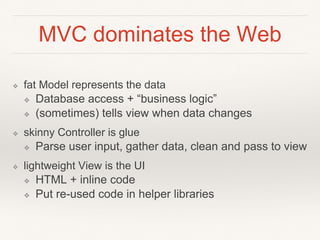
MVC dominates the Web 
❖ fat Model represents the data 
❖ Database access + “business logic” 
❖ (sometimes) tells view when data changes 
❖ skinny Controller is glue 
❖ Parse user input, gather data, clean and pass to view 
❖ lightweight View is the UI 
❖ HTML + inline code 
❖ Put re-used code in helper libraries
MVC: Web App Example
A Variety of Approaches 
❖ “CGI”: roll your own quick scripts 
❖ Don’t usually play well with others 
❖ Microframeworks (microkernel) 
❖ Quick spin up, lightweight 
❖ Sinatra (ruby), Flask (Python), etc… 
❖ Frameworks (macrokernel) 
❖ French is easy once you speak French 
❖ Rails (ruby), Django (Python), CakePHP etc… 
❖ Content Management Systems (CMS) 
❖ Core rigid, flexible module system, can get features for free 
❖ Drupal (php), Wordpress (php), etc… 
❖ PS: Javascript is HOT right now 
❖ NodeJS (+express), Meteor, BackboneJS
Microframeworks
Microframeworks 
❖ Positives 
❖ Easier learning curves 
❖ Not many assumptions to learn 
❖ Not many commands to understand 
❖ Get results quickly 
❖ Real web app in just a few lines of code 
❖ Negatives 
❖ Only do a few things out of the box (need libraries to 
do more) 
❖ Don’t scale well with features
Microframework: Flask 
❖ Dependencies 
❖ Python (I still recommend v2.7) 
❖ Python Setup Tools 
❖ Install 
❖ > pip install flask 
❖ Or 
❖ > easy_install flask 
❖ Quickstart 
❖ demo
Microframework: BackboneJS 
❖ In-browser MVC 
❖ demo
Frameworks
Frameworks 
❖ Positives 
❖ Lots of simplifying assumptions 
❖ Built for production environments 
❖ More basics built-in (db, email, etc) 
❖ Negatives 
❖ Opaque 
❖ Takes a while to learn common patterns 
❖ Annoying if you don’t do things “right”
Framework: Rails 
❖ Dependencies 
❖ Ruby (use RVM to install) 
❖ RubyGems 
❖ Install 
❖ > gem install rails 
❖ Quickstart 
❖ Demo 
❖ Install Aptana’s RadRails to get started quickly!
Examples 
❖ Backbone 
❖ https://github.com/rahulbot/GV-GetToKnow-backbone 
❖ Flask 
❖ https://github.com/rahulbot/GV-GetToKnow-flask 
❖ Rails 
❖ https://github.com/rahulbot/GV-GetToKnow-rails
Homework 
❖ see course outline

[Mas 500] Web Basics

  • 1.
    MAS.500 - SoftwareModule - Rahul Bhargava Web Development 2014.11.14
  • 2.
    Topics 1. MVCand Web Dev 2. A Variety of Approaches 3. Microframeworks 4. Frameworks
  • 3.
  • 4.
    Separates storage from interaction ❖ Helps separate code into unique pieces that don’t overlap ❖ Keeps your data storage separate from any specific representation of it to a user ❖ Facilitates code reuse ❖ read more about “Separation of Concerns”
  • 5.
    MVC Summary ❖Model: stores your data and any logic needed to use it ❖ Controller: takes user input, manipulates models, sets things up for the views ❖ View: renders the model data for a user
  • 6.
    MVC: Use ❖Many application and web frameworks have this baked in ❖ Rails has Models, Views and Controllers ❖ iOS has CoreData (NSManagedObject), UIView subclasses, UIViewController subclasses ❖ In-browser JS frameworks use this too ❖ This way of thinking about your software will pay off down the road
  • 7.
    MVC dominates theWeb ❖ fat Model represents the data ❖ Database access + “business logic” ❖ (sometimes) tells view when data changes ❖ skinny Controller is glue ❖ Parse user input, gather data, clean and pass to view ❖ lightweight View is the UI ❖ HTML + inline code ❖ Put re-used code in helper libraries
  • 8.
    MVC: Web AppExample
  • 9.
    A Variety ofApproaches ❖ “CGI”: roll your own quick scripts ❖ Don’t usually play well with others ❖ Microframeworks (microkernel) ❖ Quick spin up, lightweight ❖ Sinatra (ruby), Flask (Python), etc… ❖ Frameworks (macrokernel) ❖ French is easy once you speak French ❖ Rails (ruby), Django (Python), CakePHP etc… ❖ Content Management Systems (CMS) ❖ Core rigid, flexible module system, can get features for free ❖ Drupal (php), Wordpress (php), etc… ❖ PS: Javascript is HOT right now ❖ NodeJS (+express), Meteor, BackboneJS
  • 10.
  • 11.
    Microframeworks ❖ Positives ❖ Easier learning curves ❖ Not many assumptions to learn ❖ Not many commands to understand ❖ Get results quickly ❖ Real web app in just a few lines of code ❖ Negatives ❖ Only do a few things out of the box (need libraries to do more) ❖ Don’t scale well with features
  • 12.
    Microframework: Flask ❖Dependencies ❖ Python (I still recommend v2.7) ❖ Python Setup Tools ❖ Install ❖ > pip install flask ❖ Or ❖ > easy_install flask ❖ Quickstart ❖ demo
  • 13.
    Microframework: BackboneJS ❖In-browser MVC ❖ demo
  • 14.
  • 15.
    Frameworks ❖ Positives ❖ Lots of simplifying assumptions ❖ Built for production environments ❖ More basics built-in (db, email, etc) ❖ Negatives ❖ Opaque ❖ Takes a while to learn common patterns ❖ Annoying if you don’t do things “right”
  • 16.
    Framework: Rails ❖Dependencies ❖ Ruby (use RVM to install) ❖ RubyGems ❖ Install ❖ > gem install rails ❖ Quickstart ❖ Demo ❖ Install Aptana’s RadRails to get started quickly!
  • 17.
    Examples ❖ Backbone ❖ https://github.com/rahulbot/GV-GetToKnow-backbone ❖ Flask ❖ https://github.com/rahulbot/GV-GetToKnow-flask ❖ Rails ❖ https://github.com/rahulbot/GV-GetToKnow-rails
  • 18.
    Homework ❖ seecourse outline