Presentation #1
Basics - Overview
Topics
•
•
•
•
•
•

HTML vs CSS
DOM trees
JavaScript
PHP
Frameworks
Templates
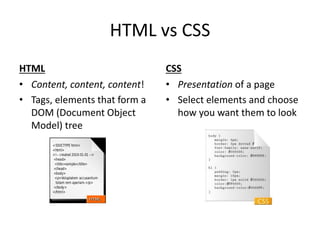
HTML vs CSS
HTML
• Content, content, content!
• Tags, elements that form a
DOM (Document Object
Model) tree

CSS
• Presentation of a page
• Select elements and choose
how you want them to look
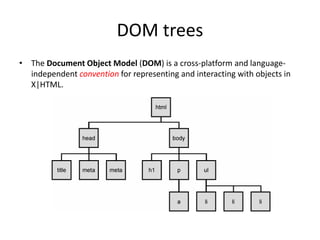
DOM trees
• The Document Object Model (DOM) is a cross-platform and languageindependent convention for representing and interacting with objects in
X|HTML.
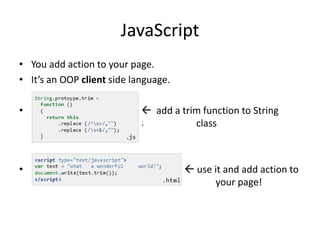
JavaScript
• You add action to your page.
• It’s an OOP client side language.
•

 add a trim function to String
sssssssssssssssssssssssssss
class

•

 use it and add action to
aaaaaaaaaaaaaaaaaaaaaaaaaaaaaa
your page!
Adding life to static pages
• You’ve been creating great web pages with HTML, and a bit of
CSS.

• But you’ve noticed that visitors to your site can’t do much
other than passively look at the content on the pages. The
communication’s one-way, and you’d like to change that!
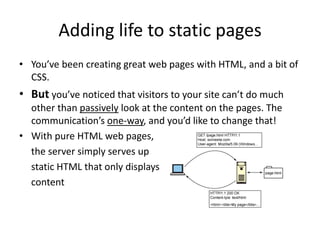
• With pure HTML web pages,
the server simply serves up
static HTML that only displays
content
PHP – Brings pages to life!
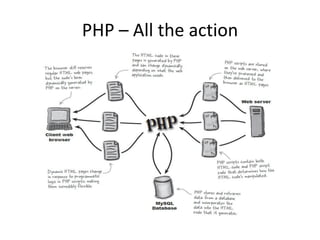
• PHP allows you to manipulate web page content on the server
just before a page is delivered to the client browser.
1. A PHP script runs on the server
2. This script can alter or generate HTML code at will
3. HTML page is delivered to the browser which does not know
that PHP was involved
• With PHP in the mix, the web server is able to dynamically
generate HTML web pages on the fly.
PHP – All the action
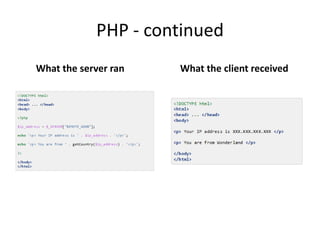
PHP - continued
What the server ran

What the client received
Frameworks
• A software framework is an abstraction in which software
providing generic functionality can be selectively changed by
additional user-written code, thus providing applicationspecific software. A software framework is a universal,
reusable software platform to develop applications, products
and solutions.
• Software frameworks include support programs, compilers,
code libraries, tool sets, and application programming
interfaces (APIs) that bring together all the different
components to enable development of a project or solution.
Frameworks – Why use one?
• If you look at PHP Job listings, you will often see “MVC Framework
Experience” as one of their requirements. It is becoming one of
those must-have skill sets for web developers.
1.
2.
3.
4.
5.
6.
7.

Code and File Organization
Utilities and Libraries
The MVC Pattern
Security
Less Code & Faster Development
Community Support
Suitable for Teamwork
Frameworks – Code and File Organization
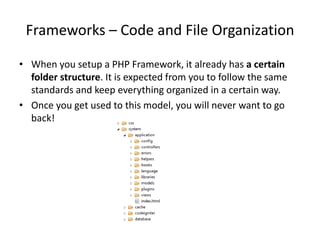
• When you setup a PHP Framework, it already has a certain
folder structure. It is expected from you to follow the same
standards and keep everything organized in a certain way.
• Once you get used to this model, you will never want to go
back!
Frameworks – Utilities and Libraries
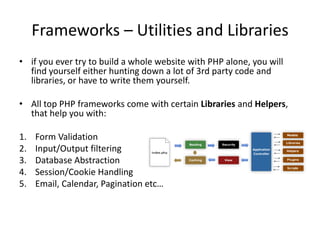
• if you ever try to build a whole website with PHP alone, you will
find yourself either hunting down a lot of 3rd party code and
libraries, or have to write them yourself.
• All top PHP frameworks come with certain Libraries and Helpers,
that help you with:
1.
2.
3.
4.
5.

Form Validation
Input/Output filtering
Database Abstraction
Session/Cookie Handling
Email, Calendar, Pagination etc…
Frameworks - The MVC Pattern
PHP itself works like a template
engine. However, when used
irresponsibly, it leads to very ugly and
unmaintainable code.
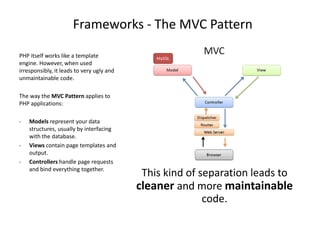
The way the MVC Pattern applies to
PHP applications:
-

-

Models represent your data
structures, usually by interfacing
with the database.
Views contain page templates and
output.
Controllers handle page requests
and bind everything together.

This kind of separation leads to
cleaner and more maintainable
code.
Frameworks - Security
• In PHP you can already find many input and output filtering
functions to protect your website against certain attacks.
• However, manually using these functions can get tiring and
you may forget about them every once in a while.
• With a framework, most of the work can be done for you
automatically. For example in CodeIgniter:
1. Any value passed to database object gets filtered against
SQL injection attacks.
2. All html generating functions, such as form helpers and url
helpers filter the output automatically.
3. All user input can be filtered against XSS attacks.
4. Encrypting cookies automatically is only a matter of
changing a config option.
Frameworks – Less Code & Faster
Development
• There is of course a learning curve for all PHP
Frameworks. But once you get over this hump, you will
enjoy the benefits of rapid application development.
• You will write less code, which means less time spent
typing. You will not have to chase down 3rd party
libraries all the time for every new project because
most of them will come with the default framework
install.
• Also, since you are being more organized, it will be
much faster to chase down bugs, maintain code, and
make changes to existing code.
Frameworks – Community Support
• All popular PHP Frameworks have great active
communities behind them. You can talk to
other developers, get help, feedback and also
give back to the community yourself.
• There are message boards and mailing lists…
You can also learn a lot by just browsing the
forums and look at what other people are
talking about.
Frameworks - Suitable for Teamwork
• The way your project is organized in a PHP
Framework also helps you create a suitable
environment for teamwork.
• You can let your designers work on the Views,
database guru work on the Models, let the
smart programmer build reusable Libraries
and Plugins etc…
• Also you can have someone build unit tests,
because they come with tools for that too.
Frameworks – Which one?
1.
2.
3.
4.
5.
6.

Laravel
Phalcon
Symfony
CodeIgniter
CakePHP
Zend

• There are also JavaScript frameworks which you
normally put them together alongside your PHP
framework to be more productive!
Templates
• A template is a set of HTML as well as CSS files
that organize the look and feel of your page.
• They basically make up the Views you will use
in your framework.
• Thus, your only job is to use the MVC
framework to fill the appropriate content on
each of your pages.
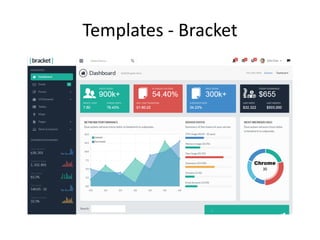
Templates - Bracket
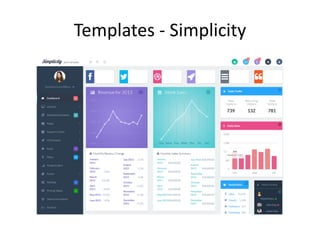
Templates - Simplicity
Templates
• And the list goes on and on…
• We will have to choose one of the ones
listed in the .doc file
The End
• Questions?

Presentation 1 Web--dev

  • 1.
  • 2.
    Topics • • • • • • HTML vs CSS DOMtrees JavaScript PHP Frameworks Templates
  • 3.
    HTML vs CSS HTML •Content, content, content! • Tags, elements that form a DOM (Document Object Model) tree CSS • Presentation of a page • Select elements and choose how you want them to look
  • 4.
    DOM trees • TheDocument Object Model (DOM) is a cross-platform and languageindependent convention for representing and interacting with objects in X|HTML.
  • 5.
    JavaScript • You addaction to your page. • It’s an OOP client side language. •  add a trim function to String sssssssssssssssssssssssssss class •  use it and add action to aaaaaaaaaaaaaaaaaaaaaaaaaaaaaa your page!
  • 6.
    Adding life tostatic pages • You’ve been creating great web pages with HTML, and a bit of CSS. • But you’ve noticed that visitors to your site can’t do much other than passively look at the content on the pages. The communication’s one-way, and you’d like to change that! • With pure HTML web pages, the server simply serves up static HTML that only displays content
  • 7.
    PHP – Bringspages to life! • PHP allows you to manipulate web page content on the server just before a page is delivered to the client browser. 1. A PHP script runs on the server 2. This script can alter or generate HTML code at will 3. HTML page is delivered to the browser which does not know that PHP was involved • With PHP in the mix, the web server is able to dynamically generate HTML web pages on the fly.
  • 8.
    PHP – Allthe action
  • 9.
    PHP - continued Whatthe server ran What the client received
  • 10.
    Frameworks • A softwareframework is an abstraction in which software providing generic functionality can be selectively changed by additional user-written code, thus providing applicationspecific software. A software framework is a universal, reusable software platform to develop applications, products and solutions. • Software frameworks include support programs, compilers, code libraries, tool sets, and application programming interfaces (APIs) that bring together all the different components to enable development of a project or solution.
  • 11.
    Frameworks – Whyuse one? • If you look at PHP Job listings, you will often see “MVC Framework Experience” as one of their requirements. It is becoming one of those must-have skill sets for web developers. 1. 2. 3. 4. 5. 6. 7. Code and File Organization Utilities and Libraries The MVC Pattern Security Less Code & Faster Development Community Support Suitable for Teamwork
  • 12.
    Frameworks – Codeand File Organization • When you setup a PHP Framework, it already has a certain folder structure. It is expected from you to follow the same standards and keep everything organized in a certain way. • Once you get used to this model, you will never want to go back!
  • 13.
    Frameworks – Utilitiesand Libraries • if you ever try to build a whole website with PHP alone, you will find yourself either hunting down a lot of 3rd party code and libraries, or have to write them yourself. • All top PHP frameworks come with certain Libraries and Helpers, that help you with: 1. 2. 3. 4. 5. Form Validation Input/Output filtering Database Abstraction Session/Cookie Handling Email, Calendar, Pagination etc…
  • 14.
    Frameworks - TheMVC Pattern PHP itself works like a template engine. However, when used irresponsibly, it leads to very ugly and unmaintainable code. The way the MVC Pattern applies to PHP applications: - - Models represent your data structures, usually by interfacing with the database. Views contain page templates and output. Controllers handle page requests and bind everything together. This kind of separation leads to cleaner and more maintainable code.
  • 15.
    Frameworks - Security •In PHP you can already find many input and output filtering functions to protect your website against certain attacks. • However, manually using these functions can get tiring and you may forget about them every once in a while. • With a framework, most of the work can be done for you automatically. For example in CodeIgniter: 1. Any value passed to database object gets filtered against SQL injection attacks. 2. All html generating functions, such as form helpers and url helpers filter the output automatically. 3. All user input can be filtered against XSS attacks. 4. Encrypting cookies automatically is only a matter of changing a config option.
  • 16.
    Frameworks – LessCode & Faster Development • There is of course a learning curve for all PHP Frameworks. But once you get over this hump, you will enjoy the benefits of rapid application development. • You will write less code, which means less time spent typing. You will not have to chase down 3rd party libraries all the time for every new project because most of them will come with the default framework install. • Also, since you are being more organized, it will be much faster to chase down bugs, maintain code, and make changes to existing code.
  • 17.
    Frameworks – CommunitySupport • All popular PHP Frameworks have great active communities behind them. You can talk to other developers, get help, feedback and also give back to the community yourself. • There are message boards and mailing lists… You can also learn a lot by just browsing the forums and look at what other people are talking about.
  • 18.
    Frameworks - Suitablefor Teamwork • The way your project is organized in a PHP Framework also helps you create a suitable environment for teamwork. • You can let your designers work on the Views, database guru work on the Models, let the smart programmer build reusable Libraries and Plugins etc… • Also you can have someone build unit tests, because they come with tools for that too.
  • 19.
    Frameworks – Whichone? 1. 2. 3. 4. 5. 6. Laravel Phalcon Symfony CodeIgniter CakePHP Zend • There are also JavaScript frameworks which you normally put them together alongside your PHP framework to be more productive!
  • 20.
    Templates • A templateis a set of HTML as well as CSS files that organize the look and feel of your page. • They basically make up the Views you will use in your framework. • Thus, your only job is to use the MVC framework to fill the appropriate content on each of your pages.
  • 21.
  • 22.
  • 23.
    Templates • And thelist goes on and on… • We will have to choose one of the ones listed in the .doc file
  • 24.