Pinterest Website Optimization
EASY STEPS TO DRIVE HUGE INCREASES
IN PINTEREST REFERRAL TRAFFIC
Marketer’s Guide to
to
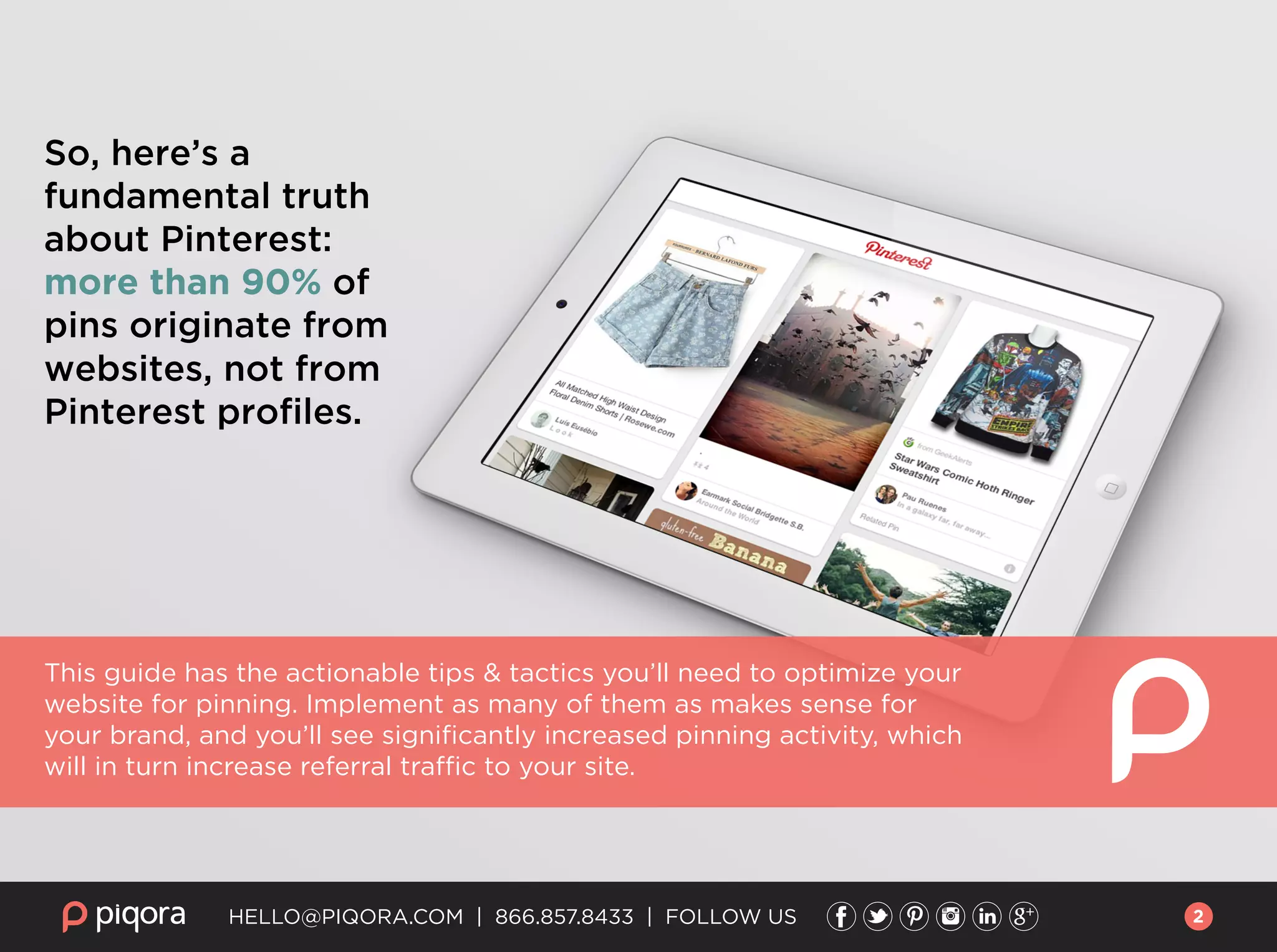
So, here’s a
fundamental truth
about Pinterest:
more than 90% of
pins originate from
websites, not from
Pinterest profiles.
This guide has the actionable tips & tactics you’ll need to optimize your
website for pinning. Implement as many of them as makes sense for
your brand, and you’ll see significantly increased pinning activity, which
will in turn increase referral traffic to your site.
HELLO@PIQORA.COM | 866.857.8433 | FOLLOW US 2
HELLO@PIQORA.COM | 866.857.8433 | FOLLOW US
Text-heavy websites, such as online news outlets,
were designed for the text web: for robots to crawl,
index and deliver links to people in search results.
These pages don’t work as well for human internet
users, and especially not consumers who are trying
to discover the perfect gift, or find inspiration for a
home remodeling project.
As consumers turn to visual networks like
Pinterest in ever-increasing numbers for precisely
this type of visual discovery, the phrase “a picture is
worth a thousand words” takes on a whole new
meaning, as marketers react to the consumer shift
and focus on telling stories with visual content, not
words. The instructions below are designed to help
any brand immediately improve their visibility on
Pinterest, improve time on site, and lead to higher
average order value for e-commerce brands.
A LITTLE BACKGROUND:
Optimizing The Pinner’s Experience
3
HELLO@PIQORA.COM | 866.857.8433 | FOLLOW US
Adding the “Pin It” button to your images is the single
most important thing you can do to increase pinning of
your content. The amount of referral traffic your site
receives from Pinterest is directly correlated to the
number of Pins posted by you, or your community. By
adding the Pin It button to your product images, the
pinning process is simplified for your site visitors, which
leads directly to increased Pins from your site.
What to do now: You can find the Pin It button on
Pinterest’s widget builder page. Also, consider adding
the Pinterest Follow button to your social CTA’s. It gets
website visitors to check out your Pinterest page,
thereby encouraging them to follow you, which leads to
more traffic and repins.
If you don’t have time to read past this page,
here are the key takeaways for optimizing your site for Pinterest:
Adding the “Pin It” button:
Posting images that resonate with your audience is the
most critical element to success on Pinterest overall,
but the text description that accompanies each image
helps it be found on Pinterest.
Pinterest-friendly descriptions:
What to do now: When someone pins from your site,
your existing product description forms that Pin’s
description and keywords. Revise the description to
match Pinterest’s own categories, in addition to the
primary keywords for that product. Read more here
about what keywords do and don’t do on Pinterest.
Rich Pins & the Gift Feed are critical for e-commerce. Take
advantage of Rich Pins and the Pinterest Gift Feed, to
make each of your Pins more shoppable for consumers.
Rich Pins enable you to embed product pricing and
in-stock availability to each pin. The Gift Feed increases
shopability even further, by alerting users when Pins
they’ve saved change in price, effectively making
Pinterest an extension of your email team!
Rich Pins & the Gift Feed:
What to do now: Learn more about Rich Pins on
Pinterest’s blog, and how to take advantage of the Gift
Feed on our blog.
4
HELLO@PIQORA.COM | 866.857.8433 | FOLLOW US
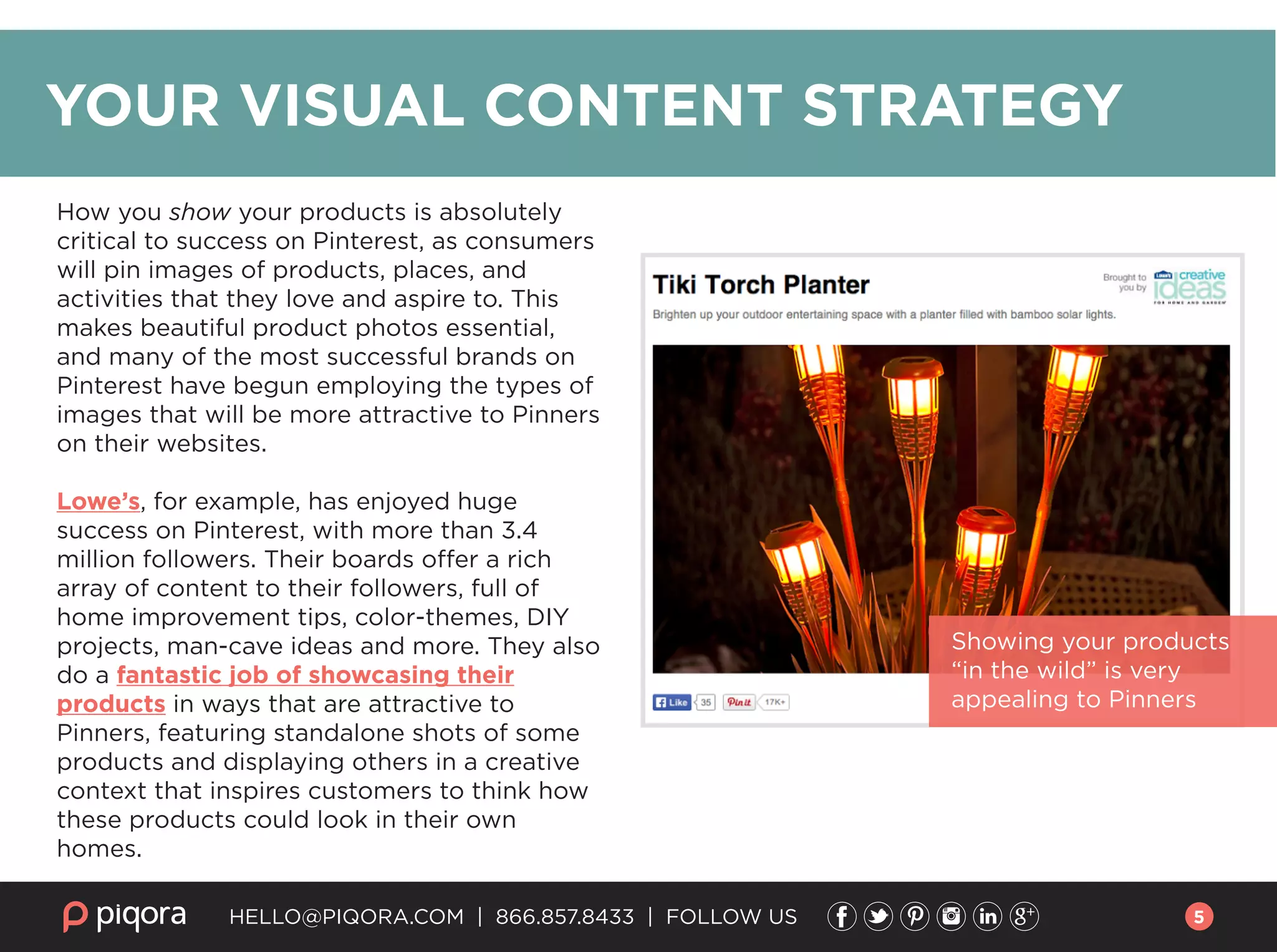
Showing your products
“in the wild” is very
appealing to Pinners
How you show your products is absolutely
critical to success on Pinterest, as consumers
will pin images of products, places, and
activities that they love and aspire to. This
makes beautiful product photos essential,
and many of the most successful brands on
Pinterest have begun employing the types of
images that will be more attractive to Pinners
on their websites.
Lowe’s, for example, has enjoyed huge
success on Pinterest, with more than 3.4
million followers. Their boards offer a rich
array of content to their followers, full of
home improvement tips, color-themes, DIY
projects, man-cave ideas and more. They also
do a fantastic job of showcasing their
products in ways that are attractive to
Pinners, featuring standalone shots of some
products and displaying others in a creative
context that inspires customers to think how
these products could look in their own
homes.
YOUR VISUAL CONTENT STRATEGY
5
The important thing is to make
sure that as much of your content
as possible is both pinnable and
pinworthy. Hero shots will get
pinned, but photos that feature
products in contextual or lifestyle
settings are also very popular.
Remember that Pinterest is
different than other social
networks because consumers are
looking to discover new products
and brands.
Keep an eye out for popular pins in
your category, and take them into
consideration for your own visual
content. Look at the lighting,
angles, photo staging, and where
the photos were taken.
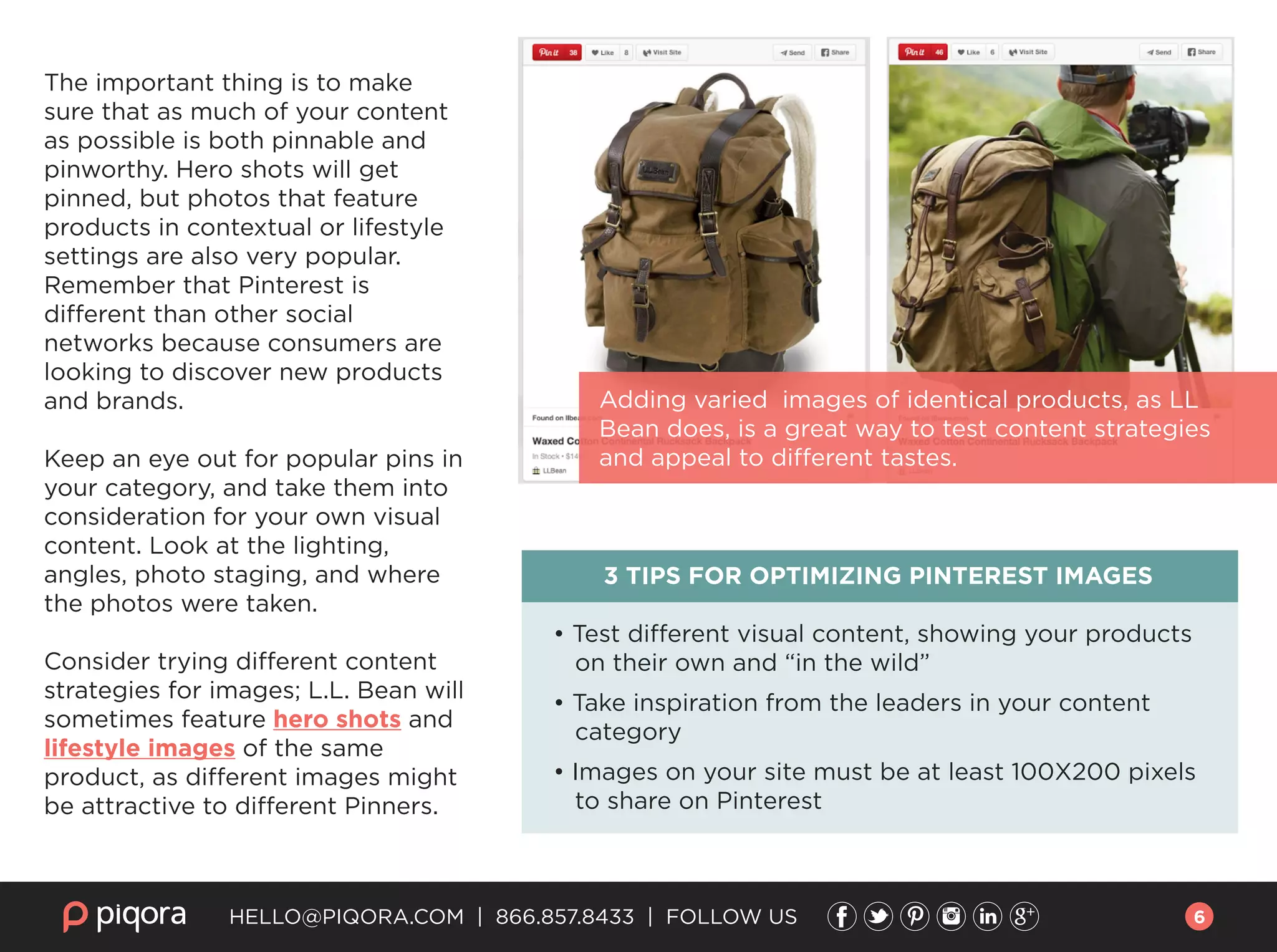
Consider trying different content
strategies for images; L.L. Bean will
sometimes feature hero shots and
lifestyle images of the same
product, as different images might
be attractive to different Pinners.
3 TIPS FOR OPTIMIZING PINTEREST IMAGES
• Test different visual content, showing your products
on their own and “in the wild”
• Take inspiration from the leaders in your content
category
• Images on your site must be at least 100X200 pixels
to share on Pinterest
HELLO@PIQORA.COM | 866.857.8433 | FOLLOW US
Adding varied images of identical products, as LL
Bean does, is a great way to test content strategies
and appeal to different tastes.
6
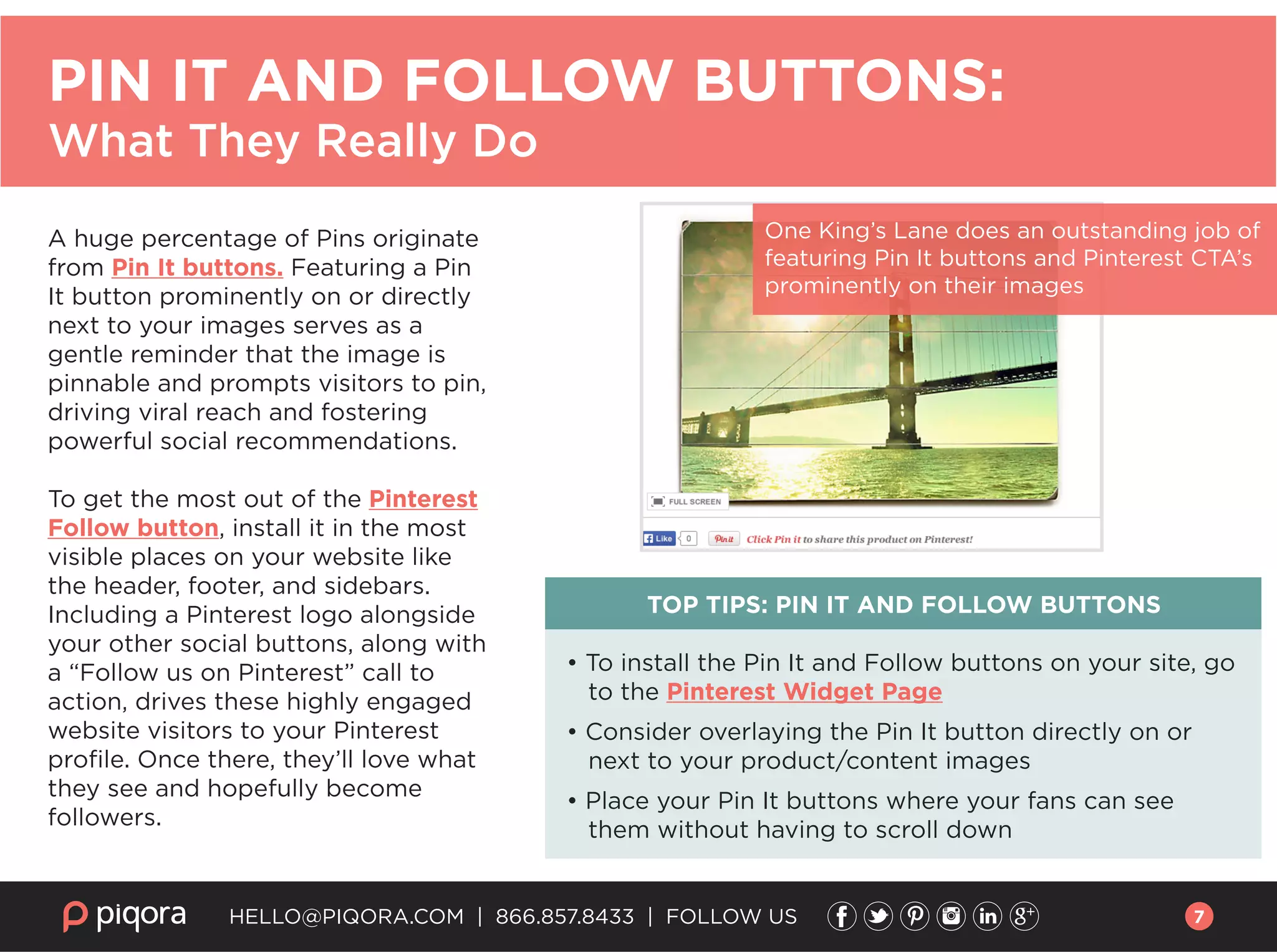
A huge percentage of Pins originate
from Pin It buttons. Featuring a Pin
It button prominently on or directly
next to your images serves as a
gentle reminder that the image is
pinnable and prompts visitors to pin,
driving viral reach and fostering
powerful social recommendations.
To get the most out of the Pinterest
Follow button, install it in the most
visible places on your website like
the header, footer, and sidebars.
Including a Pinterest logo alongside
your other social buttons, along with
a “Follow us on Pinterest” call to
action, drives these highly engaged
website visitors to your Pinterest
profile. Once there, they’ll love what
they see and hopefully become
followers.
TOP TIPS: PIN IT AND FOLLOW BUTTONS
• To install the Pin It and Follow buttons on your site, go
to the Pinterest Widget Page
• Consider overlaying the Pin It button directly on or
next to your product/content images
• Place your Pin It buttons where your fans can see
them without having to scroll down
HELLO@PIQORA.COM | 866.857.8433 | FOLLOW US
PIN IT AND FOLLOW BUTTONS:
What They Really Do
One King’s Lane does an outstanding job of
featuring Pin It buttons and Pinterest CTA’s
prominently on their images
7
On Pinterest, obviously the first thing that a
person looks at is the Pin itself, then usually
the description. Having a detailed, well written
description of your products will make it easy
for people to pin from your site, and will have
a huge payoff when they do. This is because
your description will form not only the pin’s
description on Pinterest, but also that image’s
keywords for search results!
You might have only a few seconds to attract
a Pinner’s attention. Just by adding a phrase,
you can immediately give Pinners the context
for which your pin is intended. By adding a
more robust description for all pins, to include
brand information, pricing, product
descriptors, and any additional keywords, you
enhance your pin’s discoverability. For more
information, check out this tutorial.
TOP TIPS: PIN DESCRIPTIONS
• Add product descriptions that include
details like pricing, color, product model,
and brand name
• Tailor your image descriptions and
primary keywords to match Pinterest’s
own categories
• The most repinnable descriptions are
about 200 characters long
• If you add the word “You,” the Pinner
feels like you’re speaking to them
HELLO@PIQORA.COM | 866.857.8433 | FOLLOW US
PIN DESCRIPTIONS:
Everything They Need to Have, Nothing They Don’t
8
Pinterest has several advanced features
specifically designed to help e-commerce
retailers.
Rich Pins allow you to include incredibly useful
data in your pins, ranging from agile product
pricing and availability to ingredient lists for
recipes. Pinterest’s search pulls this data directly
from your site, in real-time. Rich Pins include a
strong call to action on where to buy the pin,
which can drive more qualified and higher
purchase intent traffic to your site while reducing
bounce rate.
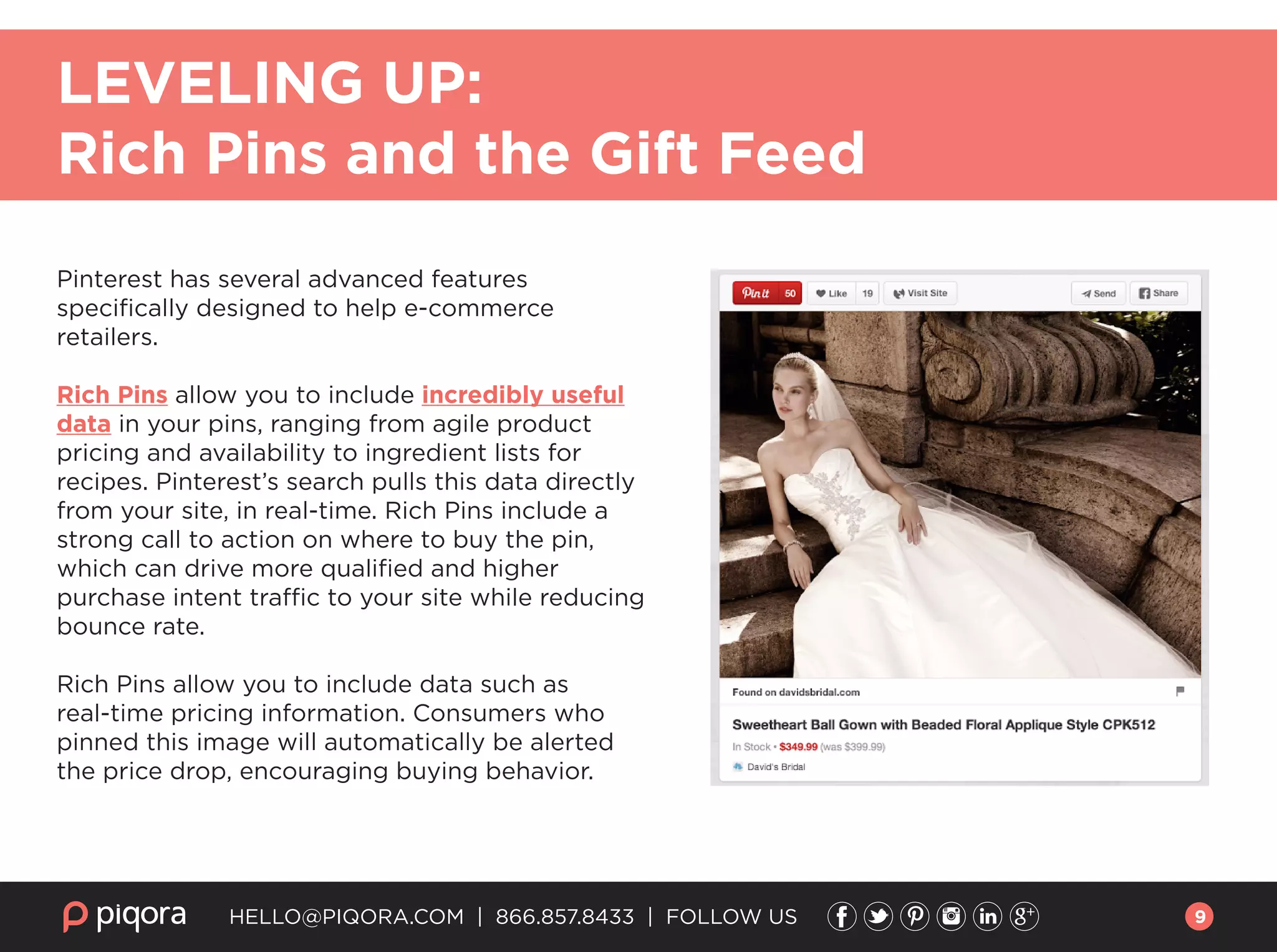
Rich Pins allow you to include data such as
real-time pricing information. Consumers who
pinned this image will automatically be alerted
the price drop, encouraging buying behavior.
HELLO@PIQORA.COM | 866.857.8433 | FOLLOW US
LEVELING UP:
Rich Pins and the Gift Feed
9
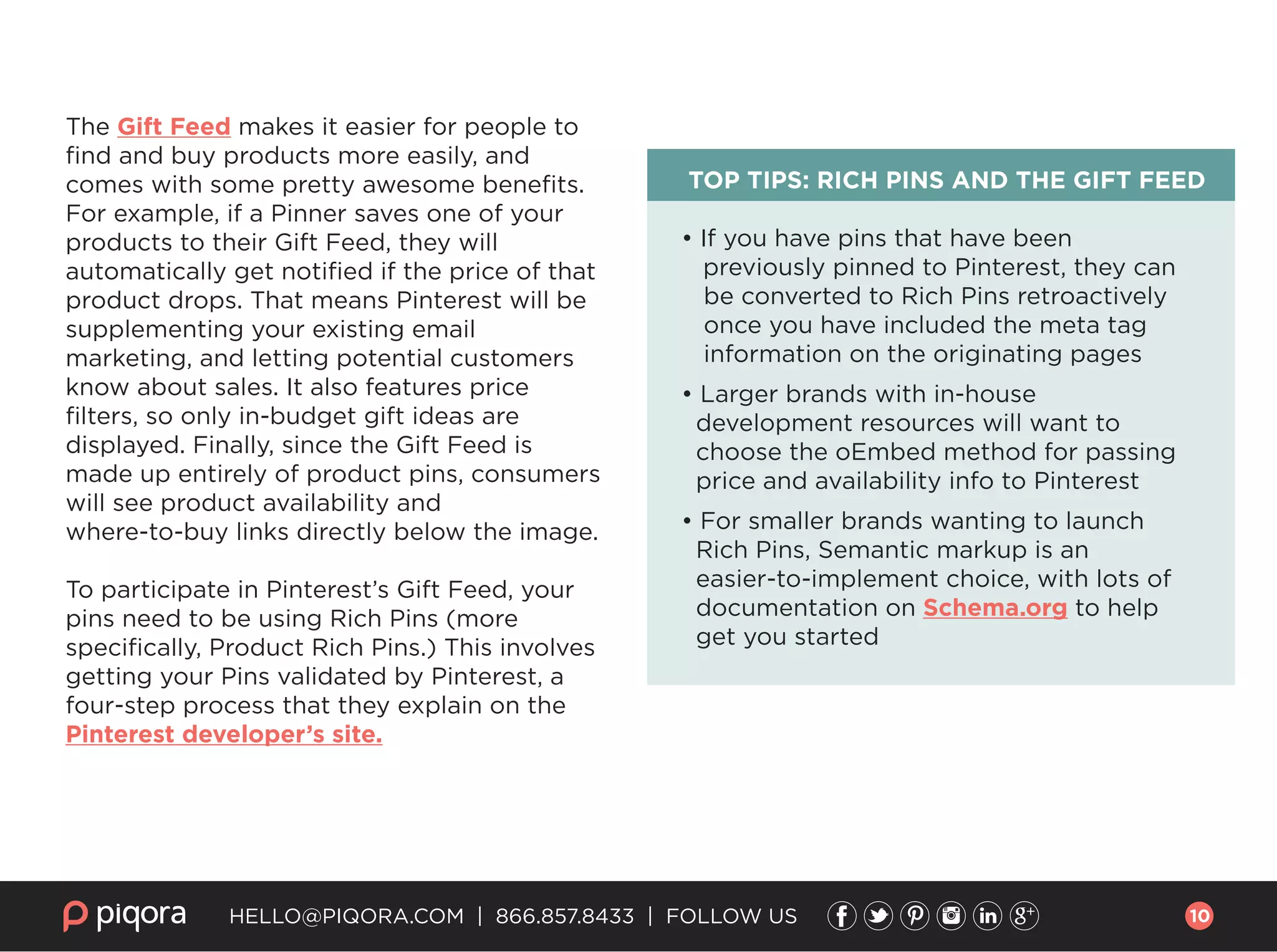
The Gift Feed makes it easier for people to
find and buy products more easily, and
comes with some pretty awesome benefits.
For example, if a Pinner saves one of your
products to their Gift Feed, they will
automatically get notified if the price of that
product drops. That means Pinterest will be
supplementing your existing email
marketing, and letting potential customers
know about sales. It also features price
filters, so only in-budget gift ideas are
displayed. Finally, since the Gift Feed is
made up entirely of product pins, consumers
will see product availability and
where-to-buy links directly below the image.
To participate in Pinterest’s Gift Feed, your
pins need to be using Rich Pins (more
specifically, Product Rich Pins.) This involves
getting your Pins validated by Pinterest, a
four-step process that they explain on the
Pinterest developer’s site.
TOP TIPS: RICH PINS AND THE GIFT FEED
• If you have pins that have been
previously pinned to Pinterest, they can
be converted to Rich Pins retroactively
once you have included the meta tag
information on the originating pages
• Larger brands with in-house
development resources will want to
choose the oEmbed method for passing
price and availability info to Pinterest
• For smaller brands wanting to launch
Rich Pins, Semantic markup is an
easier-to-implement choice, with lots of
documentation on Schema.org to help
get you started
HELLO@PIQORA.COM | 866.857.8433 | FOLLOW US 10
HELLO@PIQORA.COM | 866.857.8433 | FOLLOW US
HOW TO MEASURE PINTEREST ACTIVITY
and get more of it!
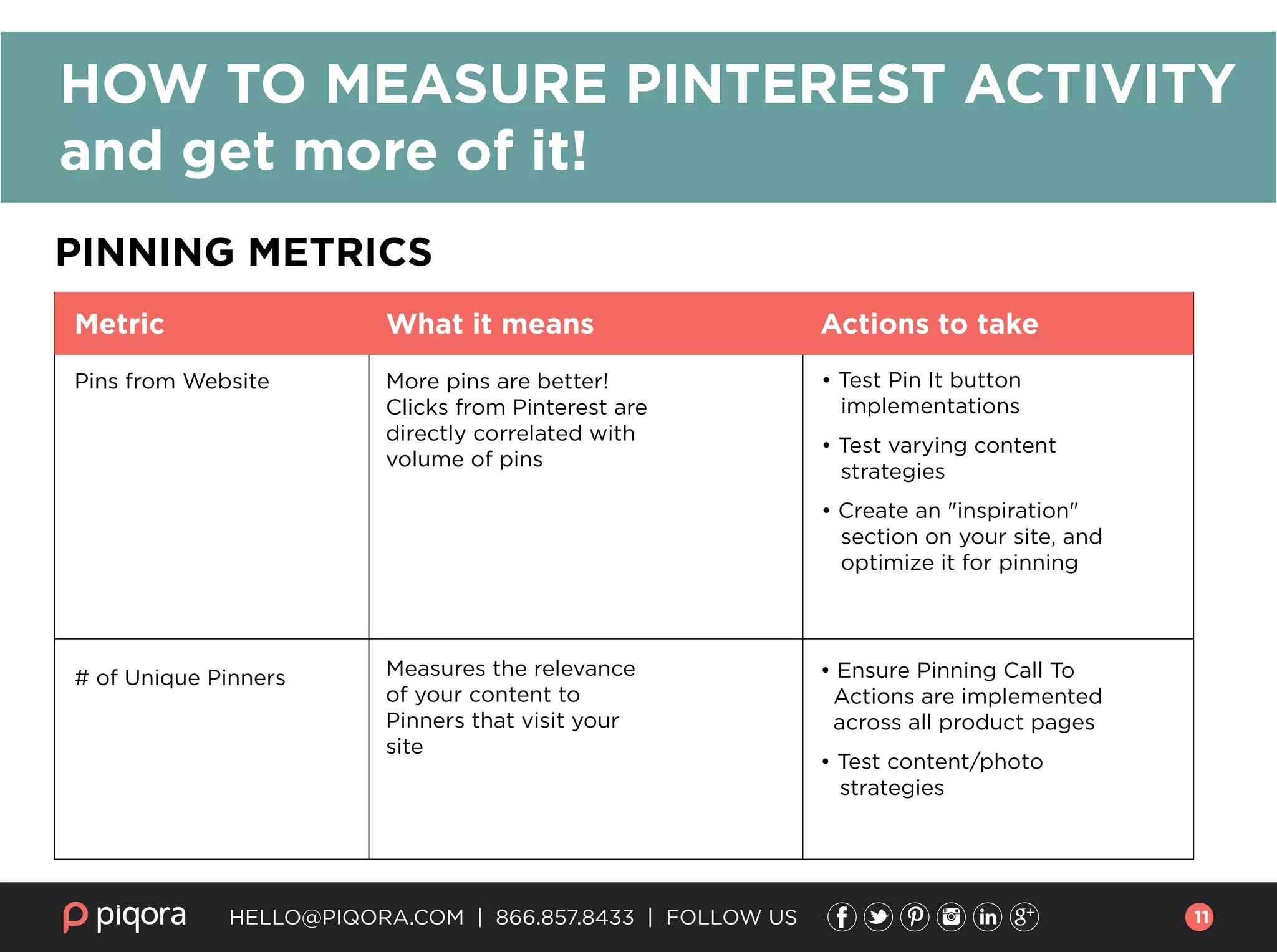
PINNING METRICS
Pins from Website More pins are better!
Clicks from Pinterest are
directly correlated with
volume of pins
• Test Pin It button
implementations
• Test varying content
strategies
• Create an "inspiration"
section on your site, and
optimize it for pinning
• Ensure Pinning Call To
Actions are implemented
across all product pages
• Test content/photo
strategies
Measures the relevance
of your content to
Pinners that visit your
site
# of Unique Pinners
Metric What it means Actions to take
11
HELLO@PIQORA.COM | 866.857.8433 | FOLLOW US
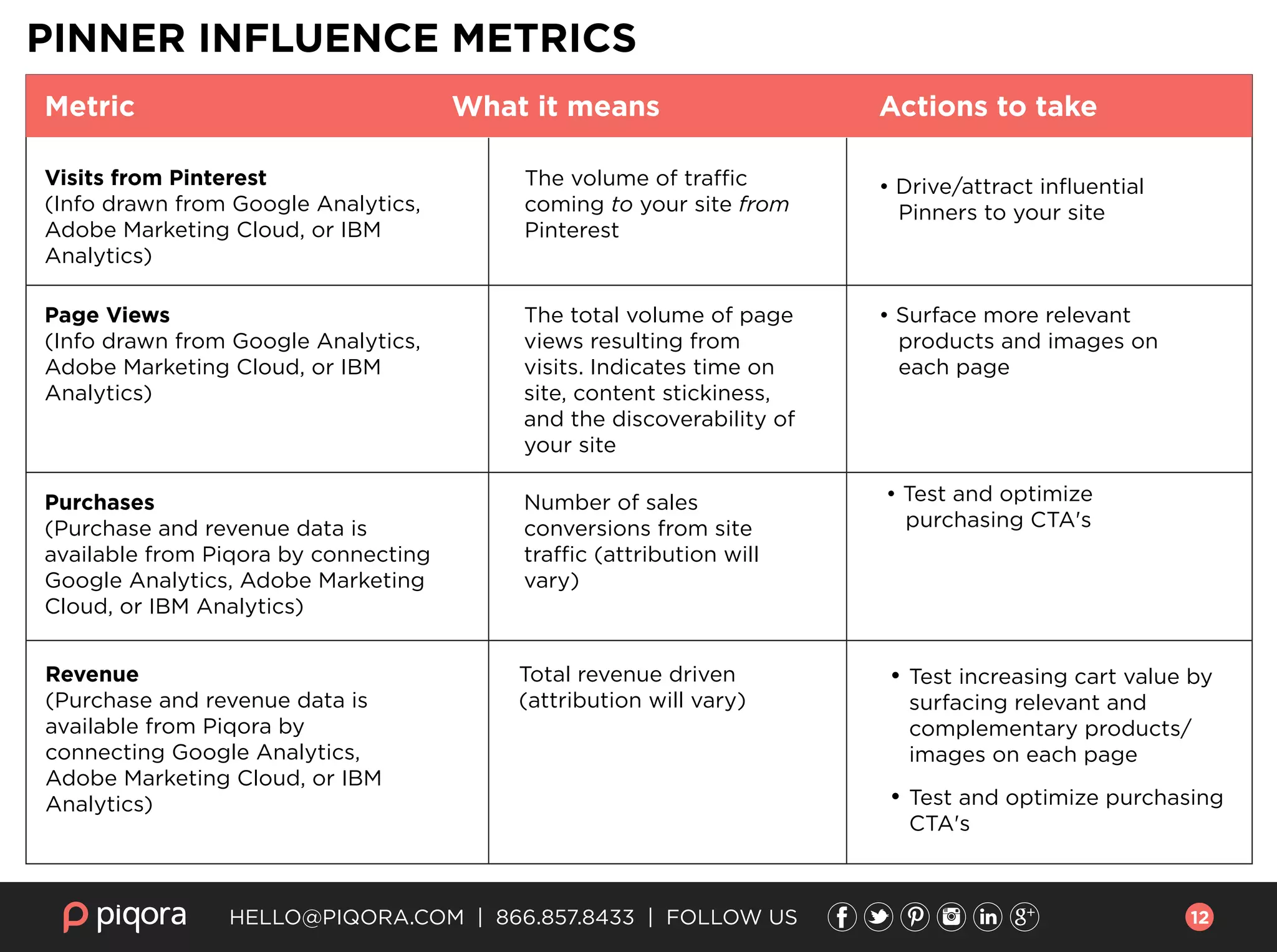
Metric What it means Actions to take
• Drive/attract influential
Pinners to your site
• Surface more relevant
products and images on
each page
• Test and optimize
purchasing CTA's
• Test increasing cart value by
surfacing relevant and
complementary products/
images on each page
• Test and optimize purchasing
CTA's
The volume of traffic
coming to your site from
Pinterest
The total volume of page
views resulting from
visits. Indicates time on
site, content stickiness,
and the discoverability of
your site
Number of sales
conversions from site
traffic (attribution will
vary)
Total revenue driven
(attribution will vary)
Visits from Pinterest
(Info drawn from Google Analytics,
Adobe Marketing Cloud, or IBM
Analytics)
Page Views
(Info drawn from Google Analytics,
Adobe Marketing Cloud, or IBM
Analytics)
Purchases
(Purchase and revenue data is
available from Piqora by connecting
Google Analytics, Adobe Marketing
Cloud, or IBM Analytics)
Revenue
(Purchase and revenue data is
available from Piqora by
connecting Google Analytics,
Adobe Marketing Cloud, or IBM
Analytics)
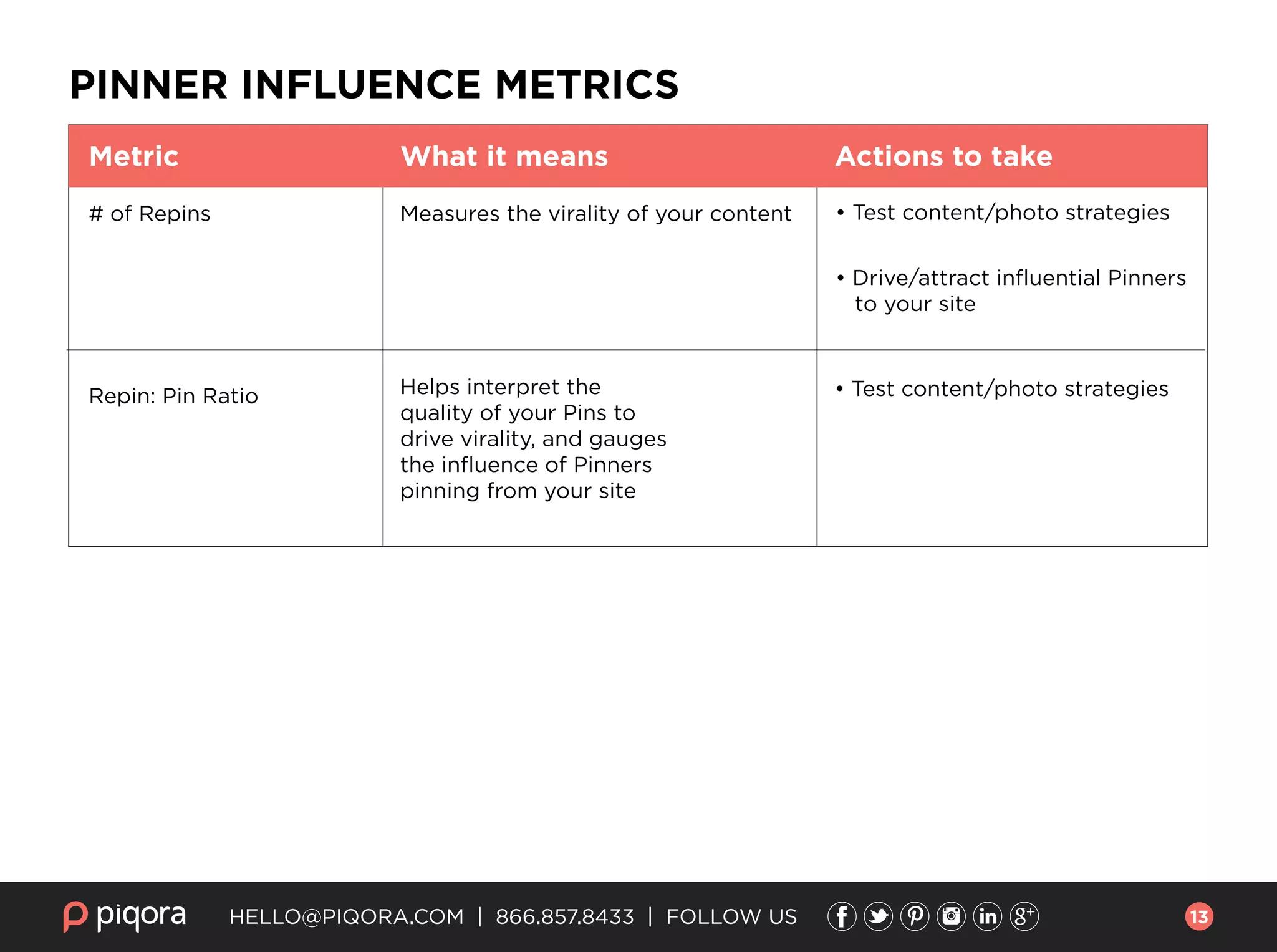
PINNER INFLUENCE METRICS
12
HELLO@PIQORA.COM | 866.857.8433 | FOLLOW US
PINNER INFLUENCE METRICS
# of Repins Measures the virality of your content • Test content/photo strategies
• Drive/attract influential Pinners
to your site
• Test content/photo strategiesHelps interpret the
quality of your Pins to
drive virality, and gauges
the influence of Pinners
pinning from your site
Repin: Pin Ratio
Metric What it means Actions to take
13
HELLO@PIQORA.COM | 866.857.8433 | FOLLOW US
There are more than 70 million people
on Pinterest, offering a unique
opportunity to leverage your visual
content to gain insight into customers’
lifestyles and needs, all while growing
reach and improving organic search
results. By optimizing your website for
Pinners, you open the doors to more fluid
interactions with your fans on that
platform, creating a strong community
around your products, services, and
brand.
To learn more about how you can
enhance your success on Pinterest, go to
www.piqora.com and request a demo,
we’d love to talk to you!
Happy Pinning!
A FEW FINAL TAKEAWAYS
14

Marketer’s Guide to Pinterest Website Optimization

  • 1.
    Pinterest Website Optimization EASYSTEPS TO DRIVE HUGE INCREASES IN PINTEREST REFERRAL TRAFFIC Marketer’s Guide to to
  • 2.
    So, here’s a fundamentaltruth about Pinterest: more than 90% of pins originate from websites, not from Pinterest profiles. This guide has the actionable tips & tactics you’ll need to optimize your website for pinning. Implement as many of them as makes sense for your brand, and you’ll see significantly increased pinning activity, which will in turn increase referral traffic to your site. HELLO@PIQORA.COM | 866.857.8433 | FOLLOW US 2
  • 3.
    HELLO@PIQORA.COM | 866.857.8433| FOLLOW US Text-heavy websites, such as online news outlets, were designed for the text web: for robots to crawl, index and deliver links to people in search results. These pages don’t work as well for human internet users, and especially not consumers who are trying to discover the perfect gift, or find inspiration for a home remodeling project. As consumers turn to visual networks like Pinterest in ever-increasing numbers for precisely this type of visual discovery, the phrase “a picture is worth a thousand words” takes on a whole new meaning, as marketers react to the consumer shift and focus on telling stories with visual content, not words. The instructions below are designed to help any brand immediately improve their visibility on Pinterest, improve time on site, and lead to higher average order value for e-commerce brands. A LITTLE BACKGROUND: Optimizing The Pinner’s Experience 3
  • 4.
    HELLO@PIQORA.COM | 866.857.8433| FOLLOW US Adding the “Pin It” button to your images is the single most important thing you can do to increase pinning of your content. The amount of referral traffic your site receives from Pinterest is directly correlated to the number of Pins posted by you, or your community. By adding the Pin It button to your product images, the pinning process is simplified for your site visitors, which leads directly to increased Pins from your site. What to do now: You can find the Pin It button on Pinterest’s widget builder page. Also, consider adding the Pinterest Follow button to your social CTA’s. It gets website visitors to check out your Pinterest page, thereby encouraging them to follow you, which leads to more traffic and repins. If you don’t have time to read past this page, here are the key takeaways for optimizing your site for Pinterest: Adding the “Pin It” button: Posting images that resonate with your audience is the most critical element to success on Pinterest overall, but the text description that accompanies each image helps it be found on Pinterest. Pinterest-friendly descriptions: What to do now: When someone pins from your site, your existing product description forms that Pin’s description and keywords. Revise the description to match Pinterest’s own categories, in addition to the primary keywords for that product. Read more here about what keywords do and don’t do on Pinterest. Rich Pins & the Gift Feed are critical for e-commerce. Take advantage of Rich Pins and the Pinterest Gift Feed, to make each of your Pins more shoppable for consumers. Rich Pins enable you to embed product pricing and in-stock availability to each pin. The Gift Feed increases shopability even further, by alerting users when Pins they’ve saved change in price, effectively making Pinterest an extension of your email team! Rich Pins & the Gift Feed: What to do now: Learn more about Rich Pins on Pinterest’s blog, and how to take advantage of the Gift Feed on our blog. 4
  • 5.
    HELLO@PIQORA.COM | 866.857.8433| FOLLOW US Showing your products “in the wild” is very appealing to Pinners How you show your products is absolutely critical to success on Pinterest, as consumers will pin images of products, places, and activities that they love and aspire to. This makes beautiful product photos essential, and many of the most successful brands on Pinterest have begun employing the types of images that will be more attractive to Pinners on their websites. Lowe’s, for example, has enjoyed huge success on Pinterest, with more than 3.4 million followers. Their boards offer a rich array of content to their followers, full of home improvement tips, color-themes, DIY projects, man-cave ideas and more. They also do a fantastic job of showcasing their products in ways that are attractive to Pinners, featuring standalone shots of some products and displaying others in a creative context that inspires customers to think how these products could look in their own homes. YOUR VISUAL CONTENT STRATEGY 5
  • 6.
    The important thingis to make sure that as much of your content as possible is both pinnable and pinworthy. Hero shots will get pinned, but photos that feature products in contextual or lifestyle settings are also very popular. Remember that Pinterest is different than other social networks because consumers are looking to discover new products and brands. Keep an eye out for popular pins in your category, and take them into consideration for your own visual content. Look at the lighting, angles, photo staging, and where the photos were taken. Consider trying different content strategies for images; L.L. Bean will sometimes feature hero shots and lifestyle images of the same product, as different images might be attractive to different Pinners. 3 TIPS FOR OPTIMIZING PINTEREST IMAGES • Test different visual content, showing your products on their own and “in the wild” • Take inspiration from the leaders in your content category • Images on your site must be at least 100X200 pixels to share on Pinterest HELLO@PIQORA.COM | 866.857.8433 | FOLLOW US Adding varied images of identical products, as LL Bean does, is a great way to test content strategies and appeal to different tastes. 6
  • 7.
    A huge percentageof Pins originate from Pin It buttons. Featuring a Pin It button prominently on or directly next to your images serves as a gentle reminder that the image is pinnable and prompts visitors to pin, driving viral reach and fostering powerful social recommendations. To get the most out of the Pinterest Follow button, install it in the most visible places on your website like the header, footer, and sidebars. Including a Pinterest logo alongside your other social buttons, along with a “Follow us on Pinterest” call to action, drives these highly engaged website visitors to your Pinterest profile. Once there, they’ll love what they see and hopefully become followers. TOP TIPS: PIN IT AND FOLLOW BUTTONS • To install the Pin It and Follow buttons on your site, go to the Pinterest Widget Page • Consider overlaying the Pin It button directly on or next to your product/content images • Place your Pin It buttons where your fans can see them without having to scroll down HELLO@PIQORA.COM | 866.857.8433 | FOLLOW US PIN IT AND FOLLOW BUTTONS: What They Really Do One King’s Lane does an outstanding job of featuring Pin It buttons and Pinterest CTA’s prominently on their images 7
  • 8.
    On Pinterest, obviouslythe first thing that a person looks at is the Pin itself, then usually the description. Having a detailed, well written description of your products will make it easy for people to pin from your site, and will have a huge payoff when they do. This is because your description will form not only the pin’s description on Pinterest, but also that image’s keywords for search results! You might have only a few seconds to attract a Pinner’s attention. Just by adding a phrase, you can immediately give Pinners the context for which your pin is intended. By adding a more robust description for all pins, to include brand information, pricing, product descriptors, and any additional keywords, you enhance your pin’s discoverability. For more information, check out this tutorial. TOP TIPS: PIN DESCRIPTIONS • Add product descriptions that include details like pricing, color, product model, and brand name • Tailor your image descriptions and primary keywords to match Pinterest’s own categories • The most repinnable descriptions are about 200 characters long • If you add the word “You,” the Pinner feels like you’re speaking to them HELLO@PIQORA.COM | 866.857.8433 | FOLLOW US PIN DESCRIPTIONS: Everything They Need to Have, Nothing They Don’t 8
  • 9.
    Pinterest has severaladvanced features specifically designed to help e-commerce retailers. Rich Pins allow you to include incredibly useful data in your pins, ranging from agile product pricing and availability to ingredient lists for recipes. Pinterest’s search pulls this data directly from your site, in real-time. Rich Pins include a strong call to action on where to buy the pin, which can drive more qualified and higher purchase intent traffic to your site while reducing bounce rate. Rich Pins allow you to include data such as real-time pricing information. Consumers who pinned this image will automatically be alerted the price drop, encouraging buying behavior. HELLO@PIQORA.COM | 866.857.8433 | FOLLOW US LEVELING UP: Rich Pins and the Gift Feed 9
  • 10.
    The Gift Feedmakes it easier for people to find and buy products more easily, and comes with some pretty awesome benefits. For example, if a Pinner saves one of your products to their Gift Feed, they will automatically get notified if the price of that product drops. That means Pinterest will be supplementing your existing email marketing, and letting potential customers know about sales. It also features price filters, so only in-budget gift ideas are displayed. Finally, since the Gift Feed is made up entirely of product pins, consumers will see product availability and where-to-buy links directly below the image. To participate in Pinterest’s Gift Feed, your pins need to be using Rich Pins (more specifically, Product Rich Pins.) This involves getting your Pins validated by Pinterest, a four-step process that they explain on the Pinterest developer’s site. TOP TIPS: RICH PINS AND THE GIFT FEED • If you have pins that have been previously pinned to Pinterest, they can be converted to Rich Pins retroactively once you have included the meta tag information on the originating pages • Larger brands with in-house development resources will want to choose the oEmbed method for passing price and availability info to Pinterest • For smaller brands wanting to launch Rich Pins, Semantic markup is an easier-to-implement choice, with lots of documentation on Schema.org to help get you started HELLO@PIQORA.COM | 866.857.8433 | FOLLOW US 10
  • 11.
    HELLO@PIQORA.COM | 866.857.8433| FOLLOW US HOW TO MEASURE PINTEREST ACTIVITY and get more of it! PINNING METRICS Pins from Website More pins are better! Clicks from Pinterest are directly correlated with volume of pins • Test Pin It button implementations • Test varying content strategies • Create an "inspiration" section on your site, and optimize it for pinning • Ensure Pinning Call To Actions are implemented across all product pages • Test content/photo strategies Measures the relevance of your content to Pinners that visit your site # of Unique Pinners Metric What it means Actions to take 11
  • 12.
    HELLO@PIQORA.COM | 866.857.8433| FOLLOW US Metric What it means Actions to take • Drive/attract influential Pinners to your site • Surface more relevant products and images on each page • Test and optimize purchasing CTA's • Test increasing cart value by surfacing relevant and complementary products/ images on each page • Test and optimize purchasing CTA's The volume of traffic coming to your site from Pinterest The total volume of page views resulting from visits. Indicates time on site, content stickiness, and the discoverability of your site Number of sales conversions from site traffic (attribution will vary) Total revenue driven (attribution will vary) Visits from Pinterest (Info drawn from Google Analytics, Adobe Marketing Cloud, or IBM Analytics) Page Views (Info drawn from Google Analytics, Adobe Marketing Cloud, or IBM Analytics) Purchases (Purchase and revenue data is available from Piqora by connecting Google Analytics, Adobe Marketing Cloud, or IBM Analytics) Revenue (Purchase and revenue data is available from Piqora by connecting Google Analytics, Adobe Marketing Cloud, or IBM Analytics) PINNER INFLUENCE METRICS 12
  • 13.
    HELLO@PIQORA.COM | 866.857.8433| FOLLOW US PINNER INFLUENCE METRICS # of Repins Measures the virality of your content • Test content/photo strategies • Drive/attract influential Pinners to your site • Test content/photo strategiesHelps interpret the quality of your Pins to drive virality, and gauges the influence of Pinners pinning from your site Repin: Pin Ratio Metric What it means Actions to take 13
  • 14.
    HELLO@PIQORA.COM | 866.857.8433| FOLLOW US There are more than 70 million people on Pinterest, offering a unique opportunity to leverage your visual content to gain insight into customers’ lifestyles and needs, all while growing reach and improving organic search results. By optimizing your website for Pinners, you open the doors to more fluid interactions with your fans on that platform, creating a strong community around your products, services, and brand. To learn more about how you can enhance your success on Pinterest, go to www.piqora.com and request a demo, we’d love to talk to you! Happy Pinning! A FEW FINAL TAKEAWAYS 14