Managing VMware VMs with Ansible
Jiri Tyr
About me
● Using Ansible since 2014
● Ansible contributor
○ Modules: yum_repository , jenkins_plugin , ldap_attr, ldap_entry
○ Jinja2 filter: comment
○ Bug fixing (mount module)
○ Code reviews
● Author of more than 100 publicly available Ansible roles
○ https://github.com/jtyr
○ https://galaxy.ansible.com/jtyr
Why not to use Terraform to manage VMware?
● But ansible can
○ Modify existing VMs (built manually or by another tool)
○ Can build VMs and configure applications using single tool (share metadata)
● Ansible is not great either
○ Doesn't support (yet) all features
○ It's not stateful - cannot show what will change (plan)
● Terraform is useful but
○ It's not perfect - sometimes rebuilds VMs without any reason
○ It's stateful - infra must be built with it to be able to change it (import is not optimal)
○ HCL sucks
■ Too many workarounds to solve simple problems like loops, conditions, variables
■ Leading to inefficiencies and data redundancy
What's supported by Ansible?
● More than 100 VMware modules to manage
○ Guest (VM - disk, NIC, customization, snapshot, vMotion, import/export OVF, ...)
○ Host (ESXi - FW, SSL, NTP, ...)
○ Distributed vSwitch (rules, port groups, ...)
○ Cluster (DRS, HA, ...)
○ Datastore
○ Content library
○ ...
Explored topics
● Building VMware templates
● Building VMs from templates
Explored topics
Building VMware templates
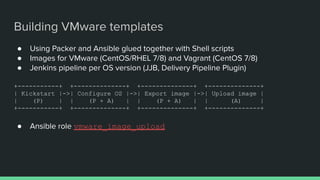
● Using Packer and Ansible glued together with Shell scripts
● Images for VMware (CentOS/RHEL 7/8) and Vagrant (CentOS 7/8)
● Jenkins pipeline per OS version (JJB, Delivery Pipeline Plugin)
+-----------+ +--------------+ +--------------+ +--------------+
| Kickstart |->| Configure OS |->| Export image |->| Upload image |
| (P) | | (P + A) | | (P + A) | | (A) |
+-----------+ +--------------+ +--------------+ +--------------+
● Ansible role vmware_image_upload
Building VMware templates
Building VMs from templates
● Desired actions
○ Build new VM (integration with phpIPAM)
○ Change params (e.g. CPU, RAM) of an existing VM
○ Rebuild VM (keep data disks, MAC)
○ Delete VM
● Challenges
○ Inventory
■ Official Ansible VMware inventory is not very useful
● No custom groups - groups only for power state and guest ID
● Inventory not in Git (only in local cache)
○ Automate all the desired actions
■ Ansible role vmware_vm_provisioning
■ Contains patched modules
● vmware_guest_disk - PR #63740
● vmware_guest - PR #63741
Building VMs from templates
Building VMs from templates - inventory
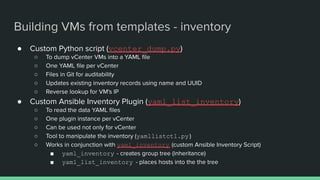
● Custom Python script (vcenter_dump.py)
○ To dump vCenter VMs into a YAML file
○ One YAML file per vCenter
○ Files in Git for auditability
○ Updates existing inventory records using name and UUID
○ Reverse lookup for VM's IP
● Custom Ansible Inventory Plugin (yaml_list_inventory)
○ To read the data YAML files
○ One plugin instance per vCenter
○ Can be used not only for vCenter
○ Tool to manipulate the inventory (yamllistctl.py )
○ Works in conjunction with yaml_inventory (custom Ansible Inventory Script)
■ yaml_inventory - creates group tree (inheritance)
■ yaml_list_inventory - places hosts into the the tree
Building VMs from templates - inventory
# inventory_data/data1.yaml
---
- guest: centos64Guest
ip: 192.168.1.102
name: vc1-host01
state: poweredOn
uuid: 3ef61642-a703-7b25-d28a-d445487bc19a
- guest: windows8Server64Guest
ip: 192.168.1.12
name: vc1-host02
state: poweredOff
uuid: 321460b2-2750-52a7-3bc4-0f12526960b7
Building VMs from templates - inventory
# inventory_data/data1.yaml
---
- guest: centos64Guest
ip: 192.168.1.102
ip_info: manual
name: vc1-host01
state: poweredOn
type: 3rdparty
uuid: 3ef61642-a703-7b25-d28a-d445487bc19a
- ansible_group: group1
guest: windows8Server64Guest
ip: 192.168.1.12
name: vc1-host02
state: poweredOff
uuid: 321460b2-2750-52a7-3bc4-0f12526960b7
Building VMs from templates - inventory
# inventory_sources /vcenter1.yaml
---
plugin: yaml_list
data_file: inventory_data/data1.yaml
ungrouped_name: group1
accept:
- guest: ~^(win|centos|rhel).*
ignore:
- state: poweredOff
- ip: null
- _type: 3rdparty
grouping:
windows:
- guest: ~^win
$ ansible-inventory --graph -i inventory_sources
$ ansible-playbook -l vc1-host01 -i inventory_sources site.yaml
# inventory_sources /vcenter1.yaml
---
plugin: yaml_list
data_file: inventory_data/data1.yaml
ungrouped_name: group1
accept:
- guest: ~^(win|centos|rhel).*
ignore:
- state: poweredOff
- ip: null
- _type: 3rdparty
# inventory_sources /vcenter1.yaml
---
plugin: yaml_list
data_file: inventory_data/data1.yaml
ungrouped_name: group1
accept:
- guest: ~^(win|centos|rhel).*
ignore:
- state: poweredOff
- ip: null
- _type: 3rdparty
grouping:
windows:
- guest: ~^win
# inventory_sources /vcenter1.yaml
---
plugin: yaml_list
data_file: inventory_data/data1.yaml
ungrouped_name: group1
accept:
- guest: ~^(win|centos|rhel).*
# inventory_sources /vcenter1.yaml
---
plugin: yaml_list
data_file: inventory_data/data1.yaml
ungrouped_name: group1
Demo
Thank you for your attention!
Questions?

Managing VMware VMs with Ansible

  • 1.
    Managing VMware VMswith Ansible Jiri Tyr
  • 2.
    About me ● UsingAnsible since 2014 ● Ansible contributor ○ Modules: yum_repository , jenkins_plugin , ldap_attr, ldap_entry ○ Jinja2 filter: comment ○ Bug fixing (mount module) ○ Code reviews ● Author of more than 100 publicly available Ansible roles ○ https://github.com/jtyr ○ https://galaxy.ansible.com/jtyr
  • 3.
    Why not touse Terraform to manage VMware?
  • 4.
    Why not touse Terraform to manage VMware? ● But ansible can ○ Modify existing VMs (built manually or by another tool) ○ Can build VMs and configure applications using single tool (share metadata) ● Ansible is not great either ○ Doesn't support (yet) all features ○ It's not stateful - cannot show what will change (plan) ● Terraform is useful but ○ It's not perfect - sometimes rebuilds VMs without any reason ○ It's stateful - infra must be built with it to be able to change it (import is not optimal) ○ HCL sucks ■ Too many workarounds to solve simple problems like loops, conditions, variables ■ Leading to inefficiencies and data redundancy
  • 5.
  • 6.
    What's supported byAnsible? ● More than 100 VMware modules to manage ○ Guest (VM - disk, NIC, customization, snapshot, vMotion, import/export OVF, ...) ○ Host (ESXi - FW, SSL, NTP, ...) ○ Distributed vSwitch (rules, port groups, ...) ○ Cluster (DRS, HA, ...) ○ Datastore ○ Content library ○ ...
  • 7.
  • 8.
    ● Building VMwaretemplates ● Building VMs from templates Explored topics
  • 9.
  • 10.
    ● Using Packerand Ansible glued together with Shell scripts ● Images for VMware (CentOS/RHEL 7/8) and Vagrant (CentOS 7/8) ● Jenkins pipeline per OS version (JJB, Delivery Pipeline Plugin) +-----------+ +--------------+ +--------------+ +--------------+ | Kickstart |->| Configure OS |->| Export image |->| Upload image | | (P) | | (P + A) | | (P + A) | | (A) | +-----------+ +--------------+ +--------------+ +--------------+ ● Ansible role vmware_image_upload Building VMware templates
  • 11.
  • 12.
    ● Desired actions ○Build new VM (integration with phpIPAM) ○ Change params (e.g. CPU, RAM) of an existing VM ○ Rebuild VM (keep data disks, MAC) ○ Delete VM ● Challenges ○ Inventory ■ Official Ansible VMware inventory is not very useful ● No custom groups - groups only for power state and guest ID ● Inventory not in Git (only in local cache) ○ Automate all the desired actions ■ Ansible role vmware_vm_provisioning ■ Contains patched modules ● vmware_guest_disk - PR #63740 ● vmware_guest - PR #63741 Building VMs from templates
  • 13.
    Building VMs fromtemplates - inventory ● Custom Python script (vcenter_dump.py) ○ To dump vCenter VMs into a YAML file ○ One YAML file per vCenter ○ Files in Git for auditability ○ Updates existing inventory records using name and UUID ○ Reverse lookup for VM's IP ● Custom Ansible Inventory Plugin (yaml_list_inventory) ○ To read the data YAML files ○ One plugin instance per vCenter ○ Can be used not only for vCenter ○ Tool to manipulate the inventory (yamllistctl.py ) ○ Works in conjunction with yaml_inventory (custom Ansible Inventory Script) ■ yaml_inventory - creates group tree (inheritance) ■ yaml_list_inventory - places hosts into the the tree
  • 14.
    Building VMs fromtemplates - inventory # inventory_data/data1.yaml --- - guest: centos64Guest ip: 192.168.1.102 name: vc1-host01 state: poweredOn uuid: 3ef61642-a703-7b25-d28a-d445487bc19a - guest: windows8Server64Guest ip: 192.168.1.12 name: vc1-host02 state: poweredOff uuid: 321460b2-2750-52a7-3bc4-0f12526960b7
  • 15.
    Building VMs fromtemplates - inventory # inventory_data/data1.yaml --- - guest: centos64Guest ip: 192.168.1.102 ip_info: manual name: vc1-host01 state: poweredOn type: 3rdparty uuid: 3ef61642-a703-7b25-d28a-d445487bc19a - ansible_group: group1 guest: windows8Server64Guest ip: 192.168.1.12 name: vc1-host02 state: poweredOff uuid: 321460b2-2750-52a7-3bc4-0f12526960b7
  • 16.
    Building VMs fromtemplates - inventory # inventory_sources /vcenter1.yaml --- plugin: yaml_list data_file: inventory_data/data1.yaml ungrouped_name: group1 accept: - guest: ~^(win|centos|rhel).* ignore: - state: poweredOff - ip: null - _type: 3rdparty grouping: windows: - guest: ~^win $ ansible-inventory --graph -i inventory_sources $ ansible-playbook -l vc1-host01 -i inventory_sources site.yaml # inventory_sources /vcenter1.yaml --- plugin: yaml_list data_file: inventory_data/data1.yaml ungrouped_name: group1 accept: - guest: ~^(win|centos|rhel).* ignore: - state: poweredOff - ip: null - _type: 3rdparty # inventory_sources /vcenter1.yaml --- plugin: yaml_list data_file: inventory_data/data1.yaml ungrouped_name: group1 accept: - guest: ~^(win|centos|rhel).* ignore: - state: poweredOff - ip: null - _type: 3rdparty grouping: windows: - guest: ~^win # inventory_sources /vcenter1.yaml --- plugin: yaml_list data_file: inventory_data/data1.yaml ungrouped_name: group1 accept: - guest: ~^(win|centos|rhel).* # inventory_sources /vcenter1.yaml --- plugin: yaml_list data_file: inventory_data/data1.yaml ungrouped_name: group1
  • 17.
  • 18.
    Thank you foryour attention! Questions?