Packaging Applications for the Maemo Platform
First, find something you  want  to package Sounds obvious, but if you're not interested, you won't maintain your package.  Pull down sources of software that you use locally, or use your own software. :-) Packaging your own software is a common thing to do, in debian as well. I have no evidence, but anecdotal data seems to suggest most packages in Maemo, the packager is also 'upstream' as well.
In the beginging was the tarball You can create a tarball from your VCS repository, or pull it down from upstream Then add the debian directory Debian requires that the source code be  pristine .  You can create files in the debian/ directory, but you may not alter the source code, (unless it is your source code, of course) Note the license if you are porting software – you don't want to package non-free software into a free software environment.
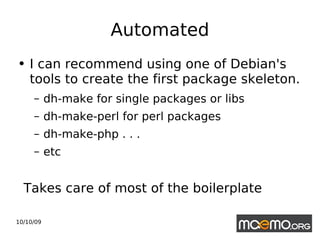
Automated I can recommend using one of Debian's tools to create the first package skeleton. dh-make for single packages or libs dh-make-perl for perl packages dh-make-php . . . etc Takes care of most of the boilerplate
dh_make example export DEBFULLNAME=”Hack Er” \ dh_make –email  [email_address]  \ --copyright=bsd \ --file ../foo.tar.gz This is all you really need to get started in most cases. Note that you should be in the source directory to run this.
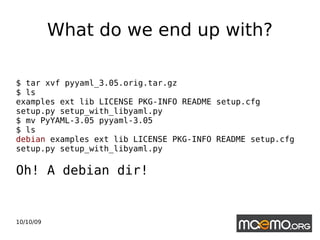
What do we end up with? $ tar xvf pyyaml_3.05.orig.tar.gz $ ls examples ext lib LICENSE PKG-INFO README setup.cfg setup.py setup_with_libyaml.py  $ mv PyYAML-3.05 pyyaml-3.05 $ ls  debian  examples ext lib LICENSE PKG-INFO README setup.cfg setup.py setup_with_libyaml.py Oh! A debian dir!
Lots of extraneous files Even if you are packaging for Debian, dh-make adds a lot of unncessary files.  You can remove many of them since they are only examples of files you might need, like man pages Since maemo does not use man pages due to space constraints you can safely remove a lot of these files.
Absolutely necessary files There is a skeleton provided by Nokia here:  https://garage.maemo.org/svn/maemoexamples/trunk/maemo-examples/debian/ This is actually a really good starting point, it provides some excellent examples and you know that it should work on the platform since Nokia provides these templates. At the very least you need:  changelog, control, copyright, and rules
changelog This holds the canonical version number, this is where the build tools will look for version info – so it has to be there.  It also should hold information regarding any changes to your software, or to the upstream software if you are packaging only It should also hold a valid email address and not the upstream email address. :)
copyright Obviously, very important. Copyright is crucial to legal enforcement of licensing, you would not want pirated software in your free software device and repos Note the boilerplate saying to look deeper into the package and check for copyright work; something like:  Find -type f -exec grep copyright {} \;
control This is where the fun is, the packaging specification if you will. Please make sure you change the maintainers name and add the XSBC-Original-Maintainer field; Maintainer: Jeremiah Foster <jeremiah@maemo.org> XSBC-Original-Maintainer: Debian Python Modules Team  < [email_address] >
rules 'rules' is a Make file, an executable makefile From the New Maintainer's Guide:  “ The important part to know about the rules file created by dh_make, is that it is just a suggestion. It will work for simple packages but for more complicated ones, don't be afraid to add and subtract from it to fit your needs. Only thing that you must not change are the names of the rules, because all the tools use these names, as mandated by the Policy.”
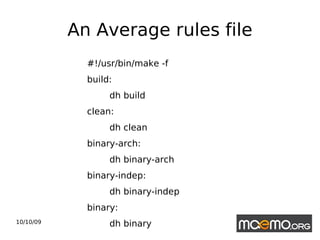
An Average rules file #!/usr/bin/make -f build: dh build clean: dh clean binary-arch: dh binary-arch binary-indep: dh binary-indep binary: dh binary
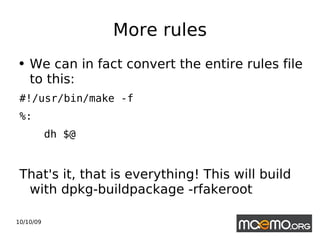
More rules We can in fact convert the entire rules file to this:  #!/usr/bin/make -f %: dh $@ That's it, that is everything! This will build with dpkg-buildpackage -rfakeroot
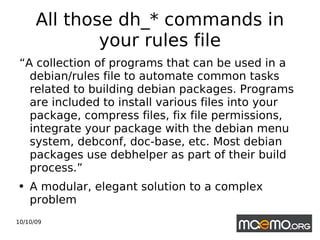
All those dh_* commands in your rules file “ A collection of programs that can be used in a debian/rules file to automate common tasks related to building debian packages. Programs are included to install various files into your package, compress files, fix file permissions, integrate your package with the debian menu system, debconf, doc-base, etc. Most debian packages use debhelper as part of their build process.” A modular, elegant solution to a complex problem
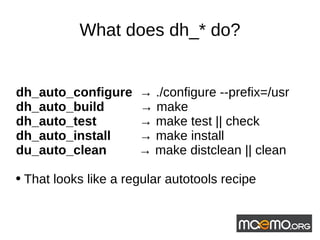
What does dh_* do? dh_auto_configure  ->  ./configure --prefix=/usr dh_auto_build  ->  make dh_auto_test  ->  make test || check dh_auto_install  ->  make install  du_auto_clean  ->  make distclean || clean That looks like a regular autotools recipe
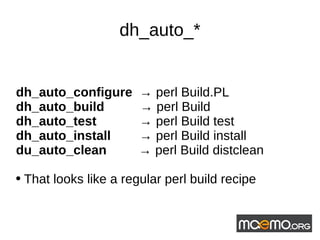
dh_auto_* dh_auto_configure  ->  perl Build.PL dh_auto_build  ->  perl Build dh_auto_test  ->  perl Build test dh_auto_install  ->  perl Build install du_auto_clean  ->  perl Build distclean That looks like a regular perl build recipe
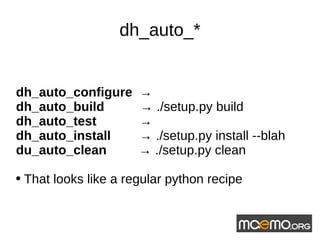
dh_auto_* dh_auto_configure  ->  dh_auto_build  ->  ./setup.py build dh_auto_test  ->  dh_auto_install  ->  ./setup.py install --blah du_auto_clean  ->  ./setup.py clean That looks like a regular python recipe
There is more than  one way to build it I prefer dpkg-buildpackage in combination with debhelper. I think it is a powerful set of tools, and modular. There are other build systems, like CDBS:  “Common Debian Build System, an abstract build system based on Makefile inheritance which is completely extensible and overridable. “
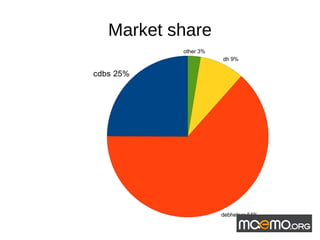
Market share
Open Build System SuSE has as service that certain members of our community swear by (I'm looking at you David Greaves) and already has Maemo packages on it. Might be an excellent choice since it builds debs and other formats, like rpms, and is used by Mer.  http://en.opensuse.org/Build_Service/Testing
Dependencies The packager is responsible for tracking down all necessary dependencies. There are tools to help you, like dpkg-shlibsdep In maemo, the packager and the developer are often the same person, so tracking down dependencies should not be so hard dh_make will try to calculate them in certain circumstances
Dependencies 2 Tracking down and adding dependencies is both necessary and powerful.  Obviously since we are building a package based on the architecture of the platform (armel) then we have to provide all the libraries to build it Benefit: the user doesn't have to go through “dependency hell”
Dependencies 3 Sometimes, you'll have to track down dependencies not already in maemo, or even in debian. Or they may have a different name.  Example libproxy0.2.3 is called libproxy in debian – it is in 'squeeze' so the packager has to 'backport' it to Lenny and upload it to the repositories.
Dependencies 4 http://packages.debian.org   Is your friend! Whatever you are missing, check in debian first, it should be there. dpkg-shlibdeps should help as well but needs to be run against symbols files or other shlibs files in debian. It is the tool that tries to create dependency chains Sometimes you'll have build dependencies as well,
auto-apt Automatically determines, and installs, build dependencies found in automake / autoconf files configuration files Caveat emptor
dpkg-buildpackage Yet another perl script! No surprise really since debian pretty much began it's life as a kernel, a bunch of C libraries and perl. Builds both the binary deb and your source package
Maemo is (and isn't) debian Yeah, there is apt-get and .debs, but don't be fooled, maemo is not debian This means that maemo does not have to follow debian's conventions, it is free to innovate without having to go through the traditional debian decision making process – which debian's founder calls “Process run amok.”
Maemo's own build system Maemo does not use the build tools that debian does in the way debian does You can get involved in shaping how packages are built on maemo
Pbuilder and cowbuilder Pbuilder stands for personal builder Automatically builds debian packages in a “clean-room” environment Helps to verify that a package can be built on the average debian system It creates a base chroot image, downloads and installs a complete, but minimal, debian system Cowbuilder is pbuilder sped up by using   cowdancer, a copy-on-write system in userland
Other debian goodies There are a number of tools inside debian that can make a packager's life easier. Tools like; debdiff: compare file lists in two binary Debian packages pbuilder: clean room (chroot) build environment to verify the build dependencies mc (mindnight commander) is a file browser that can read debs Linitan is being transformed into maemian, which may become a stand-alone tool you can run locally. dch: Simple tool for writing and formatting changelogs debian-goodies: dgrep  - Search all files in specified packages for a regex for example.
Sources http://www.debian.org/doc/maint-guide/ch-first.en.html Debian New Maintainer's Guide http://wiki.debian.org/DebianPython/NewPolicy   Debian's python policy https://garage.maemo.org/svn/maemoexamples/trunk/maemo-examples/debian/ Package file examples from maemo http://wiki.maemo.org/Documentation/Maemo_5_Developer_Guide/Packaging%2C_Deploying_and_Distributing Maemo packaging guide on the Maemo wiki  http://meetings-archive.debian.net/pub/debian-meetings/2009/debconf9/low/1060_Not_your_grandpas_debhelper.ogv Joey Hess' talk at debconf 2009 on debhelper

Packaging for the Maemo Platform

  • 1.
    Packaging Applications forthe Maemo Platform
  • 2.
    First, find somethingyou want to package Sounds obvious, but if you're not interested, you won't maintain your package. Pull down sources of software that you use locally, or use your own software. :-) Packaging your own software is a common thing to do, in debian as well. I have no evidence, but anecdotal data seems to suggest most packages in Maemo, the packager is also 'upstream' as well.
  • 3.
    In the begingingwas the tarball You can create a tarball from your VCS repository, or pull it down from upstream Then add the debian directory Debian requires that the source code be pristine . You can create files in the debian/ directory, but you may not alter the source code, (unless it is your source code, of course) Note the license if you are porting software – you don't want to package non-free software into a free software environment.
  • 4.
    Automated I canrecommend using one of Debian's tools to create the first package skeleton. dh-make for single packages or libs dh-make-perl for perl packages dh-make-php . . . etc Takes care of most of the boilerplate
  • 5.
    dh_make example exportDEBFULLNAME=”Hack Er” \ dh_make –email [email_address] \ --copyright=bsd \ --file ../foo.tar.gz This is all you really need to get started in most cases. Note that you should be in the source directory to run this.
  • 6.
    What do weend up with? $ tar xvf pyyaml_3.05.orig.tar.gz $ ls examples ext lib LICENSE PKG-INFO README setup.cfg setup.py setup_with_libyaml.py $ mv PyYAML-3.05 pyyaml-3.05 $ ls debian examples ext lib LICENSE PKG-INFO README setup.cfg setup.py setup_with_libyaml.py Oh! A debian dir!
  • 7.
    Lots of extraneousfiles Even if you are packaging for Debian, dh-make adds a lot of unncessary files. You can remove many of them since they are only examples of files you might need, like man pages Since maemo does not use man pages due to space constraints you can safely remove a lot of these files.
  • 8.
    Absolutely necessary filesThere is a skeleton provided by Nokia here: https://garage.maemo.org/svn/maemoexamples/trunk/maemo-examples/debian/ This is actually a really good starting point, it provides some excellent examples and you know that it should work on the platform since Nokia provides these templates. At the very least you need: changelog, control, copyright, and rules
  • 9.
    changelog This holdsthe canonical version number, this is where the build tools will look for version info – so it has to be there. It also should hold information regarding any changes to your software, or to the upstream software if you are packaging only It should also hold a valid email address and not the upstream email address. :)
  • 10.
    copyright Obviously, veryimportant. Copyright is crucial to legal enforcement of licensing, you would not want pirated software in your free software device and repos Note the boilerplate saying to look deeper into the package and check for copyright work; something like: Find -type f -exec grep copyright {} \;
  • 11.
    control This iswhere the fun is, the packaging specification if you will. Please make sure you change the maintainers name and add the XSBC-Original-Maintainer field; Maintainer: Jeremiah Foster <jeremiah@maemo.org> XSBC-Original-Maintainer: Debian Python Modules Team < [email_address] >
  • 12.
    rules 'rules' isa Make file, an executable makefile From the New Maintainer's Guide: “ The important part to know about the rules file created by dh_make, is that it is just a suggestion. It will work for simple packages but for more complicated ones, don't be afraid to add and subtract from it to fit your needs. Only thing that you must not change are the names of the rules, because all the tools use these names, as mandated by the Policy.”
  • 13.
    An Average rulesfile #!/usr/bin/make -f build: dh build clean: dh clean binary-arch: dh binary-arch binary-indep: dh binary-indep binary: dh binary
  • 14.
    More rules Wecan in fact convert the entire rules file to this: #!/usr/bin/make -f %: dh $@ That's it, that is everything! This will build with dpkg-buildpackage -rfakeroot
  • 15.
    All those dh_*commands in your rules file “ A collection of programs that can be used in a debian/rules file to automate common tasks related to building debian packages. Programs are included to install various files into your package, compress files, fix file permissions, integrate your package with the debian menu system, debconf, doc-base, etc. Most debian packages use debhelper as part of their build process.” A modular, elegant solution to a complex problem
  • 16.
    What does dh_*do? dh_auto_configure -> ./configure --prefix=/usr dh_auto_build -> make dh_auto_test -> make test || check dh_auto_install -> make install du_auto_clean -> make distclean || clean That looks like a regular autotools recipe
  • 17.
    dh_auto_* dh_auto_configure -> perl Build.PL dh_auto_build -> perl Build dh_auto_test -> perl Build test dh_auto_install -> perl Build install du_auto_clean -> perl Build distclean That looks like a regular perl build recipe
  • 18.
    dh_auto_* dh_auto_configure -> dh_auto_build -> ./setup.py build dh_auto_test -> dh_auto_install -> ./setup.py install --blah du_auto_clean -> ./setup.py clean That looks like a regular python recipe
  • 19.
    There is morethan one way to build it I prefer dpkg-buildpackage in combination with debhelper. I think it is a powerful set of tools, and modular. There are other build systems, like CDBS: “Common Debian Build System, an abstract build system based on Makefile inheritance which is completely extensible and overridable. “
  • 20.
  • 21.
    Open Build SystemSuSE has as service that certain members of our community swear by (I'm looking at you David Greaves) and already has Maemo packages on it. Might be an excellent choice since it builds debs and other formats, like rpms, and is used by Mer. http://en.opensuse.org/Build_Service/Testing
  • 22.
    Dependencies The packageris responsible for tracking down all necessary dependencies. There are tools to help you, like dpkg-shlibsdep In maemo, the packager and the developer are often the same person, so tracking down dependencies should not be so hard dh_make will try to calculate them in certain circumstances
  • 23.
    Dependencies 2 Trackingdown and adding dependencies is both necessary and powerful. Obviously since we are building a package based on the architecture of the platform (armel) then we have to provide all the libraries to build it Benefit: the user doesn't have to go through “dependency hell”
  • 24.
    Dependencies 3 Sometimes,you'll have to track down dependencies not already in maemo, or even in debian. Or they may have a different name. Example libproxy0.2.3 is called libproxy in debian – it is in 'squeeze' so the packager has to 'backport' it to Lenny and upload it to the repositories.
  • 25.
    Dependencies 4 http://packages.debian.org Is your friend! Whatever you are missing, check in debian first, it should be there. dpkg-shlibdeps should help as well but needs to be run against symbols files or other shlibs files in debian. It is the tool that tries to create dependency chains Sometimes you'll have build dependencies as well,
  • 26.
    auto-apt Automatically determines,and installs, build dependencies found in automake / autoconf files configuration files Caveat emptor
  • 27.
    dpkg-buildpackage Yet anotherperl script! No surprise really since debian pretty much began it's life as a kernel, a bunch of C libraries and perl. Builds both the binary deb and your source package
  • 28.
    Maemo is (andisn't) debian Yeah, there is apt-get and .debs, but don't be fooled, maemo is not debian This means that maemo does not have to follow debian's conventions, it is free to innovate without having to go through the traditional debian decision making process – which debian's founder calls “Process run amok.”
  • 29.
    Maemo's own buildsystem Maemo does not use the build tools that debian does in the way debian does You can get involved in shaping how packages are built on maemo
  • 30.
    Pbuilder and cowbuilderPbuilder stands for personal builder Automatically builds debian packages in a “clean-room” environment Helps to verify that a package can be built on the average debian system It creates a base chroot image, downloads and installs a complete, but minimal, debian system Cowbuilder is pbuilder sped up by using cowdancer, a copy-on-write system in userland
  • 31.
    Other debian goodiesThere are a number of tools inside debian that can make a packager's life easier. Tools like; debdiff: compare file lists in two binary Debian packages pbuilder: clean room (chroot) build environment to verify the build dependencies mc (mindnight commander) is a file browser that can read debs Linitan is being transformed into maemian, which may become a stand-alone tool you can run locally. dch: Simple tool for writing and formatting changelogs debian-goodies: dgrep - Search all files in specified packages for a regex for example.
  • 32.
    Sources http://www.debian.org/doc/maint-guide/ch-first.en.html DebianNew Maintainer's Guide http://wiki.debian.org/DebianPython/NewPolicy Debian's python policy https://garage.maemo.org/svn/maemoexamples/trunk/maemo-examples/debian/ Package file examples from maemo http://wiki.maemo.org/Documentation/Maemo_5_Developer_Guide/Packaging%2C_Deploying_and_Distributing Maemo packaging guide on the Maemo wiki http://meetings-archive.debian.net/pub/debian-meetings/2009/debconf9/low/1060_Not_your_grandpas_debhelper.ogv Joey Hess' talk at debconf 2009 on debhelper