José Alferes
Versão modificada de Database System Concepts, 5th Ed.
©Silberschatz, Korth and Sudarshan
Chapter 11: Storage and File Structure
11.2
José Alferes - Adaptado de Database System Concepts - 5th Edition
Physical Storage Media for DBMSs
 Main memory:
 fast access (10s to 100s of nanoseconds; 1 nanosecond = 10–9
seconds)
 generally too small (or too expensive) to store the entire database
 Volatile — contents of main memory are usually lost if a power failure
or system crash occurs.
 Magnetic-disk
 Primary medium for the long-term non-volatile online storage of data;
typically stores entire database.
 Data must be moved from disk to main memory for access, and written
back for storage
 Much slower access than main memory
 direct-access – possible to read data on disk in any order
 Reliable: usual mean time to failure is now of about 3 to 5 years
 Optical and tape storage
 Mainly backups (offline storage)
11.3
José Alferes - Adaptado de Database System Concepts - 5th Edition
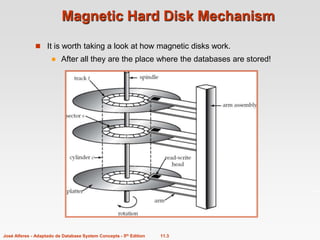
Magnetic Hard Disk Mechanism
 It is worth taking a look at how magnetic disks work.
 After all they are the place where the databases are stored!
11.4
José Alferes - Adaptado de Database System Concepts - 5th Edition
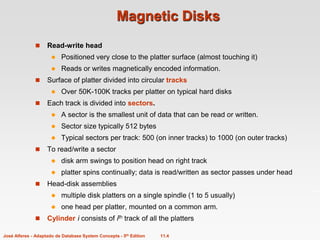
Magnetic Disks
 Read-write head
 Positioned very close to the platter surface (almost touching it)
 Reads or writes magnetically encoded information.
 Surface of platter divided into circular tracks
 Over 50K-100K tracks per platter on typical hard disks
 Each track is divided into sectors.
 A sector is the smallest unit of data that can be read or written.
 Sector size typically 512 bytes
 Typical sectors per track: 500 (on inner tracks) to 1000 (on outer tracks)
 To read/write a sector
 disk arm swings to position head on right track
 platter spins continually; data is read/written as sector passes under head
 Head-disk assemblies
 multiple disk platters on a single spindle (1 to 5 usually)
 one head per platter, mounted on a common arm.
 Cylinder i consists of ith track of all the platters
11.5
José Alferes - Adaptado de Database System Concepts - 5th Edition
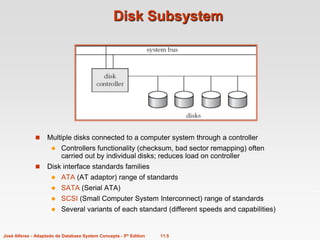
Disk Subsystem
 Multiple disks connected to a computer system through a controller
 Controllers functionality (checksum, bad sector remapping) often
carried out by individual disks; reduces load on controller
 Disk interface standards families
 ATA (AT adaptor) range of standards
 SATA (Serial ATA)
 SCSI (Small Computer System Interconnect) range of standards
 Several variants of each standard (different speeds and capabilities)
11.6
José Alferes - Adaptado de Database System Concepts - 5th Edition
 AT attachment(ATA) interface(which is a
faster version of the integrated drive
electronics)
 The new version version of ATA, to
distinguish it from SATA
 The small computer system interconnect
with the disk
 Storage organisation-REDUNDANT
ARRAYS OF INDEPENDENT
DISKS(RAID)

11.7
José Alferes - Adaptado de Database System Concepts - 5th Edition
Performance Measures of Disks
 Access time – the time it takes from when a read or write request is issued to when data
transfer begins. Consists of:
 Seek time – time it takes to reposition the arm over the correct track.
 Average seek time is 1/2 the worst case seek time.
– Would be 1/3 if all tracks had the same number of sectors, and we ignore
the time to start and stop arm movement
 4 to 10 milliseconds on typical disks
 Rotational latency – time it takes for the sector to be accessed to appear under the
head.
 Average latency is 1/2 of the worst case latency.
 4 to 11 milliseconds on typical disks (5400 to 15000 r.p.m.)
 Data-transfer rate – the rate at which data can be retrieved from or stored to the disk.
 25 to 100 MB per second max rate, lower for inner tracks
 Multiple disks may share a controller, so rate that controller can handle is also
important
 E.g. ATA-5: 66 MB/sec, SATA: 150 MB/sec, Ultra 320 SCSI: 320 MB/s
 Fiber Channel (FC2Gb): 256 MB/s
 Mean time to failure (MTTF) – the average time the disk is expected to run continuously
without any failure.
 Nowadays, typically 3 to 5 years
11.8
José Alferes - Adaptado de Database System Concepts - 5th Edition
Optimization of Disk-Block Access
 Block – a contiguous sequence of sectors from a single track
 data is transferred between disk and main memory in blocks
 sizes range from 512 bytes to several kilobytes
 Smaller blocks: more transfers from disk
 Larger blocks: more space wasted due to partially filled blocks
 Typical block sizes today range from 4 to 16 kilobytes
 We’ll see how this is important for database storage structure
 Disk-arm-scheduling algorithms order pending accesses to tracks so
that disk arm movement is minimized
 elevator algorithm : move disk arm in one direction (from outer to
inner tracks or vice versa), processing next request in that
direction, till no more requests in that direction, then reverse
direction and repeat
11.9
José Alferes - Adaptado de Database System Concepts - 5th Edition
Optimization of Disk Block Access (Cont.)
 File organization – optimize block access time by organizing the
blocks to correspond to how data will be accessed
 E.g. Store related information on the same or nearby cylinders.
 Files may get fragmented over time
 E.g. if data is inserted to/deleted from the file
 Or free blocks on disk are scattered, and newly created file
has its blocks scattered over the disk
 Sequential access to a fragmented file results in increased
disk arm movement
 Some systems have utilities to defragment the file system, in
order to speed up file access
11.10
José Alferes - Adaptado de Database System Concepts - 5th Edition
RAID
 The choice of disk structure is very important in databases. Important
factors, besides price, are:
 Capacity
 Speed
 Reliability
 RAID: Redundant Arrays of Independent Disks
 disk organization techniques that manage a large numbers of disks,
providing a view of a single disk of
 high capacity and high speed by using multiple disks in parallel,
and
 high reliability by storing data redundantly, so that data can be
recovered even if a disk fails
 The chance that some disk out of a set of N disks will fail is much higher
than the chance that a specific single disk will fail.
 E.g., a system with 100 disks, each with MTTF of 100,000 hours
(approx. 11 years), will have a system MTTF of 1000 hours (approx.
41 days)
 Techniques for using redundancy to avoid data loss are critical with
large numbers of disks
11.11
José Alferes - Adaptado de Database System Concepts - 5th Edition
Improvement of Reliability via Redundancy
 Redundancy – store extra information that can be used to rebuild
information lost in a disk failure
 E.g., Mirroring (or shadowing) – RAID level 1
 Duplicate every disk. Logical disk consists of two physical disks.
 Every write is carried out on both disks
 Reads can take place from either disk
 If one disk in a pair fails, data still available in the other
 Data loss would occur only if a disk fails, and its mirror disk also
fails before the system is repaired
– Probability of combined event is very small, (except for
dependent failure modes such as fire or building collapse or
electrical power surges)
 Mean time to data loss depends on mean time to failure,
and mean time to repair
 E.g. MTTF of 100,000 hours, mean time to repair of 10 hours gives
mean time to data loss of 500*106 hours (or 57,000 years) for a
mirrored pair of disks (ignoring dependent failure modes)
11.12
José Alferes - Adaptado de Database System Concepts - 5th Edition
Improvement in Performance via Parallelism
 Two main goals of parallelism in a disk system:
1. Load balance multiple small accesses to increase throughput
2. Parallelize large accesses to reduce response time.
 Improve transfer rate by striping data across multiple disks.
 Bit-level striping – split the bits of each byte across multiple disks
 In an array of eight disks, write bit i of each byte to disk i.
 Each access can read data at eight times the rate of a single disk.
 But seek/access time worse than for a single disk
 Bit level striping is not used much any more
 Block-level striping – with n disks, block i of a file goes to disk (i mod n) + 1
 Requests for different blocks can run in parallel if the blocks reside on
different disks
 A request for a long sequence of blocks can utilize all disks in parallel
 Usually called RAID level 0
11.13
José Alferes - Adaptado de Database System Concepts - 5th Edition
RAID Levels 2 and 3
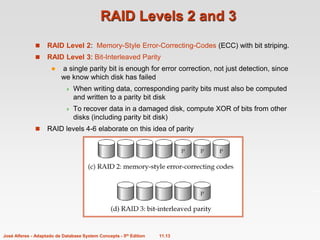
 RAID Level 2: Memory-Style Error-Correcting-Codes (ECC) with bit striping.
 RAID Level 3: Bit-Interleaved Parity
 a single parity bit is enough for error correction, not just detection, since
we know which disk has failed
 When writing data, corresponding parity bits must also be computed
and written to a parity bit disk
 To recover data in a damaged disk, compute XOR of bits from other
disks (including parity bit disk)
 RAID levels 4-6 elaborate on this idea of parity
11.14
José Alferes - Adaptado de Database System Concepts - 5th Edition
Choice of RAID Level
 Mirroring provides much better write performance than Parity
 For Parity read operations are needed before a write, whereas Mirroring
only requires 2 writes
 Mirroring preferred for high update environments such as log disks
 Mirroring needs more disks for the same capacity
 Higher cost per capacity unit
 But price of storage capacity is already low and decreasing
 Nowadays, for database systems
 (Distributed) Parity, with RAID Level 5, is preferred for applications with
low update rate, and large amounts of data
 Mirroring is preferred for all other applications
 The choice of the storage structure is an important first step when designing a
real database!

Magnetic disk - Krishna Geetha.ppt

  • 1.
    José Alferes Versão modificadade Database System Concepts, 5th Ed. ©Silberschatz, Korth and Sudarshan Chapter 11: Storage and File Structure
  • 2.
    11.2 José Alferes -Adaptado de Database System Concepts - 5th Edition Physical Storage Media for DBMSs  Main memory:  fast access (10s to 100s of nanoseconds; 1 nanosecond = 10–9 seconds)  generally too small (or too expensive) to store the entire database  Volatile — contents of main memory are usually lost if a power failure or system crash occurs.  Magnetic-disk  Primary medium for the long-term non-volatile online storage of data; typically stores entire database.  Data must be moved from disk to main memory for access, and written back for storage  Much slower access than main memory  direct-access – possible to read data on disk in any order  Reliable: usual mean time to failure is now of about 3 to 5 years  Optical and tape storage  Mainly backups (offline storage)
  • 3.
    11.3 José Alferes -Adaptado de Database System Concepts - 5th Edition Magnetic Hard Disk Mechanism  It is worth taking a look at how magnetic disks work.  After all they are the place where the databases are stored!
  • 4.
    11.4 José Alferes -Adaptado de Database System Concepts - 5th Edition Magnetic Disks  Read-write head  Positioned very close to the platter surface (almost touching it)  Reads or writes magnetically encoded information.  Surface of platter divided into circular tracks  Over 50K-100K tracks per platter on typical hard disks  Each track is divided into sectors.  A sector is the smallest unit of data that can be read or written.  Sector size typically 512 bytes  Typical sectors per track: 500 (on inner tracks) to 1000 (on outer tracks)  To read/write a sector  disk arm swings to position head on right track  platter spins continually; data is read/written as sector passes under head  Head-disk assemblies  multiple disk platters on a single spindle (1 to 5 usually)  one head per platter, mounted on a common arm.  Cylinder i consists of ith track of all the platters
  • 5.
    11.5 José Alferes -Adaptado de Database System Concepts - 5th Edition Disk Subsystem  Multiple disks connected to a computer system through a controller  Controllers functionality (checksum, bad sector remapping) often carried out by individual disks; reduces load on controller  Disk interface standards families  ATA (AT adaptor) range of standards  SATA (Serial ATA)  SCSI (Small Computer System Interconnect) range of standards  Several variants of each standard (different speeds and capabilities)
  • 6.
    11.6 José Alferes -Adaptado de Database System Concepts - 5th Edition  AT attachment(ATA) interface(which is a faster version of the integrated drive electronics)  The new version version of ATA, to distinguish it from SATA  The small computer system interconnect with the disk  Storage organisation-REDUNDANT ARRAYS OF INDEPENDENT DISKS(RAID) 
  • 7.
    11.7 José Alferes -Adaptado de Database System Concepts - 5th Edition Performance Measures of Disks  Access time – the time it takes from when a read or write request is issued to when data transfer begins. Consists of:  Seek time – time it takes to reposition the arm over the correct track.  Average seek time is 1/2 the worst case seek time. – Would be 1/3 if all tracks had the same number of sectors, and we ignore the time to start and stop arm movement  4 to 10 milliseconds on typical disks  Rotational latency – time it takes for the sector to be accessed to appear under the head.  Average latency is 1/2 of the worst case latency.  4 to 11 milliseconds on typical disks (5400 to 15000 r.p.m.)  Data-transfer rate – the rate at which data can be retrieved from or stored to the disk.  25 to 100 MB per second max rate, lower for inner tracks  Multiple disks may share a controller, so rate that controller can handle is also important  E.g. ATA-5: 66 MB/sec, SATA: 150 MB/sec, Ultra 320 SCSI: 320 MB/s  Fiber Channel (FC2Gb): 256 MB/s  Mean time to failure (MTTF) – the average time the disk is expected to run continuously without any failure.  Nowadays, typically 3 to 5 years
  • 8.
    11.8 José Alferes -Adaptado de Database System Concepts - 5th Edition Optimization of Disk-Block Access  Block – a contiguous sequence of sectors from a single track  data is transferred between disk and main memory in blocks  sizes range from 512 bytes to several kilobytes  Smaller blocks: more transfers from disk  Larger blocks: more space wasted due to partially filled blocks  Typical block sizes today range from 4 to 16 kilobytes  We’ll see how this is important for database storage structure  Disk-arm-scheduling algorithms order pending accesses to tracks so that disk arm movement is minimized  elevator algorithm : move disk arm in one direction (from outer to inner tracks or vice versa), processing next request in that direction, till no more requests in that direction, then reverse direction and repeat
  • 9.
    11.9 José Alferes -Adaptado de Database System Concepts - 5th Edition Optimization of Disk Block Access (Cont.)  File organization – optimize block access time by organizing the blocks to correspond to how data will be accessed  E.g. Store related information on the same or nearby cylinders.  Files may get fragmented over time  E.g. if data is inserted to/deleted from the file  Or free blocks on disk are scattered, and newly created file has its blocks scattered over the disk  Sequential access to a fragmented file results in increased disk arm movement  Some systems have utilities to defragment the file system, in order to speed up file access
  • 10.
    11.10 José Alferes -Adaptado de Database System Concepts - 5th Edition RAID  The choice of disk structure is very important in databases. Important factors, besides price, are:  Capacity  Speed  Reliability  RAID: Redundant Arrays of Independent Disks  disk organization techniques that manage a large numbers of disks, providing a view of a single disk of  high capacity and high speed by using multiple disks in parallel, and  high reliability by storing data redundantly, so that data can be recovered even if a disk fails  The chance that some disk out of a set of N disks will fail is much higher than the chance that a specific single disk will fail.  E.g., a system with 100 disks, each with MTTF of 100,000 hours (approx. 11 years), will have a system MTTF of 1000 hours (approx. 41 days)  Techniques for using redundancy to avoid data loss are critical with large numbers of disks
  • 11.
    11.11 José Alferes -Adaptado de Database System Concepts - 5th Edition Improvement of Reliability via Redundancy  Redundancy – store extra information that can be used to rebuild information lost in a disk failure  E.g., Mirroring (or shadowing) – RAID level 1  Duplicate every disk. Logical disk consists of two physical disks.  Every write is carried out on both disks  Reads can take place from either disk  If one disk in a pair fails, data still available in the other  Data loss would occur only if a disk fails, and its mirror disk also fails before the system is repaired – Probability of combined event is very small, (except for dependent failure modes such as fire or building collapse or electrical power surges)  Mean time to data loss depends on mean time to failure, and mean time to repair  E.g. MTTF of 100,000 hours, mean time to repair of 10 hours gives mean time to data loss of 500*106 hours (or 57,000 years) for a mirrored pair of disks (ignoring dependent failure modes)
  • 12.
    11.12 José Alferes -Adaptado de Database System Concepts - 5th Edition Improvement in Performance via Parallelism  Two main goals of parallelism in a disk system: 1. Load balance multiple small accesses to increase throughput 2. Parallelize large accesses to reduce response time.  Improve transfer rate by striping data across multiple disks.  Bit-level striping – split the bits of each byte across multiple disks  In an array of eight disks, write bit i of each byte to disk i.  Each access can read data at eight times the rate of a single disk.  But seek/access time worse than for a single disk  Bit level striping is not used much any more  Block-level striping – with n disks, block i of a file goes to disk (i mod n) + 1  Requests for different blocks can run in parallel if the blocks reside on different disks  A request for a long sequence of blocks can utilize all disks in parallel  Usually called RAID level 0
  • 13.
    11.13 José Alferes -Adaptado de Database System Concepts - 5th Edition RAID Levels 2 and 3  RAID Level 2: Memory-Style Error-Correcting-Codes (ECC) with bit striping.  RAID Level 3: Bit-Interleaved Parity  a single parity bit is enough for error correction, not just detection, since we know which disk has failed  When writing data, corresponding parity bits must also be computed and written to a parity bit disk  To recover data in a damaged disk, compute XOR of bits from other disks (including parity bit disk)  RAID levels 4-6 elaborate on this idea of parity
  • 14.
    11.14 José Alferes -Adaptado de Database System Concepts - 5th Edition Choice of RAID Level  Mirroring provides much better write performance than Parity  For Parity read operations are needed before a write, whereas Mirroring only requires 2 writes  Mirroring preferred for high update environments such as log disks  Mirroring needs more disks for the same capacity  Higher cost per capacity unit  But price of storage capacity is already low and decreasing  Nowadays, for database systems  (Distributed) Parity, with RAID Level 5, is preferred for applications with low update rate, and large amounts of data  Mirroring is preferred for all other applications  The choice of the storage structure is an important first step when designing a real database!