Project 3
Magazine!
DMET 255
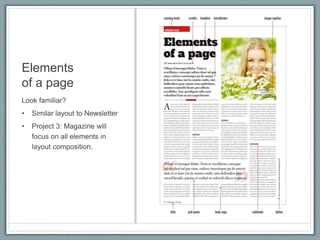
Elements
of a page
Look familiar?
• Similar layout to Newsletter
• Project 3: Magazine will
focus on all elements in
layout composition.
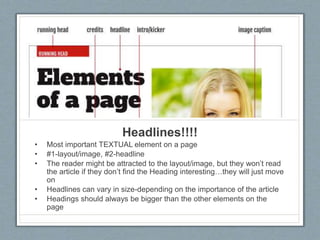
Headlines!!!!
• Most important TEXTUAL element on a page
• #1-layout/image, #2-headline
• The reader might be attracted to the layout/image, but they won’t read
the article if they don’t find the Heading interesting…they will just move
on
• Headlines can vary in size-depending on the importance of the article
• Headings should always be bigger than the other elements on the
page
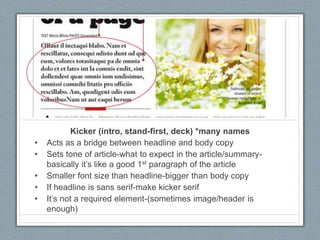
Kicker (intro, stand-first, deck) *many names
• Acts as a bridge between headline and body copy
• Sets tone of article-what to expect in the article/summary-
basically it’s like a good 1st paragraph of the article
• Smaller font size than headline-bigger than body copy
• If headline is sans serif-make kicker serif
• It’s not a required element-(sometimes image/header is
enough)
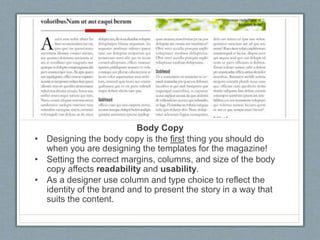
Body Copy
• Designing the body copy is the first thing you should do
when you are designing the templates for the magazine!
• Setting the correct margins, columns, and size of the body
copy affects readability and usability.
• As a designer use column and type choice to reflect the
identity of the brand and to present the story in a way that
suits the content.
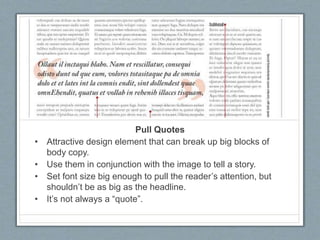
Pull Quotes
• Attractive design element that can break up big blocks of
body copy.
• Use them in conjunction with the image to tell a story.
• Set font size big enough to pull the reader’s attention, but
shouldn’t be as big as the headline.
• It’s not always a “quote”.
Subhead
• Used to break up body copy and give clever insight into the
next paragraphs.
• Readers are put off by long blocks of text!
• Can be larger than body copy or same size (but bolded)
• Do not place subheads: below images, in the last 3 rows at
the bottom of the column, in the first 3 rows at the top of a
column, top of a column, or below a pull quote.
• Subheads should not get cluttered up with other design
elements
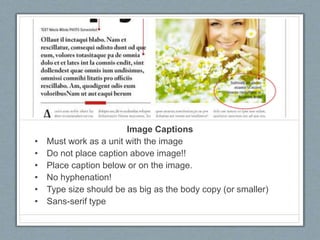
Image Captions
• Must work as a unit with the image
• Do not place caption above image!!
• Place caption below or on the image.
• No hyphenation!
• Type size should be as big as the body copy (or smaller)
• Sans-serif type
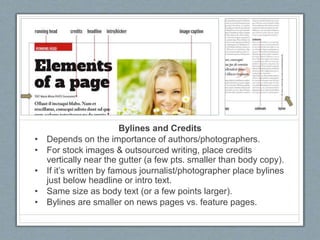
Bylines and Credits
• Depends on the importance of authors/photographers.
• For stock images & outsourced writing, place credits
vertically near the gutter (a few pts. smaller than body copy).
• If it’s written by famous journalist/photographer place bylines
just below headline or intro text.
• Same size as body text (or a few points larger).
• Bylines are smaller on news pages vs. feature pages.
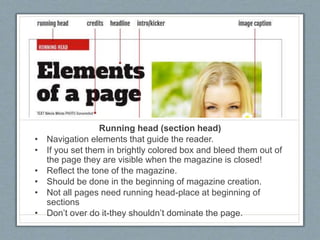
Running head (section head)
• Navigation elements that guide the reader.
• If you set them in brightly colored box and bleed them out of
the page they are visible when the magazine is closed!
• Reflect the tone of the magazine.
• Should be done in the beginning of magazine creation.
• Not all pages need running head-place at beginning of
sections
• Don’t over do it-they shouldn’t dominate the page.
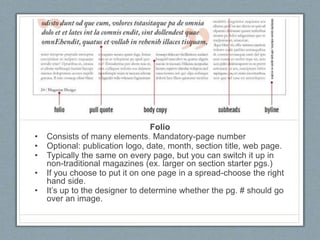
Folio
• Consists of many elements. Mandatory-page number
• Optional: publication logo, date, month, section title, web page.
• Typically the same on every page, but you can switch it up in
non-traditional magazines (ex. larger on section starter pgs.)
• If you choose to put it on one page in a spread-choose the right
hand side.
• It’s up to the designer to determine whether the pg. # should go
over an image.
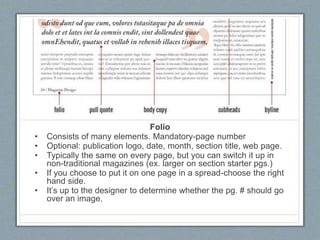
Folio
• Consists of many elements. Mandatory-page number
• Optional: publication logo, date, month, section title, web page.
• Typically the same on every page, but you can switch it up in
non-traditional magazines (ex. larger on section starter pgs.)
• If you choose to put it on one page in a spread-choose the right
hand side.
• It’s up to the designer to determine whether the pg. # should go
over an image.
Workflow
Flatplan & Structure
Flatplan
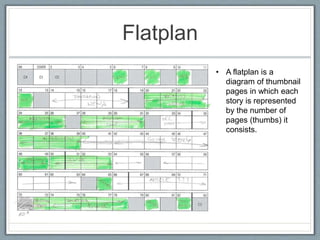
• A flatplan is a
diagram of thumbnail
pages in which each
story is represented
by the number of
pages (thumbs) it
consists.
How to use a Flatplan…
• When making a flatplan, ad pages should be marked clearly.
Also as you are done with certain pages mark them so that you
will know how many pages are finished.
• It is similar to a story board. Pages are arranged in a way so
that the magazine has a flow.
• Ex. If you have several 8pg stories, it’s a good idea to break
those stories with a few short stories or ads to maintain
balance.
• Flatplans can change daily depending on the articles (they
could be made longer or shorter) or ads (adding or dropping
ads).
• It’s important that everyone has an updated plan!
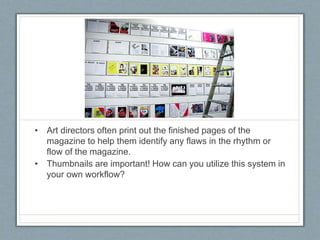
• Art directors often print out the finished pages of the
magazine to help them identify any flaws in the rhythm or
flow of the magazine.
• Thumbnails are important! How can you utilize this system in
your own workflow?
Structure
• C1-Cover Page
• C2-Advertisement (2nd most expensive ad)
• C3-Advertiser (3rd most expensive ad pg) or TOC
• C4- Back page of magazine (most expensive ad
pg)
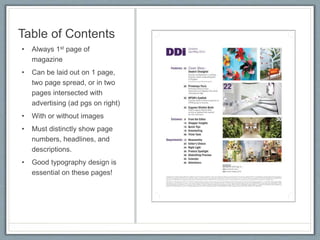
Table of Contents
• Always 1st page of
magazine
• Can be laid out on 1 page,
two page spread, or in two
pages intersected with
advertising (ad pgs on right)
• With or without images
• Must distinctly show page
numbers, headlines, and
descriptions.
• Good typography design is
essential on these pages!
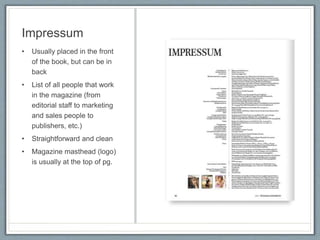
Impressum
• Usually placed in the front
of the book, but can be in
back
• List of all people that work
in the magazine (from
editorial staff to marketing
and sales people to
publishers, etc.)
• Straightforward and clean
• Magazine masthead (logo)
is usually at the top of pg.
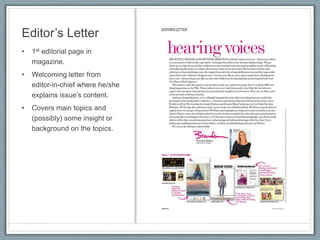
Editor’s Letter
• 1st editorial page in
magazine.
• Welcoming letter from
editor-in-chief where he/she
explains issue’s content.
• Covers main topics and
(possibly) some insight or
background on the topics.
Other Key Front Pages
Short 1 page topics
• News sections
• Reviews
• Topics about society,
culture, arts, events, etc.
• Short interviews or
columns
Section Start pages
• Generally opens a certain
section of the magazine
(news section, beauty
section, etc.)
• Can be use throughout
magazine
The front of the magazine follows a structure and design that is
only slightly changed from issue to issue.
Feature Well
• Largest part of magazine
• Contains main features (long or short articles)
• Not many ads
• Important to plan this section in the flatplan to make sure that
the pages flow well in regards to size and color.
• This is where designers have the biggest freedom,
although certain style of the publication should be followed.
Back of the book
• Contains remaining content from the front of the book,
shorter articles, news, listing, remaining columns,
horoscopes, etc.
• Less important than the front (from advertisers point of view)
• Material should NOT be less interesting here, but rather the
more laid back content.
• The last page is typically rserved for the columnist, short
essay, short interview.
• Generally advertising is cheaper – smaller ads (1/4pg 1/16
pg) grouped on these pages.
The front of the magazine follows a structure and design that is
only slightly changed from issue to issue.
Good and bad
Practices
Magazine Spreads
Single Pages
• Never think of a page singularly, but as a spread!
• The page might be on it’s own, but it creates a unit
with another page-even if it’s an ad!
• Peripheral vision allows us to view the entire
spread in a normal viewing distance (unlike a
newspaper).
• You must always consider what will be on the
other page.
Elements of the Spread
• Think about holding a magazine in your hands or
laying it down on a table to flip through it…the
most visible side is the right side.
• The most visible parts of a spread are the outer
upper parts!
• Place best content on outsides-provocative image
and words.
• That’s why footnotes and some credits are on the
inner corners near the gutter!
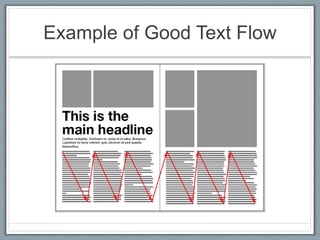
Reader’s Eye Direction
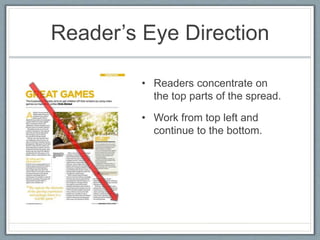
• Readers concentrate on
the top parts of the spread.
• Work from top left and
continue to the bottom.
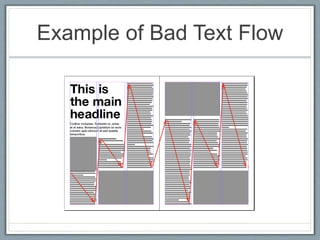
Example of Bad Text Flow
Example of Good Text Flow
Sources
• http://www.magazinedesigning.com/magazine-flatplan/
• http://www.magazinedesigning.com/magazine-spreads-good-bad-practices/
• http://www.magazinedesigning.com/structure-of-the-magazine/
• http://www.magazinedesigning.com/magazine-page-elements/
• http://www.magazinedesigning.com/magazine-columns/
• http://www.magazinedesigning.com/magazine-masthead-creation/

Magazine elements

  • 1.
  • 2.
    Elements of a page Lookfamiliar? • Similar layout to Newsletter • Project 3: Magazine will focus on all elements in layout composition.
  • 3.
    Headlines!!!! • Most importantTEXTUAL element on a page • #1-layout/image, #2-headline • The reader might be attracted to the layout/image, but they won’t read the article if they don’t find the Heading interesting…they will just move on • Headlines can vary in size-depending on the importance of the article • Headings should always be bigger than the other elements on the page
  • 4.
    Kicker (intro, stand-first,deck) *many names • Acts as a bridge between headline and body copy • Sets tone of article-what to expect in the article/summary- basically it’s like a good 1st paragraph of the article • Smaller font size than headline-bigger than body copy • If headline is sans serif-make kicker serif • It’s not a required element-(sometimes image/header is enough)
  • 5.
    Body Copy • Designingthe body copy is the first thing you should do when you are designing the templates for the magazine! • Setting the correct margins, columns, and size of the body copy affects readability and usability. • As a designer use column and type choice to reflect the identity of the brand and to present the story in a way that suits the content.
  • 6.
    Pull Quotes • Attractivedesign element that can break up big blocks of body copy. • Use them in conjunction with the image to tell a story. • Set font size big enough to pull the reader’s attention, but shouldn’t be as big as the headline. • It’s not always a “quote”.
  • 7.
    Subhead • Used tobreak up body copy and give clever insight into the next paragraphs. • Readers are put off by long blocks of text! • Can be larger than body copy or same size (but bolded) • Do not place subheads: below images, in the last 3 rows at the bottom of the column, in the first 3 rows at the top of a column, top of a column, or below a pull quote. • Subheads should not get cluttered up with other design elements
  • 8.
    Image Captions • Mustwork as a unit with the image • Do not place caption above image!! • Place caption below or on the image. • No hyphenation! • Type size should be as big as the body copy (or smaller) • Sans-serif type
  • 9.
    Bylines and Credits •Depends on the importance of authors/photographers. • For stock images & outsourced writing, place credits vertically near the gutter (a few pts. smaller than body copy). • If it’s written by famous journalist/photographer place bylines just below headline or intro text. • Same size as body text (or a few points larger). • Bylines are smaller on news pages vs. feature pages.
  • 10.
    Running head (sectionhead) • Navigation elements that guide the reader. • If you set them in brightly colored box and bleed them out of the page they are visible when the magazine is closed! • Reflect the tone of the magazine. • Should be done in the beginning of magazine creation. • Not all pages need running head-place at beginning of sections • Don’t over do it-they shouldn’t dominate the page.
  • 11.
    Folio • Consists ofmany elements. Mandatory-page number • Optional: publication logo, date, month, section title, web page. • Typically the same on every page, but you can switch it up in non-traditional magazines (ex. larger on section starter pgs.) • If you choose to put it on one page in a spread-choose the right hand side. • It’s up to the designer to determine whether the pg. # should go over an image.
  • 12.
    Folio • Consists ofmany elements. Mandatory-page number • Optional: publication logo, date, month, section title, web page. • Typically the same on every page, but you can switch it up in non-traditional magazines (ex. larger on section starter pgs.) • If you choose to put it on one page in a spread-choose the right hand side. • It’s up to the designer to determine whether the pg. # should go over an image.
  • 13.
  • 14.
    Flatplan • A flatplanis a diagram of thumbnail pages in which each story is represented by the number of pages (thumbs) it consists.
  • 15.
    How to usea Flatplan… • When making a flatplan, ad pages should be marked clearly. Also as you are done with certain pages mark them so that you will know how many pages are finished. • It is similar to a story board. Pages are arranged in a way so that the magazine has a flow. • Ex. If you have several 8pg stories, it’s a good idea to break those stories with a few short stories or ads to maintain balance. • Flatplans can change daily depending on the articles (they could be made longer or shorter) or ads (adding or dropping ads). • It’s important that everyone has an updated plan!
  • 16.
    • Art directorsoften print out the finished pages of the magazine to help them identify any flaws in the rhythm or flow of the magazine. • Thumbnails are important! How can you utilize this system in your own workflow?
  • 17.
    Structure • C1-Cover Page •C2-Advertisement (2nd most expensive ad) • C3-Advertiser (3rd most expensive ad pg) or TOC • C4- Back page of magazine (most expensive ad pg)
  • 18.
    Table of Contents •Always 1st page of magazine • Can be laid out on 1 page, two page spread, or in two pages intersected with advertising (ad pgs on right) • With or without images • Must distinctly show page numbers, headlines, and descriptions. • Good typography design is essential on these pages!
  • 19.
    Impressum • Usually placedin the front of the book, but can be in back • List of all people that work in the magazine (from editorial staff to marketing and sales people to publishers, etc.) • Straightforward and clean • Magazine masthead (logo) is usually at the top of pg.
  • 20.
    Editor’s Letter • 1steditorial page in magazine. • Welcoming letter from editor-in-chief where he/she explains issue’s content. • Covers main topics and (possibly) some insight or background on the topics.
  • 21.
    Other Key FrontPages Short 1 page topics • News sections • Reviews • Topics about society, culture, arts, events, etc. • Short interviews or columns Section Start pages • Generally opens a certain section of the magazine (news section, beauty section, etc.) • Can be use throughout magazine The front of the magazine follows a structure and design that is only slightly changed from issue to issue.
  • 22.
    Feature Well • Largestpart of magazine • Contains main features (long or short articles) • Not many ads • Important to plan this section in the flatplan to make sure that the pages flow well in regards to size and color. • This is where designers have the biggest freedom, although certain style of the publication should be followed.
  • 23.
    Back of thebook • Contains remaining content from the front of the book, shorter articles, news, listing, remaining columns, horoscopes, etc. • Less important than the front (from advertisers point of view) • Material should NOT be less interesting here, but rather the more laid back content. • The last page is typically rserved for the columnist, short essay, short interview. • Generally advertising is cheaper – smaller ads (1/4pg 1/16 pg) grouped on these pages. The front of the magazine follows a structure and design that is only slightly changed from issue to issue.
  • 24.
  • 25.
    Single Pages • Neverthink of a page singularly, but as a spread! • The page might be on it’s own, but it creates a unit with another page-even if it’s an ad! • Peripheral vision allows us to view the entire spread in a normal viewing distance (unlike a newspaper). • You must always consider what will be on the other page.
  • 26.
    Elements of theSpread • Think about holding a magazine in your hands or laying it down on a table to flip through it…the most visible side is the right side. • The most visible parts of a spread are the outer upper parts! • Place best content on outsides-provocative image and words. • That’s why footnotes and some credits are on the inner corners near the gutter!
  • 27.
    Reader’s Eye Direction •Readers concentrate on the top parts of the spread. • Work from top left and continue to the bottom.
  • 28.
    Example of BadText Flow
  • 29.
    Example of GoodText Flow
  • 30.
    Sources • http://www.magazinedesigning.com/magazine-flatplan/ • http://www.magazinedesigning.com/magazine-spreads-good-bad-practices/ •http://www.magazinedesigning.com/structure-of-the-magazine/ • http://www.magazinedesigning.com/magazine-page-elements/ • http://www.magazinedesigning.com/magazine-columns/ • http://www.magazinedesigning.com/magazine-masthead-creation/