An Introduction to Structured
     Data Presentation
          New Perspectives on Old Data


http://www.slideshare.net/shawnday/m-phil-lecture12
Objective


      To appreciate the range of structured data
   presentation tools available to digital humanities
   scholars and to be able to judge between them.
Agenda
  How did you fare with the assignment?
    Experiences
    Lessons
    Thoughts
  Data Presentation versus Data Analysis?
  Products to be have an awareness of
  Hands On Install and Config
    Exhibit
    Omeka
    Prezi
Structured Data Presentation Tools
(a tiny subset)
   Webservices               Prefuse
     TimeFlow                D3
     Google Fusion Tables    Processing
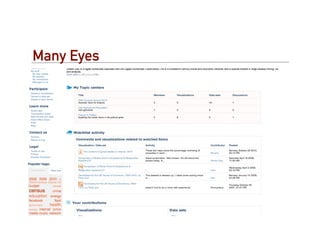
     Many Eyes
     Dipity                 Hosted
                             Omeka (Omeka)
   Frameworks                SEASR
     Gephi
     Exhibit (Exercise)
     GraphViz
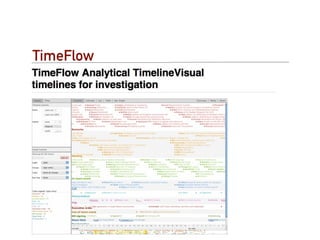
TimeFlow
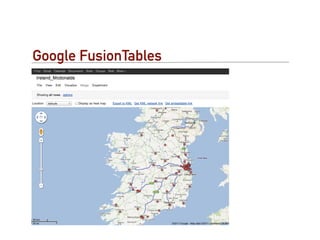
Google FusionTables
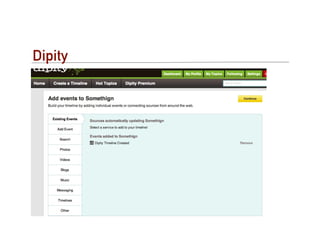
Dipity
Many Eyes
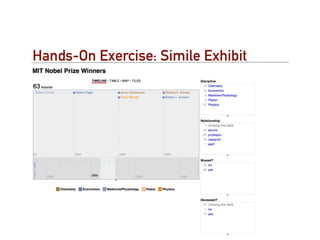
Hands-On Exercise: Simile Exhibit
Setup and Preparation
   Opera Browser contains a server if you need;
   Available from opera.com;
   Need to install opera unite - unite.opera.com;
   Need to copy datafiles:
     http://myeye.ie/ftp1/exhibit/nobelists.js?action=raw
     http://myeye.ie/ftp1/exhibit/index1.html
     You can find instructions at: http://myeye.ie/ftp1/exhibit/
     recipe.txt
Background on Exhibit


Exhibit was developed at MIT to provide a
lightweight framework for the presentation,
searching and faceted browsing of digital collections.
Exhibit lets you easily create web pages with
advanced text search and filtering functionalities,
with interactive maps, timelines, and other
visualizations
So What?...
   Little programming (JavaScript Template);
   No database (JSON text);
   a series of useful ‘instantly interactive’
   visualisations.
Background
  http://www.simile-widgets.org/exhibit/
  A couple examples…
    Canadian Network for Economic History
    Comox Valley Crime Stoppers
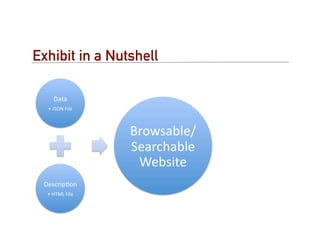
Exhibit in a Nutshell
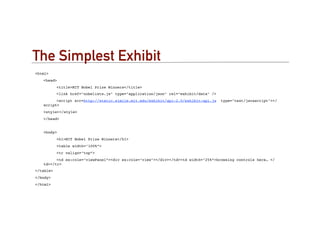
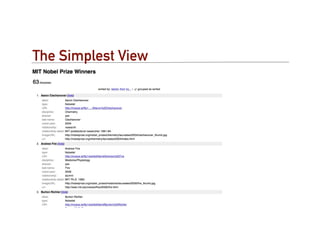
The Simplest Exhibit
<html>
!   <head>
!   !      <title>MIT Nobel Prize Winners</title>
!   !      <link href="nobelists.js" type="application/json" rel="exhibit/data" />
!   !     <script src=http://static.simile.mit.edu/exhibit/api-2.0/exhibit-api.js    type="text/javascript"></
    script>
!   <style></style>
!   </head>


!   <body>
!   !      <h1>MIT Nobel Prize Winners</h1>
!   !      <table width="100%”>
!   !      <tr valign="top”>
!   !     <td ex:role="viewPanel”><div ex:role="view"></div></td><td width="25%”>browsing controls here… </
    td></tr>
</table>
</body>
</html>
The Data
    {
"items" : [
               {     type :                  "Nobelist",
                     label :                 "Burton Richter",
! !        !         latlng:                "42.359089,-71.093412",
                     discipline :            "Physics",
                     shared :                "yes",
                     "last-name" :           "Richter",
                     "nobel-year" :          "1976",
                     relationship :          "alumni",
                     "co-winner" :           "Samuel C.C. Ting",
                     "relationship-detail" : "MIT S.B. 1952, Ph.D. 1956",
                  imageURL :              "http://nobelprize.org/nobel_prizes/
        physics/laureates/1976/richter_thumb.jpg"
               },
               ………
    ]
}
The Simplest View
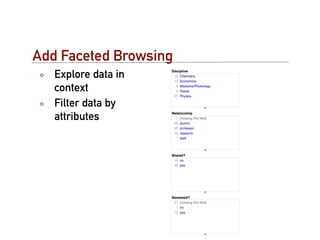
Add Faceted Browsing
   Explore data in
   context
   Filter data by
   attributes
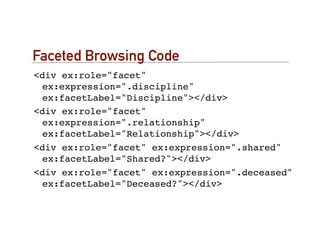
Faceted Browsing Code
<div ex:role="facet"
 ex:expression=".discipline"
 ex:facetLabel="Discipline"></div>
<div ex:role="facet"
 ex:expression=".relationship"
 ex:facetLabel="Relationship"></div>
<div ex:role="facet" ex:expression=".shared"
 ex:facetLabel="Shared?"></div>
<div ex:role="facet" ex:expression=".deceased"
 ex:facetLabel="Deceased?"></div>
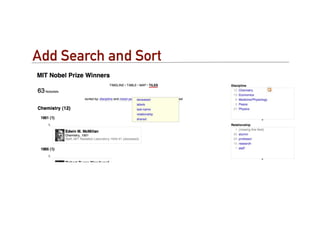
Add Search and Sort
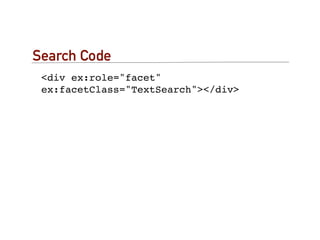
Search Code
 <div ex:role="facet"
 ex:facetClass="TextSearch"></div>
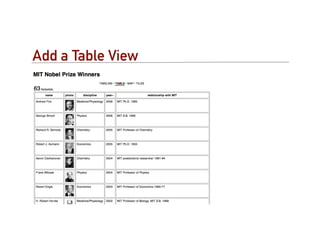
Add a Table View
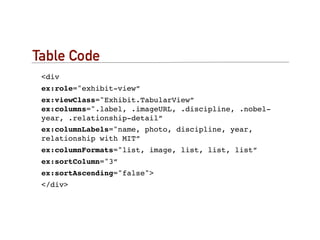
Table Code
 <div
 ex:role="exhibit-view”
 ex:viewClass="Exhibit.TabularView”
 ex:columns=".label, .imageURL, .discipline, .nobel-
 year, .relationship-detail”
 ex:columnLabels="name, photo, discipline, year,
 relationship with MIT”
 ex:columnFormats="list, image, list, list, list”
 ex:sortColumn="3”
 ex:sortAscending="false">
 </div>
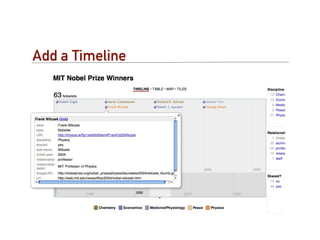
Add a Timeline
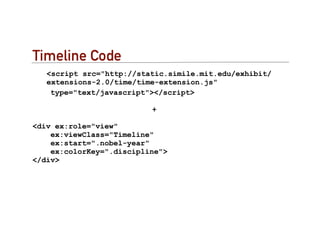
Timeline Code
   <script src="http://static.simile.mit.edu/exhibit/
   extensions-2.0/time/time-extension.js"
    type="text/javascript"></script>

                          +

<div ex:role="view"
    ex:viewClass="Timeline"
    ex:start=".nobel-year"
    ex:colorKey=".discipline">
</div>
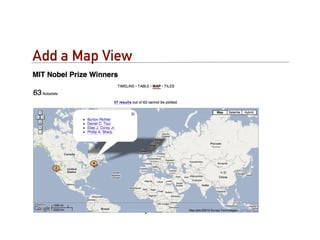
Add a Map View
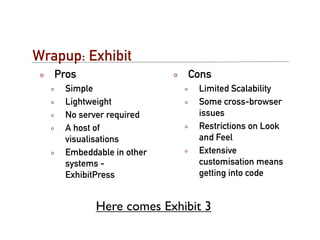
Wrapup: Exhibit
   Pros                    Cons
     Simple                  Limited Scalability
     Lightweight             Some cross-browser
     No server required      issues
     A host of               Restrictions on Look
     visualisations          and Feel
     Embeddable in other     Extensive
     systems -               customisation means
     ExhibitPress            getting into code


            Here comes Exhibit 3
Hands-On and Exercise
   Install and Setup Omeka
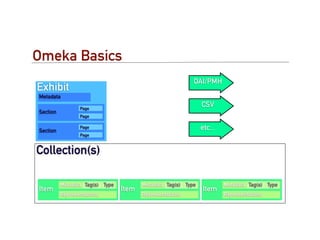
Omeka Basics
                                                           OAI/PMH
Exhibit
Metadata

                 Page
                                                               CSV
Section
                 Page


Section
                 Page                                          etc...
                 Page


Collection(s)

          Metadata Tag(s) Type          Metadata Tag(s) Type            Metadata Tag(s) Type
Item                             Item                          Item
          Representations               Representations                 Representations
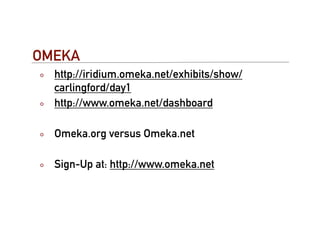
OMEKA
  http://iridium.omeka.net/exhibits/show/
  carlingford/day1
  http://www.omeka.net/dashboard

  Omeka.org versus Omeka.net

  Sign-Up at: http://www.omeka.net
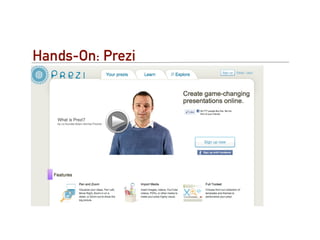
Hands-On: Prezi
Prezi
   http://prezi.com
   Scripted - Narrative driven Visual Presentation
   Tool
   Effective in skilled hands
   Helps audience relate to overall message
   Different way of imagining a presentation
   Challenging
   Not conventionally stand alone
Further Exploration
   http://datajournalism.stanford.edu/
Where to go next
   DIRT (Digital Research Toolkit)
   Timeline Tools
   Visualisation in Education
   Visual Complexity

MPhil Lecture of Data Vis for Presentation

  • 1.
    An Introduction toStructured Data Presentation New Perspectives on Old Data http://www.slideshare.net/shawnday/m-phil-lecture12
  • 2.
    Objective To appreciate the range of structured data presentation tools available to digital humanities scholars and to be able to judge between them.
  • 3.
    Agenda Howdid you fare with the assignment? Experiences Lessons Thoughts Data Presentation versus Data Analysis? Products to be have an awareness of Hands On Install and Config Exhibit Omeka Prezi
  • 4.
    Structured Data PresentationTools (a tiny subset) Webservices Prefuse TimeFlow D3 Google Fusion Tables Processing Many Eyes Dipity Hosted Omeka (Omeka) Frameworks SEASR Gephi Exhibit (Exercise) GraphViz
  • 5.
  • 6.
  • 7.
  • 8.
  • 9.
  • 10.
    Setup and Preparation Opera Browser contains a server if you need; Available from opera.com; Need to install opera unite - unite.opera.com; Need to copy datafiles: http://myeye.ie/ftp1/exhibit/nobelists.js?action=raw http://myeye.ie/ftp1/exhibit/index1.html You can find instructions at: http://myeye.ie/ftp1/exhibit/ recipe.txt
  • 11.
    Background on Exhibit Exhibitwas developed at MIT to provide a lightweight framework for the presentation, searching and faceted browsing of digital collections. Exhibit lets you easily create web pages with advanced text search and filtering functionalities, with interactive maps, timelines, and other visualizations
  • 12.
    So What?... Little programming (JavaScript Template); No database (JSON text); a series of useful ‘instantly interactive’ visualisations.
  • 13.
    Background http://www.simile-widgets.org/exhibit/ A couple examples… Canadian Network for Economic History Comox Valley Crime Stoppers
  • 14.
    Exhibit in aNutshell
  • 15.
    The Simplest Exhibit <html> ! <head> ! ! <title>MIT Nobel Prize Winners</title> ! ! <link href="nobelists.js" type="application/json" rel="exhibit/data" /> ! ! <script src=http://static.simile.mit.edu/exhibit/api-2.0/exhibit-api.js type="text/javascript"></ script> ! <style></style> ! </head> ! <body> ! ! <h1>MIT Nobel Prize Winners</h1> ! ! <table width="100%”> ! ! <tr valign="top”> ! ! <td ex:role="viewPanel”><div ex:role="view"></div></td><td width="25%”>browsing controls here… </ td></tr> </table> </body> </html>
  • 16.
    The Data { "items" : [ { type : "Nobelist", label : "Burton Richter", ! ! ! latlng: "42.359089,-71.093412", discipline : "Physics", shared : "yes", "last-name" : "Richter", "nobel-year" : "1976", relationship : "alumni", "co-winner" : "Samuel C.C. Ting", "relationship-detail" : "MIT S.B. 1952, Ph.D. 1956", imageURL : "http://nobelprize.org/nobel_prizes/ physics/laureates/1976/richter_thumb.jpg" }, ……… ] }
  • 17.
  • 18.
    Add Faceted Browsing Explore data in context Filter data by attributes
  • 19.
    Faceted Browsing Code <divex:role="facet" ex:expression=".discipline" ex:facetLabel="Discipline"></div> <div ex:role="facet" ex:expression=".relationship" ex:facetLabel="Relationship"></div> <div ex:role="facet" ex:expression=".shared" ex:facetLabel="Shared?"></div> <div ex:role="facet" ex:expression=".deceased" ex:facetLabel="Deceased?"></div>
  • 20.
  • 21.
    Search Code <divex:role="facet" ex:facetClass="TextSearch"></div>
  • 22.
  • 23.
    Table Code <div ex:role="exhibit-view” ex:viewClass="Exhibit.TabularView” ex:columns=".label, .imageURL, .discipline, .nobel- year, .relationship-detail” ex:columnLabels="name, photo, discipline, year, relationship with MIT” ex:columnFormats="list, image, list, list, list” ex:sortColumn="3” ex:sortAscending="false"> </div>
  • 24.
  • 25.
    Timeline Code <script src="http://static.simile.mit.edu/exhibit/ extensions-2.0/time/time-extension.js" type="text/javascript"></script> + <div ex:role="view" ex:viewClass="Timeline" ex:start=".nobel-year" ex:colorKey=".discipline"> </div>
  • 26.
  • 27.
    Wrapup: Exhibit Pros Cons Simple Limited Scalability Lightweight Some cross-browser No server required issues A host of Restrictions on Look visualisations and Feel Embeddable in other Extensive systems - customisation means ExhibitPress getting into code Here comes Exhibit 3
  • 28.
    Hands-On and Exercise Install and Setup Omeka
  • 29.
    Omeka Basics OAI/PMH Exhibit Metadata Page CSV Section Page Section Page etc... Page Collection(s) Metadata Tag(s) Type Metadata Tag(s) Type Metadata Tag(s) Type Item Item Item Representations Representations Representations
  • 30.
    OMEKA http://iridium.omeka.net/exhibits/show/ carlingford/day1 http://www.omeka.net/dashboard Omeka.org versus Omeka.net Sign-Up at: http://www.omeka.net
  • 31.
  • 32.
    Prezi http://prezi.com Scripted - Narrative driven Visual Presentation Tool Effective in skilled hands Helps audience relate to overall message Different way of imagining a presentation Challenging Not conventionally stand alone
  • 33.
    Further Exploration http://datajournalism.stanford.edu/
  • 34.
    Where to gonext DIRT (Digital Research Toolkit) Timeline Tools Visualisation in Education Visual Complexity