Microsoft® Lync Online Dial In
Audio Conference Calling

The world leader

in conferencing.
Communique Conferencing Advantages
•

Low prices with no contract, set up fee or monthly minimum.

•

Full Lync audio teleconference call integration: Connect Lync
computer and telephone audio callers, Outlook e-mail integration,
mute/unmute attendee lines, audio recording integration, real-time
participant status, and more.

•

24x7x365 live support: Support centers based in North America,
Europe and Asia provide service 24x7, local representation, in-country
language (19 languages) or familiar dialects.

•

International conference call access: Toll-free and local access
numbers available in more countries than any other provider (109
countries).

•

Custom Branding: We can private brand your conference call service to
promote your company and build your brand as attendees join your calls.
“Welcome to the XYZ company conferencing center. Please enter your
PIN code..”
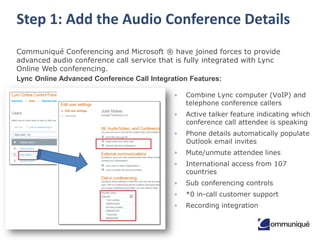
Step 1: Add the Audio Conference Details
Communiqué Conferencing and Microsoft ® have joined forces to provide
advanced audio conference call service that is fully integrated with Lync
Online Web conferencing.
Lync Online Advanced Conference Call Integration Features:
•

Combine Lync computer (VoIP) and
telephone conference callers

•

Active talker feature indicating which
conference call attendee is speaking

•

Phone details automatically populate
Outlook email invites

•

Mute/unmute attendee lines

•

International access from 107
countries

•

Sub conferencing controls

•

*0 in-call customer support

•

Recording integration
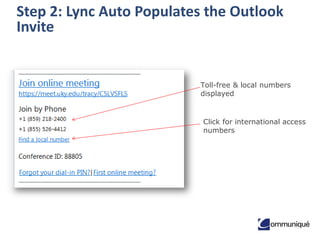
Step 2: Lync Auto Populates the Outlook
Invite

Toll-free & local numbers
displayed

Click for international access
numbers
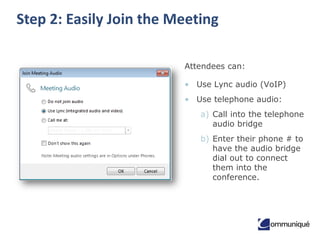
Step 2: Easily Join the Meeting
Attendees can:

• Use Lync audio (VoIP)
• Use telephone audio:

a) Call into the telephone
audio bridge
b) Enter their phone # to
have the audio bridge
dial out to connect
them into the
conference.
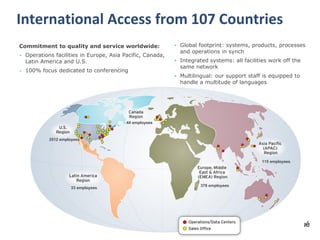
International Access from 107 Countries
Commitment to quality and service worldwide:
• Operations facilities in Europe, Asia Pacific, Canada,

Latin America and U.S.

• 100% focus dedicated to conferencing

• Global footprint: systems, products, processes
and operations in synch
• Integrated systems: all facilities work off the
same network
• Multilingual: our support staff is equipped to
handle a multitude of languages

44 employees

2512 employees

115 employees

33 employees

378 employees
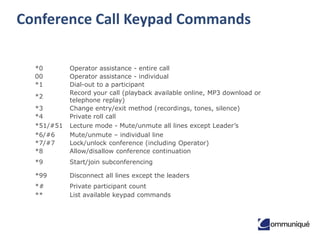
Conference Call Keypad Commands
*0
00
*1

*3
*4
*51/#51
*6/#6
*7/#7
*8

Operator assistance - entire call
Operator assistance - individual
Dial-out to a participant
Record your call (playback available online, MP3 download or
telephone replay)
Change entry/exit method (recordings, tones, silence)
Private roll call
Lecture mode - Mute/unmute all lines except Leader’s
Mute/unmute – individual line
Lock/unlock conference (including Operator)
Allow/disallow conference continuation

*9

Start/join subconferencing

*99

Disconnect all lines except the leaders

*#
**

Private participant count
List available keypad commands

*2
Custom Branded Greeting

“Welcome to the <your company name> conference
center. Please enter the conference code, followed
by the pound or hash sign. If at any point during the
conference you do require operator assistance,
please press star zero.”
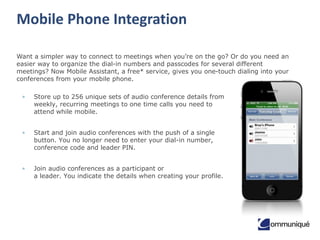
Mobile Phone Integration
Want a simpler way to connect to meetings when you’re on the go? Or do you need an
easier way to organize the dial-in numbers and passcodes for several different
meetings? Now Mobile Assistant, a free* service, gives you one-touch dialing into your
conferences from your mobile phone.
•

Store up to 256 unique sets of audio conference details from
weekly, recurring meetings to one time calls you need to
attend while mobile.

•

Start and join audio conferences with the push of a single
button. You no longer need to enter your dial-in number,
conference code and leader PIN.

•

Join audio conferences as a participant or
a leader. You indicate the details when creating your profile.
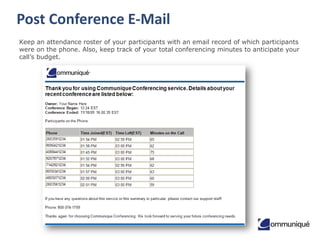
Post Conference E-Mail
Keep an attendance roster of your participants with an email record of which participants
were on the phone. Also, keep track of your total conferencing minutes to anticipate your
call’s budget.
Additional Features
• Auto Continuation

• Participant List

• Conference Breakdown

• Post-Conference Emails

• Consecutive Interpretation

• Private Participant Count

• Custom Call Flow

• Project Accounting Codes

• Dial-Out

• Quick Start

• Entry/Exit Announcement

• Record & Playback

• Force Disconnect

• Roll Call

• Group Mute/Unmute

• Security Passcode

• International Access

• Self Mute/Unmute

• Mute All Attendees

• Sub-conference

• Lock/Unlock

• Third-Party Conference Start

• Multiple Leaders

• Waiting Room

• Operator Assistance
Account Implementation and
Management
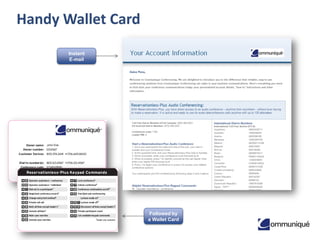
Handy Wallet Card
Instant
E-mail

Followed by
a Wallet Card
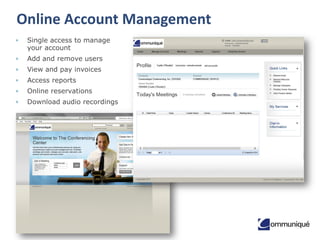
Online Account Management
•

Single access to manage
your account

•

Add and remove users

•

View and pay invoices

•

Access reports

•

Online reservations

•

Download audio recordings
Fanatical Support
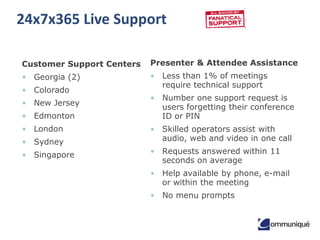
24x7x365 Live Support
Customer Support Centers

Presenter & Attendee Assistance

• Georgia (2)

• Less than 1% of meetings
require technical support

• Colorado
• New Jersey
• Edmonton
• London

• Sydney
• Singapore

• Number one support request is
users forgetting their conference
ID or PIN
• Skilled operators assist with
audio, web and video in one call
• Requests answered within 11
seconds on average
• Help available by phone, e-mail
or within the meeting
• No menu prompts
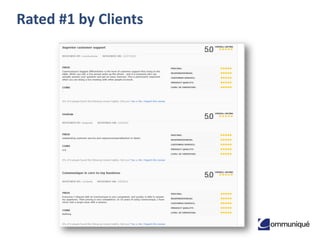
Rated #1 by Clients
Clients That Trust Communique
Awards
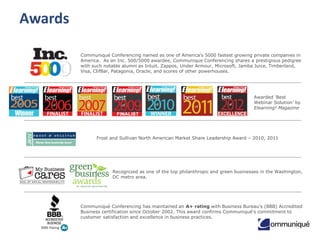
Communiqué Conferencing named as one of America's 5000 fastest growing private companies in
America. As an Inc. 500/5000 awardee, Communique Conferencing shares a prestigious pedigree
with such notable alumni as Intuit, Zappos, Under Armour, Microsoft, Jamba Juice, Timberland,
Visa, ClifBar, Patagonia, Oracle, and scores of other powerhouses.

Awarded ‘Best
Webinar Solution’ by
Elearning! Magazine

Frost and Sullivan North American Market Share Leadership Award – 2010, 2011

Recognized as one of the top philanthropic and green businesses in the Washington,
DC metro area.

Communiqué Conferencing has maintained an A+ rating with Business Bureau's (BBB) Accredited
Business certification since October 2002. This award confirms Communiqué's commitment to
customer satisfaction and excellence in business practices.
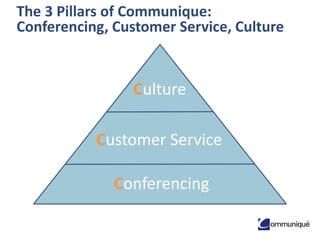
The 3 Pillars of Communique:
Conferencing, Customer Service, Culture

Culture

Customer Service
Conferencing
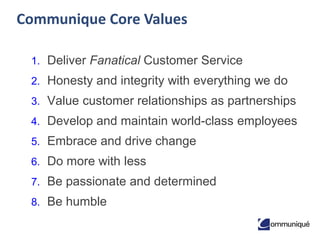
Communique Core Values
1. Deliver Fanatical Customer Service

2. Honesty and integrity with everything we do
3. Value customer relationships as partnerships
4. Develop and maintain world-class employees

5. Embrace and drive change
6. Do more with less
7. Be passionate and determined

8. Be humble
Contact Us
Website: www.communiqueconferencing.com
Email: Sales@CommuniqueConferencing.com

Phone:
• US & Worldwide: 1+866-332-2255 or 1+202-266-0058

• Canada: 1+866-332-2255
• UK: 0808 238 0649

• Ireland: 1 800932407

Lync Dial In Audio Conferencing

  • 1.
    Microsoft® Lync OnlineDial In Audio Conference Calling The world leader in conferencing.
  • 2.
    Communique Conferencing Advantages • Lowprices with no contract, set up fee or monthly minimum. • Full Lync audio teleconference call integration: Connect Lync computer and telephone audio callers, Outlook e-mail integration, mute/unmute attendee lines, audio recording integration, real-time participant status, and more. • 24x7x365 live support: Support centers based in North America, Europe and Asia provide service 24x7, local representation, in-country language (19 languages) or familiar dialects. • International conference call access: Toll-free and local access numbers available in more countries than any other provider (109 countries). • Custom Branding: We can private brand your conference call service to promote your company and build your brand as attendees join your calls. “Welcome to the XYZ company conferencing center. Please enter your PIN code..”
  • 3.
    Step 1: Addthe Audio Conference Details Communiqué Conferencing and Microsoft ® have joined forces to provide advanced audio conference call service that is fully integrated with Lync Online Web conferencing. Lync Online Advanced Conference Call Integration Features: • Combine Lync computer (VoIP) and telephone conference callers • Active talker feature indicating which conference call attendee is speaking • Phone details automatically populate Outlook email invites • Mute/unmute attendee lines • International access from 107 countries • Sub conferencing controls • *0 in-call customer support • Recording integration
  • 4.
    Step 2: LyncAuto Populates the Outlook Invite Toll-free & local numbers displayed Click for international access numbers
  • 5.
    Step 2: EasilyJoin the Meeting Attendees can: • Use Lync audio (VoIP) • Use telephone audio: a) Call into the telephone audio bridge b) Enter their phone # to have the audio bridge dial out to connect them into the conference.
  • 6.
    International Access from107 Countries Commitment to quality and service worldwide: • Operations facilities in Europe, Asia Pacific, Canada, Latin America and U.S. • 100% focus dedicated to conferencing • Global footprint: systems, products, processes and operations in synch • Integrated systems: all facilities work off the same network • Multilingual: our support staff is equipped to handle a multitude of languages 44 employees 2512 employees 115 employees 33 employees 378 employees
  • 7.
    Conference Call KeypadCommands *0 00 *1 *3 *4 *51/#51 *6/#6 *7/#7 *8 Operator assistance - entire call Operator assistance - individual Dial-out to a participant Record your call (playback available online, MP3 download or telephone replay) Change entry/exit method (recordings, tones, silence) Private roll call Lecture mode - Mute/unmute all lines except Leader’s Mute/unmute – individual line Lock/unlock conference (including Operator) Allow/disallow conference continuation *9 Start/join subconferencing *99 Disconnect all lines except the leaders *# ** Private participant count List available keypad commands *2
  • 8.
    Custom Branded Greeting “Welcometo the <your company name> conference center. Please enter the conference code, followed by the pound or hash sign. If at any point during the conference you do require operator assistance, please press star zero.”
  • 9.
    Mobile Phone Integration Wanta simpler way to connect to meetings when you’re on the go? Or do you need an easier way to organize the dial-in numbers and passcodes for several different meetings? Now Mobile Assistant, a free* service, gives you one-touch dialing into your conferences from your mobile phone. • Store up to 256 unique sets of audio conference details from weekly, recurring meetings to one time calls you need to attend while mobile. • Start and join audio conferences with the push of a single button. You no longer need to enter your dial-in number, conference code and leader PIN. • Join audio conferences as a participant or a leader. You indicate the details when creating your profile.
  • 10.
    Post Conference E-Mail Keepan attendance roster of your participants with an email record of which participants were on the phone. Also, keep track of your total conferencing minutes to anticipate your call’s budget.
  • 11.
    Additional Features • AutoContinuation • Participant List • Conference Breakdown • Post-Conference Emails • Consecutive Interpretation • Private Participant Count • Custom Call Flow • Project Accounting Codes • Dial-Out • Quick Start • Entry/Exit Announcement • Record & Playback • Force Disconnect • Roll Call • Group Mute/Unmute • Security Passcode • International Access • Self Mute/Unmute • Mute All Attendees • Sub-conference • Lock/Unlock • Third-Party Conference Start • Multiple Leaders • Waiting Room • Operator Assistance
  • 12.
  • 13.
  • 14.
    Online Account Management • Singleaccess to manage your account • Add and remove users • View and pay invoices • Access reports • Online reservations • Download audio recordings
  • 15.
  • 16.
    24x7x365 Live Support CustomerSupport Centers Presenter & Attendee Assistance • Georgia (2) • Less than 1% of meetings require technical support • Colorado • New Jersey • Edmonton • London • Sydney • Singapore • Number one support request is users forgetting their conference ID or PIN • Skilled operators assist with audio, web and video in one call • Requests answered within 11 seconds on average • Help available by phone, e-mail or within the meeting • No menu prompts
  • 17.
    Rated #1 byClients
  • 18.
  • 19.
    Awards Communiqué Conferencing namedas one of America's 5000 fastest growing private companies in America. As an Inc. 500/5000 awardee, Communique Conferencing shares a prestigious pedigree with such notable alumni as Intuit, Zappos, Under Armour, Microsoft, Jamba Juice, Timberland, Visa, ClifBar, Patagonia, Oracle, and scores of other powerhouses. Awarded ‘Best Webinar Solution’ by Elearning! Magazine Frost and Sullivan North American Market Share Leadership Award – 2010, 2011 Recognized as one of the top philanthropic and green businesses in the Washington, DC metro area. Communiqué Conferencing has maintained an A+ rating with Business Bureau's (BBB) Accredited Business certification since October 2002. This award confirms Communiqué's commitment to customer satisfaction and excellence in business practices.
  • 20.
    The 3 Pillarsof Communique: Conferencing, Customer Service, Culture Culture Customer Service Conferencing
  • 21.
    Communique Core Values 1.Deliver Fanatical Customer Service 2. Honesty and integrity with everything we do 3. Value customer relationships as partnerships 4. Develop and maintain world-class employees 5. Embrace and drive change 6. Do more with less 7. Be passionate and determined 8. Be humble
  • 22.
    Contact Us Website: www.communiqueconferencing.com Email:Sales@CommuniqueConferencing.com Phone: • US & Worldwide: 1+866-332-2255 or 1+202-266-0058 • Canada: 1+866-332-2255 • UK: 0808 238 0649 • Ireland: 1 800932407