LRMI: Implementation
by Google custom
search
Phil Barker & Lorna Campbell
The story so far
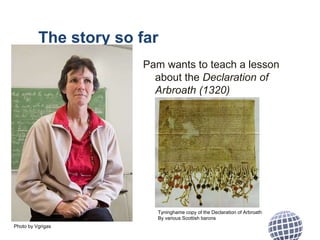
Pam wants to teach a lesson
about the Declaration of
Arbroath (1320)
Photo by Vgrigas
Tyninghame copy of the Declaration of Arbroath
By various Scottish barons
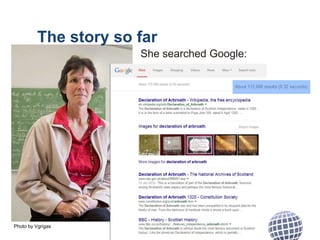
She searched Google:
Photo by Vgrigas
The story so far
The story so far
schema.org didn’t have a way of naming the educational
parameters that could have helped Pam narrow her search,
so LRMI added them.
• Educational alignment
• Educational use
• Interactivity type
• Is based on url
• Learning resource type
• Time required
• Typical age range
• Use rights URL
• Educational role (of target audience)
http://www.lrmi.net/the-specification
So…
• LRMI have enhanced schema.org so that it better
supports open web searching for learning
resources.
• What is really needed for success is for
1) more search services &
a) more resource dissemination channels
to use it.
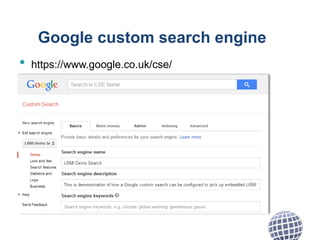
Google custom search engine
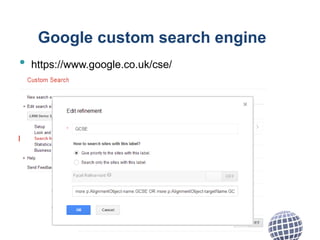
Google custom search allows you build a Google-
powered search limited to a list of domains or
schema.org types, and filtered according to
schema.org properties.
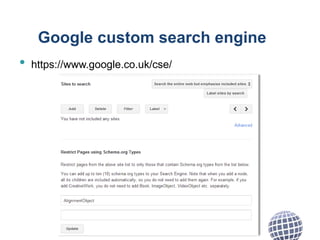
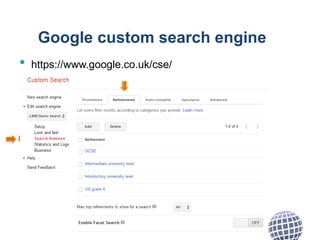
For example:
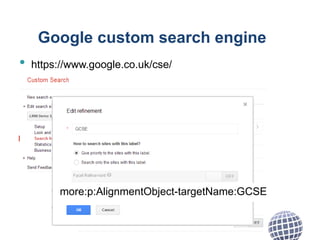
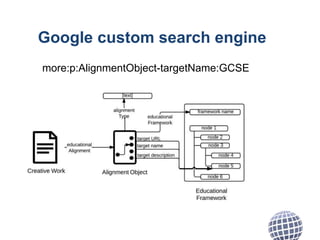
• limit searches to pages that have an Alignment
Object (pages that describe learning resources)
• filter by alignment with what you want to be learnt
Google custom search engine
• https://www.google.co.uk/cse/
Google custom search engine
• https://www.google.co.uk/cse/
Google custom search engine
• https://www.google.co.uk/cse/
Google custom search engine
• https://www.google.co.uk/cse/
Google custom search engine
• https://www.google.co.uk/cse/
more:p:AlignmentObject-targetName:GCSE
Google custom search engine
more:p:AlignmentObject-targetName:GCSE
Photo by Vgrigas
Google custom search
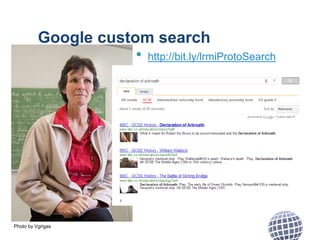
• http://bit.ly/lrmiProtoSearch
Google custom search
Feel free to try it out, try “grammar”
but remember:
It’s a proof of concept , not a service
It doesn’t used all parameters available through
LMRI
http://bit.ly/lrmiProtoSearch
Google custom search
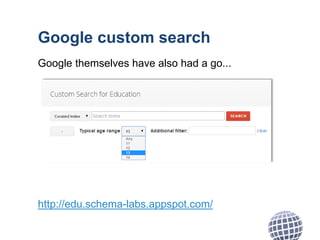
Google themselves have also had a go...
http://edu.schema-labs.appspot.com/
Questions?
• Educational frameworks tend to be local, if something
is aligned to a UK standard how do people in the South
Africa find it?
• How do you describe the educational frameworks?
• What vocabularies should we use for other LRMI
elements?
• How can you describe someone else’s resources?
• Can you use LRMI/schema.org for creating stand-
alone metadata records?
• Can you use LRMI/schema.org in other resource
formats (e.g. EPUB)?
• Can you use LRMI to describe other types of things
(events, OpenBadges...)?
Attributions
• Photo of Pam Robertson, teacher, by Vgrigas (Own work) [CC-BY-SA-3.0
(http://creativecommons.org/licenses/by-sa/3.0)], via Wikimedia Commons
Pam really is a teacher but I have no idea whether she would want to teach anything related to the
declaration of Arbroath
• Reproduction of Tyninghame (1320 A.D) copy of the Declaration of Arbroath, 1320, via
Wikimedia Commons
• Google, yandex, bing, Yahoo! And W3C logos are trademarks.
• Screenshots may contain reserved copyright, their fair use may depend on jurisdiction.
• Other images created by the authors and licensed as CC-BY
Licence
This presentation “LRMI: Implementation by Google custom search”
by Phil Barker <phil.barker@hw.ac.uk>, Heriot-Watt University
and Lorna M Campbell <lorna.m.campbell@icloud.com>, University of Bolton
of Cetis http://www.cetis.ac.uk is licensed under the
Creative Commons Attribution 4.0 International Licence
http://creativecommons.org/licenses/by/4.0/
Cetis
Cetis is the Centre for Educational Technology,
Interoperability and Standards. Our staff are globally
recognised as leading experts on education technology
innovation, interoperability and technology standards. For
over a decade Cetis has provided strategic, technical and
pedagogical advice on educational technology and
standards to funding bodies, standards agencies,
government, institutions and commercial partners.

LRMI: Implementation by Google custom search

  • 1.
    LRMI: Implementation by Googlecustom search Phil Barker & Lorna Campbell
  • 2.
    The story sofar Pam wants to teach a lesson about the Declaration of Arbroath (1320) Photo by Vgrigas Tyninghame copy of the Declaration of Arbroath By various Scottish barons
  • 3.
    She searched Google: Photoby Vgrigas The story so far
  • 4.
    The story sofar schema.org didn’t have a way of naming the educational parameters that could have helped Pam narrow her search, so LRMI added them. • Educational alignment • Educational use • Interactivity type • Is based on url • Learning resource type • Time required • Typical age range • Use rights URL • Educational role (of target audience) http://www.lrmi.net/the-specification
  • 5.
    So… • LRMI haveenhanced schema.org so that it better supports open web searching for learning resources. • What is really needed for success is for 1) more search services & a) more resource dissemination channels to use it.
  • 6.
    Google custom searchengine Google custom search allows you build a Google- powered search limited to a list of domains or schema.org types, and filtered according to schema.org properties. For example: • limit searches to pages that have an Alignment Object (pages that describe learning resources) • filter by alignment with what you want to be learnt
  • 7.
    Google custom searchengine • https://www.google.co.uk/cse/
  • 8.
    Google custom searchengine • https://www.google.co.uk/cse/
  • 9.
    Google custom searchengine • https://www.google.co.uk/cse/
  • 10.
    Google custom searchengine • https://www.google.co.uk/cse/
  • 11.
    Google custom searchengine • https://www.google.co.uk/cse/ more:p:AlignmentObject-targetName:GCSE
  • 12.
    Google custom searchengine more:p:AlignmentObject-targetName:GCSE
  • 13.
    Photo by Vgrigas Googlecustom search • http://bit.ly/lrmiProtoSearch
  • 14.
    Google custom search Feelfree to try it out, try “grammar” but remember: It’s a proof of concept , not a service It doesn’t used all parameters available through LMRI http://bit.ly/lrmiProtoSearch
  • 15.
    Google custom search Googlethemselves have also had a go... http://edu.schema-labs.appspot.com/
  • 16.
    Questions? • Educational frameworkstend to be local, if something is aligned to a UK standard how do people in the South Africa find it? • How do you describe the educational frameworks? • What vocabularies should we use for other LRMI elements? • How can you describe someone else’s resources? • Can you use LRMI/schema.org for creating stand- alone metadata records? • Can you use LRMI/schema.org in other resource formats (e.g. EPUB)? • Can you use LRMI to describe other types of things (events, OpenBadges...)?
  • 17.
    Attributions • Photo ofPam Robertson, teacher, by Vgrigas (Own work) [CC-BY-SA-3.0 (http://creativecommons.org/licenses/by-sa/3.0)], via Wikimedia Commons Pam really is a teacher but I have no idea whether she would want to teach anything related to the declaration of Arbroath • Reproduction of Tyninghame (1320 A.D) copy of the Declaration of Arbroath, 1320, via Wikimedia Commons • Google, yandex, bing, Yahoo! And W3C logos are trademarks. • Screenshots may contain reserved copyright, their fair use may depend on jurisdiction. • Other images created by the authors and licensed as CC-BY
  • 18.
    Licence This presentation “LRMI:Implementation by Google custom search” by Phil Barker <phil.barker@hw.ac.uk>, Heriot-Watt University and Lorna M Campbell <lorna.m.campbell@icloud.com>, University of Bolton of Cetis http://www.cetis.ac.uk is licensed under the Creative Commons Attribution 4.0 International Licence http://creativecommons.org/licenses/by/4.0/
  • 19.
    Cetis Cetis is theCentre for Educational Technology, Interoperability and Standards. Our staff are globally recognised as leading experts on education technology innovation, interoperability and technology standards. For over a decade Cetis has provided strategic, technical and pedagogical advice on educational technology and standards to funding bodies, standards agencies, government, institutions and commercial partners.

Editor's Notes

  • #2 title slide add title into box shown: add presenters
  • #3 body copy no bullets
  • #4 body copy no bullets
  • #5 body copy no bullets
  • #6 body copy no bullets
  • #7 body copy no bullets
  • #8 body copy no bullets
  • #9 body copy no bullets
  • #10 body copy no bullets
  • #11 body copy no bullets
  • #12 body copy no bullets
  • #13 body copy no bullets
  • #14 body copy no bullets
  • #15 body copy no bullets
  • #16 body copy no bullets
  • #17 body copy no bullets
  • #18 body copy no bullets
  • #19 body copy no bullets