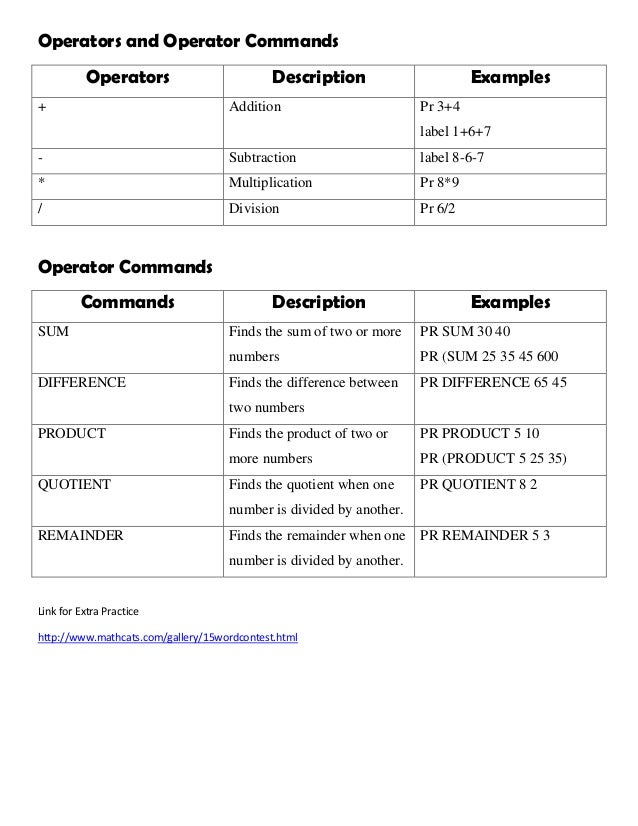
The document describes various commands and functions in MSW Logo including commands to move and draw with the turtle, set properties of the pen and turtle, create shapes using repetition of commands, and perform mathematical operations. Key commands include FD, BK, RT, LT to move and turn the turtle, REPEAT to repeat a block of commands a set number of times for creating shapes, and mathematical operators and functions like SUM, DIFFERENCE, PRODUCT, and QUOTIENT. Loops and nested repetition allow for complex drawings to be built up through repetition of simple movement and turning commands.
![MSW LOGO COMMANDS
Command Description Example
FD Moves turtle forward FD 100
BK Moves turtle backward BK 100
Right or RT Turns the head of the turtle to the right RT 90
Left or LT Turns the head of the turtle to the left LT 90
Home Brings the turtle to its starting position Home
CS or CLEARSCREEN Erases drawing on the main screen CS
CT or CLEARTEXT Erases the text from the commander
window
CT
LABEL Write text or number on the main
screen
Label 100
Label[Logo Commands]
Label “Logo Commands”
PRINT or PR Write text or number in the Recall
Text Box
PR 100
PR[Logo Commands]
PR “Logo Commands”
SETPENSIZE Sets the size of the turtle’s pen SETPENSIZE[5 5]
SETPETCOLOR OR
SETPC
Sets the color of the turtle’s pen SETPC[255 0 0]
PU or PENUP Turtle moves without drawing lines. PU
PD or PENDOWN Turtle moves while drawing lines PD
PE or PENERASE Sets pen in erase in mode. PE
PENNORMAL Sets the pen to normal drawing mode. PENNORMAL
HT or HIDETURTLE Used to hide the turtle once the
drawing is complete
HT
ST or SHOWTURTLW It makes the turtle visible on the
screen again.
ST
SETFC or
SETFLOODCOLOR
Sets the value of the fill color. SETFC[255 100 200]
FILL Fills the enclosed area with the
specified color
FILL](https://image.slidesharecdn.com/logocommands-220628053009-fbbb8c5f/95/logo_commands-pdf-1-638.jpg)
![Loops in MSW Logo
Repeat Command is used to repeat a set of commands the specified number of times.
Triangle 3 (sides)
Repeat 3 [FD 100 RT 120]
Square (4 sides)
Repeat 4 [FD 100 RT 90]
Pentagon (5 sides)
Repeat 5 [FD 100 RT 72]
Hexagon (6 sides)
Repeat 6 [FD 100 RT 60]
Septagon(7 sides)
Repeat 7 [FD 100 RT 51]
Octagon (8 sides)
Repeat 8 [FD 100 RT 45]
Repeat inside Repeat Command
One Repeat command can be used inside another repeat command. Some examples are given
below:
REPEAT 36[REPEAT 4[FD 100 RT 90] RT 10] REPEAT 8 [ REPEAT 5 [ RT 72 FD 70 ] RT
45 ]
REPEAT 50 [ELLIPSE 100 30 RT 5] REPEAT 8 [RT 45 REPEAT 6 [REPEAT 90
[FD 2 RT 2] RT 90]]](https://image.slidesharecdn.com/logocommands-220628053009-fbbb8c5f/95/logo_commands-pdf-2-638.jpg)