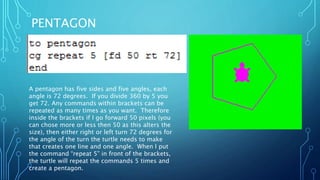
This document contains instructions for using turtle graphics commands to draw various shapes. It explains how to create squares, rectangles, triangles of different types (isosceles, equilateral, scalene), pentagons, parallelograms, nonagons, decagons, and more complex shapes like a house and fence. For each shape, it provides the key properties, then shows the turtle commands used to draw it, such as moving forward a set number of pixels and turning a specific degree amount, repeating those commands as needed.

![SQUARE
To Make a Different
sized square either up
or down the FD
number
As you can see I also experimented with the back ground color and the turtles color to do this
simply enter SETC “YELLOW or the color you want your lines to be for the background color you
enter SETBG “BLACK or the color that you want. [Warning purple does not work use violet
instead].
Any commands within brackets can be repeated by putting
the command “repeat” and a figure after it stating how
many times you want it to be repeated. A square has four
sides so I needed the turtle to move forward as many
pixels as I wanted. I chose 50 pixels. A square has equal
sides and equal angles. The angles are always 90 degrees.
Therefore the turtle needs to move forward 50 pixels and
then turn 90 degrees, four times to create a square. That
is why I put “repeat 4” because the command needed to be
repeated 4 times for each of the four sides.](https://image.slidesharecdn.com/microworlds-150601060515-lva1-app6891/85/Microworlds-2-320.jpg)