Mule Message Structure
Properties and Variables
By Srilatha Kante
Agenda
• Introduction to Mule Message
• Message Headers
• Properties
• Variables
• Flow and Flow References
Mule Message
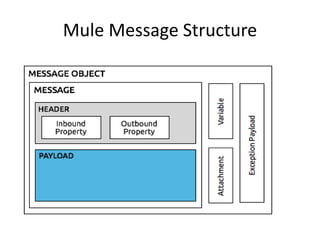
• The Mule message is the data that passes
through an application via one or more flows.
It consists of two main parts:
– the message header, which contains metadata
about the message
– the message payload, which contains your
business-specific data.
• A Mule message is, itself, embedded within
a Mule message object.
Mule Message Structure
Properties
• The metadata contained in the message
header consists of properties which provide
useful information about the message.
• Properties has a name and a value.
• Inbound Properties
• Outbound Properties
Properties
• Want to interact with server properties
– #[server.date]
• Current Application properties
– #[app.workDir]
Inbound Properties
• Inbound properties are immutable, are
automatically generated by the message
source and cannot be set or manipulated by
the user
– For HTTP – http.query.string
Outbound Properties
• Outbound properties are mutable; they are
set during the course of a flow and can
become inbound properties when the
message passes from the outbound endpoint
of one flow to the inbound endpoint of a
different flow via a transport.
• They contain metadata similar to that of an
inbound property, but an outbound property
is applied after the message enters the flow.
Outbound Properties
• Outbound properties can be set automatically
by Mule or a user can set them by manually
inserting one or more transformer elements in
the flow.
• Note that if the message is passed to a new
flow via a flow-ref rather than a connector, the
outbound properties remain outbound
properties rather than being converted to
inbound properties
Variables
• Variables are user-defined metadata about a
message. Variables have three scopes:
– Flow variables apply only to the flow in which
they exist.
– Session variables apply across all flows within the
same application.
– Record variables apply to only to records
processed as part of a batch.
Variables vs Properties
• Variables are temporary pieces of information
about a message that are meant to be used by
the application that is processing it, rather than
passed along with the message to its destination.
• Variables are more likely to be set by humans
• Properties are more likely to be set and invoked
by systems.
• Variables also have name and value
• Properties have two main
scopes: inbound and outbound.

Mule message structure

  • 1.
    Mule Message Structure Propertiesand Variables By Srilatha Kante
  • 2.
    Agenda • Introduction toMule Message • Message Headers • Properties • Variables • Flow and Flow References
  • 3.
    Mule Message • TheMule message is the data that passes through an application via one or more flows. It consists of two main parts: – the message header, which contains metadata about the message – the message payload, which contains your business-specific data. • A Mule message is, itself, embedded within a Mule message object.
  • 4.
  • 5.
    Properties • The metadatacontained in the message header consists of properties which provide useful information about the message. • Properties has a name and a value. • Inbound Properties • Outbound Properties
  • 6.
    Properties • Want tointeract with server properties – #[server.date] • Current Application properties – #[app.workDir]
  • 7.
    Inbound Properties • Inboundproperties are immutable, are automatically generated by the message source and cannot be set or manipulated by the user – For HTTP – http.query.string
  • 8.
    Outbound Properties • Outboundproperties are mutable; they are set during the course of a flow and can become inbound properties when the message passes from the outbound endpoint of one flow to the inbound endpoint of a different flow via a transport. • They contain metadata similar to that of an inbound property, but an outbound property is applied after the message enters the flow.
  • 9.
    Outbound Properties • Outboundproperties can be set automatically by Mule or a user can set them by manually inserting one or more transformer elements in the flow. • Note that if the message is passed to a new flow via a flow-ref rather than a connector, the outbound properties remain outbound properties rather than being converted to inbound properties
  • 10.
    Variables • Variables areuser-defined metadata about a message. Variables have three scopes: – Flow variables apply only to the flow in which they exist. – Session variables apply across all flows within the same application. – Record variables apply to only to records processed as part of a batch.
  • 11.
    Variables vs Properties •Variables are temporary pieces of information about a message that are meant to be used by the application that is processing it, rather than passed along with the message to its destination. • Variables are more likely to be set by humans • Properties are more likely to be set and invoked by systems. • Variables also have name and value • Properties have two main scopes: inbound and outbound.