OpenManage iDRAC 9
Power Cap – Via CLI / GUI
Kick Start Version 1.0 Jan 2020
Mark Maclean – Dell EMC UK
© Copyright 2019 Dell Inc.
2
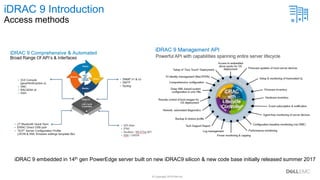
iDRAC 9 Introduction
Access methods
iDRAC 9 embedded in 14th gen PowerEdge server built on new iDRAC9 silicon & new code base initially released summer 2017
© Copyright 2019 Dell Inc.
Summary & Terms
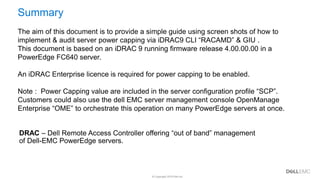
Summary
The aim of this document is to provide a simple guide using screen shots of how to
implement & audit server power capping via iDRAC9 CLI “RACAMD” & GIU .
This document is based on an iDRAC 9 running firmware release 4.00.00.00 in a
PowerEdge FC640 server.
An iDRAC Enterprise licence is required for power capping to be enabled.
Note : Power Capping value are included in the server configuration profile “SCP”.
Customers could also use the dell EMC server management console OpenManage
Enterprise “OME” to orchestrate this operation on many PowerEdge servers at once.
DRAC – Dell Remote Access Controller offering “out of band” management
of Dell-EMC PowerEdge servers.
© Copyright 2019 Dell Inc.4 of Y
How To
© Copyright 2019 Dell Inc.
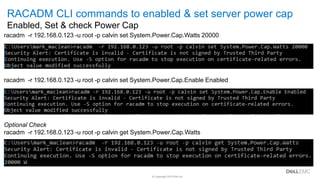
Summary & Termsracadm -r 192.168.0.123 -u root -p calvin set System.Power.Cap.Watts 20000
racadm -r 192.168.0.123 -u root -p calvin set System.Power.Cap.Enable Enabled
Optional Check
racadm -r 192.168.0.123 -u root -p calvin get System.Power.Cap.Watts
RACADM CLI commands to enabled & set server power cap
Enabled, Set & check Power Cap
© Copyright 2019 Dell Inc.
Summary & Terms
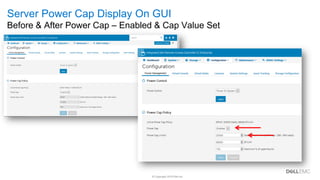
Server Power Cap Display On GUI
Before & After Power Cap – Enabled & Cap Value Set
© Copyright 2019 Dell Inc.
Summary & Terms
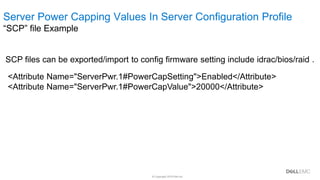
SCP files can be exported/import to config firmware setting include idrac/bios/raid .
<Attribute Name="ServerPwr.1#PowerCapSetting">Enabled</Attribute>
<Attribute Name="ServerPwr.1#PowerCapValue">20000</Attribute>
Server Power Capping Values In Server Configuration Profile
“SCP” file Example
© Copyright 2019 Dell Inc.8 of Y
Resources
© Copyright 2019 Dell Inc.
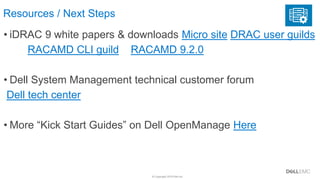
Resources / Next Steps
• iDRAC 9 white papers & downloads Micro site DRAC user guilds
RACAMD CLI guild RACAMD 9.2.0
• Dell System Management technical customer forum
Dell tech center
• More “Kick Start Guides” on Dell OpenManage Here
© Copyright 2019 Dell Inc.10 of Y
Thank You
Dell EMC OpenManage idrac9 server power capping

Dell EMC OpenManage idrac9 server power capping

  • 1.
    OpenManage iDRAC 9 PowerCap – Via CLI / GUI Kick Start Version 1.0 Jan 2020 Mark Maclean – Dell EMC UK
  • 2.
    © Copyright 2019Dell Inc. 2 iDRAC 9 Introduction Access methods iDRAC 9 embedded in 14th gen PowerEdge server built on new iDRAC9 silicon & new code base initially released summer 2017
  • 3.
    © Copyright 2019Dell Inc. Summary & Terms Summary The aim of this document is to provide a simple guide using screen shots of how to implement & audit server power capping via iDRAC9 CLI “RACAMD” & GIU . This document is based on an iDRAC 9 running firmware release 4.00.00.00 in a PowerEdge FC640 server. An iDRAC Enterprise licence is required for power capping to be enabled. Note : Power Capping value are included in the server configuration profile “SCP”. Customers could also use the dell EMC server management console OpenManage Enterprise “OME” to orchestrate this operation on many PowerEdge servers at once. DRAC – Dell Remote Access Controller offering “out of band” management of Dell-EMC PowerEdge servers.
  • 4.
    © Copyright 2019Dell Inc.4 of Y How To
  • 5.
    © Copyright 2019Dell Inc. Summary & Termsracadm -r 192.168.0.123 -u root -p calvin set System.Power.Cap.Watts 20000 racadm -r 192.168.0.123 -u root -p calvin set System.Power.Cap.Enable Enabled Optional Check racadm -r 192.168.0.123 -u root -p calvin get System.Power.Cap.Watts RACADM CLI commands to enabled & set server power cap Enabled, Set & check Power Cap
  • 6.
    © Copyright 2019Dell Inc. Summary & Terms Server Power Cap Display On GUI Before & After Power Cap – Enabled & Cap Value Set
  • 7.
    © Copyright 2019Dell Inc. Summary & Terms SCP files can be exported/import to config firmware setting include idrac/bios/raid . <Attribute Name="ServerPwr.1#PowerCapSetting">Enabled</Attribute> <Attribute Name="ServerPwr.1#PowerCapValue">20000</Attribute> Server Power Capping Values In Server Configuration Profile “SCP” file Example
  • 8.
    © Copyright 2019Dell Inc.8 of Y Resources
  • 9.
    © Copyright 2019Dell Inc. Resources / Next Steps • iDRAC 9 white papers & downloads Micro site DRAC user guilds RACAMD CLI guild RACAMD 9.2.0 • Dell System Management technical customer forum Dell tech center • More “Kick Start Guides” on Dell OpenManage Here
  • 10.
    © Copyright 2019Dell Inc.10 of Y Thank You