Learning Paths
What are they? What is coming to Administrate?
Heather Bayfield
Senior Product Manager
hlb@getadministrate.com
JJ Cranston
UX/UI Designer
jjc@getadministrate.com
• What are Learning Paths?
• Who should use them?
• Top tips for Learning Path creation
• What’s in Administrate now?
• What’s coming for Learning Paths?
• Also we have heard...
• Want to know more?
What we will cover
What are Learning Paths?
• Can sometimes be referred to as Learning
Tracks/Paths/Pathways/Journeys/Trails...
• A group of learning objectives to complete to
achieve a larger goal
• Essentially a learning plan or outline
What are they?
• Learner centred approach to learning
• Personalised goals and objectives
• Learner can be directed or given more
autonomy
• Typically span longer periods of time
• Ability to choose different ways of learning (if
provided)
Learning Paths for learners
• Tracking learners through long form learning becomes much easier
• It can save you a lot of admin time because some of the control is
handed over to the learner
• Paths can be used again and again, like templates for long term
learning, reducing excess admin work
Learning Paths for admins
Who should use them?
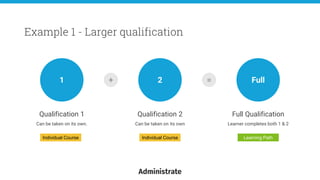
Qualification 1
Can be taken on its own.
Example 1 - Larger qualification
1 2 Full
Qualification 2
Can be taken on its own
Full Qualification
Learner completes both 1 & 2
+ =
Individual Course Individual Course Learning Path
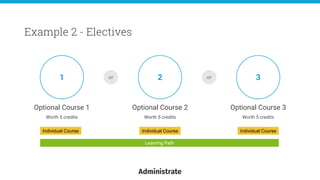
Optional Course 1
Worth 5 credits
Example 2 - Electives
1 2 3
Optional Course 2
Worth 5 credits
Optional Course 3
Worth 5 credits
or
Individual Course Individual Course
Learning Path
or
Individual Course
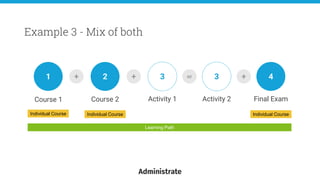
Course 1
Example 3 - Mix of both
1
Learning Path
+ +2 3 3 +or 4
Course 2 Activity 1 Activity 2 Final Exam
Individual Course Individual Course Individual Course
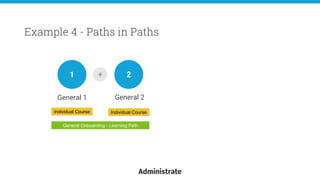
General 1
Example 4 - Paths in Paths
1
General Onboarding - Learning Path
+ 2
General 2
Individual Course Individual Course
General 1
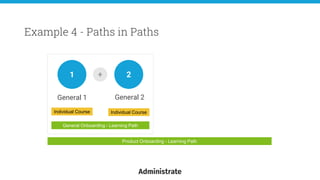
Example 4 - Paths in Paths
1
General Onboarding - Learning Path
+ 2
General 2
Individual Course Individual Course
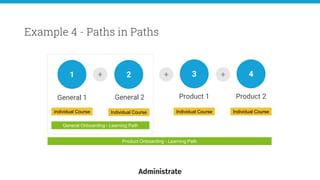
Product Onboarding - Learning Path
General 1
Example 4 - Paths in Paths
1
General Onboarding - Learning Path
+ +2 3
General 2 Product 1
Individual Course Individual Course Individual Course
Product Onboarding - Learning Path
+ 4
Product 2
Individual Course
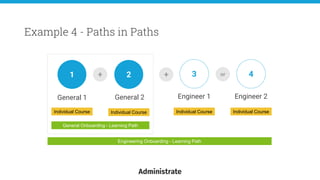
General 1
Example 4 - Paths in Paths
1
General Onboarding - Learning Path
+ +2 3
General 2 Engineer 1
Individual Course Individual Course Individual Course
Engineering Onboarding - Learning Path
4
Engineer 2
Individual Course
or
General 1
Example 4 - Paths in Paths
1
General Onboarding - Learning Path
+ 2
General 2
Individual Course Individual Course
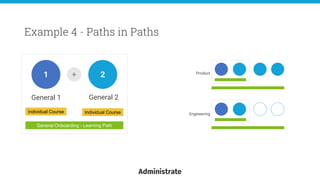
Product
Engineering
General 1
Example 4 - Paths in Paths
1
General Onboarding - Learning Path
+ 2
General 2
Individual Course Individual Course
Product
Engineering
General 1
Example 4 - Paths in Paths
1
General Onboarding - Learning Path
+ 2
General 2
Individual Course Individual Course
Product
Engineering
General 1
Example 4 - Paths in Paths
1
General Onboarding - Learning Path
+ 2
General 2
Individual Course Individual Course
Product
Engineering
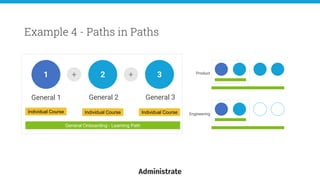
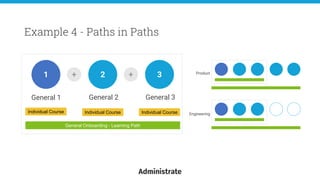
+ 3
General 3
Individual Course
General 1
Example 4 - Paths in Paths
1
General Onboarding - Learning Path
+ 2
General 2
Individual Course Individual Course
Product
Engineering
+ 3
General 3
Individual Course
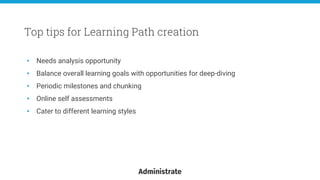
Top tips for Learning Path creation
• Needs analysis opportunity
• Balance overall learning goals with opportunities for deep-diving
• Periodic milestones and chunking
• Online self assessments
• Cater to different learning styles
Top tips for Learning Path creation
What’s in Administrate now?
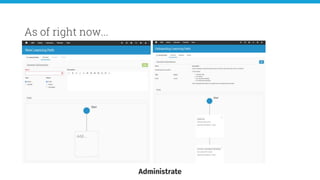
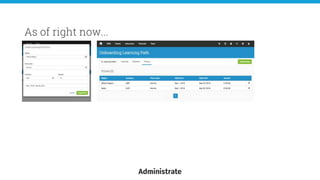
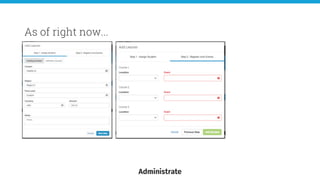
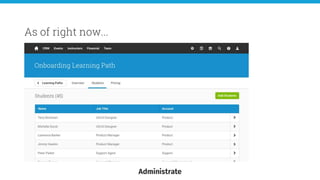
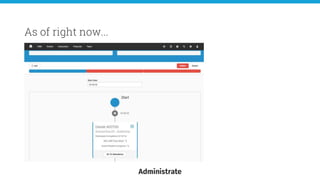
As of right now...
As of right now...
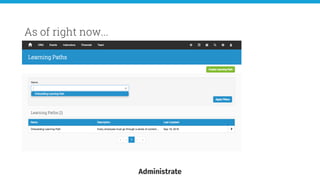
As of right now...
As of right now...
As of right now...
As of right now...
• Learning Paths - In testing, coming soon!
• Selling Learning Paths via Sales Opps - December 2018
• Selling Learning Paths via Web Integrations - January 2019
Timeline
What’s coming for
Learning Paths?
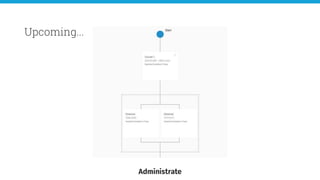
Upcoming...
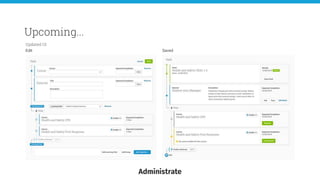
Upcoming...
Edit Saved
Updated UI
Upcoming...
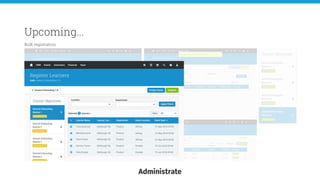
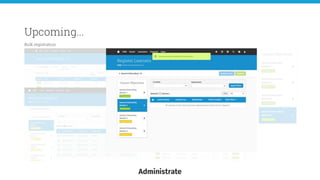
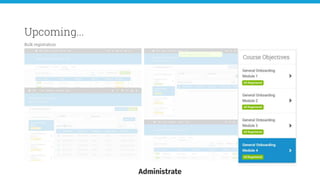
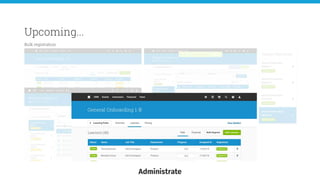
Bulk registration
Upcoming...
Bulk registration
Upcoming...
Bulk registration
Upcoming...
Bulk registration
Upcoming...
Bulk registration
Upcoming...
Bulk registration
Upcoming...
Waitlist
Upcoming...
Self registration
• Prerequisite system
• More intelligent triggers and actions
• Certificate automation
• Self registration via portal (everything)
• Qualification renewal and tracking
Also we have heard...
Want to know more?
Book a 1-2-1 with Product now at LITE
Heather Bayfield
Senior Product Manager
hlb@getadministrate.com
JJ Cranston
UX/UI Designer
jjc@getadministrate.com

LITE 2018 – Learning Paths [Heather Bayfield + JJ Cranston]

  • 1.
    Learning Paths What arethey? What is coming to Administrate? Heather Bayfield Senior Product Manager hlb@getadministrate.com JJ Cranston UX/UI Designer jjc@getadministrate.com
  • 2.
    • What areLearning Paths? • Who should use them? • Top tips for Learning Path creation • What’s in Administrate now? • What’s coming for Learning Paths? • Also we have heard... • Want to know more? What we will cover
  • 3.
  • 4.
    • Can sometimesbe referred to as Learning Tracks/Paths/Pathways/Journeys/Trails... • A group of learning objectives to complete to achieve a larger goal • Essentially a learning plan or outline What are they?
  • 5.
    • Learner centredapproach to learning • Personalised goals and objectives • Learner can be directed or given more autonomy • Typically span longer periods of time • Ability to choose different ways of learning (if provided) Learning Paths for learners
  • 6.
    • Tracking learnersthrough long form learning becomes much easier • It can save you a lot of admin time because some of the control is handed over to the learner • Paths can be used again and again, like templates for long term learning, reducing excess admin work Learning Paths for admins
  • 7.
  • 8.
    Qualification 1 Can betaken on its own. Example 1 - Larger qualification 1 2 Full Qualification 2 Can be taken on its own Full Qualification Learner completes both 1 & 2 + = Individual Course Individual Course Learning Path
  • 9.
    Optional Course 1 Worth5 credits Example 2 - Electives 1 2 3 Optional Course 2 Worth 5 credits Optional Course 3 Worth 5 credits or Individual Course Individual Course Learning Path or Individual Course
  • 10.
    Course 1 Example 3- Mix of both 1 Learning Path + +2 3 3 +or 4 Course 2 Activity 1 Activity 2 Final Exam Individual Course Individual Course Individual Course
  • 11.
    General 1 Example 4- Paths in Paths 1 General Onboarding - Learning Path + 2 General 2 Individual Course Individual Course
  • 12.
    General 1 Example 4- Paths in Paths 1 General Onboarding - Learning Path + 2 General 2 Individual Course Individual Course Product Onboarding - Learning Path
  • 13.
    General 1 Example 4- Paths in Paths 1 General Onboarding - Learning Path + +2 3 General 2 Product 1 Individual Course Individual Course Individual Course Product Onboarding - Learning Path + 4 Product 2 Individual Course
  • 14.
    General 1 Example 4- Paths in Paths 1 General Onboarding - Learning Path + +2 3 General 2 Engineer 1 Individual Course Individual Course Individual Course Engineering Onboarding - Learning Path 4 Engineer 2 Individual Course or
  • 15.
    General 1 Example 4- Paths in Paths 1 General Onboarding - Learning Path + 2 General 2 Individual Course Individual Course Product Engineering
  • 16.
    General 1 Example 4- Paths in Paths 1 General Onboarding - Learning Path + 2 General 2 Individual Course Individual Course Product Engineering
  • 17.
    General 1 Example 4- Paths in Paths 1 General Onboarding - Learning Path + 2 General 2 Individual Course Individual Course Product Engineering
  • 18.
    General 1 Example 4- Paths in Paths 1 General Onboarding - Learning Path + 2 General 2 Individual Course Individual Course Product Engineering + 3 General 3 Individual Course
  • 19.
    General 1 Example 4- Paths in Paths 1 General Onboarding - Learning Path + 2 General 2 Individual Course Individual Course Product Engineering + 3 General 3 Individual Course
  • 20.
    Top tips forLearning Path creation
  • 21.
    • Needs analysisopportunity • Balance overall learning goals with opportunities for deep-diving • Periodic milestones and chunking • Online self assessments • Cater to different learning styles Top tips for Learning Path creation
  • 22.
  • 23.
  • 24.
  • 25.
  • 26.
  • 27.
  • 28.
  • 29.
    • Learning Paths- In testing, coming soon! • Selling Learning Paths via Sales Opps - December 2018 • Selling Learning Paths via Web Integrations - January 2019 Timeline
  • 30.
  • 31.
  • 32.
  • 33.
  • 34.
  • 35.
  • 36.
  • 37.
  • 38.
  • 39.
  • 40.
  • 41.
    • Prerequisite system •More intelligent triggers and actions • Certificate automation • Self registration via portal (everything) • Qualification renewal and tracking Also we have heard...
  • 42.
    Want to knowmore? Book a 1-2-1 with Product now at LITE Heather Bayfield Senior Product Manager hlb@getadministrate.com JJ Cranston UX/UI Designer jjc@getadministrate.com

Editor's Notes

  • #2 H then J
  • #3 H
  • #4 H
  • #5 H
  • #6 H > Learning Paths revolve much more around the learner and are less about you ‘pushing’ learning to the learner and more about them ‘pulling’ from you. > goals and objectives can be customised to the individual > you can give the learner a set path of objectives to complete or allow them to choose between options to gain credit > These tend to be longer offerings - should this be in here? > You could offer written material for the learner to read through or also offer the ability to watch a video on the subject all within the same path.
  • #7 H > Because all learners are added to a Path, keeping track of individuals progress over multiple courses becomes a much easier thing to report on. > You will spend much less time on registering or discussing with your learners what courses they want to take as you can give them the ability to choose from defined options. > The general consensus with Paths is that you create it with all of the learning objectives that are accessbile on it and a learner gets assigned to their version of that, where they pick and choose between options or selecting dates, which will again reduce a lot of admin work and enable a faster route to learning.
  • #8 J Anyone can use Learning Paths as they are essentially just a way to help you and learner group together a series of learning objectives and outcomes to complete in order to achieve some over arching goal. You could have learning Paths that only consist of online modules, you could use them for internal training, or offer them to your clients or students as bigger packages of learning. Let us show you some basic examples of how these can be constructed.
  • #9 J You could be offering two smaller qualifications on their own that learners could take individually. You may also offer the ability for your learners to take both courses to gain the ‘full qualification’ whatever that may be. A learning Path is a great way to put these two parts together. In this case, the learner must complete both to get the qualification, but they will be able to choose their own dates for each of the courses to suit them. You could still restrict this ofcourse if there were time constraints.
  • #10 J You may have an offering where the learner must complete a certain amount of objectives and achieve credits along the way for them to get their qualification but the specific objectives themselves are not as important as they could choose from many. Here there are 3 options and you need to complete two, but it doesn’t matter which to gain the qualification.
  • #11 J You may have an offering where the learner must complete a certain amount of objectives and achieve credits along the way for them to get their qualification but the specific objectives themselves are not as important as they could choose from many. Here there are 3 options and you need to complete two, but it doesn’t matter which to gain the qualification.
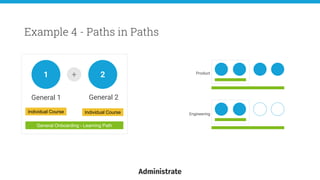
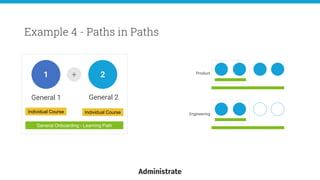
  • #12 J A lot of system that offer Learning Paths or something similar also give you the ability to nest paths within other paths. This is really powerful. Take our real example where we have general onboarding in the company, and then each department has it’s own specialised onboarding. We can create the general onboarding as a path then we can add that path to each departments onboarding path. This means that any updates to the general onboarding only needs to be made on one place, and everyones can update automatically. The concept of nesting paths saves us all even more time and allows better tracking across the board of paths that are shared and their individual ones. This model can be applied elsewhere too, wherever you find yourself with repeatable chunks of learning that you could consider as a path that is shared by many other larger qualifications.
  • #13 J A lot of system that offer Learning Paths or something similar also give you the ability to nest paths within other paths. This is really powerful. Take our real example where we have general onboarding in the company, and then each department has it’s own specialised onboarding. We can create the general onboarding as a path then we can add that path to each departments onboarding path. This means that any updates to the general onboarding only needs to be made on one place, and everyones can update automatically. The concept of nesting paths saves us all even more time and allows better tracking across the board of paths that are shared and their individual ones. This model can be applied elsewhere too, wherever you find yourself with repeatable chunks of learning that you could consider as a path that is shared by many other larger qualifications.
  • #14 J A lot of system that offer Learning Paths or something similar also give you the ability to nest paths within other paths. This is really powerful. Take our real example where we have general onboarding in the company, and then each department has it’s own specialised onboarding. We can create the general onboarding as a path then we can add that path to each departments onboarding path. This means that any updates to the general onboarding only needs to be made on one place, and everyones can update automatically. The concept of nesting paths saves us all even more time and allows better tracking across the board of paths that are shared and their individual ones. This model can be applied elsewhere too, wherever you find yourself with repeatable chunks of learning that you could consider as a path that is shared by many other larger qualifications.
  • #15 J A lot of system that offer Learning Paths or something similar also give you the ability to nest paths within other paths. This is really powerful. Take our real example where we have general onboarding in the company, and then each department has it’s own specialised onboarding. We can create the general onboarding as a path then we can add that path to each departments onboarding path. This means that any updates to the general onboarding only needs to be made on one place, and everyones can update automatically. The concept of nesting paths saves us all even more time and allows better tracking across the board of paths that are shared and their individual ones. This model can be applied elsewhere too, wherever you find yourself with repeatable chunks of learning that you could consider as a path that is shared by many other larger qualifications.
  • #16 J A lot of system that offer Learning Paths or something similar also give you the ability to nest paths within other paths. This is really powerful. Take our real example where we have general onboarding in the company, and then each department has it’s own specialised onboarding. We can create the general onboarding as a path then we can add that path to each departments onboarding path. This means that any updates to the general onboarding only needs to be made on one place, and everyones can update automatically. The concept of nesting paths saves us all even more time and allows better tracking across the board of paths that are shared and their individual ones. This model can be applied elsewhere too, wherever you find yourself with repeatable chunks of learning that you could consider as a path that is shared by many other larger qualifications.
  • #17 J A lot of system that offer Learning Paths or something similar also give you the ability to nest paths within other paths. This is really powerful. Take our real example where we have general onboarding in the company, and then each department has it’s own specialised onboarding. We can create the general onboarding as a path then we can add that path to each departments onboarding path. This means that any updates to the general onboarding only needs to be made on one place, and everyones can update automatically. The concept of nesting paths saves us all even more time and allows better tracking across the board of paths that are shared and their individual ones. This model can be applied elsewhere too, wherever you find yourself with repeatable chunks of learning that you could consider as a path that is shared by many other larger qualifications.
  • #18 J A lot of system that offer Learning Paths or something similar also give you the ability to nest paths within other paths. This is really powerful. Take our real example where we have general onboarding in the company, and then each department has it’s own specialised onboarding. We can create the general onboarding as a path then we can add that path to each departments onboarding path. This means that any updates to the general onboarding only needs to be made on one place, and everyones can update automatically. The concept of nesting paths saves us all even more time and allows better tracking across the board of paths that are shared and their individual ones. This model can be applied elsewhere too, wherever you find yourself with repeatable chunks of learning that you could consider as a path that is shared by many other larger qualifications.
  • #19 J A lot of system that offer Learning Paths or something similar also give you the ability to nest paths within other paths. This is really powerful. Take our real example where we have general onboarding in the company, and then each department has it’s own specialised onboarding. We can create the general onboarding as a path then we can add that path to each departments onboarding path. This means that any updates to the general onboarding only needs to be made on one place, and everyones can update automatically. The concept of nesting paths saves us all even more time and allows better tracking across the board of paths that are shared and their individual ones. This model can be applied elsewhere too, wherever you find yourself with repeatable chunks of learning that you could consider as a path that is shared by many other larger qualifications.
  • #20 J A lot of system that offer Learning Paths or something similar also give you the ability to nest paths within other paths. This is really powerful. Take our real example where we have general onboarding in the company, and then each department has it’s own specialised onboarding. We can create the general onboarding as a path then we can add that path to each departments onboarding path. This means that any updates to the general onboarding only needs to be made on one place, and everyones can update automatically. The concept of nesting paths saves us all even more time and allows better tracking across the board of paths that are shared and their individual ones. This model can be applied elsewhere too, wherever you find yourself with repeatable chunks of learning that you could consider as a path that is shared by many other larger qualifications.
  • #21 H
  • #22 H > It’s important to consider the essentials that needs to be part of the learning path to achieve the desired outcome, but it is also important to include other learning opportunities for the learner so they can have the option to learn in their own way or dive deeper into a particular topic of interest. > Enabling the learner to have some control over the direction of their learning makes it a better experience for them. You can still include only essentials but allow them to attend things in a different order if its possible. Or give them an option to complete an assessment in a written format or via an online quiz as an example > Having some online self assessments scattered throughout your Path is a great way to help the learner know if they are on track. You could choose to feed these in to a final qualification or just use them as a sort of ‘see how I am doing’ > Similar to the above, make sure to have periodic milestone built in to your path. These could be quick checkins with a course leader, an online exam or just a checklist of things that the learner would be expected to have completed by this point or to understand. > Paths are a great opportunity for a learner to be able to choose the type of learning they take (if you can provide it). Some might be more visual and want to watch a video or be in class, others might benefit more from listening to a podcast or reading about all of the material. you could offer each of these options for a given objective and allow the learning to decide at each point how they were going to tackle that subject.
  • #23 H
  • #24 H
  • #25 H
  • #26 H
  • #27 H
  • #28 H
  • #29 H
  • #30 H
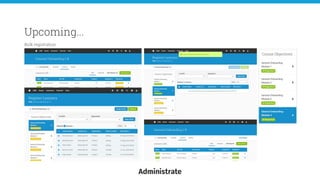
  • #31 J The 4 main things that we have coming further down the line are an update user interface for the Path construction and view, bulk registering, a waitlist and self registration via portal.
  • #32 J So if our current paths look like this
  • #33 J A quick note at this point, given that we are showing them here like this, if you want to see if more details or give some feedback on these, we would encourage that - make use of the 121 sessions and say you want to talk about Paths and one of us will meet with you, or contact us directly to see more, our details will be at the end. We want to update them to this Updated UI: Better representation of a path Easier to see the whole path Better statuses and knowledge of where a learner is on a path
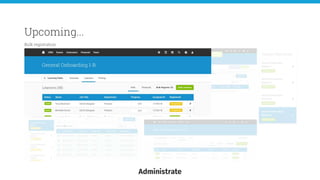
  • #34 J Bulk Registering and Waitlist are both good feature for those with long paths or with many learner that the Admin wants to register at once. This is more useful if you want to limit that choice the learner has and you want to do the register onto specific events yourself. Bulk Register:
  • #35 J Bulk Registering and Waitlist are both good feature for those with long paths or with many learner that the Admin wants to register at once. This is more useful if you want to limit that choice the learner has and you want to do the register onto specific events yourself. Bulk Register: See people unregistered
  • #36 J Bulk Registering and Waitlist are both good feature for those with long paths or with many learner that the Admin wants to register at once. This is more useful if you want to limit that choice the learner has and you want to do the register onto specific events yourself. Bulk Register: See people unregistered See objectives and unregistered learners
  • #37 J Bulk Registering and Waitlist are both good feature for those with long paths or with many learner that the Admin wants to register at once. This is more useful if you want to limit that choice the learner has and you want to do the register onto specific events yourself. Bulk Register: See people unregistered See objectives and unregistered learners gradually get people registered and see whats left
  • #38 J Bulk Registering and Waitlist are both good feature for those with long paths or with many learner that the Admin wants to register at once. This is more useful if you want to limit that choice the learner has and you want to do the register onto specific events yourself. Bulk Register: See people unregistered See objectives and unregistered learners gradually get people registered and see whats left Get all objectives done and registered
  • #39 J Bulk Registering and Waitlist are both good feature for those with long paths or with many learner that the Admin wants to register at once. This is more useful if you want to limit that choice the learner has and you want to do the register onto specific events yourself. Bulk Register: See people unregistered See objectives and unregistered learners gradually get people registered and see whats left Get all objectives done and registered Confirm that back on the learners tab of everyone registered.
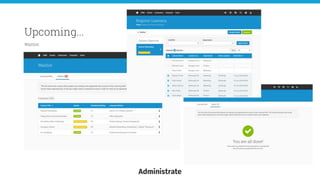
  • #40 J The Waitlist is for some sight into each of these paths and to see who is waiting to be registered onto events for course objective on their path. > So I can see courses that have learners waiting to be registered onto them > I can register them via the bulk register (or separately by accessing the individuals path) > Then once they are all registered, I’m all done! and my list is cleared.
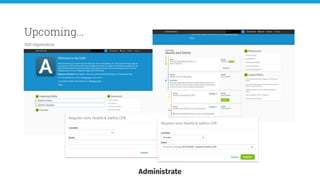
  • #41 J For those that want to give their learners more autonomy and would like the learners to choose the objectives and what dates they will attend, then enabling self registration via the portal is what you are looking for. view it in the portal They can register selecting location then the event for that course Everything fires off as normal
  • #42 J From customers and providers Not all path related - but come in convo > Variations of prereqs - 1. before taking path 2. skipping obj 3.locking down the path > Learner behaviour and results - we like to hear from you > Individual courses and full path > Self reg for paths, self reg for everything. Not far from it now > Qualification renewal, expiry. Or if course updates and invalidates or required to resit
  • #43 H If you would like to know more about Paths in Administrate, or would like to talk to Product about something else, book a 121 with us! We are always looking for people we can show and discuss new features or design with. If you can't make a 121 take a note of our details and reach out to us.